Aurum Nexus Matrix
- 专家
- 版本: 1.0
- 激活: 10
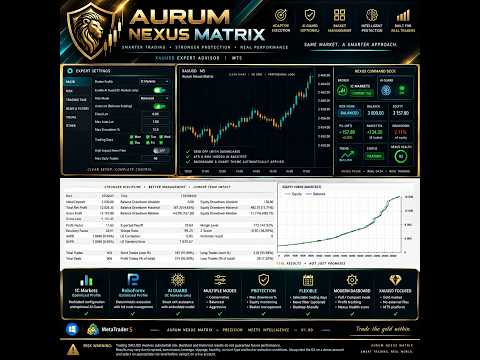
Aurum Nexus Matrix is an advanced XAUUSD Expert Advisor designed around broker-specific execution profiles, adaptive basket management, intelligent protection, and a modern professional trading interface.
Unlike generic EAs that use the same parameters across every trading environment, Aurum Nexus Matrix includes dedicated internal profiles for supported brokers. Each profile has its own optimized execution, timing, recovery, and management behavior.
The EA is designed for traders who want a clean setup with minimal configuration while keeping important risk and money-management controls available.
Key Features
- Designed specifically for XAUUSD
- Dedicated broker profiles
- IC Markets optimized profile
- RoboForex optimized profile
- Additional broker profiles planned for future versions
- Optional AI Guard
- Automatic or Fixed Lot mode
- Three Risk Modes
- Maximum account drawdown protection
- Selectable trading days
- Optional High-Impact USD News Filter
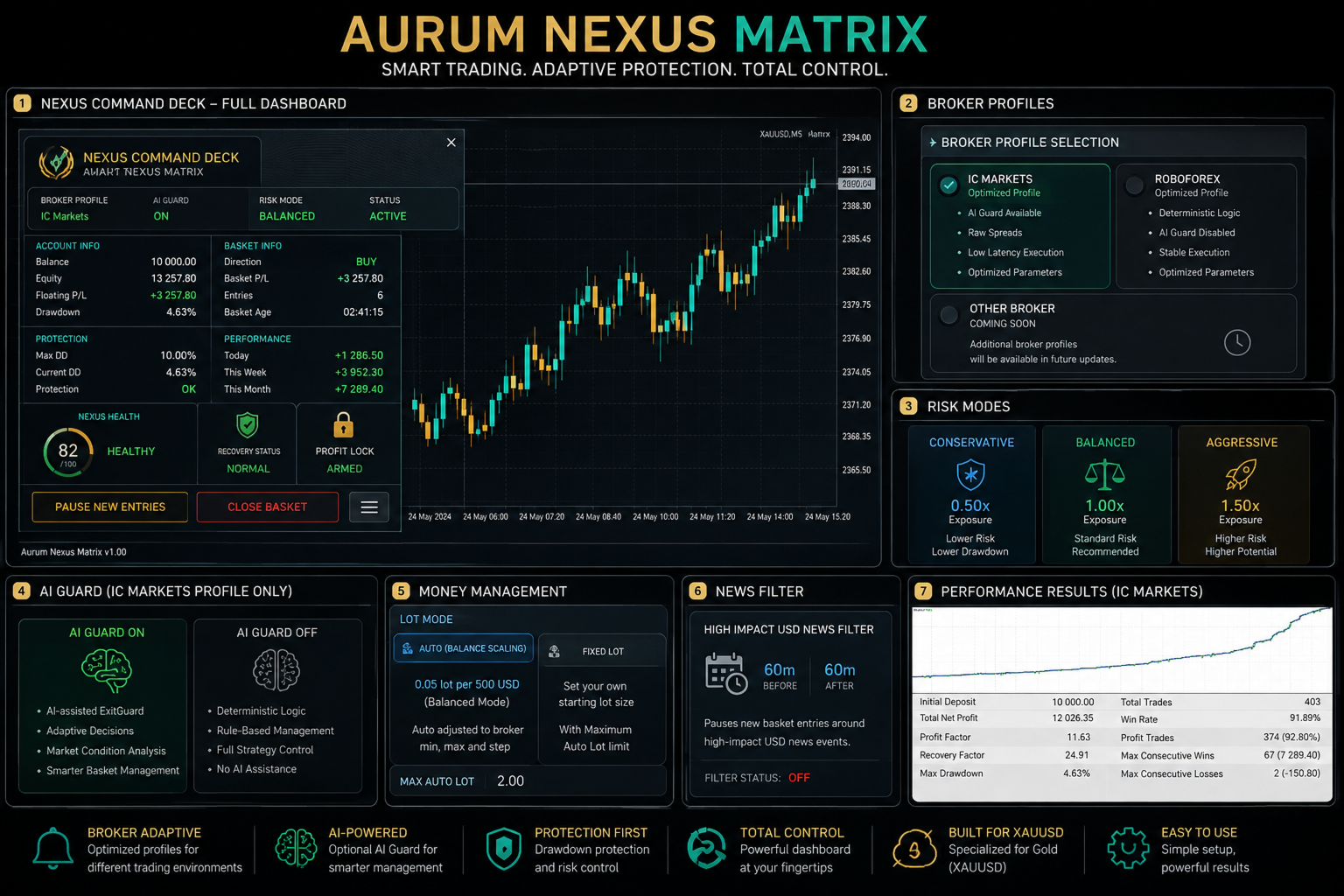
- Modern Nexus Command Deck dashboard
- Full and Compact dashboard modes
- Optional Popup and Push notifications
- Automatic chart styling when dashboard is enabled
- Internal strategy indicators hidden from the Strategy Tester chart
- Broker-specific trade management
- Basket-based position management
- Profit protection system
- Controlled recovery management
Broker Profiles
IC Markets
The IC Markets profile uses the dedicated internal configuration developed for IC Markets trading conditions.
The optional AI Guard is available with this profile and uses an embedded model designed to assist the basket exit-management process.
RoboForex
RoboForex uses its own dedicated deterministic profile.
The AI Guard is intentionally disabled for RoboForex because Aurum Nexus Matrix only activates AI where a validated broker-specific model is available.
This prevents an AI model optimized for one trading environment from being incorrectly applied to another.
Other Brokers
Additional broker profiles are planned.
When Other Broker – Coming Soon is selected, Aurum Nexus Matrix will display a notification that the current version officially supports IC Markets and RoboForex.
AI Guard
The user can enable or disable AI from the EA inputs.
For the supported IC Markets profile:
AI ON
Uses the embedded ExitGuard model.
AI OFF
Uses the deterministic trading and basket-management logic without AI assistance.
The AI does not generate random trades and does not replace the primary trading strategy. It is used as an additional management layer.
Risk Modes
Aurum Nexus Matrix includes three simple exposure modes:
Conservative
Approximately 0.50x of the standard lot exposure.
Balanced
Standard validated exposure and the default mode.
Aggressive
Approximately 1.50x of the standard lot exposure.
Risk Mode changes position exposure only. It does not modify the underlying entry logic, market structure calculations, recovery spacing, or broker-specific strategy profile.
Money Management
Two lot modes are available:
Automatic Balance Scaling
The standard Balanced configuration uses approximately:
0.05 lot per 500 USD-equivalent account balance
The lot size is normalized according to the broker's supported minimum lot, maximum lot, and volume step.
Fixed Lot
The trader can manually define a fixed starting lot.
A separate Maximum Auto Lot setting provides an additional exposure limit.
Account Protection
A configurable Maximum Peak Drawdown % protection is included.
The EA continuously monitors equity relative to its recorded equity peak and can activate protective behavior when the configured limit is reached.
This protection should not be considered a guarantee against losses, slippage, gaps, or broker execution conditions.
Trading Days
Individual trading days can be enabled or disabled:
- Monday
- Tuesday
- Wednesday
- Thursday
- Friday
Disabling a trading day prevents the EA from opening a new basket on that day.
An already open basket continues to be managed normally.
High-Impact USD News Filter
The News Filter is optional and is disabled by default.
When enabled in live trading, Aurum Nexus Matrix can use the MetaTrader Economic Calendar to pause new basket entries around high-impact USD economic events.
Default window:
60 minutes before the event
60 minutes after the event
Open baskets continue to be managed during the news window.
The live Economic Calendar is not used as a deterministic historical-news database inside Strategy Tester.
Nexus Command Deck
Aurum Nexus Matrix includes a custom modern dashboard called:
Nexus Command Deck
It provides a clean view of the EA without exposing internal strategy calculations.
The dashboard can display:
- Broker Profile
- AI Guard Status
- Risk Mode
- Account Balance
- Equity
- Floating P/L
- Current Drawdown
- Current Basket Direction
- Basket P/L
- Number of Basket Entries
- Basket Age
- Protection Status
- Recovery Status
- Profit Lock Status
- Spread Status
- Session Status
- Daily Performance
- Weekly Performance
- Nexus Health Score
The dashboard supports:
Full Mode
Compact Mode
Pause / Resume New Entries
Manual Basket Close with Confirmation
The Pause function stops new basket entries only. Existing positions continue to receive normal management.
Nexus Health
The dashboard includes a proprietary Nexus Health score from 0 to 100.
Possible states include:
- Excellent
- Healthy
- Caution
- Stressed
- Critical
The score provides a simplified visual representation of the current basket condition and protection state.
It is not a standalone buy or sell signal.
Modern Chart Theme
When the dashboard is enabled, Aurum Nexus Matrix applies its own visual identity:
- Dark graphite background
- Background grid disabled
- Modern teal bullish candles
- Aurum-gold bearish candles
- Clean muted chart colors
When the EA is removed, the previous chart appearance is restored.
When the dashboard is disabled, Aurum Nexus Matrix does not modify the chart theme.
Strategy Tester Privacy
indicators used internally by Aurum Nexus Matrix remain active for calculations but are hidden from the Strategy Tester visualization.
This keeps the tester chart clean while preserving the full internal trading logic.
Recommended Setup
Symbol: XAUUSD
Recommended Chart: M5
Supported Broker Profiles: IC Markets / RoboForex
Default Risk Mode: Balanced
News Filter: OFF by default
Dashboard: ON by default
Broker symbol suffixes such as XAUUSD.a, XAUUSD.pro or similar may be supported when the underlying instrument is recognized correctly as gold.
Important
Aurum Nexus Matrix is an automated trading system and does not guarantee profits.
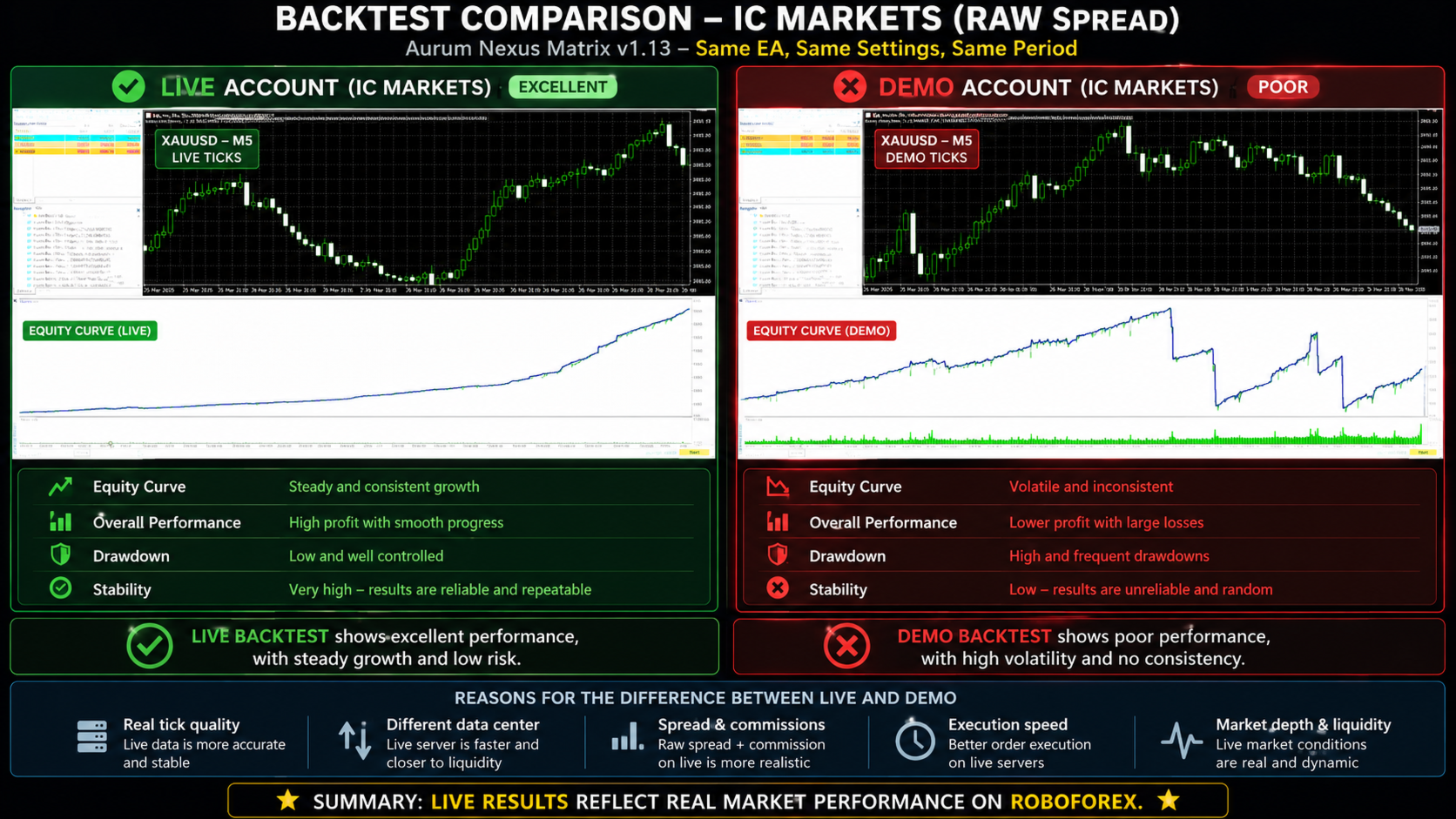
Trading XAUUSD involves substantial risk. Historical or Strategy Tester performance does not guarantee future results.
Execution quality, spread, commission, leverage, liquidity, slippage, account type, and broker conditions can materially affect results.
Always test the EA on a demo account and with an appropriate risk level before using it with real funds.