

MetaTrader 5 机器学习蓝图(第一部分):数据泄露与时间戳修正
 591
591
 9
9

概述
欢迎来到我们的 MetaTrader 5 机器学习蓝图系列的第一期。本文讨论了在使用 MetaTrader 5 数据为金融市场构建稳健的机器学习模型时,一个关键但常被忽视的问题:“时间戳陷阱”。我们将探讨错误的时间戳处理如何导致隐蔽的数据泄露,损害模型的完整性,并生成不可靠的交易信号。更重要的是,我们将基于成熟的行业研究,提供具体的解决方案和最佳实践,以确保您的数据干净、无偏,并随时可用于高级定量分析。
目标受众及先决条件
本文专为具备 Python、Pandas 和 MetaTrader 5 API 基础知识的量化交易员、数据科学家和开发人员而设计。熟悉机器学习的基本概念也会有所帮助。我们的目标是为您提供构建高完整性数据集所需的实用知识和工具,以便在算法交易中开发出值得信赖的机器学习模型。
系列路线图
本文标志着一个全面系列文章的开始,该系列文章致力于为 MetaTrader 5 构建完整的机器学习蓝图。在这一部分,我们通过确保数据完整性来奠定必要的基础。未来的主题将深入探讨机器学习流程的更高级阶段,包括:
- 第二部分 —— 高级特征工程和标注:用于定义能够捕捉真实市场动态的目标变量的技术。
- 第三部分 —— 模型训练和验证:针对金融时间序列的机器学习模型的训练、验证和选择的最佳实践。
- 第四部分 —— 严格的回测和部署:在真实交易环境中评估模型性能的方法论以及模型实时部署的策略。
MetaTrader 5 时间戳陷阱:了解和预防
数据窥探或数据泄露可能看似微不足道,但其对机器学习模型的影响可能是巨大的,甚至是毁灭性的。想象一下,你在备考时无意中 提前偷看了答案。你感觉自己的满分是应得的,但实际上这是在作弊。这正是我们在机器学习中使用 MetaTrader 5 的默认时间戳时所发生的情况 —— 数据泄露会意外破坏模型的完整性。
MetaTrader 5 的时间戳如何欺骗你
| 时间 | 开盘价 | 最高价 | 最低价 | 收盘价 |
|---|---|---|---|---|
|
|
|
|
|
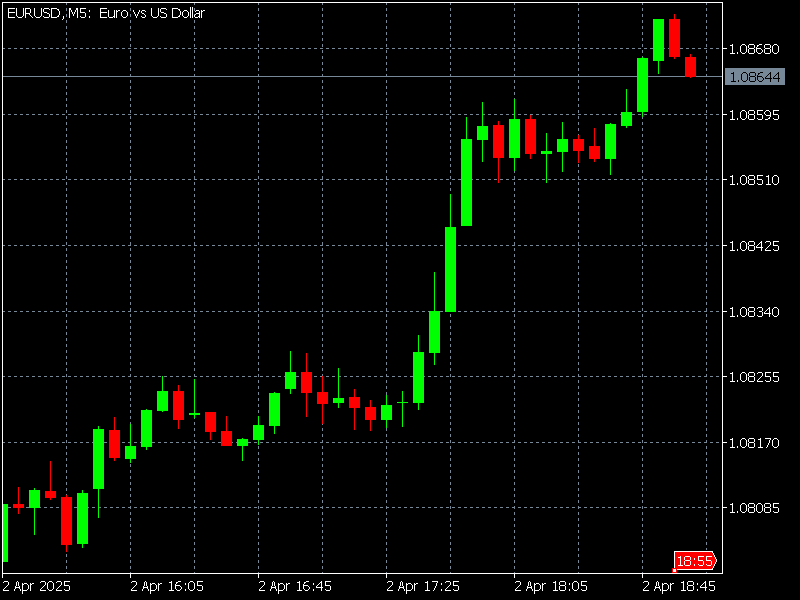
MetaTrader 5 通过在开始时打上时间戳,该 K 线的数据在 18:55:00 可用 —— 比实际收盘时间早了整整 5 分钟! 如果你的模型在训练时使用这个,那就像是在考试开始前 5 分钟给学生提供答案。为了解决这个问题,我们应该避免使用 MetaTrader 5 的预编译时间 K 线,而是使用 tick 数据来创建我们在模型中使用的柱。
数据泄露为何如此重要
数据泄露可能会悄无声息地毁掉你的整个机器学习项目。当你的模型在训练过程中意外地从本不应获取的信息中学习时,就会发生这种情况 —— 就像窥见了未来一样。因此,该模型在训练时看起来非常准确,但实际上,它只是被输入了在现实世界中永远不会得到的答案。
模型并未学习真正的模式,而是开始记忆噪声,此情形犹如学生死记硬背答案,却未理解材料实质。这会导致在对新数据进行实际预测时表现不佳。
更糟糕的是,用泄露的数据训练的模型可能看起来很可信,但在部署后却无法正常工作。它会给你虚假的自信,导致你做出错误的决定 —— 这在交易等高风险环境中尤其危险,因为即使是小的错误也可能代价高昂。
事后修复数据泄露令人沮丧。这通常意味着需要返回去重新处理流程中的大部分内容,从而浪费时间、计算资源,有时甚至还会浪费金钱。这就是为什么尽早发现和防止数据泄露如此重要的原因。
为什么 tick 柱很重要:定量视角
金融数据往往以不规则的时间间隔抵达,为能够对其应用机器学习(ML)技术,我们必须对其进行规范化处理,因为多数机器学习算法均要求数据以表格形式呈现。这些表格的行通常被称为“柱”。我们在 MetaTrader 5 以及几乎所有其他图表平台上看到的图表都表示时间柱,它通过在固定的时间周期内(例如每分钟一次)对价格进行采样,将价格数据转换为开盘价、最高价、最低价、收盘价和成交量列。
尽管时间柱在从业者和学者中可能最为流行,但出于两个原因,应避免使用。首先,市场并非以恒定的时间间隔来处理信息。开盘后的一小时比中午前后的一小时(或期货市场午夜前后的一小时)要活跃得多。作为生物,人类根据日照周期安排自己的一天是合乎逻辑的。
但如今的市场主要由算法驱动,人工监督相对有限,对于这种交易,CPU 处理周期比时间间隔更为重要。这意味着时间柱在低活动期间对信息进行过度采样,而在高活动期间对信息进行采样不足。其次,时间采样序列通常表现出较差的统计特性,如序列相关性、异方差性和收益的非正态性。
(López de Prado,2018,第 26 页)
- 理解从业者的意图: 经验丰富的从业者会在时间间隔结束时正确地标记时间柱(例如,对于 09:00:00-09:00:59.999 时间段,标记时间为 09:01:00)。这一关键步骤确保了已完成柱的所有信息在其记录的时间戳处都是真实已知的,从而防止了对未来柱的经典前瞻性偏见。
- 柱内部的细微泄漏:然而,在时间柱形成过程中,仍然可能发生更隐蔽的数据泄露形式。如果在 1 分钟柱的中间(例如 09:00:35)发生了一件大事,那么由该柱构造出的任何特征(例如其最高价或事件标记)都将不可避免地在该柱结束时包含此信息。
- 预测困境: 因此,如果机器学习模型在柱开始的初始时刻(例如 09:00:00)使用反映同一分钟内后续事件的特征进行预测或发出信号,则它实际上获得了不公平的优势。在实时交易中,9:00:00 时,9:00:35 发生的事件是完全未知的。
- 以活动驱动柱作为解决方案: 活动驱动型柱,如 tick 柱,通过仅在达到预定的市场活动量(例如,设定数量的交易,或特定交易量/交易金额值)后才完成,从根本上规避了这一问题。这种固有结构确保了此类柱的所有特征都是基于在柱形成结束的那一刻完全可用的信息构建的,自然地与实时信息流保持一致,并防止了柱内部的前瞻性偏差。
基于上述原因,在训练机器学习模型时应避免使用时间柱。相反,我们应该使用受交易活动影响的柱,如 tick 柱、成交量柱或金额柱。这些柱是在累计到一定数量的 tick、成交量或成交金额之后构建出来的。这些柱所得到的回报更接近独立同分布的正态分布,这使得它们更适合机器学习模型,因为许多机器学习模型都假设观测值是从独立同分布的高斯过程中抽取的。
以下是 M5、M15 和 M30 时间柱和 tick 柱的对数收益率分布对比。Tick 柱的大小是根据样本期内时间范围内 tick 数的中位数计算的,对于 2023 年至 2024 年的 EURUSD,我们分别得到 M5、M15 和 M30 时间周期的 tick-200、tick-500 和 tick-1000 的柱。 这是通过calculate_ticks_per_period 函数实现的,该函数将在下一节中展示。
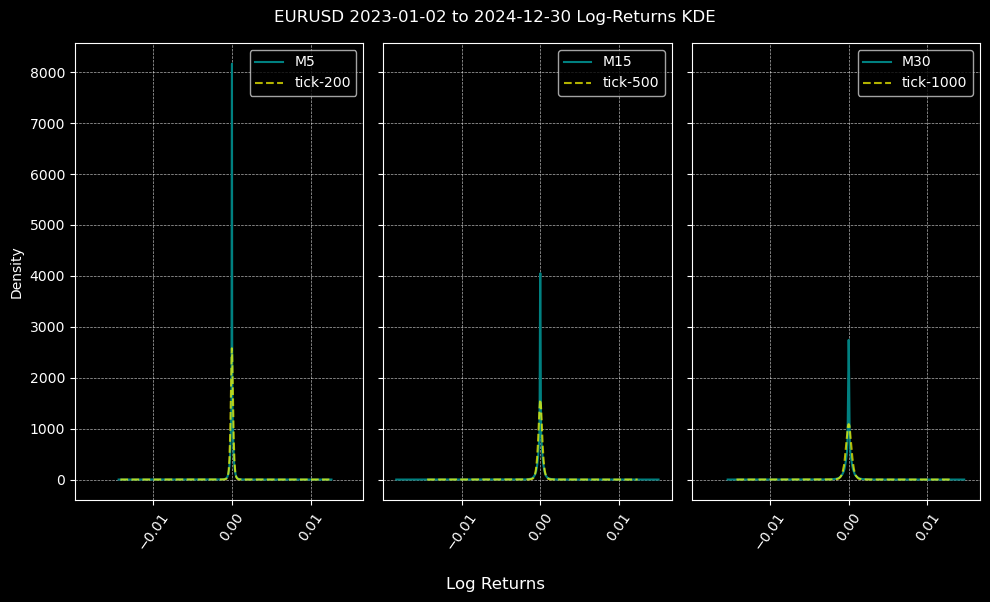
尽管对数收益率分布都不符合正态分布(这是意料之中的),但在所有时间周期内,由 tick 柱创建的分布比由时间柱创建的分布更接近正态分布。
让我们利用下面的图表,对时间柱和 tick 柱的统计特性进行更深入的分析。
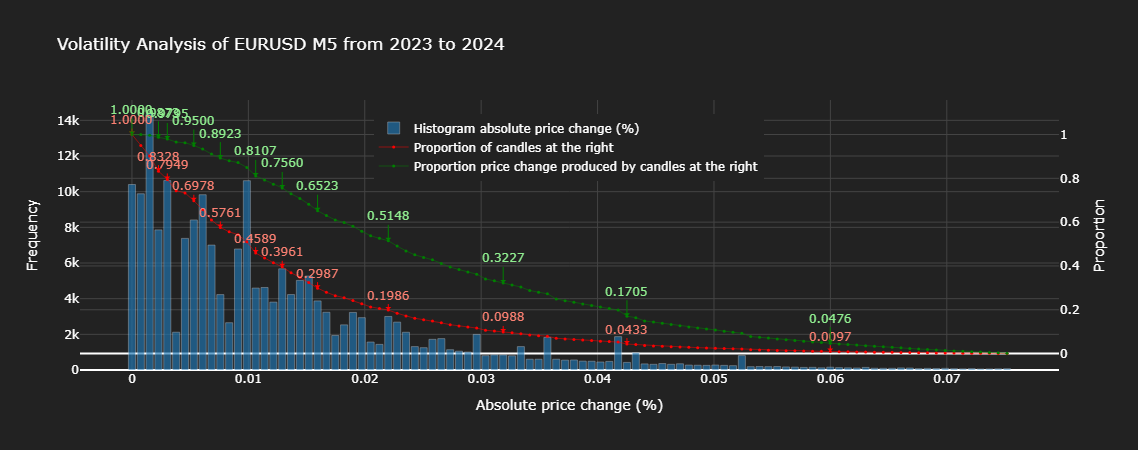
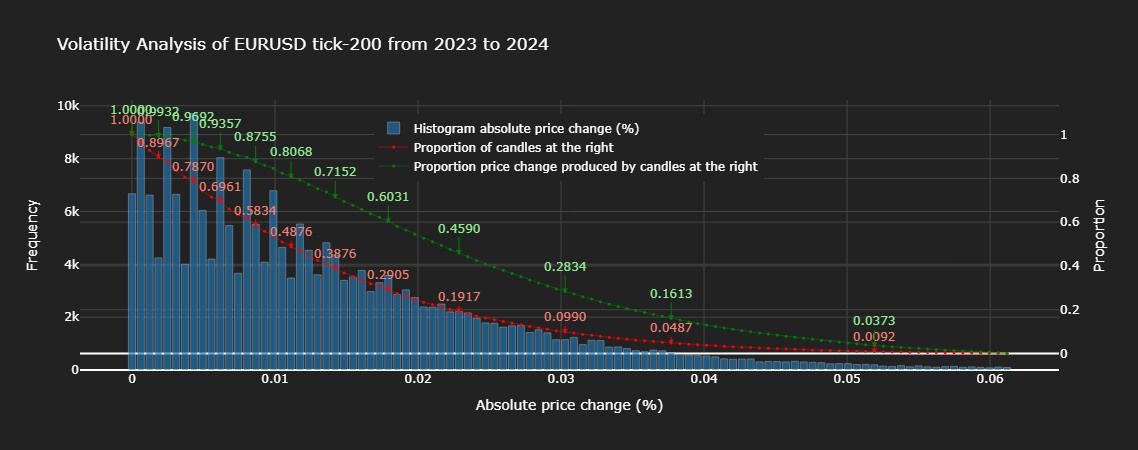
从上面的图表可以看出,大约 20% 的时间柱解释了大约 51% 的总价格变化,而 20% 的成 tick 柱解释了大约 46% 的总价格变化。值得注意的是,几乎所有比例的 tick 柱对总价格变化的解释力都低于相同比例的时间柱,这表明 tick 柱在信息采样方面比时间柱更胜一筹。从直方图可以看出,tick 柱的绝对价格变化遵循着比时间柱更符合统计规律的分布(单调递减),而时间柱的方差则杂乱无章。
在本篇及后续文章中,我们将重点探讨如何将机器学习(ML)应用于外汇工具。由于这些交易不在中央交易所进行,因此无法获取交易量信息,因此我将本系列的范围限定在时间和 tick 柱上。读者应注意,以上我仅描述了标准柱的生成。如需进一步了解高级 K 线柱,我推荐阅读这篇文章,因为它详细阐述了马科斯·洛佩斯·德·普拉多在《金融机器学习进展》一书中的工作,关于该书的研讨会笔记可在线查阅。
解决方案:基于 tick 数据重建柱的时间定义
代码实现
让我们首先从终端获取数据,并进行清理,以防止使用错误的 tick 数据来创建我们的柱数据。我将演示如何创建时间柱和 tick 柱。我们将使用 Python,因为 pandas 中基于时间的操作很方便,而且它易于用于机器学习。
步骤 0:导入
这些是本文代码片段中我们将使用的导入内容。
import numpy as np
import pandas as pd
import MetaTrader5 as mt5
import logging
from datetime import datetime as dt

logging.basicConfig(level=logging.INFO, format='%(levelname)s: %(message)s')
步骤 1:数据提取
def get_ticks(symbol, start_date, end_date):
    """
    Downloads tick data from the MT5 terminal.

    Args:
        symbol (str): Financial instrument (e.g., currency pair or stock).
        start_date, end_date (str or datetime): Time range for data (YYYY-MM-DD).

    Returns:
        pd.DataFrame: Tick data with a datetime index.
    """
    if not mt5.initialize():
        logging.error("MT5 connection not established.")
        raise RuntimeError("MT5 connection error.")

    start_date = pd.Timestamp(start_date, tz='UTC') if isinstance(start_date, str) else (
        start_date if start_date.tzinfo is not None else pd.Timestamp(start_date, tz='UTC')
    )
    end_date = pd.Timestamp(end_date, tz='UTC') if isinstance(end_date, str) else (
        end_date if end_date.tzinfo is not None else pd.Timestamp(end_date, tz='UTC')
    )

    try:
        ticks = mt5.copy_ticks_range(symbol, start_date, end_date, mt5.COPY_TICKS_ALL)
        df = pd.DataFrame(ticks)
        df['time'] = pd.to_datetime(df['time_msc'], unit='ms')
        df.set_index('time', inplace=True)
        df.drop('time_msc', axis=1, inplace=True)
        df = df[df.columns[df.any()]]
        df.info()
    except Exception as e:
        logging.error(f"Error while downloading ticks: {e}")
        return None

    return df
步骤 2:数据清洗
def clean_tick_data(df: pd.DataFrame,
                    n_digits: int,
                    timezone: str = 'UTC'
                    ) -> Optional[pd.DataFrame]:
    """
    Clean and validate Forex tick data with comprehensive quality checks.

    Args:
        df: DataFrame containing tick data with bid/ask prices and timestamp index
        n_digits: Number of decimal places in instrument price.
        timezone: Timezone to localize/convert timestamps to (default: UTC)

    Returns:
        Cleaned DataFrame or None if empty after cleaning
    """
    if df.empty:
        return None

    df = df.copy(deep=False)  # Work on a copy to avoid modifying the original DataFrame
    n_initial = df.shape[0] # Store initial row count for reporting

    # 1. Ensure proper datetime index
    # Use errors='coerce' to turn unparseable dates into NaT and then drop them.
    if not isinstance(df.index, pd.DatetimeIndex):
        original_index_name = df.index.name
        df.index = pd.to_datetime(df.index, errors='coerce')
        nan_idx_count = df.index.isnull().sum()
        if nan_idx_count > 0:
            logging.info(f"Dropped {nan_idx_count:,} rows with unparseable timestamps.")
            df = df[~df.index.isnull()]
        if original_index_name:
            df.index.name = original_index_name

    if df.empty: # Check if empty after index cleaning
        logging.warning("Warning: DataFrame empty after initial index cleaning")
        return None

    # 2. Timezone handling
    if df.index.tz is None:
        df = df.tz_localize(timezone)
    elif str(df.index.tz) != timezone.upper():
        df = df.tz_convert(timezone)

    # 3. Price validity checks
    # Apply rounding and then filtering
    df['bid'] = df['bid'].round(n_digits)
    df['ask'] = df['ask'].round(n_digits)

    # Validate prices
    price_filter = (
        (df['bid'] > 0) &
        (df['ask'] > 0) &
        (df['ask'] > df['bid'])
    )

    n_before_price_filter = df.shape[0]
    df = df[price_filter]
    n_filtered_prices = n_before_price_filter - df.shape[0]
    if n_filtered_prices > 0:
        logging.info(f"Filtered {n_filtered_prices:,} ({n_filtered_prices / n_before_price_filter:.2%}) invalid prices.")

    if df.empty: # Check if empty after price cleaning
        logging.warning("Warning: DataFrame empty after price cleaning")
        return None

    # Dropping NA values
    initial_rows_before_na = df.shape[0]
    if df.isna().any().any(): # Use .any().any() to check if any NA exists in the whole DF
        na_counts = df.isna().sum()
        na_cols = na_counts[na_counts > 0]
        if not na_cols.empty:
            logging.info(f'Dropped NA values from columns: \n{na_cols}')
            df.dropna(inplace=True)

    n_dropped_na = initial_rows_before_na - df.shape[0]
    if n_dropped_na > 0:
        logging.info(f"Dropped {n_dropped_na:,} ({n_dropped_na / n_before_price_filter:.2%}) rows due to NA values.")

    if df.empty: # Check if empty after NA cleaning
        logging.warning("Warning: DataFrame empty after NA cleaning")
        return None

    # 4. Microsecond handling
    if not df.index.microsecond.any():
        logging.warning("Warning: No timestamps with microsecond precision found")

    # 5. Duplicate handling
    duplicate_mask = df.index.duplicated(keep='last')
    dup_count = duplicate_mask.sum()
    if dup_count > 0:
        logging.info(f"Removed {dup_count:,} ({dup_count / n_before_price_filter:.2%}) duplicate timestamps.")
        df = df[~duplicate_mask]

    if df.empty: # Check if empty after duplicate cleaning
        logging.warning("Warning: DataFrame empty after duplicate cleaning")
        return None

    # 6. Chronological order
    if not df.index.is_monotonic_increasing:
        logging.info("Sorting DataFrame by index to ensure chronological order.")
        df.sort_index(inplace=True)

    # 7. Final validation and reporting
    if df.empty:
        logging.warning("Warning: DataFrame empty after all cleaning steps.")
        return None

    n_final = df.shape[0]
    n_cleaned = n_initial - n_final
    percentage_cleaned = (n_cleaned / n_initial) if n_initial > 0 else 0
    logging.info(f"Cleaned {n_cleaned:,} of {n_initial:,} ({percentage_cleaned:.2%}) datapoints.")

    return df
步骤 3:创建柱并转换为结束时间
首先,我们将创建一些辅助函数。
set_resampling_freq
def set_resampling_freq(timeframe: str) -> str:
    """
    Converts an MT5 timeframe to a pandas resampling frequency.

    Args:
        timeframe (str): MT5 timeframe (e.g., 'M1', 'H1', 'D1', 'W1').

    Returns:
        str: Pandas frequency string.
    """
    timeframe = timeframe.upper()
    nums = [x for x in timeframe if x.isnumeric()]
    if not nums:
        raise ValueError("Timeframe must include numeric values (e.g., 'M1').")

    x = int(''.join(nums))
    if timeframe == 'W1':
        freq = 'W-FRI'
    elif timeframe == 'D1':
        freq = 'B'
    elif timeframe.startswith('H'):
        freq = f'{x}H'
    elif timeframe.startswith('M'):
        freq = f'{x}min'
    elif timeframe.startswith('S'):
        freq = f'{x}S'
    else:
        raise ValueError("Valid timeframes include W1, D1, Hx, Mx, Sx.")

    return freq
calculate_ticks_per_period
def calculate_ticks_per_period(df: pd.DataFrame, timeframe: str = "M1", method: str = 'median', verbose: bool = True) -> int:
    """
    Dynamically calculates the average number of ticks per given timeframe.

    Args:
        df (pd.DataFrame): Tick data.
        timeframe (str): MT5 timeframe.
        method (str): 'median' or 'mean' for the calculation.
        verbose (bool): Whether to print the result.

    Returns:
        int: Rounded average ticks per period.
    """
    freq = set_resampling_freq(timeframe)
    resampled = df.resample(freq).size()
    fn = getattr(np, method)
    num_ticks = fn(resampled.values)
    num_rounded = int(np.round(num_ticks))
    num_digits = len(str(num_rounded)) - 1
    rounded_ticks = int(round(num_rounded, -num_digits))
    rounded_ticks = max(1, rounded_ticks)

    if verbose:
        t0 = df.index[0].date()
        t1 = df.index[-1].date()
        logging.info(f"From {t0} to {t1}, {method} ticks per {timeframe}: {num_ticks:,} rounded to {rounded_ticks:,}")

    return rounded_ticks
flatten_column_names
def flatten_column_names(df):
    '''
    Joins tuples created by dataframe aggregation
    with a list of functions into a unified name.
    '''
    return ["_".join(col).strip() for col in df.columns.values]
现在,介绍用于创建柱的主要函数。
make_bar_type_grouper
def make_bar_type_grouper(
        df: pd.DataFrame,
        bar_type: str = 'tick',
        bar_size: int = 100,
        timeframe: str = 'M1'
) -> tuple[pd.core.groupby.generic.DataFrameGroupBy, int]:
    """
    Create a grouped object for aggregating tick data into time/tick/dollar/volume bars.

    Args:
        df: DataFrame with tick data (index should be datetime for time bars).
        bar_type: Type of bar ('time', 'tick', 'dollar', 'volume').
        bar_size: Number of ticks/dollars/volume per bar (ignored for time bars).
        timeframe: Timeframe for resampling (e.g., 'H1', 'D1', 'W1').

    Returns:
        - GroupBy object for aggregation
        - Calculated bar_size (for tick/dollar/volume bars)
    """
    # Create working copy (shallow is sufficient)
    df = df.copy(deep=False)  # OPTIMIZATION: Shallow copy here only once

    # Ensure DatetimeIndex
    if not isinstance(df.index, pd.DatetimeIndex):
        try:
            df = df.set_index('time')
        except KeyError:
            raise TypeError("Could not set 'time' as index")

    # Sort if needed
    if not df.index.is_monotonic_increasing:
        df = df.sort_index()

    # Time bars
    if bar_type == 'time':
        freq = set_resampling_freq(timeframe)
        bar_group = (df.resample(freq, closed='left', label='right') # includes data upto, but not including, the end of the period
                    if not freq.startswith(('B', 'W'))
                    else df.resample(freq))
        return bar_group, 0  # bar_size not used

    # Dynamic bar sizing
    if bar_size == 0:
        if bar_type == 'tick':
            bar_size = calculate_ticks_per_period(df, timeframe)
        else:
            raise NotImplementedError(f"{bar_type} bars require non-zero bar_size")

    # Non-time bars
    df['time'] = df.index  # Add without copying

    if bar_type == 'tick':
        bar_id = np.arange(len(df)) // bar_size
    elif bar_type in ('volume', 'dollar'):
        if 'volume' not in df.columns:
            raise KeyError(f"'volume' column required for {bar_type} bars")

        # Optimized cumulative sum
        cum_metric = (df['volume'] * df['bid'] if bar_type == 'dollar'
                      else df['volume'])
        cumsum = cum_metric.cumsum()
        bar_id = (cumsum // bar_size).astype(int)
    else:
        raise NotImplementedError(f"{bar_type} bars not implemented")

    return df.groupby(bar_id), bar_size
make_bars
def make_bars(tick_df: pd.DataFrame,
              bar_type: str = 'tick',
              bar_size: int = 0,
              timeframe: str = 'M1',
              price: str = 'midprice',
              verbose=True):
    '''
    Create OHLC data by sampling ticks using timeframe or a threshold.

    Parameters
    ----------
    tick_df: pd.DataFrame
        tick data
    bar_type: str
        type of bars to create from ['tick', 'time', 'volume', 'dollar']
    bar_size: int
        default 0. bar_size when bar_type != 'time'
    timeframe: str
        MT5 timeframe (e.g., 'M5', 'H1', 'D1', 'W1').
        Used for time bars, or for tick bars if bar_size = 0.
    price: str
        default midprice. If 'bid_ask', columns (bid_open, ..., bid_close),
        (ask_open, ..., ask_close) are included.
    verbose: bool
        print information about the data

    Returns
    -------
    pd.DataFrame with columns [open, high, low, close, median_price, tick_volume, volume]
    '''
    if 'midprice' not in tick_df:
        tick_df['midprice'] = (tick_df['bid'] + tick_df['ask']) / 2

    bar_group, bar_size_ = make_bar_type_grouper(tick_df, bar_type, bar_size, timeframe)
    ohlc_df = bar_group['midprice'].ohlc().astype('float64')
    ohlc_df['tick_volume'] = bar_group['bid'].count() if bar_type != 'tick' else bar_size_

    if price == 'bid_ask':
        # Aggregate OHLC data for every bar_size rows
        bid_ask_df = bar_group.agg({k: 'ohlc' for k in ('bid', 'ask')})
        # Flatten MultiIndex columns
        col_names = flatten_column_names(bid_ask_df)
        bid_ask_df.columns = col_names
        ohlc_df = ohlc_df.join(bid_ask_df)

    if 'volume' in tick_df:
        ohlc_df['volume'] = bar_group['volume'].sum()

    if bar_type == 'time':
        ohlc_df.ffill(inplace=True)
    else:
        end_time =  bar_group['time'].last()
        ohlc_df.index = end_time + pd.Timedelta(microseconds=1) # ensure end time is after event
	df.drop('time', axis=1, inplace=True) # Remove 'time' column


        # drop last bar due to insufficient ticks
        if len(tick_df) % bar_size_ > 0:
            ohlc_df = ohlc_df.iloc[:-1]

    if verbose:
        if bar_type != 'time':
            tm = f'{bar_size_:,}'
            if bar_type == 'tick' and bar_size == 0:
                tm = f'{timeframe} - {bar_size_:,} ticks'
            timeframe = tm
        print(f'\nTick data - {tick_df.shape[0]:,} rows')
        print(f'{bar_type}_bar {timeframe}')
        ohlc_df.info()

    # Remove timezone info from DatetimeIndex
    try:
	ohlc_df = ohlc_df.tz_convert(None)
    except:
	pass

    return ohlc_df
我们上面使用的波动率分析图是使用以下代码创建的:
import plotly.graph_objects as go
import numpy as np
import pandas as pd

def plot_volatility_analysis_of_bars(df, symbol, start, end, freq, thres=.01, bins=100):
    """
    Plot the volatility analysis of bars using Plotly.
    df: DataFrame containing the data with 'open' and 'close' columns.
    symbol: Symbol of the asset.
    start: Start date of the data.
    end: End date of the data.
    freq: Frequency of the data.
    thres: Threshold for filtering large values, e.g., 1-.01 for 99th quantile.
    bins: Number of bins for the histogram.
    """
    abs_price_changes = (df['close'] / df['open'] - 1).mul(100).abs()
    thres = abs_price_changes.quantile(1 - thres)
    abs_price_changes = abs_price_changes[abs_price_changes < thres] # filter out large values for visualization

    # Calculate Histogram
    counts, bins = np.histogram(abs_price_changes, bins=bins)
    bins = bins[:-1] # remove the last bin edge

    # Calculate Proportions
    total_counts = len(abs_price_changes)
    proportion_candles_right = []
    proportion_price_change_right = []

    for i in range(len(bins)):
        candles_right = abs_price_changes[abs_price_changes >= bins[i]]
        count_right = len(candles_right)
        proportion_candles_right.append(count_right / total_counts)
        proportion_price_change_right.append(np.sum(candles_right) / np.sum(abs_price_changes))

    fig = go.Figure()

    # Histogram with Hover Template
    fig.add_trace(
        go.Bar(x=bins, y=counts,
               name='Histogram absolute price change (%)',
               marker=dict(color='#1f77b4'),
               hovertemplate='<b>Bin: %{x:.2f}</b><br>Frequency: %{y}',  # Custom hover text
               yaxis='y1',
               opacity=.65))

    ms = 3 # marker size
    lw = .5 # line width

    # Proportion of Candles at the Right with Hover Text
    fig.add_trace(
        go.Scatter(x=bins, y=proportion_candles_right,
                   name='Proportion of candles at the right',
                   mode='lines+markers',
                   marker=dict(color='red', size=ms),
                   line=dict(width=lw),
                   hovertext=[f"Bin: {x:.2f}, Proportion: {y:.4f}"
                              for x, y in zip(bins, proportion_candles_right)],  # Hover text list
                   hoverinfo='text',  # Show only the 'text' from hovertext
                   yaxis='y2'))


    # Proportion Price Change Produced by Candles at the Right with Hover Text
    fig.add_trace(
        go.Scatter(x=bins, y=proportion_price_change_right,
                   name='Proportion price change produced by candles at the right',
                   mode='lines+markers',
                   marker=dict(color='green', size=ms),
                   line=dict(width=lw),
                   hovertext=[f"Bin: {x:.2f}, Proportion: {y:.4f}"
                              for x, y in zip(bins, proportion_price_change_right)], # Hover text list
                   hoverinfo='text',  # Show only the 'text' from hovertext
                   yaxis='y2'))

    # Indices of proportion_price_change_right at 10% intervals
    search_idx = [.01, .05] + np.linspace(.1, 1., 10).tolist()
    price_idxs = np.searchsorted(sorted(proportion_candles_right), search_idx, side='right')
    for ix in price_idxs:  # Add annotations for every step-th data point as an example
        x = bins[-ix]
        y = proportion_candles_right[-ix]
        fig.add_annotation(
            x=x,
            y=y,
            text=f"{y:.4f}",  # Display the proportion value with 4 decimal points
            showarrow=True,
            arrowhead=1,
            ax=0,
            ay=-15,  # Offset for the annotation text
            font=dict(color="salmon"),
            arrowcolor="red",
            yref='y2'
        )

        y = proportion_price_change_right[-ix]
        fig.add_annotation(
            x=x,
            y=y,
            text=f"{y:.4f}",  # Display the proportion value with 4 decimal points
            showarrow=True,
            arrowhead=1,
            ax=0,
            ay=-25,  # Offset for the annotation text
            font=dict(color="lightgreen"),
            arrowcolor="green",
            yref='y2'
        )

    # Layout Configuration with Legend Inside
    fig.update_layout(
        title=f'Volatility Analysis of {symbol} {freq} from {start} to {end}',
        xaxis_title='Absolute price change (%)',
        yaxis_title='Frequency',
        yaxis2=dict(
            title='Proportion',
            overlaying='y',
            side='right',
            gridcolor='#444'  # Set grid color for the secondary y-axis
        ),
        plot_bgcolor='#222',  # Dark gray background
        paper_bgcolor='#222',
        font=dict(color='white'),
        xaxis=dict(gridcolor='#444'),  # Set grid color for the primary x-axis
        yaxis=dict(gridcolor='#444'),   # Set grid color for the primary y-axis
        legend=dict(
            x=0.3,  # Adjust x coordinate (0 to 1)
            y=0.95,  # Adjust y coordinate (0 to 1)
            traceorder="normal",  # Optional: maintain trace order
            font=dict(color="white")  # Optional: set legend text color
        ),
        # width=750,  # Set width of the figure
        # height=480,  # Set height of the figure
    )

    return fig
既然我们已经了解了如何以时间柱或 tick 柱的形式从 tick 数据中创建结构化数据,那么接下来就让我们验证一下,之前关于 tick 柱的统计特性优于时间柱的说法是否成立。我们将使用 EURUSD 2023 年的 tick 数据,该数据附在下面的文件中。
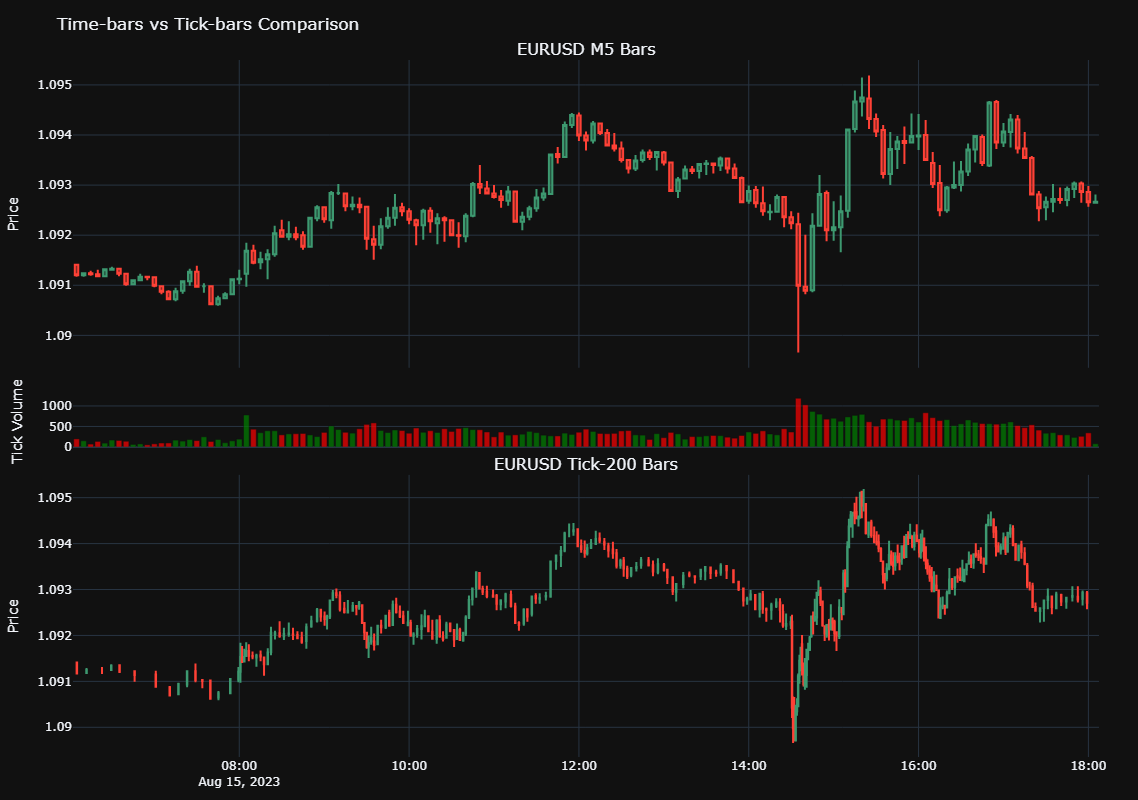
如果你仔细观察 M5 图表中成交量较高的区域,例如 14:00 至 16:00 之间,你会发现由于这一高活跃时段采样频率的增加,Tick-200 图表中形成的柱出现了重叠。相反,06:00 到 08:00 之间的 tick 柱稀疏,且彼此之间存在较大间隔。这就说明了为什么 tick 柱被称为活动驱动型柱,与在固定时间周期内均匀采样数据的时间柱形成对比。
可扩展性和硬件建议
处理高频 tick 数据并构建专门的柱可能会占用大量计算资源,尤其是在处理大型历史数据集时。为了获得最佳性能和高效处理,我们推荐以下计算配置:- 内存:建议至少配备 16GB 内存,对于大量的回测或处理多年的 tick 数据,最好配备 32GB 或更多内存。
- CPU:强烈建议使用多核 CPU(例如 Intel i7/i9 或 AMD Ryzen 7/9)。利用多核并行处理数据任务的能力将显著减少计算时间。
- 并行化策略:考虑在你的 Python 代码中实现并行处理技术。对于分布式计算, Dask 等库或 Python 内置的多进程模块对于加速数据准备、特征工程以及在大数据集上进行回测模拟都非常有价值。
后续步骤
为了有效应用本文所讨论的概念,并为阅读本系列后续部分做好准备,我们推荐以下可操作的步骤:
- 实现时间戳更正:将提供的代码片段集成到您的数据摄取流程中,以确保所有 MetaTrader 5 数据都正确打上时间戳,且不存在前瞻偏差。
- 尝试不同的柱类型:除了交易量柱之外,还可以探索其他特殊类型的柱,例如成交量柱或金额柱。观察这些不同的采样方法如何影响数据集的特征,以及它们对特定交易策略的潜在益处。
- 准备数据集: 现在有了干净、无偏的数据,就可以开始整理和准备数据集,以进行机器学习流程的下一阶段。在第二部分中,我们将深入探讨高级特征工程和标注技术。
因此,在下一篇文章中,我们将探讨马科斯·洛佩斯·德·普拉多博士的两个开创性替代方案:三重障碍法和趋势扫描法。这些技术不仅重新思考了标注,更是对其进行了重新定义。
如果你曾质疑过自己的标签是否真正与市场行为相契合,那么这就是你一直在等待的见解。
结论
在这篇基础性文章中,我们仔细探讨并提供了针对关键的“ MetaTrader 5 时间戳陷阱”的解决方案。我们展示了不正确的时间戳处理如何导致严重的数据泄露,进而产生有缺陷的模型和不可靠的交易信号。通过实施稳健的时间戳校正机制并利用 tick 柱构建的强大功能,我们成功地为构建高完整性数据集奠定了基础。这一根本性的修复对于确保您的研究的有效性、回测的准确性,以及最终确保您的机器学习模型在算法交易中的可靠性至关重要。对于任何一位志在开发真正有效且值得信赖的交易系统的严谨定量从业者而言,这至关重要的第一步是必不可少的。
在附件文档中,您将找到上面使用的代码,以及一些使用 Python API 登录 MetaTrader 5 终端的实用函数。
本文由MetaQuotes Ltd译自英文
原文地址: https://www.mql5.com/en/articles/17520
注意: MetaQuotes Ltd.将保留所有关于这些材料的权利。全部或部分复制或者转载这些材料将被禁止。
本文由网站的一位用户撰写,反映了他们的个人观点。MetaQuotes Ltd 不对所提供信息的准确性负责,也不对因使用所述解决方案、策略或建议而产生的任何后果负责。

 经典策略重构(第14部分):多策略分析
 MQL5 交易工具(第五部分):创建滚动行情条,实现交易品种实时监控
 MQL5 交易策略自动化(第24篇):集成风险管理与移动止损的伦敦时段突破系统
 价格行为分析工具包开发(第 32 部分):基于 Python 的 K 线识别引擎(二)—— 使用 TA-Lib 进行检测

我不明白有什么不清楚的。我的这句话是对您 在上一篇文章中 引用的一句话的直接回复。 无论你如何形成条形图,条形图的所有属性都是由一个时间戳归属的,而属性的实际 "事件 "与该时间并不匹配。时间。
现在我明白模糊的含义了。
现在我明白了模糊的含义。
现在我明白了模糊的含义。
这是一个非常有趣的视角。不过,我正在思考其中可能存在的一种权衡。
时间柱状图可能包含与日历时间直接相关的信息:特定时段的周期性模式、交易时段、经济数据发布,或是每周的特定日子。这些时间效应或许正是机器学习模型 能够真正掌握的内容。
对于Tick K线,各观测点的交易活动量更为均匀,但K线之间的时间间隔却变得不固定。因此,我不禁思考:当从时间K线转换为Tick K线时,是否会丢失部分与特定市场事件发生时间 相关的信息?
或许值得同时考虑这两个维度——既采用基于活动驱动的K线来采样市场活动,又将日历时间信息作为额外特征保留下来?
我可能忽略了某些方面,因此非常希望听到作者对此的见解。
在 tick 柱状图中,观测数据展现出更均匀的活动水平,但各柱状图之间的时间间隔却变得不固定。因此,我不禁思考:当我们从时间柱状图切换到 tick 柱状图时,是否会丢失部分与特定市场事件发生时间 相关的信息。
或许同时考虑这两个维度更合理——既采用基于交易活力的K线来捕捉市场活动,又将日历时间信息作为一项附加特征保留下来?
也许我这里有什么地方没考虑到,所以我非常想听听作者对此话题的看法。