Charts symbol changer and synchronizer MT5

5

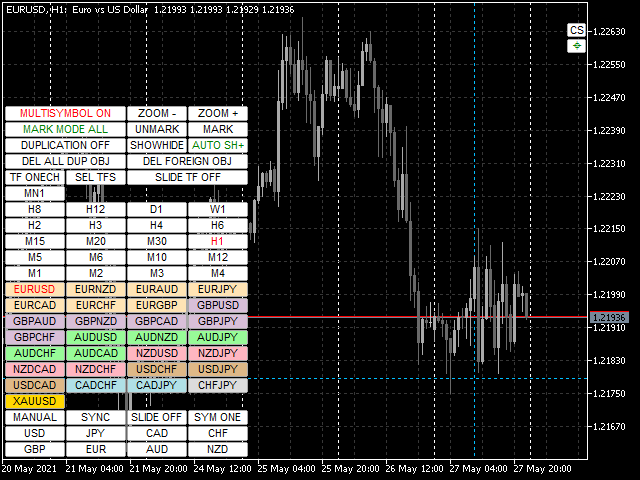
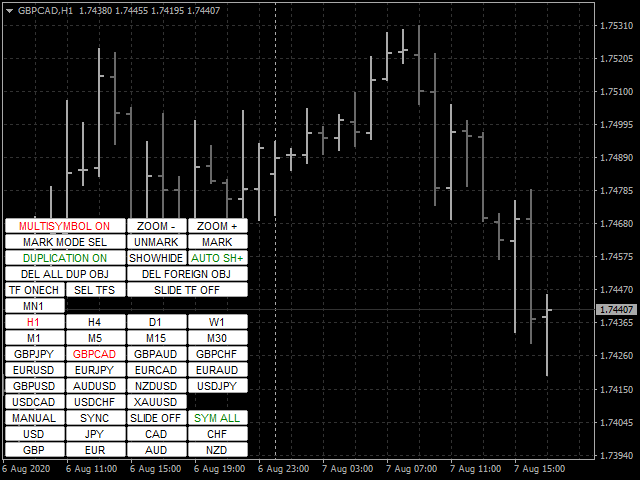
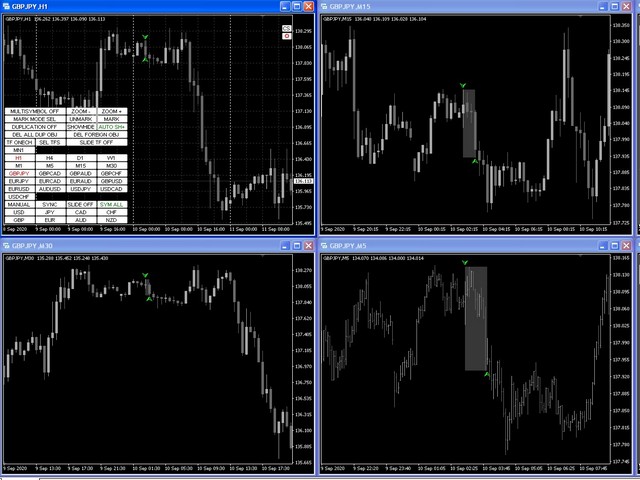
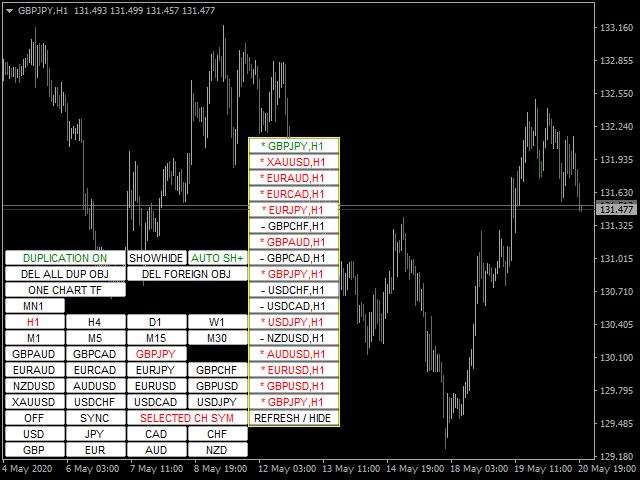
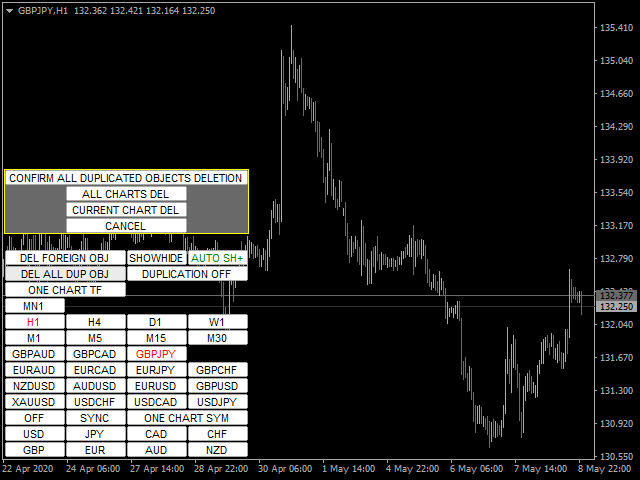
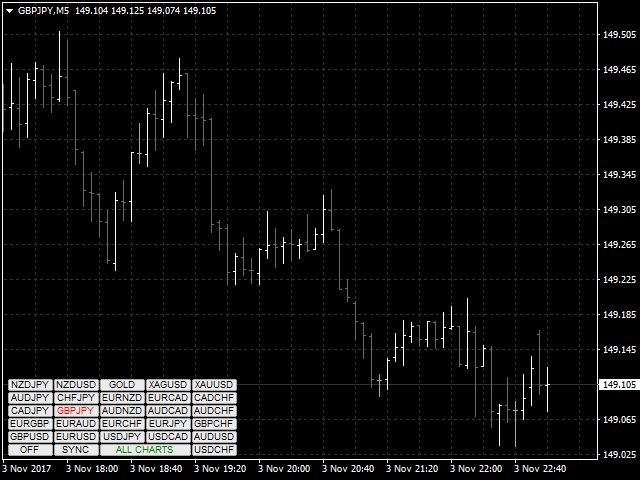
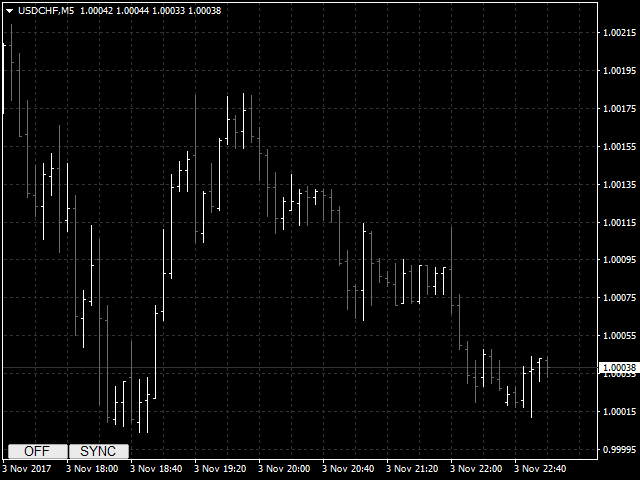
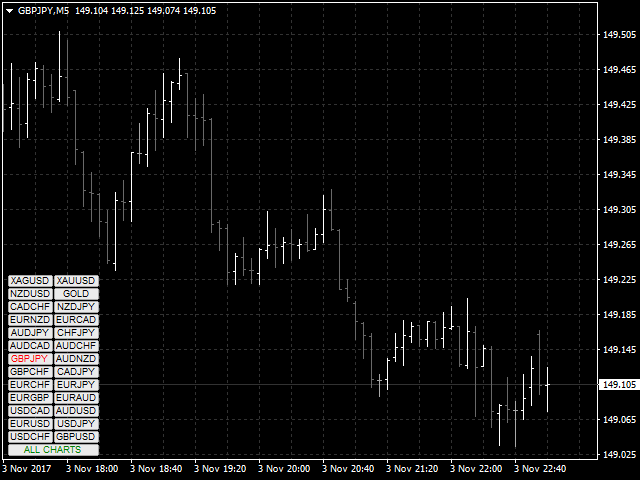
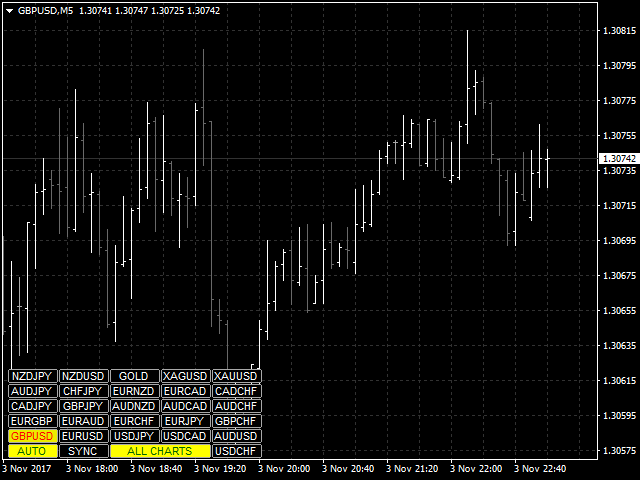
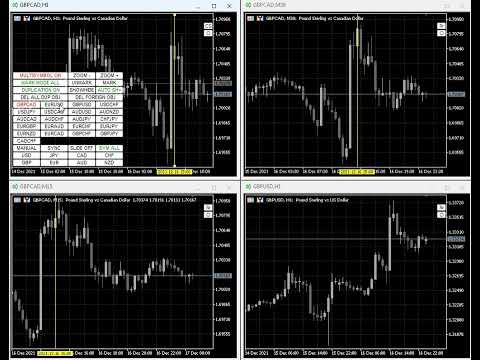
Mevcut, tüm veya seçili grafikler, zaman çerçevesi değişikliği ve geçmişteki eşzamanlı hareket (otomatik veya tıklama ile) için işlem enstrümanını değiştirmek için tasarlanmış yardımcı program. Sembol listesi "piyasaya genel bakış" bölümünden okunur. Düğmelerin rengini, boyutunu ve konumunu değiştirebilirsiniz. Grafik senkronizasyonu, senkronizasyon düğmesini tıklattığınızda veya fareyi/klavyeyi otomatik modda hareket ettirdiğinizde etkin grafikte ilk görünür çubuk anında gerçekleşir. TF, imleç tuşları kullanılarak değiştirilebilir: sol/sağ ve ticaret sembolleri - yukarı/aşağı.

8 ana para biriminin düğmeleri, döviz çiftleri listesinden çizelgeleri açmanıza izin verir (piyasaya genel bakıştan veya kullanıcı dizisinden alınmıştır). Yeni grafikler için şablon, "Yeni grafikler için şablon adı" parametresinde belirtilebilir. Para birimi değiştirilirken, mevcut çizelgelerin şablonları kaydedilir ve gösterge tarafından açılan çizelgelerde çiftin para birimleri değiştirilir. Para birimini tekrar seçtiğinizde ilgili şablonlar yüklenir.

Çoğaltma modu, nesneleri geçerli aracın tüm çizelgelerine bir kerede kopyalamanıza olanak tanır.

Global artı işareti, seçilen grafiklerde belirtilen çubuğun fiyat hareketlerini görüntülemenizi sağlar.

Parametrelerin ve talimatın açıklaması .

Ana işlevlerin listesi (yardımcı program sürekli olarak geliştirilmektedir, tüm yeni işlevler ve güncellemeler "Yenilikler" sekmesinde mevcuttur):

  • Mevcut/seçilen/tüm grafikler için işlem araçlarını değiştirin.
  • Yukarı/aşağı imleç tuşlarıyla işlem araçlarını değiştirin.
  • Ana çizelgede değişiklik yaparken tüm/seçilen çizelgeler için işlem enstrümanlarını değiştirme (ana çizelge, yardımcı programın kurulu olduğu çizelgedir).
  • Fare düğmesini kullanarak ticaret araçlarının düğmelerini vurgulayın.
  • Önceden ayarlanmış alım satım enstrümanları listesi: piyasaya genel bakış penceresinden veya kullanıcının alım satım enstrüman setinden dahil edilen tüm mevcut enstrümanlar.
  • Mevcut/tüm çizelgeler için TF'yi değiştirin.
  • Bir dizi TF düğmesi seçin.
  • İmleç tuşlarıyla TF'yi değiştirin - sol/sağ.
  • Ana tablonun TF'sini değiştirirken tüm çizelgeler için TF'yi değiştirin.
  • Yardımcı program için grafik şablonunu kaydedip geri yükleyerek 8 ana para biriminden biri için mevcut tüm para birimi çiftleri için grafik pencerelerini açma.
  • Ana çizelge ile çizelgelerin manuel veya otomatik senkronizasyonu
  • Belirli bir aralık ve yönde alım satım araçları arasında otomatik geçiş.
  • Belirli bir aralıkla TF'ler arasında otomatik geçiş.
  • Düğmelerin rengini, bağlantı açısını, kenardan ofseti, boyutu, yazı tipini, satırdaki düğme sayısını, yerleştirme alt penceresini değiştirme, yardımcı program düğmeleri ve TF için şeffaflık modunu ayarlama yeteneği.
  • Geçiş yaparken yalnızca geçerli ticaret aracının nesnelerini görüntülemek için çok karakterli mod.
  • Ana grafikte oluşturulduklarında ve/veya taşındıklarında, ilgili ticaret aracının tablolarındaki mevcut grafik nesnelerin çoğunun görüntüsünü kopyalayın, senkronize edin ve kontrol edin.
  • Belirtilen öneklere sahip nesneleri yok sayma yeteneği.
  • Belirtilen öneklere veya tümüne sahip bir ticaret aracını değiştirirken nesneleri silme yeteneği.
  • Kullanılmayan işlevlerin düğmelerini devre dışı bırakma (gizleme) yeteneği.
  • Mevcut TF için tüm yardımcı program düğmelerini gizleme/görüntüleme yeteneği.
  • İşlem enstrümanlarındaki açık pozisyonların karı/zararı için düğmenin kenar rengini vurgulayın.
  • İçindeki fiyat davranışını analiz etmek için çubuk seçim işlevi (daha küçük TF'lerde karşılık gelen çubukların grafiğinin vurgulanması ve ortasına kaydırılması).
  • Otomatik senkronizasyon modu için otomatik kaydırma çizelgelerini devre dışı bırakın ve mum aralığını vurgulayın.
  • Mevcut/seçili/tüm grafiklerde artı işaretini görüntüleyen ve eşzamanlı olarak hareket ettiren genel artı işareti özelliği
  • Yardımcı program üç modda çalışabilir: tek, ana ve yardımcı. Bu özellik, yardımcı programı herhangi bir grafikten genel artı işaretini yönetecek şekilde yapılandırmanıza olanak tanır.
  • Temel para birimine göre para birimi çifti ailelerini renklendirme yeteneği.


Değerlendirmeler 7
Chalin Saranga Jayathilake
6414
Chalin Saranga Jayathilake 2021.05.19 15:36 
 

The product already purchased 5 star

Luke Perrett
3410
Luke Perrett 2020.06.03 13:04 
 

Great product and great help from the author. Many inputs and options available with this product. EDIT: I just cant get over how good this product is and I dont even know how to use it to its full potential. With 12 screens we need tools like this to make things easy for navigation. A true credit to the author. O and did I forget to mention how helpful he is as well. 10 STARS

Önerilen ürünler
Title : Trade Assistant Manager MT5 Trade Assistant Manager — See your risk before you click Visual Risk Manager is a MetaTrader 5 chart utility for discretionary traders who want a clear, visual way to size positions . Place your Entry, Stop Loss, and Take Profit directly on the chart. The panel shows the lot size, the money at risk, the profit target in money, and the reward-to-risk ratio — updated as you move the lines. What you gain   Faster decisions   : - Automatically calculate the volum
FREE
Session Panel for MT5 Session Panel is a free MT5 indicator that gives you a fast and convenient live overview of the major trading sessions directly from the chart. Monitor Tokyo, London, and New York session times, see which session is currently active, track countdowns to the next session, and view session overlap information in one compact dashboard. Built for traders who want better market timing, clearer session awareness, and a cleaner chart workflow in live market conditions. Session Pan
FREE
Visual Trade Manager for MT5 is an interactive trade execution and position management tool designed for traders who want fast chart-based control over risk and execution. The panel provides a visual trade box with entry, stop and target lines directly on the chart. Position size is calculated from the selected risk percentage, and the tool supports both market execution and pending order placement. Main features - BUY and SELL switching directly from chart buttons - Draggable Entry, Stop and
Basic Trade Buttons is a tool to help you to quickly open and close trades, place take profit and stop loss points by clicking on the button of each job that you preferred. Once you attached this tool to mt5 chart, the program will calculate a trade volume(Lots size) automatically to prepare to send to the trade server when you click on 'Buy' or 'Sell' button. Click on 'TP', 'SL' or 'Close' button to place take profit, stop loss based on the predefined levels or to close all open positions respe
LiqStrike Trade Panel Pro
Enmanuel De Jesus Hernandez Farias
Trade Panel Pro MT5 – LiqStrike | MT5 Trade Panel | Risk Management | Position Manager Every second counts in trading. LiqStrike gives you total control — instantly. Built for serious traders who demand speed, precision and professional risk management in a single panel. MT5 Trade Panel with One Click Trading Advanced Risk Management — Auto Lot Calculator Position Manager for MetaTrader 5 Break Even & Trailing Stop per position Real-time USD tags on chart for SL & TP Compatible w
T Manager, the ultimate trade management solution designed by traders for traders. If you are searching for a simple and efficient trade panel, trade manager, or trade assistant, you are at the right place.   The market contains a diverse number of those tools , but this one is designed by traders for traders . I designed this tool, and I am using it daily. Take my advice and stop buying tools blended with un-useful features that you will never use,   T Manager provides you with the essential y
RRPP Script A script for placing a pending order prepared by the Risk Ratio Trade Panel indicator. Reads the entry price, Take Profit, Stop Loss and lot size directly from the indicator lines on the chart. Requirements The Risk Ratio Trade Panel indicator must be attached to the chart and the panel must be open before running the script. How it works Attach the Risk Ratio Trade Panel indicator to the chart, open the panel and set the Entry, TP and SL lines to the desired levels. Then run RRPP Sc
FREE
Script Name: Close All Positions Language: MQL5 Type: Utility Script Primary Function: Instantly close all open positions on the current trading account Purpose The “Close All Positions” script is a lightweight and efficient tool designed for traders using MetaTrader 5. Its main purpose is to help users quickly exit all active trades with a single click, especially during volatile market conditions or when risk management requires immediate action. Instead of manually closing each position on
FREE
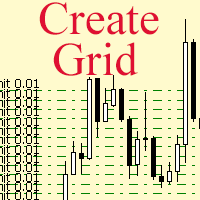
The script allows to use the mouse for placing a grid of orders with fixed or variable step quickly and with as few mistakes as possible. Drag the script to the chart using the left mouse button and release. The grid will be plotted starting from that point. If the current price is lower than the grid start point, the grid will be placed "to the north" towards the buys, and if higher - towards the sells, "to the south". Setting take profit and stop loss is left to trader's discretion. Input Par
Black Volume By ZeeAM Khan a Multi-Engine EA Professional Multi-Timeframe Volume & Breakout Trading System Black Volume Multi-Engine EA is an advanced automated trading system that combines volume analysis, spread analysis, liquidity sweeps, support/resistance breakouts, and multi-basket trade management into one powerful Expert Advisor. The EA continuously scans higher-timeframe candles to identify significant market activity, automatically draws key support and resistance zones, and executes
FREE
"Support or Resistance Alert Broken" is a simple and very intuitive tool that allows you to create or eliminate horizontal and trend supports and / or resistances with a simple click. When the support or resistance line is broken by the closing price at the end of the current candle, the "Support or Resistance Alert Broken" tool will send an alert with sound, as well as a notification to the MT4 or MT5 mobile application. This tool can send alerts from multiple pairs at the same time. Utility
Shved Position Pips Label   is a professional utility indicator for MetaTrader 5 that displays the real-time floating profit or loss of all your active positions directly on the chart. No more switching to the "Trade" tab at the bottom of the terminal — all crucial information about your running trades is positioned right in front of your eyes next to the current price line! Key Advantages: Smooth Price-Anchored Alignment:   The labels are anchored to the last bar and smoothly slide vertically f
One Click Trader  is a tool designed for MetaTrader 4 platform, which enables you to take your trading to the next level. It enables you to open, manage and close your trades in simple an efficient way by just one click of your mouse button. "-"   ,  "+"  change OCT window size  Up arrow minimizes the OCT panel Down arrow maximizes the OCT panel Right arrow displays the next panel with additional features Left arrow hides the panel with additional features Red  SELL  button enables you to open s
This tool can help you close all open orders with one click, just click "Close all". If you only want to close profitable orders, click the "Close profitable" button. After clicking, all floating orders will be closed; If you only want to close the orders with floating losses, click the "Close losable" button. After clicking, all orders with floating losses will be closed. This tool has been tested for a year. The one-click position closing function is very complete, the position closing is time
This EA is primarily used for scalping XAUUSD. Purpose Removes emotion from trade management   - automatically protects positions and takes profits so you don't have to make difficult decisions under pressure. What It Does ️   Auto Stop Loss Sets SL based on recent highs/lows + buffer No more manual placement stress   Auto Partial Profits Two modes: Fixed Movement : Close 50% after X price movement R-Ratio : Close 50% at 1.2R profit target Locks in gains while letting winners run. ️   One
Atlas Risk Radar MT5 Atlas Risk Radar MT5   is a professional risk dashboard and account protection utility for MetaTrader 5. It monitors open positions and pending orders directly on the chart and helps you see where risk is building up before it becomes a problem. Atlas Risk Radar is not a trading robot and not a signal indicator. It is a visual risk management tool for Forex traders, CFD traders, prop firm traders, scalpers, day traders, swing traders and portfolio traders who want a clear ov
Position Calculator calculates how many lots to trade based on: Entry and stop-loss levels Risk tolerance Account size (balance, equity, or even your savings account) Account currency Currency exchange rates - The main tab of the panel provides the primary control over the EA's functions and serves to output the most important calculation results: the position size, risk, reward, and risk-to-reward ratio. - The risk tab can help you assess current and potential risk and reward profile. Using a s
FREE
Guardian Magic GT
Carlos Eduardo Rivas Istacuy
Guardian Magic GT - Risk Management Expert Advisor for MetaTrader 5 PROTECT YOUR TRADING CAPITAL WITH INTELLIGENT RISK MANAGEMENT Guardian Magic GT is a professional-grade Expert Advisor designed to safeguard your trading operations by implementing sophisticated risk control mechanisms. Whether you run a single bot or manage multiple automated trading systems simultaneously, Guardian Magic GT provides real-time monitoring and automatic position management to ensure your account stays within your
Metrics Pro for Telegram - MT5 Metrics Pro for Telegram is a reporting utility for MetaTrader 5 that automatically sends your account performance data to a Telegram chat or channel via the Telegram Bot API. It is designed for algo-traders, signal providers, and fund managers who need scheduled performance summaries delivered directly to their phone without checking the terminal manually. The utility runs in the background on a chart and posts formatted reports at a scheduled server time. Reports
This EA help trader to manage his pending orders, when you place many Pending Orders this utility monitor them and when of them get filed (executed) the EA cancel and delete all rest of pending orders, to avoid  opening of all of pending orders at the same time , and lose your risk management. this utility is very useful for trader when he /she is not available on the desk.
Simple Telegram Notification – Stay Informed on Your MT5 Trading Activity! Stay connected with your MetaTrader 5 trading activity using Simple Telegram Notification , the Expert Advisor that sends real-time notifications to your Telegram app whenever orders are opened, modified, or closed . Whether you're at your desk or on the move, you’ll always be up-to-date with critical trading information. Key Features: Order Notifications : Receive instant Telegram alerts whenever an order is opened, mod
TradingX Hotkeys
Johannes Stephanus Lombard
Inputs Available Lotsizes Partial Close % You can change lotsizes as you require On an open chart click once to select chart to be able to use hotkeys on specific chart. All Pairs can be used with this expert We created this expert to be able to still trade C300 with a 0.06 Lotsize If you enter a 0.6 lot and close 0.90% you can trade with 0.06 Lot Keys to be used: B -Buy S -Sell C -Close Profitable D -Breakeven (Note if stoploss is set it won't break even) P -Partial close X -Close all
TrailingTrader MT5 – Trailing Stop-Loss and Take-Profit Script  Upon activation of the TrailingTrader script , open positions of specified trading instruments in the quote window will automatically implement an intelligent trailing stop strategy. This helps traders lock in profits and manage risks without the need for manual monitoring and adjustments. Core Configuration Parameters Symbol : Specify the trading instruments for which trailing stops should be applied. Use English commas (,) to sepa
Global crosshair for spotting levels and positions on multiple chart (timeframes). Features: Toggle with middle click (replace default MT5 crosshair). Toggle with HotKey shortcut and on chart button. Multi instance feature. (every chart can draw separate instance). Customizable Display Style. (color / line style / ex.) Global crosshair for spotting levels and positions on multiple chart (timeframes).
Grid Manager — Manual Multi-Basket Grid Assistant for MT5 Grid Manager is a hands-on control panel for building and managing grid "baskets" directly on your chart. You decide the direction and the moment; the tool opens the grid, manages every leg, and protects the position with money-based risk controls, on-chart breakeven/SL/TP lines, and one-click actions. It is an execution and management assistant — fast, visual, and fully under your control. What it is — and what it is not Grid Manager is
Trade HotKeys , klavye kısayolları kullanarak işlem emirlerini anında yürütmeyi sağlayan manuel trading aracıdır. MetaTrader 5 arayüz butonlarını kullanmadan hızlı emir kontrolüne ihtiyaç duyan discretionary trader’lar ve scalper’lar için tasarlanmıştır. Grafik üzerindeki butonlara tıklamak veya menüler arasında gezinmek yerine, işlemleri doğrudan klavyeden gerçekleştirirsiniz. Neler yapabilirsiniz Hotkey ile anında BUY / SELL açma BUY veya SELL pozisyonlarını ayrı ayrı kapatma Tek tuşla tüm po
FREE
EW Close All – Tek Tık. Her Şey Kapandı. EW Close All , hafif ve çok dilli bir Expert Advisor’dır. Tek bir butona tıklayarak tüm açık pozisyonları anında kapatır ve tüm bekleyen emirleri iptal eder. Tüm açık pozisyonları kapatır   Tüm bekleyen emirleri iptal eder   Her sembol ve her zaman diliminde çalışır   Çok dilli arayüz   Temiz, hızlı ve güvenilir Hızlı çıkışlar, risk kontrolü veya gün sonu temizliği için mükemmeldir. Tam kontrol sizde kalsın — EW Close All ile saniyeler için
FREE
**Tek Tıkla Başabaş (Breakeven) Koruması** Tek bir tıklama ile sermayenizi koruyun. Pozisyon açtıktan sonra, kârda olan tüm işlemlerin Zarar Durdur (SL) seviyesini giriş fiyatına taşımak için düğmeye basın. Bu, kazanan işlemlerdeki riski sıfırlar. **Nasıl Çalışır?** Panel, kârda ve zararda olan pozisyonlarınızı canlı olarak sayar. "SET SL TO ENTRY" düğmesine tıkladığınızda, kârda olan tüm pozisyonlar giriş fiyatına sabitlenir. Zarardaki işlemler otomatik olarak atlanır. **Önemli Özellikler**  
Painel Pro: O Pro Trader Dashboard   é a ferramenta profissional definitiva para MetaTrader 5, projetada para resolver o maior problema no trading: Disciplina e Gestão de Risco .   Esta ferramenta funciona como seu "Gerenciador de Risco", aplicando limites diários para proteger seu capital e, ao mesmo tempo, oferecendo uma interface rápida e intuitiva para a execução de ordens. Seja você um Scalper ou um Day Trader, este painel ajuda você a executar negociações rapidamente e a parar quando atin
Signals Executor for Telegram is a Utility that allows you to execute and manage positions from messages sent in Telegram Chats. Chat messages are processed to check for the existence of commands, and the command will be executed if its parameters are valid. You need the Telegram Bot Token and Chat Id to configure the input parameters. It is possible to restrict the sending of commands through the User Id, which must be configured in the input parameters. Valid Commands: Buy and Sell: Market or
Bu ürünün alıcıları ayrıca şunları da satın alıyor
Trade Assistant MT5
Evgeniy Kravchenko
4.43 (214)
It helps to calculate the risk per trade, the easy installation of a new order, order management with partial closing functions, trailing stop of 7 types and other useful functions. Additional materials and instructions Installation instructions - Application instructions - Trial version of the application for a demo account Line function -   shows on the chart the Opening line, Stop Loss, Take Profit. With this function it is easy to set a new order and see its additional characteristics bef
Trade Manager EA’ye hoş geldiniz! Ticaretin daha sezgisel, hassas ve verimli hale gelmesi için tasarlanmış nihai risk yönetim aracı ile tanışın. Bu sadece bir emir verme aracı değil; ticaret planlaması, pozisyon yönetimi ve risk kontrolü için kapsamlı bir çözüm. İster yeni başlayan bir yatırımcı olun, ister deneyimli bir trader ya da hızlı emir gerektiren bir scalper, Trade Manager EA ihtiyaçlarınıza uyum sağlar ve forex, endeksler, emtialar ve kripto paralar dahil tüm piyasalarda esneklik sunar
Beta Sürümü Telegram to MT5 Signal Trader resmi alfa sürümüne neredeyse hazır. Bazı özellikler hâlâ geliştirilmekte olup küçük hatalarla karşılaşabilirsiniz. Sorun yaşarsanız lütfen bildirin, geri bildiriminiz yazılımın herkes için gelişmesine yardımcı olur. Telegram to MT5 Signal Trader , Telegram kanallarından veya gruplarından gelen işlem sinyallerini otomatik olarak MetaTrader 5 hesabınıza kopyalayan güçlü bir araçtır. Herkese açık ve özel kanalları destekler ve birden fazla sinyal sağlayıc
TradePanel MT5
Alfiya Fazylova
4.88 (161)
Trade Panel, çok işlevli bir ticaret asistanıdır. Uygulama, manuel ticaret için 50'den fazla ticaret fonksiyonu içerir ve çoğu ticaret görevini otomatikleştirmeyi mümkün kılar. Satın almadan önce demo hesapta demo sürümü test edebilirsiniz. Demo hesap için uygulamanın deneme sürümünü indirin: https://www.mql5.com/en/blogs/post/750865 . Talimatların tamamı buraya . Ticaret. Tek tıklamayla ticaret işlemleri yapmayı sağlar: Risk otomatik hesaplaması ile bekleyen emirleri ve pozisyonları açmak. Bird
Power Candles Strateji Tarayıcısı - Kendi Kendini Optimize Eden Çoklu Sembol Kurulum Bulucu Power Candles Strateji Tarayıcısı , Power Candles göstergesini çalıştıran aynı kendinden optimize edici motoru, Piyasa İzleyicinizdeki her sembol üzerinde yan yana çalıştırır. Tek bir panel, şu anda istatistiksel olarak hangi sembollerin işlem yapılabilir olduğunu, her birinde hangi stratejinin kazandığını, en uygun Stop Loss / Take Profit çiftini gösterir ve yeni bir sinyal geldiği anda size bildirim gön
Telegram to MT5 Multi-Channel Copier , Telegram kanallarınızdaki trading sinyallerini otomatik olarak doğrudan MetaTrader 5'e kopyalar. Bot yok, tarayıcı uzantısı yok, manuel kopyalama yok. Telegram'da bir sinyal alırsınız ve EA birkaç saniye içinde terminalinizde işlem açar. Ürün iki bileşen içerir: Telegram kanallarınızı dinleyen bir Windows uygulaması ve sinyalleri MT5 terminalinizde yürüten bu Expert Advisor. Bir MT4 sürümü de mevcuttur. Kurulum kılavuzu ve uygulama indirme: https://www.mql5
Exp COPYLOT CLIENT for MT5
Vladislav Andruschenko
3.94 (34)
MetaTrader 5 için profesyonel işlem kopyalayıcı MetaTrader için hızlı, profesyonel ve güvenilir bir işlem kopyalayıcı . COPYLOT , MT4 ve MT5 terminalleri arasında Forex işlemlerini kopyalamanıza olanak tanır ve Hedge ile Netting hesaplarını destekler. COPYLOT MT5 sürümü şunları destekler: - MT5 Hedge → MT5 Hedge - MT5 Hedge → MT5 Netting - MT5 Netting → MT5 Hedge - MT5 Netting → MT5 Netting - MT4 → MT5 Hedge - MT4 → MT5 Netting MT4 sürümü Tam açıklama + DEMO + PDF Nasıl satın alınır Nasıl kurul
Anchor: The EA Manager Run your full EA portfolio without conflicts, without stacked risk, and without watching every chart yourself. Anchor coordinates up to 64 Expert Advisors on a single account, including daily loss protection built for prop firm rules. Attach Anchor to any chart. Type your EA names and magic numbers in one line. Click OK. Anchor begins coordinating immediately. Built for portfolios. Built for prop firms. Built for discipline. The Problem Running multiple EAs on the same acc
LIMITED SUMMER SALE -40% ! ONLY $470 insead of $790!  Maximum real discount! The core idea: using the user interface, you configure the parameters the chart must meet before entering a position (or positions), choose which entry models to use, and set the rules for when trading and planning should end. Lazy Trader  handles the rest: it  takes over all the routine chart watching and execution! full description  :: 3 key videos [1] ->  [2]   ->  [3] What can it do? - Understands Larry Williams
Farmed Hedge Yield Farming | All Markets (Manual - Hybrid - Semi/Automated EA) MULTI-ASSET SUPPORT Trade any asset available on your broker - Forex: Major, Minor, Exotic pairs - Crypto: BTC, ETH, XRP, SOL, BNB - Stocks: Apple, Tesla, Amazon, Google, etc. - Commodities: Gold, Silver, Oil, Gas - Indices: US30, NAS100, SPX500, DAX40 - Any CFD your broker offers VERIFIED TRADING RESULTS - Farmed Hedge Yield Axi Copy:  https://www.mql5.com/en/signals/2356376 - Farmed Hedge Yield Exn Copy:   https:/
The product will copy all telegram signal to MT5 ( which you are member) , also it can work as remote copier.  Easy to set up, copy order instant, can work with almost signal formats, image signal,  s upport to translate other language to English Work with all type of channel or group, even channel have "Restrict Saving Content", work with  multi channel, multi MT5 Work as remote copier: with signal have ticket number, it will copy exactly via ticket number. Support to backtest signal. How to s
Quant AI Agents are independent trading Expert Advisors. Instead of trading using a fixed strategy like other conventional EAs, Quant AI Agents   is a   multi-agent AI trading framework   that turns natural-language strategy prompts into live.  WANT THE SAME RESULTS AS MY LIVE SIGNAL?   Use the exact same brokers I do:   IC MARKETS , IC TRADING   .  Unlike the centralized stock market, Forex has no single, unified price feed.  Every broker sources liquidity from different providers, creating un
EA Auditor
Stephen J Martret
5 (4)
EA Auditor is an independent analysis tool for traders evaluating Expert Advisors and trading signals on MetaTrader 5. It audits backtest reports, reviews posted developer signals, and cross-verifies the two against each other to help traders assess strategies before committing capital. The MQL5 market offers a wide range of Expert Advisors from many developers, with varying approaches, quality, and transparency. EA Auditor provides a consistent, data-driven framework for reviewing them, answer
EASY Insight AIO – Akıllı ve zahmetsiz yatırım için hepsi bir arada çözüm Genel Bakış Tüm piyasayı — Forex, Altın, Kripto, Endeksler ve hatta Hisseler — saniyeler içinde, manuel grafik incelemesi, gösterge kurulumu ya da karmaşık ayarlar olmadan analiz edebildiğinizi hayal edin. EASY Insight AIO , yapay zekâ destekli yatırım için nihai, kullanıma hazır dışa aktarma aracınızdır. Tüm piyasanın kapsamlı bir anlık görüntüsünü tek bir temiz CSV dosyasında sunar; bu dosya ChatGPT, Claude, Gemini, Pe
Riskinizi otomatik olarak hesaplarken işlemlere hızlı bir şekilde girip çıkmanıza yardımcı olacak Ticaret Yöneticisi. Aşırı Ticaret, İntikam Ticareti ve Duygusal Ticaretten korunmanıza yardımcı olacak özellikler içerir. İşlemler otomatik olarak yönetilebilir ve hesap performans ölçümleri bir grafikte görselleştirilebilir. Bu özellikler, bu paneli tüm manuel yatırımcılar için ideal kılar ve MetaTrader 5 platformunun geliştirilmesine yardımcı olur. Çoklu Dil desteği. MT4 Sürümü  |  Kullanım Kılavu

Premium Trade Manager - İçine Koç Yerleştirilmiş İşlem Paneli Premium Trade Manager , grafiğinizin içine bir trading koçu yerleştirir; altında tam bir yürütme motoru çalışır. İşlemi her zamanki gibi kurun, ardından yapay zeka trading koçunuz Max, o kurulumu tam olarak okusun ve canlı hesabınıza göre taahhüt etmeden önce size net bir değerlendirme sunsun: stop disiplinli bir yaklaşıma uyuyor mu, risk büyüklüğü makul mü, yüksek etkili bir haber dakikalar sonra mı geliyor, prop firm limitinize yakl
Timeless Charts
Samuel Manoel De Souza
5 (7)
Timeless Charts, profesyonel yatırımcılar için hepsi bir arada bir trading aracıdır. Saniye Grafikleri ve Renko gibi özel grafik türlerini, Footprints , Clusters , Hacim Profilleri , VWAP çalışmaları ve gelişmiş piyasa analizi sağlayan sabitlenmiş analiz araçlarıyla gelişmiş emir akışı analiziyle birleştirir. İşlem ve pozisyon yönetimi, entegre işlem yönetim paneli aracılığıyla doğrudan grafik üzerinden gerçekleştirilirken, Market Replay ve Sanal Hesaplar trading becerileri ve stratejileri üzeri
================================================================================ POC BREAKOUT - V20.72. Full Professional Grade Toolkit ================================================================================ POC Breakout is a full MetaTrader 5 trading dashboard for discretionary traders who want breakout signals, Point of Control (POC) context, volume profiles, order flow, market structure, news, alerts, and advanced trade planning in one professional workspace. Attached directly to you
MetaTrader 5 için Trading Panel — grafik ve klavyeden profesyonel tek tıkla işlem kontrolü Aktif traderlar için geliştirilmiş güçlü bir Trading Panel; işlemleri standart MetaTrader arayüzüne göre çok daha hızlı açmanıza, yönetmenize ve kapatmanıza yardımcı olur. Bu çözüm; pozisyonları, bekleyen emirleri, toplam kârı ve işlem yürütmesini tek bir profesyonel çalışma alanında kontrol etmek isteyen kullanıcılar için tasarlanmıştır. Bu sadece sıradan bir yardımcı araç değildir. MetaTrader 5 için ger
Footprint Chart Pro — Professional OrderFlow EA for MetaTrader 5 Version 6.34 | Professional tool for real traders | Institutional-Grade Visualization DEMO USERS - PLEASE SELECT EVERY TICK / REAL TICK WHEN TESTING AND YOU HAVE DOWNLOADED HISTORICAL DATA. IF YOU SEE A WAITING SCREEN AND IT IS NOT DOWNLOADING, IT MEANS YOU HAVE LOW HISTORICAL DATA. TRY 1 MIN AND 5 MIN FIRST ON 1 DAY DATA. ONE DAY DATA SHOULD BE THE NEWEST AND MOST CURRENT DATE. PLEASE WAIT UNTIL THE MARKET HAS ROLLED OVER PERIOD.
DrawDown Limiter
Haidar Lionel Haj Ali
5 (20)
Drawdown Limiter EA You are in the right place if you were searching for Drawdown control, Drawdown limiter, Balance protection, Equity Protection or Daily Drawdown Limit related to Prop Firm, FTMO, or Funded account trading, or if you want to protect your trading account. Have you suffered from controlling your drawdown when trading funded accounts? This EA is meant for you. Prop firms usually set a rule called “Trader Daily Drawdown”, and if it is not respected, you are disqualified.  I am an
EA Pause Manager
David Enrique Barrera Moncayo
4.33 (6)
EA Pause Manager — Your Smart Risk Guard & Scheduler (MT5) What It Does Stops conflicting trades before they happen , based on active market positions and, optionally, pending orders. Pauses or resumes your EAs automatically based on: A simple leader rule : the first EA to trade becomes the leader and blocks the rest. A time schedule you define — now configurable per EA. For example, you can run one EA during the day session and another EA overnight. Optionally cleans up after simultaneous openi
Bu ürün, haber saatlerinde tüm uzman danışmanları ve manüel grafikleri filtreler, böylece manüel ticaret kurulumlarınızı veya diğer uzman danışmanlar tarafından girilen işlemleri yok edebilecek ani fiyat dalgalanmaları konusunda endişelenmenize gerek kalmaz. Bu ürün, herhangi bir haber yayınlanmadan önce açık pozisyonlarınızı ve bekleyen emirlerinizi yönetebilen tam bir sipariş yönetim sistemi ile birlikte gelir.   The News Filter'ı   satın aldığınızda, gelecekteki uzman danışmanlar için yerleşi
Signal TradingView to MT5 Pro Automator TradingView ve MetaTrader 5 arasında anında profesyonel uygulama TradingView alarmları ile MT5'teki gerçek uygulama arasındaki en güçlü iletişim köprüsüyle ticaret stratejinizi otomatikleştirin. Hız, esneklik ve kusursuz risk yönetimi talep eden yatırımcılar için tasarlanan bu Uzman Danışman (Expert Advisor), herhangi bir alarm mesajını hassas bir piyasa (market) veya limit emrine dönüştürür. GÜÇLÜ YÖNLER VE AVANTAJLAR Evrensel Ayrıştırma Motoru (Tescilli)
Crypto Charting for MT5 – MetaTrader 5 için Kripto Para Grafikleri Genel Bakış Crypto Charting for MT5, WebSocket üzerinden gerçek zamanlı OHLC verisi sağlar. Birçok borsa desteklenir ve MT5 içinde otomatik veri senkronizasyonu yapılır. Özellikler WebSocket ile canlı veri akışı Otomatik geçmiş veri güncellemesi Bağlantı kesintilerinde planlı senkronizasyon Tüm MT5 zaman dilimleriyle uyumlu Tam OHLCV veri yapısı Strateji testine destek Otomatik yeniden bağlanma Desteklenen Borsalar Binance, Byb
YuClusters
Yury Kulikov
4.93 (43)
Attention: You can view the program operation in the free version  YuClusters DEMO .  YuClusters is a professional market analysis system. The trader has unique opportunities to analyze the flow of orders, trade volumes, price movements using various charts, profiles, indicators, and graphical objects. YuClusters operates on data based on Time&Sales or ticks information, depending on what is available in the quotes of a financial instrument. YuClusters allows you to build graphs by combining da
Chart Copilot
George Angelo Boutselis
Chart Copilot , yatırımcıların daha hızlı işlem yapmalarına, açık pozisyonlarını yönetmelerine ve her türden uyarıyı doğrudan grafikten ayarlamalarına yardımcı olmak için tasarlanmış bir işlem asistanıdır. Tüm bu özelliklere grafik panelin yanı sıra konuşma tabanlı bir chatbot aracılığıyla da erişilebilir. Ek Materyal ve Talimatlar: Deneme sürümü  - Kurulum talimatları Chatbot Chart Copilot, büyük bir dil modeli çalıştıran özel bir sunucuyla birlikte gelir; bu, kendi API anahtarınızı oluşturmanı
Local Trade Copier EA , bir MAM veya PAMM hesabına ihtiyaç duymadan, harici kaynaklardan ticaret sinyalleri yürütmesi veya aynı anda birkaç hesabı yönetmesi gereken bireysel tüccarlar veya hesap yöneticileri için bir çözümdür. 8 ana hesaptan sınırsız bağımlı hesaba kopyalar [ Kurulum Kılavuzu | Güncelleme Kılavuzu | Sorun Giderme | SSS | Tüm Ürünler ] %100 kendi kendine barındırılan Kurulumu ve kullanımı kolay Hiçbir yükleyici, yapılandırma dosyası, sunucu, bellek kanalı veya DLL kullanılmadı E
FUTURES ORDERFLOW FOOTPRINT CHART Professional OrderFlow EA for MetaTrader 5 Version 1.01| Professional tool for real traders | Institutional-Grade Visualization STRATEGY TESTER USERS - PLEASE SELECT EVERY REAL TICK WHEN TESTING AND YOU HAVE DOWNLOADED HISTORICAL DATA. IF YOU SEE A WAITING SCREEN AND IT IS NOT DOWNLOADING, IT MEANS YOU HAVE LOW HISTORICAL DATA. TRY 1 MIN AND 5 MIN FIRST ON 1 DAY DATA. ONE DAY DATA SHOULD BE THE NEWEST AND MOST CURRENT DATE. PLEASE WAIT UNTIL THE MARKET HAS ROL
Telegram'dan MT5'e:   Nihai Sinyal Kopyalama Çözümü Telegram'dan MT5'e işlemlerinizi basitleştirin, DLL'lere ihtiyaç duymadan işlem sinyallerini doğrudan Telegram kanallarından ve sohbetlerinden MetaTrader 5 platformunuza kopyalayan modern araç. Bu güçlü çözüm hassas sinyal yürütme, kapsamlı özelleştirme seçenekleri sağlar, zamandan tasarruf sağlar ve verimliliğinizi artırır. [ Instructions and DEMO ] Temel Özellikler Doğrudan Telegram API Entegrasyonu Telefon numarası ve güvenli kod ile kimlik
Yazarın diğer ürünleri
Mini Charts MT5
Sergey Efimenko
4.83 (23)
Gösterge, herhangi bir zaman diliminden herhangi bir sembolün küçültülmüş grafiklerini görüntüler. Maksimum görüntülenen çizelge sayısı 28'dir. Çizelgeler hem ana hem de alt pencerede yer alabilir. İki görüntüleme modu: mumlar ve çubuklar. Görüntülenen veri miktarı (çubuklar ve mumlar) ve grafik boyutları ayarlanabilir. Bir mini sohbetle çalışmak için, önce istenen göstergeyi/göstergeleri normal bir çizelgeye koymalı, ardından bir şablon olarak kaydetmeli ve uygun parametre aracılığıyla mini çiz
FREE
CPM Extended MT5
Sergey Efimenko
4.5 (4)
Algoritma, Para Birimi Güç Ölçer göstergesi fikrine dayanmaktadır. Bu versiyonda, görüntülenen değerlerin sayısı sınırsızdır, kodu daha kompakt ve hızlıdır, mevcut çubuğun değerleri gösterge tamponları aracılığıyla elde edilebilir. Göstergenin gösterdiği şey   : ince bir bant ve para biriminin önündeki üst sayı, son N saat için bağıl güç endeksini gösterir (N, 'Saat' değişkenindeki parametrelerde ayarlanır), daha geniş bir bant günlük endeksi gösterir. Giriş parametrelerinde bu para birimini ne
FREE
Mini Charts
Sergey Efimenko
4.78 (9)
Gösterge, herhangi bir zaman diliminden herhangi bir sembolün küçültülmüş grafiklerini görüntüler. Maksimum görüntülenen çizelge sayısı 28'dir. Çizelgeler hem ana hem de alt pencerede yer alabilir. İki görüntüleme modu: mumlar ve çubuklar. Görüntülenen veri miktarı (çubuklar ve mumlar) ve grafik boyutları ayarlanabilir. Parametreler: Corner - başlangıç köşesini göster (listeden seçilir) CandleMode - görüntüleme modu: true - mumlar, false - çubuklar ShowLastBid - son fiyat gösterimini etkinleştir
FREE
Mevcut, tüm veya seçili grafikler, zaman çerçevesi değişikliği ve geçmişteki eşzamanlı hareket (otomatik veya tıklama ile) için işlem enstrümanını değiştirmek için tasarlanmış yardımcı program. Sembol listesi "piyasaya genel bakış" bölümünden okunur. Düğmelerin rengini, boyutunu ve konumunu değiştirebilirsiniz. Grafik senkronizasyonu, senkronizasyon düğmesini tıklattığınızda veya fareyi/klavyeyi otomatik modda hareket ettirdiğinizde etkin grafikte ilk görünür çubuk anında gerçekleşir. TF, imleç
CPM Extended
Sergey Efimenko
4.8 (10)
Algoritma, Para Birimi Güç Ölçer göstergesi fikrine dayanmaktadır. Bu versiyonda, görüntülenen değerlerin sayısı sınırsızdır, kodu daha kompakt ve hızlıdır, mevcut çubuğun değerleri gösterge tamponları aracılığıyla elde edilebilir. Göstergenin gösterdiği şey   : ince bir bant ve para biriminin önündeki üst sayı, son N saat için bağıl güç endeksini gösterir (N, 'Saat' değişkenindeki parametrelerde ayarlanır), daha geniş bir bant günlük endeksi gösterir. Giriş parametrelerinde bu para birimini ne
FREE
Gösterge, mevcut fiyat yönünü ve piyasa oynaklığını belirlemenizi sağlar. Traders Dynamic Index'in bu sürümü, geçmiş verilerin yeniden çizilmesini ortadan kaldırdı, algoritma hesaplama hızı optimize edildi, daha hassas ayarlamalar için daha fazla harici parametreye ve genişletilmiş işlevselliklere sahiptir: ilk osilatör seçimi ve ortalamaların yumuşatma yöntemleri eklendi . parametreler: Mode Osc - tahmin osilatör seçimi Period Osc - kullanılan osilatörün hesaplama periyodu Price Osc - salınım h
Filtrele:
[Silindi] 2022.12.07 03:42 
 

Kullanıcı değerlendirmeye herhangi bir yorum bırakmadı

Sergey Efimenko
35302
Geliştiriciden yanıt Sergey Efimenko 2022.12.07 09:04
Dear customer, you must have REMORSE because you write a bad review without even trying to solve this issue with me first or at least without reading the instructions.
Firstly, the demo versions for this product will not work due to the features of the terminal (by the way, I warn you about this in the review)
As for the incorrect operation of the utility in your opinion, in order to avoid changes, it is enough to disable unnecessary options in the settings, which you can just ask me about.
yang891205
40
yang891205 2021.05.24 04:31 
 

你好,我之前租赁了这个产品一年,使用良好,今天到期后我就购买了这个产品,可在MT5上却无法显示,产品在图表上添加不了,无法使用,请问这是什么原因呢?

Sergey Efimenko
35302
Geliştiriciden yanıt Sergey Efimenko 2021.05.24 13:52
Hello. I replied to you in private messages.
Chalin Saranga Jayathilake
6414
Chalin Saranga Jayathilake 2021.05.19 15:36 
 

The product already purchased 5 star

Mustafa Nail Sertoglu
1122
Mustafa Nail Sertoglu 2021.04.21 11:19 
 

Kullanıcı değerlendirmeye herhangi bir yorum bırakmadı

Luke Perrett
3410
Luke Perrett 2020.06.03 13:04 
 

Great product and great help from the author. Many inputs and options available with this product. EDIT: I just cant get over how good this product is and I dont even know how to use it to its full potential. With 12 screens we need tools like this to make things easy for navigation. A true credit to the author. O and did I forget to mention how helpful he is as well. 10 STARS

[Silindi] 2019.01.14 06:29 
 

Kullanıcı değerlendirmeye herhangi bir yorum bırakmadı

pete080368
1102
pete080368 2018.09.08 22:29 
 

Kullanıcı değerlendirmeye herhangi bir yorum bırakmadı

Değerlendirmeye yanıt