Top Trade Manager MT4

MT4 için En İyi İşlem Yöneticisi - İşlem Paneli, Pozisyon Büyüklüğü Hesaplayıcı ve Risk Yöneticisi

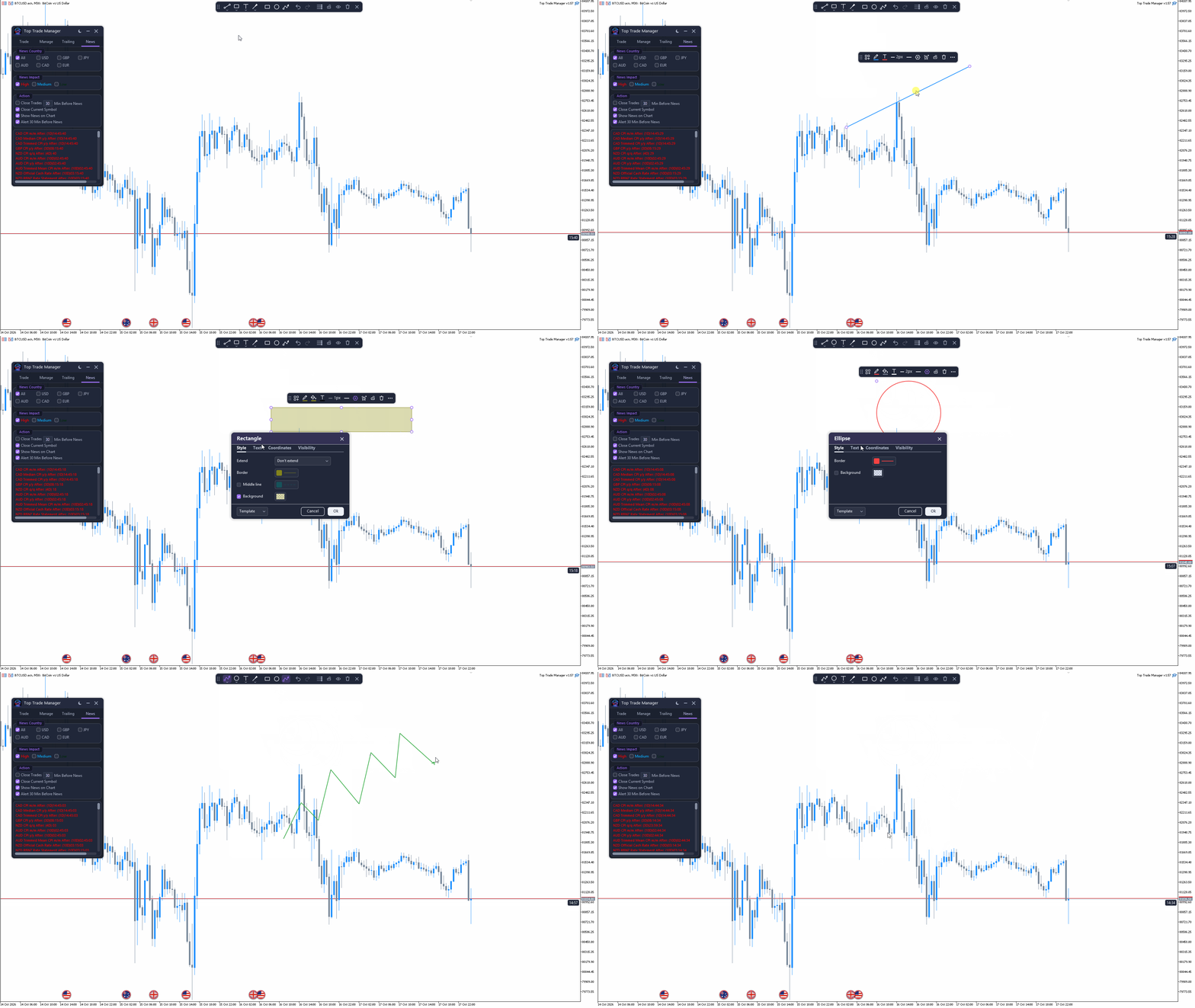
Top Trade Manager , MetaTrader 4 için eksiksiz bir işlem yöneticisidir : işlem paneli, pozisyon büyüklüğü hesaplayıcı ve risk yöneticisi bir arada. Giriş, stop loss ve kar alma noktalarınızı grafikte sürükleyin ve lot büyüklüğü, risk ve getiri anında hesaplansın. Ardından, kısmi kapanış , başabaş noktası , takip eden stop loss ve gizli stop loss ve kar alma ile işlemi yönetin, ekonomik haber takvimini takip edin ve yerleşik çizim araçlarıyla grafiğinizi işaretleyin.

Bu, manuel bir işlem aracıdır: asla kendi başına işlem açmaz. Her işleme siz karar verirsiniz ve Top Trade Manager sizin için hesaplamaları ve yönetimi yapar.

Başlıca Özellikler

  • Görsel işlem planlaması: Giriş noktası, stop loss ve kar alma seviyelerini grafik üzerinde sürükleyin.
  • Hisse senedi bakiyesinin veya öz sermayenin risk yüzdesine veya sabit nakit miktarına göre lot büyüklüğü hesaplayıcısı.
  • Piyasa ve bekleyen emirleri tek tıkla görüntüleyin.
  • Her işlem için en fazla 9 kısmi kar alma ve 9 kısmi zarar durdurma emri.
  • Başabaş noktası, 6 farklı takip eden stop loss yöntemi ve mum kapanışında stop loss.
  • Sanal (gizli) stop loss ve take profit.
  • ForexFactory ekonomik takvimine dayalı, haber uyarıları ve haber öncesi kapanışlar içeren Forex haber filtresi.
  • Fiyat uyarıları, geri alma ve yineleme özelliklerine sahip gelişmiş grafik çizim araçları.
  • Koyu ve açık temalar, grafik üzerinde bildirimler ve anlık bildirimler.

Grafik Üzerinde Görsel Ticaret Planlaması

Her işlemi rakamlar yazmak yerine görsel olarak planlayın.

  • Giriş, kar alma ve zarar durdurma bölgelerini doğrudan grafik üzerinde sürükleyin.
  • Risk, getiri, risk-getiri oranı ve işlem hacmi, siz onları hareket ettirirken anlık olarak güncellenir.
  • R:R kilidi, sürükleme işlemi sırasında seçtiğiniz TP:R ve SL:R oranlarını korur.
  • Kar alma ve zarar durdurma seviyelerini fiyat bazında veya pip cinsinden belirleyin.
  • Diğerlerini hareket ettirirken yerinde kalması için bir su terazisini sabitleyin.
  • Planlanan siparişi doğrudan bölgeden verin veya iptal edin.

Pozisyon Büyüklüğü Hesaplayıcı ve Risk Yönetimi

Zarar durdurma mesafesi ne olursa olsun, her işlemde aynı miktarda risk alın.

  • Hesap bakiyesinin veya öz sermayenin belirli bir yüzdesini veya sabit bir nakit tutarını riske atın.
  • İşlem hacmi, aracı kurumunuzun işlem hacmi adımına yuvarlanır ve serbest teminatla sınırlandırılır; azaltıldığında ise net bir uyarı verilir.

Tek Tıkla İşlem Yapma: Piyasa ve Bekleyen Emirler

  • Alış ve satış piyasa emirleri, ayrıca alış ve satış bekleyen emirler: Giriş noktasını belirlediğiniz yerden limit veya stop emri otomatik olarak seçilir.
  • Özel sipariş yorumu ve sihirli numara.
  • Tüm işlemleri kapatın veya bekleyen tüm emirleri tek tıklamayla silin.

Grafik Üzerinde Açık İşlemleri Yönetin

  • Grafikte, açık olan her işlem ve bekleyen emir, kar veya zararını gösteren kendi rozetine sahip olur.
  • Rozet üzerindeki komutlar: işlemi kapat, %50'sini kapat, bekleyen emri sil veya seviyelerini değiştir.
  • Açık bir işlemin stop loss ve take profit seviyelerini grafik üzerinde sürükleyerek değiştirebilirsiniz.
  • Kısmi kapanış planını düzenlemek, kaydetmek, sıfırlamak veya siparişi kapatmak için Yönetim sekmesindeki herhangi bir siparişi seçin.

Kısmi Kapanış, Başabaş Noktası ve Takip Eden Durdurma Emri

İşlem devam ederken karınızı otomatik olarak sabitleyin ve riski azaltın.

  • Her işlem için, pozisyonun kapanış kısmını oluşturan ve grafik üzerinde ayarlanabilen, en fazla 9 kısmi kar alma ve 9 kısmi zarar durdurma emri.
  • Pip cinsinden bir sapma ile başa baş noktasına ulaşın.
  • Sabit pip, hareketli ortalama, ATR, önceki mumun en yüksek/en düşük seviyesi, fraktallar veya Parabolik SAR ile belirlenen takip eden stop loss.
  • Başlangıç, adım ve "X pip'ten sonra başla" ayarları, her yöntem için zaman dilimi ve tam gösterge ayarları (MA periyodu, kaydırma, yöntem ve fiyat; ATR periyodu ve katsayısı; SAR adımı ve maksimumu).

Gizli Zarar Durdurma ve Kar Al (Sanal TP/SL)

  • Sanal TP/SL, stop loss ve take profit emirlerinizi aracı kurumdan gizler; EA, belirli bir seviyeye ulaşıldığında işlemi kapatır.
  • Mum kapanışlı stop loss: İşlem, yalnızca seçtiğiniz zaman dilimindeki bir mumun stop loss seviyesinin ötesinde kapanmasıyla kapanır; bu nedenle fitiller ve sivri uçlar sizi stop loss'tan çıkarmaz.

ForexFactory Takvimine Dayalı Forex Haber Filtresi

Haber verileri, çoğu forex yatırımcısının zaten takip ettiği ForexFactory ekonomik takviminden geliyor. Grafiğinizde her önemli açıklamayı görün ve yüksek etkili haberlerden önce işlemlerinizi koruyun.

  • ForexFactory'nin bu ay ve gelecek ay için tahmin, önceki ve gerçekleşen değerleri içeren takvimi.
  • ForexFactory'nin kendi etki seviyelerini kullanarak haberleri para birimine (USD, EUR, GBP, JPY, AUD, CAD veya tümü) ve etkiye (yüksek, orta, düşük) göre filtreleyin.
  • Her yayına kadar geri sayım içeren haber listesi.
  • Grafikte önemli haberler işaretçiler olarak gösterilmiştir; yerel ve aracı kurum saatine göre ayrıntıları görmek için bir işaretçiye tıklayın. İşaretçiler kapatılabilir.
  • Yeni bir ürünün piyasaya sürülmesinden 30 dakika önce, grafik üzerinde, sesli ve isteğe bağlı anlık bildirim özelliğiyle haber uyarısı.
  • Haberlerden belirli sayıda dakika önce, tüm semboller için veya yalnızca mevcut sembol için işlemleri kapatın ve bekleyen emirleri silin.
  • Önemli haberlerin gerçek değerleri, ForexFactory tarafından yayınlandıktan hemen sonra güncellenir.

Gelişmiş Grafik Çizme Araçları

İşlem yöneticisinden çıkmadan grafiği analiz edin.

  • Çizgiler, şekiller, açıklamalar ve fırçalar içeren çizim araç çubuğu: eğim çizgisi, ışın, uzatılmış çizgi, yatay çizgi ve ışın, dikey çizgi, çapraz çizgi, ok, dikdörtgen, elips, üçgen, çokgen çizgi, yol, fırça ve metin.
  • Sık kullanılan araçlar, tek tıklamayla erişim için araç çubuğuna sabitlendi.
  • Her çizimin kendine ait bir araç çubuğu vardır: şablonlar, çizgi, dolgu ve metin rengi, kalınlık, çizgi stili, ayarlar, fiyat uyarısı, kilit, ekrana sabitleme ve silme.
  • Stil, Metin, Koordinatlar ve Görünürlük sekmelerini içeren ayarlar penceresi; çizgileri sola veya sağa uzatma; çizgiler ve şekiller üzerinde metin.
  • Klonla, öne getir ve arkaya gönder.
  • Trend çizgileri, yatay ve dikey çizgiler ve dikdörtgenler üzerinde fiyat uyarıları.
  • Geri al ve yinele (Ctrl+Z ve Ctrl+Shift+Z).
  • Tüm çizimleri gizle, tüm nesneleri kilitle, tümünü temizle ve ticaret seviyelerini göster veya gizle.
  • Çizimler her grafik için ayrı ayrı kaydedilir; şablonlar ve favoriler tüm grafikler tarafından paylaşılır.
  • Mum grafiği geri sayım sayacı, mevcut mumun kapanmasına kalan süreyi gösterir.

Uyarılar, Bildirimler ve Temalar

  • Grafik üzerinde yer alan bildirimler ve mesaj kartları, her birinin kendine özgü bir sesi var.
  • İsteğe bağlı olarak telefonunuza anlık bildirimler gönderilebilir.
  • Koyu ve açık temalar.
  • Panel hareket ettirilebilir ve katlanabilir ve tüm ayarları her grafik için kaydedilir.

Kimler İçin?

Forex, altın, endeksler, kripto para birimleri veya aracı kurumlarının sunduğu diğer herhangi bir sembolde hızlı, hassas emir girişi ve disiplinli risk yönetimi isteyen manuel işlemciler, scalper'lar, günlük işlemciler ve swing işlemciler.

Sıkça Sorulan Sorular

Top Trade Manager otomatik olarak işlem açıyor mu?
Hayır. Bu manuel bir işlem yöneticisidir. Her işlemi siz seçersiniz; işlem lot büyüklüğünü hesaplar ve giriş yaptıktan sonra işlemi yönetir.

Zarar durdurma ve kar alma emirlerimi aracı kurumdan gizleyebilir miyim?
Evet. Sanal TP/SL açıkken, seviyeler yalnızca grafiğinizde kalır ve EA bu seviyelere ulaşıldığında işlemi kapatır. Terminalin, grafikteki EA ile birlikte çalışmaya devam etmesi gerekir; 7/24 yönetim için bir VPS kullanın.

Haber verileri nereden geliyor?
ForexFactory ekonomik takviminden. EA bu ay ve gelecek ayları yükler, grafikte ve Haberler sekmesinde yayınları gösterir, bunlardan önce sizi uyarır ve yüksek etkili haberlerden önce işlemleri kapatabilir. Terminalde, Haberler sekmesi adımları gösterir.

MetaTrader 5 sürümü var mı?
Evet, Top Trade Manager MetaTrader 5 ( MT5 sürümü) için de mevcuttur.


Önerilen ürünler
Manual Trade Panel EA MT4
Juvenille Emperor Limited
5 (5)
Manuel Ticaret Paneli EA MT4 , MT4 için bulabileceğiniz en basit ve kullanımı kolay ticaret panelidir. Ek pencere veya panel açmaya gerek kalmadan tüm seçenekleri ve işlevleri tek bir yüzeyde toplar. Bu bir sipariş yönetimi, risk hesaplayıcı, kısmi kapatma ve hesap koruyucu aracıdır, hepsi bir arada kullanımı son derece kullanışlı bir arayüzdür! Manuel Ticaret Paneli EA MT4 'ü kullanarak, geleneksel manuel ticaret yöntemlerinden çok daha hızlı ve daha doğru ticaret yapabilirsiniz ve bu size ti
This tool will perform Trailing stop loss and Break even management for orders. Helps you limit or reduce the time spend watching orders on the screen, especially when you need to go to sleep. Just add this EA to 1 chart, you can manage all pairs. You can filter orders by comment, magic number, symbol, and order ticket number. When Breakeven it can add shift/offset pips (to cover the commission...). You can try in strategy tester before purchase. The EA will add Buy and Sell alternately, so yo
AZ Trade Recovery Assistant MT4   combines manual trading flexibility with intelligent automated management.This advanced on-chart panel isn’t just for trade execution — it’s a complete trade management assistant. You can open or close positions instantly, adjust lot size, manage trailing stops, and modify Take Profit or Stop Loss — all directly from the panel. It’s built for traders who want full control of their trades with smart automation running in the background. What truly makes this assi
Fixer
Dimitri Nepomniachtchi
Track your orders, build a unified equity across selected symbols, magic numbers, terminals, and trading accounts. Closes orders when specified conditions are met. Creates new portfolios and adapts to already running portfolios according to your conditions. In short, take a look — it is worth it. If you have questions, write. If you are not sure about the settings, ask, I will help. Virtual SL, TP, Trailing.  * * * * It may seem like nothing special, but in practice they often help more than
Expert Advisor for MT4 Useful utility MUST have for all traders.  With 1 click button, you're able to close all your open positions. Its come with a warning pop up notification when you click to close all your trades, to avoid an accident press the button. Just press 'Yes' to confirm or 'No' to cancel it. The expert will close all your open positions no matter what pairs you currently open or directions. Just attach the expert on 1 of your chart, and you're good to go.
The Simple Lot Size Calculator can help you with risk management. Just type risk percentage, stop loss points and click calculate to get required lot size. The Simple Lot Size Calculator calculates a current chart's instrument. It's lightweight. Just load it to your chart then The Simple Lot Size Calculator will apper in the left upper corner of your chart.
The utility copies trades from the signal provider accounts (master accounts, one or multiple providers) to unlimited number of receiver accounts (slave accounts). The provider is defined by the 'provider' parameter (any combination of numbers and letters). For example, there are two providers. Run the utility in master mode on them, and set different values to the provider parameter. On the account designated for copying these signals, run two utilities in slave mode in different windows, setti
You can change the time period of the chart at the touch of a button. You can also change multiple charts at the touch of a button. You can also change multiple charts at the touch of a button, saving you the trouble of changing time periods. We are live-streaming the actual operation of the system. https://www.youtube.com/@ganesha_forex We do not guarantee your investment results. Investments should be made at your own risk. We sharll not be liable for any disadvantage or damage caused by th
Auto Close Manager EA – Equity & Account Protection Utility Overview Auto Close Manager EA is a risk management utility for MetaTrader 4 designed to automatically close all open positions when a predefined floating profit or floating loss level is reached. This Expert Advisor does NOT open trades. It only monitors account equity and manages existing positions. The EA works with manual trades and can optionally include trades opened by other Expert Advisors. How It Works The EA continuously moni
Riskinizi otomatik olarak hesaplarken işlemlere hızlı bir şekilde girip çıkmanıza yardımcı olacak Ticaret Yöneticisi. Aşırı Ticaret, İntikam Ticareti ve Duygusal Ticaretten korunmanıza yardımcı olacak özellikler içerir. İşlemler otomatik olarak yönetilebilir ve hesap performans ölçümleri bir grafikte görselleştirilebilir. Bu özellikler, bu paneli tüm manuel yatırımcılar için ideal kılar ve MetaTrader 4 platformunun geliştirilmesine yardımcı olur. Çoklu Dil desteği. MT5 Sürümü  |  Kullanım Kılavu

Slow Pips OCO Trade Panel is an advanced trading panel for placing pending orders. Traders can use this panel to place two pending orders at once. One pending order would be of buy entry type and the other one would be of sell entry type. Both orders will have Stop Loss and Take Profit parameters. Since two pending orders are placed at the same time, the pending order for which the price hits first gets converted into a market order and the other pending order gets deleted (one order cancels the
The trading panel is designed to close trading positions on the current instrument. The panel shows the account situation for the instrument it is attached to. The panel displays the following information: Balance - account balance; Equity - account equity; Margin - used margin; Free margin - free margin; Total Position - the summary position on the account for the current instrument, in lots; Position buy - the summary position of the buy direction for the current instrument, in lots; Position
Exp Swing
Vladislav Andruschenko
4.45 (65)
Swinger (Pendulum, Cheburashka) adı verilen ünlü bir stratejinin modelini kullanır - bekleyen emirlerin artan lotla alternatif olarak yerleştirilmesi. Strateji iki zıt bekleyen emrin verilmesinde yatmaktadır. Fiyat belirli bir yönde hareket ettiğinde bekleyen bir emir tetiklenirken diğer emrin lot büyüklüğü artar. EA, üç tür bekleyen açılış emri sağlar (TypeofTrade) Yerleştirme sonrası otomatik açılma (Anlık açılış AutoTrade) Manuel açma sonrası açma ve yönetim (Manuel açma ManualTrade) Yüksek/

FREE
Çok İşlevli Ticaret Aracı: Lot Hesaplayıcı, Grid Emirleri, R/R Oranı, Ticaret Yöneticisi, Arz ve Talep Bölgeleri, Fiyat Hareketi ve Daha Fazlası Demo Sürüm   |   Kullanım Kılavuzu Ticaret Asistanı strateji test cihazında çalışmaz: bu yardımcı programı test etmek için Demo Sürümünü BURADAN indirebilirsiniz. Herhangi bir soru /iyileştirme fikri/hatalar için benimle iletişime geçin MT5 sürümüne ihtiyacınız varsa, burada mevcuttur Ticaret sürecinizi basitleştirin, hızlandırın ve otomatikleştirin. St
Symbol Manager
Taras Slobodyanik
5 (4)
Symbol Manager or Grid Manager, designed to group orders into one position (by Symbol or by Magic Number). This utility will be useful to multi-currency traders (many EAs), who can have multiple orders on several pairs. You will be able to see the total number of lots, the total profit, and set virtual stop loss and virtual take profit. To set a real TP (or SL), you must first set the virtual value, and then enter the command in this cell: "set". If you want to set real TP/SL for all orders at
TRADE MANAGER G2 – PRODUCT DESCRIPTION By Ida Bagus Putu Mahardika Trade Manager G2 – All-in-One Trading Panel for Professional Execution & Risk Management Trade Manager G2 is a next-generation trading panel designed to give you full control over order execution, position management, and profit optimization in real time on MetaTrader 5. With a modern card-based user interface and individual TP actions per level, this panel elevates your trading experience to the next level. KEY ADVANTAGES OF
SMART TRADE PANEL PRO MT4 İçin Profesyonel Manuel Trading Aracı Smart Trade Panel PRO V3, hızlı emir yürütme, gelişmiş pozisyon yönetimi ve doğrudan grafik üzerinde profesyonel araçlar isteyen yatırımcılar için geliştirilmiş profesyonel bir MetaTrader 4 işlem panelidir. Smart Trade Panel PRO V3; manuel trading, scalping, forex trading, gold trading ve crypto CFD trading için tasarlanmıştır. Bu yardımcı araç; yüksek işlem hızı, profesyonel pozisyon yönetimi ve Breakeven, Trailing Stop, Reverse Po
TP SL Bot - Yeni açılan emirlere, belirtilen talimatlarınıza göre otomatik olarak Stop Loss ve Take Profit ayarlayan bir araçtır. Ayrıca, istenen Stop Loss/Take Profit boyutunda istenen miktarı elde etmek için işlem açmak için gereken hacmi hesaplama özelliği de bulunmaktadır. Boyut ve parametre ayarlamaları için birkaç seçenek vardır: 1. Mevcut hesap bakiyesinin yüzdesi olarak kullanıcı tarafından belirtilen miktarlara göre ayarlama yapma. 2. Kullanıcı tarafından belirtilen Stop Loss veya Take
EasyTradePad
Sergey Batudayev
5 (5)
EasyTradePad – MetaTrader 4 için Ticaret Paneli EasyTradePad   , manuel ve yarı otomatik ticaret için bir araçtır. Panel, emirlerin ve pozisyonların hızlı bir şekilde yönetilmesini ve tek tıklamayla risk yönetimi hesaplamalarının yapılmasını sağlar. Panel Özellikleri: Önceden tanımlanmış risk (% veya mevduat para birimi) ile işlemleri açın ve kapatın SL ve TP'yi puan, yüzde veya parasal değerler olarak ayarlayın Risk-ödül oranını otomatik olarak hesaplayın Zarar durdurmayı breakeven'a taşıyın K
TradeMngr
Edgar Enrique Retontali
TradeManager 1.0 is an Expert Advisor for MetaTrader 4 y 5 that streamlines real-time trade management. Through a graphical control panel, you can send market and pending orders, move stop losses to breakeven, and automatically calculate position size based on your risk settings. Below is a comprehensive overview of its features and input parameters. Key Features Market Orders & Pending Orders BUY/SELL Buttons : Instantly open long or short positions at market. BUY STOP / SELL STOP / BUY LIMIT
Order Panel 28
Pablo Sebastian Nequecaur
Order Panel 28 — Professional Manual Execution Panel for MT4 Trade 28 forex pairs from a single on-chart panel — with automatic lot sizing, split entries, auto break-even, and stealth SL management. Order Panel 28 is a precision execution tool built for manual traders who want full control over their entries while eliminating the repetitive calculations that slow you down and cause mistakes. No indicators, no black-box signals — just a clean, fast panel that does the math so you can focus on you
EA Order Manager v2.13 – Smart Management for Any Open Trade EA Order Manager is a universal trade manager for manual or automated orders on MetaTrader 4. It automatically applies advanced protections, trailing stop, break even, cross-closing logic, and global stop loss/take profit , regardless of the trade’s origin. Key Features: Global Stop Loss & Take Profit – Automatically secures your capital. Smart Trailing Stop – Only activates when real profit is detected. Global BreakEven –
MT4 SRP Smart Risk Panel
AMIRUL SHAFIQ BIN OTHMAN Shafiq
Smart Risk Panel Smart Risk Panel, manuel traderlara doğrudan MetaTrader grafiği üzerinde bir kontrol merkezi sunar. Piyasa veya bekleyen emirler açın, giriş sonrası pozisyonları yönetin, toplu işlemler uygulayın ve hesap korumasını grafik ile EA Inputs arasında sürekli geçiş yapmadan kontrol edin. Panel hız ve netlik için tasarlanmıştır: araçlar göreve göre gruplanır, mevcut durumlar görünür kalır ve aktif bir işlem seansında kullanılan aksiyonlar grafiğe yakın tutulur. Girişten korumaya — her
Otomatik Trade Kapatma: zamana göre veya Kâr / Zarar tetikleyicisi Bu araçla, belirli bir koşul altında trade'leri otomatik olarak kapatabilirsiniz. Çok fonksiyonlu araç : 66+ özellik, bu araç dahil  |   Sorularınız için iletişime geçin   |   MT5 versiyonu Otomatik Kapatmayı etkinleştirmek için aşağıdaki parametreleri ayarlamanız gerekir (panelde): 1. Sembol   fonksiyonun uygulanacağı: belirli bir   [Symbol]   / veya   [ALL]   tüm semboller. 2.   Koşul,   ne zaman kapatılacağı: [if total] / [if
Golden Gestion TP SL
Matthias Hubert Patrick Snidaro
Auto SL/TP Manager EA – Gestion Automatique Intelligente Auto SL/TP Manager EA est un Expert Advisor conçu pour automatiser la gestion des commandes avec une efficacité maximale et une grande discrétion. Il gère automatiquement : Le Stop Loss (SL) et le Take Profit (TP) Le Profit Lock (verrouillage progressif des bénéfices) Le Trailing Stop avec plusieurs méthodes avancées L' affichage masqué du SL et du TP pour plus de discrétion (non visible par le courtisan) C'est l'outil idéal pour les
Robi Auto
Yvan Musatov
Robi Auto Expert Advisor works using sharp tick movements. It goes through the entire history and all currency pairs with one single setting. The more latency your broker has in the amount of the Internet channel, the higher you need to set stop loss, take profit and trailing stop so that the server can process them at the desired price and the lower the trading frequency will be. The uniqueness of the Expert Advisor is that it can be run on any hourly period, on any currency pair and on the se
This is  a dashboard indicator that displays the auto-calculated risk lot, with the given risk percentage & risk points (Stop Loss) and others. The main function of this indicator is to help you calculate your exact scalping risk lots and swing risk lots. Also it displays the active trades of each pair you've executed with the following: type of trade, lot size, symbol, & equity(+/-). Also displays the bar counter set in every 5-minute bar timer. (whichever time frame you're active, the bar time
Grid Trading EA is a semi-automated one-click trading EA for both Normal Trading and Grid/Martingale Trading . Normal Trading Simply click Buy or Sell directly from the chart. The EA will automatically manage trades by: Setting Stop Loss and Take Profit Managing Trailing Stop Grid / Martingale Trading When Grid Trading mode is enabled, the EA will automatically open additional grid orders at specified distances while increasing the lot size based on your settings. Inputs & Settings Lots — Initia
Product Name: Risk Commander: Trade Assistant & Strategy Simulator Risk Commander is more than just a trade panel—it is a complete Manual Trading Ecosystem . It serves two powerful purposes: Live Assistant: Helps you execute trades with speed, precision, and perfect risk management in real-time markets. Training Simulator: Fully compatible with the Strategy Tester (Visual Mode) , allowing you to practice manual trading on historical data without risking a cent. NEW! Built-in Simulator Mode Stop
Trading panel for manual trading. Has a fairly wide functionality. Allows you to automatically calculate the order size, open both market and pending orders. It has a wide range of options for closing orders, it is possible to partially close orders, close orders after reaching a certain profit or loss, separately close profitable and unprofitable, buy and sell, as well as pending orders. The panel also contains a simple implementation of a grid of pending orders, reverse and lock functions, tr
Bu ürünün alıcıları ayrıca şunları da satın alıyor
Trade Manager EA’ye hoş geldiniz! Ticaretin daha sezgisel, hassas ve verimli hale gelmesi için tasarlanmış nihai risk yönetim aracı ile tanışın. Bu sadece bir emir verme aracı değil; ticaret planlaması, pozisyon yönetimi ve risk kontrolü için kapsamlı bir çözüm. İster yeni başlayan bir yatırımcı olun, ister deneyimli bir trader ya da hızlı emir gerektiren bir scalper, Trade Manager EA ihtiyaçlarınıza uyum sağlar ve forex, endeksler, emtialar ve kripto paralar dahil tüm piyasalarda esneklik sunar
Exp COPYLOT CLIENT for MT4
Vladislav Andruschenko
4.69 (65)
MetaTrader 4 için profesyonel işlem kopyalayıcı MetaTrader 4 için hızlı, güvenilir ve profesyonel bir işlem kopyalayıcı. COPYLOT , MetaTrader 4 ve MetaTrader 5 terminalleri arasında Forex işlemlerinin kopyalanmasını sağlar ve farklı hesap türleri ile işlem senaryoları için esnek senkronizasyon sunar. COPYLOT MT4 sürümü şunları destekler: MetaTrader 4 → MetaTrader 4 MetaTrader 5 Hedge → MetaTrader 4 MetaTrader 5 Netting → MetaTrader 4   MT5 sürümü Tam açıklama + DEMO + PDF Nasıl satın alınır Nası
Telegram to MT4 Multi-Channel Copier   , Telegram ve Discord kanallarınızdaki alım-satım sinyallerini doğrudan MetaTrader 4'e otomatik kopyalar. Bot yok, tarayıcı uzantısı yok, elle kopyalama yok. Sinyal Telegram'a veya Discord'a düşer ve EA birkaç saniye içinde terminalinizde işlemi açar. Ve bir kanalı kopyalamadan önce, yerleşik backtester o kanalın hesabınızda ne yapmış olacağını gösterir. Ürün iki bileşenden oluşur: Telegram kanallarınızı dinleyen bir Windows uygulaması ve sinyalleri MT4 ter
Trade Indicator Assistant is a powerful MT4 utility designed to turn indicators into automated trading systems. Its main feature is the ability to automatically detect an indicator’s   BUY and SELL signal buffers , without requiring you to know the buffer numbers, search through indicator settings, or modify the indicator source code. Bonus Indicator: After purchasing Trade Indicator Assistant, contact me to receive Trade Signal Pro completely free as a bonus indicator. [Download Demo Version]
TradePanel MT4
Alfiya Fazylova
4.84 (95)
Trade Panel, çok işlevli bir ticaret asistanıdır. Uygulama, manuel ticaret için 50'den fazla ticaret fonksiyonu içerir ve çoğu ticaret görevini otomatikleştirmeyi mümkün kılar. Uygulama talimatları : https://www.mql5.com/en/blogs/post/756482 Demo hesabı için uygulamanın deneme sürümü: https://www.mql5.com/en/blogs/post/750865 Uygulamayı nasıl kurulur: https://www.mql5.com/en/blogs/post/756239 Uygulamayı görsel modda nasıl test edilir: https://www.mql5.com/en/blogs/post/770277 Uygulamayı VPS Meta
Take a Break pauses your Expert Advisors when trading is a bad idea: before news, after a daily loss, outside your trading hours, or when a rule you wrote yourself says so. When the pause is over, your EAs simply continue. Account protection for all your EAs in one tool: news filter, drawdown and equity protection, time filter and custom rules. One EA on one chart protects the whole account, the free indicator gives every chart its own rules on top. Free demo | What is new in 26.09 | Support Ass
MT4 to Telegram Signal Provider , Telegram'a sinyal göndermeyi sağlayan ve hesabınızı bir sinyal sağlayıcısına dönüştüren kullanımı kolay ve tamamen özelleştirilebilir bir araçtır. Mesajların formatı tamamen özelleştirilebilir! Ancak basit kullanım için, önceden tanımlanmış bir şablonu seçebilir ve mesajın belirli kısımlarını etkinleştirebilir veya devre dışı bırakabilirsiniz. [ Demo ]  [ Kullanım Kılavuzu ] [ MT5 Sürümü ] [ Discord Sürümü ] [ Telegram Kanalı ]  New: [ Telegram To MT5 ] Kurulum
Fotokopi->Kullanışlı ve hızlı arayüz etkileşimi, kullanıcılar hemen kullanabilir       ->>>> Windows bilgisayarlarda veya VPS Windows'ta kullanılması önerilir Özellikler: Çeşitlendirilmiş ve kişiselleştirilmiş kopyalama ticareti ayarları: 1. Farklı sinyal kaynakları için farklı lot modları ayarlanabilir 2. İleri ve geri kopyalama ticareti için farklı sinyal kaynakları ayarlanabilir 3. Sinyaller yorumlarla ayarlanabilir 4. Lotun sözleşme lotuna göre kalibre edilip edilmeyeceği Çeşitlendirilmiş v
The product will copy all telegram signal to MT4   ( which you are member  ) , also it can work as remote copier.  Easy to set up, copy order instant, can work with almost signal formats, image signal, s upport to translate other language to English Work with all type of channel or group, even channel have "Restrict Saving Content", work with  multi channel, multi MT5 Work as remote copier: with signal have ticket number, it will copy exactly via ticket number. Support to backtest signal. How to
VirtualTradePad mt4 Extra
Vladislav Andruschenko
4.85 (61)
1 tıklama ile ticaret için Ticaret Paneli.   Pozisyonlar ve emirlerle çalışmak!   Grafikten veya klavyeden alım satım. Alım satım panelimizi kullanarak, grafikten tek bir tıklamayla alım satım yapabilir ve alım satım işlemlerini standart MetaTrader kontrolünden 30 kat daha hızlı gerçekleştirebilirsiniz. Bir tüccar için hayatı kolaylaştıran ve bir tüccarın ticaret faaliyetlerini çok daha hızlı ve daha rahat gerçekleştirmesine yardımcı olan parametrelerin ve işlevlerin otomatik hesaplamaları. Graf
News Filter EA: Advanced Algo Trading Assistant News Filter EA is an advanced algo trading assistant designed to enhance your trading experience. By using the   News Filter EA , you can integrate a Forex economic news filter into your existing expert advisor, even if you do not have access to its source code. In addition to the news filter, you can also specify   trading days   and   hours   for your expert. The News Filter EA also includes   risk management   and   equity protection   features
FCK CurrencyStrength Pro
Patel Hitendrakumar Mahendrabhai
Hi Friends, " FCK Currency Strength Pro " is a auto & semi auto trading expert with direction of pair. Buy-Sell separate or multi currency in one click. The strategy of  FCK Currency Strength Pro  is a combination of custom indicator, Trendlines, Support & Resistance levels ( Price Action ) and most important secretive trading algorithm mentioned above. Download News Ex4 and csv file You need the following SDSnews.ex4 in MQL4/Libraries and the daylightsavings.csv in MQL4/Files. Only 4 of 5 copi
Trade Copier Global: The name speaks for itself. This copier allows you to copy orders between MT4 terminals even if they are not installed on the same computer. Features Copying trades between MT4 terminals around the world with a short delay. Automatically recognizes symbol prefixes. Can connect many Slaves to the same Master. Supports pending and market orders. Supports partial order close (with limitations, see below) Can send messages and notifications to the Slaves from the Master Several
Unlimited Trade Copier Pro is a tool to copy trade remotely to multiple MT4, MT5 and cTrader accounts at different computers/locations over internet. This is an ideal solution for you if you are a signal provider and want to copy your trades to other receivers globally on your own rules. One provider can copy trades to multiple receivers and one receiver can get trade from multiple providers as well. The provider can even set the subscription expiry for each receiver, so that receiver will not b
Strategy Builder offers an incredible amount of functionality. It combines a trade panel with configurable automation (covert indicators into an EA), real-time statistics (profit & draw down) plus automatic optimization of SL, TP/exit, trading hours, indicator inputs. Multiple indicators can be combined into an single alert/trade signal and can include custom indicators, even if just have ex4 file or purchased from Market. The system is easily configured via a CONFIG button and associated pop-up
Grid Manual MT4
Alfiya Fazylova
4.71 (17)
Grid Manual, sipariş ızgarasıyla çalışmak için kullanılan bir ticaret yardımcı programıdır. Yardımcı program evrenseldir, esnek ayarlara ve sezgisel bir arayüze sahiptir. Sadece kayıpların ortalaması yönünde değil, aynı zamanda kazanç artışı yönünde de bir emir ızgarası ile çalışır. Tüccarın bir emir ızgarası oluşturmasına ve eşlik etmesine gerek yoktur, bu yardımcı programı yapacaktır. Emri açmanız yeterlidir ve Grid manual otomatik olarak ona bir emir ızgarası oluşturacak ve kapanana kadar ona
Ticaret yapmak istediğiniz temel alanları belirledikten sonra otomatik olarak destek ve direnç veya arz ve talep bölgelerini değiştirin. Bu EA, tek bir tıklamayla alım ve satım bölgeleri çizmenize ve ardından bunları fiyatın dönmesini beklediğiniz yere tam olarak yerleştirmenize olanak tanır. EA daha sonra bu bölgeleri izler ve bölgeler için belirttiğiniz fiyat hareketine göre otomatik olarak işlemler gerçekleştirir. İlk işlem gerçekleştirildikten sonra EA, hedef bölge haline gelen yerleştirdiğ
Effortlessly calculate lot sizes and manage trades to save time and avoid costly errors The Trade Pad Pro EA is a tool for the Metatrader Platform that aims to help traders manage their trades more efficiently and effectively. It has a user-friendly visual interface that allows users to easily place and manage an unlimited number of trades, helping to avoid human errors and enhance their trading activity. [ Installation Guide | Update Guide | Troubleshooting | FAQ | All Products ] One of the k
TradeMirror, MT4/MT5 platformları için geliştirilmiş, gerçek zamanlı işlem senkronizasyonu destekleyen yerel bir emir kopyalama aracıdır. Eğitim Daha fazla eğitim görmek için lütfen Trademirror Eğitimi bağlantısına tıklayın. Ürün Avantajları Finansal yazılımlar için güvenlik, istikrar ve gizlilik standartlarına uygun olarak üç temel alanda iyileştirme yapılmıştır: Kullanıcı dostu arayüz ile kolay kullanım Finansal senaryolarda hassas veri izolasyonu için gelişmiş gizlilik koruması Milisanlık emi
Riskless Pyramid
Snapdragon Systems Ltd
5 (1)
Introduction This powerful MT4 trade mangement EA offers a way potentially to aggressively multiply trade profits in a riskfree manner. Once a trade has been entered with a defined stoploss and take profit target then the EA will add three pyramid add-on trades in order to increase the overall level of profit. The user sets the total combined profit target to be gained if everything works out. This can be specified either as a multiple of the original trade profit or as a total dollar amount. Fo
Bu ürün, haber saatlerinde tüm uzman danışmanları ve manüel grafikleri filtreler, böylece manüel ticaret kurulumlarınızı veya diğer uzman danışmanlar tarafından girilen işlemleri yok edebilecek ani fiyat dalgalanmaları konusunda endişelenmenize gerek kalmaz. Bu ürün, herhangi bir haber yayınlanmadan önce açık pozisyonlarınızı ve bekleyen emirlerinizi yönetebilen tam bir sipariş yönetim sistemi ile birlikte gelir. The News Filter'ı satın aldığınızda, gelecekteki uzman danışmanlar için yerleşik ha
Простая в управлении Торговая панель обеспечит безопасную торговлю. Вычислит объём сделки от заданного уровня Stop Loss и величины убытка. Поможет рассчитать сейф, и в ноль закрыть неверную сделку. Интуитивно понятный интерфейс делает панель удобной в управлении, освобождая внимание трейдера для принятия решения о входе в сделку. Программа сделает все расчёты за вас. Поэтому работа с помощью панели Снайпер - оптимальное решение для торговли с соблюдением Мани-менеджмента. А это главный ключ к по
Prop Guardian Risk Manager MT4 – Drawdown, Risk & Hedge Protection for Prop Firm and Managed Accounts Prop Guardian Risk Manager is a professional risk-control utility for MetaTrader 4, designed for prop firm traders, money managers and anyone who wants strict account-level risk protection. It does not generate trading signals, strategy entries or trading decisions. Instead, it runs in the background, monitors your account risk and can automatically block new exposure, close managed trades or ac
" Trader Evolution " - A utility designed for traders who use wave and technical analysis in their work. One tab of the utility is capable of money management and opening orders, and the other can help in making Elliott wave and technical analysis. Manual (Be sure to read before purchasing) | Version for MT5 Advantages 1. Trading in a few clicks. Immediate and pending orders are available in the panel 2. Money management. The program automatically selects the appropriate lot size 3. Simplifies
DrawDown Limiter MT4
Haidar Lionel Haj Ali
5 (8)
DrawDown Limiter v5.0 — Advanced Account Protection Controller DrawDown Limiter v5.0 is a client-side account protection controller designed to supervise your trading account and automatically react when configured risk, profit, news, schedule, rollover, or position limits are reached. It can monitor manual trades, automated strategies, multiple Expert Advisors, pending orders and floating positions from one dedicated chart. It can protect the complete account or be configured to supervise a spe
Risk manager Risk manager - it will simplify the tracking of drawdown and will notify you (alert) when the specified risk is reached, and close/lock orders when the critical DD risk level is reached. If the specified drawdown is exceeded, you can choose two options for actions: All orders will be closed that mean loss will be fixed on depo. The terminal also closes. Instead of fixing the loss on depo, the opposite order will be opened - orders locking will occure. Not a single order will be c
Auto Trade Copier is designed to copy trades to multiple MT4, MT5 and cTrader accounts/terminals with 100% accuracy. The provider and receiver accounts must be on the same PC/VPS. With this tool, you can copy trades to receiver accounts on the same PC/VPS. All trading actions will be copied from provider to receiver perfectly. This version can be used on MT4 accounts only. For MT5 accounts, you must use Auto Trade Copier for MT5 . Reference: - For MT4 receiver, please download Trade Receiver Fre
MACD Divergence Scanner is a multi-timeframe and multi-symbol dashboard and alert that checks all timeframes and symbols to find regular and hidden divergences between price chart and MACD indicator. This divergence scanner is integrated with support and resistance zones so you can check the MACD divergences in the most important areas of the chart to find trend reversals in the price chart. Download demo version   (works on M 1,M5,M30,W1   timeframes) Full description of scanner parameters ->  
Support and Resistance Dashboard for MT4 is a multi-timeframe and multi-symbol scanner and alert system that finds S/R zones and pivot points for all timeframes and symbols and alerts when price has interaction with them. If you are using support and resistance (or supply and demand) zones in your trading strategy, this dashboard and its alert and filtering system is a big time saver for you. Download demo version   (works on M 1,M5,M30,W1   timeframes) Full description of scanner parameters ->
Candlestick Pattern Scanner is a multi-timeframe and multi-symbol dashboard and alert system that checks all timeframes and currency pairs for different candlestick patterns that are formed in them. Scanner is integrated with support and resistance zones so you can check the candlestick patterns in the most important areas of the chart to find breakout and reversal patterns in the price chart. Download demo version   (works on M30,D1,W1 timeframes and 20 symbols of Market Watch window) Read the
Yazarın diğer ürünleri
MT5 için En İyi İşlem Yöneticisi - İşlem Paneli, Pozisyon Büyüklüğü Hesaplayıcı ve Risk Yöneticisi Top Trade Manager , MetaTrader 5 için eksiksiz bir işlem yöneticisidir : işlem paneli, pozisyon büyüklüğü hesaplayıcı ve risk yöneticisi bir arada. Giriş, stop loss ve kar alma noktalarınızı grafikte sürükleyin ve lot büyüklüğü, risk ve getiri anında hesaplansın. Ardından, kısmi kapanış , başabaş noktası , takip eden stop loss ve gizli stop loss ve kar alma ile işlemi yönetin, ekonomik haber takvim
Filtrele:
Değerlendirme yok
Değerlendirmeye yanıt