Order Panel 28
- Yardımcı programlar
- Sürüm: 1.0
- Etkinleştirmeler: 5

Order Panel 28 — Professional Manual Execution Panel for MT4
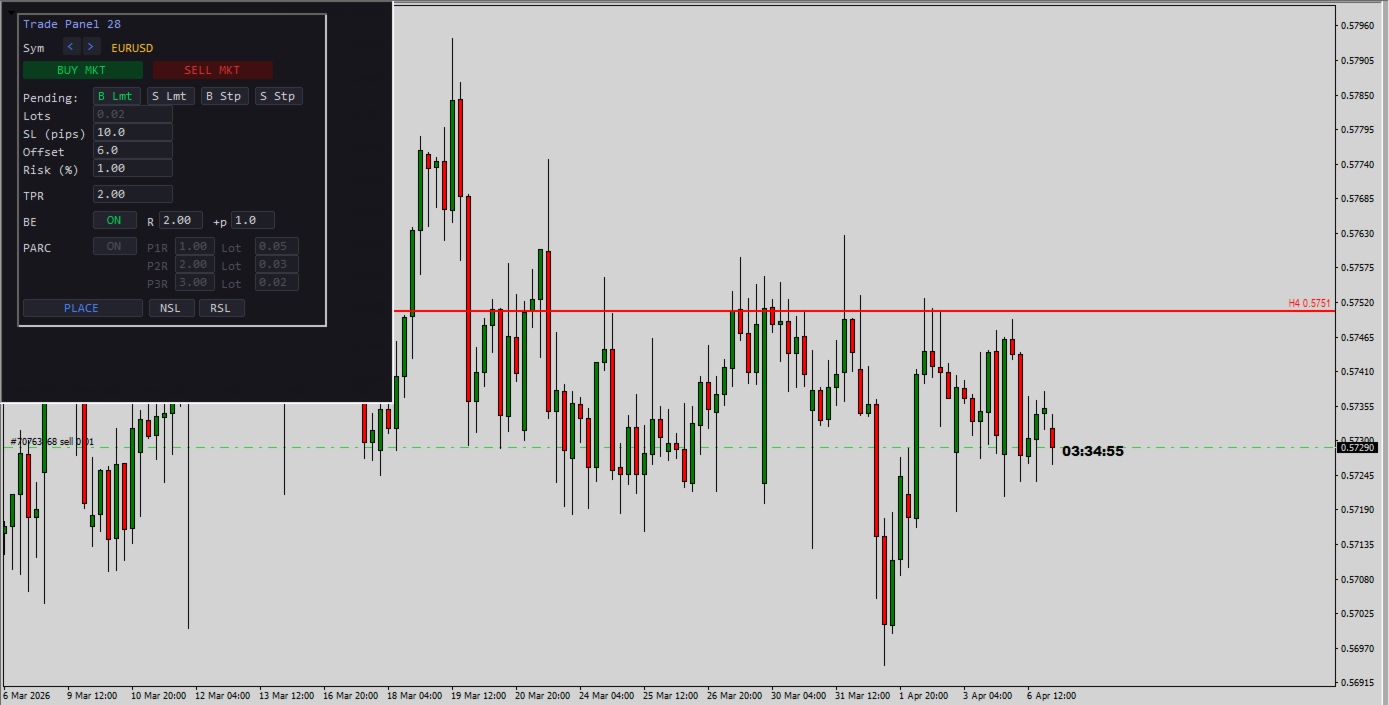
Trade 28 forex pairs from a single on-chart panel — with automatic lot sizing, split entries, auto break-even, and stealth SL management.
Order Panel 28 is a precision execution tool built for manual traders who want full control over their entries while eliminating the repetitive calculations that slow you down and cause mistakes. No indicators, no black-box signals — just a clean, fast panel that does the math so you can focus on your analysis.
WHY ORDER PANEL 28?
Manual trading means making your own decisions. But calculating lot size, splitting entries across multiple take-profits, and managing break-even levels by hand is tedious and error-prone — especially when you're watching multiple pairs. This panel solves that.
Attach it once to any chart. Select any of the 28 major and cross pairs directly from the panel. Execute instantly.
KEY FEATURES
Multi-Pair Execution (28 Pairs) Switch between all major and cross pairs without changing charts. The panel auto-detects your broker's symbol prefix and suffix (e.g., EURUSDm, EURUSD.pro) — no manual configuration needed.
Automatic Lot Sizing by Risk % Enter your risk percentage and your SL in pips. The panel calculates the exact lot size based on your account balance, pip value, and broker lot step. No more spreadsheets or mental math. The lots field updates automatically — you just click and trade.
One-Click Market Execution BUY or SELL at market with a single click. SL and TP are placed instantly based on your configured pip distance and R:R ratio.
Pending Orders with Offset Place Buy Limit, Sell Limit, Buy Stop, or Sell Stop orders with a configurable pip offset from current price. Full pre-validation against your broker's stop level and freeze level to avoid order rejections.
Split Entry Mode (PARC) Divide your position into up to 3 partial orders (P1, P2, P3), each with its own take-profit expressed as a multiple of R. The panel automatically distributes your total lot size across the three legs and normalizes to your broker's lot step. This lets you scale out at different R:R levels while keeping your total risk constant.
Automatic Break-Even (BE) When price moves a configurable multiple of R in your favor, the panel automatically moves your stop loss to entry price plus an optional extra pip buffer. The BE engine respects your broker's STOPLEVEL and FREEZELEVEL restrictions, so it won't trigger invalid modification errors.
Stealth SL Management (NSL / RSL) Need to temporarily hide your stop loss from the broker? The NSL button removes the SL from all managed trades and stores the original level internally. RSL restores it instantly. While NSL is active, auto break-even is paused for those tickets to avoid conflicts.
Email Notifications on Rejected Orders If an order is rejected (insufficient margin, invalid stops, market closed, etc.), the panel can send you an email with a clear explanation — in plain language, not just error codes. Built-in cooldown prevents notification spam.
Built-In Safety
- Debounce protection on all action buttons (prevents double-click accidents)
- Input sanitization (negative values are automatically corrected)
- Entry/SL/TP pre-validation against broker restrictions before every order
- Automatic cleanup of internal data for closed tickets
PANEL FIELDS
| Field | Description |
|---|---|
| Sym | Pair selector (28 pairs, arrows to navigate) |
| Lots | Auto-calculated from Risk % and SL (read-only) |
| SL (pips) | Stop loss distance in pips |
| Offset | Distance from current price for pending orders (pips) |
| Risk (%) | Percentage of account balance to risk per trade |
| TPR | Take profit as a multiple of R (e.g., 2.0 = 2× your SL) |
| BE R | Move SL to break-even when price reaches this R multiple |
| BE +p | Extra pips added above entry when BE triggers |
| PARC P1/P2/P3 | Individual R targets and lot allocation per leg |
CONFIGURABLE INPUTS
- DefaultSL_Pips — Default stop loss in pips (default: 10)
- DefaultR — Default R:R ratio for TP (default: 2.0)
- DefaultOffsetPips — Default offset for pending orders (default: 6.0)
- RiskPercent — Default risk per trade as % of balance (default: 1.0%)
- ModePendingPartials — Allow pending orders in PARC mode (default: OFF, market only)
- NotifyByEmailOnErrors — Send email on order rejection (default: ON)
HOW TO USE
- Attach the EA to any chart.
- Select your pair using the < > arrows.
- Set your SL in pips and your Risk %. Lots are calculated automatically.
- Set your TPR (R:R target).
- Click BUY MKT or SELL MKT for instant market execution.
- For pending orders: choose the type (B Lmt / S Lmt / B Stp / S Stp), set the Offset, and click PLACE.
- Enable PARC to split your entry into 3 partial positions with different TP targets.
- Enable BE and configure the R trigger and extra pips for automatic break-even management.
REQUIREMENTS
- MetaTrader 4
- For email notifications: configure SMTP under Tools → Options → Email
- Works with any broker — auto-detects symbol naming conventions
IDEAL FOR
- Price action traders who execute manually
- Traders managing multiple pairs from a single chart
- Anyone who wants precise risk control without calculator tools
- Scalpers and swing traders who scale out with partial take-profits
Built by a trader, for traders. No indicators. No signals. Just clean, fast, precise execution.