NoBreach Prop Protector

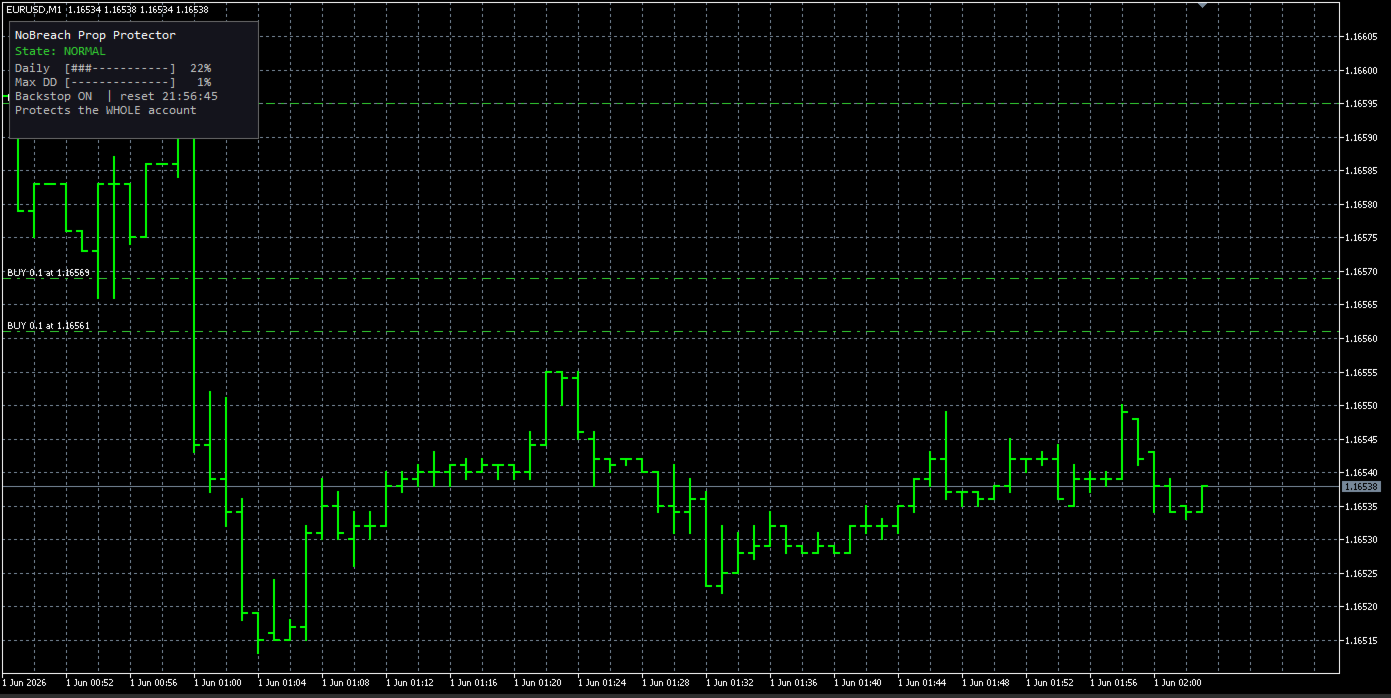
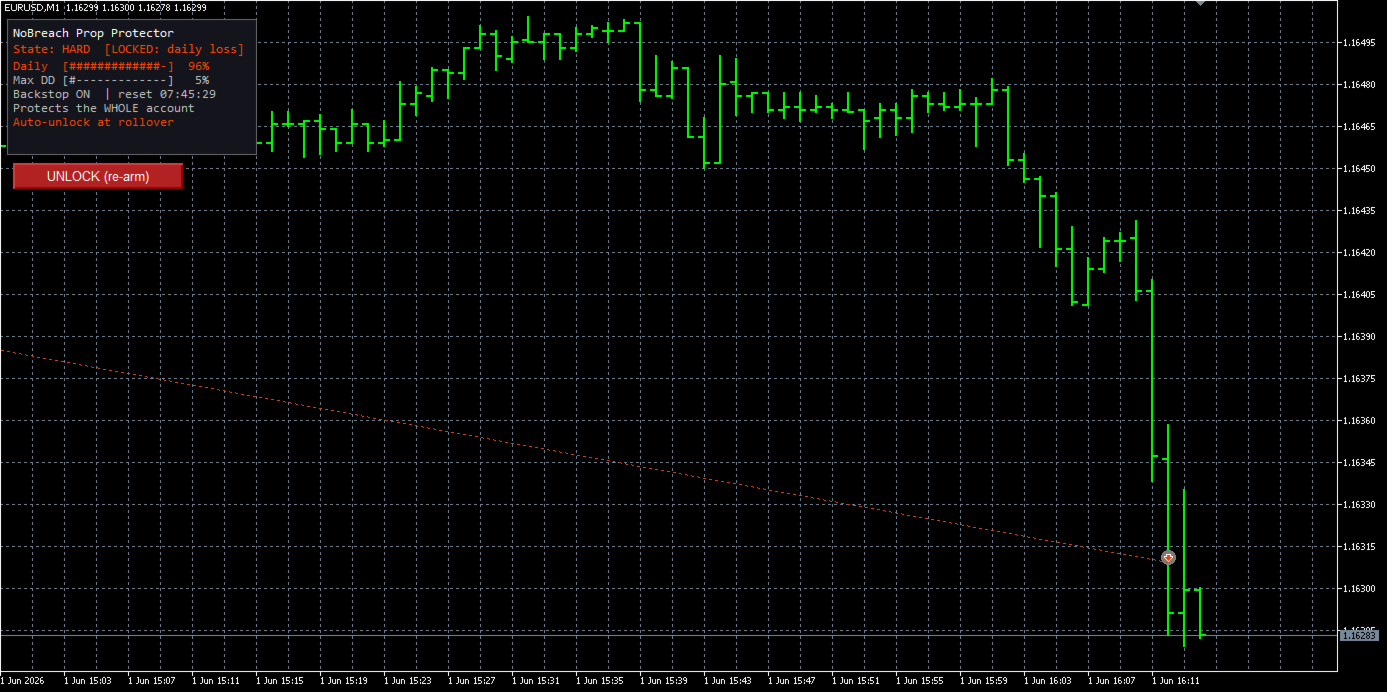
NoBreach Prop Protector watches your account's daily loss and total
  drawdown and de-risks gradually in three stages — instead of the usual
  all-or-nothing "close everything at the limit".

  What makes it different

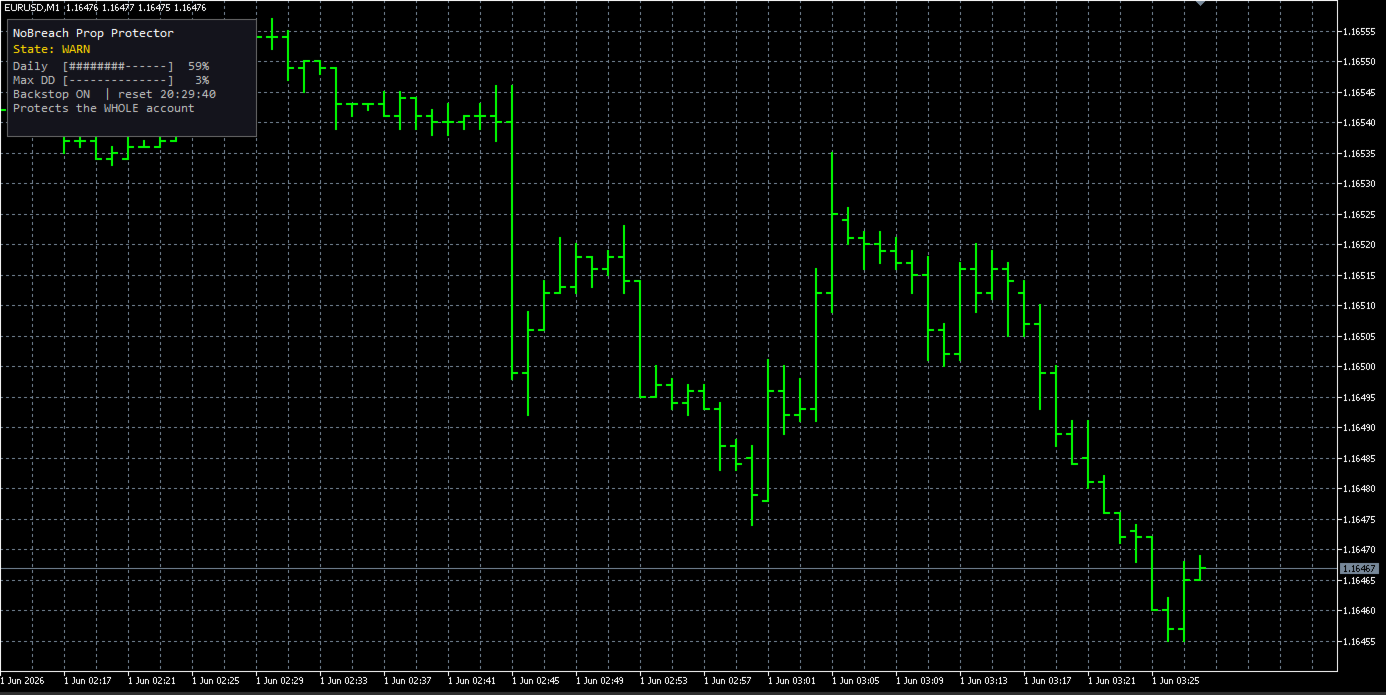
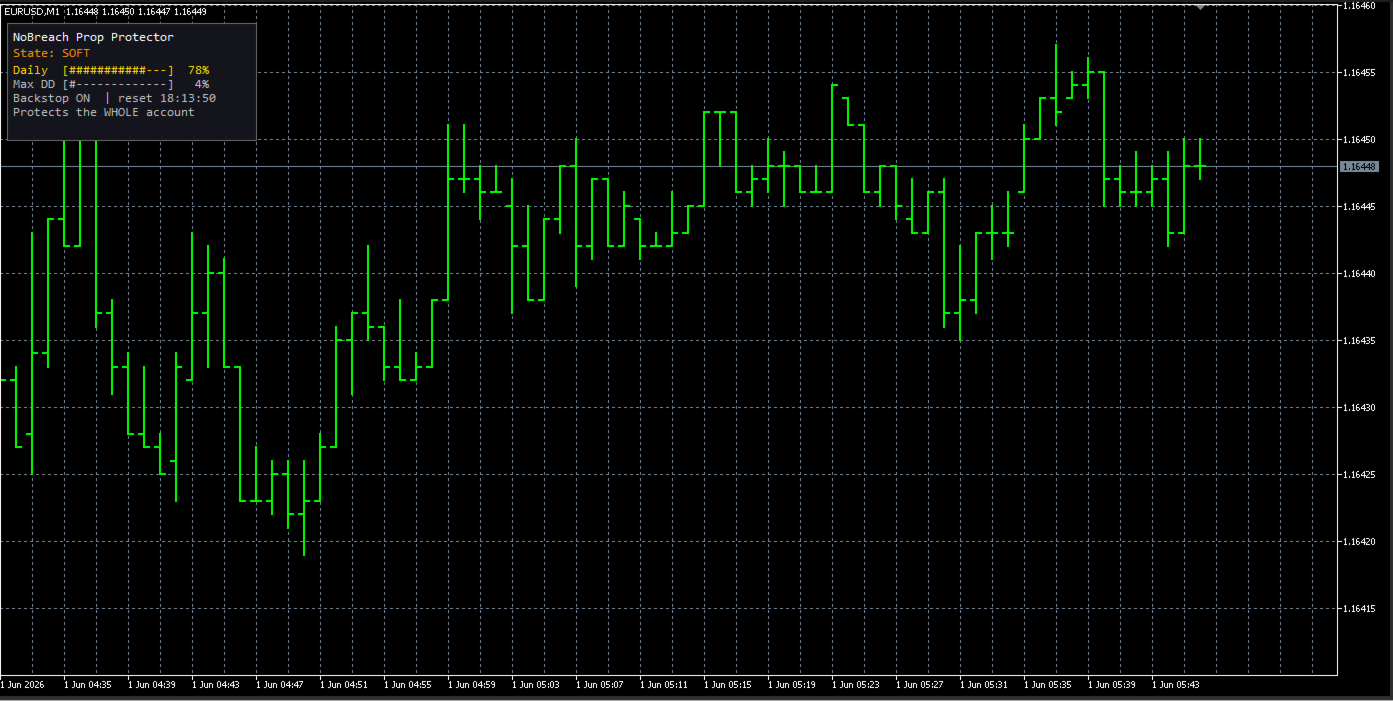
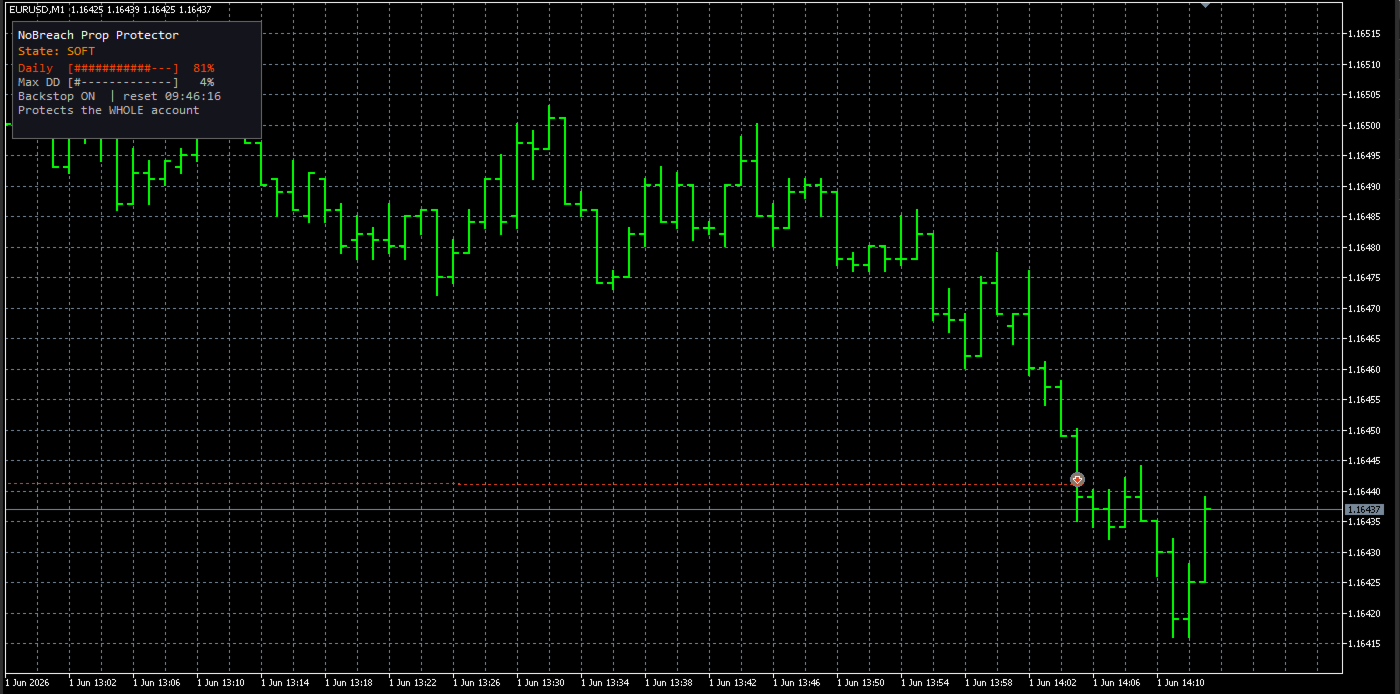
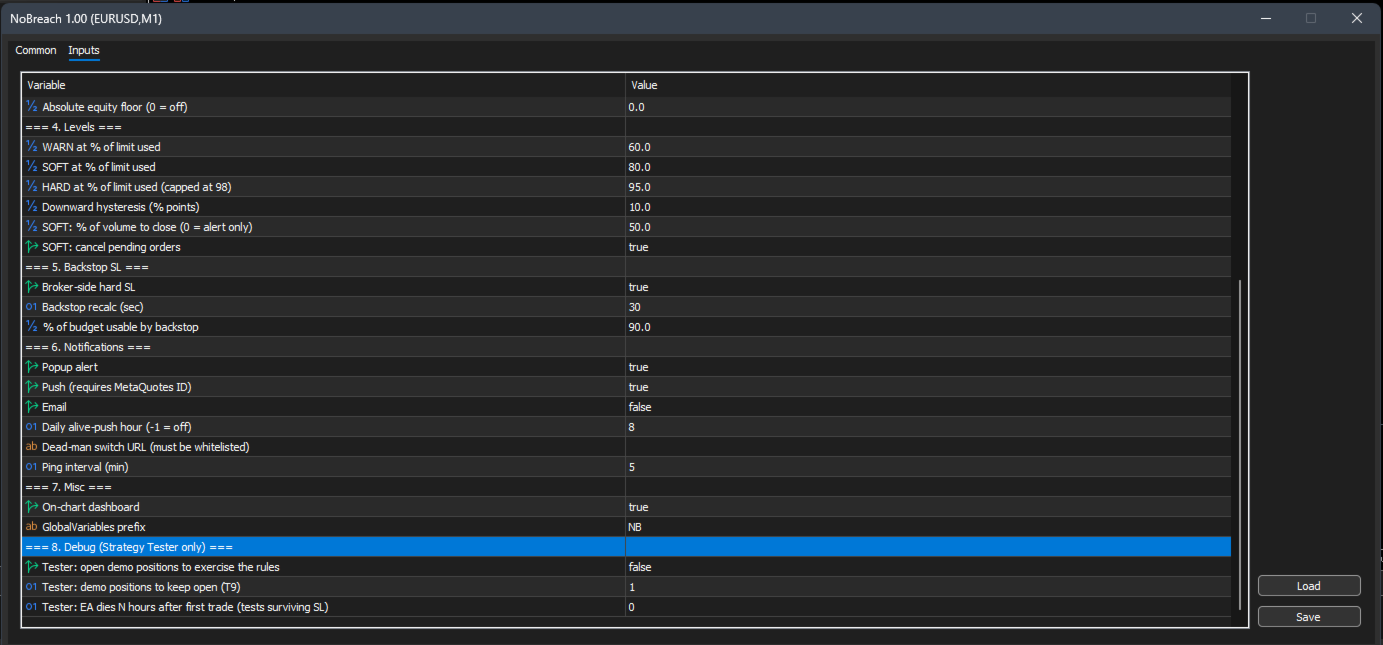
  1. Three-stage protection, not a binary kill switch. WARN notifies you,
  SOFT reduces exposure, HARD closes everything and locks trading until the
  daily reset. You get slowed down before the limit, not executed at it.

  2. Broker-side backstop. The EA continuously maintains native stop-loss
  orders on every open position, sized so that the total worst-case loss stays
  inside your remaining budget. If your PC crashes, your VPS dies or the
  terminal hangs, the stops are already sitting on the broker's server.
  Most protectors stop protecting the moment the terminal goes dark.

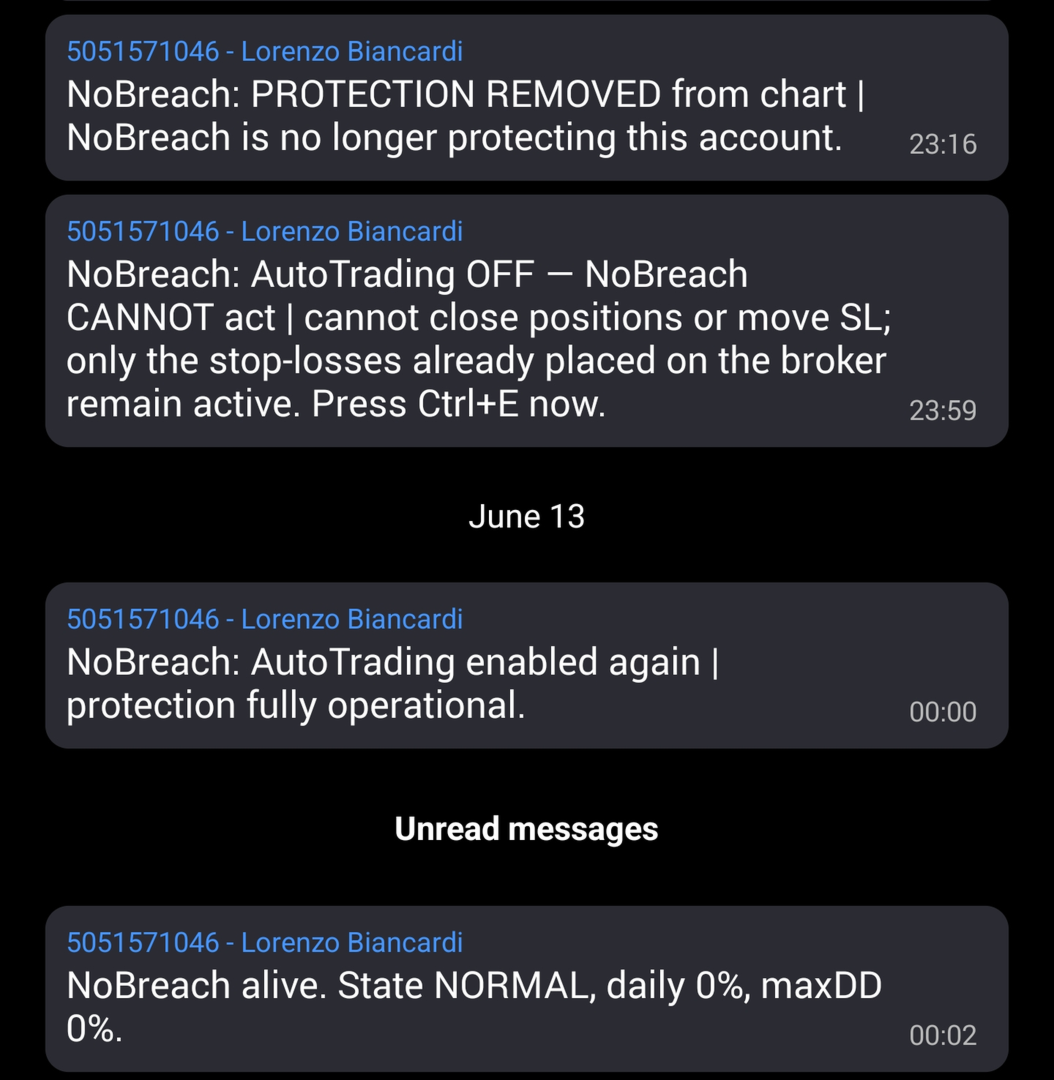
  3. A watchdog for the watchdog. Daily "I am alive" push notification,
  AutoTrading-disabled alert, and an optional dead-man-switch ping to any
  uptime-monitoring service: if the protection itself stops running, you find
  out immediately — not after a breach.

  Features

  - Daily loss limit and total drawdown limit, each as percent or account currency
  - Daily reset anchored to broker server-time rollover, with configurable
    offset for prop firms that reset at CE(S)T midnight (FTMO preset included)
  - Protects the entire account: every position, every symbol, no matter which
    EA or manual trade opened it
  - Instance lock: one running copy per account, accidental duplicates are
    blocked with a clear alert
  - State persists across restarts: peak equity and daily anchor survive
    crashes and reboots
  - On-chart dashboard: limit consumption, current state, time to reset
  - Notifications: popup, push (MetaQuotes ID), email

  What it is not

  - It does not open trades and contains no trading strategy.
  - No tool can guarantee a limit is never exceeded (weekend gaps and slippage
    can move price beyond any stop). The broker-side stops reduce this risk;
    they cannot eliminate it.

  Want to try the approach first? The free version applies the daily-loss
  rule with close-all protection: https://www.mql5.com/en/market/product/181174
Önerilen ürünler
Overview Breakout Meter is a price action tool that identifies key breakout zones based on recent daily price activity. It highlights areas where momentum is likely to trigger, helping traders anticipate breakouts or reversals with minimal configuration. How It Works The EA analyzes a user-defined number of recent daily candles and marks high and low zones where price has shown strong reactions. It automatically updates levels with new data and removes outdated zones to keep charts clear. Users
TradingX Hotkeys
Johannes Stephanus Lombard
Inputs Available Lotsizes Partial Close % You can change lotsizes as you require On an open chart click once to select chart to be able to use hotkeys on specific chart. All Pairs can be used with this expert We created this expert to be able to still trade C300 with a 0.06 Lotsize If you enter a 0.6 lot and close 0.90% you can trade with 0.06 Lot Keys to be used: B -Buy S -Sell C -Close Profitable D -Breakeven (Note if stoploss is set it won't break even) P -Partial close X -Close all
25R - WASD Order is a visual risk management EA for MetaTrader 5 that combines gaming-style WASD keyboard controls with interactive chart drawing for precise order placement. Designed for active traders who value speed and accuracy, it lets you visually plan trades by dragging entry and stop-loss lines directly on the chart, while automatically calculating position size based on your risk percentage. The tool displays color-coded profit/loss zones with real-time risk metrics, supports automatic
This EA help trader to manage his pending orders, when you place many Pending Orders this utility monitor them and when of them get filed (executed) the EA cancel and delete all rest of pending orders, to avoid  opening of all of pending orders at the same time , and lose your risk management. this utility is very useful for trader when he /she is not available on the desk.
This QuickClose help you to close all orders having profit immediately with only ONE CLICK, its work is very fast. You can choose which symbol you want or close all symbols so it will helpful for you in your trading to manage trading faster. This EA can quick close all Buy and Sell Orders by a selected symbol or total, And delete all pending orders. This SymbolButton is designed for closing orders. There is available Manual and Automatic closing functions. Automatic closing function will close t
Telegram to MT5 Pro — Advanced Telegram Signal Copier with Auto-Fix, Multi-TP, Risk Control and Full Trade Management Telegram to MT5 Pro — Profesyonel Telegram Sinyal Kopyalayıcı Telegram to MT5 Pro, Telegram’dan gelen sinyalleri MetaTrader 5 hesabına otomatik olarak doğrudan uygulayan yüksek performanslı bir trade kopyalayıcıdır ve risk, işlem yürütme ve trade yönetimi üzerinde tam kontrol sağlar. Sistem iki bileşenden oluşur: • MetaTrader 5 içinde çalışan Expert Advisor (EA) • Telegram’a bağ
Close All Pro MT5 – Fast PnL Control is a powerful trade manager MT5 utility that gives you total control over your trades. With a single click, you can close all MT5 orders, monitor real-time profit and loss, and manage your floating PnL directly from a clean on-chart panel. The tool is lightweight, responsive, and built to help traders save time, reduce emotional stress, and maintain focus. Whether you trade manually or through an EA, this MT5 profit panel provides the visibility and precisio
Superior Telegram Signals Copier MT5 automatically copies trading signals from your Telegram channels or groups straight to your MetaTrader 5 account. It reads the signal text, works out the symbol, direction, entry, stop loss and take-profit levels, sizes the position under your own risk rules, and sends the trade to MT5 within moments of the message arriving — no manual reading, typing or guessing during fast markets. The software is two parts working together: a desktop app that connects to
Simple Risk Tool — trade with a FIXED money risk, always. Stop calculating lot sizes by hand. Type the amount you accept to lose, place your BUY or SELL lines, drag your Stop Loss anywhere on the chart — the lot size recalculates instantly while your money risk never changes. HOW IT WORKS — 3 STEPS 1. Set the amount you want to risk (in your account currency). 2. Select your direction: BUY LINES or SELL LINES instantly draws draggable Stop Loss / Entry / Take Profit lines at the current char
This Expert Advisor monitors all open positions across all symbols in MetaTrader 5. Whenever a Stop Loss (SL) or Take Profit (TP) is manually set or adjusted on any position, the EA automatically applies that value to all other open positions , regardless of symbol or order type (Buy/Sell). This ensures consistent and synchronized SL and TP levels across your account. Perfect for mobile trading via tablet or smartphone!
Hybrid Assisted Trading Engine Manual Trading. Machine Discipline. The Hybrid Assisted Trading Engine is an institutional-grade manual trade management system designed to protect traders from emotional mistakes — without taking control away from them. You decide when to enter . The engine decides how the trade is managed . What It Does This system continuously monitors your manual trades and enforces professional-level trade management rules in real time: Smart Breakeven logic R-based trai
Bu danışman, tek bir tıklamayla birden fazla çiftte işlem yapmanıza olanak tanıyan bir kontrol panelidir. Tıklamak       açık       Bu düğme seçilen çift için bir emir açar. Tıklamak       kapalı       Bu buton seçilen çiftin emrini kapatır. Sipariş lotu kullanıcı tarafından girilen sayıdır. Pozitif sayılar alış emirlerine, negatif sayılar ise satış emirlerine karşılık gelir. Siparişin yalnızca bir kısmını değil tamamını kapatmak için   Kapat düğmesini   tıklayın. Nihai işlem bilet numarasına b
EA PERFORMANCE TERMINAL — everything on one screen. Every robot on your account, what each one is doing to your balance, and the months that got you here, drawn over your chart instead of buried in a report. A balance is an average, and averages hide things. One robot can quietly cover another's losses for months while the equity curve still looks calm. This reads your closed trades and splits that single number back apart, by Magic Number. A free edition is available, and it runs on a live char
EA Total Close Trade Manager MT5 Manage existing MetaTrader 5 positions from one dashboard. EA_TOTAL_CLOSE is a position, TP/SL, and trade-management utility designed for MetaTrader 5 hedging accounts. It is intended for traders who open positions manually or through other trading systems and want a structured way to close, protect, and manage existing positions without handling every position one by one. From one dashboard, you can manage position groups, apply Break Even, set or remove TP/SL l
Manual Trade Panel PRO for MT5 Product name **Manual Trade Panel PRO for MT5** Short description Advanced manual trading panel for MetaTrader 5 with BUY/SELL and BUY LIMIT/SELL LIMIT execution, balance-based lot sizing, automatic SL/TP, Break Even, trailing stop, partial close, candle timer, and open position pips counter. Full sales description **Manual Trade Panel PRO for MT5** is an advanced Expert Advisor designed for manual and semi-automatic trading in MetaTrader 5. The EA creates a c
Scale & Trail Trade Manager (MT5) Your all-in-one solution for   precision trade execution and management . With just two clicks, you can size, place, and manage trades effortlessly—no calculators, no guesswork, no stress. Workflow Click 1:   Set your entry — instantly snaps to the live market price. Move Mouse:   Preview your stop-loss and four profit targets (1R–4R) in real time. Click 2:   Lock it in — the tool sizes your trade to your exact dollar risk (e.g., $3350) and manages it automatica
MT5 Chart Replay Rewind the Market. Replay Every Trade You Took. Review Every Decision . Have you ever wished you could rewind the candlesticks on your chart and the trades you took and watch the market unfold again ? Perhaps you wanted to see exactly where a trade started going wrong, identify the setup you missed, or revisit a period when your strategy was perfectly aligned with market structure. Introducing MT5 Chart Replay  — a professional MetaTrader 5 chart replay engine designed to help t
KS Hotkey Trading Panel Pro, hızlı klavye tabanlı işlem yapma imkanı ve grafik üzerinde tıklanabilir bir kontrol paneli sunan bir MetaTrader 5 Expert Advisor'ıdır. Temel Özellikler Kısayol tuşuyla işlem yapma — Şu işlemler için tek tuşla komut verme: Piyasa Fiyatından Alış / Satış (Market Buy / Sell) Buy Limit / Sell Limit Buy Stop / Sell Stop Tüm pozisyonları kapatma Sadece Alış (Buy) pozisyonlarını kapatma / Sadece Satış (Sell) pozisyonlarını kapatma Bekleyen tüm emirleri silme Lot bo
Operative Management Pro – Advanced Trading Utility Operative Management Pro is a smart visual tool for traders who want to analyze and simulate their trades before placing them on the market. This panel displays in real-time the most important parameters of the current symbol: Current price and minimum lot size Required margin Spread cost in USD and pips Take Profit and Stop Loss value in USD Automatic risk and reward calculation With just a click on the chart, you can simulate BUY or SELL t
Check an MQL5 signal before you subscribe. A signal can look convincing on the provider page and still be a poor fit for your account. Different symbol names, minimum lots, leverage, hedging or netting, copy latency and a fixed monthly fee can materially change what happens on your account. MT5 Signal Sentinel is not a trading robot and not a signal. It does not trade. It analyzes available data and explains technical and historical risks in plain language. Why this tool was created Many problem
The Utilitarian Platform is designed to quickly open a position with established orders, as well as the ability to automatically hedge or shift an order to close a position when losses are stopped. Automatic Increase of a profit taking order when hedging a position. It is possible to enable the automatic increase of the corridor when hedging a position. There is a built-in panel for placing orders to open positions. The order size, step tracking are established in paras.
Copilot Trader AI
Abdeljalil El Kedmiri
5 (2)
Copilot Trader AI   is a revolutionary EA that brings the power of DeepSeek AI directly into your MT5 charts. With just one click and an API key costing less than $0.0005 per analysis, you get professional-grade market analysis, pattern detection, and trade levels drawn automatically on your chart. In the Comments section, you will find market analysis, trading scenarios, and results from live opportunities... Update to version 2.1 : Auto-Trading is now enabled Enable Auto-Analysis and select th
# ApexForge One Click Close EA ## Overview **ApexForge One Click Close EA** is a lightweight, non-blocking trading utility that allows you to close all matching positions—and optionally delete pending orders—with a single click. Instead of manually closing trades one by one during volatile markets, this EA provides a fast, reliable, and visually clear way to manage your exposure instantly. > ️ This tool does not generate trading signals or open positions automatically. It is designed purely
FREE
Kaynaklar ve Hızlı Bağlantılar Demo Sürümünü İndir PropFirm Risk Guard , işlem hesabınızda katı risk yönetimi ve sermaye koruma protokollerini uygulamak için tasarlanmış gelişmiş bir yardımcı araçtır. Otomatik bir uyumluluk katmanı olarak çalışır ve özsermayenizin önceden tanımlanmış günlük ve genel düşüş (drawdown) limitleri içinde kalmasını sağlar. Sıkı düşüş kuralları olan hesaplar, fonlu hesap değerlendirmeleri (prop firm testleri) ve profesyonel sermaye yönetimi gereksinimleri için ideal
Pointer synchronization MT5 is an indicator with which the pointer can be synchronized in all the visible graphics of the terminal. It shows a cross cursor on all the visible graphics of the terminal, in position relative to the cursor of the active graph. To activate the indicator, simply press the button that appears in one of the corners of the chart once the indicator is added to the chart. To deactivate the indicator, simply press the button again. Once the indicator has been deactivated,
Session Panel for MT5 Session Panel is a free MT5 indicator that gives you a fast and convenient live overview of the major trading sessions directly from the chart. Monitor Tokyo, London, and New York session times, see which session is currently active, track countdowns to the next session, and view session overlap information in one compact dashboard. Built for traders who want better market timing, clearer session awareness, and a cleaner chart workflow in live market conditions. Session Pan
FREE
Crystal Trade Manager – Advanced MT5 Risk and Trade Control Utility Overview Crystal Trade Manager (CTM) is a professional MetaTrader 5 utility designed for risk management, trade automation, and instant execution control. It provides traders with an integrated system for protecting equity, managing daily drawdowns, controlling lot sizes, and applying automation features such as automatic SL/TP, break-even, and trailing stop. The tool is suitable for manual traders, prop-firm challenge particip
This is a utility designed to automatically set the stop loss levels of orders according to the specified condition. Two price levels serve as the condition for setting stop loss: Trigger level - when this level is reached, an order is placed. The stop loss value of an order. It is possible to enable or disable traling stop loss. Input parameters Order type for execution - type of orders to be processed by the expert. It can either be BUY, SELL or auto-select. Trigger Level Points - level to pl
The Synchronized Cross indicator allows you to link cross hairs from multiple chart windows. This means that as you move the cross hair in one chart, all other cross hairs will move together by automatically staying on the same time. If, for example you are moving your mouse cursor in a M5 timeframe (see screenshots), the crosshair will show as a line in the higher timeframes, and as an area in the lower timeframes. Thus making it easier to correlate timeframes. The input parameters are self exp
Horizontal Line Trade Assistant EA  Semi-Automated Trading Assistant      IMPORTANT :     On the main/purchased program a user can click on the Horizontal line and change it to Buy or Sell, and drag by double clicking on it. Please keep in mind that this option is not available on demo version, due to some restrictions/limitations of Strategy Tester, some Object related operations are not available in the  Strategy Tester. But, it will not prevent you from Testing, please drop an Object to chart
Bu ürünün alıcıları ayrıca şunları da satın alıyor
Trade Assistant MT5
Evgeniy Kravchenko
4.43 (215)
It helps to calculate the risk per trade, the easy installation of a new order, order management with partial closing functions, trailing stop of 7 types and other useful functions. Additional materials and instructions Installation instructions - Application instructions - Trial version of the application for a demo account Line function -   shows on the chart the Opening line, Stop Loss, Take Profit. With this function it is easy to set a new order and see its additional characteristics bef
Trade Manager EA’ye hoş geldiniz! Ticaretin daha sezgisel, hassas ve verimli hale gelmesi için tasarlanmış nihai risk yönetim aracı ile tanışın. Bu sadece bir emir verme aracı değil; ticaret planlaması, pozisyon yönetimi ve risk kontrolü için kapsamlı bir çözüm. İster yeni başlayan bir yatırımcı olun, ister deneyimli bir trader ya da hızlı emir gerektiren bir scalper, Trade Manager EA ihtiyaçlarınıza uyum sağlar ve forex, endeksler, emtialar ve kripto paralar dahil tüm piyasalarda esneklik sunar
Farmed Hedge Yield Farming | All Markets (Manual - Hybrid - Semi/Automated EA) VERIFIED TRADING RESULTS - Farmed Hedge Yield Axi Copy:  https://www.mql5.com/en/signals/2356376 - Farmed Hedge Yield Exn Copy:   https://www.mql5.com/en/signals/2356404 - Farmed Hedge Yield V Copy:  https://www.mql5.com/en/signals/2357156 IMPORTANT NOTICE: FarmedHedge is a MANUAL-FOCUSED TRADING UTILITY ,not a fully automated EA. Results shown on this Signal include manual trades and overall strategic management.
Local Trade Copier EA MT5
Juvenille Emperor Limited
4.94 (148)
Local Trade Copier EA MT5, aynı Windows bilgisayarı veya Windows VPS üzerinde çalışan birden fazla MetaTrader 5 hesabı arasında işlemleri kopyalamak ve yönetmek için hızlı ve esnek bir işlem kopyalayıcıdır. Yerel işlem senkronizasyonunu, Receiver tarafında lot büyüklüğü, risk yönetimi, işlem filtreleme, sembol eşleştirme, işlem yönetimi ve hesap koruması kontrolleriyle birleştirir. Transmitter ve Receiver terminallerinizi yaklaşık 1 dakika içinde ayarlayın ve aynı veya farklı brokerlardaki hesa
Beta Sürümü Telegram to MT5 Signal Trader resmi alfa sürümüne neredeyse hazır. Bazı özellikler hâlâ geliştirilmekte olup küçük hatalarla karşılaşabilirsiniz. Sorun yaşarsanız lütfen bildirin, geri bildiriminiz yazılımın herkes için gelişmesine yardımcı olur. Telegram to MT5 Signal Trader , Telegram kanallarından veya gruplarından gelen işlem sinyallerini otomatik olarak MetaTrader 5 hesabınıza kopyalayan güçlü bir araçtır. Herkese açık ve özel kanalları destekler ve birden fazla sinyal sağlayıc
Telegram to MT5 Multi-Channel Copier   , Telegram kanallarınızdaki alım-satım sinyallerini doğrudan MetaTrader 5'e otomatik kopyalar. Bot yok, tarayıcı uzantısı yok, elle kopyalama yok. Sinyal Telegram'a düşer ve EA birkaç saniye içinde terminalinizde işlemi açar. Ve bir kanalı kopyalamadan önce, yerleşik backtester o kanalın hesabınızda ne yapmış olacağını gösterir. Ürün iki bileşenden oluşur: Telegram kanallarınızı dinleyen bir Windows uygulaması ve sinyalleri MT5 terminalinizde yürüten bu Exp
================================================================================ POC BREAKOUT - V20.72. Full Professional Grade Toolkit ================================================================================ POC Breakout is a full MetaTrader 5 trading dashboard for discretionary traders who want breakout signals, Point of Control (POC) context, volume profiles, order flow, market structure, news, alerts, and advanced trade planning in one professional workspace. Attached directly to you
TradePanel MT5
Alfiya Fazylova
4.88 (167)
Trade Panel, çok işlevli bir ticaret asistanıdır. Uygulama, manuel ticaret için 50'den fazla ticaret fonksiyonu içerir ve çoğu ticaret görevini otomatikleştirmeyi mümkün kılar. Uygulama talimatları + video talimatları: https://www.mql5.com/en/blogs/post/772292 Demo hesabı için uygulamanın deneme sürümü: https://www.mql5.com/en/blogs/post/750865 Uygulamayı nasıl kurulur: https://www.mql5.com/en/blogs/post/756239 Uygulamayı görsel modda nasıl test edilir: https://www.mql5.com/en/blogs/post/770277
Premium Trade Manager - İçine Koç Yerleştirilmiş İşlem Paneli Premium Trade Manager , grafiğinizin içine bir trading koçu yerleştirir; altında tam bir yürütme motoru çalışır. İşlemi her zamanki gibi kurun, ardından yapay zeka trading koçunuz Max, o kurulumu tam olarak okusun ve canlı hesabınıza göre taahhüt etmeden önce size net bir değerlendirme sunsun: stop disiplinli bir yaklaşıma uyuyor mu, risk büyüklüğü makul mü, yüksek etkili bir haber dakikalar sonra mı geliyor, prop firm limitinize yakl
25% discount on the release of the tool: only for the next 3 buyers Send a message to receive a demo version. AstroTrade Trading Assistant AstroTrade is a comprehensive multi-functional trading utility developed for the MetaTrader 5 platform. It integrates essential tools for trade execution, risk management, and technical monitoring into a single unified interface. The application is designed to assist traders in managing their daily operations through a visual and structured environment. Vi
Exp COPYLOT CLIENT for MT5
Vladislav Andruschenko
3.97 (35)
MetaTrader 5 için profesyonel işlem kopyalayıcı MetaTrader için hızlı, profesyonel ve güvenilir bir işlem kopyalayıcı . COPYLOT , MT4 ve MT5 terminalleri arasında Forex işlemlerini kopyalamanıza olanak tanır ve Hedge ile Netting hesaplarını destekler. COPYLOT MT5 sürümü şunları destekler: - MT5 Hedge → MT5 Hedge - MT5 Hedge → MT5 Netting - MT5 Netting → MT5 Hedge - MT5 Netting → MT5 Netting - MT4 → MT5 Hedge - MT4 → MT5 Netting MT4 sürümü Tam açıklama + DEMO + PDF Nasıl satın alınır Nasıl kurul
Welcome to ENTRY IN THE ZONE WITH SMC MULTI TIMEFRAME Entry In The Zone and SMC Multi Timeframe is a real-time market analysis tool based on Smart Money Concepts (SMC), designed to analyze market structure, price direction, and key trading zones. It supports both Single-Timeframe Analysis and Multi-Timeframe Analysis, providing a clearer view of the overall market structure across multiple timeframes, with real-time BUY / SELL signals that do not repaint. It is designed to help filter trading op
HINN MAGIC ENTRY – the ultimate tool for entry and position management! SIMPLE. FASTEST. INTUITIVE. MAX AUTOMATED. Place orders by selecting a level directly on the chart! full description   ::  demo-version  :: 60-sec-video-description Key features: - Market, limit, and pending orders - Automatic lot size calculation - Automatic spread and commission accounting - Unlimited partitial take-profits  - Breakeven and trailing stop-loss and take-profit  functions - Invalidation leves - Intuitive, a
EA Overfitter
Stephen J Martret
5 (1)
That backtest looks great. But will it still be making money tomorrow, next week, next month? EA Overfitter re-runs your EA on 100 price histories it has never seen. One score tells you if the edge is real. A backtest tells you what an EA did on one price history — the one that happened to occur. What you cannot tell from it is how much of that result was the strategy and how much was the particular path. EA Overfitter answers that. It builds up to 100 synthetic price histories your EA has n
Signal TradingView to MT5 Pro Automator TradingView ve MetaTrader 5 arasında anında profesyonel uygulama TradingView alarmları ile MT5'teki gerçek uygulama arasındaki en güçlü iletişim köprüsüyle ticaret stratejinizi otomatikleştirin. Hız, esneklik ve kusursuz risk yönetimi talep eden yatırımcılar için tasarlanan bu Uzman Danışman (Expert Advisor), herhangi bir alarm mesajını hassas bir piyasa (market) veya limit emrine dönüştürür. GÜÇLÜ YÖNLER VE AVANTAJLAR Evrensel Ayrıştırma Motoru (Tescilli)
Your EAs cannot see each other, but Anchor can. Anchor gives you one place to coordinate your EAs, manage risk, and decide when trading is allowed. It works alongside the trading bots you already use without any changes to them. The Problem One EA opens a trade. Then another starts trading. The next thing you know, you wake up to multiple grids built across your account. Each EA may be doing exactly what it was designed to do, but together they can place far more risk on your account than you in
MT5 to Telegram Signal Provider , hesabınızı bir sinyal sağlayıcı haline getirerek belirtilen sinyalleri Telegram'ın sohbetine, kanalına veya grubuna göndermeyi sağlayan kullanımı kolay, tamamen özelleştirilebilir bir araçtır. Rakip ürünlerin çoğunun aksine, DLL içe aktarması yapmaz. [ Demo ] [ Kılavuz ] [ MT4 Versiyonu ] [ Discord Versiyonu ] [ Telegram Kanalı ]  New: [ Telegram To MT5 ] Kurulum Adım adım bir kullanıcı kılavuzu mevcuttur. Telegram API'si hakkında bilgi gerekmemektedir; ihtiyac
Power Candles Strateji Tarayıcısı - Kendi Kendini Optimize Eden Çoklu Sembol Kurulum Bulucu Power Candles Strateji Tarayıcısı , Power Candles göstergesini çalıştıran aynı kendinden optimize edici motoru, Piyasa İzleyicinizdeki her sembol üzerinde yan yana çalıştırır. Tek bir panel, şu anda istatistiksel olarak hangi sembollerin işlem yapılabilir olduğunu, her birinde hangi stratejinin kazandığını, en uygun Stop Loss / Take Profit çiftini gösterir ve yeni bir sinyal geldiği anda size bildirim gön
The product will copy all telegram signal to MT5 ( which you are member) , also it can work as remote copier.  Easy to set up, copy order instant, can work with almost signal formats, image signal,  s upport to translate other language to English Work with all type of channel or group, even channel have "Restrict Saving Content", work with  multi channel, multi MT5 Work as remote copier: with signal have ticket number, it will copy exactly via ticket number. Support to backtest signal. How to s
Seconds Chart - MetaTrader 5 için saniye bazlı grafikler oluşturmanıza olanak sağlayan eşsiz bir araçtır. Seconds Chart sayesinde saniye cinsinden zaman dilimleriyle grafik oluşturabilir, standart dakika veya saatlik grafiklerde mümkün olmayan esneklik ve analiz hassasiyetine ulaşabilirsiniz. Örneğin, S15 zaman dilimi 15 saniyelik mum çubuklarını ifade eder. Desteklenen özel sembollerle herhangi bir gösterge ve danışman kullanabilirsiniz. Onlarla çalışmak, standart grafiklerde işlem yapmak kadar
Footprint Chart Pro — Professional OrderFlow EA for MetaTrader 5 Version 6.34 | Professional tool for real traders | Institutional-Grade Visualization DEMO USERS - PLEASE SELECT EVERY TICK / REAL TICK WHEN TESTING AND YOU HAVE DOWNLOADED HISTORICAL DATA. IF YOU SEE A WAITING SCREEN AND IT IS NOT DOWNLOADING, IT MEANS YOU HAVE LOW HISTORICAL DATA. TRY 1 MIN AND 5 MIN FIRST ON 1 DAY DATA. ONE DAY DATA SHOULD BE THE NEWEST AND MOST CURRENT DATE. PLEASE WAIT UNTIL THE MARKET HAS ROLLED OVER PERIOD.
Timeless Charts
Samuel Manoel De Souza
5 (8)
Timeless Charts, profesyonel yatırımcılar için hepsi bir arada bir trading aracıdır. Saniye Grafikleri ve Renko gibi özel grafik türlerini, Footprints , Clusters , Hacim Profilleri , VWAP çalışmaları ve gelişmiş piyasa analizi sağlayan sabitlenmiş analiz araçlarıyla gelişmiş emir akışı analiziyle birleştirir. İşlem ve pozisyon yönetimi, entegre işlem yönetim paneli aracılığıyla doğrudan grafik üzerinden gerçekleştirilirken, Market Replay ve Sanal Hesaplar trading becerileri ve stratejileri üzeri
Trade Copier Ultimate
Janitha Sandaruwan Amaradasa Wickramasingha Arachchilage
5 (5)
Trade Copier Ultimate - Telegram to MT5 Signal Copier Trade Copier Ultimate automatically copies Telegram trading signals into MetaTrader 5. The EA can read signal messages, detect the symbol, order type, entry price, Stop Loss, Take Profit levels and selected update commands, then execute or manage the trade in MT5 using your lot and risk settings. It is more than a basic Telegram to MT5 copier. TCU also supports Bot API and user-account Bridge workflows, Discord signal routing, local MT5 to MT
Trade Dashboard simplifies how you open, manage, and control your trades, with built-in lot size calculation. It allows you to execute trades, manage risk, and control positions directly on the chart, with tools such as partial close, breakeven, and trailing stop. Designed to reduce manual work and help you stay focused on your trading decisions. A demo version is available for testing. Detailed explanations of features are provided within the MQL5 platform. Installation instructions are include
Risk Manager Pro MT5 is an account protection Expert Advisor for traders who want strict risk control inside MetaTrader 5. The utility monitors your account equity, daily and weekly results, drawdown, open positions, trade count, consecutive losses, and trading hours. When a configured limit is reached, it can automatically close positions, cancel pending orders, stop other EAs, send notifications, or close the terminal. Instead of relying on discipline during a stressful trading session, you de
Trade Indicator Assistant   is a powerful MT5 utility designed to turn indicators into automated trading systems. Its main feature is the ability to automatically detect an indicator’s   BUY and SELL signal buffers , without requiring you to know the buffer numbers, search through indicator settings, or modify the indicator source code. Bonus Indicator:   After purchasing Trade Indicator Assistant, contact me to receive   Trade Signal Pro   completely free as a bonus indicator. [Download Demo V
MetaTrader 5 için Trading Panel — grafik ve klavyeden profesyonel tek tıkla işlem kontrolü Aktif traderlar için geliştirilmiş güçlü bir Trading Panel; işlemleri standart MetaTrader arayüzüne göre çok daha hızlı açmanıza, yönetmenize ve kapatmanıza yardımcı olur. Bu çözüm; pozisyonları, bekleyen emirleri, toplam kârı ve işlem yürütmesini tek bir profesyonel çalışma alanında kontrol etmek isteyen kullanıcılar için tasarlanmıştır. Bu sadece sıradan bir yardımcı araç değildir. MetaTrader 5 için ger
Üye olduğunuz herhangi bir kanaldan (özel ve kısıtlı olanlar dahil) sinyalleri doğrudan MT5'inize kopyalayın.  Bu araç, kullanıcıyı göz önünde bulundurarak tasarlanmış olup işlemleri yönetmek ve izlemek için ihtiyacınız olan birçok özelliği sunar. Bu ürün, kullanıcı dostu ve görsel olarak çekici bir arayüzde sunulmaktadır. Ayarlarınızı özelleştirin ve ürünü dakikalar içinde kullanmaya başlayın! Kullanıcı Kılavuzu + Demo  | MT4 Sürümü | Discord Sürümü Demo denemek isterseniz lütfen kullanıcı kı
Bu ürün, haber saatlerinde tüm uzman danışmanları ve manüel grafikleri filtreler, böylece manüel ticaret kurulumlarınızı veya diğer uzman danışmanlar tarafından girilen işlemleri yok edebilecek ani fiyat dalgalanmaları konusunda endişelenmenize gerek kalmaz. Bu ürün, herhangi bir haber yayınlanmadan önce açık pozisyonlarınızı ve bekleyen emirlerinizi yönetebilen tam bir sipariş yönetim sistemi ile birlikte gelir.   The News Filter'ı   satın aldığınızda, gelecekteki uzman danışmanlar için yerleşi
Çalışan Demo İndir Copy Cat More (Taklitçi Kedi) — İşlem Kopyalayıcı (Trade Copier) MT5 , yerel bir işlem kopyalayıcı ve bugünün ticaret zorlukları için tasarlanmış eksiksiz bir risk yönetimi ve yürütme çerçevesidir. Prop firm challenge'larından kişisel portföy yönetimine kadar, sağlam yürütme, sermaye koruması, esnek yapılandırma ve gelişmiş işlem yönetimi karışımıyla her duruma uyum sağlar. Kopyalayıcı hem Master (Master, gönderen) hem de Slave (Slave, alıcı) modlarında çalışır; piyasa ve be
Yazarın diğer ürünleri
NoBreach Daily Guard enforces one rule, the one that ends most prop-firm   challenges: the daily loss limit. Set it as a percent or in account currency.   If breached, the EA closes every position and locks trading until the daily   reset at server rollover. It protects the whole account — every symbol, every   position, manual or automated.   - Daily loss limit in % or currency   - Close-all + trading lock until next trading day   - Reset anchored to broker server time   - On-chart dashboard
FREE
Filtrele:
Değerlendirme yok
Değerlendirmeye yanıt