Telegram DrawnDown control
- Yardımcı programlar
- Sürüm: 1.50
- Güncellendi: 17 Haziran 2026
- Etkinleştirmeler: 20

DD Guardian Bot — User Guide
Requirements
- MetaTrader 5 (any broker)
- A Telegram account
Step 1 — Create your Telegram Bot- Open Telegram and search for @BotFather
- Send /newbot and follow the prompts to set a name and username
- BotFather will reply with a Bot Token — copy and save it
- Send any message to your new bot (e.g. /start ) so it can detect your Chat ID
- Open the following URL in a browser to find your Chat ID: https://api.telegram.org/bot<YOUR_TOKEN>/getUpdates Look for "chat":{"id": 123456789} — that number is your Chat ID
Step 2 — Allow WebRequest in MT5
- Go to Tools → Options → Expert Advisors
- Check Allow WebRequest for listed URL
- Add https://api.telegram.org to the list and click OK
- Drag DD_Guardian_Bot onto any chart (XAUUSD M1 recommended)
- The EA does not need to be on the same symbol as your trading bots
- If configured correctly, a startup message will appear in your Telegram chat within a few seconds
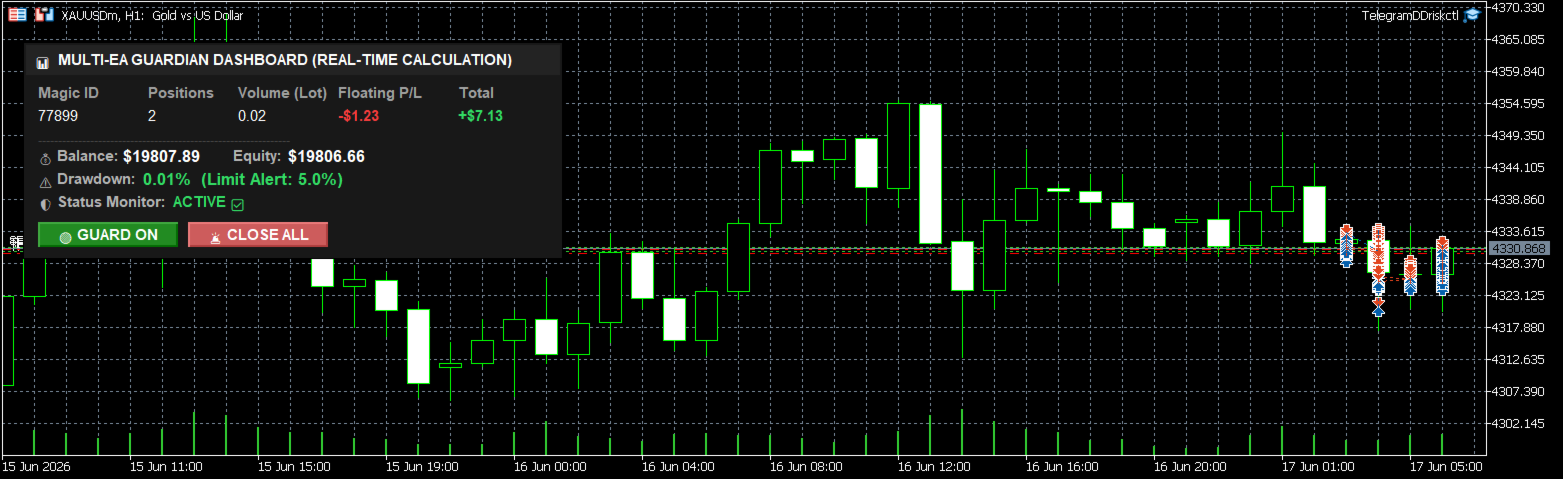
- A multi-column dashboard panel will also appear on the chart, showing live Balance, Equity, DD%, and a per-Magic-Number breakdown of positions and P/L, with on-chart buttons to toggle monitoring or close all positions
Step 3 — Configure EA Inputs
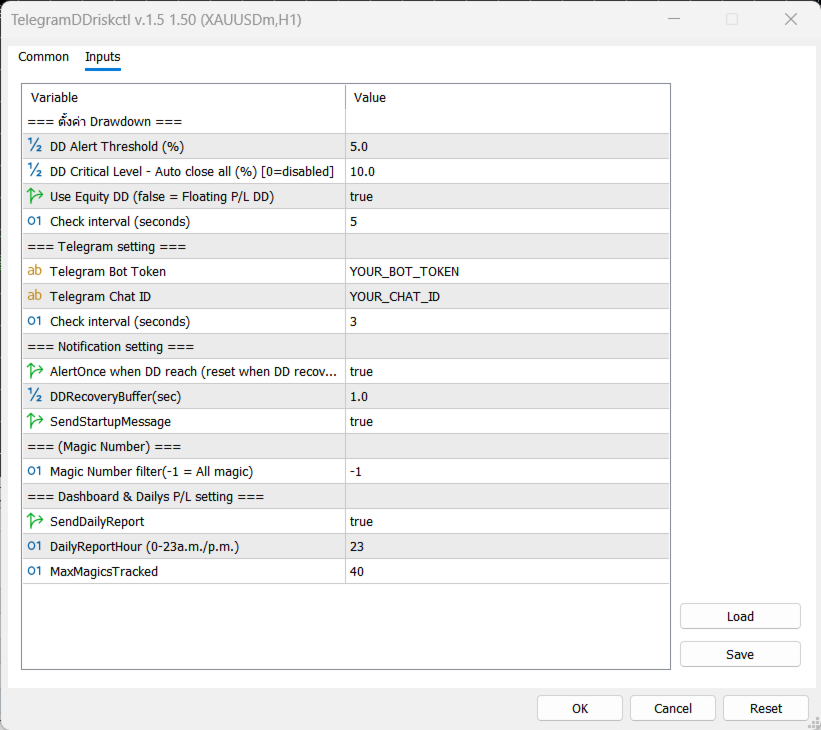
| Input | Description |
|---|---|
| InpBotToken | Your Bot Token from BotFather |
| InpChatID | Your Chat ID (numbers only) |
| InpDDThreshold | Drawdown % that triggers an alert (default: 5%) |
| InpDDCritical | Drawdown % that auto-closes all positions (0 = disabled) |
| InpUseEquityDD | true = Equity vs Balance · false = Floating P/L only |
| InpCheckIntervalSec | How often to check drawdown in seconds (default: 5) |
| InpPollingIntervalSec | How often to poll Telegram commands in seconds (default: 3) |
| InpAlertOnce | Send the DD alert only once per breach, instead of every check (resets once DD recovers below the buffer) |
| InpDDRecoveryBuffer | % below InpDDThreshold required before the alert is allowed to re-arm (default: 1.0) |
| InpSendStartupMsg | Send a Telegram message with balance/threshold when the EA starts |
| InpMagicFilter | Magic number to monitor (−1 = all orders) |
| InpSendDailyReport | Automatically send a daily P/L summary at InpDailyReportHour |
| InpDailyReportHour | Hour (0–23, broker/server time) the daily report is sent |
| InpMaxMagicsTracked | Max number of distinct Magic Numbers tracked on the dashboard (default: 40) |
Step 4 — Attach the EA
Telegram Commands
| Command | Action |
|---|---|
| /status | Show current Balance, Equity, DD%, Max DD reached, total alerts, and a per-Magic-Number Buy/Sell breakdown |
| /dashboard | Show Balance, Equity, DD%, and a per-Magic-Number table (positions, volume, floating P/L, total P/L) |
| /daily | Send the daily P/L report on demand (start balance, realized P/L, floating P/L, net day P/L, trade count) |
| /closeall | Close all open positions immediately |
| /closeloss | Close only positions currently at a loss |
| /closeprofit | Close only positions currently in profit |
| /disable | Pause DD monitoring (does not close positions) |
| /enable | Resume DD monitoring and reset alert state |
Alert Behaviour
- When DD exceeds InpDDThreshold , one alert is sent to Telegram. The alert resets automatically once equity recovers by InpDDRecoveryBuffer percent below the threshold, allowing the next alert to fire if DD rises again.
- When DD reaches InpDDCritical , all positions are closed automatically and a critical alert is sent. This fires only once per session.
- A startup message is sent when the EA loads and a shutdown message when it is removed from the chart.