Equity Shield 2 MT4

Equity Shield 2 for MT4

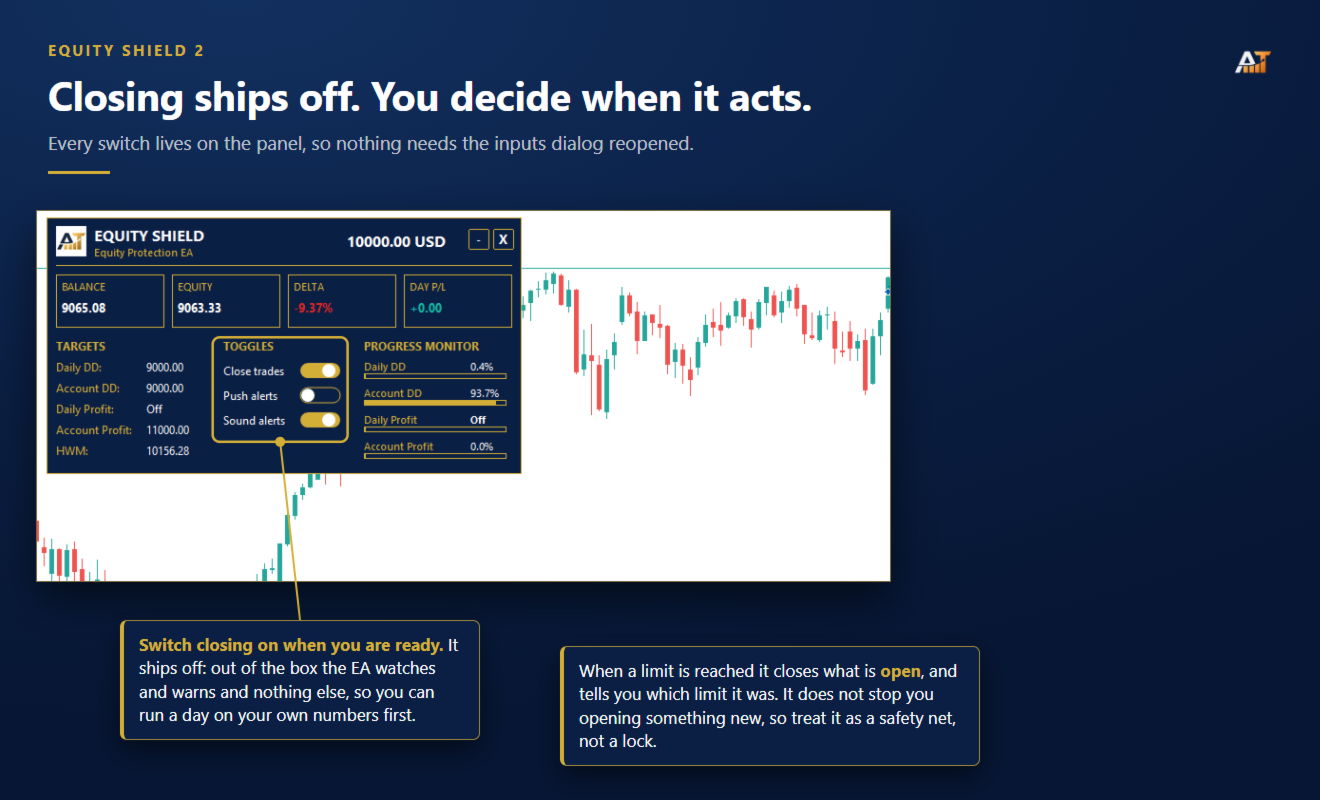
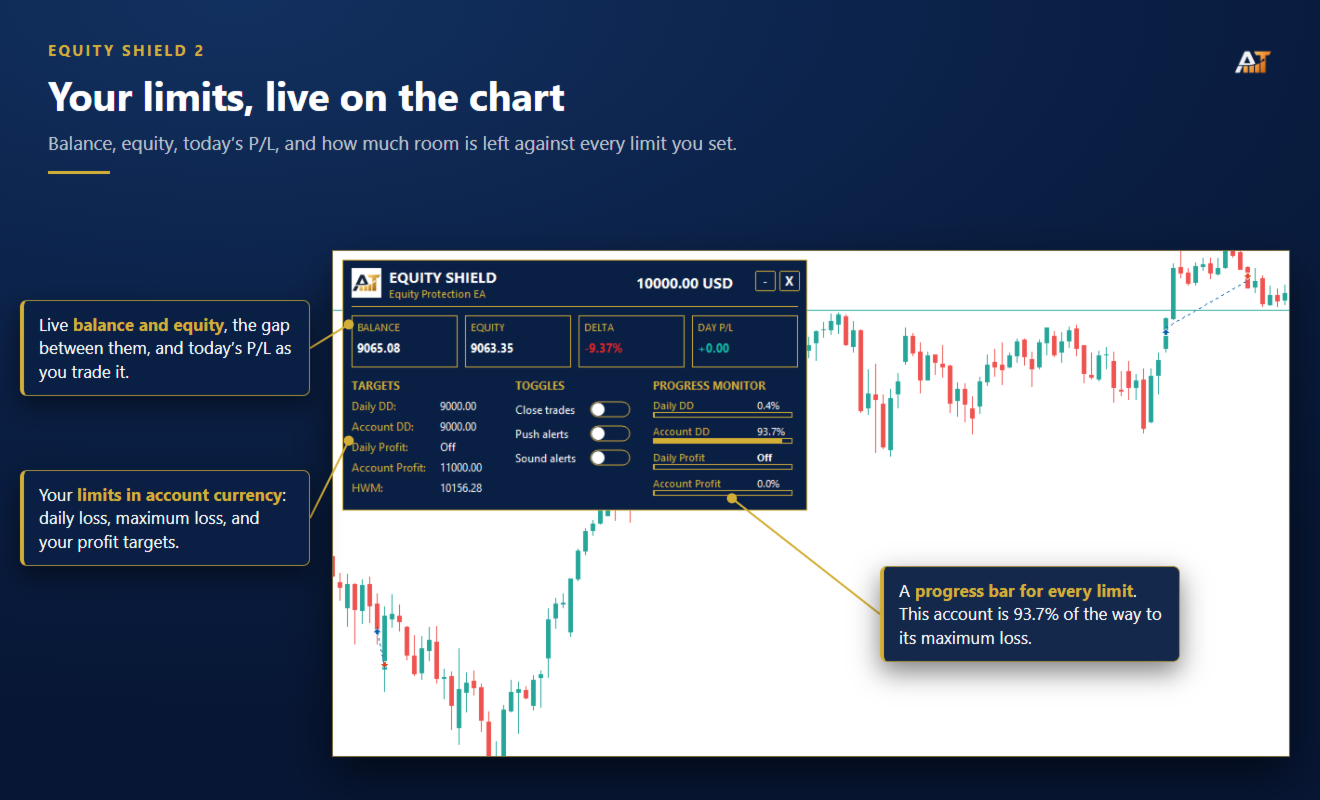
Equity Shield 2 monitors your account limits while you trade. Set daily drawdown, maximum drawdown, daily profit and account profit targets, then track your remaining room live from one on-chart panel.

When an enabled limit is reached, Equity Shield 2 can close your open positions and alert you. Built for prop firm challenges and traders who want an additional layer of account protection.

Account protection

Monitor up to four account limits:

  • Daily drawdown

  • Maximum account drawdown

  • Daily profit target

  • Account profit target

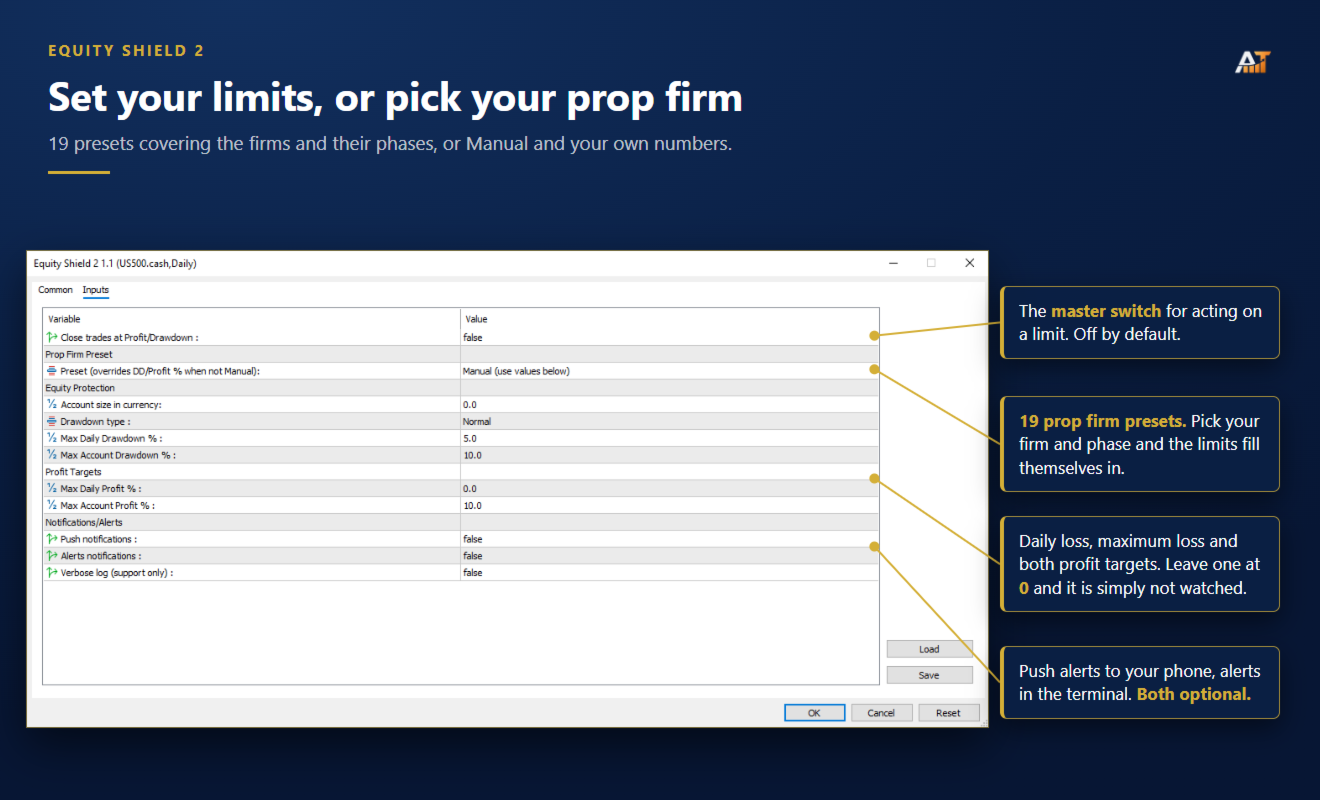
Each limit is percentage-based and shown live on the panel. Set a limit to 0 if you do not want it monitored.

Automatic protection

When a limit is reached:

  • Open positions can be closed automatically.

  • Push and terminal notifications can identify the triggered limit.

  • The panel displays the breach for easy reference.

Automatic trade closing is OFF by default. The EA can monitor your account without closing anything until you enable this feature.

Equity Shield closes existing positions when a limit is triggered. It does not prevent you from opening new trades afterward.

Prop presets

Includes 19 presets covering popular firms 

  • Phase 1 and Phase 2 presets available where applicable.

  • Automatically fills profit target, daily drawdown and maximum drawdown values.

  • Manual mode lets you enter your own limits.

Always verify your firm's current rules before trading, as conditions can change.

Live dashboard

  • Balance and equity

  • Floating profit/loss

  • Today's profit or loss

  • Progress bars for active limits

  • Remaining room before each limit

  • Draggable and minimizable panel

Drawdown modes

Choose the calculation method that matches your requirements:

  • Normal drawdown

  • Trailing drawdown

Leave Account Size at 0 to let the EA determine the starting balance automatically, or enter a fixed account size manually.

Alerts

  • MetaTrader 4 push notifications

  • Desktop terminal alerts

  • Both optional and OFF by default

Parameters

  • Close trades at Profit/Drawdown — default OFF

  • Prop Firm Preset — default Manual

  • Account Size — default 0

  • Drawdown Type — Normal or Trailing

  • Max Daily Drawdown — default 5%

  • Max Account Drawdown — default 10%

  • Max Daily Profit — default 0%

  • Max Account Profit — default 10%

  • Push Notifications — default OFF

  • Alert Notifications — default OFF

Compatibility

MetaTrader 4 · all symbols · all timeframes · no external connection required

Önerilen ürünler
Hola Traders. Lot - lot size for pending orders. Martingale - double lot size of pending orders. *(No Martingale = 1.00) TotalGridEachSide - unit each side of pending orders. SpaceOfFirstOrder - distance for the first order in points. Take Profit - profit in points. Stop Loss - loss in points. The entire positioning uses POINTS only. (10 point = 1 pip) and you can open order BUYLIMIT, SELLLIMIT, ALLBUYANDSELL you can Close Pending, Close orders Profit and Loss and Close All ***  ideas for usin
Hola Traders. Lot - lot size for pending orders. Martingale - double lot size of pending orders. *(No Martingale = 1.00) TotalGridEachSide - unit each side of pending orders. SpaceOfFirstOrder - distance for the first order in points. Take Profit - profit in points. Stop Loss - loss in points. The entire positioning uses POINTS only. (10 point = 1 pip) and you can open order BUYSTOP, SELLSTOP, ALLBUYANDSELL you can Close Pending, Close orders Profit and Loss and Close All ***  ideas for using
Grafikte filigran: Sembol + Zaman Dilimi / veya kendi metniniz # 1 Yardımcı Programım:   66'den fazla özellik içerir |   Herhangi   bir sorunuz varsa bana ulaşın Göstergenin ayarlarında şunları yapılandırabilirsiniz: Punto; Metin rengi; Yazı Tipi Adı; Pozisyon: 1 = Sol Üst; 2 = Sağ Üst; 3 = Sol Alt; 4 = Sağ Alt; 5 = Merkez; Geçerli Zaman dilimini göster: açık / kapalı; Kaldırılacak Sembolün öneki ( n_AUDCAD --> AUDCAD ); Kaldırılacak Sembolün soneki (USD CAD pro -> USD CAD); Özel metni göster:
* The product for MT5 converted using  "BRiCK TradeByArrow MT4"  is  here. BRiCK is a simple and versatile utility.   By combining Experts, Indicators and utilities like the Lego block, various trading styles can be realized. "TradeByArrow" is Utility that executes order processing when an arrow object is created on the chart. Combined with Indicator which outputs arrow object, it can be used like Expert. Parameter [ArrowName] EntryBuy: Arrow object name for buy order (partial match) EntrySel
FREE
Element 7
Vladimir Deryagin
The Expert Advisor works based on the analysis of candles (bars). The Expert Advisor settings are intuitive. You can use this Expert Advisor on any currency pair, having previously selected the settings using testing. Expert Advisor settings, description: Magic is a unique number of open trades. Volume - the trading volume of the initial transaction. A sign for increasing the lot with the selected coefficient-the choice of the action sign between the lot and the coefficient by which this
Easy mt4 to telegram
Medilane Bernard Philippe Couratier
Jarfac Mt4ToTelegram Introduction Jarfac Mt4ToTelegram   is an MT4 system designed to facilitate real-time communication between the MetaTrader 4 platform and Telegram.   This script allows traders to receive customizable instant notifications based on different trade types, ensuring optimal responsiveness without having to constantly monitor the trading platform. main Features Real-time notifications   : Receive notifications directly on Telegram as soon as an action occurs on MT4. Emoji suppor
The professional utilities "Ichimoku Waves Meter" to analyse graphs using the correct interpretation of Ichimoku kinkōhyō! Is a graphic program that allows traders to quickly and easily measure the proportions between the indicated points on the price graph. This time and price indicator is a basic tool for analysing the chart according to the Ichimoku strategy on the MT4 platform. Using this tool allows an insightful and complete analysis of time waves as well as price waves in a very short ti
The  Silver Volatility Trend Line for MT4 is an EA that helps you trade using the trendlines, drawn on your chart. It basically allows you to send and manage orders using trend lines. It automatically calculates the True Range of your asset to allow you to send orders well calibrated with the market volatility. Take Profit and Stop Loss are calculated in number of True Range. You can do that for two different orders at the same time , so that you can trade two different kind of risk / profit rat
Yet another signal copier. Nothing special. Demo version can be downloaded here . Key Features The utility copies trades between terminals: by market, pending orders (optional), as well as their stop loss and take profit levels (optional as well). You can copy from one Master account to several Slave accounts, as well as from several Master accounts to one Slave account. Volume calculation At the moment, there are two options for calculating the volume: The trade volume is taken 1 to 1 from th
Smart Trade Guard Elite PRO MT4 " The Ultimate Manual Trading & Risk Discipline Panel " Stop Trading with Emotions. TradeGuard Elite PRO is an advanced manual trading panel designed for traders who want the speed of manual execution with the discipline of a professional risk management system. Open trades in one click, calculate lot size automatically, move to break-even, partial close positions, and even block yourself from revenge trading after consecutive losses. This is not an auto tradin
Tek grafik. Tam kontrol. Her grafikteki nesneleri, renkleri ve ayarları ayrı ayrı yönetmek için zaman kaybetmeyi bırakın.       Grafik Senkronizasyon Yöneticisi ile   şunları yapabilirsiniz:       tüm MetaTrader grafiklerinizi senkronize edin, kopyalayın ve kontrol edin       anında—sadece bir panel ve birkaç kısayol kullanarak. Bir kez çizin, her yerde güncelleyin. Grafikleri tek bir tıklamayla açıp kapatın. Çalışma alanınızı temiz tutun.       sembol tabanlı nesne yönetimi   . Ve önemli ayrınt
This indicator helps you control several pairs in a small workspace, therefore, it is not necessary to open several charts on the platform to do so. The indicator shows sequentially up to 6 different pairs, besides that each of these pairs has a button with which you can stop the indicator to observe the selected pair. Place the indicator on a chart to monitor several pairs and the rest of your space use it on the chart of the pair you wish to observe in detail.    MT5 version          Parameter
Why choose Trading Pal EA: This is a EA utility that auto-manage your   positions ' Stop-Loss (SL) and Take-Profits (TP) dynamically. When opening a single   position , it is easy to set the SL and TP manually. But when dealing with multiple   positions , it can be very tedious or   overwhelming   to fill in so many SL and TP values consistently, especially in a short span of time, like in scalping. Over time and after many such trades, trading itself can become a chore. That is where this EA c
SMT Trade Planner, MetaTrader grafigi uzerinde profesyonel bir risk hesaplayici ve islem yurutme panelidir. Risk ayarlariniza gore lot buyuklugunu hesaplar, grafikte suruklenebilir Giris, Stop Loss ve Take Profit cizgileri gosterir, yapilandiriabilir risk kurallarina gore islemi dogrular ve tek tikla islem yurutmenizi saglar.   Nasil calisir Trade Planner'i herhangi bir grafige ekleyin. Panel hesap bilgilerini ve hizli risk secim dugmelerini gosterir. Grafikte uc yatay cizgi belirir: Giris (mavi
Hidden Gap by MMD MT4
Mariusz Maciej Drozdowski
Hidden Gap by MMD Hidden Gap by MMD is a unique indicator that detects hidden gaps between three consecutive candles. This observation isn't my own, but in the MMD methodology, it has its application alongside other original indicators. You can apply this indicator to the chart multiple times and set the interval from which you want to see the hidden gaps. You can show or hide these gaps as needed. For example, you can view the chart at an M5 interval and see hidden gaps from an M15 chart, etc.
EuroPulse Ribbon Trend — EMA Ribbon + ADX Trend Following EA (Swap-Free) PRODUCT OVERVIEW EuroPulse Ribbon Trend is a premium automated trading solution designed for MetaTrader 4, specialized for the EURUSD currency pair. The EA implements a simplified yet powerful trend-following strategy: • EMA 20/50 crossover for trend direction • ADX 14 for trend strength confirmation • ATR-based stop loss and take profit • Daily loss protection • Swap-Free mode for Islamic accounts WHY EURO
Pointer synchronization is an indicator with which the pointer can be synchronized in all the visible charts of the terminal. It shows a crossed cursor in all the visible charts of the terminal, in position relative to the cursor of the active chart. To activate the indicator, simply press the button that appears in one of the corners of the chart once the indicator is added to the chart. To deactivate the indicator, simply press the button again. Once the indicator has been deactivated, the cr
Pending Orders Grid Complete System opens any combination of Buy Stop, Sell Stop, Buy Limit and Sell Limit pending orders and closes all existing pending orders. You will be able to Drag-and-Drop the Script on the chart and it will pick up the start price for the first position in the grid from the "Drop" point. Usually it should be in the area of Support/Resistance lines. Input Parameters Before placing all pending orders, the input window is opened allowing you to modify all input parameters:
Devrim niteliğindeki İşlemler Zaman Yöneticisi ile işlem rutininizin kontrolünü zahmetsizce elinize alın. Bu güçlü araç, belirlenen zamanlarda emir gerçekleştirmeyi otomatikleştirerek alım satım yaklaşımınızı dönüştürür. Satın alma işleminden emir belirlemeye kadar çeşitli ticaret eylemleri için manuel müdahale olmadan kişiselleştirilmiş görev listeleri oluşturun. Trades Time Manager Kurulum ve Girdiler Kılavuzu EA hakkında bildirim almak istiyorsanız, URL'mizi MT4/MT5 terminaline ekleyin (ekran
Choose all the pairs that have positive swap in your broker Then, the EA will buy/sell before the triple swap takes place, and it will close the position after the triple swap is paid to you. It is recommended to test the EA at least 1 month in demo account so you can see the results. If you have any doubt or suggestion, don't hesitate to contact me! HOW TO USE Inputs swapDay = The day that the 3x swap is paid in your broker lots = The lot size that you want to use SL = stop loss in points (not
The panel has the most intuitive interface that every beginner can handle. In the SLp column  – you need to specify the SL size in pips. If the value turns gray and at the same time the Bay / Sell buttons are also inactive, then you have specified a SL value that is less than that allowed before it was set by your broker. In the TP% column   – you indicate TP in% of the account balance. In the settings, you can choose on the basis of what this indicator will be calculated, by equity, balance or
Hızlı Sembol, sembol isimlerinin klitable butonları olarak kullanıldığı ve zaman dilimlerinin tıklanabilir düğmeler olarak kullanıldığı bir panel tipi göstergesidir; bu göstergeyi kullanmanın ana amacı hızlı çiftler için gezinmektir; panelin kendisi de gizleme/göster butonu vardır, böylece trader'ın önünde durmaz; hızlı çıkış süresi ve hatasız performansla bu araç, her tür tüccar için en çok sahip olunması gereken bir araçtır. NASIL KULLANILIR : Basit bir şekilde istediğiniz çifte tıklayın ve
FREE
MT4 Terminal to Telegram Pro
Thennakoon Mudiyanselage Eranda Nuwan Kumara
**MT4 Terminal to Telegram Pro** is a professional-grade notification utility that turns your MetaTrader 4 terminal into a real-time Telegram signal channel with clean, structured, and reliable trade communication. Built for traders, account managers, and signal providers, it automatically tracks live terminal activity and delivers a complete trade lifecycle to Telegram: entry alerts, SL/TP modification updates, and close notifications. Instead of manually copying trades, you get consistent, f
BreakEven ProSync EA – Trade Management & Risk Control Tool Overview BreakEven ProSync EA is an expert advisor for   MetaTrader 4  that helps traders manage open positions efficiently by   automating stop-loss adjustments   and ensuring position synchronization. This tool is designed for traders who want to standardize their stop-loss and take-profit levels across multiple trades while integrating a break-even function. The EA works by calculating the  average price   of all open positions and
Telegram Forwarder can forward all activities related to trades and position taking as a signal to Telegram messenger. It can also forward indicators' alert to Telegram if you modify indicator code (I can do it for you too) to hand over alerts to Telegram Forwarder. This EA is intended for business and professional usage. You can introduce your own Telegram bot and customize water mark in screenshots. Telegram forwarder is able to forward signals for "new order", "modification of order", "Pendin
MQL4 Expert parsing signals from Telegram bot and executing the orders. Install EA, Telegram. Create a telegram bot which will distribute signal and specify it's token in EA input settings as well as key words which will be used to parse a signal. You can change or add key words by your own. Default values (lot, stops) are used in case the incoming signal don't include them. Specify "Allow DLL imports" in EA Settings.
MT4 To Notion
Levi Dane Benjamin
5 (2)
Bu program, çok kullanıcı dostu bir arayüz kullanarak MetaTrader hesabınızdaki tüm işlemleri doğrudan Notion'a aktarmanıza olanak tanır.  MT5 Sürümü  |  Kullanıcı Kılavuzu + Deneme Başlamak için lütfen Kullanıcı Kılavuzunu kullanın ve Notion Şablonunu indirin. Eğer bir deneme istiyorsanız, lütfen Kullanıcı Kılavuzuna gidin. Strateji testinde çalışmaz! Ana Özellikler Tüm işlemleri ticaret hesabınızdan Notion'a aktarın En Son Gün işlemlerini aktarın Son Hafta işlemlerini aktarın Son Ay işlemlerini
Zen MT4
Elena Kusheva
I slippage=0; - allowed slippage, 0 - not used   S cmt=""; - comment on orders   I Magic=20200131; - magic, the order ID of the EA   S WorkTime="00:00-24:00"; - the format is HH: MM-HH:MM, all day 0-24 or 00: 00-24:00   D fix_lot=0.01; / / fix lot - working lot   Order_tp D=100.0; //TP. I recommend – 10.0-take profit in points as for 4 characters! the EA automatically detects 5-character instruments and will increase the value 10 times automatically.   D order_sl=0.0; / / SL-stop loss in points
Market Monitor
Rodrigo Rethka Goncalves
Market Monitor – Smart Asset Performance Dashboard for MT4 Turn your MetaTrader 4 into a professional trading intelligence center! Market Monitor is a powerful monitoring tool that displays, in real time, the most relevant performance metrics of each symbol being traded — helping you make faster, smarter, and more strategic decisions. What Does This Indicator Do? Market Monitor scans all open and historical orders, consolidates the data by symbol, and displays everything in visual pa
Lot Profit Stats User Manual I am used to trading with the Martingale strategy. Every time I need to do statistics, I have to export the chart data to Excel for analysis, which is a very tedious process. Although there are already many statistical indicators on the market, there is a lack of one specifically for analyzing lots. With such an indicator, it would be very convenient to easily analyze the profit and loss status under different lot sizes. 1. Overview `Lot Profit Stats` is a chart-
Bu ürünün alıcıları ayrıca şunları da satın alıyor
Exp COPYLOT CLIENT for MT4
Vladislav Andruschenko
4.69 (65)
MetaTrader 4 için profesyonel işlem kopyalayıcı MetaTrader 4 için hızlı, güvenilir ve profesyonel bir işlem kopyalayıcı. COPYLOT , MetaTrader 4 ve MetaTrader 5 terminalleri arasında Forex işlemlerinin kopyalanmasını sağlar ve farklı hesap türleri ile işlem senaryoları için esnek senkronizasyon sunar. COPYLOT MT4 sürümü şunları destekler: MetaTrader 4 → MetaTrader 4 MetaTrader 5 Hedge → MetaTrader 4 MetaTrader 5 Netting → MetaTrader 4   MT5 sürümü Tam açıklama + DEMO + PDF Nasıl satın alınır Nası
Trade Indicator Assistant is a powerful MT4 utility designed to turn indicators into automated trading systems. Its main feature is the ability to automatically detect an indicator’s   BUY and SELL signal buffers , without requiring you to know the buffer numbers, search through indicator settings, or modify the indicator source code. Bonus Indicator: After purchasing Trade Indicator Assistant, contact me to receive Trade Signal Pro completely free as a bonus indicator. [Download Demo Version]
Trade Manager EA’ye hoş geldiniz! Ticaretin daha sezgisel, hassas ve verimli hale gelmesi için tasarlanmış nihai risk yönetim aracı ile tanışın. Bu sadece bir emir verme aracı değil; ticaret planlaması, pozisyon yönetimi ve risk kontrolü için kapsamlı bir çözüm. İster yeni başlayan bir yatırımcı olun, ister deneyimli bir trader ya da hızlı emir gerektiren bir scalper, Trade Manager EA ihtiyaçlarınıza uyum sağlar ve forex, endeksler, emtialar ve kripto paralar dahil tüm piyasalarda esneklik sunar
TradePanel MT4
Alfiya Fazylova
4.84 (95)
Trade Panel, çok işlevli bir ticaret asistanıdır. Uygulama, manuel ticaret için 50'den fazla ticaret fonksiyonu içerir ve çoğu ticaret görevini otomatikleştirmeyi mümkün kılar. Uygulama talimatları + video talimatları: https://www.mql5.com/en/blogs/post/772292 Demo hesabı için uygulamanın deneme sürümü: https://www.mql5.com/en/blogs/post/750865 Uygulamayı nasıl kurulur: https://www.mql5.com/en/blogs/post/756239 Uygulamayı görsel modda nasıl test edilir: https://www.mql5.com/en/blogs/post/770277
Telegram to MT4 Multi-Channel Copier   , Telegram kanallarınızdaki alım-satım sinyallerini doğrudan MetaTrader 4'e otomatik kopyalar. Bot yok, tarayıcı uzantısı yok, elle kopyalama yok. Sinyal Telegram'a düşer ve EA birkaç saniye içinde terminalinizde işlemi açar. Ve bir kanalı kopyalamadan önce, yerleşik backtester o kanalın hesabınızda ne yapmış olacağını gösterir. Ürün iki bileşenden oluşur: Telegram kanallarınızı dinleyen bir Windows uygulaması ve sinyalleri MT4 terminalinizde yürüten bu Exp
Trade Dashboard simplifies how you open, manage, and control your trades, with built-in lot size calculation. It allows you to execute trades, manage risk, and control positions directly on the chart, with tools such as partial close, breakeven, and trailing stop. Designed to reduce manual work and help you stay focused on your trading decisions. A demo version is available for testing. Detailed explanations of features are provided within the MQL5 platform. Installation instructions are include
The product will copy all telegram signal to MT4   ( which you are member  ) , also it can work as remote copier.  Easy to set up, copy order instant, can work with almost signal formats, image signal, s upport to translate other language to English Work with all type of channel or group, even channel have "Restrict Saving Content", work with  multi channel, multi MT5 Work as remote copier: with signal have ticket number, it will copy exactly via ticket number. Support to backtest signal. How to
Riskinizi otomatik olarak hesaplarken işlemlere hızlı bir şekilde girip çıkmanıza yardımcı olacak Ticaret Yöneticisi. Aşırı Ticaret, İntikam Ticareti ve Duygusal Ticaretten korunmanıza yardımcı olacak özellikler içerir. İşlemler otomatik olarak yönetilebilir ve hesap performans ölçümleri bir grafikte görselleştirilebilir. Bu özellikler, bu paneli tüm manuel yatırımcılar için ideal kılar ve MetaTrader 4 platformunun geliştirilmesine yardımcı olur. Çoklu Dil desteği. MT5 Sürümü  |  Kullanım Kılavu
Fotokopi->Kullanışlı ve hızlı arayüz etkileşimi, kullanıcılar hemen kullanabilir       ->>>> Windows bilgisayarlarda veya VPS Windows'ta kullanılması önerilir Özellikler: Çeşitlendirilmiş ve kişiselleştirilmiş kopyalama ticareti ayarları: 1. Farklı sinyal kaynakları için farklı lot modları ayarlanabilir 2. İleri ve geri kopyalama ticareti için farklı sinyal kaynakları ayarlanabilir 3. Sinyaller yorumlarla ayarlanabilir 4. Lotun sözleşme lotuna göre kalibre edilip edilmeyeceği Çeşitlendirilmiş v
News Filter EA: Advanced Algo Trading Assistant News Filter EA is an advanced algo trading assistant designed to enhance your trading experience. By using the   News Filter EA , you can integrate a Forex economic news filter into your existing expert advisor, even if you do not have access to its source code. In addition to the news filter, you can also specify   trading days   and   hours   for your expert. The News Filter EA also includes   risk management   and   equity protection   features
Prop Guardian Risk Manager MT4 – Drawdown, Risk & Hedge Protection for Prop Firm and Managed Accounts Prop Guardian Risk Manager is a professional risk-control utility for MetaTrader 4, designed for prop firm traders, money managers and anyone who wants strict account-level risk protection. It does not generate trading signals, strategy entries or trading decisions. Instead, it runs in the background, monitors your account risk and can automatically block new exposure, close managed trades or ac
Risk manager Risk manager - it will simplify the tracking of drawdown and will notify you (alert) when the specified risk is reached, and close/lock orders when the critical DD risk level is reached. If the specified drawdown is exceeded, you can choose two options for actions: All orders will be closed that mean loss will be fixed on depo. The terminal also closes. Instead of fixing the loss on depo, the opposite order will be opened - orders locking will occure. Not a single order will be c
Lot Architect — Trade Panel and Position Size Calculator for MT4 Lot Architect is a trade panel and risk-based position size calculator for MetaTrader 4. It helps calculate lot size from the selected risk, displays trade parameters before entry, and supports Market, Limit and Stop orders from the chart. The utility is designed for traders who want a structured workflow for position sizing, stop-loss placement, take-profit planning and order execution. Purpose Before opening a trade, a trader nee
MT4 to Telegram Signal Provider , Telegram'a sinyal göndermeyi sağlayan ve hesabınızı bir sinyal sağlayıcısına dönüştüren kullanımı kolay ve tamamen özelleştirilebilir bir araçtır. Mesajların formatı tamamen özelleştirilebilir! Ancak basit kullanım için, önceden tanımlanmış bir şablonu seçebilir ve mesajın belirli kısımlarını etkinleştirebilir veya devre dışı bırakabilirsiniz. [ Demo ]  [ Kullanım Kılavuzu ] [ MT5 Sürümü ] [ Discord Sürümü ] [ Telegram Kanalı ]  New: [ Telegram To MT5 ] Kurulum
Effortlessly calculate lot sizes and manage trades to save time and avoid costly errors The Trade Pad Pro EA is a tool for the Metatrader Platform that aims to help traders manage their trades more efficiently and effectively. It has a user-friendly visual interface that allows users to easily place and manage an unlimited number of trades, helping to avoid human errors and enhance their trading activity. [ Installation Guide | Update Guide | Troubleshooting | FAQ | All Products ] One of the k
Unlimited Trade Copier Pro is a tool to copy trade remotely to multiple MT4, MT5 and cTrader accounts at different computers/locations over internet. This is an ideal solution for you if you are a signal provider and want to copy your trades to other receivers globally on your own rules. One provider can copy trades to multiple receivers and one receiver can get trade from multiple providers as well. The provider can even set the subscription expiry for each receiver, so that receiver will not b
Strategy Builder offers an incredible amount of functionality. It combines a trade panel with configurable automation (covert indicators into an EA), real-time statistics (profit & draw down) plus automatic optimization of SL, TP/exit, trading hours, indicator inputs. Multiple indicators can be combined into an single alert/trade signal and can include custom indicators, even if just have ex4 file or purchased from Market. The system is easily configured via a CONFIG button and associated pop-up
VirtualTradePad mt4 Extra
Vladislav Andruschenko
4.85 (61)
1 tıklama ile ticaret için Ticaret Paneli.   Pozisyonlar ve emirlerle çalışmak!   Grafikten veya klavyeden alım satım. Alım satım panelimizi kullanarak, grafikten tek bir tıklamayla alım satım yapabilir ve alım satım işlemlerini standart MetaTrader kontrolünden 30 kat daha hızlı gerçekleştirebilirsiniz. Bir tüccar için hayatı kolaylaştıran ve bir tüccarın ticaret faaliyetlerini çok daha hızlı ve daha rahat gerçekleştirmesine yardımcı olan parametrelerin ve işlevlerin otomatik hesaplamaları. Graf
Manuel işlem için profesyonel bir panel: işlemin tüm döngüsü, hassas girişten hesabınızı korumaya kadar, grafik üzerindeki tek bir pencerede toplanır. Her pozisyonun lotunu tam olarak belirlediğiniz riske göre hesaplayın; RR Tool ile işlemi doğrudan grafik üzerinde çizgilerle kurun; piyasa emirleri, bekleyen emirler, gridler ve OCO emirleri açın. Pozisyon yönetimini panel üstlenir: beş seviyeye kadar kısmi kapatma, altı tür trailing stop, maliyetine çekme ve Virtual SL/TP. Günlük, haftalık ve ay
Grid Manual MT4
Alfiya Fazylova
4.71 (17)
Grid Manual, sipariş ızgarasıyla çalışmak için kullanılan bir ticaret yardımcı programıdır. Yardımcı program evrenseldir, esnek ayarlara ve sezgisel bir arayüze sahiptir. Sadece kayıpların ortalaması yönünde değil, aynı zamanda kazanç artışı yönünde de bir emir ızgarası ile çalışır. Tüccarın bir emir ızgarası oluşturmasına ve eşlik etmesine gerek yoktur, bu yardımcı programı yapacaktır. Emri açmanız yeterlidir ve Grid manual otomatik olarak ona bir emir ızgarası oluşturacak ve kapanana kadar ona
Ticaret yapmak istediğiniz temel alanları belirledikten sonra otomatik olarak destek ve direnç veya arz ve talep bölgelerini değiştirin. Bu EA, tek bir tıklamayla alım ve satım bölgeleri çizmenize ve ardından bunları fiyatın dönmesini beklediğiniz yere tam olarak yerleştirmenize olanak tanır. EA daha sonra bu bölgeleri izler ve bölgeler için belirttiğiniz fiyat hareketine göre otomatik olarak işlemler gerçekleştirir. İlk işlem gerçekleştirildikten sonra EA, hedef bölge haline gelen yerleştirdiğ
TradeMirror, MT4/MT5 platformları için geliştirilmiş, gerçek zamanlı işlem senkronizasyonu destekleyen yerel bir emir kopyalama aracıdır. Eğitim Daha fazla eğitim görmek için lütfen Trademirror Eğitimi bağlantısına tıklayın. Ürün Avantajları Finansal yazılımlar için güvenlik, istikrar ve gizlilik standartlarına uygun olarak üç temel alanda iyileştirme yapılmıştır: Kullanıcı dostu arayüz ile kolay kullanım Finansal senaryolarda hassas veri izolasyonu için gelişmiş gizlilik koruması Milisanlık emi
DrawDown Limiter MT4
Haidar Lionel Haj Ali
5 (8)
DrawDown Limiter v5.0 — Advanced Account Protection Controller DrawDown Limiter v5.0 is a client-side account protection controller designed to supervise your trading account and automatically react when configured risk, profit, news, schedule, rollover, or position limits are reached. It can monitor manual trades, automated strategies, multiple Expert Advisors, pending orders and floating positions from one dedicated chart. It can protect the complete account or be configured to supervise a spe
Hello friends. I wrote this utility specifically for use in my profile with a large number of Expert Advisors and sets ("Joint_profiles_from_grid_sets" https://www.mql5.com/en/blogs/post/747929 ). Now, in order to limit losses on the account, there is no need to change the "Close_positions_at_percentage_of_loss" parameter on each chart. Just open one additional chart, attach this utility and set the desired percentage for closing all trades on the account. The utility has the following function
Trade Signal Pro (MT4) — Telegram Signal Provider (Utility) A lightweight utility that sends trade notifications from your MT4 account to Telegram. It does NOT open/close trades. It only reads positions/deals and sends messages. What it sends Entry signal (BUY/SELL) with Entry, SL, TP, pips + Risk:Reward   Updates when SL/TP is modified (reply/tag to the original signal)   Close notifications: TP hit / SL hit / Breakeven / Manual close   Optional Daily & Weekly performance summary (win
Riskless Pyramid
Snapdragon Systems Ltd
5 (1)
Introduction This powerful MT4 trade mangement EA offers a way potentially to aggressively multiply trade profits in a riskfree manner. Once a trade has been entered with a defined stoploss and take profit target then the EA will add three pyramid add-on trades in order to increase the overall level of profit. The user sets the total combined profit target to be gained if everything works out. This can be specified either as a multiple of the original trade profit or as a total dollar amount. Fo
Candlestick Pattern Scanner is a multi-timeframe and multi-symbol dashboard and alert system that checks all timeframes and currency pairs for different candlestick patterns that are formed in them. Scanner is integrated with support and resistance zones so you can check the candlestick patterns in the most important areas of the chart to find breakout and reversal patterns in the price chart. Download demo version   (works on M30,D1,W1 timeframes and 20 symbols of Market Watch window) Read the
Bu ürün, haber saatlerinde tüm uzman danışmanları ve manüel grafikleri filtreler, böylece manüel ticaret kurulumlarınızı veya diğer uzman danışmanlar tarafından girilen işlemleri yok edebilecek ani fiyat dalgalanmaları konusunda endişelenmenize gerek kalmaz. Bu ürün, herhangi bir haber yayınlanmadan önce açık pozisyonlarınızı ve bekleyen emirlerinizi yönetebilen tam bir sipariş yönetim sistemi ile birlikte gelir. The News Filter'ı satın aldığınızda, gelecekteki uzman danışmanlar için yerleşik ha
Anında gün ve hafta bazında kapalı işlem geçmişinizi, mevcut açık işlemlerinizi ve döviz maruziyetinizi tek bir grafikte görün! Karlı işlemleri ve mevcut düşüşünüzün işlem portföyünüzde nerede olduğunu belirlemek için ısı haritasını kullanın. Hızlı Kapatma Düğmeleri Hızlı kapatma düğmelerini kullanarak tek bir semboldeki her işlemi kapatın, tek tek işlemleri tamamen kapatın veya bir düğmeye tıklayarak kısmi kar veya zarar elde edin. Artık bir listede işlem aramanıza ve işlemlerinizin bir kısmı
Простая в управлении Торговая панель обеспечит безопасную торговлю. Вычислит объём сделки от заданного уровня Stop Loss и величины убытка. Поможет рассчитать сейф, и в ноль закрыть неверную сделку. Интуитивно понятный интерфейс делает панель удобной в управлении, освобождая внимание трейдера для принятия решения о входе в сделку. Программа сделает все расчёты за вас. Поэтому работа с помощью панели Снайпер - оптимальное решение для торговли с соблюдением Мани-менеджмента. А это главный ключ к по
Yazarın diğer ürünleri
Visual Trade Panel for MT5 Visual Trade Panel puts order execution, risk sizing and trade management on the chart, in one draggable dashboard. Plan a trade visually, size it to your risk automatically, fire it with one click, and let it manage itself with breakeven and trailing rules. Built for discretionary traders who want speed and precision without typing prices into the standard order ticket. Visual trade setup (drag & drop) A setup box overlays the chart showing   Entry, Stop Loss and up t
Visual Trade Panel for MT4 Visual Trade Panel puts order execution, risk sizing and trade management on the chart, in one draggable dashboard. Plan a trade visually, size it to your risk automatically, fire it with one click, and let it manage itself with breakeven and trailing rules. Built for discretionary traders who want speed and precision without typing prices into the standard order ticket. Visual trade setup (drag & drop) A setup box overlays the chart showing   Entry, Stop Loss and up t
Multi Trend Scanner for MT4 Multi Trend Scanner gives you a clear multi-symbol, multi-timeframe view of market direction from one chart. Scan your Market Watch or a custom symbol list, compare trends across up to six timeframes, and open any symbol with one click. Trend dashboard Scan up to 60 symbols. Display up to 6 timeframes side by side. Each cell shows Up, Down, Flat, or No Data. Click any cell to open that symbol and timeframe. Scrollable, draggable and minimizable panel. EMA + ATR trend
Local Replicator for MT4 Local Replicator copies trades between MetaTrader terminals (MT5+MT4) running on the same computer or VPS . Use one terminal as the Sender and one or more as Receivers, with support for different brokers, account sizes and symbol names. Everything runs locally. No external server, no account credentials shared, and no trading data leaves the machine. IMPORTANT: all terminals must be running on the same computer or VPS. Local Replicator does not copy trades between diffe
Telegram Trade Alerts for MT4 Telegram Trade Alerts sends real-time account activity from MetaTrader 4 directly to your Telegram chat. Get trade alerts, account warnings, screenshots and scheduled performance reports while you are away from the platform. The EA only monitors and reports. It does not place, modify or close trades, and it does not accept commands from Telegram. Trade alerts Position opened and closed Stop Loss and Take Profit hit Breakeven detected Trailing stop activity Entry an
Equity Shield Pro
Algori Systems FZ-LLC
4.5 (2)
Equity Shield Pro 1.1 Equity Shield Pro 1.1 is a powerful utility EA designed to safeguard your trading account by actively monitoring and enforcing equity protection and profit management rules. Whether you’re trading personal accounts or working through proprietary firm challenges, this EA ensures strict adherence to risk and profit targets, enabling you to maintain discipline and consistency. Fully compatible with all challenge types, Equity Shield Pro 1.1 is specifically crafted to meet th
Local Replicator for MT5 Local Replicator copies trades between MetaTrader terminals (MT5 + MT4) running on the same computer or VPS . Use one terminal as the Sender and one or more as Receivers, with support for different brokers, account sizes and symbol names. Everything runs locally. No external server, no account credentials shared, and no trading data leaves the machine. IMPORTANT: all terminals must be running on the same computer or VPS. Local Replicator does not copy trades between dif
Multi Trend Scanner for MT5 Multi Trend Scanner puts multi-symbol, multi-timeframe trend monitoring on one chart, in one draggable dashboard. Scan your Market Watch or a custom symbol list, compare trend direction across up to six timeframes, and open any symbol with one click. Built for traders who want a fast overview of market direction without opening dozens of charts. Multi-symbol trend dashboard One row per symbol and one column per timeframe. Scan up to 60 symbols at once. Display up to
Equity Shield 2 for MT5 Equity Shield 2 monitors your account limits while you trade. Set daily drawdown, maximum drawdown, daily profit and account profit targets, then track your remaining room live from one on-chart panel. When an enabled limit is reached, Equity Shield 2 can close your open positions and alert you. Built for prop firm challenges and traders who want an additional layer of account protection. Account protection Monitor up to four account limits: Daily drawdown Maximum accoun
Telegram Trade Alerts for MT5 Telegram Trade Alerts sends real-time account activity from MetaTrader 5 directly to your Telegram chat. Get trade alerts, account warnings, screenshots and scheduled performance reports while you are away from the platform. The EA only monitors and reports. It does not place, modify or close trades, and it does not accept commands from Telegram. Trade alerts Position opened and closed Stop Loss and Take Profit hit Breakeven detected Trailing stop activity Entry an
Filtrele:
Değerlendirme yok
Değerlendirmeye yanıt