Second and Custom Timeframe Charts MT5

Second and Custom Timeframe Charts

See the market between standard timeframes.

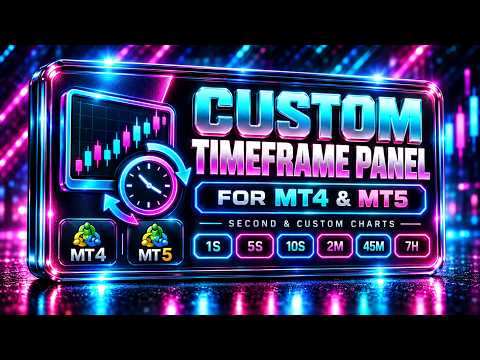
Second and Custom Timeframe Charts is a professional chart utility for MetaTrader 5 that creates synthetic candles for non-standard timeframes directly from market data. It is designed for traders who need more flexibility than the default MT5 timeframe set can provide.

Standard charts show only fixed periods. But the market does not always move in standard blocks. Sometimes the most important structure is visible on 5 seconds, 15 seconds, 17 minutes, 12 minutes, 7 hours, or another custom period that your platform does not offer by default.

This tool gives you that missing layer of market vision.

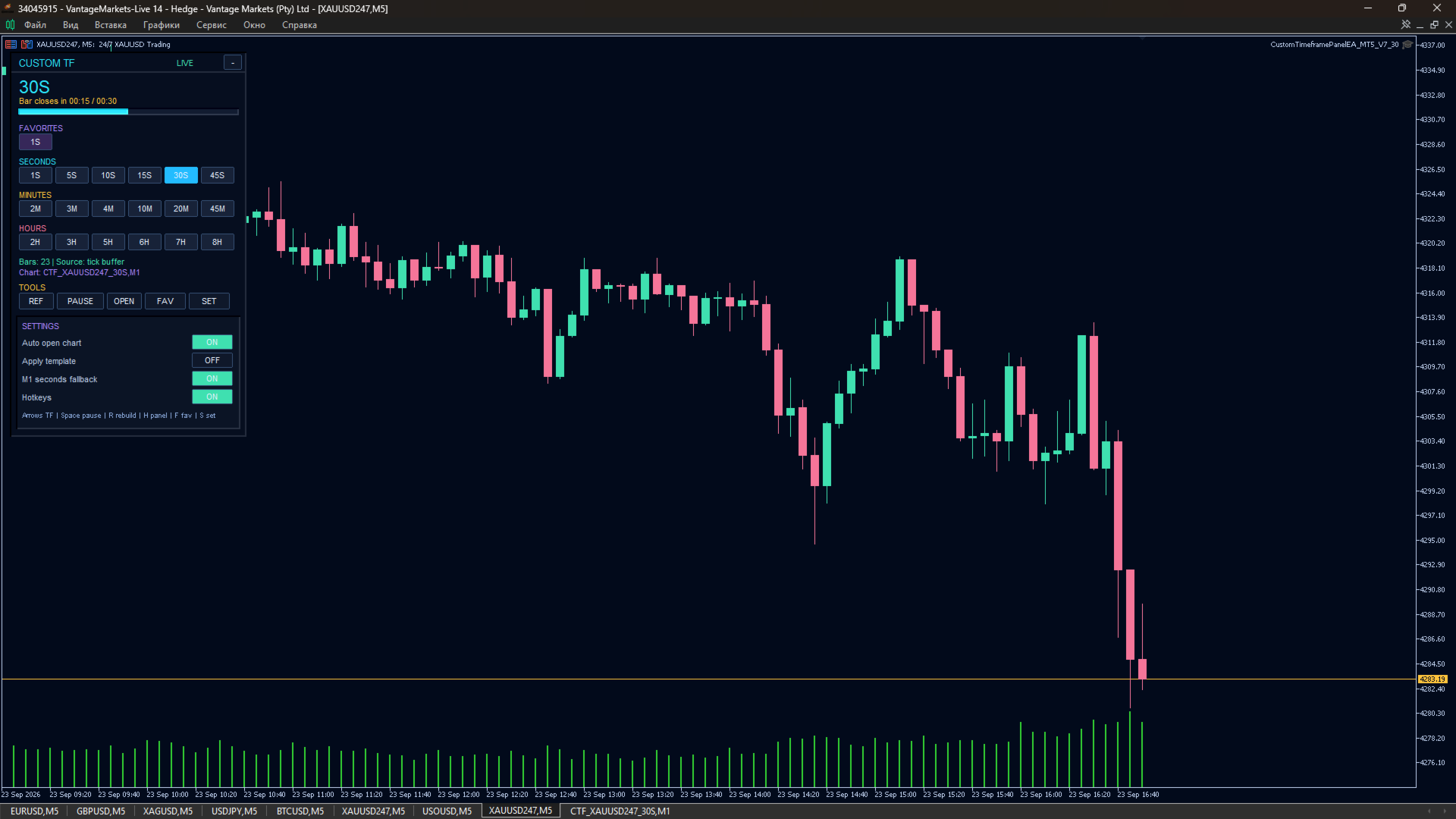
With Second and Custom Timeframe Charts, you can build and switch between custom second, minute, and hour charts using a clean on-chart panel. The utility creates synthetic candles, updates them in real time, and can also create a custom symbol chart so indicators can be applied to the generated timeframe.

It is not a trading robot. It does not open, close, or modify trades. It is a visual and analytical tool created to give you more control over how you read price action.

User Guide

Why this tool is useful

Most traders are limited by default timeframes. They jump from M1 to M5, from M15 to H1, or from H4 to D1, missing everything in between.

Second and Custom Timeframe Charts removes that limitation.

You can analyze the market with custom periods such as:

1S, 5S, 10S, 15S, 20S, 17M, 12M, 7H, 9H

You are not locked into standard chart intervals. You can create the timing structure that fits your trading logic, your instrument, and your strategy.

Main features

Custom second charts
Create synthetic candles for short-term market reading, including 1S, 5S, 10S, 15S, 20S and other second-based periods.

Custom minute charts
Build non-standard minute charts such as 12M, 17M, 20M, 45M or any other custom minute interval.

Custom hour charts
Analyze higher-timeframe structure with flexible hour periods such as 7H, 9H or other non-standard hour charts.

On-chart timeframe switch panel
Switch between custom timeframes directly from the chart with a simple visual button panel.

Synthetic candlestick display
The utility builds candles with open, high, low, close and tick volume values based on available market data.

Real-time updates
The synthetic chart updates automatically using timer and tick events.

Custom symbol chart creation
The tool can create a separate custom symbol chart for the selected synthetic timeframe. This makes it possible to apply indicators to the generated chart.

Optional overlay mode
Synthetic candles can be drawn directly over the current chart when overlay mode is enabled.

Synthetic volume display
View volume bars calculated for the generated custom timeframe.

Synthetic price line
Display the current synthetic close price line for easier chart reading.

Deal markers
Show buy and sell deal markers on the synthetic chart to review entries and exits in the context of the custom timeframe.

Flexible visual settings
Customize candle colors, wick color, price line color, volume colors, panel position, candle width, and chart display behavior.

What makes it different

This is not just a visual panel with buttons.

Second and Custom Timeframe Charts actually builds synthetic candles from available tick and M1 data, then displays them as a custom market structure. For second-based timeframes, the utility can use tick data. For minute and hour-based timeframes, it builds candles from M1 data.

The result is a much more flexible way to study price movement.

You can see fast microstructure, unusual rhythm, and custom timing zones that are normally invisible in standard MetaTrader 5 charts.

Who it is for

This utility is useful for:

Scalpers who need second-based market structure.

Intraday traders who want more precise entries and better timing.

Price action traders who want to test non-standard candle periods.

Algorithmic traders who want to visually study custom timeframe behavior.

Traders who use indicators and need a separate custom symbol chart.

Manual traders who want a cleaner and more flexible chart workflow.

Anyone who feels limited by standard MT5 timeframes.

Example use cases

Use 1S or 5S charts to study very fast market movement.

Use 10S, 15S, or 20S charts to smooth tick noise while keeping high-speed detail.

Use 12M or 17M charts to analyze non-standard intraday rhythm.

Use 7H or 9H charts to review broader structure from a different perspective.

Use the custom symbol chart to apply your favorite indicators to the generated timeframe.

Use deal markers to review your trades on the exact custom period that matters to your strategy.

How it works

Attach the utility to a MetaTrader 5 chart.

Set the list of custom timeframes in the input parameters.

Use the panel buttons to select the timeframe you want.

The utility builds synthetic candles for the selected period.

If enabled, it creates and opens a custom symbol chart for indicator analysis.

The chart continues updating automatically as new data arrives.

Important settings

InpTimeframes
List of custom timeframes separated by commas. Supported formats: S for seconds, M for minutes, H for hours. Example: 1S,5S,10S,15S,20S,17M,12M,7H,9H.

InpMaxBars
Maximum number of synthetic bars to display.

InpTimerSec
Update interval in seconds.

InpCreateIndicatorChart
Creates a custom symbol chart for the selected synthetic timeframe.

InpOpenIndicatorChartOnSwitch
Automatically opens the custom symbol chart when switching timeframe.

InpDrawOverlayChart
Draws the synthetic candles directly on the current chart.

InpShowSyntheticVolume
Shows calculated volume bars for the synthetic candles.

InpShowSyntheticPriceLine
Shows the current synthetic price line.

InpShowSyntheticDeals
Shows historical buy and sell deal markers on the synthetic chart.

InpFallbackToM1WhenNoTicks
Allows fallback to M1 data when tick data is unavailable for second-based charts.

Important notes

This product is a charting and analysis utility. It does not trade automatically.

It does not provide trading signals.

It does not guarantee profit.

The quality and depth of second-based charts depend on the tick data available from your broker and terminal history.

Minute and hour custom charts are built from M1 data.

For best results, allow MetaTrader 5 to load enough historical data for the symbol you want to analyze.

Why traders choose custom timeframes

A standard timeframe can hide important information.

A custom timeframe can reveal a cleaner rhythm, a better structure, or a more useful candle flow for your trading style.

Second and Custom Timeframe Charts gives you the freedom to stop adapting your analysis to the platform’s default limitations and start building charts around the way you actually read the market.

More control.
More flexibility.
More market context.

Second and Custom Timeframe Charts turns MetaTrader 5 into a more flexible charting workspace for traders who want to look deeper than standard timeframes.

おすすめのプロダクト
RRtoolbox - Professional Tools: Risk:Reward Trading Tool (SL/TP Horizontals + Pending orders + Diagonals), Alerts set on trend lines (for alerts on diagonal levels), SelfManagement (BE, partials...), close/cancelling by time, Statistics, Info and trading on chart. One-Click Trading with Visual Risk:Reward Management RRtoolbox is a comprehensive trading panel that combines one-click order execution,  statistics and  powerful visual Risk:Reward tools, alerts set with trendlines, on chart butt
Fvg Edge
Ahmad Meftah Abdulsalam Alawwami
5 (3)
FVG Smart Zones – 無料版 MetaTrader 5 (MT5)用 公正価値ギャップ(FVG)検出インジケーター ただのランダムなインジケーターではなく、 本格的なトレーディングツール をお探しですか? FVG Smart Zones – 無料版 は、公正価値ギャップ(FVG)を自動で検出し、チャート上に 高確率トレーディングゾーン をハイライトして、プロフェッショナルな市場の洞察を提供します。 以下のトレーダー向けに設計されています: スマートマネーコンセプト (SMC) ICTトレーディングコンセプト プライスアクション (Price Action) 需給分析 (Supply & Demand) 機関投資家向けトレーディング戦略 このインジケーターは、 価格が反応しやすいゾーン に集中するのを助けます。 主な機能 スマートゾーン検出 上昇・下降FVGの自動検出 クリーンでプロフェッショナルなビジュアルゾーン 弱い、または関連性の低いギャップを除去するインテリジェントフィルター 高度な確認機能 上位時間軸(HTF)
FREE
Auto Fib Retracements
Ross Adam Langlands Nelson
4.2 (5)
Automatic Fibonacci Retracement Line Indicator. This indicator takes the current trend and if possible draws Fibonacci retracement lines from the swing until the current price. The Fibonacci levels used are: 0%, 23.6%, 38.2%, 50%, 61.8%, 76.4%, 100%. This indicator works for all charts over all timeframes. The Fibonacci levels are also recorded in buffers for use by other trading bots. Any comments, concerns or additional feature requirements are welcome and will be addressed promptly. 
FREE
CosmiCLab SMC FIBO CosmiCLab SMC FIBO is a professional trading indicator designed for traders who use Smart Money Concepts (SMC), market structure analysis and Fibonacci retracement levels. The indicator automatically detects market swings and builds Fibonacci levels based on the latest impulse movement. It also identifies market structure changes such as BOS (Break of Structure) and CHOCH (Change of Character), helping traders understand the current market direction. CosmiCLab SMC FIBO also pr
TradePilotmt5
Hossein Khalil Alishir
TradePilot Expert Advisor (EA) for MetaTrader 5 TradePilot is a professional and user-friendly Expert Advisor (EA) for MetaTrader 5 (MT5) . It simplifies automated trading , risk management , and trade execution with a smart trading panel . Perfect for beginners and experienced traders looking for a reliable trade manager EA with automated lot size calculation and smart position management. Key Advantages User-Friendly Trading Panel: Customizable panel with buttons and hotkeys for fast ex
Expert TP SL v04 - Professional Trading Assistant with AI Motivation System Advanced manual trading tool with automatic risk management, overtrading protection, and intelligent psychological support for disciplined trading. PRODUCT OVERVIEW Expert TP SL v04 is a comprehensive trading assistant designed for manual traders who want to maintain emotional discipline while automating risk calculations. This isn't just another order placement tool - it's a complete trading psychology system that pr
インジケーターについて このインジケーターは、金融商品の終値に対するモンテカルロシミュレーションに基づいています。モンテカルロ法とは、以前の観測結果に基づくランダムな数値を使用して、さまざまな結果の確率をモデル化するための統計的手法です。 どのように機能しますか? このインジケーターは、歴史的データに基づき、時間の経過とともにランダムに価格が変動する複数の価格シナリオを生成します。各シミュレーション試行は、 終値 の変動を考慮するためのランダム変数を使用し、与えられた期間における将来の市場変動を効果的に模倣します。 モンテカルロシミュレーションの利点 - モンテカルロシミュレーションは、複数の将来のシナリオに対して戦略をテストすることで、さまざまなトレード戦略のリスクを分析するのに役立ちます。 - 稀な極端なイベント(テールリスク)を含むさまざまな市場状況で戦略のパフォーマンスを把握することができます。 - 単一の予測に依存するのではなく、モンテカルロ法は関連する確率を伴う潜在的な結果の範囲を提供します。これにより、利益や損失の可能性を理解するのに役立ちます。 モンテカルロ法は、
Candlestick Pattern Scanner is a multi-timeframe and multi-symbol dashboard and alert system that checks all timeframes and currency pairs for different candlestick patterns that are formed in them. Scanner is integrated   with support and resistance zones so you can check the candlestick patterns in most important areas of the chart to find breakout and reversal patterns in the price chart. Download demo version   (works on M4,M6,M12,H3,H8 timeframes and 20 symbols of Market Watch window) Read
プレミアムレベルは、正しい予測の精度が80%を超える独自の指標です。 この指標は、最高のトレーディングスペシャリストによって2か月以上テストされています。 あなたが他のどこにも見つけられない作者の指標! スクリーンショットから、このツールの正確さを自分で確認できます。 1は、1キャンドルの有効期限を持つバイナリーオプションの取引に最適です。 2はすべての通貨ペア、株式、商品、暗号通貨で機能します 手順: 赤い矢印が表示されたらすぐにダウントレードを開き、青い矢印が表示されたら閉じます。青い矢印の後に開くこともできます。 試してテストしてください!推奨設定はデフォルトです! 日足チャートで最高の精度を示します! インディケータは、2600 Pipsの収益性に対して、約10Pipsという非常に小さなマージンを使用します。
Overview Harmonic Patterns MT5 is a technical analysis indicator designed for the MetaTrader 5 platform. It identifies and displays harmonic price patterns, such as Butterfly, Cypher, Crab, Bat, Shark, and Gartley, in both bullish and bearish directions. The indicator calculates key price levels, including entry, stop loss, and three take-profit levels, to assist traders in analyzing market movements. Visual elements and customizable alerts enhance usability on the chart. Features Detects six ha
More stable MetaTrader 4 version is available here:  Lot Calculator Tool . This tool helps you to automatically calculate and manage risk, conveniently place orders visually, schedule orders, trail stops, move them to break-even and more. Features Place market or pending orders using draggable lines Schedule orders Calculate and limit risk using various methods See current spread See time till next candle Set custom order comments Trail stops Move stops to break-even See order profit/loss in p
Multset  This is inte_plays indicator, which helps the trader to enter the trades appropriately it plots an arrow when there is appropriate environment which permits trading Features 1. Sends push notification on mobile devices  2. Plots arrow on chart when the setting is found TimeFrame Is suggested to be used on higher time frames only, especially starting 15min and above for proper moves For more informations please  Visit:  https://t.me/Tz_Fx_Lab Subscribe to our Youtube channel:  https:
FREE
Smart FVG Indicator MT5 – MetaTrader 5でのFair Value GapとImbalance検出 Smart FVG Indicator MT5 は、 Fair Value Gap (FVG) および Imbalance ゾーンを検出するためのプロフェッショナルツールです。 Smart Money Concepts (SMC) や ICT 分析を用いるトレーダー向けに設計され、市場構造と流動性を明確に把握することができます。 インジケーターは自動的に価格の動きをスキャンし、有効なFVGおよびImbalanceゾーンを特定し、チャート上に表示・更新します。 主な特徴 FVGとImbalance検出: ローソク足構造に基づいて価格ギャップと不均衡を特定します。 Imbalanceフィルター: 強い価格変動や流動性シフトによるゾーンを強調表示します。 Body Averageフィルター: 弱い構造を除外し、有意な領域のみを残します。 動的ゾーン管理: 価格がゾーンを埋めたり無効にしたりすると自動で更新されます。 カスタマイズ可能: 色や透明度、ラインスタイ
FREE
Try Before You Buy: You can download and test the Multi Tp Ladder  free demo version  on a demo account before purchasing. For MetaTrader 5: Download:   MultiTP ladder     How to install the trial: Download the       MultiTP ladder     file above. In MetaTrader:   File → Open Data Folder →   MQL5/Experts Paste the trial file into that folder, then   restart MetaTrader . The trial is fully functional for 12  hours per demo account . To reset the trial period   (demo accounts only): MetaTrader →
THE       MAC Trade Panel       It is an advanced trading utility designed for manual traders (scalpers and day traders) seeking speed, precision, and professional risk management in MetaTrader 4. Forget about time-consuming lot calculations: define your risk and let the dashboard do all the heavy lifting. Fully interactive, resizable, and with a modern design, it allows you to trade directly from the chart with order previews, manage multiple partial exits, and automatically protect your capita
Margin Call Shield – Defend Your Margin on Your Terms Margin Call Shield is a tool for MetaTrader 5 traders who want to decide for themselves which open positions are closed during margin call situations before the platform does so automatically based on its internal rules. By default, the broker or platform decides which positions to close, often using undisclosed algorithms. Margin Call Shield lets you set this order according to your own strategy. Why Was Margin Call Shield Created? In a mar
MACD Sniper Pro is an advanced automated trading system designed for traders seeking high-precision entries and robust risk management. By combining the classic momentum of MACD Crossover with a strict ADX Volatility Filter and Dynamic ATR Management , this EA completely eliminates emotional trading and filters out dangerous flat/sideways markets. Unlike standard MACD indicators that suffer during consolidation, MACD Sniper Pro verifies trend strength before entering and protects your capital us
FREE
Auto Optimized RSI   は、正確な売買シグナルを提供するために設計された、使いやすいスマートな矢印インジケーターです。過去のデータを使ったトレードシミュレーションに基づき、各通貨ペアや時間足に最適なRSIの買い/売りレベルを自動で見つけ出します。 このインジケーターは、独立したトレードシステムとしても、既存の戦略の一部としても使用できます。特に短期トレーダーにとって便利なツールです。 従来のRSI(70/30など)の固定レベルとは異なり、 Auto Optimized RSI   はリアルな価格の動きとバックテスト結果に基づき、ダイナミックにレベルを調整します。勝率、ドローダウン、平均利益/損失といった重要な統計をモニターし、現在の市場に適応して、本当に機能するシグナルを提供します。 RSIが最適化されたレベルをクロスすると、チャート上に買い・売りの矢印が表示され、成功率の高いエントリーポイントを見つけるのに役立ちます。 ご購入後にご連絡いただければ、追加のツールや特別なトレードのヒントを無料でお渡しいたします! 皆様のトレードが成功しますように!
ALIEN DASHBOARD FULL EDITION – Professional ICT & Precision Trading Dashboard for MT5 ( HYBRID ENGINE ) Overview The   Alien Dashboard Full Edition   is a comprehensive, all‑in‑one technical indicator for MetaTrader 5 that merges the most powerful concepts from Inner Circle Trader (ICT) methodology with advanced precision‑entry logic, multi‑timeframe analysis, and an intuitive on‑chart dashboard. Designed for serious traders who want to visualise institutional order flow, identify high‑probabili
Introducing   Order Blocks Breaker , a brand-new way to identify and leverage order blocks in your trading strategy. After developing multiple order block tools with unique concepts, I’m proud to present this tool that takes things to the next level. Unlike previous tools,   Order Blocks Breaker   not only identifies order blocks but also highlights   Breaker Order Blocks —key areas where the price is likely to retest after a breakout. MT4 -  https://www.mql5.com/en/market/product/124101/ This t
GOM Trade Manager helps you execute trades the way you want it. Works on all instruments Forex, Commodities, & Crypto. It helps you with lot calculations, spread addition and balance calculations so you can just focus on actual trading. For full automatic planned management, stackable triggers and spread widening protection >> check out GOM Trade Manager Pro . ------------------------------------------NOTABLE FEATURES------------------------------------------ You set everything based on bid
FREE
Welcome to the Ultimate Harmonic Patterns recognition indicator that is focused to detect advanced patterns. The Gartley pattern, Bat pattern, and Cypher pattern  are popular technical analysis tools used by traders to identify potential reversal points in the market. Our Ultimate Harmonic Patterns recognition Indicator is a powerful tool that uses advanced algorithms to scan the markets and identify these patterns in real-time. With our Ultimate Harmonic Patterns recognition Indicator, you ca
Mine Farm is one of the most classic and time-tested scalping strategies based on the breakdown of strong price levels. Mine Farm is the author's modification of the system for determining entry and exit points into the market... Mine Farm - is the combination of great potential with reliability and safety. Why Mine Farm?! - each order has a short dynamic Stop Loss - the advisor does not use any risky methods (averaging, martingale, grid, locking, etc.) - the advisor tries to get the most
Position Man Utility
Javier Antonio Gomez Miranda
Position Manager serves as an expert advisor (EA) designed to enhance your trading experience by providing a user-friendly panel for intuitive management of your positions. This tool empowers you with a seamless interface, allowing for efficient handling of trades and improved control over your trading positions. The primary objective of Position Manager is to simplify and streamline the management of your positions, enabling you to make informed decisions with ease. Through its intuitive design
Advanced MT5 Indicator: Precision-Powered with Pivot Points, MAs & Multi-Timeframe Logic Unlock the full potential of your trading strategy with this precision-engineered MetaTrader 5 indicator —an advanced tool that intelligently blends Pivot Points , Adaptive Moving Averages , and Multi-Timeframe Analysis to generate real-time Buy and Sell signals with high accuracy.    If you want to test on Real Market, Let me know. I will give the Demo file to run on Real Account.    Whether you're a scal
自動的なSLとTPの設定 まだ SL  /  TP レベルが 設定されていない トレードに対して、 自動的にレベルが作成されます。 スマートフォンからトレードを実行する場合に便利です。 多機能ユーティリティ : 66+ 機能、このツールを含む  |   質問がある場合は連絡してください   |   MT4バージョン 自動レベルを有効にするには、4つの主要パラメータ(パネル上)を設定する必要があります: 1. シンボル   機能が適用される: 特定の [Symbol] / またはすべての [ALL] シンボル。 2. トレードタイプ: [active position] / [pending order] / [active or pending trade]:  この値に応じて、機能はアクティブなポジション、保留中の注文、またはすべてのトレードにのみ適用されます。 3.  次に、各パラメータを個別に有効または無効にできます: [SL = ]: 有効の場合、トレードにSLがまだ設定されていない場合、 SL が自動的に設定されます。 [TP = ]: 有効の場合、トレードにTPがまだ設定
Order Book, known also as Market Book, market depth, Level 2, - is a dynamically updated table with current volumes of orders to buy and to sell specific financial instument at price levels near Bid and Ask. MetaTrader 5 provides the means for receiving market book from your broker, but in real time only, without access to its history. The indicator OrderBook Cumulative Indicator accumulates market book data online and visualizes them on the chart. In addition, the indicator can show the market
AI Trade Copier – Real time Copy Trading, Prop Firm Hedging & Adaptive Equity Curve Trading AI Trade Copier is a professional Expert Advisor designed to automatically copy trades across multiple accounts while adapting to market conditions and account performance. With advanced AI logic, it supports prop firm hedging ,  adaptive   equity curve trading , exponential growth compounding , and robust account risk management. Price increases by $100 for every 10 purchases, up to $2000. Private Messag
RSI Currency Strength Meter is a powerful and elegant multi-currency indicator that measures the real-time relative strength of the 8 major currencies using RSI logic. By calculating the smoothed performance of each currency across its major pairs and applying the RSI formula, it delivers clean and responsive strength lines that make it easy to spot which currencies are truly strong or weak at any moment. This indicator is particularly useful for visualizing currency correlations and divergence
Key Features: 200+ Fully Implemented Patterns   across all categories Advanced Market Structure Analysis Smart Money Integration   (Wyckoff, Order Blocks, Liquidity) Professional Risk Management Multi-Timeframe Analysis AI-Powered Confidence Scoring Advanced Visualization Real-time Alerts Pattern Categories: Single Candle Patterns (Hammer, Doji, Marubozu, etc.) Multi-Candle Patterns (Engulfing, Stars, Harami, etc.) Chart Patterns (Head & Shoulders, Cup & Handle, Triangles, etc.) Harmonic Pattern
FREE
このプロダクトを購入した人は以下も購入しています
Trade Assistant MT5
Evgeniy Kravchenko
4.43 (214)
取引 ごとのリスクの 計算、新規注文 の 簡単 な 設置、部分的 な 決済機能 を 持 つ 注文管理、 7 種類 のトレーリングストップなど 、便利 な 機能 を 備 えています 。 追加の資料と説明書 インストール手順   -   アプリケーションの手順   -   デモアカウント用アプリケーションの試用版 ライン機能 チャート上にオープニングライン、ストップロス、テイクプロフィットを表示します。この機能により、新規注文を簡単に設定することができ、注文を出す前にその特徴を確認することができます。   リスク計算 リスク計算機能は、設定されたリスクとストップロス注文のサイズを考慮して、新規注文のボリュームを計算します。ストップロスの大きさを自由に設定できると同時に、設定したリスクを守ることができます。 Lot calc ボタン - リスク 計算 を 有効 / 無効 にします 。 Risk フィールドでは 、必要 なリスクの 値 を 0 から 100 までのパーセンテージまたは 預金通貨 で 設定 します 。 設定」 タブで 、 リスク 計算 の 種類 を 選択 します :「 $ 通
Trade Manager EAへようこそ。これは、取引をより直感的、正確、そして効率的にするために設計された究極の リスク管理ツール です。これは単なるオーダー実行ツールではなく、包括的な取引計画、ポジション管理、リスク管理のためのソリューションです。初心者から上級者、迅速な実行を必要とするスキャルパーまで、Trade Manager EAはあらゆるニーズに対応し、為替、指数、商品、暗号通貨などさまざまな市場で柔軟に対応します。 Trade Manager EAを使用すると、複雑な計算が過去のものになります。市場を分析し、エントリーポイント、ストップロス、テイクプロフィットのレベルをチャート上のラインでマークし、リスクを設定するだけで、Trade Managerが最適なポジションサイズを即座に計算し、SLとTPをピップ、ポイント、口座通貨でリアルタイムに表示します。すべての取引が簡単かつ効果的に管理されます。 主な機能: ポジションサイズ計算機 :定義されたリスクに基づいて取引サイズを瞬時に決定します。 簡単な取引計画 :エントリー、ストップロス、テイクプロフィットを設定するためのド
Local Trade Copier EA MT5
Juvenille Emperor Limited
4.97 (143)
Local Trade Copier EA MT5 による、驚くほど高速な取引コピーを体験してください。1分で簡単にセットアップできるこの取引コピー機は、同じWindowsコンピュータまたはWindows VPS上の複数のMetaTrader端末間で取引をコピーすることができ、0.5秒未満の高速コピースピードを実現します。 初心者であろうとプロのトレーダーであろうと、 Local Trade Copier EA MT5 には、あなたの特定のニーズに合わせてカスタマイズするための幅広いオプションが用意されています。これは、利益の可能性を高めたい人にとって究極のソリューションです。 今すぐ試してみて、これが市場で最も速くて簡単なトレードコピー機である理由を理解してください。 ヒント: デモアカウントで Local Trade Copier EA MT5 デモバージョンをダウンロードして試すことができます: ここ ダウンロードした無料のデモ ファイルを MT5 >> ファイル >> データ フォルダを開く >> MQL5 >> Experts フォルダに貼り付けて、ターミナルを再起動しま
TradePanel MT5
Alfiya Fazylova
4.88 (162)
Trade Panelは多機能なトレーディングアシスタントです。アプリには手動取引用の50以上のトレーディング機能が搭載されており、ほとんどの取引作業を自動化することができます。 購入前に、デモアカウントでアプリのデモ版をテストすることができます。デモアカウント用のアプリの試用版をダウンロードするには、次のリンクをご利用ください: https://www.mql5.com/en/blogs/post/750865 。 完全な手順 こちら 。 取引。 ワンクリックで取引操作を行うことができます: リスクを自動計算して指値注文やポジションを開く。 複数の注文やポジションをワンクリックで開く。 注文のグリッドを開く。 保留中の注文やポジションをグループごとに閉じる。 ポジションの方向を反転(Buyを閉じてSellを開く、またはSellを閉じてBuyを開く)。 ポジションをブロックする(不足している量のポジションを開くことでBuyとSellのポジション量を等しくする)。 すべてのポジションを部分的にワンクリックで閉じる。 すべてのポジションの利食い(Take Profit)および損切り(Sto
ベータリリース Telegram to MT5 Signal Trader はまもなく正式なアルファ版をリリースします。いくつかの機能はまだ開発中で、小さな不具合に遭遇する可能性があります。問題が発生した場合はぜひご報告ください。皆さまのフィードバックがソフトウェア改善に役立ちます。 Telegram to MT5 Signal Trader は、 Telegram のチャンネルやグループからの取引シグナルを自動的に MetaTrader 5 にコピーする強力なツールです。 パブリックおよびプライベートの両方のチャネルに対応し、複数のシグナル提供元を複数のMT5口座に接続可能です。ソフトウェアは高速で安定し、すべての取引を細かく制御できます。 インターフェースは直感的で、ダッシュボードとチャートは見やすく設計されており、リアルタイムで動作状況をモニターできます。 必要環境 MQL の制限により、EA は Telegram と通信するためのデスクトップアプリが必要です。 インストーラーは公式の インストールガイド にあります。 主な機能 マルチプロバイダー: 複数の Telegram
================================================================================ POC BREAKOUT - V20.72. Full Professional Grade Toolkit ================================================================================ POC Breakout is a full MetaTrader 5 trading dashboard for discretionary traders who want breakout signals, Point of Control (POC) context, volume profiles, order flow, market structure, news, alerts, and advanced trade planning in one professional workspace. Attached directly to you
Telegram to MT5 Multi-Channel Copier は、Telegram チャンネルのトレードシグナルを MetaTrader 5 に自動的に直接コピーします。ボットも、ブラウザ拡張機能も、手動コピーも不要。Telegram でシグナルを受信すると、EA が数秒でターミナル上でトレードをオープンします。 本製品は 2 つのコンポーネントで構成されています:Telegram チャンネルを監視する Windows アプリケーションと、MT5 ターミナルでシグナルを実行するこの Expert Advisor です。MT4 版も利用可能です。 セットアップガイドとアプリケーションのダウンロード: https://www.mql5.com/en/blogs/post/768988 動作原理 Windows アプリケーションは、ボットではなくあなた自身の API 認証情報を使用して Telegram に接続します。つまり、プライベートおよび VIP チャンネルを含む、購読しているあらゆるチャンネル、グループ、トピックを読み取ることができます。シグナルを検出すると、それを解析し
Trade Manager は、リスクを自動的に計算しながら、取引を迅速に開始および終了するのに役立ちます。 過剰取引、復讐取引、感情的な取引を防止する機能が含まれています。 取引は自動的に管理され、アカウントのパフォーマンス指標はグラフで視覚化できます。 これらの機能により、このパネルはすべてのマニュアル トレーダーにとって理想的なものとなり、MetaTrader 5 プラットフォームの強化に役立ちます。多言語サポート。 MT4バージョン  |  ユーザーガイド + デモ Trade Manager はストラテジー テスターでは機能しません。 デモについてはユーザーガイドをご覧ください。 危機管理 % または $ に基づくリスクの自動調整 固定ロットサイズを使用するか、ボリュームとピップに基づいた自動ロットサイズ計算を使用するオプション RR、Pips、または価格を使用した損益分岐点ストップロス設定トレーリングストップロス設定 目標に達したときにすべての取引を自動的に終了するための 1 日あたりの最大損失 (%)。 過度のドローダウンからアカウントを保護し、オーバートレードを防ぎます
Farmed Hedge Yield Farming | All Markets (Manual - Hybrid - Semi/Automated EA) MULTI-ASSET SUPPORT Trade any asset available on your broker - Forex: Major, Minor, Exotic pairs - Crypto: BTC, ETH, XRP, SOL, BNB - Stocks: Apple, Tesla, Amazon, Google, etc. - Commodities: Gold, Silver, Oil, Gas - Indices: US30, NAS100, SPX500, DAX40 - Any CFD your broker offers VERIFIED TRADING RESULTS - Farmed Hedge Yield Axi Copy:  https://www.mql5.com/en/signals/2356376 - Farmed Hedge Yield Exn Copy:   https:/
YuClusters
Yury Kulikov
4.93 (43)
Attention: You can view the program operation in the free version  YuClusters DEMO .  YuClusters is a professional market analysis system. The trader has unique opportunities to analyze the flow of orders, trade volumes, price movements using various charts, profiles, indicators, and graphical objects. YuClusters operates on data based on Time&Sales or ticks information, depending on what is available in the quotes of a financial instrument. YuClusters allows you to build graphs by combining da
Power Candles Strategy Scanner - 自動最適化型マルチシンボル設定ファインダー パワーキャンドル・ストラテジー・スキャナーは 、パワーキャンドル・インジケーターを駆動するのと全く同じ自己最適化エンジンを、マーケットウォッチに登録されているすべての銘柄に対して並行して実行します。1つのパネルで、現在統計的に取引可能な銘柄、各銘柄で勝率の高い戦略、最適なストップロス/テイクプロフィットの組み合わせが表示され、新たなシグナルが発生した瞬間に通知が届きます。 このツールは、Stein Investmentsのエコシステムの一部です。  18種類以上のツールをすべて閲覧し、AIを活用したセットアップの推奨を受け取り、  https://stein.investments でコミュニティに参加しましょう 市場動向を網羅。銘柄ごとに3,000件以上の自動最適化。2種類のアラート。ワンクリックでチャートを切り替えて即座にアクション。 なぜこれが必要なのか 多くのマルチ銘柄スキャナーは、 価格の動き (ボラティリティ、変動率、銘柄ごとのRSI)を表示するだけです。それ
Trade copier MT5
Alfiya Fazylova
4.59 (49)
Trade Copierは、取引口座間の取引をコピーして同期するように設計された専門的なユーティリティです。 コピーは、同じコンピューターまたはvps にインストールされている、サプライヤーのアカウント/端末から受信者のアカウント/端末に行われます。 キャンペーン - すでに「Trade copier MT5」をご購入の方は、「Trade copier MT4」を無料で入手できます(MT4 → MT5 および MT4 ← MT5 のコピー用)。詳細な条件については、どうぞ個別メッセージでお問い合わせください。 購入する前に、デモ アカウントでデモ バージョンをテストできます。 デモ版 こちら 。 詳細な説明は こちら 。 主な機能と利点: MT5ネッティングアカウントを含む、MT5> MT5、MT4> MT5、MT5> MT4のコピーをサポートします。 高いコピー速度(0.5秒未満)。 ベンダーモードと受信者モードは同じ製品内に実装されています。 チャートから直接リアルタイムでコピーを制御できる、簡単で直感的なインターフェイス。 接続が切断されたり、端末が再起動されたりしても、設定と位
Exp COPYLOT CLIENT for MT5
Vladislav Andruschenko
3.97 (35)
MetaTrader 5 用のプロフェッショナル取引コピー機 MetaTrader 向けの高速・高性能・信頼性の高い 取引コピー機 です。 COPYLOT は、MT4 と MT5 のターミナル間で Forex 取引をコピーでき、 Hedge 口座と Netting 口座の両方に対応しています。 COPYLOT MT5 版の対応構成: - MT5 Hedge → MT5 Hedge - MT5 Hedge → MT5 Netting - MT5 Netting → MT5 Hedge - MT5 Netting → MT5 Netting - MT4 → MT5 Hedge - MT4 → MT5 Netting MT4 版 完全な説明 + DEMO + PDF 購入方法 インストール方法 ログファイルの取得方法 テストと最適化の方法 Expforex のすべての製品 MT4 ターミナルへのコピーも可能です(MT4 → MT4、MT5 → MT4): COPYLOT CLIENT for MT4 COPYLOT は、2台、3台、さらには10台のターミナル間で同時に動作できる、プロフェッ
EA Auditor
Stephen J Martret
5 (4)
EA Auditor is an independent analysis tool for traders evaluating Expert Advisors and trading signals on MetaTrader 5. It audits backtest reports, reviews posted developer signals, and cross-verifies the two against each other to help traders assess strategies before committing capital. The MQL5 market offers a wide range of Expert Advisors from many developers, with varying approaches, quality, and transparency. EA Auditor provides a consistent, data-driven framework for reviewing them, answer
Anchor: The EA Manager Run your full EA portfolio without conflicts, without stacked risk, and without watching every chart yourself. Anchor coordinates up to 64 Expert Advisors on a single account, including daily loss protection built for prop firm rules. Attach Anchor to any chart. Type your EA names and magic numbers in one line. Click OK. Anchor begins coordinating immediately. Built for portfolios. Built for prop firms. Built for discipline. The Problem Running multiple EAs on the same acc
Trade Dashboard simplifies how you open, manage, and control your trades, with built-in lot size calculation. It allows you to execute trades, manage risk, and control positions directly on the chart, with tools such as partial close, breakeven, and trailing stop. Designed to reduce manual work and help you stay focused on your trading decisions. A demo version is available for testing. Detailed explanations of features are provided within the MQL5 platform. Installation instructions are include
Unlimited Trade Copier Pro MT5 is a tool to copy trade remotely to multiple MT4, MT5 and cTrader accounts at different computers/locations over internet. This is an ideal solution for you if you are a signal provider and want to copy your trades to other receivers globally on your own rules. One provider can copy trades to multiple receivers and one receiver can get trade from multiple providers as well. The provider can even set the subscription expiry for each receiver, so that receiver will n
EASY Insight AIO – スマートで手間いらずな取引のオールインワンソリューション 概要 数秒で市場全体——FX、ゴールド、暗号資産、指数、さらには株式まで——を、手作業のチャート確認や複雑なセットアップ・インジケーター導入なしにスキャンできたらどうでしょうか? EASY Insight AIO はAIトレードのための究極のプラグ&プレイ型エクスポートツールです。市場全体のスナップショットを、クリーンなCSVファイルで一括出力。ChatGPT、Claude、Gemini、Perplexityなど、さまざまなAIプラットフォームで即座に解析できます。 ウィンドウの切り替えやグラフのごちゃごちゃしたオーバーレイはもう不要。自動エクスポートされる純粋で構造化されたインサイトだけで、無駄なチャート監視に悩まされず、スマートなデータ主導の判断に集中できます。 なぜEASY Insight AIOなのか? 本当のオールインワン • セットアップ不要、インジケーターのインストール不要、チャートへのオーバーレイ不要。インストールして起動し、エクスポートするだけです。 マルチアセット対
LIMITED SUMMER SALE -40% ! ONLY $470 insead of $790!  Maximum real discount! ONLY UNTIL 08/22 The core idea: using the user interface, you configure the parameters the chart must meet before entering a position (or positions), choose which entry models to use, and set the rules for when trading and planning should end. Lazy Trader  handles the rest: it  takes over all the routine chart watching and execution! full description  :: 3 key videos [1] ->  [2]   ->  [3] What can it do? - Understand
FUTURES ORDERFLOW FOOTPRINT CHART Professional OrderFlow EA for MetaTrader 5 Version 1.01| Professional tool for real traders | Institutional-Grade Visualization STRATEGY TESTER USERS - PLEASE SELECT EVERY REAL TICK WHEN TESTING AND YOU HAVE DOWNLOADED HISTORICAL DATA. IF YOU SEE A WAITING SCREEN AND IT IS NOT DOWNLOADING, IT MEANS YOU HAVE LOW HISTORICAL DATA. TRY 1 MIN AND 5 MIN FIRST ON 1 DAY DATA. ONE DAY DATA SHOULD BE THE NEWEST AND MOST CURRENT DATE. PLEASE WAIT UNTIL THE MARKET HAS ROL
Seconds Chart - MetaTrader 5で秒足チャートを作成するユニークなツールです。 Seconds Chart を使用すると、秒単位のタイムフレームでチャートを構築でき、標準的な分足や時間足チャートでは得られない柔軟性と分析精度を実現します。例えば、 S15 は15秒足を表します。カスタムシンボルをサポートしているインジケーターやEAをすべて使用できます。標準的なチャートと同様に便利に操作できます。 標準的なツールとは異なり、 Seconds Chart は超短期のタイムフレームでも高い精度と遅延なく作業できるように設計されています。 Free Demo: Seconds Chart v2.29 Demo.ex5 無料デモをダウンロードしてご自身でお確かめください: 完全機能版 - すべての機能が利用可能 24時間テスト - 精度と利便性を評価するのに十分な時間 デモ口座のみ - ほとんどのブローカーで簡単に開設可能 GBPCADチャートのみ - ほとんどの端末で利用可能 これらの制限はデモ版のみに適用されます。製品版は、あらゆる口座タイプ(リアル、デモ、コンテス
Timeless Charts
Samuel Manoel De Souza
5 (7)
Timeless Charts is an all-in-one trading utility for professional traders. It combines custom chart types such as Seconds Charts and Renko with advanced order flow analysis using Footprints , Clusters , Volume Profiles , VWAP studies, and anchored analysis tools for deeper market insight. Trading and position management are handled directly from the chart through an integrated trade management panel , while Market Replay and Virtual Accounts provide environments for practicing trading skills and
ManHedger MT5
Peter Mueller
4.83 (6)
THIS EA IS A SEMI-AUTO EA, IT NEEDS USER INPUT. Manual & Test Version Please TEST this product before BUYING  and watch my video about it. The price of the ManHedger will increase to 250$ after 20 copies sold. Contact me for user support or bug reports or if you want the MT4 version! MT4 Version  I do not guarantee any profits or financial success using this EA. With this Expert Advisor, you can: Implement your own Zone Recovery strategy to capitalize on trending markets. Create Grid trading s
The product will copy all telegram signal to MT5 ( which you are member) , also it can work as remote copier.  Easy to set up, copy order instant, can work with almost signal formats, image signal,  s upport to translate other language to English Work with all type of channel or group, even channel have "Restrict Saving Content", work with  multi channel, multi MT5 Work as remote copier: with signal have ticket number, it will copy exactly via ticket number. Support to backtest signal. How to s
Footprint Chart Pro — Professional OrderFlow EA for MetaTrader 5 Version 6.34 | Professional tool for real traders | Institutional-Grade Visualization DEMO USERS - PLEASE SELECT EVERY TICK / REAL TICK WHEN TESTING AND YOU HAVE DOWNLOADED HISTORICAL DATA. IF YOU SEE A WAITING SCREEN AND IT IS NOT DOWNLOADING, IT MEANS YOU HAVE LOW HISTORICAL DATA. TRY 1 MIN AND 5 MIN FIRST ON 1 DAY DATA. ONE DAY DATA SHOULD BE THE NEWEST AND MOST CURRENT DATE. PLEASE WAIT UNTIL THE MARKET HAS ROLLED OVER PERIOD.
動作デモ版ダウンロード Copy Cat More (コピーキャット・モア) MT5 トレードコピー (Trade Copier) は、ローカルのトレードコピーであり、今日のトレード課題のために設計された完全なリスク管理・執行フレームワークです。プロップファーム (prop firm) のチャレンジから個人のポートフォリオ管理まで、堅牢な執行、資金保護、柔軟な設定、高度なトレード処理の組み合わせによって、あらゆる状況に適応します。 このコピーは、マスター (Master、送信側) とスレーブ (Slave、受信側) の両モードで動作し、成行注文・指値注文、トレードの変更、部分決済、両建て決済 (Close By) 操作をリアルタイムで同期します。デモ口座と実口座、トレード用ログインと投資家ログインの両方に対応し、永続的トレードメモリ (Persistent Trade Memory) システムにより、EA・端末・VPS が再起動しても復旧を保証します。一意の ID により複数のマスターとスレーブを同時に管理でき、ブローカー間の差異は接頭辞/接尾辞の調整やカスタムシンボルマッピングに
この製品は、ニュースタイム中にすべてのエキスパートアドバイザーと手動チャートをフィルタリングするため、急激な価格変動によるマニュアルトレードのセットアップの破壊や他のエキスパートアドバイザーによって入力された取引について心配する必要はありません。この製品には、ニュースのリリース前にオープンポジションとペンディングオーダーを処理できる完全な注文管理システムも付属しています。 The News Filter  を購入すると、将来のエキスパートアドバイザーのためにビルトインのニュースフィルターに頼る必要はなく、今後はすべてのエキスパートアドバイザーをここからフィルタリングできます。 ニュース選択 ニュースソースは、Forex Factoryの経済カレンダーから取得されます。 USD、EUR、GBP、JPY、AUD、CAD、CHF、NZD、CNYなど、任意の通貨数に基づいて選択できます。 Non-Farm(NFP)、FOMC、CPIなどのキーワード識別に基づいて選択することもできます。 影響レベルによってフィルタリングするニュースを選択することができ、低、中、高の影響範囲から選択できます。
Quant AI Agents are independent trading Expert Advisors. Instead of trading using a fixed strategy like other conventional EAs, Quant AI Agents   is a   multi-agent AI trading framework   that turns natural-language strategy prompts into live.  WANT THE SAME RESULTS AS MY LIVE SIGNAL?   Use the exact same brokers I do:   IC MARKETS , IC TRADING   .  Unlike the centralized stock market, Forex has no single, unified price feed.  Every broker sources liquidity from different providers, creating un
Equity Protect Pro: 安心取引のための総合的な口座保護エキスパート 口座保護、資産保護、ポートフォリオ保護、マルチ戦略保護、利益保護、利益確定、取引セキュリティ、リスク管理プログラム、自動リスク管理、自動決済、条件付き決済、スケジュール決済、動的決済、トレーリングストップロス、ワンクリッククローズ、ワンクリック決済、ワンクリック復元などの機能をお探しなら、Equity Protect Pro が最適なプログラムです。 設定は簡単で、事前設定された条件に達すると、すべてのチャートを閉じることができ、シグナルサブスクリプションのキャンセルもサポートします(これは、すべての取引プログラムも停止することを意味します)。この時点で、新しい注文は生成されなくなり、最終的にすべての注文が閉じられ、予期せぬ損失を効果的に防止し、安心して取引できるようになります。 Equity Protect Pro (Technical Manual) Equity Protect Pro Demo Version for yo u to test   Equity Protect Pro MT4
作者のその他のプロダクト
Universal Trade Copier MT5 は、同一のコンピューターまたはVPS上で稼働するMetaTrader 4とMetaTrader 5のターミナル間で取引をコピーするために設計された、プロフェッショナルなローカル取引コピー・ユーティリティです。 本製品は、以下のコピー方向に対応しています。 MT4 → MT4 MT5 → MT5 MT4 → MT5 MT5 → MT4 このバージョンはMetaTrader 5用です。MetaTrader 4ターミナルが関係する取引コピーを行うには、別途、対応するMT4バージョンが必要です。 このコピー機能は、複数の口座を管理しているトレーダー、異なるMetaTraderターミナルを使用しているトレーダー、複数のブローカーを利用しているトレーダー、またはMT4口座とMT5口座の間で取引をコピーする必要があるユーザーに適しています。 ユーザーガイド 主な機能 成行注文のコピー:Buy、Sell。 指値・逆指値注文のコピー:Buy Limit、Sell Limit、Buy Stop、Sell Stop。 Stop LossとTake Pro
Astra BB RSI Arrows — ボリンジャーバンドとRSIを使用した視覚的なトレードシグナルインジケーター Astra BB RSI Arrowsは、市場における潜在的なエントリーポイントと決済ポイントを、分かりやすく素早く見つけたいトレーダー向けに開発されたインジケーターです。 このインジケーターは、テクニカル分析で広く使用されている2つの手法、ボリンジャーバンド(Bollinger Bands)と相対力指数(RSI)を組み合わせています。 複数のウィンドウを切り替えながら、クロス、買われすぎ、売られすぎの状態を手動で監視する必要はありません。必要な情報が、視覚的なシグナルとしてチャート上に直接表示されます。 インジケーターは不要な要素でチャートを埋め尽くしません。ボリンジャーバンド、エントリー矢印、決済マーク、重要なタイミングを見逃さないための通知など、必要な情報だけを表示します。 Astra BB RSI Arrowsの基本的な考え方 価格が極端な領域に入り、その後通常の範囲へ戻り始めるとき、市場ではトレード機会が発生することがあります。このインジケーターは、そのよう
FREE
Universal Trade Copier MT4 は、同一のコンピューターまたは VPS 上で稼働する MetaTrader 4 と MetaTrader 5 のターミナル間で取引をコピーするために設計された、プロフェッショナルなローカル取引コピーソリューションです。 本製品は、以下のコピー方向に対応しています。 MT4 → MT4 MT5 → MT5 MT4 → MT5 MT5 → MT4 このバージョンは MetaTrader 4 用です。MetaTrader 5 ターミナルを含む取引コピーには、別途対応する MT5 バージョンが必要です。 本コピー機能は、複数の口座を管理しているトレーダー、異なる MetaTrader ターミナルを使用しているユーザー、複数のブローカーを利用しているトレーダー、または MT4 と MT5 の口座間で取引をコピーしたいユーザーに適しています。 ユーザーガイド 主な機能 Buy および Sell の成行注文のコピー。 Buy Limit、Sell Limit、Buy Stop、Sell Stop の指値・逆指値注文のコピー。 Stop Loss
MA EMA Cross Risk EA は、明確で論理的かつ視覚的に分かりやすい移動平均線クロス戦略で取引したいトレーダー向けに開発された、MetaTrader 5用のエキスパートアドバイザーです。 このEAは、テクニカル分析で最もよく知られている考え方の一つである、短期と長期のMA/EMAのクロスを基盤としています。市場の方向が変化した際、移動平均線を利用することで、不要なノイズや感情に影響されることなく、手動でシグナルを探す手間を減らしながら、その変化を捉えることができます。 EAは、Moving AverageまたはExponential Moving Averageのクロスを自動的に監視し、設定されたルールに従って取引を開始します。ユーザーは、移動平均線の種類、期間、Stop Loss、Take Profit、1回の取引におけるリスクを設定できます。そのため、落ち着いたシステムトレードから、さまざまな市場環境での積極的なテストまで、幅広く利用できます。 MA EMA Cross Risk EA の中心となる考え方は、取引規律です。EAは無秩序な取引を行わず、マーチンゲールを使
FREE
Turtle Path MT5 — 市場を明確に把握したいトレーダーのためのインジケーター Turtle Path MT5は、推測に頼るのではなく、市場の値動きの構造をチャート上で明確に確認したいトレーダー向けに開発されたインジケーターです。クラシックなタートル・トレーディングシステムのロジックを基に、重要なブレイクアウト水準、シグナルの方向、Take ProfitとStop Lossのゾーンを素早く特定できます。 各シグナルは、チャネルライン、エントリー水準、目標価格、Stop Loss、チャート上の矢印によって視覚的に表示されます。ブレイクアウトを手動で探したり、リスクまでの距離を計算したりする必要はありません。インジケーターが自動的に計算し、市場の状況を分かりやすく表示します。 Turtle Path MT5は、トレンドフォロー取引、ブレイクアウト戦略、規律ある取引判断を重視するトレーダーに特に適しています。複雑で分かりにくいチャートの代わりに、シグナルが発生した場所、リスクの位置、目標価格、現在重要な水準を明確に確認できます。 インジケーターの主な機能: • タートル・トレーデ
FREE
SAR Manager SAR Managerは、標準のParabolic SARアルゴリズムを基盤としたMetaTrader 5用のシグナルインジケーターです。SARの方向変化を検出し、仮想BUYおよびSELLシグナルを生成して、Stop LossとTake Profitの水準を計算します。関連するすべての情報はチャート上に直接表示されます。 本製品は、市場分析および手動取引の補助を目的としています。実際の取引注文を発注、変更、決済することはありません。 シグナルの計算 Parabolic SARのポイントが価格の上側から下側へ移動すると、BUYシグナルが確定します。SARのポイントが価格の下側から上側へ移動すると、SELLシグナルが確定します。 新しいシグナルは、ローソク足が確定した後にのみ計算されます。現在形成中のローソク足は、エントリーの確定には使用されません。仮想エントリー価格には、SARの方向変化が確定した次のローソク足の始値が使用されます。 インジケーターが同時に追跡する仮想ポジションは1つのみです。ポジションが有効である間、新しいエントリーは生成されません。Stop L
FREE
MA EMA Cross Risk EA は、明確で論理的かつ視覚的に分かりやすい移動平均線クロス戦略で取引したいトレーダー向けに開発された、MetaTrader 4用のエキスパートアドバイザーです。 このEAは、テクニカル分析で最もよく知られている考え方の一つである、短期と長期のMA/EMAのクロスを基盤としています。市場の方向が変化した際、移動平均線を利用することで、不要なノイズや感情に影響されることなく、手動でシグナルを探す手間を減らしながら、その変化を捉えることができます。 EAは、Moving AverageまたはExponential Moving Averageのクロスを自動的に監視し、設定されたルールに従って取引を開始します。ユーザーは、移動平均線の種類、期間、Stop Loss、Take Profit、1回の取引におけるリスクを設定できます。そのため、落ち着いたシステムトレードから、さまざまな市場環境での積極的なテストまで、幅広く利用できます。 MA EMA Cross Risk EA の中心となる考え方は、取引規律です。EAは無秩序な取引を行わず、マーチンゲールを使
FREE
Adaptive Pulse は、MetaTrader 5 向けの適応型トレンドインジケーターです。現在の市場方向を識別し、弱い値動きをフィルタリングしながら、確定したエントリーおよび決済シグナルをチャート上に直接表示します。 市場環境は常に変化しています。値動きが穏やかな期間では、価格がゆっくり動くため、多くの誤シグナルが発生することがあります。一方、ボラティリティが高い状況では、一般的なトレンドラインの反応が遅れる場合があります。 Adaptive Pulse は現在の市場環境に応じて感度を自動調整します。レンジ相場ではラインがより滑らかになり、強い方向性を持つ動きが発生した場合には、価格変化へ素早く反応します。 このインジケーターは、価格変動の効率性、短期および長期のボラティリティ、適応型ラインの傾き、トレンドの強さを分析します。シグナルはローソク足の確定後にのみ生成されます。一度確定した過去のシグナルは、その後に移動、消失、変更されません。 Adaptive Pulse の仕組み 適応型ラインは、現在の市場方向に応じて色が変化します。 オレンジ色は上昇方向を示します。 赤色は下
FREE
Astra BB RSI Arrows — ボリンジャーバンドとRSIを使用した視覚的なトレードシグナルインジケーター Astra BB RSI Arrowsは、市場における潜在的なエントリーポイントと決済ポイントを、分かりやすく素早く見つけたいトレーダー向けに開発されたインジケーターです。 このインジケーターは、テクニカル分析で広く使用されている2つの手法、ボリンジャーバンド(Bollinger Bands)と相対力指数(RSI)を組み合わせています。 複数のウィンドウを切り替えながら、クロス、買われすぎ、売られすぎの状態を手動で監視する必要はありません。必要な情報が、視覚的なシグナルとしてチャート上に直接表示されます。 インジケーターは不要な要素でチャートを埋め尽くしません。ボリンジャーバンド、エントリー矢印、決済マーク、重要なタイミングを見逃さないための通知など、必要な情報だけを表示します。 Astra BB RSI Arrowsの基本的な考え方 価格が極端な領域に入り、その後通常の範囲へ戻り始めるとき、市場ではトレード機会が発生することがあります。このインジケーターは、そのよう
FREE
Adaptive Pulse は、MetaTrader 4 向けの適応型トレンドインジケーターです。現在の市場方向を識別し、弱い値動きをフィルタリングしながら、確定したエントリーおよび決済シグナルをチャート上に直接表示します。 市場環境は常に変化しています。値動きが穏やかな期間では、価格がゆっくり動くため、多くの誤シグナルが発生することがあります。一方、ボラティリティが高い状況では、一般的なトレンドラインの反応が遅れる場合があります。 Adaptive Pulse は現在の市場環境に応じて感度を自動調整します。レンジ相場ではラインがより滑らかになり、強い方向性を持つ動きが発生した場合には、価格変化へ素早く反応します。 このインジケーターは、価格変動の効率性、短期および長期のボラティリティ、適応型ラインの傾き、トレンドの強さを分析します。シグナルはローソク足の確定後にのみ生成されます。一度確定した過去のシグナルは、その後に移動、消失、変更されません。 Adaptive Pulse の仕組み 適応型ラインは、現在の市場方向に応じて色が変化します。 オレンジ色は上昇方向を示します。 赤色は下
FREE
Turtle Path MT4 — 市場を明確に把握したいトレーダーのためのインジケーター Turtle Path MT4は、推測に頼るのではなく、市場の値動きの構造をチャート上で明確に確認したいトレーダー向けに開発されたインジケーターです。クラシックなタートル・トレーディングシステムのロジックを基に、重要なブレイクアウト水準、シグナルの方向、Take ProfitとStop Lossのゾーンを素早く特定できます。 各シグナルは、チャネルライン、エントリー水準、目標価格、Stop Loss、チャート上の矢印によって視覚的に表示されます。ブレイクアウトを手動で探したり、リスクまでの距離を計算したりする必要はありません。インジケーターが自動的に計算し、市場の状況を分かりやすく表示します。 Turtle Path MT4は、トレンドフォロー取引、ブレイクアウト戦略、規律ある取引判断を重視するトレーダーに特に適しています。複雑で分かりにくいチャートの代わりに、シグナルが発生した場所、リスクの位置、目標価格、現在重要な水準を明確に確認できます。 インジケーターの主な機能: • タートル・トレーデ
FREE
CandleCloseTimer — ローソク足の確定までの時間を完全管理 CandleCloseTimerは、現在のローソク足が確定するまでの残り時間をチャート上に直接表示する、MetaTrader 5用のコンパクトなユーティリティです。タイマーは現在価格の近くに表示されるため、トレーダーが最も頻繁に確認する価格スケール付近で、必要な情報を常に確認できます。 このユーティリティは取引を開始せず、売買シグナルを提供せず、取引プラットフォームの動作にも干渉しません。選択した時間足の現在のローソク足が確定するまで、あとどれくらい時間が残っているかを正確に表示することが目的です。 CandleCloseTimerの主な機能 1. 現在のローソク足の確定までのタイマー 現在のローソク足が確定するまでの残り時間を、00:00:00形式で表示します。 2. 現在価格付近への表示 タイマーを価格スケールの近くや現在価格の下に配置できるため、チャート分析を妨げません。 3. 時間足の自動切り替え M1、M5、M15、H1、H4などの時間足を切り替えると、タイマーが残り時間を自動的に再計算します。 4.
FREE
Session Atlas — MetaTrader 5向けプロフェッショナル取引セッションマップ Session Atlasは、通常のチャートを分かりやすい取引日のマップに変えるMT5用ビジュアルインジケーターです。主要な取引セッションの開始、終了、活動状況をチャート上に直接表示し、現在の市場がアジア、ヨーロッパ、アメリカのどの時間帯にあるのかを素早く把握できます。 多くのトレーダーは、価格水準、モメンタム、ブレイクアウト、ボラティリティを分析しますが、重要な要素である「時間」を見落としがちです。同じシグナルでも、アジア、ヨーロッパ、アメリカの各セッションでは、まったく異なる動きをする場合があります。 Session Atlasを使用すれば、手動でチャートに印を付けたり、何度も時刻を確認したり、不要な表示でチャートを見にくくしたりすることなく、市場の時間的な背景をすぐに把握できます。 インジケーターは、取引セッションを色付きのゾーンとしてチャート上に自動表示します。各ゾーンには、特定のセッションの時間帯と値動きの範囲が表示され、異なる市場フェーズが視覚的に区別されます。 これにより、
FREE
Session Atlas — MetaTrader 4向けプロフェッショナル取引セッションマップ Session Atlasは、通常のチャートを分かりやすい取引時間帯マップへ変えるMT4用ビジュアルインジケーターです。主要な取引セッションの開始、終了、稼働状況をチャート上に直接表示し、現在の市場がアジア、ヨーロッパ、アメリカのどの時間帯にあるのかを素早く把握できます。 多くのトレーダーは価格水準、モメンタム、ブレイクアウト、ボラティリティを分析しますが、重要な要素である「時間」を見落としがちです。同じシグナルでも、アジア、ヨーロッパ、アメリカの各セッションでは、まったく異なる動きをすることがあります。 Session Atlasを使用すれば、手動でチャートに印を付けたり、常に時刻を確認したり、不要な表示でチャートを複雑にしたりすることなく、市場の時間的な状況をすぐに確認できます。 インジケーターは、取引セッションを色付きのゾーンとしてチャート上に自動表示します。各ゾーンには、特定のセッションの時間帯と値動きの範囲が表示され、異なる取引段階が視覚的に区別されます。 これにより、市場が落
FREE
CandleCloseTimer — ローソク足の確定までの時間を完全管理 CandleCloseTimerは、現在のローソク足が確定するまでの残り時間をチャート上に直接表示する、MetaTrader 4用のコンパクトなユーティリティです。タイマーは現在価格の近くに表示されるため、トレーダーが最も頻繁に確認する価格スケール付近で、必要な情報を常に確認できます。 このユーティリティは取引を開始せず、売買シグナルを提供せず、取引プラットフォームの動作にも干渉しません。選択した時間足の現在のローソク足が確定するまで、あとどれくらい時間が残っているかを正確に表示することが目的です。 CandleCloseTimerの主な機能 1. 現在のローソク足の確定までのタイマー 現在のローソク足が確定するまでの残り時間を、00:00:00形式で表示します。 2. 現在価格付近への表示 タイマーを価格スケールの近くや現在価格の下に配置できるため、チャート分析を妨げません。 3. 時間足の自動切り替え M1、M5、M15、H1、H4などの時間足を切り替えると、タイマーが残り時間を自動的に再計算します。 4.
FREE
Trade Assistant MT4/MT5 PRO は、MetaTrader 4/5 用のプロフェッショナルなトレードパネルです。素早く、便利で、視覚的に分かりやすく取引を管理したいトレーダーのために作られています。この製品は、日常的な手作業を減らし、注文の発注と管理を速くし、リスク管理を標準化し、手動トレードをより規律あるものにします。 このツールは、トレーダーの代わりにシグナルを探すものではありません。また、魔法のような結果を約束するものでもありません。その目的はもっと実用的です。チャート上に便利なトレードインフラを提供することです。エントリーポイント、取引アイデア、市場ロジックはあなたが決めます。そして Trade Assistant MT4/MT5 PRO は、そのアイデアを明確なリスク、ポジションサイズ、Stop Loss、Take Profit、Breakeven、Trailing Stop、ポジション管理を含む正確なトレードプランへ素早く変換する手助けをします。 毎回ポジションサイズを手動で計算し、標準の注文ウィンドウを開き、Stop Loss までの距離を確認し、保
SAR Manager SAR Managerは、標準のParabolic SARアルゴリズムに基づくMetaTrader 4用のシグナルインジケーターです。SARの方向変化を検出し、仮想的なBUYおよびSELLシグナルを生成して、Stop LossとTake Profitの水準を計算します。関連するすべての情報はチャート上に直接表示されます。 本製品は、市場分析および手動取引の補助を目的としています。実際の取引注文を発注、変更、決済することはありません。 シグナルの計算 Parabolic SARのポイントが価格の上側から下側へ移動すると、BUYシグナルが確定します。SARのポイントが価格の下側から上側へ移動すると、SELLシグナルが確定します。 新しいシグナルは、ローソク足が確定した後にのみ計算されます。現在形成中のローソク足は、エントリーの確定には使用されません。仮想エントリー価格には、SARの方向転換が確定した次のローソク足の始値が使用されます。 インジケーターが同時に管理する仮想ポジションは1つだけです。ポジションが有効な間は、新しいエントリーシグナルは生成されません。Sto
FREE
Symbol Cost Monitor は、複数の取引銘柄における取引コストを同時かつ迅速に監視するために開発された、MetaTrader 5向けの高機能分析ユーティリティです。 スプレッドとスワップは、取引の最終的な結果に直接影響します。特にスキャルピング、活発なデイトレード、数日間にわたるポジション保有、複数銘柄の同時取引では、これらのコストを正確に把握することが重要です。MetaTrader 5の標準インターフェースでは、すべての情報を1つの画面で簡単に比較できないため、通常は各銘柄の仕様を個別に開いて確認する必要があります。 Symbol Cost Monitorは、選択された銘柄の主要データを収集し、チャート上のコンパクトなパネルに表示します。スプレッドが拡大している銘柄の確認、スワップの比較、取引条件の変化の監視、ポジションを開く前の潜在的なコストの評価を簡単に行えます。 パネルのデータはリアルタイムで更新され、気配値表示に登録されているすべての銘柄、またはユーザーが指定した銘柄リストを監視できます。色分け表示により取引条件の悪化を素早く確認でき、設定した水準をスプレッドが
FREE
Symbol Cost Monitor は、複数の取引銘柄における取引コストを同時かつ迅速に監視するために開発された、MetaTrader 4向けの高機能分析ユーティリティです。 スプレッドとスワップは、取引の最終的な結果に直接影響します。特にスキャルピング、活発なデイトレード、数日間にわたるポジション保有、複数銘柄の同時取引では、これらのコストを正確に把握することが重要です。MetaTrader 4の標準インターフェースでは、すべての情報を1つの画面で簡単に比較できないため、通常は各銘柄の仕様を個別に開いて確認する必要があります。 Symbol Cost Monitorは、選択された銘柄の主要データを収集し、チャート上のコンパクトなパネルに表示します。スプレッドが拡大している銘柄の確認、スワップの比較、取引条件の変化の監視、ポジションを開く前の潜在的なコストの評価を簡単に行えます。 パネルのデータはリアルタイムで更新され、気配値表示に登録されているすべての銘柄、またはユーザーが指定した銘柄リストを監視できます。色分け表示により取引条件の悪化を素早く確認でき、設定した水準をスプレッドが
FREE
Multi-Currency Candlestick Pattern Scanner for MT4 Multi-Currency Candlestick Pattern Scanner for MT4 is a professional multi-currency and multi-timeframe Japanese candlestick pattern scanner for MetaTrader 4. The indicator analyzes multiple trading instruments and timeframes simultaneously, displays detected bullish and bearish candlestick patterns in a dashboard panel, and can also show arrows, text labels, and a Moving Average directly on the active chart. This tool is designed for traders wh
Trade Assistant MT4/MT5 PRO は、MetaTrader 4/5 用のプロフェッショナルなトレードパネルです。素早く、便利で、視覚的に分かりやすく取引を管理したいトレーダーのために作られています。この製品は、日常的な手作業を減らし、注文の発注と管理を速くし、リスク管理を標準化し、手動トレードをより規律あるものにします。 このツールは、トレーダーの代わりにシグナルを探すものではありません。また、魔法のような結果を約束するものでもありません。その目的はもっと実用的です。チャート上に便利なトレードインフラを提供することです。エントリーポイント、取引アイデア、市場ロジックはあなたが決めます。そして Trade Assistant MT4/MT5 PRO は、そのアイデアを明確なリスク、ポジションサイズ、Stop Loss、Take Profit、Breakeven、Trailing Stop、ポジション管理を含む正確なトレードプランへ素早く変換する手助けをします。 毎回ポジションサイズを手動で計算し、標準の注文ウィンドウを開き、Stop Loss までの距離を確認し、保
Quantum SuperTrend AI is an indicator with AI-powered intelligent signal filtering: the indicator analyzes market conditions, filters out part of weak impulses, and helps traders see a cleaner market picture without unnecessary noise. Quantum SuperTrend AI is a professional trading indicator for MetaTrader 4, created for traders who need a clear visual tool for trend analysis, trading signals, and control of possible exit zones. The name Quantum SuperTrend AI reflects the core idea of the prod
PatternGuard VWAP Trader — a Smart Expert Advisor for Market Structure-Based Trading PatternGuard VWAP Trader is an advanced trading Expert Advisor designed to identify high-quality entry points after price exits a zone of market uncertainty. The strategy is based on a combination of VWAP logic, a NO TRADE zone, candlestick pattern confirmation, trend filtering, and flexible trade management. The EA does not open trades randomly. It analyzes market structure, waits for price to leave a consolida
Gold Wolf EA — Automated Gold Trading Expert Advisor for MT4 / MT5 Gold Wolf EA is an automated trading Expert Advisor for MetaTrader 4 and MetaTrader 5, developed for trading XAUUSD based on trend-following logic, market condition filtering, and controlled risk management. The EA is not designed for aggressive high-frequency trading. Its main objective is to identify suitable market conditions, avoid unnecessary entries, and trade only when the internal strategy conditions are met. Gold Wolf EA
Dream of the Golden Wolf EA The gold market moves fast, but not every movement is suitable for trading. Dream of the Golden Wolf EA is an automated trading Expert Advisor designed for XAUUSD and optimized for the M5 timeframe . The EA analyzes market structure, trend direction, momentum, price activity, and additional confirmation signals before opening a trade. The main goal of the EA is not to open as many trades as possible, but to identify higher-quality trading conditions where several fact
Golden Wolf Grid PRO is an Expert Advisor for MetaTrader 4 , designed for automated trading on Gold / XAUUSD using the M15 timeframe . The EA is based on a grid trading strategy and is created to work with market fluctuations, opening and managing trades automatically according to the selected parameters. Golden Wolf Grid PRO comes with optimized settings for XAUUSD M15 , so you can use the prepared configuration or perform your own optimization and forward testing according to your broker, acco
MPA Trend Dashboard — Multi-Symbol Market Scanner for MetaTrader 4 MPA Trend Dashboard is a multi-symbol technical analysis indicator for MetaTrader 4. It is designed to help traders monitor several trading instruments from one chart and quickly evaluate market direction using a combination of popular technical indicators. The indicator displays a compact signal dashboard directly on the chart. For each selected symbol, it shows BUY, SELL or WAIT signals based on multiple market analysis tools.
Golden Wolf SMC Trendline  is a professional indicator for MetaTrader 4, designed for traders who want to analyze the market through price structure, liquidity, trendlines, and key areas of interest. The indicator is based on the Smart Money Concepts approach, widely known among traders as SMC. This analytical method helps traders look at the market not only through standard signals, but also through the logic of price movement: where structure is formed, where the character of movement changes
Golden Wolf GameChanger は、MetaTrader 5 用の強力な自動売買エキスパートアドバイザーです。Game Changer インジケーターのシグナルを、注文管理、リスク管理、取引シリーズ管理、保護アルゴリズムを柔軟に備えた自動売買システムへ変換したい方のために作られました。 このエキスパートアドバイザーは、XAUUSD / GOLD のゴールド取引向けに作成・最適化されており、推奨時間足は M15 です。ゴールドはボラティリティ、強い値動き、素早い反転で知られています。そのため、Golden Wolf GameChanger EA は、反応速度、規律、取引アルゴリズムの正確な実行が重要となるアクティブトレード向けに設計されています。 アドバイザーのコンセプト Golden Wolf GameChanger EA は Game Changer のシグナルに基づいて動作し、市場の方向に応じて Buy と Sell の取引を自動で開始します。その役割は単に1つの取引を開くことではなく、設定されたパラメーターに基づいて取引シリーズ全体を管理することです。ロット、
Second and Custom Timeframe Charts See the market between standard timeframes. Second and Custom Timeframe Charts is a professional chart utility for MetaTrader 4 that creates synthetic candles for non-standard timeframes directly from market data. It is designed for traders who need more flexibility than the default MT4 timeframe set can provide. Standard charts show only fixed periods. But the market does not always move in standard blocks. Sometimes the most important structure is visible on


フィルタ:
レビューなし
レビューに返信