Modular Range Breakout EA
- Uzmanlar
- Lucas Johannes Martinus Vercoulen
- Sürüm: 1.0
- Etkinleştirmeler: 6
No magic, just a range breakout strategy that has been known and proven for decades.
This EA is built in a modular way, with a strong focus on safety, prop firm rules and usability, so you never have to doubt your settings.
- No martingale, grid or recovery systems
- Modular setup (SL, TP, filters and risk control fully configurable)
- User-friendly and fail-safe (no silent misconfigurations)
- Clear error messages when settings are incorrect
- Multi-symbol trading, a strong foundation for a diversified portfolio
- Ready to use with fully integrated symbol presets (based on robust, anti-overfitting optimizations)
- Optional KPI visuals on the chart (profit, drawdown and news)
- Designed for stable behavior, even during VPS crashes or restarts
Prop firm proof features
- Daily drawdown limit protection
- Account protection (hard stops and profit target protection for challenge and verification phases)
- Smart distribution of your daily risk budget across multiple trades (portfolio-based risk approach)
- Advanced news filter, including account-wide protection
Suitable for traders looking for a reliable, transparent and prop firm-compatible strategy, without hidden logic.
Why I built this EA
We operate in an unpredictable market. That is already challenging enough. The last thing you want is uncertainty about your tools.
I have been following different breakout strategies for a long time and have tested and analyzed many of them. The foundation of this strategy is strong and proven, but in practice something was always missing.
Either the functionality was too limited, making it difficult to adapt the strategy to your own preferences.
Or the usability was lacking, making it unclear what was actually happening. That lack of clarity made it impossible to truly trust existing solutions with real money.
What sets this EA apart
This is a system where usability, flexibility and control come first. The combination of features and settings makes it possible to use the same strategy both on a personal account and within a prop firm environment.
All settings are designed to work together logically and must be configured correctly to function. If something is not set properly, you receive a clear message in the Experts tab, including an explanation of why the configuration is not executed.
Important behaviour is always logged, so you have clear insight into what happens when trades are opened or blocked, when filters are activated and when limits are reached.
You will never find yourself wondering: “Why is it not doing anything?”
No hidden logic. No doubt. Just a system that does exactly what you expect.
Table of contents
Everything you need to understand and use this EA effectively can be found on this page. From strategy and settings to results and practical usage, everything is clearly structured in one place. You do not need additional guides or external information.
- How the strategy works
- When this strategy performs best
- Symbols, presets & portfolio
- Risk profiles & account protection
- Everything about prop firm trading
- Advanced features & filters
- Installation & first use
- How the settings work together
1. How the strategy works
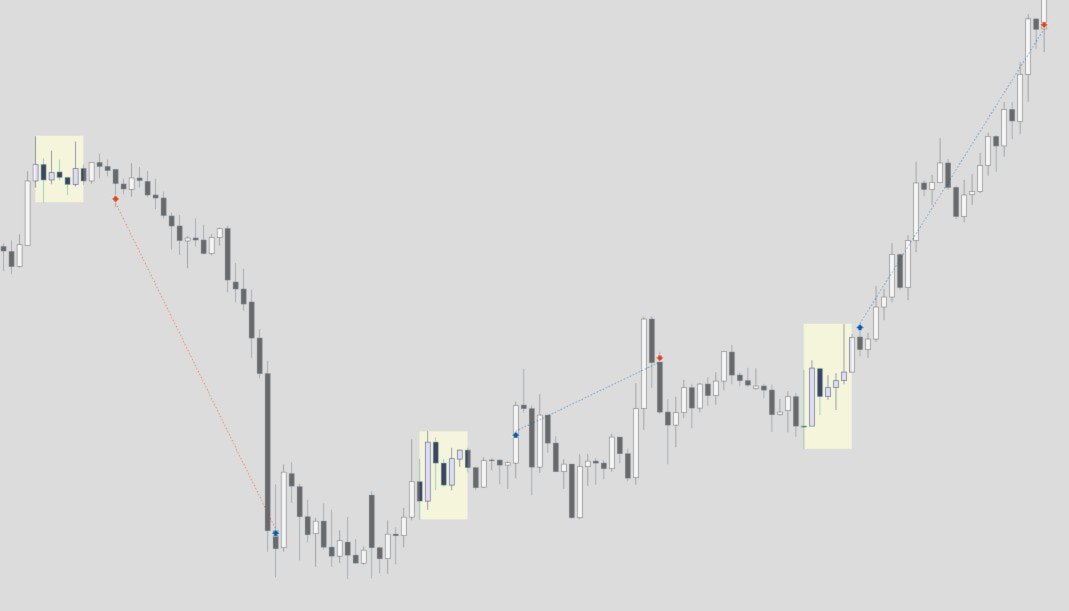
The EA first defines a range based on a time period you select (range start and range end). Once this range is formed, the EA waits for a breakout. When the price breaks above or below this range, a position is opened in the direction of the breakout.
How the position is managed and closed afterwards is fully determined by your settings.
See the first image for an example of a formed range followed by a trade.
When do you take profit or accept a loss?
Because of its modular structure, profit targets, risk control and trade management are configured separately. This allows you to precisely align the behavior of the EA with your own preferences and risk profile, without being limited to one fixed approach.
Every position always includes a Stop Loss. This means that risk is always clearly defined. The way profits are taken or positions are closed depends on the selected exit method.
Important to know: The Stop Loss is always active. The Take Profit is optional and depends on the selected exit method. The chosen exit method determines whether a Take Profit is used, but it does not affect the presence of the Stop Loss.
Available exit methods
- Time-based exit - the position includes a Stop Loss and no Take Profit, and is closed either by the Stop Loss or at a predefined time (for example at the end of the trading day)
- Hybrid exit - the position includes a Stop Loss and a Take Profit, but will still be closed at a fixed time if the Take Profit is not reached
- SL & TP only exit - the position includes both a Stop Loss and a Take Profit and is closed strictly based on these levels
Stop Loss (loss control)
You can choose from three Stop Loss methods:
- Range-based - the Stop Loss is placed on the opposite side of the formed range
- Fixed distance (points)
- Fixed distance (%) - the Stop Loss is calculated as a percentage of the entry price. Example: with a buy entry at 1000 and a Stop Loss of 1%, the Stop Loss will be placed at 990
If desired, the Stop Loss can automatically trail when the trade moves in your favor. You define when the trailing starts (trigger), how far the SL stays behind price (distance), and how often it is updated (step).
Take Profit and position closing
When you use an exit method that includes a Take Profit, you can choose from the following options:
- Fixed distance (points)
- Fixed distance (%) - the Take Profit is calculated as a percentage of the entry price. Example: with an entry at 1000 and a Take Profit of 1%, the TP will be placed at 1010
- Range-based Risk/Reward - the Take Profit is based on the size of the range, multiplied by a factor
2. When does this strategy perform best?
A range breakout strategy works best in markets where price first forms a relatively compact range (for example during the Asian session), followed by a phase where the market breaks out and builds momentum.
This strategy performs best in:
- Markets that regularly break out of ranges and show momentum
- Instruments with enough volatility to sustain movements
- Situations where price does not stay sideways for long periods
Not all markets behave the same way. Some instruments are naturally better suited for this type of strategy, while others tend to move sideways for longer periods.
It is important to understand that some symbols can underperform for extended periods and only recover later. This is why portfolio construction plays an important role when using this EA.
Applying this strategy across multiple, preferably low-correlated symbols helps reduce performance fluctuations.
Because this strategy focuses on capturing expansion and momentum, it is recommended to combine it with other strategies or EAs that perform better in sideways or low-volatility markets.
3. Symbols, presets & portfolio
Do you not have the time or interest to analyze thousands of parameter combinations? Then you are in the right place.
With this EA, you can actively search for your own edge by testing symbols, adjusting settings and running optimizations. Think of it as a flexible framework that allows you to build your own approach based on your preferences.
But let’s be honest… not everyone wants to or can go that deep into the data.
Prefer to keep things simple?
When you purchase this EA, you do not only get the strategy itself, but also access to fully integrated symbol presets. A preset defines how the strategy operates on a specific symbol, including entry behavior, exit logic and risk-related parameter.
Each preset is based on extensive data analysis and represents a carefully selected configuration that has been tested for both performance and robustness.
These are not random settings, but the result of large-scale optimization and filtering, designed to avoid overfitting and focus on stability. Each preset is optimized for a specific symbol.
Instead of manually configuring the EA or working with external files, you simply select a preset within the inputs and you are ready to go immediately, without any manual setup or file management.
The presets are actively maintained and evolve along with my own trading activities. If improvements are made or market conditions change, the EA is updated and the presets are adjusted where needed.
After updating the EA, the latest preset configurations are automatically included. You will be notified of updates through the MetaTrader platform.
This means you always have access to up-to-date, data-driven configurations, without needing to manage or adjust anything manually.
Portfolio structure & results
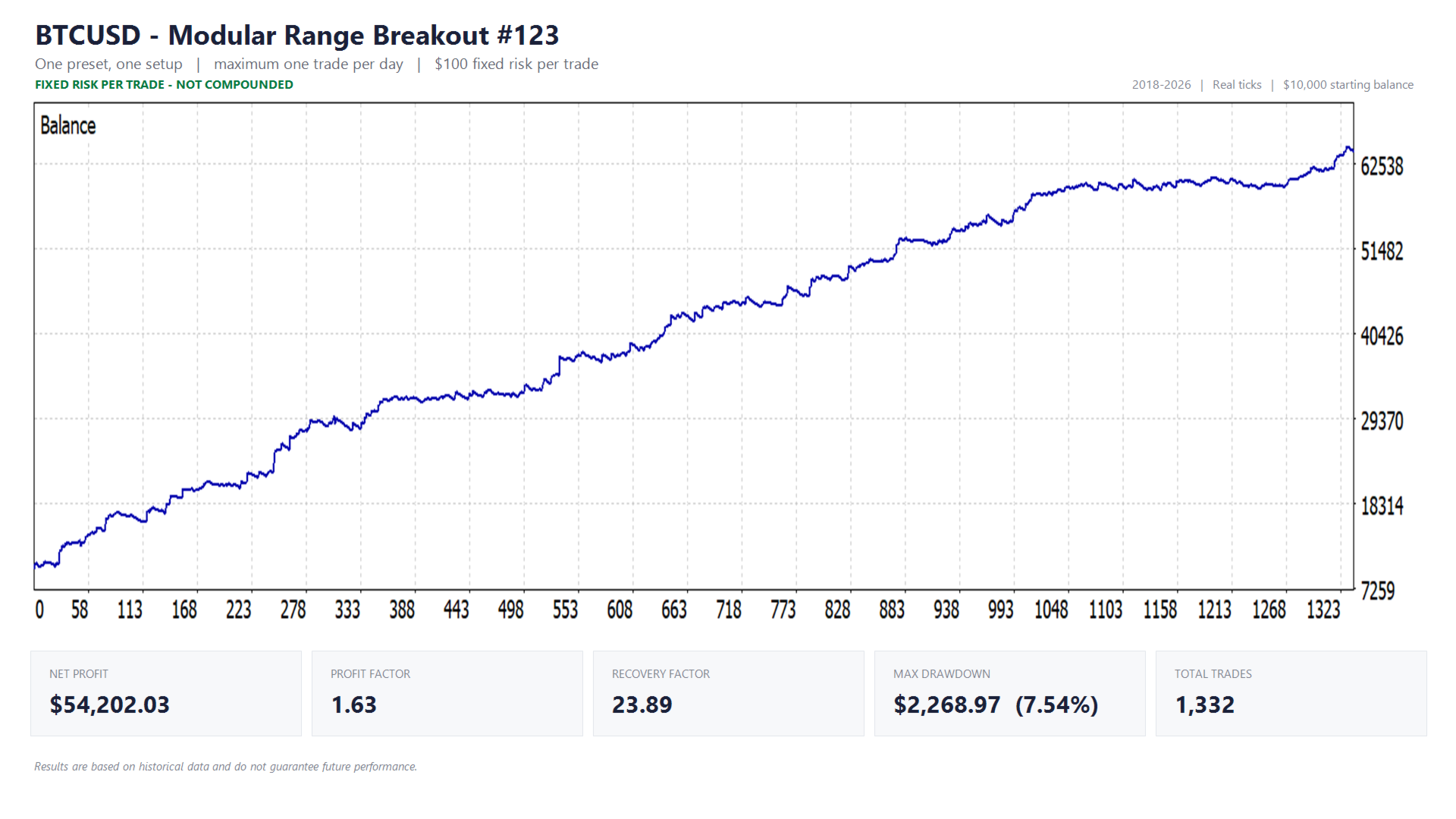
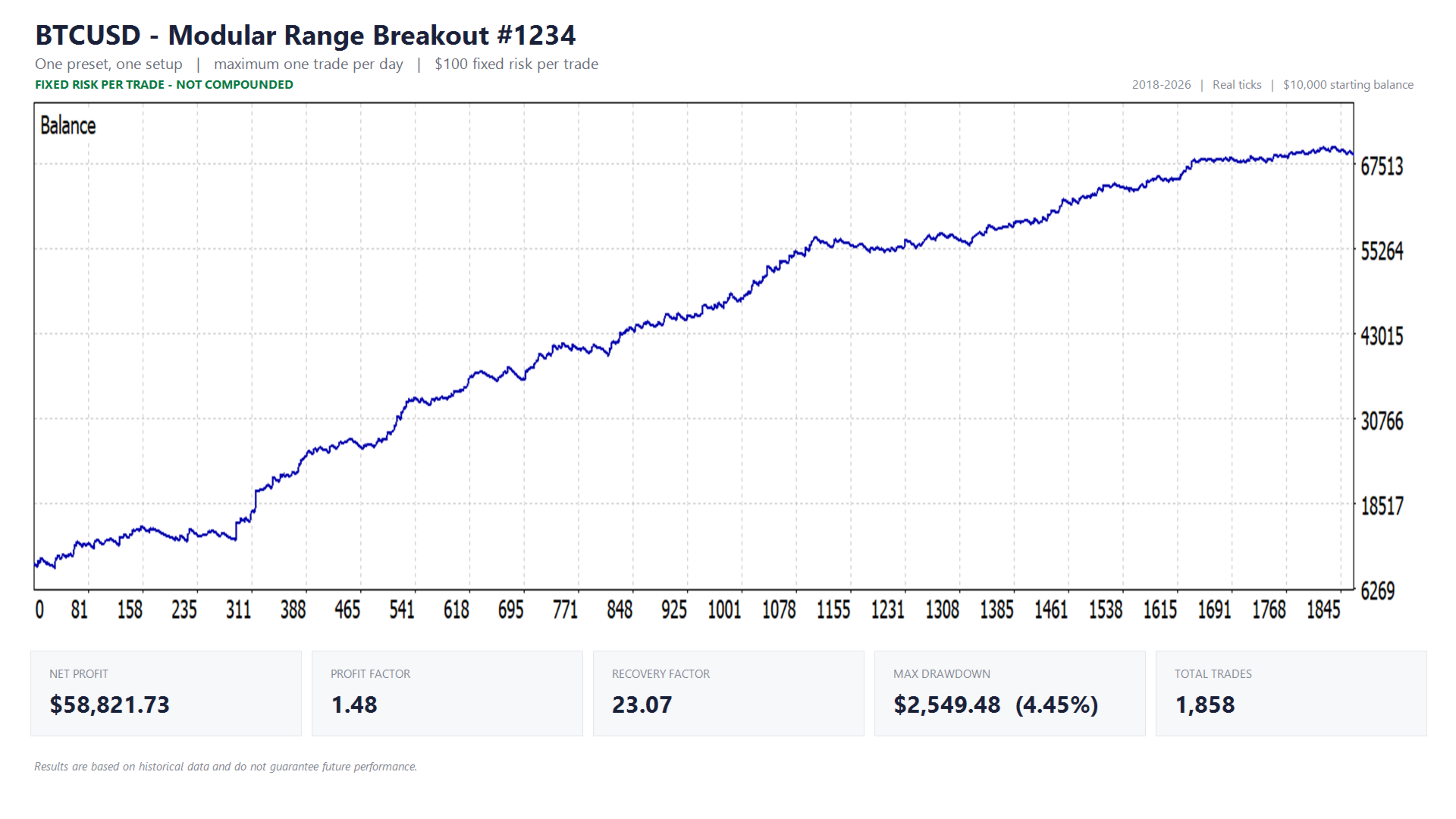
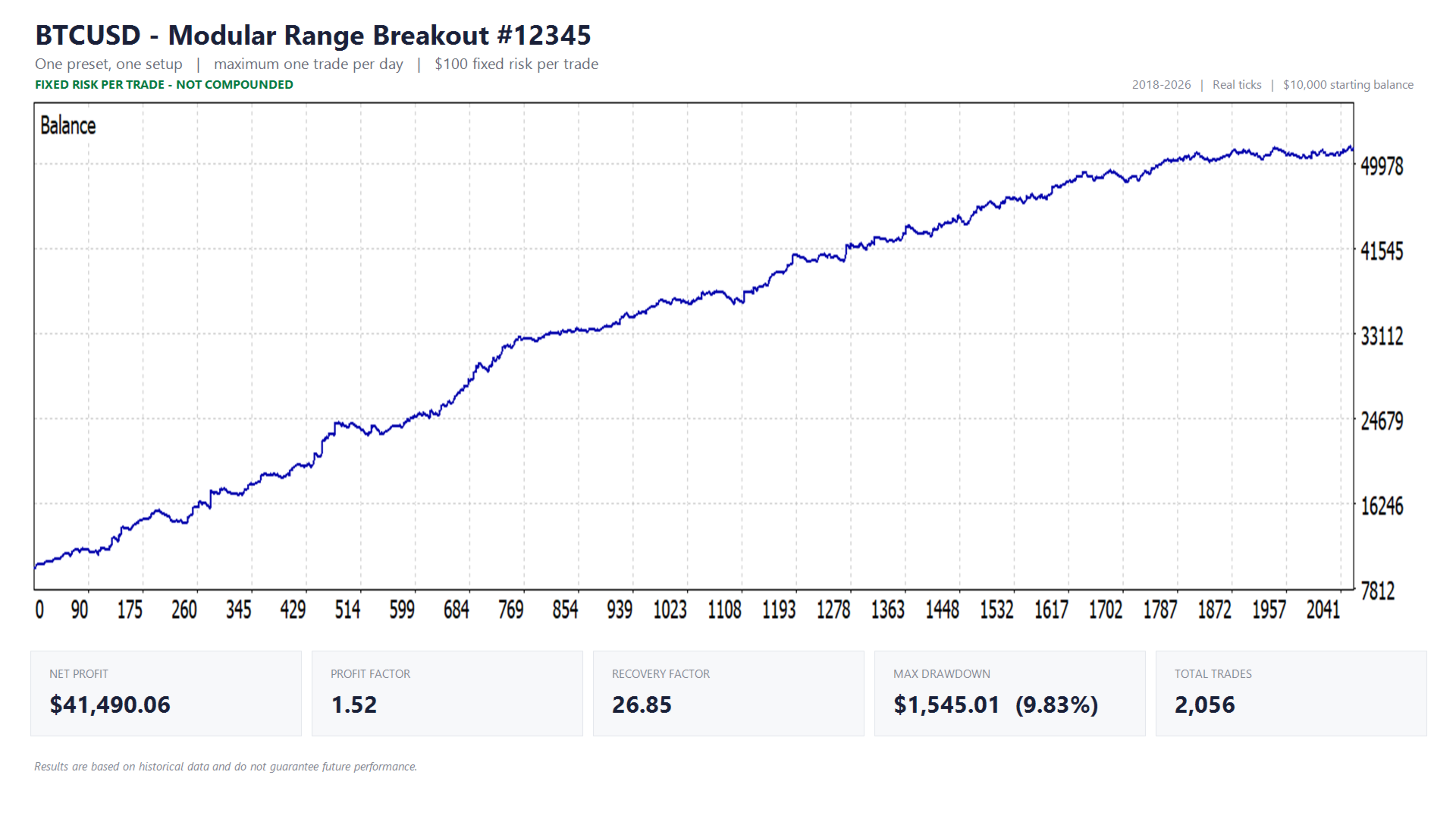
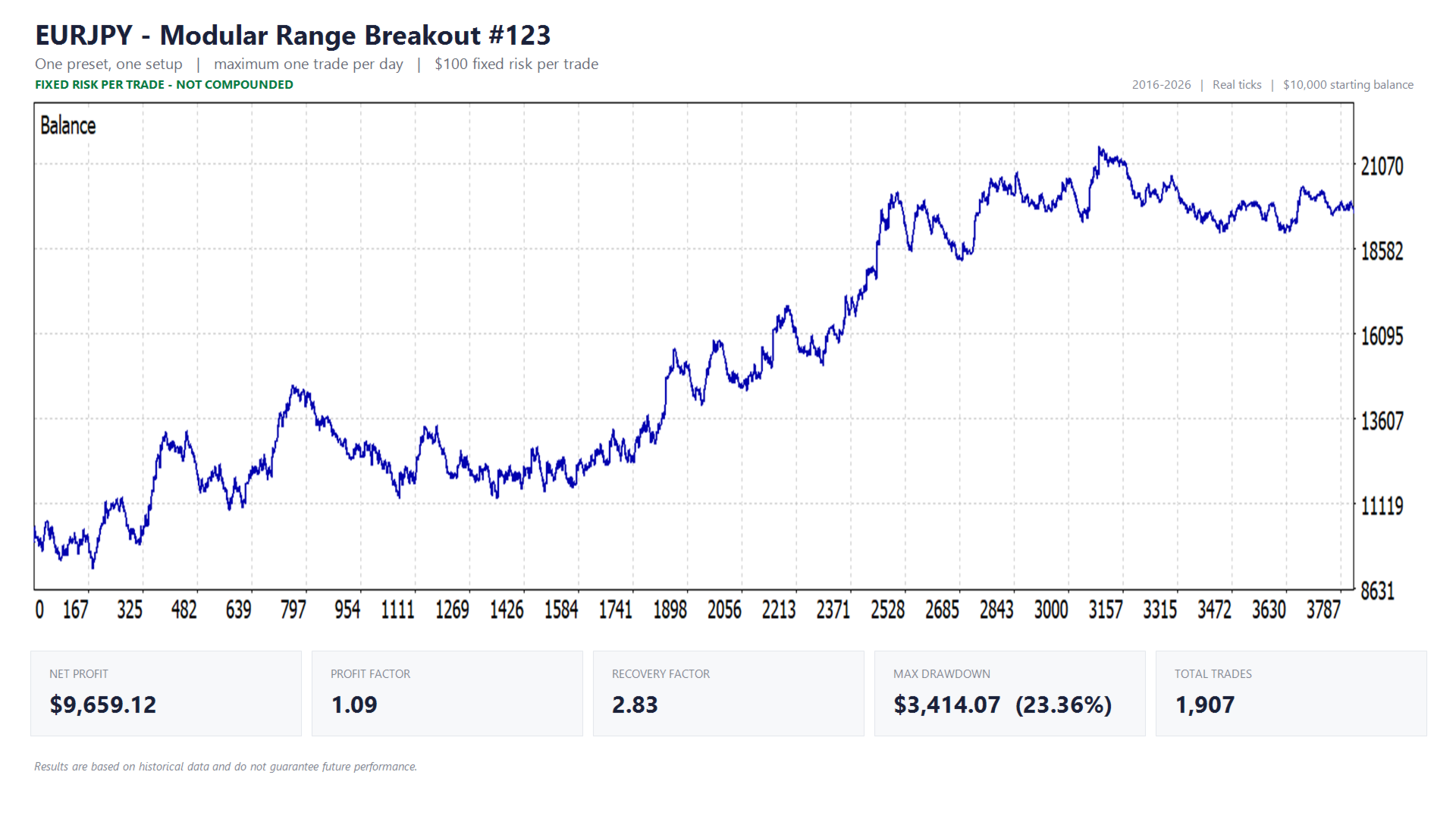
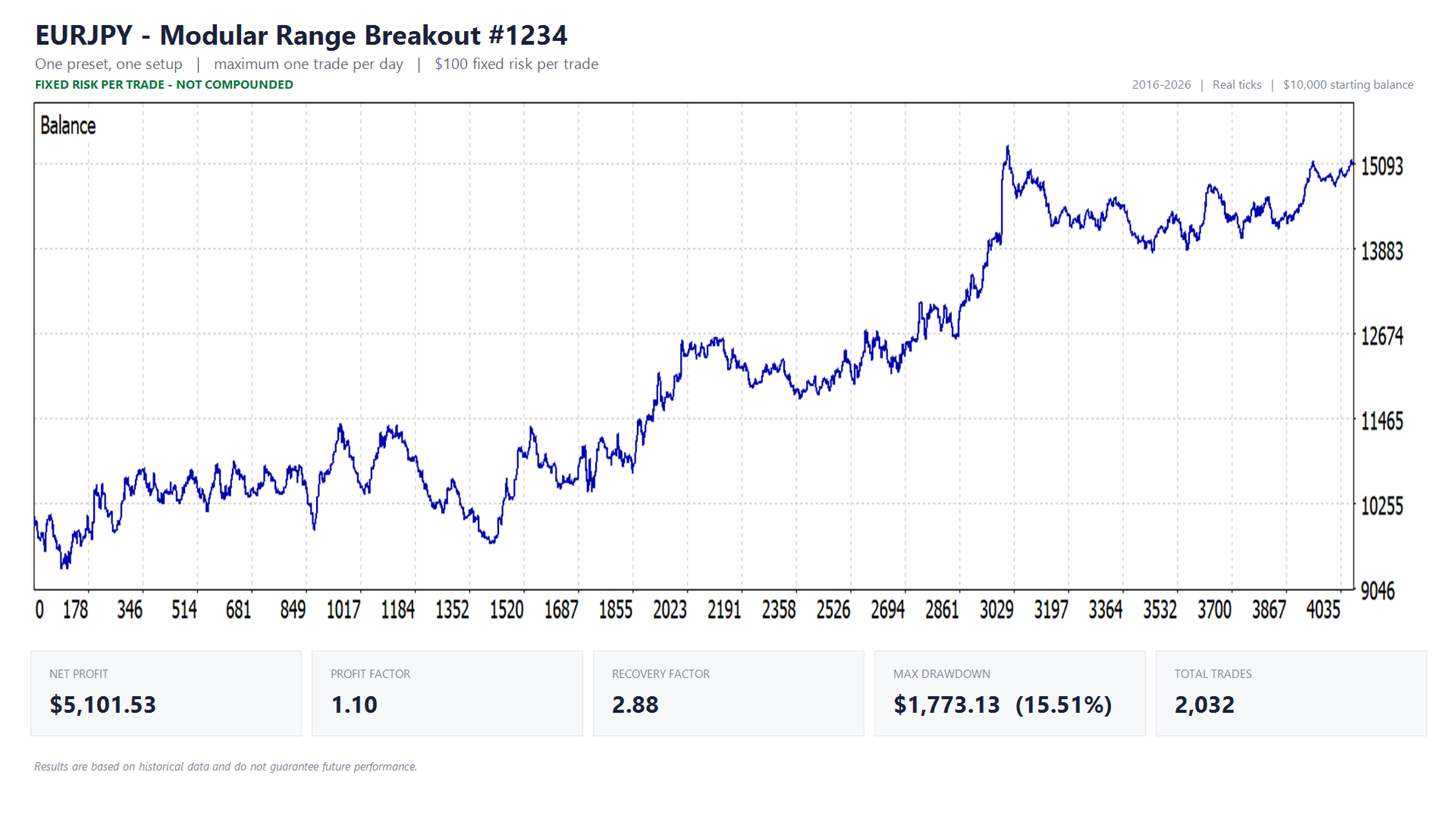
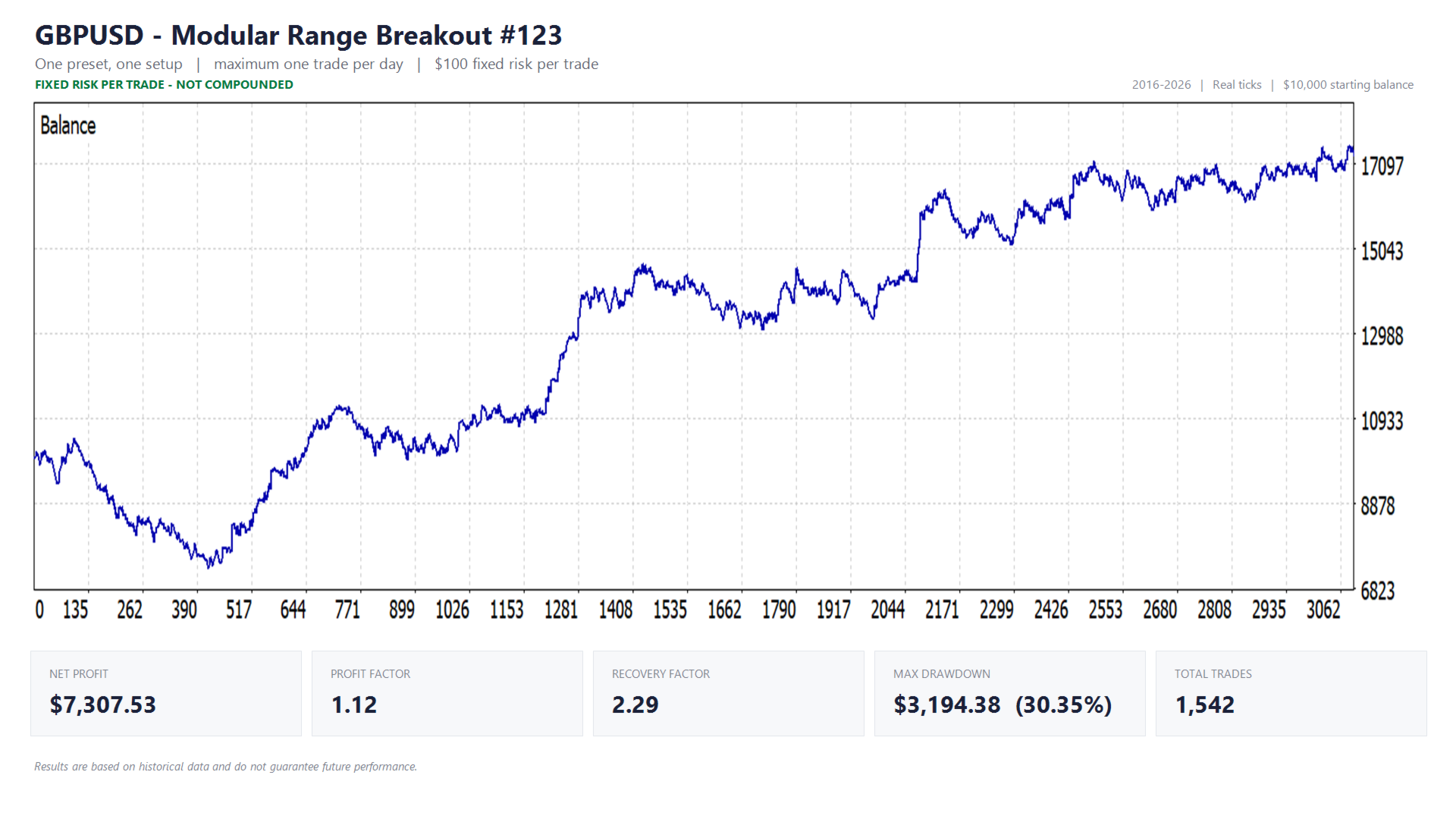
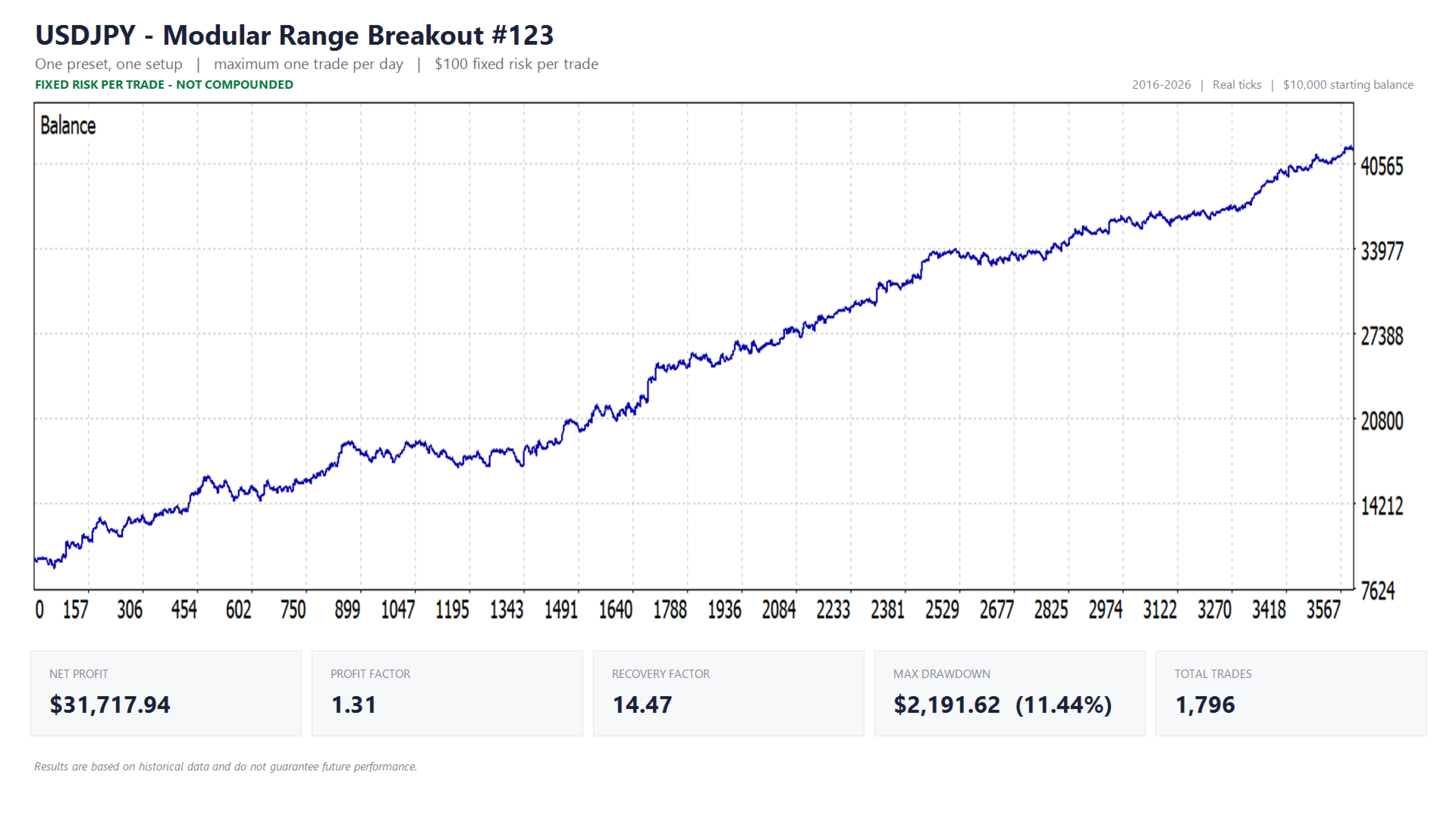
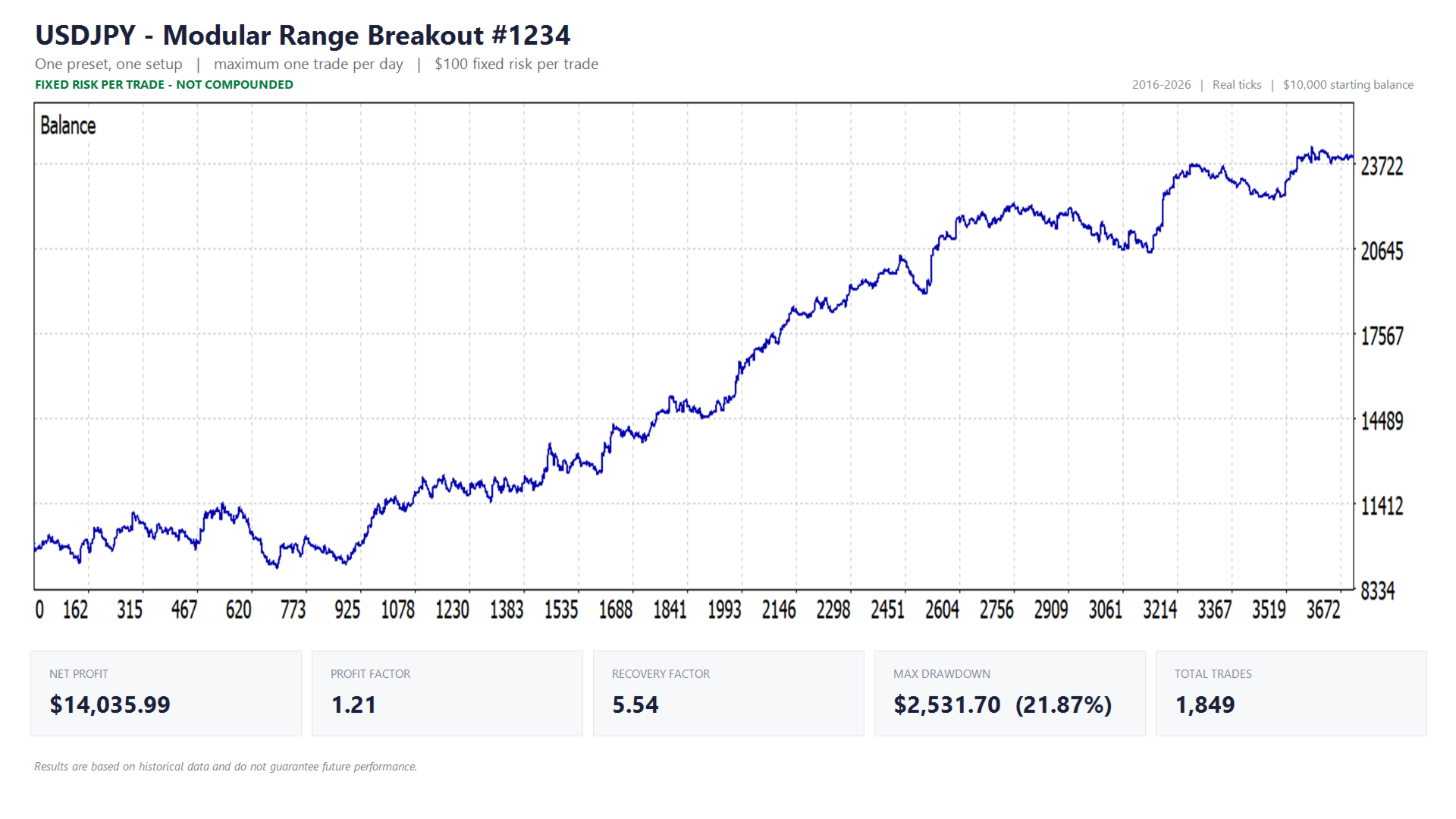
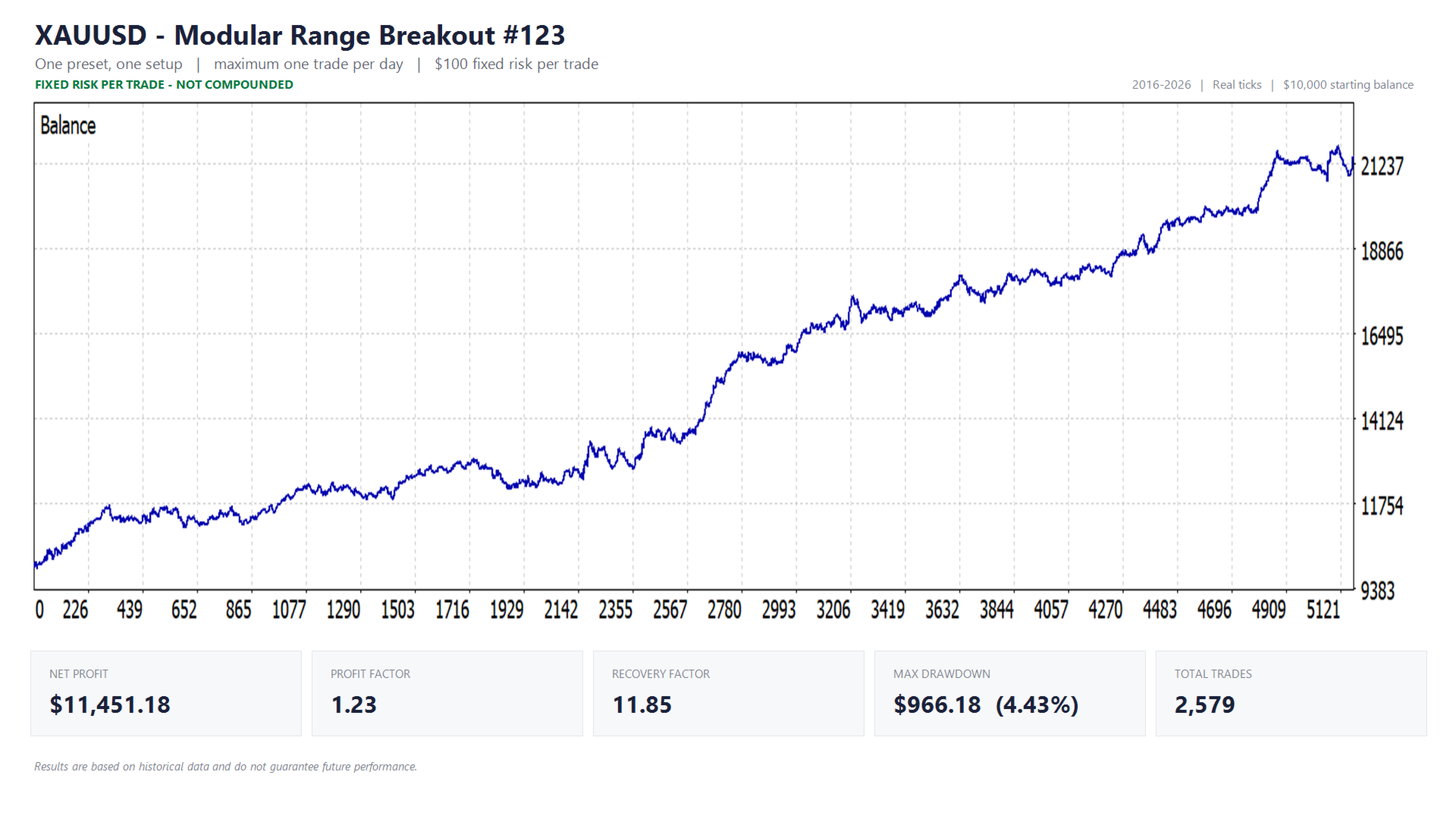
The results below are based on a standardized testing setup, so performance can be compared fairly across symbols.
All backtests have been executed using:
- High-quality historical tick data from Dukascopy
- Test period: 01-01-2016 to 01-01-2026
- Starting balance: $10,000
- Fixed risk per trade: $100 (without compounding)
- Fixed risk per trade: 1% of account value (with compounding)
- IC Trading server time (no adjustments for daylight saving time)
The table below shows the performance of the symbols that are currently included in the portfolio.
| Symbol | ROI (fixed $100/trade) | ROI (1% risk/trade) |
|---|---|---|
| EURJPY | 183,23% | 301,41% |
| USDJPY | 501,08% | 3761.81% |
| GBPUSD | 147,06% | 254,85% |
| XAUUSD | 105,72% | 176,20% |
For a complete view of performance, including drawdown, profit factor and other key metrics, refer to the corresponding visuals per symbol further down this page.
The results shown above are based on historical data and do not guarantee future performance. Periods of drawdown and recovery are part of this strategy. It is not uncommon for a symbol to underperform for extended periods (sometimes multiple months) before entering a phase of recovery.
This is exactly why portfolio construction plays such an important role. By spreading the strategy across multiple symbols, performance becomes more stable and less dependent on a single market.
Future portfolio expansion
The current portfolio forms a strong foundation, but will be expanded over time.
I am actively searching for new symbols that meet strict criteria in terms of stability, robustness and their contribution to overall portfolio diversification. Only when a symbol meets these requirements, it will be added to the EA as a new preset.
All portfolio expansions and improvements to existing presets are delivered through EA updates. After updating the EA via the MetaTrader platform, newly added symbols and refined presets become available automatically within the EA.
In this way, the system evolves together with my own trading activity. You are not just using a fixed set of configurations, but a portfolio that is continuously monitored, improved and extended over time.
How the presets are built
Each preset included in this EA is the result of an extensive research and validation process.
For every symbol, large-scale optimization runs have been performed, sometimes testing more than 100,000 individual parameter combinations over a 10-year period.
The full output of these runs is then analyzed using a custom-built Python script. Instead of selecting configurations based on a single metric, each result is evaluated using a combination of factors such as profitability, drawdown and stability.
The weighting between these criteria is intentionally structured to prioritize consistency and risk control over absolute returns.
In addition, a robustness analysis is applied. This measures how stable a configuration remains when small variations are made to the inputs. Configurations that perform well but break down quickly are considered unstable and are excluded.
Only parameter sets that lie within stable plateaus, where similar values produce similar results, are selected. This reduces the risk of overfitting and increases the likelihood that the strategy performs consistently in live market conditions.
The presets included in this EA are the final result of this process: practical, ready-to-use configurations that balance performance and robustness.
4. Risk profiles & account protection
The EA supports two risk profiles for active trading, as well as a “News filter only” profile (without trading), allowing you to use the EA purely as a protective layer.
In this chapter, we focus on the risk profiles for active trading. The “News filter only” mode is covered separately in the chapter “Everything about prop firm trading”.
Risk profile 1: Risk per trade approach
In this profile, you define the risk per trade and decide how much you want to risk per position. This profile is mainly suited for personal accounts.
You can configure risk per trade in different ways:
- Percentage of account equity (compound effect)
- Fixed amount per trade
- Fixed lot size
Risk profile 2: Daily risk budget approach
This profile is designed for traders who want to manage their daily risk centrally and is especially suitable for prop firm trading.
You define how much of your account (in %) you are willing to risk per day. The EA then automatically calculates the available risk based on your account equity at the start of the day (first tick after 00:00 server time).
Important to know:
- This is the maximum amount you can lose in a day (worst-case)
- The EA distributes this risk across the maximum number of trades
- Risk per trade depends on the maximum allowed number of simultaneous or daily trades
- The EA actively monitors daily drawdown and closes positions if needed
To use this profile correctly, it is important to understand how many trades can be active within your portfolio.
You can also define a maximum risk per individual trade relative to total account equity. This ensures a single trade never becomes too large and helps comply with prop firm rules.
Position sizing considerations
The maximum trade size is limited to 50,000 (in account currency, such as USD or EUR) risk per trade.
The EA also validates whether your settings result in a valid position size.
Working with a smaller account (approximately below €1,000 – €2,000)?
In that case, calculated lot size may fall below the broker’s minimum, especially with larger Stop Loss distances.
You can choose what happens:
- Skip the trade, so risk stays exactly as configured
- Allow execution at minimum lot size, which may slightly increase actual risk
The EA never scales positions automatically without your input and always clearly explains what happens and why.
Some setups may not be directly executable on smaller accounts, but this can be easily solved by adjusting the settings.
Account protection (drawdown limit)
The EA includes built-in protection mechanisms to control and limit total account drawdown.
You can choose between two reference methods:
- Static reference - drawdown is calculated based on a fixed reference value, such as the initial balance. This is commonly used for prop firm accounts.
- Equity trailing high - drawdown is calculated relative to the highest recorded account equity, protecting accumulated profits.
After withdrawals, this reference value may become outdated and no longer reflect actual drawdown correctly.
In that case, you can reset it manually:
- Press F3 to open Global Variables
- Locate the variable related to equity high
- Delete the variable
- The reference value will automatically reset
Unlike daily drawdown or profit target protection, existing trades are not closed when this limit is reached. Instead, opening new trades is blocked.
5. Everything about prop firm trading
This chapter helps you use the EA safely and correctly within prop firm rules.
Prop firms often have strict rules regarding drawdown, risk and news events. The EA includes multiple features to actively support these requirements.
Always verify your prop firm rules before using the EA on a live account.
Which risk profile is suitable?
The Daily risk budget profile is most suitable for prop firm trading.
You define a fixed daily risk percentage, and the EA distributes this automatically across trades.
Practical example
Suppose a prop firm allows a 5% daily drawdown. Instead of using the full limit, you may choose to use only 2.5%. Many traders do this to stay below the risk threshold and avoid hitting limits too quickly.
This creates a more controlled and defensive trading approach.
Ultimately, choose a risk level that fits your style and test different configurations.
Total drawdown limit (account level)
Most prop firms also define a maximum total drawdown, usually based on initial account balance.
Configure this in the EA:
- DD protection reference value → Static
- Static reference amount → initial account balance
Profit target protection
When setting a profit target, a protection mechanism activates automatically.
The EA monitors profit in real-time, including spreads and commissions. Once the target is effectively reached, all positions are closed.
This prevents losing floating profit after already meeting challenge requirements.
News filter
The news filter can be used in three ways:
Scenario 1: Protecting trades within this EA
In this mode, the news filter only manages trades opened by this EA on the current chart and symbol. In this scenario the EA can:
- Close trades opened by this EA before scheduled news events
- Temporarily remove SL/TP during events on trades from this EA
After the event, SL/TP are safely restored.
Scenario 2: Protecting trades from this EA and other EAs
In this mode, the news filter manages all trades on the current symbol, including positions opened by other EAs.
- Close trades from this EA and other EAs on the same symbol before scheduled news events
- Temporarily remove SL/TP during events on trades from this EA and other EAs with corresponding symbols
Scenario 3: News filter only (no trading)
In this mode, the EA does not open any trades. It is used purely as a protective layer to manage or close positions during news events.
When enabled, the EA can close positions from other EAs on the selected symbol before scheduled news events, or temporarily remove SL/TP levels from those positions during news events.
In this mode, the EA does not open any trades on the chart it is attached to. This makes it particularly useful if you want to benefit from the news filter functionality while running another EA that does not include this feature.
This setup should always be tested in a demo environment first. Be aware that some EAs include built-in safety mechanisms that require every trade to have a SL at all times.
In such cases, positions may be closed automatically if the SL is removed. This means that scenario 3 may not be compatible with all EAs.
The news filter is designed to operate safely under all conditions. In the event of a restart or crash, all active positions are automatically recovered and managed correctly.
Trades are never left without a Stop Loss, and if for any reason Stop Loss or Take Profit levels cannot be restored, the EA will take protective action and close the position to prevent unmanaged risk.
Using presets with prop firms
The use of presets is not recommended when trading with prop firms.
Prop firms are not your partner. In many cases, they operate under rules that allow them to deny payouts without providing detailed justification.
Using identical or widely shared configurations can increase the risk of your setup being flagged or considered non-compliant.
Prop firms operate under their own rules and are not aligned with your interests as a trader. For this reason, it is strongly advised to use your own custom configuration when trading with prop firms.
6. Advanced features & filters
All settings described here can be combined to further refine the behavior of the strategy.
Market filters & trading logic
With these filters, you decide when and how the EA opens trades.
- Direction filter (buy only / sell only)
- Breakout selection
- Breakout confirmation
- Range size filter
Timing & trading restrictions
The EA includes a day-of-week filter. You can define on which days the EA is allowed to trade, helping you avoid less favorable trading conditions.
Visuals (information on the chart)
The EA can display various statistics and information directly on the chart, so you can instantly see what is happening and how performance is developing.
Available visuals:
- Total account performance (drawdown & profit)
- Daily performance (daily drawdown / profit)
- News filter status on the chart
When trading multiple symbols simultaneously, it is recommended to activate these KPI visuals (profit, drawdown, etc.) on only one chart. This prevents unnecessary system load and keeps your setup clear.
7. Installation & first use
Ready to get started? Below is exactly how to install the EA and get it running within minutes.
Timeframe usage
The EA is not dependent on the timeframe it is attached to. You can run it on any timeframe without affecting how the strategy works.
Execution & VPS
The EA uses market orders and therefore depends on fast and stable execution. Using a VPS is strongly recommended. In addition, a broker with low costs and fast execution is important for consistent performance.

If you have questions about this, feel free to reach out for recommendations.
Enabling the news filter (required setup)
To use the news filter, the EA retrieves real-time news data from the Forex Factory website.
To allow this, you need to enable web requests in your MT5 terminal:
- Go to Tools → Options
- Open the Expert Advisors tab
- Enable “Allow WebRequest for listed URL”
- Add the following URL: https://nfs.faireconomy.media
Without this step, the EA cannot retrieve news data and the news filter will not function.
Checking if the news filter is working correctly
Not sure if the news filter is set up correctly? You can verify this using the following methods:
Method 1: Chart check
Enable “Show news filter status on chart” in the CHART MAKE-UP SETTINGS section.
- Whether a news event is currently active
- When the next news event occurs
- How long until trading resumes
Method 2: Experts tab
Enable “Print news event in Experts journal for verification”.
- Event name
- Related currency
- Impact level
- Exact timing (GMT and broker time)
Compare this with the Forex Factory website. If they match, the news filter works correctly.
Timezone check (if needed)
The EA converts GMT+0 news time automatically to your broker time.
The “Broker GMT offset” is set to 0 by default (auto detect).
If needed, you can manually adjust this value (for example GMT+2 or GMT+3 depending on your broker).
Magic number (important when using multiple charts)
If you run the EA on multiple charts or symbols, it is important to assign a unique magic number per chart. The magic number is used to identify which trades belong to this EA instance.
This ensures that positions, risk management and protective actions are handled correctly per chart and do not interfere with each other. Using the same magic number across multiple charts can cause trades to be managed incorrectly.
8. How the settings work together
In this chapter, you will learn how the settings interact, so you can confidently configure the EA.
You do not need to worry about silent misconfigurations. The EA is designed to detect incorrect setups and will always provide clear feedback in the Experts tab if something is not configured correctly.
What happens if settings do not match?
Some inputs only apply to specific configurations. If a combination is incorrect or incomplete, the EA will not execute it silently. Instead, it provides a clear explanation so you always understand what needs to be adjusted.
This ensures you never have to guess why the EA is not taking trades.
Using presets vs custom configuration
When a preset is selected, all strategy-related settings that control trade entries and exits are automatically configured.
These inputs are clearly marked with “ignored when a preset is selected” in the settings. When a preset is active, you do not need to adjust these values manually.
All other inputs remain active. This includes risk profile, position sizing and account protection settings. These should always be configured according to your own preferences, even when using a preset.
Using “News filter only” mode
If you want to use the EA only as a protective layer during news events, ensure that you select Custom mode.
To set this up correctly:
- Do not select a preset
- Use Custom configuration mode
- Set the risk profile to “News filter only”
Presets are designed for active trading and will override strategy-related settings. Because of this, they are not compatible with “News filter only” mode.
When configured correctly, the EA will not open any trades, but will still monitor and protect positions according to your news filter settings.
Key relationships between settings
- If you use a Take Profit method, a corresponding TP value must be set
- If you do not use a Take Profit, the TP value should be set to 0
- If you use a fixed Stop Loss (points or percentage), a valid SL value must be set
- If you use a range-based Stop Loss, the SL value should be set to 0
- If you enable trailing stop, all related inputs (trigger, distance and step) must be configured
These dependencies ensure that the EA behaves exactly as intended and that all risk parameters are clearly defined at all times.