Modular Range Breakout EA
- Experts
-
Lucas Johannes Martinus Vercoulen
 My name is Luc, 25 years old and living in The Netherlands.
 - Versione: 1.50
- Aggiornato: 24 settembre 2026
- Attivazioni: 6
Modular Range Breakout — a range breakout strategy, with the work put into everything around the entry.
The EA measures a range between a start and an end time, places a stop order on each side, and lets the break decide the direction. That part is old and well understood. What this EA adds is the layer around it: defined risk on every position, a choice of exit methods, six optional entry filters, account protection, a news filter, and a set of symbol presets that have been optimised and stress-tested rather than curve-fitted.
No martingale, grid or recovery systems. Every position carries a stop loss from the moment it exists, and every filter, risk profile and protection layer is optional and set by you.
- Ready to use through built-in symbol presets, or fully configurable for your own markets
- Multi-symbol by design, as a foundation for a diversified portfolio
- Optional KPI visuals on the chart (profit, drawdown, news)
- Prop firm features: daily drawdown limit, hard stops, profit target protection, account-wide news filter and configuration randomisation
- Nothing fails silently — any configuration that does not add up is explained in the Experts tab
Curious about live, verified results? This EA, together with my other publicly available EAs, is actively traded as part of my portfolio. Check out my MQL5 signal page.
The strategy: range, breakout, defined risk
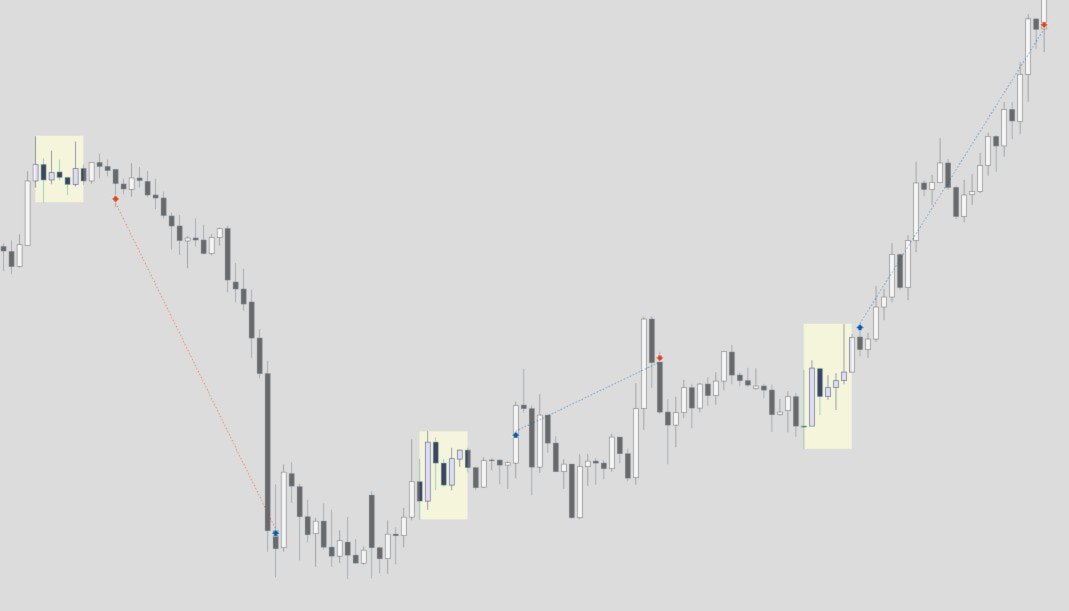
The EA measures a range between a start and an end time you choose. Once that range closes it places a stop order on each side and waits. Price breaks out, the order fills, and from that moment the exit is entirely yours to define.
Every position always includes a stop loss. Choose the one that fits the market: the opposite side of the range, a fixed distance in points, or a percentage of the entry price. It can trail as the trade moves in your favour, with your own trigger, distance and step.
The exit method is a separate choice:
- Time-based — a stop loss and no take profit; the position closes on the stop or at a fixed time
- Hybrid — a take profit is used, but the position still closes at a fixed time if it is not reached
- SL and TP only — the position closes strictly on its levels
Take profit, when you use one, can be a fixed distance in points, a percentage of the entry price, or a multiple of the range size.
Sharpening the entry, or leaving it wide
The base entry takes the first break of the range in either direction. Six optional filters narrow it, each off by default:
- Direction filter — long only or short only
- Breakout selection — take only the first breakout of the day, or allow a second attempt
- Breakout confirmation — wait for a candle to close outside the range (M1, M5, M15 or H1) instead of entering on the tick
- Range size filter — skip ranges that are too tight or too wide, in points or as a percentage of price
- Moving average filter — only trade in the direction the market is already leaning
- Day-of-week filter — switch off the days that do not suit the market you trade
Built-in symbol presets
Select a preset, set your risk, and the strategy configuration is done. No external files, no manual setup.
Each preset is the result of large-scale optimisation, often more than 100,000 parameter combinations over a ten-year period. The output is analysed on profitability, drawdown and stability together rather than on a single metric, weighted deliberately towards consistency and risk control instead of absolute return. A robustness test then discards configurations that fall apart when their inputs are nudged slightly; only parameter sets sitting inside stable plateaus, where similar values produce similar results, are kept. The aim is not the best backtest, it is a configuration that still behaves the same when the market does not.
A preset is not a single configuration. Where a symbol offers more than one usable setup, the preset runs them together, each with its own timing and character, so one quiet range does not decide the whole day:
| Preset | Range setups | Maximum trades per day |
|---|---|---|
| BTCUSD | 3 | 3 |
| EURJPY | 2 | 2 |
| USDJPY | 2 | 2 |
| GBPUSD | 1 | 1 |
| XAUUSD | 1 | 1 |
Every setup takes at most one trade per day: it enters on the first breakout and holds one position at a time. That gives you a hard daily ceiling, shown in the table above. Read it correctly: the risk you enter applies to each trade, not to the day. Running BTCUSD at 1% per trade, a day on which all three setups trade puts 3% at risk, not 1%. The EA prints the exact number for your preset in the Experts tab the moment you attach it, so your total exposure is never a guess.
Presets are actively maintained and evolve along with my own trading. Improvements and newly added symbols arrive through a normal EA update — nothing to download, nothing to import.
A withdrawn preset
The US30 preset has been withdrawn. Re-examining it showed that its results did not survive the robustness test the other presets are held to: neighbouring parameter values produced materially different outcomes, which is the signature of a configuration fitted to its own history. Rather than leave it in place, it now refuses to trade and says so in the Experts tab, so an existing set file that still selects it cannot quietly fall through to different behaviour. Selecting it is a configuration error, not a silent no-op.
Risk management that scales with your account
Four sizing profiles: a fixed amount per trade, a percentage of equity, a fixed lot size, or a daily risk budget distributed automatically across your trades — the profile for anyone who has to manage risk centrally and strictly, such as prop firm trading. Under the budget profile the EA calculates the available risk from your equity at the start of the day and spreads it across the maximum number of trades, while a cap on any single trade keeps one position from ever becoming too large.
If a calculated position size would fall below your broker's minimum, you decide in advance what happens: skip the trade so the risk stays exactly as configured, or execute at the minimum lot and accept more risk than you entered. The EA never scales a position without reporting it.
Account protection
A maximum drawdown, measured against either a fixed starting balance or a trailing equity high, blocks new trades once the limit is reached. A daily drawdown limit closes what is open. A profit target closes everything the moment it is genuinely reached, spread and commission included, so a met challenge target is not handed back.
News filter
The filter retrieves the live economic calendar and, depending on your preference, blocks new trades, closes positions, or temporarily lifts stop loss and take profit around the event and restores them afterwards. It works in three ways: on this EA's trades only, on every position on the symbol including those of other EAs, or as a pure protection layer that opens no trades at all — useful for shielding another EA that has no news filter of its own.
It survives a restart or a crash without ever leaving a position unprotected, and if a stop loss or take profit cannot be restored for any reason, the EA closes the position rather than leave unmanaged risk open.
Trade management
Trailing stop, break-even and trailing take profit each activate independently, so an open position moves with the market instead of waiting statically on a fixed level.
Prop firm environments
The daily risk budget, the drawdown limits and the profit target protection are all built with challenge and verification phases in mind. Alongside them, a built-in randomisation feature lets you vary your configuration slightly, so your setup is not identical to everyone else running the same preset. Always verify your prop firm's own rules before running the EA on a live account.
Backtest results
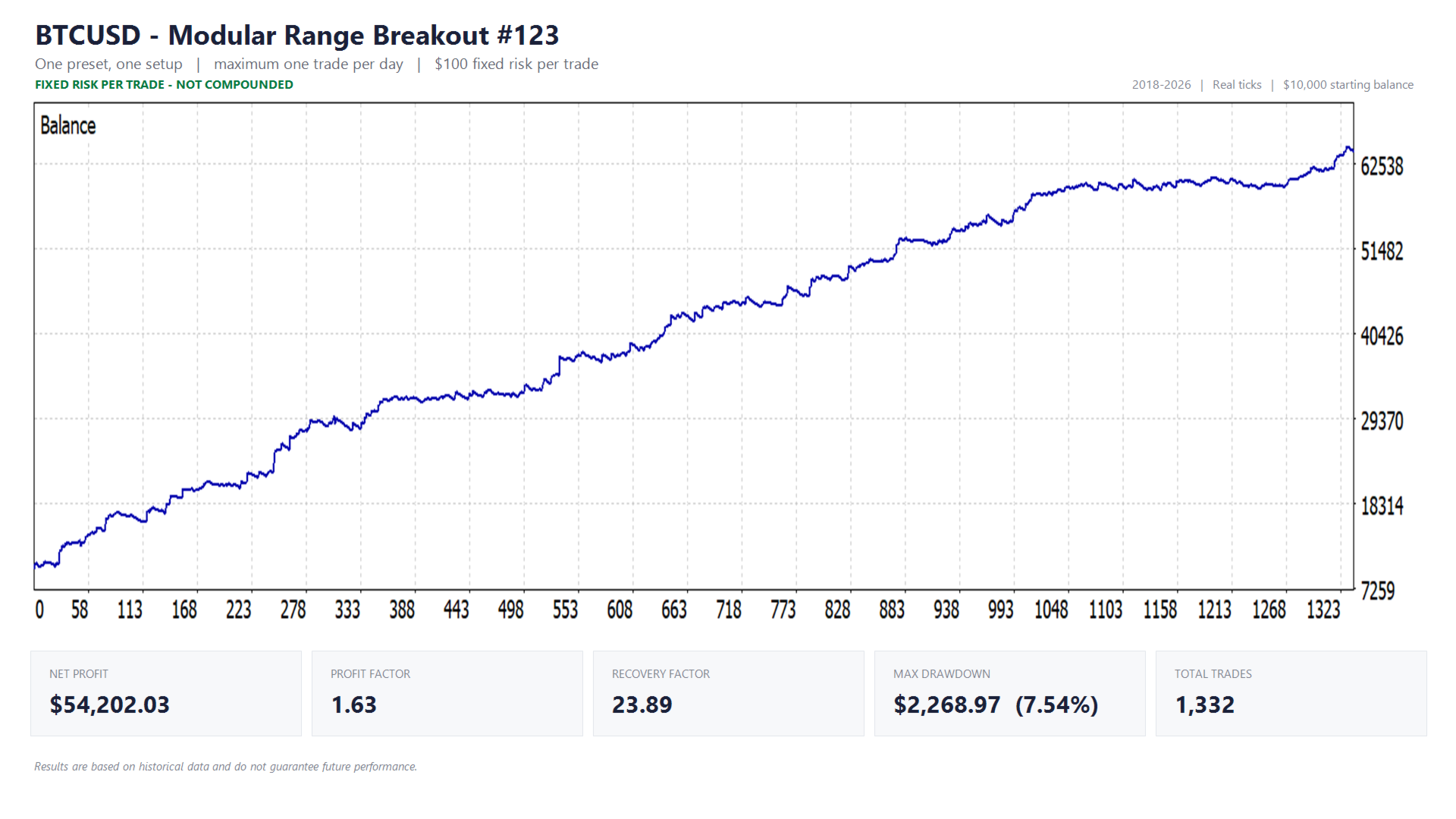
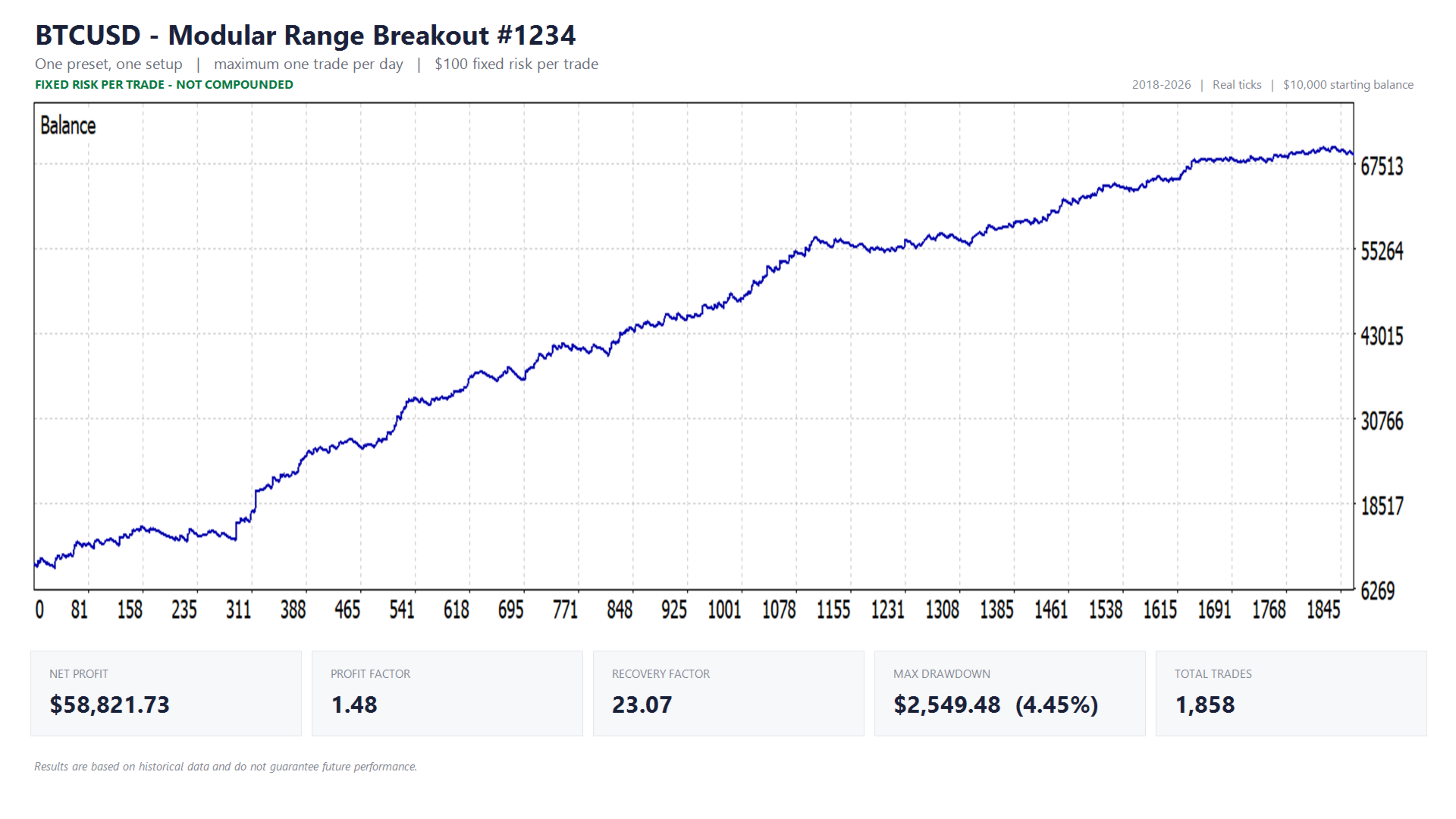
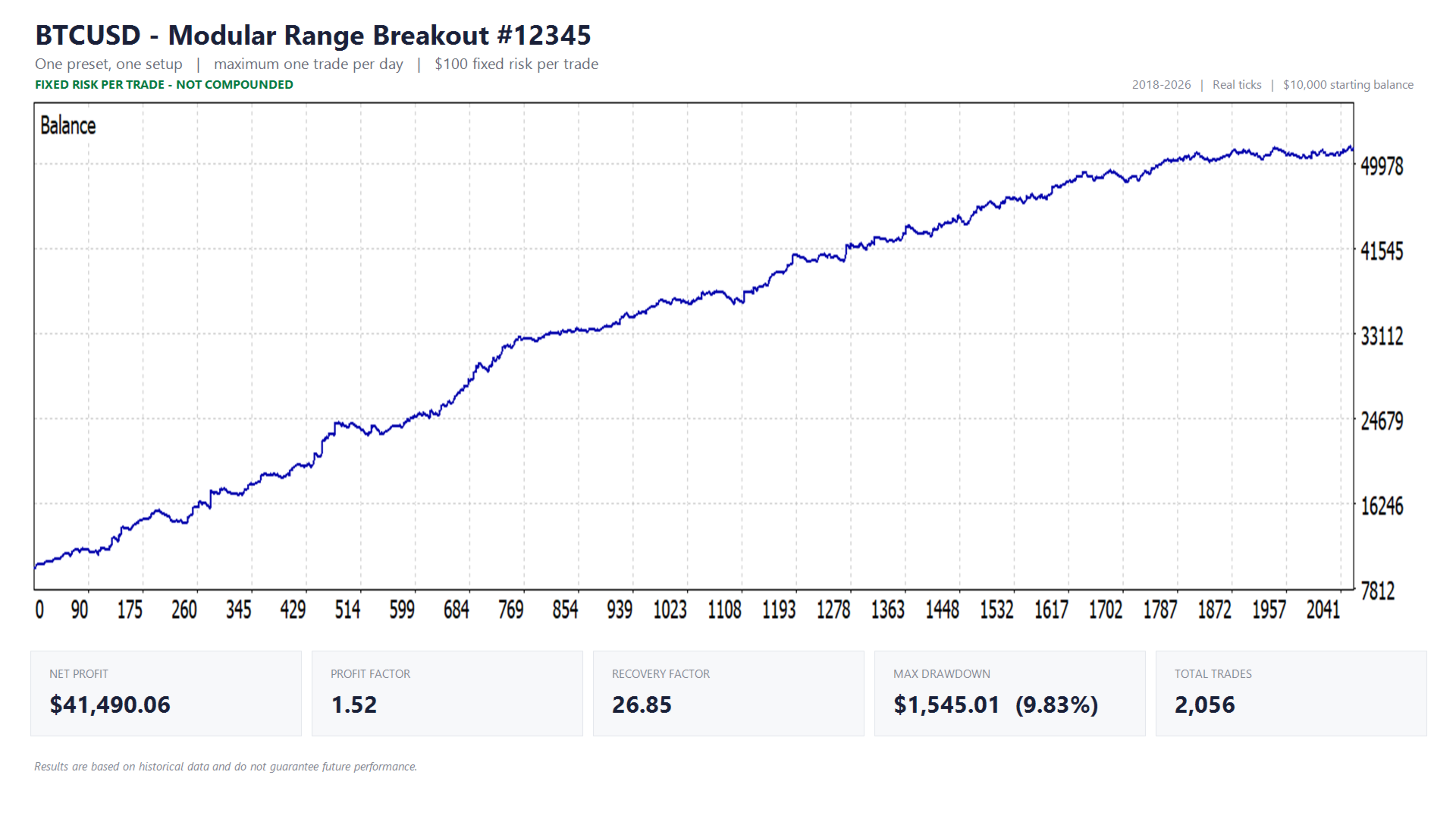
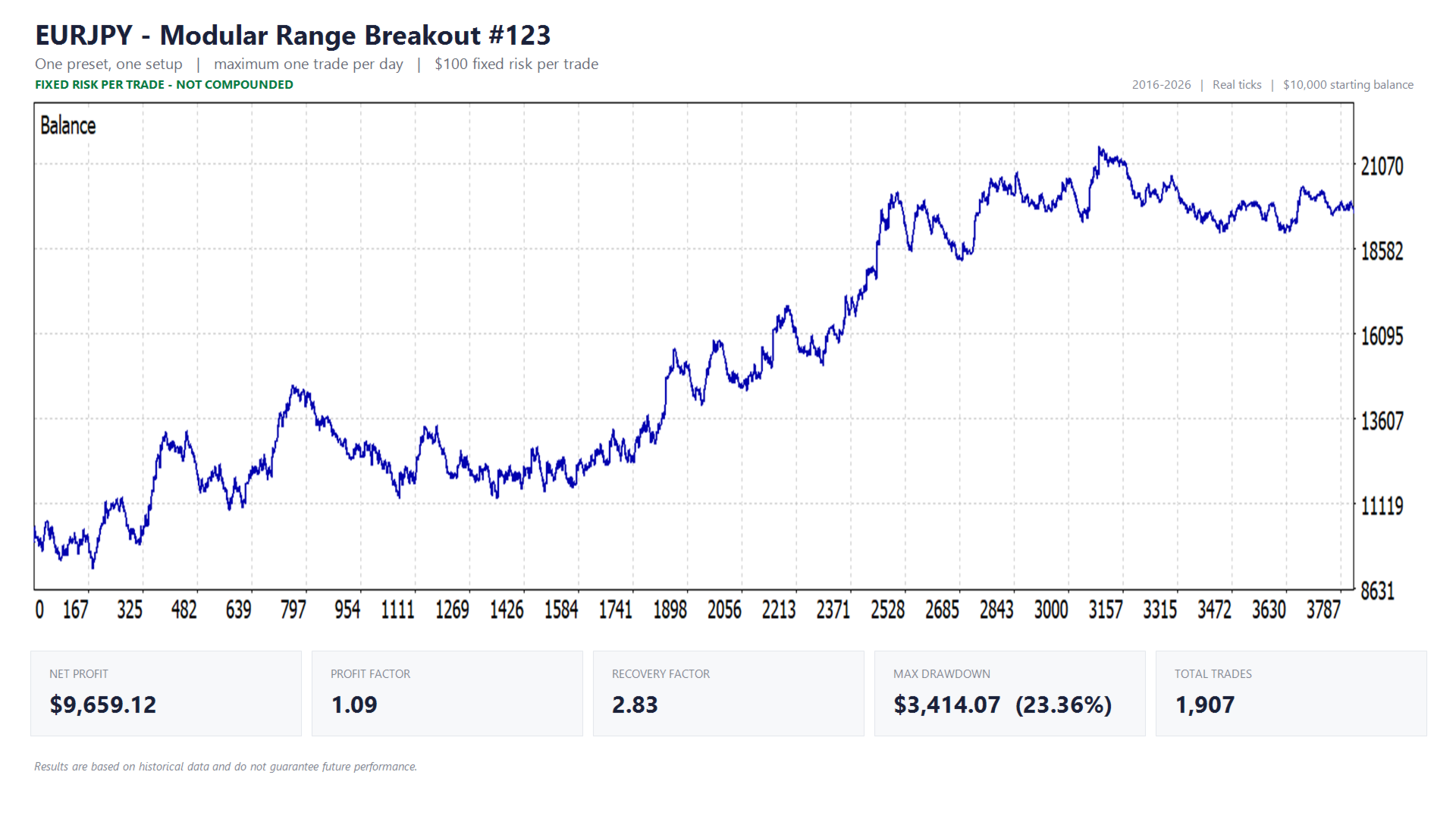
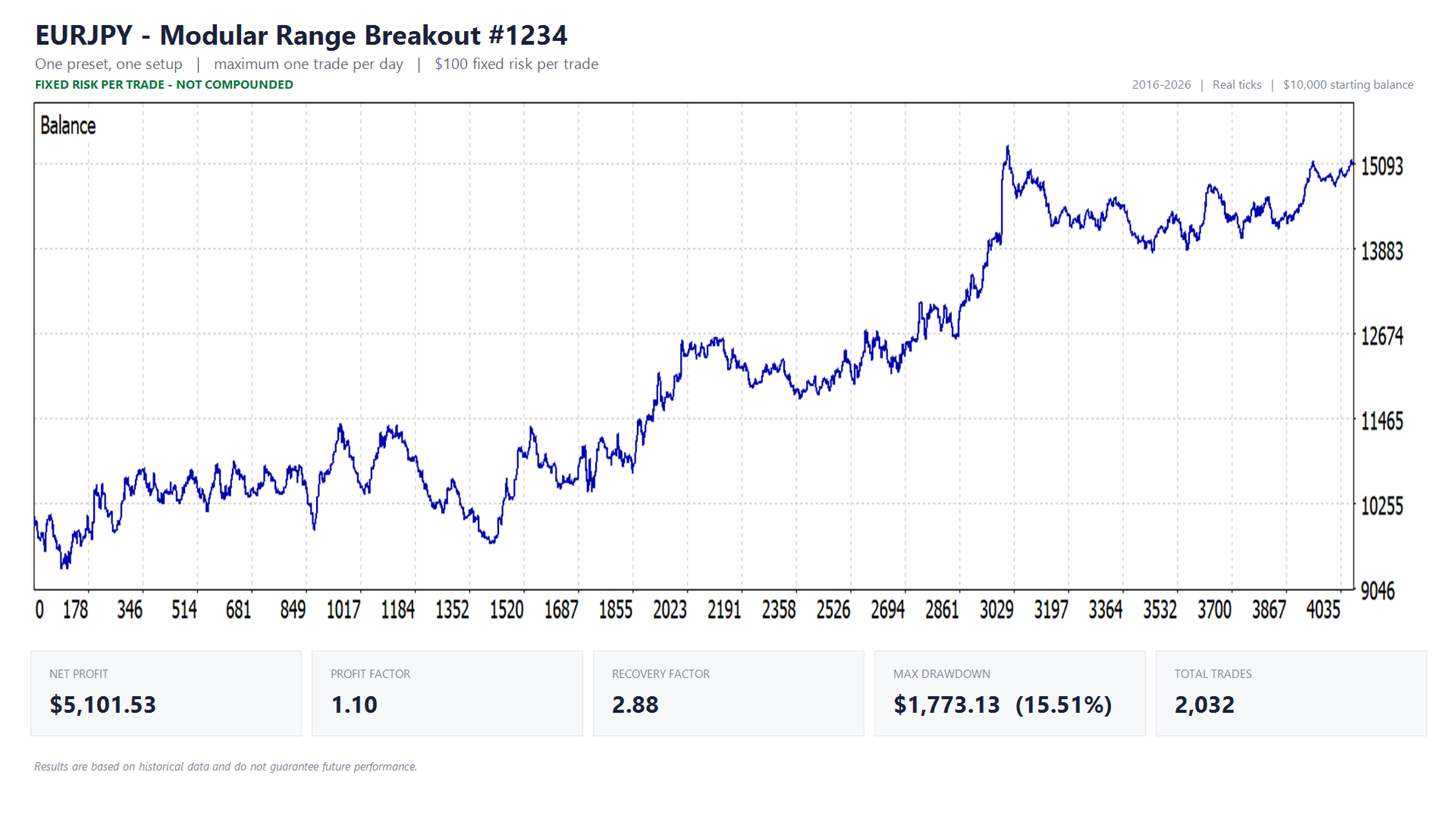
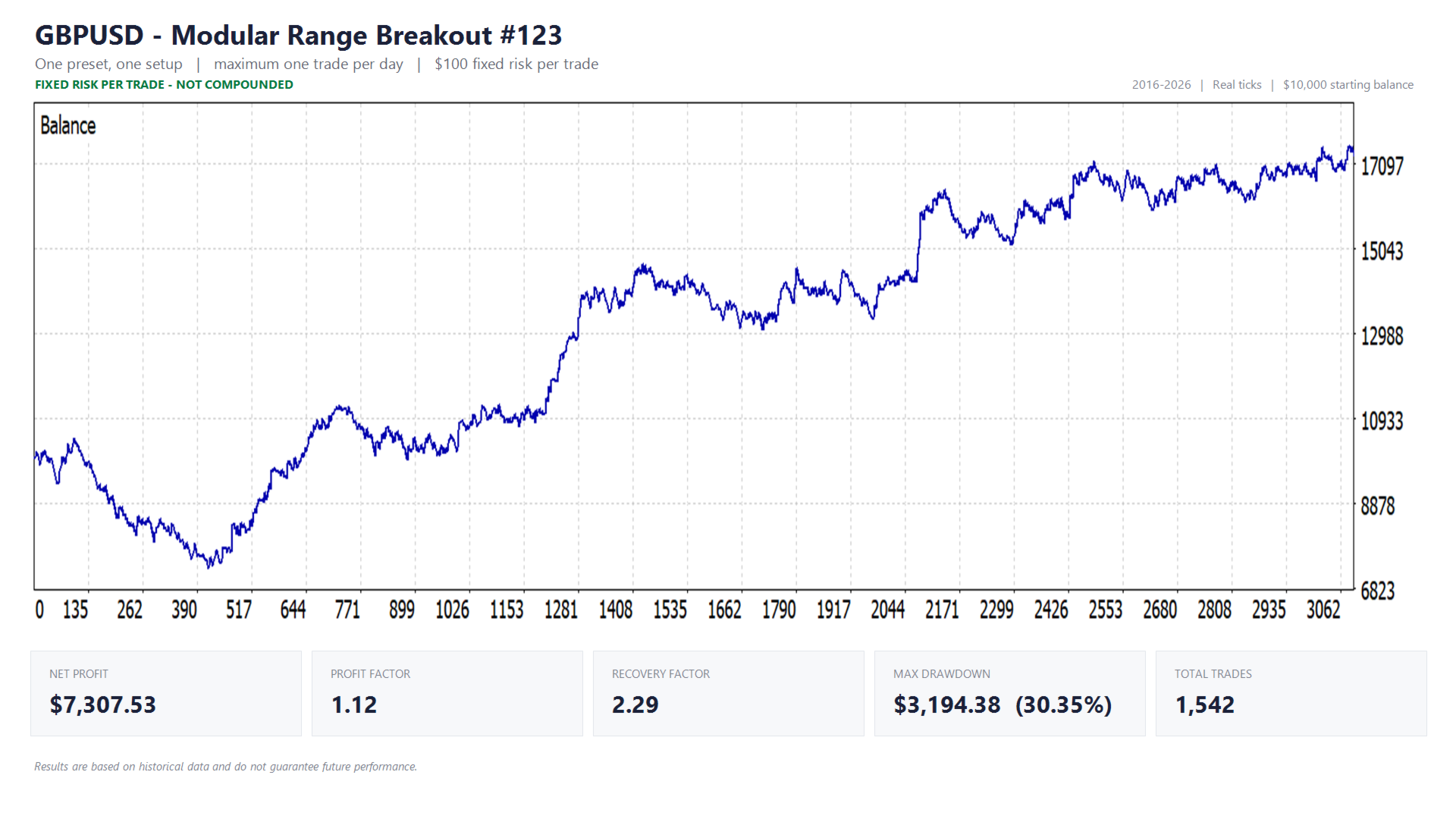
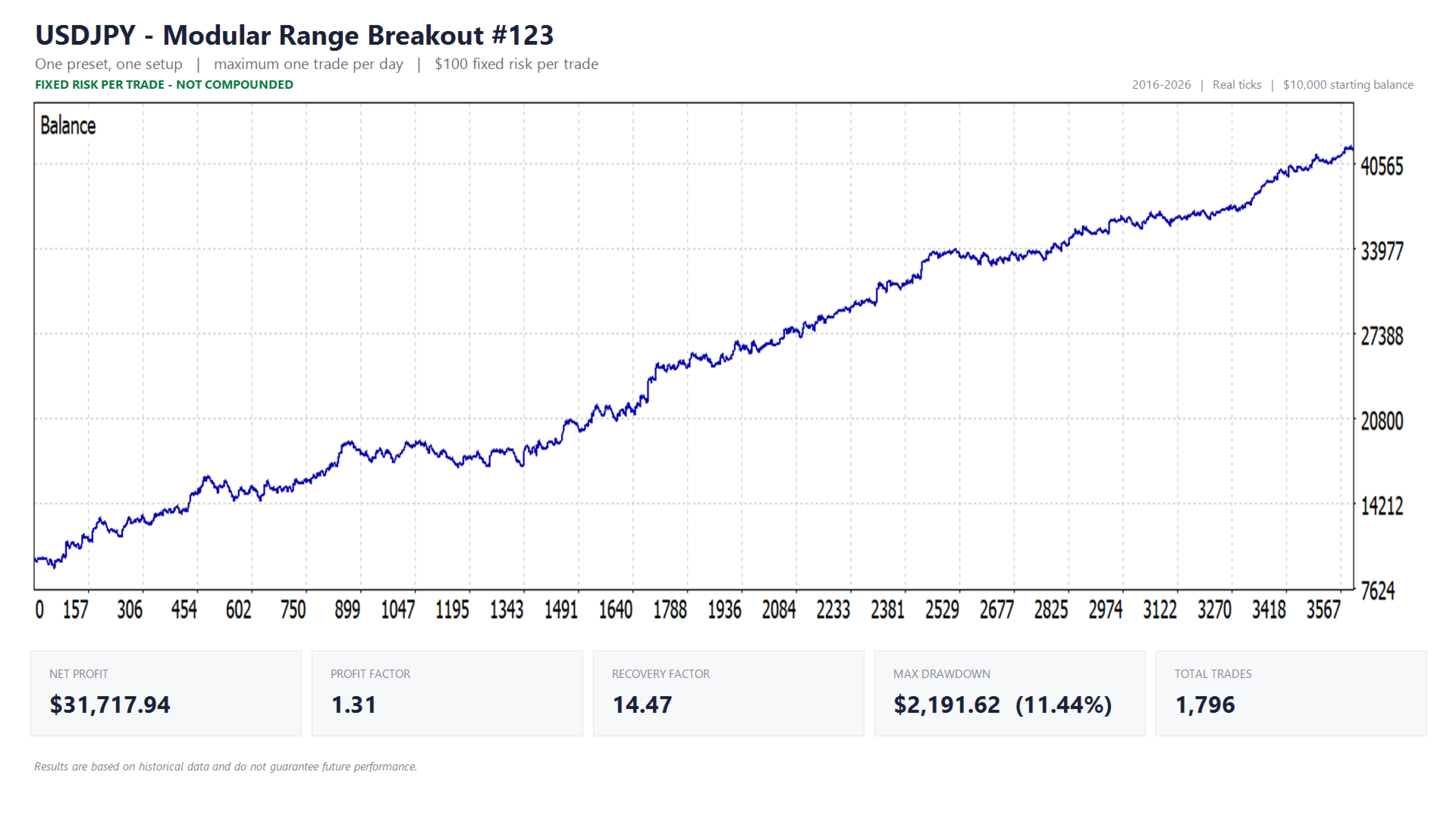
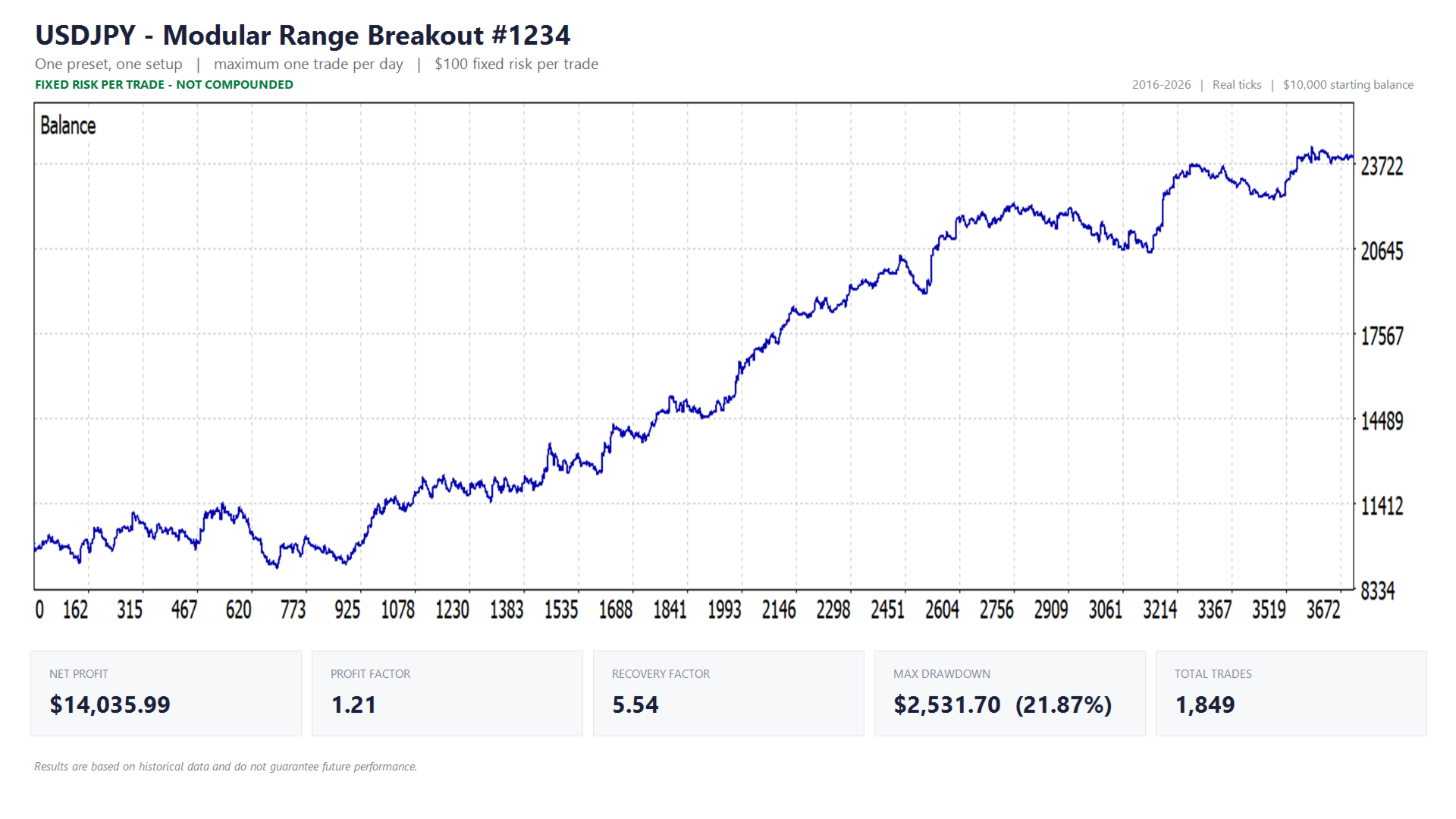
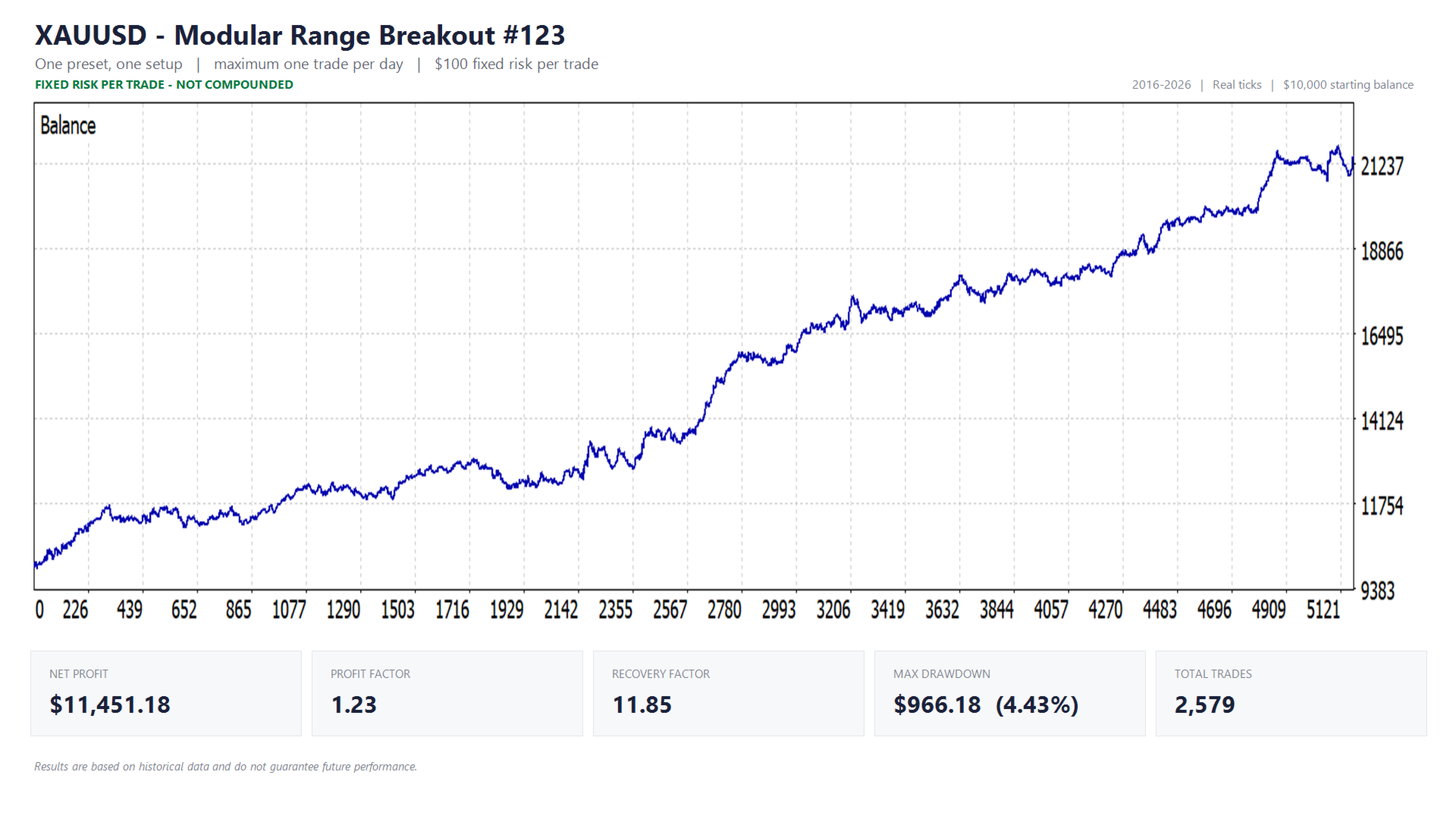
The equity curves and full reports further down this page show the complete picture, including drawdown and profit factor. Each image covers one preset with all of its setups running together — that is how the preset actually trades, so that is what is tested.
Test conditions:
- Historical tick data: Dukascopy
- Test period: 01-01-2016 to 01-01-2026 (BTCUSD: 2018–2026, limited by available data)
- Starting balance: $10,000
- Risk per trade: $100 fixed, so every trade carries the same weight from the first to the last and the later part of the curve is not distorted by compounding
- Commissions and spread set to standard broker rates within the test environment
Results are based on historical data and do not guarantee future performance. Extended drawdown is part of this strategy: a symbol can underperform for months before recovering. That is precisely why the presets run several setups where the symbol allows it, and why spreading across low-correlated symbols matters. Because this strategy captures expansion and momentum, it also pairs well with approaches that do better in quiet, sideways markets.
Technical settings and notes
Magic numbers are reserved in a block
A preset can run several setups, and each needs its own magic number to keep its trades apart. They are derived from the single magic number you enter, so you never have to type more than one. The EA prints the exact numbers it claims in the Experts tab at startup — keep those free for this EA and do not assign them to anything else on the same account. Running the EA on several charts with the same base number is safe: every lookup matches on symbol and magic together.
Presets override the strategy only
Selecting a preset configures the entry and exit settings, which are marked accordingly in the inputs. Risk profile, position sizing, account protection, chart visuals and magic number always remain your own choice.
The daily risk budget is portfolio-wide
Under that risk profile, the maximum daily positions setting is the total across your entire setup that day, not just this chart. If you run the EA on several symbols or alongside other EAs, enter your full portfolio total; otherwise the budget is divided over too few trades and each one is sized too large.
Enabling the news filter (required setup)
The news filter retrieves the calendar over the internet, so WebRequest access has to be enabled or it stays inactive:
- Go to Tools → Options
- Open the Expert Advisors tab
- Enable "Allow WebRequest for listed URL"
- Add: https://nfs.faireconomy.media
WebRequest does not work inside the Strategy Tester, so the news filter is disabled automatically during backtests.
Verifying the news filter
Enable "Show news filter status on chart" to see directly whether a news window is active, or enable "Print news event in Experts journal for verification" to log every detected event with its currency, impact and exact timing, and compare that against the calendar itself. Event times are converted to your broker's server time automatically, with the GMT offset set to auto-detect. If the times do not line up, set the offset manually.
Resetting the equity-trailing-high reference
If you use a trailing equity high as your protection reference, that value survives a restart and can therefore go stale after a withdrawal. To reset: press F3, find the equity-high variable for this EA, and delete it. It reinitialises from your current equity.
Settings that do not add up are refused, not ignored
If a combination is inconsistent — a filter enabled without a valid value, a trailing stop without a stop loss — the EA does not quietly run with it. It reports in the Experts tab exactly what needs to change.
Timeframe, execution and VPS
The EA does not depend on the timeframe of the chart it is attached to. It places stop orders at the range boundaries, so the broker watches the level rather than the EA, but stable execution still matters. A VPS and a broker with low costs and fast execution are recommended.