Copy trading EA
- Uzmanlar
- Sürüm: 1.3
- Güncellendi: 16 Nisan 2026
- Etkinleştirmeler: 5

# DS_Copy_EA - User Description
DS_Copy_EA is a MetaTrader 5 Expert Advisor that copies trades between MT5 terminals running on the same machine. One EA instance acts as a **Provider** (signal source) and another acts as a **Receiver** (copier). The mode is selected in the EA settings.
**How it works:**
1. The **Provider** publishes its open positions internally every 500ms
2. The **Receiver** reads every 1 second, detects new/changed/closed positions, and mirrors them on its own account
3. Internal communication - no network, no latency, no external services
**Key capabilities:**
- Copy from up to 3 providers simultaneously on one receiver
- Per-provider copy percentage (e.g. copy 10% of provider's lot size)
- Per-provider symbol mapping with wildcards (e.g. EURUSD on provider = EURUSDx on receiver)
- Hard stop: auto-close everything if daily equity drops beyond a threshold
- Margin protection, spread filters, retry logic
- On-chart dashboard showing live status
- Survives EA restarts (rebuilds position tracking from magic numbers)
### Step 1: Set up the Provider
1. Open the MT5 terminal where the signal source trades
2. Drag `DS_Copy_EA` onto any chart
3. In the settings dialog:
- **EA Mode** = `Provider (Signal Source)`
- **Provider ID** = any unique name, e.g. `MySignal`
- Leave other settings at defaults
4. Click OK
5. The dashboard should show "Publishing: N positions" where N matches your open trades
### Step 2: Set up the Receiver
1. Open the MT5 terminal where you want trades copied
2. Drag `DS_Copy_EA` onto any chart
3. In the settings dialog:
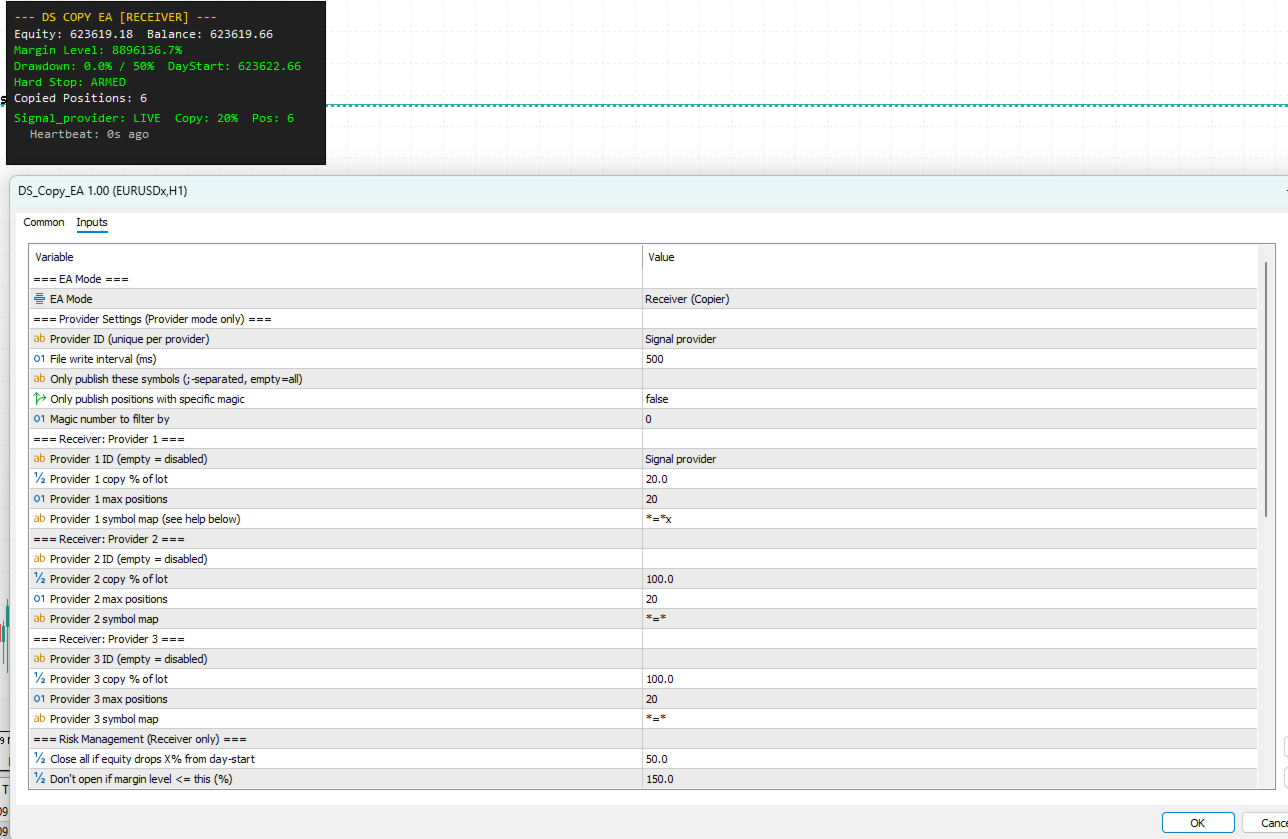
- **EA Mode** = `Receiver (Copier)`
- **Provider 1 ID** = the exact same name you used on the Provider, e.g. `MySignal`
- **Provider 1 copy %** = how much of the provider's lot to copy (e.g. 50 = half)
- **Provider 1 symbol map** = how to translate symbols (see Symbol Mapping below)
4. Click OK
5. Existing provider positions should start copying within seconds
### Step 3: Verify
- **Provider dashboard**: shows "Publishing: N positions" and "Positions on account: N"
- **Receiver dashboard**: shows provider as "LIVE", copied position count, equity/drawdown
- **Experts tab** (Ctrl+E): shows log messages for every copy/close action
> **Important**: Both terminals must be running on the same machine. The Provider ID must match exactly between Provider and Receiver (whitespace and invalid characters are auto-stripped).
---
## Settings Reference
### EA Mode
| Parameter | Default | Description |
|-----------|---------|-------------|
| EA Mode | Receiver (Copier) | Select Provider or Receiver mode |
### Provider Settings (Provider mode only)
| Parameter | Default | Description |
|-----------|---------|-------------|
| Provider ID | PROVIDER_1 | Unique name for this provider. Must match on the receiver side. |
| File write interval (ms) | 500 | How often to update the shared file. Lower = faster but more disk I/O. |
| Only publish these symbols | *(empty)* | Filter: only publish positions in these symbols. Semicolon-separated. Empty = publish all. |
| Only publish positions with specific magic | false | Filter: only publish positions with a specific magic number. |
| Magic number to filter by | 0 | The magic number to filter. Only used if the above is true. |
### Receiver: Provider 1/2/3
Each provider slot has these settings:
| Parameter | Default | Description |
|-----------|---------|-------------|
| Provider ID | PROVIDER_1 / *(empty)* / *(empty)* | The Provider ID to subscribe to. Empty = slot disabled. |
| Copy % of lot | 100.0 | Percentage of the provider's lot size to copy. 100 = same size, 50 = half, 200 = double. |
| Max positions | 20 | Maximum positions to copy from this provider. |
| Symbol map | `*=*` | Symbol mapping rules for this provider. See Symbol Mapping below. |
### Risk Management (Receiver only)
| Parameter | Default | Description |
|-----------|---------|-------------|
| Hard stop equity % | 50.0 | Close ALL positions if equity drops this % from day-start equity. 0 = disabled. |
| Min margin level % | 150.0 | Don't open new positions if margin level would drop below this. 0 = disabled. |
| Max spread (pips) | 0 | Skip copying if spread exceeds this. 0 = disabled (no spread filter). |
| Max slippage (points) | 300 | Maximum allowed slippage when opening/closing positions. |
| Max total positions | 100 | Hard cap on total copied positions across all providers. |
### Timing
| Parameter | Default | Description |
|-----------|---------|-------------|
| Polling interval (ms) | 1000 | How often the receiver checks provider files. Lower = faster reaction, more CPU. |
| Heartbeat timeout (sec) | 30 | If provider file hasn't been updated in this many seconds, consider it disconnected. |
| Trading hours start | *(empty)* | Only copy during these hours. Format: HH:MM. Empty = 24 hours. |
| Trading hours end | *(empty)* | End of trading hours. Supports overnight ranges (e.g. start=22:00, end=06:00). |
### Behavior (Receiver only)
| Parameter | Default | Description |
|-----------|---------|-------------|
| On provider disconnect | Keep positions open | What to do when a provider's heartbeat goes stale. Options: Keep / Close immediately / Close after delay. |
| Disconnect close delay (sec) | 300 | How long to wait before closing positions of a disconnected provider (if Close after delay is selected). |
| Copy stop loss | true | Mirror the provider's stop loss on copied positions. |
| Copy take profit | true | Mirror the provider's take profit on copied positions. |
| Max retry attempts | 10 | How many times to retry a failed order before giving up. |
| Delay between retries (ms) | 3000 | Wait time between retry attempts. |
| Close confirm seconds | 3 | A position must be absent from the provider file for this many seconds before closing. Protects against file-write races. |
| Close confirm reads | 3 | A position must be absent for this many consecutive file reads before closing. |
| Close all on EA removal | false | If true, close all copied positions when the EA is removed from the chart. |
### Identification (Receiver only)
| Parameter | Default | Description |
|-----------|---------|-------------|
| Base magic number | 900000 | Base for magic number encoding. Each provider gets an offset: Provider 1 = 901000, Provider 2 = 902000, Provider 3 = 903000. |
### Display & Logging
| Parameter | Default | Description |
|-----------|---------|-------------|
| Show dashboard | true | Show the on-chart status panel. |
| Enable file logging | true | Write log files to the Common Files folder. |
| Log level | 1 | 0 = Off, 1 = Info (normal), 2 = Debug (verbose - use for troubleshooting). |
---
## Symbol Mapping Guide
Each provider has its own symbol mapping rules. The format is `SOURCE=DESTINATION` pairs separated by semicolons.
### Basic Syntax
```
EURUSD=EURUSDx;GBPUSD=GBPUSDx;XAUUSD=XAUUSDx
```
This maps provider's `EURUSD` to receiver's `EURUSDx`, etc. Symbols not listed pass through unchanged.
### Wildcard Syntax
Use `*` as a wildcard to create rules that match multiple symbols:
| Rule | Meaning | Example |
|------|---------|---------|
| `*=*` | Pass-through (no change) | EURUSD -> EURUSD |
| `*=*x` | Append "x" to all symbols | EURUSD -> EURUSDx |
| `*=*.p` | Append ".p" to all symbols | EURUSD -> EURUSD.p |
| `*.s=*` | Remove ".s" suffix | EURUSD.s -> EURUSD |
| `*.raw=*.p` | Replace ".raw" with ".p" | EURUSD.raw -> EURUSD.p |
### Mixing Exact and Wildcard Rules
Exact matches always take priority over wildcards, regardless of order:
```
*=*x;BTCUSD=BTCUSD
```
| Provider Symbol | Matched Rule | Receiver Symbol |
|----------------|--------------|-----------------|
| EURUSD | `*=*x` (wildcard) | EURUSDx |
| GBPUSD | `*=*x` (wildcard) | GBPUSDx |
| XAUUSD | `*=*x` (wildcard) | XAUUSDx |
| BTCUSD | `BTCUSD=BTCUSD` (exact) | BTCUSD |
Another example - provider uses `.s` suffix, but gold has a different name:
```
XAUUSD.s=GOLD;*.s=*
```
| Provider Symbol | Matched Rule | Receiver Symbol |
|----------------|--------------|-----------------|
| EURUSD.s | `*.s=*` (wildcard) | EURUSD |
| XAUUSD.s | `XAUUSD.s=GOLD` (exact) | GOLD |
| GBPUSD.s | `*.s=*` (wildcard) | GBPUSD |
### Default
The default mapping is `*=*` which means all symbols pass through unchanged. This works when both accounts use the same broker with the same symbol names.
---
## Safety Features
### Hard Stop (Daily Equity Protection)
Monitors account equity against the day's starting equity. If the drawdown exceeds the configured threshold, ALL copied positions are closed immediately and no new positions are opened until the next trading day.
- **Threshold**: configurable (default 50%)
- **Resets**: automatically at the start of each new trading day
- **Dashboard**: shows "Hard Stop: ARMED" (green) or "HARD STOP: TRIGGERED" (red)
- **Alert**: MT5 alert popup when triggered
Example: Day starts at $10,000 equity, hard stop at 50%. If equity drops to $5,000, all positions close.
### Margin Protection
Before every trade, the EA checks:
1. Is there enough free margin for this position?
2. Would the projected margin level stay above the minimum threshold (default 150%)?
If either check fails, the position is skipped (not retried for margin).
### Close Confirmation
When a position disappears from the provider file, the receiver does NOT close immediately. Instead:
1. Marks the position as "missing" and starts a timer
2. Must be absent for 3 consecutive file reads AND 3 seconds (configurable)
3. If the position reappears during confirmation, counters reset - position stays open
4. If the provider's heartbeat is stale, close checks are skipped entirely (unreliable data)
This prevents false closures during rapid trading or file-write races.
### Retry Logic
If an order fails (requote, timeout, server busy), the EA retries up to 10 times with a 3-second delay between attempts. Non-retryable errors (no money, invalid volume, trading disabled) stop immediately.
### Anti-Flood Protection
- Minimum 500ms between order sends (rate limiting)
- 5-second cooldown between volume modifications on the same position
- Never re-copies a position that's already tracked
- Poll interval prevents excessive file reads (default 1 second)
### Volume Resync
If the copy percentage is changed while positions are open, the EA closes the affected positions and reopens them with the correct volume on the next cycle. This prevents the "add volume" infinite loop that would occur in hedging mode.
### Provider Heartbeat
The receiver tracks when each provider file was last updated. If a provider's file hasn't been updated in 30 seconds (configurable), it's marked as disconnected. The dashboard shows "DEAD" in red. The receiver will not close positions based on stale file data.
---
## Dashboard
### Provider Mode Dashboard
```
--- DS COPY EA [PROVIDER] ---
Provider ID: MySignal
Account: 12345678 BrokerServer
Positions on account: 4
Publishing: 4 positions
Filters: None (all positions)
File: CopyTrade_Provider_MySignal.csv
Last update: 14:30:45
```
- **Positions on account**: total positions detected by `PositionsTotal()` - diagnostic
- **Publishing**: how many passed the filters and were written to file
- **Filters**: shows active symbol/magic filters (or "None")
- **File**: the CSV filename being written
### Receiver Mode Dashboard
```
--- DS COPY EA [RECEIVER] ---
Equity: 10250.00 Balance: 10000.00
Margin Level: 450.2%
Drawdown: 2.5% / 50% DayStart: 10512.00
Hard Stop: ARMED
Copied Positions: 5
PROVIDER_1: LIVE Copy: 50% Pos: 3
Heartbeat: 2s ago
PROVIDER_2: LIVE Copy: 100% Pos: 2
Heartbeat: 1s ago
Last: (last error message if any)
```
-
## Troubleshooting
### Provider shows "Publishing: 0 positions" but I have trades open
1. Check **Positions on account** on the dashboard - if this is also 0, the EA can't see your positions
2. Check if symbol filter or magic filter is accidentally active (look at **Filters** line)
3. Make sure "Allow Algo Trading" is enabled in MT5 settings
4. Set Log Level to 2 (Debug) and check Experts tab for detailed position enumeration
### Receiver shows "Cannot read provider file"
1. **Provider ID mismatch**: the ID must match EXACTLY between Provider and Receiver (check for spaces)
2. **Different Common Files folder**: check both terminals log `Common Files path:` at startup - they must be the same
3. **Provider not running**: make sure the provider EA is attached and active
### Receiver reads file but shows 0 positions / stale heartbeat
```
WARNING: Provider 'XYZ' heartbeat stale (45s) positions=0
```
1. The provider may have been restarted or its ID was changed
2. An old file from a previous session still exists - delete `CopyTrade_Provider_*.csv` from the Common Files folder and restart both EAs
3. The provider is running with a different ID than the receiver expects
### Positions not copying
Set Log Level to 2 (Debug) on the receiver and check:
1. `Symbol map: EURUSD -> ???` - verify the mapped symbol name is correct
2. `Symbol not tradeable: XYZ` - the mapped symbol doesn't exist on the receiver's broker
3. `Insufficient margin` - not enough margin to open the position
4. `Max total positions reached` - position limit hit
5. `Max positions for ProviderX reached` - per-provider limit hit
### Positions closed unexpectedly
Check the log for what triggered the close:
- `Close confirmed: ... absent for Xs` - provider closed the position (or file-read issue)
- `Hard stop closed:` - equity drawdown triggered the hard stop
- `Volume resync closed:` - copy percentage was changed, position closed for reopen
- `Closing positions for disconnected provider` - heartbeat timeout with disconnect action set to Close