 MetaTrader 5
 Uzmanlar
 Göstergeler
 Kütüphaneler
 Yardımcı programlar
 Widget'lar
 Kurallar
YouTube'dan Mağaza ile ilgili öğretici videoları izleyin
Bir alım-satım robotu veya gösterge nasıl satın alınır?
Uzman Danışmanınızı
sanal sunucuda çalıştırın
sanal sunucuda çalıştırın
Satın almadan önce göstergeyi/alım-satım robotunu test edin
Mağazada kazanç sağlamak ister misiniz?
Satış için bir ürün nasıl sunulur?
MetaTrader 5 için ücretsiz alım-satım yardımcı programları - 21
 Aşağıda MetaTrader 5'te işlem yapmayı kolaylaştıran alım-satım programları bulunmaktadır. Açıklamasını ve amacını okumak için aşağıdaki listeden ürünün üzerine gelin.
>
Risk Sentinel bir strateji değil, bir koruma aracıdır. İşlem açmaz. Sizin veya başka bir EA'nın açtığı pozisyonları, profesyonel bir işlem masasının riski yönettiği gibi korur.
Ne yapar
- Her pozisyona zorunlu stop-loss. Hiçbir işlemi korumasız bırakmaz. ATR, puan, yüzde veya sabit bir para tutarı seçin. - Otomatik break-even ve trailing stop. Fiyat lehinize hareket ettikçe kazançlı işlemi kilitler. - Günlük zarar devre kesici. Gün, belirlediğiniz zarar limitine ulaştığında tüm pozisyonları
FREE

Bu küçük araç, grafik üzerinde basit bir çizgi sürükleyerek risk yönetiminizi tanımlamanıza yardımcı olur. Hesap yüzdesi veya sabit para tutarı üzerinden hesaplanan gerçek lot büyüklüğünü doğrudan satırda gösterir.
Tek yapmanız gereken klavyenizdeki "t" tuşuna basarak hattı aktif hale getirmek ve hattı stoploss noktanıza sürüklemek. Bu kadar.
Ayarlarda çizgi ve metnin rengini ve genişliğini, ayrıca metinden satıra kadar olan boşluğu ve sağı tanımlayabilir ve riski hesap yüzdesi veya sabit para
FREE

MANAGER – Position Taker | MT5 İşlem Yönetim Paneli Yakında bu sermaye yönetimi aracını LotMind işlem paneline entegre ederek daha güçlü ve verimli bir çözüm oluşturacağım. https://www.mql5.com/en/market/product/172147?source=Unknown Açılmış işlemleri verimli şekilde yönetmek için tasarlanmış gelişmiş bir paneldir. Manuel işlemler ve karmaşık hesaplamalar gerektirmez. Trader’ın analizine odaklanmasını sağlarken panel; kısmi kapama, break even, trailing stop ve tam kapama gibi işlemleri yönetir.
FREE

The Scientific Calculator is a script designed to compute science, engineering and mathematics expressions. General Description
The expression to calculate must obey syntax rules and precedence order, being constituted by the following elements: Integer and real numbers. Mathematical operators for addition (+), subtraction (-), multiplication (*), division (/) and exponentiation (^). Mathematical and trigonometric functions . Curved parentheses (()) to define the precedence and contain
FREE

Amaç:
Market Watch 'taki tüm sembolleri default.tpl şablonu ile mevcut zaman diliminde (TF) otomatik olarak açar ve aktif olmayan tüm grafikleri kapatır. Manuel işlem gerektirmeden birden fazla enstrümanı hızlı analiz etmek için idealdir! Özellikler:
Otomasyon: Tek tıklamayla onlarca grafiği açar.
Güvenlik: Gereksiz grafikleri kapatır, aktif grafiği korur.
Esneklik: Özel default.tpl şablonunuzu kullanır (önceden yapılandırın!).
Mevcut Zaman Dilimi: Grafikler, script çalıştırıldığı
FREE

Manual trading panel for MetaTrader 5. This tool enables you to open a trade in a single step. You can set the risk and levels directly on the chart and the position size will be calculated automatically. The tool does the following: You simply drag the stop-loss (SL), entry, and take-profit (TP) lines directly onto the chart. The position size is then calculated automatically, based on the specified risk as a percentage of the deposit or in the account currency. If necessary, you can specify a
FREE

Utility for know all informations and settings of all symbols available on your broker The informations that you can know are for example:
- Spread
- Digits
- Tick value
- Size step
- Size minimum
- Size maximum
- Swap buy and sell
- Margin required (for 1 standard lot)
- Rollover day
- Execution mode
and many other informations You can filter the symbols by group or you can also choose to see the informations only of symbols available on market watch.
FREE
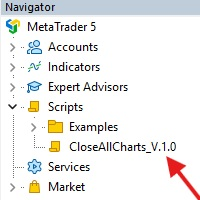
This Script was made for faster handling closing all open Chartwindows espacially in Backtesting Mode. The Script is totally for free. It is made for the MT5 Version of Metatrader. Closes all open chart windows, including the chart on which the script is being executed.
I hope you have fun with this simple but for me useful script. if you have any question please let me know...
FREE

Советник торговый помошник, располагается на инструменте (прикрепляется к графику) при закрытом рынке или просто когда планируется при достижении цены открыть сделку с заданным тейк-профитом и стоп-лоссом в % от цены автоматически открываемой сделки, при установке задается лот, цена сделки, направление, уровень прибыли и убытка, а также количество открытий по заданному уровню после срабатывания стоп-лосса.
FREE

The EA supports closing orders based on the preset amount. It can close all orders on all pairs, or it can close orders based on Magic ID. Button "Close All" manual Input - Magic Number: Magic Number = 0: Close All pairs Magic Number diffrent 0: Close All with Magic - Money TP: Profitable in money. the EA will close all orders - Money SL: Loss in money. the EA will close all orders Contact: t.me/nguyenvanbo128
FREE

ForexFanclub(FFC) : For detailed instructions and our official website, please visit my profile !
PidPro is a fully-featured, professional bulk order closing tool provided by Forex Fanclub, designed to maximize the efficiency of position management. Whether you are a scalper needing lightning-fast exits or managing a basket of positions from an Expert Advisor, PidPro provides the ultimate control. [Key Features] 1. Flexible Target Selection:
Choose between "All Charts" to manage your entire acc
FREE

Ofir Blue exporter is a handy utility to export your orders history to a JSON file . You'll need it if you want to back-test Ofir blue or Ofir Hedging , using your own trading history. How it works: Install the indicator on a chart Press export all or export <current symbol> (for example GBPUSD) The indicator will create the json file in the directory files/ofirblue/export. This directory is in the common file area. The file will be automatically taken in charge by Ofir blue strategy tester
FREE

这款专为MetaTrader 5设计的EA(Expert Advisor),能够在加载后自动关闭所有图表,并立即从当前图表中自行移除。它适合那些希望快速清理所有图表,并避免手动关闭每个图表的用户。 功能特点: 一次性清理: 加载后立即关闭所有打开的图表。 自动移除: 执行完毕后,EA自动从当前图表中移除,无需手动操作。 快速高效: 适用于快速清理交易环境,特别适合在需要快速重置或结束交易日的情境。 使用说明: 只需将此EA添加到任何一个图表上,它将自动执行关闭所有图表的操作并自行移除。使用前,请确保已保存所有重要的图表数据和设置。 风险提示: 请谨慎使用此EA,以防不小心关闭重要图表。 适用于MetaTrader 5平台。 技术支持: 如有任何技术问题或需求,请联系我以获得帮助。
FREE
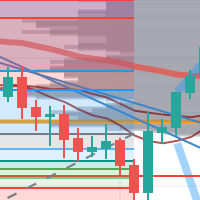
每次一忙都會錯過訊號下單,或不想一直花時間盯盤下單,可以用這個工具掛單,讓MT5 自動 盯盤並在滿足條件後下單 。
demo : https://www.youtube.com/watch?v=JBPiFkixqT4 configuration: https://www.youtube.com/watch?v=D7xESKKD26o #############################################
使用場景:
一般交易可以分為2種,分別是: 左側交易: 價格到達關鍵位置時就下單交易,想要自動下單,可以使用buy limit和sell limit掛單 右側交易: 價格到達關鍵位置, 同時出現做多或做空訊號 時下單交易, 想要自動下單, 就 可以用本工具自動掛單 本工具會 在你指定的阻力區域偵測到做空訊號時,建空單 ; 並在你指定的支撐區域偵測到做多訊號時,建多單。 demo影片: https://www.youtube.com/watch?v=JBPiFkixqT4
########################################
FREE

SVS Assistant SVS Assistant is the execution half of Smart Volatility Squeeze MT5. It carries out the orders you request from that indicator's 1-Click Trading Desk, applies your risk rules to them, and manages the resulting positions. It is published free of charge. Please read this before downloading: it does not analyse the market and it produces no signals of its own. Without the Smart Volatility Squeeze indicator running on the same chart there is nothing for it to listen to, and it will do
FREE

NHS Prop Firm Guardian NHS Prop Firm Guardian is a dedicated, single-panel risk monitor and drawdown protection overlay for MetaTrader 5, built around one core idea: watch the account relentlessly, and enforce the limit the moment it's crossed — even if the trader isn't looking . It is a pure risk-monitor companion tool, not an order-entry or trade-management system: it does not place trades, manage stops, or run automation strategies. Its job is tracking Daily drawdown on the current chart symb
FREE

TradeLens Lite - Risk Calculator for MT5
The free version of TradeLens: a simple position size calculator on your chart. It never opens, modifies or closes trades.
- Type your risk in % of the balance in the panel. - Press BUY setup or SELL setup: draggable stop loss (red) and take profit (green) lines appear, the initial stop based on the ATR. - Drag the lines: lot size, risk in money, reward in money and R:R update in real time, calculated with your broker's contract values. - Panel in the t
FREE
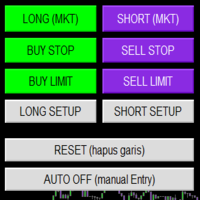
Smart Trade Panel
Trading Assistant is a powerful and elegant one-click trading panel for MetaTrader 5 — designed for professional traders who value speed, precision, and clarity.
Whether you scalp XAUUSD, swing trade indices, or run tight risk management, this tool gives you complete control with a clean visual layout, automatic ATR-based setups, and adaptive risk calculation.
️ Main Features One-Click Execution
Instant Buy/Sell Market Orders with pre-defined SL/TP
Supports Buy Stop
FREE

PropFirmGuard – Your Automatic Prop Firm Safety Net
Are you trading a prop firm challenge or a funded account and worried about accidentally breaking the rules? PropFirmGuard watches your account for you, around the clock, and automatically closes your trades before you breach your daily loss limit, your maximum drawdown limit, or once you've hit your profit target. No more manually checking your equity every five minutes — let the EA do the worrying for you.
WHAT DOES IT DO?
PropFirmGuard i
FREE

Your account, protected. Whatever is trading on it.
Phoenix Palladium Guard does not trade. It watches your whole account and steps in when a limit you set is reached: it closes all positions, deletes pending orders and keeps new trades out until the limit resets. It works for every EA on the account, EAs from any developer, and your own manual trades.
**Why an account guard?** Every EA calculates its risk as if it had the whole account to itself. Run four at once with similar settings and yo
FREE

PropBlaster Stats shows the key statistics of your MT5 account directly on the chart. It reads your trade history and never opens, closes or changes a trade.
Key figures
- Today, this week, this month or all history with one click - Net profit, trades, win rate, profit factor - Average win and loss, expectancy per trade - Maximum drawdown in money and percent - Best and worst day - Commission, swap and fees included
Good to know
- Filter by magic number and symbols (inputs) - Works on hedgin
FREE

Breakeven Trailing SL Manager;
This utility Manager is a simple utility that protects your manual trades automatically. Attach it to any chart and it watches all manual positions on your account, on every symbol. It does not open trades and it ignores trades opened by other Expert Advisors. How it works When a trade moves in profit by the Breakeven Price, the Stop Loss is moved to the exact entry price. When the price moves the same distance again, the Stop Loss is moved to entry plus that dist
FREE

Key Features: Automatic swing detection on any timeframe (M1 to MN1) Visual arrow indicators (red for swing highs, blue for swing lows) Adjustable sensitivity with customizable swing strength parameter Dynamic arrow positioning that never overlaps with candles Instant display when changing timeframes - no delays Compatible with MT4 and MT5 platforms Clean, professional interface with minimal screen clutter Lightweight code for fast performance Customizable colors and arrow sizes
Customizable S
FREE

Symbol Spec Auditor, bir sembolün sözleşme spesifikasyonunun pozisyon büyüklüğünü ve işlem maliyetini belirleyen kısmını grafikte tek bir panelde toplar: puan değeri, spread maliyeti, teminat, swap, emir gerçekleştirme kuralları ve işlem seansları. Ham spesifikasyon değerleri hesap para biriminde 1,00 lot başına paraya çevrilir ve lot büyüklüğü kodunu sessizce bozan broker ayarları uyarı olarak listelenir. Tek bir düğme aynı denetimi Piyasa Gözlemi'ndeki her sembol için bir CSV dosyasına aktarır
FREE

Share your trades with a Discord channel automatically. How it works Create a webhook in your Discord channel settings and paste the URL into the inputs. Allow WebRequest for https://discord.com in Tools, Options, Expert Advisors. New positions, SL and TP changes and closed positions are sent with symbol, direction, price, lots, pips and result, depending on your settings. Messages are queued and resent if Discord is busy. Key features Open, modify and close messages Optional lots, pips and prof
FREE

Place trades in one click with the lot size calculated from your risk. How it works Type your risk percent, stop loss in points and take profit as a multiple of the stop. The panel shows the lot size and the money at risk before you click. BUY and SELL open the order with SL and TP already attached. Management buttons move stops to break-even, close half or close all positions on the chart symbol. Key features Risk based lot size from balance, tick value and stop distance SL and TP attached to e
FREE

Quick start Drag Broker Execution Inspector Lite onto any chart. Read the live spread and the gauge in the mini HUD. Click Open , then News , to see the next USD release. Details › HTML report : your session on one page. Click "?" for plain-language help on every view. A small, movable spread HUD for any MT5 chart The utility is passive: it never places, modifies or closes orders. Current spread with a gauge comparing it with recent quotes (low / typical / elevated). Median, maximum and P95
FREE

Broker Basket Preflight Çok sembollü bir stratejiyi test etmeden önce aracı kurumun tam sembol adlarını kontrol etmek için yalnızca okuma yapan bir MetaTrader 5 tanılama betiğidir. Sözleşme ve hacim kurallarını, fiyat adımlarını, kotasyon yaşını ve spread'i Experts günlüğünde raporlar. Ekim 2026 güncelleme paketi: kurulum, varsayılanlar ve simülasyon karşılaştırması . MT5 Setup Hub . MetaTrader 5'in masaüstü sürümünde Market üzerinden çalıştırılmaya hazır sürümü ücretsiz yükleyin, ardından Gezgi
FREE

Turn your trading history into a clean journal you can open in Excel or Google Sheets. How it works Click the button on the chart or let the utility export every day at a set time. Each closed position becomes one row: symbol, direction, volume, entry and exit time and price, SL, TP, pips, duration, profit, swap, commission and net result. A second summary file lists win rate, profit factor, average win and loss, largest win and loss and maximum consecutive losses. Key features One row per posit
FREE

This EA gives traders a clean, full-window view of how large a position each Market Watch symbol can support at different percentages of account balance used as margin. It helps you quickly compare sizing options across symbols and risk levels without ever placing or modifying orders. The goal is simple position-size awareness so you can decide exposure before you trade.
Benefits Shows lot size potential across Market Watch symbols at up to three different % of balance margin levels side-by-sid
FREE

See the real cost of trading: live spreads, statistics and logs for every symbol you trade. How it works Every second the utility samples the spread of the chart symbol and any extra symbols you list. The panel shows current, minimum, average and maximum spread, and a bar chart of the average spread by server hour for the chart symbol. Samples can be logged to a CSV file and an alert can warn you when the spread is above your limit. Key features Multi symbol spread table Average spread by hour o
FREE

Lucky Gold Mining Data Reader is a read-only account monitoring and audit utility for MetaTrader 5. It provides a clear dashboard for monitoring trading account activity without sending, modifying, closing or deleting orders and positions. READ ME BEFORE YOU LOVE ME
(SINCERELY — GOLD) Lucky Gold Mining — Automated XAUUSD Trading System - Trading Systems - 14 August 2026 - Traders' Blogs
FOX CUSTOMER BENEFITS Verified customers with qualifying MQL5 Market purchases may be eligible for complimen
FREE

Place a trade from the chart in one click, with the stop already attached, then take part off or close it without leaving the chart. First reply within two working days. FEATURES One click sends one market order for the volume on the request line, with the stop attached; no martingale, no grid, no averaging. The panel shows the margin the terminal calculates for the volume the request line will send, or the shortfall. It shows the broker's stop and freeze distances for the symbol, in points, on
FREE

Find Your Broker's GMT Offset - Free Tool Not sure what GMT offset your MT5 broker uses? FindBrokerGMTOffset is a free utility that helps you identify your broker's actual server time and GMT offset directly from your MetaTrader 5 terminal. No purchase, subscription, or complicated setup is required. How to use it: Download and install the FindBrokerGMTOffset script in your MT5 terminal. Attach the script to any chart and allow it to run. The tool will display your broker's current server time a
FREE

Pro 10:00 Powell Strategy [NQ ES] by Ash_TheTrader
This indicator is just for who wanna trade base on Powell 10AM/PM method and its not a bigdeal holygrail strategy ! Its just a hands-Free tools for users . Does it works or not ? You should test it !
This indicator is specifically designed for Nasdaq (NQ) and S&P500 (ES) traders to capitalize on the massive liquidity sweeps that happen right at the New York 10:00 AM (and PM) opening hours. It automatically detects the true opening price,
FREE

SPECIAL ANNOUNCEMENT: Get the Ultimate Trading Suite! Before you grab this utility, did you know? The LogicLadder Visual Trade Planner is so powerful that it serves as the core visual execution engine for my flagship MT5 trading systems! If you are looking for a massive, all-in-one trading dashboard, advanced trade management, or strict prop-firm guardrails, you can get this exact visual planner already included inside my premium and free full-suite EAs: Pro LTS TradeDashboard MT5 (Paid
FREE
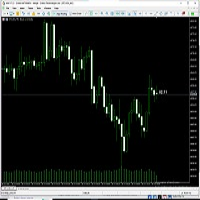
Never miss a candle close again! The Candle Closing Time Remaining indicator is an essential utility tool designed for traders who rely on precise timing, candlestick patterns, and chart confirmation before entering or exiting trades. Whether you trade Forex, Crypto, Gold, Indices, or Stocks, this indicator seamlessly works on every chart, every symbol, and all timeframes .
FREE

Umagads Lot Calculation and Auto SL TP Assistant: MT5 İçin Profesyonel Risk Yönetim Aracı Bu asistan, uygulama hızına önem veren ve katı risk yönetiminden ödün vermeyen MetaTrader 5 yatırımcıları için tasarlanmış yarı otomatik bir trading aracıdır. Umagads Assistant ile artık manuel lot hesaplamanıza veya işlem açtıktan sonra panikle koruma seviyeleri belirlemenize gerek kalmaz. Her şey anında hesaplanır ve otomatik olarak uygulanır, böylece işlemleriniz her zaman güvende kalır. Temel Özellikler
FREE

Trade Launch, manuel olarak işlem açarken hıza ve kontrole değer veren yatırımcılar için tasarlanmış sezgisel bir işlem panelidir. Doğrudan grafik üzerinde görüntülenir ve tüm ana emir parametrelerini tek bir pencerede yönetmenize olanak tanır. Ana Özellikler: Anında Emir Gönderimi: Tek bir düğmeye basarak Al ve Sat pozisyonları açın. Düğme adları, geçerli Ask ve Bid fiyatlarını dinamik olarak görüntüler. Dahili Risk Yönetimi: Lot hacmi, ayrıca Stop Loss (SL) ve Take Profit (TP) değerlerini
FREE

Shows what each closed trade earned after commission, swap and fees, by symbol, session, hour, weekday or month. FEATURES Rebuilds each trade from its deals, costs apart from gross. Net result, R, summary, breakdowns, cost alarm, CSV export. HOW TO USE IT 1. Attach it to a chart. 2. Choose the window and table. 3. Read the panel or export the CSV. PARAMETERS InpRange, InpFilterMagic, InpRiskPercent, InpFixedStopPips, InpBreakdown. LIMITATIONS Trades opened before the window are counted, not reco
FREE

Special Offer: The first 100 downloads are completely FREE! After that, the price will increase to $30. ️ 1. POSITION SIZING Sizing_Method: Choose the lot calculation method (SIZING_LOTS for manual, SIZING_PCT_EQUITY for risk percentage, SIZING_FIXED_CASH for fixed USD risk). Sizing_ManualLots: Fixed lot size (Active when SIZING_LOTS is selected). Sizing_RiskPercent: Risk per trade as a percentage of account equity. Sizing_RiskCash: Fixed risk amount per trade in USD. 2. TARGETS & STOP LO
FREE

Active Session Timer — Key Features Real-Time Session Status
Instantly see which global trading sessions (London, New York, Tokyo, Sydney) are active or inactive at any given time. Start & End Countdown Timers
Displays exact start and end times for each session, along with live countdowns to help you plan trades in advance. Local Time Zone Support
Requires users to set their local time zone during installation for accurate and personalized session tracking across all broker servers.
FREE

Fast MT5 trade management utility for one-click entry, partial close, break-even control, and spread safety.
Launch offer: the first 10 users can download it free. If it helps your trading workflow, I’d appreciate your honest feedback and suggestions through MQL5 messages or comments.
SnapTrade Pro is a m anual execution and trade management panel for MetaTrader 5 with Risk $ sizing, automatic stop loss, optional TP Ratio, symbol-aware stop input, compact mode, and fast on-chart position manag
FREE

AE-DeletePendingOrders is a professional script for MetaTrader 5 designed to quickly and securely delete all pending orders on a trading account. The script provides full control over the deletion process thanks to a flexible filtering system and reliable error handling mechanisms.
Main features The script automatically deletes all types of pending orders: BUY LIMIT, SELL LIMIT, BUY STOP and SELL STOP. An intelligent retry system has been implemented in case of temporary communication errors wi
FREE

Global Time – Trading Sessions Indicator Stay synchronized with the market, no matter your broker’s server time. Global Time gives you a clear, real-time view of the major trading sessions — Asia, London, and New York — directly on your chart. Designed with a modern and minimal interface, it helps you instantly understand which market is active and when key sessions overlap. Perfect for traders who rely on timing, volatility, and session-based strategies. Key Features: Real-time session clocks (
FREE
This script will create a report with all history orders in CSV format. The report is useful for those who run multiple EA's with different magic numbers in the same account. You can define some filters to generate your orders history report: 1) Initial date for assets in orders history. 2) Final date for assets in orders history. 3) Asset name. 4) Orders magic number. 5) Add balance/costs.
QUESTIONS ABOUT THE INSTALLATION OF PRODUCTS AT META TRADER You can also find some instructions on how
FREE

Elsna Alert (MT5 EA) is a lightweight Expert Advisor that monitors your trading account in real time and alerts you whenever a trade is opened or closed . It uses MetaTrader 5’s built-in OnTradeTransaction event to instantly detect any new executed deals—manual or automated—and plays a custom sound for each event.
You can choose whether it tracks all symbols or only the chart’s symbol . Key features: Instant audio alert when a trade opens or closes. Works with both manual and EA-driven trades. O
FREE

Candle Timer - Indicador de Contagem Regressiva O Candle Timer é um indicador para MetaTrader 5 que exibe um contador regressivo mostrando o tempo restante até o fechamento do candle atual. O indicador é altamente personalizável e permite ajustar sua aparência e posicionamento na tela. Funcionalidades Principais Contagem regressiva em tempo real do candle atual Suporte a todos os timeframes (M1, M5, M15, M30, H1, H4, D1, W1, MN) Atualização automática a cada segundo Posicionamento d
FREE

Tired of manually closing dozens of charts or managing multiple positions one by one?
With Close All Pro, you can clear your workspace in a flash—saving time, reducing clutter, and streamlining your trading workflow. Love it? Hate it? Let me know in a review! Feature requests and ideas for new tools are highly appreciated. :) Try "The AUDCAD Trader":
https://www.mql5.com/en/market/product/151841 ️ ALWAYS TEST THIS EA ON A DEMO ACCOUNT BEFORE USING IT LIVE! Description: Close All Pro is desi
FREE

Recovery Booster Sonunda – birçok EA (Expert Advisor) sahibinin aradığı çözüm. EA 'nız harika çalışıyor. Ancak kayıpla sonuçlanan bir işlemden sonra sık sık şöyle düşünürsünüz: "Şu anda biraz daha büyük lotlarla işlem yapabilseydim mükemmel olurdu" — çünkü sonraki işlemler genellikle pozitif sonuçlanır.
"Zorlu" bir EA ile canlı performans: Birçok EA geriye dönük testlerde (backtest) mükemmel görünür ancak gerçek piyasa düşüşlerinde (drawdown) zorlanır. Recovery Booster, şu anda bu popüler strate
FREE

Prop Firm Daily Loss Guardian Prop Firm Daily Loss Guardian is a lightweight risk-management utility for MetaTrader 5. It displays a clear on-chart “traffic light” status panel for your daily loss usage and can optionally enforce a hard stop by closing newly opened positions once a critical drawdown level is reached. The tool is designed for traders who want an immediate, visual understanding of when to reduce risk and when to stop trading for the day. Key Features On-chart status panel with tra
FREE

Her Zaman Mükemmel İşlem – Bu Ticaret Asistanı EA'ye Neden İhtiyacınız Var? Bu EA Neden Tüm Traderlar İçin Bir Devrimdir? Ticaret, zamanlama, hassasiyet ve risk yönetimi ile ilgilidir. Başarı ile başarısızlık arasındaki fark, işlemleri ne kadar verimli yürüttüğünüze ve riskinizi nasıl yönettiğinize bağlıdır. Bu EA, ticareti zahmetsiz hale getirmek için tasarlanmıştır ve her işlemin yapısal, kontrollü ve uzun vadeli karlılık için optimize edilmiş olmasını sağlar. Bu EA'nin Sizin İçin Vazgeçilm
FREE

PositionRelay Master Publisher, MetaTrader 5'teki açık pozisyon anlık görüntünüzü PositionRelay bulut aktarımına gönderir. Master hesap çalıştıran ve diğer terminallerde veya aracı kurumlardaki slave hesaplarda giriş, çıkış, stop loss ve take profit güncellemelerinin düşük gecikmeyle yansıtılmasını isteyen traderlar için tasarlanmıştır.
Tamamlayıcı ürün: PositionRelay Slave Subscriber (ücretsiz). Bu EA yayın yapmaya başladıktan sonra her takipçi hesaba kurun. Her iki EA da aynı PositionRelay Us
FREE

(Kripto Para Tabloları)
Binance Future'daki tüm sembolleri özel sembollere kaydeder.
Binance Future'daki sembollere "F" önekini ekler.
Binance Future'daki sembollerin takip edilebileceği alt yapıyı oluşturur.
Araçlar menüsü >> Seçenekler >> Uzman Danışmanlar'dan WebRequest'e izin vermeli ve URL'yi eklemelisiniz: https://fapi.binance.com
komut dosyasına çift tıklamanız yeterlidir.
Tüm listeye saniyeler içinde sahipsiniz.
https://www.mql5.com/en/market/product/68694 linkteki ürüne bakın
FREE

Birden fazla siparişinizi kolayca yönetmenizi sağlayan asistan
1. “Tek Tıklamayla Çoklu Sipariş Yönetiminde Ustalaşın – Riske Dayalı Parti Büyüklüğü, Kısmi Kapanışlar. Yardımcı programın temel güçlü yönlerini vurgular: otomatik hacim/risk kontrolü, çoklu sipariş gözetimi
2. “Daha Akıllı Ticaret Yapın, Daha Zor Değil – Eşzamanlı Ticaret Yönetimi için Eksiksiz Bir Kontrol Paneli” Birden fazla işlemde verimliliği ölçeklendirmek için EA'yı hepsi bir arada kontrol paneli olarak çerçeveler
3. “Tü
FREE

The script SphereSample.mq5 illustrates control of graphic objects using the classes from the Standard Library (Base class of objects array CArrayObj , CChartObjectText ).
FREE

News Guard Manager watches every robot on your account and protects them around high impact economic news. -- THE PROBLEM -- You run several Expert Advisors. Each one manages its own trades, but none of them knows what the others are doing, and none of them knows that NFP is in twelve minutes. One news spike can undo a week of careful work across all of them at once. -- WHAT THIS UTILITY DOES -- ONE PANEL FOR THE WHOLE ACCOUNT Every robot running on the account is listed with its magic n
FREE
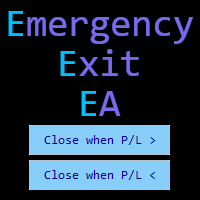
Emergency Exit is an MT5 expert advisor I developed to solve a specific problem: monitoring and managing overall account risk across multiple positions. Unlike traditional EAs that focus on entry signals or complex trading algorithms, Emergency Exit has one job - to watch your total floating P/L and take action when your predefined thresholds are hit.
The main functionality revolves around two simple conditions:
Close when P/L >: Triggers when profit exceeds a value (take profit) OR when loss
FREE

Metis Risk Guardian is an account protection utility for MetaTrader 5. It watches your equity in real time and, when a limit you set is reached, it closes every open position, deletes every pending order and keeps the account flat until you lift the lock. If you would rather stay in control, an alert-only mode warns you and touches nothing. What it protects you from
Most accounts are not lost in a single bad trade. They are lost in the hour after one, when the decision to stop has already been
FREE

EW Close All – Tek Tık. Her Şey Kapandı.
EW Close All , hafif ve çok dilli bir Expert Advisor’dır. Tek bir butona tıklayarak tüm açık pozisyonları anında kapatır ve tüm bekleyen emirleri iptal eder.
Tüm açık pozisyonları kapatır Tüm bekleyen emirleri iptal eder Her sembol ve her zaman diliminde çalışır Çok dilli arayüz Temiz, hızlı ve güvenilir
Hızlı çıkışlar, risk kontrolü veya gün sonu temizliği için mükemmeldir.
Tam kontrol sizde kalsın — EW Close All ile saniyeler için
FREE

Basket Close – Your Smart Trading Assistant for the Perfect Exit!
The Basket Close EA is the ideal solution for traders who want to efficiently manage their open positions. This simple Expert Advisor allows you to close all open positions simultaneously based on a predefined profit or loss target.
Automated Risk Management – Closes all positions as soon as a specific profit or loss (in percentage of the account balance) is reached.
Efficient Trade Control – No more manual monitoring or
FREE
Introduction to Order Risk Management EA ORM EA is specially designed for fast and accurate market order execution to be used with our Price Action and Econometric Trading strategies listed below. ORM EA is fully automatic and ORM EA is also very easy to use. ORM EA is totally free of charge. You can also use this robust order execution feature of this ORM EA for any other your own trading strategy.
Trading Strategy Guide Order Risk Management EA provides the guide for the risk management for y
FREE

1 yıllık kiralama ile ayda sadece $1.67 karşılığında tam erişim elde edin. Bu, Trading Statistics, Auto Reports, Price Alerts ve Trade Notifications özelliklerini tek bir modern Telegram izleme sistemi içinde birleştiren profesyonel çok işlevli bir yardımcı araçtır. Araç, Telegram kanalınız üzerinden /menu komutuyla uzaktan kontrolü destekler. Trade Reports gönderebilir, açık pozisyonları görüntüleyebilir, aktif Price Alerts oluşturabilir, silebilir ve yönetebilirsiniz; tüm bunları MetaTrader 5
FREE
This indicator monitors the vital constants of your trading account to keep it healthy and away from excessive risks. It monitors all trades, absolute exposure, account floating point and leverage currently in use, using different color codes for your interpretation. [ Installation Guide | Update Guide | Troubleshooting | FAQ | All Products | Get Help ] Amazingly easy to understand The indicator is clean and simple It calculates exposure by pairs and currencies Keep your used leverage cont
FREE

Convenient tool for measuring the number of points between the prices directly on the chart. Displays in the measurement between points in percentage, points (financial) and time (bars ). Compatible with all graphical timeframes. When fixed on the chart is displayed in all timeframes. Press Ctrl, click the first point, move the mouse and will now display the measurement. Click again and fix. Very fast tool that does not occupy much space. Input Parameters Line Color Line Style Text Color Text Si
FREE
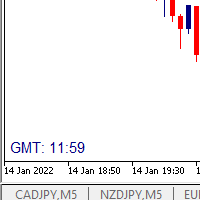
I wrote a small label to show GMT time. I t helps me to know the trading hours in Europe. I searched in the market but couldn't find it, hope it helps those who need it.
Functions: X_: Horizontal distance from border. Y_: Vertical distance from border. FontType: label color. FontSize : label font. Color3 : label color. WhatCorner : which chart corner will be drawn. If you have any request or errors please tell me to help it better.
Donate us , Thank u!
Telegram: 0388894014
FREE

Automatically protect you positions with Raba BreakEven and Trailing StopLoss EA. Functionalities: Automatic break even. Automatic trailing stoploss
I you have any doubt you can leave it in comments and I will anwer it asap. If you found this tool helpful for you, a comment and a good rating will be appreciated. Also any proposal will be taken into account for future versions.
FREE

You can send MetaTrader screenshot easily to your identified telegram channel via press the send button that on the chart. TelegramBotToken: Telegram API credentials. You can create API credentials on my.telegram.org web page ChatId: Your telegram chatId. Secreenshots will be sending this channel - Please do not press the button repeatedly. This may cause your bot or ip address to be blocked. - You have to add telegram api address ( https://api.telegram.org ) in Option > Expert Advisors > Allow
FREE

Product Name: Anchor auto TP and SL Trade Manager MT5 Your manual trade will be managed automatically. Turns single trades into smart grids with auto-sync TP/SL.
Anchor Auto TP and SL Trade Manager is a powerful trade assistant designed for manual traders who use averaging or recovery strategies. Stop calculating grid levels manually! This EA turns your manual trade into an automated "Anchor." If the market moves against you, the EA automatically builds a recovery grid based on your specific S
FREE

Orders Manager is a simple and indispensable assistant for managing all your orders. Inputs: Magic = 999; // Magic TakeProfit = 1000; // Take Profit. If = 0 the level is not setts. StopLoss = 0; // Stop Loss. If = 0 the level is not setts. Slippage = 10; // Slippage GeneralProfit = false; // Closing all orders based on total profit. If false the function is disabled and works according to TakePr
FREE
MetaTrader platformunun uygulama mağazası olan MetaTrader Mağazasından bir alım-satım robotunun nasıl satın alınacağını öğrenin.
MQL5.community Ödeme Sistemi, PayPal, banka kartları ve popüler ödeme sistemleri aracılığıyla yapılan işlemleri destekler. Daha iyi bir müşteri deneyimi için satın almadan önce alım-satım robotunu test etmenizi şiddetle tavsiye ederiz.

Alım-satım fırsatlarını kaçırıyorsunuz:
- Ücretsiz alım-satım uygulamaları
- İşlem kopyalama için 8.000'den fazla sinyal
- Finansal piyasaları keşfetmek için ekonomik haberler
Kayıt
Giriş yap
Web sitesi politikasını ve kullanım şartlarını kabul edersiniz
Hesabınız yoksa, lütfen kaydolun