 MetaTrader 5
 Uzmanlar
 Göstergeler
 Komut dosyaları
 Kütüphaneler
 Depo
Alım-satım robotlarını ücretsiz olarak nasıl indirebileceğinizi izleyin
Bizi Twitter üzerinde bulun!
Fan sayfamıza katılın
Fan sayfamıza katılın
Kodu beğendiniz mi? MetaTrader 5 terminalinde deneyin

ThirdPartyTicks - MetaTrader 5 için komut dosyası
fxsaber

Посты по улучшениям: https://www.mql5.com/ru/search#!keyword=uluchshenie&amp%3Bauthor=fxsaber&amp%3Bmethod=2&method=2 Посты по ошибкам: https://www.mql5.com/ru/search#!keyword=oshibka&amp%3Bauthor=fxsaber&amp%3Bmethod=2&method=2 Blog
- Görüntülemeler:
- 9716
- Derecelendirme:
- Yayınlandı:
- Güncellendi:
-
 Alım-satım fırsatlarını kaçırıyorsunuz:
- Ücretsiz alım-satım uygulamaları
- İşlem kopyalama için 8.000'den fazla sinyal
- Finansal piyasaları keşfetmek için ekonomik haberler
Kayıt Giriş yapWeb sitesi politikasını ve kullanım şartlarını kabul edersiniz
Hesabınız yoksa, lütfen kaydolun -
 Bu koda dayalı bir robota veya göstergeye mi ihtiyacınız var? Freelance üzerinden sipariş edin
Freelance'e git
Third-party applications for MetaTrader 4 allowing to obtain a tick history from various sources have always been popular. This history is typically used in the Strategy Tester for checking the operation of Expert Advisors as well as for conducting research (such as machine learning, etc.). Some sources of quotes discussed by users have become almost standard in the search for a "grail."
Criterion
The given MQL5 library does not have any criterion for comparing ticks. The reasons for choosing the proposed source of the tick archive are not described. But this archive is absolutely fresh and therefore not fully studied. Therefore, in order to develop your own criterion of value, perform a simple action - run your Expert Advisor using the "Every tick is based on real ticks" mode on any built-in MetaTrader 5 symbol and on the custom symbol created by the script (based on a third-party real tick history), and then compare the results obtained. This process does not require any deep knowledge of the terminal or additional actions outside it.
Script
The script accesses the tick history from the built-in source and creates an appropriate custom symbols on its basis.
Comments in the source code partially explain the principle.
// https://www.mql5.com/en/code/20225
#property script_show_inputs

#include <fxsaber\ThirdPartyTicks\ThirdPartyTicks.mqh>

sinput bool   Sync = true; // Synchronization
sinput string symbol = ""; // Symbol (NULL - current, "AllSymbols" - All)

THIRDPARTYTICKS ThirdPartyTicks; // Connecting to a local archive of quotes

// One symbol
void CreateSymbol()
{
  // Defining the symbol to work with
  const string Symb = (symbol == "") ? StringSubstr(_Symbol, 0, 6) : symbol;

  if (Sync)
    ThirdPartyTicks.Refresh();                // Reading available data from the tick archive source

  ThirdPartyTicks[Symb].Update();             // Synchronizing the local archive with the source of the selected symbol
  ThirdPartyTicks[Symb].ToCustomSymbol(true); // Creating a custom symbol based on the local archive
}

// All symbols
void CreateAllSymbols()
{
  if (Sync)
    ThirdPartyTicks.Refresh();                     // Reading available data from the tick archive source

  const uint Amount = ThirdPartyTicks.GetAmount();

  for (uint i = 0; _CS(i < Amount); i++)
  {
    ThirdPartyTicks[i].Update();                   // Synchronizing the local archive with the source of the selected symbol
    ThirdPartyTicks[i].ToCustomSymbol();           // Creating a custom symbol based on the local archive
  }
}

void OnStart()
{
  if (symbol != "AllSymbols")
    CreateSymbol();
  else if (MessageBox("Creating all the symbols can take a long time. Do you agree?", __FILE__, MB_YESNO | MB_ICONQUESTION) == IDYES)
    CreateAllSymbols();
}
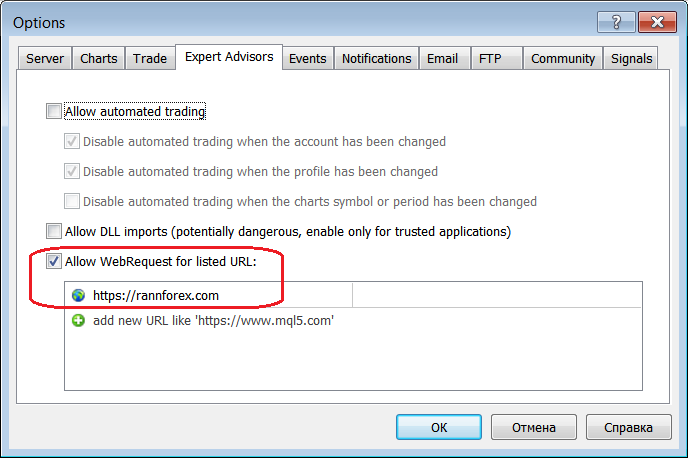
For a proper operation of the script, you should specify the address of the quotes source in Terminal Settings, for example:
Actions are written in details to logs during the script operation:
UnZip <source_name>\EURUSD.<suffix>\EURUSD.<suffix>_20180313.csv.zip 724002 bytes - unpack size 5466504 bytes.
Total Ticks (EURUSD.<suffix>) = 1645897
Corrected 3 ticks.
EURUSD.<suffix>_<source_name> saved ticks = 1645897
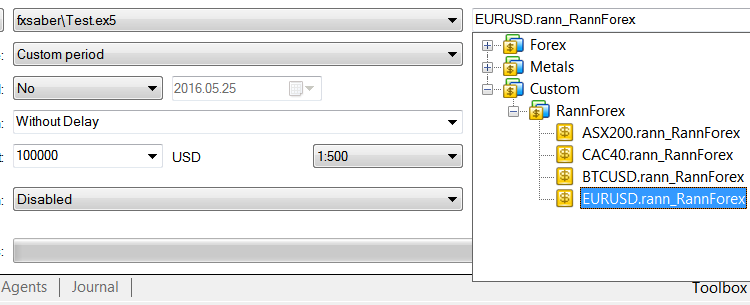
After that you can run your Expert Advisors in the Tester using new custom symbols:
Features
- Only standard MQL5 features are used, so there are no DLLs and it is suitable for the Market.
- The archive of quotes is saved on the local machine as ZIP archives with CSV-files.
- The archive of quotes is synchronized with the source: only the missing data is downloaded.
- The source files include the following libraries: ZIP and Symbol.
- The script can work with a local archive without the Internet connection.
- Data in the local archive can be edited or added manually.
- The operation of the file storage does not depend on directories in it: you can create folders and save data there at your discretion.
- The bar history is created taking into account the minimal loss of quality when switching from the "Every tick based on real ticks" testing mode to "Open Prices Only" - a trading system uses limit orders.
- The core of the script is the library with the same name. It allows creating more interesting scenarios.
- The source has not been optimized and is provided as is for educational purposes.
- In order to make the library used as a core completely universal, you need to modify it for operation with arbitrary sources and with any format of quotes.
MetaQuotes Ltd tarafından Rusçadan çevrilmiştir.
Orijinal kod: https://www.mql5.com/ru/code/20225
 Improve
An Expert Advisor based on two iMAs (Moving Average,MA) and one iRSI (Relative Strength Index, RSI). It tracks virtual profit. Works on two symbols.
 OnChart_Stochastic
Stochastic on the price chart.
Schaff Trend RSI MTF
Schaff Trend RSI multi timeframe version.
Schaff trend RSX mtf
Schaff Trend RSX multi timeframe version.