 MetaTrader 5
 Uzmanlar
 Göstergeler
 Komut dosyaları
 Kütüphaneler
 Depo
Alım-satım robotlarını ücretsiz olarak nasıl indirebileceğinizi izleyin
Bizi Telegram üzerinde bulun!
Fan sayfamıza katılın
Fan sayfamıza katılın
Kodu beğendiniz mi? MetaTrader 5 terminalinde deneyin

Money Fixed Risk - MetaTrader 5 için uzman
Vladimir Karputov

Create a personal work for me: https://www.mql5.com/en/job/new?prefered=barabashkakvn
- Görüntülemeler:
- 17228
- Derecelendirme:
- Yayınlandı:
- Güncellendi:
-
 Alım-satım fırsatlarını kaçırıyorsunuz:
- Ücretsiz alım-satım uygulamaları
- İşlem kopyalama için 8.000'den fazla sinyal
- Finansal piyasaları keşfetmek için ekonomik haberler
Kayıt Giriş yapWeb sitesi politikasını ve kullanım şartlarını kabul edersiniz
Hesabınız yoksa, lütfen kaydolun -
 Bu koda dayalı bir robota veya göstergeye mi ihtiyacınız var? Freelance üzerinden sipariş edin
Freelance'e git
An example for calculating the lot value in accordance with the risk per trade.
Update: 28 Dec 2016 -> version 1.001
What's new:
added two methods for outputting (printing) the calculated lot. Method 1 — when setting StopLoss to zero.
//--- variant #1: StopLoss=0.0
sl=0.0;
check_open_long_lot=m_money.CheckOpenLong(m_symbol.Ask(),sl);
Print("sl=0.0",
" CheckOpenLong: ",DoubleToString(check_open_long_lot,2),
", Balance: ", DoubleToString(m_account.Balance(),2),
", Equity: ", DoubleToString(m_account.Equity(),2),
", FreeMargin: ", DoubleToString(m_account.FreeMargin(),2));
sl=0.0;
check_open_long_lot=m_money.CheckOpenLong(m_symbol.Ask(),sl);
Print("sl=0.0",
" CheckOpenLong: ",DoubleToString(check_open_long_lot,2),
", Balance: ", DoubleToString(m_account.Balance(),2),
", Equity: ", DoubleToString(m_account.Equity(),2),
", FreeMargin: ", DoubleToString(m_account.FreeMargin(),2));
Method 2 — see the code listing below:
//--- variant #2: StopLoss!=0.0
sl=m_symbol.Bid()-ExtStopLoss;
check_open_long_lot=m_money.CheckOpenLong(m_symbol.Ask(),sl);
Print("sl=",DoubleToString(sl,m_symbol.Digits()),
" CheckOpenLong: ",DoubleToString(check_open_long_lot,2),
", Balance: ", DoubleToString(m_account.Balance(),2),
", Equity: ", DoubleToString(m_account.Equity(),2),
", FreeMargin: ", DoubleToString(m_account.FreeMargin(),2));
sl=m_symbol.Bid()-ExtStopLoss;
check_open_long_lot=m_money.CheckOpenLong(m_symbol.Ask(),sl);
Print("sl=",DoubleToString(sl,m_symbol.Digits()),
" CheckOpenLong: ",DoubleToString(check_open_long_lot,2),
", Balance: ", DoubleToString(m_account.Balance(),2),
", Equity: ", DoubleToString(m_account.Equity(),2),
", FreeMargin: ", DoubleToString(m_account.FreeMargin(),2));
Also, now the result of a trading operation is checked:
if(m_trade.Buy(chek_volime_lot,NULL,m_symbol.Ask(),m_symbol.Bid()-ExtStopLoss,m_symbol.Bid()+ExtStopLoss))
{
if(m_trade.ResultDeal()==0)
count--;
}
else
count--;
{
if(m_trade.ResultDeal()==0)
count--;
}
else
count--;
First check: if the end of the Buy method operation returned "true", but the ResultDeal() method returned "0" (this may happen in case of requotes) — the "count" counter should be decreased by one.
Second check: if the end of the Buy method returned false "false", the "count" counter should be decreased by one.
Why do we need to decrease "count" by one? In this case we do not have to wait 980 ticks again, but we can try to enter on the next tick.
How it works:
Set risk percent per trade (the % risk parameter) and Stop Loss (StopLoss (in pips) parameter). This defines parameters of possible deposit loss.

The following loop is implemented to simulate trading:
static long count=-21;
if(count%980==0) // we pass 980 tics
{
//--- getting lot size for open long position (CMoneyFixedRisk)
if(count%980==0) // we pass 980 tics
{
//--- getting lot size for open long position (CMoneyFixedRisk)
Initial value count=-21 is set to "warm up" the strategy tester. Then the remainder after devision of count by 980 (this number was chosen randomly) is calculated. It means that every 980 ticks lot calculation cycle is started, in which lot is calculated taking into account the risks per trade.
The lot calculation cycle depending on risk per trade (calculation for the Buy position):
Step one
//--- getting lot size for open long position (CMoneyFixedRisk)
double sl=0.0;
double check_open_long_lot=0.0;
//--- variant #1: StopLoss=0.0
sl=0.0;
check_open_long_lot=m_money.CheckOpenLong(m_symbol.Ask(),sl);
Print("sl=0.0",
", CheckOpenLong: ",DoubleToString(check_open_long_lot,2),
", Balance: ", DoubleToString(m_account.Balance(),2),
", Equity: ", DoubleToString(m_account.Equity(),2),
", FreeMargin: ", DoubleToString(m_account.FreeMargin(),2));
//--- variant #2: StopLoss!=0.0
sl=m_symbol.Bid()-ExtStopLoss;
check_open_long_lot=m_money.CheckOpenLong(m_symbol.Ask(),sl);
Print("sl=",DoubleToString(sl,m_symbol.Digits()),
", CheckOpenLong: ",DoubleToString(check_open_long_lot,2),
", Balance: ", DoubleToString(m_account.Balance(),2),
", Equity: ", DoubleToString(m_account.Equity(),2),
", FreeMargin: ", DoubleToString(m_account.FreeMargin(),2));
if(check_open_long_lot==0.0)
return;
double sl=0.0;
double check_open_long_lot=0.0;
//--- variant #1: StopLoss=0.0
sl=0.0;
check_open_long_lot=m_money.CheckOpenLong(m_symbol.Ask(),sl);
Print("sl=0.0",
", CheckOpenLong: ",DoubleToString(check_open_long_lot,2),
", Balance: ", DoubleToString(m_account.Balance(),2),
", Equity: ", DoubleToString(m_account.Equity(),2),
", FreeMargin: ", DoubleToString(m_account.FreeMargin(),2));
//--- variant #2: StopLoss!=0.0
sl=m_symbol.Bid()-ExtStopLoss;
check_open_long_lot=m_money.CheckOpenLong(m_symbol.Ask(),sl);
Print("sl=",DoubleToString(sl,m_symbol.Digits()),
", CheckOpenLong: ",DoubleToString(check_open_long_lot,2),
", Balance: ", DoubleToString(m_account.Balance(),2),
", Equity: ", DoubleToString(m_account.Equity(),2),
", FreeMargin: ", DoubleToString(m_account.FreeMargin(),2));
if(check_open_long_lot==0.0)
return;
Then the calculated lot value for a Buy position taking into account StopLoss is received to the check_open_long_lot variable using the CheckOpenLong method of the CMoneyFixedRisk class:
double check_open_long_lot=m_money.CheckOpenLong(m_symbol.Ask(),m_symbol.Bid()-ExtStopLoss);
The following parameters are printed to the Experts journal: StopLoss, calculated lot value in accordance with the risk per trade, trade account balance at the time of calculation, margin at the moment of calculation.
If the calculation returns "0.0", exit:
if(check_open_long_lot==0.0)
return;
return;
Step two
Then we receive the lot value of the Buy position for which we have sufficient funds; the value is received to the chek_volime_lot variable using the CheckVolume method of the CTrade class. The following parameters are passed here: m_symbol.Name() — symbol name, check_open_long_lot — position volume we want to open (this parameter was calculated earlier):
//--- check volume before OrderSend to avoid "not enough money" error (CTrade)
double chek_volime_lot=m_trade.CheckVolume(m_symbol.Name(),check_open_long_lot,m_symbol.Ask(),ORDER_TYPE_BUY);
double chek_volime_lot=m_trade.CheckVolume(m_symbol.Name(),check_open_long_lot,m_symbol.Ask(),ORDER_TYPE_BUY);
Step three
If the CheckVolume method returns a value other than "0.0", then we check the condition: do we have enough money to open a position with the lot calculated in accordance with the risk.
if(chek_volime_lot!=0.0)
if(chek_volime_lot>=check_open_long_lot)
m_trade.Buy(chek_volime_lot,NULL,m_symbol.Ask(),m_symbol.Bid()-ExtStopLoss,m_symbol.Bid()+ExtStopLoss);
else
Print("CMoneyFixedRisk lot = ",DoubleToString(check_open_long_lot,2),
", CTrade lot = ",DoubleToString(chek_volime_lot,2));
if(chek_volime_lot>=check_open_long_lot)
m_trade.Buy(chek_volime_lot,NULL,m_symbol.Ask(),m_symbol.Bid()-ExtStopLoss,m_symbol.Bid()+ExtStopLoss);
else
Print("CMoneyFixedRisk lot = ",DoubleToString(check_open_long_lot,2),
", CTrade lot = ",DoubleToString(chek_volime_lot,2));
If we have enough money, open the position, if not — the lot value calculated in accordance with the risk per trade (DoubleToString(check_open_long_lot,2)) and the lot value for wich we have enough funds (DoubleToString(chek_volime_lot,2)) are printed to the Experts journal.
Example (when you test in the Strategy Tester, choose EURUSD, M1, testing period from 2016.11.28, deposit $3000):
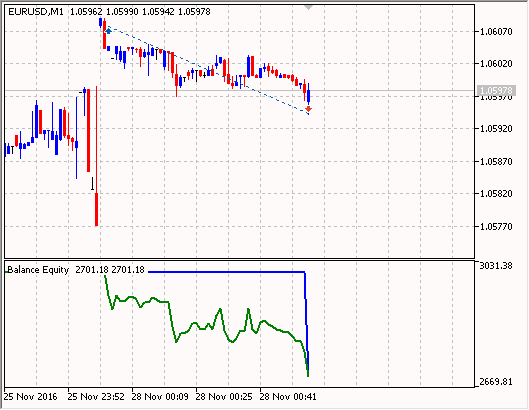
A Buy position was opened (extract from the tester journal) — the calculated lot based on risk per trade is 2.23.
Money Fixed Risk (EURUSD,M1) 2016.11.28 00:03:24 sl=0.0 CheckOpenLong: 0.01, Balance: 3000.00, Equity: 3000.00, FreeMargin: 3000.00
Money Fixed Risk (EURUSD,M1) 2016.11.28 00:03:24 sl=1.05942 CheckOpenLong: 2.23, Balance: 3000.00, Equity: 3000.00, FreeMargin: 3000.00
Trade 2016.11.28 00:03:32 instant buy 2.23 EURUSD at 1.06076 sl: 1.05942 tp: 1.06142 (1.06042 / 1.06076 / 1.06042)
Trades 2016.11.28 00:03:32 deal #2 buy 2.23 EURUSD at 1.06076 done (based on order #2)
Trade 2016.11.28 00:03:32 deal performed [#2 buy 2.23 EURUSD at 1.06076]
Trade 2016.11.28 00:03:32 order performed buy 2.23 at 1.06076 [#2 buy 2.23 EURUSD at 1.06076]
Money Fixed Risk (EURUSD,M1) 2016.11.28 00:03:32 CTrade::OrderSend: instant buy 2.23 EURUSD at 1.06076 sl: 1.05942 tp: 1.06142 [done at 1.06076]
Money Fixed Risk (EURUSD,M1) 2016.11.28 00:48:32 sl=0.0 CheckOpenLong: 0.01, Balance: 3000.00, Equity: 2828.29, FreeMargin: 462.80
Money Fixed Risk (EURUSD,M1) 2016.11.28 00:48:32 sl=1.05899 CheckOpenLong: 2.60, Balance: 3000.00, Equity: 2828.29, FreeMargin: 462.80
Money Fixed Risk (EURUSD,M1) 2016.11.28 00:48:32 CMoneyFixedRisk lot = 2.60, CTrade lot = 0.43
Trade 2016.11.28 00:53:15 stop loss triggered #2 buy 2.23 EURUSD 1.06076 sl: 1.05942 tp: 1.06142 [#3 sell 2.23 EURUSD at 1.05942]
Trades 2016.11.28 00:53:15 deal #3 sell 2.23 EURUSD at 1.05942 done (based on order #3)
Trade 2016.11.28 00:53:15 deal performed [#3 sell 2.23 EURUSD at 1.05942]
Trade 2016.11.28 00:53:15 order performed sell 2.23 at 1.05942 [#3 sell 2.23 EURUSD at 1.05942]
Money Fixed Risk (EURUSD,M1) 2016.11.28 00:03:24 sl=1.05942 CheckOpenLong: 2.23, Balance: 3000.00, Equity: 3000.00, FreeMargin: 3000.00
Trade 2016.11.28 00:03:32 instant buy 2.23 EURUSD at 1.06076 sl: 1.05942 tp: 1.06142 (1.06042 / 1.06076 / 1.06042)
Trades 2016.11.28 00:03:32 deal #2 buy 2.23 EURUSD at 1.06076 done (based on order #2)
Trade 2016.11.28 00:03:32 deal performed [#2 buy 2.23 EURUSD at 1.06076]
Trade 2016.11.28 00:03:32 order performed buy 2.23 at 1.06076 [#2 buy 2.23 EURUSD at 1.06076]
Money Fixed Risk (EURUSD,M1) 2016.11.28 00:03:32 CTrade::OrderSend: instant buy 2.23 EURUSD at 1.06076 sl: 1.05942 tp: 1.06142 [done at 1.06076]
Money Fixed Risk (EURUSD,M1) 2016.11.28 00:48:32 sl=0.0 CheckOpenLong: 0.01, Balance: 3000.00, Equity: 2828.29, FreeMargin: 462.80
Money Fixed Risk (EURUSD,M1) 2016.11.28 00:48:32 sl=1.05899 CheckOpenLong: 2.60, Balance: 3000.00, Equity: 2828.29, FreeMargin: 462.80
Money Fixed Risk (EURUSD,M1) 2016.11.28 00:48:32 CMoneyFixedRisk lot = 2.60, CTrade lot = 0.43
Trade 2016.11.28 00:53:15 stop loss triggered #2 buy 2.23 EURUSD 1.06076 sl: 1.05942 tp: 1.06142 [#3 sell 2.23 EURUSD at 1.05942]
Trades 2016.11.28 00:53:15 deal #3 sell 2.23 EURUSD at 1.05942 done (based on order #3)
Trade 2016.11.28 00:53:15 deal performed [#3 sell 2.23 EURUSD at 1.05942]
Trade 2016.11.28 00:53:15 order performed sell 2.23 at 1.05942 [#3 sell 2.23 EURUSD at 1.05942]
It turned out that funds are not enough to open the second position.
Pay attention to the fact, that when StopLoss is not specified (StopLoss=0.0), the calculated lot is equal to the minimum allowed lot value.
As a result, the first position was closed by stop loss with a loss of 298.82:

This corresponds to almost 10% risk of $3000 deposit.
MetaQuotes Ltd tarafından Rusçadan çevrilmiştir.
Orijinal kod: https://www.mql5.com/ru/code/17199
Hercules A.T.C. 2006
The Expert Advisor trades moving average breakouts. It uses the following indicators: two iMAs (Moving Average, MA), iRSI(Relative Strength Index, RSI) and two iEnvelopes (Envelopes).
The Puncher
Trades using indicators: iStochastic (Stochastic Oscillator) and iRSI (Relative Strength Index, RSI).
 ShowImportantParams
Displays important symbol and account parameters.
BigBarSound
The Expert Advisor plays sound alerts when candlestick size exceeds a certain value.