SMC Dashboard IRABC
- Индикаторы
- Версия: 1.1
- Обновлено: 12 ноября 2026

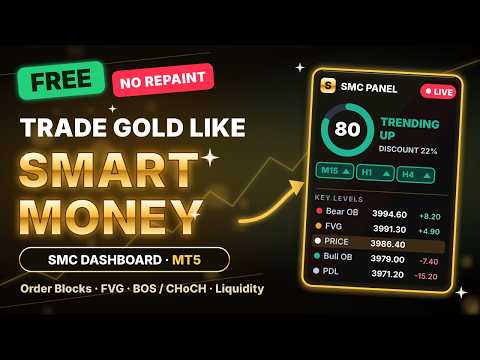
SMC Dashboard IRABC maps Smart Money Concepts on your chart and shows you at a glance where price is right now.
No arrows and no promises. The indicator draws market structure, order blocks, fair value gaps and liquidity the way SMC and ICT traders read them, then sums it all up in one live dashboard. You make the decision; the indicator does the mapping.
This version works on Gold (XAUUSD and other XAU symbols) and EURUSD.
What it draws
- Market structure on two layers: swing (main trend) and internal (short-term). BOS and CHoCH are labelled, with filters that skip weak breaks and wick sweeps.
- HH, HL, LH and LL labels on swing or internal pivots.
- Candles coloured by structure trend, so you see the bias without reading a label.
- Order blocks (internal and swing), drawn on the last opposite candle before the move, with a volatility filter and automatic removal when price breaks them.
- Fair value gaps with an automatic size filter. A gap stops extending when price first touches it, so you can see which gaps are still open.
- Equal highs and lows (EQH / EQL), where liquidity sits.
- Premium, equilibrium and discount zones, plus the strong and weak high and low.
- Previous day and week high and low.
The live dashboard
- A confluence score from 0 to 100 and a clear state: trending up, trending down, or mixed.
- Trend chips for your chart timeframe, the internal trend, H1 and H4.
- A premium / discount bar showing where price sits inside the current swing range.
- Volatility: low, normal or high, based on ATR over the last 500 bars.
- A key-levels ladder: the nearest order blocks, open FVGs, previous-day high/low and swing extremes above and below price, each with its distance.
- The last swing and internal BOS / CHoCH, the latest EQH / EQL, and a warning when price is inside an order block or FVG.
- Move it to the left or right side with one click, collapse it, and scale it for 4K screens.
How to use it
- Open XAUUSD on M5 or M15 and check the dashboard: do the chart timeframe, H1 and H4 agree?
- Check the premium / discount bar. Prefer buys in discount and sells in premium.
- Wait for price to reach a key level from the ladder: an order block or an open FVG.
- Wait for an internal CHoCH or BOS in your direction before entering, and place your stop beyond the structure.
Who it is for
- SMC and ICT traders who want structure, order blocks and FVGs marked automatically.
- Gold scalpers and intraday traders on M1 to M30.
- Traders learning Smart Money Concepts who want to see the ideas on a live chart.
Alerts
Popup alerts for BOS / CHoCH, equal highs / lows and new FVGs.
Languages
English, Chinese (中文), Spanish (Español) and Thai (ไทย). Choose the language in the settings.
This version vs Pro
- This version: Gold and EURUSD, every drawing, the full dashboard, popup alerts.
- Pro: all symbols, higher-timeframe order blocks (up to three timeframes) and push alerts to your phone.
Does it repaint?
No. Every break is confirmed on a closed candle and does not move afterwards. A swing high or low can only be confirmed after its lookback bars have passed, so its label appears a few bars later, at the bar where it formed. Order blocks are removed when price breaks them, and gaps stop extending when price touches them; that is by design.
Questions or feedback
Send me a message through MQL5. If the indicator helps your trading, a review is much appreciated.