HiLo2TimeframeIndicator
- Индикаторы
- Версия: 1.0
- Активации: 5

# 1. INDICATOR OVERVIEW
This dual-timeframe technical analysis indicator for MetaTrader 5 is designed to identify potential BUY and SELL opportunities during the development of market trends.
The indicator uses a two-stage confirmation process. It first detects a potential direction on the entry timeframe, then waits for the selected higher timeframe to confirm the same direction. A signal is displayed only when both timeframes align within the configured confirmation window.
By combining entry-timeframe analysis with higher-timeframe confirmation, the indicator helps traders assess emerging directional moves through clear chart-based signals. It also includes configurable stop-loss and trailing-stop reference levels for manual trade planning.
# 2. KEY FEATURES
- **Dual-Timeframe Analysis:** Uses separate entry and confirmation timeframes to evaluate market direction.
- **Higher-Timeframe Signal Confirmation:** Displays a BUY or SELL signal only when the confirmation timeframe aligns with the initial entry direction within the permitted confirmation window.
- **Early Trend Identification:** Designed to help identify developing bullish and bearish trends after directional confirmation.
- **Non-Repainting Confirmed Signals:** Confirmed BUY and SELL signals are designed to remain fixed on the chart after confirmation.
- **Customizable Settings:** Provides adjustable timeframe, HiLo calculation, confirmation, stop-loss, trailing-stop and chart-display parameters.
- **Multi-Symbol Compatibility:** Can be applied to supported trading symbols available in MetaTrader 5.
- **Multi-Timeframe Compatibility:** Allows users to select entry and confirmation timeframes according to their analysis preferences.
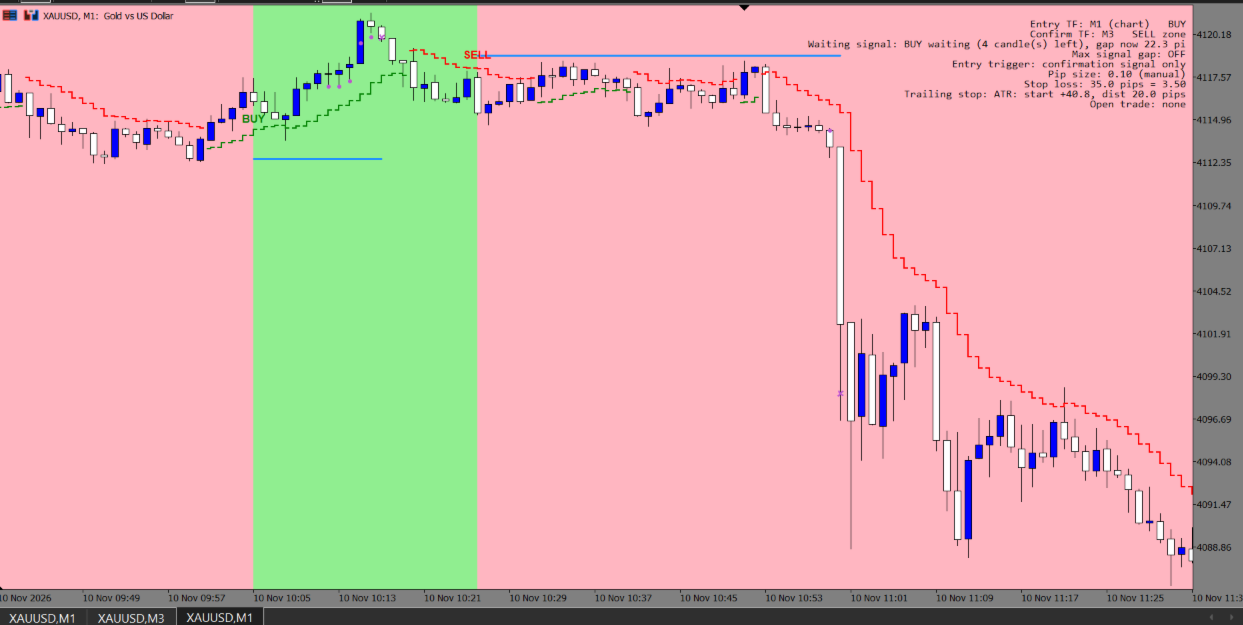
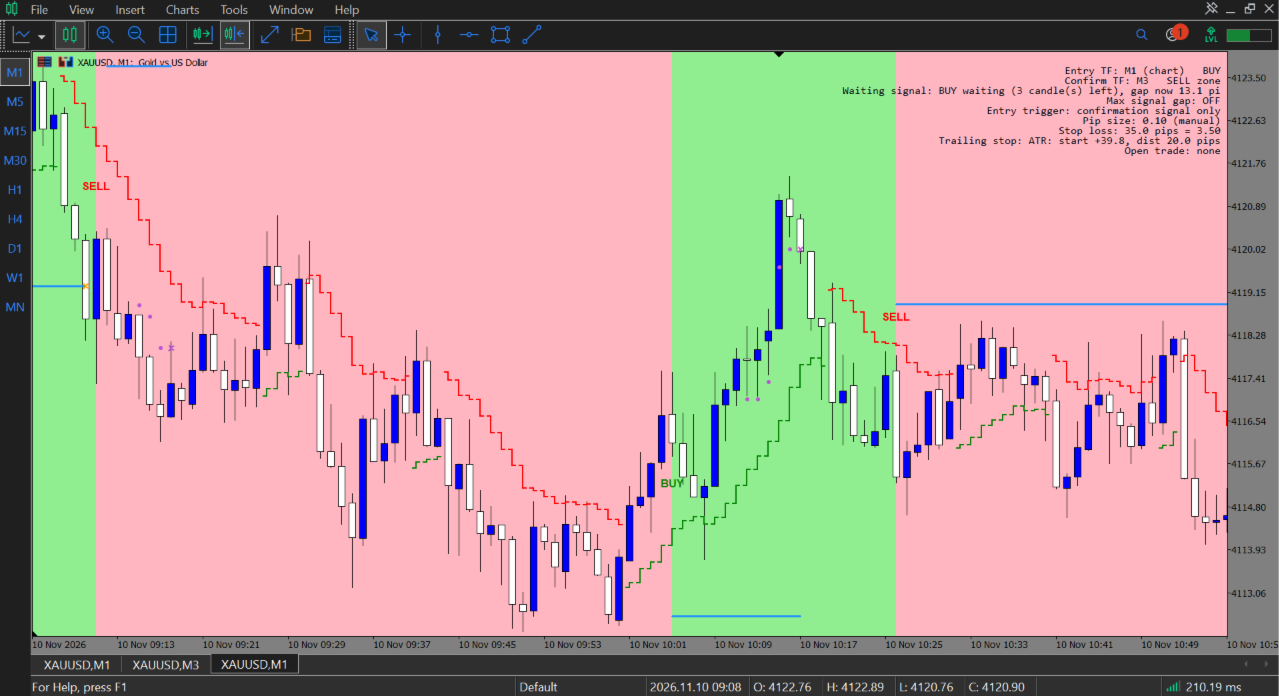
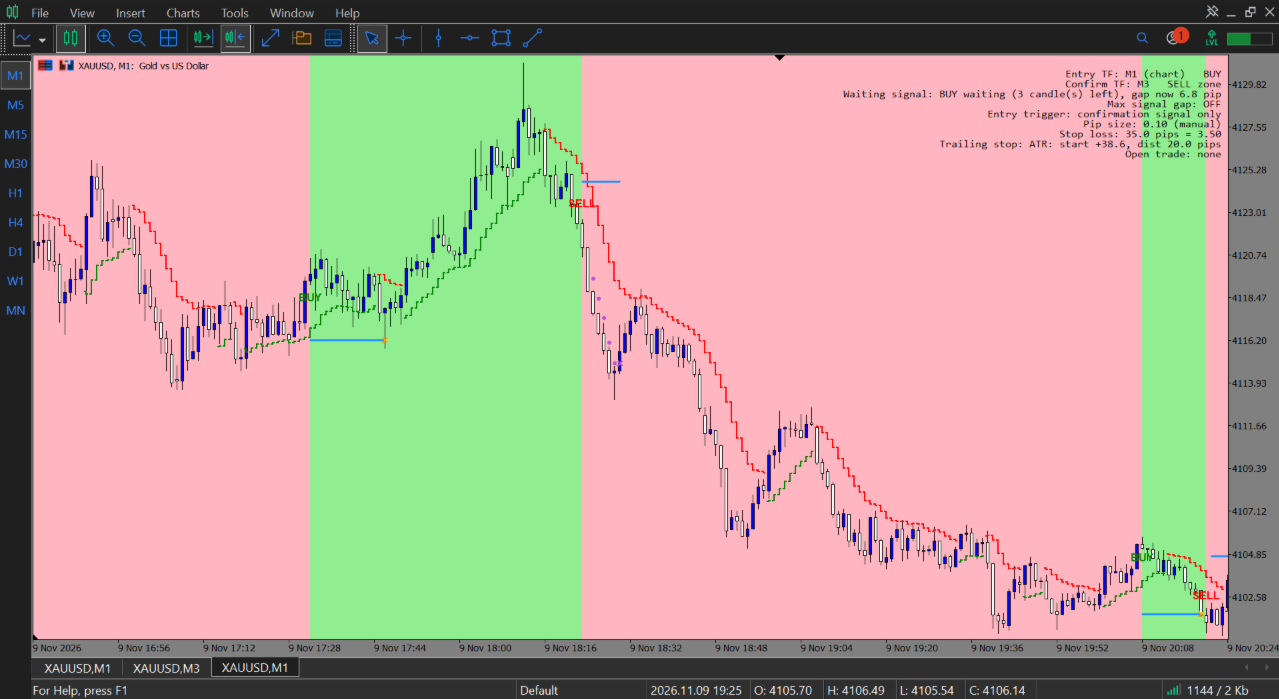
- **Chart-Based BUY/SELL Signals:** Displays visual BUY and SELL markers and labels when the confirmation conditions are met.
- **Stop-Loss Reference Levels:** Calculates and displays fixed-pip or ATR-based stop-loss levels for manual use.
- **Trailing-Stop Reference Levels:** Calculates and displays fixed-distance or ATR-based trailing-stop levels for manual trade management.
- **Visual Customization:** Allows users to customize signal markers, confirmation zones, labels, colors, font size and the information panel.
# 3. HOW THE SIGNALS WORK
The indicator uses a two-stage confirmation process based on a Lower Timeframe (LTF) and a Higher Timeframe (HTF).
**BUY Signal**
1. The entry timeframe generates an initial BUY signal.
2. The indicator starts waiting for the higher timeframe to confirm the bullish direction.
3. The higher timeframe has a maximum of 6 confirmation candles to align with the BUY direction. This number can be changed in the input settings.
4. When the higher timeframe confirms the same direction at the selected confirmation timing, the indicator displays a BUY signal on the chart.
**SELL Signal**
1. The entry timeframe generates an initial SELL signal.
2. The indicator starts waiting for the higher timeframe to confirm the bearish direction.
3. The higher timeframe has a maximum of 6 confirmation candles to align with the SELL direction. This number can be changed in the input settings.
4. When the higher timeframe confirms the same direction at the selected confirmation timing, the indicator displays a SELL signal on the chart.
**Signal Expiration**
If the higher timeframe does not confirm the initial direction within the configured confirmation window, the pending setup expires and no confirmed BUY or SELL signal is generated from that setup.
**Confirmation Timing**
In the displayed default configuration, confirmation is evaluated at the close of the confirmation-timeframe candle. The confirmation timing can be selected through the indicator inputs where supported.
# 4. RECOMMENDED MARKET CONDITIONS
The indicator is primarily designed for trending market conditions, with a focus on identifying developing trends during their early stages.
**Best-Suited Conditions**
- Markets transitioning into a new bullish or bearish trend.
- Early stages of developing directional moves.
- Markets showing clear bullish or bearish momentum.
- Conditions in which the entry and confirmation timeframes establish directional agreement.
**Less-Suitable Conditions**
During sideways, ranging or choppy market conditions, directional agreement between the two timeframes may be less consistent. As a result, confirmed trading opportunities may be less frequent, and signals may be less reliable.
Traders should assess the broader market structure and apply their own risk-management rules. No market condition guarantees a successful outcome.
# 5. RECOMMENDED SETTINGS & COMPATIBILITY
**Platform:** MetaTrader 5
**Symbol Compatibility:** Designed for use on multiple trading symbols available through the connected MetaTrader 5 broker, including Forex pairs and Gold (XAUUSD). Pip-size settings should be checked for each instrument.
**Timeframe Compatibility:** Supports configurable entry and confirmation timeframes. The following are example configurations, not guaranteed optimal settings.
### Gold Configuration Example
- Entry timeframe: M1 (1 Minute)
- Confirmation timeframe: M3 (3 Minutes)
- Confirmation window: Up to 6 confirmation-timeframe candles
- Confirmation timing: At confirmation candle close
- Confirmation HiLo Period: 7
- Manual gold pip-size example: 0.10 price units per pip
### Forex Configuration Example
- Entry timeframe: M15 (15 Minutes)
- Confirmation timeframe: H1 (1 Hour)
- Confirmation HiLo Period: 4
- Pip-size mode: Automatic, where supported, or Manual according to the selected currency pair
- Standard pip examples: 0.0001 for most non-JPY pairs and 0.01 for most JPY pairs
Use a Confirmation HiLo Period of 7 for the Gold example and 4 for the Forex example. These are setup-specific values, not a single setting intended for every instrument. In the MT5 Inputs tab shown in the supplied screenshot, this setting is named 'Period' under 'HiLo Signal – CONFIRMATION timeframe'.
**Risk-Management Display Options:**
- Fixed-pip stop-loss calculation
- ATR-based stop-loss calculation
- Fixed-distance trailing-stop calculation
- ATR-based trailing-stop calculation
The stop-loss and trailing-stop features calculate and display reference levels only. They do not place or modify broker-side orders.
# 6. INPUT PARAMETERS
The indicator provides configurable inputs for timeframe confirmation, HiLo calculations, signal handling, stop-loss and trailing-stop reference levels, pip-size calculation and chart appearance. Defaults below reflect the supplied MT5 screenshots.
## 6.1 TIMEFRAMES & CONFIRMATION
| Parameter | Description | Screenshot default |
|---|---|---|
| Use 2-timeframe confirmation | Enables or disables the dual-timeframe confirmation mechanism. | true |
| Entry timeframe (gives the signal, Current = chart) | Selects the timeframe used to generate the initial BUY or SELL signal. Current uses the chart timeframe. | Current |
| Confirmation timeframe | Selects the higher timeframe used to confirm the initial signal. | 3 Minutes |
| Confirmation timing | Defines when the higher-timeframe confirmation is evaluated. | At confirmation candle close |
| Wait for confirmation (confirmation candles) | Sets the maximum number of confirmation-timeframe candles allowed for the higher timeframe to align with the initial signal. | 6 |
| Use max gap filter between the two signals | Enables or disables the maximum-distance filter between the entry and confirmation signals. | false |
| Max gap between the two signals (pips) | Sets the maximum permitted distance between the two signals when the gap filter is enabled. | 20.0 |
## 6.2 HILO SIGNAL – ENTRY TIMEFRAME
Controls the HiLo calculation used to generate the initial entry-timeframe signal.
| Parameter | Description | Screenshot default |
|---|---|---|
| Period | Sets the calculation period for the entry-timeframe HiLo signal. | 10 |
| Shift | Sets the shift applied to the HiLo calculation. | 0 |
| Smoothing method | Selects the smoothing method used for the calculation. | Exponential |
## 6.3 HILO SIGNAL – CONFIRMATION TIMEFRAME
Controls the HiLo calculation used to evaluate directional confirmation on the higher timeframe.
| Parameter | Description | Screenshot default |
|---|---|---|
| Period | Sets the calculation period for the confirmation-timeframe HiLo signal. Use the value appropriate to the selected setup. | 7 (Gold example); 4 (Forex example) |
| Shift | Sets the shift applied to the confirmation HiLo calculation. | 0 |
| Smoothing method | Selects the smoothing method used for the confirmation calculation. | Exponential |
## 6.4 SIGNAL LOGIC & DIRECTION CHANGE
Controls how the indicator handles confirmed signals and changes in signal direction. These settings do not execute or manage broker-side trades.
| Parameter | Description | Screenshot default |
|---|---|---|
| Entry trigger | Defines the signal condition used to display an entry indication. | Confirmation signal only |
| Close & reverse on signal change | Enables or disables the indicator's close-and-reverse signal-handling logic when the signal direction changes. | true |
| Close on signal change of | Selects the timeframe whose signal change is used by the indicator's signal-handling logic. | Confirmation timeframe |
## 6.5 STOP LOSS
The indicator can calculate and display a suggested stop-loss reference level to assist with manual trade planning. Users can choose between Fixed Pips and ATR-based calculation modes.
| Parameter | Description | Screenshot default |
|---|---|---|
| Use stop loss | Enables or disables stop-loss level calculation and display. | true |
| Stop loss mode | Selects the stop-loss calculation method: Fixed Pips or ATR. | Fixed Pips |
| Stop loss (pips) – Fixed Pips mode | Sets the stop-loss distance in pips when Fixed Pips mode is selected. | 35.0 |
| ATR length – ATR mode | Sets the ATR calculation period for ATR-based stop-loss calculation. | 14 |
| ATR multiplier – ATR mode | Sets the multiplier applied to ATR when calculating the stop-loss distance. | 1.5 |
| ATR stop: minimum (pips, 0 = off) | Sets a minimum ATR-based stop-loss distance. Enter 0 to disable this limit. | 0.0 |
| ATR stop: maximum (pips, 0 = off) | Sets a maximum ATR-based stop-loss distance. Enter 0 to disable this limit. | 0.0 |
**Important:** Stop-loss levels are displayed for reference only. The indicator does not place, modify or execute stop-loss orders.
## 6.6 TRAILING STOP
The indicator can calculate and display a suggested trailing-stop reference level to help users monitor potential stop adjustments as the market moves. Users can choose between Fixed and ATR-based trailing calculations.
| Parameter | Description | Screenshot default |
|---|---|---|
| Use trailing stop | Enables or disables trailing-stop level calculation and display. | true |
| Trailing mode | Selects the trailing-stop calculation method: Fixed or ATR. | ATR |
| Fixed: start trailing at profit of (pips) | Sets the profit threshold at which fixed-mode trailing begins. | 15.0 |
| Fixed: trailing distance (pips) | Sets the trailing distance in fixed mode. | 10.0 |
| ATR: length | Sets the ATR calculation period for ATR-based trailing. | 14 |
| ATR: start trailing at profit of (× ATR) | Sets the profit threshold required to activate ATR-based trailing, expressed as an ATR multiple. | 2.0 |
| ATR: trailing distance (× ATR) | Sets the trailing distance as an ATR multiple. | 2.0 |
| ATR: minimum distance (pips, 0 = off) | Sets the minimum trailing distance. Enter 0 to disable this limit. | 5.0 |
| ATR: maximum distance (pips, 0 = off) | Sets the maximum trailing distance. Enter 0 to disable this limit. | 20.0 |
**Important:** Trailing-stop levels are displayed for reference only. The indicator does not move broker-side stop-loss orders or automatically manage open positions.
## 6.7 PIP SIZE CONFIGURATION
Allows users to configure how pip distances are calculated for different trading instruments. This setting is relevant to pip-based stop-loss, trailing-stop and signal-gap calculations.
| Parameter | Description | Screenshot default |
|---|---|---|
| Pip size mode | Selects the pip-size calculation mode. | Manual |
| Manual pip size (price units) | Defines the price movement corresponding to one pip when Manual mode is selected. | 0.1 |
**Automatic Mode:** Uses the indicator's automatic pip-size calculation for supported symbols.
**Manual Mode:** Allows users to enter the pip size appropriate for the selected currency pair or trading instrument.
**Standard pip-size examples:**
- Most non-JPY Forex pairs, such as EURUSD and GBPUSD: 0.0001 price units per standard pip.
- Most JPY Forex pairs, such as USDJPY and EURJPY: 0.01 price units per standard pip.
- Gold (XAUUSD): 0.10 price units per pip under the supplied manual gold configuration.
Broker symbol specifications and quoting conventions can vary, especially for CFDs and metals. Users should verify the pip-size value for their broker and selected symbol before using pip-based levels.
## 6.8 CHART DISPLAY SETTINGS
Controls the visibility of signal markers, confirmation information and calculated reference levels on the chart.
| Parameter | Description | Screenshot default |
|---|---|---|
| Show signal markers | Displays or hides signal markers on the chart. | true |
| Show signals while waiting for confirmation | Displays or hides preliminary signals while higher-timeframe confirmation is pending. | false |
| Show confirmation zone & gap-skipped marker | Displays or hides confirmation zones and markers for signals skipped by the gap filter, where applicable. | true |
| Show BUY / SELL label when the confirmation signal comes | Displays or hides BUY and SELL labels when confirmation is received. | true |
| Show SL / trailing stop levels | Displays or hides the calculated stop-loss and trailing-stop reference levels. | true |
| Show info panel | Displays or hides the indicator information panel. | true |
## 6.9 CHART OBJECTS: ZONE BACKGROUND & LABELS
Allows users to customize the appearance of BUY and SELL zones and chart labels.
| Parameter | Description | Screenshot default |
|---|---|---|
| Buy zone background color (green) | Sets the background color used for BUY zones. | LightGreen |
| Sell zone background color (red) | Sets the background color used for SELL zones. | LightPink |
| BUY label color | Sets the text color of BUY labels. | Green |
| SELL label color | Sets the text color of SELL labels. | Red |
| BUY / SELL label font size | Sets the font size of BUY and SELL labels. | 8 |
| Zone background & labels: only the last N bars (100–10000) | Limits zone backgrounds and labels to the selected number of recent chart bars. | 3000 |
**Parameter note:** Some settings apply only when their related feature or calculation mode is enabled. For example, Fixed Pips settings apply when Fixed Pips mode is selected, while ATR settings apply when ATR mode is selected.
# 7. INSTALLATION & HOW TO USE
1. Purchase and install the indicator through the MQL5 Market using your MQL5 account.
2. Open MetaTrader 5 and locate the installed indicator in the Navigator's Market or purchased-products area.
3. Open the trading symbol and chart timeframe you want to analyze.
4. Attach the indicator to the chart.
5. In the Inputs tab, select the entry timeframe and confirmation timeframe.
6. Configure the confirmation window, HiLo parameters and other settings according to your preferred setup.
7. Select Automatic or Manual pip-size mode and verify the pip size for the selected symbol.
8. Configure the stop-loss and trailing-stop calculation options if you want their reference levels displayed.
9. Review the BUY/SELL signals and the calculated reference levels. Place and manage any trades manually through your broker's platform.
# 8. LIMITATIONS & REQUIREMENTS
- **Platform requirement:** MetaTrader 5.
- **Manual trade management:** This product is a technical indicator, not an Expert Advisor. It does not execute trades, place orders, close positions, modify broker-side stop-loss orders or automatically manage account risk.
- **Stop-loss and trailing-stop levels:** These are calculated and displayed as reference levels only. Traders must place or adjust orders manually.
- **Confirmation window:** A pending setup expires if the higher timeframe does not confirm the entry direction within the configured number of confirmation candles.
- **Market conditions:** Sideways, ranging and choppy conditions may produce fewer confirmed setups or less reliable signals than clearly directional conditions.
- **Pip-size configuration:** Users should verify automatic pip-size calculations or enter an appropriate manual pip size for the selected symbol and broker.
- **Broker and symbol differences:** Price quotes, digits and contract specifications may vary between brokers and instruments. Check settings before live use.
- **No guaranteed results:** Signals and calculated levels are analytical aids and cannot guarantee profitable trades.
# 9. DISCLAIMER
This indicator is a technical analysis tool intended to assist with market analysis and manual trading decisions. It does not provide financial advice, guarantee profits or predict future market movements. Trading financial markets involves risk, and past or historical signals do not guarantee future results. Users are responsible for their own trading decisions and risk management.