Phoenix Prime Pro Max MT5
- Эксперты
- Версия: 2.101
- Активации: 10

Phoenix Prime Pro Max MT5
Phoenix Prime Pro Max MT5 is an advanced multi-symbol trading and basket-management Expert Advisor for MetaTrader 5, combining flexible automation, grid and exposure management, regime-aware risk controls, manual trading tools, virtual limit orders, and integrated Chart and Multi Dashboards.
It is designed for traders who want to choose how much of the trading process is automated — from fully systematic operation to hybrid manual trading with automated basket and risk management.
Flexible Automation
Phoenix Prime Pro Max does not force the trader to use a fixed indicator strategy.
The indicator engine can be disabled completely, or individual signal components can be enabled according to the intended trading approach.
Available signal and market filters include:
• ATR and ADX market-regime filtering
• Support and resistance
• Candlestick confirmation
• Multi-timeframe EMA analysis
• Multi-timeframe RSI analysis
Any combination of the available filters can be used. When several filters are enabled, the active conditions participate together in the entry decision.
Built-in Aggressive, Balanced and Conservative signal profiles are available, together with a Custom mode for user-defined settings.
This flexibility allows Phoenix Prime Pro Max to operate as a fully automated system, a selectively filtered strategy, or a hybrid environment in which entries and baskets can also be managed manually.
Market Regime Control and Cooldown
The market-regime layer uses ATR and ADX conditions to control whether new trading activity should continue under the current market environment.
When a configured regime condition is breached, the trader can select how the EA responds:
• Warning only
• Stop new initial entries
• Stop all new initial and grid entries
• Close managed positions
A configurable cooldown period can prevent immediate re-entry after a regime breach.
This provides additional control over how quickly the system resumes trading following unsuitable volatility or trend conditions.
Grid Management
The grid engine supports several configurable position-building methods rather than a single fixed progression.
Available lot modes include:
• Fixed lot
• Lots Sum scaling
• Martingale scaling
Grid spacing can use a fixed base distance or ATR-based dynamic distance.
Additional controls include:
• Distance growth between layers
• Maximum grid distance
• Configurable grid timeframe
• Independent Buy and Sell basket limits
• Optional unlimited basket depth when the order limit is set to zero
The trader remains responsible for selecting settings appropriate for the intended risk profile.
Higher-Timeframe Grid Mode
Phoenix Prime Pro Max can change the management of deeper baskets after a configurable number of grid orders.
When enabled, the EA can switch to a separate higher-timeframe grid mode with its own timeframe and lot coefficient.
This allows later basket layers to be managed differently from early grid positions instead of applying identical logic throughout the complete basket.
Hybrid Manual and Automated Trading
Phoenix Prime Pro Max is designed to support both systematic automation and direct trader intervention.
The trader can allow the EA to manage normal operation, then intervene through the Chart Dashboard when discretionary analysis, changing market conditions, or risk considerations require manual control.
Manual and basket-management functions include:
• Buy and Sell trading controls
• Start or stop automation by side
• Close Buy
• Close Sell
• Close All
• Close profitable positions
• Close losing positions
• Percentage-based closes
• Basket target controls
• Emergency Flatten Account
This allows the trader to take over an active basket when needed while remaining inside the same basket-management and risk-control environment.
Virtual Limit Orders
Phoenix Prime Pro Max includes EA-managed virtual Buy Limit and Sell Limit functionality.
Virtual limits can be configured and managed through the dashboard rather than relying only on broker-side pending orders.
Virtual orders may be prepared while the market is closed, allowing the trader to define intended entry levels in advance.
Actual trade execution occurs only when the market is available and the applicable EA, broker, trading-permission, and risk conditions allow execution.
Position Sizing and Exposure Management
Phoenix Prime Pro Max supports both conventional fixed-lot sizing and exposure-based position sizing.
Exposure-based sizing can operate using:
• A fixed exposure target
• A balance-relative exposure model
Additional limits can be applied to:
• Maximum order value
• Maximum basket value
This provides another method of controlling position size across instruments with different prices, contract sizes, and effective exposures.
Basket Exits and Profit Protection
Basket exits support several threshold methods:
• Price points
• Account-currency amount
• Daily ATR
• Basket exposure
Available controls include:
• Basket Take Profit
• Separate first-order Take Profit
• Optional basket Stop Loss
• Maximum basket loss as a percentage of account balance
Phoenix Prime Pro Max also includes configurable profit-protection logic for profitable baskets.
Profit-protection controls include:
• Trailing activation
• Profit-lock activation
• Profit-lock distance
• Breakeven-style protection
• Configurable threshold measurement mode
Profit Protection is designed to protect gains after they exist. It does not close a basket at a loss and should not be treated as a replacement for downside risk controls.
Account-Level Risk Management
Optional account-risk logic can monitor:
• Minimum margin level
• Maximum drawdown
When a configured risk threshold is breached, the trader can select whether the EA should:
• Warn only
• Stop initial entries
• Stop all new entries
• Close managed positions
Additional risk controls include:
• Maximum order value
• Maximum basket value
• Maximum basket loss
• Independent Buy and Sell permissions
• Independent basket-depth limits
These controls provide several layers of protection, but they remain configuration tools rather than guarantees against loss.
Trading Schedule Controls
Phoenix Prime Pro Max includes:
• Restricted trading-time windows
• Separate allowed trading-time windows
• Individual trading permissions for every day of the week
Time-based controls operate using broker/server time.
Multi-Symbol Operation
Phoenix Prime Pro Max supports three trading universes:
• Chart Symbol
• Selected MarketWatch symbols
• Built-In Forex Pairs using the 28-pair Forex universe
Multi-symbol operation can also be constrained through configurable symbol and basket limits.
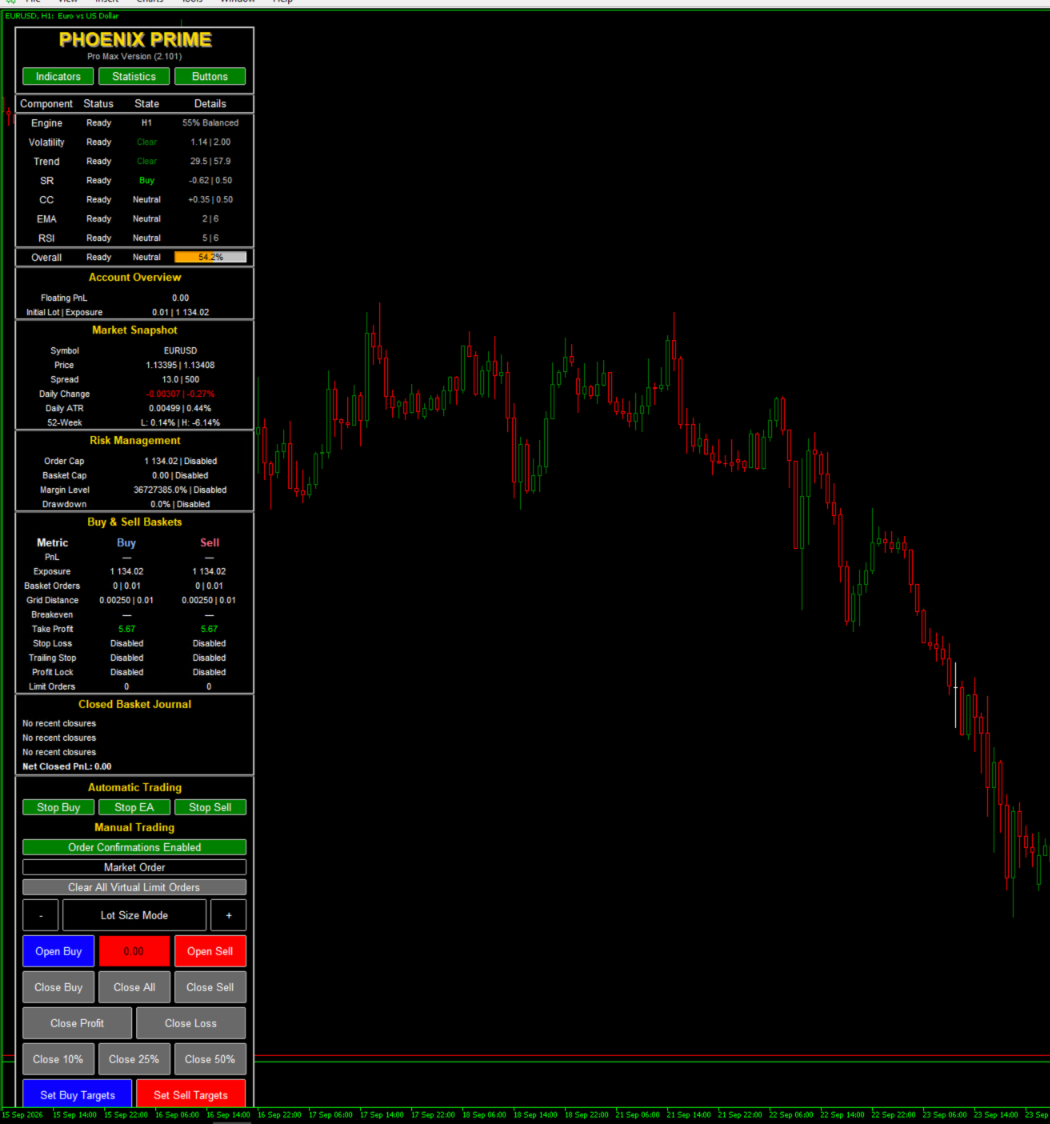
Chart Dashboard
The Chart Dashboard provides a single interface for monitoring and controlling the current trading environment.
It presents:
• Indicator status
• Basket information
• Symbol statistics
• Account and risk information
• Entry blockers
• Trading status
• Manual trading controls
• Basket-management controls
The dashboard also includes an Account Risk Meter and emergency Flatten Account function.
Chart visuals can display trading-management information directly on the chart, including:
• Take Profit
• Stop Loss
• Breakeven
• Trailing / Profit Protection
• Next-grid information
The objective is to provide both operational visibility and direct control without requiring constant navigation between separate MetaTrader windows.
Multi Dashboard
The Multi Dashboard provides a portfolio-style view of multiple managed symbols.
Available dashboard layouts include:
• Compact metrics
• Indicator information
• Advanced filtering
• Trading metrics and actions
Symbols can be filtered by states such as:
• All managed symbols
• Signal-ready symbols
• Open baskets
• Signals or open baskets
• Blocked symbols
The dashboard can also sort symbols using a broad range of analytical and trading metrics, including:
• Spread
• Trading status
• EMA distance
• RSI
• Candlestick signal
• Volatility
• ADX trend
• Buy and Sell exposure
• Floating PnL
• Breakeven distance
• Grid distance
• Support and resistance distance
This allows the trader to supervise multiple symbols and identify where attention may be required without opening each chart individually.
Intended Operating Styles
Phoenix Prime Pro Max can be configured for several different workflows:
• Fully automated entry and basket management
• Automated trading using selected indicator filters
• Automated operation with the indicator engine disabled
• Manual initial trading with automated basket management
• Automated baskets with discretionary manual intervention
• Dashboard-driven manual and semi-automated basket management
The objective is not to force one trading methodology.
Phoenix Prime Pro Max is designed to let the trader decide which parts of the trading process should remain automated and which parts should remain under direct control.
Important Risk Information
Grid trading can increase exposure while price moves against an existing basket.
Deeper baskets and progressive position sizing can materially increase risk.
Several downside-protection functions are configurable and may be disabled in the starting configuration. Review the Stop Loss, Maximum Basket Loss, Account Risk, exposure limits, and Profit Protection settings before live use.
Virtual orders, automation controls, risk limits, and basket-management tools do not remove trading risk or guarantee execution at a specific price.
Phoenix Prime Pro Max MT5 requires a MetaTrader 5 hedging account.
Test the intended symbol universe, signal configuration, grid settings, position-sizing method, trading schedule, and risk controls on a demo account before using funded capital.
No profit, return, win rate, or drawdown outcome is guaranteed or implied.