Answer GoldEdge
- Эксперты
- Версия: 1.5
- Активации: 5

ANSWER GOLDEDGE — Automated XAUUSD Trading for MetaTrader 5
Answer GoldEdge is a fully automated Expert Advisor developed specifically for XAUUSD on MetaTrader 5.
The system independently identifies qualifying market conditions, manages trade execution, applies predefined risk controls, and manages each trade basket from entry through exit without requiring manual intervention.
GoldEdge uses a structured three-target trade-management approach with one basket active at a time. Its underlying entry logic, market-condition filters, risk parameters, and execution rules are proprietary and operate internally.
Designed for traders who want a straightforward automated setup, GoldEdge keeps configuration intentionally simple: select your LotSize, enable Algo Trading, and allow the EA to manage execution.
Platform: MetaTrader 5
Market: XAUUSD
Chart Timeframe: M2 (2-Minute)
Account Type: MT5-compatible trading account
Operation: Fully automated
Customer Input: LotSize
HOW GOLDEDGE MANAGES TRADES
Answer GoldEdge manages the complete trade lifecycle automatically, from entry through final exit.
When a qualifying setup is identified, GoldEdge uses a structured multi-target approach designed to manage different stages of the position independently. Only one trade basket is permitted at a time, keeping execution controlled and preventing overlapping GoldEdge setups.
Protective levels and trade-management instructions are handled automatically. No manual adjustment is required during normal operation.
The specific entry criteria, market-condition filters, target calculations, protective logic, and internal management rules are proprietary components of Answer GoldEdge and are not exposed as user-configurable parameters.
The trader controls the LotSize. GoldEdge handles the execution.
REQUIREMENTS & COMPATIBILITY
Answer GoldEdge is designed specifically for MetaTrader 5 and XAUUSD using the M2 (2-minute) chart timeframe.
For correct operation, the following are required:
▪ MetaTrader 5 trading platform
▪ XAUUSD or the broker’s corresponding Gold symbol
▪ M2 (2-minute) chart timeframe
▪ Algo Trading enabled
▪ Stable internet connection or VPS environment
▪ Sufficient account margin for the selected LotSize
Answer GoldEdge should be attached to an M2 chart. Other chart timeframes are not supported for operation.
Once correctly installed and enabled, GoldEdge manages its trading operations automatically.
Trading conditions can vary between brokers due to differences in spreads, pricing, execution, liquidity and symbol specifications. As a result, execution and trading results may differ between accounts.
A VPS is recommended for continuous operation when the user’s computer cannot remain connected to MetaTrader 5.
No strategy configuration is required. The customer-controlled trading parameter is LotSize.
HISTORICAL TESTING
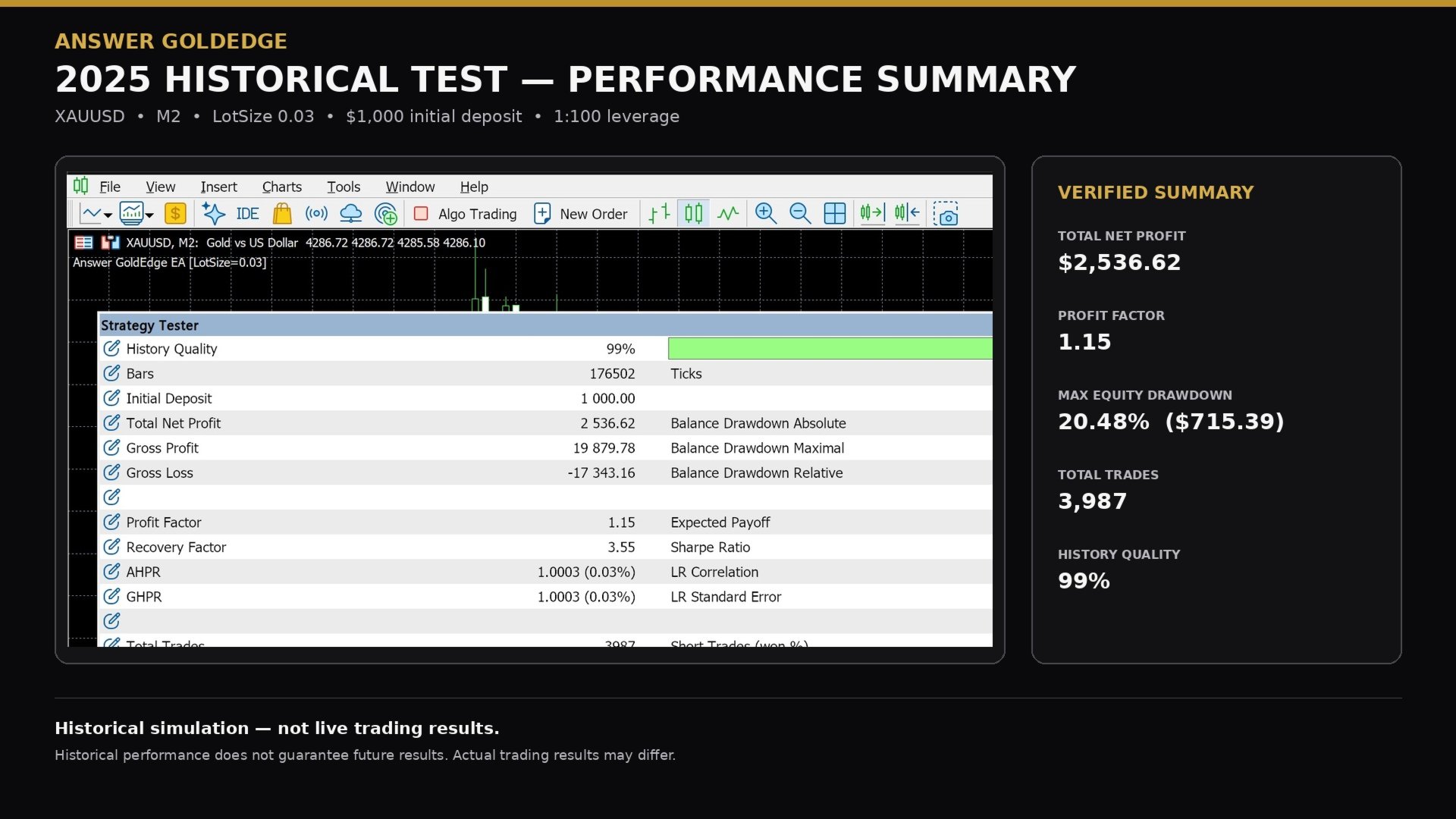
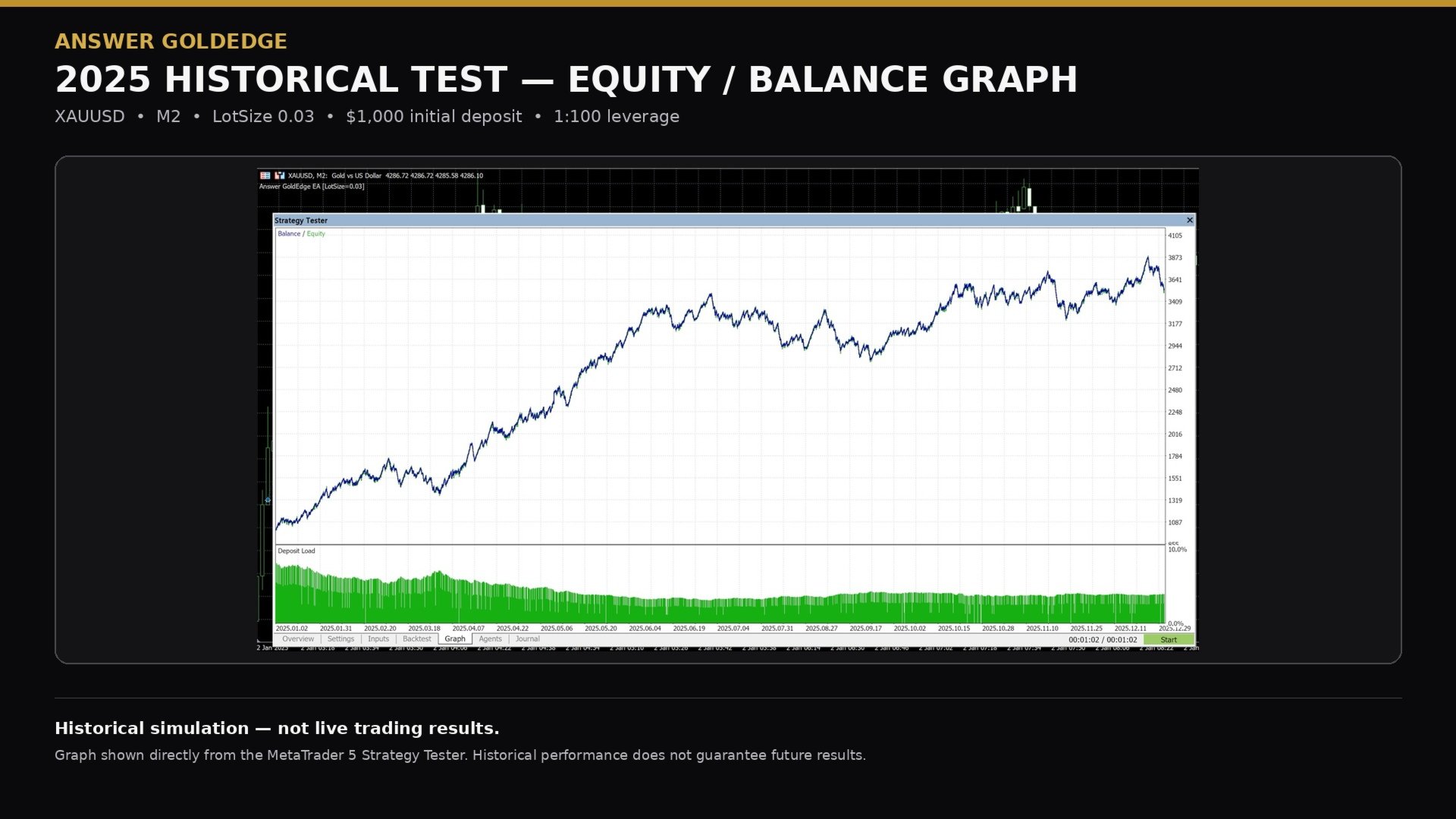
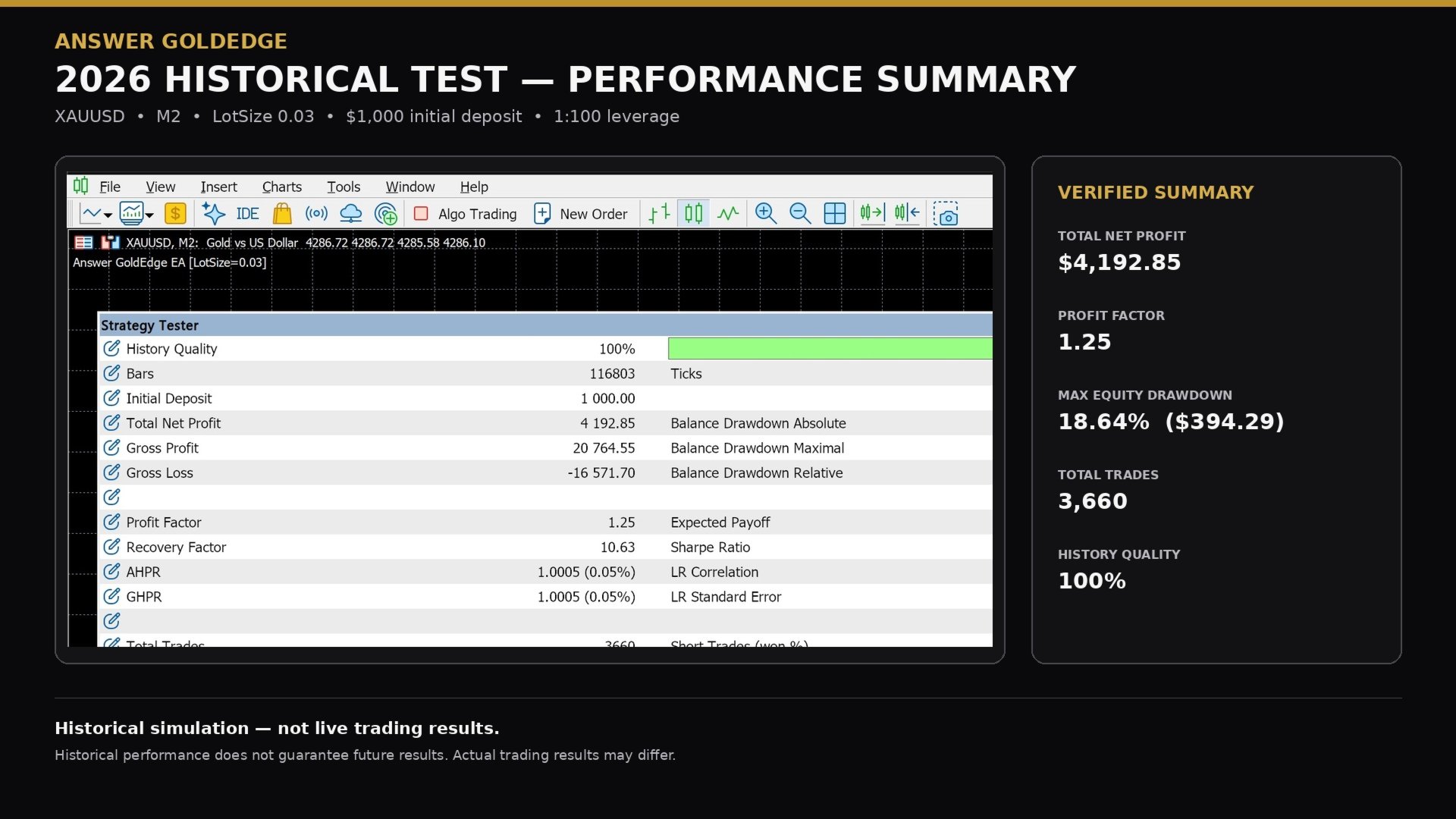
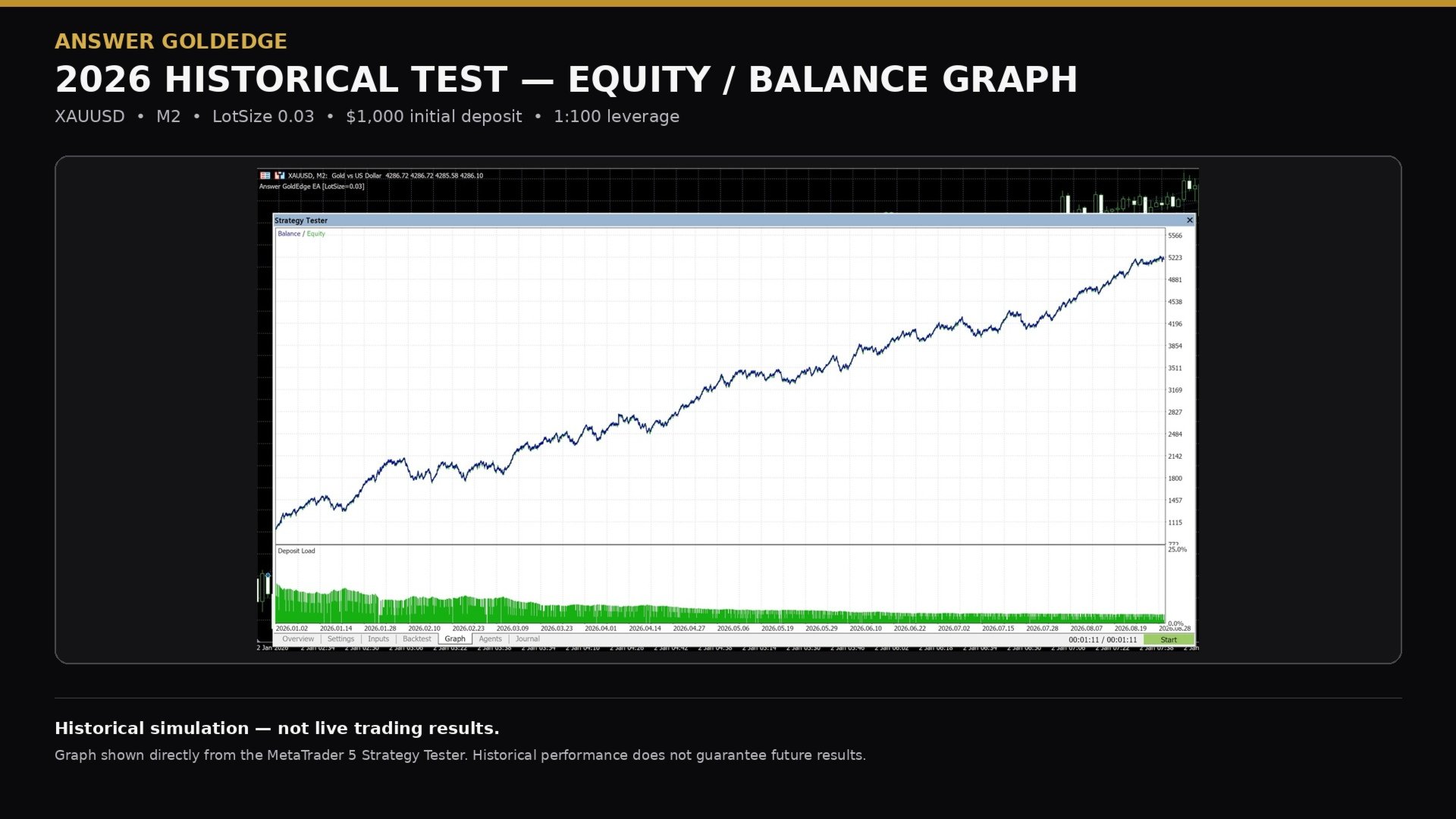
Answer GoldEdge has been evaluated using historical market data through the MetaTrader 5 Strategy Tester across multiple market periods.
Historical testing is used to evaluate the system’s behavior across varying XAUUSD market conditions and to review factors such as trade frequency, drawdown, execution behavior and overall strategy performance.
Published Strategy Tester statistics are presented as historical simulation data only and should not be interpreted as live trading results or as an indication of future performance.
Actual trading results may differ due to market conditions, broker pricing, spreads, slippage, execution, liquidity and other trading-environment factors.
Historical performance does not guarantee future results.
LOT SIZE & RISK MANAGEMENT
Answer GoldEdge keeps user configuration intentionally simple. LotSize is the trading parameter controlled by the user.
LotSize represents the total trading volume of the three-position GoldEdge basket, not the volume of each individual position.
GoldEdge divides the selected total volume across its three trade positions. The selected LotSize must therefore be large enough to satisfy the broker’s minimum trade volume and volume-step requirements for all three positions.
For brokers using a minimum volume and volume step of 0.01 lots, examples of suitable total basket sizes include 0.03, 0.06, 0.09 and 0.12 lots. A total LotSize of 0.02 cannot be divided into three 0.01-lot positions and therefore cannot form a valid three-position basket.
Broker symbol specifications may vary. Users should confirm the minimum volume and volume step permitted for their Gold symbol.
Increasing LotSize increases both potential gains and potential losses, while reducing LotSize decreases overall exposure.
GoldEdge contains internal risk and trade-management controls that operate automatically. These components are proprietary and are not exposed as customer-configurable settings.
Users should select a LotSize appropriate for their account size, available margin and individual risk tolerance.
No LotSize can eliminate trading risk. XAUUSD can experience significant volatility, and losses and drawdowns are a normal possibility when using any automated trading system.
Users remain responsible for selecting and maintaining an appropriate level of trading exposure.
INSTALLATION & GETTING STARTED
Answer GoldEdge is designed for straightforward installation and operation on MetaTrader 5.
- Install Answer GoldEdge through MetaTrader 5.
- Open the broker’s XAUUSD/Gold symbol on an M2 (2-minute) chart.
- Attach Answer GoldEdge to the M2 chart.
- Select your preferred LotSize. Ensure the selected total volume can be distributed across all three GoldEdge positions according to the broker’s minimum volume and volume-step requirements.
- Enable Algo Trading.
- Allow GoldEdge to manage trading automatically.
Once active, GoldEdge handles trade identification, execution and management without requiring manual intervention during normal operation.
For continuous operation, MetaTrader 5 should remain connected to the trading account with Algo Trading enabled. A VPS is recommended when the trading terminal cannot remain online continuously.
If MetaTrader 5 or the VPS is restarted, re-establish the trading connection and ensure Answer GoldEdge and Algo Trading are active.
Before using GoldEdge, confirm that the trading account meets the compatibility requirements stated in the product description.
CUSTOMER SUPPORT & TROUBLESHOOTING
Support is available for Answer GoldEdge customers through the MQL5 platform.
Support covers product-related assistance including installation, activation, initial setup, XAUUSD symbol compatibility, VPS operation and general troubleshooting.
Before requesting assistance, users should confirm that MetaTrader 5 is connected, Algo Trading is enabled, the correct Gold symbol is available, the M2 timeframe is selected, and the account meets the stated compatibility requirements.
When reporting an issue, providing relevant screenshots and MetaTrader 5 Journal or Experts information can help identify the cause more efficiently.
Support is provided for the operation and functionality of Answer GoldEdge. It does not include personalized financial advice, account management or guarantees regarding trading performance.