Trading 360
- Эксперты
- Версия: 1.10
- Обновлено: 18 сентября 2026
- Активации: 5

Trading 360 — indicator vote expert advisor
Seven classic indicators, one score, one decision.
Trading 360 does not look for a secret pattern. It reads the same seven
indicators a discretionary trader would read, turns each one into a vote
between -2 and +2, averages the votes, and acts on the result. Nothing more
is hidden inside it, and the panel on the chart shows every vote and the
reason behind it while the robot is running.
The indicators
- Moving average cross (period and method configurable)
- RSI
- Stochastic %K / %D
- MACD histogram
- CCI
- Williams' Alligator
- Parabolic SAR
Each vote has its own weight. Set a weight to zero and that indicator stops
voting: with one line of configuration the robot becomes a pure MACD system,
or a pure Alligator system, or any combination in between. That is the point
of it. It is a bench for comparing ideas, not a fixed recipe.
How it decides
The weighted mean of the votes is the score, between -2 and +2. Above the
buy threshold it goes long; below the sell threshold it goes short; when the
score falls back through the exit threshold the position is closed. An
optional long-term moving average filter blocks entries against the
background trend.
Risk
Every position carries a stop at a configurable multiple of ATR, and the
size is calculated so that hitting that stop costs a fixed percentage of
equity. Volumes are normalised to the minimum, maximum and step the symbol
accepts, free margin is verified before every order, and stop levels respect
the broker's minimum distance and freeze level. An equity guard can stop the robot altogether: set a maximum drawdown from
the equity peak, or an absolute equity floor, and choose whether it merely
stops opening, closes and stops, or removes itself from the chart. A daily
loss limit can also block new entries for the rest of the day. There is no grid, no martingale and no
averaging down.
Decisions are taken on closed bars only. A vote read from a bar that is
still forming changes as the bar changes, and cannot be tested honestly.
Works on any symbol and any timeframe. No DLL, no external indicator, no
internet connection required.
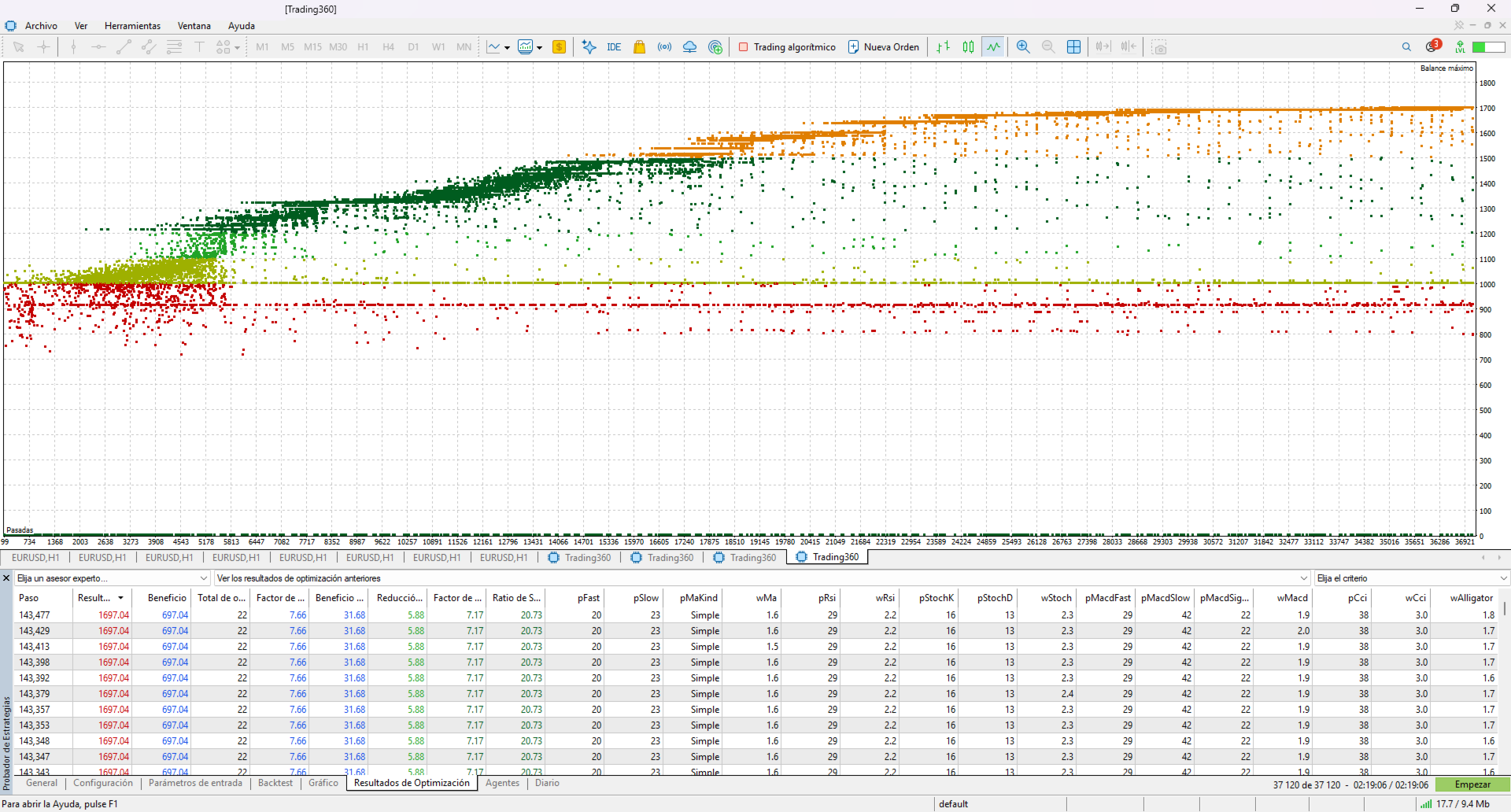
The optimisation criterion (OnTester) does not reward net profit alone: it
requires at least 30 trades, and penalises equity drawdown, so the optimiser
does not hand you the pass that got lucky once.
Suggested starting point
Default parameters are a starting point for your own testing, not a
validated configuration. Test on the instrument and timeframe you intend to
use, on your own broker's data and spreads, and on a demo account first.
This is educational and research software. It does not predict prices and it
is not investment advice. Simulated or past results do not guarantee future
results. Trading carries the risk of losing your capital.
Seven classic indicators, one score, one decision.
Trading 360 does not look for a secret pattern. It reads the same seven
indicators a discretionary trader would read, turns each one into a vote
between -2 and +2, averages the votes, and acts on the result. Nothing more
is hidden inside it, and the panel on the chart shows every vote and the
reason behind it while the robot is running.
The indicators
- Moving average cross (period and method configurable)
- RSI
- Stochastic %K / %D
- MACD histogram
- CCI
- Williams' Alligator
- Parabolic SAR
Each vote has its own weight. Set a weight to zero and that indicator stops
voting: with one line of configuration the robot becomes a pure MACD system,
or a pure Alligator system, or any combination in between. That is the point
of it. It is a bench for comparing ideas, not a fixed recipe.
How it decides
The weighted mean of the votes is the score, between -2 and +2. Above the
buy threshold it goes long; below the sell threshold it goes short; when the
score falls back through the exit threshold the position is closed. An
optional long-term moving average filter blocks entries against the
background trend.
Risk
Every position carries a stop at a configurable multiple of ATR, and the
size is calculated so that hitting that stop costs a fixed percentage of
equity. Volumes are normalised to the minimum, maximum and step the symbol
accepts, free margin is verified before every order, and stop levels respect
the broker's minimum distance and freeze level. An equity guard can stop the robot altogether: set a maximum drawdown from
the equity peak, or an absolute equity floor, and choose whether it merely
stops opening, closes and stops, or removes itself from the chart. A daily
loss limit can also block new entries for the rest of the day. There is no grid, no martingale and no
averaging down.
Decisions are taken on closed bars only. A vote read from a bar that is
still forming changes as the bar changes, and cannot be tested honestly.
Works on any symbol and any timeframe. No DLL, no external indicator, no
internet connection required.
The optimisation criterion (OnTester) does not reward net profit alone: it
requires at least 30 trades, and penalises equity drawdown, so the optimiser
does not hand you the pass that got lucky once.
Suggested starting point
Default parameters are a starting point for your own testing, not a
validated configuration. Test on the instrument and timeframe you intend to
use, on your own broker's data and spreads, and on a demo account first.
This is educational and research software. It does not predict prices and it
is not investment advice. Simulated or past results do not guarantee future
results. Trading carries the risk of losing your capital.