NextGen PRO
- Эксперты
- Версия: 2.50
- Обновлено: 25 августа 2026
- Активации: 5

NextGen PRO is an automated Expert Advisor designed for trading XAUUSD (Gold) on MetaTrader 5. It uses a trend-following approach with Buy Stop and Sell Stop pending orders, grid-based order placement, batch lot progression, money-based risk management, daily limits and weekend trading restrictions.
Strategy
The EA determines the market direction using the closed M5 candle and two moving averages.
When the market is identified as an upward trend, the EA places Buy Stop orders above the current market price. When the market is identified as a downward trend, it places Sell Stop orders below the current market price.
When the price is between the two moving averages, the market is treated as a range and the EA does not place new orders.
The trend calculation uses closed candles rather than the currently forming candle.
Pending Order Grid
When a valid trend is detected, the EA creates a series of pending orders in the direction of the trend.
The distance between grid levels is controlled by the Grid Step setting. Buy Stop orders are used during an upward trend and Sell Stop orders are used during a downward trend.
Pending orders that do not meet the broker's minimum stop distance are skipped automatically.
The maximum number of pending orders and the maximum number of positions can be controlled through the input parameters.
The EA requires a hedging account because several positions in the same direction may be open at the same time.
Lot Size Progression
The EA supports batch-based lot progression.
The first batch uses the configured base lot size. After the configured number of orders has been reached, the lot size increases by the base lot amount for the next batch.
For example, if the base lot is 0.01 and the batch size is configured accordingly, subsequent batches can use 0.02, 0.03 and so on.
The lot progression is linear. It does not double the lot size after each trade.
The progression can be adjusted or effectively disabled through the batch and order-count settings.
Grid Refresh
The EA includes a grid refresh mechanism that can re-anchor pending orders according to market conditions.
When a position is open, the pending order grid for that direction remains unchanged. The EA does not continuously move or re-price the existing ladder while the position is running.
When the last position of a trading cycle closes, the EA can check the current trend and create a new grid if the trend remains valid.
When no position is open, a retracement-based refresh can re-anchor the grid closer to the current market price after the configured retracement distance has been reached.
If the market trend changes direction, pending orders from the previous direction are cancelled and a new grid can be created in the new direction.
A cooldown period can be configured to prevent repeated grid rebuilding during rapid market movements.
Risk Management
The EA supports a money-based stop loss.
The StopLossDollars setting defines the loss amount for a 0.01 lot position. The EA scales this amount according to the position volume.
The EA also supports a money-based trailing stop. Trailing starts after the configured profit level is reached and follows the highest profit achieved by the position according to the configured trailing distance.
These protective controls are managed by the EA and are not necessarily placed as visible stop levels on the broker server. Therefore, the EA must remain running for these protections to operate.
A VPS is recommended for continuous operation.
Daily Trading Limits
The EA can use daily loss and daily profit limits based on the equity recorded at the beginning of the trading day.
When a configured daily limit is reached, the EA can cancel pending orders and close losing positions according to the selected settings. It then stops opening new positions until the next trading day.
Profitable positions can remain active and continue to be managed by the EA.
The daily limits are reset automatically at the beginning of the next trading day.
Weekend Filter
The EA includes a configurable weekend trading filter.
The user can specify a Friday stop time and a Monday resume time using the terminal time.
During the configured weekend period, the EA can cancel pending orders, close losing positions and prevent new trades.
Profitable positions can remain open and continue to be managed according to the configured trailing stop settings.
Account and Symbol Requirements
NextGen PRO is designed for XAUUSD (Gold).
The EA requires a hedging account because multiple positions in the same direction may be maintained simultaneously.
The trend calculation is based on the M5 timeframe, regardless of the chart timeframe to which the EA is attached.
A broker with reasonable spreads on Gold and support for pending stop orders is recommended.
The grid step, stop loss and trailing settings should be adjusted according to the characteristics and volatility of the broker's Gold symbol.
The required account size depends on the selected lot size, grid distance and maximum number of orders. Users should check the required margin on a demo account before using the EA on a live account.
Input Parameters
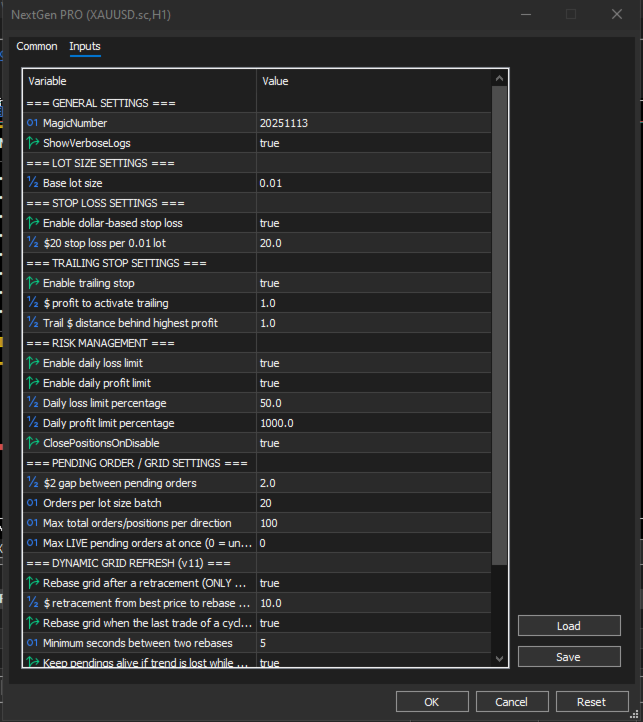
General settings include the MagicNumber and ShowVerboseLogs parameters.
Lot size settings include LotSize, which defines the base lot size and the increment used for subsequent batches.
Stop loss settings include UseDollarSL and StopLossDollars.
Trailing stop settings include UseTrailingStop, TrailingStartDollars and TrailingStopDollars.
Risk management settings include UseDailyLossLimit, UseDailyProfitLimit, DailyLossPct, DailyProfitPct and ClosePositionsOnDisable.
Grid settings include GridStepDollars, OrdersPerBatch, MaxOpenTradesPerDir and MaxPendingAhead.
Grid refresh settings include UseRetracementRefresh, RetracementDollars, RefreshAfterCycleEnd, RebaseCooldownSeconds and KeepGridOnSignalLoss.
Weekend settings include UseWeekendFilter, FridayStopTime and MondayResumeTime.
On-Chart Information
The EA provides an on-chart dashboard with information about the current market condition and EA status.
The dashboard can display the current trend, grid status, trading session status, current lot size, open positions, pending orders, floating profit, current spread and the algorithmic trading status of the terminal.
Installation and Initial Setup
Open an XAUUSD chart in MetaTrader 5 and attach the EA.
Enable algorithmic trading in the terminal.
For initial testing, users should first run the EA on a demo account and observe its grid placement, position management and refresh behavior.
The stop loss, trailing stop, grid step and maximum order settings should be selected according to the trading account and broker conditions.
Important Information
NextGen PRO uses multiple pending orders and may have several positions open in the same direction. A strong market movement against the active grid can therefore result in increased account exposure and drawdown.
The money-based stop loss is applied to individual positions and does not represent a fixed maximum loss for the entire grid.
Users should consider the combined exposure of all possible positions when selecting the lot size and maximum order settings.
The EA should be tested on a demo account before being used with real funds.
Trading financial markets involves the risk of loss. Past trading or backtest results do not guarantee future performance. No trading system can guarantee profits. Users should only trade with funds they can afford to lose.