SuperPositionTerminal

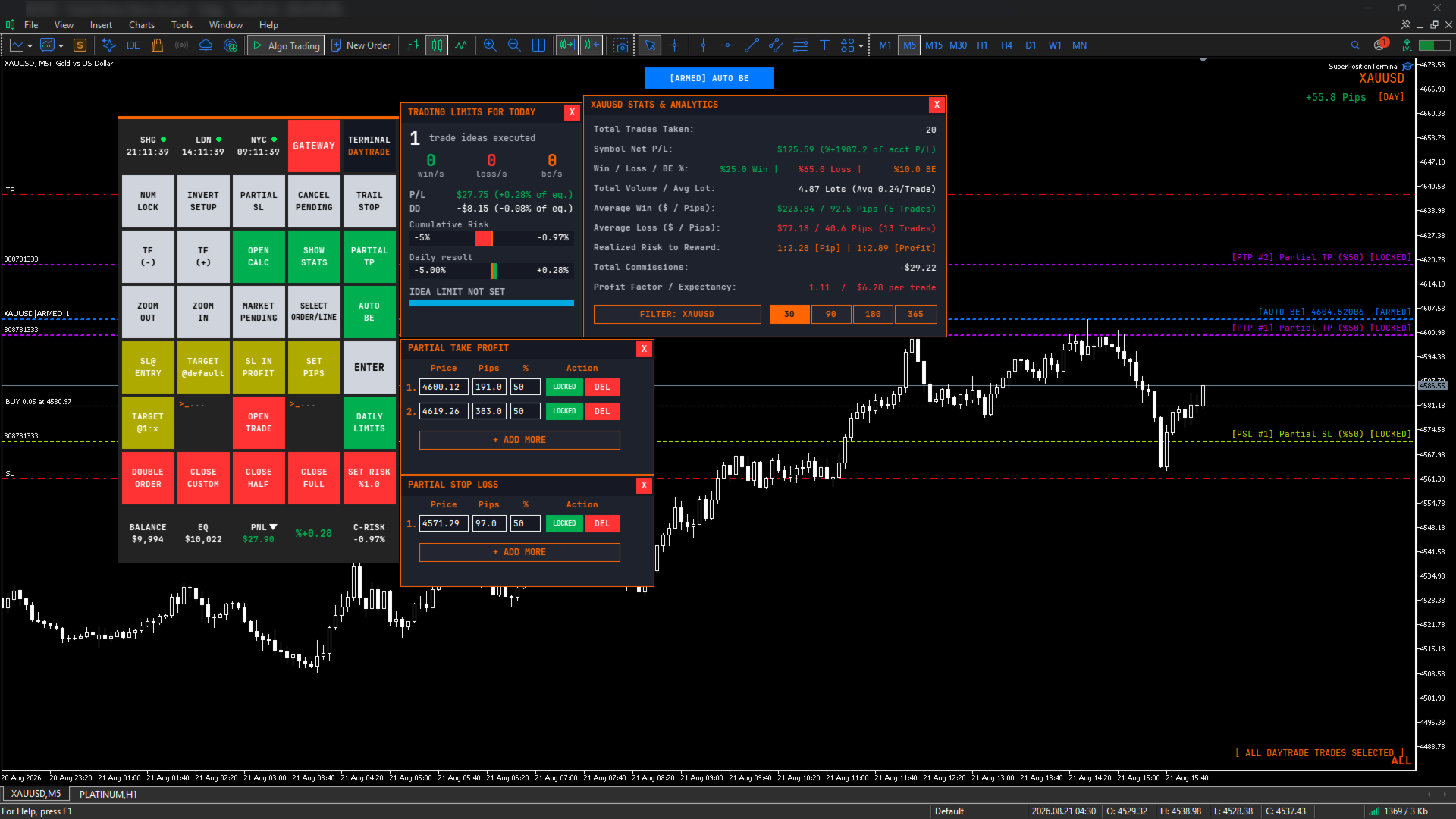
SuperPositionTerminal is a manual trading terminal for MetaTrader 5, built for discretionary and prop-firm traders who work to fixed daily risk limits. Build, size and execute every trade from one control panel: position sizing by account percentage, fixed money risk or fixed lot, multi-level partial exits, automatic break-even, and daily limits that refuse a trade before the money is at risk.

It is not an automated strategy. It does not predict, signal or trade for you. It is the control surface a discretionary trader uses to construct a position correctly, execute it in one click, and manage it without ever opening a dialog box or calculating a lot size by hand.

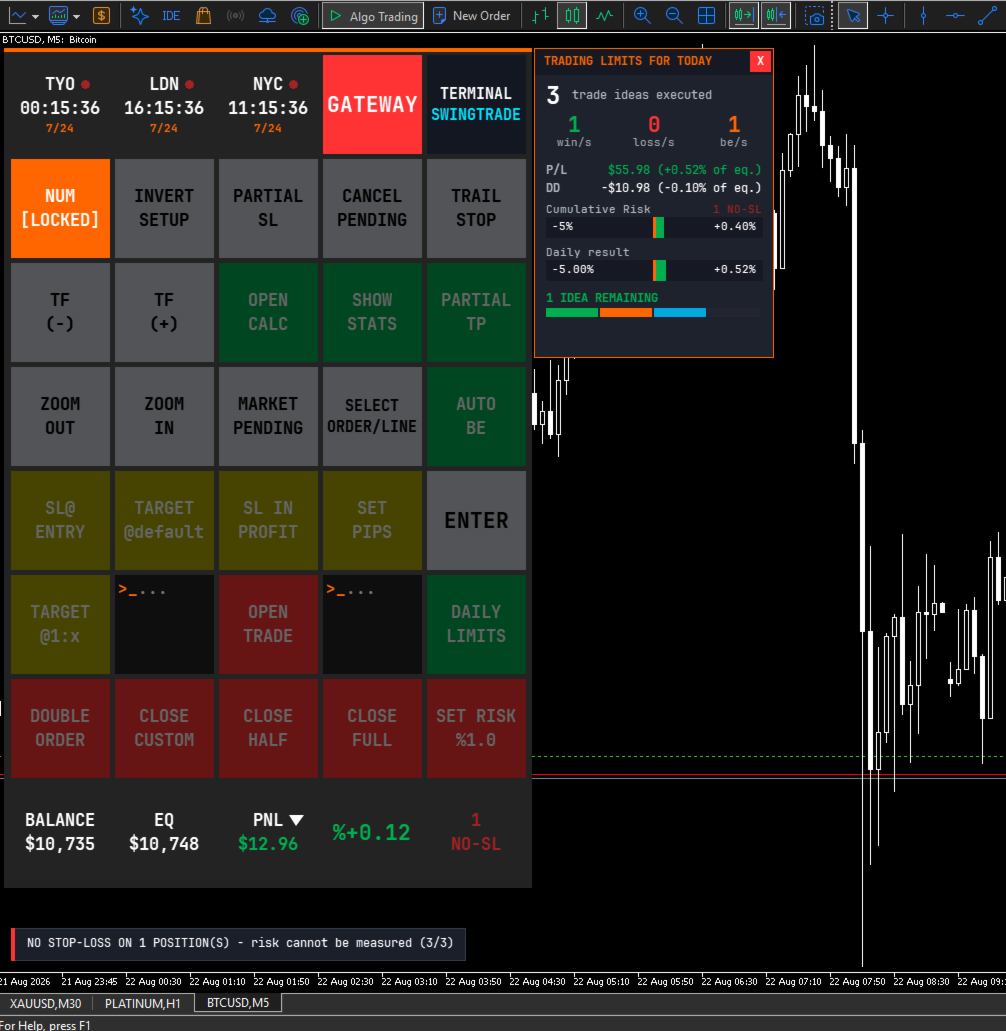
Every function you normally reach through MT5's menus – lot sizing, stop placement, partial closes, break-even moves, risk checks – is a single labelled button, laid out in a fixed grid you can learn once and use blind.

HOW IT WORKS

1. A purpose-built interface

SuperPositionTerminal is rendered on its own graphics layer with an embedded monospace typeface, anti-aliased vector icons, and proper window management – windows come to front when clicked, controls never leak clicks to whatever is underneath, and everything scales cleanly from compact laptop screens to 4K displays.

The layout is deliberately institutional: dense, monospaced, information first. It is designed to be read at a glance while you are watching price, not admired.

2. Risk architecture built for prop-firm rules

Drawdown is tracked continuously against your chosen basis (Balance or Equity), with a configurable daily reset hour and minute in server time. The default of 00:00 matches the daily candle open used by most brokers, so most traders never touch it – and if your firm resets at a different hour, you set that hour.

On top of that: a daily maximum loss, a daily maximum gain, a maximum number of trade ideas per day, and a total open lots ceiling. When a limit is reached, the terminal refuses the trade and tells you why.

The daily loss limit is the one that does the real work, and it does more than watch your realised losses. Before a trade opens, the terminal adds up the worst case of every position you already hold and asks whether this new trade would push the total past your limit. If it would, the trade is refused – before the money is at risk, not after. A separate early-warning threshold can tell you you are approaching that ceiling while you still have room to act.

Note: the trade-idea counter and the total-lot ceiling ship switched off, so the terminal never surprises a new user with a wall. Set a number when you want them.

3. Exposure alarm with enforced confirmation

Two configurable exposure thresholds monitor your total projected loss across every open position on every symbol – stop-loss distance where a stop exists, live floating loss where it does not.

When a threshold is crossed, a modal alert takes over the screen with a repeating audible alarm and blocks every other control. Dismissing it requires a deliberate four-step confirmation, not a reflex click. Each threshold is suppressed independently for the rest of the trading day once acknowledged.

It is designed to interrupt at the point where another position would be added on top of existing exposure.

4. Multi-level partial exits

Partial Take-Profit and Partial Stop-Loss each support multiple independent levels. Add a row, drag its line on the chart or type an exact pip distance, set the percentage to close, and lock it.

Locked levels are monitored continuously – even with the window hidden, and they survive timeframe and template changes. Remaining volume is tracked across all levels, so the terminal tells you when the broker's minimum lot makes another level impossible instead of silently creating one that can never fill.

5. Multi-position safety system

When more than one position is open on the same symbol and strategy, any action that could apply to the wrong one is refused until you explicitly select a position. This covers Partial Take-Profit lock, Partial Stop-Loss lock, Target @1:X, Target @default and Double Order.

Locked partial levels are pinned to a specific ticket, so a position opened later can never silently inherit a plan that was built for another one.

6. Session intelligence

Three world clocks sit at the top of the panel and follow the instrument you are actually trading. Load an index and you get its home exchange; load gold and the relevant metals session appears; load crypto and you get 24/7. Session open, closed and lunch-break states are shown, overlapping sessions are highlighted, and an optional warning marks the high-spread rollover window.

You can also pin three cities manually from eleven financial centres.

FEATURE SUMMARY

Trade construction

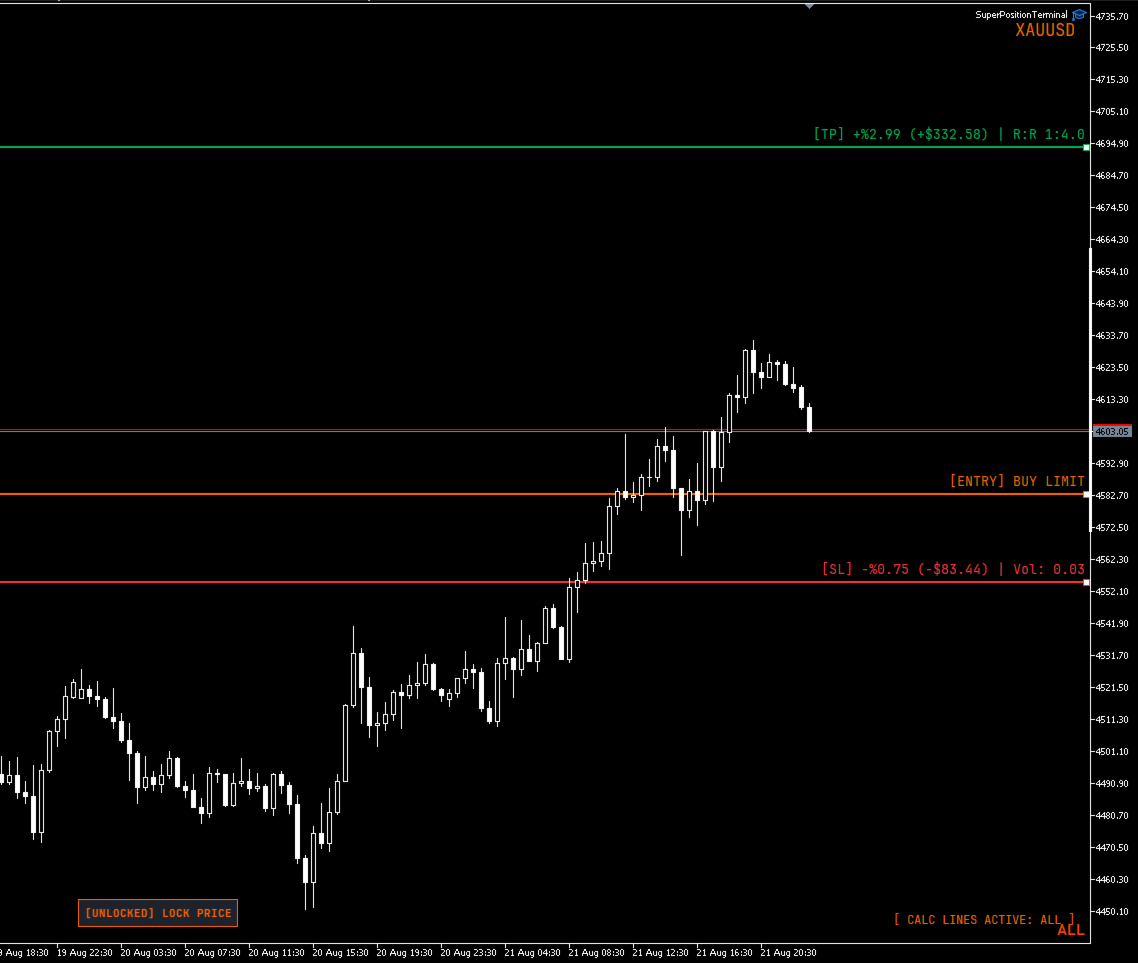
  • Visual stop-loss, take-profit and entry lines, dragged directly on the chart
  • Live lot, risk and reward recalculated on every pixel of movement
  • Position sizing by account percentage, fixed money risk, or fixed lot
  • Risk and reward shown in currency, percentage and risk-to-reward ratio simultaneously
  • Optional commission-adjusted net figures
  • Pending orders resolved automatically to Buy/Sell Stop or Limit
  • Invalid geometry flagged on the chart before you can execute
  • Multi-entry execution with optional risk splitting across entries
  • Arrow-key adjustment mode for pip distance and risk percentage
  • Price locking, and stop-loss / take-profit side mirroring

Position management

  • One-click close: full, half, or a configurable custom percentage
  • Stop to entry, with optional profit offset
  • Stop into profit by fixed pips or previous candle high/low with buffer
  • Target to a default pip distance, or to a Risk:Reward ratio
  • Automatic break-even: drag the trigger line where you want it, then arm it with one button. Until it is armed the line is only a marker, so nothing can fire while you are still positioning it. Once armed the line locks in place and cannot be dragged by accident. It locks either the entry or a chosen R multiple, measured from the position's original stop
  • Position duplication with optional lot recalculation
  • Trailing stop to previous candle high/low
  • Cancel all pending orders
  • Cycle through open positions and lines to select one
  • Volume-weighted average entry line when several positions are open

Risk and reporting

  • Continuous drawdown tracking (Balance or Equity basis)
  • Configurable daily reset hour and minute (server time)
  • Daily loss, gain, trade-idea and total-lot limits
  • Cumulative open-risk brake: a new trade is refused if the worst case of all open positions plus the new one would breach your daily loss limit
  • Two-stage exposure alarm with enforced confirmation
  • Account statistics window: performance and break-even classification
  • Live balance, equity and floating profit or loss, in currency and percentage
  • On-chart pip counter tagged by strategy mode

Platform

  • Two strategy modes (Day / Swing) on separate magic numbers, so intraday and swing positions are managed as separate books on the same chart
  • Timeframe and zoom controls
  • Symbol drawer listing every symbol with an open position, with click-through chart switching
  • Three panel sizes, DPI aware
  • Broker server and latency readout
  • Lot minimum, maximum and step overrides for misreporting brokers
  • Order filling mode override
  • Full colour customisation of every line and label

IMPORTANT – HOW TO EVALUATE THIS PRODUCT

Please read this before downloading the demo.

SuperPositionTerminal is a manual tool. Every function is driven by clicking buttons and dragging lines on a live chart.

The MetaTrader Strategy Tester does not deliver mouse interaction to an Expert Advisor. This is a platform limitation that affects every manual trading panel, not a fault in this product. In the Strategy Tester the panel will render correctly, but the buttons will not respond to clicks.

To evaluate it properly, please watch the demonstration video, or contact me and I will walk you through it.

A note on order execution. The maximum slippage input only has an effect on accounts that use Instant or Request execution. On Market and Exchange execution accounts – which is what most brokers now provide – the platform ignores the deviation value entirely. The input is still there for the accounts where it applies. Order filling mode is detected from the symbol and set automatically, so there is nothing to configure either way.

REQUIREMENTS

  • MetaTrader 5
  • Any broker and any symbol
  • Hedging or netting accounts
  • "Algo Trading" enabled

Designed for discretionary traders, prop-firm traders and anyone who manages risk manually and wants the mechanics to disappear.

SUPPORT

Questions, feature requests and bug reports are welcome. I answer every message.
Рекомендуем также
AetherFlow AI DataBridge Продвинутая система сбора данных для машинного обучения и интеграции с ИИ Создание эффективных ML-моделей для трейдинга требует качественных многомерных данных. Ручной сбор технических индикаторов, метрик ценового действия и данных рыночной структуры по множеству активов и таймфреймов — это трудоёмкий и подверженный ошибкам процесс. AetherFlow AI DataBridge автоматизирует весь процесс сбора данных. Этот советник собирает комплексные рыночные данные с нескольких активов о
EasyInsight AIO MT5
Alain Verleyen
4.92 (12)
EASY Insight AIO – Всё-в-одном для умного и простого трейдинга Обзор Представьте, что вы можете просканировать весь рынок — Форекс, золото, криптовалюты, индексы и даже акции — всего за несколько секунд, без ручного просмотра графиков, сложной установки или настройки индикаторов. EASY Insight AIO — это ваш идеальный инструмент экспорта для трейдинга с поддержкой искусственного интеллекта. Он предоставляет полный снимок рынка в одном аккуратном CSV-файле — готовом к мгновенному анализу в ChatGP
Grid Trading - полуавтоматический советник для торговли по сетке в один клик на хеджевых счетах. Также доступна версия для MetaTrader 4 . *Данный советник предназначен только для счетов с хеджинговой системой учета позиций Обычный режим Вы нажимаете на кнопку Sell или Buy на графике, затем эксперт добавит уровни стоп-лосс, тейк-профит для сделки, а функции трейлинг-стопа и безубытка позаботятся о сделке, если она не сможет достичь цели профита. Хеджирование При выборе торговли с использованием
XBOOT BOLETA PRO Professional Manual Trading Panel for MetaTrader 5 XBOOT Boleta Pro is a complete trading panel designed for traders who execute manual trades and want greater speed, organization, and control during every trading session. More than a standard Buy and Sell panel, XBOOT Boleta Pro combines powerful trading tools into a single interface, helping traders analyze the market, manage risk, execute orders, and monitor trading performance without leaving the chart. Its purpose is to sim
QuickTrade Panel — One-Click Buy/Sell with Live Risk & Reward Preview Trade faster and smarter, directly from the chart — no order window required. QuickTrade Panel is a lightweight, fully manual trading panel for MetaTrader 5. It sits on your chart as a draggable floating window, giving you instant Buy/Sell execution with full control over lot size, stop loss, take profit, and risk-to-reward — all visible before you click. Key Features One-click Buy / Sell execution Large, color-coded SELL and
Premium Risk — это интеллектуальный инструмент управления рисками и открытия сделок, разработанный специально для скальперов. Он автоматически рассчитывает соотношение риск-прибыль (R:R) и сумму риска, основанную на капитале , помогая определить точный объем позиции и лота. С помощью POS-модуля вы можете автоматически отслеживать и управлять сделками. Функция магнит моментально определяет текущую цену и позволяет открывать сделки быстро и точно. Проще говоря, Premium Risk — это профессиональный
DrawMaster
Alex Orozco
5 (1)
ВАЖНО!: ПЕРЕД ПОКУПКОЙ ИНДИКАТОРА СВЯЖИТЕСЬ СО МНОЙ, ЧТОБЫ ПОЛУЧИТЬ СКИДКУ 20% TG: @SoyRauX DrawMaster — профессиональные инструменты для рисования на MT5 Универсальная панель с расширенными инструментами для рисования для серьезных трейдеров. ОСНОВНЫЕ ОСОБЕННОСТИ: • Интеллектуальные прямоугольники — пустые и заполненные с настраиваемыми цветами • Линии тренда — несколько стилей и настраиваемая толщина • Рыночные структуры — MS и BOS с автоматическим обнаружением • Свободное рисование —
Parameters Explained Algorithm Settings: magicNumber (int): Unique identifier for trades managed by the EA. Default value: 0 (manages manual trades). Note: Set this to the corresponding magic number of trades opened by other EAs or set it to 0 for manually executed trades. BreakEvenInPoints (bool): Activates the breakeven strategy based on profit in points. true: Moves Stop Loss to breakeven when the trade reaches the specified ProfitPointsForBreakeven . false: Disables this function. ProfitPoin
AdaptiveStats  is a comprehensive and visually stunning performance analysis tool for the MetaTrader 5 (MQL5) platform, featuring a professional "Fintech Dark" (JARVIS-inspired) aesthetic. It is engineered to provide traders with real-time, actionable insights into their trading performance directly on the chart interface. Key features and capabilities include: Multi-Timeframe Performance Tracking : Automatically calculates and aggregates Net Profit, Win Rate, and Total Trades for three critical
FREE
Manyal trading system, CovEchoTrend Robot, focuses on reliability and flexibility. By employing statistical analysis methods to study the relationships between the base indicator and market patterns, the system enables a deeper understanding of market processes. Intelligent pattern analysis: The application of statistical data processing helps identify key trend reversal points more accurately, signaling significant market shifts. Informed decision-making is based on the intersection of indicato
Hermes is a control panel that allows you to easily and effectively open market positions and place pending orders. In addition, thanks to its send and receive functions, Hermes can connect two or more terminals, copying the operations of one to the other or to the others. The send and receive functions for orders and market positions are independent of each other, i.e. it is possible to send positions to be copied to one terminal and orders to another, or to copy positions from one terminal and
Professional-Grade Chart Analysis – AI-Powered & Visually Enhanced The AInalyzer is an Expert Advisor for MetaTrader 5 that leverages artificial intelligence to analyze market structures and automatically places visual objects directly on your charts. Instead of spending hours manually examining charts, you'll get a clear overview of support levels, resistance zones, trend structures, and potential trading opportunities in no time – all logically presented, visually marked, and available at you
General Description In the simplest terms this is a contrarian intra-day scalping system. Built to try and let correct trades run as far as possible and flip the trade when indicated. The indicator looks at historical daily trading ranges to lay out levels at which it takes long and short positions based on the statistical levels. The indicator is built around index futures, mainly around S&P and the DOW but can be used an any futures contract mainly using AMP Futures to trade. The indicator is
Pro Trade Utility for MetaTrader 5 Pro Trade Utility is a professional manual trading assistant designed for traders who want precision, speed and clarity — without automated strategies. This tool does not trade automatically . It helps you execute and manage trades correctly with proper risk control. Key Features  Risk & Position Management Risk-based automatic lot size calculation Risk shown clearly in account currency Adjustable Stop Loss (points) Fixed Risk:Reward display  Trade Executio
Scalping Trade Panel – Fast and Precise Trading Control for MT5 Scalping Trade Panel is a professional trading panel designed for MetaTrader 5, offering traders lightning-fast access to market and pending orders directly from the chart. Optimized for scalping strategies, it combines precision, speed, and simplicity in one compact interface. Key Features: Market Orders: Execute BUY and SELL orders instantly with a single click. Stop Losses : You can add a stop loss for any market or pending
PropShield Guardian MT5 – Максимальная защита от просадки и контроль сделок Защитите свой счет. Соблюдайте дисциплину. Уверенно проходите испытания проп-фирм. Хватит сливать депозиты. Начните торговать как профессионал. PropShield Guardian MT5 — это мощный утилитарный советник (Expert Advisor), разработанный для защиты вашего торгового счета, строгого соблюдения правил риск-менеджмента и предотвращения ошибок, вызванных эмоциями. Это НЕ торговый бот. Это ваш автоматический риск-менеджер и систем
User Manual Buy Trading Utility, Get 2 indicators FREE ! After purchase contact me for your " TWO indicators GIFT (Any one you want) ", adding you in group. Trading Utility MT5 The manual trader's cockpit. Size every trade by risk, place it from the chart, and manage it without ever opening the order dialog. Eight tabs, seven trailing engines, and every stop and target draggable with one click. One panel between you and the order window. Risk-sized entries, draggable stops, seven trailing modes
Возьмите под контроль свой форекс-портфель. Мгновенно смотрите, где вы стоите, что работает и что причиняет вам боль! ВЕРСИЯ MT4 ДОСТУПНА ЗДЕСЬ: https://www.mql5.com/ru/market/product/58375 Информационная панель торгового менеджера предназначена для того, чтобы показать вам, где в настоящее время находится каждая ваша позиция на рынке форекс, а также упростить управление рисками и подверженность валютным рискам. Для трейдеров, которые постепенно выходят на рынок с несколькими позициями или исп
TP Hunter
Ahmet Gokcen Sirma
TP Hunter EA Adaptive Multi-Mode Trading Engine for MetaTrader 5 Overview TP Hunter EA is an advanced automated trading solution for MetaTrader 5 that combines Normal, Stop, Limit and Automatic Preset trading modes in a single Expert Advisor. The EA automatically loads optimized settings according to the selected symbol, making it suitable for Forex pairs, Gold, Silver, Oil and major stock indices. Users may also override the automatic preset selection and manually choose their preferred tradi
QDragon Gold - Интеллектуальный мультивременной торговый робот для золота QDragon Gold — это профессиональная полностью автоматизированная торговая система, разработанная специально для золота (XAUUSD). Советник сочетает в себе передовые механизмы следования за трендом, динамическое управление ордерами и системы защиты капитала. Основные преимущества: * Логика следования за трендом: Советник торгует строго в направлении доминирующего рыночного тренда, используя мультивременной анализ для фил
Quantum Copy Sync MT5
Phasit Nithitsribhandit
SPECIAL INTRODUCTORY OFFER – 25% OFF! Get the ultimate high-speed trade copier at a special launch price of only $149! (Bonus: 10 Activations included per license) Quantum Copy-Sync: The Ultimate High-Speed Trade Replication Engine for MT5 Professional-grade synchronization tool designed for traders who demand speed, security, and precision. Built with 100% native MQL5 code, it ensures ultra-low latency copying without the need for external DLLs. Key Advanced Features: Insane Speed: Inst
Pattern Recognition EA - From Learn to Earn. The market repeats itself. This EA finds every past repeat of the current candle sequence - and lets history vote the direction. ONE SHAPE. EVERY REPEAT IN HISTORY VOTES. The last N candles on your signal timeframe form a shape. The EA scans the history you choose - a fixed number of bars or everything your broker provides - for the SAME shape, and checks what happened next, every single time. Only when enough repeats exist AND a clear majority of t
CopyTrade Pro MT5
David Julio Cuenca Oliver
CopyTrade Pro MT5   With CopyTrade Pro MT5, you can copy your trades from MT5 to MT5, MT5 to MT4. For MT5 to MT4 copies, you must have both versions (MT5 and MT4) installed. MT4 version:   CopyTrade Pro MT5 can: - Copy from MT5 to MT5, MT5 to MT4 quickly, instantly, and securely. - Master and Slave functionality, connecting both accounts using a comment to link and copy trades. - Fast execution (under 50ms). - Hides the fact that the trade has been copied using a copier, making it very useful
AlphaTrader: Ваш Интеллектуальный Помощник в Форекс-Торговле AlphaTrader   — это передовая торговая система, которая использует автоматический анализ и торговлю для оптимизации процесса принятия решений на рынке Forex. Разработанный с использованием геометрических паттернов и современных алгоритмов, этот торговый бот способен выявлять закономерности в движении цен и предоставлять вам точные сигналы для успешной торговли.   Зачем Выбирают AlphaTrader? AlphaTrader не просто инструмент для торго
OTE Trade Copier MT5
Olaoluwa Oluwaseun Bamitale
OTE Trade Copier MT5 Trade Copier & Prop Firm Risk Manager Copy trades locally between MT5 terminals and across MT4/MT5 platforms on the same PC or VPS while protecting your funded accounts with advanced risk controls. IMPORTANT: Send me a message for the Complete User Manual Before Installation Why Traders Choose OTE Trade Copier MT5 Supports MT5 to MT5 trade copying Supports MT4 to MT5 and MT5 to MT4 when used with the MT4 version Designed for prop firm and funded account traders Daily drawd
Master Manager
Medina Cortez Edison Armando
MASTER MANAGER Risk management of open operations (Does not perform automatic operations) and structural analysis. "Stop chasing prices; let the Master Manager identify institutional zones for you and surgically manage the risk of the trades you enter." ️ System Features 1. Structural Analysis: Identification of Swings and Balance of Sights with confluence. 2. Liquidity (FVG): Imbalance zones with 50% mitigation and dynamic extension. 3. Visual Management: Draggable and fixed partial
Scalping Control Panel Scalping Control Panel is a simple and practical trading tool designed for scalpers and traders who use grid-style entries. The EA gives you direct control over your trading setup from a clean panel on the chart. Start a BUY or SELL grid with one click and customize the main parameters before entering the market. Main Features One-Click BUY & SELL Start a BUY or SELL sequence directly from the chart. Adjustable Lot Size Set the lot size you want to use before starting th
MT5 to Telegram Notification Hub   is a user-friendly tool that connects MetaTrader 5 (MT5) with Telegram, enabling seamless transmission of trade alerts, updates, and custom messages directly from MT5 to your Telegram account or channel. You can easily adjust and enable or disable specific parts of the notifications, making it ideal for signal providers and traders who want to keep their audience informed with real-time updates Setup guide A setup guide is available here . Key Features: Instan
SmartZone Sentinel — Multi-Symbol Smart Money Concepts EA Trade Smart Money Concepts across multiple symbols at once — with confluence-gated entries, automatic risk management, and real-time Telegram alerts. SmartZone Sentinel scans as many symbols as you choose, in parallel, looking for institutional-style setups: break of structure, liquidity sweeps, fair value gaps, and order block mitigation. It only acts when multiple signals line up — not on a single indicator firing — and once a trade is
Just Copier MT5
Agung Imaduddin
4.75 (4)
"Just copier" is designed to copy trading without any complicated settings. The copy can be done in one PC. One EA can be set as master (provider) or slave (receiver). The receiver lot can be set to multiple providers lots. Please also check this product at fxina.hostingerapp.com.  Any type of copy is available. MT4 -> MT5 MT4 -> MT4 MT5 -> MT5 MT5 -> MT4 If you want to copy MT4 -> MT5 or MT5 -> MT4, please purchase "Just copier" for MT4 and "Just copier" for MT5 separately. Just Copier can copy
С этим продуктом покупают
Trade Assistant MT5
Evgeniy Kravchenko
4.41 (216)
Помогает рассчитать риск на сделку, простая установка нового ордера с помощью линий, управление ордерами с функциями частичного закрытия, 7 типов трейлинг-стопа и другие полезные функции. Дополнительные материалы и инструкции Инструкция по установке - Инструкция к приложению - Пробная версия приложения для демо счета Функция Линии   - отображает на графике линию открытия, стоп-лосс, тейк-профит. С помощью этой функции легко установить новый ордер и увидеть его дополнительные характеристики пе
TradePanel MT5
Alfiya Fazylova
4.88 (167)
Trade Panel — это многофункциональный торговый помощник. Приложение содержит более 50 торговых функций для ручной торговли и позволяет автоматизировать большинство торговых операций. Перед покупкой вы можете протестировать демоверсию на демо-счете. Скачать пробную версию приложения для демонстрационного аккаунта: https://www.mql5.com/ru/blogs/post/750864 . Полная инструкция здесь . Торговля. Позволяет совершать торговые операции в один клик: Открыть отложенные ордера и позиции с автоматическим р
Astro Trade MT5
Indra Maulana
5 (2)
AstroTrade Trading Assistant AstroTrade is a comprehensive multi-functional trading utility developed for the MetaTrader 5 platform. It integrates essential tools for trade execution, risk management, and technical monitoring into a single unified interface. The application is designed to assist traders in managing their daily operations through a visual and structured environment. Visual Trade Execution and Risk Management The application includes a specialized trading panel that assists in c
================================================================================ POC BREAKOUT - V20.72. Full Professional Grade Toolkit ================================================================================ POC Breakout is a full MetaTrader 5 trading dashboard for discretionary traders who want breakout signals, Point of Control (POC) context, volume profiles, order flow, market structure, news, alerts, and advanced trade planning in one professional workspace. Attached directly to you
Premium Trade Manager - Торговая панель со встроенным коучем Premium Trade Manager помещает торгового коуча прямо в ваш график, а под ним работает полноценный движок исполнения. Настройте сделку так, как вы всегда это делаете, затем позвольте Max, вашему ИИ-наставнику по трейдингу, прочитать именно эту настройку с учётом вашего живого счёта и дать чёткое заключение до того, как вы входите: соответствует ли стоп дисциплинированному подходу, разумен ли риск, не выходит ли высоковолатильный релиз ч
Footprint Chart Pro — Professional OrderFlow EA for MetaTrader 5 Version 6.34 | Professional tool for real traders | Institutional-Grade Visualization DEMO USERS - PLEASE SELECT EVERY TICK / REAL TICK WHEN TESTING AND YOU HAVE DOWNLOADED HISTORICAL DATA. IF YOU SEE A WAITING SCREEN AND IT IS NOT DOWNLOADING, IT MEANS YOU HAVE LOW HISTORICAL DATA. TRY 1 MIN AND 5 MIN FIRST ON 1 DAY DATA. ONE DAY DATA SHOULD BE THE NEWEST AND MOST CURRENT DATE. PLEASE WAIT UNTIL THE MARKET HAS ROLLED OVER PERIOD.
Farmed Hedge Yield Farming | All Markets (Manual - Hybrid - Semi/Automated EA) VERIFIED TRADING RESULTS - Farmed Hedge Yield Axi Copy:  https://www.mql5.com/en/signals/2356376 - Farmed Hedge Yield Exn Copy:   https://www.mql5.com/en/signals/2356404 - Farmed Hedge Yield V Copy:  https://www.mql5.com/en/signals/2357156 * Before purchasing, please feel free to send me a message if you have any questions about the product or setup. ** After purchase,  Contact me via private message to receive t
Global Investing FX Terminal
Santiago Nicolas Pla Casuriaga
Global Investing FX Terminal — это комплексный FX-дашборд для MetaTrader 5 — процентные ставки центральных банков, позиции COT CFTC, рэнкинг carry, индексы экономических сюрпризов, перекос опционов, настроения ритейла и корреляции, тринадцать панелей в общей сложности — отображается на едином канвасе без мерцания и обновляется каждые 10 секунд через один прикреплённый EA. Никаких внешних программ не требуется. Профессиональный анализ валютного рынка требует одновременного доступа к данным, котор
Trading Chaos Expert
Gennadiy Stanilevych
5 (11)
Этот программный продукт не имеет аналогов в мире, поскольку он является универсальным "пультом управления" торговых операций, начиная от получения торговых сигналов, автоматизации входа в позиции, установки стоп-лоссов и тейк-профитов, а также трейлинга прибыли одновременно по множеству сделок в одном открытом окне. Интуитивно понятное управление экспертом в "три клика" на экране монитора позволяет полноценно использовать все его функции на разного рода компьютерах, включая планшетные. Взаимоде
Power Candles Strategy Scanner — самооптимизирующийся инструмент для поиска настроек по нескольким инструментам Power Candles Strategy Scanner использует тот же самооптимизирующийся движок, что и индикатор Power Candles — для всех символов в вашем Market Watch, одновременно. На одной панели отображается информация о том, какие символы в данный момент являются статистически торгуемыми, какая стратегия выигрывает на каждом из них, оптимальная пара Stop Loss / Take Profit, а также отправляется увед
Custom Alerts AIO: Универсальный сканер рынка — Без настройки Обзор Custom Alerts AIO — это самый быстрый и простой способ отслеживать рыночные сигналы в реальном времени на множестве инструментов без дополнительной настройки и без необходимости покупать другие продукты. В состав входят все необходимые индикаторы от Stein Investments, что делает этот инструмент идеальным решением «всё в одном» для трейдеров, ценящих простоту и эффективность. Просто установите на график и сразу получайте сигнал
Welcome to ENTRY IN THE ZONE WITH SMC MULTI TIMEFRAME Entry In The Zone and SMC Multi Timeframe is a real-time market analysis tool based on Smart Money Concepts (SMC), designed to analyze market structure, price direction, and key trading zones. It supports both Single-Timeframe Analysis and Multi-Timeframe Analysis, providing a clearer view of the overall market structure across multiple timeframes, with real-time BUY / SELL signals that do not repaint. It is designed to help filter trading op
VirtualTradePad PRO SE MT5 — профессиональный торговый центр управления для MetaTrader 5 VirtualTradePad PRO SE — это премиальная торговая панель и рабочая среда управления сделками на графике для MetaTrader 5 . Она создана для трейдеров, которым нужны более быстрое исполнение, более понятный контроль позиций, структурированное управление сделками, визуальное планирование уровней и профессиональный рабочий процесс прямо с графика. Это не просто панель BUY / SELL. PRO SE объединяет ручную торговл
YuClusters
Yury Kulikov
4.93 (43)
Внимание: Ознакомиться с работой программы можно с помощью бесплатной версии  YuClusters DEMO . YuClusters это профессиональная система анализа рынка. Для трейдера открываются уникальные возможности анализа потока ордеров, объемов торговли, движения цены используя различные графики, профили, индикаторы, графические объекты. YuClusters оперирует данными на основе ленты сделок или тиковой информации, в зависимости от того, что доступно в котировках финансового инструмента.  YuClusters позволяет с
Quant AI Agents
Ho Tuan Thang
5 (1)
Quant AI Agents are independent trading Expert Advisors. Instead of trading using a fixed strategy like other conventional EAs, Quant AI Agents   is a   multi-agent AI trading framework   that turns natural-language strategy prompts into live.  WANT THE SAME RESULTS AS MY LIVE SIGNAL?   Use the exact same brokers I do:   IC MARKETS , IC TRADING   .  Unlike the centralized stock market, Forex has no single, unified price feed.  Every broker sources liquidity from different providers, creating un
The product will copy all telegram signal to MT5 ( which you are member) , also it can work as remote copier.  Easy to set up, copy order instant, can work with almost signal formats, image signal,  s upport to translate other language to English Work with all type of channel or group, even channel have "Restrict Saving Content", work with  multi channel, multi MT5 Work as remote copier: with signal have ticket number, it will copy exactly via ticket number. Support to backtest signal. How to s
AI Agent Supervisor is NOT an Expert Advisor. AI Agent Supervisor   is a   multi-agent AI risk & portfolio supervisor   that watches every EA on your account and intervenes in real time.  WANT AN AI PORTFOLIO MANAGER WATCHING YOUR FLEET 24/7?   Run your fleet on the same brokers I do:   IC MARKETS , IC TRADING   .  Unlike the centralized stock market, Forex has no single, unified price feed.  Every broker sources liquidity from different providers, creating unique data streams. The Supervisor r
Trade Copier Pro MT5
Vu Trung Kien
3.67 (3)
Trade Copier Pro - это мощный инструмент для удаленного копирования сделок между несколькими счетами MetaTrader 4/MetaTrader 5, расположенными в разных местах, по сети интернет. Это идеальное решение для провайдеров сигналов, которые хотят поделиться своей торговлей с другими трейдерами по всему миру. Один поставщик может копировать сделки на множество счетов-получателей, а один получатель может копировать торговлю множества провайдеров. Поставщик также может установить время истечения подписки
Custom Timeframe Manager Pro: неограниченные таймфреймы в MetaTrader 5 Стандартные настройки терминала часто скрывают важные детали движения цены. Ограничивая анализ только классическими периодами, трейдер рискует упустить моменты зарождения тренда и истинные уровни волатильности. Custom Timeframe Manager Pro — это профессиональная утилита, расширяющая границы MetaTrader 5. Создавайте любые кастомные периоды, включая дробные и экзотические, и работайте с ними как с обычными графиками терминала.
The product will copy all  Discord  signal   to MT5   ( which you are member  ) , also it can work as remote copier.  Easy to set up. Work with almost signal formats, support to translate other language to English Work with multi channel, multi MT5. Work with Image signal. Copy order instant, auto detect symbol. Work as remote copier: with signal have ticket number, it will copy exactly via ticket number. How to setup and guide: Let read all details about setup and download Discord To MetaTrader
Unlimited Trade Copier Pro - это мощный инструмент для удаленного копирования сделок между несколькими счетами MetaTrader 4/MetaTrader 5, расположенными удаленно друг от друга, по сети интернет. Это идеальное решение для провайдеров сигналов, которые хотят поделиться своей торговлей с другими трейдерами по всему миру. Один поставщик может копировать сделки на неограниченное количество счетов-получателей, а один получатель также может копировать сделки неограниченного количества провайдеров. Пост
Adam FTMO MT5
Vyacheslav Izvarin
5 (2)
ADAM EA Special Version for FTMO Please use ShowInfo= false for backtesting ! Our 1st EA created using ChatGPT technology Trade only GOOD and checked PROP FIRMS  Default parameters for Challenge $100,000 Tested on EURUSD and GBPUSD only  Use 15MIN Time Frame Close all deals and Auto-trading  before Weekend at 12:00 GMT+3  Friday For Prop Firms MUST use special Protector  https://www.mql5.com/en/market/product/94362 --------------------------------------------------------------------------------
ManHedger MT5
Peter Mueller
4.83 (6)
THIS EA IS A SEMI-AUTO EA, IT NEEDS USER INPUT. Manual & Test Version Please TEST this product before BUYING  and watch my video about it. The price of the ManHedger will increase to 250$ after 20 copies sold. Contact me for user support or bug reports or if you want the MT4 version! MT4 Version  I do not guarantee any profits or financial success using this EA. With this Expert Advisor, you can: Implement your own Zone Recovery strategy to capitalize on trending markets. Create Grid trading s
Check EA performance  https://www.mql5.com/en/signals/2376164?source=Site +Profile+Seller Spot vs Future Arbitrage EA for MT5 Spot vs Future Arbitrage EA is an automated Expert Advisor designed for MetaTrader 5 that operates using price differences between Gold spot and Gold futures instruments. The strategy opens positions on both instruments simultaneously to take advantage of temporary differences between spot and futures prices. Requirements The trading account must provide both Gold spot
Mt5 To InterativeBrokers Copier allows you to copy deals from MT5 account to Interactive Brokers. With this, you can run your EA strategy on a MT5 Demo/Real Account, then copy all the deals to Interactive Brokers account real time. Features: 1. Copy or Invert-Copy deals Realtime from MT5 to IB Account. 2. Synchronizing positions of both accounts periodicaly, in case any missing copying. 3. You can choose only Buy position or Sell position. Symbols Setup: General Format:  {MT Symbol} -> {IB S
FUTURES ORDERFLOW FOOTPRINT CHART Professional OrderFlow EA for MetaTrader 5 Version 1.01| Professional tool for real traders | Institutional-Grade Visualization STRATEGY TESTER USERS - PLEASE SELECT EVERY REAL TICK WHEN TESTING AND YOU HAVE DOWNLOADED HISTORICAL DATA. IF YOU SEE A WAITING SCREEN AND IT IS NOT DOWNLOADING, IT MEANS YOU HAVE LOW HISTORICAL DATA. TRY 1 MIN AND 5 MIN FIRST ON 1 DAY DATA. ONE DAY DATA SHOULD BE THE NEWEST AND MOST CURRENT DATE. PLEASE WAIT UNTIL THE MARKET HAS ROL
Indicator Automator EA: The Ultimate Indicator Automation Tool Tired of being chained to your desk, waiting for signals from your favorite indicator? Do you want to eliminate emotional trading and unlock the true potential of your manual strategy? Indicator Automator EA is a powerful and highly versatile Expert Advisor for MetaTrader 5 designed to automate any trading indicator that provides clear Buy and Sell signals through its indicator buffers. You don't need to be a programmer. If you have
Crystal Trade Manager – Advanced MT5 Risk and Trade Control Utility Overview Crystal Trade Manager (CTM) is a professional MetaTrader 5 utility designed for risk management, trade automation, and instant execution control. It provides traders with an integrated system for protecting equity, managing daily drawdowns, controlling lot sizes, and applying automation features such as automatic SL/TP, break-even, and trailing stop. The tool is suitable for manual traders, prop-firm challenge particip
Features   With MT5 to Interactive Brokers(IB) Trader, you can: 1. Load chart data from IB to MT5, and Analyze with all standard or customer Indicators. 2. Place Orders to IB Account Directly in MT5. 3. Make your Own EAs upon IB Securities by only making minus changes of the trading function. Usage 1) Installation Copy the "Mt5ToIBTraderEn.ex4" and sample files to [MT5 Data Folder]->MQL5->Experts.  2)  MT5 Settings Add the IP Address to the MT5 Allowed URLs in 'Tools->Options->Expert Adviso
ВРЕМЕННАЯ СКИДКА  -40% ! Всего  $470 вместо $790!  Максимальный реальный дисконт! ТОЛЬКО ДО 22.08 Суть: используя юзер-интерфейс вы настраиваете параметры, которым должен соответствовать график до входа в позицию(позиции), настраиваете какие входные модели использовать, настраиваете правила по которым надо завершать торговлю и планирование. А всю рутину по наблюдению за графиком и исполнению Lazy Trader берет на себя. полное описание  :: 3 ключевых видео [1] -> [2] -> [3]  :: [ ДЕМО-ВЕРСИЯ ] Чт
Фильтр:
Нет отзывов
Ответ на отзыв