SuperPositionTerminal

SuperPositionTerminal is a manual trading terminal for MetaTrader 5.

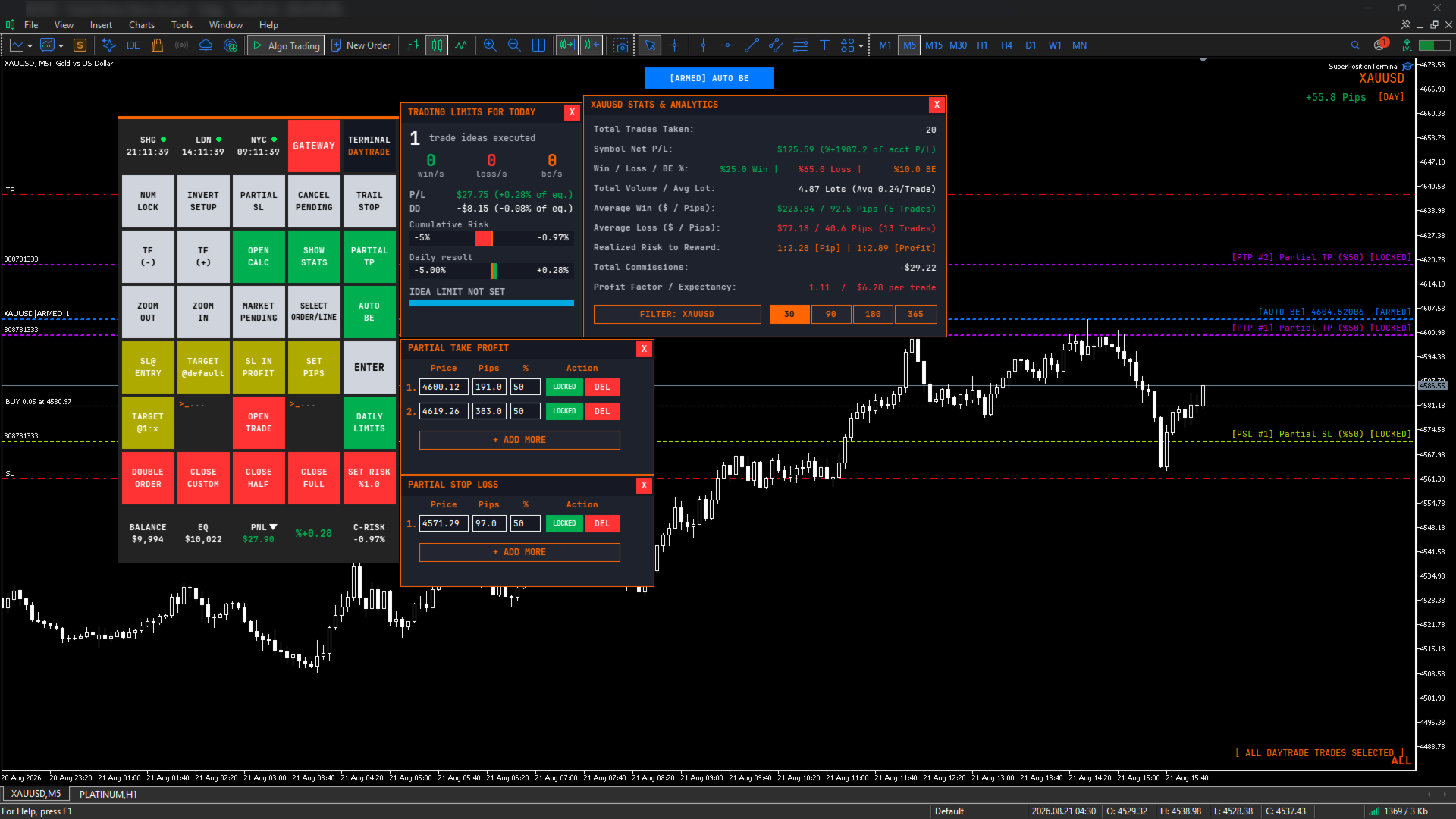
It is not an automated strategy. It does not predict, signal or trade for you. It is the control surface a discretionary trader uses to construct a position correctly, execute it in one click, and manage it without ever opening a dialog box or calculating a lot size by hand.

Every function you normally reach through MT5's menus – lot sizing, stop placement, partial closes, break-even moves, risk checks – is a single labelled button, laid out in a fixed grid you can learn once and use blind.

HOW IT WORKS

1. A purpose-built interface

SuperPositionTerminal is rendered on its own graphics layer with an embedded monospace typeface, anti-aliased vector icons, and proper window management – windows come to front when clicked, controls never leak clicks to whatever is underneath, and everything scales cleanly from compact laptop screens to 4K displays.

The layout is deliberately institutional: dense, monospaced, information first. It is designed to be read at a glance while you are watching price, not admired.

2. Risk architecture built for prop-firm rules

Drawdown is tracked continuously against your chosen basis (Balance or Equity), with a configurable daily reset hour and minute in server time. The default of 00:00 matches the daily candle open used by most brokers, so most traders never touch it – and if your firm resets at a different hour, you set that hour.

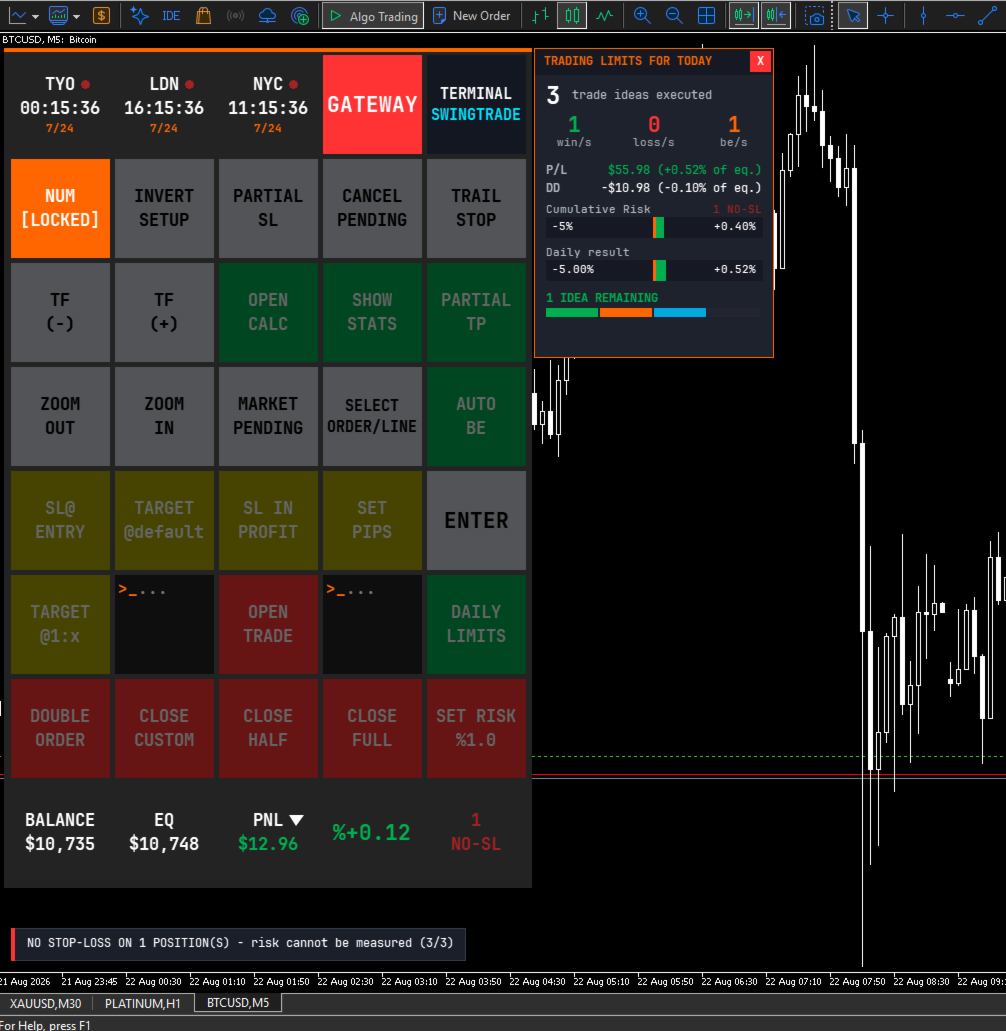
On top of that: a daily maximum loss, a daily maximum gain, a maximum number of trade ideas per day, and a total open lots ceiling. When a limit is reached, the terminal refuses the trade and tells you why.

The daily loss limit is the one that does the real work, and it does more than watch your realised losses. Before a trade opens, the terminal adds up the worst case of every position you already hold and asks whether this new trade would push the total past your limit. If it would, the trade is refused – before the money is at risk, not after. A separate early-warning threshold can tell you you are approaching that ceiling while you still have room to act.

Note: the trade-idea counter and the total-lot ceiling ship switched off, so the terminal never surprises a new user with a wall. Set a number when you want them.

3. Exposure alarm with enforced confirmation

Two configurable exposure thresholds monitor your total projected loss across every open position on every symbol – stop-loss distance where a stop exists, live floating loss where it does not.

When a threshold is crossed, a modal alert takes over the screen with a repeating audible alarm and blocks every other control. Dismissing it requires a deliberate four-step confirmation, not a reflex click. Each threshold is suppressed independently for the rest of the trading day once acknowledged.

It is designed to interrupt at the point where another position would be added on top of existing exposure.

4. Multi-level partial exits

Partial Take-Profit and Partial Stop-Loss each support multiple independent levels. Add a row, drag its line on the chart or type an exact pip distance, set the percentage to close, and lock it.

Locked levels are monitored continuously – even with the window hidden, and they survive timeframe and template changes. Remaining volume is tracked across all levels, so the terminal tells you when the broker's minimum lot makes another level impossible instead of silently creating one that can never fill.

5. Multi-position safety system

When more than one position is open on the same symbol and strategy, any action that could apply to the wrong one is refused until you explicitly select a position. This covers Partial Take-Profit lock, Partial Stop-Loss lock, Target @1:X, Target @default and Double Order.

Locked partial levels are pinned to a specific ticket, so a position opened later can never silently inherit a plan that was built for another one.

6. Session intelligence

Three world clocks sit at the top of the panel and follow the instrument you are actually trading. Load an index and you get its home exchange; load gold and the relevant metals session appears; load crypto and you get 24/7. Session open, closed and lunch-break states are shown, overlapping sessions are highlighted, and an optional warning marks the high-spread rollover window.

You can also pin three cities manually from eleven financial centres.

FEATURE SUMMARY

Trade construction

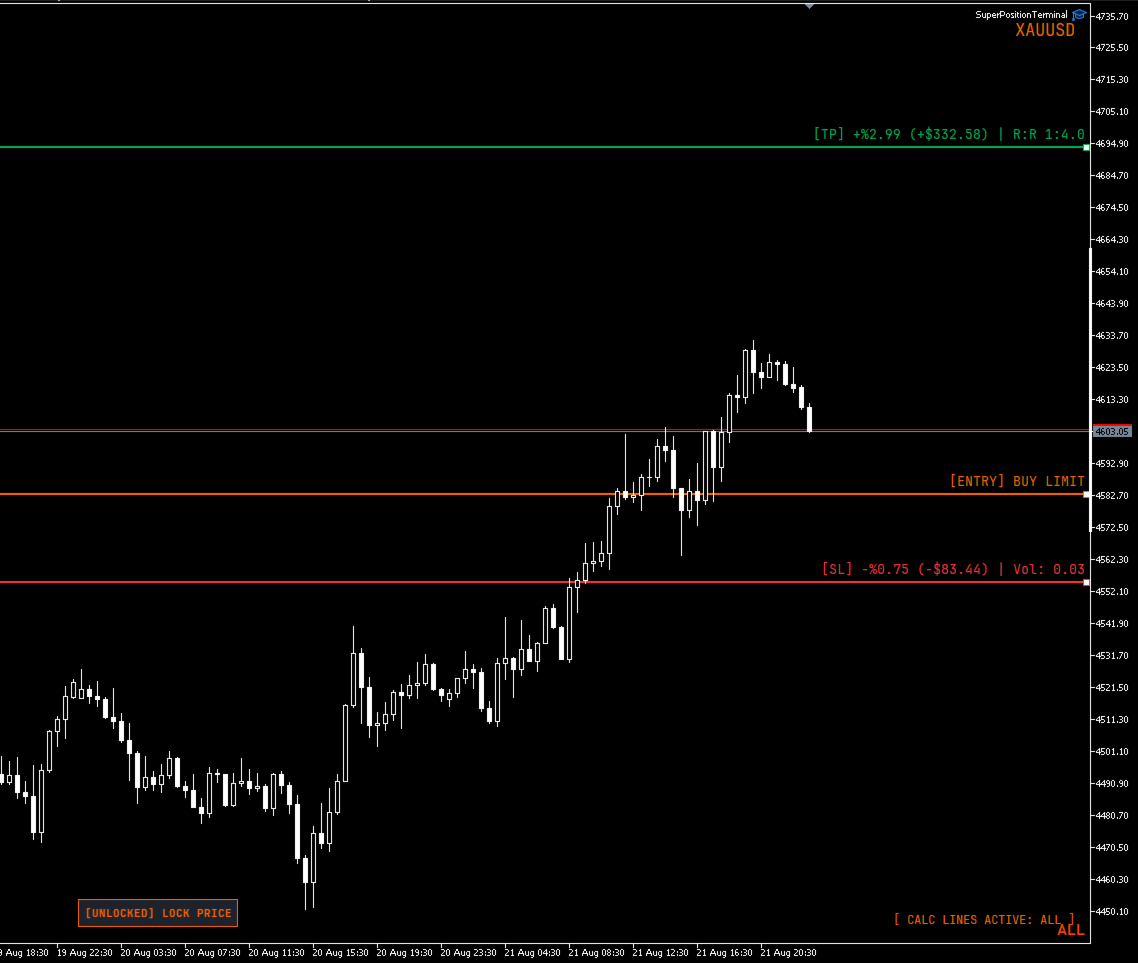
  • Visual stop-loss, take-profit and entry lines, dragged directly on the chart
  • Live lot, risk and reward recalculated on every pixel of movement
  • Position sizing by account percentage, fixed money risk, or fixed lot
  • Risk and reward shown in currency, percentage and risk-to-reward ratio simultaneously
  • Optional commission-adjusted net figures
  • Pending orders resolved automatically to Buy/Sell Stop or Limit
  • Invalid geometry flagged on the chart before you can execute
  • Multi-entry execution with optional risk splitting across entries
  • Arrow-key adjustment mode for pip distance and risk percentage
  • Price locking, and stop-loss / take-profit side mirroring

Position management

  • One-click close: full, half, or a configurable custom percentage
  • Stop to entry, with optional profit offset
  • Stop into profit by fixed pips or previous candle high/low with buffer
  • Target to a default pip distance, or to a Risk:Reward ratio
  • Automatic break-even: drag the trigger line where you want it, then arm it with one button. Until it is armed the line is only a marker, so nothing can fire while you are still positioning it. Once armed the line locks in place and cannot be dragged by accident. It locks either the entry or a chosen R multiple, measured from the position's original stop
  • Position duplication with optional lot recalculation
  • Trailing stop to previous candle high/low
  • Cancel all pending orders
  • Cycle through open positions and lines to select one
  • Volume-weighted average entry line when several positions are open

Risk and reporting

  • Continuous drawdown tracking (Balance or Equity basis)
  • Configurable daily reset hour and minute (server time)
  • Daily loss, gain, trade-idea and total-lot limits
  • Cumulative open-risk brake: a new trade is refused if the worst case of all open positions plus the new one would breach your daily loss limit
  • Two-stage exposure alarm with enforced confirmation
  • Account statistics window: performance and break-even classification
  • Live balance, equity and floating profit or loss, in currency and percentage
  • On-chart pip counter tagged by strategy mode

Platform

  • Two strategy modes (Day / Swing) on separate magic numbers, so intraday and swing positions are managed as separate books on the same chart
  • Timeframe and zoom controls
  • Symbol drawer listing every symbol with an open position, with click-through chart switching
  • Three panel sizes, DPI aware
  • Broker server and latency readout
  • Lot minimum, maximum and step overrides for misreporting brokers
  • Order filling mode override
  • Full colour customisation of every line and label

IMPORTANT – HOW TO EVALUATE THIS PRODUCT

Please read this before downloading the demo.

SuperPositionTerminal is a manual tool. Every function is driven by clicking buttons and dragging lines on a live chart.

The MetaTrader Strategy Tester does not deliver mouse interaction to an Expert Advisor. This is a platform limitation that affects every manual trading panel, not a fault in this product. In the Strategy Tester the panel will render correctly, but the buttons will not respond to clicks.

To evaluate it properly, please watch the demonstration video, or contact me and I will walk you through it.

A note on order execution. The maximum slippage input only has an effect on accounts that use Instant or Request execution. On Market and Exchange execution accounts – which is what most brokers now provide – the platform ignores the deviation value entirely. The input is still there for the accounts where it applies. Order filling mode is detected from the symbol and set automatically, so there is nothing to configure either way.

REQUIREMENTS

  • MetaTrader 5
  • Any broker and any symbol
  • Hedging or netting accounts
  • "Algo Trading" enabled

Designed for discretionary traders, prop-firm traders and anyone who manages risk manually and wants the mechanics to disappear.

SUPPORT

Questions, feature requests and bug reports are welcome. I answer every message.
Produtos recomendados
AetherFlow AI DataBridge Sistema Avançado de Mineração de Dados Multi-Ativos para Machine Learning e Integração com IA Construir modelos ML eficazes para trading requer dados multidimensionais de alta qualidade. Coletar manualmente indicadores técnicos, métricas de ação de preço e dados de estrutura de mercado em múltiplos ativos e timeframes é demorado e propenso a erros. AetherFlow AI DataBridge automatiza todo o processo de coleta de dados. Este Expert Advisor minera dados de mercado abrangen
EasyInsight AIO MT5
Alain Verleyen
4.92 (12)
EASY Insight AIO – A solução tudo-em-um para trading inteligente e sem esforço Visão geral Imagine analisar todo o mercado — Forex, Ouro, Cripto, Índices e até Ações — em segundos, sem precisar examinar gráficos manualmente, instalar indicadores ou lidar com configurações complicadas. EASY Insight AIO é sua ferramenta definitiva de exportação para trading com IA, pronta para usar. Ela oferece um panorama completo do mercado em um único arquivo CSV limpo — pronto para análise imediata no ChatGP
Grid Trading EA is a semi-automated one-click trading EA for both Normal Trading and Grid/Martingale Trading . Normal Trading Simply click Buy or Sell directly from the chart. The EA will automatically manage trades by: Setting Stop Loss and Take Profit Managing Trailing Stop Grid / Martingale Trading (For Hedging Account Type Only) When Grid Trading mode is enabled, the EA will automatically open additional grid orders at specified distances while increasing the lot size based on your settings.
XBOOT BOLETA PRO A ferramenta profissional para operações manuais no MetaTrader 5 A XBOOT Boleta Pro é um painel completo desenvolvido para traders que realizam operações manuais e desejam mais agilidade, organização e controle durante a execução das operações. Muito mais do que uma simples boleta de compra e venda, a XBOOT Boleta Pro reúne em um único painel diversas ferramentas que auxiliam desde a leitura do mercado até o gerenciamento das posições abertas. Seu objetivo é reduzir o tempo gast
QuickTrade Panel — One-Click Buy/Sell with Live Risk & Reward Preview Trade faster and smarter, directly from the chart — no order window required. QuickTrade Panel is a lightweight, fully manual trading panel for MetaTrader 5. It sits on your chart as a draggable floating window, giving you instant Buy/Sell execution with full control over lot size, stop loss, take profit, and risk-to-reward — all visible before you click. Key Features One-click Buy / Sell execution Large, color-coded SELL and
Premium Risk é uma ferramenta inteligente de gerenciamento de risco e execução de operações, desenvolvida especialmente para traders scalpers. Ela calcula automaticamente a relação risco-recompensa (R:R) e o valor do risco baseado no seu capital , ajudando você a definir com precisão o tamanho e volume da posição. Com o módulo POS , é possível monitorar e gerenciar suas operações automaticamente. A função ímã (magnet) detecta instantaneamente o preço atual do mercado, permitindo entradas rápidas
DrawMaster
Alex Orozco
5 (1)
IMPORTANTE!: ANTES DE COMPRAR O INDICADOR, CONSIDERE ENTRAR EM CONTATO COMIGO PARA OBTER UM DESCONTO DE 20% TG: @SoyRauX DrawMaster - Ferramentas profissionais de desenho para MT5 Painel tudo-em-um com ferramentas avançadas de desenho para traders sérios. PRINCIPAIS CARACTERÍSTICAS: • Retângulos inteligentes - Vazios e preenchidos com cores personalizáveis • Linhas de tendência - Vários estilos e espessuras configuráveis • Estruturas de mercado - MS e BOS com deteção automática • Desenh
Parameters Explained Algorithm Settings: magicNumber (int): Unique identifier for trades managed by the EA. Default value: 0 (manages manual trades). Note: Set this to the corresponding magic number of trades opened by other EAs or set it to 0 for manually executed trades. BreakEvenInPoints (bool): Activates the breakeven strategy based on profit in points. true: Moves Stop Loss to breakeven when the trade reaches the specified ProfitPointsForBreakeven . false: Disables this function. ProfitPoin
AdaptiveStats  is a comprehensive and visually stunning performance analysis tool for the MetaTrader 5 (MQL5) platform, featuring a professional "Fintech Dark" (JARVIS-inspired) aesthetic. It is engineered to provide traders with real-time, actionable insights into their trading performance directly on the chart interface. Key features and capabilities include: Multi-Timeframe Performance Tracking : Automatically calculates and aggregates Net Profit, Win Rate, and Total Trades for three critical
FREE
Manyal trading system, CovEchoTrend Robot, focuses on reliability and flexibility. By employing statistical analysis methods to study the relationships between the base indicator and market patterns, the system enables a deeper understanding of market processes. Intelligent pattern analysis: The application of statistical data processing helps identify key trend reversal points more accurately, signaling significant market shifts. Informed decision-making is based on the intersection of indicato
Hermes is a control panel that allows you to easily and effectively open market positions and place pending orders. In addition, thanks to its send and receive functions, Hermes can connect two or more terminals, copying the operations of one to the other or to the others. The send and receive functions for orders and market positions are independent of each other, i.e. it is possible to send positions to be copied to one terminal and orders to another, or to copy positions from one terminal and
Professional-Grade Chart Analysis – AI-Powered & Visually Enhanced The AInalyzer is an Expert Advisor for MetaTrader 5 that leverages artificial intelligence to analyze market structures and automatically places visual objects directly on your charts. Instead of spending hours manually examining charts, you'll get a clear overview of support levels, resistance zones, trend structures, and potential trading opportunities in no time – all logically presented, visually marked, and available at you
General Description In the simplest terms this is a contrarian intra-day scalping system. Built to try and let correct trades run as far as possible and flip the trade when indicated. The indicator looks at historical daily trading ranges to lay out levels at which it takes long and short positions based on the statistical levels. The indicator is built around index futures, mainly around S&P and the DOW but can be used an any futures contract mainly using AMP Futures to trade. The indicator is
Pro Trade Utility for MetaTrader 5 Pro Trade Utility is a professional manual trading assistant designed for traders who want precision, speed and clarity — without automated strategies. This tool does not trade automatically . It helps you execute and manage trades correctly with proper risk control. Key Features  Risk & Position Management Risk-based automatic lot size calculation Risk shown clearly in account currency Adjustable Stop Loss (points) Fixed Risk:Reward display  Trade Executio
Scalping Trade Panel – Fast and Precise Trading Control for MT5 Scalping Trade Panel is a professional trading panel designed for MetaTrader 5, offering traders lightning-fast access to market and pending orders directly from the chart. Optimized for scalping strategies, it combines precision, speed, and simplicity in one compact interface. Key Features: Market Orders: Execute BUY and SELL orders instantly with a single click. Stop Losses : You can add a stop loss for any market or pending
PropShield Guardian MT5 – Ultimate Drawdown Protection & Trade Control EA Proteja sua conta. Exija disciplina. Passe os desafios da prop firm com confiança. Não estoure a conta. Comece a operar como um profissional. PropShield Guardian MT5 é um utilitário Expert Advisor poderoso projetado para proteger sua conta, impor regras de risco e impedir erros de trading emocional. Principais Funcionalidades Sistema de Proteção contra Drawdown – Monitora drawdown diário e total. Fecha automaticament
User Manual Buy Trading Utility, Get 2 indicators FREE ! After purchase contact me for your " TWO indicators GIFT (Any one you want) ", adding you in group. Trading Utility MT5 The manual trader's cockpit. Size every trade by risk, place it from the chart, and manage it without ever opening the order dialog. Eight tabs, seven trailing engines, and every stop and target draggable with one click. One panel between you and the order window. Risk-sized entries, draggable stops, seven trailing modes
Assuma o controle de sua carteira forex. Veja instantaneamente onde você está, o que está funcionando e o que está causando dor! VERSÃO MT4 DISPONÍVEL AQUI: https://www.mql5.com/en/market/product/58375 O Painel do Trade Manager foi projetado para mostrar rapidamente onde está cada posição que você tem no mercado cambial atualmente e tornar o gerenciamento de risco e a exposição a moedas mais fáceis de entender. Para os comerciantes que escalam para o mercado gradualmente com várias posições ou
TP Hunter
Ahmet Gokcen Sirma
TP Hunter EA Adaptive Multi-Mode Trading Engine for MetaTrader 5 Overview TP Hunter EA is an advanced automated trading solution for MetaTrader 5 that combines Normal, Stop, Limit and Automatic Preset trading modes in a single Expert Advisor. The EA automatically loads optimized settings according to the selected symbol, making it suitable for Forex pairs, Gold, Silver, Oil and major stock indices. Users may also override the automatic preset selection and manually choose their preferred tradi
QDragon Gold
Autthapon Kawpom
QDragon Gold - Expert Advisor de Trading de Ouro Inteligente Multi-Temporal QDragon Gold é um sistema de trading profissional e totalmente automatizado, desenvolvido especificamente para operar Ouro (XAUUSD). O EA combina uma mecânica avançada de seguimento de tendência com gestão dinâmica de ordens e sistemas de proteção de capital. Destaques Principais: * Lógica de Seguimento de Tendência: O EA opera estritamente na direção da tendência dominante do mercado, utilizando análise multi-tempor
Quantum Copy Sync MT5
Phasit Nithitsribhandit
SPECIAL INTRODUCTORY OFFER – 25% OFF! Get the ultimate high-speed trade copier at a special launch price of only $149! (Bonus: 10 Activations included per license) Quantum Copy-Sync: The Ultimate High-Speed Trade Replication Engine for MT5 Professional-grade synchronization tool designed for traders who demand speed, security, and precision. Built with 100% native MQL5 code, it ensures ultra-low latency copying without the need for external DLLs. Key Advanced Features: Insane Speed: Inst
Pattern Recognition EA
Claudiu-georgian Zavera
Pattern Recognition EA - From Learn to Earn. The market repeats itself. This EA finds every past repeat of the current candle sequence - and lets history vote the direction. ONE SHAPE. EVERY REPEAT IN HISTORY VOTES. The last N candles on your signal timeframe form a shape. The EA scans the history you choose - a fixed number of bars or everything your broker provides - for the SAME shape, and checks what happened next, every single time. Only when enough repeats exist AND a clear majority of t
CopyTrade Pro MT5
David Julio Cuenca Oliver
CopyTrade Pro MT5   With CopyTrade Pro MT5, you can copy your trades from MT5 to MT5, MT5 to MT4. For MT5 to MT4 copies, you must have both versions (MT5 and MT4) installed. MT4 version:   CopyTrade Pro MT5 can: - Copy from MT5 to MT5, MT5 to MT4 quickly, instantly, and securely. - Master and Slave functionality, connecting both accounts using a comment to link and copy trades. - Fast execution (under 50ms). - Hides the fact that the trade has been copied using a copier, making it very useful
AlphaTrader: Your Intelligent Partner in Forex Trading AlphaTrader   is an advanced trading system that utilizes automated analysis and trading strategies to optimize decision-making in the Forex market. Built using geometric patterns and cutting-edge algorithms, this bot detects pricing patterns, providing precise signals for successful trades.   Why Choose AlphaTrader? AlphaTrader is not just a trading bot; it’s a   full-fledged partner   designed to help you manage your capital as efficien
OTE Trade Copier MT5
Olaoluwa Oluwaseun Bamitale
OTE Trade Copier MT5 Trade Copier & Prop Firm Risk Manager Copy trades locally between MT5 terminals and across MT4/MT5 platforms on the same PC or VPS while protecting your funded accounts with advanced risk controls. IMPORTANT: Send me a message for the Complete User Manual Before Installation Why Traders Choose OTE Trade Copier MT5 Supports MT5 to MT5 trade copying Supports MT4 to MT5 and MT5 to MT4 when used with the MT4 version Designed for prop firm and funded account traders Daily drawd
Master Manager
Medina Cortez Edison Armando
MASTER MANAGER Gestão de riscos de operações em aberto (não executa operações automáticas) e análise estrutural. "Pare de perseguir preços; deixe o Gestor Master identificar zonas institucionais para você e gerenciar cirurgicamente o risco das operações que você realiza." ️ Funcionalidades do Sistema 1. Análise Estrutural: Identificação de oscilações e equilíbrio de perspectivas com confluência. 2. Liquidez (FVG): Zonas de desequilíbrio com mitigação de 50% e extensão dinâmica. 3. Ger
Scalping Control Panel Scalping Control Panel is a simple and practical trading tool designed for scalpers and traders who use grid-style entries. The EA gives you direct control over your trading setup from a clean panel on the chart. Start a BUY or SELL grid with one click and customize the main parameters before entering the market. Main Features One-Click BUY & SELL Start a BUY or SELL sequence directly from the chart. Adjustable Lot Size Set the lot size you want to use before starting th
MT5 to Telegram Notification Hub   is a user-friendly tool that connects MetaTrader 5 (MT5) with Telegram, enabling seamless transmission of trade alerts, updates, and custom messages directly from MT5 to your Telegram account or channel. You can easily adjust and enable or disable specific parts of the notifications, making it ideal for signal providers and traders who want to keep their audience informed with real-time updates Setup guide A setup guide is available here . Key Features: Instan
SmartZone Sentinel
Allan Njuguna Kimani
SmartZone Sentinel — Multi-Symbol Smart Money Concepts EA Trade Smart Money Concepts across multiple symbols at once — with confluence-gated entries, automatic risk management, and real-time Telegram alerts. SmartZone Sentinel scans as many symbols as you choose, in parallel, looking for institutional-style setups: break of structure, liquidity sweeps, fair value gaps, and order block mitigation. It only acts when multiple signals line up — not on a single indicator firing — and once a trade is
Just Copier MT5
Agung Imaduddin
4.75 (4)
"Just copier" is designed to copy trading without any complicated settings. The copy can be done in one PC. One EA can be set as master (provider) or slave (receiver). The receiver lot can be set to multiple providers lots. Please also check this product at fxina.hostingerapp.com.  Any type of copy is available. MT4 -> MT5 MT4 -> MT4 MT5 -> MT5 MT5 -> MT4 If you want to copy MT4 -> MT5 or MT5 -> MT4, please purchase "Just copier" for MT4 and "Just copier" for MT5 separately. Just Copier can copy
Os compradores deste produto também adquirem
Trade Assistant MT5
Evgeniy Kravchenko
4.41 (216)
Ajuda a calcular o risco por comércio, a fácil instalação de uma nova encomenda, gestão de encomendas com funções de fecho parcial, trailing stop de 7 tipos e outras funções úteis. Materiais e instruções adicionais Instruções de instalação   -   Instruções para a aplicação   -   Versão de teste da aplicação para uma conta de demonstração Função de linha Mostra no gráfico a linha de Abertura, Stop Loss, Take Profit. Com esta função é fácil definir uma nova ordem e ver as suas características ad
TradePanel MT5
Alfiya Fazylova
4.88 (167)
Trade Panel é um assistente de negociação multifuncional. O aplicativo contém mais de 50 funções de negociação para trading manual e permite automatizar a maioria das tarefas de negociação. Antes da compra, você pode testar a versão de demonstração em uma conta demo. Baixe a versão experimental do aplicativo para uma conta de demonstração: https://www.mql5.com/pt/blogs/post/762547 . Instruções completas aqui . Comércio. Permite realizar operações de negociação com um clique: Abrir ordens pendent
Astro Trade MT5
Indra Maulana
5 (2)
AstroTrade Trading Assistant AstroTrade is a comprehensive multi-functional trading utility developed for the MetaTrader 5 platform. It integrates essential tools for trade execution, risk management, and technical monitoring into a single unified interface. The application is designed to assist traders in managing their daily operations through a visual and structured environment. Visual Trade Execution and Risk Management The application includes a specialized trading panel that assists in c
================================================================================ POC BREAKOUT - V20.72. Full Professional Grade Toolkit ================================================================================ POC Breakout is a full MetaTrader 5 trading dashboard for discretionary traders who want breakout signals, Point of Control (POC) context, volume profiles, order flow, market structure, news, alerts, and advanced trade planning in one professional workspace. Attached directly to you
Premium Trade Manager - O Painel de Operações com um Coach Integrado Premium Trade Manager coloca um coach de trading dentro do seu gráfico, com um motor de execução completo por baixo. Configure a operação da forma que sempre faz e deixe o Max, seu coach de trading com IA, ler exatamente esse setup em relação à sua conta ao vivo e dar um veredicto direto antes de confirmar: se o stop é disciplinado, se o risco faz sentido, se há um evento de alto impacto a minutos de distância, se você está pró
Footprint Chart Pro — Professional OrderFlow EA for MetaTrader 5 Version 6.34 | Professional tool for real traders | Institutional-Grade Visualization DEMO USERS - PLEASE SELECT EVERY TICK / REAL TICK WHEN TESTING AND YOU HAVE DOWNLOADED HISTORICAL DATA. IF YOU SEE A WAITING SCREEN AND IT IS NOT DOWNLOADING, IT MEANS YOU HAVE LOW HISTORICAL DATA. TRY 1 MIN AND 5 MIN FIRST ON 1 DAY DATA. ONE DAY DATA SHOULD BE THE NEWEST AND MOST CURRENT DATE. PLEASE WAIT UNTIL THE MARKET HAS ROLLED OVER PERIOD.
Farmed Hedge Yield Farming | All Markets (Manual - Hybrid - Semi/Automated EA) VERIFIED TRADING RESULTS - Farmed Hedge Yield Axi Copy:  https://www.mql5.com/en/signals/2356376 - Farmed Hedge Yield Exn Copy:   https://www.mql5.com/en/signals/2356404 - Farmed Hedge Yield V Copy:  https://www.mql5.com/en/signals/2357156 * Before purchasing, please feel free to send me a message if you have any questions about the product or setup. ** After purchase,  Contact me via private message to receive t
Global Investing FX Terminal
Santiago Nicolas Pla Casuriaga
O Global Investing FX Terminal é um dashboard de FX completo para o MetaTrader 5 — taxas de política monetária, posicionamento COT do CFTC, rankings de carry, surpresas econômicas, skew de opções, sentimento de varejo e correlações, treze painéis ao todo — renderizado sobre um único overlay canvas sem flicker, com atualização a cada 10 segundos a partir de um único EA. Nenhum software externo é necessário. A análise profissional de câmbio exige acesso simultâneo a dados que normalmente ficam esp
Trading Chaos Expert
Gennadiy Stanilevych
5 (11)
Não existe software igual no mundo e que represente um "console" universal de negociação informando sinais para operar, entrada automatizada do mercado, configurando o Stop Loss e o Take Profit, assim como o Trailling Profit para diversas negociações em apenas uma janela aberta. O controle intuitivo do Expert Advisor em "três cliques" garante um uso abrangente de todas as suas funções em diferentes computadores, incluindo tablets. Interagindo com indicadores de sinal adicionais que marcam o gráf
Power Candles Strategy Scanner - Localizador de configurações multissímbolo com auto-otimização O Power Candles Strategy Scanner utiliza o mesmo motor de auto-otimização que alimenta o indicador Power Candles — em todos os símbolos da sua lista de observação, lado a lado. Um painel indica-lhe quais os símbolos que são estatisticamente negociáveis neste momento, qual a estratégia vencedora para cada um, o par ideal de Stop Loss / Take Profit, e avisa-o assim que um novo sinal é emitido. Esta ferr
Custom Alerts AIO: Monitoramento inteligente de múltiplos mercados – pronto para uso, sem configuração Visão geral Custom Alerts AIO é uma ferramenta avançada de varredura de mercado que funciona imediatamente após a instalação — sem necessidade de configurar indicadores adicionais. Inclui internamente todos os principais indicadores da Stein Investments (FX Power, FX Volume, FX Dynamic, FX Levels e IX Power), permitindo que você monitore facilmente todas as principais classes de ativos: Forex
Welcome to ENTRY IN THE ZONE WITH SMC MULTI TIMEFRAME Entry In The Zone and SMC Multi Timeframe is a real-time market analysis tool based on Smart Money Concepts (SMC), designed to analyze market structure, price direction, and key trading zones. It supports both Single-Timeframe Analysis and Multi-Timeframe Analysis, providing a clearer view of the overall market structure across multiple timeframes, with real-time BUY / SELL signals that do not repaint. It is designed to help filter trading op
VirtualTradePad PRO SE MT5 — centro profissional de controle de trading para MetaTrader 5 VirtualTradePad PRO SE é um painel de trading premium baseado no gráfico e um ambiente de gerenciamento de operações para MetaTrader 5 . Ele foi desenvolvido para traders que desejam execução mais rápida, controle de posições mais claro, gerenciamento de trades estruturado, planejamento visual de níveis e um fluxo de trabalho profissional diretamente no gráfico. Não é apenas um painel de COMPRA / VENDA. O P
YuClusters
Yury Kulikov
4.93 (43)
Atenção: A versão demo para revisão e teste está aqui . YuClusters é um sistema profissional de análise de mercado. O trader tem oportunidades únicas para analisar o fluxo de pedidos, volumes de negociação, movimentos de preços usando vários gráficos, perfis, indicadores e objetos gráficos. O YuClusters opera com base em dados de Tempos e Negócios ou informações de ticks, dependendo do que está disponível nas cotações de um instrumento financeiro. O YuClusters permite que você crie gráficos com
Quant AI Agents
Ho Tuan Thang
5 (1)
Quant AI Agents are independent trading Expert Advisors. Instead of trading using a fixed strategy like other conventional EAs, Quant AI Agents   is a   multi-agent AI trading framework   that turns natural-language strategy prompts into live.  WANT THE SAME RESULTS AS MY LIVE SIGNAL?   Use the exact same brokers I do:   IC MARKETS , IC TRADING   .  Unlike the centralized stock market, Forex has no single, unified price feed.  Every broker sources liquidity from different providers, creating un
The product will copy all telegram signal to MT5 ( which you are member) , also it can work as remote copier.  Easy to set up, copy order instant, can work with almost signal formats, image signal,  s upport to translate other language to English Work with all type of channel or group, even channel have "Restrict Saving Content", work with  multi channel, multi MT5 Work as remote copier: with signal have ticket number, it will copy exactly via ticket number. Support to backtest signal. How to s
AI Agent Supervisor is NOT an Expert Advisor. AI Agent Supervisor   is a   multi-agent AI risk & portfolio supervisor   that watches every EA on your account and intervenes in real time.  WANT AN AI PORTFOLIO MANAGER WATCHING YOUR FLEET 24/7?   Run your fleet on the same brokers I do:   IC MARKETS , IC TRADING   .  Unlike the centralized stock market, Forex has no single, unified price feed.  Every broker sources liquidity from different providers, creating unique data streams. The Supervisor r
Trade Copier Pro MT5
Vu Trung Kien
3.67 (3)
Trade Copier Pro MT5 is a tool to copy trade remotely to multiple MT4, MT5 and cTradfer accounts at different computers/locations over internet. This is an ideal solution for you if you are a signal provider and want to copy your trades to other receivers globally on your own rules. One provider can copy trades to multiple receivers and one receiver can get trade from multiple providers as well. The provider can even set the subscription expiry for each receiver, so that receiver will not be abl
Custom Timeframe Manager Pro: timeframes ilimitados no MetaTrader 5 As configurações padrão do terminal costumam ocultar detalhes importantes do movimento dos preços. Ao limitar a análise apenas aos períodos clássicos, o trader corre o risco de perder os momentos de início de uma tendência e os níveis reais de volatilidade. Custom Timeframe Manager Pro é um utilitário profissional que expande os limites do MetaTrader 5. Crie quaisquer períodos personalizados, incluindo fracionários e exóticos,
The product will copy all  Discord  signal   to MT5   ( which you are member  ) , also it can work as remote copier.  Easy to set up. Work with almost signal formats, support to translate other language to English Work with multi channel, multi MT5. Work with Image signal. Copy order instant, auto detect symbol. Work as remote copier: with signal have ticket number, it will copy exactly via ticket number. How to setup and guide: Let read all details about setup and download Discord To MetaTrader
Unlimited Trade Copier Pro MT5 is a tool to copy trade remotely to multiple MT4, MT5 and cTrader accounts at different computers/locations over internet. This is an ideal solution for you if you are a signal provider and want to copy your trades to other receivers globally on your own rules. One provider can copy trades to multiple receivers and one receiver can get trade from multiple providers as well. The provider can even set the subscription expiry for each receiver, so that receiver will n
Adam FTMO MT5
Vyacheslav Izvarin
5 (2)
ADAM EA Special Version for FTMO Please use ShowInfo= false for backtesting ! Our 1st EA created using ChatGPT technology Trade only GOOD and checked PROP FIRMS  Default parameters for Challenge $100,000 Tested on EURUSD and GBPUSD only  Use 15MIN Time Frame Close all deals and Auto-trading  before Weekend at 12:00 GMT+3  Friday For Prop Firms MUST use special Protector  https://www.mql5.com/en/market/product/94362 --------------------------------------------------------------------------------
ManHedger MT5
Peter Mueller
4.83 (6)
THIS EA IS A SEMI-AUTO EA, IT NEEDS USER INPUT. Manual & Test Version Please TEST this product before BUYING  and watch my video about it. The price of the ManHedger will increase to 250$ after 20 copies sold. Contact me for user support or bug reports or if you want the MT4 version! MT4 Version  I do not guarantee any profits or financial success using this EA. With this Expert Advisor, you can: Implement your own Zone Recovery strategy to capitalize on trending markets. Create Grid trading s
Check EA performance  https://www.mql5.com/en/signals/2376164?source=Site +Profile+Seller Spot vs Future Arbitrage EA for MT5 Spot vs Future Arbitrage EA is an automated Expert Advisor designed for MetaTrader 5 that operates using price differences between Gold spot and Gold futures instruments. The strategy opens positions on both instruments simultaneously to take advantage of temporary differences between spot and futures prices. Requirements The trading account must provide both Gold spot
Mt5 To InterativeBrokers Copier allows you to copy deals from MT5 account to Interactive Brokers. With this, you can run your EA strategy on a MT5 Demo/Real Account, then copy all the deals to Interactive Brokers account real time. Features: 1. Copy or Invert-Copy deals Realtime from MT5 to IB Account. 2. Synchronizing positions of both accounts periodicaly, in case any missing copying. 3. You can choose only Buy position or Sell position. Symbols Setup: General Format:  {MT Symbol} -> {IB S
FUTURES ORDERFLOW FOOTPRINT CHART Professional OrderFlow EA for MetaTrader 5 Version 1.01| Professional tool for real traders | Institutional-Grade Visualization STRATEGY TESTER USERS - PLEASE SELECT EVERY REAL TICK WHEN TESTING AND YOU HAVE DOWNLOADED HISTORICAL DATA. IF YOU SEE A WAITING SCREEN AND IT IS NOT DOWNLOADING, IT MEANS YOU HAVE LOW HISTORICAL DATA. TRY 1 MIN AND 5 MIN FIRST ON 1 DAY DATA. ONE DAY DATA SHOULD BE THE NEWEST AND MOST CURRENT DATE. PLEASE WAIT UNTIL THE MARKET HAS ROL
Indicator Automator EA: The Ultimate Indicator Automation Tool Tired of being chained to your desk, waiting for signals from your favorite indicator? Do you want to eliminate emotional trading and unlock the true potential of your manual strategy? Indicator Automator EA is a powerful and highly versatile Expert Advisor for MetaTrader 5 designed to automate any trading indicator that provides clear Buy and Sell signals through its indicator buffers. You don't need to be a programmer. If you have
Crystal Trade Manager – Advanced MT5 Risk and Trade Control Utility Overview Crystal Trade Manager (CTM) is a professional MetaTrader 5 utility designed for risk management, trade automation, and instant execution control. It provides traders with an integrated system for protecting equity, managing daily drawdowns, controlling lot sizes, and applying automation features such as automatic SL/TP, break-even, and trailing stop. The tool is suitable for manual traders, prop-firm challenge particip
Features   With MT5 to Interactive Brokers(IB) Trader, you can: 1. Load chart data from IB to MT5, and Analyze with all standard or customer Indicators. 2. Place Orders to IB Account Directly in MT5. 3. Make your Own EAs upon IB Securities by only making minus changes of the trading function. Usage 1) Installation Copy the "Mt5ToIBTraderEn.ex4" and sample files to [MT5 Data Folder]->MQL5->Experts.  2)  MT5 Settings Add the IP Address to the MT5 Allowed URLs in 'Tools->Options->Expert Adviso
HINN Lazy Trader
ALGOFLOW OÜ
5 (1)
LIMITED SUMMER SALE -40% ! ONLY $470 insead of $790!  Maximum real discount! ONLY UNTIL 08/22 The core idea: using the user interface, you configure the parameters the chart must meet before entering a position (or positions), choose which entry models to use, and set the rules for when trading and planning should end. Lazy Trader  handles the rest: it  takes over all the routine chart watching and execution! full description  :: 3 key videos [1] ->  [2]   ->  [3] What can it do? - Understand
Filtro:
Sem comentários
Responder ao comentário