PilotAi Scanner
- Эксперты
- Версия: 1.532
- Обновлено: 25 октября 2026
- Активации: 5

PilotAi Scanner — анализ с поддержкой ИИ и исполнение под контролем трейдера для MetaTrader 5
СТАРТОВАЯ ЦЕНА: 99 USD — цена для первых пользователей. Обычная цена: 149 USD.
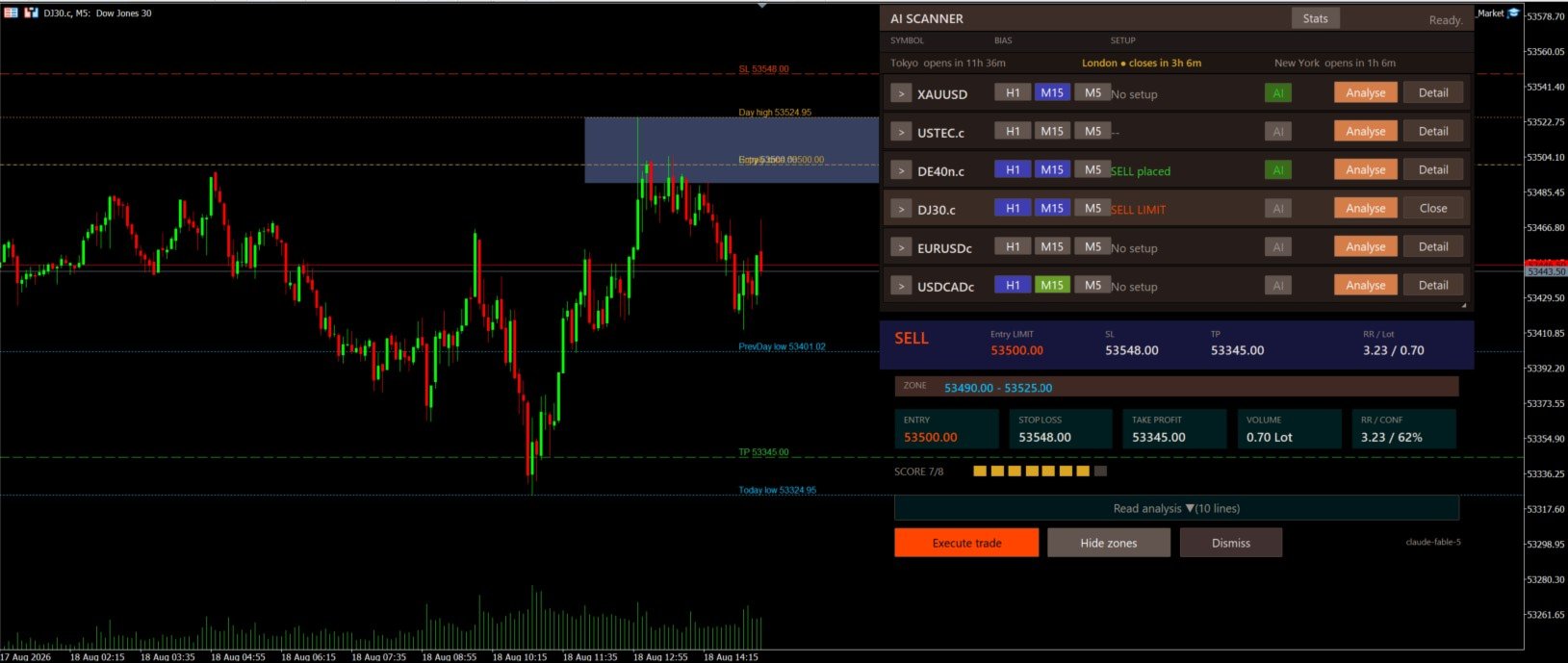
PilotAi Scanner — это система анализа рынка и исполнения сделок с поддержкой ИИ для MetaTrader 5. Ручной анализ является основным рабочим режимом: трейдер запрашивает анализ, проверяет предложенные Entry, Stop Loss, Take Profit, Risk/Reward, score, confidence и предупреждения, а также может изменить Entry, SL или TP до исполнения. PilotAi пересчитывает риск, размер лота и RR по подтверждённым уровням. Исполнение происходит только после явного подтверждения трейдера.
Что такое PilotAi Scanner
PilotAi объединяет внешнюю оценку рынка с помощью ИИ с локальной детерминированной проверкой и контролем исполнения. Система прежде всего предназначена для интерактивного анализа и исполнения под контролем трейдера, а отдельный Selective AUTO Mode доступен пользователям, которые осознанно включают автоматизацию.
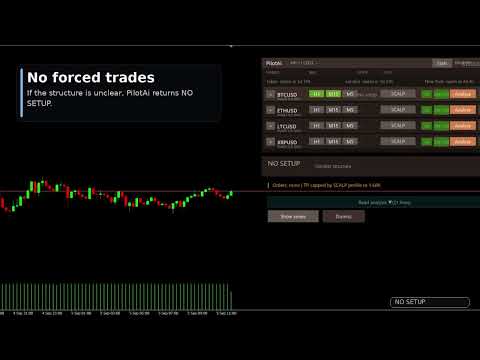
Внешний ИИ-провайдер не получает прямого доступа к брокеру. PilotAi локально проверяет предложения по заданным правилам риска, условиям счёта, спецификациям символа и ограничениям брокера до того, как исполнение становится доступным. Допустимым результатом также может быть NO SETUP; система не обязана создавать сделку.
Ручной анализ — основной рабочий режим
Выберите в панели символ, поддерживаемый брокером, и запросите анализ. PilotAi формирует структурированный мульти-таймфрейм контекст для выбранного провайдера и получает предложенный план с направлением, типом ордера, Entry, SL, TP, RR, score, confidence, рыночным контекстом и предупреждениями, если они доступны.
Рабочий процесс: Анализ → предложенный ИИ-план → локальная проверка → проверка трейдером → при необходимости изменение Entry/SL/TP → пересчёт риска/лота/RR → Execute Trade → MANUAL APPROVED → при необходимости последующее изменение SL/TP → детерминированное управление продолжается от нового подтверждённого состояния.
Проверка и редактирование до исполнения
Ручной анализ — это процесс проверки, а не слепого исполнения. До подтверждения трейдер может изменить Entry, Stop Loss и Take Profit. После этого PilotAi пересчитывает RR, денежный риск, процент риска, размер лота и предварительную оценку маржи.
Некорректная геометрия цен, недостаточная маржа, ограничения по расстоянию стопов, чрезмерный риск или другие жёсткие условия безопасности могут заблокировать исполнение. Предупреждения остаются видимыми. После подтверждения корректного плана через Execute Trade PilotAi помечает сделку как MANUAL APPROVED.
Новое в 1.532 — изменение SL/TP после исполнения MANUAL APPROVED
Контроль трейдера сохраняется и после исполнения для сделок PilotAi с происхождением MANUAL APPROVED. Трейдер может позднее изменить Stop Loss и Take Profit уже открытой рыночной позиции MANUAL APPROVED или активного отложенного ордера MANUAL APPROVED.
Изменение выполняется осознанно: трейдер вводит новые уровни, PilotAi проверяет точность, геометрию цен, ограничения брокера по stop/freeze и применимые лимиты риска, а модификация брокеру отправляется только после явного подтверждения. После успешного изменения PilotAi повторно считывает состояние брокера и принимает новые подтверждённые уровни как текущую базу управления. Затем детерминированное управление продолжается от этого состояния.
Редактирование SL/TP после исполнения применяется только к позициям и отложенным ордерам MANUAL APPROVED. Оно не применяется к AUTO-сделкам, внешним ручным сделкам или позициям других советников. AUTO сохраняет собственные автоматические правила защиты и управления.
Анализ с ИИ и детерминированная проверка
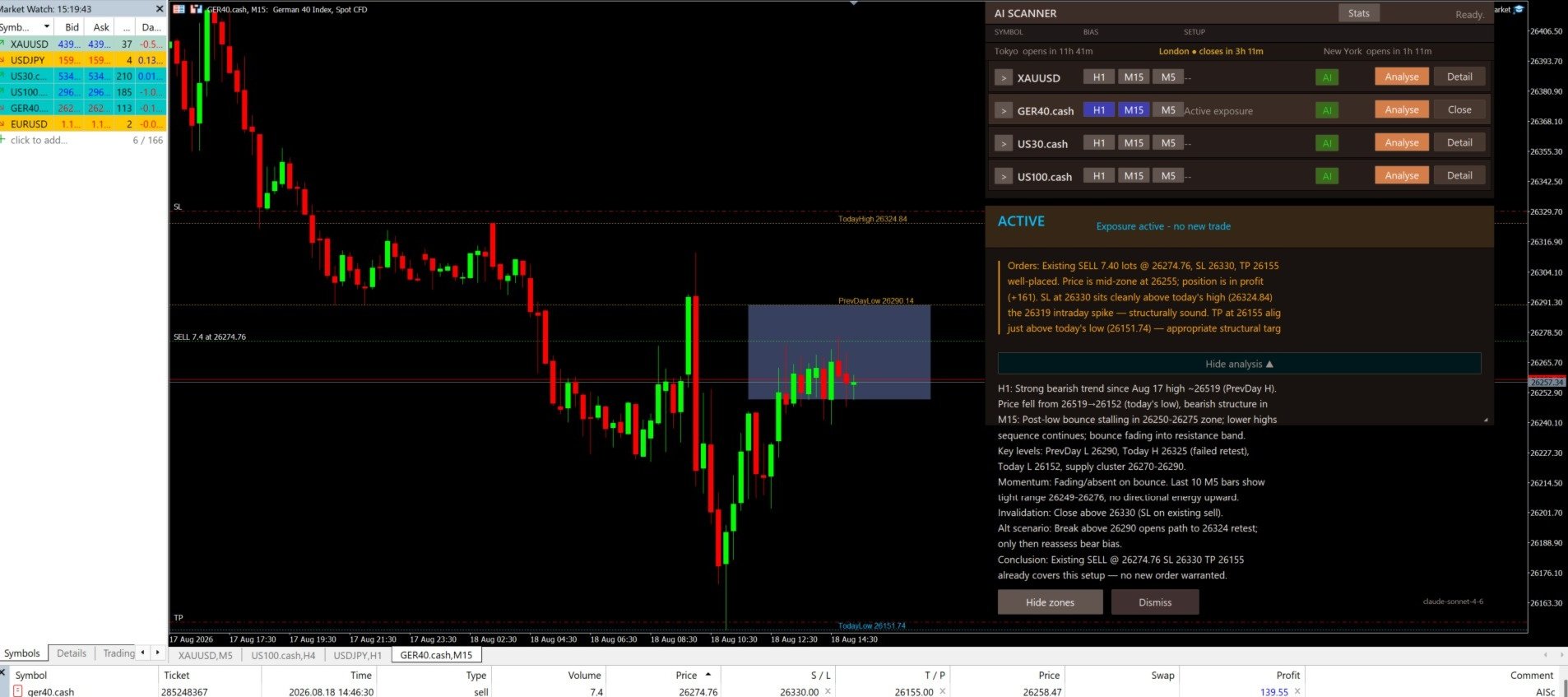
ИИ предоставляет структурированный анализ или review кандидата. PilotAi сохраняет локальный контроль над проверкой, расчётом объёма и исполнением. Проверки могут включать геометрию уровней, расстояние стопов, маржу, spread, price drift, лимиты дубликатов и экспозиции, текущие котировки, режим торговли символа и торговые сессии брокера.
Доступность рынка зависит от сессий конкретного символа у брокера, режима торговли и текущего состояния котировок. Техническая поддержка символа не означает одинаковые условия или результаты на всех рынках.
Selective AUTO Mode
Selective AUTO Mode является дополнительным режимом и включается отдельно. Локальный MQL5-движок формирует точный candidate на основе структуры закрытых баров; выбранный ИИ-провайдер оценивает candidate; PilotAi проверяет score и confidence; затем детерминированные market-, risk-, news-, session- и execution-guards определяют, полностью ли он квалифицирован.
Если какое-либо обязательное условие отсутствует, AUTO ждёт. Режим намеренно селективный и не позиционируется как высокочастотная или полностью «set-and-forget» система. AUTO не получает описанные выше права ручного изменения после исполнения.
Детерминированное управление риском и позициями
PilotAi рассчитывает объём исходя из денежного риска между ценой исполнения и Stop Loss и нормализует его согласно правилам брокера. Поддерживаемые функции включают:
- Adaptive Profit Protection (APP)
- Hard Risk Lock и отслеживание исходного риска
- Настраиваемый Break-Even
- Настраиваемый ATR trailing
- Опциональный Partial Close
- Опциональный terminal-side Cash TP
- Управление жизненным циклом pending orders и arrival guards
- Structure Reset после Stop Loss в том же направлении
- Post-SL Priority processing
- Контроль риска/экспозиции по символу и совокупно
- Проверки маржи, spread, stop-distance, price-drift и дубликатов
PilotAi управляет только собственными сделками AUTO и MANUAL APPROVED. Обычные внешние ручные сделки MT5 под управление не принимаются.
Опциональное управление позициями с помощью ИИ
AI Position Management по умолчанию ВЫКЛЮЧЕНО. AI Entry Review и Manual AI Analysis могут оставаться активными при выключенном AI Position Management; детерминированное управление позициями продолжает работать независимо.
Если опциональная функция включена, рекомендации провайдера всё равно ограничены локальными правилами защиты. Отдельные настройки управляют расширением SL и дополнительными входами; обе функции по умолчанию отключены. Adaptive Profit Protection и Hard Risk Lock могут ограничить или отклонить рекомендацию.
Новости, сессии и funded-style ограничения
PilotAi может использовать встроенный экономический календарь MetaTrader 5. AUTO может блокировать новые входы вокруг важных событий и работать fail-closed, если необходимые данные недоступны или устарели. В ручном анализе активное news-условие может потребовать одноразового явного подтверждения для текущего candidate, не убирая предупреждение и не разблокируя AUTO.
Опциональный Prop Firm Mode предоставляет настраиваемые внутренние ограничения, включая проверку прогнозируемого дневного убытка, дневные лимиты убытка/прибыли и счётчики сделок или убытков. Эти пользовательские настройки не подтверждают соответствие требованиям брокера, проп-компании или программы оценки; пользователь обязан сверять их с актуальными правилами своего счёта.
Символы, стили и dashboard
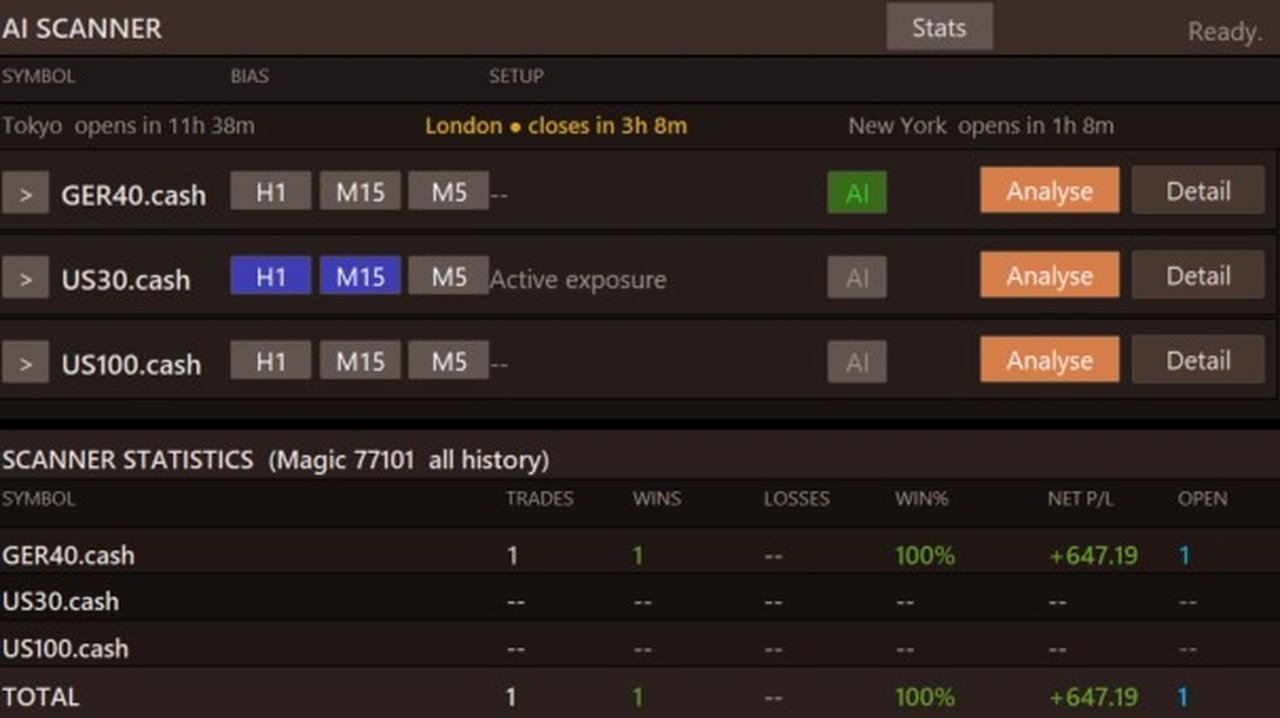
Один экземпляр PilotAi может отслеживать до восьми точных символов брокера. Названия и суффиксы должны совпадать с Market Watch. Стили Scalp, Daytrade и Swing используют разные стандартные таймфрейм-контексты, а dashboard показывает состояние символа, предложенные уровни, RR, score, confidence, предупреждения и relevant controls.
Спецификации брокера, spreads, сессии, ликвидность и качество исполнения различаются. Доступность символа является технической возможностью, а не обещанием результата.
Поддерживаемые ИИ-провайдеры и требования API
PilotAi поддерживает:
- OpenAI
- Anthropic
- xAI
- DeepSeek
- Alibaba Qwen
- Пользовательские OpenAI-compatible endpoints
Пользователь выбирает провайдера и модель и использует собственный API key (BYOK). В MetaTrader 5 необходимо разрешить WebRequest для endpoint выбранного провайдера.
Ручные ИИ-анализы, AUTO reviews и опциональные AI position-management reviews могут создавать отдельные расходы у стороннего API-провайдера. Цены, доступность моделей и поведение сервиса определяются провайдером и могут изменяться; фиксированная стоимость не обещается. Храните API-данные в секрете и не показывайте их на скриншотах, в preset-файлах или support logs.
Рекомендуемый первый запуск
- Установите PilotAi Scanner из ваших покупок MQL5 и прикрепите его к одному графику.
- Введите точные названия символов брокера и выберите нужный стиль.
- Выберите поддерживаемого провайдера и модель, введите API key и разрешите нужный WebRequest endpoint.
- Оставьте AUTO выключенным в первой сессии.
- Запросите Ручной Анализ для одного символа.
- Проверьте контекст, предупреждения, Entry, SL, TP, RR, риск и рассчитанный объём.
- При необходимости измените уровни и исполняйте только после самостоятельного принятия плана.
- Проверьте настройки детерминированного управления перед включением Selective AUTO или опционального AI Position Management.
Важные замечания
- PilotAi — программное обеспечение для поддержки решений и исполнения, а не финансовая консультация.
- Любое предложение может быть ошибочным; NO SETUP является нормальным результатом.
- Ручное подтверждение не отменяет жёсткие проверки безопасности, маржи, брокера или уровней.
- AUTO селективен и должен включаться только после понимания конфигурации.
- Данные брокера, спецификации, сессии, spreads и качество исполнения различаются.
- Данные экономического календаря и сторонние ИИ-сервисы могут задерживаться, быть недоступными или изменяться.
- Демонстрация Strategy Tester использует локальную showcase-логику и не является результатом внешнего ИИ или ожидаемым торговым результатом.
Предупреждение о рисках
Торговля инструментами с кредитным плечом связана со значительным риском и может привести к существенным убыткам. Stop Loss, программные проверки и настроенные лимиты не могут устранить slippage, gaps, ошибки исполнения, проблемы подключения или рыночный риск. Прошлые тесты, демонстрации и предыдущие результаты не предсказывают будущую доходность. Начинайте на демо-счёте, проверяйте каждую настройку под своего брокера и правила счёта и торгуйте только капиталом, потерю которого можете себе позволить.