Execution X PRO
- Утилиты
-
Artur Jacek Domagala
 We are an MT5 development team focused on building modern trading tools for MetaTrader 5.
Built for traders who want clarity, discipline and control — not overloaded charts or random signals. - Версия: 2.64
- Активации: 10
Professional Manual Execution and Trade Management Panel for MetaTrader 5
Solution. Comfort. Experience.
Easy to understand, develop for New traders
Execution X PRO is an advanced manual trading panel created for traders who want to maintain full control over their market decisions while improving execution speed, position management and trading discipline.
It does not generate random entries and it does not replace the trader’s strategy.
Instead, it provides a structured execution environment that connects manual decision-making with professional risk controls, basket management, market context and real-time trade supervision.
The trader decides when and where to enter.
Execution X PRO handles the structure around that decision.
Built for Controlled Manual Trading
Manual trading often becomes difficult not because the trader cannot read the market, but because execution becomes inconsistent under pressure.
Delayed entries, oversized positions, emotional re-entry, uncontrolled exposure and poor profit management can turn a valid market idea into an avoidable loss.
Execution X PRO was designed to reduce this operational noise.
From one visual control panel, the trader can:
-
open BUY and SELL positions,
-
close the active trading basket,
-
monitor current exposure,
-
manage protective levels,
-
control daily risk,
-
observe market direction,
-
track trading sessions,
-
supervise open positions,
-
and respond faster when market conditions change.
The result is a cleaner, more controlled and repeatable trading process.
Core FeaturesFast Manual Execution
Execution X PRO provides direct BUY and SELL controls directly on the chart.
The panel reduces unnecessary platform navigation and allows the trader to act immediately when a valid setup appears.
Execution remains fully manual. The system does not decide when to enter the market.
This makes Execution X PRO suitable for traders using:
-
price action,
-
market structure,
-
liquidity concepts,
-
support and resistance,
-
order blocks,
-
breakout strategies,
-
trend continuation,
-
reversal setups,
-
discretionary scalping,
-
intraday trading,
-
and position trading.
Basket Position Management
Multiple positions opened in the same direction can be managed as one coordinated trading basket.
Instead of treating every position as an isolated order, Execution X PRO supervises the combined exposure from a common reference point.
The panel can calculate and display:
-
basket direction,
-
number of active positions,
-
combined lot exposure,
-
current basket profit,
-
current basket movement,
-
protective basket level,
-
and progressive profit objectives.
This is especially useful for scaling into a valid market move while maintaining a clear overview of total exposure.
Opposite-direction entries can be restricted while a basket is active, helping prevent accidental hedging and conflicting trade management.
Progressive Profit Management
Execution X PRO uses a structured multi-stage profit management model.
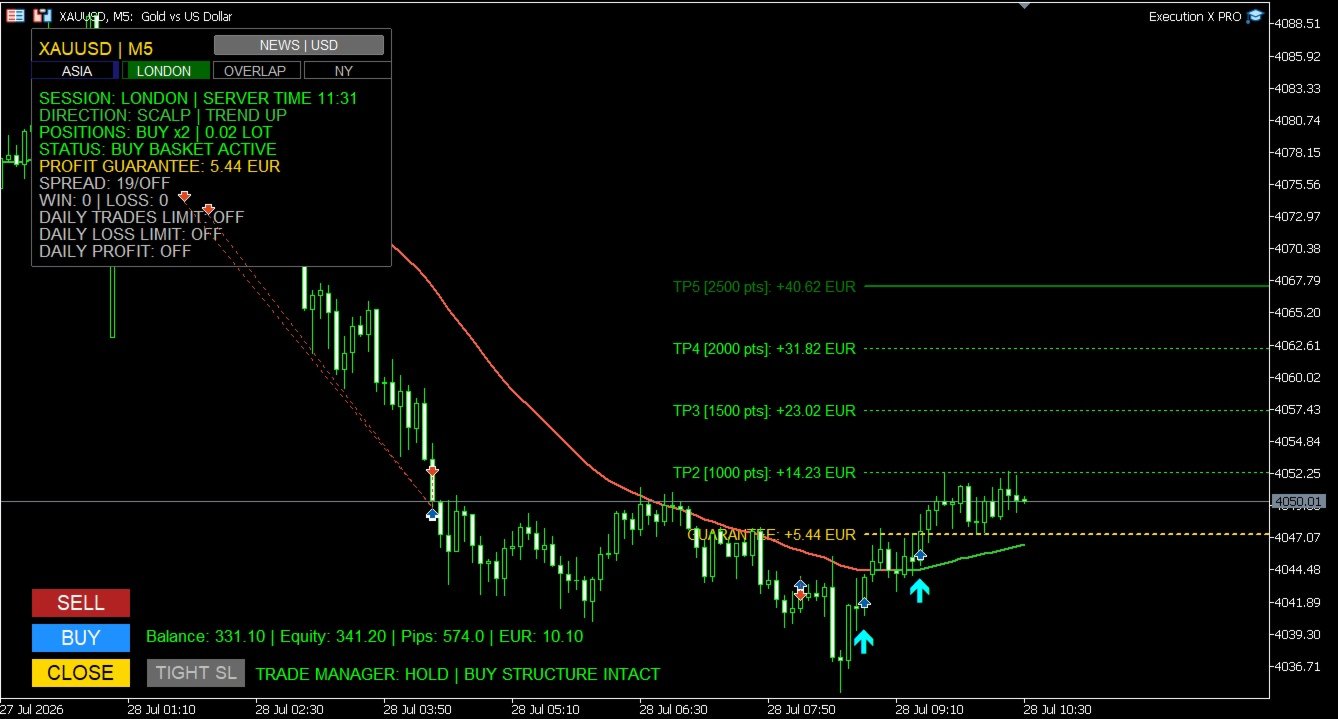
The active trade plan is displayed directly on the chart, allowing the trader to see the progression from the initial protective level through consecutive profit stages.
As price advances, the system can progressively protect the basket and preserve previously reached profit levels.
This creates a disciplined transition from:
initial risk → break-even protection → secured profit → extended profit control
The objective is not only to reach a target, but also to manage the trade professionally while it develops.
Profit Guarantee System
The Profit Guarantee module continuously evaluates the protection currently secured by the basket.
When the market reaches further stages of the trade plan, the protective level can advance in the direction of profit.
The system is designed so that protection does not move backwards after a stronger level has already been secured.
The current guaranteed result is displayed directly on the panel, giving the trader a clear answer to an important question:
How much of the current basket result is already protected?
This helps reduce uncertainty during pullbacks and removes part of the emotional pressure associated with managing profitable trades.
Structure-Based Profit Protection
An optional market-structure protection mode can refine profit management using confirmed structural reference points.
Instead of relying only on fixed target progression, the system may evaluate whether a more effective protective level exists around the active price structure.
This allows profit protection to remain connected to actual market behaviour while respecting the direction of the basket.
The internal calculation remains fully automated, while the trader sees only the relevant protective result.
Trade Manager
Execution X PRO includes a real-time Trade Manager designed to support the trader after entry.
The manager evaluates the active basket and presents clear status information such as:
-
WAITING
-
HOLD
-
TIGHTEN SL
-
EXIT NOW
-
CONTROL YOUR PROFIT
The Trade Manager does not blindly close positions or replace the trader’s judgment.
Its purpose is to provide an additional layer of situational awareness by monitoring the relationship between the open trade, recent price structure and current profit protection.
When appropriate, the trader can use the dedicated TIGHT SL control to apply the suggested protective adjustment.
Optional popup and mobile notifications can also be enabled for important status changes.
Direction Line and Trading Profiles
Execution X PRO includes a visual Direction Line that helps the trader maintain directional context without covering the chart with unnecessary indicators.
The line changes dynamically according to directional pressure and can display:
-
upward conditions,
-
downward conditions,
-
or neutral market behaviour.
Dedicated profiles are available for different trading styles:
Scalping
Designed for short-term charts and faster market reactions.
Day Trading
Designed for intraday execution and broader directional context.
Position Trading
Designed for higher timeframes and longer market cycles.
Custom
Allows experienced traders to configure their own directional framework.
The Direction Line is not an entry signal by itself. It acts as a visual orientation tool that helps the trader compare an intended position with the broader market direction.
Market Structure Zones
Execution X PRO can display selected market structure zones directly on the chart.
These zones help identify areas associated with significant directional expansion and structural price behaviour.
Optional midpoint references provide additional visual context inside each zone.
The objective is to support chart interpretation without replacing the trader’s own analysis.
Market Structure Zones can be switched off whenever a completely clean chart is preferred.
Timeframe-Based Trade Profiles
Different timeframes produce different market conditions.
A protective distance suitable for scalping may be inappropriate for an intraday or position trade.
Execution X PRO can adapt its trade-management framework according to the active chart timeframe.
This allows the system to maintain a more consistent relationship between:
-
initial protection,
-
market movement,
-
progressive targets,
-
and the selected trading horizon.
The trader may also disable the timeframe profile mode when a custom approach is preferred.
Risk ManagementCapital Risk Guard
Before accepting a new position, Execution X PRO can evaluate the potential combined exposure of the active basket.
When the estimated basket risk exceeds the configured account-risk threshold, further execution can be blocked.
This helps prevent uncontrolled position accumulation and protects the trader from unintentionally building exposure beyond the selected risk limit.
Automatic or Fixed Position Size
The panel supports two position-sizing approaches:
Fixed Lot Mode
The trader defines the lot size manually.
Balance-Based Lot Mode
Position size can adjust automatically according to account balance.
This gives the user the flexibility to choose between complete manual control and a more systematic sizing model.
Daily Loss Limit
A daily monetary loss limit can be defined directly in the settings.
Execution X PRO monitors both closed and active trading results for the current day.
When the configured loss threshold is reached, the system can close the active basket and block further trading activity.
This feature is designed to protect the trader from revenge trading, emotional escalation and excessive exposure after a difficult session.
Daily Profit Target
The trader can define a daily monetary profit objective.
The panel continuously displays the remaining amount required to reach that target.
Once the target is achieved, Execution X PRO can:
-
close the active basket,
-
record the daily objective as completed,
-
and prevent further entries for the remainder of the trading day.
This helps transform a profitable session into a completed session instead of allowing overtrading to return profits to the market.
Daily Trade Limit
A maximum number of trades can be configured for each trading day.
The panel displays the current number of executed trades relative to the selected limit.
When the limit is reached, additional entries are blocked.
This encourages selective execution and helps traders avoid low-quality trades caused by boredom, frustration or excessive market activity.
Spread Protection
Execution X PRO can monitor the current spread before accepting a new trade.
When the spread exceeds the configured threshold, entry is temporarily blocked.
This can be especially valuable during:
-
low-liquidity periods,
-
market openings,
-
news releases,
-
rollover,
-
and sudden volatility expansion.
Entry Cooldown
A configurable cooldown period can be applied after opening a position.
During the cooldown, additional entries are temporarily restricted.
This feature helps prevent rapid emotional re-entry and uncontrolled position stacking.
Margin Control
Before submitting a position, Execution X PRO checks whether sufficient account margin is available.
This provides an additional operational safeguard and reduces rejected or inappropriate execution attempts.
High-Impact News ProtectionExecution X PRO includes an integrated high-impact economic news filter.
The system automatically identifies relevant currencies associated with the active trading symbol and monitors important scheduled events.
During the configured protection window, new entries can be blocked.
The panel displays:
-
news protection status,
-
affected currency,
-
event information,
-
and the approaching release window.
This helps traders avoid entering new positions immediately before major economic events when spreads, volatility and execution conditions may become unstable.
The news filter can be disabled by traders who prefer to manage economic events manually.
Trading Session MonitorThe panel identifies the current global trading session using server-time synchronization.
It can display the active market phase, including:
-
Asia,
-
London,
-
London–New York overlap,
-
New York,
-
and quieter market periods.
The visual session cockpit provides immediate context about current liquidity conditions without requiring external tools.
This is particularly useful for traders whose strategy depends on session behaviour, volatility transitions or market-opening activity.
Real-Time Trading DashboardExecution X PRO keeps the most important account and position information visible directly on the chart.
The panel displays:
-
account balance,
-
account equity,
-
current basket movement,
-
floating basket result,
-
symbol and timeframe,
-
market direction,
-
current position side,
-
number of active positions,
-
combined lot exposure,
-
protected basket result,
-
spread status,
-
win and loss statistics,
-
daily trade usage,
-
daily loss status,
-
daily profit progress,
-
trading session,
-
server time,
-
news status,
-
and Trade Manager guidance.
The trader does not need to constantly switch between multiple MetaTrader windows to understand the current trading situation.
Visual Trade Plan
After entry, Execution X PRO draws the active management structure directly on the chart.
The trader can clearly see:
-
the basket reference price,
-
the protective level,
-
consecutive profit objectives,
-
the approximate financial result at each level,
-
and the progression of the active trade.
This improves clarity before and during position management.
The chart becomes a visual execution map rather than a collection of disconnected orders.
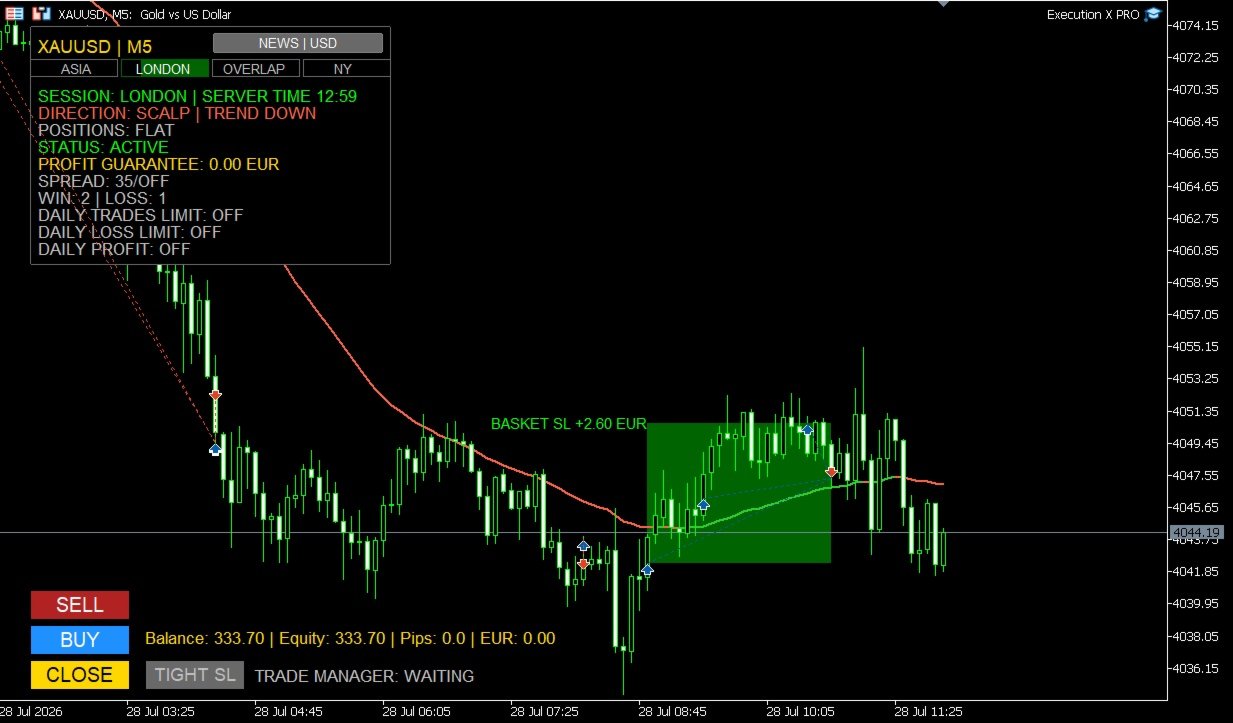
Entry Markers and Result Zones
Optional entry markers show where BUY and SELL positions were executed.
After the basket is closed, the system can draw a visual result zone representing the completed trade.
Profitable and losing baskets are visually separated, making post-trade review faster and clearer.
These result zones remain useful for:
-
analysing entry quality,
-
reviewing trade duration,
-
studying market reaction,
-
comparing execution with the original setup,
-
and improving future decisions.
End-of-Day Management
Execution X PRO can optionally close an active basket near the end of the trading day.
This feature is useful for traders who do not want to carry positions overnight or who operate under strict daily trading rules.
When disabled, the system leaves the basket untouched.
Why Use Execution X PRO?Execution X PRO is designed to solve the practical problems that appear between market analysis and real execution.
A trader may understand the market correctly and still lose control through:
-
hesitation,
-
delayed execution,
-
excessive position size,
-
inconsistent stop management,
-
premature profit-taking,
-
uncontrolled scaling,
-
revenge trading,
-
or failure to stop after reaching a daily objective.
Execution X PRO creates a controlled process around the trader’s decisions.
It does not promise that every trade will win.
It helps ensure that every trade is executed and managed within a consistent professional framework.
Designed for Different Trading StylesExecution X PRO can support:
-
XAUUSD trading,
-
Forex,
-
indices,
-
metals,
-
commodities,
-
scalping,
-
intraday trading,
-
swing trading,
-
position trading,
-
single-entry trading,
-
and basket-based execution.
Because the system does not impose its own entry strategy, it can be integrated with many discretionary methodologies.
Who Is Execution X PRO For?Execution X PRO is designed for traders who:
-
want to make their own entry decisions,
-
need faster chart-based execution,
-
want professional basket management,
-
prefer visible risk controls,
-
scale into positions,
-
struggle with emotional overtrading,
-
want to protect daily results,
-
need clear post-entry guidance,
-
want to monitor market sessions and news,
-
or prefer one structured panel instead of multiple disconnected tools.
It can be used by both developing and experienced traders, but it is especially valuable for traders who already have a strategy and need a more disciplined execution environment.
Important InformationExecution X PRO is a manual execution and trade-management system.
It is not a fully automated trading robot and it does not independently select market entries.
The quality of results depends on:
-
the trader’s market analysis,
-
entry timing,
-
selected position size,
-
broker conditions,
-
spread,
-
volatility,
-
risk settings,
-
and trading discipline.
No trading tool can guarantee profits or eliminate market risk.
Always test the panel on a demo account before using it with real funds.
Review all settings carefully and use only capital you can afford to lose.
Execution X PROYour analysis. Your decision. Professional execution.
Solution. Comfort. Experience.