Execution X PRO

EXECUTION X PRO

Professional Manual Execution and Trade Management Panel for MetaTrader 5

Solution. Comfort. Experience.

Easy to understand, develop for New traders

Execution X PRO is an advanced manual trading panel created for traders who want to maintain full control over their market decisions while improving execution speed, position management and trading discipline.

It does not generate random entries and it does not replace the trader’s strategy.

Instead, it provides a structured execution environment that connects manual decision-making with professional risk controls, basket management, market context and real-time trade supervision.

The trader decides when and where to enter.

Execution X PRO handles the structure around that decision.

Built for Controlled Manual Trading

Manual trading often becomes difficult not because the trader cannot read the market, but because execution becomes inconsistent under pressure.

Delayed entries, oversized positions, emotional re-entry, uncontrolled exposure and poor profit management can turn a valid market idea into an avoidable loss.

Execution X PRO was designed to reduce this operational noise.

From one visual control panel, the trader can:

  • open BUY and SELL positions,

  • close the active trading basket,

  • monitor current exposure,

  • manage protective levels,

  • control daily risk,

  • observe market direction,

  • track trading sessions,

  • supervise open positions,

  • and respond faster when market conditions change.

The result is a cleaner, more controlled and repeatable trading process.

Core Features

Fast Manual Execution

Execution X PRO provides direct BUY and SELL controls directly on the chart.

The panel reduces unnecessary platform navigation and allows the trader to act immediately when a valid setup appears.

Execution remains fully manual. The system does not decide when to enter the market.

This makes Execution X PRO suitable for traders using:

  • price action,

  • market structure,

  • liquidity concepts,

  • support and resistance,

  • order blocks,

  • breakout strategies,

  • trend continuation,

  • reversal setups,

  • discretionary scalping,

  • intraday trading,

  • and position trading.

Basket Position Management

Multiple positions opened in the same direction can be managed as one coordinated trading basket.

Instead of treating every position as an isolated order, Execution X PRO supervises the combined exposure from a common reference point.

The panel can calculate and display:

  • basket direction,

  • number of active positions,

  • combined lot exposure,

  • current basket profit,

  • current basket movement,

  • protective basket level,

  • and progressive profit objectives.

This is especially useful for scaling into a valid market move while maintaining a clear overview of total exposure.

Opposite-direction entries can be restricted while a basket is active, helping prevent accidental hedging and conflicting trade management.

Progressive Profit Management

Execution X PRO uses a structured multi-stage profit management model.

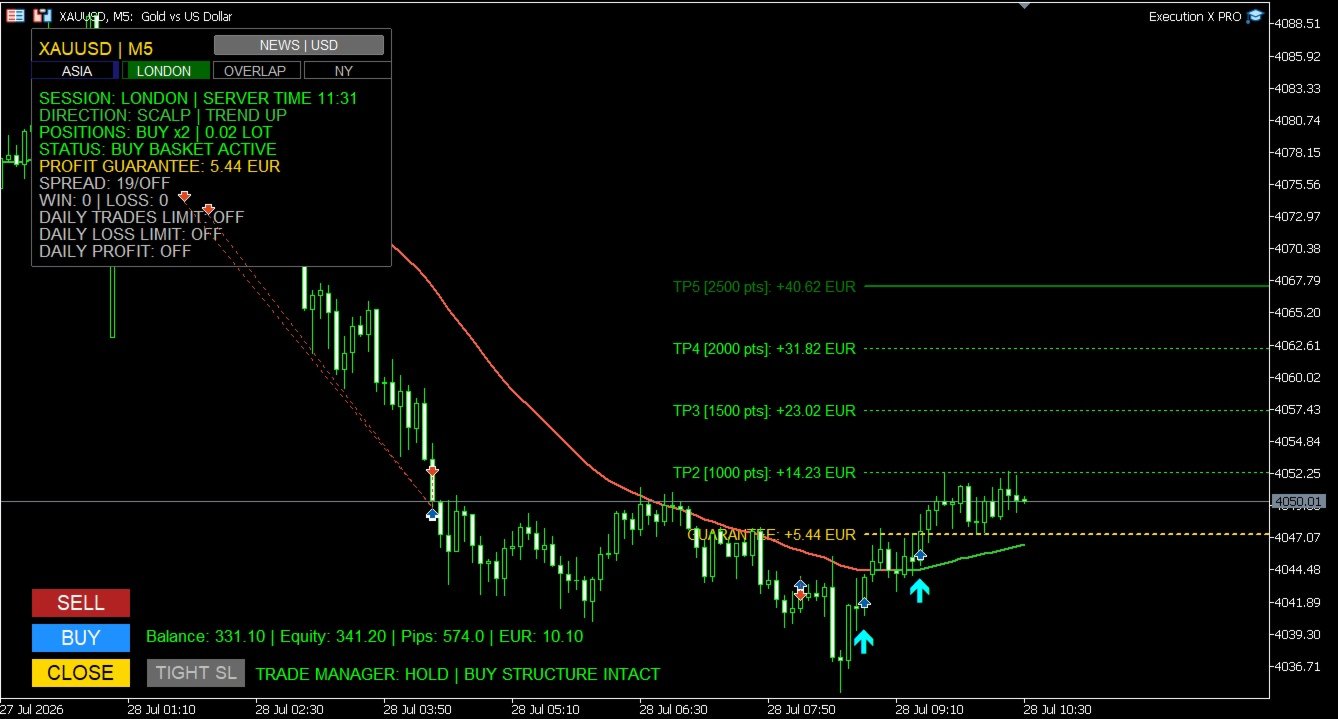
The active trade plan is displayed directly on the chart, allowing the trader to see the progression from the initial protective level through consecutive profit stages.

As price advances, the system can progressively protect the basket and preserve previously reached profit levels.

This creates a disciplined transition from:

initial risk → break-even protection → secured profit → extended profit control

The objective is not only to reach a target, but also to manage the trade professionally while it develops.

Profit Guarantee System

The Profit Guarantee module continuously evaluates the protection currently secured by the basket.

When the market reaches further stages of the trade plan, the protective level can advance in the direction of profit.

The system is designed so that protection does not move backwards after a stronger level has already been secured.

The current guaranteed result is displayed directly on the panel, giving the trader a clear answer to an important question:

How much of the current basket result is already protected?

This helps reduce uncertainty during pullbacks and removes part of the emotional pressure associated with managing profitable trades.

Structure-Based Profit Protection

An optional market-structure protection mode can refine profit management using confirmed structural reference points.

Instead of relying only on fixed target progression, the system may evaluate whether a more effective protective level exists around the active price structure.

This allows profit protection to remain connected to actual market behaviour while respecting the direction of the basket.

The internal calculation remains fully automated, while the trader sees only the relevant protective result.

Trade Manager

Execution X PRO includes a real-time Trade Manager designed to support the trader after entry.

The manager evaluates the active basket and presents clear status information such as:

  • WAITING

  • HOLD

  • TIGHTEN SL

  • EXIT NOW

  • CONTROL YOUR PROFIT

The Trade Manager does not blindly close positions or replace the trader’s judgment.

Its purpose is to provide an additional layer of situational awareness by monitoring the relationship between the open trade, recent price structure and current profit protection.

When appropriate, the trader can use the dedicated TIGHT SL control to apply the suggested protective adjustment.

Optional popup and mobile notifications can also be enabled for important status changes.

Direction Line and Trading Profiles

Execution X PRO includes a visual Direction Line that helps the trader maintain directional context without covering the chart with unnecessary indicators.

The line changes dynamically according to directional pressure and can display:

  • upward conditions,

  • downward conditions,

  • or neutral market behaviour.

Dedicated profiles are available for different trading styles:

Scalping

Designed for short-term charts and faster market reactions.

Day Trading

Designed for intraday execution and broader directional context.

Position Trading

Designed for higher timeframes and longer market cycles.

Custom

Allows experienced traders to configure their own directional framework.

The Direction Line is not an entry signal by itself. It acts as a visual orientation tool that helps the trader compare an intended position with the broader market direction.

Market Structure Zones

Execution X PRO can display selected market structure zones directly on the chart.

These zones help identify areas associated with significant directional expansion and structural price behaviour.

Optional midpoint references provide additional visual context inside each zone.

The objective is to support chart interpretation without replacing the trader’s own analysis.

Market Structure Zones can be switched off whenever a completely clean chart is preferred.

Timeframe-Based Trade Profiles

Different timeframes produce different market conditions.

A protective distance suitable for scalping may be inappropriate for an intraday or position trade.

Execution X PRO can adapt its trade-management framework according to the active chart timeframe.

This allows the system to maintain a more consistent relationship between:

  • initial protection,

  • market movement,

  • progressive targets,

  • and the selected trading horizon.

The trader may also disable the timeframe profile mode when a custom approach is preferred.

Risk Management

Capital Risk Guard

Before accepting a new position, Execution X PRO can evaluate the potential combined exposure of the active basket.

When the estimated basket risk exceeds the configured account-risk threshold, further execution can be blocked.

This helps prevent uncontrolled position accumulation and protects the trader from unintentionally building exposure beyond the selected risk limit.

Automatic or Fixed Position Size

The panel supports two position-sizing approaches:

Fixed Lot Mode

The trader defines the lot size manually.

Balance-Based Lot Mode

Position size can adjust automatically according to account balance.

This gives the user the flexibility to choose between complete manual control and a more systematic sizing model.

Daily Loss Limit

A daily monetary loss limit can be defined directly in the settings.

Execution X PRO monitors both closed and active trading results for the current day.

When the configured loss threshold is reached, the system can close the active basket and block further trading activity.

This feature is designed to protect the trader from revenge trading, emotional escalation and excessive exposure after a difficult session.

Daily Profit Target

The trader can define a daily monetary profit objective.

The panel continuously displays the remaining amount required to reach that target.

Once the target is achieved, Execution X PRO can:

  • close the active basket,

  • record the daily objective as completed,

  • and prevent further entries for the remainder of the trading day.

This helps transform a profitable session into a completed session instead of allowing overtrading to return profits to the market.

Daily Trade Limit

A maximum number of trades can be configured for each trading day.

The panel displays the current number of executed trades relative to the selected limit.

When the limit is reached, additional entries are blocked.

This encourages selective execution and helps traders avoid low-quality trades caused by boredom, frustration or excessive market activity.

Spread Protection

Execution X PRO can monitor the current spread before accepting a new trade.

When the spread exceeds the configured threshold, entry is temporarily blocked.

This can be especially valuable during:

  • low-liquidity periods,

  • market openings,

  • news releases,

  • rollover,

  • and sudden volatility expansion.

Entry Cooldown

A configurable cooldown period can be applied after opening a position.

During the cooldown, additional entries are temporarily restricted.

This feature helps prevent rapid emotional re-entry and uncontrolled position stacking.

Margin Control

Before submitting a position, Execution X PRO checks whether sufficient account margin is available.

This provides an additional operational safeguard and reduces rejected or inappropriate execution attempts.

High-Impact News Protection

Execution X PRO includes an integrated high-impact economic news filter.

The system automatically identifies relevant currencies associated with the active trading symbol and monitors important scheduled events.

During the configured protection window, new entries can be blocked.

The panel displays:

  • news protection status,

  • affected currency,

  • event information,

  • and the approaching release window.

This helps traders avoid entering new positions immediately before major economic events when spreads, volatility and execution conditions may become unstable.

The news filter can be disabled by traders who prefer to manage economic events manually.

Trading Session Monitor

The panel identifies the current global trading session using server-time synchronization.

It can display the active market phase, including:

  • Asia,

  • London,

  • London–New York overlap,

  • New York,

  • and quieter market periods.

The visual session cockpit provides immediate context about current liquidity conditions without requiring external tools.

This is particularly useful for traders whose strategy depends on session behaviour, volatility transitions or market-opening activity.

Real-Time Trading Dashboard

Execution X PRO keeps the most important account and position information visible directly on the chart.

The panel displays:

  • account balance,

  • account equity,

  • current basket movement,

  • floating basket result,

  • symbol and timeframe,

  • market direction,

  • current position side,

  • number of active positions,

  • combined lot exposure,

  • protected basket result,

  • spread status,

  • win and loss statistics,

  • daily trade usage,

  • daily loss status,

  • daily profit progress,

  • trading session,

  • server time,

  • news status,

  • and Trade Manager guidance.

The trader does not need to constantly switch between multiple MetaTrader windows to understand the current trading situation.

Visual Trade Plan

After entry, Execution X PRO draws the active management structure directly on the chart.

The trader can clearly see:

  • the basket reference price,

  • the protective level,

  • consecutive profit objectives,

  • the approximate financial result at each level,

  • and the progression of the active trade.

This improves clarity before and during position management.

The chart becomes a visual execution map rather than a collection of disconnected orders.

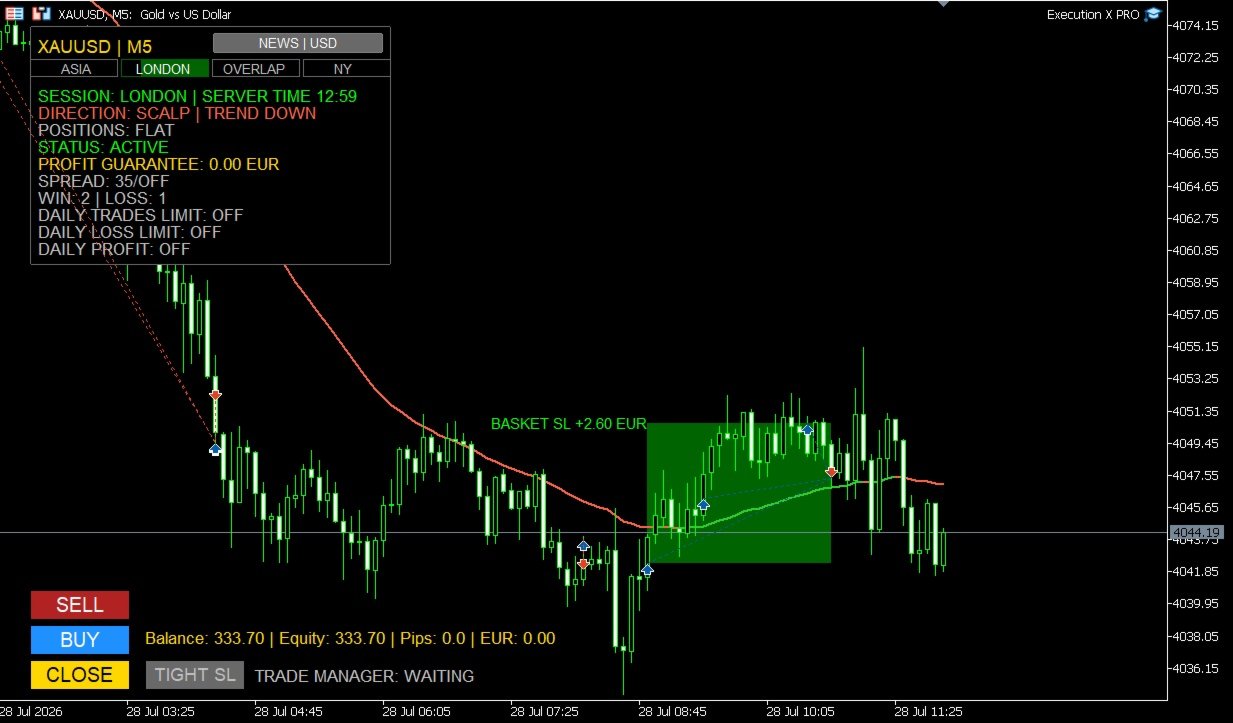
Entry Markers and Result Zones

Optional entry markers show where BUY and SELL positions were executed.

After the basket is closed, the system can draw a visual result zone representing the completed trade.

Profitable and losing baskets are visually separated, making post-trade review faster and clearer.

These result zones remain useful for:

  • analysing entry quality,

  • reviewing trade duration,

  • studying market reaction,

  • comparing execution with the original setup,

  • and improving future decisions.

End-of-Day Management

Execution X PRO can optionally close an active basket near the end of the trading day.

This feature is useful for traders who do not want to carry positions overnight or who operate under strict daily trading rules.

When disabled, the system leaves the basket untouched.

Why Use Execution X PRO?

Execution X PRO is designed to solve the practical problems that appear between market analysis and real execution.

A trader may understand the market correctly and still lose control through:

  • hesitation,

  • delayed execution,

  • excessive position size,

  • inconsistent stop management,

  • premature profit-taking,

  • uncontrolled scaling,

  • revenge trading,

  • or failure to stop after reaching a daily objective.

Execution X PRO creates a controlled process around the trader’s decisions.

It does not promise that every trade will win.

It helps ensure that every trade is executed and managed within a consistent professional framework.

Designed for Different Trading Styles

Execution X PRO can support:

  • XAUUSD trading,

  • Forex,

  • indices,

  • metals,

  • commodities,

  • scalping,

  • intraday trading,

  • swing trading,

  • position trading,

  • single-entry trading,

  • and basket-based execution.

Because the system does not impose its own entry strategy, it can be integrated with many discretionary methodologies.

Who Is Execution X PRO For?

Execution X PRO is designed for traders who:

  • want to make their own entry decisions,

  • need faster chart-based execution,

  • want professional basket management,

  • prefer visible risk controls,

  • scale into positions,

  • struggle with emotional overtrading,

  • want to protect daily results,

  • need clear post-entry guidance,

  • want to monitor market sessions and news,

  • or prefer one structured panel instead of multiple disconnected tools.

It can be used by both developing and experienced traders, but it is especially valuable for traders who already have a strategy and need a more disciplined execution environment.

Important Information

Execution X PRO is a manual execution and trade-management system.

It is not a fully automated trading robot and it does not independently select market entries.

The quality of results depends on:

  • the trader’s market analysis,

  • entry timing,

  • selected position size,

  • broker conditions,

  • spread,

  • volatility,

  • risk settings,

  • and trading discipline.

No trading tool can guarantee profits or eliminate market risk.

Always test the panel on a demo account before using it with real funds.

Review all settings carefully and use only capital you can afford to lose.

Execution X PRO

Your analysis. Your decision. Professional execution.

Solution. Comfort. Experience.


推荐产品
BeansAssist
Ivanvielle Bonifacio Dupaya
BeansAssist *Major update 3.00 released. Kindly update your copy of BeansAssist Gives you fruitful information of the price of the symbol that you are trading. Improve your trades simply by following the suggestion that it gives you. Tracks deal stats daily so you keep track of your performance. Don't let emotions take control, be a better and profitable trader with BeansAssist to guide you. *Note: This utility is not for free 
Manyal trading system, CovEchoTrend Robot, focuses on reliability and flexibility. By employing statistical analysis methods to study the relationships between the base indicator and market patterns, the system enables a deeper understanding of market processes. Intelligent pattern analysis: The application of statistical data processing helps identify key trend reversal points more accurately, signaling significant market shifts. Informed decision-making is based on the intersection of indicato
Mahra Pro Indicator MT5
Mahra Said Mohammed Al Kaabi
Mahra Pro Indicator MT5 Overview Mahra Pro is a MetaTrader 5 chart indicator designed to support structured analysis of XAUUSD (Gold). It combines trend, momentum, volatility and price-structure conditions to identify potential buy and sell setups and display them directly on the chart. The indicator does not open, modify or close trades. All trading decisions and order execution remain under the user's control. Main features • Buy and sell signal arrows on the chart. • Fast and slow EMA lines w
机构级日内交易工具 高级可视化助手,助力手动交易。 机构级日内交易工具是一款专业的可视化智能交易系统(EA),专为使用价格行为(Price Action)、CRT、PO3、ICT/SMC 等工具的手动交易者开发,旨在提供清晰的图表信息,帮助交易者获得机构级的分析视角。 机构级日内交易工具将您的图表转化为机构级的分析仪表盘,让交易者完全掌控交易执行。 清晰的视觉呈现。专业的分析视角。人性化的决策。 此EA不会自动开仓、平仓或管理订单。 它仅作为可视化图表分析工具使用。 EA目标 智能化地组织图表,自动生成机构级图表、重要价位、风险区域、高时间框架(HTF)信息和可视化管理,从而帮助交易者更快、更严谨、更准确地做出决策。 主要功能 控制面板(开/关) 简洁专业的界面 可单独激活/停用模块 消除视觉干扰 可视化风险管理 自动绘制止损和止盈之间的区域 直观显示: 风险区域 盈利区域 风险回报比 非常适合操作纪律和入场前规划 不会自动开仓或平仓;用户必须使用按钮激活订单。 不会修改自动止损或止盈 不会执行自动交易 机构工具 CBDR(央行交易员价
Divergent Stochastic Filter II Catch Reversals Early, Filter Noise, Trade with Confidence The Edge: Why This Stochastic is Different  Every trader knows the Stochastic oscillator. But knowing when to trust its signals, that's the real challenge. The Divergent Stochastic Filter II transforms this classic indicator into a precision reversal detection system by adding critical elements: divergence intelligence, signal filtering and exhaustion detection.  While standard Stochastic oscillators fire s
XBOOT BOLETA PRO Professional Manual Trading Panel for MetaTrader 5 XBOOT Boleta Pro is a complete trading panel designed for traders who execute manual trades and want greater speed, organization, and control during every trading session. More than a standard Buy and Sell panel, XBOOT Boleta Pro combines powerful trading tools into a single interface, helping traders analyze the market, manage risk, execute orders, and monitor trading performance without leaving the chart. Its purpose is to sim
Break Retest
Ongkysetiawan
BREAK RETEST NON-REPAINT. WORKS BEST AT M15 AND ABOVE.  Benefits Fewer false breakouts . Combining close confirmation + retest + previous-close filter greatly reduces noise vs. raw high/low breaks. Tighter execution plans . The drawn level line gives an objective spot for entries, stop placement (just beyond the level), and partial-take-profit structure. Non-repainting confidence . Signals are placed on current bar. Flexible across markets . Works on FX, indices, metals, crypto; scalping on M15
Currency Strength Panel
AL MOOSAWI ABDULLAH JAFFER BAQER
Currency Strength Trade the strongest currencies against the weakest with confidence. Currency Strength is a professional MetaTrader utility that measures and displays the real-time strength of major currencies, helping traders identify high-probability trading opportunities based on market momentum rather than guesswork. Instead of analyzing one currency pair at a time, Currency Strength evaluates multiple currency pairs simultaneously to determine which currencies are gaining strength and whic
TradingManagement
Christian Ishmael Calienta Magallon
TradingManager is a comprehensive trading panel designed to streamline your trading workflow in MetaTrader 5. It combines order management, risk controls, and market analysis into one intuitive interface. Key Features 1. Trading Panel Market Order Entry   - One-click BUY/SELL with automatic SL and TP line placement on chart Fib Limit Orders   - Draw Fibonacci-based limit orders with visual SL and TP levels Risk Management   - Choose between Lots, % Risk, or $ Risk modes Take Profit Split   - Dis
AutoStructure
Evgeniy Grebenuik
AutoStructure — Your Key to Precise Market Entry in Forex! AutoStructure is a professional Forex indicator designed for traders who value precision, speed, and full control over the market. With just one click, you'll be able to: Automatically draw key support and resistance levels Visualize FVG zones (Fair Value Gaps) to spot profitable reversals Analyze Order Blocks across multiple timeframes Build Fibonacci levels based on real price action Perfectly suited for both scalpers and position t
Somewhere over the rainbow It is a system that tries to operate the market from the exhaustion of the trend with a correction algorithm that tries to cut losses at the cost of increasing the margin This system makes all the adjustments automatically, analyzing the pair and the market to decide which is the most efficient step to reach your destination. Somewhere over the rainbow is a multiple trade and multi lot system(The maximum batch can be up to 5 times the initial batch distributed in mult
SwiftDraw Starter 是一款精简而高效的专业图表工具,旨在让技术分析更加快速、整洁和高效。 专为依赖手动图表分析的交易者打造,SwiftDraw Starter 通过直观的键盘快捷键提供一系列核心图表工具,帮助您以最少的点击快速创建和管理最常用的图表对象。 专为 剥头皮交易者、日内交易者和自主决策型交易者 设计,SwiftDraw Starter 能够简化图表准备流程,并提高您在盘前分析和技术分析中的工作效率。 SwiftDraw Starter 也是您进入 SwiftDraw 生态系统的第一步。 如果您希望获得完整体验,包括高级交易规划工具、 Live Multi-Timeframe Sync 以及更多功能,可以在本主页中探索 SwiftDraw Prime 。 为速度而生 通过可自定义的快捷键,快速创建您最常用的核心图表工具: 水平线 — 通过一次操作快速标记支撑位、阻力位和关键价格水平。 垂直线 — 轻松标记特定时间点或区分不同的市场阶段。 趋势线 — 通过一个快捷键并在图表上拖动,即可快速创建趋势线,更清晰地观察价格结构。 矩形 — 以简洁、半透明的设计突出显示
FREE
Metatrader to telegram copier
Lawrence Chilambe Mkandawire
MT5 to Telegram Copier Pro is a powerful Expert Advisor built to solve one of the biggest challenges faced by signal providers and active traders: fast, reliable, and professional trade broadcasting . Many traders lose subscribers, miss opportunities, or create confusion because they manually type signals, delay trade updates, or send incomplete trade details. Others open trades from their phone and struggle to instantly share them with their Telegram audience. This tool eliminates those problem
Introduction to the Manual Backtesting Indicator on MQL5 The MetaTrader platform provides an excellent backtesting tool for evaluating Expert Advisors (EAs). However, when it comes to manually backtesting a strategy to assess its effectiveness, this tool has some limitations: You cannot manually draw zones or trend lines while in backtesting mode. You cannot switch timeframes to check time alignment. For example, if my strategy requires additional confirmation from a higher timeframe (HTF), this
Currency Index Watcher is a simple and user-friendly tool for whoever wish to trade Forex using currencies indexes. Currency Index Watcher is configurable and usable directly from the panel. Indexes of 8 custom currencies EUR, USD, GBP, JPY, CHF, AUD, CAD, NZD (default) Any 3-chars symbol from your market watch could be used (BTC = bitcoin, RUB = ruble, CNH = yuan etc ...) : double click the symbol label  Ability to select which currencies and made-of pairs will be analyzed : check/uncheck wante
Omega Sense X Cryptocurrency
Aiman Saeed Salem Dahbag
Overview Omega Sense X is a professional trading indicator developed exclusively for Bitcoin (BTC) on the MetaTrader 5 platform. It utilizes an intelligent multi-factor analysis system to identify high-probability trading opportunities while filtering out weaker market conditions. This helps traders make more informed decisions without continuously monitoring the market. Key Features Clear Buy and Sell signals. Smart filtering system to improve signal quality. Automatic Entry Price calculation.
Binance Full Trader
Arash Rezaeian
2 (1)
Binance Full Trader is developed for connection to your Binance account and get data, draw price charts and trade easily with any strategy by an indicator. A user-friendly interface has developed for it and has tried to give access to the necessary information such as open orders and wallet balances. ·        There are two sample indicators (one for trade signal and another for price) that you can download it from these links: https://drive.google.com/file/d/1w2CGuu3rArWKMhS9LkepT9zhVkGR1AO7/vie
賺錢和研究的工具。 交易信號和策略的核心是基於作者的價格預測模式形成算法。適用於任何樂器!輔以基於 MA "九尾狐" 的控制系統,盡可能準確地更新和調整市場、儀器和工作期間的信號。 合格:所有市場中的所有工具(有例外)。 適用對象:對沖基金、基金和資產經理、投資經理、投機者、投資者和利益相關者。 ..................................................................................................................................................................................
RSI Cortex Ai
Michael Prescott Burney
RSI Cortex AI for MT5 RSI Cortex AI is a MetaTrader 5 indicator designed to help traders analyze momentum using a multi-factor ranking model instead of relying only on a fixed RSI threshold approach. It combines momentum features, directional ranking, confidence scoring, and adaptive filtering into a clean TradingView-style workspace for chart-based analysis. What the indicator does RSI Cortex AI evaluates momentum using a broader feature set than a standard RSI line. It is designed to help trad
FREE
Let us introduce the Heikin Ashi RSI Oscillator! This indicator combines the concepts of Heikin Ashi candles with the RSI (Relative Strength Index) to produce an oscillator-like format that can be used to filter out some of the noise associated with standard RSI readings. This provides traders with a smoother representation of market conditions. Here are some articles to read more about the RSI and Heikin Ashi candles: https://www.investopedia.com/terms/r/rsi.asp https://www.investopedia.com/ter
NEW :    integration with Ofir Signals to send personalized alerts Ofir Notify is a tool which send alerts on trades to Telegram Alert on any event concerning a position : Opening, Closing, modification (SL, TP) Send alerts to Chats, Groups and Channel Alert on Equity change Display Risk, Reward and progress of profit/lost for each position Customization of alerts Sending charts screenshots with alerts Send signals from your indicators or experts Multi-lingual  NEW  : version 2 brings integrati
Daily Entry m1
Ibrahim Aljaref
Daily Entry M1 – MT5 指标 Daily Entry M1 是一款为 MetaTrader 5 开发的指标,专为专注于 M1 时间周期短线日内交易机会的交易者设计。 该指标会分析市场状况,并在其内部入场条件得到确认后,直接在图表上显示清晰的 BUY 和 SELL 箭头。 该指标旨在寻找潜在的市场转折区域,并尝试识别接近日内顶部或底部的入场机会,帮助交易者专注于可能的反转机会,而不是随机的市场位置。 每个交易箭头都带有其自身预设的目标水平,使交易者能够立即看到与该特定信号相关的目标。 Daily Entry M1 的主要目标是提供一个简洁且实用的交易环境,让交易者能够快速识别入场信号及其对应目标,而不会让图表变得过于复杂。 主要功能 专为 MetaTrader 5 设计 针对 M1 时间周期进行优化 清晰的 BUY 和 SELL 入场箭头 尝试识别接近潜在市场顶部和底部的入场机会 专注于可能的日内反转区域 每个箭头都包含其自身目标 目标水平与对应信号相关联 内置新交易信号提醒 支持 MetaTrader 5 推送通知 当出现新的 BUY 或 SELL 信号时可以接收通
Onyx Sniper
Thirawut Detbangoon
Onyx Sniper - 聪明钱概念 (SMC) 助手 Onyx Sniper 是一款强大且高精度的指标,旨在简化 SMC 交易。它自动检测高概率的订单块 (OB) 和市场结构,直接在图表上为您提供精确的进场和出场水平。 主要功能: 智能订单块 (OB): 自动识别有效的买入/卖出订单块,并计算每个设置的概率得分(例如 85%)。 市场结构映射: 自动绘制特征改变 (CHoCH) 和结构破坏 (BOS) 线。 多时间框架仪表板: 无需切换图表即可立即检查 6 个时间框架(M1、M5、M15、M30、H1、H4)的整体趋势方向。 内置交易计划: 显示实时仪表板,提供精确的进场、止损 (SL) 和 4 个止盈 (TP1-TP4) 水平。 整洁的图表: 自动隐藏已测试或被突破的区域,保持图表清晰。 主要参数: Max Bars: 用于计算的历史K线数量。 Swing Length: 识别波段高低点的灵敏度。 SL Points: 止损计算的缓冲距离(点)。 Radar Points: 扫描最近活跃信号的最大距离。 Colors: 完全可自定义的颜色设置。
Telegram to mt5 pro
Janet Abu Khalil
4 (4)
Telegram to MT5 Pro — 高级 Telegram 信号复制器(Auto-Fix,多TP,风险控制,完整交易管理) Telegram to MT5 Pro — 专业 Telegram 信号复制系统 Telegram to MT5 Pro 可将来自 Telegram 的交易信号实时复制到您的 MetaTrader 5 账户,并提供完整的风险控制、执行管理与交易管理功能。 系统由两个组件组成: • 运行在 MetaTrader 5 内的 Expert Advisor(EA) • 连接 Telegram 并将信号发送到 EA 的桌面桥接程序 两个组件必须在同一台电脑运行。由于 MQL5 限制,EA 无法直接连接 Telegram。 支持与安装 提供完整 PDF 安装指南。 支持内容: • 完整 PDF 使用手册 • 分步安装指导 • 在线聊天支持 • 交易商设置帮助(前缀、后缀、符号映射) 功能说明 • 读取任意 Telegram 群组或频道信号 • 自动解析交易品种、方向、入场、止损、止盈 • 秒级执行交易 • 管理交易(移动止损、保本、部分平仓) • 支持多账户与多信号
Pivot meter
Theophane Dohou
新交易工具:优化您的交易! 我很高兴向您介绍我开发的全新工具,让您在无需多想的情况下轻松进行交易!与传统的指标不同,这个工具不仅仅是追踪价格变化。它深入分析不同货币之间的相关性,帮助您发现进场的战略时机。 以下是它的工作原理: 零 = 无交易:当指标为零时,表示市场条件不利,我将保持观望,暂不进入市场。 当数值达到4时,警报触发:当其中一种货币达到4时,工具会发送警报,提醒您市场条件适合在四种货币对上进行交易。 相关性分析:与传统的指标不同,这个工具基于货币之间的相关性。例如,如果一种货币与美元相关,则标记为1,如果两种货币相关,则标记为2。当数值达到4时,意味着多种货币相对于美元疲软,工具会向您发送警报,提醒您在四个货币对中选择交易。 这是一个真正节省时间的工具,避免了手动搜索每个货币对。它会自动提醒您最佳的交易机会! 现在是时候以基于货币相关性而非单纯价格波动的方式进行交易了,不必再多想!
BlueBoat – Prime Cycle is a technical indicator for MetaTrader 5 that visualizes market cycles based on the Fimathe cycle model (Marcelo Ferreira) . It identifies and displays historic and live cycle structures such as CA, C1, C2, C3, etc., helping traders understand the rhythm and timing of price movement across multiple sessions. This tool is ideal for manual analysis or as a supporting signal in discretionary strategies. Key Features Historical Cycle Analysis – Backtest and visualize as many
CopyTrade Pro MT5
David Julio Cuenca Oliver
CopyTrade Pro MT5   With CopyTrade Pro MT5, you can copy your trades from MT5 to MT5, MT5 to MT4. For MT5 to MT4 copies, you must have both versions (MT5 and MT4) installed. MT4 version:   CopyTrade Pro MT5 can: - Copy from MT5 to MT5, MT5 to MT4 quickly, instantly, and securely. - Master and Slave functionality, connecting both accounts using a comment to link and copy trades. - Fast execution (under 50ms). - Hides the fact that the trade has been copied using a copier, making it very useful
Trade2Telegram
Strifor (Mauritius) Ltd
5 (10)
Trade2Telegram — 一个用于将MetaTrader交易自动通知发送到Telegram的插件。 该工具适用于管理资金的交易者、运营信号频道的人员或领导教育社区的人。该插件会将终端中的所有交易操作复制并发布到选定的Telegram聊天、群组或频道中。 当开仓或平仓、止损或止盈水平变动、挂单触发或部分平仓时,消息会自动发送。 您可以自定义消息格式,包括:交易品种、交易方向、交易手数、开仓和平仓价格、止损/止盈水平,以及点数和金额的结果。它还支持添加标签和备注,并可选择服务器时间或本地时间。 该插件直接通过Telegram Bot API工作,无需任何第三方服务。连接方式非常简单,只需提供您的Bot令牌和目标聊天或频道的ID即可。 主要优势: 完全自动化的交易通知; 灵活的消息格式和发送频率; 支持所有订单类型; 可维护公开或私人的交易统计。 该插件非常适合信号频道、私募交易办公室、团队交易日志以及透明的实时交易跟踪。
FREE
使用革命性的交易时间管理器轻松控制您的交易程序。这个强大的工具可以在指定时间自动执行订单,从而改变您的交易方式。 为不同的交易行为(从购买到设置订单)制定个性化任务列表,所有这些都无需人工干预。 交易时间管理器安装和输入指南 如果您想获取有关 EA 的通知,请将我们的 URL 添加到 MT4/MT5 终端(参见屏幕截图)。 MT4版本     https://www.mql5.com/en/market/product/103716 MT5版本     https://www.mql5.com/en/market/product/103715 告别人工监控,拥抱精简效率。直观的界面允许您设置精确的参数,包括交易品种、执行时间、价格、止损 (SL)、止盈 (TP) 点和手数大小。 该工具的灵活性通过与市场行为相匹配的适应性重复选项来凸显。通过视觉主题个性化您的体验,并减少长时间交易期间的眼睛疲劳。 摆脱手动交易程序,拥抱“交易时间管理器”的强大功能。提高交易的准确性、组织性和自由度。简化您的日常工作并重新体验交易。 主要特点: 自动订单执行:按指定时间间隔无缝自动执行订单,从而节省您的
MSD Utility MT5
Kevin Beltran Keena
Multi Strategy Dashboard Utility MT5        Some functions of the MSD Utility can only be used on the full version. Multi instrument and multi time frame scanner, with the best indicators.  Comes with an order management panel. The MSD Utility can be used for manual trading. Click on the '?' button on the dashboard to obtain information about the various elements of the MSD Utility. Uses ATR Take Profits, ATR Stop Losses and ATR Trailing Stops. Comes with an FX Currency Strength meter and a Mar
该产品的买家也购买
================================================================================ POC BREAKOUT - V20.72. Full Professional Grade Toolkit ================================================================================ POC Breakout is a full MetaTrader 5 trading dashboard for discretionary traders who want breakout signals, Point of Control (POC) context, volume profiles, order flow, market structure, news, alerts, and advanced trade planning in one professional workspace. Attached directly to you
Farmed Hedge Yield Farming | All Markets (Manual - Hybrid - Semi/Automated EA) VERIFIED TRADING RESULTS - Farmed Hedge Yield Axi Copy:  https://www.mql5.com/en/signals/2356376 - Farmed Hedge Yield Exn Copy:   https://www.mql5.com/en/signals/2356404 - Farmed Hedge Yield V Copy:  https://www.mql5.com/en/signals/2357156 * Before purchasing, please feel free to send me a message if you have any questions about the product or setup. ** After purchase,  Contact me via private message to receive t
EA Overfitter
Stephen J Martret
回测看起来很漂亮。但它明天、下周、下个月还能继续赚钱吗? EA Overfitter 让您的 EA 在 100 段它从未见过的价格历史上重新运行。一个分数告诉您这个优势是否真实。 回测告诉您的,是 EA 在某一段价格历史上的表现——那段恰好发生过的历史。您无法从中判断,这个结果有多少来自策略本身,又有多少只是那一条特定路径带来的。 EA Overfitter 回答的正是这个问题。它构建最多 100 段您的 EA 从未交易过的合成价格历史,让策略在全部这些历史上重新运行,并展示它所产生的完整结果区间。您得到的不再是一条幸运或不幸路径上的单个数字,而是一幅真实的图景:策略在陌生数据上多久能赚钱、典型结果是什么样(而不是最好的那一次),以及您的回测离它有多远。 这些世界是由您自己的近期历史重建而成,因此这不是预测——任何从历史数据出发的检验都不可能是预测。它告诉您的是:这个优势是否依赖于价格的某一种特定排列,以及回测数字距离典型结果有多远。在投入资金之前,这才是值得回答的问题。 三个步骤 1. 构建。在图表上选择时间区间和世界数量,然后按 Build。EA Overfitter 会
FUTURES ORDERFLOW FOOTPRINT CHART Professional OrderFlow EA for MetaTrader 5 Version 1.01| Professional tool for real traders | Institutional-Grade Visualization STRATEGY TESTER USERS - PLEASE SELECT EVERY REAL TICK WHEN TESTING AND YOU HAVE DOWNLOADED HISTORICAL DATA. IF YOU SEE A WAITING SCREEN AND IT IS NOT DOWNLOADING, IT MEANS YOU HAVE LOW HISTORICAL DATA. TRY 1 MIN AND 5 MIN FIRST ON 1 DAY DATA. ONE DAY DATA SHOULD BE THE NEWEST AND MOST CURRENT DATE. PLEASE WAIT UNTIL THE MARKET HAS ROL
The product will copy all telegram signal to MT5 ( which you are member) , also it can work as remote copier.  Easy to set up, copy order instant, can work with almost signal formats, image signal,  s upport to translate other language to English Work with all type of channel or group, even channel have "Restrict Saving Content", work with  multi channel, multi MT5 Work as remote copier: with signal have ticket number, it will copy exactly via ticket number. Support to backtest signal. How to s
YuClusters
Yury Kulikov
4.93 (43)
Attention: You can view the program operation in the free version  YuClusters DEMO .  YuClusters is a professional market analysis system. The trader has unique opportunities to analyze the flow of orders, trade volumes, price movements using various charts, profiles, indicators, and graphical objects. YuClusters operates on data based on Time&Sales or ticks information, depending on what is available in the quotes of a financial instrument. YuClusters allows you to build graphs by combining da
Power Candles 策略扫描器——自优化多符号设置查找器 Power Candles策略扫描器 采用与Power Candles指标相同的自优化引擎,可同时扫描您“市场观察”中的所有交易品种。一个面板即可显示当前哪些品种在统计上具备交易价值、每种策略的最佳应用方向、最优止损/止盈组合,并在新信号触发时立即向您发送提醒。 本工具是 Stein Investments 生态系统的一部分 - 18+ 款工具,加上 Max,您的一对一 AI 交易导师。  随时在线,深入了解每一款指标,在您需要梳理思路的那一刻就在那里。  立即认识他: https://stein.investments 您的全面市场监控。每个交易品种超过3,000次自动优化。2种警报类型。一键切换图表并采取行动。 为何您需要此工具 大多数多标的扫描器仅展示价格 波动 。每只股票的波动率、百分比变化、RSI。您仍需自行摸索正确的策略、合适的止损位以及理想的入场阈值。Power Candles策略扫描器针对每只股票自动解答这些问题,仅在数学验证过的交易设置中触发实际入场信号时才会向您发出提示。这就是全部卖点。 自动
Quant AI Agents
Ho Tuan Thang
5 (1)
Quant AI Agents are independent trading Expert Advisors. Instead of trading using a fixed strategy like other conventional EAs, Quant AI Agents   is a   multi-agent AI trading framework   that turns natural-language strategy prompts into live.  WANT THE SAME RESULTS AS MY LIVE SIGNAL?   Use the exact same brokers I do:   IC MARKETS , IC TRADING   .  Unlike the centralized stock market, Forex has no single, unified price feed.  Every broker sources liquidity from different providers, creating un
Footprint Chart Pro — Professional OrderFlow EA for MetaTrader 5 Version 6.34 | Professional tool for real traders | Institutional-Grade Visualization DEMO USERS - PLEASE SELECT EVERY TICK / REAL TICK WHEN TESTING AND YOU HAVE DOWNLOADED HISTORICAL DATA. IF YOU SEE A WAITING SCREEN AND IT IS NOT DOWNLOADING, IT MEANS YOU HAVE LOW HISTORICAL DATA. TRY 1 MIN AND 5 MIN FIRST ON 1 DAY DATA. ONE DAY DATA SHOULD BE THE NEWEST AND MOST CURRENT DATE. PLEASE WAIT UNTIL THE MARKET HAS ROLLED OVER PERIOD.
Bots Builder Pro MT5
Andrey Barinov
4.17 (6)
This is exactly what the name says. Visual strategy builder . One of a kind. Turn your trading strategies and ideas into Expert Advisors without writing single line of code. Generate mql source code files with a few clicks and get your fully functional Expert Advisors, which are ready for live execution, strategy tester and cloud optimization. There are very few options for those who have no programming skills and can not create their trading solutions in the MQL language. Now, with Bots Builde
The real‑time view of what is happening inside the market. Footprint Secrets brings detailed analysis directly into MetaTrader 5. It shows where volume is trading, how buyers and sellers are interacting, and how liquidity shifts as the market evolves. Designed for traders who want a precise, real‑time understanding of market behavior. Check out the free preview version here:  https://www.mql5.com/en/market/product/172398 Benefits for the Trader See the real activity behind price . Footprint ch
Custom Alerts AIO:多市场智能监控,一键启动,无需设置 概述 Custom Alerts AIO 是一款“开箱即用”的高级市场扫描工具,无需额外安装任何其他指标或进行复杂设置。它内置了 Stein Investments 的所有核心指标(FX Power、FX Volume、FX Dynamic、FX Levels 和 IX Power),可帮助您轻松监控所有主要资产类别,如外汇、黄金、指数和加密货币。如果您的经纪商支持股票,您也可以手动添加个股进行监控。 1. 为什么选择 Custom Alerts AIO? 无需额外购买任何指标 • 所有关键指标均已内置,开箱即用。 • 专注于实时预警,不包含任何图形元素,性能高效,界面简洁。 全面覆盖所有主要市场 • 支持监控外汇、金属、加密货币和指数市场。 • 无需手动输入任何交易品种,只需在设置中勾选资产类别即可启用。 • 股票并不属于默认类别,如有需要可手动通过参数输入添加。 高效、专业、便捷 • 无需图表模板和手动加载,适合自动化或远程交易环境。 • 非常适合 VPS 上长期运行,或作为后台市场预警工具使用。 2
AI Agent Supervisor is NOT an Expert Advisor. AI Agent Supervisor   is a   multi-agent AI risk & portfolio supervisor   that watches every EA on your account and intervenes in real time.  WANT AN AI PORTFOLIO MANAGER WATCHING YOUR FLEET 24/7?   Run your fleet on the same brokers I do:   IC MARKETS , IC TRADING   .  Unlike the centralized stock market, Forex has no single, unified price feed.  Every broker sources liquidity from different providers, creating unique data streams. The Supervisor r
EasyInsight AIO MT5
Alain Verleyen
4.92 (12)
EASY Insight AIO – 全能智能交易一站式解决方案 概述 想象一下,您可以在几秒钟内扫描整个市场——外汇、黄金、加密货币、指数,甚至股票——无需手动筛选图表、繁琐安装或配置指标。 EASY Insight AIO 是您专为 AI 交易打造的即装即用数据导出工具。它将整个市场快照一次性输出为简洁的 CSV 文件,直接支持 ChatGPT、Claude、Gemini、Perplexity 等各类 AI 平台的即时分析。 无需窗口切换,无需图表叠加,也没有任何杂乱。只需纯净、结构化的数据自动导出,让您专注于基于数据的高效决策,无需再盯盘耗时。 为什么选择 EASY Insight AIO? 真正的一体化 • 无需设置,无需安装指标,无图表叠加。只需安装、运行并导出——就是这么简单。 多资产全覆盖 • 扫描分析外汇、金属、加密货币、指数、股票——您的券商所能提供的一切市场。 AI 专属数据导出 • 高度结构化、针对 AI 优化的 CSV 文件,直接适配主流智能工具和平台。 完整导出内容: • 三个可选周期的货币强度分析 • 净多头头寸变化体现市场情绪 • 成交量变化、
Global Investing FX Terminal
Santiago Nicolas Pla Casuriaga
Global Investing FX Terminal 是一款面向 MetaTrader 5 的一体化外汇仪表盘——涵盖央行政策利率、CFTC COT 持仓、利差排名、经济意外指数、期权偏斜、散户情绪与相关性,共十三个分析面板——以单一无闪烁画布呈现,每 10 秒从单个挂载 EA 刷新一次,无需任何外部软件。 专业外汇分析需要同时调取通常分散在不同平台的数据:利率衍生品、政府数据门户、券商掉期规格、期权台。此 EA 将所有这些整合到交易终端内的单一界面中,在您执行决策的地方完成分析。 仪表盘上显示的内容 市场概览 外汇对列表 — 所有 28 个 G10 货币对,加上当券商 Market Watch 中存在 NOK/SEK 交叉盘时显示的交叉盘——最多共 36 个货币对——的实时买卖价。每行显示点差、日度与周度变化、以点数表示的绝对区间,以及 ADR%——当前交易时段区间占 14 日平均日区间的百分比。ADR 达到 95% 的货币对已消耗其统计日内延伸空间;伦敦盘中场 ADR 仅 25% 的货币对仍有运行余地。颜色逐 Tick 实时更新。 货币对详情 — 点击列表中的任意行,即可打开该
Trading Chaos Expert
Gennadiy Stanilevych
5 (11)
世界上没有本软件的同等产品,它代表一个覆盖交易信号的通用交易 "控制台",自动入场,设置止损和止盈,还有在单一窗口里同时进行多交易尾随终止。EA 的 "三次点击" 直观控制,确保在不同计算机上全方位使用所有功能,包括平板电脑。 与附加的信号指标交互来标记图标,给出实际市场的全貌,EA 令您做出正确的选择,以及在大多数情况下成为胜者一方。内置资金管理算法, 还有自动计算手数, 虚拟订单交易, 以及一些其它从崩溃账户里挽救交易者的 "诀窍"。它不是一个 "黑盒子"。而是一个深思熟虑的交易员的不可或缺的助理, 至少要尝试一次它的动作。 注,在面板上形成的 EA 不能在策略测试员中测试。可以在您的模拟账户里以实时模式检查它, 您可以下载本 EA 的免费版 - 混沌交易 EA 演示 。 EA 表现为一个面板,带有内置功能的交易机器人的,自动基于交易者可直观检查的交易信号入场,完全按照比尔·威廉姆斯的策略“混沌交易:第二版”和“新贸易维度”。在单独的窗口里,EA 识别价格走势的导向,用于指定品种和时间帧的全自动交易模式,也可以多品种并发。 它同时分析 MetaTrader 5“市场观察”窗口中显示
Features   With MT5 to Interactive Brokers(IB) Trader, you can: 1. Load chart data from IB to MT5, and Analyze with all standard or customer Indicators. 2. Place Orders to IB Account Directly in MT5. 3. Make your Own EAs upon IB Securities by only making minus changes of the trading function. Usage 1) Installation Copy the "Mt5ToIBTraderEn.ex4" and sample files to [MT5 Data Folder]->MQL5->Experts.  2)  MT5 Settings Add the IP Address to the MT5 Allowed URLs in 'Tools->Options->Expert Adviso
HINN Lazy Trader
ALGOFLOW OÜ
5 (1)
The core idea: using the user interface, you configure the parameters the chart must meet before entering a position (or positions), choose which entry models to use, and set the rules for when trading and planning should end. Lazy Trader  handles the rest: it  takes over all the routine chart watching and execution! full description  :: 3 key videos [1] ->  [2]   ->  [3] What can it do? - Understands Larry Williams market structure - Understands swing market structure by Michael Huddleston
Check EA performance  https://www.mql5.com/en/signals/2376164?source=Site +Profile+Seller Spot vs Future Arbitrage EA for MT5 Spot vs Future Arbitrage EA is an automated Expert Advisor designed for MetaTrader 5 that operates using price differences between Gold spot and Gold futures instruments. The strategy opens positions on both instruments simultaneously to take advantage of temporary differences between spot and futures prices. Requirements The trading account must provide both Gold spot
The product will copy all  Discord  signal   to MT5   ( which you are member  ) , also it can work as remote copier.  Easy to set up. Work with almost signal formats, support to translate other language to English Work with multi channel, multi MT5. Work with Image signal. Copy order instant, auto detect symbol. Work as remote copier: with signal have ticket number, it will copy exactly via ticket number. How to setup and guide: Let read all details about setup and download Discord To MetaTrader
Prop Firm Os
Gayathiri Gopalakrishnan
5 (1)
PROP FIRM OS Structured Trading Assistant for MetaTrader 5 PROP FIRM OS is a structured trading assistant designed for MetaTrader 5 users who prefer rule-based market analysis and organized trading workflows. The Expert Advisor combines market analysis tools, scanner functions, dashboard monitoring, alerts, risk-control settings, and trade management features inside one system. PROP FIRM OS is designed to help traders follow selected rules, filters, and monitoring conditions during trading activ
Trade Copier Pro MT5
Vu Trung Kien
3.67 (3)
Trade Copier Pro MT5 is a tool to copy trade remotely to multiple MT4, MT5 and cTradfer accounts at different computers/locations over internet. This is an ideal solution for you if you are a signal provider and want to copy your trades to other receivers globally on your own rules. One provider can copy trades to multiple receivers and one receiver can get trade from multiple providers as well. The provider can even set the subscription expiry for each receiver, so that receiver will not be abl
ManHedger MT5
Peter Mueller
4.83 (6)
THIS EA IS A SEMI-AUTO EA, IT NEEDS USER INPUT. Manual & Test Version Please TEST this product before BUYING  and watch my video about it. The price of the ManHedger will increase to 250$ after 20 copies sold. Contact me for user support or bug reports or if you want the MT4 version! MT4 Version  I do not guarantee any profits or financial success using this EA. With this Expert Advisor, you can: Implement your own Zone Recovery strategy to capitalize on trending markets. Create Grid trading s
Mt5 To InterativeBrokers Copier allows you to copy deals from MT5 account to Interactive Brokers. With this, you can run your EA strategy on a MT5 Demo/Real Account, then copy all the deals to Interactive Brokers account real time. Features: 1. Copy or Invert-Copy deals Realtime from MT5 to IB Account. 2. Synchronizing positions of both accounts periodicaly, in case any missing copying. 3. You can choose only Buy position or Sell position. Symbols Setup: General Format:  {MT Symbol} -> {IB S
Latency Arbitrage
Heri Yusufu Kaniugu
Latency Arbitrage – Ultra Fast Execution & Price Inefficiency Capture Latency Arbitrage  utility tool is designed to exploit short-term price inefficiencies between fast and slow price feeds. Instead of predicting market direction, the EA focuses on execution speed and price deviation opportunities, allowing traders to capture micro-movements before the market fully adjusts. With built-in risk controls and smart filtering, it ensures precise and disciplined trading performance. Price increases b
Crystal Trade Manager – Advanced MT5 Risk and Trade Control Utility Overview Crystal Trade Manager (CTM) is a professional MetaTrader 5 utility designed for risk management, trade automation, and instant execution control. It provides traders with an integrated system for protecting equity, managing daily drawdowns, controlling lot sizes, and applying automation features such as automatic SL/TP, break-even, and trailing stop. The tool is suitable for manual traders, prop-firm challenge particip
RiskGuard Management
MONTORIO MICHELE
5 (22)
注意 :要获取免费试用版,请访问我的网站。 使用手册 用户手册 RiskGuard Management — 您进行无妥协交易的终极盟友。 Lot Calculator — 自动计算手数。 Quantum — 自动风险控制,最大化利润并减少回撤。 Automatic Journal — 包含并可从我的网站免费下载。 Automatic Screenshot — 两张截图:开仓时一张,平仓时一张。 Partial Profit — 智能管理的部分平仓功能。 Smartphone Trading — 可通过手机下单,自动管理。 Stop Loss & DD Block — 每日资金的全面保护。 Automatic Break-Even — 轻松降低风险。 Closing Time — 精准控制交易时间。 Automatic Spread — 实时正确设置止损和止盈。 详细的多语言文档以及意大利语和英语的视频教程,可在我的网站上获取。
Unlimited Trade Copier Pro MT5 is a tool to copy trade remotely to multiple MT4, MT5 and cTrader accounts at different computers/locations over internet. This is an ideal solution for you if you are a signal provider and want to copy your trades to other receivers globally on your own rules. One provider can copy trades to multiple receivers and one receiver can get trade from multiple providers as well. The provider can even set the subscription expiry for each receiver, so that receiver will n
# 如果您有任何其他需求或對合作感興趣,請聯繫 zion.quantech.london@gmail.com。 Flash Trade (FT) 最友善的手動交易工具。 使用最直觀的操作來確保您的資金。 FT的特點 點擊任意位置快速交易 FT支持市場訂單和掛單 兩次點擊完成訂單並設置SL和TP 三次點擊完成掛單並設置SL和TP 自動將每個訂單的止損金額設置為您設置的餘額百分比或固定金額 下訂單時實時預估利潤 超簡單的界面和操作 支持拆分訂單 使用方式 市場訂單: 點擊圖表決定止損價位 點擊Buy或是Sell鈕 掛單: 點擊圖表決定入場價位 選擇掛單類型 點擊圖表決定止損價位 暫停FT: 點擊右上方的"On/Off"按鈕來切換開關 當按鈕從綠(On)變為紅(Off),代表FT已被停止 點擊"Off"按鈕再次開啟FT 如果有任何疑問、改善建議或是bug回報都可以聯繫e50310@gmail.com或留下評論 功能將持續於未來的版本推出
Adam FTMO MT5
Vyacheslav Izvarin
5 (2)
ADAM EA Special Version for FTMO Please use ShowInfo= false for backtesting ! Our 1st EA created using ChatGPT technology Trade only GOOD and checked PROP FIRMS  Default parameters for Challenge $100,000 Tested on EURUSD and GBPUSD only  Use 15MIN Time Frame Close all deals and Auto-trading  before Weekend at 12:00 GMT+3  Friday For Prop Firms MUST use special Protector  https://www.mql5.com/en/market/product/94362 --------------------------------------------------------------------------------
作者的更多信息
Fire Horse Gold Pyramid MT5 Uses internal trend-based logic for BUY-only market conditions. Uses controlled position management with reduced risk behavior for additional positions. Protection logic is handled internally by the EA. No martingale.No grid.No averaging down. Overview Fire Horse Gold Pyramid MT5 executes trades based on predefined technical rules. Positions are managed only according to the EA internal logic. The system includes: • Internal trend-based market filtering • Internal e
Fast view of market structure across multiple timeframes — always at hand. Add it to your MT5 library and keep your chart clean. Simple, lightweight and practical — ideal as a supporting tool for daily price action analysis. Track market structure with speed and clarity. MultiTF Fast Pivot ZigZag helps you identify HH, HL, LH, LL and key higher-timeframe levels without switching charts or cluttering your workspace.
Execution Trainer X
Artur Jacek Domagala
Execution Trainer X is a manual trading practice tool created for MetaTrader 5 Strategy Tester. Before real money is placed on the market, the trader should train the decision, the hand and the reaction. Train your decisions. Train your reactions. Train your patience. Train before you risk real money. This Expert Advisor does not trade automatically. It gives you simple BUY, SELL and CLOSE buttons, so you can practice manual execution directly on historical charts. Use it to train entries,
Super MTF Color State
Artur Jacek Domagala
Super MTF Color State Super MTF Color State is a simple multi-timeframe trend direction indicator for MetaTrader 5. Its job is simple: to show the current market direction in a clean and visual way. Green line = the market is moving up. Red line = the market is moving down. The indicator also includes a small color state panel: D1 | H4 | H1 | M15 | M5 | M1 Each timeframe changes color depending on its current direction. This helps the trader quickly see which timeframes agree with the move an
筛选:
无评论
回复评论