Execution X PRO

EXECUTION X PRO

Professional Manual Execution and Trade Management Panel for MetaTrader 5

Solution. Comfort. Experience.

Easy to understand, develop for New traders

Execution X PRO is an advanced manual trading panel created for traders who want to maintain full control over their market decisions while improving execution speed, position management and trading discipline.

It does not generate random entries and it does not replace the trader’s strategy.

Instead, it provides a structured execution environment that connects manual decision-making with professional risk controls, basket management, market context and real-time trade supervision.

The trader decides when and where to enter.

Execution X PRO handles the structure around that decision.

Built for Controlled Manual Trading

Manual trading often becomes difficult not because the trader cannot read the market, but because execution becomes inconsistent under pressure.

Delayed entries, oversized positions, emotional re-entry, uncontrolled exposure and poor profit management can turn a valid market idea into an avoidable loss.

Execution X PRO was designed to reduce this operational noise.

From one visual control panel, the trader can:

  • open BUY and SELL positions,

  • close the active trading basket,

  • monitor current exposure,

  • manage protective levels,

  • control daily risk,

  • observe market direction,

  • track trading sessions,

  • supervise open positions,

  • and respond faster when market conditions change.

The result is a cleaner, more controlled and repeatable trading process.

Core Features

Fast Manual Execution

Execution X PRO provides direct BUY and SELL controls directly on the chart.

The panel reduces unnecessary platform navigation and allows the trader to act immediately when a valid setup appears.

Execution remains fully manual. The system does not decide when to enter the market.

This makes Execution X PRO suitable for traders using:

  • price action,

  • market structure,

  • liquidity concepts,

  • support and resistance,

  • order blocks,

  • breakout strategies,

  • trend continuation,

  • reversal setups,

  • discretionary scalping,

  • intraday trading,

  • and position trading.

Basket Position Management

Multiple positions opened in the same direction can be managed as one coordinated trading basket.

Instead of treating every position as an isolated order, Execution X PRO supervises the combined exposure from a common reference point.

The panel can calculate and display:

  • basket direction,

  • number of active positions,

  • combined lot exposure,

  • current basket profit,

  • current basket movement,

  • protective basket level,

  • and progressive profit objectives.

This is especially useful for scaling into a valid market move while maintaining a clear overview of total exposure.

Opposite-direction entries can be restricted while a basket is active, helping prevent accidental hedging and conflicting trade management.

Progressive Profit Management

Execution X PRO uses a structured multi-stage profit management model.

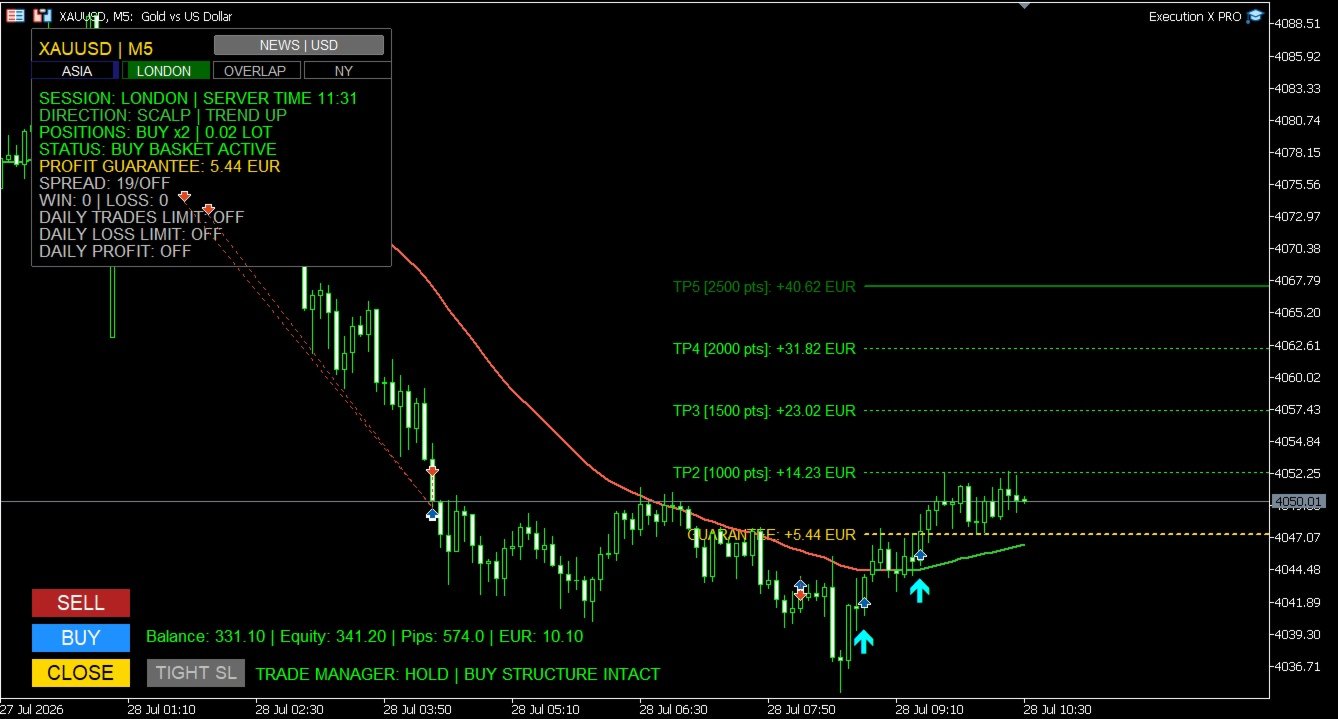
The active trade plan is displayed directly on the chart, allowing the trader to see the progression from the initial protective level through consecutive profit stages.

As price advances, the system can progressively protect the basket and preserve previously reached profit levels.

This creates a disciplined transition from:

initial risk → break-even protection → secured profit → extended profit control

The objective is not only to reach a target, but also to manage the trade professionally while it develops.

Profit Guarantee System

The Profit Guarantee module continuously evaluates the protection currently secured by the basket.

When the market reaches further stages of the trade plan, the protective level can advance in the direction of profit.

The system is designed so that protection does not move backwards after a stronger level has already been secured.

The current guaranteed result is displayed directly on the panel, giving the trader a clear answer to an important question:

How much of the current basket result is already protected?

This helps reduce uncertainty during pullbacks and removes part of the emotional pressure associated with managing profitable trades.

Structure-Based Profit Protection

An optional market-structure protection mode can refine profit management using confirmed structural reference points.

Instead of relying only on fixed target progression, the system may evaluate whether a more effective protective level exists around the active price structure.

This allows profit protection to remain connected to actual market behaviour while respecting the direction of the basket.

The internal calculation remains fully automated, while the trader sees only the relevant protective result.

Trade Manager

Execution X PRO includes a real-time Trade Manager designed to support the trader after entry.

The manager evaluates the active basket and presents clear status information such as:

  • WAITING

  • HOLD

  • TIGHTEN SL

  • EXIT NOW

  • CONTROL YOUR PROFIT

The Trade Manager does not blindly close positions or replace the trader’s judgment.

Its purpose is to provide an additional layer of situational awareness by monitoring the relationship between the open trade, recent price structure and current profit protection.

When appropriate, the trader can use the dedicated TIGHT SL control to apply the suggested protective adjustment.

Optional popup and mobile notifications can also be enabled for important status changes.

Direction Line and Trading Profiles

Execution X PRO includes a visual Direction Line that helps the trader maintain directional context without covering the chart with unnecessary indicators.

The line changes dynamically according to directional pressure and can display:

  • upward conditions,

  • downward conditions,

  • or neutral market behaviour.

Dedicated profiles are available for different trading styles:

Scalping

Designed for short-term charts and faster market reactions.

Day Trading

Designed for intraday execution and broader directional context.

Position Trading

Designed for higher timeframes and longer market cycles.

Custom

Allows experienced traders to configure their own directional framework.

The Direction Line is not an entry signal by itself. It acts as a visual orientation tool that helps the trader compare an intended position with the broader market direction.

Market Structure Zones

Execution X PRO can display selected market structure zones directly on the chart.

These zones help identify areas associated with significant directional expansion and structural price behaviour.

Optional midpoint references provide additional visual context inside each zone.

The objective is to support chart interpretation without replacing the trader’s own analysis.

Market Structure Zones can be switched off whenever a completely clean chart is preferred.

Timeframe-Based Trade Profiles

Different timeframes produce different market conditions.

A protective distance suitable for scalping may be inappropriate for an intraday or position trade.

Execution X PRO can adapt its trade-management framework according to the active chart timeframe.

This allows the system to maintain a more consistent relationship between:

  • initial protection,

  • market movement,

  • progressive targets,

  • and the selected trading horizon.

The trader may also disable the timeframe profile mode when a custom approach is preferred.

Risk Management

Capital Risk Guard

Before accepting a new position, Execution X PRO can evaluate the potential combined exposure of the active basket.

When the estimated basket risk exceeds the configured account-risk threshold, further execution can be blocked.

This helps prevent uncontrolled position accumulation and protects the trader from unintentionally building exposure beyond the selected risk limit.

Automatic or Fixed Position Size

The panel supports two position-sizing approaches:

Fixed Lot Mode

The trader defines the lot size manually.

Balance-Based Lot Mode

Position size can adjust automatically according to account balance.

This gives the user the flexibility to choose between complete manual control and a more systematic sizing model.

Daily Loss Limit

A daily monetary loss limit can be defined directly in the settings.

Execution X PRO monitors both closed and active trading results for the current day.

When the configured loss threshold is reached, the system can close the active basket and block further trading activity.

This feature is designed to protect the trader from revenge trading, emotional escalation and excessive exposure after a difficult session.

Daily Profit Target

The trader can define a daily monetary profit objective.

The panel continuously displays the remaining amount required to reach that target.

Once the target is achieved, Execution X PRO can:

  • close the active basket,

  • record the daily objective as completed,

  • and prevent further entries for the remainder of the trading day.

This helps transform a profitable session into a completed session instead of allowing overtrading to return profits to the market.

Daily Trade Limit

A maximum number of trades can be configured for each trading day.

The panel displays the current number of executed trades relative to the selected limit.

When the limit is reached, additional entries are blocked.

This encourages selective execution and helps traders avoid low-quality trades caused by boredom, frustration or excessive market activity.

Spread Protection

Execution X PRO can monitor the current spread before accepting a new trade.

When the spread exceeds the configured threshold, entry is temporarily blocked.

This can be especially valuable during:

  • low-liquidity periods,

  • market openings,

  • news releases,

  • rollover,

  • and sudden volatility expansion.

Entry Cooldown

A configurable cooldown period can be applied after opening a position.

During the cooldown, additional entries are temporarily restricted.

This feature helps prevent rapid emotional re-entry and uncontrolled position stacking.

Margin Control

Before submitting a position, Execution X PRO checks whether sufficient account margin is available.

This provides an additional operational safeguard and reduces rejected or inappropriate execution attempts.

High-Impact News Protection

Execution X PRO includes an integrated high-impact economic news filter.

The system automatically identifies relevant currencies associated with the active trading symbol and monitors important scheduled events.

During the configured protection window, new entries can be blocked.

The panel displays:

  • news protection status,

  • affected currency,

  • event information,

  • and the approaching release window.

This helps traders avoid entering new positions immediately before major economic events when spreads, volatility and execution conditions may become unstable.

The news filter can be disabled by traders who prefer to manage economic events manually.

Trading Session Monitor

The panel identifies the current global trading session using server-time synchronization.

It can display the active market phase, including:

  • Asia,

  • London,

  • London–New York overlap,

  • New York,

  • and quieter market periods.

The visual session cockpit provides immediate context about current liquidity conditions without requiring external tools.

This is particularly useful for traders whose strategy depends on session behaviour, volatility transitions or market-opening activity.

Real-Time Trading Dashboard

Execution X PRO keeps the most important account and position information visible directly on the chart.

The panel displays:

  • account balance,

  • account equity,

  • current basket movement,

  • floating basket result,

  • symbol and timeframe,

  • market direction,

  • current position side,

  • number of active positions,

  • combined lot exposure,

  • protected basket result,

  • spread status,

  • win and loss statistics,

  • daily trade usage,

  • daily loss status,

  • daily profit progress,

  • trading session,

  • server time,

  • news status,

  • and Trade Manager guidance.

The trader does not need to constantly switch between multiple MetaTrader windows to understand the current trading situation.

Visual Trade Plan

After entry, Execution X PRO draws the active management structure directly on the chart.

The trader can clearly see:

  • the basket reference price,

  • the protective level,

  • consecutive profit objectives,

  • the approximate financial result at each level,

  • and the progression of the active trade.

This improves clarity before and during position management.

The chart becomes a visual execution map rather than a collection of disconnected orders.

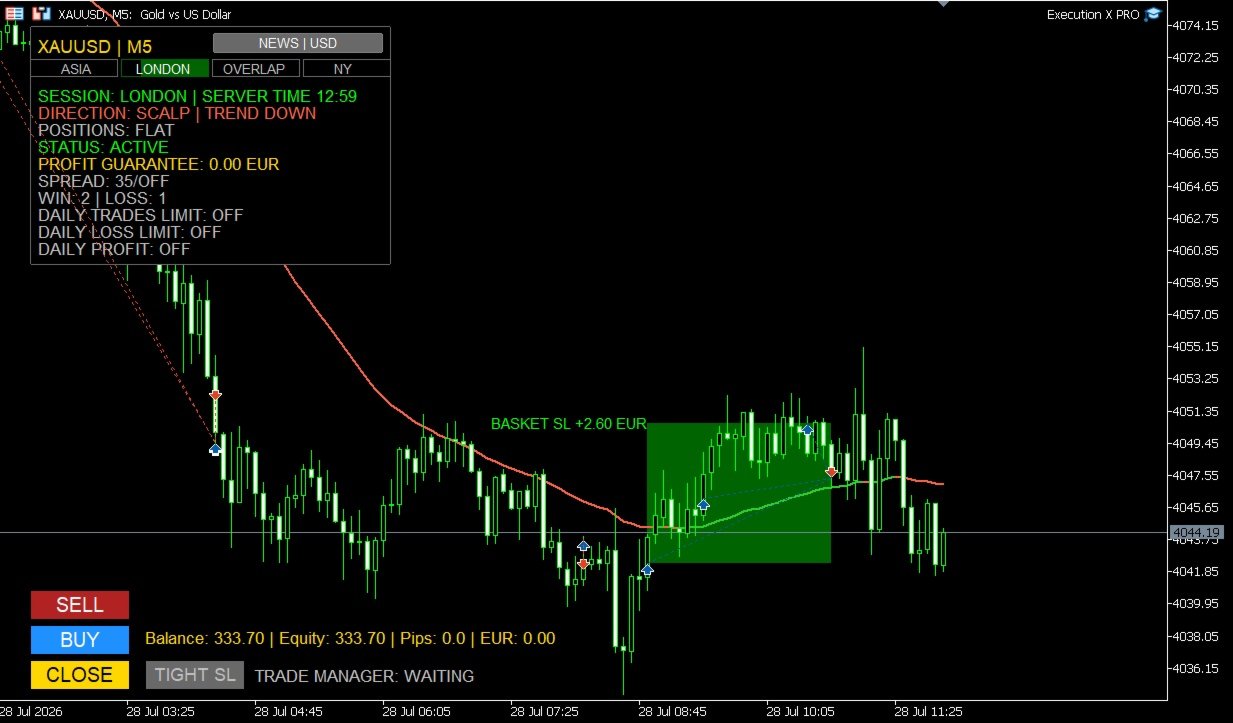
Entry Markers and Result Zones

Optional entry markers show where BUY and SELL positions were executed.

After the basket is closed, the system can draw a visual result zone representing the completed trade.

Profitable and losing baskets are visually separated, making post-trade review faster and clearer.

These result zones remain useful for:

  • analysing entry quality,

  • reviewing trade duration,

  • studying market reaction,

  • comparing execution with the original setup,

  • and improving future decisions.

End-of-Day Management

Execution X PRO can optionally close an active basket near the end of the trading day.

This feature is useful for traders who do not want to carry positions overnight or who operate under strict daily trading rules.

When disabled, the system leaves the basket untouched.

Why Use Execution X PRO?

Execution X PRO is designed to solve the practical problems that appear between market analysis and real execution.

A trader may understand the market correctly and still lose control through:

  • hesitation,

  • delayed execution,

  • excessive position size,

  • inconsistent stop management,

  • premature profit-taking,

  • uncontrolled scaling,

  • revenge trading,

  • or failure to stop after reaching a daily objective.

Execution X PRO creates a controlled process around the trader’s decisions.

It does not promise that every trade will win.

It helps ensure that every trade is executed and managed within a consistent professional framework.

Designed for Different Trading Styles

Execution X PRO can support:

  • XAUUSD trading,

  • Forex,

  • indices,

  • metals,

  • commodities,

  • scalping,

  • intraday trading,

  • swing trading,

  • position trading,

  • single-entry trading,

  • and basket-based execution.

Because the system does not impose its own entry strategy, it can be integrated with many discretionary methodologies.

Who Is Execution X PRO For?

Execution X PRO is designed for traders who:

  • want to make their own entry decisions,

  • need faster chart-based execution,

  • want professional basket management,

  • prefer visible risk controls,

  • scale into positions,

  • struggle with emotional overtrading,

  • want to protect daily results,

  • need clear post-entry guidance,

  • want to monitor market sessions and news,

  • or prefer one structured panel instead of multiple disconnected tools.

It can be used by both developing and experienced traders, but it is especially valuable for traders who already have a strategy and need a more disciplined execution environment.

Important Information

Execution X PRO is a manual execution and trade-management system.

It is not a fully automated trading robot and it does not independently select market entries.

The quality of results depends on:

  • the trader’s market analysis,

  • entry timing,

  • selected position size,

  • broker conditions,

  • spread,

  • volatility,

  • risk settings,

  • and trading discipline.

No trading tool can guarantee profits or eliminate market risk.

Always test the panel on a demo account before using it with real funds.

Review all settings carefully and use only capital you can afford to lose.

Execution X PRO

Your analysis. Your decision. Professional execution.

Solution. Comfort. Experience.


おすすめのプロダクト
BeansAssist
Ivanvielle Bonifacio Dupaya
BeansAssist *Major update 3.00 released. Kindly update your copy of BeansAssist Gives you fruitful information of the price of the symbol that you are trading. Improve your trades simply by following the suggestion that it gives you. Tracks deal stats daily so you keep track of your performance. Don't let emotions take control, be a better and profitable trader with BeansAssist to guide you. *Note: This utility is not for free 
Manyal trading system, CovEchoTrend Robot, focuses on reliability and flexibility. By employing statistical analysis methods to study the relationships between the base indicator and market patterns, the system enables a deeper understanding of market processes. Intelligent pattern analysis: The application of statistical data processing helps identify key trend reversal points more accurately, signaling significant market shifts. Informed decision-making is based on the intersection of indicato
Mahra Pro Indicator MT5 Overview Mahra Pro is a MetaTrader 5 chart indicator designed to support structured analysis of XAUUSD (Gold). It combines trend, momentum, volatility and price-structure conditions to identify potential buy and sell setups and display them directly on the chart. The indicator does not open, modify or close trades. All trading decisions and order execution remain under the user's control. Main features • Buy and sell signal arrows on the chart. • Fast and slow EMA lines w
機関投資家向けデイトレードツール 手動取引のための高度なビジュアルアシスタント。 デイトレードツール・インスティテューショナルは、プライスアクション、CRT、PO3、ICT/SMCを使用し、チャート上で機関投資家レベルの明瞭性を求める手動トレーダー向けに開発された、プロフェッショナルな視覚化エキスパートアドバイザーです。 デイトレードツール・インスティテューショナルは、チャートを機関投資家向けの分析ダッシュボードに変換し、トレーダーが執行を完全にコントロールできるようにします。 視覚的な明瞭性。プロフェッショナルなコンテキスト。人間の判断。 このEAは、注文の発注、決済、管理を自動で行うものではありません。 ビジュアルチャート作成および分析ツールとしてのみ機能します。 EAの目的 チャートをインテリジェントに整理し、機関投資家向けの描画、重要な水準、リスクゾーン、HTFコンテキスト、ビジュアル管理を自動化することで、より迅速で規律のある、正確な意思決定を可能にします。 主な機能 コントロールパネル(オン/オフ) シンプルでプロフェッショナルなインターフェース モジュ
Divergent Stochastic Filter II Catch Reversals Early, Filter Noise, Trade with Confidence The Edge: Why This Stochastic is Different  Every trader knows the Stochastic oscillator. But knowing when to trust its signals, that's the real challenge. The Divergent Stochastic Filter II transforms this classic indicator into a precision reversal detection system by adding critical elements: divergence intelligence, signal filtering and exhaustion detection.  While standard Stochastic oscillators fire s
XBOOT BOLETA PRO Professional Manual Trading Panel for MetaTrader 5 XBOOT Boleta Pro is a complete trading panel designed for traders who execute manual trades and want greater speed, organization, and control during every trading session. More than a standard Buy and Sell panel, XBOOT Boleta Pro combines powerful trading tools into a single interface, helping traders analyze the market, manage risk, execute orders, and monitor trading performance without leaving the chart. Its purpose is to sim
BREAK RETEST NON-REPAINT. WORKS BEST AT M15 AND ABOVE.  Benefits Fewer false breakouts . Combining close confirmation + retest + previous-close filter greatly reduces noise vs. raw high/low breaks. Tighter execution plans . The drawn level line gives an objective spot for entries, stop placement (just beyond the level), and partial-take-profit structure. Non-repainting confidence . Signals are placed on current bar. Flexible across markets . Works on FX, indices, metals, crypto; scalping on M15
Currency Strength Panel
AL MOOSAWI ABDULLAH JAFFER BAQER
Currency Strength Trade the strongest currencies against the weakest with confidence. Currency Strength is a professional MetaTrader utility that measures and displays the real-time strength of major currencies, helping traders identify high-probability trading opportunities based on market momentum rather than guesswork. Instead of analyzing one currency pair at a time, Currency Strength evaluates multiple currency pairs simultaneously to determine which currencies are gaining strength and whic
TradingManagement
Christian Ishmael Calienta Magallon
TradingManager is a comprehensive trading panel designed to streamline your trading workflow in MetaTrader 5. It combines order management, risk controls, and market analysis into one intuitive interface. Key Features 1. Trading Panel Market Order Entry   - One-click BUY/SELL with automatic SL and TP line placement on chart Fib Limit Orders   - Draw Fibonacci-based limit orders with visual SL and TP levels Risk Management   - Choose between Lots, % Risk, or $ Risk modes Take Profit Split   - Dis
AutoStructure — Your Key to Precise Market Entry in Forex! AutoStructure is a professional Forex indicator designed for traders who value precision, speed, and full control over the market. With just one click, you'll be able to: Automatically draw key support and resistance levels Visualize FVG zones (Fair Value Gaps) to spot profitable reversals Analyze Order Blocks across multiple timeframes Build Fibonacci levels based on real price action Perfectly suited for both scalpers and position t
Somewhere over the rainbow It is a system that tries to operate the market from the exhaustion of the trend with a correction algorithm that tries to cut losses at the cost of increasing the margin This system makes all the adjustments automatically, analyzing the pair and the market to decide which is the most efficient step to reach your destination. Somewhere over the rainbow is a multiple trade and multi lot system(The maximum batch can be up to 5 times the initial batch distributed in mult
SwiftDraw Starter is a streamlined charting utility designed to make technical analysis faster, cleaner and more efficient. Built for traders who rely on manual chart analysis, SwiftDraw Starter provides a selection of essential charting tools through intuitive keyboard shortcuts, helping you create and manage the objects you use most with minimal clicks. Designed for scalpers, intraday traders and discretionary traders , SwiftDraw Starter helps simplify chart preparation and improve the efficie
FREE
MT5 to Telegram Copier Pro is a powerful Expert Advisor built to solve one of the biggest challenges faced by signal providers and active traders: fast, reliable, and professional trade broadcasting . Many traders lose subscribers, miss opportunities, or create confusion because they manually type signals, delay trade updates, or send incomplete trade details. Others open trades from their phone and struggle to instantly share them with their Telegram audience. This tool eliminates those problem

Introduction to the Manual Backtesting Indicator on MQL5 The MetaTrader platform provides an excellent backtesting tool for evaluating Expert Advisors (EAs). However, when it comes to manually backtesting a strategy to assess its effectiveness, this tool has some limitations: You cannot manually draw zones or trend lines while in backtesting mode. You cannot switch timeframes to check time alignment. For example, if my strategy requires additional confirmation from a higher timeframe (HTF), this
Currency Index Watcher is a simple and user-friendly tool for whoever wish to trade Forex using currencies indexes. Currency Index Watcher is configurable and usable directly from the panel. Indexes of 8 custom currencies EUR, USD, GBP, JPY, CHF, AUD, CAD, NZD (default) Any 3-chars symbol from your market watch could be used (BTC = bitcoin, RUB = ruble, CNH = yuan etc ...) : double click the symbol label  Ability to select which currencies and made-of pairs will be analyzed : check/uncheck wante
Overview Omega Sense X is a professional trading indicator developed exclusively for Bitcoin (BTC) on the MetaTrader 5 platform. It utilizes an intelligent multi-factor analysis system to identify high-probability trading opportunities while filtering out weaker market conditions. This helps traders make more informed decisions without continuously monitoring the market. Key Features Clear Buy and Sell signals. Smart filtering system to improve signal quality. Automatic Entry Price calculation.
Binance Full Trader is developed for connection to your Binance account and get data, draw price charts and trade easily with any strategy by an indicator. A user-friendly interface has developed for it and has tried to give access to the necessary information such as open orders and wallet balances. ·        There are two sample indicators (one for trade signal and another for price) that you can download it from these links: https://drive.google.com/file/d/1w2CGuu3rArWKMhS9LkepT9zhVkGR1AO7/vie
稼ぎと研究のためのツール。 トレーディングシグナルと戦略の中核は、価格予測パターンを形成するための著者のアルゴリズムに基づいています。どんな楽器にも使えます! MA「九尾の狐」に基づく制御システムが追加され、市場、機器、および作業期間に合わせて信号を可能な限り正確に更新および調整します。 対象:すべての市場のすべての商品(例外があります)。 対象者:ヘッジファンド、ファンドおよび資産運用会社、投資運用会社、投機家、投資家および利害関係者。 .................................................................................................................................................................................
RSI Cortex Ai
Michael Prescott Burney
RSI Cortex AI for MT5 RSI Cortex AI is a MetaTrader 5 indicator designed to help traders analyze momentum using a multi-factor ranking model instead of relying only on a fixed RSI threshold approach. It combines momentum features, directional ranking, confidence scoring, and adaptive filtering into a clean TradingView-style workspace for chart-based analysis. What the indicator does RSI Cortex AI evaluates momentum using a broader feature set than a standard RSI line. It is designed to help trad
FREE
Let us introduce the Heikin Ashi RSI Oscillator! This indicator combines the concepts of Heikin Ashi candles with the RSI (Relative Strength Index) to produce an oscillator-like format that can be used to filter out some of the noise associated with standard RSI readings. This provides traders with a smoother representation of market conditions. Here are some articles to read more about the RSI and Heikin Ashi candles: https://www.investopedia.com/terms/r/rsi.asp https://www.investopedia.com/ter
NEW :    integration with Ofir Signals to send personalized alerts Ofir Notify is a tool which send alerts on trades to Telegram Alert on any event concerning a position : Opening, Closing, modification (SL, TP) Send alerts to Chats, Groups and Channel Alert on Equity change Display Risk, Reward and progress of profit/lost for each position Customization of alerts Sending charts screenshots with alerts Send signals from your indicators or experts Multi-lingual  NEW  : version 2 brings integrati
Daily Entry M1 – MT5インジケーター Daily Entry M1は、M1時間足で短期のデイトレード機会に注目するトレーダー向けに開発されたMetaTrader 5インジケーターです。 このインジケーターは市場状況を分析し、内部のエントリー条件が確認されたときに、チャート上へ明確なBUYおよびSELLの矢印を直接表示します。 このインジケーターは、潜在的な市場の転換エリアを探し、日中の高値または安値に近いエントリーを特定することを目的としており、ランダムな価格位置ではなく、反転の可能性がある機会に集中できるよう支援します。 各トレード矢印には、それぞれ事前定義された独自のターゲットレベルが付属しており、その特定のシグナルに対応するターゲットをすぐに確認できます。 Daily Entry M1の主な目的は、不必要にチャートを複雑化することなく、エントリーシグナルとそれに対応するターゲットを素早く識別できる、シンプルで実用的なトレード環境を提供することです。 主な機能 MetaTrader 5向けに設計 M1時間足向けに最適化 明確なBUYおよびSELLエントリー矢印
Onyx Sniper - スマートマネーコンセプト (SMC) アシスタント Onyx Sniper は、SMCトレードを簡素化するために設計された、強力で高精度なインジケーターです。高確率のオーダーブロック (OB) と市場構造を自動的に検出し、チャート上に正確なエントリーとエグジットのレベルを提供します。 主な機能: スマートオーダーブロック (OB): 有効な売買オーダーブロックを自動的に識別し、各セットアップの確率スコア(例:85%)を計算します。 市場構造マッピング: Change of Character (CHoCH) と Break of Structure (BOS) のラインを自動的に描画します。 マルチタイムフレームダッシュボード: チャートを切り替えることなく、6つのタイムフレーム(M1、M5、M15、M30、H1、H4)のトレンド方向を即座に確認できます。 組み込みトレードプラン: エントリー、ストップロス (SL)、および4つのテイクプロフィット (TP1-TP4) レベルを備えたダッシュボードを表示します。 クリーンなチャート: テスト済みまたはブレイク
Telegram to MT5 Pro — 高度なTelegramシグナルコピー機(自動修正・マルチTP・リスク管理・完全トレード管理) Telegram to MT5 Pro — プロフェッショナル Telegram シグナルコピーツール Telegram to MT5 Pro は、TelegramのシグナルをMetaTrader 5アカウントへ自動で直接実行する高性能トレードコピーシステムです。リスク管理、執行、トレード管理を完全に制御できます。 本システムは2つのコンポーネントで構成されています: • MetaTrader 5内で動作するExpert Advisor(EA) • Telegramと接続しシグナルをローカルでEAへ送信するコンパニオンデスクトップアプリ 両方は同じPC上で動作する必要があります。MQL5の制限によりEAはTelegramへ直接接続できません。ブリッジがTelegram処理を担当し、EAが取引を実行します。 サポートとインストール支援 完全なPDFインストール&ユーザーガイドが提供されます。 サポート内容: • 完全PDFユーザーガイド(全設定説明)
新しいトレーディングツール:トレードを最適化しよう! 私は、悩まずに簡単に取引できるように開発した全く新しいツールを紹介できることを嬉しく思います!従来の指標とは異なり、このツールは単に価格の変動を追跡するのではなく、通貨間の相関関係を深く分析し、市場に入る戦略的なタイミングを見つける手助けをします。 使い方は以下の通りです: ゼロ = 取引なし:指標がゼロの間は、市場の条件が適していないことを意味し、市場に参加しません。 4の数字でアラートが発動:通貨の1つが4に達すると、ツールがアラートを送信し、4つの通貨ペアで取引をするのに適した条件が整ったことを知らせます。 相関関係の分析:従来の指標とは異なり、このツールは通貨間の相関に基づいています。例えば、ある通貨がドルと相関している場合は1、2つの通貨が相関していれば2となります。4に達すると、それは複数の通貨がドルに対して弱いことを意味し、ツールは4つの通貨ペアをアラートとして送信します。 各通貨ペアを手動で探す手間を省く、時間を大幅に節約できるツールです!このツールは最適な取引機会を自動的にお知らせします。 今こそ
BlueBoat – Prime Cycle is a technical indicator for MetaTrader 5 that visualizes market cycles based on the Fimathe cycle model (Marcelo Ferreira) . It identifies and displays historic and live cycle structures such as CA, C1, C2, C3, etc., helping traders understand the rhythm and timing of price movement across multiple sessions. This tool is ideal for manual analysis or as a supporting signal in discretionary strategies. Key Features Historical Cycle Analysis – Backtest and visualize as many
CopyTrade Pro MT5
David Julio Cuenca Oliver
CopyTrade Pro MT5   With CopyTrade Pro MT5, you can copy your trades from MT5 to MT5, MT5 to MT4. For MT5 to MT4 copies, you must have both versions (MT5 and MT4) installed. MT4 version:   CopyTrade Pro MT5 can: - Copy from MT5 to MT5, MT5 to MT4 quickly, instantly, and securely. - Master and Slave functionality, connecting both accounts using a comment to link and copy trades. - Fast execution (under 50ms). - Hides the fact that the trade has been copied using a copier, making it very useful
Trade2Telegram
Strifor (Mauritius) Ltd
5 (10)
Trade2Telegram — MetaTraderからTelegramへの自動取引通知用プラグインです。 このツールは、資金を管理するトレーダー、シグナルチャンネルを運営する人、または教育コミュニティをリードする人向けに設計されています。プラグインは、ターミナル上のすべての取引操作をコピーし、選択したTelegramのチャット、グループ、またはチャンネルに公開します。 ポジションのオープンやクローズ、ストップロス(SL)やテイクプロフィット(TP)の変更、未決注文の発動、または部分決済が行われた際に、メッセージは自動的に送信されます。 メッセージ形式はカスタマイズ可能で、以下の情報を含めることができます:銘柄、取引方向、取引量、エントリー・エグジット価格、SL/TPレベル、ポイントおよび金額での結果。ハッシュタグやコメントの追加、サーバー時間またはローカル時間の選択にも対応しています。 このプラグインは、サードパーティのサービスを使用せず、Telegram Bot APIを直接利用して動作します。接続は簡単で、ボットのトークンと目的のチャットまたはチャンネルのIDを提供するだけです
FREE
革新的な Trades Time Manager を使用して、取引ルーチンを簡単に管理できます。この強力なツールは、指定された時間に注文執行を自動化し、取引アプローチを変革します。 購入から注文の設定まで、すべて手動介入なしで、さまざまな取引アクションのためのパーソナライズされたタスク リストを作成します。 Trades Time Manager のインストールと入力ガイド EA に関する通知を受け取りたい場合は、MT4/MT5 ターミナルに URL を追加してください (スクリーンショットを参照)。 MT4のバージョン     https://www.mql5.com/en/market/product/103716 MT5のバージョン     https://www.mql5.com/en/market/product/103715 手動監視に別れを告げ、合理化された効率を採用します。直感的なインターフェイスにより、シンボル、約定時間、価格、ストップロス (SL)、テイクプロフィット (TP) ポイント、ロットサイズなどの正確なパラメーターを設定できます。 このツールの柔軟性は、市
Multi Strategy Dashboard Utility MT5        Some functions of the MSD Utility can only be used on the full version. Multi instrument and multi time frame scanner, with the best indicators.  Comes with an order management panel. The MSD Utility can be used for manual trading. Click on the '?' button on the dashboard to obtain information about the various elements of the MSD Utility. Uses ATR Take Profits, ATR Stop Losses and ATR Trailing Stops. Comes with an FX Currency Strength meter and a Mar
このプロダクトを購入した人は以下も購入しています
================================================================================ POC BREAKOUT - V20.72. Full Professional Grade Toolkit ================================================================================ POC Breakout is a full MetaTrader 5 trading dashboard for discretionary traders who want breakout signals, Point of Control (POC) context, volume profiles, order flow, market structure, news, alerts, and advanced trade planning in one professional workspace. Attached directly to you
Farmed Hedge Yield Farming | All Markets (Manual - Hybrid - Semi/Automated EA) VERIFIED TRADING RESULTS - Farmed Hedge Yield Axi Copy:  https://www.mql5.com/en/signals/2356376 - Farmed Hedge Yield Exn Copy:   https://www.mql5.com/en/signals/2356404 - Farmed Hedge Yield V Copy:  https://www.mql5.com/en/signals/2357156 * Before purchasing, please feel free to send me a message if you have any questions about the product or setup. ** After purchase,  Contact me via private message to receive t
That backtest looks great. But will it still be making money tomorrow, next week, next month? EA Overfitter re-runs your EA on 100 price histories it has never seen. One score tells you if the edge is real. A backtest tells you what an EA did on one price history — the one that happened to occur. What you cannot tell from it is how much of that result was the strategy and how much was the particular path. EA Overfitter answers that. It builds up to 100 synthetic price histories your EA has n
FUTURES ORDERFLOW FOOTPRINT CHART Professional OrderFlow EA for MetaTrader 5 Version 1.01| Professional tool for real traders | Institutional-Grade Visualization STRATEGY TESTER USERS - PLEASE SELECT EVERY REAL TICK WHEN TESTING AND YOU HAVE DOWNLOADED HISTORICAL DATA. IF YOU SEE A WAITING SCREEN AND IT IS NOT DOWNLOADING, IT MEANS YOU HAVE LOW HISTORICAL DATA. TRY 1 MIN AND 5 MIN FIRST ON 1 DAY DATA. ONE DAY DATA SHOULD BE THE NEWEST AND MOST CURRENT DATE. PLEASE WAIT UNTIL THE MARKET HAS ROL
The product will copy all telegram signal to MT5 ( which you are member) , also it can work as remote copier.  Easy to set up, copy order instant, can work with almost signal formats, image signal,  s upport to translate other language to English Work with all type of channel or group, even channel have "Restrict Saving Content", work with  multi channel, multi MT5 Work as remote copier: with signal have ticket number, it will copy exactly via ticket number. Support to backtest signal. How to s
YuClusters
Yury Kulikov
4.93 (43)
Attention: You can view the program operation in the free version  YuClusters DEMO .  YuClusters is a professional market analysis system. The trader has unique opportunities to analyze the flow of orders, trade volumes, price movements using various charts, profiles, indicators, and graphical objects. YuClusters operates on data based on Time&Sales or ticks information, depending on what is available in the quotes of a financial instrument. YuClusters allows you to build graphs by combining da
Power Candles Strategy Scanner - 自動最適化型マルチシンボル設定ファインダー パワーキャンドル・ストラテジー・スキャナーは 、パワーキャンドル・インジケーターを駆動するのと全く同じ自己最適化エンジンを、マーケットウォッチに登録されているすべての銘柄に対して並行して実行します。1つのパネルで、現在統計的に取引可能な銘柄、各銘柄で勝率の高い戦略、最適なストップロス/テイクプロフィットの組み合わせが表示され、新たなシグナルが発生した瞬間に通知が届きます。 このツールは、Stein Investmentsのエコシステムの一部です。  18種類以上のツールをすべて閲覧し、AIを活用したセットアップの推奨を受け取り、  https://stein.investments でコミュニティに参加しましょう 市場動向を網羅。銘柄ごとに3,000件以上の自動最適化。2種類のアラート。ワンクリックでチャートを切り替えて即座にアクション。 なぜこれが必要なのか 多くのマルチ銘柄スキャナーは、 価格の動き (ボラティリティ、変動率、銘柄ごとのRSI)を表示するだけです。それ
Quant AI Agents are independent trading Expert Advisors. Instead of trading using a fixed strategy like other conventional EAs, Quant AI Agents   is a   multi-agent AI trading framework   that turns natural-language strategy prompts into live.  WANT THE SAME RESULTS AS MY LIVE SIGNAL?   Use the exact same brokers I do:   IC MARKETS , IC TRADING   .  Unlike the centralized stock market, Forex has no single, unified price feed.  Every broker sources liquidity from different providers, creating un
Footprint Chart Pro — Professional OrderFlow EA for MetaTrader 5 Version 6.34 | Professional tool for real traders | Institutional-Grade Visualization DEMO USERS - PLEASE SELECT EVERY TICK / REAL TICK WHEN TESTING AND YOU HAVE DOWNLOADED HISTORICAL DATA. IF YOU SEE A WAITING SCREEN AND IT IS NOT DOWNLOADING, IT MEANS YOU HAVE LOW HISTORICAL DATA. TRY 1 MIN AND 5 MIN FIRST ON 1 DAY DATA. ONE DAY DATA SHOULD BE THE NEWEST AND MOST CURRENT DATE. PLEASE WAIT UNTIL THE MARKET HAS ROLLED OVER PERIOD.
This is exactly what the name says. Visual strategy builder . One of a kind. Turn your trading strategies and ideas into Expert Advisors without writing single line of code. Generate mql source code files with a few clicks and get your fully functional Expert Advisors, which are ready for live execution, strategy tester and cloud optimization. There are very few options for those who have no programming skills and can not create their trading solutions in the MQL language. Now, with Bots Builde
The real‑time view of what is happening inside the market. Footprint Secrets brings detailed analysis directly into MetaTrader 5. It shows where volume is trading, how buyers and sellers are interacting, and how liquidity shifts as the market evolves. Designed for traders who want a precise, real‑time understanding of market behavior. Check out the free preview version here:  https://www.mql5.com/en/market/product/172398 Benefits for the Trader See the real activity behind price . Footprint ch
Custom Alerts AIO:マルチマーケット監視を一括で実現 — 設定不要ですぐに使えるインテリジェントツール 概要 Custom Alerts AIO は、追加のインジケーター設定が不要で、インストール後すぐに利用できる高機能マーケットスキャナーです。FX Power、FX Volume、FX Dynamic、FX Levels、IX Power を内部にすべて統合し、主要なすべての資産クラス(為替、金属、指数、暗号資産)を一括監視できます。MetaTrader の仕様により、株式は個別のシンボルとして追加可能ですが、一般的には利用頻度は低めです。 1. なぜ Custom Alerts AIO を選ぶべきか 追加ライセンス不要 • 必要なすべての Stein Investments インジケーターが内蔵されており、すぐに使用可能です。 • チャートに表示されるグラフィックは省略されており、アラート生成に特化した構成です。 市場を広範囲にカバー • 為替、金属、暗号資産、株価指数に対応(株式は手動追加可能)。 • シンボル名を入力する必要はなく、プロパティで資産クラス
AI Agent Supervisor is NOT an Expert Advisor. AI Agent Supervisor   is a   multi-agent AI risk & portfolio supervisor   that watches every EA on your account and intervenes in real time.  WANT AN AI PORTFOLIO MANAGER WATCHING YOUR FLEET 24/7?   Run your fleet on the same brokers I do:   IC MARKETS , IC TRADING   .  Unlike the centralized stock market, Forex has no single, unified price feed.  Every broker sources liquidity from different providers, creating unique data streams. The Supervisor r
EASY Insight AIO – スマートで手間いらずな取引のオールインワンソリューション 概要 数秒で市場全体——FX、ゴールド、暗号資産、指数、さらには株式まで——を、手作業のチャート確認や複雑なセットアップ・インジケーター導入なしにスキャンできたらどうでしょうか? EASY Insight AIO はAIトレードのための究極のプラグ&プレイ型エクスポートツールです。市場全体のスナップショットを、クリーンなCSVファイルで一括出力。ChatGPT、Claude、Gemini、Perplexityなど、さまざまなAIプラットフォームで即座に解析できます。 ウィンドウの切り替えやグラフのごちゃごちゃしたオーバーレイはもう不要。自動エクスポートされる純粋で構造化されたインサイトだけで、無駄なチャート監視に悩まされず、スマートなデータ主導の判断に集中できます。 なぜEASY Insight AIOなのか? 本当のオールインワン • セットアップ不要、インジケーターのインストール不要、チャートへのオーバーレイ不要。インストールして起動し、エクスポートするだけです。 マルチアセット対
Global Investing FX Terminal は、MetaTrader 5 向けのオールインワン FX ダッシュボードです——中央銀行政策金利、CFTC COT ポジション、キャリーランキング、経済サプライズ、オプションスキュー、リテールセンチメント、相関まで、合計 13 のアナリティクスパネルを、ちらつきのない単一キャンバス上に表示し、単一の EA から 10 秒ごとに更新します。外部ソフトウェア不要です。 プロの FX 分析には、通常は別々のプラットフォームに分散しているデータへの同時アクセスが欠かせません。レートデリバティブ、政府統計ポータル、ブローカーのスワップ仕様、オプションデスク——このEAはそれらすべてを、実際に売買判断を下すトレーディングターミナルの単一画面に集約します。 ダッシュボードの表示内容 マーケットオーバービュー FX ペアテーブル — G10 全 28 ペアに加え、ブローカーの Market Watch に NOK/SEK クロスが存在する場合はそれも含めた最大 36 ペアのリアルタイム Bid/Ask。各行にはスプレッド、日次・週次変化、pip
Trading Chaos Expert
Gennadiy Stanilevych
5 (11)
This software has no equals in the world and represents a universal trade "console" covering trading signals, automated market entry, setting of Stop Loss and Take Profit, as well as Trailing Profit for multiple trades at the same time in a single open window. Intuitive control of the Expert Advisor in "three clicks" ensures a comprehensive use of all its functions on different computers, including tablets PCs. Interacting with additional signal indicators that mark the chart to give a real mark
Features   With MT5 to Interactive Brokers(IB) Trader, you can: 1. Load chart data from IB to MT5, and Analyze with all standard or customer Indicators. 2. Place Orders to IB Account Directly in MT5. 3. Make your Own EAs upon IB Securities by only making minus changes of the trading function. Usage 1) Installation Copy the "Mt5ToIBTraderEn.ex4" and sample files to [MT5 Data Folder]->MQL5->Experts.  2)  MT5 Settings Add the IP Address to the MT5 Allowed URLs in 'Tools->Options->Expert Adviso
The core idea: using the user interface, you configure the parameters the chart must meet before entering a position (or positions), choose which entry models to use, and set the rules for when trading and planning should end. Lazy Trader  handles the rest: it  takes over all the routine chart watching and execution! full description  :: 3 key videos [1] ->  [2]   ->  [3] What can it do? - Understands Larry Williams market structure - Understands swing market structure by Michael Huddleston
Check EA performance  https://www.mql5.com/en/signals/2376164?source=Site +Profile+Seller Spot vs Future Arbitrage EA for MT5 Spot vs Future Arbitrage EA is an automated Expert Advisor designed for MetaTrader 5 that operates using price differences between Gold spot and Gold futures instruments. The strategy opens positions on both instruments simultaneously to take advantage of temporary differences between spot and futures prices. Requirements The trading account must provide both Gold spot
The product will copy all  Discord  signal   to MT5   ( which you are member  ) , also it can work as remote copier.  Easy to set up. Work with almost signal formats, support to translate other language to English Work with multi channel, multi MT5. Work with Image signal. Copy order instant, auto detect symbol. Work as remote copier: with signal have ticket number, it will copy exactly via ticket number. How to setup and guide: Let read all details about setup and download Discord To MetaTrader
Prop Firm Os
Gayathiri Gopalakrishnan
5 (1)
PROP FIRM OS Structured Trading Assistant for MetaTrader 5 PROP FIRM OS is a structured trading assistant designed for MetaTrader 5 users who prefer rule-based market analysis and organized trading workflows. The Expert Advisor combines market analysis tools, scanner functions, dashboard monitoring, alerts, risk-control settings, and trade management features inside one system. PROP FIRM OS is designed to help traders follow selected rules, filters, and monitoring conditions during trading activ
Trade Copier Pro MT5 is a tool to copy trade remotely to multiple MT4, MT5 and cTradfer accounts at different computers/locations over internet. This is an ideal solution for you if you are a signal provider and want to copy your trades to other receivers globally on your own rules. One provider can copy trades to multiple receivers and one receiver can get trade from multiple providers as well. The provider can even set the subscription expiry for each receiver, so that receiver will not be abl
ManHedger MT5
Peter Mueller
4.83 (6)
THIS EA IS A SEMI-AUTO EA, IT NEEDS USER INPUT. Manual & Test Version Please TEST this product before BUYING  and watch my video about it. The price of the ManHedger will increase to 250$ after 20 copies sold. Contact me for user support or bug reports or if you want the MT4 version! MT4 Version  I do not guarantee any profits or financial success using this EA. With this Expert Advisor, you can: Implement your own Zone Recovery strategy to capitalize on trending markets. Create Grid trading s
Mt5 To InterativeBrokers Copier allows you to copy deals from MT5 account to Interactive Brokers. With this, you can run your EA strategy on a MT5 Demo/Real Account, then copy all the deals to Interactive Brokers account real time. Features: 1. Copy or Invert-Copy deals Realtime from MT5 to IB Account. 2. Synchronizing positions of both accounts periodicaly, in case any missing copying. 3. You can choose only Buy position or Sell position. Symbols Setup: General Format:  {MT Symbol} -> {IB S
Latency Arbitrage – Ultra Fast Execution & Price Inefficiency Capture Latency Arbitrage  utility tool is designed to exploit short-term price inefficiencies between fast and slow price feeds. Instead of predicting market direction, the EA focuses on execution speed and price deviation opportunities, allowing traders to capture micro-movements before the market fully adjusts. With built-in risk controls and smart filtering, it ensures precise and disciplined trading performance. Price increases b
Crystal Trade Manager – Advanced MT5 Risk and Trade Control Utility Overview Crystal Trade Manager (CTM) is a professional MetaTrader 5 utility designed for risk management, trade automation, and instant execution control. It provides traders with an integrated system for protecting equity, managing daily drawdowns, controlling lot sizes, and applying automation features such as automatic SL/TP, break-even, and trailing stop. The tool is suitable for manual traders, prop-firm challenge particip
ATTENTION For a free trial version, visit my website. Manual QUANTUM RiskGuard Management — Your ultimate ally for uncompromising trading. Lot Calculator — Automatic lot size calculation. Quantum — Automatic risk to maximize profits and reduce drawdowns. Automatic Journal — Included and freely downloadable from my website. Automatic Screenshot — Two screenshots: one at entry and one at exit. Partial Profit — Smartly managed partial exits. Smartphone Trading — Place orders from your mobile, mana
Unlimited Trade Copier Pro MT5 is a tool to copy trade remotely to multiple MT4, MT5 and cTrader accounts at different computers/locations over internet. This is an ideal solution for you if you are a signal provider and want to copy your trades to other receivers globally on your own rules. One provider can copy trades to multiple receivers and one receiver can get trade from multiple providers as well. The provider can even set the subscription expiry for each receiver, so that receiver will n
# If you have any other requirements or are interested in collaboration, please contact  dev.quantech.london@gmail.com . Flash Trade (FT) Most friendly manual trading tool. Easy operation to secure your funds. Features of FT Click the chart to trade fast FT supports market orders and pending orders Click twice to complete the order and set SL and TP Click trice to complete the pending order and set SL and TP Automatically set the stop-loss amount of each order to a fixed percentage of the bala
Adam FTMO MT5
Vyacheslav Izvarin
5 (2)
ADAM EA Special Version for FTMO Please use ShowInfo= false for backtesting ! Our 1st EA created using ChatGPT technology Trade only GOOD and checked PROP FIRMS  Default parameters for Challenge $100,000 Tested on EURUSD and GBPUSD only  Use 15MIN Time Frame Close all deals and Auto-trading  before Weekend at 12:00 GMT+3  Friday For Prop Firms MUST use special Protector  https://www.mql5.com/en/market/product/94362 --------------------------------------------------------------------------------
作者のその他のプロダクト
Fire Horse Gold Pyramid MT5 Uses internal trend-based logic for BUY-only market conditions. Uses controlled position management with reduced risk behavior for additional positions. Protection logic is handled internally by the EA. No martingale.No grid.No averaging down. Overview Fire Horse Gold Pyramid MT5 executes trades based on predefined technical rules. Positions are managed only according to the EA internal logic. The system includes: • Internal trend-based market filtering • Internal e
Fast view of market structure across multiple timeframes — always at hand. Add it to your MT5 library and keep your chart clean. Simple, lightweight and practical — ideal as a supporting tool for daily price action analysis. Track market structure with speed and clarity. MultiTF Fast Pivot ZigZag helps you identify HH, HL, LH, LL and key higher-timeframe levels without switching charts or cluttering your workspace.
Execution Trainer X is a manual trading practice tool created for MetaTrader 5 Strategy Tester. Before real money is placed on the market, the trader should train the decision, the hand and the reaction. Train your decisions. Train your reactions. Train your patience. Train before you risk real money. This Expert Advisor does not trade automatically. It gives you simple BUY, SELL and CLOSE buttons, so you can practice manual execution directly on historical charts. Use it to train entries,
Super MTF Color State Super MTF Color State is a simple multi-timeframe trend direction indicator for MetaTrader 5. Its job is simple: to show the current market direction in a clean and visual way. Green line = the market is moving up. Red line = the market is moving down. The indicator also includes a small color state panel: D1 | H4 | H1 | M15 | M5 | M1 Each timeframe changes color depending on its current direction. This helps the trader quickly see which timeframes agree with the move an
フィルタ:
レビューなし
レビューに返信