Execution X PRO

EXECUTION X PRO

Professional Manual Execution and Trade Management Panel for MetaTrader 5

Solution. Comfort. Experience.

Easy to understand, develop for New traders

Execution X PRO is an advanced manual trading panel created for traders who want to maintain full control over their market decisions while improving execution speed, position management and trading discipline.

It does not generate random entries and it does not replace the trader’s strategy.

Instead, it provides a structured execution environment that connects manual decision-making with professional risk controls, basket management, market context and real-time trade supervision.

The trader decides when and where to enter.

Execution X PRO handles the structure around that decision.

Built for Controlled Manual Trading

Manual trading often becomes difficult not because the trader cannot read the market, but because execution becomes inconsistent under pressure.

Delayed entries, oversized positions, emotional re-entry, uncontrolled exposure and poor profit management can turn a valid market idea into an avoidable loss.

Execution X PRO was designed to reduce this operational noise.

From one visual control panel, the trader can:

  • open BUY and SELL positions,

  • close the active trading basket,

  • monitor current exposure,

  • manage protective levels,

  • control daily risk,

  • observe market direction,

  • track trading sessions,

  • supervise open positions,

  • and respond faster when market conditions change.

The result is a cleaner, more controlled and repeatable trading process.

Core Features

Fast Manual Execution

Execution X PRO provides direct BUY and SELL controls directly on the chart.

The panel reduces unnecessary platform navigation and allows the trader to act immediately when a valid setup appears.

Execution remains fully manual. The system does not decide when to enter the market.

This makes Execution X PRO suitable for traders using:

  • price action,

  • market structure,

  • liquidity concepts,

  • support and resistance,

  • order blocks,

  • breakout strategies,

  • trend continuation,

  • reversal setups,

  • discretionary scalping,

  • intraday trading,

  • and position trading.

Basket Position Management

Multiple positions opened in the same direction can be managed as one coordinated trading basket.

Instead of treating every position as an isolated order, Execution X PRO supervises the combined exposure from a common reference point.

The panel can calculate and display:

  • basket direction,

  • number of active positions,

  • combined lot exposure,

  • current basket profit,

  • current basket movement,

  • protective basket level,

  • and progressive profit objectives.

This is especially useful for scaling into a valid market move while maintaining a clear overview of total exposure.

Opposite-direction entries can be restricted while a basket is active, helping prevent accidental hedging and conflicting trade management.

Progressive Profit Management

Execution X PRO uses a structured multi-stage profit management model.

The active trade plan is displayed directly on the chart, allowing the trader to see the progression from the initial protective level through consecutive profit stages.

As price advances, the system can progressively protect the basket and preserve previously reached profit levels.

This creates a disciplined transition from:

initial risk → break-even protection → secured profit → extended profit control

The objective is not only to reach a target, but also to manage the trade professionally while it develops.

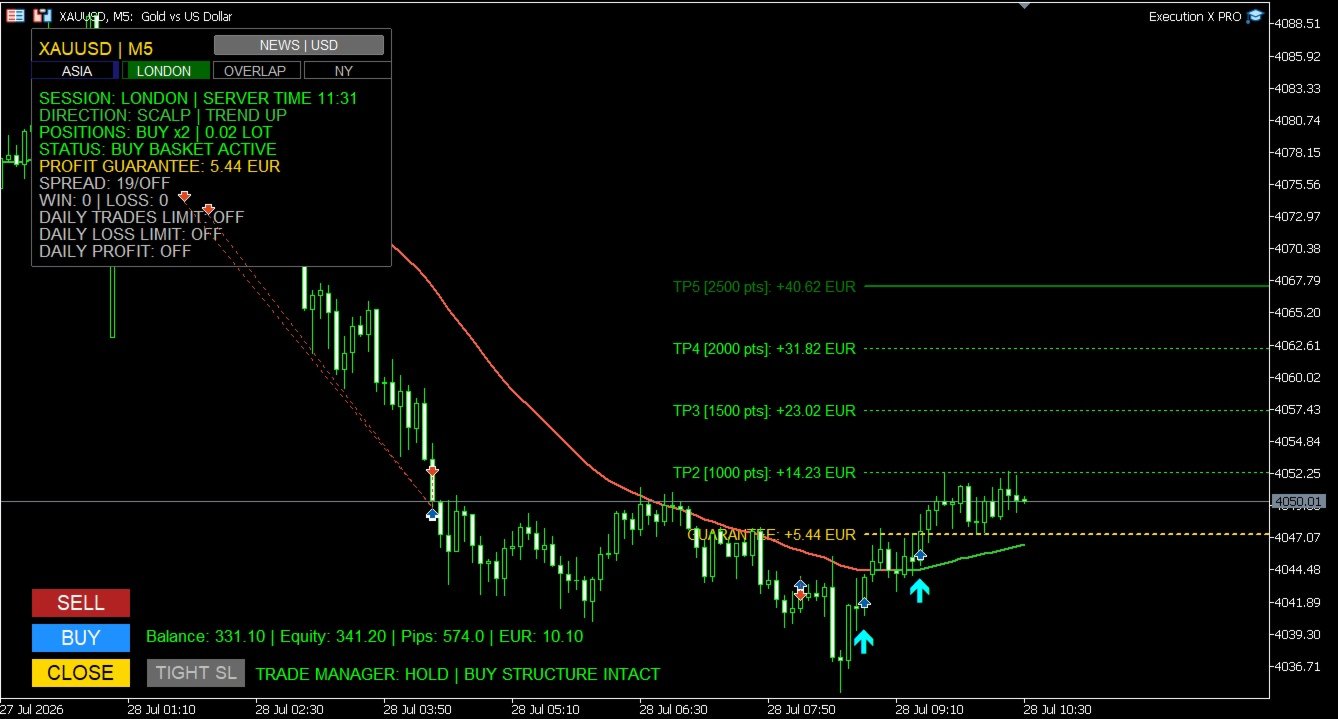
Profit Guarantee System

The Profit Guarantee module continuously evaluates the protection currently secured by the basket.

When the market reaches further stages of the trade plan, the protective level can advance in the direction of profit.

The system is designed so that protection does not move backwards after a stronger level has already been secured.

The current guaranteed result is displayed directly on the panel, giving the trader a clear answer to an important question:

How much of the current basket result is already protected?

This helps reduce uncertainty during pullbacks and removes part of the emotional pressure associated with managing profitable trades.

Structure-Based Profit Protection

An optional market-structure protection mode can refine profit management using confirmed structural reference points.

Instead of relying only on fixed target progression, the system may evaluate whether a more effective protective level exists around the active price structure.

This allows profit protection to remain connected to actual market behaviour while respecting the direction of the basket.

The internal calculation remains fully automated, while the trader sees only the relevant protective result.

Trade Manager

Execution X PRO includes a real-time Trade Manager designed to support the trader after entry.

The manager evaluates the active basket and presents clear status information such as:

  • WAITING

  • HOLD

  • TIGHTEN SL

  • EXIT NOW

  • CONTROL YOUR PROFIT

The Trade Manager does not blindly close positions or replace the trader’s judgment.

Its purpose is to provide an additional layer of situational awareness by monitoring the relationship between the open trade, recent price structure and current profit protection.

When appropriate, the trader can use the dedicated TIGHT SL control to apply the suggested protective adjustment.

Optional popup and mobile notifications can also be enabled for important status changes.

Direction Line and Trading Profiles

Execution X PRO includes a visual Direction Line that helps the trader maintain directional context without covering the chart with unnecessary indicators.

The line changes dynamically according to directional pressure and can display:

  • upward conditions,

  • downward conditions,

  • or neutral market behaviour.

Dedicated profiles are available for different trading styles:

Scalping

Designed for short-term charts and faster market reactions.

Day Trading

Designed for intraday execution and broader directional context.

Position Trading

Designed for higher timeframes and longer market cycles.

Custom

Allows experienced traders to configure their own directional framework.

The Direction Line is not an entry signal by itself. It acts as a visual orientation tool that helps the trader compare an intended position with the broader market direction.

Market Structure Zones

Execution X PRO can display selected market structure zones directly on the chart.

These zones help identify areas associated with significant directional expansion and structural price behaviour.

Optional midpoint references provide additional visual context inside each zone.

The objective is to support chart interpretation without replacing the trader’s own analysis.

Market Structure Zones can be switched off whenever a completely clean chart is preferred.

Timeframe-Based Trade Profiles

Different timeframes produce different market conditions.

A protective distance suitable for scalping may be inappropriate for an intraday or position trade.

Execution X PRO can adapt its trade-management framework according to the active chart timeframe.

This allows the system to maintain a more consistent relationship between:

  • initial protection,

  • market movement,

  • progressive targets,

  • and the selected trading horizon.

The trader may also disable the timeframe profile mode when a custom approach is preferred.

Risk Management

Capital Risk Guard

Before accepting a new position, Execution X PRO can evaluate the potential combined exposure of the active basket.

When the estimated basket risk exceeds the configured account-risk threshold, further execution can be blocked.

This helps prevent uncontrolled position accumulation and protects the trader from unintentionally building exposure beyond the selected risk limit.

Automatic or Fixed Position Size

The panel supports two position-sizing approaches:

Fixed Lot Mode

The trader defines the lot size manually.

Balance-Based Lot Mode

Position size can adjust automatically according to account balance.

This gives the user the flexibility to choose between complete manual control and a more systematic sizing model.

Daily Loss Limit

A daily monetary loss limit can be defined directly in the settings.

Execution X PRO monitors both closed and active trading results for the current day.

When the configured loss threshold is reached, the system can close the active basket and block further trading activity.

This feature is designed to protect the trader from revenge trading, emotional escalation and excessive exposure after a difficult session.

Daily Profit Target

The trader can define a daily monetary profit objective.

The panel continuously displays the remaining amount required to reach that target.

Once the target is achieved, Execution X PRO can:

  • close the active basket,

  • record the daily objective as completed,

  • and prevent further entries for the remainder of the trading day.

This helps transform a profitable session into a completed session instead of allowing overtrading to return profits to the market.

Daily Trade Limit

A maximum number of trades can be configured for each trading day.

The panel displays the current number of executed trades relative to the selected limit.

When the limit is reached, additional entries are blocked.

This encourages selective execution and helps traders avoid low-quality trades caused by boredom, frustration or excessive market activity.

Spread Protection

Execution X PRO can monitor the current spread before accepting a new trade.

When the spread exceeds the configured threshold, entry is temporarily blocked.

This can be especially valuable during:

  • low-liquidity periods,

  • market openings,

  • news releases,

  • rollover,

  • and sudden volatility expansion.

Entry Cooldown

A configurable cooldown period can be applied after opening a position.

During the cooldown, additional entries are temporarily restricted.

This feature helps prevent rapid emotional re-entry and uncontrolled position stacking.

Margin Control

Before submitting a position, Execution X PRO checks whether sufficient account margin is available.

This provides an additional operational safeguard and reduces rejected or inappropriate execution attempts.

High-Impact News Protection

Execution X PRO includes an integrated high-impact economic news filter.

The system automatically identifies relevant currencies associated with the active trading symbol and monitors important scheduled events.

During the configured protection window, new entries can be blocked.

The panel displays:

  • news protection status,

  • affected currency,

  • event information,

  • and the approaching release window.

This helps traders avoid entering new positions immediately before major economic events when spreads, volatility and execution conditions may become unstable.

The news filter can be disabled by traders who prefer to manage economic events manually.

Trading Session Monitor

The panel identifies the current global trading session using server-time synchronization.

It can display the active market phase, including:

  • Asia,

  • London,

  • London–New York overlap,

  • New York,

  • and quieter market periods.

The visual session cockpit provides immediate context about current liquidity conditions without requiring external tools.

This is particularly useful for traders whose strategy depends on session behaviour, volatility transitions or market-opening activity.

Real-Time Trading Dashboard

Execution X PRO keeps the most important account and position information visible directly on the chart.

The panel displays:

  • account balance,

  • account equity,

  • current basket movement,

  • floating basket result,

  • symbol and timeframe,

  • market direction,

  • current position side,

  • number of active positions,

  • combined lot exposure,

  • protected basket result,

  • spread status,

  • win and loss statistics,

  • daily trade usage,

  • daily loss status,

  • daily profit progress,

  • trading session,

  • server time,

  • news status,

  • and Trade Manager guidance.

The trader does not need to constantly switch between multiple MetaTrader windows to understand the current trading situation.

Visual Trade Plan

After entry, Execution X PRO draws the active management structure directly on the chart.

The trader can clearly see:

  • the basket reference price,

  • the protective level,

  • consecutive profit objectives,

  • the approximate financial result at each level,

  • and the progression of the active trade.

This improves clarity before and during position management.

The chart becomes a visual execution map rather than a collection of disconnected orders.

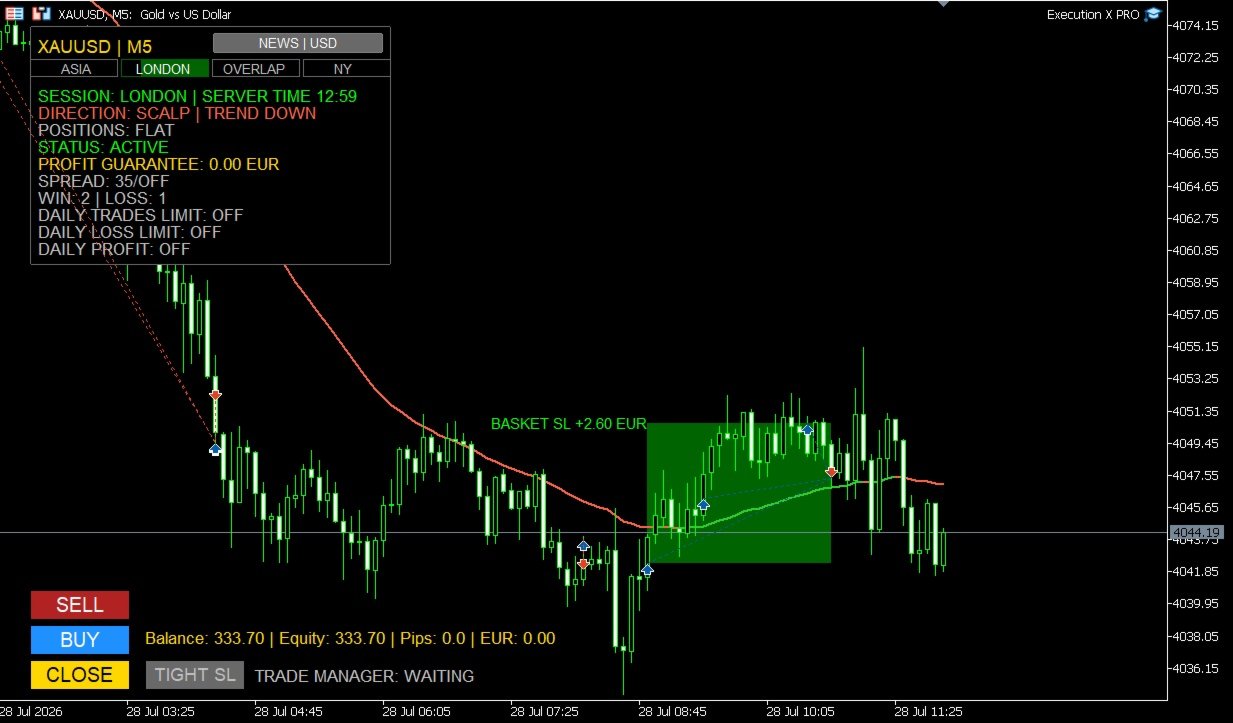
Entry Markers and Result Zones

Optional entry markers show where BUY and SELL positions were executed.

After the basket is closed, the system can draw a visual result zone representing the completed trade.

Profitable and losing baskets are visually separated, making post-trade review faster and clearer.

These result zones remain useful for:

  • analysing entry quality,

  • reviewing trade duration,

  • studying market reaction,

  • comparing execution with the original setup,

  • and improving future decisions.

End-of-Day Management

Execution X PRO can optionally close an active basket near the end of the trading day.

This feature is useful for traders who do not want to carry positions overnight or who operate under strict daily trading rules.

When disabled, the system leaves the basket untouched.

Why Use Execution X PRO?

Execution X PRO is designed to solve the practical problems that appear between market analysis and real execution.

A trader may understand the market correctly and still lose control through:

  • hesitation,

  • delayed execution,

  • excessive position size,

  • inconsistent stop management,

  • premature profit-taking,

  • uncontrolled scaling,

  • revenge trading,

  • or failure to stop after reaching a daily objective.

Execution X PRO creates a controlled process around the trader’s decisions.

It does not promise that every trade will win.

It helps ensure that every trade is executed and managed within a consistent professional framework.

Designed for Different Trading Styles

Execution X PRO can support:

  • XAUUSD trading,

  • Forex,

  • indices,

  • metals,

  • commodities,

  • scalping,

  • intraday trading,

  • swing trading,

  • position trading,

  • single-entry trading,

  • and basket-based execution.

Because the system does not impose its own entry strategy, it can be integrated with many discretionary methodologies.

Who Is Execution X PRO For?

Execution X PRO is designed for traders who:

  • want to make their own entry decisions,

  • need faster chart-based execution,

  • want professional basket management,

  • prefer visible risk controls,

  • scale into positions,

  • struggle with emotional overtrading,

  • want to protect daily results,

  • need clear post-entry guidance,

  • want to monitor market sessions and news,

  • or prefer one structured panel instead of multiple disconnected tools.

It can be used by both developing and experienced traders, but it is especially valuable for traders who already have a strategy and need a more disciplined execution environment.

Important Information

Execution X PRO is a manual execution and trade-management system.

It is not a fully automated trading robot and it does not independently select market entries.

The quality of results depends on:

  • the trader’s market analysis,

  • entry timing,

  • selected position size,

  • broker conditions,

  • spread,

  • volatility,

  • risk settings,

  • and trading discipline.

No trading tool can guarantee profits or eliminate market risk.

Always test the panel on a demo account before using it with real funds.

Review all settings carefully and use only capital you can afford to lose.

Execution X PRO

Your analysis. Your decision. Professional execution.

Solution. Comfort. Experience.


Produtos recomendados
Prop Firm Guard Pro
Shanawaz Mohammed Nabi Rasool Pinjori
Prop Firm Guard Pro protects a prop firm challenge or funded account from breaking its risk rules. It watches the whole account every second and, when a rule is broken, closes the positions, deletes pending orders and blocks new trades for as long as the rule requires. It works with manual trading and with any other Expert Advisor on the same account. It never opens trades on a live chart. Rules it enforces Daily loss limit - measured from the balance, the equity or the higher of the two at the
# Ronin Copier - Tactical Prop Sync **Zero-Latency, Zero-DLL Local Trade Copier Built for Serious Prop Traders.** **EARLY ADOPTER PROMOTION (LIMITED COPIES):** - **First 10 copies:** **$59** (Current Stage) - **Next 10 copies:** **$99** - **Final Price:** **$199** *Price increases automatically as review milestones are reached.* --- Managing multiple MT5 accounts across prop firms (FTMO, FundedNext, Alpha Capital, etc.) or private brokers? **Ronin Copier** provides seamless, millisecond-
BeansAssist
Ivanvielle Bonifacio Dupaya
BeansAssist *Major update 3.00 released. Kindly update your copy of BeansAssist Gives you fruitful information of the price of the symbol that you are trading. Improve your trades simply by following the suggestion that it gives you. Tracks deal stats daily so you keep track of your performance. Don't let emotions take control, be a better and profitable trader with BeansAssist to guide you. *Note: This utility is not for free 
Manyal trading system, CovEchoTrend Robot, focuses on reliability and flexibility. By employing statistical analysis methods to study the relationships between the base indicator and market patterns, the system enables a deeper understanding of market processes. Intelligent pattern analysis: The application of statistical data processing helps identify key trend reversal points more accurately, signaling significant market shifts. Informed decision-making is based on the intersection of indicato
Ferramenta Daytrade Institucional Assistente visual avançado para negociação manual. Daytrade Tool Institutional é um Expert Advisor de Visualização profissional desenvolvido para traders manuais que utilizam Price Action, CRT, PO3, ICT / SMC e precisam de clareza institucional no gráfico. Daytrade Tool Institutional transforma seu gráfico em um painel institucional de análise, mantendo o trader no controle total da execução. Clareza visual. Contexto profissional. Decisão humana. Este EA NÃO a
Divergent Stochastic Filter II Catch Reversals Early, Filter Noise, Trade with Confidence The Edge: Why This Stochastic is Different  Every trader knows the Stochastic oscillator. But knowing when to trust its signals, that's the real challenge. The Divergent Stochastic Filter II transforms this classic indicator into a precision reversal detection system by adding critical elements: divergence intelligence, signal filtering and exhaustion detection.  While standard Stochastic oscillators fire s
XBOOT BOLETA PRO A ferramenta profissional para operações manuais no MetaTrader 5 A XBOOT Boleta Pro é um painel completo desenvolvido para traders que realizam operações manuais e desejam mais agilidade, organização e controle durante a execução das operações. Muito mais do que uma simples boleta de compra e venda, a XBOOT Boleta Pro reúne em um único painel diversas ferramentas que auxiliam desde a leitura do mercado até o gerenciamento das posições abertas. Seu objetivo é reduzir o tempo gast
BREAK RETEST NON-REPAINT. WORKS BEST AT M15 AND ABOVE.  Benefits Fewer false breakouts . Combining close confirmation + retest + previous-close filter greatly reduces noise vs. raw high/low breaks. Tighter execution plans . The drawn level line gives an objective spot for entries, stop placement (just beyond the level), and partial-take-profit structure. Non-repainting confidence . Signals are placed on current bar. Flexible across markets . Works on FX, indices, metals, crypto; scalping on M15
Currency Strength Panel
AL MOOSAWI ABDULLAH JAFFER BAQER
Currency Strength Trade the strongest currencies against the weakest with confidence. Currency Strength is a professional MetaTrader utility that measures and displays the real-time strength of major currencies, helping traders identify high-probability trading opportunities based on market momentum rather than guesswork. Instead of analyzing one currency pair at a time, Currency Strength evaluates multiple currency pairs simultaneously to determine which currencies are gaining strength and whic
TradingManagement
Christian Ishmael Calienta Magallon
TradingManager is a comprehensive trading panel designed to streamline your trading workflow in MetaTrader 5. It combines order management, risk controls, and market analysis into one intuitive interface. Key Features 1. Trading Panel Market Order Entry   - One-click BUY/SELL with automatic SL and TP line placement on chart Fib Limit Orders   - Draw Fibonacci-based limit orders with visual SL and TP levels Risk Management   - Choose between Lots, % Risk, or $ Risk modes Take Profit Split   - Dis
AutoStructure
Evgeniy Grebenuik
AutoStructure — Your Key to Precise Market Entry in Forex! AutoStructure is a professional Forex indicator designed for traders who value precision, speed, and full control over the market. With just one click, you'll be able to: Automatically draw key support and resistance levels Visualize FVG zones (Fair Value Gaps) to spot profitable reversals Analyze Order Blocks across multiple timeframes Build Fibonacci levels based on real price action Perfectly suited for both scalpers and position t
Somewhere over the rainbow It is a system that tries to operate the market from the exhaustion of the trend with a correction algorithm that tries to cut losses at the cost of increasing the margin This system makes all the adjustments automatically, analyzing the pair and the market to decide which is the most efficient step to reach your destination. Somewhere over the rainbow is a multiple trade and multi lot system(The maximum batch can be up to 5 times the initial batch distributed in mult
Strong Liquidity Zones A professional non-repainting liquidity mapping indicator that detects and scores high-probability imbalance zones and stop-pool zones on the chart. The indicator identifies two core types of liquidity areas: • Imbalance Zones – price gaps (similar to Fair Value Gaps) that act as magnets • Stop-Pool Zones – areas around confirmed swing highs/lows where stop orders typically cluster Each zone receives a dynamic 0–10 score based on volume pressure, zone size, number of tests
FREE
Metatrader to telegram copier
Lawrence Chilambe Mkandawire
MT5 to Telegram Copier Pro is a powerful Expert Advisor built to solve one of the biggest challenges faced by signal providers and active traders: fast, reliable, and professional trade broadcasting . Many traders lose subscribers, miss opportunities, or create confusion because they manually type signals, delay trade updates, or send incomplete trade details. Others open trades from their phone and struggle to instantly share them with their Telegram audience. This tool eliminates those problem

Introduction to the Manual Backtesting Indicator on MQL5 The MetaTrader platform provides an excellent backtesting tool for evaluating Expert Advisors (EAs). However, when it comes to manually backtesting a strategy to assess its effectiveness, this tool has some limitations: You cannot manually draw zones or trend lines while in backtesting mode. You cannot switch timeframes to check time alignment. For example, if my strategy requires additional confirmation from a higher timeframe (HTF), this
Currency Index Watcher is a simple and user-friendly tool for whoever wish to trade Forex using currencies indexes. Currency Index Watcher is configurable and usable directly from the panel. Indexes of 8 custom currencies EUR, USD, GBP, JPY, CHF, AUD, CAD, NZD (default) Any 3-chars symbol from your market watch could be used (BTC = bitcoin, RUB = ruble, CNH = yuan etc ...) : double click the symbol label  Ability to select which currencies and made-of pairs will be analyzed : check/uncheck wante
Binance Full Trader
Arash Rezaeian
2 (1)
Binance Full Trader is developed for connection to your Binance account and get data, draw price charts and trade easily with any strategy by an indicator. A user-friendly interface has developed for it and has tried to give access to the necessary information such as open orders and wallet balances. ·        There are two sample indicators (one for trade signal and another for price) that you can download it from these links: https://drive.google.com/file/d/1w2CGuu3rArWKMhS9LkepT9zhVkGR1AO7/vie
Ferramentas para ganhar e pesquisar. O núcleo dos sinais de negociação e estratégia é baseado no algoritmo do autor para a formação de padrões de previsão de preços. Aplicável a qualquer instrumento! Complementado com um sistema de controle baseado no MA "Nine-Tailed Fox" , atualizando e ajustando o sinal com a maior precisão possível para o mercado, instrumento e período de trabalho. Elegíveis: Todos os instrumentos em todos os mercados (há exceções). Para quem é: fundos de hedge, gestores d
COMPLETE USER MANUAL Apex Trade Terminal is a professional visual order entry and dynamic risk management suite engineered for MetaTrader 5. Designed for prop-firm traders, scalpers, and day traders, Apex combines manual visual control with algorithmic capital protection directly on your charts. ________________________________________ 5 KEY STRENGTHS THAT DISTINGUISH APEX FROM THE COMPETITION 1. ️‍️ Proprietary Stealth V-Orders (Trigger+Stop) Never reveal your breakout levels to broker o
FREE
Let us introduce the Heikin Ashi RSI Oscillator! This indicator combines the concepts of Heikin Ashi candles with the RSI (Relative Strength Index) to produce an oscillator-like format that can be used to filter out some of the noise associated with standard RSI readings. This provides traders with a smoother representation of market conditions. Here are some articles to read more about the RSI and Heikin Ashi candles: https://www.investopedia.com/terms/r/rsi.asp https://www.investopedia.com/ter
NEW :    integration with Ofir Signals to send personalized alerts Ofir Notify is a tool which send alerts on trades to Telegram Alert on any event concerning a position : Opening, Closing, modification (SL, TP) Send alerts to Chats, Groups and Channel Alert on Equity change Display Risk, Reward and progress of profit/lost for each position Customization of alerts Sending charts screenshots with alerts Send signals from your indicators or experts Multi-lingual  NEW  : version 2 brings integrati
Telegram to mt5 pro
Janet Abu Khalil
4 (4)
Telegram to MT5 Pro — Copiador avançado de sinais do Telegram com Auto-Fix, Multi-TP, controlo de risco e gestão completa de operações Telegram to MT5 Pro — Copiador profissional de sinais do Telegram Telegram to MT5 Pro copia automaticamente sinais de trading do Telegram diretamente para a sua conta MetaTrader 5 em tempo real, com controlo total de risco, execução e gestão de operações. O sistema é composto por dois componentes: • Expert Advisor (EA) dentro do MetaTrader 5 • Aplicação bridge q
O Auto Stop Loss and Target Enforcer acompanha cada nova posição. Se uma posição abrir sem stop loss ou sem take profit, acrescenta-os alguns segundos depois. Abrange as operações abertas manualmente e as abertas por outros Expert Advisors. Como os stops e os alvos são definidos - Stop loss: um múltiplo do movimento típico do mercado (Average True Range), um número fixo de pips, uma parte definida da conta ou além do suporte ou resistência mais próximos. - Take profit: um múltiplo do movimento
Pivot meter
Theophane Dohou
Nova Ferramenta de Trading: Otimize suas Operações! Estou animado em apresentar uma nova ferramenta que desenvolvi para realizar operações sem complicação! Ao contrário dos indicadores tradicionais, essa ferramenta não apenas segue a variação dos preços. Ela analisa profundamente as correlações entre as moedas e ajuda a identificar os momentos estratégicos para entrar no mercado. Veja como funciona: Zero = Sem Operação: Enquanto o indicador estiver em zero, isso significa que as condições
BlueBoat – Prime Cycle é um indicador técnico para MetaTrader 5 que analisa e visualiza ciclos de mercado com base no modelo de ciclos FIMATHE (Marcelo Ferreira) . O indicador identifica e marca estruturas de ciclo históricas e atuais, como CA, C1, C2, C3 , permitindo ao trader compreender a dinâmica estrutural do preço ao longo do tempo. O indicador combina análise histórica (backtest) com marcação em tempo real , oferecendo uma visão clara tanto dos ciclos passados quanto do ciclo ativo no grá
JT360 OrderPanel Pro – Professional Trade Execution and Risk Management for MetaTrader 5 Product Overview JT360 OrderPanel Pro is an interactive trading panel for MetaTrader 5 that combines trade execution, risk calculation, position management, and multiple protection mechanisms within a single interface. The panel is designed for traders who make their own trading decisions and want to apply structured risk rules, controlled order execution, and additional safety mechanisms. In addition to sta
Trade2Telegram
Strifor (Mauritius) Ltd
5 (12)
Trade2Telegram — um plugin para notificações automáticas de trades do MetaTrader para o Telegram. Esta ferramenta é projetada para traders que gerenciam capital, administram canais de sinais ou lideram comunidades educacionais. O plugin copia todas as operações de trading do terminal e as publica em um chat, grupo ou canal selecionado no Telegram. As mensagens são enviadas automaticamente quando posições são abertas ou fechadas, níveis de stop-loss ou take-profit são alterados, ordens pendentes
FREE
Assuma o controle de sua rotina de negociação sem esforço com o revolucionário Trades Time Manager. Essa ferramenta potente automatiza a execução de ordens em horários designados, transformando sua abordagem de negociação. Crie listas de tarefas personalizadas para diversas ações de negociação, desde a compra até a definição de pedidos, tudo sem intervenção manual. Guia de instalação e entradas do Trades Time Manager Se você deseja receber notificações sobre o EA, adicione nosso URL ao terminal
Os compradores deste produto também adquirem
Farmed Hedge Yield Farming | All Markets (Manual - Hybrid - Semi/Automated EA) VERIFIED TRADING RESULTS - Farmed Hedge Yield Axi Copy:  https://www.mql5.com/en/signals/2356376 - Farmed Hedge Yield Exn Copy:   https://www.mql5.com/en/signals/2356404 - Farmed Hedge Yield V Copy:  https://www.mql5.com/en/signals/2357156 IMPORTANT NOTICE: FarmedHedge is a MANUAL-FOCUSED TRADING UTILITY ,not a fully automated EA. Results shown on this Signal include manual trades and overall strategic management.
================================================================================ POC BREAKOUT - V20.72. Full Professional Grade Toolkit ================================================================================ POC Breakout is a full MetaTrader 5 trading dashboard for discretionary traders who want breakout signals, Point of Control (POC) context, volume profiles, order flow, market structure, news, alerts, and advanced trade planning in one professional workspace. Attached directly to you
News Trade EA MT5
Konstantin Kulikov
4.55 (11)
Apresento um robô útil que eu mesmo uso há vários anos. Pode ser usado nos modos semiautomático e totalmente automático. >>> Chat <<< O programa contém configurações flexíveis para negociação nas notícias do calendário econômico. Não pode ser verificado no testador de estratégia. Somente trabalho real. Nas configurações do terminal, você precisa adicionar o site de notícias à lista de URLs permitidos. Clique em Serviço > Opções > Conselheiros. Marque com V a caixa "Permitir WebRequest para os
Master Your Trading Discipline   Stop losing your hard-earned gains to overtrading and emotional decisions. The Discipline Tool is your ultimate trading assistant, ensuring strict risk management in real-time. Key Protection Features: Advanced Drawdown Defense : Automatically halts trading if your daily drawdown exceeds a preset threshold (percentage or dollar amount). Real-Time Equity Lock : Safeguard profits by referencing peak equity, ensuring drawdown stays within control. Hard Profit Target
The product will copy all telegram signal to MT5 ( which you are member) , also it can work as remote copier.  Easy to set up, copy order instant, can work with almost signal formats, image signal,  s upport to translate other language to English Work with all type of channel or group, even channel have "Restrict Saving Content", work with  multi channel, multi MT5 Work as remote copier: with signal have ticket number, it will copy exactly via ticket number. Support to backtest signal. How to s
EasyInsight AIO MT5
Alain Verleyen
4.92 (12)
EASY Insight AIO – A solução tudo-em-um para trading inteligente e sem esforço Visão geral Imagine analisar todo o mercado — Forex, Ouro, Cripto, Índices e até Ações — em segundos, sem precisar examinar gráficos manualmente, instalar indicadores ou lidar com configurações complicadas. EASY Insight AIO é sua ferramenta definitiva de exportação para trading com IA, pronta para usar. Ela oferece um panorama completo do mercado em um único arquivo CSV limpo — pronto para análise imediata no ChatGP
Power Candles Strategy Scanner - Localizador de configurações multissímbolo com auto-otimização O Power Candles Strategy Scanner utiliza o mesmo motor de auto-otimização que alimenta o indicador Power Candles — em todos os símbolos da sua lista de observação, lado a lado. Um painel indica-lhe quais os símbolos que são estatisticamente negociáveis neste momento, qual a estratégia vencedora para cada um, o par ideal de Stop Loss / Take Profit, e avisa-o assim que um novo sinal é emitido. Esta ferr
The Patch
Mian Rameez Ali
The Patch It never opens a trade. It walks behind the ones that did. Every open position, every pending order — checked twice a second for the one thing that's easy to forget: a stop, a target. Found bare, it doesn't ask. It writes the missing number in, measured in points from wherever the position began, and moves on to the next. No strategy, no opinion on direction. Just the quiet assumption that nothing should ever sit on the market unprotected — not because someone decided it shouldn't,
RETAILBERG FOOTPRINT CHART PRO — Order-Flow Workspace for MetaTrader 5 Version 7.00  |  Professional System  |  31 tools  |  One chart A full 150-page illustrated User Manual is included. Please read the full manual to understand this feature packed footprint chart elements and ui. https://www.mql5.com/en/blogs/post/777982 DEMO / STRATEGY TESTER — PLEASE READ FIRST
Floor Watch
Syed Tauqeer Hussain Shah
Floor Watch One number, watched every thirty seconds: how far equity has fallen since the day began — or since its highest point, if it's told to trail the peak instead of the open. Cross the line and it doesn't argue. Every open position closes, every pending order vanishes, and anything that slips through afterward gets shut the moment it appears. Not asked. Removed. The floor holds until the clock turns 5 AM Pakistan time — then, and only then, does the day start over. One rule. No except
Uma única compra. Todos os meus indicadores para MT4 e MT5, atuais e futuros, sem custo adicional. Após a compra, entre em contato comigo para saber como recebê-los. Está previsto aumentar o preço em 50$ a cada 10 compras, até 999$. Vale o preço do Market no momento do pagamento. Mantenha o indicador em que você confia. Automatize o trabalho ao redor dele. Seu sinal. Suas regras. Sua execução. Você já tem um indicador MT5 em que confia, mas ainda precisa acompanhar o gráfico, esperar sinais, ca
EA Overfitter
Stephen J Martret
5 (1)
That backtest looks great. But will it still be making money tomorrow, next week, next month? EA Overfitter re-runs your EA on 100 price histories it has never seen. One score tells you if the edge is real. A backtest tells you what an EA did on one price history — the one that happened to occur. What you cannot tell from it is how much of that result was the strategy and how much was the particular path. EA Overfitter answers that. It builds up to 100 synthetic price histories your EA has n
YuClusters
Yury Kulikov
4.93 (43)
Atenção: A versão demo para revisão e teste está aqui . YuClusters é um sistema profissional de análise de mercado. O trader tem oportunidades únicas para analisar o fluxo de pedidos, volumes de negociação, movimentos de preços usando vários gráficos, perfis, indicadores e objetos gráficos. O YuClusters opera com base em dados de Tempos e Negócios ou informações de ticks, dependendo do que está disponível nas cotações de um instrumento financeiro. O YuClusters permite que você crie gráficos com
Quant AI Agents
Ho Tuan Thang
5 (1)
Quant AI Agents are independent trading Expert Advisors. Instead of trading using a fixed strategy like other conventional EAs, Quant AI Agents   is a   multi-agent AI trading framework   that turns natural-language strategy prompts into live.  WANT THE SAME RESULTS AS MY LIVE SIGNAL?   Use the exact same brokers I do:   IC MARKETS , IC TRADING   .  Unlike the centralized stock market, Forex has no single, unified price feed.  Every broker sources liquidity from different providers, creating un
Daily Trading Limiter
AL MOOSAWI ABDULLAH JAFFER BAQER
5 (8)
• Please test the product in the Strategy Tester before purchasing to understand how it works. • If you face any issues, contact me via private message—I’m always available to help. • After purchase, send me a screenshot of your order to receive a FREE EA as a gift. Daily Trading Limiter — the rule you cannot break Every trader knows the number. Three trades. Two percent. One bad day and stop. And every trader has watched themselves take the fourth trade anyway. The problem was never knowing th
FUTURES ORDERFLOW FOOTPRINT CHART Professional OrderFlow EA for MetaTrader 5 Version 1.01| Professional tool for real traders | Institutional-Grade Visualization STRATEGY TESTER USERS - PLEASE SELECT EVERY REAL TICK WHEN TESTING AND YOU HAVE DOWNLOADED HISTORICAL DATA. IF YOU SEE A WAITING SCREEN AND IT IS NOT DOWNLOADING, IT MEANS YOU HAVE LOW HISTORICAL DATA. TRY 1 MIN AND 5 MIN FIRST ON 1 DAY DATA. ONE DAY DATA SHOULD BE THE NEWEST AND MOST CURRENT DATE. PLEASE WAIT UNTIL THE MARKET HAS ROL
Trading Chaos Expert
Hennadii Stanilevych
5 (11)
Não existe software igual no mundo e que represente um "console" universal de negociação informando sinais para operar, entrada automatizada do mercado, configurando o Stop Loss e o Take Profit, assim como o Trailling Profit para diversas negociações em apenas uma janela aberta. O controle intuitivo do Expert Advisor em "três cliques" garante um uso abrangente de todas as suas funções em diferentes computadores, incluindo tablets. Interagindo com indicadores de sinal adicionais que marcam o gráf
Copy your MT5 trades to Interactive Brokers You keep using MT5. Every order you open or close is sent to your IB account. In real time. No coding. No changes to your strategy or EA. Try it first Rent 1 month: $30. Test on a live or paper account. What it does Real-time copying: same direction, reverse, or one side only. Map any MT5 symbol to any IB symbol. Set a lot ratio for each. Forex, Futures, Stocks, CFDs, Metals and Crypto. Position sync: both accounts checked, any difference fixed. Optio
Quant Panel
Kevin Craig E Gittins
Quant Panel Pro O Painel Definitivo de Desempenho Multi-EA para Traders Quantitativos Pare de alternar entre múltiplos gráficos ou ferramentas externas para monitorar suas estratégias algorítmicas! O Quant Panel Pro oferece monitoramento de portfólio em nível institucional em uma interface profissional e elegante. Principais Recursos Análise Quantitativa ao Seu Alcance Agregação de lucros/perdas (P&L) em tempo real para todos seus Expert Advisors Análise estatística de taxa de acerto com métric
VERON LINK MASTER MT5 — Real-time Multi-Account Dashboard & Sync Controller Veron Link Master is a high-performance, centralized monitoring and synchronization control center designed for MetaTrader 5. Built specifically for traders managing multiple accounts, prop firm portfolios, grid/martingale EAs, or client networks, Veron Link Master provides a seamless, ultra-modern dark-themed GUI dashboard directly on your MT5 terminal. Pricing Structure: Take advantage of our early-bird pricing before
Veron Link Slave – Synchronized Grid, Martingale & Breakout Management Short Description Advanced synchronization tool designed to manage Grid, Martingale, and Breakout EAs. Automatically sends close-basket signals to the Master account upon profit target completion, minimizing slippage across different brokers. Full Description Veron Link Slave is a specialized utility developed to enhance the execution efficiency and risk management of multi-account or multi-broker trading setups. It is desig
Advanced Daily Trading Limiter PRO
AL MOOSAWI ABDULLAH JAFFER BAQER
Advanced Daily Trading Limiter PRO Professional Risk Management. Uncompromising Trading Discipline. One undisciplined trading session can erase weeks of consistent profits. Whether it's overtrading, revenge trading, or exceeding a prop firm's daily risk limits, emotional decisions often become a trader's biggest obstacle—not the market itself. Advanced Daily Trading Limiter PRO is a comprehensive risk management and discipline enforcement utility for MetaTrader 5, designed to help traders stay
HINN Lazy Trader
ALGOFLOW OÜ
5 (1)
The core idea: using the user interface, you configure the parameters the chart must meet before entering a position (or positions), choose which entry models to use, and set the rules for when trading and planning should end. Lazy Trader  handles the rest: it  takes over all the routine chart watching and execution! full description  :: 3 key videos [1] ->  [2]   ->  [3] What can it do? - Understands Larry Williams market structure - Understands swing market structure by Michael Huddleston
AI Arbitron — an MT5 Spot vs Future Gold Arbitrage Bot designed to capture price discrepancies between correlated Spot and Future instruments through hedged, non-directional trading. Platform: MT5 Use Swap Free Accounts, many of the regulated broker gives swap free accounts for 7 days, make use of it by only buying lower price asset and selling higher price asset, hold your position for 2-3 days. Asset: Mainly Gold (XAUUSD) using Spot + Future/CFD price feeds. Core strategy: It monitors the p
Mentfx Mmanage mt5
Anton Jere Calmes
4.25 (8)
The added video will showcase all functionality, effectiveness, and uses of the trade manager. Drag and Drop Trade Manager. Draw your entry and have the tool calculate the rest. Advanced targeting and close portions of a trade directly available in tool (manage trades while you sleep). Market order or limit order on either side with factored spread. Just draw the entry, the tool does the rest. Hotkey setup to make it simple. Draw where you want to enter, and the stop loss, the tool calculates al
Features   With MT5 to Interactive Brokers(IB) Trader, you can: 1. Load chart data from IB to MT5, and Analyze with all standard or customer Indicators. 2. Place Orders to IB Account Directly in MT5. 3. Make your Own EAs upon IB Securities by only making minus changes of the trading function. Usage 1) Installation Copy the "Mt5ToIBTraderEn.ex4" and sample files to [MT5 Data Folder]->MQL5->Experts.  2)  MT5 Settings Add the IP Address to the MT5 Allowed URLs in 'Tools->Options->Expert Adviso
MT5 Trading Deck
Manuel Michiels
5 (2)
One button. One trade. MT5 Trading Deck is a hotkey trading panel for MetaTrader 5 that turns the platform into a keyboard-driven execution cockpit. Stop loss, take profit and lot size are pre-calculated for every key; the moment you press, a market order is live on the broker. A complete technical user manual is attached in the product Comments section. It documents every input parameter, the full hotkey map, the recommended Stream Deck XL layout, and the advanced workflows for Pre-Limit orders
Global Investing FX Terminal
Santiago Nicolas Pla Casuriaga
5 (1)
O Global Investing FX Terminal é um dashboard de FX completo para o MetaTrader 5 — taxas de política monetária, posicionamento COT do CFTC, rankings de carry, surpresas econômicas, skew de opções, sentimento de varejo e correlações, treze painéis ao todo — renderizado sobre um único overlay canvas sem flicker, com atualização a cada 10 segundos a partir de um único EA. Nenhum software externo é necessário. A análise profissional de câmbio exige acesso simultâneo a dados que normalmente ficam esp
EA Slipstream
Stephen J Martret
5 (1)
Your backtest filled every order at the price it asked for. Your account does not. EA Slipstream measures what execution costs your EA, using your own fills, slippages and spreads to show you the true performance of your EA. A backtest prices every trade at the level the EA named. In live trading a pending order fills at whatever price is available when it triggers, a stop closes wherever the market is when it is hit, and the spread at that moment is whatever the account was quoting. The differ
Unlimited Trade Copier Pro MT5 is a tool to copy trade remotely to multiple MT4, MT5 and cTrader accounts at different computers/locations over internet. This is an ideal solution for you if you are a signal provider and want to copy your trades to other receivers globally on your own rules. One provider can copy trades to multiple receivers and one receiver can get trade from multiple providers as well. The provider can even set the subscription expiry for each receiver, so that receiver will n
Mais do autor
Fire Horse Gold Pyramid MT5 Uses internal trend-based logic for BUY-only market conditions. Uses controlled position management with reduced risk behavior for additional positions. Protection logic is handled internally by the EA. No martingale.No grid.No averaging down. Overview Fire Horse Gold Pyramid MT5 executes trades based on predefined technical rules. Positions are managed only according to the EA internal logic. The system includes: • Internal trend-based market filtering • Internal e
Fast view of market structure across multiple timeframes — always at hand. Add it to your MT5 library and keep your chart clean. Simple, lightweight and practical — ideal as a supporting tool for daily price action analysis. Track market structure with speed and clarity. MultiTF Fast Pivot ZigZag helps you identify HH, HL, LH, LL and key higher-timeframe levels without switching charts or cluttering your workspace.
Execution Trainer X
Artur Jacek Domagala
Execution Trainer X is a manual trading practice tool created for MetaTrader 5 Strategy Tester. Before real money is placed on the market, the trader should train the decision, the hand and the reaction. Train your decisions. Train your reactions. Train your patience. Train before you risk real money. This Expert Advisor does not trade automatically. It gives you simple BUY, SELL and CLOSE buttons, so you can practice manual execution directly on historical charts. Use it to train entries,
Super MTF Color State Super MTF Color State is a simple multi-timeframe trend direction indicator for MetaTrader 5. Its job is simple: to show the current market direction in a clean and visual way. Green line = the market is moving up. Red line = the market is moving down. The indicator also includes a small color state panel: D1 | H4 | H1 | M15 | M5 | M1 Each timeframe changes color depending on its current direction. This helps the trader quickly see which timeframes agree with the move an
Filtro:
Sem comentários
Responder ao comentário