RiskCalc Shield

RiskCalc Shield: Comprehensive System Overview & User Manual

⚠️ WARNING / DISCLAIMER

Please manually verify all calculations before trading with real money! This tool is designed to be comprehensive but has currently only been tested extensively on a single broker. We highly recommend cross-checking the calculated values manually against your broker's Symbol Properties. (Alternatively, as an additional option, you could provide a screenshot to an AI to help verify the formula accuracy). The developer assumes no responsibility for any financial losses or errors resulting from the use of this tool under any circumstances.

1. MAIN PANEL (Real-Time Metrics)

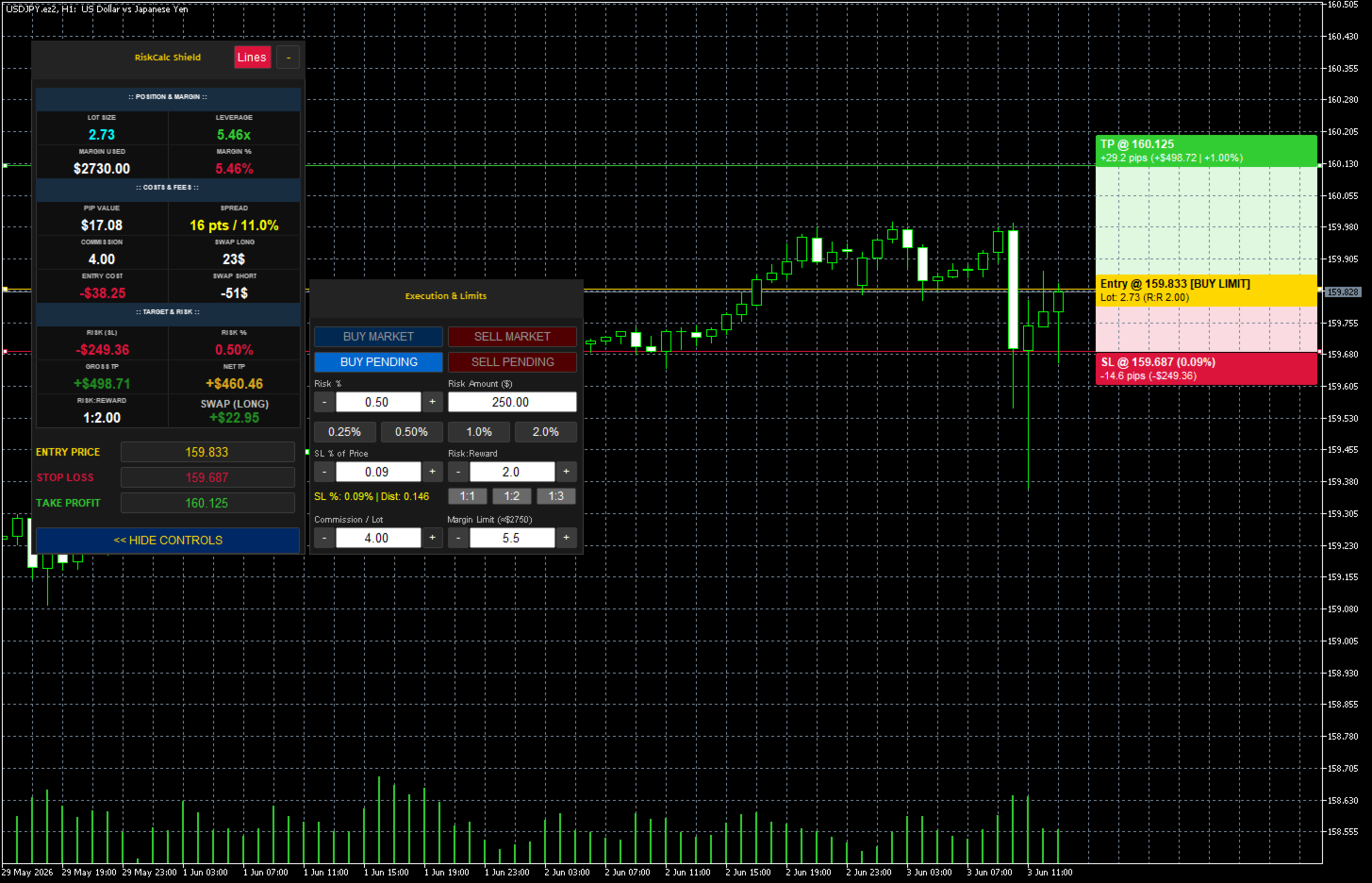
This is the primary dashboard that displays real-time calculations before you execute a trade.

:: POSITION & MARGIN ::

  • LOT SIZE: The automatically calculated position size based on your specified risk and Stop Loss distance.

  • LEVERAGE: Displays the effective leverage you are using for this specific trade (Notional Value ÷ Account Equity).

  • MARGIN USED: The exact monetary amount the broker will lock as collateral for this trade.

  • MARGIN %: The percentage of your account equity that the Margin Used represents. Changes color to warn you if you are approaching your Margin Limit.

:: COSTS & FEES ::

  • PIP VALUE: The actual monetary value of one pip based on your calculated Lot Size.

  • SPREAD: Displays the real-time spread cost in points (pts) and shows its percentage relative to your total Risk (SL) to warn you of high spread conditions.

  • COMMISSION: The calculated commission fee based on your Lot Size and your manual commission input.

  • SWAP LONG: The estimated overnight holding fee/credit if you open a Long (Buy) position.

  • ENTRY COST: The total hidden cost required just to open the trade (Spread Cost + Commission).

  • SWAP SHORT: The estimated overnight holding fee/credit if you open a Short (Sell) position.

:: TARGET & RISK ::

  • RISK (SL): The exact monetary amount you will lose if your Stop Loss is hit.

  • RISK %: The actual percentage of your account at risk (should match your target risk closely).

  • GROSS TP: The raw profit amount when your Take Profit is hit, before deducting entry costs.

  • NET TP: The actual profit amount you get to keep (Gross TP - Entry Cost).

  • RISK:REWARD: The calculated ratio between your Net TP and your Risk (SL).

  • EXPECT SWAP (Dynamic Swap): Automatically updates to show the specific overnight swap cost (Long or Short) based on your chosen trade direction.

2. SIDE PANEL (Execution & Limits)

This panel provides quick access to trade execution and parameter adjustments.

  • Execution Buttons: * BUY MARKET / SELL MARKET: Executes the trade immediately at the current market Bid/Ask price.

    • BUY PENDING / SELL PENDING: Sets up a limit or stop order depending on where your Entry line is placed relative to the current price.

  • Risk % Management:

    • Risk % / Risk Amount: Input fields to set your risk by percentage or exact currency amount.

    • Quick Presets: Instant buttons to set risk to 0.25%, 0.50%, 1.0%, or 2.0%.

    • +/- Adjusters: Fine-tune the risk percentage quickly.

  • SL % of Price: Allows setting the Stop Loss distance as a percentage of the asset's current price (e.g., a 0.10% drop) rather than standard pips/points.

  • Risk:Reward (R:R): * Input field to set a custom R:R target.

    • Quick preset buttons for 1:1, 1:2, and 1:3. The Take Profit line will auto-adjust based on this ratio.

  • Commission / Lot: A manual input field to set your broker's commission rate per 1 standard lot.

  • Margin Limit: A safety lock that prevents the tool from calculating a lot size that would exceed this margin percentage (e.g., 5.5%). Crucial for passing Prop Firm evaluations.

RiskCalc Shield: คู่มือและภาพรวมระบบอย่างละเอียด

⚠️ คำเตือน / ข้อจำกัดความรับผิดชอบ

โปรดทดสอบและตรวจสอบความถูกต้องของการคำนวณด้วยตัวท่านเองก่อนใช้งานจริง! เครื่องมือนี้ถูกสร้างขึ้นให้ครอบคลุมการคำนวณในหลายกรณี แต่เพิ่งผ่านการทดสอบการใช้งานจริงกับเพียงโบรกเกอร์เดียวเท่านั้น ทางที่ดีขอแนะนำให้ท่านลองคำนวณด้วยมือเพื่อเทียบค่า หรือดูควบคู่กับหน้าต่างข้อมูลพื้นฐานสินทรัพย์ (Symbol Properties) ของโบรกเกอร์ท่าน (อีกแนวทางหนึ่งที่ขอเสนอคือ ท่านอาจแคปหน้าจอแล้วนำไปให้ AI ช่วยวิเคราะห์ตรวจสอบความถูกต้องของสูตรเพิ่มเติมได้) เพื่อป้องกันความผิดพลาด ผู้พัฒนาไม่ขอรับผิดชอบต่อความเสียหายทางการเงิน หรือข้อผิดพลาดใดๆ ที่อาจเกิดขึ้นจากการใช้งานเครื่องมือนี้ในทุกกรณี

1. แผงข้อมูลหลัก (MAIN PANEL)

หน้าต่างแสดงผลหลักแบบเรียลไทม์ที่ช่วยวิเคราะห์ค่าใช้จ่ายและผลกำไรทั้งหมด "ก่อน" ที่คุณจะตัดสินใจเข้าเทรด

:: POSITION & MARGIN (ตำแหน่งและมาร์จิ้น) ::

  • LOT SIZE: ขนาดออเดอร์ที่ระบบคำนวณให้อัตโนมัติ โดยอิงจากความเสี่ยงที่คุณตั้งไว้และระยะห่างของเส้น SL

  • LEVERAGE: แสดงอัตราทด (Leverage) ที่คุณกำลังใช้จริงสำหรับออเดอร์นี้ (มูลค่าสัญญารวม ÷ อิควิตี้)

  • MARGIN USED: จำนวนเงินหลักประกันที่โบรกเกอร์จะดึงไปล็อคไว้เพื่อเปิดออเดอร์นี้

  • MARGIN %: สัดส่วนของ Margin Used เมื่อเทียบเป็นเปอร์เซ็นต์ของพอร์ต (สีจะเปลี่ยนเพื่อเตือนหากใช้มาร์จิ้นสูงเกินไป)

:: COSTS & FEES (ต้นทุนและค่าธรรมเนียม) ::

  • PIP VALUE: มูลค่าเงินจริงต่อการขยับ 1 Pip ตามขนาด Lot Size ของคุณ

  • SPREAD: ค่าสเปรดแบบเรียลไทม์ (หน่วย Points) และแสดงเป็น % เมื่อเทียบกับระยะ SL เพื่อเตือนว่าสเปรดกินต้นทุนความเสี่ยงไปเท่าไหร่แล้ว

  • COMMISSION: ค่าคอมมิชชั่นรวมสำหรับออเดอร์นี้ (คำนวณจาก Lot Size ข้ามกับค่าคอมฯ ที่คุณกรอกไว้)

  • SWAP LONG: ประมาณการค่าใช้จ่าย (หรือรายได้) ข้ามคืน หากคุณเปิดออเดอร์ฝั่ง Buy

  • ENTRY COST (ต้นทุนการเข้าเทรด): ต้นทุนรวมที่คุณต้องจ่ายทันทีที่กดเปิดออเดอร์ (Spread + Commission)

  • SWAP SHORT: ประมาณการค่าใช้จ่าย (หรือรายได้) ข้ามคืน หากคุณเปิดออเดอร์ฝั่ง Sell

:: TARGET & RISK (เป้าหมายและความเสี่ยง) ::

  • RISK (SL): จำนวนเงินจริงที่คุณจะเสียหากกราฟวิ่งชน Stop Loss

  • RISK %: เปอร์เซ็นต์ความเสี่ยงจริงของพอร์ต (จะใกล้เคียงกับ % ที่คุณตั้งเป้าไว้)

  • GROSS TP: กำไรขั้นต้นเมื่อกราฟวิ่งชน Take Profit (ยังไม่หักต้นทุน Entry Cost)

  • NET TP: กำไรสุทธิที่คุณจะได้รับเข้าพอร์ตจริงๆ (Gross TP หักลบ Entry Cost แล้ว)

  • RISK:REWARD: สัดส่วนความคุ้มค่าของการลงทุน (คำนวณจาก Net TP เทียบกับความเสี่ยง SL)

  • EXPECT SWAP (Dynamic Swap): แสดงค่า Swap ข้ามคืนแบบเจาะจงให้อัตโนมัติ โดยระบบจะรู้เองว่าคุณกำลังจะเปิดออเดอร์ Buy หรือ Sell แล้วดึงค่ามาแสดงผล

2. แผงควบคุม (SIDE PANEL - Execution & Limits)

ส่วนควบคุมคำสั่งและการปรับจูนตัวเลขต่างๆ อย่างรวดเร็ว

  • ปุ่มเข้าออเดอร์ (Execution Buttons): * BUY MARKET / SELL MARKET: ส่งคำสั่งซื้อขายทันทีที่ราคาตลาดปัจจุบัน

    • BUY PENDING / SELL PENDING: วางออเดอร์ล่วงหน้า (ระบบจะปรับเป็น Limit หรือ Stop ให้อัตโนมัติอิงจากตำแหน่งเส้น Entry)

  • การจัดการความเสี่ยง (Risk % Management):

    • Risk % / Risk Amount: ช่องกรอกความเสี่ยงแบบเปอร์เซ็นต์ หรือแบบกำหนดจำนวนเงิน(ดอลลาร์)โดยตรง

    • ปุ่มลัด (Quick Presets): ปุ่มเซ็ตความเสี่ยงรวดเร็ว 0.25%, 0.50%, 1.0%, 2.0%

    • ปุ่ม +/-: สำหรับปรับจูนเปอร์เซ็นต์ความเสี่ยงแบบละเอียด

  • SL % of Price: การตั้งค่าระยะ Stop Loss เป็นเปอร์เซ็นต์การขยับของราคา (เช่น ถ้าราคาร่วงลง 0.10%) แทนการนับระยะเป็นจุดทั่วไป

  • สัดส่วน Risk:Reward (R:R): * ช่องสำหรับกรอก R:R เป้าหมายตามต้องการ

    • ปุ่มลัด 1:1, 1:2, 1:3 (เมื่อกดแล้ว ระบบจะย้ายเส้น TP ไปยังระยะเป้าหมายให้อัตโนมัติ)

  • Commission / Lot: ช่องสำหรับกรอกค่าธรรมเนียมคอมมิชชั่นของโบรกเกอร์คุณ (ต่อ 1 Standard Lot)

  • Margin Limit: ระบบล็อคความปลอดภัย หากโปรแกรมคำนวณ Lot แล้วพบว่าจะดึงมาร์จิ้นเกิน % ที่ตั้งไว้ตรงนี้ (เช่น 5.5%) ระบบจะหั่น Lot ลงอัตโนมัติ (ฟีเจอร์สำคัญสำหรับนักเทรดพอร์ตสอบ Prop Firm)

Рекомендуем также
FiT Panel Pro
Thonglak Janyakorn
Overview FiT Panel Pro is a professional-grade trade management panel designed for MetaTrader 5 traders who demand speed, precision, and full control over their trades. Built with a modern dark-theme UI, it combines one-click execution with advanced risk management, visual SL/TP drag lines, automatic Fibonacci-based levels, and comprehensive order management — all in a single, compact panel. Whether you are a scalper, day trader, or swing trader, FiT Panel Pro gives you the edge you need to exec
FREE
================================================================ MATRIX CONDITION MONITOR Live Trade Condition Panel for MetaTrader 5 Fully Automatic -- Works with ALL Matrix EAs ================================================================ NEVER MISS A TRADE SETUP AGAIN Matrix Condition Monitor is a free utility that attaches to any chart and automatically checks all 10 trade conditions in real time -- showing you exactly why a trade will or will not open, and alerting you the moment ever
FREE
TrendVision AI
Murtadha Majid Jeyad Al-Khuzaie
TrendVision AI – Smart Trend Channels & Price Forecasting for MetaTrader 5 Discover market structure and explore potential future price direction with TrendVision AI, an advanced technical indicator for MetaTrader 5 that combines automatic trendline analysis with a machine-learning-based price forecasting model. How Does TrendVision AI Work? TrendVision AI analyzes historical candlestick data within a configurable lookback window. It automatically draws two trendlines directly on the chart:
FREE
Risk Manager – Account Protection Tool Risk Manager is an Expert Advisor for MetaTrader 5 designed to protect your trading account by applying automatic risk management rules. This tool does not open trades . It continuously monitors your account and enforces predefined limits to help prevent excessive losses and maintain disciplined trading. Risk Manager works in the background and can manage positions opened by manual trading or other Expert Advisors. It is particularly useful for: • Manual tr
FREE
Click Trading
Jawad Tauheed
5 (2)
One Click Trading – Auto TP SL Developer TraderLinkz Version 1.00 Category Utility What it does Adds missing TP and SL to your manual trades and pending orders Sets them once per ticket Lets you move TP and SL afterward Works on hedging and netting accounts Scans on every tick and reacts on trade events Why you want it You place faster entries You get consistent risk and exit targets You reduce fat finger errors You keep full manual control Quick start Attach the EA to any chart Keep TP and SL e
FREE
EA Health Monitor is a free indicator for MetaTrader 5 that shows how each Expert Advisor on your account is doing. It groups the account history by magic number. Every EA gets its own row. Manual trades have a row of their own, and a total sits at the bottom. It only reads the account history and open positions. It never opens, changes or closes a trade. Standalone: Everything is built in. You do not need to buy or install any other product named on this page. Quick start Attach EA Health Monit
FREE
Most lot size calculators assume one pip is worth ten dollars. That assumption is wrong on gold, wrong on indices, wrong on JPY crosses, and wrong on every account not denominated in USD - which is to say, wrong exactly where oversizing hurts. This one asks your server instead. It reads the tick value, tick size, point size, volume step and margin requirements actually published for the symbol on your chart, so the number it gives you is the number your account will accept. How it works Attach i
FREE
Value Chart Candlesticks
Flavio Javier Jarabeck
4.57 (14)
The idea of a Value Chart indicator was presented in the very good book I read back in 2020 , " Dynamic Trading Indicators: Winning with Value Charts and Price Action Profile ", from the authors Mark Helweg and David Stendahl. The idea is simple and the result is pure genius: Present candlestick Price analysis in a detrended way! HOW TO READ THIS INDICATOR Look for Overbought and Oversold levels. Of course, you will need to test the settings a lot to find the "correct" one for your approach. It
FREE
Trade With Price is a powerful and user-friendly MetaTrader 5 Expert Advisor designed to simplify and accelerate your trading execution. This EA provides a smart one-click trading panel that allows traders to instantly place BUY, SELL, and pending orders directly at the current market price—eliminating the need to calculate distances in pips. Key Features One-click BUY & SELL execution Place pending orders based on market price instead of pips Clean and intuitive trading panel interface
FREE
Deviation Trend Profile Overview Deviation Trend Profile is a MetaTrader 5 chart indicator that combines three visual layers in a single chart window: a moving average with momentum-based coloring, deviation bands calculated from volatility, and a horizontal distribution profile drawn to the right of the current price. The indicator is an analytical tool. It does not open, modify or close trades, and it is not a complete trading system. It is designed to help the user observe trend direction, mo
FREE
GOM Trade Manager
Wannapach Chinnaprapa
GOM Trade Manager helps you execute trades the way you want it. Works on all instruments Forex, Commodities, & Crypto. It helps you with lot calculations, spread addition and balance calculations so you can just focus on actual trading. For full automatic planned management, stackable triggers and spread widening protection >> check out GOM Trade Manager Pro . ------------------------------------------NOTABLE FEATURES------------------------------------------ You set everything based on bid
FREE
Blahtech VWAP - Volume Weighted Average Price (VWAP) is the ratio of price to total volume. It provides an average price over a specified time interval.  Links [  Install  |  Update  |  Documentation   ] Feature Highlights Configurable VWAP Line Sessions, intervals, anchored or continuous Previous day settlement line Standard Deviation bands Alerts at bar close or real time Automatic Broker or Tick volumes Significantly reduced CPU usage Input Parameters Expert Advisor Mode  - Reserved for iCu
FREE
How it works –   Base-departure detection — algorithmically finds consolidation bases (overlapping range with compressed volatility) followed by displacement departures. Patterns: Drop-Base-Rally, Rally-Base-Drop, Rally-Base-Rally, Drop-Base-Drop — detected structurally, not by candle names. –   Strength score (0–100) — from departure velocity, time-at-base, freshness (each revisit decays the score), higher-timeframe confluence and origin volume. –   Lifecycle — Fresh, Tested (decaying), Broken
FREE
MT5 History Checker Can you trust the historical data behind your MT5 backtest? MT5 History Checker is a diagnostic utility designed to identify missing periods and coverage problems in the historical data supplied by your MetaTrader 5 broker. Select the symbol and date range you want to examine and run the checker. The utility analyses the available history and provides a clear PASS, WARNING or FAIL result. What it checks Historical tick-hour coverage M1 historical-data coverage Missing periods
FREE
Position Selective Close MT5
Francisco Manuel Vicente Berardo
The Position Selective Close is a multi-symbol multi-timeframe script used to close simultaneously various positions.  General Description   The Position Selective Close   possesses   three operation modes (Intersection,   Union   and All) that control the way   as   four position features (symbol, magic number,   type   and profit) are used. The modes, available through the Selection Mode input parameter, relate to the features, available through the “Select by Feature” and “Feature” input pa
FREE
Free automatic Fibonacci is an indicator that automatically plots a Fibonacci retracement based on the number of bars you select on the BarsToScan setting in the indicator. The Fibonacci is automatically updated in real time as new highest and lowest values appears amongst the selected bars. You can select which level values to be displayed in the indicator settings. You can also select the color of the levels thus enabling the trader to be able to attach the indicator several times with differe
FREE
Общее описание Этот индикатор — усовершенствованная версия классического канала Дончия с добавлением практических функций для реальной торговли. Помимо стандартных трёх линий (верхняя, нижняя и средняя), система определяет пробои и отображает их на графике стрелками, показывая только линию, противоположную текущему направлению тренда для более чистого восприятия. Индикатор включает: Визуальные сигналы : цветные стрелки при пробое Автоматические уведомления : всплывающие окна, push и email Фильтр
FREE
Trading panel for manual trading. Has a fairly wide functionality. Allows you to automatically calculate the order size, open both market and pending orders. It has a wide range of options for closing orders, it is possible to partially close orders, close orders after reaching a certain profit or loss, separately close profitable and unprofitable, buy and sell, as well as pending orders. The panel also contains a simple implementation of a grid of pending orders, reverse and lock functions, tr
FREE
High Low Open Close
Alexandre Borela
4.98 (46)
Если вам нравится этот проект, оставьте 5-звездочный обзор. Данный показатель рисует открытые, высокие, низкие и закрывающие цены на указанные период и его можно отрегулировать для специфического часового пояса. Это важные уровни, которые выглядят многие институциональные и профессиональные трейдеры и могут быть полезны для вас, чтобы знать места, где они могут быть больше активный. Доступные периоды: Предыдущий день. Предыдущая неделя. Предыдущий месяц. Предыдущий квартал. Предыдущий год. Или
FREE
Trade Behavior Mirror читает только уже закрытую историю сделок вашего собственного счёта и считает один конкретный паттерн: открытие новой позиции вскоре после зафиксированного убытка, с лотом больше вашего обычного объёма. Инструмент ничего не прогнозирует и не даёт советов. Каждая цифра на панели - это то, что уже произошло на этом счёте. Как строятся цифры: инструмент читает до 31 дня закрытых сделок по всем символам и всем магическим номерам - это картина всего счёта, а не только символа,
FREE
INTRODUCING MML Data Bridge The demand for bridging external data and machine learning with trading platforms is higher than ever. MetaTrader 5 is a powerful environment for trading and back testing, but without a data bridge, MT5 is largely isolated from using any external data. MML Bridge is a developer tool that allows users to bridge external data into MT5 for back testing, live trading, and optimization. It's built for ease of use, providing users with a simple function API that drip-feeds
FREE
TradeVisonPro Forex Analyzer Pro Панель аналитики и мониторинга торгового счета MT5 TradeVisonPro Forex Analyzer Pro — это решение для анализа торговли и мониторинга счетов, разработанное для пользователей MetaTrader 5. Продукт организует торговые данные MT5 в структурированной веб-панели, позволяя трейдерам просматривать информацию о счете, контролировать открытые позиции, анализировать историю торговли, отслеживать стратегии, вести торговый журнал и изучать статистику эффективности. TradeVison
FREE
PZ Penta O MT5
PZ TRADING SLU
3.8 (5)
The Penta-O is a 6-point retracement harmonacci pattern which usually precedes big market movements. Penta-O patterns can expand and repaint quite a bit. To make things easier this indicator implements a twist: it waits for a donchian breakout in the right direction before signaling the trade. The end result is an otherwise repainting indicator with a very reliable trading signal. The donchian breakout period is entered as an input. [ Installation Guide | Update Guide | Troubleshooting | FAQ | A
FREE
Friend of the Trend: Ваш Трекер Трендов Освойте рынок с помощью Friend of the Trend — индикатора, который упрощает анализ трендов и помогает определить лучшие моменты для покупки, продажи или ожидания. С интуитивно понятным и визуально привлекательным дизайном, Friend of the Trend анализирует движения цен и предоставляет четкие сигналы через цветной гистограмму: Зеленые полосы : Указывают на восходящий тренд, сигнализируя о возможностях для покупки. Красные полосы : Предупреждают о нисходящем тр
FREE
Представляем NAS100 Auto SL и TP Maker для MT5: Никогда больше не пропустите установку StopLoss и TakeProfit с нашим NAS100 Auto SL и TP Maker, незаменимым помощником для трейдеров, работающих на рынке Nasdaq 100 в MetaTrader 5. Этот инструмент предназначен для тех, кто ищет беспроблемное решение для автоматизации управления уровнями StopLoss и TakeProfit. Ключевые особенности: Эффективная автоматизация: Автоматически отслеживает сделки Nasdaq 100 без StopLoss и/или TakeProfit. Динамически ре
FREE
ConsistencyGuard
Vanessa Cristina Ribeiro Dos Anjos
Version 7.04 Крупное обновление, направленное на усиление дисциплины внутридневной торговли и защиту торгового счета. • Режим Post-Session Review с настраиваемым временем от 0 до 60 минут. • После завершения разрешенного количества сделок трейдер может оставить MetaTrader 5 открытым для анализа графиков, создания скриншотов и заполнения торгового журнала. • Попытка открыть новую сделку после достижения дневного лимита активирует защиту Emergency Close. • Emergency Close закрывает открытые позици
FREE
IMPORTANT NOTE: This is a professional Trade Management Utility and on-chart assistant. It is NOT an automated trading robot. It does not open trades on its own. The UltraFast Trade Manager MT5 is the ultimate execution and risk-management suite designed to give you absolute control over your manual and algorithmic trades. When managing multiple positions, calculating complex net break-even points, or constantly monitoring the economic calendar, hesitation can lead to costly mistakes. This utili
FREE
GRInvest Breakeven Manager is an MT5 trade-management Expert Advisor designed to manage existing open positions after entry. Its purpose is to automate breakeven protection, staged partial closes, trailing stops and position management while still giving the trader full manual control over individual trades. The EA does not need to open trades itself . It can manage manual trades and trades opened by other Expert Advisors according to the selected symbol, direction and magic-number filters. The
FREE
Apex Point is a trend-following indicator for MetaTrader 5, transforming complex market data into signals for traders. It displays blue dots for uptrends, red dots for downtrends, and yellow crosses at potential reversals, helping users identify momentum shifts quickly. Key features include a confirmation system requiring multiple bars (default: 3) to validate changes, reducing false signals; dynamic ATR-based offsets for adaptive trailing, with instant ratcheting in the trend direction and smo
FREE
This robot sends Telegram notifications based on the coloring rules of PLATINUM Candle indicator. Example message for selling assets: [SPX][M15] PLATINUM TO SELL 11:45. Example message for buying assets : [EURUSD][M15] PLATINUM TO BUY 11:45 AM. Before enable Telegram notifications  you need to create a Telegram bot, get the bot API Key and also get your personal Telegram chatId. It's not possible to send messages to groups or channels. You can only send messages to your user chatId. You should
FREE
С этим продуктом покупают
Trade Assistant MT5
Evgeniy Kravchenko
4.43 (216)
Помогает рассчитать риск на сделку, простая установка нового ордера с помощью линий, управление ордерами с функциями частичного закрытия, 7 типов трейлинг-стопа и другие полезные функции. Дополнительные материалы и инструкции Инструкция по установке - Инструкция к приложению Функция Линии   - отображает на графике линию открытия, стоп-лосс, тейк-профит. С помощью этой функции легко установить новый ордер и увидеть его дополнительные характеристики перед открытием. Управление риском   -   функ
Добро пожаловать в Trade Manager EA — лучший инструмент для управления рисками, предназначенный для упрощения, точности и эффективности торговли. Это не просто инструмент для размещения ордеров; это комплексное решение для удобного планирования торгов, управления позициями и усиленного контроля над рисками. Независимо от того, начинающий вы трейдер, опытный специалист или скальпер, нуждающийся в быстром исполнении, Trade Manager EA адаптируется к вашим потребностям и работает с любыми активами:
Local Trade Copier EA MT5
Juvenille Emperor Limited
4.94 (149)
Local Trade Copier EA MT5 — это быстрый и гибкий копировщик сделок для копирования и управления сделками между несколькими счетами MetaTrader 5 на одном компьютере с Windows или Windows VPS. Он сочетает локальную синхронизацию сделок с настройками на стороне Receiver для управления размером лота, рисками, фильтрацией сделок, сопоставлением символов, управлением сделками и защитой счета. Настройте терминалы Transmitter и Receiver примерно за 1 минуту и копируйте ручные сделки или сделки, открыты
Telegram to MT5 Multi-Channel Copier   автоматически копирует торговые сигналы из ваших Telegram- и Discord -каналов прямо в MetaTrader 5. Без ботов, без браузерных расширений, без ручного копирования. Сигнал приходит в Telegram или Discord — и советник открывает сделку в вашем терминале за считанные секунды. А перед тем как копировать канал, встроенный бэктестер покажет, что этот канал сделал бы на вашем счёте. Продукт состоит из двух компонентов: приложения для Windows, которое слушает ваши Te
================================================================================ POC BREAKOUT - V20.72. Full Professional Grade Toolkit ================================================================================ POC Breakout is a full MetaTrader 5 trading dashboard for discretionary traders who want breakout signals, Point of Control (POC) context, volume profiles, order flow, market structure, news, alerts, and advanced trade planning in one professional workspace. Attached directly to you
Farmed Hedge Yield Farming | All Markets (Manual - Hybrid - Semi/Automated EA) VERIFIED TRADING RESULTS - Farmed Hedge Yield Axi Copy:  https://www.mql5.com/en/signals/2356376 - Farmed Hedge Yield Exn Copy:   https://www.mql5.com/en/signals/2356404 - Farmed Hedge Yield V Copy:  https://www.mql5.com/en/signals/2357156 IMPORTANT NOTICE: FarmedHedge is a MANUAL-FOCUSED TRADING UTILITY ,not a fully automated EA. Results shown on this Signal include manual trades and overall strategic management.
Копируйте сигналы из Telegram по своим торговым правилам Telegram to MT5 Signal Trader автоматически копирует текстовые торговые сигналы из открытых и закрытых каналов и групп Telegram в MetaTrader 5. Управляйте несколькими поставщиками сигналов и счетами MT5 из одного приложения для компьютера, задавая индивидуальные параметры риска и торговли для каждого поставщика . Для копирования не нужны бот Telegram и настройка API. Просто войдите в свой аккаунт Telegram по номеру телефона или QR-коду и в
Strategy Ledger Pro
Abdullah Uygar Tuna
5 (11)
Теперь доступно на русском языке. Strategy Ledger Pro — панель анализа счёта для MetaTrader 5, работающая только на чтение. Она разделяет результаты счёта по советникам, стратегиям, символам и magic-номерам, чтобы было видно, что на самом деле вносит каждый из них. Панель доступна на 11 языках: English, Français, Deutsch, Español, Italiano, Português, Русский, Türkçe, 中文, 日本語 и 한국어. Перед загрузкой демоверсии. Маркет запускает демоверсию любого платного продукта только в тестере стратегий. Эта
TradePanel MT5
Alfiya Fazylova
4.88 (170)
Trade Panel — это многофункциональный торговый помощник. Приложение содержит более 50 торговых функций для ручной торговли и позволяет автоматизировать большинство торговых операций. Инструкция к приложению: https://www.mql5.com/ru/blogs/post/756476 Пробная версия приложения для демо-счета: https://www.mql5.com/ru/blogs/post/750864 Как установить приложение: https://www.mql5.com/ru/blogs/post/750096 Как тестировать приложение в визуальном режиме: https://www.mql5.com/ru/blogs/post/770274 Как уст
Master Your Trading Discipline   Stop losing your hard-earned gains to overtrading and emotional decisions. The Discipline Tool is your ultimate trading assistant, ensuring strict risk management in real-time. Key Protection Features: Advanced Drawdown Defense : Automatically halts trading if your daily drawdown exceeds a preset threshold (percentage or dollar amount). Real-Time Equity Lock : Safeguard profits by referencing peak equity, ensuring drawdown stays within control. Hard Profit Target
Power Candles Strategy Scanner — самооптимизирующийся инструмент для поиска настроек по нескольким инструментам Power Candles Strategy Scanner использует тот же самооптимизирующийся движок, что и индикатор Power Candles — для всех символов в вашем Market Watch, одновременно. На одной панели отображается информация о том, какие символы в данный момент являются статистически торгуемыми, какая стратегия выигрывает на каждом из них, оптимальная пара Stop Loss / Take Profit, а также отправляется увед
Exp COPYLOT CLIENT for MT5
Vladislav Andruschenko
3.97 (35)
Профессиональный копировщик сделок для MetaTrader 5 Быстрый, профессиональный и надежный копировщик сделок для MetaTrader . COPYLOT позволяет копировать сделки Forex между терминалами MT4 и MT5 с поддержкой счетов Hedge и Netting . Версия COPYLOT для MT5 поддерживает: - MT5 Hedge → MT5 Hedge - MT5 Hedge → MT5 Netting - MT5 Netting → MT5 Hedge - MT5 Netting → MT5 Netting - MT4 → MT5 Hedge - MT4 → MT5 Netting Версия MT4 Полное описание + DEMO + PDF Как купить Как установить Как получить файлы жур
Entry In The Zone with SMC Multi Timeframe is a real-time market analysis tool based on Smart Money Concepts (SMC), designed to analyze market structure, price direction, and key trading zones. It supports both Single-Timeframe and Multi-Timeframe Analysis, providing a clearer view of overall market structure across multiple timeframes, with real-time BUY / SELL signals designed with a strict focus on No-Repaint principles.   The signals are designed to help filter unclear setups and evaluate tr
Telegram To MT5 Ultra
Mirel Daniel Gheonu
5 (5)
Telegram To MT5 — копировщик сигналов Превратите торговые сигналы из ваших Telegram-каналов в реальные ордера MT5 — автоматически, на любом количестве счетов, с полным контролем над риском и правилами. Telegram To MT5 связывает VIP / сигнальные каналы, на которые вы уже подписаны в Telegram, с вашим терминалом MetaTrader 5. Бесплатное приложение-компаньон для ПК читает сообщения (даже из каналов, которые не допускают ботов), а этот советник исполняет их на вашем счёте — применяя ваши настройки р
EasyInsight AIO MT5
Alain Verleyen
4.92 (12)
EASY Insight AIO – Всё-в-одном для умного и простого трейдинга Обзор Представьте, что вы можете просканировать весь рынок — Форекс, золото, криптовалюты, индексы и даже акции — всего за несколько секунд, без ручного просмотра графиков, сложной установки или настройки индикаторов. EASY Insight AIO — это ваш идеальный инструмент экспорта для трейдинга с поддержкой искусственного интеллекта. Он предоставляет полный снимок рынка в одном аккуратном CSV-файле — готовом к мгновенному анализу в ChatGP
The product will copy all telegram signal to MT5 ( which you are member) , also it can work as remote copier.  Easy to set up, copy order instant, can work with almost signal formats, image signal,  s upport to translate other language to English Work with all type of channel or group, even channel have "Restrict Saving Content", work with  multi channel, multi MT5 Work as remote copier: with signal have ticket number, it will copy exactly via ticket number. Support to backtest signal. How to s
Нужна поддержка? Как настроить? Есть вопросы? Спрашивайте здесь на своём языке, быстрый ответ: https://www.mql5.com/en/market/product/139088/comments Скачать рабочую демо-версию Copy Cat More (Копи Кэт Мор) — копировщик сделок (Trade Copier) MT5 — это локальный копировщик сделок и полноценная система управления рисками и исполнения, созданная для современных торговых задач. От челленджей проп-фирм (prop firm) до управления личным портфелем — он адаптируется к любой ситуации благодаря сочетанию
Trade Indicator Assistant   is a powerful MT5 utility designed to turn indicators into automated trading systems. Its main feature is the ability to automatically detect an indicator’s   BUY and SELL signal buffers , without requiring you to know the buffer numbers, search through indicator settings, or modify the indicator source code. Bonus Indicator:   After purchasing Trade Indicator Assistant, contact me to receive   Trade Signal Pro   completely free as a bonus indicator. [Download Demo V
HINN MAGIC ENTRY - лучший инструмент для входа и менеджмента позиций! ПРОСТО. БЫСТРО. ИНТУИТИВНО. МАКСИМАЛЬНО АВТОМАТИЗИРОВАНО. Выставляет ордера через выбор уровня на графике! полное описание    ::    demo-версия    ::   60-sec-video-description Основные функции: - Рыночные, лимитные и отложенные ордера -  Автоматический подсчет лоттажа  -  Автоматический учет спреда и комиссий -  Неограниченное количество промежуточных тейков для позиций - Перевод в безубыток и трейл стоп-лосса и тейк-проф
Signal TradingView to MT5 Pro Automator Мгновенное профессиональное исполнение между TradingView и MetaTrader 5 Автоматизируйте свою торговую стратегию с помощью самого надежного моста связи между алертами TradingView и реальным исполнением в MT5. Разработанный для трейдеров, которым требуются скорость, гибкость и безупречное управление рисками, этот советник (Expert Advisor) превращает любое сообщение с алертом в точный рыночный или лимитный ордер. ПРЕИМУЩЕСТВА И СИЛЬНЫЕ СТОРОНЫ Универсальный д
Trade copier MT5
Alfiya Fazylova
4.61 (57)
Trade Copier — это профессиональная утилита, предназначенная для копирования и синхронизации сделок между торговыми счетами. Копирование происходит от счета/терминала поставщика к счету/терминалу получателя, которые установлены на одном компьютере или vps. Перед покупкой вы можете протестировать демо-версию на демо-счете. Демо-версия здесь . Полная инструкция здесь . Основной функционал и преимущества: Русифицированный интерфейс, поддержка на русском языке. Поддерживает копирование МТ5 > МТ5, МТ
Grid Manual MT5
Alfiya Fazylova
4.73 (22)
Grid Manual — это торговая панель для работы с сеточными стратегиями. Утилита универсальная, имеет гибкие настройки и понятный интерфейс. Работает с сеткой ордеров не только в сторону усреднения убытков, но и в сторону наращивания прибыли. Трейдеру не нужно создавать и сопровождать сетку ордеров, это сделает утилита. Достаточно открыть ордер и Grid manual автоматически создаст ему сетку ордеров и будет сопровождать его до самого закрытия. Полная инструкция и демо-версия здесь . Основные особенно
The Patch
Mian Rameez Ali
The Patch It never opens a trade. It walks behind the ones that did. Every open position, every pending order — checked twice a second for the one thing that's easy to forget: a stop, a target. Found bare, it doesn't ask. It writes the missing number in, measured in points from wherever the position began, and moves on to the next. No strategy, no opinion on direction. Just the quiet assumption that nothing should ever sit on the market unprotected — not because someone decided it shouldn't,
Seconds Chart MT5
Boris Sedov
4.61 (18)
Seconds Chart - уникальный инструмент для создания секундных графиков в MetaTrader 5 . С помощью Seconds Chart вы можете построить график с таймфреймом, заданным в секундах, получая идеальную гибкость и точность анализа, недоступную на стандартных минутных или часовых графиках. Например, таймфрейм S15 обозначает график со свечами продолжительностью 15 секунд. Вы можете использовать любые индикаторы и советники с поддержкой пользовательских символов. Работать с ними так же удобно, как и на станда
Telegram to MT5 Coppy
Sergey Batudayev
5 (10)
Telegram to MT5: Идеальное решение для копирования сигналов Упростите свою торговлю с Telegram to MT5 — современным инструментом, который копирует торговые сигналы прямо из каналов и чатов Telegram на вашу платформу MetaTrader 5, без необходимости использования DLL. Это мощное решение обеспечивает точное исполнение сигналов, широкие возможности настройки, экономит время и повышает вашу эффективность. [ Instructions and DEMO ] [ FAQ ] [ How atach logs properly ] [ Settings descrition ] Ключевые
EA Overfitter
Stephen J Martret
5 (1)
Бэктест выглядит отлично. Но будет ли советник зарабатывать завтра, через неделю, через месяц? EA Overfitter прогоняет вашего советника по 100 историям цены, которых он никогда не видел. Одна оценка показывает, реально ли преимущество. Бэктест показывает, что советник сделал на одной истории цены — на той, которая случайно произошла. Из него невозможно понять, какая часть результата была заслугой стратегии, а какая — конкретного пути цены. EA Overfitter отвечает на этот вопрос. Он строит до 10
Торговая панель для MetaTrader 5 — профессиональная торговля в один клик с графика и клавиатуры Мощная торговая панель для активного ручного трейдинга, которая позволяет открывать, сопровождать и закрывать сделки значительно быстрее и удобнее, чем стандартными средствами MetaTrader. Панель создана для тех, кто хочет получить полный контроль над позициями, ордерами, прибылью и торговыми сценариями в одном рабочем пространстве. Это не просто вспомогательная утилита. Это полноценный торговый интер
Anchor Trade Manager
Kalinskie Gilliam
5 (9)
Your EAs cannot see each other, but Anchor can. Anchor gives you one place to coordinate your EAs, manage risk, and decide when trading is allowed. It works alongside the trading bots you already use without any changes to them. The Problem One EA opens a trade. Then another starts trading. The next thing you know, you wake up to multiple grids built across your account. Each EA may be doing exactly what it was designed to do, but together they can place far more risk on your account than you in
Trade Dashboard MT5
Fatemeh Ameri
4.94 (135)
Trade Dashboard simplifies how you open, manage, and control your trades, with built-in lot size calculation. It allows you to execute trades, manage risk, and control positions directly on the chart, with tools such as partial close, breakeven, and trailing stop. Designed to reduce manual work and help you stay focused on your trading decisions. A demo version is available for testing. Detailed explanations of features are provided within the MQL5 platform. Installation instructions are include
Floor Watch
Syed Tauqeer Hussain Shah
Floor Watch One number, watched every thirty seconds: how far equity has fallen since the day began — or since its highest point, if it's told to trail the peak instead of the open. Cross the line and it doesn't argue. Every open position closes, every pending order vanishes, and anything that slips through afterward gets shut the moment it appears. Not asked. Removed. The floor holds until the clock turns 5 AM Pakistan time — then, and only then, does the day start over. One rule. No except
Другие продукты этого автора
Step Line Chart I created this indicator because I couldn't find a built-in step line chart in MT5, and I was tired of switching back and forth to TradingView just to see one. This is my very first indicator, originally made for my own personal use, and I am sharing it for anyone who might have the same need. What it does: Transforms the standard MT5 Line Chart into a clean Step Line chart based on Close prices. When attached, it automatically switches the chart mode to "Line Chart" and hides t
FREE
Фильтр:
Нет отзывов
Ответ на отзыв



















