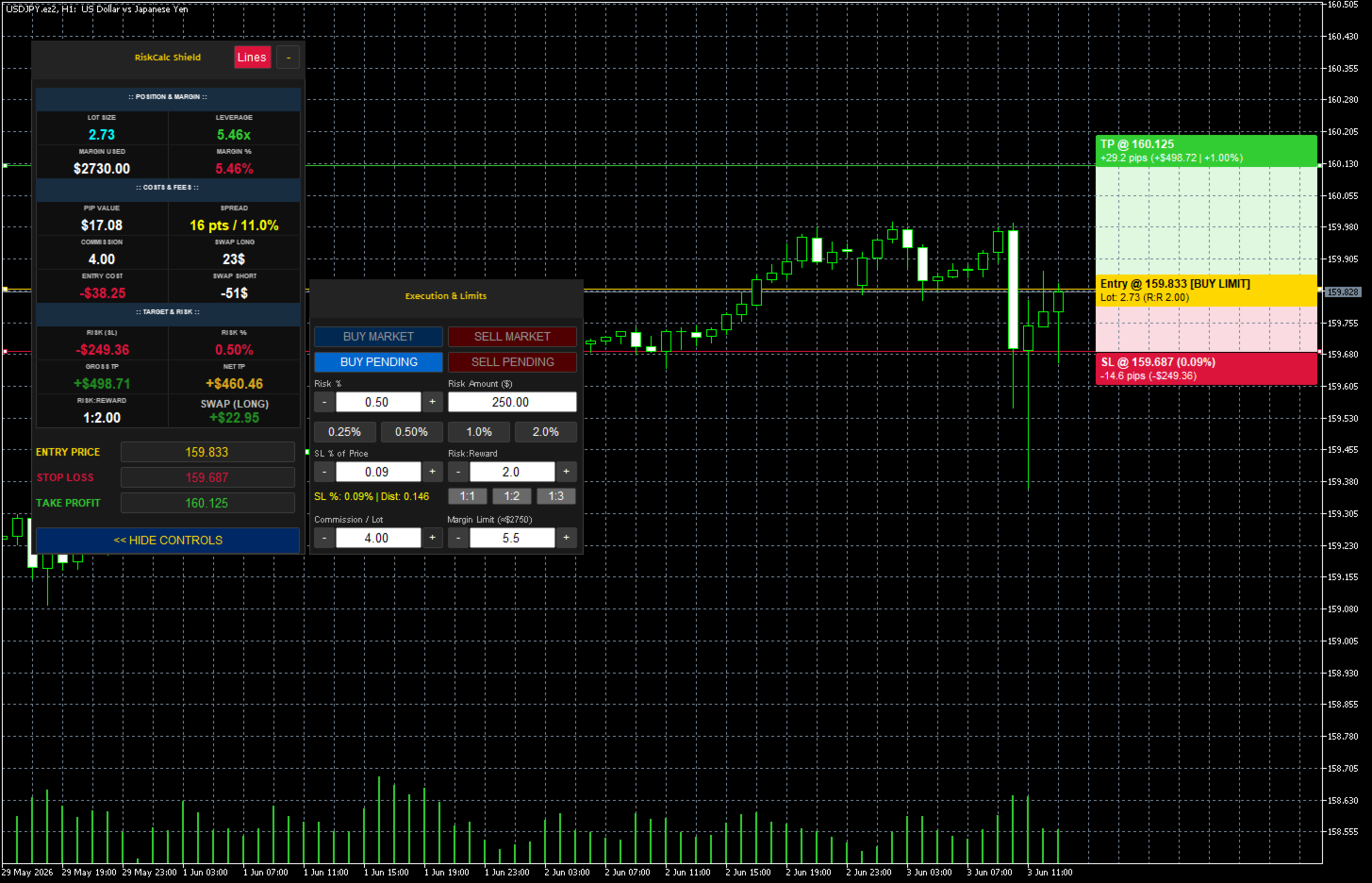
RiskCalc Shield
- 유틸리티
- 버전: 3.25
- 업데이트됨: 15 6월 2026

⚠️ WARNING / DISCLAIMER
Please manually verify all calculations before trading with real money! This tool is designed to be comprehensive but has currently only been tested extensively on a single broker. We highly recommend cross-checking the calculated values manually against your broker's Symbol Properties. (Alternatively, as an additional option, you could provide a screenshot to an AI to help verify the formula accuracy). The developer assumes no responsibility for any financial losses or errors resulting from the use of this tool under any circumstances.
1. MAIN PANEL (Real-Time Metrics)
This is the primary dashboard that displays real-time calculations before you execute a trade.
:: POSITION & MARGIN ::
-
LOT SIZE: The automatically calculated position size based on your specified risk and Stop Loss distance.
-
LEVERAGE: Displays the effective leverage you are using for this specific trade (Notional Value ÷ Account Equity).
-
MARGIN USED: The exact monetary amount the broker will lock as collateral for this trade.
-
MARGIN %: The percentage of your account equity that the Margin Used represents. Changes color to warn you if you are approaching your Margin Limit.
:: COSTS & FEES ::
-
PIP VALUE: The actual monetary value of one pip based on your calculated Lot Size.
-
SPREAD: Displays the real-time spread cost in points (pts) and shows its percentage relative to your total Risk (SL) to warn you of high spread conditions.
-
COMMISSION: The calculated commission fee based on your Lot Size and your manual commission input.
-
SWAP LONG: The estimated overnight holding fee/credit if you open a Long (Buy) position.
-
ENTRY COST: The total hidden cost required just to open the trade (Spread Cost + Commission).
-
SWAP SHORT: The estimated overnight holding fee/credit if you open a Short (Sell) position.
:: TARGET & RISK ::
-
RISK (SL): The exact monetary amount you will lose if your Stop Loss is hit.
-
RISK %: The actual percentage of your account at risk (should match your target risk closely).
-
GROSS TP: The raw profit amount when your Take Profit is hit, before deducting entry costs.
-
NET TP: The actual profit amount you get to keep (Gross TP - Entry Cost).
-
RISK:REWARD: The calculated ratio between your Net TP and your Risk (SL).
-
EXPECT SWAP (Dynamic Swap): Automatically updates to show the specific overnight swap cost (Long or Short) based on your chosen trade direction.
2. SIDE PANEL (Execution & Limits)
This panel provides quick access to trade execution and parameter adjustments.
-
Execution Buttons: * BUY MARKET / SELL MARKET: Executes the trade immediately at the current market Bid/Ask price.
-
BUY PENDING / SELL PENDING: Sets up a limit or stop order depending on where your Entry line is placed relative to the current price.
-
-
Risk % Management:
-
Risk % / Risk Amount: Input fields to set your risk by percentage or exact currency amount.
-
Quick Presets: Instant buttons to set risk to 0.25%, 0.50%, 1.0%, or 2.0%.
-
+/- Adjusters: Fine-tune the risk percentage quickly.
-
-
SL % of Price: Allows setting the Stop Loss distance as a percentage of the asset's current price (e.g., a 0.10% drop) rather than standard pips/points.
-
Risk:Reward (R:R): * Input field to set a custom R:R target.
-
Quick preset buttons for 1:1, 1:2, and 1:3. The Take Profit line will auto-adjust based on this ratio.
-
-
Commission / Lot: A manual input field to set your broker's commission rate per 1 standard lot.
-
Margin Limit: A safety lock that prevents the tool from calculating a lot size that would exceed this margin percentage (e.g., 5.5%). Crucial for passing Prop Firm evaluations.
⚠️ คำเตือน / ข้อจำกัดความรับผิดชอบ
โปรดทดสอบและตรวจสอบความถูกต้องของการคำนวณด้วยตัวท่านเองก่อนใช้งานจริง! เครื่องมือนี้ถูกสร้างขึ้นให้ครอบคลุมการคำนวณในหลายกรณี แต่เพิ่งผ่านการทดสอบการใช้งานจริงกับเพียงโบรกเกอร์เดียวเท่านั้น ทางที่ดีขอแนะนำให้ท่านลองคำนวณด้วยมือเพื่อเทียบค่า หรือดูควบคู่กับหน้าต่างข้อมูลพื้นฐานสินทรัพย์ (Symbol Properties) ของโบรกเกอร์ท่าน (อีกแนวทางหนึ่งที่ขอเสนอคือ ท่านอาจแคปหน้าจอแล้วนำไปให้ AI ช่วยวิเคราะห์ตรวจสอบความถูกต้องของสูตรเพิ่มเติมได้) เพื่อป้องกันความผิดพลาด ผู้พัฒนาไม่ขอรับผิดชอบต่อความเสียหายทางการเงิน หรือข้อผิดพลาดใดๆ ที่อาจเกิดขึ้นจากการใช้งานเครื่องมือนี้ในทุกกรณี
1. แผงข้อมูลหลัก (MAIN PANEL)
หน้าต่างแสดงผลหลักแบบเรียลไทม์ที่ช่วยวิเคราะห์ค่าใช้จ่ายและผลกำไรทั้งหมด "ก่อน" ที่คุณจะตัดสินใจเข้าเทรด
:: POSITION & MARGIN (ตำแหน่งและมาร์จิ้น) ::
-
LOT SIZE: ขนาดออเดอร์ที่ระบบคำนวณให้อัตโนมัติ โดยอิงจากความเสี่ยงที่คุณตั้งไว้และระยะห่างของเส้น SL
-
LEVERAGE: แสดงอัตราทด (Leverage) ที่คุณกำลังใช้จริงสำหรับออเดอร์นี้ (มูลค่าสัญญารวม ÷ อิควิตี้)
-
MARGIN USED: จำนวนเงินหลักประกันที่โบรกเกอร์จะดึงไปล็อคไว้เพื่อเปิดออเดอร์นี้
-
MARGIN %: สัดส่วนของ Margin Used เมื่อเทียบเป็นเปอร์เซ็นต์ของพอร์ต (สีจะเปลี่ยนเพื่อเตือนหากใช้มาร์จิ้นสูงเกินไป)
:: COSTS & FEES (ต้นทุนและค่าธรรมเนียม) ::
-
PIP VALUE: มูลค่าเงินจริงต่อการขยับ 1 Pip ตามขนาด Lot Size ของคุณ
-
SPREAD: ค่าสเปรดแบบเรียลไทม์ (หน่วย Points) และแสดงเป็น % เมื่อเทียบกับระยะ SL เพื่อเตือนว่าสเปรดกินต้นทุนความเสี่ยงไปเท่าไหร่แล้ว
-
COMMISSION: ค่าคอมมิชชั่นรวมสำหรับออเดอร์นี้ (คำนวณจาก Lot Size ข้ามกับค่าคอมฯ ที่คุณกรอกไว้)
-
SWAP LONG: ประมาณการค่าใช้จ่าย (หรือรายได้) ข้ามคืน หากคุณเปิดออเดอร์ฝั่ง Buy
-
ENTRY COST (ต้นทุนการเข้าเทรด): ต้นทุนรวมที่คุณต้องจ่ายทันทีที่กดเปิดออเดอร์ (Spread + Commission)
-
SWAP SHORT: ประมาณการค่าใช้จ่าย (หรือรายได้) ข้ามคืน หากคุณเปิดออเดอร์ฝั่ง Sell
:: TARGET & RISK (เป้าหมายและความเสี่ยง) ::
-
RISK (SL): จำนวนเงินจริงที่คุณจะเสียหากกราฟวิ่งชน Stop Loss
-
RISK %: เปอร์เซ็นต์ความเสี่ยงจริงของพอร์ต (จะใกล้เคียงกับ % ที่คุณตั้งเป้าไว้)
-
GROSS TP: กำไรขั้นต้นเมื่อกราฟวิ่งชน Take Profit (ยังไม่หักต้นทุน Entry Cost)
-
NET TP: กำไรสุทธิที่คุณจะได้รับเข้าพอร์ตจริงๆ (Gross TP หักลบ Entry Cost แล้ว)
-
RISK:REWARD: สัดส่วนความคุ้มค่าของการลงทุน (คำนวณจาก Net TP เทียบกับความเสี่ยง SL)
-
EXPECT SWAP (Dynamic Swap): แสดงค่า Swap ข้ามคืนแบบเจาะจงให้อัตโนมัติ โดยระบบจะรู้เองว่าคุณกำลังจะเปิดออเดอร์ Buy หรือ Sell แล้วดึงค่ามาแสดงผล
2. แผงควบคุม (SIDE PANEL - Execution & Limits)
ส่วนควบคุมคำสั่งและการปรับจูนตัวเลขต่างๆ อย่างรวดเร็ว
-
ปุ่มเข้าออเดอร์ (Execution Buttons): * BUY MARKET / SELL MARKET: ส่งคำสั่งซื้อขายทันทีที่ราคาตลาดปัจจุบัน
-
BUY PENDING / SELL PENDING: วางออเดอร์ล่วงหน้า (ระบบจะปรับเป็น Limit หรือ Stop ให้อัตโนมัติอิงจากตำแหน่งเส้น Entry)
-
-
การจัดการความเสี่ยง (Risk % Management):
-
Risk % / Risk Amount: ช่องกรอกความเสี่ยงแบบเปอร์เซ็นต์ หรือแบบกำหนดจำนวนเงิน(ดอลลาร์)โดยตรง
-
ปุ่มลัด (Quick Presets): ปุ่มเซ็ตความเสี่ยงรวดเร็ว 0.25%, 0.50%, 1.0%, 2.0%
-
ปุ่ม +/-: สำหรับปรับจูนเปอร์เซ็นต์ความเสี่ยงแบบละเอียด
-
-
SL % of Price: การตั้งค่าระยะ Stop Loss เป็นเปอร์เซ็นต์การขยับของราคา (เช่น ถ้าราคาร่วงลง 0.10%) แทนการนับระยะเป็นจุดทั่วไป
-
สัดส่วน Risk:Reward (R:R): * ช่องสำหรับกรอก R:R เป้าหมายตามต้องการ
-
ปุ่มลัด 1:1, 1:2, 1:3 (เมื่อกดแล้ว ระบบจะย้ายเส้น TP ไปยังระยะเป้าหมายให้อัตโนมัติ)
-
-
Commission / Lot: ช่องสำหรับกรอกค่าธรรมเนียมคอมมิชชั่นของโบรกเกอร์คุณ (ต่อ 1 Standard Lot)
-
Margin Limit: ระบบล็อคความปลอดภัย หากโปรแกรมคำนวณ Lot แล้วพบว่าจะดึงมาร์จิ้นเกิน % ที่ตั้งไว้ตรงนี้ (เช่น 5.5%) ระบบจะหั่น Lot ลงอัตโนมัติ (ฟีเจอร์สำคัญสำหรับนักเทรดพอร์ตสอบ Prop Firm)