Live Position Sizer Pro MT5

If you find this tool useful, please leave a review

The position size you need, the levels you are trading, and the dollars at stake — always visible, always updating, always accurate. No manual calculations and 
No switching to a browser tab.

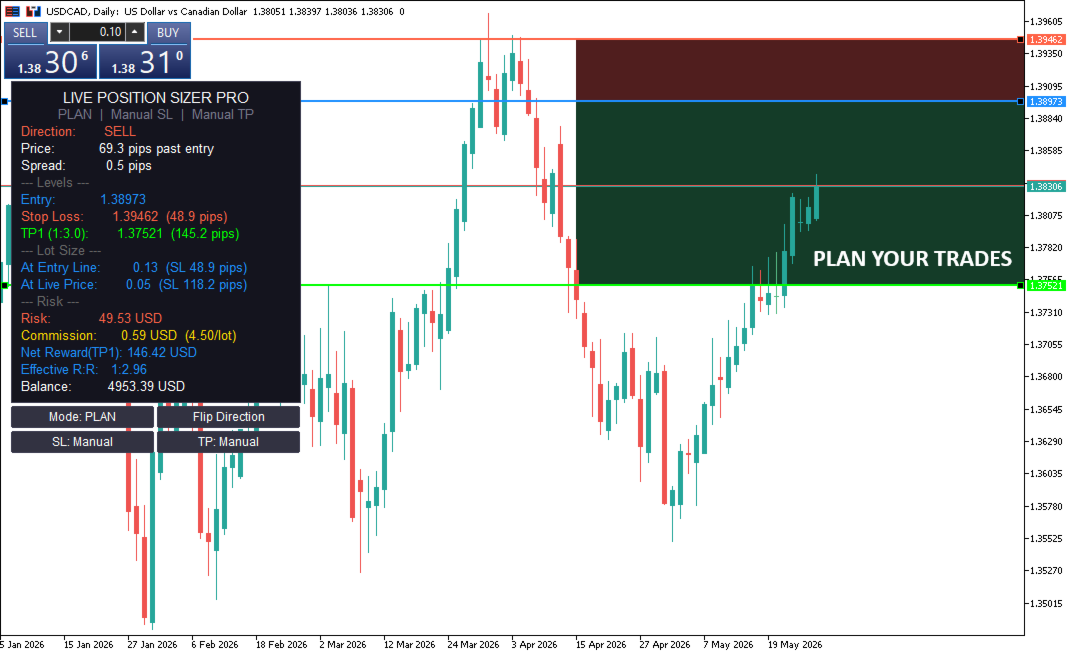
Place your entry and stop loss lines on the chart. Is a Live Risk Calculator that calculates your lot size, take profit levels, risk, and reward in real time. Switch to live mode and the lot size updates with every tick as price moves. Every number on the dashboard is ready the moment you are.

Prop Firm Safe — this tool does not execute, modify, or close any trades. It is an indicator, not an EA. It draws lines and calculates numbers. You place the order yourself, manually, when you are ready. There is zero automated order activity on your account, which means zero risk of triggering prop firm EA detection. Use it on any funded account, any challenge, any broker.


Two Modes

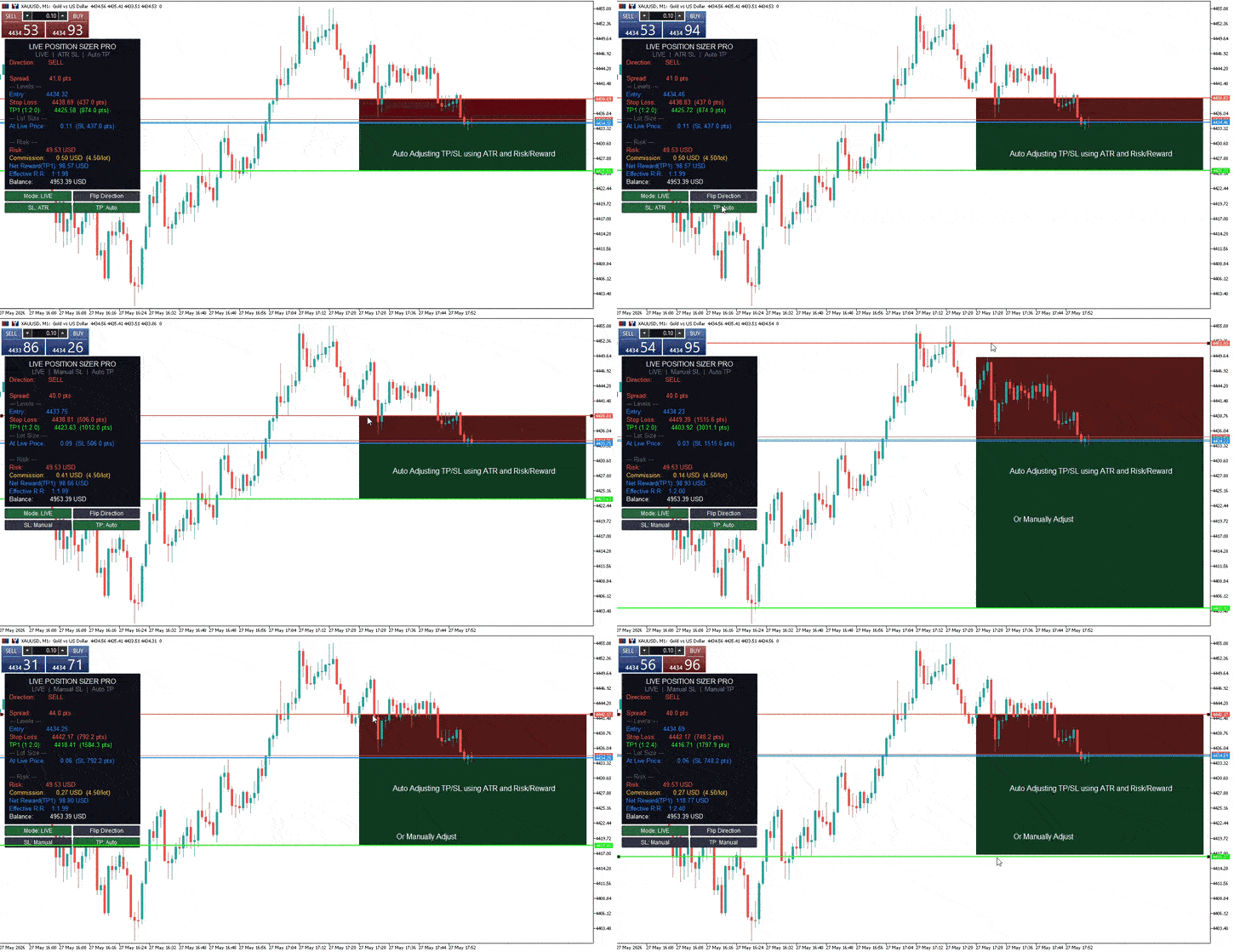
Plan Mode — drag the entry and stop loss lines wherever you want on the chart. Set up your trade in advance. The dashboard shows two lot sizes: one based on your planned entry, one based on the current live price. Watch the "price distance" readout and when it shows AT ENTRY, you are ready to execute.

Live Mode — the entry line follows the current price every second. Your lot size updates in real time as price moves relative to your stop loss. One glance tells you exactly what size to trade right now.

Toggle between modes with an on-chart button. No need to reload the indicator or change inputs.

  • Stop Loss: Manual or ATR
  • Manual — drag the stop loss line to any level you choose. Structure, support, resistance, wherever your invalidation point is.
  • ATR — the stop loss is placed automatically at a configurable ATR multiple from entry. Updates in real time in both modes. Switch between manual and ATR with an on-chart button.
  • Take Profit: Auto or Manual
  • Auto — TP levels are calculated from your risk:reward ratio and the SL distance. Move the SL and the TPs adjust automatically. Up to three TP levels (TP1, TP2, TP3) with independent R:R ratios.
  • Manual — TP lines become draggable. Place them wherever you want. The dashboard calculates the actual R:R from where you placed them, so you always know your real ratio even with manually positioned targets.
  • Toggle between auto and manual with an on-chart button.
  • Flip Direction — One button click mirrors your stop loss and take profits to the opposite side of your entry. Instantly switch between a buy and sell setup without dragging anything. Works in both Plan and Live modes, with both manual and ATR stops.


The Dashboard

Always visible on the chart, updated in real time:

  • Direction — BUY or SELL, detected automatically from your entry and SL positions.
  • Price — distance from current price to your entry line. Shows "AT ENTRY" when price reaches your level.
  • Spread — live spread in pips or points with a colour warning when spreads widen.
  • Entry, Stop Loss, TP1, TP2, TP3 — exact prices with distances in pips or points.
  • At Entry Line — the lot size if you enter at your planned price.
  • At Live Price — the lot size if you enter at the current market price.
  • Risk — dollars at risk if your stop loss is hit.
  • Reward — dollars gained if TP1 is hit.
  • Commission — total round-trip commission at the calculated lot size (if configured).
  • Effective R:R — your real risk:reward after commission is deducted.
  • Balance — current account balance for reference.
  • Accurate Lot Sizing on Every Instrument

The lot size calculation uses a three-method approach that works correctly on forex pairs, gold, indices, commodities, crypto, and cross-currency pairs. Many position sizers on MQL5 Market produce incorrect lot sizes on gold and indices because they rely on a single broker-reported value that is often wrong. This tool cross-validates using OrderCalcProfit, contract size, and tick value to ensure the number you see is the number you should trade.


Commission Aware

Enter your round-trip commission per lot and the tool factors it into the lot size calculation. Your risk percentage accounts for both the SL loss and the commission cost. The dashboard shows your net reward after commission and your effective R:R, so you see the real numbers, not the theoretical ones.


Configuration

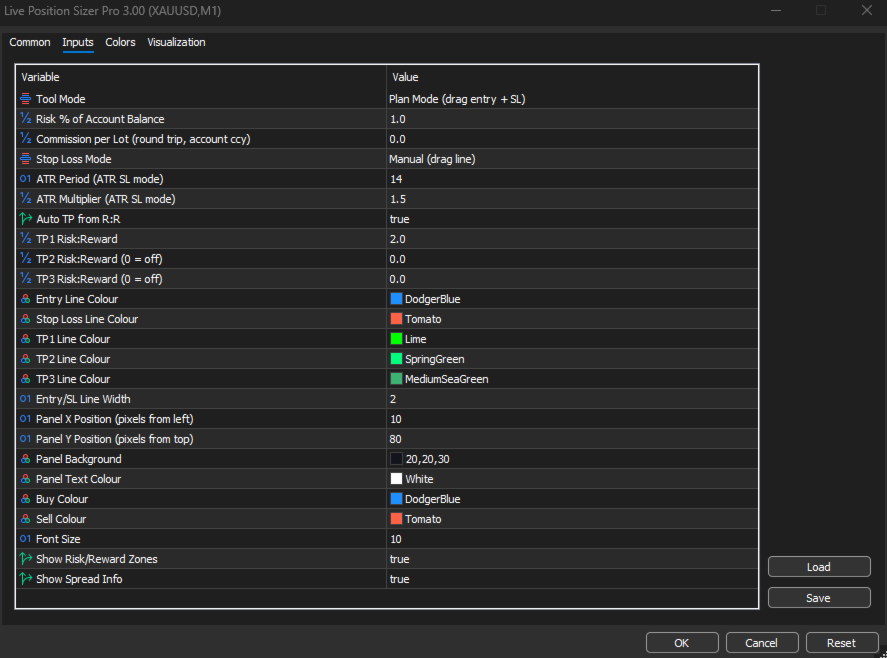
  • Mode — Plan or Live (also toggleable via button).
  • Risk % — percentage of account balance at risk per trade.
  • Commission — round-trip commission per lot in account currency. Set to 0 to disable.
  • SL Mode — Manual or ATR (also toggleable via button).
  • ATR Period — lookback for ATR calculation (default 14).
  • ATR Multiplier — distance from entry in ATR units (default 1.5).
  • Auto TP — on or off (also toggleable via button).
  • TP1 R:R — risk:reward for the first take profit (default 1:2).
  • TP2 R:R — second take profit (default off, set to 0).
  • TP3 R:R — third take profit (default off, set to 0).
  • Panel X / Y — pixel position of the dashboard on the chart.
  • Colours — entry line, SL line, TP1/TP2/TP3 lines, panel background, text, buy colour, sell colour are all independently configurable.
  • Show Zones — toggle the shaded risk and reward areas between entry and SL/TP.
  • Show Spread — toggle the live spread display.

Who It Is For

Discretionary traders who size every position to a fixed risk percentage and want the number on screen at all times. Scalpers who need the lot size updating live as they wait for price to reach their level. Swing traders planning entries in advance who want to see both the planned and market lot sizes. Prop firm traders who cannot afford to get lot sizing wrong on a funded account. Anyone who believes that knowing your exact risk is not optional — it is the first step of every trade.

Important

This tool is a visual aid for trade planning and risk management. As with any trading tool, always verify lot sizes and levels against your broker's specifications before placing a trade. Broker configurations, symbol properties, and account conditions vary. As with any trading tool, we recommend that you confirm the indicator performs as expected on your setup. Trading involves risk, and the developer is not responsible for trading decisions or outcomes.

Рекомендуем также
25R - WASD Order is a visual risk management EA for MetaTrader 5 that combines gaming-style WASD keyboard controls with interactive chart drawing for precise order placement. Designed for active traders who value speed and accuracy, it lets you visually plan trades by dragging entry and stop-loss lines directly on the chart, while automatically calculating position size based on your risk percentage. The tool displays color-coded profit/loss zones with real-time risk metrics, supports automatic
Quick Close
Nikitha Lilitha Mathangana
Quick Close Button provides you with a quick, fast, effective, and handy way to close orders, positions, bearish and bullish open, profiting and losing positions. Available options: Close All: close all orders and positions. Close Profit: close all positions in profit. Close Loss: close all positions in loss. Close Stop: close all stop orders. Close Buy: close all buy positions. Close Sell: close all sell positions. Close Orders: close all orders Close Positions: close all positions # : Hides /
The Synchronized Cross indicator allows you to link cross hairs from multiple chart windows. This means that as you move the cross hair in one chart, all other cross hairs will move together by automatically staying on the same time. If, for example you are moving your mouse cursor in a M5 timeframe (see screenshots), the crosshair will show as a line in the higher timeframes, and as an area in the lower timeframes. Thus making it easier to correlate timeframes. The input parameters are self exp

OB FVG Trade Copier: Unified Master & Slave EA Version: 2.00 Type: Trade Copier / Risk Management Utility Compatibility: MetaTrader 4 & MetaTrader 5 (Cross-compatible codebase) Overview The OB FVG Trade Copier is a professional-grade, unified trade copying system designed to mirror trades between Master and Slave accounts seamlessly. Built with a unified architecture, a single EA file serves as both the sender (Master) and receiver (Slave) simply by toggling the EA Mode in the settings. It uti
FREE
Trend Wave Analyzer Overview The Trend Wave Analyzer is a specialized MQL5 tool designed for MetaTrader 5 that identifies,analyzes,and visualizes price trend cycles in financial markets.It detects complete up/down/sideways price movements by identifying key turning points(peaks and troughs)in price action,providing traders with valuable insights into market behavior patterns. #Key Features -Multi-symbol Analysis:Analyze multiple trading instruments simultaneously -Trend Identification:Auto
Gold Trade Manager PRO MT5 is a manual trade management utility for MetaTrader 5. It is designed for traders who want to open, protect and manage positions directly from the chart without switching between multiple terminal windows. Current price: $59 - increases by $10 after every 20 purchases until reaching the final price of $119 . Next price: $69 . Complete Buyer Kit: 40 Professional Resources included at no additional cost. MT5 Presets, PDF Guides, Checklists, Mindmaps, Reference Cards, and
See how your account is really doing at a glance, right on the chart. The dashboard reads your account and trade history and never opens, modifies or closes a trade. How it works Every second the dashboard reads balance, equity, margin and open positions. Closed results come from the deal history: for each closing deal the profit, swap, commission and fee are added together. From these deals it calculates closed profit for today, this week and this month, plus statistics for the period you choos
FREE
Buy by Trend
Konstantin Kulikov
Иногда рынки находятся в такой трендовой фазе , что не заметить этого невозможно , и достаточно просто покупать по тренду. 1) Итак, мы листаем чарты разных инструментов, и вот, видим хорошую точку входа, так давайте укажем желанную цену для первого ордера в параметре Price_for_First_Order и направление в параметре Trend_Direction, этого бывает уже достаточно для хорошей сделки. ( Если Price_for_First_Order= 0, то открытие позиции произойдёт немедленно по рынку. ) 2) В параметре Price_for_TakePro
Smart Stop Scanner – многоактивный интеллектуальный сканер стоп-лоссов Общее описание Smart Stop Scanner предоставляет профессиональный контроль стоп-лоссов на любом рынке. Он анализирует рыночную структуру, определяет значимые пробои и формирует ключевые защитные уровни по Forex, Золоту, Индексам, Металлам, Криптовалютам и другим инструментам. Все данные отображаются в одном чистом, информативном и DPI-адаптивном панели для максимальной ясности и скорости принятия решений. Как определяется с
MGD Prop Risk Guard MT5 Professional Account Risk Monitoring for MetaTrader 5 — FREE MGD Prop Risk Guard MT5 is a free account risk monitoring utility designed to help traders stay informed about their daily loss limits, maximum drawdown, and available risk. Whether you trade manually, use Expert Advisors, or participate in proprietary trading firm challenges, MGD Prop Risk Guard provides a clear, real-time overview of your account's risk exposure. Monitor your trading risk directly from your MT
FREE
Chart Handler
Gediminas Rucinskas
5 (2)
Have you ever been in a situation when you could not control the chart conveniently or had to make additional clicks to be able to scroll the history or set the scale fix numbers manually to be able to stretch the chart?  Features: Chart centering. Automatic scale fix. Automatic scroll control. This tool is one of many features included in "Trading Essentials" utility application, which can be found on mql5.com
FREE
Telegram to mt5 pro
Janet Abu Khalil
4 (4)
Telegram to MT5 Pro — Расширенный копировщик сигналов Telegram с Auto-Fix, Multi-TP, управлением риском и полным управлением сделками Telegram to MT5 Pro — профессиональный копировщик сигналов Telegram Telegram to MT5 Pro автоматически копирует торговые сигналы из Telegram прямо в ваш аккаунт MetaTrader 5 в реальном времени с полным контролем риска, исполнения и управления сделками. Система состоит из двух компонентов: • Expert Advisor (EA), работающий внутри MetaTrader 5 • Desktop bridge прило
Martingale panel MT5
Mohammadbagher Ramezan Akbari
In this article, we would like to introduce the trade panel product with the Martingale panel. This panel is made in such a way that it can meet the needs of traders to a great extent. This trade panel actually consists of two trade panels at the same time, with the first one you can take positions with certain profit and loss limits, and with the second one, you can have positions with profit limits but without loss limits. When positions lose, a new position will be added based on the settings
TradeControl Utility Pro — торговая утилита для MetaTrader 5, созданная для трейдеров, которым важeн риск-менеджмент и визуальный порядок на графике. Программа сочетает в себе компактную панель с минималистичным Flat-дизайном и инструменты для виртуального планирования сделок (VRP) и группировки позиций. Примечание: Это утилита для ручной торговли, а не автоматический советник или генератор сигналов. Программа не дает гарантий прибыли. Торговля на финансовых рынках сопряжена с высоким риском.
Ultra Prokit Tool
Francis Muchai Waweru
ULTRA PRO TOOLKIT EA Draw it. Size it. Execute it. Most charts are buried under tools that refuse to talk to each other. You mark a level in one place, work out your lot size somewhere else, then hand-type an order and hope you remembered the stop. Ultra Pro Toolkit EA puts the entire workflow on one panel: sketch your market structure, tell it how many dollars you are willing to lose, and let it handle the arithmetic and the order routing. ️ This is a manual trading cockpit, not a signal
Индикатор строит текущие котировки, которые можно сравнить с историческими и на этом основании сделать прогноз ценового движения. Индикатор имеет текстовое поле для быстрой навигации к нужной дате. Параметры : Symbol - выбор символа, который будет отображать индикатор; SymbolPeriod - выбор периода, с которого индикатор будет брать данные; IndicatorColor - цвет индикатора; Inverse - true переворачивает котировки, false - исходный вид; Далее идут настройки текстового поля, в которое можно ввес
Fastest Trades Copier is the fastest and most lightweight trade copier between MT5 accounts available on the market. Running entirely through the MT5 Common Folder — no DLLs, no external servers, no internet dependency — it copies your trades between two terminals on the same VPS or PC with near-zero latency, polling every 500ms with minimal CPU footprint. Key Features: Ultra-fast local copy via MT5 Common Folder Configurable symbol name translation between brokers (e.g. USDJPY.sc → USDJPY)
“One-Click Flatten — Fast, Clean, Reliable”      Close all orders and positions in your account with a single click — no hassle, no fumbling through tabs.      Time-saving tool for traders needing instant exit from the market—especially during volatile moves or news events.      Emotion-free execution reduces human errors and hesitation—just click and it's done.      Easy to use: load the EA in MT5 and let it handle the rest. Perfect for both beginners and seasoned traders.      Fu
FREE
DYJ MOBILE GAMING TRADING WINNER может использовать ваши различные терминалы (MOBILE PHONE, WEB, TRADINGVIEW, MT5) для ручной торговли, а затем автоматически обрабатывается EA. Мобильная торговля может использовать различные режимы сетки советника, режим скальпирования, режим хеджирующего арбитража и режим независимого ордера для открытия позиций вручную. Советник может автоматически устанавливать стоп-лосс для мобильного открытия. И используйте свой мобильный телефон, чтобы открывать сетку,
The EA allows you to extract the tick data history from the Mt5 terminal of your broker for any symbol. Extraction is done on the common folder. Open the data folder from your Mt5 terminal, go back one tree and then look for the common folder. Parameters fields (default values can change and all fields are imputable): 1. Symbol: leave blank if extraction is for the current chart symbol 2.Date 3. Time 4. Seconds before the time stamp under field 2, the  tick data  extraction to start 5. Second
Stop Out Line MT5
Sergey Batudayev
4 (1)
Логика работы Утилита Stop Out простой но весьма удобный индикатор показывающий сколько пунктов осталось до уровня Stop Out. Его польза заключается в том, что многие трейдеры заведомо завышают риск в торговле в погоне за прибылью используют доступную маржу по максиму и вот для этого случая весьма важно знать где брокер может принудительно закрыть ваши позиции. Просто установите индикатор на график и  в зависимости от открытой позиции в Buy или Sell, вы увидите граничную отметку цены для данной
FREE
Intenza Prop & Equity Guard is a professional account risk monitor and protection system for MT5 traders. Daily loss and drawdown tracking, hard equity floor, trailing profit lock, optional auto-close on breach, full trade journal with calendar, statistics and branded HTML/CSV reports. Single .ex5, no DLL. Everything you need to see, respect, and enforce your risk limits, all in one unified panel. Why Intenza Prop & Equity Guard? Most risk tools either just display numbers or blindly close trad
TradeConsole
Musera Isaac
5 (1)
TradeConsole — On-Chart Trading Dashboard with Smart Alerts TradeConsole is a lightweight on-chart utility designed to help traders keep essential market context in one place. It combines session tracking, an upcoming economic news panel, a currency strength view, a quick technical bias summary, trade statistics, and one-click control tools. The purpose of the dashboard is to improve chart awareness, reduce screen clutter, and support faster decision-making during live trading. Main Features On
FREE
Telegram Notification Worker (v5.31) Telegram Notification Worker is a high-performance, professional utility designed to bridge the gap between your MetaTrader 5 terminal and Telegram. It acts as a dedicated background worker that forwards custom alerts, trade events, and system status messages from any of your Expert Advisors (EAs) directly to your Telegram chat or channel. Key Technical Features: Asynchronous Messaging Engine: Unlike standard notification scripts, this worker uses an asynchr
FREE
GRInvest Breakeven Manager is an MT5 trade-management Expert Advisor designed to manage existing open positions after entry. Its purpose is to automate breakeven protection, staged partial closes, trailing stops and position management while still giving the trader full manual control over individual trades. The EA does not need to open trades itself . It can manage manual trades and trades opened by other Expert Advisors according to the selected symbol, direction and magic-number filters. The
FREE
Precision Risk Manager and Multi-Order Controller for MT5 — Version 2 This utility provides risk-based lot size calculation, one-click order execution, and batch trade modification from a single collapsible panel. It is designed for manual traders who manage multiple entries on the same symbol. Features Lot Size Calculator: Enter a risk percentage and stop-loss price, then click Calculate Lot Size to receive the exact lot size for that risk amount. Order Execution: Click Buy or Sell to execute
FREE
Manual Trade Panel PRO for MT5 Product name **Manual Trade Panel PRO for MT5** Short description Advanced manual trading panel for MetaTrader 5 with BUY/SELL and BUY LIMIT/SELL LIMIT execution, balance-based lot sizing, automatic SL/TP, Break Even, trailing stop, partial close, candle timer, and open position pips counter. Full sales description **Manual Trade Panel PRO for MT5** is an advanced Expert Advisor designed for manual and semi-automatic trading in MetaTrader 5. The EA creates a c
Click Trading
Jawad Tauheed
5 (2)
One Click Trading – Auto TP SL Developer TraderLinkz Version 1.00 Category Utility What it does Adds missing TP and SL to your manual trades and pending orders Sets them once per ticket Lets you move TP and SL afterward Works on hedging and netting accounts Scans on every tick and reacts on trade events Why you want it You place faster entries You get consistent risk and exit targets You reduce fat finger errors You keep full manual control Quick start Attach the EA to any chart Keep TP and SL e
FREE
Apex Predator Эксклюзивный EA для USDJPY, предназначенный для торговли гэпами открытия в понедельник Apex Predator — это автоматический торговый советник для MT5, который нацелен на движение «закрытия гэпа», часто наблюдаемое в начале торговой недели. Пока рынок закрыт на выходных, в мире могут происходить различные события и выходить важные новости. В результате при открытии рынка в понедельник утром цена может значительно отличаться от цены закрытия пятницы. Эта разница в цене называется «гэпо
FREE
PipTick Equity - это простой индикатор, который показывает развитие кривой средств в реальном времени. Для более точного измерения его следует использовать в отдельном окне с периодом M1. Основные характеристики Индикатор показывает развитие кривой средств в реальном времени Высокая точность на минутном графике Очень быстрые вычисления Предназначен для MT4 и MT5
FREE
С этим продуктом покупают
Trade Assistant MT5
Evgeniy Kravchenko
4.43 (216)
Помогает рассчитать риск на сделку, простая установка нового ордера с помощью линий, управление ордерами с функциями частичного закрытия, 7 типов трейлинг-стопа и другие полезные функции. Дополнительные материалы и инструкции Инструкция по установке - Инструкция к приложению Функция Линии   - отображает на графике линию открытия, стоп-лосс, тейк-профит. С помощью этой функции легко установить новый ордер и увидеть его дополнительные характеристики перед открытием. Управление риском   -   функ
Добро пожаловать в Trade Manager EA — лучший инструмент для управления рисками, предназначенный для упрощения, точности и эффективности торговли. Это не просто инструмент для размещения ордеров; это комплексное решение для удобного планирования торгов, управления позициями и усиленного контроля над рисками. Независимо от того, начинающий вы трейдер, опытный специалист или скальпер, нуждающийся в быстром исполнении, Trade Manager EA адаптируется к вашим потребностям и работает с любыми активами:
Local Trade Copier EA MT5
Juvenille Emperor Limited
4.94 (149)
Local Trade Copier EA MT5 — это быстрый и гибкий копировщик сделок для копирования и управления сделками между несколькими счетами MetaTrader 5 на одном компьютере с Windows или Windows VPS. Он сочетает локальную синхронизацию сделок с настройками на стороне Receiver для управления размером лота, рисками, фильтрацией сделок, сопоставлением символов, управлением сделками и защитой счета. Настройте терминалы Transmitter и Receiver примерно за 1 минуту и копируйте ручные сделки или сделки, открыты
Telegram to MT5 Multi-Channel Copier   автоматически копирует торговые сигналы из ваших Telegram- и Discord -каналов прямо в MetaTrader 5. Без ботов, без браузерных расширений, без ручного копирования. Сигнал приходит в Telegram или Discord — и советник открывает сделку в вашем терминале за считанные секунды. А перед тем как копировать канал, встроенный бэктестер покажет, что этот канал сделал бы на вашем счёте. Продукт состоит из двух компонентов: приложения для Windows, которое слушает ваши Te
Farmed Hedge Yield Farming | All Markets (Manual - Hybrid - Semi/Automated EA) VERIFIED TRADING RESULTS - Farmed Hedge Yield Axi Copy:  https://www.mql5.com/en/signals/2356376 - Farmed Hedge Yield Exn Copy:   https://www.mql5.com/en/signals/2356404 - Farmed Hedge Yield V Copy:  https://www.mql5.com/en/signals/2357156 IMPORTANT NOTICE: FarmedHedge is a MANUAL-FOCUSED TRADING UTILITY ,not a fully automated EA. Results shown on this Signal include manual trades and overall strategic management.
Копируйте сигналы из Telegram по своим торговым правилам Telegram to MT5 Signal Trader автоматически копирует текстовые торговые сигналы из открытых и закрытых каналов и групп Telegram в MetaTrader 5. Управляйте несколькими поставщиками сигналов и счетами MT5 из одного приложения для компьютера, задавая индивидуальные параметры риска и торговли для каждого поставщика . Для копирования не нужны бот Telegram и настройка API. Просто войдите в свой аккаунт Telegram по номеру телефона или QR-коду и в
TradePanel MT5
Alfiya Fazylova
4.88 (170)
Trade Panel — это многофункциональный торговый помощник. Приложение содержит более 50 торговых функций для ручной торговли и позволяет автоматизировать большинство торговых операций. Инструкция к приложению: https://www.mql5.com/ru/blogs/post/756476 Пробная версия приложения для демо-счета: https://www.mql5.com/ru/blogs/post/750864 Как установить приложение: https://www.mql5.com/ru/blogs/post/750096 Как тестировать приложение в визуальном режиме: https://www.mql5.com/ru/blogs/post/770274 Как уст
Strategy Ledger Pro
Abdullah Uygar Tuna
5 (12)
Теперь доступно на русском языке. Strategy Ledger Pro — панель анализа счёта для MetaTrader 5, работающая только на чтение. Она разделяет результаты счёта по советникам, стратегиям, символам и magic-номерам, чтобы было видно, что на самом деле вносит каждый из них. Панель доступна на 11 языках: English, Français, Deutsch, Español, Italiano, Português, Русский, Türkçe, 中文, 日本語 и 한국어. Перед загрузкой демоверсии. Маркет запускает демоверсию любого платного продукта только в тестере стратегий. Эта
================================================================================ POC BREAKOUT - V20.72. Full Professional Grade Toolkit ================================================================================ POC Breakout is a full MetaTrader 5 trading dashboard for discretionary traders who want breakout signals, Point of Control (POC) context, volume profiles, order flow, market structure, news, alerts, and advanced trade planning in one professional workspace. Attached directly to you
News Trade EA MT5
Konstantin Kulikov
4.55 (11)
Представляю полезного робота, которым пользуюсь сам уже несколько лет. Может использоваться как в полуавтоматическом, так и в полностью автоматическом режиме. >>> Chat <<< Программа содержит гибкие настройки торговли на новостях экономического календаря. В тестере стратегий проверить нельзя. Только реальная работа. В настройках терминала необходимо добавить новостной сайт в список разрешенных URL. Кликните Сервис > Настройки > Советники. Поставьте галочку в "Разрешить WebRequest для следующих U
Master Your Trading Discipline   Stop losing your hard-earned gains to overtrading and emotional decisions. The Discipline Tool is your ultimate trading assistant, ensuring strict risk management in real-time. Key Protection Features: Advanced Drawdown Defense : Automatically halts trading if your daily drawdown exceeds a preset threshold (percentage or dollar amount). Real-Time Equity Lock : Safeguard profits by referencing peak equity, ensuring drawdown stays within control. Hard Profit Target
Dealer's Panel No signal decides anything here — a hand does. One click, and the panel calculates what's underneath: lot size from risk, target from a 30-step balance ladder that remembers exactly how far an account has climbed. Toggle between market and pending without touching an input field. Set a stop, and the take-profit can write itself — a fixed share of the balance, translated into price with no arithmetic left for the trader to get wrong. One trade live at a time; it won't let a seco
Exp COPYLOT CLIENT for MT5
Vladislav Andruschenko
3.97 (35)
Профессиональный копировщик сделок для MetaTrader 5 Быстрый, профессиональный и надежный копировщик сделок для MetaTrader . COPYLOT позволяет копировать сделки Forex между терминалами MT4 и MT5 с поддержкой счетов Hedge и Netting . Версия COPYLOT для MT5 поддерживает: - MT5 Hedge → MT5 Hedge - MT5 Hedge → MT5 Netting - MT5 Netting → MT5 Hedge - MT5 Netting → MT5 Netting - MT4 → MT5 Hedge - MT4 → MT5 Netting Версия MT4 Полное описание + DEMO + PDF Как купить Как установить Как получить файлы жур
HINN MAGIC ENTRY - лучший инструмент для входа и менеджмента позиций! ПРОСТО. БЫСТРО. ИНТУИТИВНО. МАКСИМАЛЬНО АВТОМАТИЗИРОВАНО. Выставляет ордера через выбор уровня на графике! полное описание    ::    demo-версия    ::   60-sec-video-description Основные функции: - Рыночные, лимитные и отложенные ордера -  Автоматический подсчет лоттажа  -  Автоматический учет спреда и комиссий -  Неограниченное количество промежуточных тейков для позиций - Перевод в безубыток и трейл стоп-лосса и тейк-проф
Get Ready for 2 Major New Features in Our Next Update — Coming Soon!    [ NEW  ] We’re taking market analysis to the next level with 2 new features designed to meet your trading needs. Introducing: TRADE OVERVIEW DASHBOARD CONFLUENCE AT ZONE 1. TRADE OVERVIEW DASHBOARD A dashboard that helps you see the overall market picture more easily, with key information from multiple timeframes and trading guidance to support your trading decisions, helping you analyze the market and plan your trades sys
The product will copy all telegram signal to MT5 ( which you are member) , also it can work as remote copier.  Easy to set up, copy order instant, can work with almost signal formats, image signal,  s upport to translate other language to English Work with all type of channel or group, even channel have "Restrict Saving Content", work with  multi channel, multi MT5 Work as remote copier: with signal have ticket number, it will copy exactly via ticket number. Support to backtest signal. How to s
EasyInsight AIO MT5
Alain Verleyen
4.92 (12)
EASY Insight AIO – Всё-в-одном для умного и простого трейдинга Обзор Представьте, что вы можете просканировать весь рынок — Форекс, золото, криптовалюты, индексы и даже акции — всего за несколько секунд, без ручного просмотра графиков, сложной установки или настройки индикаторов. EASY Insight AIO — это ваш идеальный инструмент экспорта для трейдинга с поддержкой искусственного интеллекта. Он предоставляет полный снимок рынка в одном аккуратном CSV-файле — готовом к мгновенному анализу в ChatGP
Telegram To MT5 Ultra
Mirel Daniel Gheonu
5 (5)
Telegram To MT5 — копировщик сигналов Превратите торговые сигналы из ваших Telegram-каналов в реальные ордера MT5 — автоматически, на любом количестве счетов, с полным контролем над риском и правилами. Telegram To MT5 связывает VIP / сигнальные каналы, на которые вы уже подписаны в Telegram, с вашим терминалом MetaTrader 5. Бесплатное приложение-компаньон для ПК читает сообщения (даже из каналов, которые не допускают ботов), а этот советник исполняет их на вашем счёте — применяя ваши настройки р
MT5 to Telegram Signal Provider — это простой в использовании полностью настраиваемый инструмент, который позволяет отправлять определённые сигналы в чат, канал или группу Telegram, превращая вашу учётную запись в провайдера сигналов . В отличие от большинства конкурирующих продуктов, он не использует импорт DLL. [ Демо ]   [ Руководство ] [ Версия MT4 ] [ Версия для Discord ] [ Канал в Telegram ]  New: [ Telegram To MT5 ] Настройка Доступно пошаговое руководство пользователя . Никаких знаний A
Power Candles Strategy Scanner — самооптимизирующийся инструмент для поиска настроек по нескольким инструментам Power Candles Strategy Scanner использует тот же самооптимизирующийся движок, что и индикатор Power Candles — для всех символов в вашем Market Watch, одновременно. На одной панели отображается информация о том, какие символы в данный момент являются статистически торгуемыми, какая стратегия выигрывает на каждом из них, оптимальная пара Stop Loss / Take Profit, а также отправляется увед
The Patch
Mian Rameez Ali
The Patch It never opens a trade. It walks behind the ones that did. Every open position, every pending order — checked twice a second for the one thing that's easy to forget: a stop, a target. Found bare, it doesn't ask. It writes the missing number in, measured in points from wherever the position began, and moves on to the next. No strategy, no opinion on direction. Just the quiet assumption that nothing should ever sit on the market unprotected — not because someone decided it shouldn't,
Grid Manual MT5
Alfiya Fazylova
4.73 (22)
Grid Manual — это торговая панель для работы с сеточными стратегиями. Утилита универсальная, имеет гибкие настройки и понятный интерфейс. Работает с сеткой ордеров не только в сторону усреднения убытков, но и в сторону наращивания прибыли. Трейдеру не нужно создавать и сопровождать сетку ордеров, это сделает утилита. Достаточно открыть ордер и Grid manual автоматически создаст ему сетку ордеров и будет сопровождать его до самого закрытия. Полная инструкция и демо-версия здесь . Основные особенно
Signal TradingView to MT5 Pro Automator Мгновенное профессиональное исполнение между TradingView и MetaTrader 5 Автоматизируйте свою торговую стратегию с помощью самого надежного моста связи между алертами TradingView и реальным исполнением в MT5. Разработанный для трейдеров, которым требуются скорость, гибкость и безупречное управление рисками, этот советник (Expert Advisor) превращает любое сообщение с алертом в точный рыночный или лимитный ордер. ПРЕИМУЩЕСТВА И СИЛЬНЫЕ СТОРОНЫ Универсальный д
Нужна поддержка? Как настроить? Есть вопросы? Спрашивайте здесь на своём языке, быстрый ответ: https://www.mql5.com/en/market/product/139088/comments Скачать рабочую демо-версию Copy Cat More (Копи Кэт Мор) — копировщик сделок (Trade Copier) MT5 — это локальный копировщик сделок и полноценная система управления рисками и исполнения, созданная для современных торговых задач. От челленджей проп-фирм (prop firm) до управления личным портфелем — он адаптируется к любой ситуации благодаря сочетанию
Anchor Trade Manager
Kalinskie Gilliam
5 (9)
Your EAs cannot see each other, but Anchor can. Anchor gives you one place to coordinate your EAs, manage risk, and decide when trading is allowed. It works alongside the trading bots you already use without any changes to them. The Problem One EA opens a trade. Then another starts trading. The next thing you know, you wake up to multiple grids built across your account. Each EA may be doing exactly what it was designed to do, but together they can place far more risk on your account than you in
Trade copier MT5
Alfiya Fazylova
4.61 (57)
Trade Copier — это профессиональная утилита, предназначенная для копирования и синхронизации сделок между торговыми счетами. Копирование происходит от счета/терминала поставщика к счету/терминалу получателя, которые установлены на одном компьютере или vps. Перед покупкой вы можете протестировать демо-версию на демо-счете. Демо-версия здесь . Полная инструкция здесь . Основной функционал и преимущества: Русифицированный интерфейс, поддержка на русском языке. Поддерживает копирование МТ5 > МТ5, МТ
Telegram to MT5 Coppy
Sergey Batudayev
5 (10)
Telegram to MT5: Идеальное решение для копирования сигналов Упростите свою торговлю с Telegram to MT5 — современным инструментом, который копирует торговые сигналы прямо из каналов и чатов Telegram на вашу платформу MetaTrader 5, без необходимости использования DLL. Это мощное решение обеспечивает точное исполнение сигналов, широкие возможности настройки, экономит время и повышает вашу эффективность. [ Instructions and DEMO ] [ FAQ ] [ How atach logs properly ] [ Settings descrition ] Ключевые
The News Filter MT5
Leolouiski Gan
4.79 (24)
Этот продукт фильтрует всех экспертных советников и ручные графики во время новостей, так что вам не нужно беспокоиться о внезапных скачках цены, которые могут разрушить ваши ручные торговые настройки или сделки, введенные другими экспертными советниками. Этот продукт также поставляется с полной системой управления ордерами, которая может обрабатывать ваши открытые позиции и ордера на ожидание перед выпуском новостей. После покупки   The News Filter   вам больше не придется полагаться на встроен
Торговая панель для MetaTrader 5 — профессиональная торговля в один клик с графика и клавиатуры Мощная торговая панель для активного ручного трейдинга, которая позволяет открывать, сопровождать и закрывать сделки значительно быстрее и удобнее, чем стандартными средствами MetaTrader. Панель создана для тех, кто хочет получить полный контроль над позициями, ордерами, прибылью и торговыми сценариями в одном рабочем пространстве. Это не просто вспомогательная утилита. Это полноценный торговый интер
Floor Watch
Syed Tauqeer Hussain Shah
Floor Watch One number, watched every thirty seconds: how far equity has fallen since the day began — or since its highest point, if it's told to trail the peak instead of the open. Cross the line and it doesn't argue. Every open position closes, every pending order vanishes, and anything that slips through afterward gets shut the moment it appears. Not asked. Removed. The floor holds until the clock turns 5 AM Pakistan time — then, and only then, does the day start over. One rule. No except
Другие продукты этого автора
See What Others Cannot MetaTrader 5 stops at the 1-minute chart. Everything that happens inside that minute, the spikes, the reversals, the momentum shifts, is invisible. Until now. Simple Seconds Chart builds true 1-second OHLC candlesticks in real time, directly inside MT5. No external software. No data subscriptions. No workarounds. Attach it to any symbol and a fully interactive candlestick chart opens automatically, updating tick by tick. What You Get Real 1-second candles built from your
FREE
Gold Breakout Multi-Strategy EA XAUUSD H1 breakout system — honest, tick-validated, free. What this is A gold (XAUUSD) breakout expert advisor that trades multiple support/resistance breakout strategies on the H1 timeframe, concentrated in the New York session, with a trailing stop and a false-break margin filter. It places pending stop orders at breakout levels and manages exits with a breakeven-then-trail stop. No grid, no martingale, no averaging-down. Every position carries a hard stop. It i
FREE
Always Know When the Candle Closes!The countdown is right there on the chart, updating every second. If you find this indicator useful, please leave a review How It Works The indicator displays up to three independent candle close countdowns on your chart, each set to any MT5 timeframe. Monitor your chart timeframe, a higher timeframe, and a lower timeframe simultaneously — all without switching charts. Slot 1 defaults to your current chart timeframe. Set slots 2 and 3 to any timeframe you want
FREE
The Best 1 Star rated Seconds Chart - Check the reviews that don't update the stars MT5 stops at the 1-minute chart. Advanced Seconds Chart MT5 goes below it, building real sub-minute OHLC candlesticks directly inside MT5 with full access to every indicator and drawing tool you already use. No plugins. No external feeds. Attach it to a chart and go. This product is now free. Download it, use it, and message me if anything does not work as described. I respond to every message and fix genuine iss
ATR Stop Loss and Take Profit Calculator. Know your risk before you take the trade! Click any candle and instantly see your stop loss, take profit, and correct lot size, all calculated from ATR, scaled to your account. A useful back-testing and live trading tool.  If you find this indicator useful, please leave a review How It Works Click a candle. The indicator reads ATR at that bar, calculates SL and TP using your configured multipliers, and draws the levels on the chart. An info panel shows
FREE
Фильтр:
Нет отзывов
Ответ на отзыв