Live Position Sizer Pro MT5
- 유틸리티
-
Andrew Mcculloch
 I build real tools that can help you with your trading. If you want AI characters selling you a dream, I cannot help you.
Message me if there is indicators/features you want added to current indicators or have an idea for an indicator to be developed. - 버전: 3.0
If you find this tool useful, please leave a review
The position size you need, the levels you are trading, and the dollars at stake — always visible, always updating, always accurate. No manual calculations and No switching to a browser tab.
If you find this tool useful, please leave a review
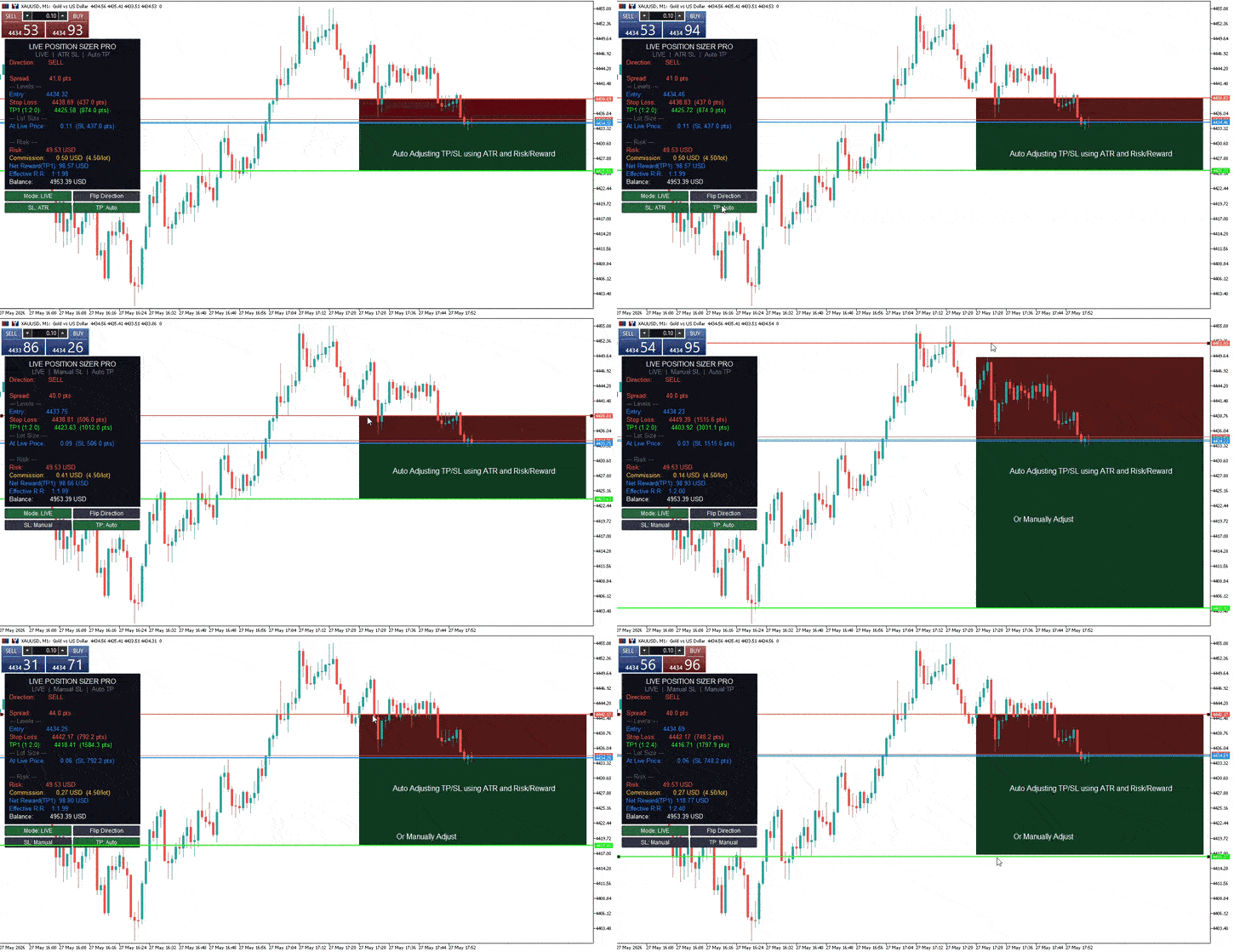
Place your entry and stop loss lines on the chart. Is a Live Risk Calculator that calculates your lot size, take profit levels, risk, and reward in real time. Switch to live mode and the lot size updates with every tick as price moves. Every number on the dashboard is ready the moment you are.
Prop Firm Safe — this tool does not execute, modify, or close any trades. It is an indicator, not an EA. It draws lines and calculates numbers. You place the order yourself, manually, when you are ready. There is zero automated order activity on your account, which means zero risk of triggering prop firm EA detection. Use it on any funded account, any challenge, any broker.
Two Modes
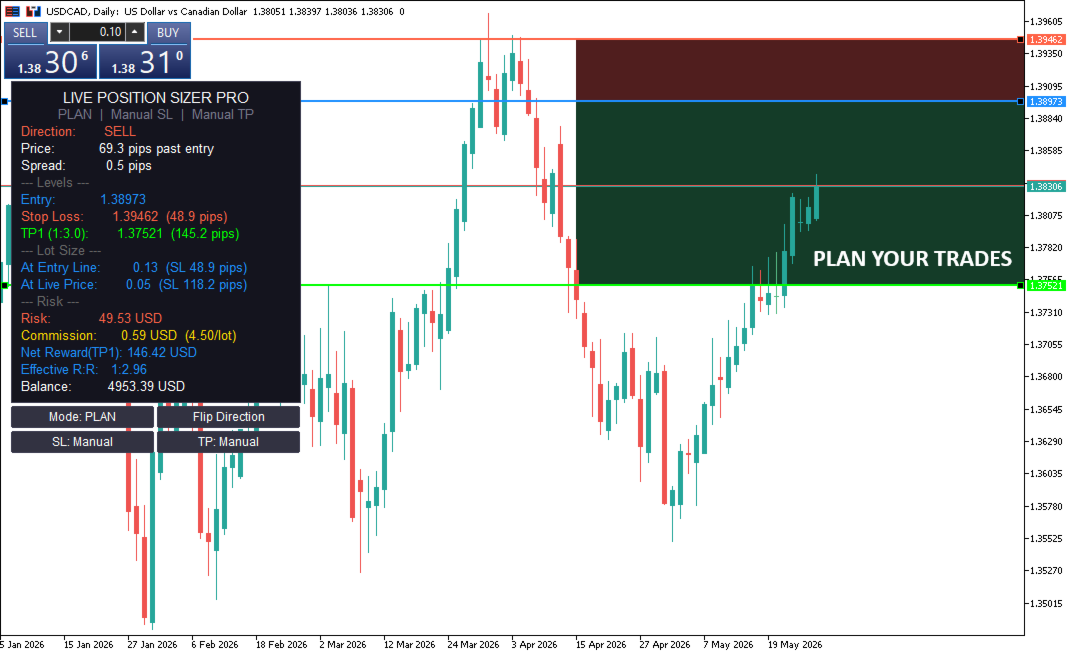
Plan Mode — drag the entry and stop loss lines wherever you want on the chart. Set up your trade in advance. The dashboard shows two lot sizes: one based on your planned entry, one based on the current live price. Watch the "price distance" readout and when it shows AT ENTRY, you are ready to execute.
Live Mode — the entry line follows the current price every second. Your lot size updates in real time as price moves relative to your stop loss. One glance tells you exactly what size to trade right now.
Toggle between modes with an on-chart button. No need to reload the indicator or change inputs.
- Stop Loss: Manual or ATR
- Manual — drag the stop loss line to any level you choose. Structure, support, resistance, wherever your invalidation point is.
- ATR — the stop loss is placed automatically at a configurable ATR multiple from entry. Updates in real time in both modes. Switch between manual and ATR with an on-chart button.
- Take Profit: Auto or Manual
- Auto — TP levels are calculated from your risk:reward ratio and the SL distance. Move the SL and the TPs adjust automatically. Up to three TP levels (TP1, TP2, TP3) with independent R:R ratios.
- Manual — TP lines become draggable. Place them wherever you want. The dashboard calculates the actual R:R from where you placed them, so you always know your real ratio even with manually positioned targets.
- Toggle between auto and manual with an on-chart button.
- Flip Direction — One button click mirrors your stop loss and take profits to the opposite side of your entry. Instantly switch between a buy and sell setup without dragging anything. Works in both Plan and Live modes, with both manual and ATR stops.
The Dashboard
Always visible on the chart, updated in real time:
- Direction — BUY or SELL, detected automatically from your entry and SL positions.
- Price — distance from current price to your entry line. Shows "AT ENTRY" when price reaches your level.
- Spread — live spread in pips or points with a colour warning when spreads widen.
- Entry, Stop Loss, TP1, TP2, TP3 — exact prices with distances in pips or points.
- At Entry Line — the lot size if you enter at your planned price.
- At Live Price — the lot size if you enter at the current market price.
- Risk — dollars at risk if your stop loss is hit.
- Reward — dollars gained if TP1 is hit.
- Commission — total round-trip commission at the calculated lot size (if configured).
- Effective R:R — your real risk:reward after commission is deducted.
- Balance — current account balance for reference.
- Accurate Lot Sizing on Every Instrument
The lot size calculation uses a three-method approach that works correctly on forex pairs, gold, indices, commodities, crypto, and cross-currency pairs. Many position sizers on MQL5 Market produce incorrect lot sizes on gold and indices because they rely on a single broker-reported value that is often wrong. This tool cross-validates using OrderCalcProfit, contract size, and tick value to ensure the number you see is the number you should trade.
Commission Aware
Enter your round-trip commission per lot and the tool factors it into the lot size calculation. Your risk percentage accounts for both the SL loss and the commission cost. The dashboard shows your net reward after commission and your effective R:R, so you see the real numbers, not the theoretical ones.
Configuration
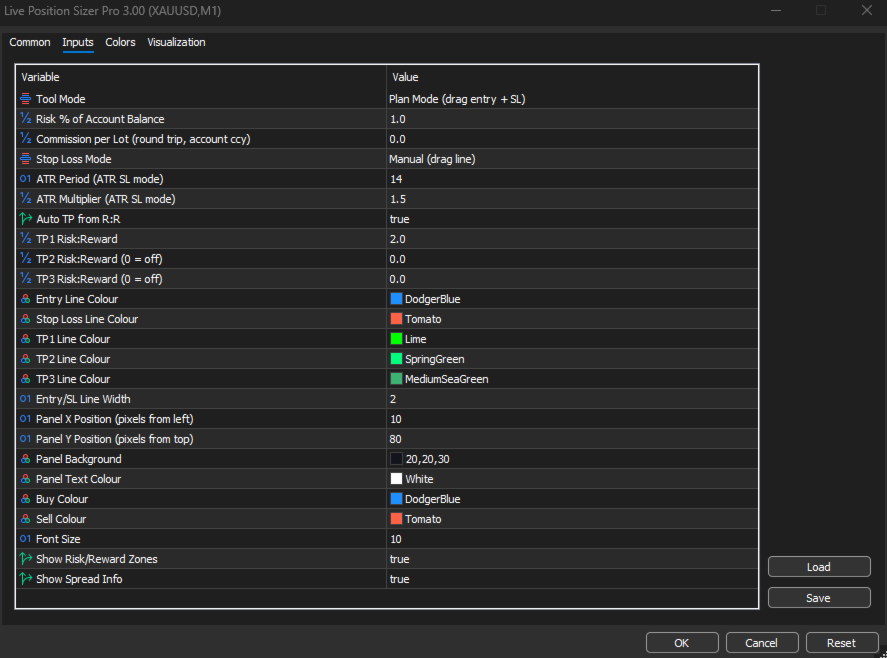
- Mode — Plan or Live (also toggleable via button).
- Risk % — percentage of account balance at risk per trade.
- Commission — round-trip commission per lot in account currency. Set to 0 to disable.
- SL Mode — Manual or ATR (also toggleable via button).
- ATR Period — lookback for ATR calculation (default 14).
- ATR Multiplier — distance from entry in ATR units (default 1.5).
- Auto TP — on or off (also toggleable via button).
- TP1 R:R — risk:reward for the first take profit (default 1:2).
- TP2 R:R — second take profit (default off, set to 0).
- TP3 R:R — third take profit (default off, set to 0).
- Panel X / Y — pixel position of the dashboard on the chart.
- Colours — entry line, SL line, TP1/TP2/TP3 lines, panel background, text, buy colour, sell colour are all independently configurable.
- Show Zones — toggle the shaded risk and reward areas between entry and SL/TP.
- Show Spread — toggle the live spread display.
Who It Is For
Discretionary traders who size every position to a fixed risk percentage and want the number on screen at all times. Scalpers who need the lot size updating live as they wait for price to reach their level. Swing traders planning entries in advance who want to see both the planned and market lot sizes. Prop firm traders who cannot afford to get lot sizing wrong on a funded account. Anyone who believes that knowing your exact risk is not optional — it is the first step of every trade.
Important
This tool is a visual aid for trade planning and risk management. As with any trading tool, always verify lot sizes and levels against your broker's specifications before placing a trade. Broker configurations, symbol properties, and account conditions vary. As with any trading tool, we recommend that you confirm the indicator performs as expected on your setup. Trading involves risk, and the developer is not responsible for trading decisions or outcomes.