Advanced Seconds Chart MT5

1
  • Утилиты
  • Andrew Mcculloch
    Andrew Mcculloch
    1 (1)
    I build real tools that can help you with your trading. If you want AI characters selling you a dream, I cannot help you.

    Message me if there is indicators/features you want added to current indicators or have an idea for an indicator to be developed.
  • Версия: 2.31
  • Обновлено: 20 августа 2026
  • Активации: 10

See What Others Cannot

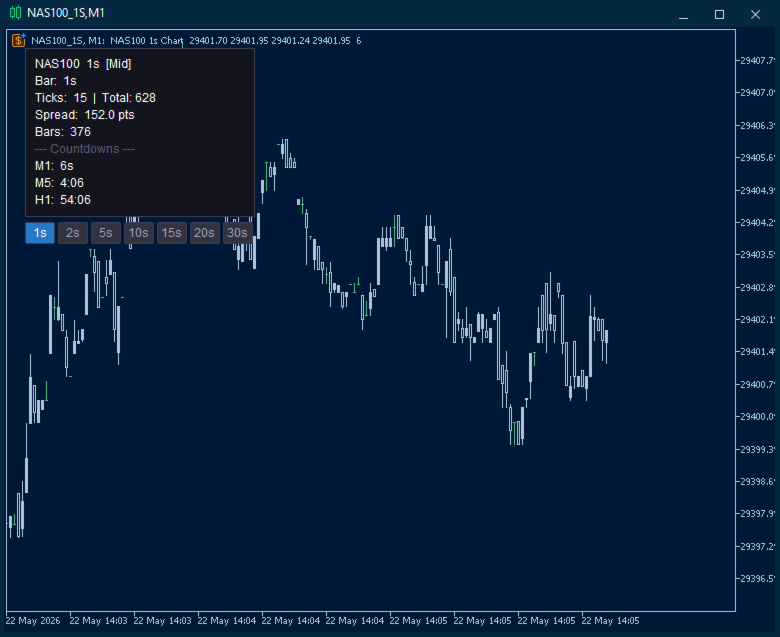
MT5 stops at the 1-minute chart. Advanced Seconds Chart MT5 goes below it, building real sub-minute OHLC candlesticks directly inside MT5 with full access to every indicator and drawing tool you already use.

No plugins. No external feeds. Attach it to a chart and go.

This product is now free. Download it, use it, and message me if anything does not work as described. I respond to every message and fix genuine issues.

What It Does


The EA captures your broker's live tick stream and aggregates it into sub-minute candles via a custom symbol. Every MT5 feature works natively, so you can attach indicators, oscillators and drawing tools exactly as you would on any other chart.

You choose the resolution. Need 25-second candles? Set it. 45-second candles? Set it. Any duration from 1 to 59 seconds.

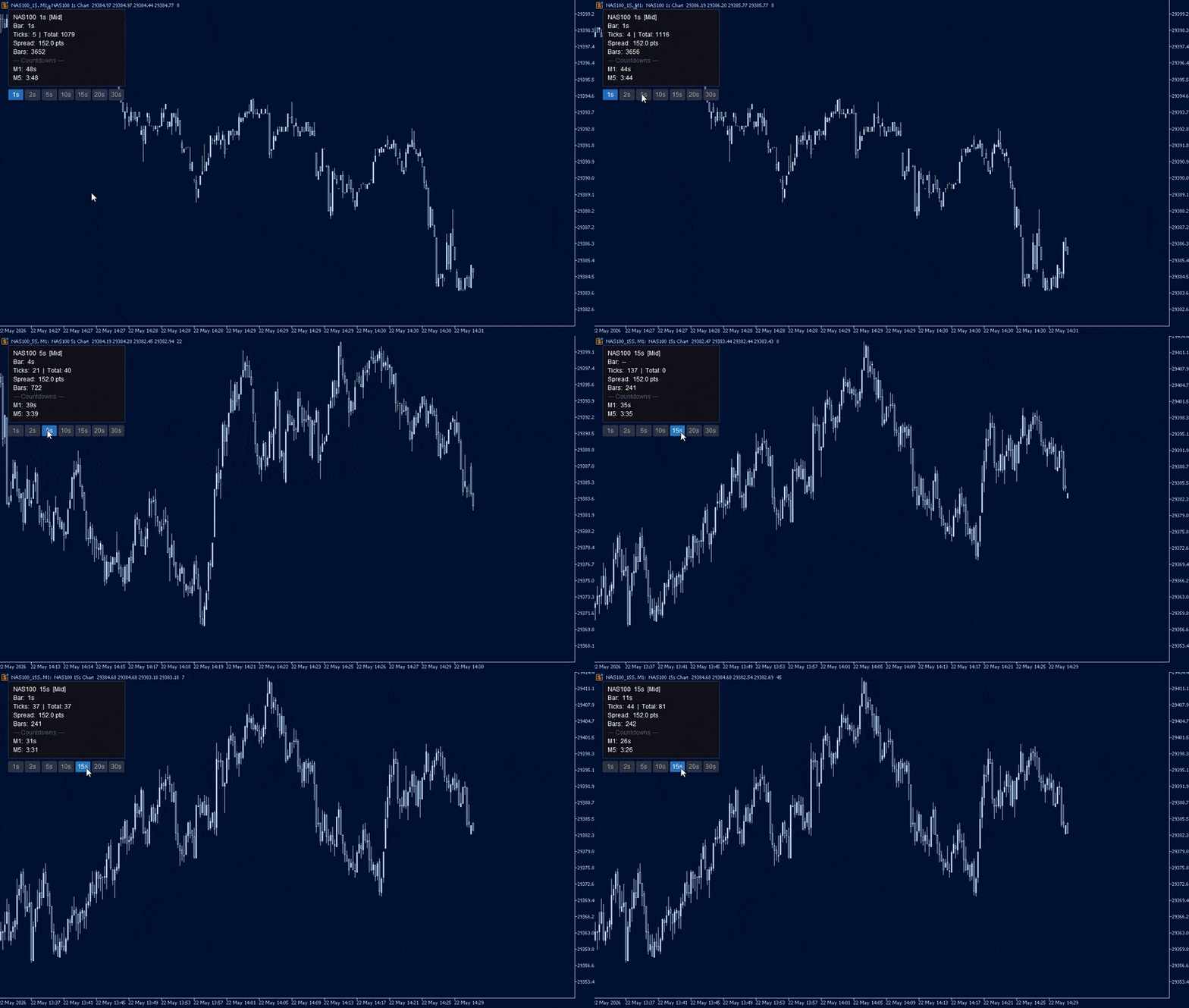
One-click duration switching. Seven on-chart buttons (1s, 2s, 5s, 10s, 15s, 20s, 30s). Click one and the chart rebuilds in under a second. No restarts, no dialogs.

Price source selection. Bid, Ask, Mid or Last. Mid averages bid and ask per tick, producing cleaner candles on pairs with variable spreads.

Spread filter. Set a maximum spread in points. Ticks arriving during blown-out spreads are discarded, keeping candles clean through news and rollover.

Instant backfill. Loads up to an hour of candles from stored tick history the moment the EA starts, so there is no waiting for bars to accumulate.

Persistent chart. The seconds chart survives a terminal restart with your template, indicators, window size and position intact. On reload the EA reattaches to the existing chart rather than opening a duplicate.

On-screen diagnostics. If bars are not being built, the EA tells you why on the chart itself rather than leaving you with an empty window.

Live Info Panel

A compact, repositionable dashboard updated every second:

  • Status — colour-coded indicator showing whether bars are building normally
  • Bar countdown — seconds until the current candle closes
  • Tick count — activity on the current bar plus session total
  • Live spread — current spread in points
  • Multi-timeframe countdowns — up to three slots (for example M1, M5, H1) counting down simultaneously

Panel corner, margin, colours, font size and opacity are all configurable.

If Something Does Not Look Right

Version 2.31 added active fault detection. If no candles appear, a warning is drawn on the chart naming the cause and the fix. The conditions it detects:

  • The selected price source returns no price on this symbol (common when Last is selected on a forex pair — switch to Bid or Mid)
  • Every tick is being rejected by the spread filter (raise the limit or set it to 0)
  • No ticks are arriving from the broker (market closed, or the symbol is not receiving data)
  • No tick history was available to backfill (candles will still build from live ticks)
  • The seconds chart could not be opened

Faults are also flagged on the parent chart, so a problem is visible even if the seconds chart never appeared. If you hit something the warning does not cover, send me a screenshot of the info panel and I will look into it.

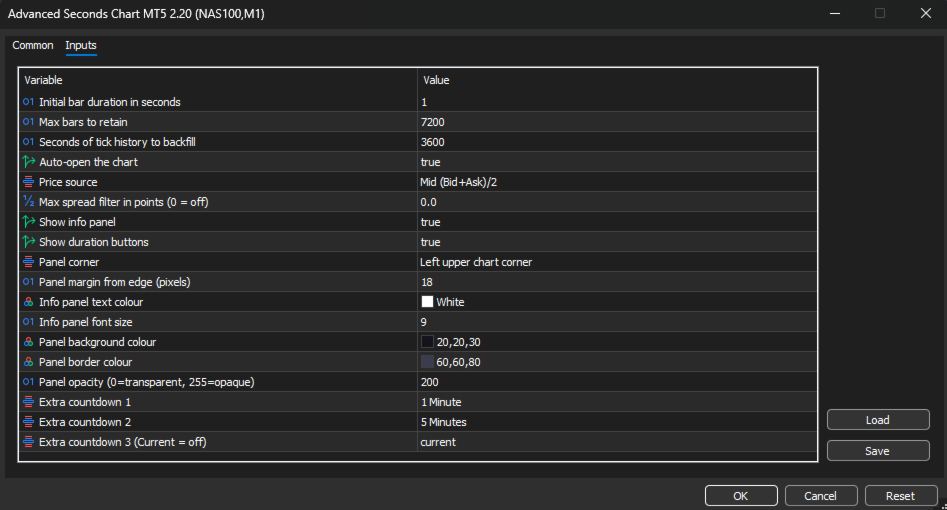
Configuration

Bar settings

Initial bar duration (default 1s) — Starting candle duration. Changeable at any time with the on-chart buttons, without restarting.

Max bars to retain (default 7,200) — Rolling buffer size. Once the limit is reached the oldest bar is dropped as each new one is added. At 1-second resolution 7,200 bars is 2 hours of history; at 30 seconds it is 60 hours.

Backfill seconds (default 3600) — How many seconds of tick history to read on startup. Increase it if your broker stores deep tick history and you want more bars available immediately. 300 is five minutes, 3600 is one hour.

Auto-open chart (default true) — Opens the custom symbol chart automatically on launch. Disable to open it manually from Market Watch.


Price and filtering

Price source (default Mid) — Which price from each tick builds the candles. Bid and Ask use the raw quote. Mid averages the two, smoothing spread-induced noise. Last uses the trade price, relevant for futures and equities.

Max spread filter (default 0, off) — Maximum allowable spread in points. Any tick exceeding it is discarded. Useful during news, rollover and low-liquidity sessions. Set to 0 to disable.


Chart persistence

Keep seconds chart open when terminal closes (default true) — Leaves the chart open on shutdown so MT5 saves it into your profile with its template, indicators, size and position.

Reuse an existing seconds chart (default true) — On reload, reattaches to the chart already open instead of creating a second one.


Diagnostics

Show on-screen warnings (default true) — Draws the fault warning on the chart when no bars are being built.

Seconds without a tick before warning (default 120) — How long the feed can be silent before the no-market-data warning appears.


Info panel display

Show info panel (default true) — Toggles the entire dashboard.

Show duration buttons (default true) — Toggles the button row. Can be shown independently of the info panel.

Panel corner (default Left Upper) — Which corner the panel and buttons anchor to. All four are supported, and the panel repositions automatically on chart resize.

Panel margin (default 18px) — Distance in pixels between the panel edge and the chart corner.

Text colour, font size, background colour, border colour, opacity — Full visual control to match your chart theme.


Multi-timeframe countdowns

Extra countdown 1 (default M1) — Live countdown to the next candle close on the selected timeframe.

Extra countdown 2 (default M5) — Second slot.

Extra countdown 3 (default off) — Third slot. Set any slot to Current to disable it.


Setup

  1. Attach the EA to any chart you want sub-minute candles for.
  2. Adjust the inputs or accept the defaults.
  3. Click OK. The seconds chart opens automatically.

The first time it opens, the seconds chart uses your Default template. Set the seconds chart up the way you want it — colours, indicators, window position — and it will come back that way on every restart from then on.

Do not save a template with this EA attached and set it as your Default template, as every new chart would then load the EA and open further charts. Version 2.31 blocks this from running away, but it is still worth avoiding.


Use Cases

Scalping. See entries and exits at the resolution they actually happen. A 1-minute candle hides dozens of micro-structures that matter when holding time is measured in seconds.

News trading. Watch the initial spike, the pullback and the continuation unfold bar by bar in the seconds after a release, rather than waiting for a single 1 minute candle to close.

Execution analysis. Compare your fill times and prices against the actual 1-second price action to understand slippage and timing.

Learning price action. Studying how candles form at the 1-second level builds intuition for structure and momentum that carries directly to higher timeframes.
Рекомендуем также
Backstop enforces the two rules that end funded accounts. A daily loss limit and a maximum loss limit, applied to everything on the account — every Expert Advisor, every symbol, and every trade you place by hand. Attach it to any one chart and it governs the whole terminal. It does not trade. It has no strategy, no signals and no opinion about the market. It is a governor. What it does Daily loss limit — measured from balance at the reset, equity at the reset, or a fixed account size. Firms diff
FREE
ChartPan
Leandro Rodrigo Giron
Hey Trader! Boring with the Meta chart? Do you want to move it as you do in Profit? Your problems are over! Now available   Chart Panoramic   or   ChartPan   for closer friends, a utility that allows you to move the chart to better visualize the most relevant points for your trade. Recommend you to add a keyboard shortcut for quick access (Ctrl + Q - for example), because you will need to run   ChartPan   after symbol changing to "release" the chart again. To add a hotkey: after downloading
FREE
GRInvest Breakeven Manager is an MT5 trade-management Expert Advisor designed to manage existing open positions after entry. Its purpose is to automate breakeven protection, staged partial closes, trailing stops and position management while still giving the trader full manual control over individual trades. The EA does not need to open trades itself . It can manage manual trades and trades opened by other Expert Advisors according to the selected symbol, direction and magic-number filters. The
FREE
TradePanelAssistant
Jonald Pagatpat Baydal
# Trade Assistant Manager Stop calculating lot sizes by hand. Trade Assistant Manager is an on-chart panel that turns your risk settings and chart lines into a precise, ready-to-fire order — automatically. ## Key Features **Automatic Lot Sizing** Set your risk as a percentage of account balance or a fixed dollar amount. The panel reads the distance between your Entry and Stop Loss lines and instantly calculates the exact lot size for that risk — accounting for your broker's commission per lo
FREE
Be Line
Nattapon Chuekamhod
BE Line — Real-Time Breakeven Indicator for MT5   (Free, No License Required) Automatically calculates and draws a   Breakeven (BE) horizontal line   based on all open positions for the current symbol. Net Long (Buy bias)   → Line draws at   Bid . When Bid crosses above the line, you're in profit. Net Short (Sell bias)   → Line draws at   Ask . When Ask crosses below the line, you're in profit. Accounts for   Swap and Commission   automatically. Includes an info panel showing: BE Price, Position
FREE
This utility EA will display simple renko, hence the name essential renko. The renko will be shown in a new tab and using custom symbol. Please do note (especially for those who new to Renko), that Renko does not follow timeline as it will follow price movement. That's why it has a lot of potential where you can attach any EA that you want and use any custom indicator in this new custom symbol for renko. Always use M1 timeframe. Most of the time you don't need to change anything. But if you d
FREE
This indicator creates a Renko-based custom symbol in MetaTrader 5. Renko charts are built using price movement only, not time, making them useful for analyzing trends and filtering noise. Features Customizable brick size in points. Option to calculate brick size using ATR (adaptive). Ability to show or hide wicks. Creates and updates a custom Renko chart symbol. Automatically opens the chart window (optional). Maintains a limited bar history for performance. Inputs BrickSizePoints – brick size
FREE
Quick Trade Manager (QTM) - это мощный инструмент для быстрой и интуитивной торговли непосредственно на графике MT5 с полной поддержкой пользовательских (синтетических) символов. QTM расширяет возможности быстрой торговли непосредственно на графике, делая торговлю в один клик ещё удобнее. Доступен автоматический расчёт объёма позиции исходя из заданного процента риска на сделку. Полностью поддерживаются любые пользовательские (синтетические) символы. Например, QTM можно использовать для торговли
FREE
Renko Chart
Marcin Konieczny
3.56 (9)
Индикатор Renko Chart позволяет отображать графики "ренко" в окне индикатора. Тип графиков "ренко" показывает лишь движения цены, большие заданного (box size). Он помогает устранить шум и сосредоточиться на основных трендах. При построении графика время не учитывается, используются лишь ценовые движения. По этой причине графики "Ренко" не похожи на графики цены. Индикатор работает в 2 режимах: CLOSE - при построении графика "ренко" используются только цены Close; HIGH_LOW - при построении график
FREE
Renko Maker
Aleksandr Slavskii
5 (1)
Это DEMO версия Renko Maker PRO  к сожалению правила маркета не позволили указать это в названии. Почему то проверка маркета запрещает в названии слово DEMO. Демо версия строит ренко бары только на основе EURUSD из 1000 последних минутных баров. Revolution Renko Maker PRO — Инновационный Конструктор Ренко Графиков для MetaTrader 5   Создавайте идеальные ренко-бары с сохранением тиковых данных и реальных объемов — теперь с полной поддержкой индикаторов, советников и тестера стратегий!  
FREE
The CandleStick Factory is a tool that allow you to perform a market scan and search any candlestick pattern that you already created. The lite version  can be downloaded here :  https://www.mql5.com/en/market/product/75568 You can perform a quick search in the current chart (500 bars will be scanned), or save your custom candlestick patterns, and search in different Symbols/Timeframes that you can select in the settings tab, the scan can be scheduled every 1, 5 or 10 minutes by updating the Ref
FREE
Renko Flow MT5
Komang Putra Riswanjaya
Renko Flow Are you a trader who loves using Renko charts? Unfortunately, MetaTrader does not provide an easy built-in way to display Renko charts directly. That’s why Renko Flow was created — to give traders a simple and practical way to use Renko-style visualization without needing complicated external tools or offline charts. Renko Flow can visualize Renko charts directly inside a separate window, allowing you to analyze Renko movement while still keeping your original price chart clean and
FREE
BoletaMiniPanel
PATRICK ANTONIO MORELO A.
5 (4)
Simple panel with  Stop loss (Loss), Stop gain (Gain) , Trailing stop (TS) and Breakeven (BE-P). Lot is the number of contracts to be traded. Gain is the number, in points, that the stop gain will be positioned. If you don't want to put stop gain, just put 0 (zero) in place and when you open the order it won't have this stop. Loss is the number, in points, that the stop loss will be placed. If you don't want to put stop loss, just put 0 (zero) in place and when you open the order it won't ha
FREE
Общая информация Утилита URL html and xml to csv предназначена для получения содержимого формата html или xml из URL-адресов и для загрузки его в выходной файл формата txt или csv. Она позволяет получать веб-страницы целиком, начиная с протокола http, в виде документа для дальнейшего в мобильном приложении или в терминале MetaTrader. Это полезно для получения наибольшей пользы из данных о событиях и экономических календарях, а также публикаций, связанных с инструментами, доступными на торговом т
FREE
Утилита рисует pivot уровни на основании выбора из day week month Берется предыдущая свеча выбранного таймфрейма и расчитываются значения для уровней по следующим формулам: Pivot = (high + close + low)/ 3 R1 = ( 2 * Pivot) - low S1 = ( 2 * Pivot) - high R2 = Pivot + (R1 -S1) R3 = high + ( 2 * (Pivot - low)) S2 = Pivot - (R1 - S1) S3 = low - ( 2 *(high - Pivot)); Настраиваются стиль и толщина для всех линий. Цвета для линий R, Pivot и S настраиваются по отдельности. При удалении утилиты с графика
FREE
Профессиональный индикатор, отображающий две взвешенные скользящие средние (WMA) непосредственно на графике и автоматически определяющий фазы низкой волатильности и бокового движения рынка. WMA1 рассчитывается по цене открытия с небольшим смещением и используется для определения направления тренда. WMA2 рассчитывается по цене закрытия и служит подтверждением импульса. Когда расстояние между двумя WMA уменьшается, свечи автоматически окрашиваются в серый цвет, предупреждая о консолидации и снижен
FREE
Gino Renko
Stephane, Andr Valette
1 (1)
Another renko-based indicator. It returns different usable values ​​for an EA, and is directly displayed on the main chart. Its setting is very simple: The size of the renko The number of bars taken into account The falling color The color on the rise Returned values: Buffer 0 : Value of the middle Buffer 1 : Value of the Top Buffer 2 : Value of the Bottom Buffer 3 : Direction of renko (0.0 for top ; 1.0 for bottom) Buffer 4 : Ratio of the renko, for example, if it is twice, 3 times, ro more of
GDS Renko Matrix - Free Multi-Scale Renko Overview Indicator for MetaTrader 5 GDS Renko Matrix is a free multi-scale Renko overview indicator for MetaTrader 5. It helps traders monitor Renko structure, direction and chart context in a compact matrix-style view. The purpose of this tool is to provide a faster visual overview of Renko behavior without turning the chart into a signal system. It does not predict the market and does not generate buy or sell signals. Renko EDGE EA Golden Delta | Alg
FREE
Are you tired of drawing trendlines every time you're analyzing charts? Or perhaps you would like more consistency in your technical analysis. Then this is for you. This indicator will draw trend lines automatically when dropped on a chart. How it works Works similar to standard deviation channel found on mt4 and mt5. It has 2 parameters: 1. Starting Bar 2. Number of bars for calculation The   starting bar   is the bar which drawing of the trend lines will begin, while the   number of bars for c
FREE
Day Direction Scanner
Efren Hernandez Partida
5 (3)
Сканер направления движения дня (Day Direction Scanner) — это индикатор, который использует направление текущей свечи на дневном, 4-часовом, 1-часовом, 15-минутном и 5-минутном графиках для определения направления рынка. Когда все свечи сходятся в одном направлении, индикатор показывает, является ли день бычьим или медвежьим, или же если четкого направления нет. Он полезен для быстрого определения направления движения рынка в течение дня. Особенности: - Работает со всеми валютными парами, инд
FREE
Drawdown Shield — Free Prop Firm Drawdown Protector & Risk Manager for MT5 Free Prop Firm Drawdown Protector | FTMO Compliant | No DLL Required | NFP Safe Failed a prop firm challenge because of a drawdown breach? You're not alone. Over 70% of traders fail due to risk management — not strategy.   Drawdown Shield   gives you the essential Drawdown Protector to pass your FTMO challenge, completely free. Brought to you by the PropGuard Pro team. What You Get in This FREE Version Feature Stat
FREE
LongTerm
Edoardo Centorame
5 (1)
LongTerm — это индикатор направленного анализа, разработанный для интерпретации силы и качества тренда средне долгосрочного периода, с особым фокусом на long oriented анализ. Это не индикатор входа и не инструмент операционного тайминга, а инструмент, созданный для помощи трейдеру в понимании того, когда рынок предлагает благоприятные или неблагоприятные условия для long trend, уменьшая типичный шум краткосрочных колебаний. Цели LongTerm создан для того, чтобы: идентифицировать сильные и структу
FREE
XQRR v4
Jean Robert Giraud
XQRR v4 FUSION – Le guide stratégique ultime Arrêtez de deviner, passez à l'action. Cette indicateu r  Il présente la méthode FUSION  : une stratégie clé en main pour maîtriser les marchés. Ce que vous maîtriserez : Configuration optimale : configurez vos graphiques comme un pro pour une lecture instantanée du marché. La stratégie « FUSION » : Comment aligner les périodes (MTF) pour ne capturer que les flux à forte probabilité. Entrées et sorties : règles précises pour entrer en position et pla
FREE
BW Zones Indicator — индикатор для MetaTrader 5, который определяет зоны на основе направления AO и AC и отображает их непосредственно на графике цены: зеленая зона — AO и AC растут; красная зона — AO и AC снижаются; нейтральная зона — направления AO и AC не совпадают. Отображение на графике: цветные бары для визуального выделения зон; стрелка вверх после двух подряд зеленых зон; стрелка вниз после двух подряд красных зон. Стрелки отображаются непосредственно на графике цены: сигнал вверх — под
FREE
Forex 17 – Bollinger Bands Pure Sound Alert No Plots подает звуковые сигналы, когда цена пересекает верхнюю или нижнюю полосу Bollinger Bands. Разные звуки используются для восходящих и нисходящих пробоев, помогая выявлять потенциально перекупленные или перепроданные состояния. Версия без графического отображения не рисует визуальные элементы на графике. Настраиваемые параметры включают период, отклонение и интервалы между сигналами. Чисто звуковой подход подходит для сохранения чистоты графиков
FREE
Aurum Premium Chart Themes - make MetaTrader 5 look premium in one click. Combine it with our other FREE PRoducts/Tools  Five hand-tuned colour themes with a soft glow, a clean layout and a subtle symbol watermark. Drop it on any chart and it looks finished instantly. Remove it and your original colours come back automatically. THEMES - Noir Gold: deep black with gold candles. The signature Aurum look. - Midnight Glass: dark navy with teal and rose. - Carbon: minimal black and white. - Ivor
FREE
Signalator Renko MT5 — бесплатная утилита для MetaTrader 5, которая отображает движение цены в виде чистого и настраиваемого графика Renko непосредственно в терминале. Утилита заменяет стандартное отображение графика по времени отдельным окном Renko, где движение цены формируется в кирпичи фиксированного размера. Это помогает сосредоточиться на направленном движении цены и отфильтровать более мелкие колебания, которые не достигают выбранного размера кирпича. Signalator Renko MT5 создан как специ
FREE
Общее описание Этот индикатор — усовершенствованная версия классического канала Дончия с добавлением практических функций для реальной торговли. Помимо стандартных трёх линий (верхняя, нижняя и средняя), система определяет пробои и отображает их на графике стрелками, показывая только линию, противоположную текущему направлению тренда для более чистого восприятия. Индикатор включает: Визуальные сигналы : цветные стрелки при пробое Автоматические уведомления : всплывающие окна, push и email Фильтр
FREE
This is a buyer and seller aggression indicator that analyzes the shape of each candle and project this data in a histogram form. There are 4 histograms in one. On the front we have two: Upper - Buyer force. Lower - Seller force. At the background we also have two histogram, both with same color. They measure the combined strenght of buyers and sellers. This histograms can be turned off in Input Parameters. It is also possible to have the real or tick volume to help on this force measurement. IN
FREE
TrendVision AI
Murtadha Majid Jeyad Al-Khuzaie
TrendVision AI – Smart Trend Channels & Price Forecasting for MetaTrader 5 Discover market structure and explore potential future price direction with TrendVision AI, an advanced technical indicator for MetaTrader 5 that combines automatic trendline analysis with a machine-learning-based price forecasting model. How Does TrendVision AI Work? TrendVision AI analyzes historical candlestick data within a configurable lookback window. It automatically draws two trendlines directly on the chart:
FREE
С этим продуктом покупают
Trade Assistant MT5
Evgeniy Kravchenko
4.43 (216)
Помогает рассчитать риск на сделку, простая установка нового ордера с помощью линий, управление ордерами с функциями частичного закрытия, 7 типов трейлинг-стопа и другие полезные функции. Дополнительные материалы и инструкции Инструкция по установке - Инструкция к приложению - Пробная версия приложения для демо счета Функция Линии   - отображает на графике линию открытия, стоп-лосс, тейк-профит. С помощью этой функции легко установить новый ордер и увидеть его дополнительные характеристики пе
Добро пожаловать в Trade Manager EA — лучший инструмент для управления рисками, предназначенный для упрощения, точности и эффективности торговли. Это не просто инструмент для размещения ордеров; это комплексное решение для удобного планирования торгов, управления позициями и усиленного контроля над рисками. Независимо от того, начинающий вы трейдер, опытный специалист или скальпер, нуждающийся в быстром исполнении, Trade Manager EA адаптируется к вашим потребностям и работает с любыми активами:
Local Trade Copier EA MT5
Juvenille Emperor Limited
4.94 (149)
Local Trade Copier EA MT5 — это быстрый и гибкий копировщик сделок для копирования и управления сделками между несколькими счетами MetaTrader 5 на одном компьютере с Windows или Windows VPS. Он сочетает локальную синхронизацию сделок с настройками на стороне Receiver для управления размером лота, рисками, фильтрацией сделок, сопоставлением символов, управлением сделками и защитой счета. Настройте терминалы Transmitter и Receiver примерно за 1 минуту и копируйте ручные сделки или сделки, открыты
Telegram to MT5 Multi-Channel Copier   автоматически копирует торговые сигналы из ваших Telegram- и Discord -каналов прямо в MetaTrader 5. Без ботов, без браузерных расширений, без ручного копирования. Сигнал приходит в Telegram или Discord — и советник открывает сделку в вашем терминале за считанные секунды. А перед тем как копировать канал, встроенный бэктестер покажет, что этот канал сделал бы на вашем счёте. Продукт состоит из двух компонентов: приложения для Windows, которое слушает ваши Te
================================================================================ POC BREAKOUT - V20.72. Full Professional Grade Toolkit ================================================================================ POC Breakout is a full MetaTrader 5 trading dashboard for discretionary traders who want breakout signals, Point of Control (POC) context, volume profiles, order flow, market structure, news, alerts, and advanced trade planning in one professional workspace. Attached directly to you
Strategy Ledger Pro
Abdullah Uygar Tuna
5 (11)
Теперь доступно на русском языке. Strategy Ledger Pro — панель анализа счёта для MetaTrader 5, работающая только на чтение. Она разделяет результаты счёта по советникам, стратегиям, символам и magic-номерам, чтобы было видно, что на самом деле вносит каждый из них. Панель доступна на 11 языках: English, Français, Deutsch, Español, Italiano, Português, Русский, Türkçe, 中文, 日本語 и 한국어. Перед загрузкой демоверсии. Маркет запускает демоверсию любого платного продукта только в тестере стратегий. Эта
TradePanel MT5
Alfiya Fazylova
4.88 (170)
Trade Panel — это многофункциональный торговый помощник. Приложение содержит более 50 торговых функций для ручной торговли и позволяет автоматизировать большинство торговых операций. Инструкция к приложению: https://www.mql5.com/ru/blogs/post/756476 Пробная версия приложения для демо-счета: https://www.mql5.com/ru/blogs/post/750864 Как установить приложение: https://www.mql5.com/ru/blogs/post/750096 Как тестировать приложение в визуальном режиме: https://www.mql5.com/ru/blogs/post/770274 Как уст
The Patch
Mian Rameez Ali
The Patch It never opens a trade. It walks behind the ones that did. Every open position, every pending order — checked twice a second for the one thing that's easy to forget: a stop, a target. Found bare, it doesn't ask. It writes the missing number in, measured in points from wherever the position began, and moves on to the next. No strategy, no opinion on direction. Just the quiet assumption that nothing should ever sit on the market unprotected — not because someone decided it shouldn't,
Копируйте сигналы из Telegram по своим торговым правилам Telegram to MT5 Signal Trader автоматически копирует текстовые торговые сигналы из открытых и закрытых каналов и групп Telegram в MetaTrader 5. Управляйте несколькими поставщиками сигналов и счетами MT5 из одного приложения для компьютера, задавая индивидуальные параметры риска и торговли для каждого поставщика . Для копирования не нужны бот Telegram и настройка API. Просто войдите в свой аккаунт Telegram по номеру телефона или QR-коду и в
Floor Watch
Syed Tauqeer Hussain Shah
Floor Watch One number, watched every thirty seconds: how far equity has fallen since the day began — or since its highest point, if it's told to trail the peak instead of the open. Cross the line and it doesn't argue. Every open position closes, every pending order vanishes, and anything that slips through afterward gets shut the moment it appears. Not asked. Removed. The floor holds until the clock turns 5 AM Pakistan time — then, and only then, does the day start over. One rule. No except
Power Candles Strategy Scanner — самооптимизирующийся инструмент для поиска настроек по нескольким инструментам Power Candles Strategy Scanner использует тот же самооптимизирующийся движок, что и индикатор Power Candles — для всех символов в вашем Market Watch, одновременно. На одной панели отображается информация о том, какие символы в данный момент являются статистически торгуемыми, какая стратегия выигрывает на каждом из них, оптимальная пара Stop Loss / Take Profit, а также отправляется увед
Grid Manual MT5
Alfiya Fazylova
4.73 (22)
Grid Manual — это торговая панель для работы с сеточными стратегиями. Утилита универсальная, имеет гибкие настройки и понятный интерфейс. Работает с сеткой ордеров не только в сторону усреднения убытков, но и в сторону наращивания прибыли. Трейдеру не нужно создавать и сопровождать сетку ордеров, это сделает утилита. Достаточно открыть ордер и Grid manual автоматически создаст ему сетку ордеров и будет сопровождать его до самого закрытия. Полная инструкция и демо-версия здесь . Основные особенно
Одна покупка — все мои индикаторы для MT4 и MT5, уже доступные и выпущенные в будущем, без дополнительной оплаты. После покупки свяжитесь со мной, чтобы узнать, как их получить. Планируется повышать цену на 50$ после каждых 10 покупок, до 999$. Действует цена Market на момент оформления покупки. Сохраните индикатор, которому доверяете. Автоматизируйте работу с ним. Ваш сигнал. Ваши правила. Ваше исполнение. У вас уже есть надежный индикатор MT5, но приходится следить за графиком, ждать сигнала,
Daily Trading Limiter
AL MOOSAWI ABDULLAH JAFFER BAQER
5 (8)
• Please test the product in the Strategy Tester before purchasing to understand how it works. • If you face any issues, contact me via private message—I’m always available to help. • After purchase, send me a screenshot of your order to receive a FREE EA as a gift. Daily Trading Limiter — the rule you cannot break Every trader knows the number. Three trades. Two percent. One bad day and stop. And every trader has watched themselves take the fourth trade anyway. The problem was never knowing th
Welcome to ENTRY IN THE ZONE with SMC MULTI TIMEFRAME SPECIAL BENEFIT / FOR OUR MQL5 CUSTOMERS FREE ACCESS TO THE NEW TOOL  — COMING SOON — Learn more on our official website  : https://www.fableedge.net Entry In The Zone with SMC Multi Timeframe is a real-time market analysis tool based on Smart Money Concepts (SMC), designed to analyze market structure, price direction, and key trading zones. It supports both Single-Timeframe and Multi-Timeframe Analysis, providing a clearer view of overall ma
VirtualTradePad PRO SE MT5 — профессиональный торговый центр управления для MetaTrader 5 VirtualTradePad PRO SE — это премиальная торговая панель и рабочая среда управления сделками на графике для MetaTrader 5 . Она создана для трейдеров, которым нужны более быстрое исполнение, более понятный контроль позиций, структурированное управление сделками, визуальное планирование уровней и профессиональный рабочий процесс прямо с графика. Это не просто панель BUY / SELL. PRO SE объединяет ручную торговл
FUTURES ORDERFLOW FOOTPRINT CHART Professional OrderFlow EA for MetaTrader 5 Version 1.01| Professional tool for real traders | Institutional-Grade Visualization STRATEGY TESTER USERS - PLEASE SELECT EVERY REAL TICK WHEN TESTING AND YOU HAVE DOWNLOADED HISTORICAL DATA. IF YOU SEE A WAITING SCREEN AND IT IS NOT DOWNLOADING, IT MEANS YOU HAVE LOW HISTORICAL DATA. TRY 1 MIN AND 5 MIN FIRST ON 1 DAY DATA. ONE DAY DATA SHOULD BE THE NEWEST AND MOST CURRENT DATE. PLEASE WAIT UNTIL THE MARKET HAS ROL
Trading Chaos Expert
Hennadii Stanilevych
5 (11)
Этот программный продукт не имеет аналогов в мире, поскольку он является универсальным "пультом управления" торговых операций, начиная от получения торговых сигналов, автоматизации входа в позиции, установки стоп-лоссов и тейк-профитов, а также трейлинга прибыли одновременно по множеству сделок в одном открытом окне. Интуитивно понятное управление экспертом в "три клика" на экране монитора позволяет полноценно использовать все его функции на разного рода компьютерах, включая планшетные. Взаимоде
Trade copier MT5
Alfiya Fazylova
4.61 (56)
Trade Copier — это профессиональная утилита, предназначенная для копирования и синхронизации сделок между торговыми счетами. Копирование происходит от счета/терминала поставщика к счету/терминалу получателя, которые установлены на одном компьютере или vps. Перед покупкой вы можете протестировать демо-версию на демо-счете. Демо-версия здесь . Полная инструкция здесь . Основной функционал и преимущества: Русифицированный интерфейс, поддержка на русском языке. Поддерживает копирование МТ5 > МТ5, МТ
MT5 to Telegram Signal Provider — это простой в использовании полностью настраиваемый инструмент, который позволяет отправлять определённые сигналы в чат, канал или группу Telegram, превращая вашу учётную запись в провайдера сигналов . В отличие от большинства конкурирующих продуктов, он не использует импорт DLL. [ Демо ]   [ Руководство ] [ Версия MT4 ] [ Версия для Discord ] [ Канал в Telegram ]  New: [ Telegram To MT5 ] Настройка Доступно пошаговое руководство пользователя . Никаких знаний A
The product will copy all telegram signal to MT5 ( which you are member) , also it can work as remote copier.  Easy to set up, copy order instant, can work with almost signal formats, image signal,  s upport to translate other language to English Work with all type of channel or group, even channel have "Restrict Saving Content", work with  multi channel, multi MT5 Work as remote copier: with signal have ticket number, it will copy exactly via ticket number. Support to backtest signal. How to s
Exp COPYLOT CLIENT for MT5
Vladislav Andruschenko
3.97 (35)
Профессиональный копировщик сделок для MetaTrader 5 Быстрый, профессиональный и надежный копировщик сделок для MetaTrader . COPYLOT позволяет копировать сделки Forex между терминалами MT4 и MT5 с поддержкой счетов Hedge и Netting . Версия COPYLOT для MT5 поддерживает: - MT5 Hedge → MT5 Hedge - MT5 Hedge → MT5 Netting - MT5 Netting → MT5 Hedge - MT5 Netting → MT5 Netting - MT4 → MT5 Hedge - MT4 → MT5 Netting Версия MT4 Полное описание + DEMO + PDF Как купить Как установить Как получить файлы жур
Telegram To MT5 Ultra
Mirel Daniel Gheonu
5 (5)
Telegram To MT5 — копировщик сигналов Превратите торговые сигналы из ваших Telegram-каналов в реальные ордера MT5 — автоматически, на любом количестве счетов, с полным контролем над риском и правилами. Telegram To MT5 связывает VIP / сигнальные каналы, на которые вы уже подписаны в Telegram, с вашим терминалом MetaTrader 5. Бесплатное приложение-компаньон для ПК читает сообщения (даже из каналов, которые не допускают ботов), а этот советник исполняет их на вашем счёте — применяя ваши настройки р
Trade Manager DaneTrades
Levi Dane Benjamin
4.23 (30)
Trade Manager, который поможет вам быстро входить и выходить из сделок, автоматически рассчитывая риск. Включает функции, которые помогут предотвратить чрезмерную торговлю, торговлю из мести и эмоциональную торговлю. Сделками можно управлять автоматически, а показатели эффективности счета можно визуализировать в виде графика. Эти функции делают эту панель идеальной для всех трейдеров, занимающихся ручной торговлей, и помогают улучшить платформу MetaTrader 5. Многоязычная поддержка. Версия для МТ
Signal TradingView to MT5 Pro Automator Мгновенное профессиональное исполнение между TradingView и MetaTrader 5 Автоматизируйте свою торговую стратегию с помощью самого надежного моста связи между алертами TradingView и реальным исполнением в MT5. Разработанный для трейдеров, которым требуются скорость, гибкость и безупречное управление рисками, этот советник (Expert Advisor) превращает любое сообщение с алертом в точный рыночный или лимитный ордер. ПРЕИМУЩЕСТВА И СИЛЬНЫЕ СТОРОНЫ Универсальный д
Footprint Chart Pro — Professional OrderFlow EA for MetaTrader 5 Version 6.34 | Professional tool for real traders | Institutional-Grade Visualization DEMO USERS - PLEASE SELECT EVERY TICK / REAL TICK WHEN TESTING AND YOU HAVE DOWNLOADED HISTORICAL DATA. IF YOU SEE A WAITING SCREEN AND IT IS NOT DOWNLOADING, IT MEANS YOU HAVE LOW HISTORICAL DATA. TRY 1 MIN AND 5 MIN FIRST ON 1 DAY DATA. ONE DAY DATA SHOULD BE THE NEWEST AND MOST CURRENT DATE. PLEASE WAIT UNTIL THE MARKET HAS ROLLED OVER PERIOD.
Trade Indicator Assistant   is a powerful MT5 utility designed to turn indicators into automated trading systems. Its main feature is the ability to automatically detect an indicator’s   BUY and SELL signal buffers , without requiring you to know the buffer numbers, search through indicator settings, or modify the indicator source code. Bonus Indicator:   After purchasing Trade Indicator Assistant, contact me to receive   Trade Signal Pro   completely free as a bonus indicator. [Download Demo V
Seconds Chart MT5
Boris Sedov
4.61 (18)
Seconds Chart - уникальный инструмент для создания секундных графиков в MetaTrader 5 . С помощью Seconds Chart вы можете построить график с таймфреймом, заданным в секундах, получая идеальную гибкость и точность анализа, недоступную на стандартных минутных или часовых графиках. Например, таймфрейм S15 обозначает график со свечами продолжительностью 15 секунд. Вы можете использовать любые индикаторы и советники с поддержкой пользовательских символов. Работать с ними так же удобно, как и на станда
Astro Trade MT5
Indra Maulana
5 (8)
25% discount on the release of the tool: only for the next 3 buyers Send a message to receive a demo version. AstroTrade Trading Assistant AstroTrade is a comprehensive multi-functional trading utility developed for the MetaTrader 5 platform. It integrates essential tools for trade execution, risk management, and technical monitoring into a single unified interface. The application is designed to assist traders in managing their daily operations through a visual and structured environment. Vi
Premium Trade Manager - Торговая панель со встроенным коучем Premium Trade Manager помещает торгового коуча прямо в ваш график, а под ним работает полноценный движок исполнения. Настройте сделку так, как вы всегда это делаете, затем позвольте Max, вашему ИИ-наставнику по трейдингу, прочитать именно эту настройку с учётом вашего живого счёта и дать чёткое заключение до того, как вы входите: соответствует ли стоп дисциплинированному подходу, разумен ли риск, не выходит ли высоковолатильный релиз ч
Другие продукты этого автора
See What Others Cannot MetaTrader 5 stops at the 1-minute chart. Everything that happens inside that minute, the spikes, the reversals, the momentum shifts, is invisible. Until now. Simple Seconds Chart builds true 1-second OHLC candlesticks in real time, directly inside MT5. No external software. No data subscriptions. No workarounds. Attach it to any symbol and a fully interactive candlestick chart opens automatically, updating tick by tick. What You Get Real 1-second candles built from your
FREE
Gold Breakout Multi-Strategy EA XAUUSD H1 breakout system — honest, tick-validated, free. What this is A gold (XAUUSD) breakout expert advisor that trades multiple support/resistance breakout strategies on the H1 timeframe, concentrated in the New York session, with a trailing stop and a false-break margin filter. It places pending stop orders at breakout levels and manages exits with a breakeven-then-trail stop. No grid, no martingale, no averaging-down. Every position carries a hard stop. It i
FREE
If you find this tool useful, please leave a review The position size you need, the levels you are trading, and the dollars at stake — always visible, always updating, always accurate. No manual calculations and  No switching to a browser tab . Place your entry and stop loss lines on the chart. Is a Live Risk Calculator that calculates your lot size, take profit levels, risk, and reward in real time. Switch to live mode and the lot size updates with every tick as price moves. Every number on th
FREE
ATR Stop Loss and Take Profit Calculator. Know your risk before you take the trade! Click any candle and instantly see your stop loss, take profit, and correct lot size, all calculated from ATR, scaled to your account. A useful back-testing and live trading tool.  If you find this indicator useful, please leave a review How It Works Click a candle. The indicator reads ATR at that bar, calculates SL and TP using your configured multipliers, and draws the levels on the chart. An info panel shows
FREE
Always Know When the Candle Closes!The countdown is right there on the chart, updating every second. If you find this indicator useful, please leave a review How It Works The indicator displays up to three independent candle close countdowns on your chart, each set to any MT5 timeframe. Monitor your chart timeframe, a higher timeframe, and a lower timeframe simultaneously — all without switching charts. Slot 1 defaults to your current chart timeframe. Set slots 2 and 3 to any timeframe you want
FREE
Фильтр:
nphil9
15
nphil9 2026.09.26 05:45 

Пользователь не оставил комментарий к оценке

Andrew Mcculloch
2304
Ответ разработчика Andrew Mcculloch 2026.09.29 10:01
Thanks for your support nphil9. I'm glad you've found value from this and hope it helps with your trading, and as always I appreciate your feedback and suggestions that you messaged me to help improve it!
playgold
1428
playgold 2026.08.28 02:44 

Пользователь не оставил комментарий к оценке

Andrew Mcculloch
2304
Ответ разработчика Andrew Mcculloch 2026.08.28 03:31
I appreciate your review! If you run into any issues or have any suggestions, feel free to message me!
Titus
14
Titus 2026.08.25 11:35 

Пользователь не оставил комментарий к оценке

Andrew Mcculloch
2304
Ответ разработчика Andrew Mcculloch 2026.08.26 02:42
Thank you for your review. Please message me if you run into any issues or have any suggestions!
toptrn
24
toptrn 2026.08.07 17:04 

It doesn't work. The candles don't light up, and everything keeps freezing. It's completely unusable. The seller isn't responding either.

Andrew Mcculloch
2304
Ответ разработчика Andrew Mcculloch 2026.08.10 08:53
Hi toptrn. Please check dm for assistance. As the seconds chart is not native to MT5, there may be some settings that need to be changed in order for the candles to appear correctly. I used this product most days without issue, so please allow me the opportunity to rectify any issues for you.
Ответ на отзыв























