QuantHubCommander

当然,下面这版是适合直接放到市场页面里的 英文版本

Product Overview

QuantHubCommaner Dashboard for MT4 is a trading statistics and analysis tool designed specifically for MetaTrader 4.
It does not open, modify, or close trades, and it does not interfere with any trading strategy. Its purpose is to display account status and historical trading performance in a clear, visual, and easy-to-read dashboard.

With this panel, users can quickly review trading results across different time periods and filter data by Symbol, Magic Number, Comment, and Account. It is suitable for both manual traders and EA users who want a more efficient way to review and evaluate performance.

This tool is especially useful for:

  • Monitoring overall account performance

  • Analyzing the real results of a specific EA or trading system

  • Comparing performance across different time periods

  • Reviewing key metrics such as win rate, drawdown, profit factor, and average holding time

  • Making trade history easier to understand through charts and detail tables

Key Features

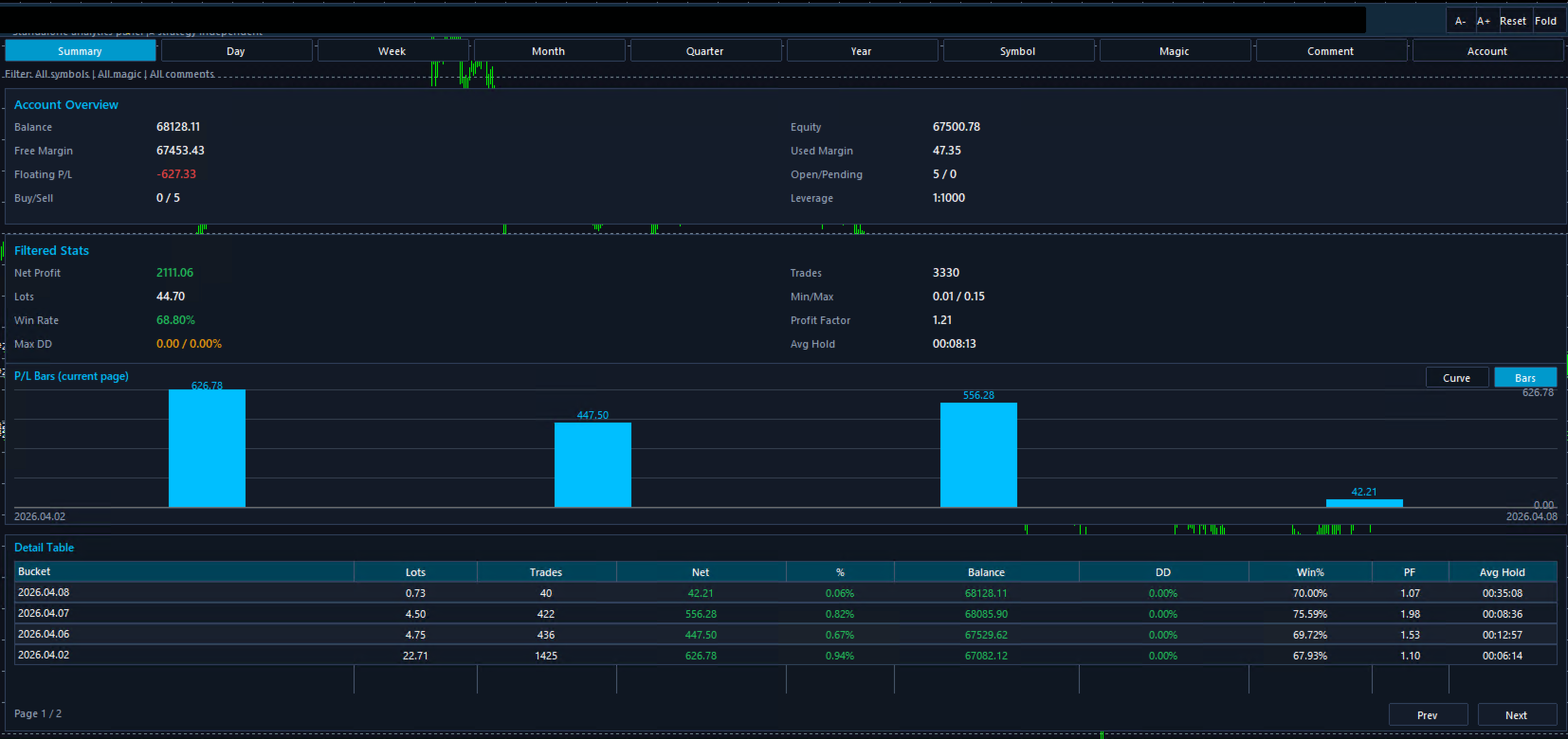
1. Clear Account Overview

The dashboard displays important account information in one place, including:

  • Balance

  • Equity

  • Free Margin

  • Floating P/L

  • Used Margin

  • Open / Pending Orders

  • Leverage

  • Buy / Sell Position Count

This allows users to understand the current account status without switching between multiple windows.

2. Multi-Period Performance Analysis

Supports multiple reporting periods:

  • Summary

  • Day

  • Week

  • Month

  • Quarter

  • Year

Users can review short-term performance or analyze longer-term results depending on their needs.

3. Automatic Trading Statistics

The dashboard automatically calculates and displays core performance metrics, including:

  • Net Profit

  • Lots

  • Trades

  • Win Rate

  • Max Drawdown

  • Profit Factor

  • Min / Max Lot

  • Average Holding Time

These metrics help users evaluate strategy stability, profitability, and risk more efficiently.

4. Visual Chart Display

Built-in chart visualization makes the results easier to understand at a glance.
Compared with raw numbers alone, charts make it easier to spot profit distribution, performance changes, and general trading trends.

5. Detailed Table for Review

A detailed statistics table is included for deeper analysis. It can display information such as:

  • Time bucket

  • Lots

  • Number of trades

  • Net profit

  • Profit percentage

  • Balance

  • Drawdown

  • Win %

  • Profit Factor

  • Average holding time

This is especially useful for trade review and comparing results across different periods.

6. Flexible Data Filtering

The dashboard supports filtering by:

  • Symbol

  • Magic

  • Comment

  • Account

This is very helpful for traders running multiple strategies, symbols, or systems on the same account, because each group of trades can be analyzed separately.

7. Analysis Only, No Trade Execution

This product is designed purely for statistics and visualization.
It does not place trades and does not affect existing trading operations.

Parameter List

Below is a general English parameter description template. You can replace the names with your actual input parameter names if needed.

Basic Display Parameters

Statistics Period
Selects the reporting period, such as Summary, Day, Week, Month, Quarter, or Year.

Show Dashboard
Enables or disables the main statistics panel.

Auto Refresh
Automatically refreshes the statistics data.

Refresh Interval
Sets the refresh interval for updating data.

Filter Parameters

Filter Symbol
Filters statistics by trading symbol.

Filter Magic
Filters statistics by Magic Number.

Filter Comment
Filters statistics by order comment.

Filter Account
Filters results by account.

Chart Parameters

Chart Mode
Selects the chart display mode, such as curve or bar chart.

Bars Per Page
Defines how many grouped results are shown in the current chart page.

Show Profit Labels
Shows or hides profit value labels on the chart.

Sync Chart With Table
Keeps the chart synchronized with the table pagination.

Table Parameters

Rows Per Page
Sets how many rows are displayed in the detail table per page.

Default Page
Defines the default page shown when opening the table.

Show Detail Table
Enables or disables the detail table.

Interface Parameters

Panel Position X
Horizontal position of the panel.

Panel Position Y
Vertical position of the panel.

Panel Width
Width of the dashboard panel.

Panel Height
Height of the dashboard panel.

Font Size
Controls the display font size.

Color Theme
Changes the dashboard color style.

Usage Suggestions

1. Use It on a Separate Chart

For the best viewing experience, it is recommended to load the dashboard on a dedicated chart window.

2. Use Filters for Multi-Strategy Accounts

If multiple EAs or systems are running on the same account, use Magic or Comment filters to analyze each strategy separately.

3. Review Performance by Period

Start with Summary for an overall view, then switch to Day, Week, or Month to identify changes and patterns over time.

4. Use Charts and Tables Together

Charts help visualize trends, while tables provide precise details. Using both together gives a more complete performance review.

5. Suitable for Both Manual and EA Trading

Whether trades are placed manually or by an Expert Advisor, this tool helps present the results in a much more organized and readable way.

Notes

1. This Is Not a Trading EA

This product is for statistics and visualization only. It does not manage or execute trades.

2. Results Depend on Account History

All displayed data is based on the account history and current account information available in MT4. Incomplete history may affect the results.

3. Filters Affect the Displayed Results

When Symbol, Magic, Comment, or other filters are enabled, only matching data will be shown. This is expected behavior.

4. This Tool Is for Analysis Purposes

The dashboard is intended to help users review trading performance. It does not provide financial advice or guarantee results.

5. Load Full History for Best Accuracy

For the most accurate statistics, make sure MT4 has fully loaded the required account history before reviewing the dashboard.

Turn raw trade history into a clear, visual, and easy-to-review performance dashboard.

Рекомендуем также
Самый быстрый способ поменять период. Подходит для трейдеров, использующих несколько графиков и таймфреймов. Размер форма и цвет настраиваются. Входные параметры Corner — выберите "Right lower chart corner" ("Нижний правый угол графика") в качестве угла размещения Color — цвет фона кнопки ColorText — цвет текста кнопки ColorOn — цвет фона кнопки для текущего периода ColorOnText — цвет текста кнопки для текущего периода Font — шрифт Arial, Verdana... FontSize — размер шрифта в пикселях DistanceX
FREE
Position Selective Close MT4
Francisco Manuel Vicente Berardo
The Position Selective Close is a multi-symbol multi-timeframe script used to close simultaneously various positions.  General Description   The Position Selective Close   possesses   three operation modes (Intersection,   Union   and All) that control the way   as   four position features (symbol, magic number,   type   and profit) are used. The modes, available through the Selection Mode input parameter, relate to the features, available through the “Select by Feature” and “Feature” input pa
FREE
Простенький скрипт, в котором очень часто нуждаются трейдеры. Он калькулирует лот в процентах от депозита. Для соблюдения риск-менеджмента очень даже нужная вещь. В настройках присутствует только одна опция: MaxRisk - риск в процентах для вычисления лота. Даный помощник работает как стандартный скрипт, то есть запускается только один раз на соответствующем графике, после чего можно приступать к торговле с вычисленым лотом. Все гениальное просто! Успешной торговли!
FREE
SL and TP Setter
Giacomo Barone
4 (1)
You can manually open a trade (one click), and this EA will take care of setting the SL and TP. SL and TP are set based on the number of pips you specify in the input screen. You can also choose monetary SL and TP. SL and TP are determined based on the weighted average price (WAP), so if you open a new trade, SL and TP will be updated according to the new WAP. The WAP is not unique but differentiated between buy and sell trades (this is useful only if you open opposite trades on the same chart)
FREE
Deal multiplier Mt4
Mikhail Mitin
4.46 (13)
Утилита открывает копии открытых сделок.  Очень удобно, если вы пользуетесь сервисом " Сигналы " и хотите увеличить объем сделок. Настройки: Символы: все символы только текущий символ Сделки: Buy Sell Magic Любой Magic Определенный Magic Лот Original - объем лота из "Оригинала"; Fix Lot - фиксированный объем лота; Lot X Mult - объем лота из "Источника" умноженный на коэффициент; Stop Loss From sender - Stop Loss из Источника; Without - без Stop Loss; Plus Fix - Stop Loss из Источника плюс фикси
FREE
This MQL4 code is a custom indicator that draws multiple colored rectangles on a chart, spaced apart by a defined pip distance, and projected into the future. Here's a brief breakdown: Purpose: Draws several horizontal rectangles (zones) starting from a specified price. Rectangles are spaced apart vertically by a pip distance. Colors alternate between FirstColor and SecondColor . Rectangles can be drawn behind candles and optionally filled. Each rectangle extends into the future for a specified
FREE
Buffer Finder Tool
Afsal Meerankutty
4.75 (4)
CyberZingFx Buffer Finder Tool Developed for Finding Buffers of Indicator to use in Universal Indicator EA . This is Not an Indicator or EA CyberZingFx Buffer Finder Tool is utility tool designed specifically for MetaTrader 4 (MT4) users. It is a standalone application that helps you easily find the buffers of any MT4 indicator, allowing you to use them in your Universal Indicator EA. With the Buffer Finder Tool, you no longer have to search through the data window to find the buffers you need.
FREE
Scalping Day Trading Support Utility Scalping One MT4 free One position is displayed with one button. View P & L, Lot, and Point in real time. It is possible to switch the display of positions of only chart currencies and all currency pairs.  (The free version has only 3 positions) Supports automatic identification in Japanese and English   Account currency notation corresponds to dollar, euro, pound, yen (automatic identification) The timeline drawing function can be linked with the clock disp
FREE
Show Pips
Roman Podpora
4.26 (58)
Данный информационный индикатор будет полезен тем, кто всегда хочет быть в курсе текущей ситуации на счете. Индикатор отображает такие данные, как прибыль в пунктах, процентах и валюте, а также спред по текущей паре и время до закрытия бара на текущем таймфрейме.  VERSION MT5 -  Больше полезных индикаторов Существует несколько вариантов расположения информационной строки на графике: Справа от цены (бегает за ценой); Как комментарий (в левом верхнем углу графика); В выбранном углу экрана. Так же
FREE
StealthTrade Commander is an advanced visual trading panel and risk-management utility designed for manual traders, scalpers, and Prop-Firm challengers. This tool helps you execute trades visually directly from the chart, hide your Stop Loss and Take Profit levels from the broker, and strictly control your daily drawdown—a crucial feature for passing and keeping Prop-Firm funded accounts.  KEY FEATURES:  Risk Guardian (Prop-Firm Protector) Max Daily Loss Limit: Automatically closes all trades a
FREE
PZ Trade Pad EA
PZ TRADING SLU
4.27 (30)
Clos Утилита PZ Trade Pad EA позволяет торговать с помощью панели прямо на ценовом графике. Продукт имеет встроенное управление риском и может работать с уже открытыми сделками. Возможность совершать сделки прямо на ценовом графике Управление капиталом Возможность установки стоп-уровней Закрытие всех открытых сделок в один клик Удаление всех отложенных ордеров в один клик Частичное закрытие прибыльных сделок в один клик Без входных параметров. Применение Утилита проста в использовании. Выберите
FREE
This is an **MT4 Indicator called “Elsna Dashboard”**, designed as a **monitoring dashboard**. Its main functions are: **1. Dashboard Display** * Shows key account info:   * Balance & Equity   * Floating Profit/Loss   * Floating Pips   * Number of open trades   * Spread   * Total lot size   * Duration of the oldest trade * Automatically positions and color-codes these values.  **2. Trade Alerts** * Plays a sound when a trade opens or closes.  **3. History Recording** * Records balance an
FREE
This indicator help to mark the high and low of the session Asian,London,Newyork , with custom hour setting This indicator is set to count from minute candle so it will move with the current market and stop at the designated hour and create a accurate line for the day. below is the customization that you can adjust : Input Descriptions EnableAsian Enables or disables the display of Asian session high and low levels. EnableLondon Enables or disables the display of London session high and
FREE
Account Info EA It is a tool that presents on the graph all the positions of the account, and specific information concerning the positions, but also the account. It enables the user to have an image of his account at a glance. Use like any expert advisor. You can't attach it in the same chart with other expert advisor. It does not have the ability to open or manage positions. You can attach it on any chart and any timeframe.
FREE
Stop controller – утилита, которая следит за тем, чтобы у ордеров были установлены стоп-приказы и за уровнем просадки или прибыли. Стоп-приказы можно установить, как пользовательские, так и расчётные. Также она способна сопровождать рыночные ордера. Сопровождение выглядит следующим образом: утилита отслеживает промежуточные между ценой открытия и тейкпрофитом цели и частично закрывает сделки, при этом переводя стоплосс на уровень предыдущей цели. Частичное закрытие ордеров можно отключить. Чтобы
FREE
The indicator is a real-time trading dashboard for MT4, showing account, trade, and risk information in a compact panel directly on the chart. Key Features Dashboard Display Shows instrument, price, spread, and remaining candle time. Shows account stats: balance, equity, margin, free margin, margin used. Floating profit and pips of all open trades. Historical profits: today, this week, this month, and all-time. Risk stats: total lot size, average risk per trade, average R:R ratio, average trade
FREE
Larger Price Time Crosshair Data
John Louis Fernando Diamante
5 (6)
This utility indicator provides accessibility and readability, by displaying a larger price scale, time scale, crosshair, and symbol name/tf/ohlc information. All features are sizeable and can be styled separately, and are optional to show. All Features optional to use font, size and color options Price Scale option to hide the default MT4 price scale option to show horizontal lines at price levels prices drawn can be at round numbers (ie automatic rounding to multiples of 5/10/20/25 points),
FREE
Universal TradingView to MT4 Webhook Connector Automatically execute your TradingView alerts inside MetaTrader 4 — fast, reliable, and hands-free. This connector bridges TradingView and MT4, allowing BUY, SELL, and CLOSE alerts from any TradingView indicator or strategy to be converted into real MT4 trades with advanced risk management . Stop fighting with complex python scripts or unreliable copiers. This tool pulls signals directly from any webhook server you choose and executes them with lig
FREE
This is a simplified version of Advanced Trade Simulator for trying it out. You can trade NZDCHF. With the full version, you can trade anything and no time limit. You can find it here: https://www.mql5.com/en/market/product/61670 Description... It is an indicator you can attach to any chart and then buy and sell the given symbol virtually. No actual trading takes place.  You can attach it to multiple charts. Then you can buy/sell multiple symbols. Features: - buy and sell immediately on the give
FREE
This MQL4 indicator creates a customizable grid of horizontal lines on your trading chart. Here's what it does: **Main Functions:** - Draws equally spaced horizontal lines across the visible price range - Supports two line types: horizontal lines or trend lines with forward projection - Automatically adjusts to price scale changes **Key Features:** 1. **Customizable Spacing**: Set grid distance in pips (20 pips by default) 2. **Flexible Starting Point**: Auto-calculates starting price or lets
FREE
Constructor – удобный инструмент для создания, проверки, построения (конструктор стратегий) и применения торговых стратегий и идей, тестирования и использования отдельных индикаторов и их групп. Constructor включает в себя открытие, закрытие, сопровождение сделок, модуль усреднения, модуль восстановления, а также различные варианты торговли с усреднением или без, с применением мартингейла или без. К продукту можно подключить до 10 различных внешних индикаторов, подробная инструкция приложена в p
FREE
This utility keeps a watchful eye on your trading terminals and ensures that you are notified if any of them are disconnected. Simply attach the utility to a chart and connect to a monitoring service who can notify you. We use UptimeRobot for both VPS and terminal monitoring; however, any service supporting heartbeat monitoring can be employed. Many such services offer free plans and various notification methods, such as Cronitor.io
FREE
Tipu Trader
Kaleem Haider
3 (2)
Tipu Trader - это часть экосистемы Tipu Panel , которая была разработана из-за необходимости быстрой и простой торговли. Tipu Trader - это простая торговая панель для наиболее часто используемых торговых функций. Создавайте свои собственные сигналы с Tipu Panel и торгуйте при помощи Tipu Trader, простой и удобной торговой панели. Особенности Простая торговая панель для наиболее часто используемых торговых функций. Создавайте свои собственные сигналы с Tipu Panel и торгуйте при помощи Tipu Trade
FREE
Jvh Trading Information
Jeremy Nicolaj Van Hoorn
JVH Trading Information Panel v3.93 Professional Trading Dashboard for MetaTrader 4 The JVH Trading Information Panel is an advanced, real-time trading dashboard for MetaTrader 4 , designed to give traders a clear, structured overview of risk, performance and execution quality — all in one clean, dark-themed panel. Built for retail traders and prop-firm traders (FTMO, FundedNext, etc.) who require accurate, equity-based risk tracking and professional-level statistics. Key Advantages Liv
FREE
This indicator alerts you when/before new 1 or 5 minute bar candle formed. In other words,this indicator alerts you every 1/5 minutes. This indicator is especially useful for traders who trade when new bars formed. *This indicator don't work propery in strategy tester.Use this in live trading to check functionality. There is more powerful Pro version .In Pro version,you can choose more timeframe and so on. Input Parameters Alert_Or_Sound =Sound ----- Choose alert or sound or both to notify y
FREE
Free automatic fibonacci - это индикатор, который автоматически строит коррекции Фибоначчи, основываясь на количестве баров, выбранных в параметре BarsToScan. Линии Фибоначчи автоматически обновляются в реальном времени при появлении новых максимальных и минимальных значений среди выбранных баров. В настройках индикатора можно выбрать уровни, значения которых будут отображены. Также можно выбрать цвет уровней, что позволяет трейдеру прикреплять индикатор несколько раз с разными настройками и цве
FREE
OvertradeShield – Утилита EA для предотвращения овертрейдинга в дискреционной торговле Бывало ли у вас чувство сожаления после того, как вы совершили «еще одну сделку» в дискреционной торговле? OvertradeShield — это утилита EA, которая автоматически ограничивает и предупреждает новые входы на основе зафиксированной прибыли и убытков, поддерживая ваши торговые правила и дисциплину. Этот инструмент идеально подходит для трейдеров, которые хотят контролировать ежедневные результаты, избежать овертр
FREE
SX Theme Setter MT4
Mojtaba Sarikhani
5 (1)
SX Theme Setter is intended for changing chart appearance in 2 modes: - Gradient background mode: In this mode, the indicator creates a gradient background for your chart. Colors, steps and gradient type can be selected by user. - Color theme: Color theme mode provides more than 50 built-in different color themes which can be selected from a list. Most of these themes are converted from official color themes of real trading platforms of the past and present. Try them out and see if they suit
FREE
Индикатор Стрелки (Сигналы на Покупку/Продажу) – простой, но мощный инструмент! Версия продукта : 1.01 Тип индикатора : Сигналы разворота тренда Поддерживаемые таймфреймы : Все (Рекомендуется: H1, H4, D1) Ключевые особенности : Сигнал на покупку : Зелёная стрелка вверх () под свечой Сигнал на продажу : Красная стрелка вниз () над свечой Точное определение разворотов тренда – основано на проверенной стратегии SMA. ️ Чистый график – минималистичный, ненавязчивый стиль ото
FREE
Phone Trade Assistant
Krutik Piyushkumar Parekh
Smart Lot-Size Calculator And Trade Assistant for Mobile Trading Overview: This is the tool every trader in the market must have no matter if you are scalper, swing traders, day trader, or long term trader. This On-The-Go trading tool will help you stay disciplined and also stay free from daily trade management chores, Most traders face common problems like   1. Calculation of proper lot-size of a position to take controlled risk  2. Managing every trade and trailing stop-loss if trades goes in
FREE
С этим продуктом покупают
Trade Assistant MT4
Evgeniy Kravchenko
4.43 (194)
Помогает рассчитать риск на сделку, простая установка нового ордера с помощью линий, управление ордерами с функциями частичного закрытия, 7 типов трейлинг-стопа и другие полезные функции. Дополнительные материалы и инструкции Инструкция по установке   -   Инструкция к приложению   -   Пробная версия приложения для демо счета Функция Линии   - отображает на графике линию открытия, стоп-лосс, тейк-профит. С помощью этой функции легко установить новый ордер и увидеть его дополнительные характери
Local Trade Copier EA MT4
Juvenille Emperor Limited
4.96 (109)
Опыт экстремально быстрого копирования сделок с помощью Local Trade Copier EA MT4 . Благодаря простой установке в течение 1 минуты этот копировщик сделок позволяет вам копировать сделки между несколькими терминалами MetaTrader на одном компьютере с Windows или на Windows VPS с крайне быстрыми скоростями копирования менее 0.5 секунды. Независимо от того, новичок вы или профессиональный трейдер, Local Trade Copier EA MT4 предлагает широкий спектр опций, чтобы настроить его под ваши конкретные пот
Добро пожаловать в Trade Manager EA — лучший инструмент для управления рисками, предназначенный для упрощения, точности и эффективности торговли. Это не просто инструмент для размещения ордеров; это комплексное решение для удобного планирования торгов, управления позициями и усиленного контроля над рисками. Независимо от того, начинающий вы трейдер, опытный специалист или скальпер, нуждающийся в быстром исполнении, Trade Manager EA адаптируется к вашим потребностям и работает с любыми активами:
The product will copy all telegram signal to MT4   ( which you are member  ) , also it can work as remote copier.  Easy to set up, copy order instant, can work with almost signal formats, image signal, s upport to translate other language to English Work with all type of channel or group, even channel have "Restrict Saving Content", work with  multi channel, multi MT5 Work as remote copier: with signal have ticket number, it will copy exactly via ticket number. Support to backtest signal. How to
Exp COPYLOT CLIENT for MT4
Vladislav Andruschenko
4.65 (66)
Копировщик позиций/сделок/ордеров для MetaTrader 4 ( Для копирования на терминал MetaTrader 4 ). Копирует сделки, позиции, ордера с любых счетов, в том числе и счетов, открытых по инвест паролю. Один из лучших копировщиков сделок COPYLOT  МТ4 - МТ4, МТ5 - МТ4 для версии  COPYLOT MT4  ( или  МТ4 - МТ5  МТ5 - МТ5 для версии COPYLOT MT5)  на сегодняшний день. Версия МТ5 Полное описание +DEMO +PDF Как купить Как установить    Как получить файлы журналов   Как тестировать и оптимизировать    Все
TradePanel MT4
Alfiya Fazylova
4.84 (94)
Trade Panel — это многофункциональный торговый помощник. Приложение содержит более 50 торговых функций для ручной торговли и позволяет автоматизировать большинство торговых операций. Внимание! Скидки действуют ограниченное время, каждый вторник цена будет повышаться на 5$ (до 90$). Перед покупкой вы можете протестировать демоверсию на демо-счете. Скачать пробную версию приложения для демонстрационного аккаунта: https://www.mql5.com/ru/blogs/post/750864 . Полная инструкция здесь . Торговля. Позво
Trade copier MT4
Alfiya Fazylova
4.58 (33)
Trade Copier — это профессиональная утилита, предназначенная для копирования и синхронизации сделок между торговыми счетами. Копирование происходит от счета/терминала поставщика к счету/терминалу получателя, которые установлены на одном компьютере или vps. Перед покупкой вы можете протестировать демо-версию на демо-счете. Демо-версия здесь . Полная инструкция здесь . Основной функционал и преимущества: Русифицированный интерфейс, поддержку на русском языке. Поддерживает копирование МТ4 > МТ4, МТ
Trading History MT4
Siarhei Vashchylka
5 (9)
Trading History - Программа для торговли и управления капиталом на истории котировок в тестере стратегий. Может работать с отложенными и немедленными ордерами, оснащена функциями трейлинг стопа, безубытка и тейкпрофита. Очень хорошо подходит для тренировок и тестирования различных стратегий. Инструкция/Мануал ( Обязательно читайте перед приобретением ) Преимущества 1. В кратчайшие сроки позволяет протестировать любую торговую стратегию 2. Отличный тренажёр для тренировок трейдинга. Можно получи
Trade Manager MT4 DaneTrades
Levi Dane Benjamin
4.09 (11)
Trade Manager, который поможет вам быстро входить и выходить из сделок, автоматически рассчитывая риск. Включает функции, которые помогут предотвратить чрезмерную торговлю, торговлю из мести и эмоциональную торговлю. Сделками можно управлять автоматически, а показатели эффективности счета можно визуализировать в виде графика. Эти функции делают эту панель идеальной для всех трейдеров, занимающихся ручной торговлей, и помогают улучшить платформу MetaTrader 4. Многоязычная поддержка. Версия MT5  |
Copy Cat More Trade Copier MT4 (Копия Кот MT4) — это не просто локальный торговый копировщик; это полноценная система управления рисками и исполнения, созданная для современных условий торговли. От испытаний в prop-фирмах до личного управления счетами — он адаптируется к любой ситуации, сочетая надежное исполнение, защиту капитала, гибкую настройку и расширенные функции обработки сделок. Копировщик работает как в режиме Master (отправитель), так и в режиме Slave (получатель), обеспечивая синхрон
Seconds Chart - уникальный инструмент для создания секундных графиков в MetaTrader 4 . С помощью Seconds Chart вы можете построить график с таймфреймом, заданным в секундах, получая идеальную гибкость и точность анализа, недоступную на стандартных минутных или часовых графиках. Например, таймфрейм S15 обозначает график со свечами продолжительностью 15 секунд. Вы можете использовать любые индикаторы, советники и скрипты. Работать с ними так же удобно, как и на стандартных графиках. В отличие от с
Risk Manager for MT4
Sergey Batudayev
4.6 (10)
Советник Риск Менеджер для МТ4, очень важная и по моему мнению необходимая программа для каждого трейдера. С помощью данного советника вы сможете контролировать  риск на вашем торговом счету. Контроль риска и прибыли может осуществляться как в  денежном $ эквиваленте так и в % процентном. Для работы советника просто прикрепите его на график валютной пары и выставите значения допустимого риска в валюте депозита или в % от текущего баланса.   [ Инструкция ] Version for MT5 -  https://www.mql5.com
MT4 к Telegram Signal Provider - это простой в использовании и полностью настраиваемый инструмент, который позволяет отправлять сигналы в Telegram, превращая ваш аккаунт в поставщика сигналов. Формат сообщений полностью настраиваем! Однако для простого использования вы также можете выбрать предопределенный шаблон и включать или отключать определенные части сообщения. [ Демо ]  [ Руководство ] [ Версия для MT5 ] [ Версия для Discord ] [ Телеграм-канал ]  New: [ Telegram To MT5 ] Настройка Шаг за
Торговая панель с предустановкой ордеров и автоматическим расчетом лота для терминала MT4. Внимание, торговая панель не работает в тестере стратегий (только тестирование трейлинг-стопа). Руководство, Описание, Скачать Light Demo. Успешных трейдеров отличает самодисциплина и грамотный манименеджмент. Если Вы используете фиксированный лот, то Вы рискуете. Ведь на разных таймфреймах разное расстояние и одна убыточная сделка может перекрыть несколько профитных. Если использовать автоматический лот т
Trader Evolution MT4
Siarhei Vashchylka
5 (2)
"Trader Evolution" - Утилита, предназначенная для трейдеров, которые используют в своей работе волновой и технический анализ. Одна вкладка утилиты способна управлять капиталом и открывать ордера, а другая - помогать в построении волн Эллиотта, уровней поддержки и сопротивления, а также линий тренда. Инструкция/Мануал ( Обязательно читайте перед приобретением ) | Версия для МТ5 Преимущества 1. Торговля в несколько кликов. В панели доступны немедленные и отложенные ордера 2. Управление капиталом
Telegram to MT4 Coppy
Sergey Batudayev
3.44 (9)
Telegram to MT4: Идеальное решение для копирования сигналов Упростите свою торговлю с Telegram to MT4 — современным инструментом, который копирует торговые сигналы прямо из каналов и чатов Telegram на вашу платформу MetaTrader 4, без необходимости использования DLL. Это мощное решение обеспечивает точное исполнение сигналов, широкие возможности настройки, экономит время и повышает вашу эффективность. [ Instructions and DEMO ] [ FAQ ] Ключевые возможности Прямая интеграция с Telegram API Аутентиф
Trend Line Optimizer
Evgenii Aksenov
4.11 (19)
Это автоматический оптимизатор параметров для индикатора   Trend Line PRO Легко и быстро вы подберете оптимальные параметры для вашего любимого индикатора Trend Line PRO.  Оптимизация занимает всего несколько секунд. Оптимизатор позволяет находит лучшие параметры для каждой пары и периода: Amplitude, TP1-TP3, StopLoss, а так же значения для Time Filter и HTF Filter на выбранном участке истории (Days)  Для оптимизации разных таймфреймов вам нужен разный диапазон истории: M5-M15 установите парам
Предупреждение: этот советник не будет работать в режиме Тестера, а только на демонстрационных или реальных счетах. Свяжитесь со мной, если вы хотите попробовать демонстрационный режим по ссылке https://www.mql5.com/en/users/abudabi MT5 Version Отправляй ордера быстро в MetaTrader 4 с помощью клавиатуры и мыши: Просто перемести курсор над желаемой ценой, нажми клавишу: Ордер 'Buy Market': E Ордер 'Buy Limit': A Ордер 'Buy Stop': Z Ордер 'Sell Market' : Q Ордер 'Sell Limit': D Ордер 'Sell Sto
Профессиональное решение для копирования сделок между терминалами. RS Trade Copier - это надёжная и гибкая система копирования торговых операций между терминалами MetaTrader 4. Программа подходит как опытным трейдерам и сигнал-сервисам, так и частным инвесторам. Позволяет передавать сигналы от одного или нескольких источников к одному или нескольким приёмникам с высокой точностью и минимальными задержками. Поддерживает как простую автоматическую настройку, так и расширенное ручное конфигурирован
DrawDown Limiter MT4
Haidar Lionel Haj Ali
5 (8)
Drawdown Limiter EA You are in the right place if you were searching for Drawdown control, Drawdown limiter, Balance protection, Equity Protection or Daily Drawdown Limit related to Prop Firm, FTMO, or Funded account trading, or if you want to protect your trading account. Have you suffered from controlling your drawdown when trading funded accounts? This EA is meant for you. Prop firms usually set a rule called “Trader Daily Drawdown”, and if it is not respected, you are disqualified.  I am an
VirtualTradePad mt4 Extra
Vladislav Andruschenko
4.85 (61)
Торговая Панель для торговли в 1 клик.  Работа с позициями и ордерами!  Торговля с  чарта  (график) или с  клавиатуры . С помощью нашей торговой панели Вы можете торговать   в один клик с графика   и совершать торговые операции в   30   раз быстрее стандартного управления в MetaTrader.  Автоматические расчеты параметров и функции, которые облегчают жизнь трейдеру и помогают трейдеру вести свою торговую деятельность в разы быстрее и удобнее. Графические подсказки и полная информация по торговым с
EchoTrade Telegram to MT4 Copier
Perpetual Chinemerem Vincent
5 (2)
EchoTrade Telegram to MT5 Copier Seamless, Instant, and Reliable Signal Copying - Direct from Telegram to MetaTrader 4! The product does not run in the strategy tester but you can get free trial version   here  for testing before purchase. Tired of manually executing trades from Telegram signals? EchoTrade automates the process, instantly copying trades from any Telegram channel or group directly into your MT5 account—accurately, efficiently, and without delay. Key Features: Universal Compatib
Chart Button
Chantal Sala
3 (1)
Chart Button позволяет перемещаться по всем графикам одним кликом. Утилита располагает символы как по вертикали, так и по горизонтали. Позволяет производить изменения на нескольких графиках одновременно. Утилита оптимизирует навигацию и ускоряет анализ. Значения входных параметров Direction (расположение кнопок символов) Horizontal – горизонтальное Vertical – вертикальное 32 SYMBOLS – 32 символа Forex_Suffix_Symbols – суффикс символа (не отображается на соответствующей кнопке символа) COLORS AN
Trade Dashboard MT4
Fatemeh Ameri
4.92 (53)
Tired of complex order placement and manual calculations? Trade Dashboard is your solution. With its user-friendly interface, placing orders becomes effortless, by a single click, you can open trades, set stop loss and take profit levels, manage trade lot size, and calculate risk to reward ratios, allowing you to only focus on your strategy. Say goodbye to manual calculations and streamline your trading experience with Trade Dashboard. Download  Demo Version  right now. You can find  Details of

ManHedger MT4
Peter Mueller
5 (2)
THIS EA IS A SEMI-AUTO EA, IT NEEDS USER INPUT. Manual & Test Version Please TEST this product before   BUYING  and watch my video about it. Contact me for user support or bug reports, or if you want the MT5 version! MT5 Version I do not guarantee any profits or financial success using this EA. With this Expert Advisor, you can: Implement your own   Zone Recovery   strategy to capitalize on trending markets. Create   Grid   trading strategies, to profit from ranging markets. Place orders easil
Lot Size Calc
Makarii Gubaydullin
Калькулятор торгового лота Моя  утилита 1 : более 66 функций, включая профессиональное управление рисками   |   свяжитесь со мной  если у вас есть вопрос Калькулятор позволяет  быстро   рассчитать  размер позиции непосредственно  в торговом терминале,  для соблюдения риск-менеджмента. работает на всех торговых инструментах: форекс, акции, фьючерсы, индексы, CFD, облигации, криптовалюты; сворачиваемый интерфейс; Особенно удобно для краткосрочных трейдеров, когда нужно действовать  быстро . Для р
KopirMT4 (CopierMT4) - копировщик сделок для терминала MetaTrader 4, копирует (синхронизирует, дублирует) сделки с любых счетов (copier, copy dealers). Поддержка копирования: MT4 <-> MT4, MT4 -> MT5 Hedge, MT5 Hedge -> MT4 Чат поддержки:  https://www.mql5.com/ru/messages/01c3f341a058d901 Почему именно наш продукт? Копировщик обладает высокой скоростью работы и не зависит от тиков. Скорость копирования - менее 0.5 сек. Сделки копируются с высокой точностью, режим "скальпера" позволяет копироват
RT Manual Backtester
Mr Thanya Kanapornpong
Enhance Your Manual Backtesting Experience in MT4 Strategy Tester with Our Powerful Trading Panel >> The demo version allows a maximum of 5 orders and is limited to testing on EURUSD the M1 timeframe only. << Transform the way you practice and test your trading strategies in the MT4 Strategy Tester. The RT_ManualBacktester enables you to execute trades and manage your orders more effectively, providing a seamless manual backtesting experience. With RT_ManualBacktester , you can: - Execut
Специальное предложение для трейдеров – скидка 40% Advanced Trade Manager – универсальное решение для более быстрой, умной и безопасной ручной торговли. Преобразуйте свою ручную торговлю с помощью NextGen Trade Manager AI – профессиональной панели на графике, которая объединяет мгновенное исполнение ордеров, визуальное планирование сделок и мощное управление рисками в один интуитивно понятный инструмент. Исполняйте ордера, управляйте рисками и защищайте прибыль быстрее, чем когда-либо, не пок
MT4 to Discord Signal Provider — это удобный, полностью настраиваемый инструмент, предназначенный для отправки торговых сигналов напрямую в Discord. Этот инструмент превращает ваш торговый счет в эффективного поставщика сигналов. Настройте формат сообщений под свой стиль! Для удобства выберите из предварительно разработанных шаблонов и решите, какие элементы сообщения включить или исключить. [ Демо ] [ Руководство ] [ Версия MT5 ] [ Версия Telegram ]  New: [ Telegram To MT5 ] Настройка Следуйте

Другие продукты этого автора
Shadow Bands Pro – MT5 说明(中英文) English Description (MT5) Shadow Bands Pro – Advanced Reversion System for MT5 This MT5 edition of Shadow Bands Pro takes full advantage of the MT5 platform, offering faster calculations, more timeframes, and better testing capabilities. It remains a non-repainting (on close) trend-reversal / mean-reversion tool with dynamic channels, entity-break logic, and an integrated statistics panel. Key Features Optimized for MT5’s 64-bit, multi-threaded architecture Non-
FREE
Shadow Bands Pro – MT4 说明(中英文) English Description (MT4) Shadow Bands Pro – Advanced Reversion System for MT4 Shadow Bands Pro is a non-repainting (on candle close) trend-reversal and mean-reversion indicator designed for traders who need clear, rule-based entries and exits. By combining a dynamic volatility band, entity-break logic, and a built-in statistics panel, it helps you quickly see where price is stretched and where high-probability reversals may occur. Key Features Non-repainting on
FREE
ProTrade Panel – Speed, Precision, Professionalism Master the markets with the ultimate MT5 assistant. Are you tired of the slow, clumsy default execution in MT5? Do you struggle to manage multiple orders during high volatility? ProTrade Panel   is designed for serious manual traders. It combines     One-Click Execution, Breakout Pending Orders, Bulk Closing, and Visual Risk Management   into one sleek, floating interface. Key Features Smart Drag & Drop : Long-press the header to move th
FREE
ProTrade Panel – Speed, Precision, Professionalism Master the markets with the ultimate MT4 assistant. Are you tired of the slow, clumsy default execution in MT4? Do you struggle to manage multiple orders during high volatility? ProTrade Panel   is designed for serious manual traders. It combines   One-Click Execution, Breakout Pending Orders, Bulk Closing, and Visual Risk Management   into one sleek, floating interface. Key Features Smart Drag & Drop : Long-press the header to move the
FREE
Фильтр:
Нет отзывов
Ответ на отзыв