EA Watchdog MT5

 Shows how much of each limit you set is used: equity drawdown, daily loss, open trades, EA silence and losing streak. Sends a message to the terminal, the MetaTrader app, email, Telegram or Discord when a limit is reached. EA Watchdog does not trade.

EA Watchdog MT5 shows how much of each limit you set is used - equity drawdown, daily loss, open trades, EA silence, losing streak - and sends a message when a limit is reached. The panel shows the warning state of each limit, including the state Near before the limit is reached. EA Watchdog does not trade. Do not rely on EA Watchdog as your only safeguard.

What EA Watchdog does

Many traders run Expert Advisors on a VPS or a PC and do not look at the terminal all day. A problem can stay unnoticed for hours: an Expert Advisor that has stopped trading, an unusual series of losses, an equity that has fallen far, too many open trades, a lost connection, Algo Trading switched off by mistake.

You set the limits. EA Watchdog compares the values of your account with them and tells you when a limit is reached. It sends one message when a limit is reached, and one message when the value is back to normal. It does not repeat itself with every check. If you want reminders, you can switch them on.

EA Watchdog runs as an Expert Advisor on its own chart. It reads the deal history and the open positions of your account. It does not open, change or close any order or position. It does not trade in the Strategy Tester either. It works with Algo Trading switched off.

What it watches

Each watch has its own alert threshold. The panel shows three warning states: OK, Near and Triggered. Near starts at a share of your limit (default 80 percent) and is shown in the panel. Messages are sent when a limit is reached (Triggered) and when the value is back to normal. The one exception is the losing streak: it also sends a note when the streak is as long as the normal value.

EA silent. A Magic Number has not traded for a number of hours of market time that you set (default 24). The clock runs only while the symbols of that Expert Advisor have live quotes, so weekends do not count. Holidays with quotes can be added by date.

Losing streak. The current series of losing trades of an Expert Advisor (per Magic Number) is as long as, or longer than, what is normal for it. The normal value is the longest streak of its backtest, which you can enter, or an estimate from its own results.

Equity drawdown. The equity has fallen from its highest value seen by EA Watchdog by more than your limit, in percent, as an amount, or both. Deposits, withdrawals, credit and bonus changes adjust the peak, so they do not count as drawdown.

Daily loss. The equity is below its value at the start of the day by more than your limit (default 5 percent). You set the hour at which the day starts.

Open trades. The number of open positions of the whole account has reached your limit. This includes all Expert Advisors, manual trades and trades placed from other terminals or devices on the same account. The number of pending orders is shown for information and does not count towards the limit. The default limit is 100 positions. It is high and only a starting point: set it to match your account.

Connection lost. The terminal has had no connection to the trade server for more minutes than you set (default 5).

Algo Trading off. Algo Trading is switched off in the terminal for more minutes than you set (default 2).

Daily report. One short message per day at a time you set, with equity, today's result, open positions and pending orders and the number of watches in each state. If the report arrives, the terminal and EA Watchdog were running at that time. If it does not arrive, something may be wrong with the terminal, the VPS or the internet.

Channels

Each message can go to any of these channels. Alert is on by default.

Alert: a pop-up with sound in the terminal.
Push: a notification to the MetaTrader app on your phone.
Mail: an email from the terminal.
Telegram: a message to your own bot. You need a bot token and a chat ID.
Discord: a message to a channel of your own Discord server. You need a webhook URL.

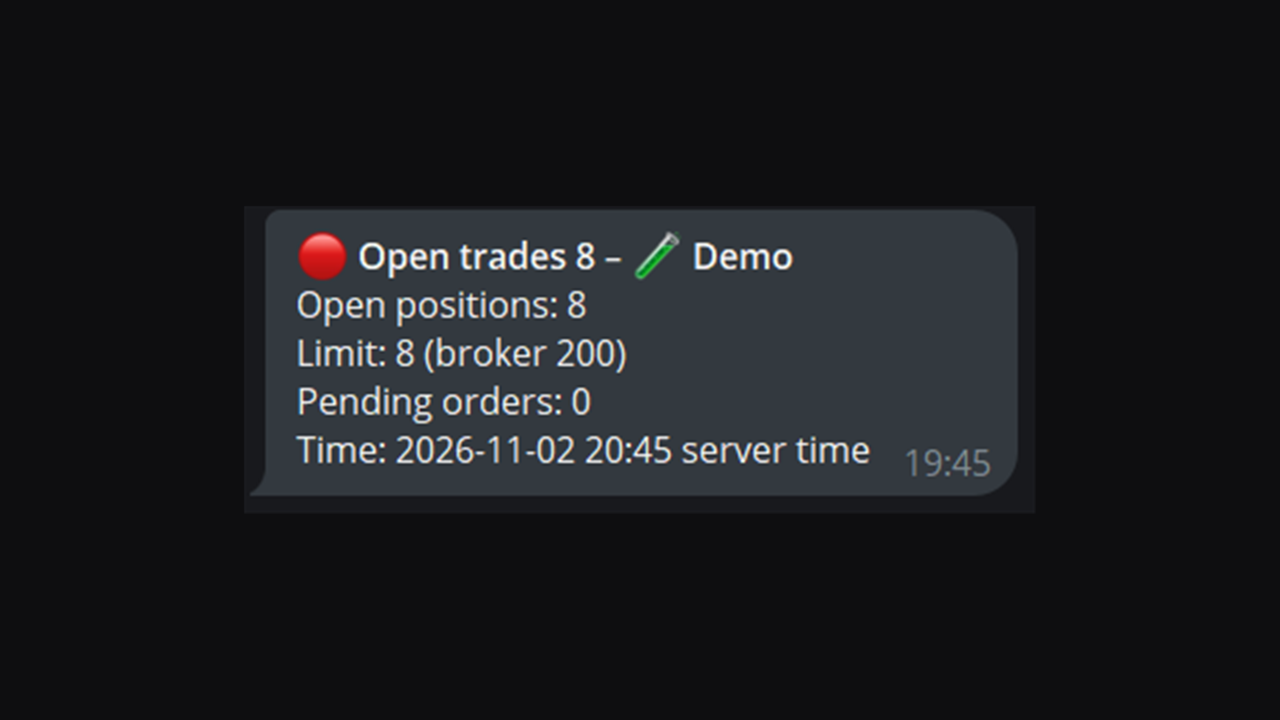
Messages have a clear layout: a header with the event and the name you gave the account, then one line per value, for example the value, the limit and the time. In Telegram and Discord the layout is a bold header and lines, or a coloured card with fields. A short preview is below.

Preview of a message

This is what a message looks like in Telegram. The values are examples. The name "Demo" is the Label you can set in the inputs. If you leave Label empty, the account number is used.

🔴 Equity drawdown 10.4% - 🧪 Demo
Drawdown: 1,298.00 USD (10.4%)
Limit: 10%
Peak > now: 12,480.00 > 11,182.00
Time: 2026-11-03 14:20 server time

(The first line is bold in Telegram. The arrow between the values is shown as ">" in this text.)

The other channels show the same facts in their own way. Push is one short line. Alert is one line in the terminal alert window, without emoji. The manual shows a preview for every channel and every watch.

The panel

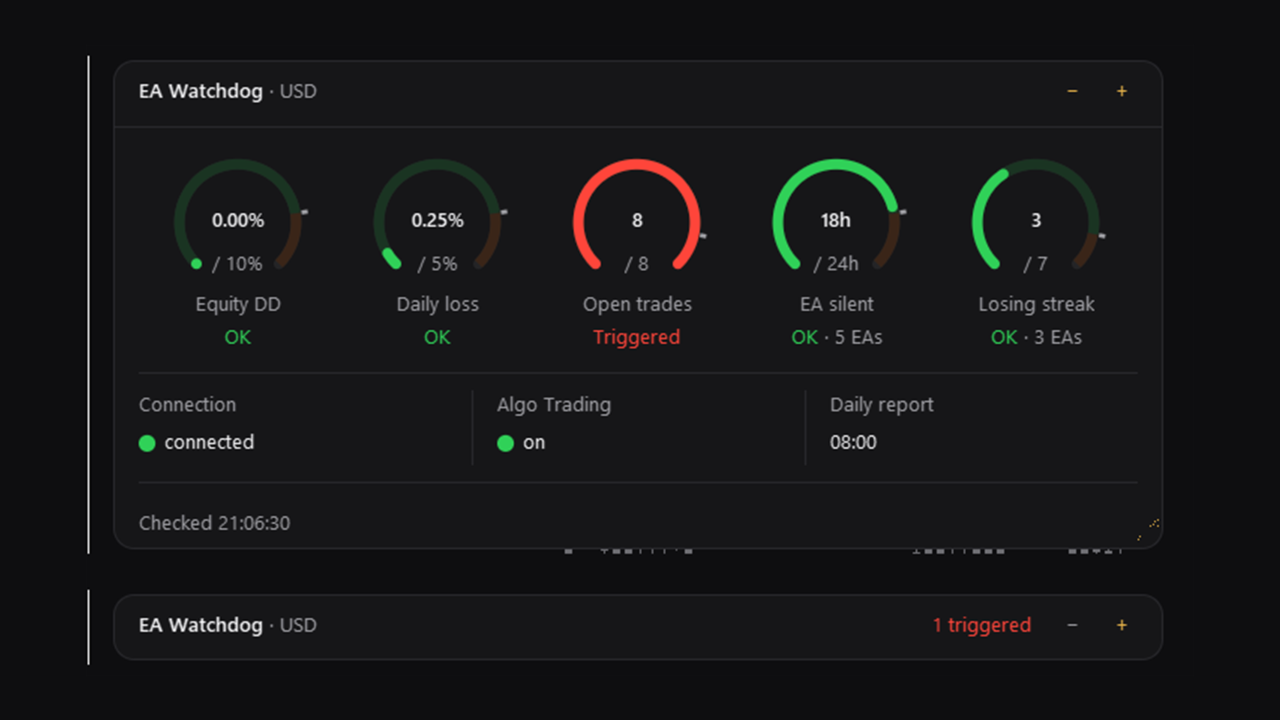
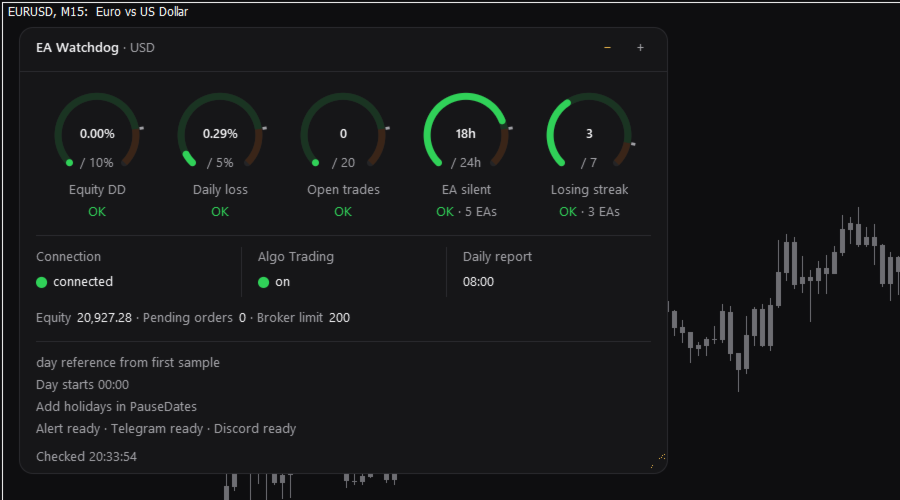
The panel is small and dark and has a fixed order. Each ring belongs to one watch that you switched on. It shows the current value in the middle, your limit below it, the name of the watch and the warning state as a word. The ring fills up as the value approaches the limit, and a small mark shows where Near starts. A full ring means that the limit is reached. A watch without a limit is not shown as a ring.

Under the rings are three status cells: Connection, Algo Trading and Daily report. Below them are the equity and, if Open trades is on, the pending orders. At the bottom you see the state of each channel, for example "Alert ok - Telegram ok - Discord ok", and the time of the last check.

Colours mark the warning state (green, orange, red) and are always accompanied by a word. Nothing flashes. You can switch between three sizes, and you can drag the width. The panel does not show your account number, name or server.

Set up in three steps

1. Open a new, empty chart of any symbol and attach EA Watchdog MT5 to it. Use one chart for it. MetaTrader allows one Expert Advisor per chart.
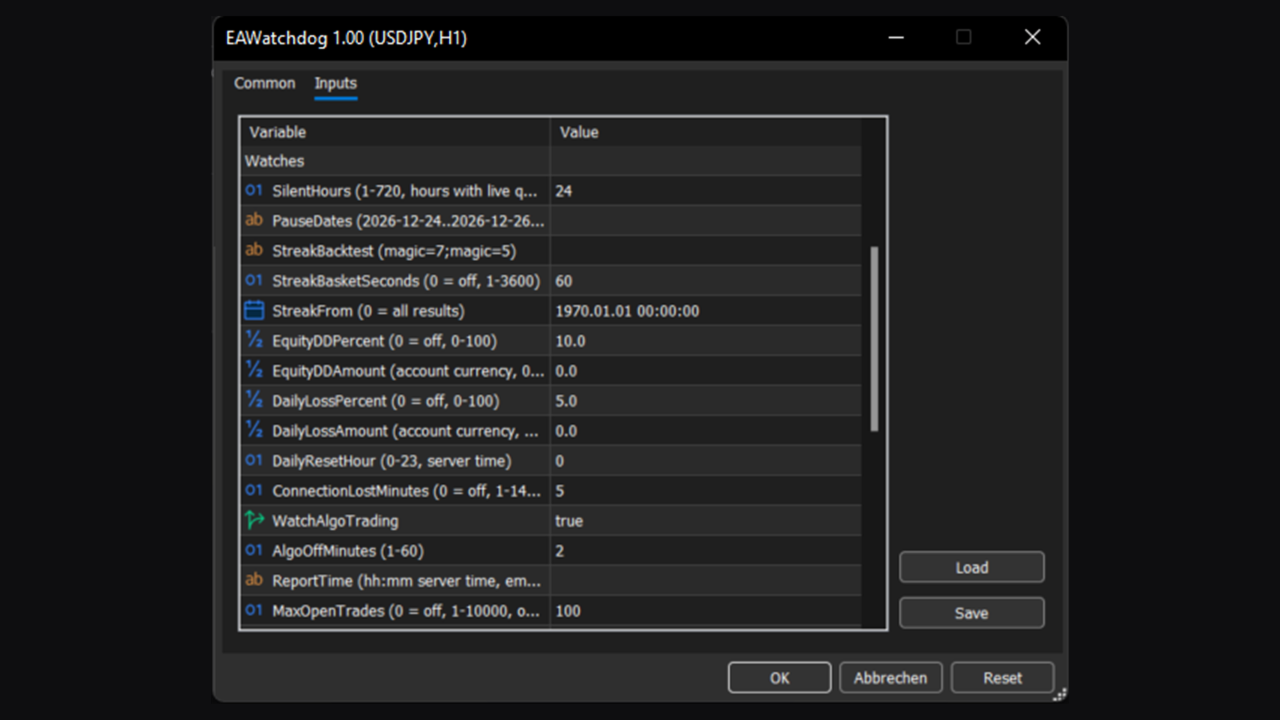
2. In the inputs, set your limits. By default, Equity drawdown is set to 10 percent, Daily loss to 5 percent and Open trades to 100 positions. Adjust them to your account; the default for Open trades (100) is high and only a starting point. EA silent, Losing streak, Connection lost and Algo Trading off are on by default.
3. Choose where messages go. Alert works at once. For Push, Mail, Telegram and Discord, follow the steps in the user manual. For Telegram and Discord you add one address to the terminal's list of allowed URLs.

After you set up Push, Mail, Telegram or Discord, EA Watchdog sends one test message to that channel, so that you can see that it works.

What EA Watchdog does not do

It does not trade. It does not close positions, delete orders or switch off Expert Advisors. It does not give advice and makes no forecast.

It shows no table of Expert Advisors and no trade history. It reports whether your own limits are reached.

It is not the rule check of any trading firm. The values come from the readings of EA Watchdog. Set your limits to match your own rules.

Privacy and what is sent

Without Push, Mail, Telegram or Discord, nothing leaves your terminal. EA Watchdog has no server of its own and sends nothing to the developer.

If you fill in Telegram or Discord, EA Watchdog sends message texts to that service, and only message texts: the event, a few values, the Label (or the account number, if Label is empty) and the time. It sends no deals, no positions and no history. It writes no files. It uses no DLL.

MetaTrader keeps input values in plain text. The Telegram token and the Discord webhook URL can be read in the input dialog, in chart templates and in .set files. Do not share screenshots of the inputs or .set files.

Good to know

EA Watchdog can only report what the terminal can see. If the terminal, the VPS or the internet connection is down, EA Watchdog cannot send anything at that time. After an internet outage, the messages are sent when the connection is back, with the time of the event. Push messages are not sent again.

Push and mail are handed to the terminal, and delivery is not confirmed. Telegram and Discord confirm that the message was accepted. Messages can be delayed or can fail. Do not rely on EA Watchdog as your only safeguard.

EA silent means no trading activity. It does not show whether the Expert Advisor is loaded on a chart. The clock is accurate to about 30 minutes per market pause.

Equity drawdown is measured from the highest equity that EA Watchdog has seen. It starts with the equity at the first start. While EA Watchdog is not running, it sees nothing, so the measured drawdown can be smaller than the real one. Removing EA Watchdog from the chart starts a new peak. Saved states older than four weeks are dropped.

Open trades counts what the account holds at the time of each check. Short peaks between two checks are not seen.

If you run EA Watchdog on two charts of the same account, only one of them sends messages.

Requirements

MetaTrader 5, hedging or netting account, any broker and symbol. A new chart of its own. For Push: your MetaQuotes ID in the terminal settings. For Mail: SMTP settings in the terminal. For Telegram and Discord: your own bot or webhook, and one entry for each in the terminal's list of allowed URLs (Tools, Options, Expert Advisors).

Texts and inputs are in English.

Manual and questions

The user manual explains every watch, the panel, all inputs with examples, the messages of each channel and the set-up of Telegram and Discord: https://www.mql5.com/en/blogs/post/779095

Questions and problem reports are welcome in the product comments or by private message on MQL5.
Produtos recomendados
Forget about enabling templates when you launch the window. Auto Template Master Service  is a professional utility tool that runs as a system service in MetaTrader 5, and it will do it for you. Unlike traditional indicators or expert advisors (EAs), the program runs in the background of the entire terminal and doesn't require you to add it to each window individually. As soon as you open a new chart of any instrument (Forex, Stocks, Crypto), the service immediately detects the new window and a
GoldPulseZ v1.0 — Manual Gold Trading EA for MetaTrader 5 GoldPulseZ is a professional manual trading assistant designed exclusively for XAUUSD (Gold) on MetaTrader 5. Built for active traders who want full control of their entries while benefiting from smart trade management automation. Timeframe: M15 Broker: Any broker Key Features: One-Click Trading Panel — Instantly place Buy or Sell orders directly from the chart dashboard with your pre-set lot size, SL, and TP. Automatic Trailing Stop — Lo
DGem Trade Manager Panel
Damien Jean Michel Gremillet
Trade Manager Panel ## Short description  Manage your manual trades with one click: automatic break-even, trailing stop, two-level partial close and risk-based lot sizing — all from a single on-chart panel. --- ## Full description Trade Manager Panel is an on-chart utility that takes care of your open trades so you can focus on the market instead of the order ticket. Drop it on any chart and it manages every position on that symbol automatically, while an interactive panel lets you size new
EA SB8 Panel Trade
Juan Manuel Bernal Martin
SB-8 – Manual Trading Panel with Fixed Risk & TradingView-Style Visualization for MT5 SB-8 is an advanced manual trading panel for MetaTrader 5 , designed to execute trades visually, quickly and without calculations . It is especially built for traders coming from TradingView , who often find MT5 confusing when it comes to risk management and trade visualization. With SB-8, you don’t calculate lot size, percentages or risk . You simply move the Stop Loss line , and the panel handles everything a
RMT Visual Trade Planner
Denis David Garcia Camejo
RMT Visual Trade Planner is a lot size calculator, position size calculator and order planner for MetaTrader 5: you plan a trade with three lines on the chart. Drag the stop loss and take profit, and it shows the lot size for your risk, the money at risk, the reward and the margin. The order is sent only after you press SEND and then CONFIRM. The problem it solves Working out the lot size for a given stop and a given risk takes a calculator, and a mistake there costs more than a bad entry. The o
HYT utility
Sergey Batudayev
HYT (Help Your Trading)   é uma ferramenta projetada para ajudar você   a reduzir   suas posições perdedoras usando duas técnicas principais: Média padrão. Hedge com posterior abertura de posições na direção da tendência. Esta ferramenta permite que você gerencie múltiplas posições abertas em diferentes direções, tanto para compra quanto para venda. O HYT calcula automaticamente o tamanho da próxima posição, o preço do pedido, a direção para a média e o fechamento da posição com um nível de lucr
Orders Executor
Claudio Aguiar De Aragao
Apresentando       Orders Executor , seu companheiro de negociação poderoso e eficiente, projetado para executar ordens diretamente de um arquivo texto especificado pelo usuário. Esta ferramenta de negociação inovadora agiliza o seu processo de negociação, fornecendo uma solução conveniente e automatizada para executar negociações com precisão e velocidade. Características principais   : **Integração de arquivo de texto:** Orders Executor       foi projetado para ler e interpretar facilmente
All In One Trade Manager is a trade manager and one-click trading panel for manual traders on MetaTrader 5. It works as a trading assistant, risk manager and position size calculator in one dashboard. It brings together everything below in one panel: order entry with risk sizing automatic trade management advanced order types account protection statistics Its entry checks run in the background and tell you, before you click BUY or SELL, when something speaks against the trade. Also available
GoldFlow Pro1
Minh Tu Nguyen
3 (2)
An order-flow Expert Advisor built for one market only: XAUUSD. GoldFlow Pro reads the live GOLD market tick by tick — price movement, momentum, and liquidity behavior — and acts only when its conditions are met. Precise entries. Defined risk. Disciplined management on every position. MQL5 Signal — Live Monitoring https://www.mql5.com/en/signals/2384830 Introducing GoldFlow Pro GoldFlow Pro was developed around a single idea: instead of reacting to lagging indicators, read what the market is act
ProBridger
Marius Ovidiu Sunzuiana
How Traders and Analysts Can Use the Data Export Bridge to Improve Their Analytics The MQL Data Export Bridge unlocks a new level of analytical power by transforming MetaTrader into a real‑time data provider for any external research environment. Here are the most impactful ways different users can apply the bridge to enhance their trading performance. Build Predictive Models with Machine Learning Who benefits: Quantitative traders, data scientists, algorithm developers How it helps: Export t
PositionCalculatorMT5
Nguyen Duy Trung
4.43 (46)
Position Calculator calculates how many lots to trade based on: Entry and stop-loss levels Risk tolerance Account size (balance, equity, or even your savings account) Account currency Currency exchange rates - The main tab of the panel provides the primary control over the EA's functions and serves to output the most important calculation results: the position size, risk, reward, and risk-to-reward ratio. - The risk tab can help you assess current and potential risk and reward profile. Using a s
FREE
RiskPilot Pro
Mohamed Zein Mohamed Zein Soliman
RiskPilot Pro Plan risk clearly. Execute efficiently. Manage positions from one professional MT5 dashboard. RiskPilot Pro is a visual trade-planning and position-management utility for MetaTrader 5. It helps manual traders define risk before entry, calculate position size, place market or pending orders, and manage open positions from one chart panel. Important: RiskPilot Pro does not generate trading signals and does not choose trade direction. The trader defines the setup and remains responsib
Signal Provider Utility Pro (Telegram & Discord) The Professional Solution for Signal Providers. Automated Broadcasting | Smart GUI Panel | Performance Reports Stop managing your signals manually. Signal Provider Utility Pro is the realiable bridge between your MetaTrader 5 terminal and your community on Telegram and Discord. Designed for high-performance signal services, this tool gives you instant control over your broadcasts without ever needing to open the settings window. From real-time tr
Trade Desk
Mostafa Saad Saeed Shawara
Trade Desk é um painel de trading e um gestor de operações para o MetaTrader. Planeje a entrada no gráfico, calcule o tamanho com uma calculadora de lotes e gerencie as posições abertas no mesmo painel: stop loss, vários alvos, ponto de equilíbrio e stop móvel. Instruções adicionais: Versão de teste para contas demo — Trade Desk para MetaTrader 4 A maioria das ferramentas do gráfico só ajuda a abrir a operação. Depois da execução ainda é preciso um gestor de posições. O Trade Desk reúne as duas
Trade Control Panel
Jerry Jilun Anak Liban
Trade Control Panel Function Normal One Click Function Close All Close All Profit Close All Loss Close All Pending Order Close All Sell Close All Buy Advance One Click Function 1.  Close Partial Lot Sell by Percent It will help you partial close for all open position by desire percent you wanted. No longer partial close one by one for every open position Manual input for desire percent 2. Close Partial Lot Buy by Percent It will help you partial close for all open position by desire percent
Blade Position Manager Pro – MT5 Trade Management Utility Take Control of Your Trades with One Professional Dashboard Blade Position Manager Pro is a MetaTrader 5 trade management utility designed to help traders manage open positions, control risk, protect floating profits, and simplify everyday trading operations. Whether you trade Gold (XAUUSD), Forex, indices, or other supported instruments, Blade Position Manager Pro provides practical tools for managing your trades from a compact, easy-to-
EA utility to help you with your Discipline for New Traders. When Balance Drop below set Daily Max Percentage Draw Down Balance. Any new trades open after the DD Threshold reached, Bot will close any new trades instantly and will keep canceling any pending orders placed as well until the Next Daily Candle is formed or EA is removed. Note: 1. Please Attached EA Utility before start trading for the day.  2. Set Timeframe before attaching EA utility to the chart. If timeframe changed after taking a
FREE
SL/TP Mover – The Ultimate Position Manager for MetaTrader 5 Take full control of your stop losses and take profits across all open trades – instantly, visually, and automatically.** The Problems Every Trader Faces - Manually adjusting SL/TP on multiple positions is tedious and error‑prone – especially during fast markets. - New trades often open without any SL/TP unless you remember to set them every time. - Scaling in or adding to a position leaves older and newer trades with inconsistent r
Prop Firm Shield Full
Pablo Adolfo Cantos
Prop Firm Shield is a risk management panel for MetaTrader 5, built for prop firm traders who need control over their daily limits. You configure each limit and the tool watches the account around the clock, acting automatically when a limit is reached: closing positions, deleting pending orders and blocking new trading until the next day. Features: - Daily Take Profit - three modes: fixed USD, percent of the day-start balance, or target balance - Daily Stop Loss - three modes: fixed USD, percen
Pattern Recognition EA
Claudiu-georgian Zavera
Pattern Recognition EA - From Learn to Earn. The market repeats itself. This EA finds every past repeat of the current candle sequence - and lets history vote the direction. ONE SHAPE. EVERY REPEAT IN HISTORY VOTES. The last N candles on your signal timeframe form a shape. The EA scans the history you choose - a fixed number of bars or everything your broker provides - for the SAME shape, and checks what happened next, every single time. Only when enough repeats exist AND a clear majority of t
Telegram2MT5 Signal Copier — Automatize a cópia dos seus sinais do Telegram diretamente no MetaTrader 5 Com o Telegram2MT5 Signal Copier, cada sinal que você recebe no Telegram é executado de forma instantânea e automática na sua conta MetaTrader 5. Rápido, confiável e totalmente personalizável. Baixe o arquivo Windows Bridge APP e o tutorial O arquivo de bridge é necessário para conectar o Painel Web Local ao EA do MT5 Compatível com Windows 10 & Windows 11 — 64 bits — e Windows Server a parti
Vix Golden Harmony
Lefika Raphel Sebatane
5 (1)
Vix Golden Harmony Vix Golden Harmony is a fully automated Expert Advisor for MetaTrader 5. Once attached to a chart it handles everything on its own — identifying its own entries, managing each position while it is open, and closing it when its conditions are met. Every order is checked against your broker's trading requirements and your account's available margin before it is sent, and an internal protection layer monitors the account while a position is running. No manual intervention, no con
FREE
One Click Trader  is a tool designed for MetaTrader 4 platform, which enables you to take your trading to the next level. It enables you to open, manage and close your trades in simple an efficient way by just one click of your mouse button. "-"   ,  "+"  change OCT window size  Up arrow minimizes the OCT panel Down arrow maximizes the OCT panel Right arrow displays the next panel with additional features Left arrow hides the panel with additional features Red  SELL  button enables you to open s
This Expert Advisor monitors all open positions across all symbols in MetaTrader 5. Whenever a Stop Loss (SL) or Take Profit (TP) is manually set or adjusted on any position, the EA automatically applies that value to all other open positions , regardless of symbol or order type (Buy/Sell). This ensures consistent and synchronized SL and TP levels across your account. Perfect for mobile trading via tablet or smartphone!
FREE
**Forex Trade Manager Pro MT5** **Trade Manager MT5** é um utilitário abrangente de gerenciamento de negociações para o MetaTrader 5 que oferece controle total sobre todos os aspectos da sua posição, desde o momento em que você planeja uma negociação até o momento em que a encerra. Ele foi desenvolvido para traders que levam o risco a sério, desde o iniciante construindo disciplina até o profissional scalper que precisa de execução instantânea em múltiplas posições. A ferramenta se anexa a qu
A simple script that closes all current orders. Terminate once close all positions, so no worries about constantly closing your order. How to use : Drag the script from the navigator to the chart, and it will be activated. Do remember to enable algo trading to use this script. There are different version of the script that can choose whether to close all buy/sell posiitons, if you need this, do contact me in MQL5.
Close Assistant 5
Gheis Mohammadi
5 (2)
Close Assistant (CA)  is a full featured utility for monitoring and closing a set of positions placed by trader or EA. It closes filtered orders in specified time or level or candle patterns or when a certain profit or loss of the total positions is reached. CA uses Zero Profit Lock function to save deposit when total profit falls to zero. Profit and loss levels can be set in fixed amount of account currency or percentage of balance or equity or margin. CA only monitors and works on filtered pos
O Signals Executor for Telegram é um Utilitário que permite executar e gerenciar posições a partir de mensagens enviadas em Chats de Telegram. As mensagens do chat são processadas para verificar a existência de comandos, e o comando será executado se seus parâmetros forem válidos. Você precisa do Token do Bot do Telegram e o Chat Id para configurar os parâmetros de entrada. É possível restringir o envio de comandos através do User Id , que deve ser configurado nos parâmetros de entrada. Comando
Trade Panel HotKey – MT5 Scalping Utility Fast Trade Panel HotKey is a lightweight MT5 trading utility designed for traders who need to open, manage, and close positions as quickly as possible . The main purpose of this tool is to reduce the time between a trading decision and execution. Instead of moving the mouse, opening order windows, or manually modifying multiple positions, most important actions can be performed instantly through customizable keyboard hotkeys or directly from the compact
Viking Alpha DAX Ivar Edition
Valdeci Carlos Dos Passos Albuquerque
Viking Alpha DAX — Ivar Edition Viking Alpha DAX is a fully automated Expert Advisor designed exclusively for the DE40 (DAX) index on the M5 timeframe. Built with a multi-strategy architecture, it captures high-probability intraday opportunities at the Frankfurt market open — the most liquid and predictable moment of the European trading session. VERIFIED BACKTEST RESULTS — 12 Months (April 2025 – March 2026) - Initial Deposit: $150 (agressive profile) - Final Balance: $1,055 - Net Profit: +$
Os compradores deste produto também adquirem
Trade Assistant MT5
Evgeniy Kravchenko
4.43 (216)
Ajuda a calcular o risco por comércio, a fácil instalação de uma nova encomenda, gestão de encomendas com funções de fecho parcial, trailing stop de 7 tipos e outras funções úteis. Materiais e instruções adicionais Instruções de instalação   -   Instruções para a aplicação   Função de linha Mostra no gráfico a linha de Abertura, Stop Loss, Take Profit. Com esta função é fácil definir uma nova ordem e ver as suas características adicionais antes da abertura.   Gestão de risco A função de cálcul
Bem-vindo ao Trade Manager EA—uma ferramenta de gestão de risco criada para tornar o trading mais intuitivo, preciso e eficiente. Não é apenas uma ferramenta para executar ordens, mas uma solução abrangente para planejamento de operações, gerenciamento de posições e controle de risco. Seja você um iniciante, trader avançado ou scalper que precisa de execução rápida, o Trade Manager EA adapta-se às suas necessidades, oferecendo flexibilidade em todos os mercados, desde forex e índices até commodi
O Telegram to MT5 Multi-Channel Copier copia automaticamente os sinais de trading dos seus canais de Telegram e Discord diretamente para o MetaTrader 5. Sem bots, sem extensões de navegador, sem copiar à mão. O sinal chega ao Telegram ou ao Discord e o EA abre a operação no seu terminal em poucos segundos. E antes de copiar um canal, o backtester integrado mostra o que esse canal teria feito na sua conta. O produto inclui dois componentes: um aplicativo de Windows que escuta os seus canais de Te

Farmed Hedge Yield Farming | All Markets (Manual - Hybrid - Semi/Automated EA) VERIFIED TRADING RESULTS - Farmed Hedge Yield Axi Copy:  https://www.mql5.com/en/signals/2356376 - Farmed Hedge Yield Exn Copy:   https://www.mql5.com/en/signals/2356404 - Farmed Hedge Yield V Copy:  https://www.mql5.com/en/signals/2357156 IMPORTANT NOTICE: FarmedHedge is a MANUAL-FOCUSED TRADING UTILITY ,not a fully automated EA. Results shown on this Signal include manual trades and overall strategic management.
Local Trade Copier EA MT5
Juvenille Emperor Limited
4.94 (149)
Local Trade Copier EA MT5 é um copiador de operações rápido e flexível para copiar e gerenciar operações entre várias contas MetaTrader 5 no mesmo computador Windows ou Windows VPS. Ele combina a sincronização local de operações com controles no lado do Receiver para tamanho de lote, gerenciamento de risco, filtragem de operações, mapeamento de símbolos, gerenciamento de operações e proteção da conta. Configure seus terminais Transmitter e Receiver em aproximadamente 1 minuto e copie operações
Strategy Ledger Pro
Abdullah Uygar Tuna
5 (14)
Agora disponível em português. Strategy Ledger Pro é um painel de análise de conta somente leitura para o MetaTrader 5. Ele separa os resultados da conta por Expert Advisor, estratégia, símbolo e número mágico, para que você veja o que cada um realmente contribui. O painel está disponível em 11 idiomas: English, Français, Deutsch, Español, Italiano, Português, Русский, Türkçe, 中文, 日本語 e 한국어. Antes de baixar a demo. O Market executa a demo de qualquer produto pago somente no Testador de Estratég
Copie sinais do Telegram com suas próprias regras de negociação Telegram to MT5 Signal Trader copia automaticamente sinais de negociação em texto de canais e grupos públicos e privados do Telegram para o MetaTrader 5. Gerencie vários provedores e contas MT5 em um único aplicativo para desktop, com configurações individuais de risco e de negociação para cada provedor . Você não precisa de um bot do Telegram nem configurar uma API para copiar sinais. Basta entrar com sua própria conta do Telegram
TradePanel MT5
Alfiya Fazylova
4.88 (170)
Trade Panel é um assistente de negociação multifuncional. O aplicativo contém mais de 50 funções de negociação para trading manual e permite automatizar a maioria das tarefas de negociação. Instruções para o aplicativo: https://www.mql5.com/pt/blogs/post/762435 Versão de teste do aplicativo para conta demo: https://www.mql5.com/pt/blogs/post/762547 Como instalar o aplicativo: https://www.mql5.com/pt/blogs/post/762548 Como testar o aplicativo no modo visual: https://www.mql5.com/pt/blogs/post/770
================================================================================ POC BREAKOUT - V20.72. Full Professional Grade Toolkit ================================================================================ POC Breakout is a full MetaTrader 5 trading dashboard for discretionary traders who want breakout signals, Point of Control (POC) context, volume profiles, order flow, market structure, news, alerts, and advanced trade planning in one professional workspace. Attached directly to you
MT5 to Telegram Signal Provider é uma utilidade fácil de usar e totalmente personalizável que permite o envio de sinais especificados para o chat, canal ou grupo do Telegram, tornando sua conta um fornecedor de sinais . Ao contrário da maioria dos produtos concorrentes, ele não usa importações de DLL. [ Demonstração ] [ Manual ] [ Versão MT4 ] [ Versão Discord ] [ Canal do Telegram ]  New: [ Telegram To MT5 ] Configuração Um guia do usuário passo a passo está disponível. Não é necessário conhec
VirtualTradePad PRO SE MT5 — centro profissional de controle de trading para MetaTrader 5 VirtualTradePad PRO SE é um painel de trading premium baseado no gráfico e um ambiente de gerenciamento de operações para MetaTrader 5 . Ele foi desenvolvido para traders que desejam execução mais rápida, controle de posições mais claro, gerenciamento de trades estruturado, planejamento visual de níveis e um fluxo de trabalho profissional diretamente no gráfico. Não é apenas um painel de COMPRA / VENDA. O P
REVDEN AI Desk: Conduza Seu Trading a Partir de Uma Conversa com Sua Própria IA, sobre o Contexto de Mercado do REVDEN Imagine conduzir seu trading a partir de uma única conversa. O REVDEN AI Desk traz isso para o MetaTrader 5: você pergunta à sua própria IA como ela lê o mercado, e ela responde a partir do contexto completo do REVDEN sobre os símbolos que você opera, com o estado de cada um, o quadro de risco e as divulgações que vêm pela frente. As propostas dela chegam com entrada, stop, alvo
Exp COPYLOT CLIENT for MT5
Vladislav Andruschenko
3.97 (35)
Copiador profissional de operações para MetaTrader 5 Um copiador de operações rápido, profissional e confiável para MetaTrader . COPYLOT permite copiar operações de Forex entre terminais MT4 e MT5 com suporte para contas Hedge e Netting . A versão MT5 do COPYLOT oferece suporte a: - MT5 Hedge → MT5 Hedge - MT5 Hedge → MT5 Netting - MT5 Netting → MT5 Hedge - MT5 Netting → MT5 Netting - MT4 → MT5 Hedge - MT4 → MT5 Netting Versão MT4 Descrição completa + DEMO + PDF Como comprar Como instalar Como
Trade copier MT5
Alfiya Fazylova
4.61 (57)
Trade Copier é um utilitário profissional projetado para copiar e sincronizar negociações entre contas de negociação. A cópia ocorre da conta / terminal do fornecedor para a conta / terminal do destinatário, instalada no mesmo computador ou vps. Antes de comprar, você pode testar a versão demo em uma conta demo. Versão de demonstração aqui . Instruções completas aqui . Principais funcionalidades e benefícios: Suporta a cópia de MT5> MT5, MT4> MT5, MT5> MT4, incluindo contas "MT5 netting". Os mod
News Trade EA MT5
Konstantin Kulikov
4.55 (11)
Apresento um robô útil que eu mesmo uso há vários anos. Pode ser usado nos modos semiautomático e totalmente automático. >>> Chat <<< O programa contém configurações flexíveis para negociação nas notícias do calendário econômico. Não pode ser verificado no testador de estratégia. Somente trabalho real. Descarregue o ficheiro mais recente de definições: https://www.mql5.com/en/blogs/post/747929 Monitorização de sinais: https://www.mql5.com/en/signals/author/test-standart Ao criar suas próprias
EA Portfolio Control & Cloud Monitoring for MetaTrader 5 Your EAs manage trades. KONTROL_01 manages your EAs. A control system for traders running multiple Expert Advisors on the same account. Coordinate EA activity, manage trading risks and monitor your setup remotely. A detailed User Manual is available via DM after purchase. IN PRACTICE Multiple EAs. No coordination. Your EAs trade independently, unaware of each other's activity. KONTROL_01 coordinates them, limits simultaneous activity a
RETAILBERG FOOTPRINT CHART PRO — Order-Flow Workspace for MetaTrader 5 Version 7.00  |  Professional System  |  31 tools  |  One chart A full 150-page illustrated User Manual is included. Please read the full manual to understand this feature packed footprint chart elements and ui. https://www.mql5.com/en/blogs/post/777982 DEMO / STRATEGY TESTER — PLEASE READ FIRST
Seconds Chart MT5
Boris Sedov
4.61 (18)
Seconds Chart - uma ferramenta exclusiva para criar gráficos de segundos no MetaTrader 5 . Com o Seconds Chart , você pode criar gráficos com períodos definidos em segundos, proporcionando flexibilidade e precisão ideais para análise, indisponíveis em gráficos padrão de minutos ou horas. Por exemplo, o período S15 indica um gráfico com velas de 15 segundos. Você pode usar qualquer indicador ou Expert Advisor com suporte a símbolos personalizados. Trabalhar com eles é tão conveniente quanto negoc
The Patch
Mian Rameez Ali
The Patch It never opens a trade. It walks behind the ones that did. Every open position, every pending order — checked twice a second for the one thing that's easy to forget: a stop, a target. Found bare, it doesn't ask. It writes the missing number in, measured in points from wherever the position began, and moves on to the next. No strategy, no opinion on direction. Just the quiet assumption that nothing should ever sit on the market unprotected — not because someone decided it shouldn't,
Próxima Atualização — Versão 2.52 em Breve! [NOVO] Prepare-se para 4 Grandes Novos Recursos Projetados para Aprimorar sua Análise de Mercado e seu Fluxo de Trabalho de Trading Estamos levando a análise de mercado a um novo nível com 4 novos recursos desenvolvidos para atender às suas necessidades de trading. Apresentamos: 1. TRADE OVERVIEW DASHBOARD 2. CONFLUENCE AT ZONE 3. STRONG & WEAK HIGH/LOW 4. OTE 1. TRADE OVERVIEW DASHBOARD Um painel que ajuda você a compreender mais facilmente o panoram
Anchor Trade Manager
Kalinskie Gilliam
5 (8)
Your EAs cannot see each other, but Anchor can. Anchor gives you one place to coordinate your EAs, manage risk, and decide when trading is allowed. It works alongside the trading bots you already use without any changes to them. The Problem One EA opens a trade. Then another starts trading. The next thing you know, you wake up to multiple grids built across your account. Each EA may be doing exactly what it was designed to do, but together they can place far more risk on your account than you in
The product will copy all telegram signal to MT5 ( which you are member) , also it can work as remote copier.  Easy to set up, copy order instant, can work with almost signal formats, image signal,  s upport to translate other language to English Work with all type of channel or group, even channel have "Restrict Saving Content", work with  multi channel, multi MT5 Work as remote copier: with signal have ticket number, it will copy exactly via ticket number. Support to backtest signal. How to s
Astro Trade MT5
Indra Maulana
5 (8)
25% discount on the release of the tool: only for the next 3 buyers Send a message to receive a demo version. AstroTrade Trading Assistant AstroTrade is a comprehensive multi-functional trading utility developed for the MetaTrader 5 platform. It integrates essential tools for trade execution, risk management, and technical monitoring into a single unified interface. The application is designed to assist traders in managing their daily operations through a visual and structured environment. Vi
Timeless Charts
Samuel Manoel De Souza
5 (9)
Timeless Charts é um utilitário de trading tudo-em-um para traders profissionais. Ele combina tipos de gráficos personalizados, como Gráficos por Segundos e Renko , com análise avançada de fluxo de ordens utilizando Footprints , Clusters , Perfis de Volume , estudos VWAP e ferramentas de análise ancorada para uma visão mais profunda do mercado. O gerenciamento de ordens e posições é realizado diretamente no gráfico por meio de um painel integrado de gerenciamento de operações , enquanto o Market
Floor Watch
Syed Tauqeer Hussain Shah
Floor Watch One number, watched every thirty seconds: how far equity has fallen since the day began — or since its highest point, if it's told to trail the peak instead of the open. Cross the line and it doesn't argue. Every open position closes, every pending order vanishes, and anything that slips through afterward gets shut the moment it appears. Not asked. Removed. The floor holds until the clock turns 5 AM Pakistan time — then, and only then, does the day start over. One rule. No except
Telegram To MT5 Ultra
Mirel Daniel Gheonu
5 (5)
Telegram To MT5 — Copiador de sinais Transforme as chamadas de trading dos seus canais do Telegram em ordens reais no MT5 — automaticamente, em quantas contas quiser, com o risco e as regras totalmente sob o seu controlo. O Telegram To MT5 liga os canais VIP / de sinais que já segue no Telegram ao seu terminal MetaTrader 5. Um aplicativo de desktop complementar gratuito lê as mensagens (mesmo de canais que bloqueiam bots), e este Expert Advisor executa-as na sua conta — aplicando as suas própria
Power Candles Strategy Scanner - Localizador de configurações multissímbolo com auto-otimização O Power Candles Strategy Scanner utiliza o mesmo motor de auto-otimização que alimenta o indicador Power Candles — em todos os símbolos da sua lista de observação, lado a lado. Um painel indica-lhe quais os símbolos que são estatisticamente negociáveis neste momento, qual a estratégia vencedora para cada um, o par ideal de Stop Loss / Take Profit, e avisa-o assim que um novo sinal é emitido. Esta ferr
Equity Protect Pro: Seu Especialista em Proteção de Contas Abrangente para Negociação Tranquila Se você está procurando recursos como proteção de conta, proteção de patrimônio, proteção de portfólio, proteção de múltiplas estratégias, proteção de lucro, coleta de lucro, segurança de negociação, programas de controle de risco, controle automático de risco, liquidação automática, liquidação condicional, liquidação programada, liquidação dinâmica, trailing stop loss, fechamento com um clique, liqu
Trader Evolution
Siarhei Vashchylka
5 (7)
" Trader Evolution " - A utility designed for traders who use wave and technical analysis in their work. One tab of the utility is capable of money management and opening orders, and the other can help in making Elliott wave and technical analysis. Manual (Be sure to read before purchasing) | Version for MT4 Advantages 1. Trading in a few clicks. Immediate and pending orders are available in the panel 2. Money management. The program automatically selects the appropriate lot size 3. Simplifies
MT5 Professional Copy Trading System (Edição MT5) O MT5 Professional Copy Trading System é um copiador de operações LOCAL de nível industrial e ultra rápido, projetado para traders profissionais, provedores de sinais e gestão multi-conta de estilo institucional. Diferentemente das soluções de cópia retail ou baseadas em nuvem, este sistema é construído sobre uma arquitetura LOCAL otimizada para ambientes onde múltiplos terminais operam no mesmo sistema Windows. Arquitetura LOCAL industrial O d
Mais do autor
EA Desk MT5
Christian Kotschote
EA Desk MT5 is a free, read-only panel that shows your account results per Expert Advisor in one calm view, and which of them has gone quiet. Shows account results and a table per Magic Number on its own chart, so you can see which Expert Advisor is active and which has been quiet. EA Desk does not trade. EA Desk is a read-only panel that shows your account results per Expert Advisor in one calm view. What EA Desk does Many traders run several Expert Advisors on one account. The terminal sho
FREE
Filtro:
Sem comentários
Responder ao comentário