EA Watchdog MT5

 Shows how much of each limit you set is used: equity drawdown, daily loss, open trades, EA silence and losing streak. Sends a message to the terminal, the MetaTrader app, email, Telegram or Discord when a limit is reached. EA Watchdog does not trade.

EA Watchdog MT5 shows how much of each limit you set is used - equity drawdown, daily loss, open trades, EA silence, losing streak - and sends a message when a limit is reached. The panel shows the warning state of each limit, including the state Near before the limit is reached. EA Watchdog does not trade. Do not rely on EA Watchdog as your only safeguard.

What EA Watchdog does

Many traders run Expert Advisors on a VPS or a PC and do not look at the terminal all day. A problem can stay unnoticed for hours: an Expert Advisor that has stopped trading, an unusual series of losses, an equity that has fallen far, too many open trades, a lost connection, Algo Trading switched off by mistake.

You set the limits. EA Watchdog compares the values of your account with them and tells you when a limit is reached. It sends one message when a limit is reached, and one message when the value is back to normal. It does not repeat itself with every check. If you want reminders, you can switch them on.

EA Watchdog runs as an Expert Advisor on its own chart. It reads the deal history and the open positions of your account. It does not open, change or close any order or position. It does not trade in the Strategy Tester either. It works with Algo Trading switched off.

What it watches

Each watch has its own alert threshold. The panel shows three warning states: OK, Near and Triggered. Near starts at a share of your limit (default 80 percent) and is shown in the panel. Messages are sent when a limit is reached (Triggered) and when the value is back to normal. The one exception is the losing streak: it also sends a note when the streak is as long as the normal value.

EA silent. A Magic Number has not traded for a number of hours of market time that you set (default 24). The clock runs only while the symbols of that Expert Advisor have live quotes, so weekends do not count. Holidays with quotes can be added by date.

Losing streak. The current series of losing trades of an Expert Advisor (per Magic Number) is as long as, or longer than, what is normal for it. The normal value is the longest streak of its backtest, which you can enter, or an estimate from its own results.

Equity drawdown. The equity has fallen from its highest value seen by EA Watchdog by more than your limit, in percent, as an amount, or both. Deposits, withdrawals, credit and bonus changes adjust the peak, so they do not count as drawdown.

Daily loss. The equity is below its value at the start of the day by more than your limit (default 5 percent). You set the hour at which the day starts.

Open trades. The number of open positions of the whole account has reached your limit. This includes all Expert Advisors, manual trades and trades placed from other terminals or devices on the same account. The number of pending orders is shown for information and does not count towards the limit. The default limit is 100 positions. It is high and only a starting point: set it to match your account.

Connection lost. The terminal has had no connection to the trade server for more minutes than you set (default 5).

Algo Trading off. Algo Trading is switched off in the terminal for more minutes than you set (default 2).

Daily report. One short message per day at a time you set, with equity, today's result, open positions and pending orders and the number of watches in each state. If the report arrives, the terminal and EA Watchdog were running at that time. If it does not arrive, something may be wrong with the terminal, the VPS or the internet.

Channels

Each message can go to any of these channels. Alert is on by default.

Alert: a pop-up with sound in the terminal.
Push: a notification to the MetaTrader app on your phone.
Mail: an email from the terminal.
Telegram: a message to your own bot. You need a bot token and a chat ID.
Discord: a message to a channel of your own Discord server. You need a webhook URL.

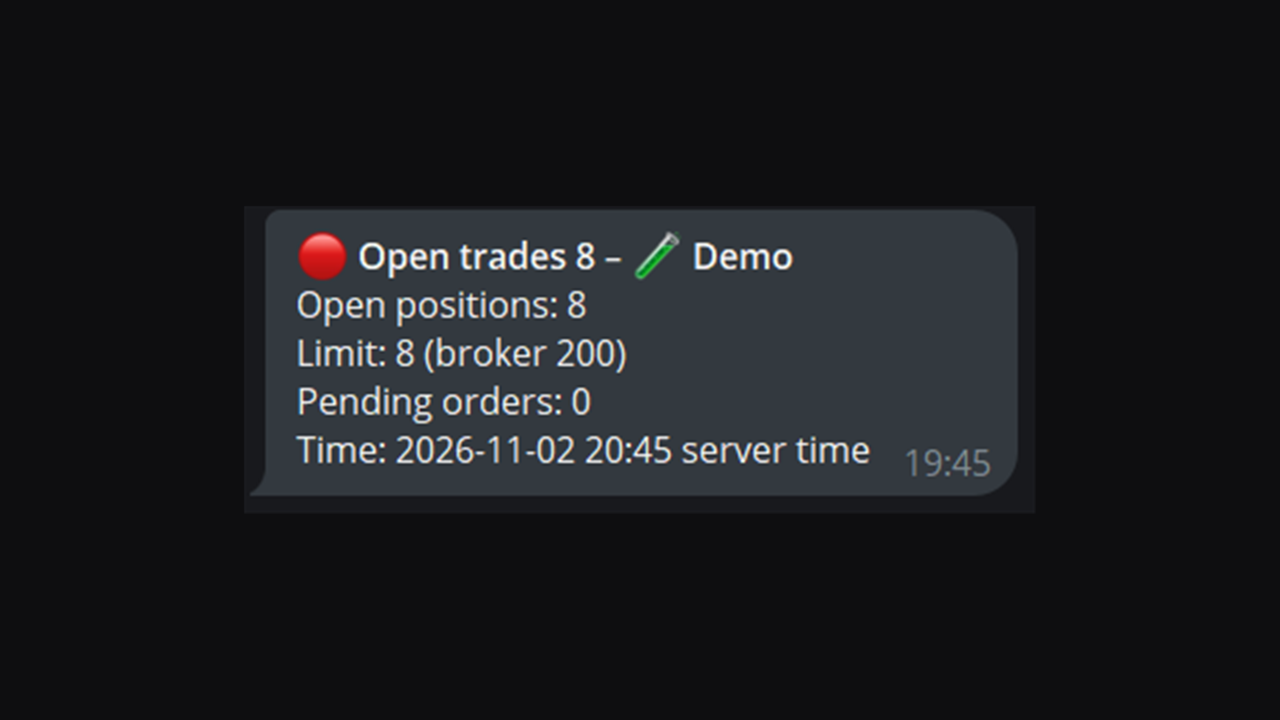
Messages have a clear layout: a header with the event and the name you gave the account, then one line per value, for example the value, the limit and the time. In Telegram and Discord the layout is a bold header and lines, or a coloured card with fields. A short preview is below.

Preview of a message

This is what a message looks like in Telegram. The values are examples. The name "Demo" is the Label you can set in the inputs. If you leave Label empty, the account number is used.

🔴 Equity drawdown 10.4% - 🧪 Demo
Drawdown: 1,298.00 USD (10.4%)
Limit: 10%
Peak > now: 12,480.00 > 11,182.00
Time: 2026-11-03 14:20 server time

(The first line is bold in Telegram. The arrow between the values is shown as ">" in this text.)

The other channels show the same facts in their own way. Push is one short line. Alert is one line in the terminal alert window, without emoji. The manual shows a preview for every channel and every watch.

The panel

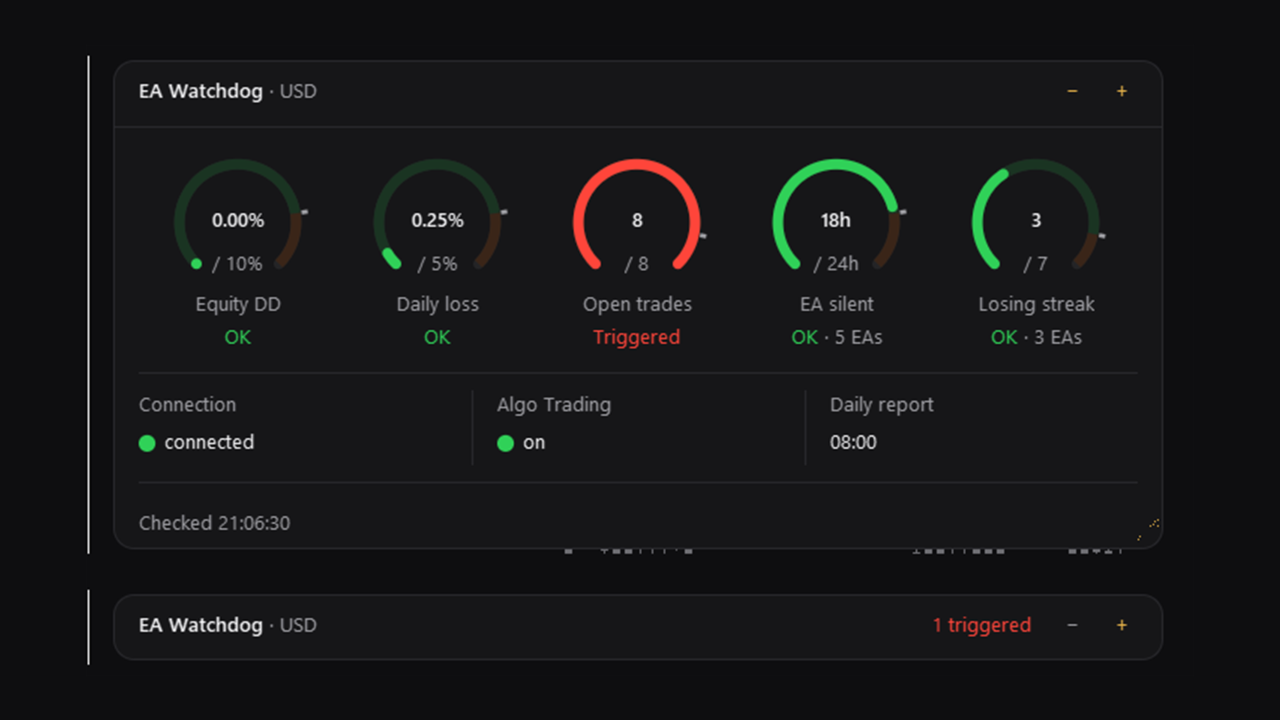
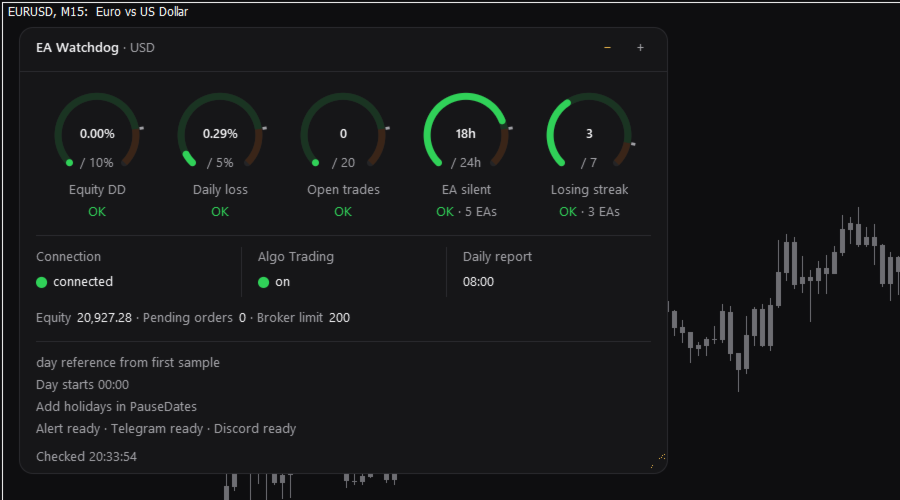
The panel is small and dark and has a fixed order. Each ring belongs to one watch that you switched on. It shows the current value in the middle, your limit below it, the name of the watch and the warning state as a word. The ring fills up as the value approaches the limit, and a small mark shows where Near starts. A full ring means that the limit is reached. A watch without a limit is not shown as a ring.

Under the rings are three status cells: Connection, Algo Trading and Daily report. Below them are the equity and, if Open trades is on, the pending orders. At the bottom you see the state of each channel, for example "Alert ok - Telegram ok - Discord ok", and the time of the last check.

Colours mark the warning state (green, orange, red) and are always accompanied by a word. Nothing flashes. You can switch between three sizes, and you can drag the width. The panel does not show your account number, name or server.

Set up in three steps

1. Open a new, empty chart of any symbol and attach EA Watchdog MT5 to it. Use one chart for it. MetaTrader allows one Expert Advisor per chart.
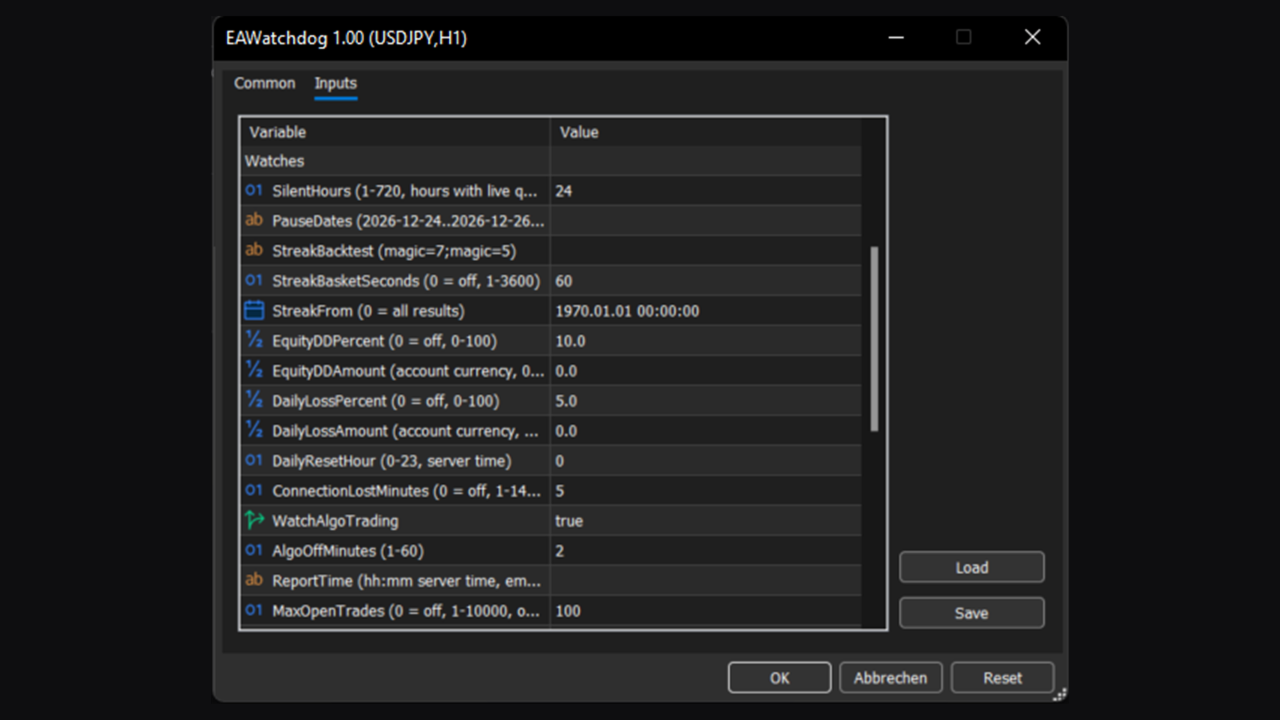
2. In the inputs, set your limits. By default, Equity drawdown is set to 10 percent, Daily loss to 5 percent and Open trades to 100 positions. Adjust them to your account; the default for Open trades (100) is high and only a starting point. EA silent, Losing streak, Connection lost and Algo Trading off are on by default.
3. Choose where messages go. Alert works at once. For Push, Mail, Telegram and Discord, follow the steps in the user manual. For Telegram and Discord you add one address to the terminal's list of allowed URLs.

After you set up Push, Mail, Telegram or Discord, EA Watchdog sends one test message to that channel, so that you can see that it works.

What EA Watchdog does not do

It does not trade. It does not close positions, delete orders or switch off Expert Advisors. It does not give advice and makes no forecast.

It shows no table of Expert Advisors and no trade history. It reports whether your own limits are reached.

It is not the rule check of any trading firm. The values come from the readings of EA Watchdog. Set your limits to match your own rules.

Privacy and what is sent

Without Push, Mail, Telegram or Discord, nothing leaves your terminal. EA Watchdog has no server of its own and sends nothing to the developer.

If you fill in Telegram or Discord, EA Watchdog sends message texts to that service, and only message texts: the event, a few values, the Label (or the account number, if Label is empty) and the time. It sends no deals, no positions and no history. It writes no files. It uses no DLL.

MetaTrader keeps input values in plain text. The Telegram token and the Discord webhook URL can be read in the input dialog, in chart templates and in .set files. Do not share screenshots of the inputs or .set files.

Good to know

EA Watchdog can only report what the terminal can see. If the terminal, the VPS or the internet connection is down, EA Watchdog cannot send anything at that time. After an internet outage, the messages are sent when the connection is back, with the time of the event. Push messages are not sent again.

Push and mail are handed to the terminal, and delivery is not confirmed. Telegram and Discord confirm that the message was accepted. Messages can be delayed or can fail. Do not rely on EA Watchdog as your only safeguard.

EA silent means no trading activity. It does not show whether the Expert Advisor is loaded on a chart. The clock is accurate to about 30 minutes per market pause.

Equity drawdown is measured from the highest equity that EA Watchdog has seen. It starts with the equity at the first start. While EA Watchdog is not running, it sees nothing, so the measured drawdown can be smaller than the real one. Removing EA Watchdog from the chart starts a new peak. Saved states older than four weeks are dropped.

Open trades counts what the account holds at the time of each check. Short peaks between two checks are not seen.

If you run EA Watchdog on two charts of the same account, only one of them sends messages.

Requirements

MetaTrader 5, hedging or netting account, any broker and symbol. A new chart of its own. For Push: your MetaQuotes ID in the terminal settings. For Mail: SMTP settings in the terminal. For Telegram and Discord: your own bot or webhook, and one entry for each in the terminal's list of allowed URLs (Tools, Options, Expert Advisors).

Texts and inputs are in English.

Manual and questions

The user manual explains every watch, the panel, all inputs with examples, the messages of each channel and the set-up of Telegram and Discord: https://www.mql5.com/en/blogs/post/779095

Questions and problem reports are welcome in the product comments or by private message on MQL5.
おすすめのプロダクト
Forget about enabling templates when you launch the window. Auto Template Master Service  is a professional utility tool that runs as a system service in MetaTrader 5, and it will do it for you. Unlike traditional indicators or expert advisors (EAs), the program runs in the background of the entire terminal and doesn't require you to add it to each window individually. As soon as you open a new chart of any instrument (Forex, Stocks, Crypto), the service immediately detects the new window and a
GoldPulseZ v1.0 — Manual Gold Trading EA for MetaTrader 5 GoldPulseZ is a professional manual trading assistant designed exclusively for XAUUSD (Gold) on MetaTrader 5. Built for active traders who want full control of their entries while benefiting from smart trade management automation. Timeframe: M15 Broker: Any broker Key Features: One-Click Trading Panel — Instantly place Buy or Sell orders directly from the chart dashboard with your pre-set lot size, SL, and TP. Automatic Trailing Stop — Lo
Trade Manager Panel ## Short description  Manage your manual trades with one click: automatic break-even, trailing stop, two-level partial close and risk-based lot sizing — all from a single on-chart panel. --- ## Full description Trade Manager Panel is an on-chart utility that takes care of your open trades so you can focus on the market instead of the order ticket. Drop it on any chart and it manages every position on that symbol automatically, while an interactive panel lets you size new
SB-8 – Manual Trading Panel with Fixed Risk & TradingView-Style Visualization for MT5 SB-8 is an advanced manual trading panel for MetaTrader 5 , designed to execute trades visually, quickly and without calculations . It is especially built for traders coming from TradingView , who often find MT5 confusing when it comes to risk management and trade visualization. With SB-8, you don’t calculate lot size, percentages or risk . You simply move the Stop Loss line , and the panel handles everything a
RMT Visual Trade Planner is a lot size calculator, position size calculator and order planner for MetaTrader 5: you plan a trade with three lines on the chart. Drag the stop loss and take profit, and it shows the lot size for your risk, the money at risk, the reward and the margin. The order is sent only after you press SEND and then CONFIRM. The problem it solves Working out the lot size for a given stop and a given risk takes a calculator, and a mistake there costs more than a bad entry. The o
HYT (Help Your Trading) は、主に次の 2 つのテクニックを使用して、損失ポジション を平均化 できるように設計されたツールです。 標準平均化。 トレンドの方向に沿ってポジションをオープンすることでヘッジします。 このツールを使用すると、買いと売りの両方において、異なる方向に開かれた複数のポジションを管理できます。 HYT は、次のポジションのサイズ、注文価格、平均化の方向、指定された利益確定レベルでのポジションのクローズを自動的に計算します。 また、希望する利益確定レベルと初期ロットを指定して、「購入」ボタンと「販売」ボタンを使用してポジションを開くオプションも提供します。 使用を開始する には、ツールをチャートにドラッグし、利益確定レベルを設定して、「平均化を開始」ボタンをクリックするだけです。 初期ポジションが大きすぎない ことを確認し、平均を下げるときにツールによってポジション サイズが拡大されるため、追加費用が発生することを覚悟してください。 HYTは 自動取引 も可能です。自動取引を有効にすると、ツールは指定されたパラメータに従ってポジションを開閉しま
Orders Executor
Claudio Aguiar De Aragao
Introducing Orders Executor , your powerful and efficient trading companion designed to seamlessly execute orders directly from a user-specified text file . This innovative trading tool streamlines your trading process, providing a convenient and automated solution for executing trades with precision and speed. Key Features : **Text File Integration:**     Orders Executor is designed to effortlessly read and interpret orders from a plain text file, eliminating the need for manual input. Simpl
All In One Trade Manager is a trade manager and one-click trading panel for manual traders on MetaTrader 5. It works as a trading assistant, risk manager and position size calculator in one dashboard. It brings together everything below in one panel: order entry with risk sizing automatic trade management advanced order types account protection statistics Its entry checks run in the background and tell you, before you click BUY or SELL, when something speaks against the trade. Also available
GoldFlow Pro1
Minh Tu Nguyen
3 (2)
An order-flow Expert Advisor built for one market only: XAUUSD. GoldFlow Pro reads the live GOLD market tick by tick — price movement, momentum, and liquidity behavior — and acts only when its conditions are met. Precise entries. Defined risk. Disciplined management on every position. MQL5 Signal — Live Monitoring https://www.mql5.com/en/signals/2384830 Introducing GoldFlow Pro GoldFlow Pro was developed around a single idea: instead of reacting to lagging indicators, read what the market is act
ProBridger
Marius Ovidiu Sunzuiana
How Traders and Analysts Can Use the Data Export Bridge to Improve Their Analytics The MQL Data Export Bridge unlocks a new level of analytical power by transforming MetaTrader into a real‑time data provider for any external research environment. Here are the most impactful ways different users can apply the bridge to enhance their trading performance. Build Predictive Models with Machine Learning Who benefits: Quantitative traders, data scientists, algorithm developers How it helps: Export t
Position Calculator calculates how many lots to trade based on: Entry and stop-loss levels Risk tolerance Account size (balance, equity, or even your savings account) Account currency Currency exchange rates - The main tab of the panel provides the primary control over the EA's functions and serves to output the most important calculation results: the position size, risk, reward, and risk-to-reward ratio. - The risk tab can help you assess current and potential risk and reward profile. Using a s
FREE
RiskPilot Pro
Mohamed Zein Mohamed Zein Soliman
RiskPilot Pro Plan risk clearly. Execute efficiently. Manage positions from one professional MT5 dashboard. RiskPilot Pro is a visual trade-planning and position-management utility for MetaTrader 5. It helps manual traders define risk before entry, calculate position size, place market or pending orders, and manage open positions from one chart panel. Important: RiskPilot Pro does not generate trading signals and does not choose trade direction. The trader defines the setup and remains responsib
Signal Provider Utility Pro (Telegram & Discord) The Professional Solution for Signal Providers. Automated Broadcasting | Smart GUI Panel | Performance Reports Stop managing your signals manually. Signal Provider Utility Pro is the realiable bridge between your MetaTrader 5 terminal and your community on Telegram and Discord. Designed for high-performance signal services, this tool gives you instant control over your broadcasts without ever needing to open the settings window. From real-time tr
Trade Desk
Mostafa Saad Saeed Shawara
Trade Desk は MetaTrader 向けのトレードパネルとトレードマネージャーです。チャート上でエントリーを決め、ロット計算機で数量を出し、同じパネルから保有ポジションを管理します。損切り、複数の利確、建値、トレーリングストップに対応します。 追加の説明: デモ口座向け体験版 — MetaTrader 4 向け Trade Desk チャート上のツールの多くは注文を出すところまでです。約定のあとはポジションマネージャーが必要です。 Trade Desk はその両方を同じチャートに置きます。レベルをドラッグしてリスク報酬比をその場で確認し、パネルから送信します。その後、別の注文ウィンドウを開かずに、開いている取引を選んで調整できます。ブローカーへの変更は 「更新」を押すまでプレビューのままなので、ラインをドラッグしてもポジションは誤って変わりません。 主な機能 チャート上のトレードパネル: Buy と Sell のクイックエントリー、ロット、金額リスク、口座に対する割合リスクを、レベル表と保有ポジション一覧の横に配置します。 チャート上のトレードアシスタント: エントリー、損
Trade Control Panel Function Normal One Click Function Close All Close All Profit Close All Loss Close All Pending Order Close All Sell Close All Buy Advance One Click Function 1.  Close Partial Lot Sell by Percent It will help you partial close for all open position by desire percent you wanted. No longer partial close one by one for every open position Manual input for desire percent 2. Close Partial Lot Buy by Percent It will help you partial close for all open position by desire percent
Blade Position Manager Pro – MT5 Trade Management Utility Take Control of Your Trades with One Professional Dashboard Blade Position Manager Pro is a MetaTrader 5 trade management utility designed to help traders manage open positions, control risk, protect floating profits, and simplify everyday trading operations. Whether you trade Gold (XAUUSD), Forex, indices, or other supported instruments, Blade Position Manager Pro provides practical tools for managing your trades from a compact, easy-to-
EA utility to help you with your Discipline for New Traders. When Balance Drop below set Daily Max Percentage Draw Down Balance. Any new trades open after the DD Threshold reached, Bot will close any new trades instantly and will keep canceling any pending orders placed as well until the Next Daily Candle is formed or EA is removed. Note: 1. Please Attached EA Utility before start trading for the day.  2. Set Timeframe before attaching EA utility to the chart. If timeframe changed after taking a
FREE
SL/TP Mover – The Ultimate Position Manager for MetaTrader 5 Take full control of your stop losses and take profits across all open trades – instantly, visually, and automatically.** The Problems Every Trader Faces - Manually adjusting SL/TP on multiple positions is tedious and error‑prone – especially during fast markets. - New trades often open without any SL/TP unless you remember to set them every time. - Scaling in or adding to a position leaves older and newer trades with inconsistent r
Prop Firm Shield is a risk management panel for MetaTrader 5, built for prop firm traders who need control over their daily limits. You configure each limit and the tool watches the account around the clock, acting automatically when a limit is reached: closing positions, deleting pending orders and blocking new trading until the next day. Features: - Daily Take Profit - three modes: fixed USD, percent of the day-start balance, or target balance - Daily Stop Loss - three modes: fixed USD, percen
Pattern Recognition EA - From Learn to Earn. The market repeats itself. This EA finds every past repeat of the current candle sequence - and lets history vote the direction. ONE SHAPE. EVERY REPEAT IN HISTORY VOTES. The last N candles on your signal timeframe form a shape. The EA scans the history you choose - a fixed number of bars or everything your broker provides - for the SAME shape, and checks what happened next, every single time. Only when enough repeats exist AND a clear majority of t
Telegram2MT5 Signal Copier — TelegramのシグナルをMetaTrader 5で自動コピー Telegram2MT5 Signal Copierを使えば、Telegramで受け取ったあらゆるシグナルが、あなたのMetaTrader 5口座で即座に自動執行されます。 高速・信頼性・フルカスタマイズ対応。 Windows Bridge APP ファイルとチュートリアル を入手してください Bridgeファイルは、ローカルWebパネルをMT5 EAに接続するために必要です Windows 10 & Windows 11(64ビット)および Windows Server 2016以降に対応 Main Features 完全な互換性: 公開チャンネル・非公開チャンネルのどちらでも問題なく動作し、制限はありません。 瞬時の執行: ENTRY、STOP LOSS、最大5つのTAKE PROFITレベルをミリ秒単位で検出して発注します。(現時点ではペンディングオーダーを使用) カスタムパターン対応: コーディング不要で、Telegramチャンネルが使っているシグナルの
Vix Golden Harmony
Lefika Raphel Sebatane
5 (1)
Vix Golden Harmony Vix Golden Harmony is a fully automated Expert Advisor for MetaTrader 5. Once attached to a chart it handles everything on its own — identifying its own entries, managing each position while it is open, and closing it when its conditions are met. Every order is checked against your broker's trading requirements and your account's available margin before it is sent, and an internal protection layer monitors the account while a position is running. No manual intervention, no con
FREE
One Click Trader  is a tool designed for MetaTrader 4 platform, which enables you to take your trading to the next level. It enables you to open, manage and close your trades in simple an efficient way by just one click of your mouse button. "-"   ,  "+"  change OCT window size  Up arrow minimizes the OCT panel Down arrow maximizes the OCT panel Right arrow displays the next panel with additional features Left arrow hides the panel with additional features Red  SELL  button enables you to open s
This Expert Advisor monitors all open positions across all symbols in MetaTrader 5. Whenever a Stop Loss (SL) or Take Profit (TP) is manually set or adjusted on any position, the EA automatically applies that value to all other open positions , regardless of symbol or order type (Buy/Sell). This ensures consistent and synchronized SL and TP levels across your account. Perfect for mobile trading via tablet or smartphone!
FREE
**Forex Trade Manager Pro MT5** **Trade Manager MT5** は、MetaTrader 5向けの包括的なトレード管理ユーティリティです。トレードを計画する瞬間から決済する瞬間まで、ポジションのあらゆる側面を完全にコントロールできます。リスクを真剣に考えるトレーダー、つまり規律を築き始めた初心者から、複数のポジションにわたって瞬時の実行を必要とするプロのスキャルパーまで、幅広く対応できるように設計されています。 このツールは任意のチャートに装着でき、クリーンでコンパクトなパネルを表示します。チャート上に直接、ドラッグ可能な水平線を使用して、意図するエントリー、ストップロス、テイクプロフィットの各レベルをマークします。Trade Managerは、定義されたリスクに基づいて正しいポジションサイズを即座に計算し、ストップロスとテイクプロフィットの値をpipsと口座通貨でリアルタイムに表示し、計画中のトレードのリスク・リワード比率を表示します。手動計算は一切必要ありません。リスクを一度定義すれば、ツールが残りのすべてを処理します。 **ポジ
A simple script that closes all current orders. Terminate once close all positions, so no worries about constantly closing your order. How to use : Drag the script from the navigator to the chart, and it will be activated. Do remember to enable algo trading to use this script. There are different version of the script that can choose whether to close all buy/sell posiitons, if you need this, do contact me in MQL5.
Close Assistant (CA)  is a full featured utility for monitoring and closing a set of positions placed by trader or EA. It closes filtered orders in specified time or level or candle patterns or when a certain profit or loss of the total positions is reached. CA uses Zero Profit Lock function to save deposit when total profit falls to zero. Profit and loss levels can be set in fixed amount of account currency or percentage of balance or equity or margin. CA only monitors and works on filtered pos

Signals Executor for Telegram is a Utility that allows you to execute and manage positions from messages sent in Telegram Chats. Chat messages are processed to check for the existence of commands, and the command will be executed if its parameters are valid. You need the Telegram Bot Token and Chat Id to configure the input parameters. It is possible to restrict the sending of commands through the User Id, which must be configured in the input parameters. Valid Commands: Buy and Sell: Market or
Trade Panel HotKey – MT5 Scalping Utility Fast Trade Panel HotKey is a lightweight MT5 trading utility designed for traders who need to open, manage, and close positions as quickly as possible . The main purpose of this tool is to reduce the time between a trading decision and execution. Instead of moving the mouse, opening order windows, or manually modifying multiple positions, most important actions can be performed instantly through customizable keyboard hotkeys or directly from the compact
Viking Alpha DAX Ivar Edition
Valdeci Carlos Dos Passos Albuquerque
Viking Alpha DAX — Germany 40 Expert Advisor for MetaTrader 5 LAUNCH PROMO Only 10 copies at launch price. Price increases with each sale. Launch price: $297 Next price: $497 Final price: $997 Live Performance: FX Blue — Vikingtradingbots What Makes Viking Alpha DAX Different Most DAX robots fail for one simple reason: they treat the Germany 40 like a forex pair. It isn't. The DAX has a heartbeat — a specific rhythm tied to the Frankfurt Stock Exchange opening, the European session structure, an
このプロダクトを購入した人は以下も購入しています
Trade Assistant MT5
Evgeniy Kravchenko
4.43 (216)
取引 ごとのリスクの 計算、新規注文 の 簡単 な 設置、部分的 な 決済機能 を 持 つ 注文管理、 7 種類 のトレーリングストップなど 、便利 な 機能 を 備 えています 。 追加の資料と説明書 インストール手順   -   アプリケーションの手順   ライン機能 チャート上にオープニングライン、ストップロス、テイクプロフィットを表示します。この機能により、新規注文を簡単に設定することができ、注文を出す前にその特徴を確認することができます。   リスク計算 リスク計算機能は、設定されたリスクとストップロス注文のサイズを考慮して、新規注文のボリュームを計算します。ストップロスの大きさを自由に設定できると同時に、設定したリスクを守ることができます。 Lot calc ボタン - リスク 計算 を 有効 / 無効 にします 。 Risk フィールドでは 、必要 なリスクの 値 を 0 から 100 までのパーセンテージまたは 預金通貨 で 設定 します 。 設定」 タブで 、 リスク 計算 の 種類 を 選択 します :「 $ 通貨」、「 % 残高」、「 % エクイティ 」、「
Trade Manager EAへようこそ。これは、取引をより直感的、正確、そして効率的にするために設計された究極の リスク管理ツール です。これは単なるオーダー実行ツールではなく、包括的な取引計画、ポジション管理、リスク管理のためのソリューションです。初心者から上級者、迅速な実行を必要とするスキャルパーまで、Trade Manager EAはあらゆるニーズに対応し、為替、指数、商品、暗号通貨などさまざまな市場で柔軟に対応します。 Trade Manager EAを使用すると、複雑な計算が過去のものになります。市場を分析し、エントリーポイント、ストップロス、テイクプロフィットのレベルをチャート上のラインでマークし、リスクを設定するだけで、Trade Managerが最適なポジションサイズを即座に計算し、SLとTPをピップ、ポイント、口座通貨でリアルタイムに表示します。すべての取引が簡単かつ効果的に管理されます。 主な機能: ポジションサイズ計算機 :定義されたリスクに基づいて取引サイズを瞬時に決定します。 簡単な取引計画 :エントリー、ストップロス、テイクプロフィットを設定するためのド
Telegram to MT5 Multi-Channel Copier   は、 Telegram と Discord チャンネルのトレードシグナルを MetaTrader 5 へ自動コピーします。ボット不要、ブラウザ拡張不要、手動コピー不要。Telegram や Discord にシグナルが届くと、EA が数秒であなたのターミナルに注文を出します。 さらに、チャンネルをコピーする前に、内蔵バックテスターでそのチャンネルがあなたの口座でどう動いたかを確認できます。 製品は 2 つのコンポーネントで構成されます:Telegram チャンネルを監視する Windows アプリと、MT5 ターミナルでシグナルを執行する本 EA です。MT4 版もあります   こちら . 購入前にお試しください:   アプリは無料でダウンロードできます。ご自身のチャンネルを接続し、各シグナルがどのように読み取られるかをご確認ください。Backtest タブと実際の取引には、購入またはレンタルした EA が必要です。このページの無料デモはストラテジーテスターでのみ動作し、テスターでは Telegram と D
Farmed Hedge Yield Farming | All Markets (Manual - Hybrid - Semi/Automated EA) VERIFIED TRADING RESULTS - Farmed Hedge Yield Axi Copy:  https://www.mql5.com/en/signals/2356376 - Farmed Hedge Yield Exn Copy:   https://www.mql5.com/en/signals/2356404 - Farmed Hedge Yield V Copy:  https://www.mql5.com/en/signals/2357156 IMPORTANT NOTICE: FarmedHedge is a MANUAL-FOCUSED TRADING UTILITY ,not a fully automated EA. Results shown on this Signal include manual trades and overall strategic management.
Local Trade Copier EA MT5
Juvenille Emperor Limited
4.94 (149)
Local Trade Copier EA MT5 は、同一の Windows PC または Windows VPS 上で稼働する複数の MetaTrader 5 口座間で、取引をコピーおよび管理するための高速で柔軟なトレードコピーツールです。 ローカルでの取引同期に加え、Receiver 側でロットサイズ、リスク管理、取引フィルター、シンボルマッピング、取引管理、口座保護を個別に設定できます。 Transmitter と Receiver のターミナルは約 1分 で設定でき、同一ブローカーまたは異なるブローカーの口座間で、手動取引や EA による取引をコピーできます。適切な条件下では、ローカルの MetaTrader ターミナル間で取引情報を 0.5秒未満 で同期できます。実際の約定速度は、ブローカーのレイテンシー、ネットワーク状況、PC/VPS の性能、ターミナルの負荷によって異なります。 ご購入前に無料デモをお試しください Local Trade Copier EA MT5 の完全機能版無料デモ を、MT5 デモ口座で 1回につき4時間 テストできます。 Local Trad
Strategy Ledger Pro
Abdullah Uygar Tuna
5 (14)
日本語に対応しました。 Strategy Ledger Pro は、MetaTrader 5 用の読み取り専用の口座分析パネルです。口座の成績をエキスパートアドバイザー(EA)、戦略、銘柄、マジックナンバーごとに分け、それぞれが実際にどれだけ貢献しているかを明らかにします。 パネルは 11 言語に対応しています:English、Français、Deutsch、Español、Italiano、Português、Русский、Türkçe、中文、日本語、한국어。 デモをダウンロードする前に。 Market では、有料製品のデモはストラテジーテスター内でのみ実行されます。このパネルはご自身の口座の取引を分析しますが、ストラテジーテスターには読み取る口座履歴がないため、デモは空のパネルで起動し、その旨を表示します。これはデモの仕組みによるもので、製品の制限ではありません。 この説明内の動画では、実口座でのパネルの動作をご覧いただけます。 すべての機能を解説した詳しい マニュアル (英語)と、情報交換やお知らせのための AureusAI Trading Suite グループをご用意し
自分の取引ルールで Telegram のシグナルをコピー Telegram to MT5 Signal Trader は、Telegram の公開・非公開チャンネルやグループから、テキスト形式の取引シグナルを MetaTrader 5 へ自動でコピーします。1つのデスクトップアプリで複数の配信者と MT5 口座を管理し、 配信者ごとにリスクと取引設定を個別に指定 できます。 シグナルのコピーに Telegram ボットや API 設定は必要ありません。 電話番号または QR コードでご自身の Telegram アカウントにログインし、すでに参加しているチャンネルやグループを選ぶだけです。ボットの作成や、Telegram API トークン、API ID、API hash の入力は不要です。 ポジションサイズを選び、複数の利確水準に分けて決済し、建値へのストップ移動やトレーリングストップを自動化できます。配信者のシグナルを受け取りながら、実際の取引方法は自分で管理できます。 本製品は、この MT5 エキスパートアドバイザ(EA)と、必須の Windows 連携アプリで構成されます。 インス
TradePanel MT5
Alfiya Fazylova
4.88 (170)
Trade Panelは多機能なトレーディングアシスタントです。アプリには手動取引用の50以上のトレーディング機能が搭載されており、ほとんどの取引作業を自動化することができます。 アプリの説明書: https://www.mql5.com/en/blogs/post/756482 デモ口座用アプリの試用版: https://www.mql5.com/en/blogs/post/750865 アプリのインストール方法: https://www.mql5.com/en/blogs/post/756239 アプリをビジュアルモードでテストする方法: https://www.mql5.com/en/blogs/post/770277 VPSのMetaTraderにアプリをインストールする方法: https://www.mql5.com/en/blogs/post/770190 取引。 ワンクリックで取引操作を行うことができます: リスクを自動計算して指値注文やポジションを開く。 複数の注文やポジションをワンクリックで開く。 注文のグリッドを開く。 保留中の注文やポジションをグループごとに閉じる
================================================================================ POC BREAKOUT - V20.72. Full Professional Grade Toolkit ================================================================================ POC Breakout is a full MetaTrader 5 trading dashboard for discretionary traders who want breakout signals, Point of Control (POC) context, volume profiles, order flow, market structure, news, alerts, and advanced trade planning in one professional workspace. Attached directly to you
MT5 to Telegram Signal Provider は、Telegramのチャット、チャンネル、またはグループに 指定された シグナルを送信することができる、完全にカスタマイズ可能な簡単なユーティリティです。これにより、あなたのアカウントは シグナルプロバイダー になります。 競合する製品とは異なり、DLLのインポートは使用していません。 [ デモ ] [ マニュアル ] [ MT4版 ] [ Discord版 ] [ Telegramチャンネル ]  New: [ Telegram To MT5 ] セットアップ ステップバイステップの ユーザーガイド が利用可能です。 Telegram APIの知識は必要ありません。必要な全ては開発者から提供されます。 主な特長 購読者に送信する注文の詳細をカスタマイズする機能 例えば、Bronze、Silver、Goldといった階層型のサブスクリプションモデルを作成できます。Goldサブスクリプションでは、すべてのシグナルが提供されます。 id、シンボル、またはコメントによって注文をフィルターできます 注文が実行されたチャート
VirtualTradePad PRO SE MT5 — MetaTrader 5向けプロフェッショナル取引コントロールセンター VirtualTradePad PRO SE は、 MetaTrader 5 向けのプレミアムなチャートベースの取引パネルであり、トレード管理ワークスペースです。より速い執行、明確なポジション管理、構造化されたトレード管理、視覚的なレベル計画、そしてチャート上で完結するプロフェッショナルなワークフローを求めるトレーダー向けに設計されています。 これは単なる BUY / SELL パネルではありません。PRO SE は、手動取引、予約注文、ポジション管理、部分決済、バスケット損益管理、平均化レベル、ATMルール、シグナル監視、リアルタイム市場情報、ストラテジーテスター (Strategy Tester) ワークフロー、VPS向け運用を、1つの連携されたインターフェースに統合します。 MT4版 | 完全な説明とスクリーンショット | 購入方法 | インストール方法 | ログファイルの取得方法 | テストと最適化の方法 | Expforex のすべての製品 PRO
REVDEN AI Desk:あなた自身の AI との一つの会話で、REVDEN のマーケットコンテキストをもとにトレードを運営する トレードのすべてを一つの会話で運営する姿を想像してみてください。 REVDEN AI Desk はそれを MetaTrader 5 にもたらします。あなた自身の AI に相場をどう読んでいるかを尋ねると、AI はあなたが取引する銘柄について REVDEN の完全なコンテキストをもとに答えます。銘柄の状態、リスク像、今後の指標発表まで含めてです。AI の提案はエントリー、ストップ、ターゲット、リスクとともに届き、合うものをあなたが承認します。ルールの変更も同じ方法です。変えたい点を書けば、AI が新しいルールブックの草案を作り、採用するかどうかはあなたが決めます。会話の周りには、マーケット全体が一つの画面にまとまっています。 デスクとセットアップガイドをご覧ください。 すべての画面、すべての設定、そしてあなた自身の AI との最初のステップ: stein.investments/products/revden-ai-desk AI との一つの会話、マーケッ
Exp COPYLOT CLIENT for MT5
Vladislav Andruschenko
3.97 (35)
MetaTrader 5 用のプロフェッショナル取引コピー機 MetaTrader 向けの高速・高性能・信頼性の高い 取引コピー機 です。 COPYLOT は、MT4 と MT5 のターミナル間で Forex 取引をコピーでき、 Hedge 口座と Netting 口座の両方に対応しています。 COPYLOT MT5 版の対応構成: - MT5 Hedge → MT5 Hedge - MT5 Hedge → MT5 Netting - MT5 Netting → MT5 Hedge - MT5 Netting → MT5 Netting - MT4 → MT5 Hedge - MT4 → MT5 Netting MT4 版 完全な説明 + DEMO + PDF 購入方法 インストール方法 ログファイルの取得方法 テストと最適化の方法 Expforex のすべての製品 MT4 ターミナルへのコピーも可能です(MT4 → MT4、MT5 → MT4): COPYLOT CLIENT for MT4 COPYLOT は、2台、3台、さらには10台のターミナル間で同時に動作できる、プロフェッ
Trade copier MT5
Alfiya Fazylova
4.61 (57)
Trade Copierは、取引口座間の取引をコピーして同期するように設計された専門的なユーティリティです。 コピーは、同じコンピューターまたはvps にインストールされている、サプライヤーのアカウント/端末から受信者のアカウント/端末に行われます。 購入する前に、デモ アカウントでデモ バージョンをテストできます。 デモ版 こちら 。 詳細な説明は こちら 。 主な機能と利点: MT5ネッティングアカウントを含む、MT5> MT5、MT4> MT5、MT5> MT4のコピーをサポートします。 高いコピー速度(0.5秒未満)。 ベンダーモードと受信者モードは同じ製品内に実装されています。 チャートから直接リアルタイムでコピーを制御できる、簡単で直感的なインターフェイス。 接続が切断されたり、端末が再起動されたりしても、設定と位置が失われることはありません。 コピーするシンボルを選択できます。また、受信者のシンボルを置き換えることもできます(例:EURUSD> USDJPY)。 各シンボルごとにコピーの個別設定を行うことができます。 バックコピーをサポートします。 特定の注文のみのコピー
News Trade EA MT5
Konstantin Kulikov
4.55 (11)
僕自身が数年間使っている便利なロボットをご紹介します。半自動モードでも完全自動モードでもお使いいただけます。 >>> Chat <<< 当プログラムは経済指標カレンダーで発表されるニュースをもとにした取引の柔軟な設定が可能です。戦略テスターでは確認不可です。実際の取引のみです。 最新の設定アーカイブをダウンロードしてください: https://www.mql5.com/en/blogs/post/747929 シグナルモニタリング: https://www.mql5.com/en/signals/author/test-standart 当該エキスパート・アドバイザーのためのカスタマイズ設定セットを作る場合は、ブログの全パラメータの説明を参照してください :   https://www.mql5.com/en/blogs/post/748545 。 基本的なデフォルト設定について 一つのチャートからGBPとの通貨ペア(GBPUSD、EURGBP、GBPJPY、GBPCAD、GBPAUD、GBPCHF)で取引をします。GBPは最もボラティリティの高い通貨のため、取引が成功するチ
EA Portfolio Control & Cloud Monitoring for MetaTrader 5 Your EAs manage trades. KONTROL_01 manages your EAs. A control system for traders running multiple Expert Advisors on the same account. Coordinate EA activity, manage trading risks and monitor your setup remotely. A detailed User Manual is available via DM after purchase. IN PRACTICE Multiple EAs. No coordination. Your EAs trade independently, unaware of each other's activity. KONTROL_01 coordinates them, limits simultaneous activity a
RETAILBERG FOOTPRINT CHART PRO — Order-Flow Workspace for MetaTrader 5 Version 7.00  |  Professional System  |  31 tools  |  One chart A full 150-page illustrated User Manual is included. Please read the full manual to understand this feature packed footprint chart elements and ui. https://www.mql5.com/en/blogs/post/777982 DEMO / STRATEGY TESTER — PLEASE READ FIRST
Seconds Chart - MetaTrader 5で秒足チャートを作成するユニークなツールです。 Seconds Chart を使用すると、秒単位のタイムフレームでチャートを構築でき、標準的な分足や時間足チャートでは得られない柔軟性と分析精度を実現します。例えば、 S15 は15秒足を表します。カスタムシンボルをサポートしているインジケーターやEAをすべて使用できます。標準的なチャートと同様に便利に操作できます。 標準的なツールとは異なり、 Seconds Chart は超短期のタイムフレームでも高い精度と遅延なく作業できるように設計されています。 Free Demo: Seconds Chart v2.29 Demo.ex5 無料デモをダウンロードしてご自身でお確かめください: 完全機能版 - すべての機能が利用可能 24時間テスト - 精度と利便性を評価するのに十分な時間 デモ口座のみ - ほとんどのブローカーで簡単に開設可能 GBPCADチャートのみ - ほとんどの端末で利用可能 これらの制限はデモ版のみに適用されます。製品版は、あらゆる口座タイプ(リアル、デモ、コンテス
The Patch It never opens a trade. It walks behind the ones that did. Every open position, every pending order — checked twice a second for the one thing that's easy to forget: a stop, a target. Found bare, it doesn't ask. It writes the missing number in, measured in points from wherever the position began, and moves on to the next. No strategy, no opinion on direction. Just the quiet assumption that nothing should ever sit on the market unprotected — not because someone decided it shouldn't,
次回アップデート — バージョン 2.52 近日公開!【新機能】 市場分析とトレードワークフローを強化する、4つの主要な新機能にご期待ください 皆様のトレードニーズに応える4つの新機能により、市場分析を次のレベルへと引き上げます。新機能をご紹介します: 1. TRADE OVERVIEW DASHBOARD 2. CONFLUENCE AT ZONE 3. STRONG & WEAK HIGH/LOW 4. OTE 1. TRADE OVERVIEW DASHBOARD 市場全体の状況をより簡単に把握できるダッシュボードです。トレード判断をサポートするガイダンスを提供し、市場分析とトレード計画を体系的に行えるよう支援します。すべてを1つの画面で確認できます。 マルチタイムフレーム市場概要(Multi-Timeframe Market Overview) 市場の方向性と価格構造をより明確に把握 市場状況をすばやく確認 体系的な市場分析とエントリー計画のためのガイダンス 2. CONFLUENCE AT ZONE 価格が重要なゾーンに入るとき…いくつのサポート要因が一致しているかを確認で
Your EAs cannot see each other, but Anchor can. Anchor gives you one place to coordinate your EAs, manage risk, and decide when trading is allowed. It works alongside the trading bots you already use without any changes to them. The Problem One EA opens a trade. Then another starts trading. The next thing you know, you wake up to multiple grids built across your account. Each EA may be doing exactly what it was designed to do, but together they can place far more risk on your account than you in
The product will copy all telegram signal to MT5 ( which you are member) , also it can work as remote copier.  Easy to set up, copy order instant, can work with almost signal formats, image signal,  s upport to translate other language to English Work with all type of channel or group, even channel have "Restrict Saving Content", work with  multi channel, multi MT5 Work as remote copier: with signal have ticket number, it will copy exactly via ticket number. Support to backtest signal. How to s
25% discount on the release of the tool: only for the next 3 buyers Send a message to receive a demo version. AstroTrade Trading Assistant AstroTrade is a comprehensive multi-functional trading utility developed for the MetaTrader 5 platform. It integrates essential tools for trade execution, risk management, and technical monitoring into a single unified interface. The application is designed to assist traders in managing their daily operations through a visual and structured environment. Vi
Timeless Charts
Samuel Manoel De Souza
5 (9)
Timeless Charts is an all-in-one trading utility for professional traders. It combines custom chart types such as Seconds Charts and Renko with advanced order flow analysis using Footprints , Clusters , Volume Profiles , VWAP studies, and anchored analysis tools for deeper market insight. Trading and position management are handled directly from the chart through an integrated trade management panel , while Market Replay and Virtual Accounts provide environments for practicing trading skills and
Floor Watch
Syed Tauqeer Hussain Shah
Floor Watch One number, watched every thirty seconds: how far equity has fallen since the day began — or since its highest point, if it's told to trail the peak instead of the open. Cross the line and it doesn't argue. Every open position closes, every pending order vanishes, and anything that slips through afterward gets shut the moment it appears. Not asked. Removed. The floor holds until the clock turns 5 AM Pakistan time — then, and only then, does the day start over. One rule. No except
Telegram To MT5 — シグナルコピア Telegram チャンネルのトレードコールを、実際の MT5 注文に変換します — 自動で、好きなだけの口座に対応し、リスクとルールは完全にあなたの管理下に置けます。 Telegram To MT5 は、あなたが Telegram で既にフォローしている VIP / シグナルチャンネルを MetaTrader 5 端末に接続します。無料の付属デスクトップアプリがメッセージを読み取り(ボットを禁止しているチャンネルでも可能)、この EA があなたの口座でそれらを執行します — あなた自身のリスク設定、シンボルマッピング、テイクプロフィット処理、セッションおよびニュースフィルターを適用します。 これはシグナルコピアであり、ブラックボックス戦略ではありません。どのチャンネルを信頼するか、各トレードのロットと管理方法をあなたが決めます。 ステップバイステップの設定と付属アプリのインストールガイド 仕組み [あなたの Telegram チャンネル] -> [付属デスクトップアプリ] -> [MT5 + この EA] -> 注文 付属デスクトッ
Power Candles Strategy Scanner - 自動最適化型マルチシンボル設定ファインダー パワーキャンドル・ストラテジー・スキャナーは 、パワーキャンドル・インジケーターを駆動するのと全く同じ自己最適化エンジンを、マーケットウォッチに登録されているすべての銘柄に対して並行して実行します。1つのパネルで、現在統計的に取引可能な銘柄、各銘柄で勝率の高い戦略、最適なストップロス/テイクプロフィットの組み合わせが表示され、新たなシグナルが発生した瞬間に通知が届きます。 このツールは、Stein Investmentsのエコシステムの一部です。  18種類以上のツールをすべて閲覧し、AIを活用したセットアップの推奨を受け取り、  https://stein.investments でコミュニティに参加しましょう 市場動向を網羅。銘柄ごとに3,000件以上の自動最適化。2種類のアラート。ワンクリックでチャートを切り替えて即座にアクション。 なぜこれが必要なのか 多くのマルチ銘柄スキャナーは、 価格の動き (ボラティリティ、変動率、銘柄ごとのRSI)を表示するだけです。それ
Equity Protect Pro: 安心取引のための総合的な口座保護エキスパート 口座保護、資産保護、ポートフォリオ保護、マルチ戦略保護、利益保護、利益確定、取引セキュリティ、リスク管理プログラム、自動リスク管理、自動決済、条件付き決済、スケジュール決済、動的決済、トレーリングストップロス、ワンクリッククローズ、ワンクリック決済、ワンクリック復元などの機能をお探しなら、Equity Protect Pro が最適なプログラムです。 設定は簡単で、事前設定された条件に達すると、すべてのチャートを閉じることができ、シグナルサブスクリプションのキャンセルもサポートします(これは、すべての取引プログラムも停止することを意味します)。この時点で、新しい注文は生成されなくなり、最終的にすべての注文が閉じられ、予期せぬ損失を効果的に防止し、安心して取引できるようになります。 Equity Protect Pro (Technical Manual) Equity Protect Pro Demo Version for yo u to test   Equity Protect Pro MT4
Trader Evolution
Siarhei Vashchylka
5 (7)
" Trader Evolution " - A utility designed for traders who use wave and technical analysis in their work. One tab of the utility is capable of money management and opening orders, and the other can help in making Elliott wave and technical analysis. Manual (Be sure to read before purchasing) | Version for MT4 Advantages 1. Trading in a few clicks. Immediate and pending orders are available in the panel 2. Money management. The program automatically selects the appropriate lot size 3. Simplifies
MT5 Professional Copy Trading System(MT5版) MT5 Professional Copy Trading System は、工業レベルの超高速 LOCAL トレードコピア であり、プロトレーダー、シグナル提供者、機関レベルのマルチアカウント運用のために設計されています。一般的なクラウド型やリテール向けコピーシステムとは異なり、本システムは同一 Windows 環境で動作することを前提とした LOCAL アーキテクチャに基づいて構築されています。 工業級 LOCAL アーキテクチャ LOCAL 設計により、同一 PC または同一 Windows VPS 上で稼働する複数のターミナル間で、低遅延かつ高い安定性を実現します。不要なネットワーク依存を減らすことで、より高速な同期、正確な約定、Master と Receiver 間の高い一貫性を確保できます。これは高頻度取引や 24/7 無人運用に適した環境を提供します。 Master / Slave / Self-Copier + Cross Copy(MT4 ↔ MT5) MT5 版は Master
作者のその他のプロダクト
EA Desk MT5 is a free, read-only panel that shows your account results per Expert Advisor in one calm view, and which of them has gone quiet. Shows account results and a table per Magic Number on its own chart, so you can see which Expert Advisor is active and which has been quiet. EA Desk does not trade. EA Desk is a read-only panel that shows your account results per Expert Advisor in one calm view. What EA Desk does Many traders run several Expert Advisors on one account. The terminal sho
FREE
フィルタ:
レビューなし
レビューに返信