Front Row Spotlight

Spotlight — Compare Strategy Development Trade by Trade

A final result tells you where a strategy ended. It does not show how the result developed, where behaviour started to change or whether Demo, Live and Retest still follow a comparable path.

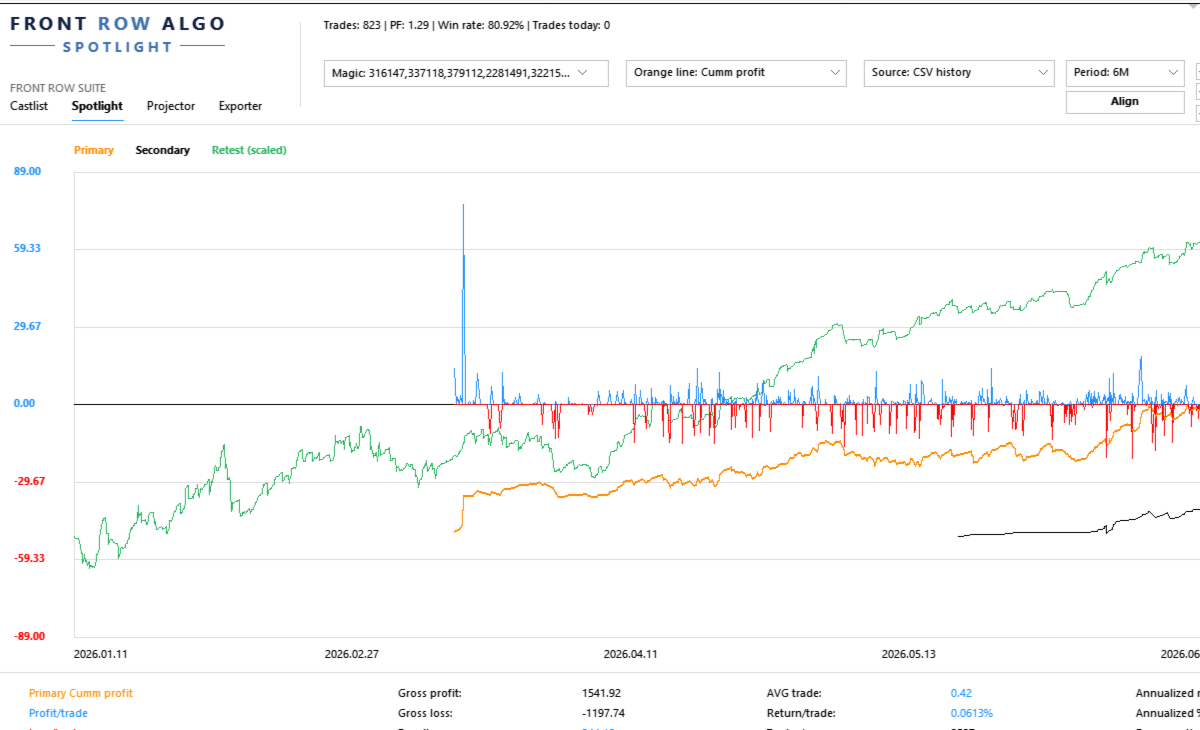
Spotlight turns trading history into a visual trade-by-trade comparison workspace. It helps the trader begin with one validated baseline, add one controlled comparison and record what the evidence does—and does not—show.

Documentation and Quick Start

  • Spotlight Quick Start Manual — build one baseline, add one comparison and understand the trade axis.
  • Front Row User Guide 1.0 — understand the complete Castlist, Spotlight and Backstage workflow.
  • Support — see the Support section below for product questions and technical issues.

About the Automatic MQL5 Demo

The automatic MQL5 demo is restricted to the isolated Strategy Tester. This product is designed for use in a normally running MT5 terminal, so the tester demo is not a functional trial and should not be used to assess normal operation. Please use the product video and documentation for a representative overview.

Questions are always welcome. If the Comments section is available to you, please ask your question there. Otherwise, hover over the seller name and choose Send message. I am happy to help with any questions.

Start with One Strategy and One Question

Select a known Magic#, choose the source and period, and begin with a metric that matches your question:

  • Where did the current drawdown begin?
  • Is recovery supported by several trades or one outlier?
  • Does Live still resemble Demo or SQX Retest?
  • Which strategy variant develops differently?
  • What changes when one strategy is added to or removed from a portfolio?

Validate the first line before enabling additional sources, Align, VS or Portfolio Impact.

What You Can Do with Spotlight

  • Analyse MT5 History directly or use persistent Demo and Live CSV sources maintained by Backstage.
  • Compare account development with supported StrategyQuant X Retest exports.
  • Follow core performance, Drawdown, Capital and analytical Margin after every trade and display individual Trade Lines.
  • Read Result, trade efficiency, evidence speed, annualised scenarios and exposure together in the lower summary.
  • Align sources deliberately, compare individual strategies with VS and test temporary additions, removals or swaps with Portfolio Impact.
  • Create or update shared Notes and Reviews from a real trade point.

The Trade Axis

The horizontal axis represents consecutive trade slots, not evenly spaced calendar time. Trades remain ordered by their real close time, but long inactive periods do not create large empty areas.

Trades closing near each other may share a slot according to TradeMatchToleranceMinutes . This synchronises the visual comparison; it does not prove that the trades had equal direction, volume, entry or economic meaning.

A Practical First Comparison

  1. Attach Spotlight to one docked MT5 chart.
  2. Select one known Magic# and one source.
  3. Choose a period with enough trades.
  4. Confirm first trade, latest trade and trade count.
  5. Select one understandable metric.
  6. Describe the absolute baseline in plain language.
  7. Add one Secondary, SQX Retest or VS line.
  8. Record the observation and schedule a Review when useful.

Compare Sources Without Hiding Their Differences

Spotlight can bring MT5, Demo, Live and SQX Retest into one analytical view, but the trader remains responsible for verifying identity, period, costs, sizing and source freshness.

In the current version, Retest means the standard supported SQX trade-export format. The Retest Magic# is derived from all digits in the complete filename. Avoid unrelated digits such as duplicate-file suffixes.

Backstage is optional for MT5 History and SQX Retest. It becomes relevant when the same persistent CSV history should remain available across products, terminals or later analysis without relying only on broker-held history.

VS and Portfolio Impact

Use VS when individual strategies must remain separate. Use Portfolio Impact when you want to test a temporary addition, removal or swap against the current selected portfolio.

Neither function changes EAs, positions, files, Live markers or the Primary selection. Impact is an analytical session scenario, not a trading instruction or saved portfolio change.

Capital, Margin and Leverage

Capital and Margin depend on the selected source and configured assumptions. AccountCapitalOverride supplies a reproducible reference capital. MarginLeverageOverride supplies analytical leverage.

Calculated Margin is not automatically the historical margin reserved by a broker. SQX Retest does not reconstruct equivalent historical Capital or Margin.

Using Spotlight with a VPS

Spotlight works normally in your local MT5 terminal while the trading EAs continue running on MetaQuotes VPS. Connect the local terminal to the same trading account and allow MT5 history to synchronise. The trading EAs do not also need to run locally.

Use Spotlight locally with MT5 History, local Backstage CSV files and local SQX Retest files. MetaQuotes VPS has a separate file environment and does not synchronise files back to the local terminal, so it is not the normal interactive Spotlight workspace.

A Windows VPS supports the complete Spotlight workflow through Remote Desktop. Keep Spotlight, Backstage and any required Retest files in the same Windows/MT5 environment when they need to share data, and include those files in the VPS backup policy.

Important Operating Notes

  • Keep the Spotlight chart docked inside MT5 for reliable Suite Selector operation.
  • Read absolute lines before using Align.
  • A shared trade slot is not proof of an identical trade.
  • Annualised values are linear scenarios, not predictions or compounding promises.
  • Saved settings and up to five VS selections can be restored after restart or reattachment.

Use Spotlight on Its Own or in the Connected Workflow

Spotlight can analyse MT5 History and SQX Retest without the other products. Add Backstage for persistent Demo/Live sources and Castlist for Status, Live, Archive and the daily review cycle.

Support

Have a question about what Spotlight does, how a feature works or whether it is suitable for a particular workflow? Post your question in the Comments section. The answer may also help other users.

Is something not working as expected in your installation? Hover over the seller name at the top of this page and click Send message.

Please use a private message for:

  • Errors or unexpected behaviour
  • Installation or configuration problems
  • Questions about your specific setup
  • Screenshots, log messages or data files
  • Information involving an account, broker, terminal or trading history

When reporting a technical issue, please include:

  • Spotlight version
  • MetaTrader 5 build number
  • What you were trying to do
  • What you expected to happen
  • What happened instead
  • Steps to reproduce the issue
  • Selected source, period and Magic#
  • Whether Align or scaling was active
  • Relevant settings, screenshots or log messages

Never publish account credentials or sensitive trading information in the Comments section.

If you are unsure which option to use, send a private message.

For questions concerning purchases, downloads, payments, activations or your MQL5 account, contact the MQL5 Service Desk. 

Produtos recomendados
Olá, comerciantes! Sou o seu assistente comercial. Para não falar muito, deixe-me lhe dizer a minha especialidade: 1. Eu sou bom em gerenciar suas posições, não importa em qual extremidade você coloca uma ordem, eu posso ajudá-lo a adicionar uma linha de stop-loss razoável e um stop-loss móvel pela primeira vez. 2. Eu posso ajudá-lo a evitar a subida e a queda e a erradicar as fraquezas humanas das raízes dos princípios. 3. Eu lhe enviarei uma mensagem de notificação para o cliente MT5 do seu d
Strategy Attribution Matrix is a performance and relationship view grouped by Magic Number or comment prefix. Key functions: - Strategy-level trading results - Contribution analysis - Drawdown by strategy group - Correlation estimates between selected groups - Detailed selected-group trade view - Magic Number and comment-prefix grouping - Clear account-history scope and status The utility analyzes available account history. Correlation estimates and attribution results depend on data completen
Tick Volume Chart - uma ferramenta exclusiva para criar gráficos baseados no volume de ticks no MetaTrader 5 . Com o Tick Volume Chart , você pode construir gráficos onde cada candle é formado não por tempo, mas por uma quantidade definida de ticks. Isso oferece uma precisão ideal na análise da atividade do mercado, indisponível nos gráficos de tempo convencionais. Você pode utilizar quaisquer indicadores e robôs de negociação compatíveis com símbolos personalizados. Trabalhar com os gráficos ge
Talents ATR Scalper Utility (MT5) The Talents ATR Scalper Utility is a professional-grade trade execution and management tool built for MetaTrader 5. Inspired by the Biblical Parable of the Talents , this utility is designed to help traders multiply their potential with precision risk control, one-click simplicity, and advanced automation. Whether you’re scalping forex, gold, or indices, this tool delivers speed, consistency, and confidence. Key Features One-Click Trade Preview Click below price
LotCalculatorPro
Reynaldo Jr Audencial Pascual
LotCalculatorPro + Smart Trading Panel LotCalculatorPro é um poderoso assistente de trading tudo-em-um, projetado para simplificar a gestão de risco, o cálculo do tamanho do lote e a execução de operações diretamente no gráfico. Esta ferramenta ajuda os traders a controlar o risco, calcular tamanhos de lote precisos e gerenciar operações automaticamente com recursos inteligentes como Break-Even, fechamento parcial e proteção diária de lucro/perda . É ideal para traders de Forex, traders de prop
Grid Trading EA is a semi-automated one-click trading EA for both Normal Trading and Grid/Martingale Trading . Normal Trading Simply click Buy or Sell directly from the chart. The EA will automatically manage trades by: Setting Stop Loss and Take Profit Managing Trailing Stop Grid / Martingale Trading (For Hedging Account Type Only) When Grid Trading mode is enabled, the EA will automatically open additional grid orders at specified distances while increasing the lot size based on your settings.
Click Trading
Jawad Tauheed
5 (2)
One Click Trading – Auto TP SL Developer TraderLinkz Version 1.00 Category Utility What it does Adds missing TP and SL to your manual trades and pending orders Sets them once per ticket Lets you move TP and SL afterward Works on hedging and netting accounts Scans on every tick and reacts on trade events Why you want it You place faster entries You get consistent risk and exit targets You reduce fat finger errors You keep full manual control Quick start Attach the EA to any chart Keep TP and SL e
FREE
Close All and Change Take Profit and Stop Loss All Orders. Main Features     Ability to Close All Orders the Symbol you put this EA.     Ability to Change Take Profit to All Order.     Ability to Change Stop Loss to All Order.     Show Order count.     Show Average price with info and Horizontal Line.     Show lot open.     Show Price diff from average to price now     Show broken price with info and Horizontal Line.     Easy to use . How to use Close All (Symbol) PC : you can click on CloseAl
Crash5 EA ,I s a automatic robot that has the level of professional decision when to take a trade without any emotion. The bot will help in your scalping decision making with its own TP (take profit) and SL (stop loss) with the trail stop when in profit. This is a trend based spike catching ,looking on whats happening in real time charts no repainting of any signals. The robot helps in making decisions on the candle stick pattern opened and closed lat price with the help of RSI ,MACD and the EMA
Check an MQL5 signal before you subscribe. A signal can look convincing on the provider page and still be a poor fit for your account. Different symbol names, minimum lots, leverage, hedging or netting, copy latency and a fixed monthly fee can materially change what happens on your account. MT5 Signal Sentinel is not a trading robot and not a signal. It does not trade. It analyzes available data and explains technical and historical risks in plain language. Why this tool was created Many problem
Expert TP SL v04 - Professional Trading Assistant with AI Motivation System Advanced manual trading tool with automatic risk management, overtrading protection, and intelligent psychological support for disciplined trading. PRODUCT OVERVIEW Expert TP SL v04 is a comprehensive trading assistant designed for manual traders who want to maintain emotional discipline while automating risk calculations. This isn't just another order placement tool - it's a complete trading psychology system that pr
Apex StopLoss Manager
Muhammad Hassan Muhammad Ahmad Atiyah
Apex StopLoss Manager MT5 Script – Stop Loss Control Utility Overview Apex StopLoss Manager is a trade management script for MetaTrader 5 designed to provide precise, rule-based control over Stop Loss behavior on existing open positions . The script focuses on manual execution and accuracy. It does not use automated trading logic, does not open trades, and runs once per attachment . Core Functionality The script provides two independent Stop Loss control functions, both enabled only through exp
justEnter is a semi-automatic trade management utility for MetaTrader 5. You choose the entry; the utility calculates position size, places the stop loss, and manages the position through breakeven, partial closes and trailing until exit. For traders following signals If you take your entries from a signal service, a mentor, or your own alerts, the entry decision is already made by the time you open the terminal. What remains is execution: sizing the position correctly, placing the stop, moving
Risk calculator for MetaTrader 5. Precision Position Calculator is a MetaTrader 5 utility that helps calculate trade volume based on the risk configured by the user. The panel allows the user to work with Entry, Stop Loss and up to three Take Profit levels directly on the chart. Main description Precision Position Calculator is a utility for MetaTrader 5 designed to help calculate the volume of a trade before opening it. The panel allows the user to configure risk, select the order type, set th
FREE
Why this Telegram copier is better than the rest! Creates a new position for every TP. Can add multiple layers and positions. Can run a Runner for maximum profit! Questions and special offers: Telegram @Fxmelvin You can automatick trade like MO Automatic copying from Telegram — we have developed free software for use on a VPS. Contact us for more information. This makes trading fully automated. Telegram Setup instruction Open your Telegram APP and search for "BotFather". Type  /start  and click
Global Stop Loss and Take Profit Manager Drag Lines Auto Apply Already using my free Global Stop Loss and Take Profit Setter? This is the always on version. Instead of setting levels once, you drag two lines on the chart and every manual position on that symbol — plus every new one you open — instantly inherits the Stop Loss and Take Profit. No clicking into each order. No forgetting a stop. Global Stop Loss and Target Manager is a drag-and-drop risk tool for manual traders on MetaTrader 5. Pu
Golden Retriever
Alexander Daneel Muller
Golden Retriever is one of my best EA's to date. The Golden Retriever, retrieves money from the market for you. It Retrieves money in small sizes and is a very gentle trader. I am a fullime trader for the past 17 years.  My methods all revolve around small profits, short trades and low risk. My experience shows that 2-3% monthly profit using a combination of trade systems is the best way to have a long and effective career in trading.  It was developed using 17 years of experience in live tradin
Aqui está a tradução para o português (Brasil), utilizando a terminologia padrão do mercado financeiro e de Prop Firms para garantir que o texto soe natural para um trader brasileiro. Prop Calculator Assistant Pare de quebrar contas de Prop Firm por erros de cálculo. Deixe que o Assistente cuide do risco para você. O Prop Calculator Assistant é o painel de gestão de ordens definitivo, projetado especificamente para traders que buscam aprovação em desafios (FTMO, etc.) ou que já gerenciam capital
Imagine flying a real aircraft without ever stepping into a flight simulator. That's what trading is like. You have to simulate your strategy before you can take it to a live market. It is good if you can simulate things speedily before even stepping into any live market, or before coming up with an automated system.  People don't have all day to stare at a higher timeframe chart until the entry signal finally arrives. That's why I built this so that you can simulate your strategy with speed. Th
FREE
This utility provides the ability to use hot keys in manual trading instantly responding to the current market situation. You can assign hot keys to open/close positions by their type, open/close all positions on the current chart and remove all orders on the current chart. You can also assign hot keys for five predefined trade volumes and switch between them if necessary with no need to change the volume manually from time to time. It is also possible to set the auto calculation of a trade volu
Introducing Neural Bitcoin Impulse - an innovative trading bot created using neural network training technology on voluminous market data sets. The built-in mathematical model of artificial intelligence searches for the potential impulse of each next market bar and uses the resulting patterns of divergence and convergence between the predictive indicators and the price to form high-precision reversal points for opening trading positions. The trading robot is based on the Neural Bar Impulse ind
TraderOS | PropGuard Proteção contra Perdas Diárias e Drawdown Máximo em Empresas Prop Nunca mais falhe um desafio prop por ultrapassar os limites de perda diária ou de perda máxima. TraderOS | O PropGuard é uma ferramenta profissional de gestão de risco concebida especificamente para traders de empresas prop. Monitoriza a sua conta de negociação em tempo real e protege-o automaticamente contra o incumprimento dos limites de perda diária e das regras de drawdown máximo, que são as principais
Nome do Produto: Sentinel Pro (Escaneamento de Tendência & Terminal de Risco Invisível)   Redefinindo o Trading Manual: Uma solução completa, da identificação de tendências ao controle de risco invisível. O Sentinel Pro não é apenas um painel de negociação, é o seu copiloto inteligente. Combinando escaneamento de tendências de todo o mercado baseado em regressão linear, Stop Loss invisível de nível institucional, sincronização de múltiplos gráficos e sistema automático de controle de risco. F
Phoenix Breakeven Button
PHOENIX GLOBAL INVESTMENTS LTD
Mover manualmente os stop loss para o ponto de equilíbrio em várias posições abertas é demorado durante um mercado volátil, e é fácil aplicá-lo acidentalmente a uma posição que ainda esteja no vermelho. O botão Phoenix Breakeven move o stop loss de todas as posições abertas lucrativas para o ponto de equilíbrio com um único clique, ignorando automaticamente aquelas que ainda estejam no prejuízo. Como ele protege seu lucro - Um clique aplica a proteção de ponto de equilíbrio a todas as posiçõ
FREE
Features: fast opening / closing deals automatic closing of trades by profit / loss shows the number of deals and the total profit for the Symbol Fast open deals: set the Lot volume set  StopLoss / TakeProfit in points (if you set "0", then it is not used) set slippage set Magic (if necessary) set comment (if necessary) Fast open features: fast open Buy fast open Sell fast close ALL open orders for the current Symbol Auto close deals by profit / loss (analogue of virtual StopLoss / TakeProfi
EA Dashboard MT5
Teerathad Booranawisedkul
FREE 7-DAY TRIAL After your trial ends, continue using this essential trading tool for only $30 one-time payment. This utility is designed to assist traders in monitoring account status, open positions, and trading performance in real time. It provides consolidated information related to account metrics, risk exposure, and statistical performance to support trading analysis and decision-making. The product does not execute trades automatically and does not provide trading signals. It is intend
Local Copy Trader Utility - Professional Copy Trading System Overview Local Copy Trader Utility is the complete solution for mirroring trades between MetaTrader 5 accounts. With both Master and Slave functionality in one powerful Expert Advisor, it delivers reliable, lightning-fast trade copying with zero external dependencies. Perfect for managing multiple accounts, following trading signals, or transferring trades between brokers, this system ensures your positions stay perfectly synchronized
MT5 To Telegram Copier
Levi Dane Benjamin
2.67 (3)
Envie sinais totalmente personalizáveis do MT5 para o Telegram e torne-se um Provedor de Sinais! Este produto é apresentado em uma interface gráfica fácil de usar e visualmente atraente. Personalize suas configurações e comece a usar o produto em questão de minutos! Guia do Usuário + Demonstração  | Versão MT4  | Versão Discord Se deseja experimentar uma demonstração, por favor consulte o Guia do Usuário. O Remetente de MT5 para o Telegram NÃO funciona no testador de estratégias. Recursos de M
25R - WASD Order is a visual risk management EA for MetaTrader 5 that combines gaming-style WASD keyboard controls with interactive chart drawing for precise order placement. Designed for active traders who value speed and accuracy, it lets you visually plan trades by dragging entry and stop-loss lines directly on the chart, while automatically calculating position size based on your risk percentage. The tool displays color-coded profit/loss zones with real-time risk metrics, supports automatic
Os compradores deste produto também adquirem
Trade Assistant MT5
Evgeniy Kravchenko
4.43 (216)
Ajuda a calcular o risco por comércio, a fácil instalação de uma nova encomenda, gestão de encomendas com funções de fecho parcial, trailing stop de 7 tipos e outras funções úteis. Materiais e instruções adicionais Instruções de instalação   -   Instruções para a aplicação   -   Versão de teste da aplicação para uma conta de demonstração Função de linha Mostra no gráfico a linha de Abertura, Stop Loss, Take Profit. Com esta função é fácil definir uma nova ordem e ver as suas características ad
Bem-vindo ao Trade Manager EA—uma ferramenta de gestão de risco criada para tornar o trading mais intuitivo, preciso e eficiente. Não é apenas uma ferramenta para executar ordens, mas uma solução abrangente para planejamento de operações, gerenciamento de posições e controle de risco. Seja você um iniciante, trader avançado ou scalper que precisa de execução rápida, o Trade Manager EA adapta-se às suas necessidades, oferecendo flexibilidade em todos os mercados, desde forex e índices até commodi
Local Trade Copier EA MT5
Juvenille Emperor Limited
4.94 (149)
Local Trade Copier EA MT5 é um copiador de operações rápido e flexível para copiar e gerenciar operações entre várias contas MetaTrader 5 no mesmo computador Windows ou Windows VPS. Ele combina a sincronização local de operações com controles no lado do Receiver para tamanho de lote, gerenciamento de risco, filtragem de operações, mapeamento de símbolos, gerenciamento de operações e proteção da conta. Configure seus terminais Transmitter e Receiver em aproximadamente 1 minuto e copie operações
O Telegram to MT5 Multi-Channel Copier copia automaticamente os sinais de trading dos seus canais de Telegram diretamente para o MetaTrader 5. Sem bots, sem extensões de navegador, sem copiar à mão. O sinal chega ao Telegram e o EA abre a operação no seu terminal em poucos segundos. E antes de copiar um canal, o backtester integrado mostra o que esse canal teria feito na sua conta. O produto inclui dois componentes: um aplicativo de Windows que escuta os seus canais de Telegram, e este Expert Ad
================================================================================ POC BREAKOUT - V20.72. Full Professional Grade Toolkit ================================================================================ POC Breakout is a full MetaTrader 5 trading dashboard for discretionary traders who want breakout signals, Point of Control (POC) context, volume profiles, order flow, market structure, news, alerts, and advanced trade planning in one professional workspace. Attached directly to you
TradePanel MT5
Alfiya Fazylova
4.88 (170)
Trade Panel é um assistente de negociação multifuncional. O aplicativo contém mais de 50 funções de negociação para trading manual e permite automatizar a maioria das tarefas de negociação. Instruções para o aplicativo: https://www.mql5.com/pt/blogs/post/762435 Versão de teste do aplicativo para conta demo: https://www.mql5.com/pt/blogs/post/762547 Como instalar o aplicativo: https://www.mql5.com/pt/blogs/post/762548 Como testar o aplicativo no modo visual: https://www.mql5.com/pt/blogs/post/770
Copie sinais do Telegram com suas próprias regras de negociação Telegram to MT5 Signal Trader copia automaticamente sinais de negociação em texto de canais e grupos públicos e privados do Telegram para o MetaTrader 5. Gerencie vários provedores e contas MT5 em um único aplicativo para desktop, com configurações individuais de risco e de negociação para cada provedor . Você não precisa de um bot do Telegram nem configurar uma API para copiar sinais. Basta entrar com sua própria conta do Telegram
Power Candles Strategy Scanner - Localizador de configurações multissímbolo com auto-otimização O Power Candles Strategy Scanner utiliza o mesmo motor de auto-otimização que alimenta o indicador Power Candles — em todos os símbolos da sua lista de observação, lado a lado. Um painel indica-lhe quais os símbolos que são estatisticamente negociáveis neste momento, qual a estratégia vencedora para cada um, o par ideal de Stop Loss / Take Profit, e avisa-o assim que um novo sinal é emitido. Esta ferr
Farmed Hedge Yield Farming | All Markets (Manual - Hybrid - Semi/Automated EA) VERIFIED TRADING RESULTS - Farmed Hedge Yield Axi Copy:  https://www.mql5.com/en/signals/2356376 - Farmed Hedge Yield Exn Copy:   https://www.mql5.com/en/signals/2356404 - Farmed Hedge Yield V Copy:  https://www.mql5.com/en/signals/2357156 IMPORTANT NOTICE: FarmedHedge is a MANUAL-FOCUSED TRADING UTILITY ,not a fully automated EA. Results shown on this Signal include manual trades and overall strategic management.
Exp COPYLOT CLIENT for MT5
Vladislav Andruschenko
3.97 (35)
Copiador profissional de operações para MetaTrader 5 Um copiador de operações rápido, profissional e confiável para MetaTrader . COPYLOT permite copiar operações de Forex entre terminais MT4 e MT5 com suporte para contas Hedge e Netting . A versão MT5 do COPYLOT oferece suporte a: - MT5 Hedge → MT5 Hedge - MT5 Hedge → MT5 Netting - MT5 Netting → MT5 Hedge - MT5 Netting → MT5 Netting - MT4 → MT5 Hedge - MT4 → MT5 Netting Versão MT4 Descrição completa + DEMO + PDF Como comprar Como instalar Como
Grid Manual MT5
Alfiya Fazylova
4.73 (22)
"Grid Manual" é um painel comercial para trabalhar com uma grade de ordens. O utilitário é universal, possui configurações flexíveis e uma interface intuitiva. Ele trabalha com uma grade de ordens não apenas na direção da média das perdas, mas também na direção do aumento dos lucros. O trader não precisa criar e manter uma grade de ordens, tudo será feito pelo ""Grid Manual". Basta abrir um orden e o "Grid manual" criará automaticamente uma grade de ordens para ele e trabalhará com ele até que s
Footprint Chart Pro — Professional OrderFlow EA for MetaTrader 5 Version 6.34 | Professional tool for real traders | Institutional-Grade Visualization DEMO USERS - PLEASE SELECT EVERY TICK / REAL TICK WHEN TESTING AND YOU HAVE DOWNLOADED HISTORICAL DATA. IF YOU SEE A WAITING SCREEN AND IT IS NOT DOWNLOADING, IT MEANS YOU HAVE LOW HISTORICAL DATA. TRY 1 MIN AND 5 MIN FIRST ON 1 DAY DATA. ONE DAY DATA SHOULD BE THE NEWEST AND MOST CURRENT DATE. PLEASE WAIT UNTIL THE MARKET HAS ROLLED OVER PERIOD.
HINN MagicEntry Extra
ALGOFLOW OÜ
4.74 (19)
HINN MAGIC ENTRY – the ultimate tool for entry and position management! SIMPLE. FASTEST. INTUITIVE. MAX AUTOMATED. Place orders by selecting a level directly on the chart! full description   ::  demo-version  :: 60-sec-video-description Key features: - Market, limit, and pending orders - Automatic lot size calculation - Automatic spread and commission accounting - Unlimited partitial take-profits  - Breakeven and trailing stop-loss and take-profit  functions - Invalidation leves - Intuitive, a
Welcome to ENTRY IN THE ZONE AND SMC MULTI TIMEFRAME /  Official Website :   https://www.fableedge.net Entry In The Zone and SMC Multi Timeframe is a real-time market analysis tool based on Smart Money Concepts (SMC), designed to analyze market structure, price direction, and key trading zones. It supports both Single-Timeframe Analysis and Multi-Timeframe Analysis, providing a clearer view of the overall market structure across multiple timeframes, with real-time BUY / SELL signals that do not
Signal TradingView to MT5 Pro Automator Execução profissional instantânea entre TradingView e MetaTrader 5 Automatize a sua estratégia de trading com a ponte de comunicação mais robusta entre os alertas do TradingView e a execução real no MT5. Concebido para traders que exigem velocidade, flexibilidade e uma gestão de risco impecável, este Expert Advisor transforma qualquer mensagem de alerta numa ordem de mercado ou de limite precisa. PONTOS FORTES E VANTAGENS Motor de Parsing Universal (Propri
MT5 to Telegram Signal Provider é uma utilidade fácil de usar e totalmente personalizável que permite o envio de sinais especificados para o chat, canal ou grupo do Telegram, tornando sua conta um fornecedor de sinais . Ao contrário da maioria dos produtos concorrentes, ele não usa importações de DLL. [ Demonstração ] [ Manual ] [ Versão MT4 ] [ Versão Discord ] [ Canal do Telegram ]  New: [ Telegram To MT5 ] Configuração Um guia do usuário passo a passo está disponível. Não é necessário conhec
Premium Trade Manager - O Painel de Operações com um Coach Integrado Premium Trade Manager coloca um coach de trading dentro do seu gráfico, com um motor de execução completo por baixo. Configure a operação da forma que sempre faz e deixe o Max, seu coach de trading com IA, ler exatamente esse setup em relação à sua conta ao vivo e dar um veredicto direto antes de confirmar: se o stop é disciplinado, se o risco faz sentido, se há um evento de alto impacto a minutos de distância, se você está pró
Anchor Trade Manager
Kalinskie Gilliam
5 (9)
Your EAs cannot see each other, but Anchor can. Anchor gives you one place to coordinate your EAs, manage risk, and decide when trading is allowed. It works alongside the trading bots you already use without any changes to them. The Problem One EA opens a trade. Then another starts trading. The next thing you know, you wake up to multiple grids built across your account. Each EA may be doing exactly what it was designed to do, but together they can place far more risk on your account than you in
Trade Indicator Assistant   is a powerful MT5 utility designed to turn indicators into automated trading systems. Its main feature is the ability to automatically detect an indicator’s   BUY and SELL signal buffers , without requiring you to know the buffer numbers, search through indicator settings, or modify the indicator source code. Bonus Indicator:   After purchasing Trade Indicator Assistant, contact me to receive   Trade Signal Pro   completely free as a bonus indicator. [Download Demo V
Trade Manager Panel Pro MT5
VividMind Digital Solutions
5 (6)
Envie-me uma mensagem após a compra para receber o kit completo do manual + teste de 3 dias da API da OpenAI para testar os recursos de IA + Outro presente bônus O preço atual é um desconto limitado para a atualização de relançamento de agosto — garanta sua edição agora antes que o preço aumente. Próximo preço: $340 Isso é completamente diferente de qualquer painel de trading que você já experimentou ou viu no mercado. É um dos painéis de trading com tecnologia de IA mais inovadores disponíveis
Quant Panel
Kevin Craig E Gittins
Quant Panel Pro O Painel Definitivo de Desempenho Multi-EA para Traders Quantitativos Pare de alternar entre múltiplos gráficos ou ferramentas externas para monitorar suas estratégias algorítmicas! O Quant Panel Pro oferece monitoramento de portfólio em nível institucional em uma interface profissional e elegante. Principais Recursos Análise Quantitativa ao Seu Alcance Agregação de lucros/perdas (P&L) em tempo real para todos seus Expert Advisors Análise estatística de taxa de acerto com métric
Telegram to MT5 Coppy
Sergey Batudayev
5 (10)
Telegram para MT5:   A solução definitiva para cópia de sinais Simplifique suas negociações com o Telegram para MT5, a ferramenta moderna que copia sinais de negociação diretamente dos canais e chats do Telegram para a sua plataforma MetaTrader 5, sem a necessidade de DLLs. Esta solução poderosa garante execução precisa dos sinais, amplas opções de personalização, economiza tempo e aumenta sua eficiência. [ Instructions and DEMO ] Principais características Integração direta da API do Telegram A
YuClusters
Yury Kulikov
4.93 (43)
Atenção: A versão demo para revisão e teste está aqui . YuClusters é um sistema profissional de análise de mercado. O trader tem oportunidades únicas para analisar o fluxo de pedidos, volumes de negociação, movimentos de preços usando vários gráficos, perfis, indicadores e objetos gráficos. O YuClusters opera com base em dados de Tempos e Negócios ou informações de ticks, dependendo do que está disponível nas cotações de um instrumento financeiro. O YuClusters permite que você crie gráficos com
Trade Manager DaneTrades
Levi Dane Benjamin
4.23 (30)
Trade Manager para ajudá-lo a entrar e sair rapidamente de negociações enquanto calcula automaticamente seu risco. Incluindo recursos para ajudar a evitar negociações excessivas, negociações de vingança e negociações emocionais. As negociações podem ser gerenciadas automaticamente e as métricas de desempenho da conta podem ser visualizadas em um gráfico. Esses recursos tornam este painel ideal para todos os traders manuais e ajudam a aprimorar a plataforma MetaTrader 5. Suporte multilíngue. Vers
DrawDown Limiter
Haidar Lionel Haj Ali
5 (23)
DrawDown Limiter v5.0 — Controlador Avançado de Proteção de Conta O DrawDown Limiter v5.0 é um controlador de proteção de conta executado no lado do cliente, desenvolvido para monitorar sua conta de trading e reagir automaticamente quando os limites configurados de risco, lucro, notícias, horário, rollover ou número de posições forem atingidos. Ele pode monitorar operações manuais, estratégias automatizadas, vários Expert Advisors, ordens pendentes e posições abertas a partir de um único gráfico
The News Filter MT5
Leolouiski Gan
4.78 (23)
Este produto filtra todos os consultores especializados e gráficos manuais durante o horário das notícias, para que você não precise se preocupar com picos de preços repentinos que possam destruir suas configurações de negociação manuais ou negociações realizadas por outros consultores especializados. Este produto também vem com um sistema de gerenciamento de pedidos completo que pode lidar com suas posições abertas e ordens pendentes antes do lançamento de qualquer notícia. Depois de comprar o
Painel de Trading para MetaTrader 5 — controle profissional de trading em um clique a partir do gráfico e do teclado Um painel de trading avançado para traders ativos, criado para abrir, gerenciar e fechar operações muito mais rápido do que com a interface padrão do MetaTrader. Esta solução foi desenvolvida para quem deseja controlar posições, ordens pendentes, lucro total e execução em um único espaço de trabalho profissional. Não se trata apenas de mais um utilitário. É um verdadeiro cockpit
Smart Stop Scanner – Sistema multiactivo de análise de stops baseado em estrutura de mercado Visão geral O Smart Stop Scanner oferece aos traders um monitoramento profissional de níveis de stop-loss em múltiplos mercados. O sistema identifica automaticamente as zonas de stop mais relevantes com base na estrutura real do mercado, rupturas significativas e lógica de price action — tudo apresentado em um painel unificado, claro e totalmente compatível com telas de alta resolução (DPI-aware). Func
Seconds Chart MT5
Boris Sedov
4.61 (18)
Seconds Chart - uma ferramenta exclusiva para criar gráficos de segundos no MetaTrader 5 . Com o Seconds Chart , você pode criar gráficos com períodos definidos em segundos, proporcionando flexibilidade e precisão ideais para análise, indisponíveis em gráficos padrão de minutos ou horas. Por exemplo, o período S15 indica um gráfico com velas de 15 segundos. Você pode usar qualquer indicador ou Expert Advisor com suporte a símbolos personalizados. Trabalhar com eles é tão conveniente quanto negoc
Trade Dashboard MT5
Fatemeh Ameri
4.94 (135)
Trade Dashboard simplifies how you open, manage, and control your trades, with built-in lot size calculation. It allows you to execute trades, manage risk, and control positions directly on the chart, with tools such as partial close, breakeven, and trailing stop. Designed to reduce manual work and help you stay focused on your trading decisions. A demo version is available for testing. Detailed explanations of features are provided within the MQL5 platform. Installation instructions are include
Mais do autor
Castlist — Turn Your EA Portfolio into a Management Worklist Running several Expert Advisors creates a different challenge from running one EA: knowing which strategy needs attention and remembering what you decided about it. Castlist brings strategy identity, recent activity, performance and management context together in one MT5 workspace. It helps you move from a large portfolio to a short, practical worklist without changing or controlling the EAs themselves. Castlist is available free of ch
FREE
Backstage — Preserve the History Behind Your Strategy Decisions MT5 analysis depends on the account history still available from the terminal and broker. When older history disappears, it cannot be reconstructed later simply by choosing an earlier date. Backstage turns the closed-trade history currently available in MT5 into a persistent local CSV source. It maintains the corresponding progress state and daily backup so Castlist, Spotlight and read-only analytical tools can reuse the same histor
Filtro:
Sem comentários
Responder ao comentário