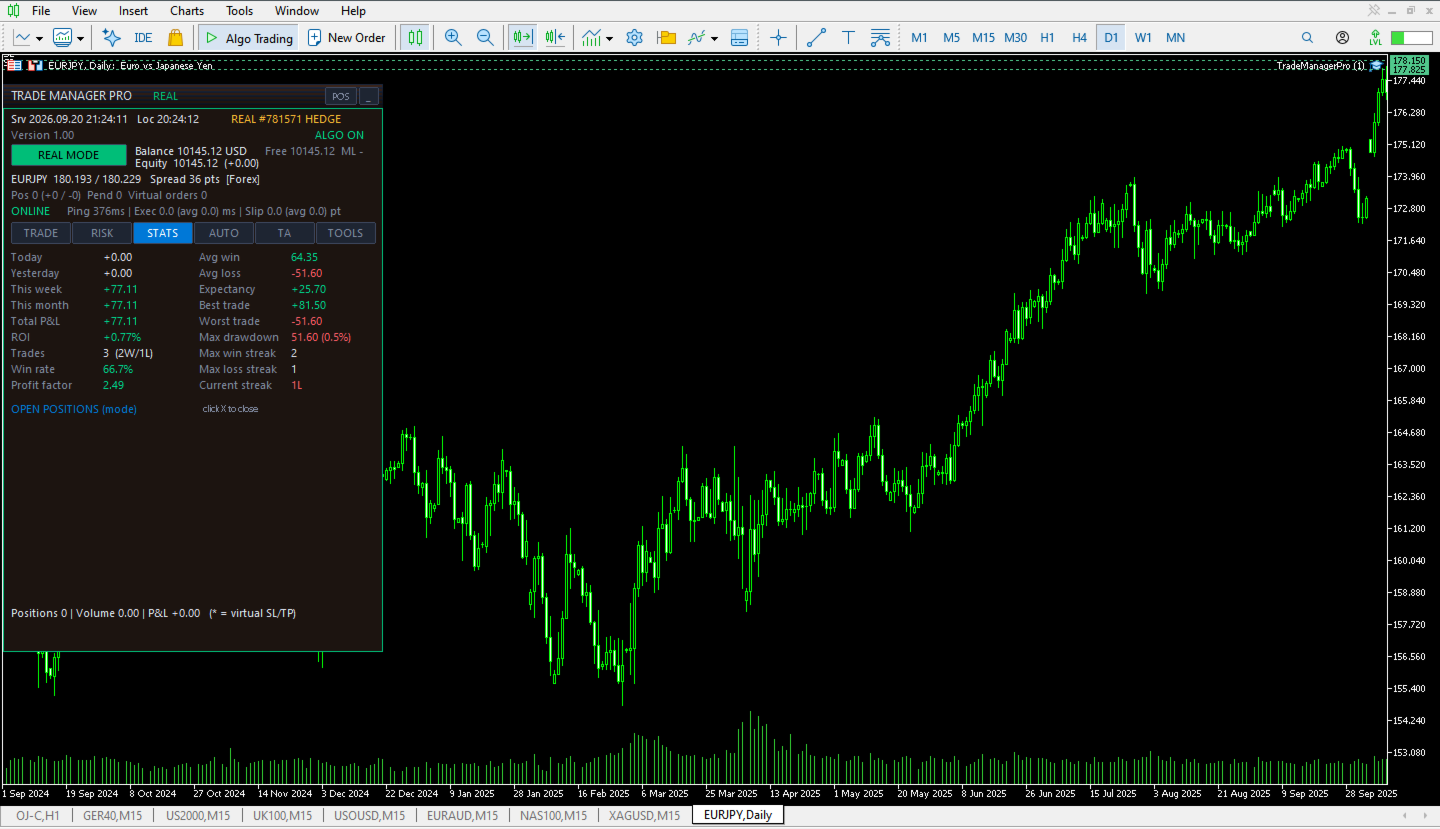
Trade Manger PRO

Introduction

Managing a trade by hand often means an order ticket, a lot calculator, a stop-loss to edit and a set of personal rules to keep in mind. Trade Manager Pro puts these tasks in one panel on your chart.

It is a manual trade manager, not an automated strategy. You decide when to enter. The panel handles order entry, position sizing, stop management and the risk limits you set for yourself.

Two design choices set it apart. First, it has a Real mode and a Virtual mode. Virtual mode is a complete simulated account with its own balance and statistics, so you can practise a routine with the same buttons and without opening any new position at your broker. Second, you can keep stop-loss and take-profit levels on your own computer instead of at the broker, and drag them on the chart.

It works on hedging and netting accounts, on any symbol and any chart timeframe.

Key features

Order entry. Market orders with one click, plus buy stop, sell stop, buy limit and sell limit orders placed at a distance in points that you type. Pending orders can be sent to the broker, or held by the panel and sent as a market order when price touches them. You can also arm the panel and click a price on the chart to place a held pending order there. Drag its line to move it.

Position sizing. Type a lot, pick one of seven presets, or switch on Auto Risk. Auto Risk calculates the lot from your stop-loss distance and a percentage of equity or balance. Three risk levels are available, 0.5, 1.5 and 3.0 percent by default, and all three can be changed.

Stop management. Set stop-loss and take-profit in points, either sent to the broker or kept as virtual levels. Break-even, a trailing stop and four trailing profit levels only ever tighten a stop, never loosen it.

Position tools. Close all positions, only buys, only sells, only profitable, only losing, or one chosen position. Partial close at 25, 50 or 75 percent, scale in, scale out, hedge and reverse.

Templates. Scalping, Day trade and Swing templates set stop-loss, take-profit, risk level and automation in one click. Their distances are scaled for forex, metals, indices and crypto. A fourth slot stores your own settings.

Statistics. Profit and loss for today, yesterday, this week and this month, plus win rate, profit factor, expectancy, average win and loss, streaks and maximum drawdown. A table lists open positions with a close button on each row. Each closed position counts as one trade.

Market view. Trend and RSI on M30, H1, H4 and D1, support and resistance, four pivot point methods, volume compared with its average, and divergence between price and RSI, MACD, Stochastic or CCI. These readings are for information only. The panel does not trade on them.

Alerts and layout. On-chart banner, sound, and optional pop-up and push notifications. Drag the panel by its title bar, snap it to a corner or minimize it. Close all, reverse, emergency stop and account reset ask for confirmation. Keyboard shortcuts (hold Shift) can be switched off.

Risk management and settings

Risk limits. Six limits can be set, and each is switched off by entering 0: daily loss, weekly loss, drawdown from the equity peak, consecutive losses, open positions and trades per day. The defaults are 5 percent, 10 percent, 20 percent, 4, 10 and 20. A warning appears at 80 percent of the loss and drawdown limits. While a limit is exceeded the panel refuses new orders, and the drawdown limit stays active until you press Resume. You can also let the panel close all positions when a loss or drawdown limit is reached. Emergency Stop closes every position, cancels pending orders and halts trading until you press Resume.

Order checks. Before an order is sent the panel checks the connection, the algo trading permission, the symbol trade mode, optional working hours, the minimum reward to risk, available margin, the broker's minimum stop distance, the broker's volume cap per direction and its limit on pending orders. If a check fails, the panel says which one.

Inputs, in groups. General: magic number, order comment, managing other trades and other symbols, virtual account balance, confirmations and shortcuts. Execution: base slippage for forex, metals, indices and crypto, retries, minimum reward to risk and the share of free margin one order may use. Lot sizing and risk levels: default lot, lot limits, the three risk percentages, equity or balance basis and default stop-loss and take-profit. Automation: break-even, trailing and profit level triggers. Analysis: settings for the multi-timeframe view, support and resistance, pivots, volume and divergence. Working hours and alerts: trading window by time and weekday, banner, sound, pop-up and push.

Limits you should know about. Virtual stop-loss and take-profit work only while the panel is running on a connected terminal. If the terminal closes, the panel is removed or the connection drops, those positions have no stop at the broker. The close is a market order sent after price touches the level, so a fast market can fill beyond it. Use broker-side levels where that risk is not acceptable.

By default the panel manages every position on the chart symbol, including manual trades and trades opened by other Expert Advisors. To limit it to orders opened from the panel, turn off Manage manual trades / other EAs.

Loss limits are calculated from the trades the panel manages. The drawdown limit uses account equity.

The panel does not predict the market and does not promise any result. Trading leveraged instruments involves a risk of loss. Try the panel in Virtual mode and on a demo account before you use it on a live account.

Frequently asked questions

Does it open trades on its own?
No. Apart from pending orders that you placed yourself, it never opens a position. It can close positions: at a virtual stop, on Emergency Stop and, if you enable it, when a risk limit is reached.

Does Virtual mode send orders to my broker?
No new orders are sent. Positions that are already open in Real mode stay managed, so their virtual stops and automation keep running while the panel runs.

Which accounts and symbols does it support?
Hedging and netting accounts, and any symbol. The Hedge button needs a hedging account. On a netting account an opposite order would close the position, so the panel declines. Run one copy per symbol on each account.

Can I use it next to other Expert Advisors?
Yes. Set Manage manual trades / other EAs to false if you want it to leave their positions alone.

What happens if I close the terminal?
Broker-side orders and stops are not affected. Virtual stops stop working until the panel runs again. Settings, the virtual account and virtual stop levels are saved on your computer and restored at the next start.

Does it use DLLs or the internet?
No. It has no DLL calls and no web requests. Its files are kept in the terminal's Files folder on your computer.

Can I try it before buying?
The MetaTrader Market provides a demo that runs in the Strategy Tester. It does not run on a live chart. After purchase you can attach it to a demo account and start in Virtual mode.

How do I get started, and where do I ask questions?
Attach the panel to a demo chart, switch to Virtual mode, open a trade with a stop-loss and a take-profit, then try break-even and trailing. Set your limits on the Risk tab. When you are comfortable, move to Real mode with the minimum lot. Questions and bug reports are welcome in the Comments tab of this product. Updates are free and listed under What's New.
Produtos recomendados
This tool will perform Trailing stop loss and Break even management for orders. Helps you limit or reduce the time spend watching orders on the screen, especially when you need to go to sleep. Just add this EA to 1 chart, you can manage all pairs. You can filter orders by comment, magic number, symbol and order ticket number. When Breakeven it can add shift/offset pips (to cover the commission...). You can try in strategy tester before purchase. The EA will add Buy and Sell alternately, so you
Risk Properly with FXPosition Size Calculator which calculated the optimal Lot sSize based on your desired Risk Percentage and Stop-Loss, ensuring precise Risk Management. Enter your account balance, risk percentage, and Stop-Loss(either in points or price levels), and the calculator instantly determines the required lot size so that you don't risk too much. Protect your capital and trade with confidence with Accurate Position Sizing and Simplicity.
Risk-o-meter is a Risk calculator Panel designed to help people who are new to trading, better understand how much they are risking for potential profit or loss. Inputs: 1. Enter your Risk in % or currency 2. Enter your Return Ratio 3. Enter your Lot Size Results: 1. SL line 2. TP Line Features: 1. By moving the SL line, lot size will adjust to keep Risk fixed. 2. By moving the TP line, Risk Ration will adjust to keep Risk fixed.  
DYJ Game Device   is an EA , It has a graphical interface operation,It includes manual opening and quick closing buttons or mobile opening buttons. that follows the virtual transaction record of any dyj indicator to actually open and close positions. You can follow orders according to 5 major strategies Trend mode: Accept the profit and loss ratio assigned to each trader by the market at the close of each day. The actual operation is 1 order each time, with a fixed number of lots each time, such
CYGNIX RISK GLADIATOR — Professional Trade Manager & Risk Guardian for MT5 Guard every position. Manage every trade. Sleep at night. Cygnix Risk Gladiator is a professional-grade position management Expert Advisor that watches every open trade on your account and automatically applies institutional-level risk controls in real time. It does not generate signals — it protects, manages, and exits trades opened by you, your strategies, or any other EA. Built for IC Markets and fully compatible w
SmartEA Trade Manager is a supervisor for accounts that run several Expert Advisors at once. It enforces an EXCLUSIVE TRADING LOCK: the first EA to open a position trades alone, all other managed EAs are removed from their charts, and they are restored with their exact original settings once the account is flat again. You keep the diversification of many EAs without ever stacking their risk. The manager does NOT open trades of its own. It manages the EAs you already run. EAs not in your list a
DDKiller Pro
Njaratahiry Michael Randrianiaina
Stop Blowing Your Account. Once and For All. DDKiller Pro is the MT5 risk guardian that runs silently on your chart and shuts down trading the moment you hit a limit — whether you're grinding a prop firm challenge or managing your own CFD account. The problem every trader knows: You set your rules. You break them anyway. One revenge trade. One overleveraged position. One session that erases a month of gains. DDKiller Pro removes that decision from your hands entirely. What it does: The second yo
Risk Trade Management Panel
Yim Chung Eric Liong Wee Kwong
Risk Panel is an on-chart position sizing, order execution and trade management utility for MetaTrader 5. Additional materials and instructions Instructions It is built for discretionary traders who choose their own entries but want to calculate volume, prepare orders and manage positions directly from the chart. The panel does not provide trading signals and does not choose when to trade. How it works Enter the amount you want to risk, in money or as a percentage of your balance or equity. Pos
Ultimate Pro Trading Panel — All-In-One Manual & Grid Trading Dashboard Pro Trading Panel   is an all-in-one on-chart control panel that gives discretionary and semi-automated traders a complete toolkit for entries, exits, risk management, and grid trading — without leaving the chart. Every function is visual, draggable, and updates in real time. If you want to test this utility feel free to download the basic preview version of this tool here:  https://www.mql5.com/en/market/product/181435 Who
AZ Trade Recovery Assistant MT5 combines manual trading flexibility with intelligent automated management.This advanced on-chart panel isn’t just for trade execution — it’s a complete trade management assistant. You can open or close positions instantly, adjust lot size, manage trailing stops, and modify Take Profit or Stop Loss — all directly from the panel. It’s built for traders who want full control of their trades with smart automation running in the background. What truly makes this assist
Easy Trade Executor é uma ferramenta para cálculo rápido do tamanho da posição, execução de operações e gerenciamento de trades no MT5. Posicione os níveis de Open Price, Stop Loss e Take Profit diretamente no gráfico, obtenha cálculos automáticos do tamanho da posição e abra operações com risco controlado em apenas alguns cliques. Por que escolher o Easy Trade Executor? O Easy Trade Executor foi desenvolvido para traders que desejam mais do que apenas calcular riscos — eles querem gerenciar op
Recovery Assistant Pro for MT5 Professional Manual Recovery Trading Assistant Recovery Assistant Pro is a powerful and easy-to-use Manual Trading Assistant EA. Helps calculate the appropriate Lot Size . Designed to help traders recover losing positions back to profit based on the desired Target USD . Reduces the complexity of Recovery calculations and minimizes errors caused by manual calculations. With a beautiful and user-friendly trading panel (shown above), you can control your trades qu
Equity Master Stop v2 MT5
Frank William Jr Colbert
Trading tool combining a sophisticated equity stop-loss, dynamic take-profit management (Breakeven & Trailing), and symbol-group-based closing logic. It is a complete risk management and trade supervision tool. Features: All features of `Equity Master Stop v1` (floating profit/loss limits, exit protection, skip hours). Take-Profit Override: Can force a TP on any order to lock in a `MAX_FLOATING_PROFIT`. Step Breakeven: Locks in increasing amounts of profit as a trade moves favorably (e.g., aft
SLTPSetter
Raphael Djangmah Osro Agbo
SLTPSetter - StopLoss Take Profit Setter HOW DOES IT WORK? Risk and account management is a very critical aspect of trading. Before entering a position, you must be fully aware how much you will be willing to loss both in percentage and value. This is where SLTPSetter gets you covered.  All you need to do is attach the indicator on the chart and PRESS BUY OR SELL automatically, all parameters needed for placing the trades will be provided at the top left corner of the screen. Feel free to adjust
Trade Manager DaneTrades
Levi Dane Benjamin
4.23 (30)
Trade Manager para ajudá-lo a entrar e sair rapidamente de negociações enquanto calcula automaticamente seu risco. Incluindo recursos para ajudar a evitar negociações excessivas, negociações de vingança e negociações emocionais. As negociações podem ser gerenciadas automaticamente e as métricas de desempenho da conta podem ser visualizadas em um gráfico. Esses recursos tornam este painel ideal para todos os traders manuais e ajudam a aprimorar a plataforma MetaTrader 5. Suporte multilíngue. Vers
The AZT Profit Locker is an advanced automated risk-management utility designed specifically for MetaTrader 5 (MT5) traders who want to remove emotional interference and protect their hard-earned profits. Traders aren't just fighting the Forex market, they're fighting their own biology. Fear, Greed and Anxiety lead to holding losers too long and cutting winners too early. The utility flips the script by removing emotion from risk management. Operating as a dedicated automated risk manager, this
Trade Manager G2 MT5
Ida Bagus Putu Mahardika
TRADE MANAGER G2 – PRODUCT DESCRIPTION By Ida Bagus Putu Mahardika Trade Manager G2 – All-in-One Trading Panel for Professional Execution & Risk Management Trade Manager G2 is a next-generation trading panel designed to give you full control over order execution, position management, and profit optimization in real time on MetaTrader 5. With a modern card-based user interface and individual TP actions per level, this panel elevates your trading experience to the next level. KEY ADVANTAGES OF
TradeControl Pro – Gerenciador de Trades Avançado para MetaTrader TradeControl Pro é uma ferramenta de gestão de trades para MetaTrader que permite a administração estruturada e eficiente de posições diretamente no gráfico. A aplicação combina uma interface clara com cálculos automatizados e opções flexíveis de controlo para diferentes abordagens de trading. O painel integrado no gráfico (On-Chart) possui uma estrutura em formato de tabela e está dividido em três áreas principais (abas): Executi
TP SL Bot MT5
Ruslan Brezovskiy
5 (1)
TP SL Bot - uma ferramenta que automaticamente estabelece o Stop Loss e Take Profit para novas ordens abertas de várias maneiras de acordo com suas instruções. Ele também tem a função de calcular o volume necessário para abrir uma negociação para atingir o lucro desejado com o tamanho de stop loss/take profit especificado.   Existem várias formas de calcular o tamanho e configurar os parâmetros: 1. Configurações com base na quantidade especificada pelo usuário em percentagem do saldo atual da co
Bastion is a monitor-and-close-only risk manager for prop-firm traders. It watches your account against your firm's daily-loss and maximum-drawdown limits in real time and force-closes your open positions BEFORE you cross a line. It never opens a trade of its own, so it stays fully within the tools allowed by FTMO, FundedNext, The5ers, FTUK and FXIFY. Why traders fail challenges A large share of failed evaluations end on a single daily-loss breach: a moment of inattention, a news spike, one tra
You can change the time period of the chart at the touch of a button. You can also change multiple charts at the touch of a button. You can also change multiple charts at the touch of a button,   saving you the trouble of changing time periods. We are live-streaming the actual operation of the system. Please check for yourself if it is usable. Please check it out for yourself. https://www.youtube.com/@ganesha_forex We do not guarantee your investment results. Investments should be made at you
Bneu News Filter Pro
Marvinson Salavia Caballero
Bneu News Filter is a trading utility for MetaTrader 5 that monitors economic calendar events and manages trading activity during high-impact news releases. The utility provides automatic position protection, real-time spread monitoring, and optional news trading functionality through a visual panel interface. Main Functionality Economic Calendar Integration Automatic retrieval of economic calendar events from the MetaTrader 5 built-in calendar. Monitors 8 major currencies: USD, EUR, GBP, JP
Margin Call Shield – Defend Your Margin on Your Terms Margin Call Shield is a tool for MetaTrader 5 traders who want to decide for themselves which open positions are closed during margin call situations before the platform does so automatically based on its internal rules. By default, the broker or platform decides which positions to close, often using undisclosed algorithms. Margin Call Shield lets you set this order according to your own strategy. Why Was Margin Call Shield Created? In a mar
The Ultimate All-In-One Trade Manager & Prop Firm Guardian for MT5. Nexus Pro Trade Manager is the most advanced, all-in-one trading assistant designed for both manual traders and Prop Firm challengers. Featuring a stunning, lag-free UI (Dark/Light mode), it completely transforms your MT5 into a professional trading terminal. Whether you are trading a personal account or trying to pass evaluations for FTMO, FundedNext, or other prop firms, Nexus Pro protects your capital, automates your risk cal
SwiftEdge Scalper EA Profissional de Scalping com Controle Manual Completo O scalping exige decisões em frações de segundo, gestão precisa de risco e execução perfeita de ordens. Gerenciar cálculos de breakeven, trailing stops e múltiplas posições enquanto observa a ação do preço é avassalador sem as ferramentas certas. SwiftEdge Scalper é seu assistente de trading profissional projetado para scalpers ativos e day traders. Execute operações com um clique ou atalho de teclado, enquanto o EA geren
Rhino Backtest Manager - gestor de operações para o trading real e o testador de estratégia Rhino Backtest Manager é um painel de gestão de operações que funciona tanto no trading real quanto no testador de estratégia do MetaTrader 5. Ele permite enviar e gerir ordens manualmente dentro do testador com a mesma interface usada numa conta real, de modo que uma estratégia pode ser verificada em dados históricos e depois negociada sem trocar de ferramenta. O painel calcula o volume da posição a par
Equity Firewall é uma ferramenta para MT5 projetada para controle automático de drawdowns e gestão de risco a nível de conta. Protege o capital, especialmente quando múltiplos consultores especialistas estão operando na mesma conta com risco de aumentos repentinos de posições ou drawdowns. Instalar a versão de teste para contas demo Equity Firewall permite definir um drawdown máximo geral, um limite diário de perdas e um objetivo de lucro, com a opção de escolher a ação ao atingir o limite: fech
Trade Assistant 38 in 1
Makarii Gubaydullin
4.91 (23)
Ferramenta Multifuncional: Calculadora de Lote, Ordens Grid, Proporção R/R, Gerenciador de Negociações, Zonas de Oferta e Demanda, Price Action e muito mais Versão Demo   |   Manual do Usuário O Assistente de Trading   não funciona no testador de estratégias : você pode baixar a   Versão Demo AQUI  para testar a utilidade . Entre em contato   para qualquer dúvida  / ideias de melhoria / caso encontre um erro Se precisar de uma versão MT4, ela está disponível aqui Simplifique, acelere e automati
Currency Exposure Matrix is a currency-level exposure dashboard derived from current open positions. Key functions: - Gross and net currency exposure - Long and short decomposition - Deposit-currency conversion - Concentration warnings - Transparent handling when conversion symbols are unavailable The utility helps users understand aggregated currency exposure across their portfolio. It does not generate entry signals, predict market direction or guarantee trading results. Review broker symbol
Headline ShikaaTraders Gold Grid Pro is a high-performance trade management utility designed specifically for XAUUSD (Gold) and high-volatility pairs. It allows traders to execute complex grid-layering strategies with a single click, ensuring you never miss an entry during fast market moves. Why Choose Gold Grid Pro? Manual trading on Gold requires speed. Manually calculating distances and opening multiple positions takes too much time. This utility automates the "Scaling-In" process, allowing y
Os compradores deste produto também adquirem
Trade Assistant MT5
Evgeniy Kravchenko
4.43 (216)
Ajuda a calcular o risco por comércio, a fácil instalação de uma nova encomenda, gestão de encomendas com funções de fecho parcial, trailing stop de 7 tipos e outras funções úteis. Materiais e instruções adicionais Instruções de instalação   -   Instruções para a aplicação   -   Versão de teste da aplicação para uma conta de demonstração Função de linha Mostra no gráfico a linha de Abertura, Stop Loss, Take Profit. Com esta função é fácil definir uma nova ordem e ver as suas características ad
Bem-vindo ao Trade Manager EA—uma ferramenta de gestão de risco criada para tornar o trading mais intuitivo, preciso e eficiente. Não é apenas uma ferramenta para executar ordens, mas uma solução abrangente para planejamento de operações, gerenciamento de posições e controle de risco. Seja você um iniciante, trader avançado ou scalper que precisa de execução rápida, o Trade Manager EA adapta-se às suas necessidades, oferecendo flexibilidade em todos os mercados, desde forex e índices até commodi
================================================================================ POC BREAKOUT - V20.72. Full Professional Grade Toolkit ================================================================================ POC Breakout is a full MetaTrader 5 trading dashboard for discretionary traders who want breakout signals, Point of Control (POC) context, volume profiles, order flow, market structure, news, alerts, and advanced trade planning in one professional workspace. Attached directly to you
TradePanel MT5
Alfiya Fazylova
4.88 (169)
Trade Panel é um assistente de negociação multifuncional. O aplicativo contém mais de 50 funções de negociação para trading manual e permite automatizar a maioria das tarefas de negociação. Instruções para o aplicativo + vídeo-instruções: https://www.mql5.com/pt/blogs/post/772421 Versão de teste do aplicativo para conta demo: https://www.mql5.com/pt/blogs/post/762547 Como instalar o aplicativo: https://www.mql5.com/pt/blogs/post/762548 Como testar o aplicativo no modo visual: https://www.mql5.co
O Telegram to MT5 Multi-Channel Copier copia automaticamente os sinais de trading dos seus canais de Telegram diretamente para o MetaTrader 5. Sem bots, sem extensões de navegador, sem copiar à mão. O sinal chega ao Telegram e o EA abre a operação no seu terminal em poucos segundos. E antes de copiar um canal, o backtester integrado mostra o que esse canal teria feito na sua conta. O produto inclui dois componentes: um aplicativo de Windows que escuta os seus canais de Telegram, e este Expert Ad
Copie sinais do Telegram com suas próprias regras de negociação Telegram to MT5 Signal Trader copia automaticamente sinais de negociação em texto de canais e grupos públicos e privados do Telegram para o MetaTrader 5. Gerencie vários provedores e contas MT5 em um único aplicativo para desktop, com configurações individuais de risco e de negociação para cada provedor . Você não precisa de um bot do Telegram nem configurar uma API para copiar sinais. Basta entrar com sua própria conta do Telegram
Farmed Hedge Yield Farming | All Markets (Manual - Hybrid - Semi/Automated EA) VERIFIED TRADING RESULTS - Farmed Hedge Yield Axi Copy:  https://www.mql5.com/en/signals/2356376 - Farmed Hedge Yield Exn Copy:   https://www.mql5.com/en/signals/2356404 - Farmed Hedge Yield V Copy:  https://www.mql5.com/en/signals/2357156 IMPORTANT NOTICE: FarmedHedge is a MANUAL-FOCUSED TRADING UTILITY ,not a fully automated EA. Results shown on this Signal include manual trades and overall strategic management.
Premium Trade Manager - O Painel de Operações com um Coach Integrado Premium Trade Manager coloca um coach de trading dentro do seu gráfico, com um motor de execução completo por baixo. Configure a operação da forma que sempre faz e deixe o Max, seu coach de trading com IA, ler exatamente esse setup em relação à sua conta ao vivo e dar um veredicto direto antes de confirmar: se o stop é disciplinado, se o risco faz sentido, se há um evento de alto impacto a minutos de distância, se você está pró
Exp COPYLOT CLIENT for MT5
Vladislav Andruschenko
3.97 (35)
Copiador profissional de operações para MetaTrader 5 Um copiador de operações rápido, profissional e confiável para MetaTrader . COPYLOT permite copiar operações de Forex entre terminais MT4 e MT5 com suporte para contas Hedge e Netting . A versão MT5 do COPYLOT oferece suporte a: - MT5 Hedge → MT5 Hedge - MT5 Hedge → MT5 Netting - MT5 Netting → MT5 Hedge - MT5 Netting → MT5 Netting - MT4 → MT5 Hedge - MT4 → MT5 Netting Versão MT4 Descrição completa + DEMO + PDF Como comprar Como instalar Como
HINN MagicEntry Extra
ALGOFLOW OÜ
4.74 (19)
HINN MAGIC ENTRY – the ultimate tool for entry and position management! SIMPLE. FASTEST. INTUITIVE. MAX AUTOMATED. Place orders by selecting a level directly on the chart! full description   ::  demo-version  :: 60-sec-video-description Key features: - Market, limit, and pending orders - Automatic lot size calculation - Automatic spread and commission accounting - Unlimited partitial take-profits  - Breakeven and trailing stop-loss and take-profit  functions - Invalidation leves - Intuitive, a
Trade Manager DashPlus
Henry Lyubomir Wallace
4.85 (13)
DashPlus é uma ferramenta avançada de gerenciamento de operações projetada para melhorar a eficiência e a eficácia das suas transações na plataforma MetaTrader 5. Ela oferece um conjunto completo de funcionalidades, incluindo cálculo de risco, gestão de ordens, sistemas de grade avançados, ferramentas baseadas em gráficos e análise de desempenho. Principais Funcionalidades 1. Grade de Recuperação Implementa um sistema de grade flexível e de média para gerenciar operações em condições adversas de
EasyInsight AIO MT5
Alain Verleyen
4.92 (12)
EASY Insight AIO – A solução tudo-em-um para trading inteligente e sem esforço Visão geral Imagine analisar todo o mercado — Forex, Ouro, Cripto, Índices e até Ações — em segundos, sem precisar examinar gráficos manualmente, instalar indicadores ou lidar com configurações complicadas. EASY Insight AIO é sua ferramenta definitiva de exportação para trading com IA, pronta para usar. Ela oferece um panorama completo do mercado em um único arquivo CSV limpo — pronto para análise imediata no ChatGP
Trade Copier Ultimate
Janitha Sandaruwan Amaradasa Wickramasingha Arachchilage
5 (5)
Trade Copier Ultimate - Telegram to MT5 Signal Copier Trade Copier Ultimate automatically copies Telegram trading signals into MetaTrader 5. The EA can read signal messages, detect the symbol, order type, entry price, Stop Loss, Take Profit levels and selected update commands, then execute or manage the trade in MT5 using your lot and risk settings. It is more than a basic Telegram to MT5 copier. TCU also supports Bot API and user-account Bridge workflows, Discord signal routing, local MT5 to MT
Trade Dashboard MT5
Fatemeh Ameri
4.94 (133)
Trade Dashboard simplifies how you open, manage, and control your trades, with built-in lot size calculation. It allows you to execute trades, manage risk, and control positions directly on the chart, with tools such as partial close, breakeven, and trailing stop. Designed to reduce manual work and help you stay focused on your trading decisions. A demo version is available for testing. Detailed explanations of features are provided within the MQL5 platform. Installation instructions are include
Timeless Charts
Samuel Manoel De Souza
5 (8)
Timeless Charts é um utilitário de trading tudo-em-um para traders profissionais. Ele combina tipos de gráficos personalizados, como Gráficos por Segundos e Renko , com análise avançada de fluxo de ordens utilizando Footprints , Clusters , Perfis de Volume , estudos VWAP e ferramentas de análise ancorada para uma visão mais profunda do mercado. O gerenciamento de ordens e posições é realizado diretamente no gráfico por meio de um painel integrado de gerenciamento de operações , enquanto o Market
EA Overfitter
Stephen J Martret
5 (1)
That backtest looks great. But will it still be making money tomorrow, next week, next month? EA Overfitter re-runs your EA on 100 price histories it has never seen. One score tells you if the edge is real. A backtest tells you what an EA did on one price history — the one that happened to occur. What you cannot tell from it is how much of that result was the strategy and how much was the particular path. EA Overfitter answers that. It builds up to 100 synthetic price histories your EA has n
Trade Indicator Assistant   is a powerful MT5 utility designed to turn indicators into automated trading systems. Its main feature is the ability to automatically detect an indicator’s   BUY and SELL signal buffers , without requiring you to know the buffer numbers, search through indicator settings, or modify the indicator source code. Bonus Indicator:   After purchasing Trade Indicator Assistant, contact me to receive   Trade Signal Pro   completely free as a bonus indicator. [Download Demo V
Footprint Chart Pro — Professional OrderFlow EA for MetaTrader 5 Version 6.34 | Professional tool for real traders | Institutional-Grade Visualization DEMO USERS - PLEASE SELECT EVERY TICK / REAL TICK WHEN TESTING AND YOU HAVE DOWNLOADED HISTORICAL DATA. IF YOU SEE A WAITING SCREEN AND IT IS NOT DOWNLOADING, IT MEANS YOU HAVE LOW HISTORICAL DATA. TRY 1 MIN AND 5 MIN FIRST ON 1 DAY DATA. ONE DAY DATA SHOULD BE THE NEWEST AND MOST CURRENT DATE. PLEASE WAIT UNTIL THE MARKET HAS ROLLED OVER PERIOD.
The News Filter MT5
Leolouiski Gan
4.78 (23)
Este produto filtra todos os consultores especializados e gráficos manuais durante o horário das notícias, para que você não precise se preocupar com picos de preços repentinos que possam destruir suas configurações de negociação manuais ou negociações realizadas por outros consultores especializados. Este produto também vem com um sistema de gerenciamento de pedidos completo que pode lidar com suas posições abertas e ordens pendentes antes do lançamento de qualquer notícia. Depois de comprar o
The product will copy all telegram signal to MT5 ( which you are member) , also it can work as remote copier.  Easy to set up, copy order instant, can work with almost signal formats, image signal,  s upport to translate other language to English Work with all type of channel or group, even channel have "Restrict Saving Content", work with  multi channel, multi MT5 Work as remote copier: with signal have ticket number, it will copy exactly via ticket number. Support to backtest signal. How to s
News Filter EA
Rashed Samir
5 (2)
News Filter EA: Advanced Algo Trading Assistant News Filter EA is an advanced algo trading assistant designed to enhance your trading experience. By using the News Filter EA , you can integrate a Forex economic news filter into your existing expert advisor, even if you do not have access to its source code. In addition to the news filter, you can also specify trading days and hours for your expert. The News Filter EA also includes risk management  and equity protection features. MT4 Version Ma
Anchor Trade Manager
Kalinskie Gilliam
5 (9)
Your EAs cannot see each other, but Anchor can. Anchor gives you one place to coordinate your EAs, manage risk, and decide when trading is allowed. It works alongside the trading bots you already use without any changes to them. The Problem One EA opens a trade. Then another starts trading. The next thing you know, you wake up to multiple grids built across your account. Each EA may be doing exactly what it was designed to do, but together they can place far more risk on your account than you in
Power Candles Strategy Scanner - Localizador de configurações multissímbolo com auto-otimização O Power Candles Strategy Scanner utiliza o mesmo motor de auto-otimização que alimenta o indicador Power Candles — em todos os símbolos da sua lista de observação, lado a lado. Um painel indica-lhe quais os símbolos que são estatisticamente negociáveis neste momento, qual a estratégia vencedora para cada um, o par ideal de Stop Loss / Take Profit, e avisa-o assim que um novo sinal é emitido. Esta ferr
Astro Trade MT5
Indra Maulana
5 (7)
25% discount on the release of the tool: only for the next 3 buyers Send a message to receive a demo version. AstroTrade Trading Assistant AstroTrade is a comprehensive multi-functional trading utility developed for the MetaTrader 5 platform. It integrates essential tools for trade execution, risk management, and technical monitoring into a single unified interface. The application is designed to assist traders in managing their daily operations through a visual and structured environment. Vi
O Local Trade Copier EA é uma solução para traders individuais ou gerentes de contas que precisam executar sinais de negociação de fontes externas ou que precisam gerenciar várias contas ao mesmo tempo, sem a necessidade de uma conta MAM ou PAMM. Copia de até 8 contas mestras para contas escravas ilimitadas [ Guia de instalação | Guia de atualização | Solução de problemas | Perguntas frequentes | Todos os produtos ] 100% auto-hospedado Fácil de instalar e usar Nenhum instalador, arquivos de con
Um painel profissional para operação manual que reúne todo o ciclo do trade em uma única janela no gráfico, da entrada precisa à proteção da conta. Calcule o volume exato de cada posição para o risco definido, monte a operação traçando linhas no gráfico com o RR Tool e envie ordens a mercado e pendentes, grids e OCO. O painel assume o acompanhamento da posição: fechamento parcial em até cinco níveis, seis tipos de trailing stop, breakeven e Virtual SL/TP. Limites diários, semanais e mensais prot
FUTURES ORDERFLOW FOOTPRINT CHART Professional OrderFlow EA for MetaTrader 5 Version 1.01| Professional tool for real traders | Institutional-Grade Visualization STRATEGY TESTER USERS - PLEASE SELECT EVERY REAL TICK WHEN TESTING AND YOU HAVE DOWNLOADED HISTORICAL DATA. IF YOU SEE A WAITING SCREEN AND IT IS NOT DOWNLOADING, IT MEANS YOU HAVE LOW HISTORICAL DATA. TRY 1 MIN AND 5 MIN FIRST ON 1 DAY DATA. ONE DAY DATA SHOULD BE THE NEWEST AND MOST CURRENT DATE. PLEASE WAIT UNTIL THE MARKET HAS ROL
Risk Manager Pro MT5 is an account protection Expert Advisor for traders who want strict risk control inside MetaTrader 5. The utility monitors your account equity, daily and weekly results, drawdown, open positions, trade count, consecutive losses, and trading hours. When a configured limit is reached, it can automatically close positions, cancel pending orders, stop other EAs, send notifications, or close the terminal. Instead of relying on discipline during a stressful trading session, you de
YuClusters
Yury Kulikov
4.93 (43)
Atenção: A versão demo para revisão e teste está aqui . YuClusters é um sistema profissional de análise de mercado. O trader tem oportunidades únicas para analisar o fluxo de pedidos, volumes de negociação, movimentos de preços usando vários gráficos, perfis, indicadores e objetos gráficos. O YuClusters opera com base em dados de Tempos e Negócios ou informações de ticks, dependendo do que está disponível nas cotações de um instrumento financeiro. O YuClusters permite que você crie gráficos com
Signal TradingView to MT5 Pro Automator Execução profissional instantânea entre TradingView e MetaTrader 5 Automatize a sua estratégia de trading com a ponte de comunicação mais robusta entre os alertas do TradingView e a execução real no MT5. Concebido para traders que exigem velocidade, flexibilidade e uma gestão de risco impecável, este Expert Advisor transforma qualquer mensagem de alerta numa ordem de mercado ou de limite precisa. PONTOS FORTES E VANTAGENS Motor de Parsing Universal (Propri
Mais do autor
Market Maker Reversal Scanner — Multi-Symbol Daily Reversal Dashboard for MT4 By the time you've clicked through forty charts looking for a first red day at a monthly high, the setup you wanted has already closed. Market Maker Reversal Scanner reads your entire Market Watch on the daily timeframe, finds a fixed set of reversal and exhaustion patterns, scores each one on a transparent 10-point scale, and puts the results in a single sortable panel on one chart. You stop hunting. You start choosin
Market Maker Signal Days MT4
Siyasanga Stephen Mabokela
Market Maker Signal Days — On-Chart Companion Indicator "Always think of your entry point as last night's close." — Paul Tudor Jones Introduction Market Maker Reversal Scanner tells you which instruments to look at. Signal Days tells you what you're looking at once you get there. Attach it to any chart and it reads the daily timeframe, applies the same scoring engine as the scanner, and draws the result directly on your price action: signal labels, extreme levels, a first-day-of-month reference,
Market Maker Reversal Scanner — Multi-Symbol Daily Reversal Dashboard for MT5 By the time you've clicked through forty charts looking for a first red day at a monthly high, the setup you wanted has already closed. Market Maker Reversal Scanner reads your entire Market Watch on the daily timeframe, finds a fixed set of reversal and exhaustion patterns, scores each one on a transparent 10-point scale, and puts the results in a single sortable panel on one chart. You stop hunting. You start choosin
Market Maker Signal Days MT5
Siyasanga Stephen Mabokela
Market Maker Signal Days — On-Chart Companion Indicator "Always think of your entry point as last night's close." — Paul Tudor Jones Introduction Market Maker Reversal Scanner tells you which instruments to look at. Signal Days tells you what you're looking at once you get there. Attach it to any chart and it reads the daily timeframe, applies the same scoring engine as the scanner, and draws the result directly on your price action: signal labels, extreme levels, a first-day-of-month reference,
Filtro:
Sem comentários
Responder ao comentário