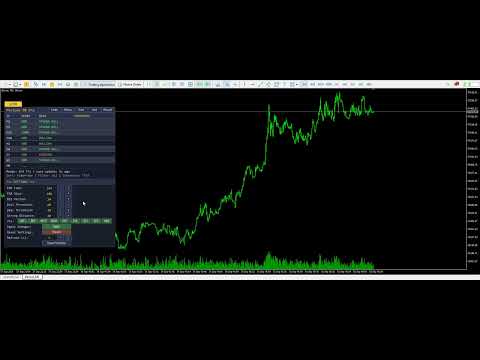
Periods BB Pro Multi Timeframe Trend Bias Scanner
- Indicadores
- Versão: 2.10
- Ativações: 5

Multi-timeframe trend bias scanner combining EMA trend, RSI momentum, and price strength into a composite 0-100 score per timeframe. Ranks up to 9 timeframes with 5-tier classification, consensus column, and a professional draggable panel.
Full Product Description
Overview
Periods BB Pro is a professional multi-timeframe trend bias scanner that answers the single most important question a trader can ask before placing an order: "Which direction is the market really going, across every timeframe I care about?"
Instead of hopping between charts to check EMAs and RSI on M15, then H1, then H4, then D1 — trying to remember what you saw two minutes ago — this indicator scans up to 9 timeframes simultaneously and displays their trend bias in a single ranked table. Each timeframe is scored from 0 to 100 based on a composite of three proven directional signals, then classified into one of five tiers from STRONG BEAR to STRONG BULL.
The result is a real-time, at-a-glance market bias map that lets you align every trade with the dominant flow.
Understanding the Composite Score
Single-indicator scanners are unreliable. A bullish RSI reading during a bearish EMA cross tells you nothing useful. Periods BB Pro solves this by combining three independent directional signals into a single robust score:
1. Trend (EMA Fast vs EMA Slow) — weight +2 / -2 The most established measure of trend direction. When the fast EMA (default 50) is above the slow EMA (default 200), the market is in an uptrend. Below, downtrend.
2. Momentum (RSI Level) — weight +2 / -2 RSI above 60 confirms bullish momentum. Below 40, bearish momentum. Between 40 and 60, momentum is inconclusive.
3. Immediate Strength (Price vs EMA Fast) — weight +1 / -1 The tiebreaker. Price above the fast EMA shows immediate bullish pressure. Below, immediate bearish pressure.
The three signals sum to a raw score from -5 to +5, which is then normalized to 0-100 for display. The 5-tier classification is:
- 80-100 — STRONG BULLISH (all three signals agree bullish, extreme)
- 60-79 — BULLISH (majority bullish, meaningful)
- 40-59 — NEUTRAL (mixed signals, no clear bias)
- 20-39 — BEARISH (majority bearish, meaningful)
- 0-19 — STRONG BEARISH (all three signals agree bearish, extreme)
The thresholds are user-configurable, and the "STRONG" distance from 50 is adjustable in the live settings panel.
Key Features
9 Timeframes, Individual Control Scan any combination of M1, M5, M15, M30, H1, H4, D1, W1, and MN1. Each timeframe has its own dedicated toggle button in the settings panel — click any one to add or remove it from the scan without touching the others. All 9 timeframes are enabled by default so you see the full market picture from the moment you attach the indicator.
CONSENSUS Column The most powerful feature of the scanner. Beyond individual timeframe scores, the panel shows a consensus indicator across ALL enabled timeframes:
- ^4/6 — 4 of 6 measured timeframes are bullish (bullish leaning)
- v3/5 — 3 of 5 measured timeframes are bearish (bearish leaning)
- - — tie between bulls and bears (no directional consensus)
When all measured timeframes agree in the same direction, the consensus is highlighted in gold — signaling a rare, high-conviction market alignment across every timescale you monitor.
Draggable Panel with Live Settings The panel starts at your chosen position but can be moved anywhere on the chart by clicking and dragging its title bar. The position is saved automatically and restored between MT5 restarts. A built-in Settings sub-panel lets you toggle timeframes, adjust EMA and RSI periods, tune thresholds, and change refresh rate — all in real time, without opening the input dialog.
Sortable Rankings Click Sort in the panel title to cycle through three sort modes:
- timeframe — natural order (M1 → MN1)
- score — highest score at the top (bullish first)
- strength — most extreme signals first (STRONG bull/bear at top)
Sort by strength when you want to see immediately which timeframes are showing the loudest signals, regardless of direction.
Filter Modes Click Show to filter which rows appear:
- all — every enabled timeframe
- bulls — only bullish and STRONG BULL rows
- bears — only bearish and STRONG BEAR rows
- strong — only STRONG BULL and STRONG BEAR (extreme signals)
Perfect for cutting through noise when scanning for the strongest trades of the day.
5-Tier Color Classification Each bias tier has its own color for instant visual recognition:
- STRONG BULL — bright green
- BULLISH — soft green
- NEUTRAL — muted gray-blue
- BEARISH — orange-red
- STRONG BEAR — bright red
Rows with STRONG signals are also highlighted with a slightly different background for extra visibility.
Adjustable Formula Parameters Every input to the score can be tuned live from the settings panel:
- EMA Fast period (presets: 8, 13, 21, 34, 50, 89, 100, 144)
- EMA Slow period (presets: 50, 89, 100, 144, 200, 233)
- RSI Period (presets: 7, 9, 14, 21, 28)
- Bull Threshold — score level where BULLISH begins (default 60)
- Bear Threshold — score level where BEARISH begins (default 40)
- Strong Distance — how far from 50 defines STRONG tier (default 20)
Changes apply instantly. The indicator rebuilds its internal handles and the panel refreshes immediately.
Full State Persistence Everything you customize persists between MT5 restarts, per chart:
- Panel position (X, Y coordinates)
- Panel visibility and settings sub-panel visibility
- Sort mode and filter mode
- EMA periods, RSI period, thresholds, strong distance
- Which 9 timeframes are enabled (stored as a compact bitmap)
Each chart has its own state file (identified by ChartID ), so different charts can have different scanner configurations running simultaneously.
Always-Visible Toggle Button When you hide the panel, a small [ ] BB button remains in the corner so you can bring the panel back with a single click. The button label reflects the current state ( [x] when visible, [ ] when hidden).
The Professional Panel
Panel Layout
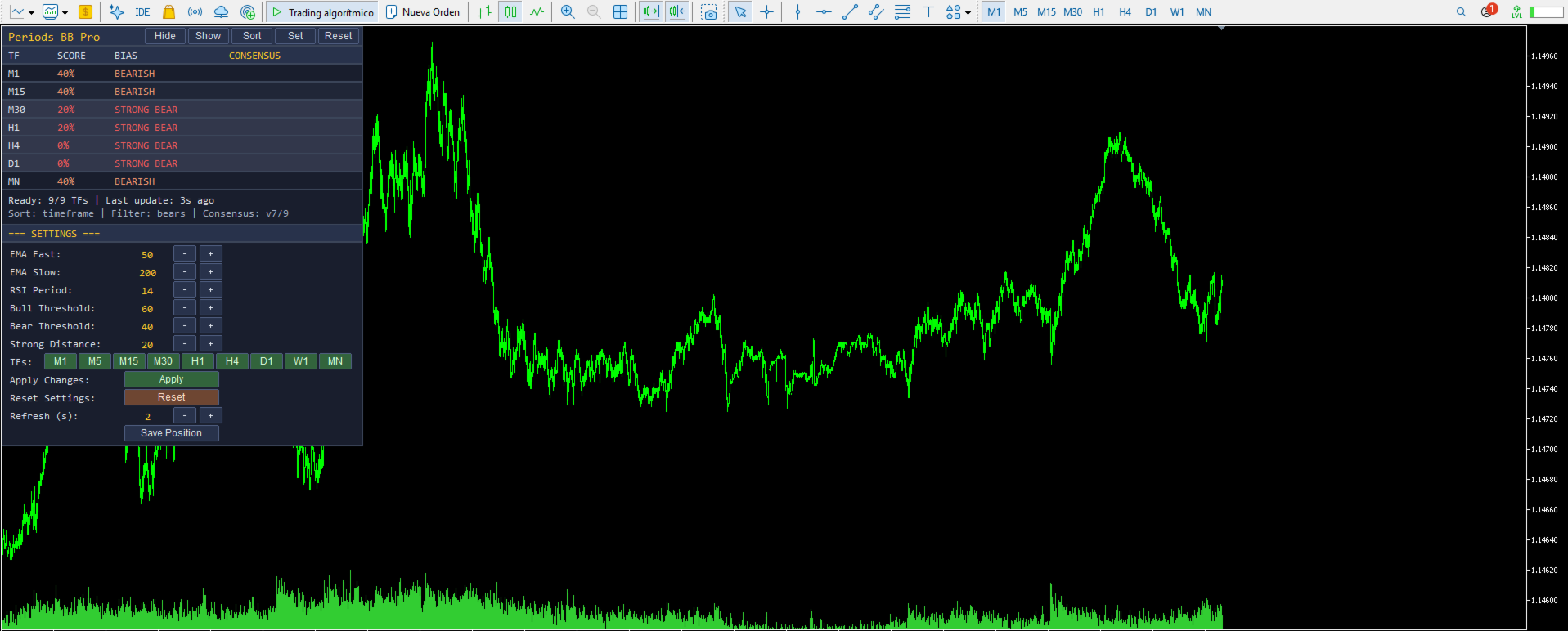
+-------------------------------------------------------+ | Periods BB Pro [Hide][Show][Sort][Set][Reset]| <- Draggable title bar +-------------------------------------------------------+ | TF | SCORE | BIAS | CONSENSUS | <- Column headers +-------------------------------------------------------+ | M1 | 78% | BULLISH | | | M5 | 88% | STRONG BULL | | | M15 | 65% | BULLISH | | | M30 | 50% | NEUTRAL | | | H1 | 45% | NEUTRAL | | | H4 | 32% | BEARISH | | | D1 | 28% | BEARISH | | | W1 | 65% | BULLISH | | | MN | 82% | STRONG BULL | | +-------------------------------------------------------+ | Ready: 9/9 TFs | Last update: 2s ago | <- Status | Sort: timeframe | Filter: all | Consensus: ^5/9 | <- Status +-------------------------------------------------------+
Settings Sub-Panel (opened with the Set button)
- EMA Fast, EMA Slow, RSI Period, Bull Threshold, Bear Threshold, Strong Distance — each with [-] [+] preset cycles
- 9 individual timeframe toggle buttons in one row
- Apply Changes button (rebuilds indicator handles)
- Reset Settings button (restores input defaults)
- Refresh interval control
- Save Position button
Practical Trading Applications
Multi-Timeframe Alignment for Trade Entry Before entering any trade, check the scanner. If your intended direction agrees with the CONSENSUS across at least 4-5 timeframes, the odds are on your side. If the CONSENSUS is against you, or ties ( - ), you may be trading against the dominant flow.
Higher Timeframe Filter for Lower Timeframe Signals Trading M5 or M15 setups? Look at H1, H4, and D1 in the scanner. If all three are BULLISH or STRONG BULL, take only long M5/M15 setups. This single filter can transform a mediocre lower-timeframe system into a consistently profitable one.
Momentum Reversal Detection When a symbol transitions from STRONG BEAR on H1, to BEARISH , then NEUTRAL , then BULLISH — you are watching a multi-timeframe momentum reversal build in real time. Combined with the CONSENSUS column, this catches turns before they become obvious.
Institutional Flow Analysis Large institutional positions play out across days and weeks. The D1 and W1 rows tell you where the smart money is committed. When those two agree in direction, and shorter timeframes align with them, you are trading with institutional flow, not against it.
End-of-Day Scan At session close, glance at the scanner. If MN, W1, D1 are all STRONG BULL, tomorrow's bias is bullish. Plan your positions accordingly. If the higher timeframes are split, expect chop and reduce size.
Scalping with Trend Context Fast scalpers can enable only M1, M5, and M15. The consensus across these three gives the immediate flow. Combine with the H1 as a "control" timeframe: only take longs when H1 is bullish, only take shorts when H1 is bearish.
Full Input Parameter List
Bias Calculation
- EMA fast period
- EMA slow period
- RSI period
- Bullish score threshold
- Bearish score threshold
- Strong distance from 50
Timeframes to Scan
- Show M1, M5, M15, M30, H1, H4, D1, W1, MN1 — each independently (all default ON)
Panel Settings
- Show info panel
- Panel initial X / Y (px)
- Refresh interval (seconds)
- Font size
- Row height (px)
Panel Colors
- Background, header, text, accent (title)
- STRONG BULL, BULL, NEUTRAL, BEAR, STRONG BEAR colors
Persistence
- Save state between MT5 restarts
Technical Specifications
- Platform: MetaTrader 5 (build 3815 or later)
- Type: Chart-window custom indicator (no separate window)
- CPU load: Minimal — refresh is timer-based (1-30 seconds), not tick-based
- Memory: Standard indicator footprint plus 3 handles per enabled timeframe
- No DLL dependencies — pure native MQL5
- No external network requests — fully offline
- File system access: state persistence file inside the MT5 sandbox only
- Compatible with: all account types (real, demo, netting, hedging)
- Symbol support: universal — works on forex, futures, indices, metals, crypto
- Language: all interface elements in English
Why Periods BB Pro Over Alternatives
Free MTF scanners have consistent limitations:
- Single-indicator logic — usually just EMA cross OR just RSI. Prone to false signals in choppy markets.
- Fixed timeframe list — cannot add or remove timeframes without editing code
- Static panel — no drag, no adjustable settings, no live tuning
- No consensus indicator — you have to read every row and count in your head
- No sorting or filtering — the display is a fixed order that never highlights what matters
- No persistence — every restart resets your configuration
- Uncontrolled updates — recalculates on every tick, hogging CPU on active symbols
- No state cleanup — indicator handles and chart objects leak between reloads
Periods BB Pro addresses every one of these limitations. The composite score combines three independent signals for robustness. The 9 individual toggles let you build any timeframe combination. The panel is fully draggable with live settings. The CONSENSUS column does the mental counting for you. Sort and filter modes surface exactly the timeframes that matter. Everything persists. Refresh is timer-based and configurable. Handles and objects are properly released on unload.
Support and Updates
- Free lifetime updates via the MQL5 Market
- Responsive support: contact via MQL5 profile messages
- Bug fixes prioritized within 48 hours
- Feature requests welcome — leave a comment on the product page
- Detailed change log with each release
Frequently Asked Questions
Q: Does the indicator generate trading signals? A: Periods BB Pro is a bias scanner and analysis tool, not a trading signal generator. It tells you which direction each timeframe is leaning and how strong that lean is. You use this information to decide when to take trades from your own strategy, and in which direction, with the market's dominant flow instead of against it.
Q: Can I use this in the Strategy Tester? A: Yes, the indicator loads and displays correctly in the Strategy Tester Visual Mode. Since the panel updates via a timer and reads other timeframes via handles, results are consistent with live behavior.
Q: Does it work on all brokers? A: Yes. The indicator uses only standard MQL5 functions ( iMA , iRSI , iClose ) that work identically across all MetaTrader 5 brokers. It works on forex, gold, silver, indices, futures, and crypto.
Q: What is the difference between BULLISH and STRONG BULLISH? A: BULLISH means the score is above the bull threshold (default 60) but below the "strong" level (default 70). STRONG BULLISH means the score is at or above 50 + the Strong Distance parameter (default 20, so >= 70). Both thresholds and the strong distance are user-configurable.
Q: What does the CONSENSUS notation mean? A: The CONSENSUS shows how many timeframes agree on a direction, out of the total measured. ^5/9 means 5 of 9 timeframes are bullish. v6/9 means 6 of 9 are bearish. A dash - means bulls equal bears. When the consensus is ^X/X or vX/X (all agree), it displays in gold as a signal of extreme alignment.
Q: Can I use this on any symbol? A: Yes. The indicator reads its data from the current chart symbol. Attach it to any chart (EURUSD, XAUUSD, US500, BTCUSD, or any other) and it will scan that symbol across the enabled timeframes.
Q: Why did you replace the timeframe group cycler with individual toggles? A: Traders need precise control over their scan configuration. A scalper might want M1, M5, and H1 as a control. A swing trader might want H4, D1, W1. A position trader might want D1, W1, MN only. Individual toggles let you build ANY combination in seconds, without being forced into pre-made presets.
Q: How much CPU does this use? A: Very little. Unlike scanners that recompute on every price tick, Periods BB Pro uses a timer (default 2 seconds, configurable). Each refresh reads three indicator values per enabled timeframe. With all 9 timeframes enabled, that's 27 buffer reads every 2 seconds — negligible on any modern PC.
Q: Can multiple instances run on different charts simultaneously? A: Yes. Each chart runs an independent instance with its own state file, settings, and scanner configuration. Attach to as many charts as you like.
Q: I disabled a timeframe and its stale data still shows briefly when I re-enable it. Is that a bug? A: No, that's fixed in v2.10. When you disable a timeframe, its cached data is cleared immediately so re-enabling it starts with a clean scan on the next refresh cycle.
Getting Started
- Purchase and download from MQL5 Market
- The indicator installs automatically to your MetaTrader 5 terminal
- Drag Periods_BB_Pro from the Navigator onto any chart
- The panel appears at the upper-left with all 9 timeframes enabled by default
- Wait 3-5 seconds for the first full scan to complete
- Click Set in the panel title bar to explore live settings
- Toggle individual timeframes on/off with the TFs: row of buttons
- Try clicking Sort — cycle through timeframe, score, and strength ordering
- Try clicking Show — filter to bulls only, then bears only, then strong only
- Drag the panel to your preferred position
Within one minute of installation, you have a fully personalized multi-timeframe bias scanner running on your chart.
Tags: multi-timeframe, mtf scanner, trend bias, ema, rsi, momentum, trend, consensus, bulls bears, bias barometer, forex, futures, indices, crypto, professional indicator, day trading, swing trading, position trading, multi-timeframe analysis, dashboard
Version History
Version 2.10 — Current release
- All 9 timeframes enabled by default (M1, M5, M15, M30, H1, H4, D1, W1, MN1)
- Individual timeframe toggle buttons — click any single TF to add or remove it from the scan
- Removed the previous group-preset cycler (Day/Swing/All/Position) that forced pre-armed combinations
- Stale data cleanup when a timeframe is disabled
Version 2.00 — Major release
- Composite score: EMA trend + RSI momentum + price strength
- 5-tier bias classification (STRONG BULL to STRONG BEAR)
- CONSENSUS column with agreement counting
- Draggable panel with live in-panel settings
- Sortable columns (timeframe, score, strength)
- Filter modes (all, bulls, bears, strong)
- Full state persistence per chart
- Universal symbol compatibility
Version 1.00 — Initial release
- Basic MTF bias display with static labels
- 7 timeframes with input-only configuration
- Simple score display
Recommended Product Metadata for MQL5 Market
Category: Indicators > Trading Tools