TendenciaPrecioFecha

AutoFindBestTrendLine — Detector Automático de Líneas de Tendencia

Descripción general: AutoFindBestTrendLine es una utilidad para MetaTrader 5 que analiza el historial del gráfico y detecta automáticamente la mejor línea de tendencia posible, ya sea de máximos (resistencias), mínimos (soportes) o ambos. El script identifica los dos puntos más relevantes y dibuja una línea óptima basada en el número de toques reales sobre el precio.

Ventajas principales:

  • Detección automática de líneas de tendencia sin intervención manual.

  • Funciona en cualquier símbolo y período.

  • Permite elegir entre análisis de máximos, mínimos o ambos.

  • Traza líneas con color, estilo y grosor configurables.

  • No elimina líneas anteriores: cada ejecución crea una nueva.

  • Ligero, rápido y sin consumo continuo de recursos (es un script).

  • Ideal para traders técnicos que buscan soportes y resistencias reales.

Cómo funciona: El script analiza todas las velas desde la fecha indicada y evalúa combinaciones de puntos para encontrar la línea con mayor número de toques. Una vez detectada, la dibuja automáticamente en el gráfico y muestra información detallada en el registro.

Parámetros de entrada:

  • InpStartDate — Fecha de inicio del análisis.

  • InpSearchMode — Tipo de búsqueda: Máximos, Mínimos o Ambos.

  • InpLineColor — Color de la línea de tendencia.

  • InpLineStyle — Estilo de línea (sólida, rayas, puntos).

  • InpLineWidth — Grosor de la línea (1 a 5).

Uso recomendado: Ejecute el script en cualquier gráfico para obtener una línea de tendencia óptima basada en el comportamiento real del precio. Útil para validar zonas de soporte/resistencia, detectar estructuras técnicas y complementar análisis manual.       //+------------------------------------------------------------------+

//|                                    AutoFindBestTrendLine.mq5     |

//|                                  Copyright 2026                  |

//|                                                                  |

//+------------------------------------------------------------------+

#property copyright "Copyright 2026"

#property link      ""

#property version   "1.31"

#property script_show_inputs


// Enumeración para elegir qué tipo de puntos analizar

enum ENUM_SEARCH_MODE

{

   SEARCH_BOTH = 0,       // Analizar Máximos y Mínimos

   SEARCH_HIGHS_ONLY = 1, // Solo Máximos (Resistencias)

   SEARCH_LOWS_ONLY = 2   // Solo Soportes (Mínimos)

};


// Parámetros de entrada configurables

input datetime        InpStartDate   = D'2026.01.01 00:00'; // Fecha de inicio del análisis

input ENUM_SEARCH_MODE InpSearchMode = SEARCH_BOTH;         // Modo de búsqueda

input color           InpLineColor   = clrDodgerBlue;       // Color de la línea de tendencia

input ENUM_LINE_STYLE InpLineStyle   = STYLE_SOLID;         // Estilo de línea (Sólida, Rayas, Puntos...)

input int             InpLineWidth   = 3;                   // Grosor de la línea (1 a 5)


//+------------------------------------------------------------------+

//| Script program start function                                    |

//+------------------------------------------------------------------+

void OnStart()

{

   // 1. Copiar datos de las barras del gráfico actual

   MqlRates rates[];

   ArraySetAsSeries(rates, true);

   int totalBars = CopyRates(_Symbol, _Period, 0, Bars(_Symbol, _Period), rates);


   if(totalBars < 5)

   {

      Print("Error: No hay suficientes barras en el gráfico para analizar.");

      return;

   }


   // Encontrar el índice de la barra que corresponde a la fecha de inicio seleccionada

   int startIndex = -1;

   for(int i = 0; i < totalBars; i++)

   {

      if(rates[i].time <= InpStartDate)

      {

         startIndex = i;

         break;

      }

   }


   if(startIndex < 0)

   {

      startIndex = totalBars - 1; // Si la fecha es más antigua que el historial, usa la más antigua disponible

   }


   Print("==================================================");

   Print(" INICIANDO BARRIDO AUTOMÁTICO");

   Print(" Desde: ", TimeToString(rates[startIndex].time, TIME_DATE|TIME_MINUTES), " | Velas analizadas: ", startIndex + 1);

   Print("==================================================");


   int bestTouches = -1;

   datetime bestT1 = 0, bestT2 = 0;

   double   bestP1 = 0.0, bestP2 = 0.0;

   string   lineTypeFound = "";


   // 2. Evaluar combinaciones según el modo seleccionado (ajustado para admitir gráficos cortos)

   int minLimit = MathMin(2, startIndex);

   for(int i = startIndex; i >= minLimit; i--)

   {

      for(int j = i - 1; j >= 0; j--)

      {

         datetime t1 = rates[i].time;

         datetime t2 = rates[j].time;

         if(t1 == t2) continue;


         // Evaluar Máximos

         if(InpSearchMode == SEARCH_BOTH || InpSearchMode == SEARCH_HIGHS_ONLY)

         {

            double p1 = rates[i].high;

            double p2 = rates[j].high;

            int touches = CountLineTouches(p1, t1, p2, t2, rates, startIndex);


            if(touches > bestTouches)

            {

               bestTouches = touches;

               bestT1 = t1; bestP1 = p1;

               bestT2 = t2; bestP2 = p2;

               lineTypeFound = "Resistencia (High-High)";

            }

         }


         // Evaluar Mínimos

         if(InpSearchMode == SEARCH_BOTH || InpSearchMode == SEARCH_LOWS_ONLY)

         {

            double p1 = rates[i].low;

            double p2 = rates[j].low;

            int touches = CountLineTouches(p1, t1, p2, t2, rates, startIndex);


            if(touches > bestTouches)

            {

               bestTouches = touches;

               bestT1 = t1; bestP1 = p1;

               bestT2 = t2; bestP2 = p2;

               lineTypeFound = "Soporte (Low-Low)";

            }

         }

      }

   }


   if(bestTouches <= 0)

   {

      Print("Aviso: No se pudo trazar ninguna línea. Prueba a poner una fecha de inicio más reciente (ej. hace pocos días) en los ajustes del script.");

      return;

   }


   // 3. Crear un nombre ÚNICO para que no borre las líneas anteriores

   string lineName = StringFormat("AutoTrend_%d", GetTickCount());


   if(ObjectCreate(0, lineName, OBJ_TREND, 0, bestT1, bestP1, bestT2, bestP2))

   {

      // Configurar diseño, rayos y permitir modificarla con el ratón

      ObjectSetInteger(0, lineName, OBJPROP_RAY_LEFT, true);

      ObjectSetInteger(0, lineName, OBJPROP_RAY_RIGHT, true);

      ObjectSetInteger(0, lineName, OBJPROP_COLOR, InpLineColor);

      ObjectSetInteger(0, lineName, OBJPROP_STYLE, InpLineStyle);

      ObjectSetInteger(0, lineName, OBJPROP_WIDTH, InpLineWidth);

      ObjectSetInteger(0, lineName, OBJPROP_SELECTABLE, true);

      ObjectSetInteger(0, lineName, OBJPROP_HIDDEN, false);


      ChartRedraw(0);

   }


   // 4. Mostrar información detallada en el registro (log)

   Print("==================================================");

   Print(" TENDENCIA ÓPTIMA ENCONTRADA Y GRAFICADA:");

   Print(" Nombre del objeto : ", lineName);

   Print(" Tipo detectado    : ", lineTypeFound);

   Print(" [COPIAR] Punto 1  -> Tiempo: ", TimeToString(bestT1, TIME_DATE|TIME_MINUTES), " | Precio: ", DoubleToString(bestP1, _Digits));

   Print(" [COPIAR] Punto 2  -> Tiempo: ", TimeToString(bestT2, TIME_DATE|TIME_MINUTES), " | Precio: ", DoubleToString(bestP2, _Digits));

   Print(" Velas tocadas     : ", bestTouches);

   Print("==================================================");

}


// Función auxiliar para contar los toques

int CountLineTouches(double p1, datetime t1, double p2, datetime t2, const MqlRates &rates[], int limitIndex)

{

   int touches = 0;

   double slope = (double)(p2 - p1) / (double)(t2 - t1);


   for(int k = limitIndex; k >= 0; k--)

   {

      datetime barTime = rates[k].time;

      double linePrice = p1 + (double)(barTime - t1) * slope;


      if(linePrice >= rates[k].low && linePrice <= rates[k].high)

      {

         touches++;

      }

   }

   return touches;

}


추천 제품
Tired of SMC indicators that clutter your chart with random lines and overlapping boxes, obstructing your view of the price action? The  Ultimate SMC Assistant  is not just another structure mapping indicator; it is a Smart AI Trader Assistant designed specifically for Smart Money Concepts (SMC) traders and for successfully passing Prop Firm evaluations. The indicator constantly scans the market to detect the freshest and strongest reversal zones, providing you with a professional live dashboard
FREE
Auric Mohd iK
Md Iqbal Kaiser
AURIC MOHD-iK is a dynamic, logic-based Expert Advisor (EA) engineered specifically for trading XAUUSD (Gold). Unlike standard trading systems that rely on lagging, unreliable indicators, this EA operates purely on clean price logic—executing trades the way an experienced human trader naturally reads the market. This version is completely free with limitations, offering permanent value to your trading setup with zero hidden costs. Active Auric Mode That's it!!!!!!!!!! Core Trading Parameters Ac
FREE
An updated version is now available free of charge. Ver. 034.33   is available. Basics Currency Pair: EUR-USD 5 Minute Display and set the 5-minute chart of EUR-USD. Adjustments may be necessary depending on the broker. In particular, entry is controlled by " エンベロープミドル偏差"  and the ATR 1H value. About Envelope Middle Deviation " エンベロープミドル偏差" is closer to 1.0, the easier it is to enter the market, but at the same time, the rate of being cut-risk increases. About  ATR EntryLimit   ATR Entry Li
FREE
What is SMC Market Structure Pro? SMC Market Structure Pro is an automated trading Expert Advisor for MetaTrader 5 , developed based on Smart Money Concept (SMC) and market structure analysis . The EA is designed to help traders follow the natural flow of the market , focusing on price structure instead of indicators or lagging signals. How Does the EA Work? The EA analyzes market structure changes using pure price action: Detects higher highs & higher lows for bullish structure Detects l
FREE
Artemis Gold HFT Throttle EA MT5 기다림은 끝났습니다 — Artemis Gold HFT Throttle EA가 이제 MetaTrader 5에서 제공됩니다. Artemis Gold HFT Throttle EA MT5는 통제된 실행, 지능형 가드 보호, 명확한 대시보드 가시성을 원하는 XAUUSD 트레이더를 위해 설계된 골드 중심 Expert Advisor입니다. 대부분의 빠른 트레이딩 로봇은 속도에만 집중합니다. 하지만 실제 브로커 환경에서는 통제되지 않은 속도가 문제가 될 수 있습니다. 골드 스프레드는 빠르게 확대될 수 있고, 유동성은 급변할 수 있으며, 주문 수정은 거부될 수 있고, 공격적인 거래 요청 동작은 불안정한 결과를 만들 수 있습니다. Artemis는 다른 원칙을 기반으로 설계되었습니다. 통제된 속도는 통제되지 않은 속도보다 더 지속 가능합니다. 이 MT5 버전은 검증된 MT4 v1.4 Artemis Gold HFT Throttle EA를 기반으로
FREE
RangeRaider is a fully automated range-breakout Expert Advisor for MetaTrader 5. It identifies the consolidation range that forms around the session open, waits for a confirmed breakout, and opens a single position in the direction of the break with a fixed Stop Loss and Take Profit. The logic is clean and rule-based, without grid, martingale or averaging. How it works The EA measures the price range that builds up around the chosen session. When price breaks and confirms beyond that range, it
FREE
Free automatic Fibonacci is an indicator that automatically plots a Fibonacci retracement based on the number of bars you select on the BarsToScan setting in the indicator. The Fibonacci is automatically updated in real time as new highest and lowest values appears amongst the selected bars. You can select which level values to be displayed in the indicator settings. You can also select the color of the levels thus enabling the trader to be able to attach the indicator several times with differe
FREE
Crow Rango Indicator
Cristobal Hidalgo Soriano
CROW RANGO INDICATOR – Session Range Tool for MT5 Identify key market ranges clearly and automatically, and trade volatility with greater precision. CROW RANGO INDICATOR is designed for traders who focus on market sessions, range breakouts, and impulsive price movements , helping to visualize consolidation zones and potential entry points. MAIN FEATURES Draws up to 3 independent ranges per day Fully customizable start and end times Displays key levels: Range High Range Low Midline (eq
FREE
Prometheus Analyst
Humphrey Mangera
PROMETHEUS TECHNICAN VERSION Free | By THE SONS A gift from The Sons — no strings, no trial, no expiry. Every trader deserves access to professional-grade market intelligence. That belief is why Prometheus Technical Version exists, and why it costs nothing. Consider it our handshake to the trading community. What You're Getting This is not a simplified tool dressed up as a gift. Prometheus Technican Version is a fully built, institutional-quality technical analysis indicator running a dual-model
FREE
Banks Dealing Range
Aurthur Musendame
4 (1)
The Central Bank Dealers Range (CBDR) is a key ICT concept, used to project potential highs and lows for the day based on market conditions during a specific time window. The CBDR is utilized to forecast price movements in both bullish and bearish market conditions. By identifying this range, traders can better anticipate the price levels that may form as the day progresses. CBDR and Standard Deviation A key feature of the CBDR is its application of standard deviation , a statistical measure u
FREE
My other indicators: https://www.mql5.com/en/market/product/156702   (FREE) https://www.mql5.com/en/market/product/153968 (FREE) https://www.mql5.com/en/market/product/153960 (FREE) This indicator displays higher timeframe candles directly on your lower timeframe chart, allowing you to monitor higher timeframe price action without switching between charts. It also plots session highs and lows for the Asia, London, and New York kill zones, giving you key liquidity levels directly on your chart.
FREE
Hidden Edge – High-Low PreUS High-Low PreUS is a clean and lightweight indicator that marks key reference levels before the US session begins. It draws a session box from 00:01 to 09:00 CET, identifying the high and low of the Asian session, and includes additional reference elements to support structured intraday trading decisions. Features Draws a rectangular range from 00:01 to 09:00 CET Marks the high and low of the session clearly Plots a horizontal yellow line as a suggested stop level bas
FREE
Echelon EA
Daniel Suk
5 (1)
Echelon EA – Chart Your Unique Trading Constellation Like the celestial guides that lead explorers through the vast universe, Echelon EA empowers you to create and optimize your very own trading strategies. This versatile system combines advanced grid and martingale techniques with cutting‐edge indicators, offering you an endless palette for designing a strategy that is truly your own. Craft Your Personal Strategy: Infinite Possibilities – Customize every parameter to build a trading system t
FREE
NovaTac Volition Exit Commander is a position-aware MT5 exit indicator with separate BUY and SELL scores, closed-bar confirmation, trailing references and confluence-qualified management states. NovaTac Volition Exit Commander is a position-aware exit analysis indicator for MetaTrader 5. It evaluates conditions relevant to managing BUY and SELL positions and displays separate Close BUY and Close SELL scores.  The indicator combines momentum, trend strength, volatility, candle behaviour, marke
FREE
Failed Auction
Giorgi Abuladze
Failed Auction — Professional Failed Auction Detection MT5 Version 1.05  The Problem With Volume in CFDs Every serious trader understands that volume is the lifeblood of market analysis. It is the one variable that reveals intention behind price movement. Yet the vast majority of CFD instruments — indices, forex pairs, commodities — operate without access to centralized exchange volume. What brokers provide is tick volume: a raw count of price changes per bar, devoid of directional context. Most
FREE
unleash the Power of Automation: The Precision Bollinger Bands EA and  Stop Guessing. Start Executing. Let Our Algorithm Trade for You. Are you tired of staring at charts all day, battling emotions, and missing opportunities? Introducing the   Precision Bollinger Bands EA , your 24/7 automated trading partner engineered to systematically capitalize on market contractions and expansions. This isn't just another indicator; it's a complete, rule-based strategy packaged into a powerful Expert Adviso
FREE
Triple Indicator Pro
Ebrahim Mohamed Ahmed Maiyas
4 (4)
Triple Indicator Pro: ADX, BB & MA Powered Trading Expert Unlock precision trading with Triple Indicator Pro, an advanced Expert Advisor designed to maximize your market edge. Combining the power of the ADX (trend strength), Bollinger Bands (market volatility), and Moving Average (trend direction), this EA opens trades only when all three indicators align 1 - ADX (Average Directional Index) indicator – This indicator measures the strength of the trend, if the trend is weak, the expert avoids
FREE
Narrow Range Timeframe
Ricardo Rodrigues Lucca
4.5 (2)
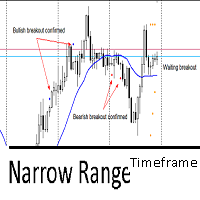
This indicator utilizes the Narrow Range 7 concept . This concept says that if the seventh candle is the one with the smallest range, that is, the smallest difference between maximum and minimum of all 7 candles. The indicator marks this candle with two markers and waits for a breakout to happens in the next 6 candles. It's called "timeframe" because if in the next 6 candles the breakout not happens, it will remove all marks on candle. If it exceeds 7 times the timeframe, it also will remove the
FREE
MiEasyOrderMT5
Carlos Miguel Iriondo
5 (1)
Mi Easy Order MT5 es un programa diseñado para facilitar y optimizar la ejecución de operaciones de compra y venta en los mercados financieros, proporcionando al trader una herramienta práctica, precisa y confiable para la gestión del riesgo. Su objetivo principal es simplificar el proceso de entrada al mercado, eliminando cálculos manuales y reduciendo errores comunes que suelen producirse al momento de definir el tamaño de la posición. El sistema permite al usuario ingresar como parámetro el n
FREE
Gold Polaris AI
Shota Watanabe
5 (2)
Gold Polaris AI Non-Martingale / Non-Grid Design AI Trading System for Gold (XAUUSD H1) Overview Gold Polaris AI is an AI-based trading system specifically designed for XAUUSD (Gold) on the H1 timeframe. The model was trained using multiple ATR-based volatility features, allowing it to adapt to expanding and contracting volatility structures. The AI evaluates market conditions dynamically and automatically switches between trend-following and counter-trend logic. When the system detects trend
FREE
Nexus Breakout line
Mohammed Kaddour
5 (2)
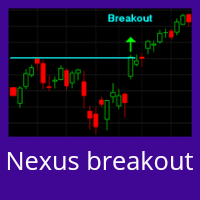
INTRODUCTION : The breakout strength meter is a trading tool that is used to identify which currencies are the strongest to breakout, and which currencies are the weakest to breakout. The settings for the indicator are easy, and if you cannot find the settings, please leave a comment The tools are completely free to use Please, if you like the indicator, please leave a comment and rate the indicator in order to develop it
FREE
XAU M1 Trend Pro
Michail Manelidis
Advanced Gold Scalping Signal Indicator XAU M1 Trend Pro is a precision-built trend and signal indicator designed specifically for XAUUSD (Gold) on the M1 timeframe . It combines multi-layer filtering, volatility analysis, and smart scoring logic to deliver high-quality BUY and SELL signals while avoiding market noise. Built for traders who demand accuracy, speed, and consistency in fast-moving gold markets. Key Features Smart Buy & Sell Signals Generates real-time alerts when high-probabili
FREE
Steady Runner NP EA
Theo Robert Gottwald
2.5 (2)
Introducing Steady Runner NP EA (Free Version): Precision Trading for GBPUSD M5 What is Steady Runner NP EA? Steady Runner NP EA is a   mathematically designed Expert Advisor (EA)   exclusively crafted for the   GBPUSD M5 timeframe . Built with advanced algorithms and statistical models, this EA automates your trading strategy to deliver   precision, consistency, and discipline   in every trade. Whether you're a seasoned trader or just starting out, Steady Runner NP EA is your reliable par
FREE
Cybertrade Keltner Channels
Emanuel Andriato
4.67 (6)
Cybertrade Keltner Channels - MT5 Created by Chester Keltner, this is a volatility indicator used by technical analysis. It is possible to follow the trend of financial asset prices and generate support and resistance patterns. In addition, envelopes are a way of tracking volatility in order to identify opportunities to buy and sell these assets. It works on periods longer than the period visible on the chart. All values ​​are available in the form of buffers to simplify possible automations.
FREE
Babel Assistant
Iurii Bazhanov
4.33 (9)
Babel assistant 1     The MT5 netting “Babel_assistant_1” robot uses the ZigZag indicator to generate Fibonacci levels on M1, M5, M15, H1, H4, D1, W1  periods of the charts , calculates the strength of trends for buying and selling. It opens a position with "Lot for open a position" if the specified trend level 4.925 is exceeded. Then Babel places pending orders at the some Fibonacci levels and places specified Stop Loss , Take Profit. The screen displays current results of work on the position
FREE
How it works –   Base-departure detection — algorithmically finds consolidation bases (overlapping range with compressed volatility) followed by displacement departures. Patterns: Drop-Base-Rally, Rally-Base-Drop, Rally-Base-Rally, Drop-Base-Drop — detected structurally, not by candle names. –   Strength score (0–100) — from departure velocity, time-at-base, freshness (each revisit decays the score), higher-timeframe confluence and origin volume. –   Lifecycle — Fresh, Tested (decaying), Broken
FREE
FlatBreakout MT5
Aleksei Vorontsov
3 (1)
FlatBreakout MT5 (Free Version) Flat Range Detector and Breakout Panel for MT5 — GBPUSD Only FlatBreakout MT5   is the free version of the professional FlatBreakoutPro MT5 indicator, specially designed for flat (range) detection and breakout signals on the   GBPUSD   pair only. Perfect for traders who want to experience the unique fractal logic of FlatBreakout MT5 and test breakout signals on a live market without limitations. Who Is This Product For? For traders who prefer to trade breakout of
FREE
PZ Goldfinch Scalper EA MT5
PZ TRADING SLU
3.33 (57)
This is the latest iteration of my famous scalper, Goldfinch EA, published for the first time almost a decade ago. It scalps the market on sudden volatility expansions that take place in short periods of time: it assumes and tries to capitalize of inertia in price movement after a sudden price acceleration. This new version has been simplified to allow the trader use the optimization feature of the tester easily to find the best trading parameters. [ Installation Guide | Update Guide | Troublesh
FREE
This indicator uses a different approach from the previous version to get it's trendlines. This method is derived from Orchard Forex, and the process of making the indicator is demonstrated in there video   https://www.youtube.com/watch?v=mEaiurw56wY&t=1425s . The basic idea behind this indicator is it draws a   tangent line   on the highest levels and lowest levels of the bars used for calculation, while ensuring that the lines don't intersect with the bars in review (alittle confusing? I know
FREE
QuantumAlert Stoch Navigator is a free indicator available for MT4/MT5 platforms, its work is to provide "alerts" when the market is inside "overbought and oversold" regions in the form of "buy or sell" signals. This indicator comes with many customization options mentioned in the parameter section below, user can customise these parameters as needful. Join our   MQL5 group , where we share important news and updates. You are also welcome to join our private channel as well, contact me for the p
FREE
이 제품의 구매자들이 또한 구매함
Trade Assistant MT5
Evgeniy Kravchenko
4.43 (214)
거래당 위험 계산, 라인을 사용한 손쉬운 신규 주문, 부분 청산 기능을 통한 주문 관리, 7가지 유형의 트레일링 스탑 및 기타 유용한 기능을 제공합니다. 추가 자료 및 지침 설치 지침   -   애플리케이션 지침   -   데모 계정용 애플리케이션 평가판 라인 기능       - 차트에 개시선, 손절매, 차익실현을 표시합니다. 이 기능을 사용하면 새로운 주문을 쉽게 하고 개봉 전에 추가 특성을 볼 수 있습니다. 위기 관리       -       위험 계산 기능은 설정된 위험과 손절매 주문의 크기를 고려하여 새 주문의 볼륨을 계산합니다. 이를 통해 손절매 크기를 설정하고 동시에 설정된 위험을 존중할 수 있습니다. 로트 계산 버튼 - 위험 계산을 활성화/비활성화합니다. 필요한 위험 값은 위험 필드에 0에서 100 사이의 백분율 또는 예금 통화로 설정됩니다. 설정 탭에서 위험 계산 옵션을 선택합니다. $ 통화, % 잔액, % 지분, % 자유 마진, % 사용자 정의, % AB 이전
Trade Manager EA에 오신 것을 환영합니다. 이 도구는 거래를 보다 직관적이고 정확하며 효율적으로 만들기 위해 설계된 궁극적인 리스크 관리 도구 입니다. 단순한 주문 실행 도구가 아닌, 원활한 거래 계획, 포지션 관리 및 리스크 제어를 위한 종합 솔루션입니다. 초보자부터 고급 트레이더, 빠른 실행이 필요한 스캘퍼에 이르기까지 Trade Manager EA는 외환, 지수, 상품, 암호화폐 등 다양한 시장에서 유연성을 제공합니다. Trade Manager EA를 사용하면 복잡한 계산은 이제 과거의 일이 됩니다. 시장을 분석하고 진입, 손절 및 익절 수준을 차트의 수평선으로 표시한 후 리스크를 설정하면, Trade Manager가 이상적인 포지션 크기를 즉시 계산하고 SL 및 TP 값을 실시간으로 표시합니다. 모든 거래가 간편하게 관리됩니다. 주요 기능: 포지션 크기 계산기 : 정의된 리스크에 따라 거래 크기를 즉시 결정합니다. 간단한 거래 계획 : 진입, 손절, 익절을 위한
Local Trade Copier EA MT5
Juvenille Emperor Limited
4.95 (143)
Local Trade Copier EA MT5 를 사용하여 매우 빠른 거래 복사 경험을 해보세요. 1분 안에 간편하게 설정할 수 있으며, 이 거래 복사기를 사용하면 Windows 컴퓨터 또는 Windows VPS에서 여러 개의 MetaTrader 터미널 간에 거래를 0.5초 미만의 초고속 복사 속도로 복사할 수 있습니다. 초보자든 전문가든   Local Trade Copier EA MT5 는 다양한 옵션을 제공하여 사용자의 특정 요구에 맞게 맞춤 설정할 수 있습니다. 이는 수익 잠재력을 높이려는 모든 사람을 위한 최고의 솔루션입니다. 지금 사용해보시고 이것이 왜 시장에서 가장 빠르고 쉬운 무역용 복사기인지 알아보세요! 팁: 여기 에서 데모 계정에서 Local Trade Copier EA MT5 데모 버전을 다운로드하여 사용해 볼 수 있습니다. 다운로드한 무료 데모 파일을 MT5 >> File >> Open Data Folder >> MQL5 >> Experts 폴더에 붙여넣고 터
베타 출시 Telegram to MT5 Signal Trader 는 곧 공식 알파 버전을 출시할 예정입니다. 일부 기능은 아직 개발 중이며, 작은 버그가 발생할 수 있습니다. 문제가 있으면 꼭 보고해 주세요. 여러분의 피드백은 소프트웨어 개선에 도움이 됩니다. Telegram to MT5 Signal Trader 는 Telegram 채널 또는 그룹의 거래 신호를 자동으로 MetaTrader 5 계정으로 복사하는 강력한 도구입니다. 공개 및 비공개 채널을 모두 지원하며, 여러 신호 제공자를 여러 MT5 계정에 연결할 수 있습니다. 소프트웨어는 빠르고 안정적으로 동작하며, 복사된 거래를 완벽히 제어할 수 있습니다. 인터페이스는 깔끔하며 대시보드와 차트가 시각적으로 구성되어 있고, 직관적인 네비게이션이 가능합니다. 여러 Signal Account를 관리하고, 공급자별 설정을 세밀하게 조정하며, 모든 동작을 실시간으로 모니터링할 수 있습니다. 필수 조건 MQL의 제한으로 인해 EA는 Te
TradePanel MT5
Alfiya Fazylova
4.88 (162)
Trade Panel은 다기능 거래 도우미입니다. 이 애플리케이션에는 50개 이상의 수동 거래 기능이 포함되어 있으며 대부분의 거래 작업을 자동화할 수 있습니다. 구매하기 전에 데모 계정에서 데모 버전을 테스트할 수 있습니다. 데모 계정용 애플리케이션 체험판 다운로드: https://www.mql5.com/en/blogs/post/750865 . 전체 지침 여기 . 거래. 한 번의 클릭으로 거래를 수행할 수 있습니다: 리스크 자동 계산과 함께 예약 주문 및 포지션 열기. 한 번의 클릭으로 여러 주문 및 포지션 열기. 주문 그리드 열기. 예약 주문 및 포지션을 그룹별로 닫기. 포지션 방향 전환 (Buy 닫기 > Sell 열기, Sell 닫기 > Buy 열기). 포지션 잠금 (부족한 포지션을 열어 Buy와 Sell 포지션의 수량을 동일하게 만들기). 모든 포지션 한 번의 클릭으로 부분적으로 닫기. 모든 포지션의 테이크 프로핏과 스톱로스를 같은 가격 수준에 설정. 모든 포지션의 스톱로스를
Farmed Hedge Yield Farming | All Markets (Manual - Hybrid - Semi/Automated EA) MULTI-ASSET SUPPORT Trade any asset available on your broker - Forex: Major, Minor, Exotic pairs - Crypto: BTC, ETH, XRP, SOL, BNB - Stocks: Apple, Tesla, Amazon, Google, etc. - Commodities: Gold, Silver, Oil, Gas - Indices: US30, NAS100, SPX500, DAX40 - Any CFD your broker offers VERIFIED TRADING RESULTS - Farmed Hedge Yield Axi Copy:  https://www.mql5.com/en/signals/2356376 - Farmed Hedge Yield Exn Copy:   https:/
Telegram to MT5 Multi-Channel Copier 는 Telegram 채널의 트레이딩 신호를 자동으로 MetaTrader 5로 직접 복사합니다. 봇도, 브라우저 확장 프로그램도, 수동 복사도 필요 없습니다. Telegram에서 신호를 받으면 EA가 몇 초 안에 터미널에서 거래를 엽니다. 본 제품은 두 가지 구성 요소로 구성되어 있습니다: Telegram 채널을 감시하는 Windows 애플리케이션과 MT5 터미널에서 신호를 실행하는 이 Expert Advisor입니다. MT4 버전도 제공됩니다. 설정 가이드 및 애플리케이션 다운로드: https://www.mql5.com/en/blogs/post/768988 작동 방식 Windows 애플리케이션은 봇이 아닌 사용자 자신의 API 자격 증명을 사용하여 Telegram에 연결됩니다. 이는 프라이빗 및 VIP 채널을 포함하여 구독 중인 모든 채널, 그룹 또는 주제를 읽을 수 있음을 의미합니다. 신호를 감지하면 이를 파싱하여
파워 캔들 전략 스캐너 - 자체 최적화 다중 종목 설정 찾기 도구 파워 캔들 전략 스캐너는 마켓 워치에 등록된 모든 종목에 대해 파워 캔들 지표와 동일한 자체 최적화 엔진을 동시에 실행합니다. 하나의 패널에서 현재 통계적으로 거래 가능한 종목, 각 종목별 최적의 전략, 최적의 손절매/익절 조합을 알려주며, 새로운 신호가 발생하면 즉시 알림을 전송합니다. 이 도구는 Stein Investments 에코시스템의 일부입니다. 18개 이상의 도구와 함께 당신의 1대1 AI 트레이딩 멘토 Max.  항상 대기 중, 모든 인디케이터를 깊이 있게 이해, 무언가를 차근차근 생각해보고 싶은 순간에 도움을 줍니다.  https://stein.investments 에서 만나보세요 완벽한 시장 모니터링. 종목당 3,000건 이상의 자동 최적화. 2가지 알림 유형. 한 번의 클릭으로 차트를 전환하고 바로 거래하세요. 이 도구가 필요한 이유 대부분의 다중 종목 스캐너는 가격 변동만 보여줍니다. 티커별
Anchor Trade Manager
Kalinskie Gilliam
5 (5)
Anchor: The EA Manager Run your full EA portfolio without conflicts, without stacked risk, and without watching every chart yourself. Anchor coordinates up to 64 Expert Advisors on a single account, including daily loss protection built for prop firm rules. Attach Anchor to any chart. Type your EA names and magic numbers in one line. Click OK. Anchor begins coordinating immediately. Built for portfolios. Built for prop firms. Built for discipline. The Problem Running multiple EAs on the same acc
Exp COPYLOT CLIENT for MT5
Vladislav Andruschenko
3.94 (34)
MetaTrader 5용 전문 트레이드 복사기 MetaTrader 용 빠르고 전문적이며 신뢰할 수 있는 트레이드 복사기 입니다. COPYLOT 은 MT4와 MT5 터미널 간의 Forex 거래 복사를 지원하며, Hedge 및 Netting 계좌를 모두 지원합니다. COPYLOT MT5 버전 지원 구성: - MT5 Hedge → MT5 Hedge - MT5 Hedge → MT5 Netting - MT5 Netting → MT5 Hedge - MT5 Netting → MT5 Netting - MT4 → MT5 Hedge - MT4 → MT5 Netting MT4 버전 전체 설명 + DEMO + PDF 구매 방법 설치 방법 로그 파일 확인 방법 테스트 및 최적화 방법 Expforex의 모든 제품 MT4 터미널로도 거래를 복사할 수 있습니다(MT4 → MT4, MT5 → MT4): COPYLOT CLIENT for MT4 COPYLOT은 2개, 3개, 심지어 10개의 터미널과 동시에 작동할
================================================================================ POC BREAKOUT - V20.72. Full Professional Grade Toolkit ================================================================================ POC Breakout is a full MetaTrader 5 trading dashboard for discretionary traders who want breakout signals, Point of Control (POC) context, volume profiles, order flow, market structure, news, alerts, and advanced trade planning in one professional workspace. Attached directly to you
Footprint Chart Pro — Professional OrderFlow EA for MetaTrader 5 Version 6.34 | Professional tool for real traders | Institutional-Grade Visualization DEMO USERS - PLEASE SELECT EVERY TICK / REAL TICK WHEN TESTING AND YOU HAVE DOWNLOADED HISTORICAL DATA. IF YOU SEE A WAITING SCREEN AND IT IS NOT DOWNLOADING, IT MEANS YOU HAVE LOW HISTORICAL DATA. TRY 1 MIN AND 5 MIN FIRST ON 1 DAY DATA. ONE DAY DATA SHOULD BE THE NEWEST AND MOST CURRENT DATE. PLEASE WAIT UNTIL THE MARKET HAS ROLLED OVER PERIOD.
Trade copier MT5
Alfiya Fazylova
4.59 (49)
Trade Copier는 거래 계정 간의 거래를 복사하고 동기화하도록 설계된 전문 유틸리티입니다. 복사는 공급자의 계정/단말기에서 동일한 컴퓨터 또는 vps에 설치된 수신자의 계정/단말기로 발생합니다. 프로모션 - 이미 "Trade copier MT5"를 구매하셨다면, "Trade copier MT4"를 무료로 받으실 수 있습니다 (MT4 → MT5 및 MT4 ← MT5 복사용). 조건에 대한 자세한 정보를 원하시면, 개인 메시지를 통해 저희에게 문의해 주시기 바랍니다! 구매하기 전에 데모 계정에서 데모 버전을 테스트할 수 있습니다. 데모 버전 여기 . 전체 지침 여기 . 주요 기능 및 이점: 복사기는 "МТ5> МТ5", "МТ4> МТ5", "МТ5> МТ4" 복사를 지원합니다. 복사기는 데모 계정 > 실 계정, 실 계정 > 데모 계정, 데모 계정 > 데모 계정 및 실제 계정 > 실 계정 복사를 지원합니다. 복사기는 읽기 전용 암호가 적용된 투자자 계정에서 복사를 지원합니다. 하
The product will copy all telegram signal to MT5 ( which you are member) , also it can work as remote copier.  Easy to set up, copy order instant, can work with almost signal formats, image signal,  s upport to translate other language to English Work with all type of channel or group, even channel have "Restrict Saving Content", work with  multi channel, multi MT5 Work as remote copier: with signal have ticket number, it will copy exactly via ticket number. Support to backtest signal. How to s
MetaTrader 5용 트레이딩 패널 — 차트와 키보드에서 실행하는 프로페셔널 원클릭 트레이딩 활동적인 트레이더를 위해 설계된 고급 Trading Panel로, MetaTrader 기본 인터페이스보다 훨씬 빠르고 직관적으로 포지션과 주문을 열고, 관리하고, 종료할 수 있습니다. 이 패널은 포지션 관리, 대기 주문 제어, 총수익 관리, 체결 속도를 하나의 전문적인 작업 공간에 통합하고 싶은 트레이더를 위한 솔루션입니다. 이것은 단순한 보조 유틸리티가 아닙니다. MetaTrader 5를 위한 진정한 trading cockpit입니다. 차트에서 직접 거래하고, 키보드로 빠르게 명령을 실행하며, 자동 계산과 시각적 가이드를 통해 수동 트레이딩을 더 빠르고, 더 명확하고, 더 편리하게 만들어 줍니다.  이 패널을 사용하면 차트에서 단 한 번의 클릭으로 거래를 실행할 수 있으며, 표준 MetaTrader 컨트롤보다 최대 30배 빠르게 거래 작업을 수행할 수 있습니다. 새로운 프리미엄 버전
EasyInsight AIO MT5
Alain Verleyen
4.92 (12)
EASY Insight AIO – 스마트하고 손쉬운 트레이딩을 위한 올인원 솔루션 개요 외환, 금, 암호화폐, 지수, 심지어 주식까지 — 전 시장을 몇 초 만에, 수동 차트 확인이나 복잡한 설치, 인디케이터 설정 없이 스캔할 수 있다고 상상해 보세요. EASY Insight AIO 는 AI 기반 트레이딩을 위한 궁극의 플러그 앤 플레이(Plug & Play) 데이터 내보내기 도구입니다. 단 하나의 깔끔한 CSV 파일로 전체 시장 스냅샷을 제공하며, ChatGPT, Claude, Gemini, Perplexity 등 다양한 AI 플랫폼에서 즉시 분석할 수 있습니다. 창 전환, 복잡함, 차트 오버레이는 더 이상 필요 없습니다. 자동으로 내보내지는 순수하고 구조화된 데이터 인사이트만으로, 반복적인 차트 감시 대신 데이터 기반의 스마트한 의사결정에 집중할 수 있습니다. 왜 EASY Insight AIO인가요? 진정한 올인원 • 별도의 설정, 인디케이터 설치, 차트 오버레이가 필요 없습
Premium Trade Manager - 코치가 내장된 트레이딩 패널 Premium Trade Manager 는 차트 안에 트레이딩 코치를 심어놓은 도구입니다. 주문을 확정하기 전에, AI 트레이딩 코치 Max가 설정된 거래를 직접 읽고 명확한 판단을 내려줍니다. 스톱이 규율 있는 접근 방식에 맞는지, 리스크 크기가 합리적인지, 고영향 뉴스 이벤트가 몇 분 후에 있는지, 프롭 펌 한도에 근접했는지. 그 아래에는 완전한 실행 엔진이 있습니다. 원클릭 리스크 기반 진입, 차트에서 드래그로 세우고 거래가 진행되는 동안에도 계속 움직일 수 있는 플랜, 최대 4단계 분할 익절, 7가지 트레일링 방식, 실시간 프롭 펌 컴플라이언스, 뉴스 가드, 그리고 자체 비용을 평가하는 스프레드까지. 결정은 당신이 내립니다. Max가 두 번째 시선으로 확인합니다. 패널이 그 이후의 모든 것을 처리합니다. 구매 전에 직접 체험해 보세요. 브라우저에서 라이브 패널을 직접 클릭해볼 수 있습니다. 구매 전에 실제
Trade Manager DaneTrades
Levi Dane Benjamin
4.28 (29)
거래 관리자는 위험을 자동으로 계산하는 동시에 거래를 빠르게 시작하고 종료하는 데 도움을 줍니다. 과잉 거래, 복수 거래 및 감정 거래를 방지하는 데 도움이 되는 기능이 포함되어 있습니다. 거래를 자동으로 관리할 수 있으며 계정 성과 지표를 그래프로 시각화할 수 있습니다. 이러한 기능은 이 패널을 모든 수동 거래자에게 이상적으로 만들고 MetaTrader 5 플랫폼을 향상시키는 데 도움이 됩니다. 다중 언어 지원. MT4 버전  |  사용자 가이드 + 데모 트레이드 매니저는 전략 테스터에서 작동하지 않습니다. 데모를 보려면 사용자 가이드로 이동하세요. 위기 관리 % 또는 $를 기준으로 위험 자동 조정 고정 로트 크기 또는 거래량과 핍을 기반으로 한 자동 로트 크기 계산을 사용하는 옵션 RR, Pips 또는 Price를 사용한 손익분기점 손실 설정 추적 중지 손실 설정 목표 달성 시 모든 거래를 자동으로 마감하는 최대 일일 손실률(%)입니다. 과도한 손실로부터 계정을 보호하고 과도한
EA Auditor
Stephen J Martret
5 (4)
EA Auditor is an independent analysis tool for traders evaluating Expert Advisors and trading signals on MetaTrader 5. It audits backtest reports, reviews posted developer signals, and cross-verifies the two against each other to help traders assess strategies before committing capital. The MQL5 market offers a wide range of Expert Advisors from many developers, with varying approaches, quality, and transparency. EA Auditor provides a consistent, data-driven framework for reviewing them, answer
HINN MagicEntry Extra
ALGOFLOW OÜ
4.75 (16)
LIMITED SUMMER SALE -40% !   ONLY $30 insead of $50!  Maximum real discount! HINN MAGIC ENTRY – the ultimate tool for entry and position management! Place orders by selecting a level directly on the chart! full description   ::  demo-version  :: 60-sec-video-description Key features: - Market, limit, and pending orders - Automatic lot size calculation - Automatic spread and commission accounting - Unlimited partitial take-profits  - Breakeven and trailing stop-loss and take-profit  functions -
Seconds Chart MT5
Boris Sedov
4.61 (18)
Seconds Chart - MetaTrader 5에서 초 단위 차트를 생성하는 독특한 도구입니다. Seconds Chart 를 사용하면 초 단위로 설정된 타임프레임으로 차트를 작성할 수 있어, 표준 분 또는 시간 단위 차트에서는 불가능한 유연성과 정밀한 분석이 가능합니다. 예를 들어, S15 타임프레임은 15초 동안의 캔들로 구성된 차트를 의미합니다. 사용자 정의 심볼을 지원하는 모든 인디케이터와 전문가 어드바이저를 사용할 수 있습니다. 이를 사용하는 것은 표준 차트에서 거래하는 것만큼 편리합니다. 표준 도구와 달리, Seconds Chart 는 초고속 타임프레임에서도 높은 정확도와 지연 없이 작업할 수 있도록 지원합니다. 무료 데모: Seconds Chart v2.29 Demo.ex5 무료 데모를 다운로드하고 직접 확인하십시오: 완전한 기능 - 모든 기능 사용 가능 24시간 테스트 - 정확성과 편리성을 평가하기에 충분한 시간 데모 계정만 - 대부분의 브로커에서 쉽게 개설 가능
HINN Lazy Trader
ALGOFLOW OÜ
5 (1)
LIMITED SUMMER SALE -40% ! ONLY $470 insead of $790!  Maximum real discount! The core idea: using the user interface, you configure the parameters the chart must meet before entering a position (or positions), choose which entry models to use, and set the rules for when trading and planning should end. Lazy Trader  handles the rest: it  takes over all the routine chart watching and execution! full description  :: 3 key videos [1] ->  [2]   ->  [3] What can it do? - Understands Larry Williams
작동 데모 다운로드 Copy Cat More (카피캣) MT5 트레이드 카피어 (Trade Copier) 는 로컬 트레이드 카피어이자, 오늘날의 트레이딩 과제를 위해 설계된 완전한 리스크 관리 및 실행 프레임워크입니다. 프롭 펌 (prop firm) 챌린지부터 개인 포트폴리오 관리까지, 견고한 실행, 자본 보호, 유연한 설정, 고급 트레이드 처리의 조합으로 모든 상황에 적응합니다. 이 카피어는 마스터 (Master, 송신측) 와 슬레이브 (Slave, 수신측) 두 모드 모두에서 작동하며, 시장가 주문과 대기 주문, 트레이드 수정, 부분 청산, 상호 청산 (Close By) 작업을 실시간으로 동기화합니다. 데모 및 실거래 계좌, 트레이딩 또는 인베스터 로그인 모두와 호환되며, EA·터미널·VPS가 재시작되더라도 영구 트레이드 메모리 (Persistent Trade Memory) 시스템을 통해 복구를 보장합니다. 고유 ID로 여러 마스터와 슬레이브를 동시에 관리할 수 있으며, 브로커
Quant AI Agents
Ho Tuan Thang
5 (1)
Quant AI Agents are independent trading Expert Advisors. Instead of trading using a fixed strategy like other conventional EAs, Quant AI Agents   is a   multi-agent AI trading framework   that turns natural-language strategy prompts into live.  WANT THE SAME RESULTS AS MY LIVE SIGNAL?   Use the exact same brokers I do:   IC MARKETS , IC TRADING   .  Unlike the centralized stock market, Forex has no single, unified price feed.  Every broker sources liquidity from different providers, creating un
Trade Dashboard MT5
Fatemeh Ameri
4.95 (131)
Trade Dashboard simplifies how you open, manage, and control your trades, with built-in lot size calculation. It allows you to execute trades, manage risk, and control positions directly on the chart, with tools such as partial close, breakeven, and trailing stop. Designed to reduce manual work and help you stay focused on your trading decisions. A demo version is available for testing. Detailed explanations of features are provided within the MQL5 platform. Installation instructions are include
The News Filter MT5
Leolouiski Gan
4.78 (23)
이 제품은 뉴스 시간 동안 모든 전문가 어드바이저 및 수동 차트를 필터링하여 수동 거래 설정이나 다른 전문가 어드바이저가 입력한 거래가 파괴될 수 있는 급격한 가격 상승으로부터 걱정하지 않아도 됩니다. 이 제품은 또한 뉴스 발표 전에 열린 포지션과 대기 주문을 처리할 수 있는 완전한 주문 관리 시스템이 함께 제공됩니다.   The News Filter  를 구매하면 더 이상 내장 뉴스 필터에 의존할 필요가 없으며 이제부터 모든 전문가 어드바이저를 여기서 필터링할 수 있습니다. 뉴스 선택 뉴스 소스는 Forex Factory의 경제 캘린더에서 얻어집니다. USD, EUR, GBP, JPY, AUD, CAD, CHF, NZD 및 CNY와 같은 어떤 통화 기준으로 선택할 수 있습니다. Non-Farm (NFP), FOMC, CPI 등과 같은 키워드 식별을 기준으로 선택할 수도 있습니다. 저, 중, 고 영향을 가지는 뉴스를 필터링할 수 있도록 선택할 수 있습니다. 차트와 관련된 뉴스만 선
Trader Evolution
Siarhei Vashchylka
5 (7)
" Trader Evolution " - A utility designed for traders who use wave and technical analysis in their work. One tab of the utility is capable of money management and opening orders, and the other can help in making Elliott wave and technical analysis. Manual (Be sure to read before purchasing) | Version for MT4 Advantages 1. Trading in a few clicks. Immediate and pending orders are available in the panel 2. Money management. The program automatically selects the appropriate lot size 3. Simplifies
EA Performance Tracker
Russell Leeon Tan
5 (2)
EA Performance Tracker (AESTracker) A clean, modern dashboard that shows exactly how your trades and EAs are performing — right on your chart. It reads your full account history automatically and breaks down the numbers by magic number / strategy. Display only — it does not place any trades. What it shows - Account header: live Balance, Equity, and Open (floating) P/L - Profit summary: gross profit, net profit, and the exact commission & swap deducted - Key stats: win rate, profit factor, exp
Welcome to ENTRY IN THE ZONE WITH SMC MULTI TIMEFRAME Entry In The Zone with  SMC Multi Timeframe  is a professional trading indicator built on Smart Money Concepts (SMC), combining market structure analysis with a No Repaint BUY / SELL signal system in a single indicator. It helps traders understand market structure more clearly, identify key price zones, and focus on higher-quality trading opportunities. By combining Multi-Timeframe Analysis, Points of Interest (POIs), and real-time signals, t
YuClusters
Yury Kulikov
4.93 (43)
Attention: You can view the program operation in the free version  YuClusters DEMO .  YuClusters is a professional market analysis system. The trader has unique opportunities to analyze the flow of orders, trade volumes, price movements using various charts, profiles, indicators, and graphical objects. YuClusters operates on data based on Time&Sales or ticks information, depending on what is available in the quotes of a financial instrument. YuClusters allows you to build graphs by combining da
필터:
리뷰 없음
리뷰 답변