Neuron Chart Replay

Neuron Replay — Bar Replay & Paper‑Trading Trainer

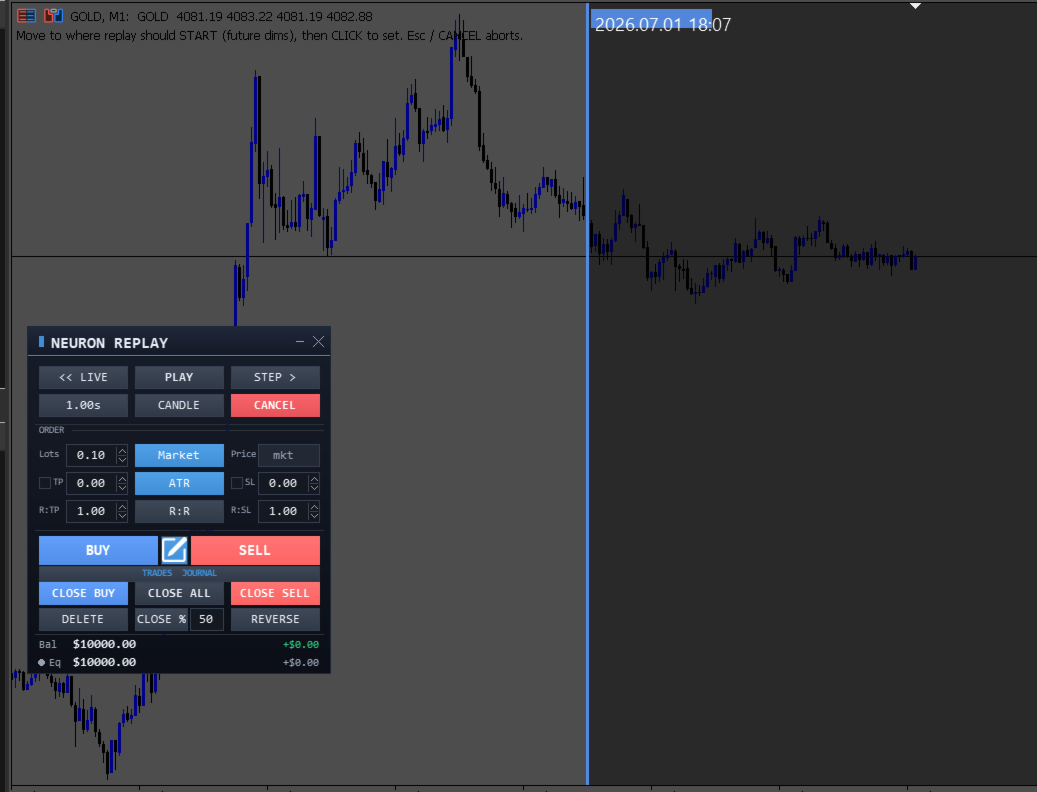
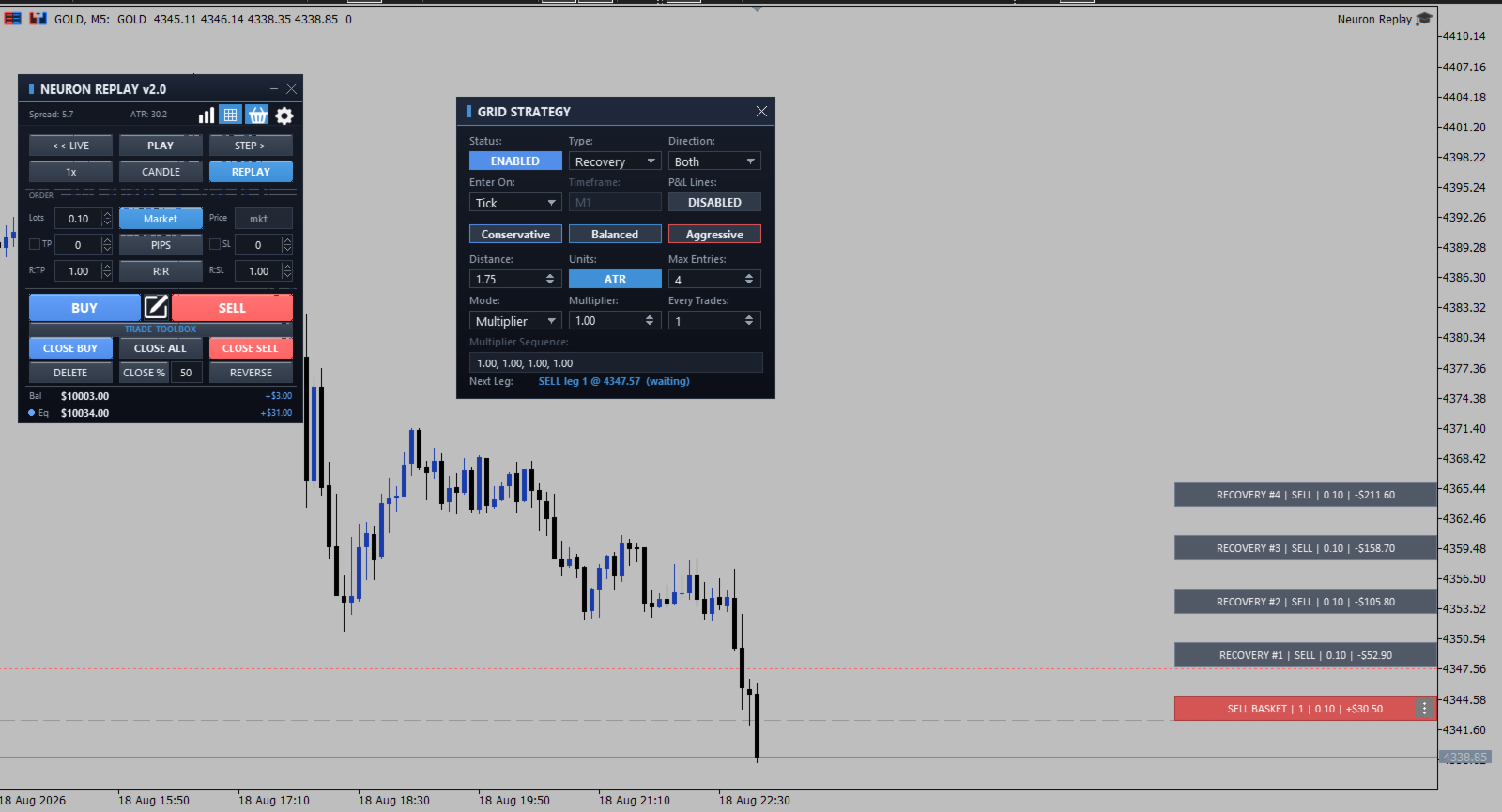
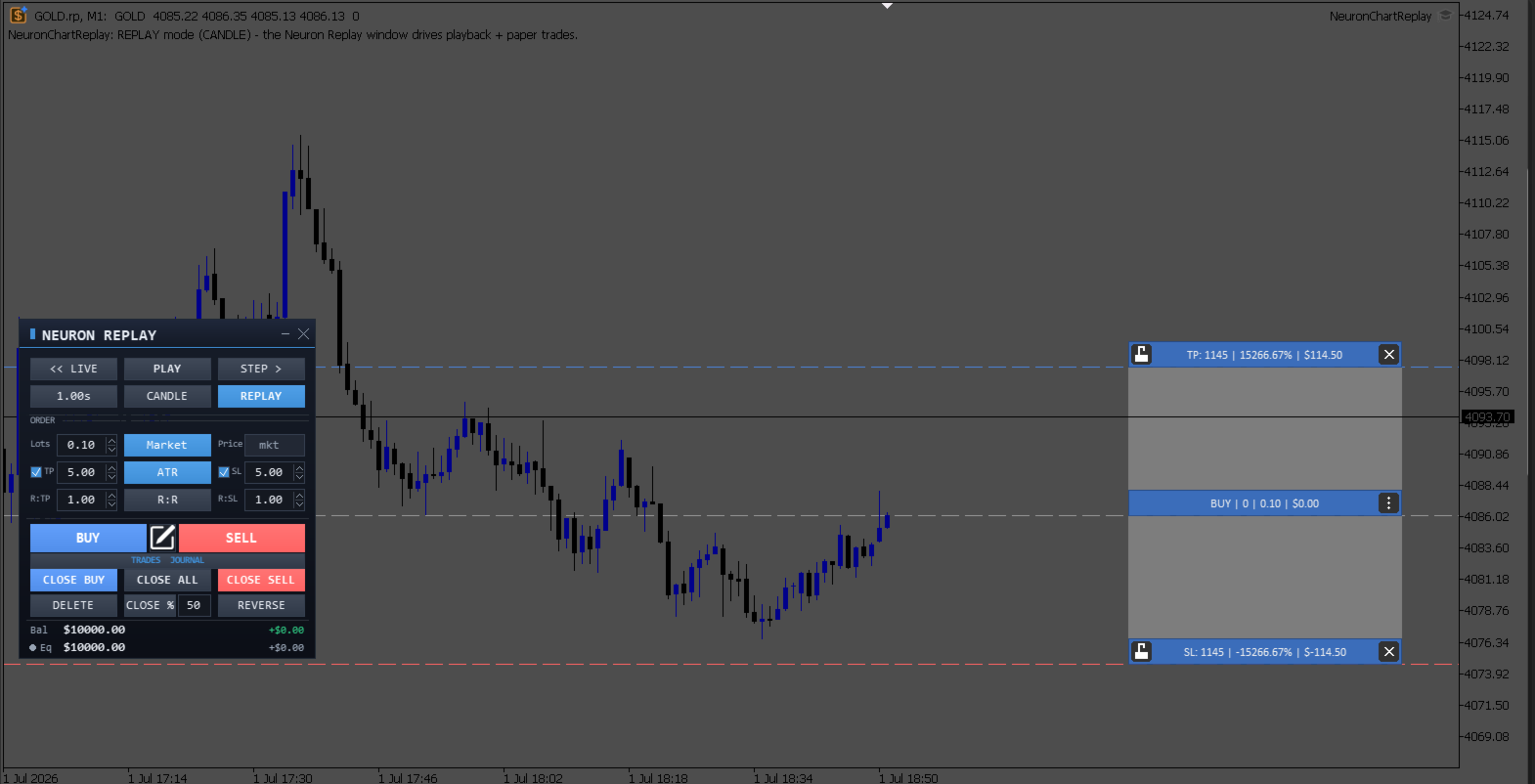
Neuron Replay turns any MetaTrader 5 chart into a TradingView‑style market replay and risk‑free practice simulator. Rewind any symbol to any point in its history, then step through it bar‑by‑bar — or auto‑play it — and practice your entries, exits and trade management on a fully interactive on‑chart panel. Every trade is 100% simulated (paper / "ghost" trading): the tool never sends a single real order to your account, so you can train your strategy and your discipline with zero risk.

Why traders use it

  • Replay the market like a video — rewind, step, and fast‑forward price action.
  • Practice a full trading session in minutes instead of waiting live.
  • Place, drag and manage virtual trades exactly like a real order panel.
  • Build screen time and a repeatable process without risking a cent.
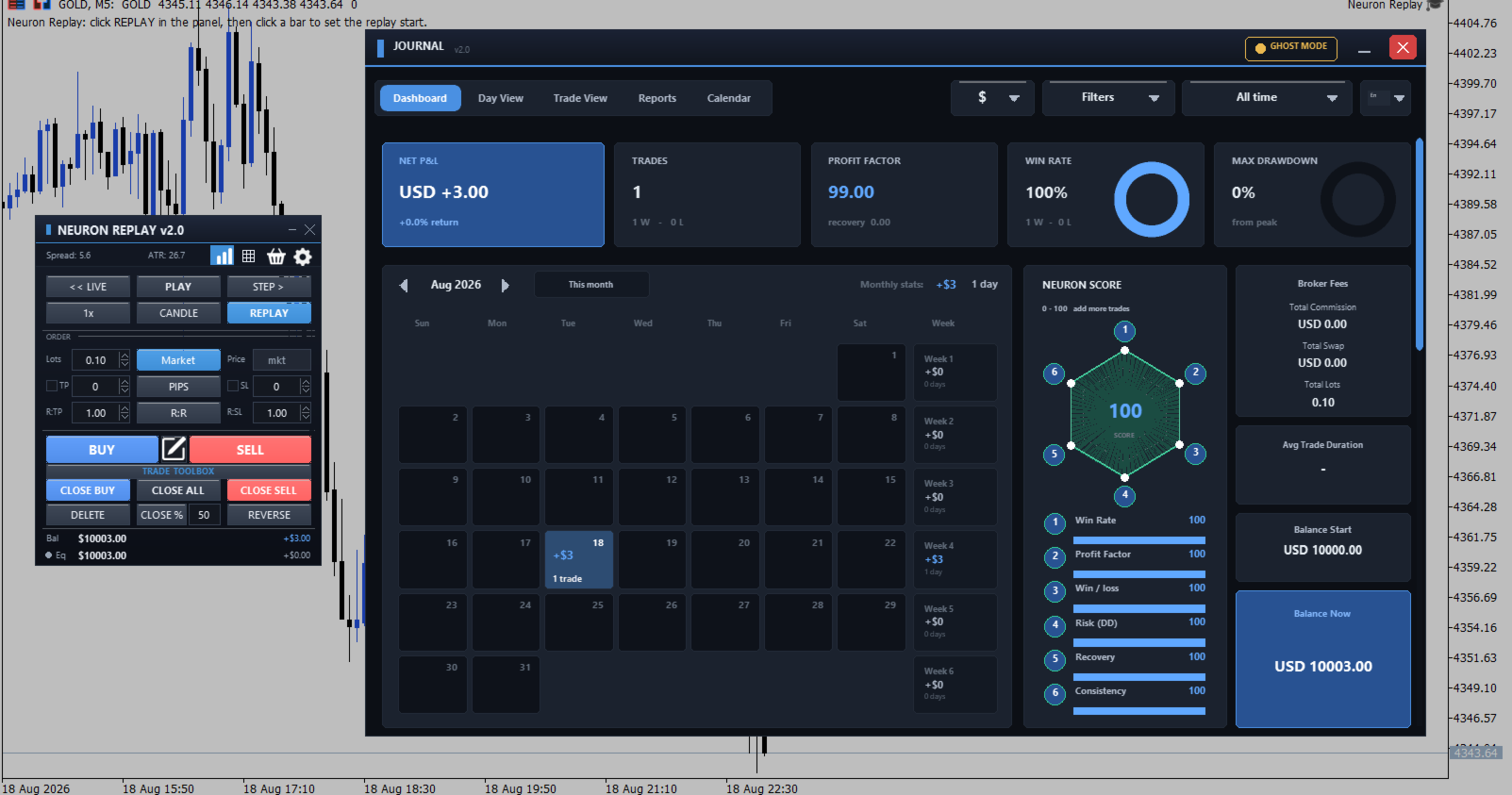
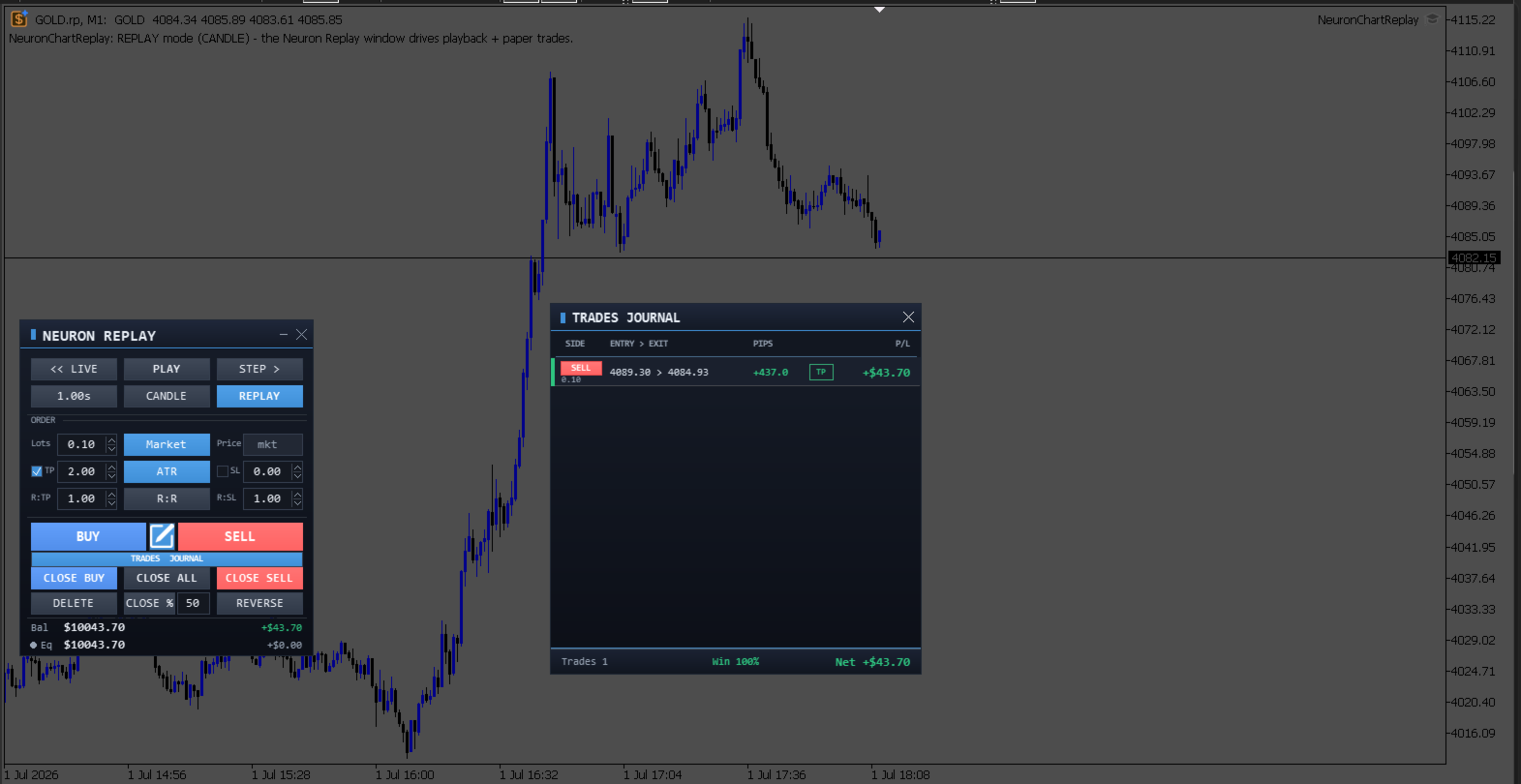
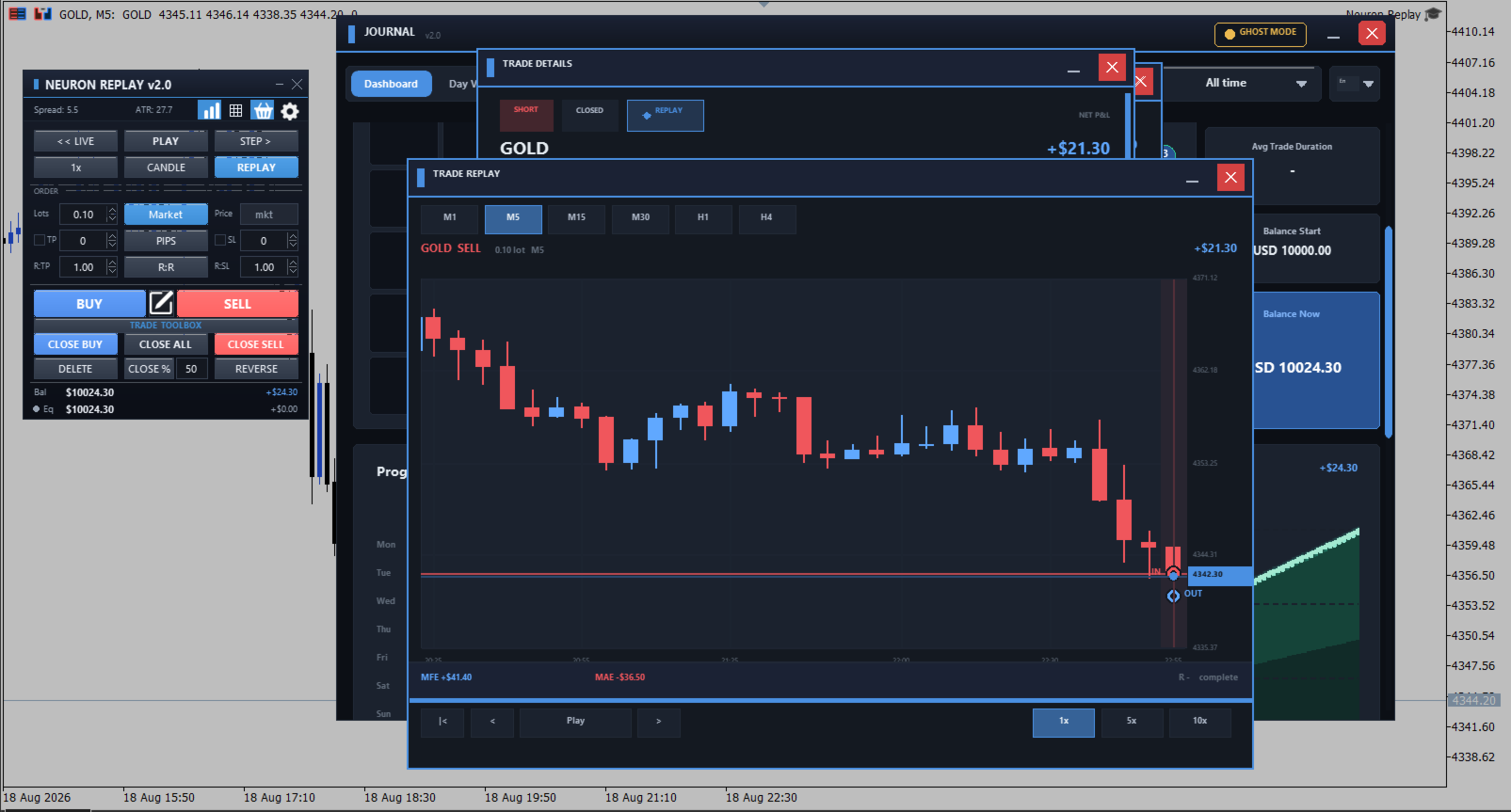
  • Review every decision in a built‑in trades journal with win‑rate and net result.

Key Features

Feature What it does
Any‑point replay Click REPLAY, move the cursor to any past bar (the "future" dims as you move), click to lock the start — the chart replays from there.
Step & Play Reveal one bar at a time (STEP) or auto‑play at 5 adjustable speeds (2s / 1s / 0.5s / 0.25s / 0.1s per bar).
Candle / Tick modes Replay bar‑by‑bar (CANDLE) or drip real ticks inside each bar (TICK) for finer control.
Market orders One‑click virtual BUY / SELL filled at the current replay price.
Pending order tool Drag an entry line on the chart; it auto‑detects BUY LIMIT / BUY STOP / SELL LIMIT / SELL STOP from where you place it, then OK places it.
Draggable SL / TP Grab the SL/TP bars right on the chart to set levels; profit/loss zones shade between entry and target.
ATR / Pips toggle One switch flips all SL/TP inputs between raw pips and ATR multiples, everywhere.
Per‑trade menu A ⋮ menu on each trade: add/remove SL & TP, Break‑Even, Close, Close % (partial).
SL / TP lock Lock a level so it can't be moved or removed by accident.
Paper account Live Balance and Equity with cumulative realized P&L and open floating P&L.
Trades journal Every trade logged — side, entry→exit, pips, result, reason (TP/SL/manual/partial) — with win‑rate and net P&L.
Movable panels Drag the control panel and the journal anywhere; minimise the panel to just its title bar.

How to start a replay (3 steps)

  1. Attach Neuron Replay to any symbol and timeframe.
  2. Click REPLAY, move the cursor to the bar where you want to begin, then click to set the start point.
  3. Use STEP to advance one bar, or PLAY to auto‑run — and start placing practice trades.

Playback controls

Button Action
<< LIVE Return the chart to the live symbol.
PLAY / PAUSE Auto‑advance the replay / pause it.
STEP > Reveal the next bar (or tick chunk in Tick mode).
Speed Cycle the auto‑play speed (seconds per bar).
CANDLE / TICK Switch between candle‑by‑candle and tick playback.
REPLAY Pick (or re‑pick) the replay start point on the chart.

Order entry & management

Control Purpose
Lots Order size for new trades.
Market / Pending Fill instantly at market, or arm a pending price.
TP / SL (with checkboxes) Enable and set take‑profit / stop‑loss distance.
ATR / Pips Two‑state unit toggle for SL/TP (ATR multiple vs pips).
R:R Set take‑profit as a risk‑to‑reward multiple of the stop.
BUY / SELL Place a market order at the current price.
Pencil (order tool) Open the draggable pending‑order tool with auto Limit/Stop detection and an on‑bar OK/Reverse.
CLOSE BUY / ALL / SELL Close open trades by direction, or all at once.
DELETE / CLOSE % / REVERSE Remove pendings, scale out by percentage, or flip a position.

Inputs

Input Default Description
History bars 5000 Number of bars loaded into the replay.
Replay symbol suffix .rp Suffix for the replay symbol clone (EURUSD → EURUSD.rp).
Cursor line colour blue Colour of the start‑picker cursor line.
Future‑area dim 120 How strongly the un‑revealed future is dimmed (0 = off … 255 = black).
Paper starting balance 10000 Starting balance for the simulated account ($).
Default lot size 0.10 Lot size pre‑filled in the panel.
Default SL (pips) 0 Default stop‑loss distance (0 = none).
Default TP (pips) 0 Default take‑profit distance (0 = none).

Who is it for

  • New traders learning to read price action and place orders safely.
  • Strategy testers who want to eyeball a setup across historical sessions.
  • Discretionary traders building screen time and a repeatable routine.
  • Anyone who wants a TradingView‑style replay without leaving MetaTrader 5.

Requirements & notes

  • MetaTrader 5, any symbol and timeframe (best on symbols with history available).
  • The replay runs on a temporary custom‑symbol clone of your chart; the << LIVE button returns you to the real symbol at any time.
  • Simulation only: all trades are virtual — Neuron Replay never opens, modifies or closes a real position.
  • This is a manual, interactive training utility; it does not trade automatically and makes no profit claims.

Train hard in replay, trade calm live.
추천 제품
TradingX Hotkeys
Johannes Stephanus Lombard
Inputs Available Lotsizes Partial Close % You can change lotsizes as you require On an open chart click once to select chart to be able to use hotkeys on specific chart. All Pairs can be used with this expert We created this expert to be able to still trade C300 with a 0.06 Lotsize If you enter a 0.6 lot and close 0.90% you can trade with 0.06 Lot Keys to be used: B -Buy S -Sell C -Close Profitable D -Breakeven (Note if stoploss is set it won't break even) P -Partial close X -Close all
Overview AlphaForge Range Chart is a professional non-trading range-bar charting utility for MetaTrader 5. It generates live Range charts as MT5 custom symbols, helping traders analyze price movement through fixed-range bars instead of standard time-based candles. Unlike visual-only overlays, the generated Range chart behaves like a real MT5 custom-symbol chart. This means you can open it as a normal chart, apply templates, draw analysis objects, and add indicators directly to the Range chart fo
"Support or Resistance Alert Broken" is a simple and very intuitive tool that allows you to create or eliminate horizontal and trend supports and / or resistances with a simple click. When the support or resistance line is broken by the closing price at the end of the current candle, the "Support or Resistance Alert Broken" tool will send an alert with sound, as well as a notification to the MT4 or MT5 mobile application. This tool can send alerts from multiple pairs at the same time. Utility
The instant trade risk click EA is aimed to help you get into the market as quickly as possible. You give it your risk percentage, and your risk to reward you're hoping to get, then an option to set only stop loss and no take profit. With that, every CTRL + Left Click events on the chart would instantly open a position, with the price on the clicked x and y axis as the stop loss, and the open price as the current markets bid/ask price. If you click above the price, it's a Sell position , if yo
원클릭 본전 보호  단 한 번의 클릭으로 거래 자본을 즉시 보호하세요. 수동으로 포지션을 오픈한 후, 버튼을 누르면 수익 중인 모든 오픈 포지션의 손절매(Stop Loss)를 진입 가격으로 이동시킵니다. 이를 통해 수익권 거래의 리스크를 완전히 제거하며, 손실 중인 포지션은 그대로 유지합니다. #### **작동 원리** 어떠한 방법으로든 평소와 같이 거래를 시작하세요. 패널에는 수익 중인 포지션과 손실 중인 포지션의 숫자가 실시간으로 표시됩니다. 수익을 보호할 준비가 되면 **'SET SL TO ENTRY'** 버튼을 클릭하십시오. 모든 수익 포지션의 손절매가 즉시 정확한 진입 가격으로 이동합니다. 현재 손실 중인 포지션은 자동으로 건너뛰며 아무런 영향을 받지 않습니다. #### **핵심 기능**  * **패널 기본 위치:** 패널은 차트 우측에 기본적으로 배치되어 가격 축이나 캔들을 가리지 않습니다.  * **자유로운 이동:** 패널은 드래그가 가능합니다. 파란색 헤더 바를 클릭하
JYPF Trade Panel is a professional, interactive trading assistant for MT5. It features dynamic 3-line synchronization (Entry/SL/TP) with "Instant Click-and-Drag" technology. Avoid mouse blockages with our cutting-edge translucent trend-zone visualization. Real-time floating profit/loss projections and Risk-to-Reward (R:R) ratios are calculated instantly on your chart. Complete with one-click break-even, 50% partial close, trailing pips, and global equity protection—the ultimate toolkit for scalp
FREE
This is an utility for MetaTrader 5 designed to send notifications to a Telegram bot regarding trading activity on the terminal. The EA monitors changes in positions and orders, then sends structured messages to specified Telegram chats through the Telegram Bot API. It can optionally include chart screenshots when positions are opened. The EA uses the WebRequest function to communicate with the Telegram API. No additional servers or external services are required. Main Features Position Activity
Advanced Trailing Stop & Break-Even Expert Advisor with Partial Profit Taking Overview Unlock the full potential of your trading strategy with this Expert Advisor that automates trade management to maximize profits and minimize losses. Designed for both novice and experienced traders, this EA offers precise control over your trades with customizable trailing stops, break-even protection, and partial profit taking — all working seamlessly to protect your capital and lock in gains. Key Features Dy
Basic Trade Buttons
Kriengsak Peitaisong
Basic Trade Buttons is a tool to help you to quickly open and close trades, place take profit and stop loss points by clicking on the button of each job that you preferred. Once you attached this tool to mt5 chart, the program will calculate a trade volume(Lots size) automatically to prepare to send to the trade server when you click on 'Buy' or 'Sell' button. Click on 'TP', 'SL' or 'Close' button to place take profit, stop loss based on the predefined levels or to close all open positions respe
This EA help trader to manage his pending orders, when you place many Pending Orders this utility monitor them and when of them get filed (executed) the EA cancel and delete all rest of pending orders, to avoid  opening of all of pending orders at the same time , and lose your risk management. this utility is very useful for trader when he /she is not available on the desk.
TradeMetrics Pro
Hussein Adnan Kadhim
The TradeMetrics Pro indicator enhances trade analysis and performance evaluation by presenting trade history and metrics directly on the chart. It accomplishes this through three key features: Summary Trade Panel: The Summary Trade Panel provides a concise overview of open and closed trades. It organizes trade summaries by symbol, lots traded, pips gained or lost, profit, and advanced statistics. This panel enables quick assessment and comparison of trade performance across different symbols.
QuickTrade Panel — One-Click Buy/Sell with Live Risk & Reward Preview Trade faster and smarter, directly from the chart — no order window required. QuickTrade Panel is a lightweight, fully manual trading panel for MetaTrader 5. It sits on your chart as a draggable floating window, giving you instant Buy/Sell execution with full control over lot size, stop loss, take profit, and risk-to-reward — all visible before you click. Key Features One-click Buy / Sell execution Large, color-coded SELL and
Product Description Bybit Charts Utility for MetaTrader 5 — a streamlined tool designed for traders who use Bybit. This utility provides you with the convenience of automatically drawing all charts of Bybit within MetaTrader 5, enabling seamless time-frame switching and efficient market visualization. MQL5  Key Features Automatically draws every timeframe (starting from M1) for charts of Bybit. MQL5 Enables smooth navigation between different time-frames, just like viewing regular charts. MQL5
Sync In Many Ways MT5
Sa No Tsuyoshi Kokorozashi
Description This is a Utility tool for MT5 which will make our chart analysis task quite more efficient and save large amount of time. As for chart analysis, some are watching out several symbol simultaneously with single timeframe and others are trading only one single pair with   multi timeframe analysis. For both, a common troublesome issue is “scroll chart to look back” or “draw chart objects” in multi charts at the same time.  Especially for those who are trading with multi timeframe soluti
ProTrading Panel — 수동 트레이딩을 위한 최고의 어시스턴트 ProTrading Panel 과 함께 수동 트레이딩의 경험을 한 단계 더 높여보세요. 이 EA(Expert Advisor)는 신속한 주문 체결을 위해 설계되었으며, 차트 공간을 방해하지 않고 완벽하게 어우러지는 세련되고 눈이 편안한 세로형 인터페이스를 제공합니다. 화면을 마우스로 클릭하는 것을 선호하시든, 키보드 단축키를 사용하여 번개처럼 빠른 속도로 거래를 실행하시든 이 도구는 귀하에게 가장 완벽한 선택이 될 것입니다. 주요 기능: 정밀한 리스크 관리: 스톱로스(SL)를 포인트 단위로 설정하면, 설정하신 원하는 손익비(Risk:Reward / R:R)에 따라 테이크프로핏(TP)이 자동으로 계산됩니다. 고급 트레이링 스톱: 수익을 자동으로 확보할 수 있습니다. 트레이링 스톱 기능의 활성화/비활성화를 토글할 수 있으며 시작, 단계, 거리를 포인트 단위로 자유롭게 설정할 수 있습니다. 실시간 손익 추적: 당일 손
Com este Expert Advisor tenha a possibilidade de fechar todas as posições de forma automatizada. Tenha em mãos o recurso de fechar as posições e ordens pendentes por ações, Dólar, Índice ou TODOS estes juntos, algo inovador no mercado. Ideal para quem quer uma segunda camada de segurança para suas operações automatizadas ou ainda que o próprio robô feche suas operações manuais em um horário programado. Promoção de 30 dólares para a três primeiras assinatura, posteriormente será cobrado 50 dól
ATM Auto Trade Manager   Expert Advisor will manage all transactions you make using Expert Advisor, or manually from all platforms (Web Trade, MT5 Windows, MT5 Mac, MT5Mobile phone) Multi Currency In one chart, the Tool will manage transactions of all currencies or according to the available list. Currency Selection All Transactions of All Pairs Based on the Pairs List Auto Manage, with setup parameters on one chart Auto Close Profit Average Auto Close Profit only Auto SL / TP Auto Trailing B
TrailNow Ghost EA - 고급 클라이언트 사이드 트레일링 스톱 유틸리티 TrailNow Ghost EA - 고급 클라이언트 사이드 트레일링 스톱 유틸리티 개요 TrailNow Ghost EA는 서버 사이드 스톱 로스 주문을 수정하지 않고 정교한 클라이언트 사이드 트레일링 스톱 기능을 구현하는 고급 MetaTrader 5 유틸리티입니다. 이 혁신적인 접근 방식은 다양한 브로커 환경 및 거래 전략과의 호환성을 유지하면서 트레이더에게 포지션 관리에 대한 향상된 제어를 제공합니다. 핵심 기능 고스트 트레일링 스톱 시스템 EA는 다음과 같은 "고스트" 트레일링 스톱 메커니즘을 사용하여 작동합니다: 포지션과 대기 주문을 실시간으로 모니터링 가격 움직임을 기반으로 가상 트레일링 스톱 레벨 계산 고스트 스톱 레벨이 트리거될 때 포지션 종료 실행 원래 서버 사이드 스톱 로스 주문을 그대로 유지 차트 디스플레이 요소를 통한 시각적 피드백 제공 주요 특징 멀티 심볼 지원 모든 심볼 또는 특
Tools to open multiple positions/trades all at once?  We've created your easy solution. You can now enter multiple positions at one time. You can set you Lot size, Number of positions, Interval every open position, Take profit, and stop loss and trailing stop too. an addition button for Close All Close All Profit Close All Loss Close All Sell Close All Buy For example: You want to buy 2, 4, 6 or any number of positions with a certain lot size, every 10 second. You can now do so by simply
Painel Otrader
Renato Sanchez Moura
Painel Pro: Video 01 :  https://www.youtube.com/watch?v=9K2JmSWuEuU Video 02:   https://youtu.be/hHdAzAQRRok?si=sDtXsUKJmmdqwN5P Available in English & Portuguese (Select in Inputs) Disponível em Português e Inglês (Selecione nas Configurações) Pro Trader Dashboard   is the ultimate professional utility for MetaTrader 5, designed to solve the biggest problem in trading:   Discipline and Risk Management . This tool acts as your "Risk Manager", enforcing daily limits to protect your capital
EA Manage Emotion
Hua Nguyen Nguyen Tran
EA Emotion   is not a traditional Expert Advisor that places trades automatically – instead, it’s a psychological checkpoint that helps you manage   trading discipline and emotional control . Designed especially for discretionary traders, prop firm challengers, and anyone serious about improving consistency,   EA Emotion   asks a series of custom questions   right after you open a trade , such as: Did you follow your trading plan? Are you in the right mental state? Is this trade part of your set
Trade Command Center
Nguyen Thanh Trieu
5 (2)
추가 자료 및 지침 설치 지침 - 애플리케이션 지침 - 데모 계정용 애플리케이션의 평가판 펀딩 계좌. 로트 계산 한 번의 실수. 드로다운 한도 초과. 계좌 폐쇄. 전략이 잘못된 게 아니었다. 실행 순간에 리스크가 통제되지 않았기 때문이다. Trade Command Center 는 시각적 매매 실행 및 리스크 관리 패널입니다. SL 거리에서 로트 계산. 포지션 자동 관리. 드로다운 한도 실시간 모니터링. 5개 탭. 차트 패널 하나. DLL 없음. 외부 연결 없음. 정확한 실행과 프롭 펌 준수가 필요한 수동 트레이더를 위해 설계. 프롭 펌 스타일 규칙에 맞춘 유연한 Risk Guard 설정. 일일 손실, 주간 손실, 에퀴티 드로다운, 부동 손실 지원. 핵심 기능 시각적 매매 계획: 차트에서 Entry, SL, TP 박스를 드래그. 로트, 핍 거리, 달러 금액, R:R을 실시간 확인. 원클릭 실행. 리스크 계산기: 리스크 모드 선택 — 잔고 비율, 고정 금액, 고정 로트. 패널이 포
안녕하세요 친구 사람들의 눈에는 투자가 어렵고 위험한 사업으로 여겨집니다. 그러나 지식과 기술을 습득하여 투자한다면 시장은 결코 당신에게 해를 끼치지 않을 것입니다. 자본 시장에서 필터 라이팅은 전문가들이 생산성을 높이고 시간을 절약하기 위해 이 분야에서 취하는 조치 중 하나입니다. 많은 수의 기호 활동으로 인해 저장된 정보 및 데이터의 양이 매우 높습니다. 이 시장에서 활동하는 사람들은 때때로 일련의 정보가 필요하며 문제의 민감성으로 인해 가능한 한 빨리 정보를 얻어야 합니다. 이 정보는 일반적으로 시장의 미래를 예측하는 데 도움이 되며 매우 중요합니다. Fitler가 우리의 명령으로 작성하면 요청한 조건에 맞는 공유를 찾아줄 것입니다! 선택한 기능을 필터링하면 거래 가능한 모든 주식을 검색하고 적합한 주식을 표시합니다. 자본시장의 각 개인은 거래에 대한 구체적인 전략을 가지고 있으며 필터링을 통해 전략에 따라 진행하기 쉽습니다. 그 후, 그는 다양한 시간대에 걸쳐 자신의 전
The Definitive Performance Testing Solution for MetaTrader Environments What This Tool Does This specialized benchmark utility measures the performance of your MetaTrader environment, providing insights that impact your trading execution. Unlike generic system benchmarks, this tool evaluates performance specifically within the MetaTrader runtime environment. For Professional Traders & Developers: Performance Metrics : Measurements of calculation throughput and memory efficiency Trading-Specific
This Expert Advisor monitors all open positions across all symbols in MetaTrader 5. Whenever a Stop Loss (SL) or Take Profit (TP) is manually set or adjusted on any position, the EA automatically applies that value to all other open positions , regardless of symbol or order type (Buy/Sell). This ensures consistent and synchronized SL and TP levels across your account. Perfect for mobile trading via tablet or smartphone!
Telegram Sender Osw MT5
William Oswaldo Mayorga Urduy
사용자 설명서: Telegram Sender Osw Telegram Sender Osw는 MetaTrader에서 Telegram으로 거래 신호를 자동으로 전송하도록 설계된 Expert Assistant(EA)입니다. 신호 제공자 및 계정 관리자에게 이상적이며, 가격, 손절매, 이익실현, 거래량과 같은 주요 데이터를 즉시 전문적으로 전송합니다. 1. 매개변수 설정 일반 및 연결 EA 활성화: 시스템을 활성화(true)하거나 비활성화(false)합니다. 봇 토큰: @BotFather에서 발급받은 영숫자 코드입니다. 채팅 ID: 대상 채널, 그룹 또는 개인 채팅의 식별자입니다. 하위 그룹/스레드 ID 전송: Telegram 그룹에서 "주제" 기능을 사용하는 경우에만 이 옵션을 활성화하십시오. 전송 로직(전송 유형) 자동: 새로운 포지션 또는 명령이 감지되는 즉시 전송합니다. 버튼: 차트에서 "Telegram 전송" 버튼을 수동으로 눌렀을 때만 전송합니다. 사용자 지정 (텔레
The utility sends alerts with information about MetaTrader 5 account events to Telegram. The utility is being updated and developed. 1) Opening and closing positions 2) Order placement and deletion 3) Modification of Take Profit/Stop Loss of positions 4) Modification of Take Profit / Stop Loss / Pending Order Prices 5) Including/Excluding Filters by Character Name 6) Including/Excluding filters by Magic number 7) Including/Excluding filters by word content in comments 8) Ability to selec
현재, 전체 또는 선택한 차트, 시간대 변경 및 모든 차트의 동시 이동(자동 또는 클릭 시)에 대한 거래 수단을 변경하도록 설계된 유틸리티입니다. 기호 목록은 "시장 개요"에서 읽습니다. 버튼의 색상, 크기 및 위치를 변경할 수 있습니다. 차트 동기화는 동기화 버튼을 클릭하거나 자동 모드에서 마우스/키보드를 이동할 때 활성 차트에서 첫 번째로 보이는 막대가 표시될 때 발생합니다. TF는 커서 키를 사용하여 변경할 수 있습니다: 왼쪽/오른쪽 및 거래 기호 - 위/아래. 8개 주요 통화에 대한 버튼을 사용하면 통화 쌍 목록에서 차트를 열 수 있습니다(시장 개요 또는 사용자 문자열에서 가져옴). 새 차트의 템플릿은 "새 차트의 템플릿 이름" 매개변수에서 지정할 수 있습니다. 통화를 변경할 때 현재 차트의 템플릿이 저장되고 지표에 의해 열린 차트에서 쌍의 통화가 대체됩니다. 통화를 다시 선택하면 해당 템플릿이 로드됩니다. 복제 모드를 사용하면 현재 도구의 모든 차트에 개체를 한 번에 복사할
BLZ Candle TImer
Moustapha Boulouz
4.48 (21)
BLZ 캔들 타이머: 트레이딩의 미래를 열다 현재 막대가 끝나고 새 막대가 나타나기까지 남은 시간을 알려주는 고급 막대 타이머 카운트 다운 인 BLZ 캔들 타이머로 최첨단 거래의 세계로 들어서십시오. 이 지표는 차트에서 마지막 막대의 남은 시간을 표시하여 시장 리듬보다 앞서 나갈 수 있도록 정밀도의 힘을 경험하십시오. 새 막대가 도착하면 적시에 알림을 보내 트레이딩 전략에 동적 우위를 더합니다. 다재다능함이 핵심입니다: - 빠른 속도의 *M1 차트주기*부터 넓은 시야의 *MN 차트주기*까지 모든 차트주기에서 원활하게 작동합니다. - 사용자 지정 가능한 매개 변수로 거래 경험을 맞춤화하여 선호도에 따라 *색상*, *텍스트 크기* 및 *가시성*을 가지고 놀 수 있습니다. *단순한 도구가 아니라 모든 트레이딩 스타일*에 맞는 다용도 동반자로 스캘퍼와 장중 트레이더의 요구를 충족합니다. 번개처럼 빠른 계산을 통해 *BLZ 캔들 타이머 *는 시장의 심장 박동과 동기화되어 한 비트도
FREE
Signals for Telegram
Elidio Xavier Guimaraes
It is a utility that posts customized messages on Telegram based on account trading activity. Once the utility is on the chart, with each new position opened from the same chart symbol the utility is added, a customized message will be sent to the Telegram group defined in the input parameters. The utility will post to the Telegram group if a new position is opened and if it is the same symbol as the chart the utility is running on. If you are using an Expert Advisor for Buy and Sell and want to
이 제품의 구매자들이 또한 구매함
Trade Assistant MT5
Evgeniy Kravchenko
4.43 (213)
거래당 위험 계산, 라인을 사용한 손쉬운 신규 주문, 부분 청산 기능을 통한 주문 관리, 7가지 유형의 트레일링 스탑 및 기타 유용한 기능을 제공합니다. 추가 자료 및 지침 설치 지침   -   애플리케이션 지침   -   데모 계정용 애플리케이션 평가판 라인 기능       - 차트에 개시선, 손절매, 차익실현을 표시합니다. 이 기능을 사용하면 새로운 주문을 쉽게 하고 개봉 전에 추가 특성을 볼 수 있습니다. 위기 관리       -       위험 계산 기능은 설정된 위험과 손절매 주문의 크기를 고려하여 새 주문의 볼륨을 계산합니다. 이를 통해 손절매 크기를 설정하고 동시에 설정된 위험을 존중할 수 있습니다. 로트 계산 버튼 - 위험 계산을 활성화/비활성화합니다. 필요한 위험 값은 위험 필드에 0에서 100 사이의 백분율 또는 예금 통화로 설정됩니다. 설정 탭에서 위험 계산 옵션을 선택합니다. $ 통화, % 잔액, % 지분, % 자유 마진, % 사용자 정의, % AB 이전
Trade Manager EA에 오신 것을 환영합니다. 이 도구는 거래를 보다 직관적이고 정확하며 효율적으로 만들기 위해 설계된 궁극적인 리스크 관리 도구 입니다. 단순한 주문 실행 도구가 아닌, 원활한 거래 계획, 포지션 관리 및 리스크 제어를 위한 종합 솔루션입니다. 초보자부터 고급 트레이더, 빠른 실행이 필요한 스캘퍼에 이르기까지 Trade Manager EA는 외환, 지수, 상품, 암호화폐 등 다양한 시장에서 유연성을 제공합니다. Trade Manager EA를 사용하면 복잡한 계산은 이제 과거의 일이 됩니다. 시장을 분석하고 진입, 손절 및 익절 수준을 차트의 수평선으로 표시한 후 리스크를 설정하면, Trade Manager가 이상적인 포지션 크기를 즉시 계산하고 SL 및 TP 값을 실시간으로 표시합니다. 모든 거래가 간편하게 관리됩니다. 주요 기능: 포지션 크기 계산기 : 정의된 리스크에 따라 거래 크기를 즉시 결정합니다. 간단한 거래 계획 : 진입, 손절, 익절을 위한
Local Trade Copier EA MT5
Juvenille Emperor Limited
4.96 (142)
Local Trade Copier EA MT5 를 사용하여 매우 빠른 거래 복사 경험을 해보세요. 1분 안에 간편하게 설정할 수 있으며, 이 거래 복사기를 사용하면 Windows 컴퓨터 또는 Windows VPS에서 여러 개의 MetaTrader 터미널 간에 거래를 0.5초 미만의 초고속 복사 속도로 복사할 수 있습니다. 초보자든 전문가든   Local Trade Copier EA MT5 는 다양한 옵션을 제공하여 사용자의 특정 요구에 맞게 맞춤 설정할 수 있습니다. 이는 수익 잠재력을 높이려는 모든 사람을 위한 최고의 솔루션입니다. 지금 사용해보시고 이것이 왜 시장에서 가장 빠르고 쉬운 무역용 복사기인지 알아보세요! 팁: 여기 에서 데모 계정에서 Local Trade Copier EA MT5 데모 버전을 다운로드하여 사용해 볼 수 있습니다. 다운로드한 무료 데모 파일을 MT5 >> File >> Open Data Folder >> MQL5 >> Experts 폴더에 붙여넣고 터
베타 출시 Telegram to MT5 Signal Trader 는 곧 공식 알파 버전을 출시할 예정입니다. 일부 기능은 아직 개발 중이며, 작은 버그가 발생할 수 있습니다. 문제가 있으면 꼭 보고해 주세요. 여러분의 피드백은 소프트웨어 개선에 도움이 됩니다. Telegram to MT5 Signal Trader 는 Telegram 채널 또는 그룹의 거래 신호를 자동으로 MetaTrader 5 계정으로 복사하는 강력한 도구입니다. 공개 및 비공개 채널을 모두 지원하며, 여러 신호 제공자를 여러 MT5 계정에 연결할 수 있습니다. 소프트웨어는 빠르고 안정적으로 동작하며, 복사된 거래를 완벽히 제어할 수 있습니다. 인터페이스는 깔끔하며 대시보드와 차트가 시각적으로 구성되어 있고, 직관적인 네비게이션이 가능합니다. 여러 Signal Account를 관리하고, 공급자별 설정을 세밀하게 조정하며, 모든 동작을 실시간으로 모니터링할 수 있습니다. 필수 조건 MQL의 제한으로 인해 EA는 Te
TradePanel MT5
Alfiya Fazylova
4.88 (160)
Trade Panel은 다기능 거래 도우미입니다. 이 애플리케이션에는 50개 이상의 수동 거래 기능이 포함되어 있으며 대부분의 거래 작업을 자동화할 수 있습니다. 구매하기 전에 데모 계정에서 데모 버전을 테스트할 수 있습니다. 데모 계정용 애플리케이션 체험판 다운로드: https://www.mql5.com/en/blogs/post/750865 . 전체 지침 여기 . 거래. 한 번의 클릭으로 거래를 수행할 수 있습니다: 리스크 자동 계산과 함께 예약 주문 및 포지션 열기. 한 번의 클릭으로 여러 주문 및 포지션 열기. 주문 그리드 열기. 예약 주문 및 포지션을 그룹별로 닫기. 포지션 방향 전환 (Buy 닫기 > Sell 열기, Sell 닫기 > Buy 열기). 포지션 잠금 (부족한 포지션을 열어 Buy와 Sell 포지션의 수량을 동일하게 만들기). 모든 포지션 한 번의 클릭으로 부분적으로 닫기. 모든 포지션의 테이크 프로핏과 스톱로스를 같은 가격 수준에 설정. 모든 포지션의 스톱로스를
파워 캔들 전략 스캐너 - 자체 최적화 다중 종목 설정 찾기 도구 파워 캔들 전략 스캐너는 마켓 워치에 등록된 모든 종목에 대해 파워 캔들 지표와 동일한 자체 최적화 엔진을 동시에 실행합니다. 하나의 패널에서 현재 통계적으로 거래 가능한 종목, 각 종목별 최적의 전략, 최적의 손절매/익절 조합을 알려주며, 새로운 신호가 발생하면 즉시 알림을 전송합니다. 이 도구는 Stein Investments 에코시스템의 일부입니다. 18개 이상의 도구와 함께 당신의 1대1 AI 트레이딩 멘토 Max.  항상 대기 중, 모든 인디케이터를 깊이 있게 이해, 무언가를 차근차근 생각해보고 싶은 순간에 도움을 줍니다.  https://stein.investments 에서 만나보세요 완벽한 시장 모니터링. 종목당 3,000건 이상의 자동 최적화. 2가지 알림 유형. 한 번의 클릭으로 차트를 전환하고 바로 거래하세요. 이 도구가 필요한 이유 대부분의 다중 종목 스캐너는 가격 변동만 보여줍니다. 티커별
Farmed Hedge Yield Farming | All Markets (Manual - Hybrid - Semi/Automated EA) MULTI-ASSET SUPPORT Trade any asset available on your broker - Forex: Major, Minor, Exotic pairs - Crypto: BTC, ETH, XRP, SOL, BNB - Stocks: Apple, Tesla, Amazon, Google, etc. - Commodities: Gold, Silver, Oil, Gas - Indices: US30, NAS100, SPX500, DAX40 - Any CFD your broker offers VERIFIED TRADING RESULTS - Farmed Hedge Yield Axi Copy:  https://www.mql5.com/en/signals/2356376 - Farmed Hedge Yield Exn Copy:   https:/
Quant AI Agents
Ho Tuan Thang
5 (1)
Quant AI Agents are independent trading Expert Advisors. Instead of trading using a fixed strategy like other conventional EAs, Quant AI Agents   is a   multi-agent AI trading framework   that turns natural-language strategy prompts into live.  WANT THE SAME RESULTS AS MY LIVE SIGNAL?   Use the exact same brokers I do:   IC MARKETS , IC TRADING   .  Unlike the centralized stock market, Forex has no single, unified price feed.  Every broker sources liquidity from different providers, creating un
Exp COPYLOT CLIENT for MT5
Vladislav Andruschenko
3.94 (34)
MetaTrader 5용 전문 트레이드 복사기 MetaTrader 용 빠르고 전문적이며 신뢰할 수 있는 트레이드 복사기 입니다. COPYLOT 은 MT4와 MT5 터미널 간의 Forex 거래 복사를 지원하며, Hedge 및 Netting 계좌를 모두 지원합니다. COPYLOT MT5 버전 지원 구성: - MT5 Hedge → MT5 Hedge - MT5 Hedge → MT5 Netting - MT5 Netting → MT5 Hedge - MT5 Netting → MT5 Netting - MT4 → MT5 Hedge - MT4 → MT5 Netting MT4 버전 전체 설명 + DEMO + PDF 구매 방법 설치 방법 로그 파일 확인 방법 테스트 및 최적화 방법 Expforex의 모든 제품 MT4 터미널로도 거래를 복사할 수 있습니다(MT4 → MT4, MT5 → MT4): COPYLOT CLIENT for MT4 COPYLOT은 2개, 3개, 심지어 10개의 터미널과 동시에 작동할
YuClusters
Yury Kulikov
4.89 (44)
Attention: You can view the program operation in the free version  YuClusters DEMO .  YuClusters is a professional market analysis system. The trader has unique opportunities to analyze the flow of orders, trade volumes, price movements using various charts, profiles, indicators, and graphical objects. YuClusters operates on data based on Time&Sales or ticks information, depending on what is available in the quotes of a financial instrument. YuClusters allows you to build graphs by combining da
Trade copier MT5
Alfiya Fazylova
4.57 (46)
Trade Copier는 거래 계정 간의 거래를 복사하고 동기화하도록 설계된 전문 유틸리티입니다. 복사는 공급자의 계정/단말기에서 동일한 컴퓨터 또는 vps에 설치된 수신자의 계정/단말기로 발생합니다. 프로모션 - 이미 "Trade copier MT5"를 구매하셨다면, "Trade copier MT4"를 무료로 받으실 수 있습니다 (MT4 → MT5 및 MT4 ← MT5 복사용). 조건에 대한 자세한 정보를 원하시면, 개인 메시지를 통해 저희에게 문의해 주시기 바랍니다! 구매하기 전에 데모 계정에서 데모 버전을 테스트할 수 있습니다. 데모 버전 여기 . 전체 지침 여기 . 주요 기능 및 이점: 복사기는 "МТ5> МТ5", "МТ4> МТ5", "МТ5> МТ4" 복사를 지원합니다. 복사기는 데모 계정 > 실 계정, 실 계정 > 데모 계정, 데모 계정 > 데모 계정 및 실제 계정 > 실 계정 복사를 지원합니다. 복사기는 읽기 전용 암호가 적용된 투자자 계정에서 복사를 지원합니다. 하
Telegram to MT5 Multi-Channel Copier 는 Telegram 채널의 트레이딩 신호를 자동으로 MetaTrader 5로 직접 복사합니다. 봇도, 브라우저 확장 프로그램도, 수동 복사도 필요 없습니다. Telegram에서 신호를 받으면 EA가 몇 초 안에 터미널에서 거래를 엽니다. 본 제품은 두 가지 구성 요소로 구성되어 있습니다: Telegram 채널을 감시하는 Windows 애플리케이션과 MT5 터미널에서 신호를 실행하는 이 Expert Advisor입니다. MT4 버전도 제공됩니다. 설정 가이드 및 애플리케이션 다운로드: https://www.mql5.com/en/blogs/post/768988 작동 방식 Windows 애플리케이션은 봇이 아닌 사용자 자신의 API 자격 증명을 사용하여 Telegram에 연결됩니다. 이는 프라이빗 및 VIP 채널을 포함하여 구독 중인 모든 채널, 그룹 또는 주제를 읽을 수 있음을 의미합니다. 신호를 감지하면 이를 파싱하여
Premium Trade Manager - 코치가 내장된 트레이딩 패널 Premium Trade Manager 는 차트 안에 트레이딩 코치를 심어놓은 도구입니다. 주문을 확정하기 전에, AI 트레이딩 코치 Max가 설정된 거래를 직접 읽고 명확한 판단을 내려줍니다. 스톱이 규율 있는 접근 방식에 맞는지, 리스크 크기가 합리적인지, 고영향 뉴스 이벤트가 몇 분 후에 있는지, 프롭 펌 한도에 근접했는지. 그 아래에는 완전한 실행 엔진이 있습니다. 원클릭 리스크 기반 진입, 드래그 가능한 스톱과 타겟 라인, 최대 4단계 분할 익절, 7가지 트레일링 방식, 실시간 프롭 펌 컴플라이언스, 뉴스 가드, 그리고 자체 비용을 평가하는 스프레드까지. 결정은 당신이 내립니다. Max가 두 번째 시선으로 확인합니다. 패널이 그 이후의 모든 것을 처리합니다. 구매 전에 직접 체험해 보세요. 브라우저에서 라이브 패널을 직접 클릭해볼 수 있습니다. 구매 전에 실제 사용감을 느낄 수 있는 가장 빠른 방법입니다
Telegram To MT5 Receiver
Levi Dane Benjamin
4.53 (15)
가입한 모든 채널에서 (개인 및 제한된 채널 포함) 시그널을 바로 MT5로 복사합니다.   이 도구는 사용자를 고려하여 설계되었으며 거래를 관리하고 모니터하는 데 필요한 많은 기능을 제공합니다. 이 제품은 사용하기 쉽고 시각적으로 매력적인 그래픽 인터페이스로 제공됩니다. 설정을 사용자 정의하고 제품을 몇 분 안에 사용할 수 있습니다! 사용자 가이드 + 데모  | MT4 버전 | 디스코드 버전 데모를 시도하려면 사용자 가이드로 이동하십시오. Telegram To MT5 수신기는 전략 테스터에서 작동하지 않습니다! Telegram To MT5 특징 여러 채널에서 동시에 신호를 복사합니다. 개인 및 제한된 채널에서 신호를 복사합니다. Bot 토큰이나 채팅 ID가 필요하지 않습니다.   (원하는 경우에는 사용할 수 있습니다) 위험 % 또는 고정된 로트로 거래합니다. 특정 심볼을 제외합니다. 모든 신호를 복사할지 또는 복사할 신호를 사용자 정의할지 선택할 수 있습니다. 모든 신호를 인
FUTURES ORDERFLOW FOOTPRINT CHART Professional OrderFlow EA for MetaTrader 5 Version 1.01| Professional tool for real traders | Institutional-Grade Visualization STRATEGY TESTER USERS - PLEASE SELECT EVERY REAL TICK WHEN TESTING AND YOU HAVE DOWNLOADED HISTORICAL DATA. IF YOU SEE A WAITING SCREEN AND IT IS NOT DOWNLOADING, IT MEANS YOU HAVE LOW HISTORICAL DATA. TRY 1 MIN AND 5 MIN FIRST ON 1 DAY DATA. ONE DAY DATA SHOULD BE THE NEWEST AND MOST CURRENT DATE. PLEASE WAIT UNTIL THE MARKET HAS ROL
Trade Dashboard MT5
Fatemeh Ameri
4.95 (129)
Trade Dashboard simplifies how you open, manage, and control your trades, with built-in lot size calculation. It allows you to execute trades, manage risk, and control positions directly on the chart, with tools such as partial close, breakeven, and trailing stop. Designed to reduce manual work and help you stay focused on your trading decisions. A demo version is available for testing. Detailed explanations of features are provided within the MQL5 platform. Installation instructions are include
================================================================================ POC BREAKOUT - V20.72. Full Professional Grade Toolkit ================================================================================ POC Breakout is a full MetaTrader 5 trading dashboard for discretionary traders who want breakout signals, Point of Control (POC) context, volume profiles, order flow, market structure, news, alerts, and advanced trade planning in one professional workspace. Attached directly to you
Telegram to mt5 pro
Janet Abu Khalil
3.67 (3)
Telegram to MT5 Pro — Advanced Telegram Signal Copier with Auto-Fix, Multi-TP, Risk Control and Full Trade Management Telegram to MT5 Pro — 전문 텔레그램 신호 복사기 Telegram to MT5 Pro는 텔레그램 신호를 MetaTrader 5 계정으로 자동으로 직접 실행하는 고성능 트레이드 복사기로, 리스크, 실행, 트레이드 관리에 대한 완전한 제어를 제공합니다. 이 시스템은 두 가지 구성 요소로 이루어져 있습니다: • MetaTrader 5 내부에서 실행되는 Expert Advisor (EA) • 텔레그램에 연결되어 신호를 로컬로 EA에 전송하는 데스크톱 브리지 애플리케이션 두 구성 요소는 동일한 컴퓨터에서 실행되어야 합니다. MQL5 플랫폼 제한으로 인해 EA는 텔레그램에 직접 연결할 수 없습니다. 브리지는 텔레그램을 처리하고 EA는 거래를 실행합니다. 지원 및 설치

Seconds Chart MT5
Boris Sedov
4.61 (18)
Seconds Chart - MetaTrader 5에서 초 단위 차트를 생성하는 독특한 도구입니다. Seconds Chart 를 사용하면 초 단위로 설정된 타임프레임으로 차트를 작성할 수 있어, 표준 분 또는 시간 단위 차트에서는 불가능한 유연성과 정밀한 분석이 가능합니다. 예를 들어, S15 타임프레임은 15초 동안의 캔들로 구성된 차트를 의미합니다. 사용자 정의 심볼을 지원하는 모든 인디케이터와 전문가 어드바이저를 사용할 수 있습니다. 이를 사용하는 것은 표준 차트에서 거래하는 것만큼 편리합니다. 표준 도구와 달리, Seconds Chart 는 초고속 타임프레임에서도 높은 정확도와 지연 없이 작업할 수 있도록 지원합니다. 무료 데모: Seconds Chart v2.29 Demo.ex5 무료 데모를 다운로드하고 직접 확인하십시오: 완전한 기능 - 모든 기능 사용 가능 24시간 테스트 - 정확성과 편리성을 평가하기에 충분한 시간 데모 계정만 - 대부분의 브로커에서 쉽게 개설 가능
Timeless Charts
Samuel Manoel De Souza
5 (7)
Timeless Charts is an all-in-one trading utility for professional traders. It combines custom chart types such as Seconds Charts and Renko with advanced order flow analysis using Footprints , Clusters , Volume Profiles , VWAP studies, and anchored analysis tools for deeper market insight. Trading and position management are handled directly from the chart through an integrated trade management panel , while Market Replay and Virtual Accounts provide environments for practicing trading skills and
AI Agent Supervisor is NOT an Expert Advisor. AI Agent Supervisor   is a   multi-agent AI risk & portfolio supervisor   that watches every EA on your account and intervenes in real time.  WANT AN AI PORTFOLIO MANAGER WATCHING YOUR FLEET 24/7?   Run your fleet on the same brokers I do:   IC MARKETS , IC TRADING   .  Unlike the centralized stock market, Forex has no single, unified price feed.  Every broker sources liquidity from different providers, creating unique data streams. The Supervisor r
Footprint Chart Pro — Professional OrderFlow EA for MetaTrader 5 Version 6.34 | Professional tool for real traders | Institutional-Grade Visualization DEMO USERS - PLEASE SELECT EVERY TICK / REAL TICK WHEN TESTING AND YOU HAVE DOWNLOADED HISTORICAL DATA. IF YOU SEE A WAITING SCREEN AND IT IS NOT DOWNLOADING, IT MEANS YOU HAVE LOW HISTORICAL DATA. TRY 1 MIN AND 5 MIN FIRST ON 1 DAY DATA. ONE DAY DATA SHOULD BE THE NEWEST AND MOST CURRENT DATE. PLEASE WAIT UNTIL THE MARKET HAS ROLLED OVER PERIOD.
EasyInsight AIO MT5
Alain Verleyen
4.92 (12)
EASY Insight AIO – 스마트하고 손쉬운 트레이딩을 위한 올인원 솔루션 개요 외환, 금, 암호화폐, 지수, 심지어 주식까지 — 전 시장을 몇 초 만에, 수동 차트 확인이나 복잡한 설치, 인디케이터 설정 없이 스캔할 수 있다고 상상해 보세요. EASY Insight AIO 는 AI 기반 트레이딩을 위한 궁극의 플러그 앤 플레이(Plug & Play) 데이터 내보내기 도구입니다. 단 하나의 깔끔한 CSV 파일로 전체 시장 스냅샷을 제공하며, ChatGPT, Claude, Gemini, Perplexity 등 다양한 AI 플랫폼에서 즉시 분석할 수 있습니다. 창 전환, 복잡함, 차트 오버레이는 더 이상 필요 없습니다. 자동으로 내보내지는 순수하고 구조화된 데이터 인사이트만으로, 반복적인 차트 감시 대신 데이터 기반의 스마트한 의사결정에 집중할 수 있습니다. 왜 EASY Insight AIO인가요? 진정한 올인원 • 별도의 설정, 인디케이터 설치, 차트 오버레이가 필요 없습
Anchor Trade Manager
Kalinskie Gilliam
5 (3)
Anchor: The EA Manager Run your full EA portfolio without conflicts, without stacked risk, and without watching every chart yourself. Anchor coordinates up to 64 Expert Advisors on a single account. Attach Anchor to any chart. Type your EA names and magic numbers in one line. Click OK. Anchor begins coordinating immediately. Built for portfolios. Built for discipline. Built for prop firms. The Problem Running multiple EAs on the same account creates risk. Two gold EAs can open opposite positions
Entry In The Zone with SMC Multi Timeframe is a real-time 2-in-1 market analysis tool that combines market structure analysis and a No Repaint BUY / SELL signal system into a single indicator, built on Smart Money Concepts (SMC) — a widely adopted framework used by professional traders to understand market structure. This indicator helps you see the market more clearly, make decisions based on structure rather than guesswork, and focus on high-probability zones where price is more likely to reac
The product will copy all telegram signal to MT5 ( which you are member) , also it can work as remote copier.  Easy to set up, copy order instant, can work with almost signal formats, image signal,  s upport to translate other language to English Work with all type of channel or group, even channel have "Restrict Saving Content", work with  multi channel, multi MT5 Work as remote copier: with signal have ticket number, it will copy exactly via ticket number. Support to backtest signal. How to s
작동 데모 다운로드 Copy Cat More (카피캣) MT5 트레이드 카피어 (Trade Copier) 는 로컬 트레이드 카피어이자, 오늘날의 트레이딩 과제를 위해 설계된 완전한 리스크 관리 및 실행 프레임워크입니다. 프롭 펌 (prop firm) 챌린지부터 개인 포트폴리오 관리까지, 견고한 실행, 자본 보호, 유연한 설정, 고급 트레이드 처리의 조합으로 모든 상황에 적응합니다. 이 카피어는 마스터 (Master, 송신측) 와 슬레이브 (Slave, 수신측) 두 모드 모두에서 작동하며, 시장가 주문과 대기 주문, 트레이드 수정, 부분 청산, 상호 청산 (Close By) 작업을 실시간으로 동기화합니다. 데모 및 실거래 계좌, 트레이딩 또는 인베스터 로그인 모두와 호환되며, EA·터미널·VPS가 재시작되더라도 영구 트레이드 메모리 (Persistent Trade Memory) 시스템을 통해 복구를 보장합니다. 고유 ID로 여러 마스터와 슬레이브를 동시에 관리할 수 있으며, 브로커
Trade Manager DaneTrades
Levi Dane Benjamin
4.28 (29)
거래 관리자는 위험을 자동으로 계산하는 동시에 거래를 빠르게 시작하고 종료하는 데 도움을 줍니다. 과잉 거래, 복수 거래 및 감정 거래를 방지하는 데 도움이 되는 기능이 포함되어 있습니다. 거래를 자동으로 관리할 수 있으며 계정 성과 지표를 그래프로 시각화할 수 있습니다. 이러한 기능은 이 패널을 모든 수동 거래자에게 이상적으로 만들고 MetaTrader 5 플랫폼을 향상시키는 데 도움이 됩니다. 다중 언어 지원. MT4 버전  |  사용자 가이드 + 데모 트레이드 매니저는 전략 테스터에서 작동하지 않습니다. 데모를 보려면 사용자 가이드로 이동하세요. 위기 관리 % 또는 $를 기준으로 위험 자동 조정 고정 로트 크기 또는 거래량과 핍을 기반으로 한 자동 로트 크기 계산을 사용하는 옵션 RR, Pips 또는 Price를 사용한 손익분기점 손실 설정 추적 중지 손실 설정 목표 달성 시 모든 거래를 자동으로 마감하는 최대 일일 손실률(%)입니다. 과도한 손실로부터 계정을 보호하고 과도한
MetaTrader 5용 트레이딩 패널 — 차트와 키보드에서 실행하는 프로페셔널 원클릭 트레이딩 활동적인 트레이더를 위해 설계된 고급 Trading Panel로, MetaTrader 기본 인터페이스보다 훨씬 빠르고 직관적으로 포지션과 주문을 열고, 관리하고, 종료할 수 있습니다. 이 패널은 포지션 관리, 대기 주문 제어, 총수익 관리, 체결 속도를 하나의 전문적인 작업 공간에 통합하고 싶은 트레이더를 위한 솔루션입니다. 이것은 단순한 보조 유틸리티가 아닙니다. MetaTrader 5를 위한 진정한 trading cockpit입니다. 차트에서 직접 거래하고, 키보드로 빠르게 명령을 실행하며, 자동 계산과 시각적 가이드를 통해 수동 트레이딩을 더 빠르고, 더 명확하고, 더 편리하게 만들어 줍니다.  이 패널을 사용하면 차트에서 단 한 번의 클릭으로 거래를 실행할 수 있으며, 표준 MetaTrader 컨트롤보다 최대 30배 빠르게 거래 작업을 수행할 수 있습니다. 새로운 프리미엄 버전
Royal Copier
Janet Abu Khalil
5 (1)
Royal Copier — 전문 MT5 트레이드 복사기 Royal Copier는 MetaTrader 5용 전문 로컬 실시간 트레이드 복사기입니다. 이제 두 기능이 하나의 MT5 Expert Advisor 안에 통합되었습니다. 입력값에서 EA를 Master 모드 로 실행할지 Client 모드 로 실행할지 선택하면 됩니다. 즉, 동일한 EA를 원본 계정과 수신 계정 모두에서 사용할 수 있으며, 기존 복사기의 동작 방식은 그대로 유지됩니다. Royal Copier는 다음과 같은 일반적인 계정 간 복사를 지원합니다. MT5에서 MT5 MT5에서 MT4 MT4에서 MT4 MT4에서 MT5 MT4와 복사하려면 MT4_Copier 를 사용하십시오. 작동 방식 Royal Copier는 동일한 Windows PC의 공유 파일을 통해 작동하는 로컬 복사기입니다. EA가 Master 모드 로 설정되면 원본 계정을 모니터링하고 모든 거래 활동을 공유 파일에 기록합니다. EA가 Client 모드 로 설정되
제작자의 제품 더 보기
NeuronLiquidity is a chart-overlay indicator for MetaTrader 5 from Neuron Systems that maps where liquidity rests and marks the exact bar where it is taken. It is an indicator only: it draws on your chart and raises alerts. It does not place trades, it does not send buy or sell orders, and it does not manage positions or accounts. Native MQL5, no DLLs, no external dependencies. Works on any symbol (forex, gold and metals, indices, crypto) and any timeframe. === HOW IT FINDS LIQUIDITY POOLS === A
Trade. Allows you to perform basic trading operations in one click directly from the chart. Trading operations: Open Buy and Sell market positions with one click. Specify lot size manually before opening a trade. Set Stop Loss and Take Profit as price levels . Stop Loss and Take Profit are automatically initialized at a fixed distance from the current market price (default: ±50 pips , symbol-aware). Fully supports Forex, Metals (XAUUSD), Indices, and other MT5 symbols with correct price formatti
FREE
Trend Magicc
Muhammad Hassaan
*This is tradingview indicator converted to mql5* The Trend Magic Indicator is a popular technical analysis tool used to identify the direction of a market trend and potential trend reversals. It is a versatile indicator that can be applied to various financial instruments and timeframes. The Trend Magic Indicator consists of a combination of moving averages and a volatility-based filter. It aims to smooth out price fluctuations and provide a clearer visualization of the underlying trend. Here
FREE
Chandelier Exits
Muhammad Hassaan
*This is tradingview indicator converted to mql4* The Chandelier Exit Indicator is a popular technical analysis tool developed by Chuck LeBeau. It is designed to help traders identify potential exit points for their trades based on market volatility and the concept of trailing stops. The Chandelier Exit Indicator consists of three main components: Average True Range (ATR): The indicator utilizes the Average True Range, which measures market volatility. The ATR calculates the average range betwe
FREE
CM SlingShot System
Muhammad Hassaan
*This is tradingview indicator converted to mql4* The CM Slingshot System Indicator is a trading tool that aims to identify potential trade setups based on market volatility and price action. It is designed to help traders spot entry and exit points in trending markets. The CM Slingshot System Indicator combines multiple indicators and techniques to generate trading signals. Here are the key features and components of the indicator: Bollinger Bands: The indicator incorporates Bollinger Bands, w
FREE
SuperTrend V
Muhammad Hassaan
*This is TradingView indicator converted to mql4* The SuperTrend V indicator is a popular technical analysis tool used to identify trends and potential trend reversals in financial markets. It is based on the concept of the SuperTrend indicator but incorporates additional features and variations. The SuperTrend V indicator uses a combination of price action and volatility to determine the trend direction and generate trading signals. Here are the key components and features of the indicator: Ca
FREE
UT bot alerts
Muhammad Hassaan
*This is tradingview bot converted to mql4* The UT Bot Alert Indicator is an advanced technical analysis tool designed to help traders optimize their trading performance. This innovative indicator is based on the proven UT Bot system, which utilizes multiple indicators to deliver accurate signals that can help traders make better decisions. The UT Bot Alert Indicator provides a range of features that can help you stay on top of market trends and capitalize on opportunities. Here are some of its
UT bot alert
Muhammad Hassaan
UT Bot Alerts is a technical indicator for MetaTrader 5 that highlights potential directional changes based on momentum conditions. The indicator marks signal points directly on the chart and can generate optional notifications for convenience. The signal generation logic can operate in two modes: Closed-bar mode: signals are confirmed only after the bar closes. Live-bar mode: signals are displayed during the formation of the current bar. Both modes are available depending on the user's preferr
HA Market Bias
Muhammad Hassaan
*This is trading view indicator converted in mql5* The HA Market Bias Indicator is a popular tool used in trading and technical analysis, designed to help traders identify market bias and potential trend reversals. It is commonly used in conjunction with candlestick charts and provides valuable insights into market sentiment. The indicator is based on the Heiken Ashi (HA) candlestick charting technique, which aims to filter out market noise and provide a smoother representation of price action.
The trendlines with breaks indicator return pivot point based trendlines with highlighted breakouts. Users can control the steepness of the trendlines as well as their slope calculation method. Trendline breakouts occur in real-time and are not subject to backpainting. Trendlines can however be subject to repainting unless turned off from the user settings. The indicator includes integrated alerts for trendline breakouts. Any valid trendlines methodology can be used with the indicator, users
AI Range Breaker
Muhammad Hassaan
Note: Kindly inbox me for setfile AI Range Breaker watches a time window you choose each day, marks that session’s high and low , then automatically places pending buy/sell orders just outside the range. If price breaks out, the EA manages the trade with breakeven, candle-based trailing, optional partial close, and a single scale-in once price moves in your favor. If nothing happens, the pending orders are removed after a set number of candles—keeping your chart and account clean. Best use Work
SMC Flow Cloud
Muhammad Hassaan
SMF Cloud is a clean, lightweight chart indicator that visualizes directional market flow using an adaptive trend “cloud”, dynamic volatility bands, retest markers, and a TradingView-style strength gauge. It is designed for fast decision-making: identify trend shifts, measure trend strength, and spot pullback/retest opportunities at a glance. Key Features Smart Money Flow Trend Cloud Smooth trend baseline (EMA or ALMA) with optional additional smoothing. Clear bullish/bearish flow visualization
This indicator builds a Pivot Anchored Volume Profile (VAP/VPOC approximation using tick volume) and automatically splits the profile into pivot-to-pivot segments , giving you a clean, TradingView-like view of where volume concentrated during each swing. It draws a horizontal histogram for every segment and highlights the Value Area and key levels, making it easy to spot acceptance/rejection zones, high-volume nodes, and potential support/resistance. Key Features Segmented Volume Profile (Pivot-
Chandelier Exit Pro
Muhammad Hassaan
Chandelier Exit PRO A precise and reliable trend-following indicator for MetaTrader 5 Chandelier Exit PRO is a professionally engineered implementation of the Chandelier Exit indicator, designed to closely match the original version in both logic and signal behavior. It provides clear trend direction, dynamic stop levels, and well-timed reversal signals, making it suitable for traders who require consistency and accuracy in their decision-making. Core Features Accurate Logic This indicator repli
NeuronScanner - Multi-Symbol Multi-Timeframe Confluence Scanner for MetaTrader 5 NeuronScanner is an on-chart scanner and dashboard for MetaTrader 5. It shows a colour-coded grid of confluence scores across many symbols and timeframes on one panel, so you can review a whole watchlist at once. Works on any symbol: forex, metals, gold, indices and crypto. HOW IT WORKS For every symbol and timeframe in the grid, NeuronScanner reads eight indicators and turns each into a simple vote - bullish, be
NeuronStructure reads market structure the way a desk does and labels every event on the exact closed bar that confirmed it, so what you see now is what you would have seen then. It is an indicator for chart analysis only: it draws on the chart, it does not place, modify or close trades, it does not send orders, and it does not manage positions or accounts. It is the market-structure companion to NeuronLiquidity, built to sit alongside it: structure tells you the framework and bias, liquidity te
Neuron Sessions
Muhammad Hassaan
NeuronSessions maps the four trading sessions, Sydney, Tokyo, London and New York, directly on your chart and keeps the read honest: a completed session is frozen and never redrawn, only the live one develops. It is an indicator for chart analysis only: it draws on the chart, it does not place, modify or close trades, it does not send orders, and it does not manage positions or accounts. It is the sessions companion to NeuronLiquidity and NeuronStructure, and is built to sit alongside them: stru
Neuron Sniper ICT
Muhammad Hassaan
NeuronSniper is a complete ICT (Inner Circle Trader / smart-money) workspace and setup engine for MetaTrader 5 from Neuron Systems. It maps the whole picture, market structure, liquidity, order blocks, fair value gaps and premium/discount, and then marks one strict, high-quality reversal setup with a fixed risk:reward plan. It is an indicator for chart analysis only: it draws on the chart, it does not place, modify or close trades, it does not send orders, and it does not manage positions or acc
Neuron Flow SMC
Muhammad Hassaan
NeuronFlow is a smart-money trend-continuation toolkit for MetaTrader 5 from Neuron Systems. It reads market structure and then, on every confirmed break, marks a continuation setup, a pullback into the fresh order block or fair value gap left by the move, in the direction of the trend, with a fixed risk:reward plan. It is an indicator for chart analysis only: it draws on the chart, it does not place, modify or close trades, it does not send orders, and it does not manage positions or accounts.
Neuron Super Trend
Muhammad Hassaan
NeuronTrend is a premium adaptive trend engine for MetaTrader 5 from Neuron Systems. It draws one clean, non-repainting baseline that colours the trend blue (up) or red (down), surrounds it with a translucent neon trend cloud, and reads the trend across timeframes in a live dashboard. It is an indicator for chart analysis only: it draws on the chart, it does not place, modify or close trades, it does not send orders, and it does not manage positions or accounts. Native MQL5, no DLLs, non-repaint
NeuronCloud is a premium moving-average cloud for MetaTrader 5 from Neuron Systems. A fast and a slow moving average fill a translucent neon cloud behind the candles and colour it blue (up) or red (down), while a multi-MA ribbon between them shows when a trend is fanning out or compressing into a squeeze. It is an indicator for chart analysis only: it draws on the chart, it does not place, modify or close trades, it does not send orders, and it does not manage positions or accounts. Native MQL5,
NeuronIchimoku is a premium Ichimoku Kinko Hyo indicator for MetaTrader 5 from Neuron Systems. It draws the full classic Ichimoku system, projects the cloud forward of price, and scores every Tenkan/Kijun cross with a transparent five-factor confidence engine so you can see, at a glance, which crosses agree with the bigger picture and which do not. It is an indicator for chart analysis only: it does not place, modify or close trades, it does not send orders, and it does not manage positions or a
NeuronQuant is a premium quant analytics indicator for MetaTrader 5 from Neuron Systems. It reads the chart with the kind of statistical tools common in quantitative analysis: a forward expected-move range, realized volatility, a market-regime read and a standardized z-score. It is an indicator for chart analysis only: it does not place, modify or close trades, it does not send orders, and it does not manage positions or accounts. Native MQL5, no DLLs, non-repainting closed-bar logic. Works on a
NeuronPropGuard — prop-firm rule compliance & trade management for MT5 Most funded accounts are not lost on bad entries — they are lost on a single trade that crosses the daily-loss line or the max-drawdown floor. NeuronPropGuard keeps those rules in front of you in real time, sizes every trade against the room you actually have left, and can step in before a buffer is breached. It reads only your own MetaTrader 5 account — no external feed, no signals, no profit promises. It cannot guarantee co
NeuronDivergence — multi-oscillator confluence divergence engine for MT5 A single oscillator showing divergence is a hint; three agreeing at once is a setup. NeuronDivergence reads RSI, MACD and Stochastic together, finds regular and hidden divergence on each, and only marks a signal when enough of them agree — then scores that agreement 0–100 with a confidence engine and draws it on your chart with entry, stop and target levels, a command dashboard and alerts. It is non-repainting and closed-ba
NeuronCopier — a local MT5 trade copier that actually thinks Most copiers blindly mirror lots. NeuronCopier verifies the symbol by price, sizes each trade by risk, scores the master it is copying, protects the receiving account against prop-firm and drawdown breaches, and ships with a full on-chart trade manager. It mirrors trades from one MetaTrader 5 account to one or many others running on the same PC , instantly and reliably, through the shared terminal data folder. 100% native MQL5 — no DLL
NeuronReplay — replay each of your closed trades one by one, bar-by-bar, and analyze exactly what happened Your trade history is just a list of numbers. NeuronReplay turns it into film. It lists every closed trade in a dashboard; click any one and it re-plays that single trade candle-by-candle on its own chart , exactly like stepping through the MetaTrader 5 Strategy Tester — but scoped to a real trade you already took. You see the entry, the stop, the target and the exit drawn in, a floating P&
NeuronJournal - Trading Journal and Analytics Dashboard for MetaTrader 5 NeuronJournal reads your own MetaTrader 5 closed-trade history and presents it as an analytics dashboard inside the terminal. It shows your performance metrics, a calendar of daily results, a quant-style score of your trading, and a detailed breakdown of every trade and every day, with a built-in notes journal. It is an analytics and journaling tool only. It reads your account and draws. It does not give trading signals and
필터:
리뷰 없음
리뷰 답변