Neuron Sessions
- 지표
- 버전: 1.0
- 활성화: 5

NeuronSessions maps the four trading sessions, Sydney, Tokyo, London and New York, directly on your chart and keeps the read honest: a completed session is frozen and never redrawn, only the live one develops. It is an indicator for chart analysis only: it draws on the chart, it does not place, modify or close trades, it does not send orders, and it does not manage positions or accounts.
It is the sessions companion to NeuronLiquidity and NeuronStructure, and is built to sit alongside them: structure gives the framework, liquidity shows where the stops rest, and sessions tell you whose hours you are trading and where the London and New York move is likely to break from. Native MQL5, no DLLs, non-repainting closed-bar logic, on forex, gold and metals, indices and crypto across any intraday timeframe.
=== HOW IT WORKS ===
You enter each session window once, in GMT hours (for example London 07:00 to 16:00 GMT), and the indicator converts those fixed windows into your broker's server time, so every box lands in the right place no matter where your broker's clock sits. The broker GMT offset is detected automatically, with a manual override for terminals it cannot read, and the offset in use is shown in the panel. Overnight sessions that cross midnight, such as Sydney, are anchored and measured correctly.
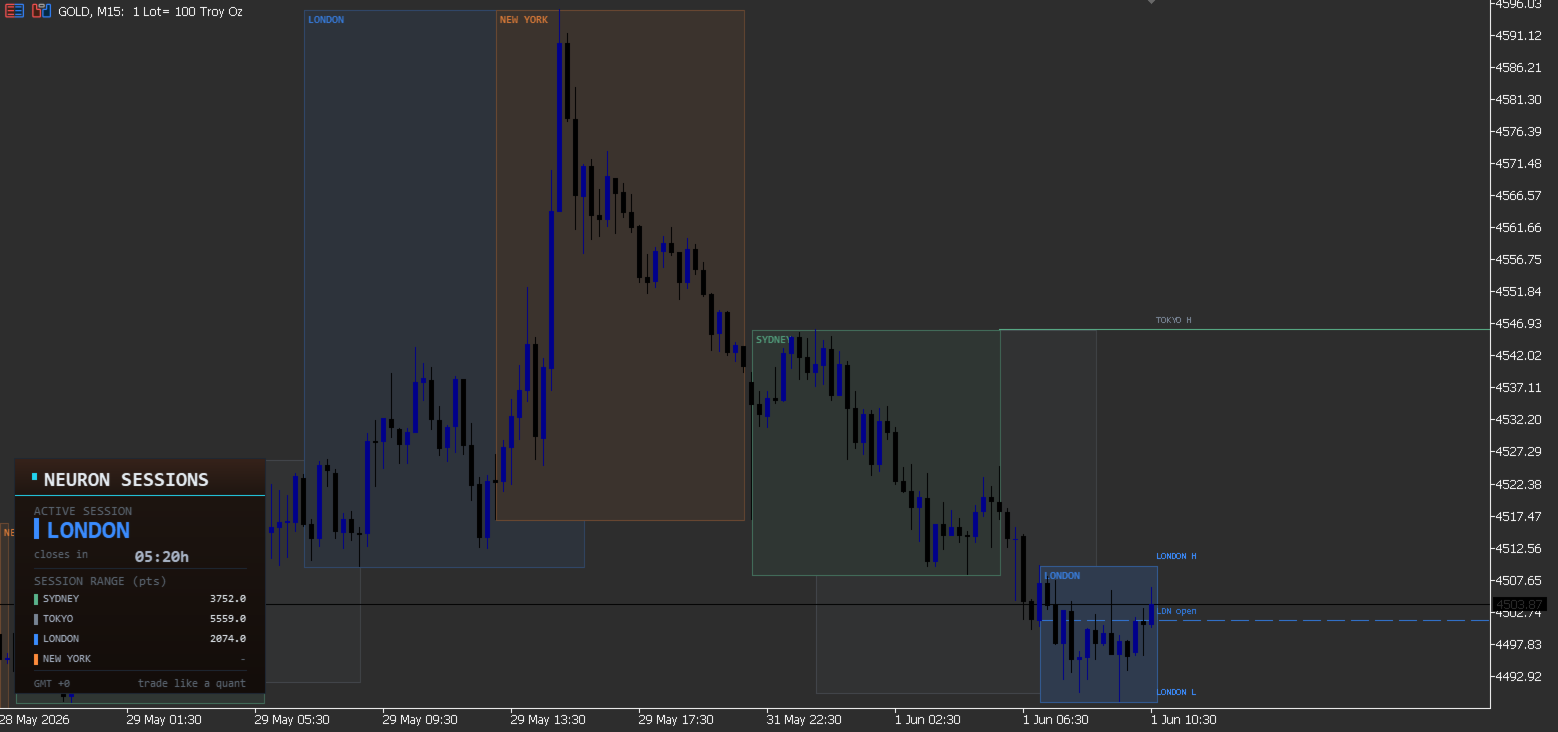
Every session is recorded from closed bars only, so an intrabar wick can never repaint a stored session high or low. The session developing now is drawn brighter with a right edge that tracks the clock; once it ends it is dimmed and frozen, with both the open and close edges marked, so you can see exactly where that session started and finished. There is no after-the-fact redrawing.
=== WHAT IS INCLUDED ===
| Module | What it does |
|---|---|
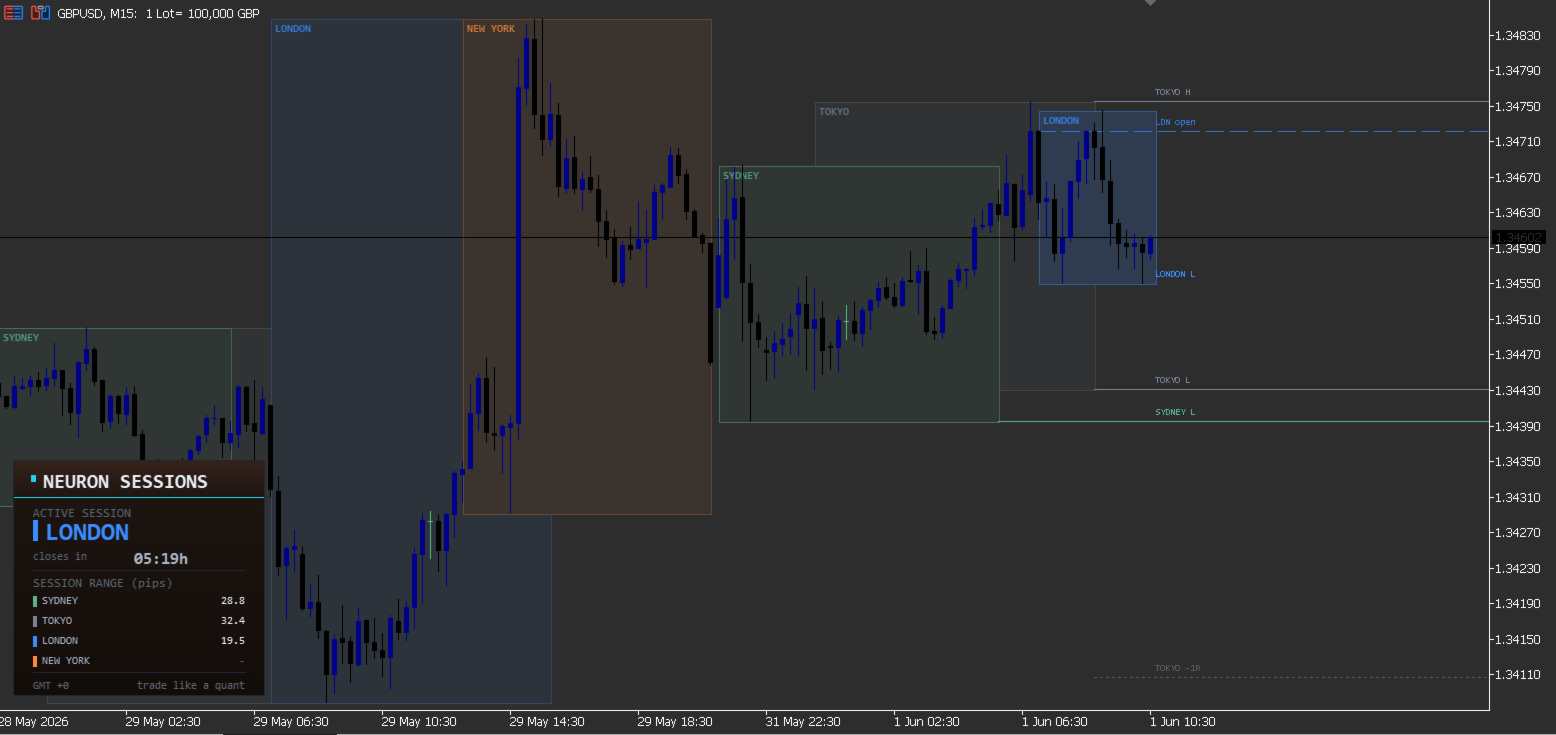
| Session boxes (all four) | Sydney, Tokyo, London and New York each draw as a premium translucent box spanning that session's high-low range. The session developing now is bright with a tracking right edge; completed sessions are dimmed and frozen, with the open and close edges marked. |
| Broker-time aware | Session times entered once in GMT and auto-converted to your broker's server time, with automatic GMT-offset detection and a manual override. Overnight sessions that cross midnight are handled correctly. |
| Killzone shading | An optional subtle band over each session's opening window, the killzone, with an adjustable length from the session open. |
| Session high/low liquidity lines | Each session's high and low extend to the right as reference levels, the prior-session highs and lows that London and New York tend to sweep. Dropped once taken, or kept dim if you prefer to see where the sweep happened. |
| Session open lines | A reference line at the London open and the New York open, plus an optional Daily open, so the key market-open levels are always marked. |
| Tokyo (Asian) range projection | The Tokyo range projected above and below at plus and minus one times its size, giving objective breakout references for the move out of the Asian range. |
| Status panel | The active session, or the next one to open, in its own colour, a live countdown to the close or next open, a killzone indicator, today's session ranges in points (pips on forex), and the detected broker GMT offset. |
| Alerts | On a session open and when price takes a prior session high or low (a session-liquidity sweep): pop-up, push and platform email, each toggled independently. |
=== HOW TO READ IT ===
- Each box is a session's range. The live session is bright with a tracking edge; completed sessions are frozen, so you can see each session's high, low, open and close.
- Use the panel to stay oriented. It shows the active or next session, a live countdown, the killzone state, today's ranges, and the detected GMT offset, so you can confirm the alignment at a glance.
- Session highs and lows are liquidity. They are the levels London and New York tend to run; watch how price interacts with them.
- The Asian range projection frames the breakout. The plus and minus one-times rails give objective references for the London / New York move out of the Asian range.
- Killzones mark the opening windows. Turn them on to highlight where session moves often originate.
- Open lines are key levels. The London, New York and optional Daily open lines mark the prices the market opened from.
=== SUGGESTED SETTINGS (starting points) ===
These are starting points to match your style and the market you trade; they are configuration preferences, not performance recommendations. Adjust and test on your own charts.
| If you want... | Try |
|---|---|
| The classic, balanced view | Defaults: all four sessions on, high/low lines on, Asian-range projection on, killzones off, panel on. |
| A London / New York focus | Turn Sydney and Tokyo off, keep London and New York with their open lines. |
| An ICT killzone view | Turn killzones on and set the killzone length to your window (for example 120 minutes from the open). |
| To see where sweeps happened | Turn on "keep swept" so taken high/low lines stay dimmed instead of dropping. |
| The daily open marked | Turn on the Daily open line. |
| A cleaner chart | Turn labels off, lower the box opacity, or reduce the history days behind today. |
| To fix a misaligned clock | If auto-detect is off for your broker, set the GMT offset manually and confirm it in the panel. |
=== A NOTE ON DAYLIGHT SAVING ===
Session times are fixed GMT inputs and do not auto-shift for daylight saving. Across a DST changeover you nudge the start and end hours, or the GMT offset, by one hour. The panel always shows the offset in use, so you can confirm the alignment.
=== SPECIFICATIONS ===
| Type | Indicator (chart analysis only) |
| Platform | MetaTrader 5, any build |
| Markets | Forex, gold and metals, indices, crypto |
| Timeframes | Any intraday timeframe |
| Engine | Native MQL5, no DLLs, non-repainting closed-bar logic |
| Sessions | Sydney, Tokyo, London, New York; GMT inputs auto-converted to broker time |
| Levels | Session high/low liquidity lines, London / New York / Daily open lines |
| Asian range | Plus and minus one-times projection rails |
| Panel | Active / next session, live countdown, killzone state, today's ranges, GMT offset |
| Alerts | Session open and session high/low sweep via pop-up, push and platform email |
=== INPUTS ===
| Group | Input | Default | Purpose |
|---|---|---|---|
| Sessions | InpBoxesOn | true | Draw session boxes (translucent hi-lo span) |
| Sessions | InpSessSydney / InpSessAsia / InpSessLondon / InpSessNY | true | Show Sydney / Tokyo / London / New York |
| Sessions | InpDaysBack | 5 | History days behind today (0 = today only) |
| Session times (GMT) | InpSydStartGMT / InpSydEndGMT | 21 / 6 | Sydney window (GMT hours; crosses midnight) |
| Session times (GMT) | InpAsiaStartGMT / InpAsiaEndGMT | 0 / 9 | Tokyo window (GMT hours) |
| Session times (GMT) | InpLdnStartGMT / InpLdnEndGMT | 7 / 16 | London window (GMT hours) |
| Session times (GMT) | InpNYStartGMT / InpNYEndGMT | 13 / 22 | New York window (GMT hours; crosses midnight) |
| Session times (GMT) | InpSessGMTOffset | -99 (auto) | Broker GMT offset hours; nudge 1h across a DST changeover |
| Style | InpSydClr / InpAsiaClr / InpLdnClr / InpNYClr | green / slate / blue / amber | Session tones |
| Style | InpBoxTintF | 0.16 | Box opacity (higher = more visible) |
| Style | InpLabels | true | ASIA / LONDON / NY labels on boxes |
| Style | InpAsiaEmph | true | Emphasise the Asian range (brighter rails) |
| Killzones | InpKillzones | false | Shade over each session's killzone window |
| Killzones | InpKzMins | 120 | Killzone length from session open (minutes) |
| Session levels | InpHiLoLines | true | Session high/low liquidity lines (extend right) |
| Session levels | InpHiLoDays | 1 | High/low lines for the last N days (0 = today) |
| Session levels | InpKeepSwept | false | Keep swept lines (dim) instead of dropping them |
| Session levels | InpOpenLines | true | London / New York session open lines |
| Session levels | InpDailyOpen | false | Daily open line |
| Session levels | InpAsiaProj | true | Asian-range projection targets (+/-1x range) |
| Alerts | InpAlertOpen | false | Alert when a session opens |
| Alerts | InpAlertSweep | false | Alert when price takes a prior session high/low |
| Alerts | InpAlertPopup / InpAlertPush / InpAlertEmail | true / false / false | Alert channels |
| Panel | InpPanel | true | Show status panel |
| Panel | InpCountdown | true | Live countdown (1-second timer) |
| Engine | InpGlowThrottleMs | 40 | Box redraw throttle on scroll/zoom (ms) |
| Engine | InpMaxScanBars | 6000 | Hard cap on the closed-bar scan |
=== COMPATIBILITY ===
- MetaTrader 5, any build.
- Any symbol: forex, gold and metals, indices, crypto.
- Any intraday timeframe.
- Native MQL5, no DLLs and no external dependencies.
- Non-repainting closed-bar logic: a completed session is frozen and does not change after the fact.
=== PAIRS WITH THE NEURON SUITE ===
NeuronSessions frames the day and the killzones. It is built to bundle with NeuronLiquidity (where the stops rest) and NeuronStructure (the breaks and order blocks), and fits alongside the rest of the Neuron suite, NeuronSniper, NeuronFlow, NeuronTrend, NeuronCloud, NeuronIchimoku and NeuronQuant (each sold separately). Run them together for the full smart-money read on one chart.
=== SUPPORT ===
Customisation requests and questions are welcome through the Comments tab on this product page.
NOTE: NeuronSessions is an indicator for session and price-level analysis only. It draws on the chart, it does not place, modify or close trades, it does not send orders, and it does not manage positions or accounts, and it makes no claim about future results. All trading decisions and execution remain entirely with you.