Neuron Chart Replay

Neuron Replay — Bar Replay & Paper‑Trading Trainer

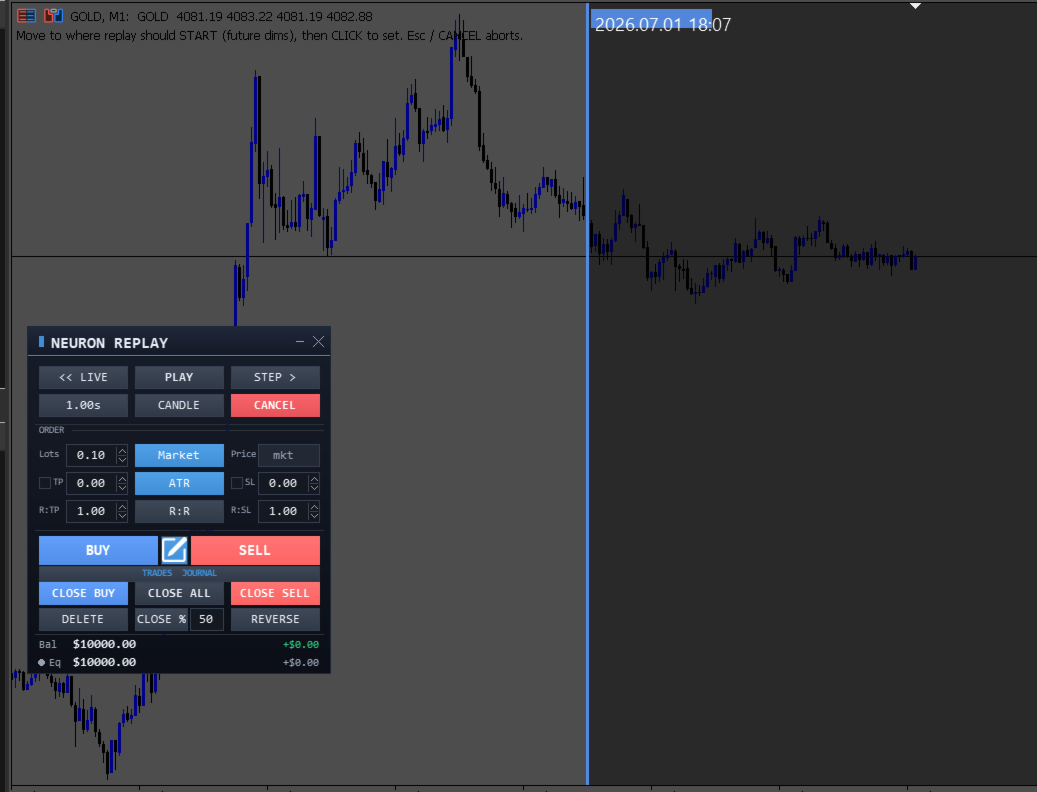
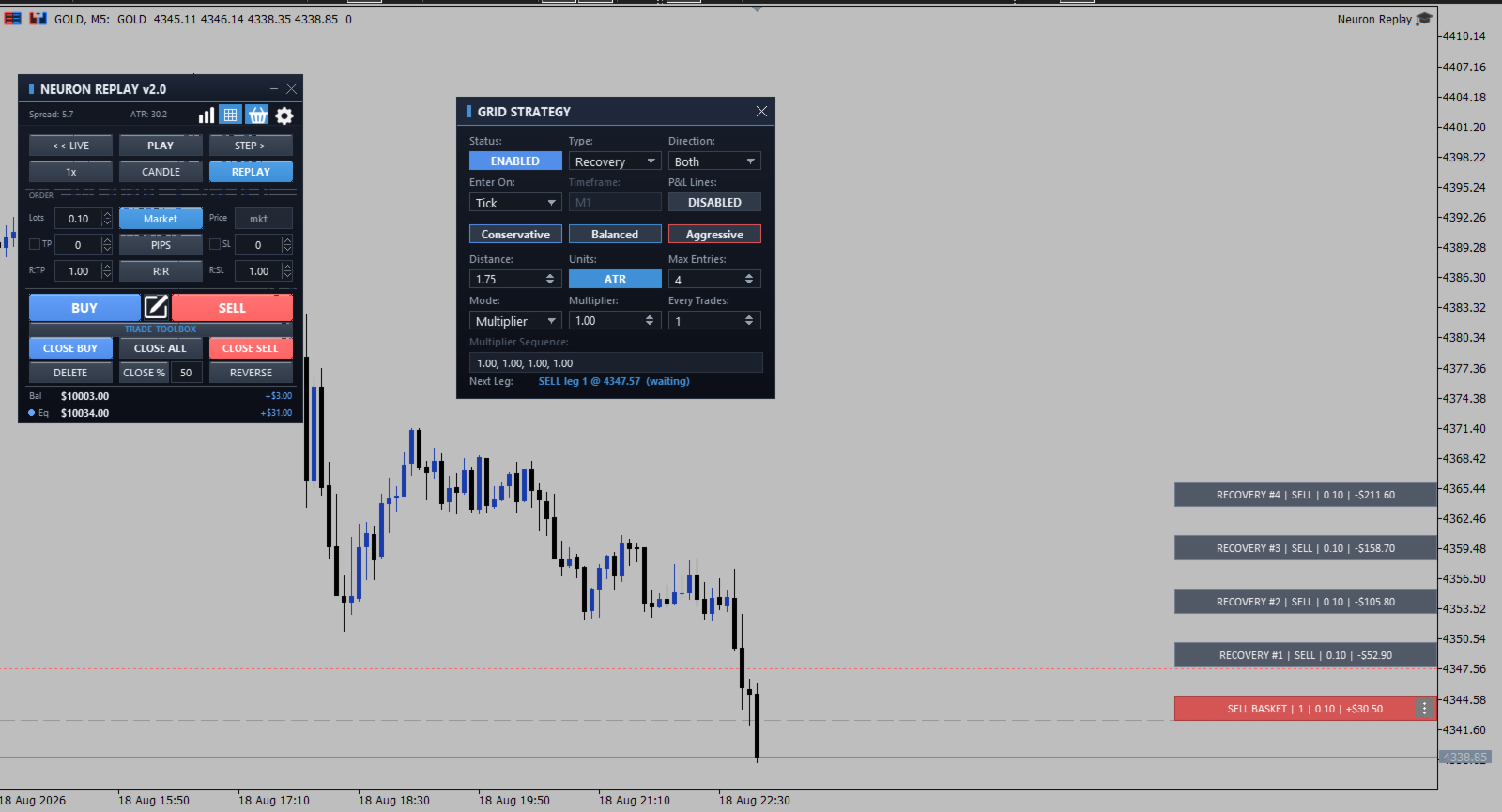
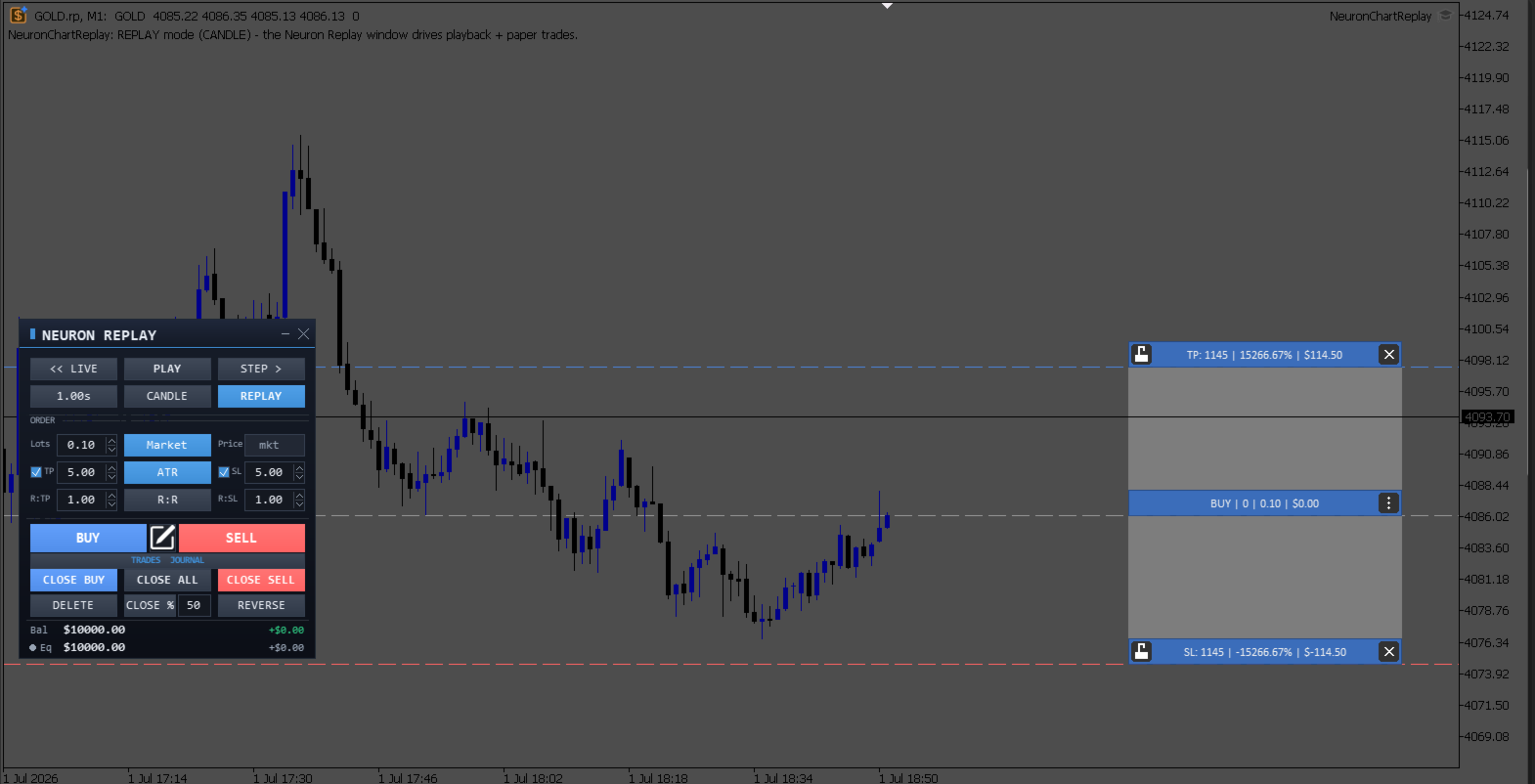
Neuron Replay turns any MetaTrader 5 chart into a TradingView‑style market replay and risk‑free practice simulator. Rewind any symbol to any point in its history, then step through it bar‑by‑bar — or auto‑play it — and practice your entries, exits and trade management on a fully interactive on‑chart panel. Every trade is 100% simulated (paper / "ghost" trading): the tool never sends a single real order to your account, so you can train your strategy and your discipline with zero risk.

Why traders use it

  • Replay the market like a video — rewind, step, and fast‑forward price action.
  • Practice a full trading session in minutes instead of waiting live.
  • Place, drag and manage virtual trades exactly like a real order panel.
  • Build screen time and a repeatable process without risking a cent.
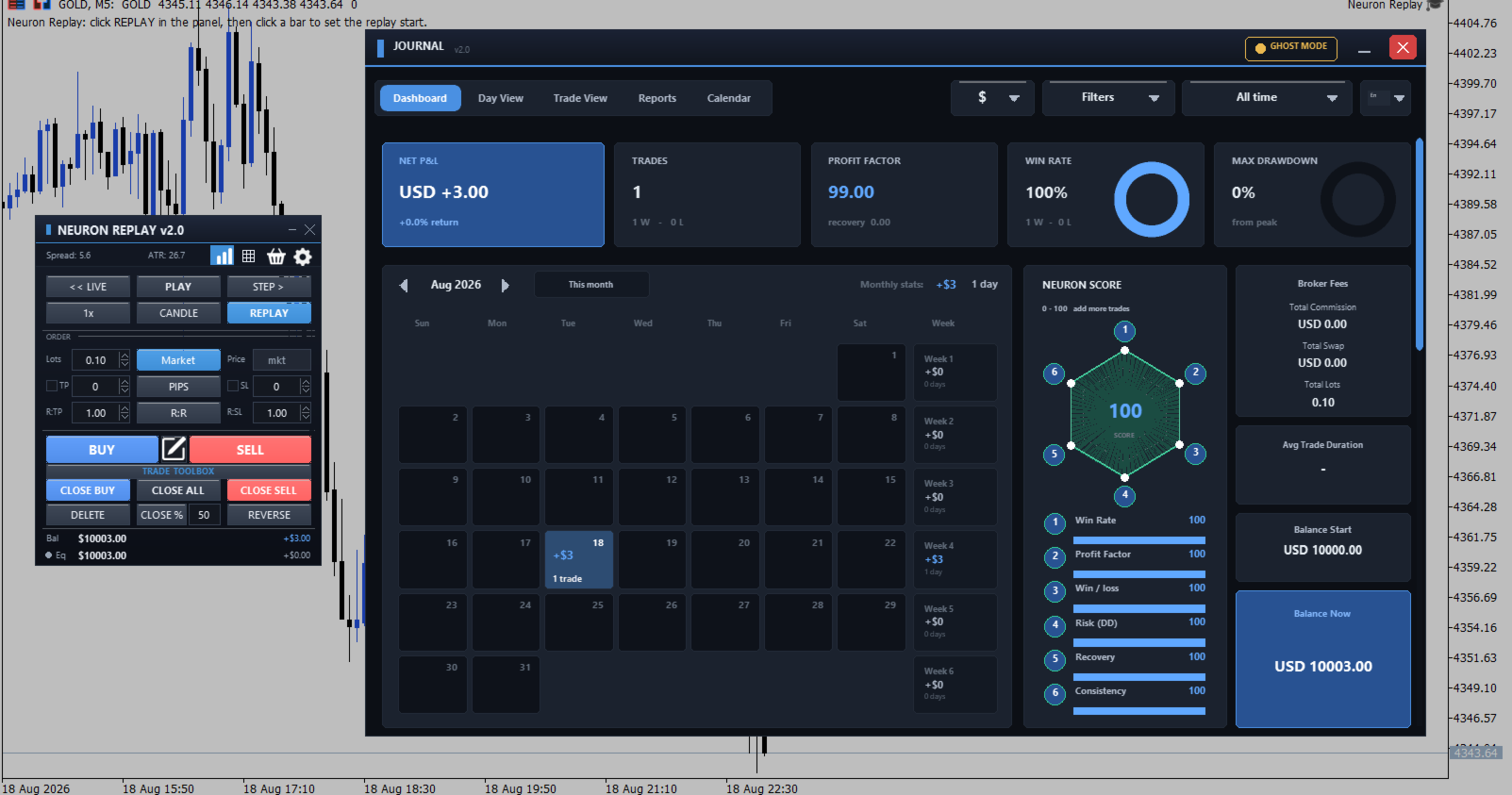
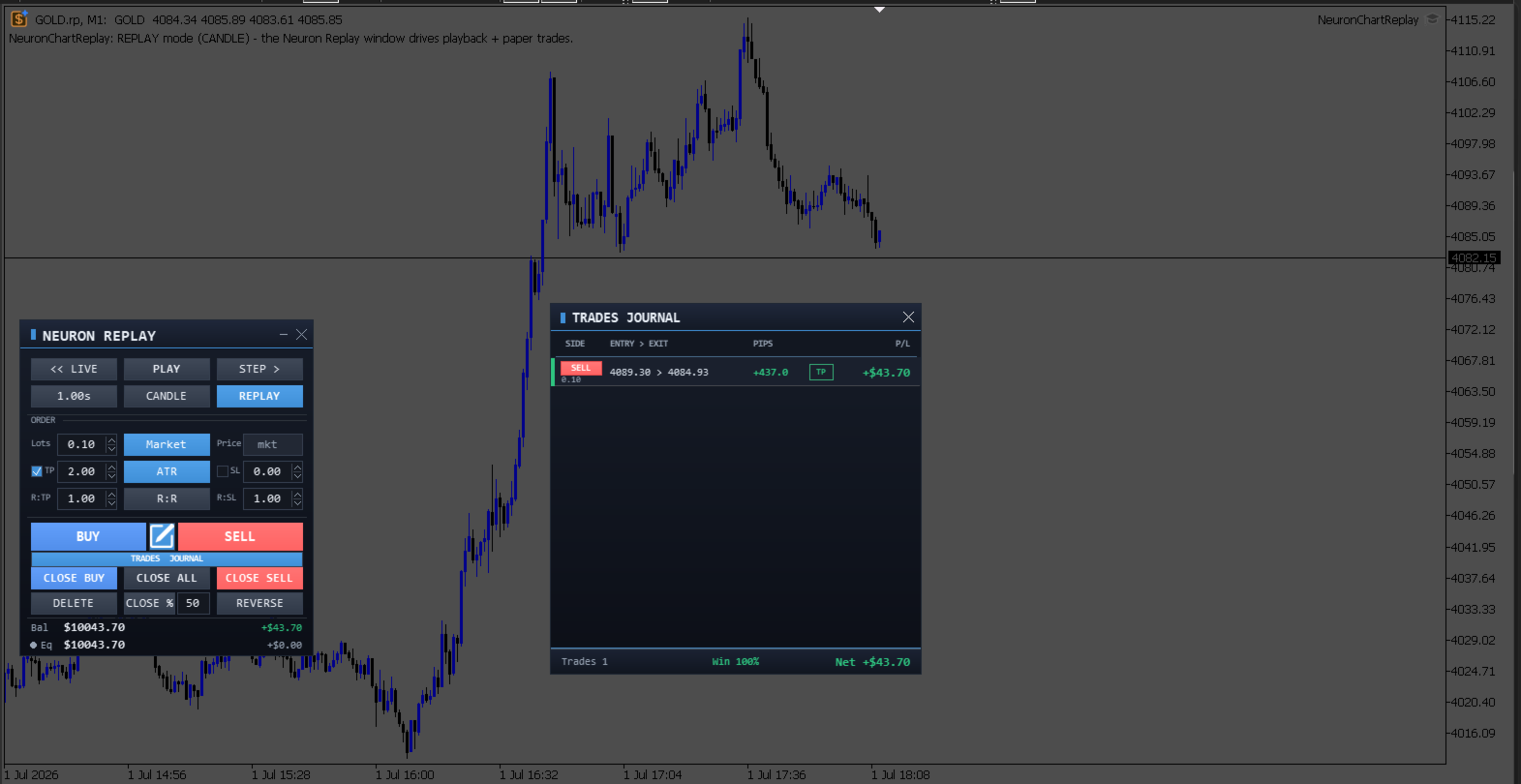
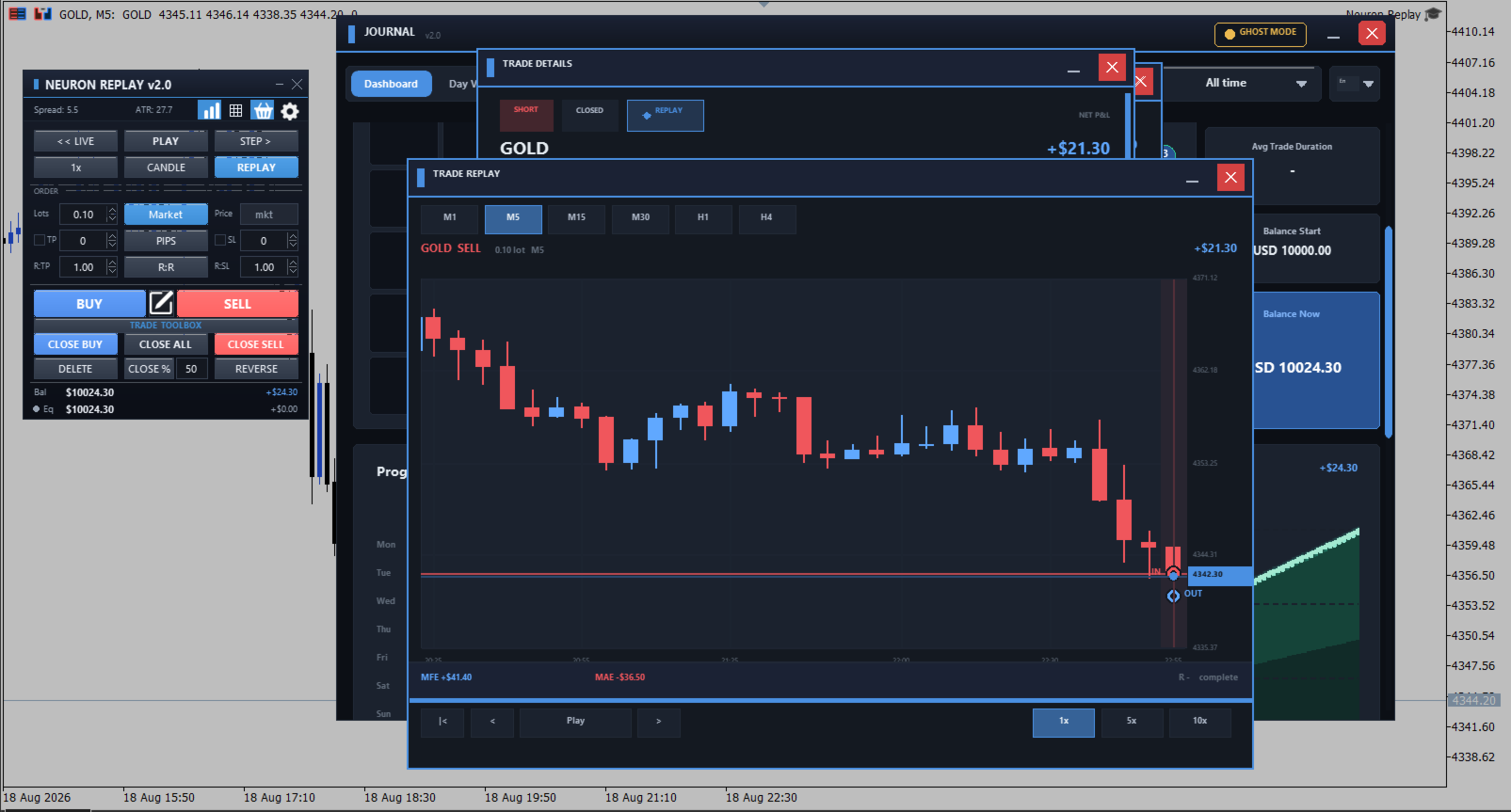
  • Review every decision in a built‑in trades journal with win‑rate and net result.

Key Features

Feature What it does
Any‑point replay Click REPLAY, move the cursor to any past bar (the "future" dims as you move), click to lock the start — the chart replays from there.
Step & Play Reveal one bar at a time (STEP) or auto‑play at 5 adjustable speeds (2s / 1s / 0.5s / 0.25s / 0.1s per bar).
Candle / Tick modes Replay bar‑by‑bar (CANDLE) or drip real ticks inside each bar (TICK) for finer control.
Market orders One‑click virtual BUY / SELL filled at the current replay price.
Pending order tool Drag an entry line on the chart; it auto‑detects BUY LIMIT / BUY STOP / SELL LIMIT / SELL STOP from where you place it, then OK places it.
Draggable SL / TP Grab the SL/TP bars right on the chart to set levels; profit/loss zones shade between entry and target.
ATR / Pips toggle One switch flips all SL/TP inputs between raw pips and ATR multiples, everywhere.
Per‑trade menu A ⋮ menu on each trade: add/remove SL & TP, Break‑Even, Close, Close % (partial).
SL / TP lock Lock a level so it can't be moved or removed by accident.
Paper account Live Balance and Equity with cumulative realized P&L and open floating P&L.
Trades journal Every trade logged — side, entry→exit, pips, result, reason (TP/SL/manual/partial) — with win‑rate and net P&L.
Movable panels Drag the control panel and the journal anywhere; minimise the panel to just its title bar.

How to start a replay (3 steps)

  1. Attach Neuron Replay to any symbol and timeframe.
  2. Click REPLAY, move the cursor to the bar where you want to begin, then click to set the start point.
  3. Use STEP to advance one bar, or PLAY to auto‑run — and start placing practice trades.

Playback controls

Button Action
<< LIVE Return the chart to the live symbol.
PLAY / PAUSE Auto‑advance the replay / pause it.
STEP > Reveal the next bar (or tick chunk in Tick mode).
Speed Cycle the auto‑play speed (seconds per bar).
CANDLE / TICK Switch between candle‑by‑candle and tick playback.
REPLAY Pick (or re‑pick) the replay start point on the chart.

Order entry & management

Control Purpose
Lots Order size for new trades.
Market / Pending Fill instantly at market, or arm a pending price.
TP / SL (with checkboxes) Enable and set take‑profit / stop‑loss distance.
ATR / Pips Two‑state unit toggle for SL/TP (ATR multiple vs pips).
R:R Set take‑profit as a risk‑to‑reward multiple of the stop.
BUY / SELL Place a market order at the current price.
Pencil (order tool) Open the draggable pending‑order tool with auto Limit/Stop detection and an on‑bar OK/Reverse.
CLOSE BUY / ALL / SELL Close open trades by direction, or all at once.
DELETE / CLOSE % / REVERSE Remove pendings, scale out by percentage, or flip a position.

Inputs

Input Default Description
History bars 5000 Number of bars loaded into the replay.
Replay symbol suffix .rp Suffix for the replay symbol clone (EURUSD → EURUSD.rp).
Cursor line colour blue Colour of the start‑picker cursor line.
Future‑area dim 120 How strongly the un‑revealed future is dimmed (0 = off … 255 = black).
Paper starting balance 10000 Starting balance for the simulated account ($).
Default lot size 0.10 Lot size pre‑filled in the panel.
Default SL (pips) 0 Default stop‑loss distance (0 = none).
Default TP (pips) 0 Default take‑profit distance (0 = none).

Who is it for

  • New traders learning to read price action and place orders safely.
  • Strategy testers who want to eyeball a setup across historical sessions.
  • Discretionary traders building screen time and a repeatable routine.
  • Anyone who wants a TradingView‑style replay without leaving MetaTrader 5.

Requirements & notes

  • MetaTrader 5, any symbol and timeframe (best on symbols with history available).
  • The replay runs on a temporary custom‑symbol clone of your chart; the << LIVE button returns you to the real symbol at any time.
  • Simulation only: all trades are virtual — Neuron Replay never opens, modifies or closes a real position.
  • This is a manual, interactive training utility; it does not trade automatically and makes no profit claims.

Train hard in replay, trade calm live.
Önerilen ürünler
TradingX Hotkeys
Johannes Stephanus Lombard
Inputs Available Lotsizes Partial Close % You can change lotsizes as you require On an open chart click once to select chart to be able to use hotkeys on specific chart. All Pairs can be used with this expert We created this expert to be able to still trade C300 with a 0.06 Lotsize If you enter a 0.6 lot and close 0.90% you can trade with 0.06 Lot Keys to be used: B -Buy S -Sell C -Close Profitable D -Breakeven (Note if stoploss is set it won't break even) P -Partial close X -Close all
Overview AlphaForge Range Chart is a professional non-trading range-bar charting utility for MetaTrader 5. It generates live Range charts as MT5 custom symbols, helping traders analyze price movement through fixed-range bars instead of standard time-based candles. Unlike visual-only overlays, the generated Range chart behaves like a real MT5 custom-symbol chart. This means you can open it as a normal chart, apply templates, draw analysis objects, and add indicators directly to the Range chart fo
"Support or Resistance Alert Broken" is a simple and very intuitive tool that allows you to create or eliminate horizontal and trend supports and / or resistances with a simple click. When the support or resistance line is broken by the closing price at the end of the current candle, the "Support or Resistance Alert Broken" tool will send an alert with sound, as well as a notification to the MT4 or MT5 mobile application. This tool can send alerts from multiple pairs at the same time. Utility
The instant trade risk click EA is aimed to help you get into the market as quickly as possible. You give it your risk percentage, and your risk to reward you're hoping to get, then an option to set only stop loss and no take profit. With that, every CTRL + Left Click events on the chart would instantly open a position, with the price on the clicked x and y axis as the stop loss, and the open price as the current markets bid/ask price. If you click above the price, it's a Sell position , if yo
**Tek Tıkla Başabaş (Breakeven) Koruması** Tek bir tıklama ile sermayenizi koruyun. Pozisyon açtıktan sonra, kârda olan tüm işlemlerin Zarar Durdur (SL) seviyesini giriş fiyatına taşımak için düğmeye basın. Bu, kazanan işlemlerdeki riski sıfırlar. **Nasıl Çalışır?** Panel, kârda ve zararda olan pozisyonlarınızı canlı olarak sayar. "SET SL TO ENTRY" düğmesine tıkladığınızda, kârda olan tüm pozisyonlar giriş fiyatına sabitlenir. Zarardaki işlemler otomatik olarak atlanır. **Önemli Özellikler**  
JYPF Trade Panel is a professional, interactive trading assistant for MT5. It features dynamic 3-line synchronization (Entry/SL/TP) with "Instant Click-and-Drag" technology. Avoid mouse blockages with our cutting-edge translucent trend-zone visualization. Real-time floating profit/loss projections and Risk-to-Reward (R:R) ratios are calculated instantly on your chart. Complete with one-click break-even, 50% partial close, trailing pips, and global equity protection—the ultimate toolkit for scalp
FREE
This is an utility for MetaTrader 5 designed to send notifications to a Telegram bot regarding trading activity on the terminal. The EA monitors changes in positions and orders, then sends structured messages to specified Telegram chats through the Telegram Bot API. It can optionally include chart screenshots when positions are opened. The EA uses the WebRequest function to communicate with the Telegram API. No additional servers or external services are required. Main Features Position Activity
Advanced Trailing Stop & Break-Even Expert Advisor with Partial Profit Taking Overview Unlock the full potential of your trading strategy with this Expert Advisor that automates trade management to maximize profits and minimize losses. Designed for both novice and experienced traders, this EA offers precise control over your trades with customizable trailing stops, break-even protection, and partial profit taking — all working seamlessly to protect your capital and lock in gains. Key Features Dy
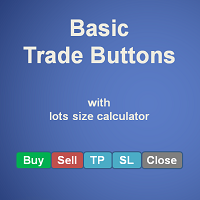
Basic Trade Buttons is a tool to help you to quickly open and close trades, place take profit and stop loss points by clicking on the button of each job that you preferred. Once you attached this tool to mt5 chart, the program will calculate a trade volume(Lots size) automatically to prepare to send to the trade server when you click on 'Buy' or 'Sell' button. Click on 'TP', 'SL' or 'Close' button to place take profit, stop loss based on the predefined levels or to close all open positions respe
This EA help trader to manage his pending orders, when you place many Pending Orders this utility monitor them and when of them get filed (executed) the EA cancel and delete all rest of pending orders, to avoid  opening of all of pending orders at the same time , and lose your risk management. this utility is very useful for trader when he /she is not available on the desk.
The TradeMetrics Pro indicator enhances trade analysis and performance evaluation by presenting trade history and metrics directly on the chart. It accomplishes this through three key features: Summary Trade Panel: The Summary Trade Panel provides a concise overview of open and closed trades. It organizes trade summaries by symbol, lots traded, pips gained or lost, profit, and advanced statistics. This panel enables quick assessment and comparison of trade performance across different symbols.
QuickTrade Panel — One-Click Buy/Sell with Live Risk & Reward Preview Trade faster and smarter, directly from the chart — no order window required. QuickTrade Panel is a lightweight, fully manual trading panel for MetaTrader 5. It sits on your chart as a draggable floating window, giving you instant Buy/Sell execution with full control over lot size, stop loss, take profit, and risk-to-reward — all visible before you click. Key Features One-click Buy / Sell execution Large, color-coded SELL and
Product Description Bybit Charts Utility for MetaTrader 5 — a streamlined tool designed for traders who use Bybit. This utility provides you with the convenience of automatically drawing all charts of Bybit within MetaTrader 5, enabling seamless time-frame switching and efficient market visualization. MQL5  Key Features Automatically draws every timeframe (starting from M1) for charts of Bybit. MQL5 Enables smooth navigation between different time-frames, just like viewing regular charts. MQL5
Description This is a Utility tool for MT5 which will make our chart analysis task quite more efficient and save large amount of time. As for chart analysis, some are watching out several symbol simultaneously with single timeframe and others are trading only one single pair with   multi timeframe analysis. For both, a common troublesome issue is “scroll chart to look back” or “draw chart objects” in multi charts at the same time.  Especially for those who are trading with multi timeframe soluti
ProTrading Panel — Manuel İşlemler İçin En Gelişmiş Ticaret Yardımcısı ProTrading Panel ile manuel işlem deneyiminizi bir üst seviyeye taşıyın. Emirlerin yıldırım hızında iletilmesi için tasarlanan bu Uzman Danışman (EA), çalışma alanınızı daraltmadan grafiklerinize mükemmel şekilde uyum sağlayan şık ve gözü yormayan dikey bir arayüz sunar. İster ekrana fareyle tıklamayı tercih edin, ister klavye kısayollarını kullanarak işlemlerinizi ışık hızında gerçekleştirin; bu araç tamamen sizin için tasar
Com este Expert Advisor tenha a possibilidade de fechar todas as posições de forma automatizada. Tenha em mãos o recurso de fechar as posições e ordens pendentes por ações, Dólar, Índice ou TODOS estes juntos, algo inovador no mercado. Ideal para quem quer uma segunda camada de segurança para suas operações automatizadas ou ainda que o próprio robô feche suas operações manuais em um horário programado. Promoção de 30 dólares para a três primeiras assinatura, posteriormente será cobrado 50 dól
ATM Auto Trade Manager   Expert Advisor will manage all transactions you make using Expert Advisor, or manually from all platforms (Web Trade, MT5 Windows, MT5 Mac, MT5Mobile phone) Multi Currency In one chart, the Tool will manage transactions of all currencies or according to the available list. Currency Selection All Transactions of All Pairs Based on the Pairs List Auto Manage, with setup parameters on one chart Auto Close Profit Average Auto Close Profit only Auto SL / TP Auto Trailing B
TrailNow Ghost EA - Gelişmiş İstemci Tarafı Trailing Stop Yardımcı Programı TrailNow Ghost EA - Gelişmiş İstemci Tarafı Trailing Stop Yardımcı Programı Genel Bakış TrailNow Ghost EA, sunucu tarafı stop loss emirlerini değiştirmeden gelişmiş istemci tarafı trailing stop işlevselliği uygulayan ileri düzey bir MetaTrader 5 yardımcı programıdır. Bu yenilikçi yaklaşım, çeşitli broker ortamları ve ticaret stratejileri ile uyumluluğu korurken tüccarlara pozisyon yönetimi üzerinde gelişmiş kontrol sağl
Tools to open multiple positions/trades all at once?  We've created your easy solution. You can now enter multiple positions at one time. You can set you Lot size, Number of positions, Interval every open position, Take profit, and stop loss and trailing stop too. an addition button for Close All Close All Profit Close All Loss Close All Sell Close All Buy For example: You want to buy 2, 4, 6 or any number of positions with a certain lot size, every 10 second. You can now do so by simply
Painel Pro: Video 01 :  https://www.youtube.com/watch?v=9K2JmSWuEuU Video 02:   https://youtu.be/hHdAzAQRRok?si=sDtXsUKJmmdqwN5P Available in English & Portuguese (Select in Inputs) Disponível em Português e Inglês (Selecione nas Configurações) Pro Trader Dashboard   is the ultimate professional utility for MetaTrader 5, designed to solve the biggest problem in trading:   Discipline and Risk Management . This tool acts as your "Risk Manager", enforcing daily limits to protect your capital
EA Emotion   is not a traditional Expert Advisor that places trades automatically – instead, it’s a psychological checkpoint that helps you manage   trading discipline and emotional control . Designed especially for discretionary traders, prop firm challengers, and anyone serious about improving consistency,   EA Emotion   asks a series of custom questions   right after you open a trade , such as: Did you follow your trading plan? Are you in the right mental state? Is this trade part of your set
Ek materyaller ve talimatlar Kurulum talimatları - Uygulama talimatları - Demo hesap için uygulamanın deneme sürümü Fonlu hesap. Yanlis hesaplanmis bir lot buyuklugu. Drawdown limiti asildi. Hesap kapatildi. Strateji basarisiz oldugu icin degil. Islem aninda risk kontrol edilmedigi icin. Trade Command Center , gorsel trade islem ve risk yonetimi panelidir. SL mesafesinden lot hesaplar. Pozisyonlari otomatik yonetir. Drawdown limitlerini gercek zamanli izler. Bes sekme. Bir grafik paneli. DLL
Merhaba arkadaşlar Yatırım yapmak insanların gözünde zor ve riskli bir iş olarak görülüyor. Ama bilgi ve beceri kazanarak yatırım yaparsanız piyasa size asla zarar vermez. Sermaye piyasasında filtre yazımı, bu alanda profesyonellerin verimliliği artırmak ve zamandan tasarruf etmek için yaptıkları eylemlerden biridir. Çok sayıda sembolün faaliyeti nedeniyle depolanan bilgi ve verilerin hacmi çok yüksektir. Bu piyasada faaliyet gösteren kişiler bazen bir dizi bilgiye ihtiyaç duymaktadır ve konun
The Definitive Performance Testing Solution for MetaTrader Environments What This Tool Does This specialized benchmark utility measures the performance of your MetaTrader environment, providing insights that impact your trading execution. Unlike generic system benchmarks, this tool evaluates performance specifically within the MetaTrader runtime environment. For Professional Traders & Developers: Performance Metrics : Measurements of calculation throughput and memory efficiency Trading-Specific
This Expert Advisor monitors all open positions across all symbols in MetaTrader 5. Whenever a Stop Loss (SL) or Take Profit (TP) is manually set or adjusted on any position, the EA automatically applies that value to all other open positions , regardless of symbol or order type (Buy/Sell). This ensures consistent and synchronized SL and TP levels across your account. Perfect for mobile trading via tablet or smartphone!
Telegram Sender Osw MT5
William Oswaldo Mayorga Urduy
Kullanım Kılavuzu: Telegram Sender Osw Telegram Sender Osw, MetaTrader'dan Telegram'a işlem sinyallerinin otomatik olarak gönderilmesini sağlamak için tasarlanmış bir Uzman Asistanıdır (EA). Sinyal sağlayıcıları ve hesap yönetimi için ideal olan bu yazılım, kritik verileri (Fiyat, Zarar Durdurma, Kar Al, Hacim) anında ve profesyonelce gönderir. 1. Parametre Yapılandırması Genel ve Bağlantı EA'yı Etkinleştir: Sistemi etkinleştirir (true) veya duraklatır (false). Bot Token: @BotFather'dan alına
Yardımcı program, Telegram'a MetaTrader 5 hesap olayları hakkında bilgi içeren mesajlar (bildirimler) gönderir. Yardımcı program güncellenmekte ve geliştirilmektedir. 1) Açılış ve kapanış pozisyonları 2) Sipariş verme ve silme 3) Pozisyonların Kar Al / Zararı Durdur modifikasyonu 4) Kar Al / Zararı Durdur / Bekleyen Emir Fiyatlarının Değiştirilmesi 5) Karakter Adına Göre Filtreleri Dahil Etme/Dışlama 6) Sihirli numaraya göre filtreleri dahil etme/hariç tutma 7) Yorumlarda kelime içeriğin
Mevcut, tüm veya seçili grafikler, zaman çerçevesi değişikliği ve geçmişteki eşzamanlı hareket (otomatik veya tıklama ile) için işlem enstrümanını değiştirmek için tasarlanmış yardımcı program. Sembol listesi "piyasaya genel bakış" bölümünden okunur. Düğmelerin rengini, boyutunu ve konumunu değiştirebilirsiniz. Grafik senkronizasyonu, senkronizasyon düğmesini tıklattığınızda veya fareyi/klavyeyi otomatik modda hareket ettirdiğinizde etkin grafikte ilk görünür çubuk anında gerçekleşir. TF, imleç
BLZ Candle TImer
Moustapha Boulouz
4.48 (21)
BLZ Mum Zamanlayıcı: Ticaretin Geleceğini Açığa Çıkarma BLZ Mum Zamanlayıcı ile ticaretin en ileri dünyasına adım atın, mevcut çubuk Bitmeden ve yenisi ortaya çıkmadan önce kalan süreyi ortaya çıkaran gelişmiş bir çubuk Zamanlayıcı Geri Sayımı. Bu gösterge, grafiğinizdeki son çubuk için kalan süreyi ortaya çıkararak piyasanın ritminin önünde kalmanızı sağlarken hassasiyetin gücünü deneyimleyin. Yeni bir çubuğun gelişi için zamanında bildirimlerle tetikte olun ve ticaret stratejinize dinamik b
FREE
It is a utility that posts customized messages on Telegram based on account trading activity. Once the utility is on the chart, with each new position opened from the same chart symbol the utility is added, a customized message will be sent to the Telegram group defined in the input parameters. The utility will post to the Telegram group if a new position is opened and if it is the same symbol as the chart the utility is running on. If you are using an Expert Advisor for Buy and Sell and want to
Bu ürünün alıcıları ayrıca şunları da satın alıyor
Trade Assistant MT5
Evgeniy Kravchenko
4.43 (213)
It helps to calculate the risk per trade, the easy installation of a new order, order management with partial closing functions, trailing stop of 7 types and other useful functions. Additional materials and instructions Installation instructions - Application instructions - Trial version of the application for a demo account Line function -   shows on the chart the Opening line, Stop Loss, Take Profit. With this function it is easy to set a new order and see its additional characteristics bef
Trade Manager EA’ye hoş geldiniz! Ticaretin daha sezgisel, hassas ve verimli hale gelmesi için tasarlanmış nihai risk yönetim aracı ile tanışın. Bu sadece bir emir verme aracı değil; ticaret planlaması, pozisyon yönetimi ve risk kontrolü için kapsamlı bir çözüm. İster yeni başlayan bir yatırımcı olun, ister deneyimli bir trader ya da hızlı emir gerektiren bir scalper, Trade Manager EA ihtiyaçlarınıza uyum sağlar ve forex, endeksler, emtialar ve kripto paralar dahil tüm piyasalarda esneklik sunar
Local Trade Copier EA MT5
Juvenille Emperor Limited
4.96 (142)
Local Trade Copier EA MT5   ile olağanüstü hızlı işlem kopyalama deneyimi yaşayın. Kolay 1 dakikalık kurulumuyla bu işlem kopyalayıcısı, aynı Windows bilgisayarda veya Windows VPS'te birden fazla MetaTrader terminali arasında işlemleri kopyalamanıza olanak tanır ve 0.5 saniyenin altındaki şimşek hızında kopyalama hızları sunar. Başlangıç seviyesinde veya profesyonel bir tüccar olsanız da,   Local Trade Copier EA MT5 , spesifik ihtiyaçlarınıza göre özelleştirmek için geniş bir seçenek yelpazesi s
Beta Sürümü Telegram to MT5 Signal Trader resmi alfa sürümüne neredeyse hazır. Bazı özellikler hâlâ geliştirilmekte olup küçük hatalarla karşılaşabilirsiniz. Sorun yaşarsanız lütfen bildirin, geri bildiriminiz yazılımın herkes için gelişmesine yardımcı olur. Telegram to MT5 Signal Trader , Telegram kanallarından veya gruplarından gelen işlem sinyallerini otomatik olarak MetaTrader 5 hesabınıza kopyalayan güçlü bir araçtır. Herkese açık ve özel kanalları destekler ve birden fazla sinyal sağlayıc
TradePanel MT5
Alfiya Fazylova
4.88 (160)
Trade Panel, çok işlevli bir ticaret asistanıdır. Uygulama, manuel ticaret için 50'den fazla ticaret fonksiyonu içerir ve çoğu ticaret görevini otomatikleştirmeyi mümkün kılar. Satın almadan önce demo hesapta demo sürümü test edebilirsiniz. Demo hesap için uygulamanın deneme sürümünü indirin: https://www.mql5.com/en/blogs/post/750865 . Talimatların tamamı buraya . Ticaret. Tek tıklamayla ticaret işlemleri yapmayı sağlar: Risk otomatik hesaplaması ile bekleyen emirleri ve pozisyonları açmak. Bird
Power Candles Strateji Tarayıcısı - Kendi Kendini Optimize Eden Çoklu Sembol Kurulum Bulucu Power Candles Strateji Tarayıcısı , Power Candles göstergesini çalıştıran aynı kendinden optimize edici motoru, Piyasa İzleyicinizdeki her sembol üzerinde yan yana çalıştırır. Tek bir panel, şu anda istatistiksel olarak hangi sembollerin işlem yapılabilir olduğunu, her birinde hangi stratejinin kazandığını, en uygun Stop Loss / Take Profit çiftini gösterir ve yeni bir sinyal geldiği anda size bildirim gön
Farmed Hedge Yield Farming | All Markets (Manual - Hybrid - Semi/Automated EA) MULTI-ASSET SUPPORT Trade any asset available on your broker - Forex: Major, Minor, Exotic pairs - Crypto: BTC, ETH, XRP, SOL, BNB - Stocks: Apple, Tesla, Amazon, Google, etc. - Commodities: Gold, Silver, Oil, Gas - Indices: US30, NAS100, SPX500, DAX40 - Any CFD your broker offers VERIFIED TRADING RESULTS - Farmed Hedge Yield Axi Copy:  https://www.mql5.com/en/signals/2356376 - Farmed Hedge Yield Exn Copy:   https:/
Quant AI Agents are independent trading Expert Advisors. Instead of trading using a fixed strategy like other conventional EAs, Quant AI Agents   is a   multi-agent AI trading framework   that turns natural-language strategy prompts into live.  WANT THE SAME RESULTS AS MY LIVE SIGNAL?   Use the exact same brokers I do:   IC MARKETS , IC TRADING   .  Unlike the centralized stock market, Forex has no single, unified price feed.  Every broker sources liquidity from different providers, creating un
Exp COPYLOT CLIENT for MT5
Vladislav Andruschenko
3.94 (34)
MetaTrader 5 için profesyonel işlem kopyalayıcı MetaTrader için hızlı, profesyonel ve güvenilir bir işlem kopyalayıcı . COPYLOT , MT4 ve MT5 terminalleri arasında Forex işlemlerini kopyalamanıza olanak tanır ve Hedge ile Netting hesaplarını destekler. COPYLOT MT5 sürümü şunları destekler: - MT5 Hedge → MT5 Hedge - MT5 Hedge → MT5 Netting - MT5 Netting → MT5 Hedge - MT5 Netting → MT5 Netting - MT4 → MT5 Hedge - MT4 → MT5 Netting MT4 sürümü Tam açıklama + DEMO + PDF Nasıl satın alınır Nasıl kurul
YuClusters
Yury Kulikov
4.89 (44)
Attention: You can view the program operation in the free version  YuClusters DEMO .  YuClusters is a professional market analysis system. The trader has unique opportunities to analyze the flow of orders, trade volumes, price movements using various charts, profiles, indicators, and graphical objects. YuClusters operates on data based on Time&Sales or ticks information, depending on what is available in the quotes of a financial instrument. YuClusters allows you to build graphs by combining da
Trade copier MT5
Alfiya Fazylova
4.57 (46)
Trade Copier, ticaret hesapları arasındaki işlemleri kopyalamak ve senkronize etmek için tasarlanmış profesyonel bir yardımcı programdır. Kopyalama, tedarikçinin hesabından/terminalinden alıcının aynı bilgisayarda veya vps'de kurulu olan hesabına/terminaline gerçekleşir. KAMPANYA - Eğer zaten "Trade copier MT5" aldıysanız, "Trade copier MT4"ü ücretsiz olarak alabilirsiniz (MT4 > MT5 ve MT4 < MT5 kopyalamalar için). Koşullar hakkında daha fazla bilgi almak için lütfen bizimle özel mesaj yoluyla i
Telegram to MT5 Multi-Channel Copier , Telegram kanallarınızdaki trading sinyallerini otomatik olarak doğrudan MetaTrader 5'e kopyalar. Bot yok, tarayıcı uzantısı yok, manuel kopyalama yok. Telegram'da bir sinyal alırsınız ve EA birkaç saniye içinde terminalinizde işlem açar. Ürün iki bileşen içerir: Telegram kanallarınızı dinleyen bir Windows uygulaması ve sinyalleri MT5 terminalinizde yürüten bu Expert Advisor. Bir MT4 sürümü de mevcuttur. Kurulum kılavuzu ve uygulama indirme: https://www.mql5
Premium Trade Manager - İçine Koç Yerleştirilmiş İşlem Paneli Premium Trade Manager , grafiğinizin içine bir trading koçu yerleştirir; altında tam bir yürütme motoru çalışır. İşlemi her zamanki gibi kurun, ardından yapay zeka trading koçunuz Max, o kurulumu tam olarak okusun ve canlı hesabınıza göre taahhüt etmeden önce size net bir değerlendirme sunsun: stop disiplinli bir yaklaşıma uyuyor mu, risk büyüklüğü makul mü, yüksek etkili bir haber dakikalar sonra mı geliyor, prop firm limitinize yakl
Üye olduğunuz herhangi bir kanaldan (özel ve kısıtlı olanlar dahil) sinyalleri doğrudan MT5'inize kopyalayın.  Bu araç, kullanıcıyı göz önünde bulundurarak tasarlanmış olup işlemleri yönetmek ve izlemek için ihtiyacınız olan birçok özelliği sunar. Bu ürün, kullanıcı dostu ve görsel olarak çekici bir arayüzde sunulmaktadır. Ayarlarınızı özelleştirin ve ürünü dakikalar içinde kullanmaya başlayın! Kullanıcı Kılavuzu + Demo  | MT4 Sürümü | Discord Sürümü Demo denemek isterseniz lütfen kullanıcı kı
FUTURES ORDERFLOW FOOTPRINT CHART Professional OrderFlow EA for MetaTrader 5 Version 1.01| Professional tool for real traders | Institutional-Grade Visualization STRATEGY TESTER USERS - PLEASE SELECT EVERY REAL TICK WHEN TESTING AND YOU HAVE DOWNLOADED HISTORICAL DATA. IF YOU SEE A WAITING SCREEN AND IT IS NOT DOWNLOADING, IT MEANS YOU HAVE LOW HISTORICAL DATA. TRY 1 MIN AND 5 MIN FIRST ON 1 DAY DATA. ONE DAY DATA SHOULD BE THE NEWEST AND MOST CURRENT DATE. PLEASE WAIT UNTIL THE MARKET HAS ROL
Trade Dashboard simplifies how you open, manage, and control your trades, with built-in lot size calculation. It allows you to execute trades, manage risk, and control positions directly on the chart, with tools such as partial close, breakeven, and trailing stop. Designed to reduce manual work and help you stay focused on your trading decisions. A demo version is available for testing. Detailed explanations of features are provided within the MQL5 platform. Installation instructions are include
================================================================================ POC BREAKOUT - V20.72. Full Professional Grade Toolkit ================================================================================ POC Breakout is a full MetaTrader 5 trading dashboard for discretionary traders who want breakout signals, Point of Control (POC) context, volume profiles, order flow, market structure, news, alerts, and advanced trade planning in one professional workspace. Attached directly to you
Telegram to MT5 Pro — Advanced Telegram Signal Copier with Auto-Fix, Multi-TP, Risk Control and Full Trade Management Telegram to MT5 Pro — Profesyonel Telegram Sinyal Kopyalayıcı Telegram to MT5 Pro, Telegram’dan gelen sinyalleri MetaTrader 5 hesabına otomatik olarak doğrudan uygulayan yüksek performanslı bir trade kopyalayıcıdır ve risk, işlem yürütme ve trade yönetimi üzerinde tam kontrol sağlar. Sistem iki bileşenden oluşur: • MetaTrader 5 içinde çalışan Expert Advisor (EA) • Telegram’a bağ

Seconds Chart - MetaTrader 5 için saniye bazlı grafikler oluşturmanıza olanak sağlayan eşsiz bir araçtır. Seconds Chart sayesinde saniye cinsinden zaman dilimleriyle grafik oluşturabilir, standart dakika veya saatlik grafiklerde mümkün olmayan esneklik ve analiz hassasiyetine ulaşabilirsiniz. Örneğin, S15 zaman dilimi 15 saniyelik mum çubuklarını ifade eder. Desteklenen özel sembollerle herhangi bir gösterge ve danışman kullanabilirsiniz. Onlarla çalışmak, standart grafiklerde işlem yapmak kadar
Timeless Charts
Samuel Manoel De Souza
5 (7)
Timeless Charts, profesyonel yatırımcılar için hepsi bir arada bir trading aracıdır. Saniye Grafikleri ve Renko gibi özel grafik türlerini, Footprints , Clusters , Hacim Profilleri , VWAP çalışmaları ve gelişmiş piyasa analizi sağlayan sabitlenmiş analiz araçlarıyla gelişmiş emir akışı analiziyle birleştirir. İşlem ve pozisyon yönetimi, entegre işlem yönetim paneli aracılığıyla doğrudan grafik üzerinden gerçekleştirilirken, Market Replay ve Sanal Hesaplar trading becerileri ve stratejileri üzeri
AI Agent Supervisor is NOT an Expert Advisor. AI Agent Supervisor   is a   multi-agent AI risk & portfolio supervisor   that watches every EA on your account and intervenes in real time.  WANT AN AI PORTFOLIO MANAGER WATCHING YOUR FLEET 24/7?   Run your fleet on the same brokers I do:   IC MARKETS , IC TRADING   .  Unlike the centralized stock market, Forex has no single, unified price feed.  Every broker sources liquidity from different providers, creating unique data streams. The Supervisor r
Footprint Chart Pro — Professional OrderFlow EA for MetaTrader 5 Version 6.34 | Professional tool for real traders | Institutional-Grade Visualization DEMO USERS - PLEASE SELECT EVERY TICK / REAL TICK WHEN TESTING AND YOU HAVE DOWNLOADED HISTORICAL DATA. IF YOU SEE A WAITING SCREEN AND IT IS NOT DOWNLOADING, IT MEANS YOU HAVE LOW HISTORICAL DATA. TRY 1 MIN AND 5 MIN FIRST ON 1 DAY DATA. ONE DAY DATA SHOULD BE THE NEWEST AND MOST CURRENT DATE. PLEASE WAIT UNTIL THE MARKET HAS ROLLED OVER PERIOD.
EASY Insight AIO – Akıllı ve zahmetsiz yatırım için hepsi bir arada çözüm Genel Bakış Tüm piyasayı — Forex, Altın, Kripto, Endeksler ve hatta Hisseler — saniyeler içinde, manuel grafik incelemesi, gösterge kurulumu ya da karmaşık ayarlar olmadan analiz edebildiğinizi hayal edin. EASY Insight AIO , yapay zekâ destekli yatırım için nihai, kullanıma hazır dışa aktarma aracınızdır. Tüm piyasanın kapsamlı bir anlık görüntüsünü tek bir temiz CSV dosyasında sunar; bu dosya ChatGPT, Claude, Gemini, Pe
Anchor: The EA Manager Run your full EA portfolio without conflicts, without stacked risk, and without watching every chart yourself. Anchor coordinates up to 64 Expert Advisors on a single account. Attach Anchor to any chart. Type your EA names and magic numbers in one line. Click OK. Anchor begins coordinating immediately. Built for portfolios. Built for discipline. Built for prop firms. The Problem Running multiple EAs on the same account creates risk. Two gold EAs can open opposite positions
Entry In The Zone with SMC Multi Timeframe is a real-time 2-in-1 market analysis tool that combines market structure analysis and a No Repaint BUY / SELL signal system into a single indicator, built on Smart Money Concepts (SMC) — a widely adopted framework used by professional traders to understand market structure. This indicator helps you see the market more clearly, make decisions based on structure rather than guesswork, and focus on high-probability zones where price is more likely to reac
The product will copy all telegram signal to MT5 ( which you are member) , also it can work as remote copier.  Easy to set up, copy order instant, can work with almost signal formats, image signal,  s upport to translate other language to English Work with all type of channel or group, even channel have "Restrict Saving Content", work with  multi channel, multi MT5 Work as remote copier: with signal have ticket number, it will copy exactly via ticket number. Support to backtest signal. How to s
Çalışan Demo İndir Copy Cat More (Taklitçi Kedi) — İşlem Kopyalayıcı (Trade Copier) MT5 , yerel bir işlem kopyalayıcı ve bugünün ticaret zorlukları için tasarlanmış eksiksiz bir risk yönetimi ve yürütme çerçevesidir. Prop firm challenge'larından kişisel portföy yönetimine kadar, sağlam yürütme, sermaye koruması, esnek yapılandırma ve gelişmiş işlem yönetimi karışımıyla her duruma uyum sağlar. Kopyalayıcı hem Master (Master, gönderen) hem de Slave (Slave, alıcı) modlarında çalışır; piyasa ve be
Riskinizi otomatik olarak hesaplarken işlemlere hızlı bir şekilde girip çıkmanıza yardımcı olacak Ticaret Yöneticisi. Aşırı Ticaret, İntikam Ticareti ve Duygusal Ticaretten korunmanıza yardımcı olacak özellikler içerir. İşlemler otomatik olarak yönetilebilir ve hesap performans ölçümleri bir grafikte görselleştirilebilir. Bu özellikler, bu paneli tüm manuel yatırımcılar için ideal kılar ve MetaTrader 5 platformunun geliştirilmesine yardımcı olur. Çoklu Dil desteği. MT4 Sürümü  |  Kullanım Kılavu
MetaTrader 5 için Trading Panel — grafik ve klavyeden profesyonel tek tıkla işlem kontrolü Aktif traderlar için geliştirilmiş güçlü bir Trading Panel; işlemleri standart MetaTrader arayüzüne göre çok daha hızlı açmanıza, yönetmenize ve kapatmanıza yardımcı olur. Bu çözüm; pozisyonları, bekleyen emirleri, toplam kârı ve işlem yürütmesini tek bir profesyonel çalışma alanında kontrol etmek isteyen kullanıcılar için tasarlanmıştır. Bu sadece sıradan bir yardımcı araç değildir. MetaTrader 5 için ger
Royal Copier
Janet Abu Khalil
5 (1)
Royal Copier — Profesyonel MT5 Trade Copier Royal Copier, MetaTrader 5 için profesyonel, gerçek zamanlı yerel bir trade copier çözümüdür. Artık her iki işlev de tek bir MT5 Expert Advisor içinde yer almaktadır. Giriş ayarlarından EA’nın Master Modu veya Client Modu ile çalışmasını seçmeniz yeterlidir. Bu, aynı EA’nın kaynak hesapta da alıcı hesapta da kullanılabileceği ve orijinal copier davranışının korunacağı anlamına gelir. Royal Copier, hesaplar arasında en yaygın tüm kopyalama kombinasyonla
Yazarın diğer ürünleri
NeuronLiquidity is a chart-overlay indicator for MetaTrader 5 from Neuron Systems that maps where liquidity rests and marks the exact bar where it is taken. It is an indicator only: it draws on your chart and raises alerts. It does not place trades, it does not send buy or sell orders, and it does not manage positions or accounts. Native MQL5, no DLLs, no external dependencies. Works on any symbol (forex, gold and metals, indices, crypto) and any timeframe. === HOW IT FINDS LIQUIDITY POOLS === A
Trade. Allows you to perform basic trading operations in one click directly from the chart. Trading operations: Open Buy and Sell market positions with one click. Specify lot size manually before opening a trade. Set Stop Loss and Take Profit as price levels . Stop Loss and Take Profit are automatically initialized at a fixed distance from the current market price (default: ±50 pips , symbol-aware). Fully supports Forex, Metals (XAUUSD), Indices, and other MT5 symbols with correct price formatti
FREE
Trend Magicc
Muhammad Hassaan
*This is tradingview indicator converted to mql5* The Trend Magic Indicator is a popular technical analysis tool used to identify the direction of a market trend and potential trend reversals. It is a versatile indicator that can be applied to various financial instruments and timeframes. The Trend Magic Indicator consists of a combination of moving averages and a volatility-based filter. It aims to smooth out price fluctuations and provide a clearer visualization of the underlying trend. Here
FREE
*This is tradingview indicator converted to mql4* The Chandelier Exit Indicator is a popular technical analysis tool developed by Chuck LeBeau. It is designed to help traders identify potential exit points for their trades based on market volatility and the concept of trailing stops. The Chandelier Exit Indicator consists of three main components: Average True Range (ATR): The indicator utilizes the Average True Range, which measures market volatility. The ATR calculates the average range betwe
FREE
*This is tradingview indicator converted to mql4* The CM Slingshot System Indicator is a trading tool that aims to identify potential trade setups based on market volatility and price action. It is designed to help traders spot entry and exit points in trending markets. The CM Slingshot System Indicator combines multiple indicators and techniques to generate trading signals. Here are the key features and components of the indicator: Bollinger Bands: The indicator incorporates Bollinger Bands, w
FREE
SuperTrend V
Muhammad Hassaan
*This is TradingView indicator converted to mql4* The SuperTrend V indicator is a popular technical analysis tool used to identify trends and potential trend reversals in financial markets. It is based on the concept of the SuperTrend indicator but incorporates additional features and variations. The SuperTrend V indicator uses a combination of price action and volatility to determine the trend direction and generate trading signals. Here are the key components and features of the indicator: Ca
FREE
UT bot alerts
Muhammad Hassaan
*This is tradingview bot converted to mql4* The UT Bot Alert Indicator is an advanced technical analysis tool designed to help traders optimize their trading performance. This innovative indicator is based on the proven UT Bot system, which utilizes multiple indicators to deliver accurate signals that can help traders make better decisions. The UT Bot Alert Indicator provides a range of features that can help you stay on top of market trends and capitalize on opportunities. Here are some of its
UT bot alert
Muhammad Hassaan
UT Bot Alerts is a technical indicator for MetaTrader 5 that highlights potential directional changes based on momentum conditions. The indicator marks signal points directly on the chart and can generate optional notifications for convenience. The signal generation logic can operate in two modes: Closed-bar mode: signals are confirmed only after the bar closes. Live-bar mode: signals are displayed during the formation of the current bar. Both modes are available depending on the user's preferr
*This is trading view indicator converted in mql5* The HA Market Bias Indicator is a popular tool used in trading and technical analysis, designed to help traders identify market bias and potential trend reversals. It is commonly used in conjunction with candlestick charts and provides valuable insights into market sentiment. The indicator is based on the Heiken Ashi (HA) candlestick charting technique, which aims to filter out market noise and provide a smoother representation of price action.
The trendlines with breaks indicator return pivot point based trendlines with highlighted breakouts. Users can control the steepness of the trendlines as well as their slope calculation method. Trendline breakouts occur in real-time and are not subject to backpainting. Trendlines can however be subject to repainting unless turned off from the user settings. The indicator includes integrated alerts for trendline breakouts. Any valid trendlines methodology can be used with the indicator, users
AI Range Breaker
Muhammad Hassaan
Note: Kindly inbox me for setfile AI Range Breaker watches a time window you choose each day, marks that session’s high and low , then automatically places pending buy/sell orders just outside the range. If price breaks out, the EA manages the trade with breakeven, candle-based trailing, optional partial close, and a single scale-in once price moves in your favor. If nothing happens, the pending orders are removed after a set number of candles—keeping your chart and account clean. Best use Work
SMF Cloud is a clean, lightweight chart indicator that visualizes directional market flow using an adaptive trend “cloud”, dynamic volatility bands, retest markers, and a TradingView-style strength gauge. It is designed for fast decision-making: identify trend shifts, measure trend strength, and spot pullback/retest opportunities at a glance. Key Features Smart Money Flow Trend Cloud Smooth trend baseline (EMA or ALMA) with optional additional smoothing. Clear bullish/bearish flow visualization
This indicator builds a Pivot Anchored Volume Profile (VAP/VPOC approximation using tick volume) and automatically splits the profile into pivot-to-pivot segments , giving you a clean, TradingView-like view of where volume concentrated during each swing. It draws a horizontal histogram for every segment and highlights the Value Area and key levels, making it easy to spot acceptance/rejection zones, high-volume nodes, and potential support/resistance. Key Features Segmented Volume Profile (Pivot-
Chandelier Exit PRO A precise and reliable trend-following indicator for MetaTrader 5 Chandelier Exit PRO is a professionally engineered implementation of the Chandelier Exit indicator, designed to closely match the original version in both logic and signal behavior. It provides clear trend direction, dynamic stop levels, and well-timed reversal signals, making it suitable for traders who require consistency and accuracy in their decision-making. Core Features Accurate Logic This indicator repli
NeuronScanner - Multi-Symbol Multi-Timeframe Confluence Scanner for MetaTrader 5 NeuronScanner is an on-chart scanner and dashboard for MetaTrader 5. It shows a colour-coded grid of confluence scores across many symbols and timeframes on one panel, so you can review a whole watchlist at once. Works on any symbol: forex, metals, gold, indices and crypto. HOW IT WORKS For every symbol and timeframe in the grid, NeuronScanner reads eight indicators and turns each into a simple vote - bullish, be
NeuronStructure reads market structure the way a desk does and labels every event on the exact closed bar that confirmed it, so what you see now is what you would have seen then. It is an indicator for chart analysis only: it draws on the chart, it does not place, modify or close trades, it does not send orders, and it does not manage positions or accounts. It is the market-structure companion to NeuronLiquidity, built to sit alongside it: structure tells you the framework and bias, liquidity te
NeuronSessions maps the four trading sessions, Sydney, Tokyo, London and New York, directly on your chart and keeps the read honest: a completed session is frozen and never redrawn, only the live one develops. It is an indicator for chart analysis only: it draws on the chart, it does not place, modify or close trades, it does not send orders, and it does not manage positions or accounts. It is the sessions companion to NeuronLiquidity and NeuronStructure, and is built to sit alongside them: stru
NeuronSniper is a complete ICT (Inner Circle Trader / smart-money) workspace and setup engine for MetaTrader 5 from Neuron Systems. It maps the whole picture, market structure, liquidity, order blocks, fair value gaps and premium/discount, and then marks one strict, high-quality reversal setup with a fixed risk:reward plan. It is an indicator for chart analysis only: it draws on the chart, it does not place, modify or close trades, it does not send orders, and it does not manage positions or acc
NeuronFlow is a smart-money trend-continuation toolkit for MetaTrader 5 from Neuron Systems. It reads market structure and then, on every confirmed break, marks a continuation setup, a pullback into the fresh order block or fair value gap left by the move, in the direction of the trend, with a fixed risk:reward plan. It is an indicator for chart analysis only: it draws on the chart, it does not place, modify or close trades, it does not send orders, and it does not manage positions or accounts.
NeuronTrend is a premium adaptive trend engine for MetaTrader 5 from Neuron Systems. It draws one clean, non-repainting baseline that colours the trend blue (up) or red (down), surrounds it with a translucent neon trend cloud, and reads the trend across timeframes in a live dashboard. It is an indicator for chart analysis only: it draws on the chart, it does not place, modify or close trades, it does not send orders, and it does not manage positions or accounts. Native MQL5, no DLLs, non-repaint
NeuronCloud is a premium moving-average cloud for MetaTrader 5 from Neuron Systems. A fast and a slow moving average fill a translucent neon cloud behind the candles and colour it blue (up) or red (down), while a multi-MA ribbon between them shows when a trend is fanning out or compressing into a squeeze. It is an indicator for chart analysis only: it draws on the chart, it does not place, modify or close trades, it does not send orders, and it does not manage positions or accounts. Native MQL5,
NeuronIchimoku is a premium Ichimoku Kinko Hyo indicator for MetaTrader 5 from Neuron Systems. It draws the full classic Ichimoku system, projects the cloud forward of price, and scores every Tenkan/Kijun cross with a transparent five-factor confidence engine so you can see, at a glance, which crosses agree with the bigger picture and which do not. It is an indicator for chart analysis only: it does not place, modify or close trades, it does not send orders, and it does not manage positions or a
NeuronQuant is a premium quant analytics indicator for MetaTrader 5 from Neuron Systems. It reads the chart with the kind of statistical tools common in quantitative analysis: a forward expected-move range, realized volatility, a market-regime read and a standardized z-score. It is an indicator for chart analysis only: it does not place, modify or close trades, it does not send orders, and it does not manage positions or accounts. Native MQL5, no DLLs, non-repainting closed-bar logic. Works on a
NeuronPropGuard — prop-firm rule compliance & trade management for MT5 Most funded accounts are not lost on bad entries — they are lost on a single trade that crosses the daily-loss line or the max-drawdown floor. NeuronPropGuard keeps those rules in front of you in real time, sizes every trade against the room you actually have left, and can step in before a buffer is breached. It reads only your own MetaTrader 5 account — no external feed, no signals, no profit promises. It cannot guarantee co
NeuronDivergence — multi-oscillator confluence divergence engine for MT5 A single oscillator showing divergence is a hint; three agreeing at once is a setup. NeuronDivergence reads RSI, MACD and Stochastic together, finds regular and hidden divergence on each, and only marks a signal when enough of them agree — then scores that agreement 0–100 with a confidence engine and draws it on your chart with entry, stop and target levels, a command dashboard and alerts. It is non-repainting and closed-ba
NeuronCopier — a local MT5 trade copier that actually thinks Most copiers blindly mirror lots. NeuronCopier verifies the symbol by price, sizes each trade by risk, scores the master it is copying, protects the receiving account against prop-firm and drawdown breaches, and ships with a full on-chart trade manager. It mirrors trades from one MetaTrader 5 account to one or many others running on the same PC , instantly and reliably, through the shared terminal data folder. 100% native MQL5 — no DLL
NeuronReplay — replay each of your closed trades one by one, bar-by-bar, and analyze exactly what happened Your trade history is just a list of numbers. NeuronReplay turns it into film. It lists every closed trade in a dashboard; click any one and it re-plays that single trade candle-by-candle on its own chart , exactly like stepping through the MetaTrader 5 Strategy Tester — but scoped to a real trade you already took. You see the entry, the stop, the target and the exit drawn in, a floating P&
NeuronJournal - Trading Journal and Analytics Dashboard for MetaTrader 5 NeuronJournal reads your own MetaTrader 5 closed-trade history and presents it as an analytics dashboard inside the terminal. It shows your performance metrics, a calendar of daily results, a quant-style score of your trading, and a detailed breakdown of every trade and every day, with a built-in notes journal. It is an analytics and journaling tool only. It reads your account and draws. It does not give trading signals and
Filtrele:
Değerlendirme yok
Değerlendirmeye yanıt