Position Prime

지금 무료 데모 버전을 다운로드하여 구매 전에 전략 테스터에서 모든 위험 관리 기능을 테스트해 보세요!


Position Prime은 MetaTrader 5 (MT5)를 위한 기관급 시각적 주문 실행 어시스턴트이자 위험 관리 도구입니다. 속도와 정밀도를 요구하는 트레이더를 위해 개발되었으며, 수동 랏(Lot) 계산의 번거로움을 없애고 차트를 진정한 트레이딩 데스크로 바꿔줍니다. 단 몇 분의 1초 만에 거래를 계획, 실행 및 보호하세요.


🛡️ 위험 관리 및 자동 랏(Lot) 계산

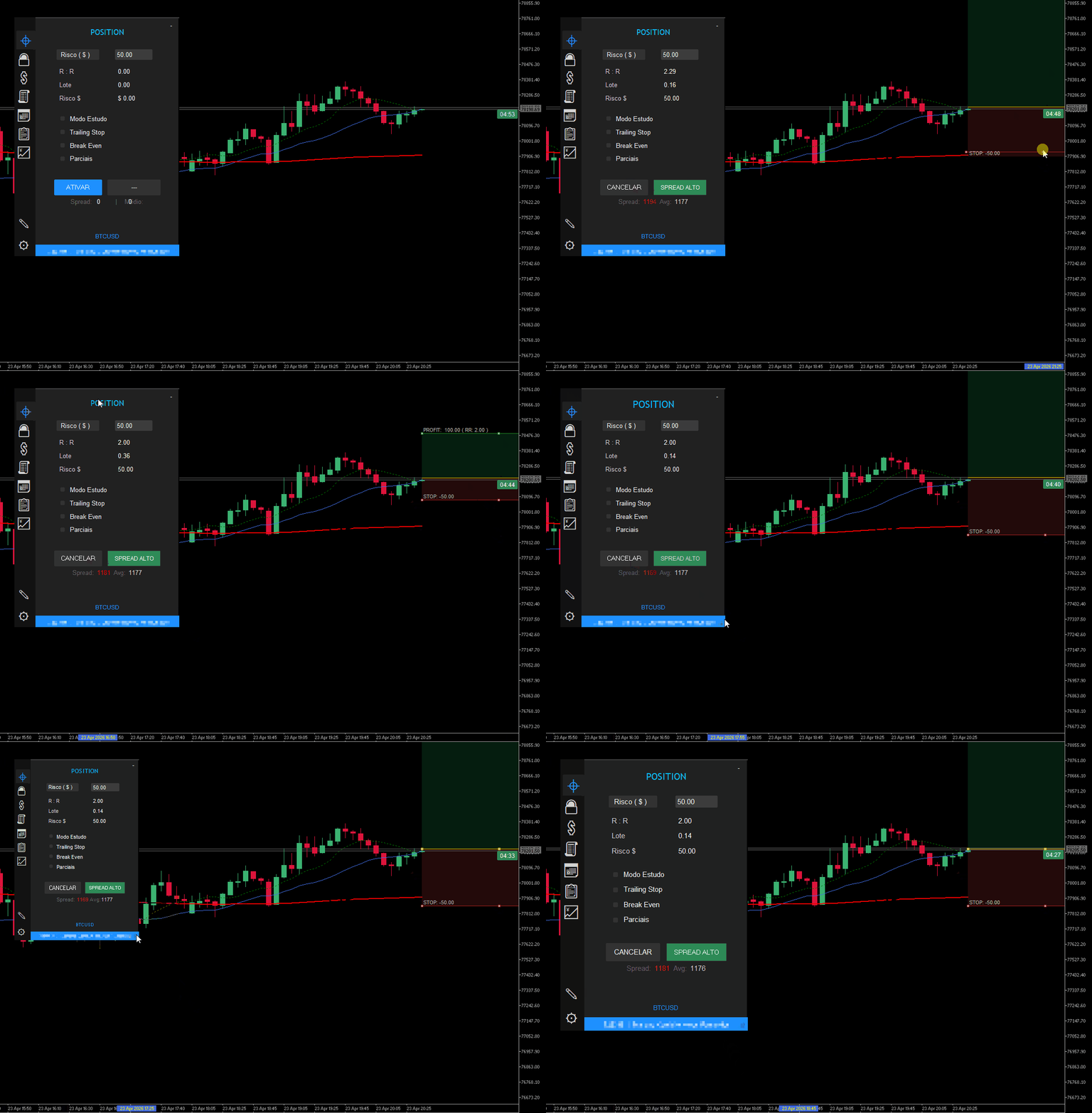
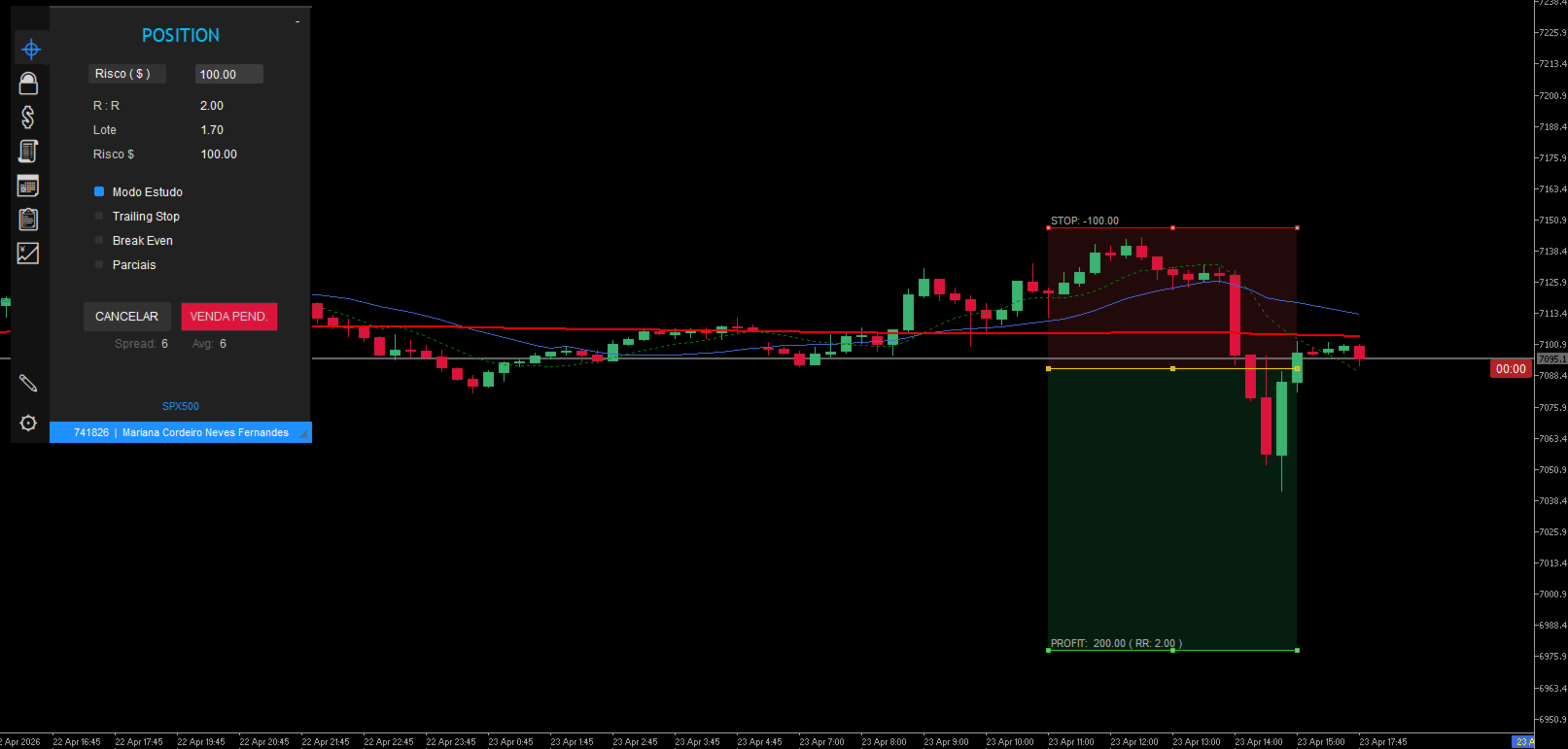
  • 동적 계산: 위험 감수 금액($) 또는 계좌 잔고 비율(%)을 설정하세요. 차트에서 손절매(SL) 선을 드래그하면 패널이 정확한 랏 크기를 자동으로 계산합니다.

  • 실시간 예측: 주문을 열기 전에 화면에서 직접 손익비(RR), 예상 수익 및 잠재적 손실을 시각화합니다.

  • 일일 손실 제한 (Daily Loss Lock): 하루 최대 금전적 손실 한도를 설정하세요. 이 한도에 도달하면 패널이 새로운 거래를 차단하여 과도한 거래(오버트레이딩)와 감정적인 실수로부터 자본을 보호합니다.


    시각적 거래 및 초고속 실행 (단축키)

    • 단축키 (Hotkeys): 빛의 속도로 거래하세요. 키보드 키를 매핑하여 마우스를 만지지 않고도 탭 전환, 위험 요소 변경, 보호 기능 활성화, 주문 실행 또는 패닉(전체 청산) 버튼을 작동시킬 수 있습니다.

    • 대화형 선 (드래그 앤 드롭): 진입, 손절매(SL), 이익실현(TP) 선을 차트 위에서 자유롭게 드래그하세요.

    • 하이브리드 실행: 완전히 동일한 시각적 인터페이스를 사용하여 시장가 주문을 전송하거나 대기 주문(Limit/Stop)을 설정할 수 있습니다.

    • 컬러 위험 구역: 진입선과 목표/손절선 사이의 공간이 시각적인 직사각형으로 채워져 감수하고 있는 위험을 즉각적으로 파악할 수 있습니다.


      ⚙️ 고급 거래 관리 (100% 자동화)

      주문을 연 후에는 화면을 잊으셔도 됩니다. Position Prime이 귀하를 대신하여 거래를 관리합니다:

      • 자동 본절 (Auto Break Even): 가격이 설정한 목표에 도달하는 즉시 로봇이 SL을 진입가(위험 제로)로 이동시킵니다.

      • 스마트 트레일링 스탑 (Smart Trailing Stop): 손절매가 추세에 따라 가격을 따라가도록 하여 수익을 확보하세요.

      • 부분 청산 시스템 (최대 3단계): 손익비(RR) 목표를 기반으로 최대 3개의 부분 청산(랏의 %)을 설정할 수 있습니다.


        🔒 기관급 보호 (스프레드 및 뉴스)

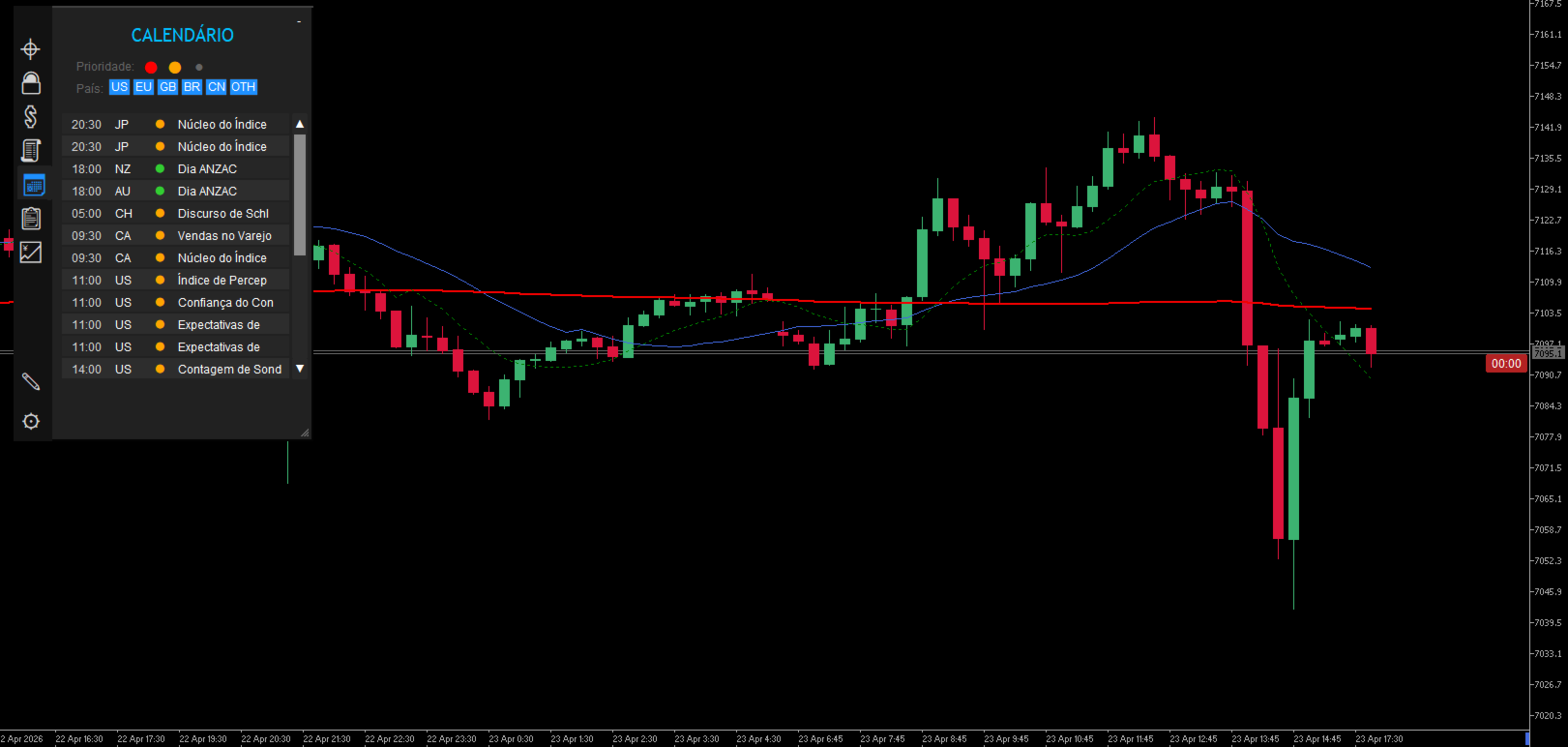
        • 경제 캘린더 및 뉴스 알림: 패널은 전 세계 이벤트를 실시간으로 모니터링합니다. 영향력이 큰(High-Impact) 뉴스 발표 몇 분 전에 거래를 시도하면 실행 버튼이 경고를 보내고 이중 확인을 요구합니다.

        • 스프레드 모니터링: 브로커의 스프레드가 평균보다 위험할 정도로 높을 경우 시스템이 시각적으로 경고하여 막대한 슬리피지(Slippage)가 발생하는 것을 방지합니다.


          🖥️ 완벽한 사용자 맞춤 설정: 귀하의 셋업을 위해

          • 멀티 OS 아키텍처 (Windows & Mac): 코드가 Windows 또는 MacBook 사용 여부를 자동으로 인식하여 폰트, 이모티콘, 창 크기 및 간격을 조정하여 모든 운영 체제에서 버그 없는 완벽한 인터페이스를 보장합니다.

          • 라이트 및 다크 테마: 클릭 한 번으로 패널 디자인을 전환하여 MetaTrader의 테마와 맞추고, 야간에는 시력을 보호하며 주간에는 대비를 높일 수 있습니다.

          • 이중 언어 지원: 단 한 번의 클릭으로 전체 인터페이스와 보고서를 즉시 번역합니다 (영어 및 포르투갈어).

          • 고스트 드래그 및 크기 조정: 패널 크기를 자유롭게 조절하세요. 독자적인 "고스트" 렌더링 시스템을 통해 작업 공간을 조정하는 동안 MetaTrader가 멈추는 현상을 방지합니다.


            📊 차트 내부의 "운영 체제" (9개의 탭)

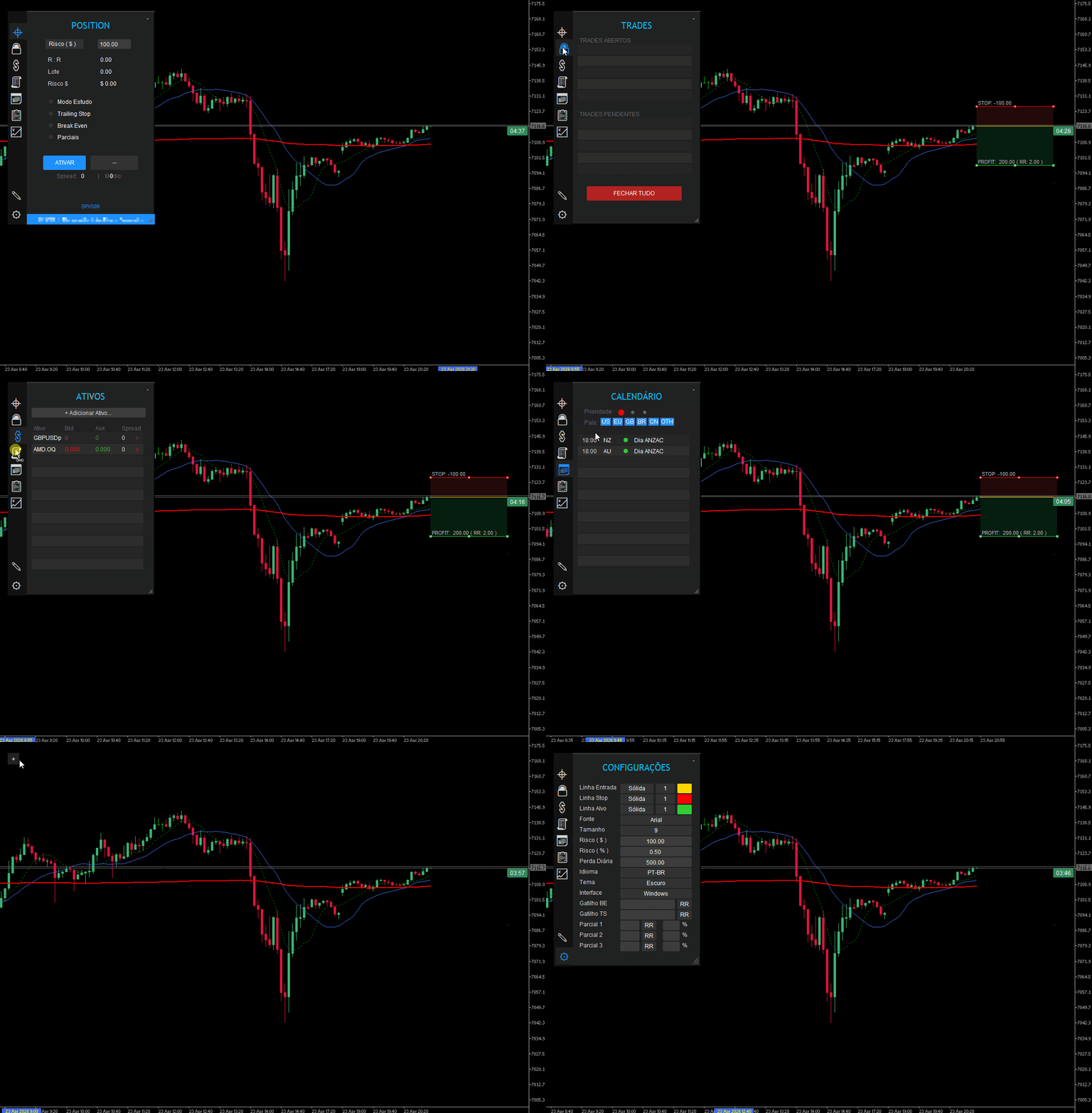
            • POSITION (⌖) / 포지션: 계산, 위험 관리, 빠른 단축키 및 실행을 위한 메인 화면입니다.

            • TRADES (🔓) / 거래: 모든 미체결 및 대기 주문의 목록으로, 개별 청산 옵션이 있습니다.

            • SYMBOLS (💲) / 심볼: 즐겨찾기 목록을 만들어 차트를 빠르게 전환하세요. 실시간 스프레드와 매수/매도(Bid/Ask) 호가를 보여줍니다.

            • HISTORY (🧾) / 기록: 청산된 모든 거래의 일일 요약입니다.

            • CALENDAR (📅) / 캘린더: 영향력 수준과 국가별로 오늘의 뉴스를 필터링합니다.

            • REPORT (📋) / 보고서: 재무 결과(오늘, 이번 주, 이번 달)와 손익비(RR) 지표를 보여주는 대시보드입니다.

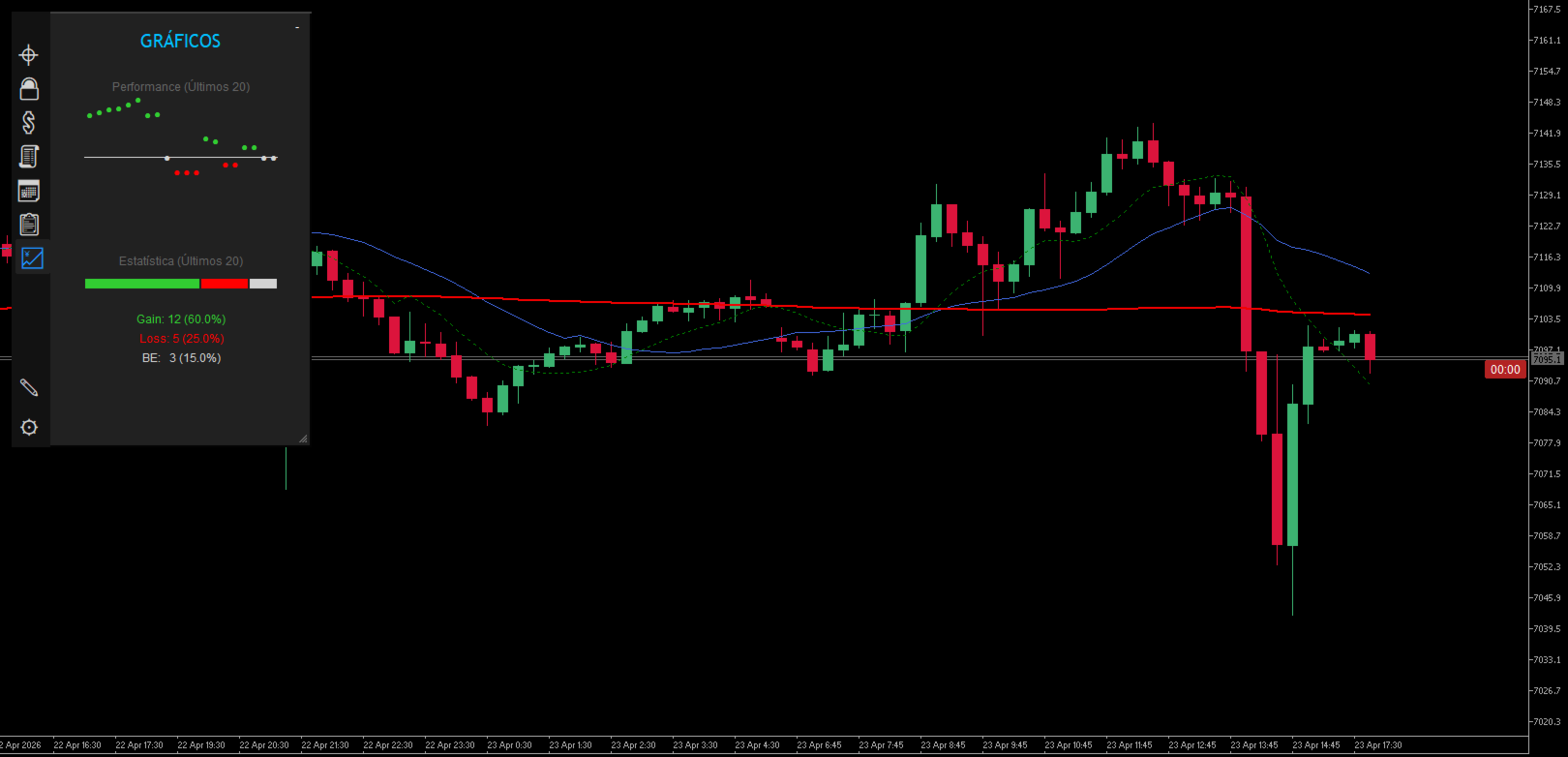
            • CHARTS (💹) / 차트: 최근 20개 거래의 성과(수익, 손실, 본절)를 보여주는 산점도 및 원형 차트입니다.

            • NOTES (✎) / 노트: 그날의 거래 상황을 기록할 수 있는 차트 내장 메모장입니다.

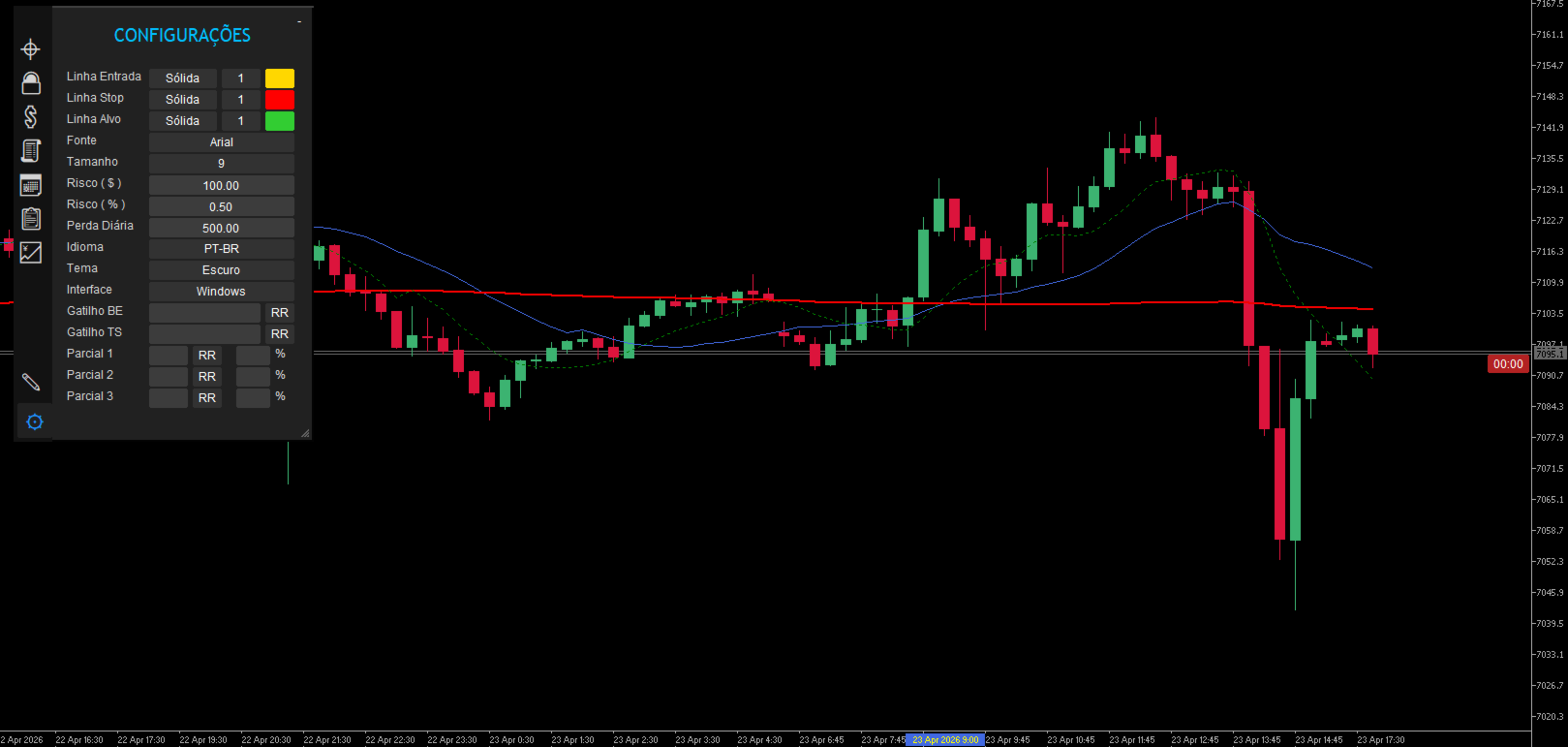
            • SETTINGS (⚙) / 설정: 그래픽, 언어, 테마, 일일 손실 제한 및 폰트를 위한 맞춤 설정 허브입니다.

            추천 제품
            One Click Trader  is a tool designed for MetaTrader 4 platform, which enables you to take your trading to the next level. It enables you to open, manage and close your trades in simple an efficient way by just one click of your mouse button. "-"   ,  "+"  change OCT window size  Up arrow minimizes the OCT panel Down arrow maximizes the OCT panel Right arrow displays the next panel with additional features Left arrow hides the panel with additional features Red  SELL  button enables you to open s
            이 도구를 사용하면 한 번의 클릭으로 열려 있는 모든 주문을 닫을 수 있습니다. "모두 닫기"를 클릭하기만 하면 됩니다. 수익성 있는 주문만 청산하려면 "수익성 있는 청산" 버튼을 클릭하세요. 클릭한 후 모든 변동 주문이 청산됩니다. 변동 손실이 있는 주문만 종료하려면 "손실 가능 청산" 버튼을 클릭하세요. 클릭한 후 변동 손실이 있는 모든 주문이 종료됩니다. 이 도구는 1년 동안 테스트를 거쳤으며 원클릭 포지션 청산 기능이 매우 완벽합니다. 포지션 청산은 적시에 이루어지며 지연 범위는 작습니다. 물론 지연은 귀하가 속한 지역 및 네트워크 환경과도 관련이 있습니다. 이에 주의하시기 바랍니다. 과거 데이터의 백테스트 과정에서 도구는 더욱 완벽하게 작동했으며 100개의 주문을 모두 마감하는 데 최대 0.495초밖에 걸리지 않았습니다. 실제 거래 과정에서 나의 최대 포지션 주문 수는 26개에 불과했고, 모든 포지션이 청산되는 데 걸리는 시간은 1.28초였습니다.
            Orders Executor
            Claudio Aguiar De Aragao
            Introducing Orders Executor , your powerful and efficient trading companion designed to seamlessly execute orders directly from a user-specified text file . This innovative trading tool streamlines your trading process, providing a convenient and automated solution for executing trades with precision and speed. Key Features : **Text File Integration:**     Orders Executor is designed to effortlessly read and interpret orders from a plain text file, eliminating the need for manual input. Simpl
            You can see Binance Spot data instantly in Metatrader 5 and it allows you to use all the features that Metatrader has provided to you. You can access the data of all symbols listed on Binance Futures. Don't forget to set the timezone. Binance it's 00:00 UTC. You need to fix it according to your own country You need to install the free Binance Spot Symbol List plugin. https://www.mql5.com/tr/market/product/83507 After loading, it automatically downloads the data of the cryptos in the market obser
            Superior Telegram Signals Multi-Platform Trade Copier & Notification System   Available for MetaTrader 4 and MetaTrader 5 Superior Telegram Signals   is a utility that connects a trading terminal to the Telegram application. It is designed to send automated trade notifications, chart screenshots, and account status updates to a specified Telegram chat, channel, or group. Use Cases This tool can be used by: Signal Providers:   To automate the broadcasting of trade signals, modifications, and clos
            This Expert Advisor monitors all open positions across all symbols in MetaTrader 5. Whenever a Stop Loss (SL) or Take Profit (TP) is manually set or adjusted on any position, the EA automatically applies that value to all other open positions , regardless of symbol or order type (Buy/Sell). This ensures consistent and synchronized SL and TP levels across your account. Perfect for mobile trading via tablet or smartphone!
            Trade Control Panel
            Jerry Jilun Anak Liban
            Trade Control Panel Function Normal One Click Function Close All Close All Profit Close All Loss Close All Pending Order Close All Sell Close All Buy Advance One Click Function 1.  Close Partial Lot Sell by Percent It will help you partial close for all open position by desire percent you wanted. No longer partial close one by one for every open position Manual input for desire percent 2. Close Partial Lot Buy by Percent It will help you partial close for all open position by desire percent
            EAs Manager
            Abdeljalil El Kedmiri
            5 (1)
            The   Ultimate EAs Manager   is a professional risk management and trade assistance tool designed to monitor, control, and optimize all trading activities on your MT5 account. It acts as a   central command center   that oversees every trade - whether opened by other Expert Advisors or manually by you. How it's work with other EAs : Blog post  MT4 version:  https://www.mql5.com/en/market/product/167007 Only 10 copies will be sold at the early-bird price. After 10 copies, the price jumps directly
            Telegram to mt5 pro
            Janet Abu Khalil
            3.67 (3)
            Telegram to MT5 Pro — Advanced Telegram Signal Copier with Auto-Fix, Multi-TP, Risk Control and Full Trade Management Telegram to MT5 Pro — 전문 텔레그램 신호 복사기 Telegram to MT5 Pro는 텔레그램 신호를 MetaTrader 5 계정으로 자동으로 직접 실행하는 고성능 트레이드 복사기로, 리스크, 실행, 트레이드 관리에 대한 완전한 제어를 제공합니다. 이 시스템은 두 가지 구성 요소로 이루어져 있습니다: • MetaTrader 5 내부에서 실행되는 Expert Advisor (EA) • 텔레그램에 연결되어 신호를 로컬로 EA에 전송하는 데스크톱 브리지 애플리케이션 두 구성 요소는 동일한 컴퓨터에서 실행되어야 합니다. MQL5 플랫폼 제한으로 인해 EA는 텔레그램에 직접 연결할 수 없습니다. 브리지는 텔레그램을 처리하고 EA는 거래를 실행합니다. 지원 및 설치
            CasperIT AI News Trading Guard CasperIT AI News Trading Guard is an MT5 economic-news protection Expert Advisor. It monitors the MetaTrader Economic Calendar and applies a strict account-wide trading lockdown around selected high- and medium-impact news events. The EA is designed for traders who use manual strategies, Expert Advisors or multiple trading systems in the same terminal. It publishes a bridge value that connected EAs can read before opening new trades. For support and updates, joi
            Telegram ChartSnap MT5 is an utility tool to bridge your MetaTrader 5 activities to your Telegram chat/group/channel. It will screen shot your MetaTrader 5 chart and send it to your dedicated Telegram chat/group/channel through a Telegram bot. The whole process will keep repeating based on a time cycle that predetermined by the user. It is a convenient tool for those who like to get access to their favorite system/dashboard that only available at MetaTrader Desktop. Beside that, trader can easi
            Telegram Notify MT5 Telegram Notify MT5 is an utility tool to bridge your MetaTrader 5 activities to your Telegram chat/channel. It is useful for monitoring your MetaTrader 5 account by sending a notification to your particular Telegram chat/channel when someone/EA is placing trades, modifying order's TP/SL, closing trades and etc. This EA does not place any trade for your account. This EA also could be a convenient tool for monitoring other's EA trading activities or a tool for publishing your
            거래원 여러분 안녕하세요!저는 당신의 거래 조수입니다.더 이상 말하지 말고, 내가 너에게 나의 특기를 알려줄게. 1.나는 당신의 창고를 관리하는 데 능숙하다, 당신이 어느 쪽에서 주문하든, 나는 가장 먼저 당신을 도와 합리적인 손실 방지선과 이동 손실 방지선을 추가할 수 있습니다. 2.나는 너를 도와 상승과 하락을 회피하고 원칙을 지키지 못하는 인간성의 약점을 근원적으로 근절할 수 있다. 3. 귀하가 참고할 수 있도록 최적 지점에서 귀하의 모바일 MT5 클라이언트에 알림 메시지를 보냅니다. 물론 귀하는 모바일 장치 내의 MetaTrader 5 APP의 MetaQuotes ID를 MetaTrader 5 클라이언트 --> 옵션 --> 알림 --> MetaQuotes ID의 편집 상자에 등록하고 알림 지점 확인을 눌러야 합니다. 4. 정책 테스트에서 수동 시뮬레이션 디스크 연습을 잘 지원합니다. 5. 저에게 연락하면 추가 AI 보조 클라이언트 슈퍼 보조 프로그램을 얻을 수 있습니다. 참
            MyFXRoom ProEA
            Darren Graham Pallatina
            MyFXRoom Pro EA A semi-automated trade management EA built around the MyFXRoom Strategies (Guides in my profile) Designed for traders who make their own decisions and want precise execution, clean risk management and professional chart tools — without handing control to a fully automated system. TRADE EXECUTION Execute 1, 2 or 3 simultaneous market orders with a single button click. The EA calculates exact po
            T Manager for Price action Traders
            Haidar Lionel Haj Ali
            4.5 (10)
            T Manager, the ultimate trade management solution designed by traders for traders. If you are searching for a simple and efficient trade panel, trade manager, or trade assistant, you are at the right place.   The market contains a diverse number of those tools , but this one is designed by traders for traders . I designed this tool, and I am using it daily. Take my advice and stop buying tools blended with un-useful features that you will never use,   T Manager provides you with the essential y
            ProBridger
            Marius Ovidiu Sunzuiana
            How Traders and Analysts Can Use the Data Export Bridge to Improve Their Analytics The MQL Data Export Bridge unlocks a new level of analytical power by transforming MetaTrader into a real‑time data provider for any external research environment. Here are the most impactful ways different users can apply the bridge to enhance their trading performance. Build Predictive Models with Machine Learning Who benefits: Quantitative traders, data scientists, algorithm developers How it helps: Export t
            This QuickClose help you to close all orders having profit immediately with only ONE CLICK, its work is very fast. You can choose which symbol you want or close all symbols so it will helpful for you in your trading to manage trading faster. This EA can quick close all Buy and Sell Orders by a selected symbol or total, And delete all pending orders. This SymbolButton is designed for closing orders. There is available Manual and Automatic closing functions. Automatic closing function will close t
            GS trade report
            Aleksander Gladkov
            5 (1)
            3 in 1 : Report + monitoring + sending messages (Telegram, ...) to optimize trading and use of advisors. Monitoring: Panel on the chart Sending messages to Telegram Sending messages to Email Sending Notifications Sending pop-up messages Sound notifications when the established Profit/Loss levels are exceeded Monitoring is activated by pressing the Start button. Profit for the period by currency pairs, hours and Magic number for the current account. Forms four tables: by symbols, by magic number
            PropGuard Pro — Prop Firm Drawdown Protector & Risk Manager for MetaTrader 5 Automatically protect your funded account from drawdown breaches. Real-time daily drawdown & max drawdown monitoring with auto-close — built for FTMO, 5ers, and all prop firm traders. 15 Activations | Prop Firm Presets | Drawdown Limiter | Equity Guard | Risk Control Panel --- Protect Your Funded Account with One Click PropGuard Pro is a professional drawdown protection and risk management EA designed specifi
            Spread Costs refers to the amount of the loss caused by the spread, and Swap Benefits refers to the amount of the income gained by overnight positions. Spread Costs is an important indicator for short-term traders, especially for scalping traders, and Swap Benefits is an important indicator for long-term traders. Since the spreads and swaps on the MetaTrader 5 platform are all expressed in points, we need to convert it into the amount expressed in the account currency. This tool can display the
            # Telegram Signal Forwarder EA for MetaTrader 5 ## Overview This Expert Advisor automatically forwards all trading activity to a Telegram channel or group. It tracks **positions AND pending orders** in real-time and sends formatted signals. **Key Feature:** All follow-up messages (close, partial close, modify, delete) are sent as **replies to the original signal** in Telegram, creating a clean threaded conversation for each trade. ## Signal Types ### For Positions (Market Orders) - **OPEN
            Minions Labs Recalibrator
            Flavio Javier Jarabeck
            5 (1)
            Once again, We Nailed It! Imagine a faster and smoother way to recalibrate ANY Indicator using just obvious and intuitive mouse clicks, realtime, real fast, real results on your chart just right after the Click... Instead of the boring "Open Settings dialog / Change one setting / Click OK / See what happens on Chart...",  then repeat this process endlessly until you kill yourself! Well... No More... Welcome to the Minions Labs Recalibrator tool! Now you can Study, Trial, Experiment and Play with
            This utility provides the ability to use hot keys in manual trading instantly responding to the current market situation. You can assign hot keys to open/close positions by their type, open/close all positions on the current chart and remove all orders on the current chart. You can also assign hot keys for five predefined trade volumes and switch between them if necessary with no need to change the volume manually from time to time. It is also possible to set the auto calculation of a trade volu
            MQL Tool "Ofir Email to Telegram": Never Miss a Trading Alert Again! Tired of missing important alerts from your indicators and Expert Advisors (EAs)? Ofir Email to Telegram is the solution you've been waiting for! This revolutionary MQL tool automatically forwards all email alerts from your indicators and EAs directly to your Telegram account. Never again will you miss a trading opportunity or important notification! Here are just a few of the benefits of Ofir Email to Telegram: Quick and easy
            The real‑time view of what is happening inside the market. Footprint Secrets brings detailed analysis directly into MetaTrader 5. It shows where volume is trading, how buyers and sellers are interacting, and how liquidity shifts as the market evolves. Designed for traders who want a precise, real‑time understanding of market behavior. Check out the free preview version here:  https://www.mql5.com/en/market/product/172398 Benefits for the Trader See the real activity behind price . Footprint ch
            Summary A simple yet powerful trade manager for MetaTrader 5 that combines lightning fast execution with bulletproof risk management  Features • Account summary showing balance, daily PnL, symbol and spread • Auto lot size calculation based on % of account risk per trade • Pre-defined stoploss and risk/reward targets • Breakeven toggle which moves stoploss to entry • Trailing stoploss toggle for active positions • Keyboard hotkeys for quick entries and exits • Lightweight and optimised for low
            Quick operation, quick purchase, sale, empty operation. Provide three buttons: Buy, Sell, empty. Buy: Quickly place more orders after clicking, default 1 hand, profit point and stop-loss point are 110 points, after successful order can be manually modified. Sell: Quickly place an empty order after clicking, default 1 hand, profit point and stop-loss point are 110 points, can be manually modified after the order is successful. Empty: Quickly clear all orders, including purchase and s
            Pending Orders Grid Complete System   opens any combination of Buy Stop, Sell Stop, Buy Limit and Sell Limit pending orders and closes all existing pending orders. Only one time of the pending order at the same time!!! You will have a possibility to put a legitimate   Open Price   for the first position in the grid. Usually it should in the area of Support/Resistance lines. You just need to drop this script on the chart of a desired currency pair. Input Parameters Before placing all pending ord
            AW Metatrader to Telegram MT5
            AW Trading Software Limited
            5 (1)
            귀하의 구독자가 귀하의 거래 터미널에서 귀하의 거래 이벤트를 놓치지 않도록 알림을 보내는 자동화된 시스템. 계정의 모든 거래 작업에 대해 Telegram 메신저에 알림을 보내는 유틸리티입니다. Telegram ->   HERE   / MT4 ->   HERE   의 채널에 유틸리티를 연결하는 단계별 지침 장점: 쉬운 설정과 자세한 설명, 조정 가능한 스크린샷을 보낼 수 있습니다. 이모티콘을 사용하여 사용자 정의 가능한 알림 텍스트, 오픈, 전체 또는 부분 마감에 대한 알림 조정 및 주문 수정, 기본적으로 알림을 보낼 때 텍스트 파일이 자동으로 다운로드되며, 대기 중인 주문의 배치 또는 삭제에 대한 알림 조정, 기호 및 매직 넘버로 편리한 필터링. 입력 변수: TELEGRAM BOT AND CHAT SETTINGS Telegram bot token - Enter the token number received after registering the bot in "BotFather" Te

            Expert was built on the basis of Trap . EA can trade in automatic and semi-automatic mode. In automatic mode, it will place pending orders. However, in semi-automatic mode, it will wait for the first manually opened order. It will then go into automatic mode. Before starting work, the expert will download 28 currency pairs:         "AUDCAD","AUDCHF","AUDJPY","AUDNZD","AUDUSD","CADCHF","CADJPY",         "CHFJPY","EURAUD","EURCAD","EURCHF","EURGBP","EURJPY","EURNZD",         "EURUSD","GBPAUD","GBP
            이 제품의 구매자들이 또한 구매함
            AI Agent Supervisor is NOT an Expert Advisor. AI Agent Supervisor   is a   multi-agent AI risk & portfolio supervisor   that watches every EA on your account and intervenes in real time.  WANT AN AI PORTFOLIO MANAGER WATCHING YOUR FLEET 24/7?   Run your fleet on the same brokers I do:   IC MARKETS , IC TRADING   .  Unlike the centralized stock market, Forex has no single, unified price feed.  Every broker sources liquidity from different providers, creating unique data streams. The Supervisor r
            Quant AI Agents
            Ho Tuan Thang
            5 (1)
            Quant AI Agents are independent trading Expert Advisors. Instead of trading using a fixed strategy like other conventional EAs, Quant AI Agents   is a   multi-agent AI trading framework   that turns natural-language strategy prompts into live.  WANT THE SAME RESULTS AS MY LIVE SIGNAL?   Use the exact same brokers I do:   IC MARKETS , IC TRADING   .  Unlike the centralized stock market, Forex has no single, unified price feed.  Every broker sources liquidity from different providers, creating un
            Farmed Hedge Yield Farming | All Markets (Manual - Hybrid - Semi/Automated EA) MULTI-ASSET SUPPORT Trade any asset available on your broker - Forex: Major, Minor, Exotic pairs - Crypto: BTC, ETH, XRP, SOL, BNB - Stocks: Apple, Tesla, Amazon, Google, etc. - Commodities: Gold, Silver, Oil, Gas - Indices: US30, NAS100, SPX500, DAX40 - Any CFD your broker offers VERIFIED TRADING RESULTS - Farmed Hedge Yield Axi Copy:  https://www.mql5.com/en/signals/2356376 - Farmed Hedge Yield Exn Copy:   https:/
            Footprint Chart Pro — Professional OrderFlow EA for MetaTrader 5 Version 6.34 | Professional tool for real traders | Institutional-Grade Visualization DEMO USERS - PLEASE SELECT EVERY TICK / REAL TICK WHEN TESTING AND YOU HAVE DOWNLOADED HISTORICAL DATA. IF YOU SEE A WAITING SCREEN AND IT IS NOT DOWNLOADING, IT MEANS YOU HAVE LOW HISTORICAL DATA. TRY 1 MIN AND 5 MIN FIRST ON 1 DAY DATA. ONE DAY DATA SHOULD BE THE NEWEST AND MOST CURRENT DATE. PLEASE WAIT UNTIL THE MARKET HAS ROLLED OVER PERIOD.
            Prop Firm Os
            Gayathiri Gopalakrishnan
            5 (1)
            PROP FIRM OS Structured Trading Assistant for MetaTrader 5 PROP FIRM OS is a structured trading assistant designed for MetaTrader 5 users who prefer rule-based market analysis and organized trading workflows. The Expert Advisor combines market analysis tools, scanner functions, dashboard monitoring, alerts, risk-control settings, and trade management features inside one system. PROP FIRM OS is designed to help traders follow selected rules, filters, and monitoring conditions during trading activ
            파워 캔들 전략 스캐너 - 자체 최적화 다중 종목 설정 찾기 도구 파워 캔들 전략 스캐너는 마켓 워치에 등록된 모든 종목에 대해 파워 캔들 지표와 동일한 자체 최적화 엔진을 동시에 실행합니다. 하나의 패널에서 현재 통계적으로 거래 가능한 종목, 각 종목별 최적의 전략, 최적의 손절매/익절 조합을 알려주며, 새로운 신호가 발생하면 즉시 알림을 전송합니다. 이 도구는 Stein Investments 에코시스템의 일부입니다. 18개 이상의 도구와 함께 당신의 1대1 AI 트레이딩 멘토 Max.  항상 대기 중, 모든 인디케이터를 깊이 있게 이해, 무언가를 차근차근 생각해보고 싶은 순간에 도움을 줍니다.  https://stein.investments 에서 만나보세요 완벽한 시장 모니터링. 종목당 3,000건 이상의 자동 최적화. 2가지 알림 유형. 한 번의 클릭으로 차트를 전환하고 바로 거래하세요. 이 도구가 필요한 이유 대부분의 다중 종목 스캐너는 가격 변동만 보여줍니다. 티커별

            The product will copy all telegram signal to MT5 ( which you are member) , also it can work as remote copier.  Easy to set up, copy order instant, can work with almost signal formats, image signal,  s upport to translate other language to English Work with all type of channel or group, even channel have "Restrict Saving Content", work with  multi channel, multi MT5 Work as remote copier: with signal have ticket number, it will copy exactly via ticket number. Support to backtest signal. How to s
            Custom Alerts AIO: 다중 시장을 동시에 모니터링 – 설정 없이 즉시 사용 가능 개요 Custom Alerts AIO 는 복잡한 설정 없이 즉시 사용할 수 있는 통합 시장 모니터링 도구입니다. FX Power, FX Volume, FX Dynamic, FX Levels, IX Power 등 필요한 모든 지표가 내장되어 있어 별도의 설치나 구성 없이 알림 기능을 바로 사용할 수 있습니다. 차트 그래픽 없이 작동하며, Forex, 금속, 지수, 암호화폐 등 주요 자산군을 모두 지원합니다. 주식(Symbols)은 별도로 입력하여 추가할 수 있으나, MetaTrader에서는 일반적으로 제한적으로만 사용됩니다. 1. 왜 Custom Alerts AIO를 선택해야 하나요? 추가 라이선스가 필요 없습니다 • 모든 Stein Investments 지표가 내장되어 있어 별도 구매가 필요 없습니다. • 즉시 알림 기능을 시작할 수 있어 빠르고 간편합니다. 모든 시장을 하나의 도구로
            AntiOverfit PRO MT5
            Enrique Enguix
            5 (6)
            EA를 구매하기 전에, 이 시스템이 정말 버티는지 아니면 백테스트에서 운 좋게 좋아 보였던 것뿐인지 먼저 확인하세요. 대부분의 로봇은 보기 좋은 백테스트와 함께 판매됩니다. 우상향 곡선. 좋은 Profit Factor. 의심할 이유가 거의 없어 보입니다. 그런데도 그런 EA들 중 많은 수가 시장이 그 과거 구간처럼 움직이지 않기 시작하는 순간 무너지기 시작합니다. 왜 그럴까요? 백테스트가 증명하는 것은 딱 한 가지뿐이기 때문입니다. 그 전략이 특정한 하나의 가격 경로에서는 작동했다는 것. 다른 경로에서도 버틴다는 뜻은 아닙니다. 견고하다는 뜻도 아닙니다. 당연히 당신의 돈을 쓸 가치가 있다는 뜻도 아닙니다. 당신이 EA를 사는 이유는 과거의 예쁜 곡선을 감상하기 위해서가 아닙니다. 계속 변하는 시장에서 실제로 쓰기 위해서입니다. AntiOverfit PRO가 하는 일 AntiOverfit PRO는 MetaTrader 5용 Expert Advisor가 정말 탄탄한지, 아니면 특정한
            YuClusters
            Yury Kulikov
            4.93 (42)
            Attention: You can view the program operation in the free version  YuClusters DEMO .  YuClusters is a professional market analysis system. The trader has unique opportunities to analyze the flow of orders, trade volumes, price movements using various charts, profiles, indicators, and graphical objects. YuClusters operates on data based on Time&Sales or ticks information, depending on what is available in the quotes of a financial instrument. YuClusters allows you to build graphs by combining da
            Telegram To MT5 Receiver
            Levi Dane Benjamin
            4.31 (16)
            가입한 모든 채널에서 (개인 및 제한된 채널 포함) 시그널을 바로 MT5로 복사합니다.   이 도구는 사용자를 고려하여 설계되었으며 거래를 관리하고 모니터하는 데 필요한 많은 기능을 제공합니다. 이 제품은 사용하기 쉽고 시각적으로 매력적인 그래픽 인터페이스로 제공됩니다. 설정을 사용자 정의하고 제품을 몇 분 안에 사용할 수 있습니다! 사용자 가이드 + 데모  | MT4 버전 | 디스코드 버전 데모를 시도하려면 사용자 가이드로 이동하십시오. Telegram To MT5 수신기는 전략 테스터에서 작동하지 않습니다! Telegram To MT5 특징 여러 채널에서 동시에 신호를 복사합니다. 개인 및 제한된 채널에서 신호를 복사합니다. Bot 토큰이나 채팅 ID가 필요하지 않습니다.   (원하는 경우에는 사용할 수 있습니다) 위험 % 또는 고정된 로트로 거래합니다. 특정 심볼을 제외합니다. 모든 신호를 복사할지 또는 복사할 신호를 사용자 정의할지 선택할 수 있습니다. 모든 신호를 인
            ================================================================================ POC BREAKOUT - V20.72. Full Professional Grade Toolkit ================================================================================ POC Breakout is a full MetaTrader 5 trading dashboard for discretionary traders who want breakout signals, Point of Control (POC) context, volume profiles, order flow, market structure, news, alerts, and advanced trade planning in one professional workspace. Attached directly to you
            FUTURES ORDERFLOW FOOTPRINT CHART Professional OrderFlow EA for MetaTrader 5 Version 1.01| Professional tool for real traders | Institutional-Grade Visualization STRATEGY TESTER USERS - PLEASE SELECT EVERY REAL TICK WHEN TESTING AND YOU HAVE DOWNLOADED HISTORICAL DATA. IF YOU SEE A WAITING SCREEN AND IT IS NOT DOWNLOADING, IT MEANS YOU HAVE LOW HISTORICAL DATA. TRY 1 MIN AND 5 MIN FIRST ON 1 DAY DATA. ONE DAY DATA SHOULD BE THE NEWEST AND MOST CURRENT DATE. PLEASE WAIT UNTIL THE MARKET HAS ROL
            ManHedger MT5
            Peter Mueller
            4.83 (6)
            THIS EA IS A SEMI-AUTO EA, IT NEEDS USER INPUT. Manual & Test Version Please TEST this product before BUYING  and watch my video about it. The price of the ManHedger will increase to 250$ after 20 copies sold. Contact me for user support or bug reports or if you want the MT4 version! MT4 Version  I do not guarantee any profits or financial success using this EA. With this Expert Advisor, you can: Implement your own Zone Recovery strategy to capitalize on trending markets. Create Grid trading s
            Ultimate Extractor
            Clifton Creath
            5 (8)
            Ultimate Extractor - Professional Trading Analytics for MT5 *****this is the local HTML version of Ultimate Extractor. !!!!!it is not compatible with Cloud!!!! For the online version please reach out to me directly****** Ultimate Extractor transforms your MetaTrader 5 trading history into actionable insights with comprehensive analytics, interactive charts, and real-time performance tracking. What It Does Automatically analyzes your MT5 trading history across all Expert Advisors and generates
            HINN Lazy Trader
            ALGOFLOW OÜ
            5 (2)
            The core idea: using the user interface, you configure the parameters the chart must meet before entering a position (or positions), choose which entry models to use, and set the rules for when trading and planning should end. Lazy Trader  handles the rest: it  takes over all the routine chart watching and execution! full description  :: 3 key videos [1] ->  [2]   ->  [3] What can it do? - Understands Larry Williams market structure - Understands swing market structure by Michael Huddleston
            Bots Builder Pro MT5
            Andrey Barinov
            4.17 (6)
            This is exactly what the name says. Visual strategy builder . One of a kind. Turn your trading strategies and ideas into Expert Advisors without writing single line of code. Generate mql source code files with a few clicks and get your fully functional Expert Advisors, which are ready for live execution, strategy tester and cloud optimization. There are very few options for those who have no programming skills and can not create their trading solutions in the MQL language. Now, with Bots Builde
            Neowave Chart Plotter
            Bahador Baradari
            5 (1)
            This Expert Advisor is applicable to plot wave charts as per the NeoWave  method (Neely Extension of Wave Theory).  NeoWave is a scientific, objective and revolutionary style of Elliott Wave Theory that was invented by Glenn Neely in 1990 in the “Mastering Elliott Wave” book. To start analyzing with this method, we need a particular chart called the Wave Chart or Cash Data chart . This is the first step for a good wave analysis. To draw this chart, Highs and Lows should be plotted in the order t
            MT5 Trading Deck
            Manuel Michiels
            5 (2)
            One button. One trade. MT5 Trading Deck is a hotkey trading panel for MetaTrader 5 that turns the platform into a keyboard-driven execution cockpit. Stop loss, take profit and lot size are pre-calculated for every key; the moment you press, a market order is live on the broker. A complete technical user manual is attached in the product Comments section. It documents every input parameter, the full hotkey map, the recommended Stream Deck XL layout, and the advanced workflows for Pre-Limit orders
            Trade Copier Pro MT5 is a tool to copy trade remotely to multiple MT4, MT5 and cTradfer accounts at different computers/locations over internet. This is an ideal solution for you if you are a signal provider and want to copy your trades to other receivers globally on your own rules. One provider can copy trades to multiple receivers and one receiver can get trade from multiple providers as well. The provider can even set the subscription expiry for each receiver, so that receiver will not be abl
            RiskGuard Management
            MONTORIO MICHELE
            5 (22)
            ATTENTION For a free trial version, visit my website. Manual QUANTUM RiskGuard Management — Your ultimate ally for uncompromising trading. Lot Calculator — Automatic lot size calculation. Quantum — Automatic risk to maximize profits and reduce drawdowns. Automatic Journal — Included and freely downloadable from my website. Automatic Screenshot — Two screenshots: one at entry and one at exit. Partial Profit — Smartly managed partial exits. Smartphone Trading — Place orders from your mobile, mana
            Crypto Charting
            Rajesh Kumar Nait
            5 (5)
            Crypto Charting for MT5 – MetaTrader 5용 암호화폐 차트 통합 도구 개요 Crypto Charting for MT5는 WebSocket을 통해 실시간 OHLC 차트 데이터를 제공합니다. 여러 거래소를 지원하며 MT5에서 자동으로 데이터가 동기화됩니다. 기능 WebSocket을 통한 실시간 차트 자동 역사 데이터 업데이트 네트워크 중단 시 예약된 동기화 모든 MT5 타임프레임 지원 OHLCV 데이터 지원 전략 테스터 지원 자동 재연결 기능 지원 거래소 Binance, Bybit, OKX, KuCoin, MEXC, Gate.io, Bitget, XT.com 추가 정보 Crypto Ticks 라는 별도 제품에서 틱 데이터와 오더북 정보를 제공합니다. 참고 사항 DLL 미사용, VPS 환경에 적합합니다. Strategy Tester에서는 WebRequest 기능이 작동하지 않습니다. 데모가 필요하신 경우 MQL5의 개인 메시지를 통해 문의하십시오. Full
            EasyInsight AIO MT5
            Alain Verleyen
            4.92 (12)
            EASY Insight AIO – 스마트하고 손쉬운 트레이딩을 위한 올인원 솔루션 개요 외환, 금, 암호화폐, 지수, 심지어 주식까지 — 전 시장을 몇 초 만에, 수동 차트 확인이나 복잡한 설치, 인디케이터 설정 없이 스캔할 수 있다고 상상해 보세요. EASY Insight AIO 는 AI 기반 트레이딩을 위한 궁극의 플러그 앤 플레이(Plug & Play) 데이터 내보내기 도구입니다. 단 하나의 깔끔한 CSV 파일로 전체 시장 스냅샷을 제공하며, ChatGPT, Claude, Gemini, Perplexity 등 다양한 AI 플랫폼에서 즉시 분석할 수 있습니다. 창 전환, 복잡함, 차트 오버레이는 더 이상 필요 없습니다. 자동으로 내보내지는 순수하고 구조화된 데이터 인사이트만으로, 반복적인 차트 감시 대신 데이터 기반의 스마트한 의사결정에 집중할 수 있습니다. 왜 EASY Insight AIO인가요? 진정한 올인원 • 별도의 설정, 인디케이터 설치, 차트 오버레이가 필요 없습
            The product will copy all  Discord  signal   to MT5   ( which you are member  ) , also it can work as remote copier.  Easy to set up. Work with almost signal formats, support to translate other language to English Work with multi channel, multi MT5. Work with Image signal. Copy order instant, auto detect symbol. Work as remote copier: with signal have ticket number, it will copy exactly via ticket number. How to setup and guide: Let read all details about setup and download Discord To MetaTrader
            VOLUME BUBBLES ORDERFLOW FOOTPRINT PROFESSIONAL Expert Advisor for MetaTrader 5 Complete Feature Documentation Introduction: Volume Bubbles OrderFlow Footprint Professional is an advanced order flow visualization tool designed for the MetaTrader 5 platform. It provides institutional-grade market analysis through real-time volume bubbles visualization, volume profiling, and sophisticated order flow analysis. This Expert Advisor transforms raw market data into actionable trading intelligence, hel
            Gamma Edge Pro MT5 — GexBot Classic API Integration Gamma Edge Pro   brings institutional-grade   Gamma Exposure (GEX) data   directly onto your MetaTrader 5 chart — the same data used by professional options traders to anticipate price magnets, hedging flows, and dealer positioning. Powered by the   GexBot Classic API , this indicator automatically maps options market data from US-listed instruments onto any   MT5 CFD instrument   — Forex pairs, Gold, indices, and more — with intelligent price
            Crypto Ticks and Depth
            Rajesh Kumar Nait
            5 (2)
            MetaTrader 5용 Crypto Ticks – 실시간 암호화폐 틱 데이터 및 오더북 통합 개요 Crypto Ticks는 주요 암호화폐 거래소의 실시간 틱 데이터와 오더북 깊이를 MetaTrader 5에 직접 스트리밍합니다. 스캘핑, 알고리즘 트레이딩, 전략 테스트를 위한 정밀 데이터를 원하는 트레이더를 위해 설계되었습니다. 지원 거래소 Binance: 스팟  및 선물 KuCoin: 스팟 및 선물 (차트 오더북 지원) Bybit: 선물 및 역방향 선물 XT.com: 스팟 및 선물 주요 기능 WebSocket을 통한 실시간 틱 스트리밍 Binance 스트림 지원: @ticker, @bookTicker API를 통한 완전한 OHLCV 히스토리 업데이트 오더북 시각화 (최고 매수/매도 + 레벨) 자동 재연결로 안정성 유지 정확한 캔들 차트를 위한 예약 데이터 교체 MT5 재시작 시 자동 히스토리 업데이트 Strategy Tester에서 틱 기반 데이터 지원 VPS 환경에 최적화 –
            Telegram To MT5 — 시그널 카피어 텔레그램 채널의 트레이딩 콜을 실제 MT5 주문으로 바꿔 드립니다 — 자동으로, 원하는 만큼의 계좌에서, 리스크와 규칙을 완전히 당신의 통제 아래 둡니다. Telegram To MT5는 이미 텔레그램에서 팔로우하고 있는 VIP / 시그널 채널을 당신의 MetaTrader 5 터미널에 연결합니다. 무료 동반 데스크톱 앱이 메시지를 읽고(봇을 차단하는 채널에서도 가능), 이 EA가 당신의 계좌에서 이를 실행합니다 — 당신만의 리스크 설정, 심볼 매핑, 익절(TP) 처리, 세션 및 뉴스 필터를 적용합니다. 이것은 블랙박스 전략이 아니라 시그널 카피어입니다. 어떤 채널을 신뢰할지, 각 거래의 수량과 관리 방식을 당신이 결정합니다. 단계별 설정 및 동반 앱 설치 가이드 작동 방식 [당신의 텔레그램 채널] -> [동반 데스크톱 앱] -> [MT5 + 이 EA] -> 주문 동반 데스크톱 앱(무료, 포함)은 당신의 텔레그램 계정으로 로그인하여 선택한
            Unlimited Trade Copier Pro MT5 is a tool to copy trade remotely to multiple MT4, MT5 and cTrader accounts at different computers/locations over internet. This is an ideal solution for you if you are a signal provider and want to copy your trades to other receivers globally on your own rules. One provider can copy trades to multiple receivers and one receiver can get trade from multiple providers as well. The provider can even set the subscription expiry for each receiver, so that receiver will n
            Trend Cue Basket Manager
            Mohammadreza Faghanimakrani
            5 (1)
            Trend Cue Basket Manager is a semi-automatic basket management utility for MT5 hedging accounts. After purchase, please send me a message.  I will send you the bonus package and basic setup guidance. The idea is very simple: You open the first trade manually. Trend Cue Basket Manager manages the basket after entry. It does not give buy or sell signals by itself. It does not choose the market direction for you. It does not open the first trade automatically. The first decision is always yours. Af
            필터:
            리뷰 없음
            리뷰 답변