All In One Trade Manager

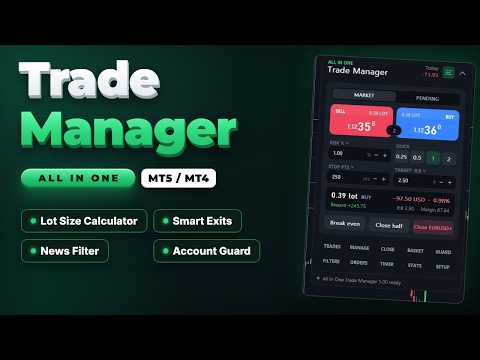
All In One Trade Manager is a trade manager and one-click trading panel for manual traders on MetaTrader 5. It works as a trading assistant, risk manager and position size calculator in one dashboard. It brings together everything below in one panel:


  • order entry with risk sizing
  • automatic trade management
  • advanced order types
  • account protection
  • statistics


Its entry checks run in the background and tell you, before you click BUY or SELL, when something speaks against the trade.

Also available for MetaTrader 4: https://www.mql5.com/en/market/product/202843


WHO IT IS FOR


- Manual traders who scalp, day trade or swing trade forex, gold (XAUUSD), indices or crypto.

- Traders who want consistent risk management: every lot is calculated from the risk you set, and stop loss and take profit are placed with each order.

- Prop firm challenge and funded traders who need a daily loss limit, a max drawdown limit and an equity guard. Always check your firm's own rules too.


ENTRY CHECKS


The panel stays clean while every rule passes. When a rule needs your attention, one line appears at the top of the panel with the exact reason, for example "USD Non-Farm Payrolls in 4 min":


- Amber: a warning, for example news coming up.

- Red: the rule blocks new entries.


You can still send a blocked BUY or SELL by holding the button for one second, so you stay in control.


The available rules:


  • News filter. Uses the economic calendar built into MetaTrader 5, so no website, DLL or WebRequest setup is needed.
    • Only events for the chart's currencies count (for example USD and EUR on EURUSD, USD on gold).
    • Choose high impact only, or high and medium impact.
    • Set the minutes before and after each event.
    • Choose whether news warns you or blocks new entries.
    • Optional action a set time before the event: close trades, move stops to break even, delete pending orders, or close and delete.
    • Upcoming events list with countdown, and event markers on the chart.
  • Spread limit.
  • Trading hours: two time windows, which may cross midnight, plus a choice of trading days.
  • Volatility band: minimum and maximum ATR.
  • Exposure limits: lots per currency and trades per symbol.
  • Account guard (equity protection): daily loss limit, weekly loss limit, max drawdown, daily profit target, trades per day, open positions, loss streak and cooldown after a loss.


ORDER PANEL


- Buy and sell buttons with live prices and the spread between them.

- Market or pending orders. For pending orders, the limit or stop type is chosen automatically from where you place the entry.

- Lot size calculator: size by risk % of balance, equity or free margin, by risk in money, or by fixed lots. Quick buttons for common sizes.

- Commission per lot is counted in the risk.

- Stop loss in points or as a multiple of ATR. Take profit in points or as a risk:reward ratio.

- Live preview of lot size, risk in money and percent, reward, R:R and required margin, before you send.

- Volume is rounded to the broker's lot step. If the minimum lot would exceed your risk, the panel tells you.

- Broker error codes are shown as plain sentences, for example "Stop or target too close to price".


ADVANCED ORDERS


- Scale-in layers. Split one trade into 2 to 10 entries that step toward the stop. All layers share one stop and one target, and your risk is divided between them. A preview shows each layer's price, lot and risk before you send.

- Straddle (OCO). Places a buy stop above and a sell stop below the price, both sized by your risk. When one fills, the other is deleted.

- Trailing pending orders. Pending orders follow the price at a set distance.

- Virtual pending orders. The order waits on your computer and is sent when the price reaches it.


CHART RISK:REWARD TOOL


- Entry, stop and target lines with labels showing points, money, percent and R.

- Partial take-profit and partial stop levels are marked on the chart.

- Drag the stop and the lot size updates to keep your risk constant.

- Drag the entry to switch to a pending order.

- Drag any pill sideways to move the whole tool anywhere on the chart.

- Click the dots on the entry pill to switch between BUY and SELL.

- Every open position gets a small label with its profit and its R multiple.


TRADE MANAGEMENT


- Break even (breakeven stop): trigger in points or R, with a lock offset in points. Two extra profit-lock steps.

- Trailing stop, six methods: fixed distance, ATR, candle high/low, moving average, Parabolic SAR and fractals. Each starts after a profit you choose and moves in steps.

- Partial take profit: up to four levels, each closing a percentage of the starting volume. Optional move to break even after the first level.

- Partial stop loss: two levels that cut part of a losing position before the full stop.

- Automatic stop and target for trades opened manually, from the mobile app or by other EAs.

- Scope: this symbol or all symbols; trades opened by the panel only, or all trades.


CLOSE TOOLS


- Close all, profitable, losing, buys or sells. Delete pending orders.

- Partial close 25%, 50% or 75%.

- Reverse a position, or lock it with an opposite hedge position (hedging accounts).

- Bulk buttons are confirmed by holding them, so a single misclick does nothing.


BASKET


- Manage a group of trades as one: this symbol or all; buys, sells or both.

- Basket target and stop, in money or percent of balance.

- Trailing that locks a share of the peak profit.

- Break-even line of the whole basket drawn on the chart.


STEALTH


- Hidden (virtual) stop loss and take profit: kept on your computer instead of at the broker, with an optional wider emergency stop at the broker.

- Stop on candle close: the stop only fires when a bar closes beyond it.

- Convert the stops of open trades to virtual stops and back with one button.


TIMER AND ALERTS


- Server clock, a candle countdown, and a 24-hour session ribbon for Sydney, Tokyo, London and New York.

- Close trades after a set number of minutes.

- Close everything at a daily time, or before the weekend on Friday.

- Delete pending orders after a set time.

- Price alerts: a line on the chart that notifies you when the price reaches it. Drag the line to move the alert.


STATS


- Results for today, this week, this month or all time: net profit, win rate, profit factor, average win and loss, expectancy, and average R.

- 30-day result curve.

- Open risk if all stops are hit.

- Exposure per currency.

- Results by symbol.

- Export of the trade journal to CSV.

- Optional chart screenshot when a trade opens and closes.


NOTIFICATIONS


Sound, MT5 push, e-mail and Telegram (with your own bot) for:


- guard actions

- basket exits

- news actions

- price alerts


COMFORT


- Three presets save all your settings and load them with one click.

- Dark and light themes. All colours can be changed in the inputs, and the panel scales from 50% to 250%.

- Keyboard shortcuts (hotkeys): Shift+B buy, Shift+S sell, Shift+C close symbol, Shift+E break even, Shift+L chart tool, Shift+P pending, Shift+H hide.

- Settings are saved per symbol and per account, and survive restarts.

- When the panel runs on several charts, one chart runs the automatic rules so they never act twice.

- The panel scrolls on small screens: use the mouse wheel or drag its scroll bar.


ACCOUNTS AND INSTRUMENTS


- Works on hedging and netting accounts.

- Forex, metals, indices and crypto. Lot sizing uses the broker's own profit calculation, so no instrument needs special settings.


IMPORTANT NOTES


- Rules that act locally need MetaTrader 5 to be running and connected: virtual stops and orders, partial exits, trailing, timer exits, basket, guard, news actions and alerts. A stop set at the broker keeps protecting your trade when the terminal is closed. Virtual stops do not.

- When a limit is hit, the account guard blocks new entries from the panel and can close all open trades. With "Hard lock" on, it also closes trades opened elsewhere while trading is locked. It cannot stop another terminal or the mobile app from opening trades in the first place, and it does not replace the rules of your prop firm.

- Telegram: add https://api.telegram.org under Tools > Options > Expert Advisors > Allow WebRequest, and enter your bot token and chat id in the inputs.

- The economic calendar is not available in the Strategy Tester. In the tester the news filter shows "Calendar is not available".

- The product does not open trades on its own and does not give trading signals.


TESTING THE FREE DEMO


Run the demo in the Strategy Tester with visual mode on to use the panel by hand. Without visual mode, the tester runs a short automatic demonstration that opens sample trades so you can see break even, partial closes and trailing at work.


The visual tester gives the panel fewer mouse events than a live chart:


- Slow the test down with the speed slider, so the market does not run away while you click.

- The mouse wheel does not reach the panel in the tester. Drag the scroll bar on the right edge of the panel instead.

- Hover effects (the chart tool following the BUY or SELL button under the mouse) appear only on a live chart. Click the grip dots on the chart tool to switch between BUY and SELL.

- The tester shows its own tooltip with the object name over the panel. A live chart does not.


INPUTS


Trading

- Magic number for trades opened by the panel: 2604190

- Order comment: AIO Trade Manager

- Maximum slippage (points): 30

- Default risk per trade (% of balance): 1.0

- Manage manual and other EA trades by default: false


Behaviour

- Keyboard shortcuts (Shift + key): true

- Hold to confirm bulk close buttons: true

- Sounds: true

- Push notifications: false

- Telegram bot token / chat id: empty (off)

- Reset saved panel settings on start: false


Appearance

- Theme: Dark

- Panel scale (%): 100

- Corner radius (px): 16

- 11 colours for the dark theme (slate theme by default)


Everything else is set inside the panel and saved automatically.

추천 제품
This Expert Advisor monitors all open positions across all symbols in MetaTrader 5. Whenever a Stop Loss (SL) or Take Profit (TP) is manually set or adjusted on any position, the EA automatically applies that value to all other open positions , regardless of symbol or order type (Buy/Sell). This ensures consistent and synchronized SL and TP levels across your account. Perfect for mobile trading via tablet or smartphone!
FREE
Trade Control Panel
Jerry Jilun Anak Liban
Trade Control Panel Function Normal One Click Function Close All Close All Profit Close All Loss Close All Pending Order Close All Sell Close All Buy Advance One Click Function 1.  Close Partial Lot Sell by Percent It will help you partial close for all open position by desire percent you wanted. No longer partial close one by one for every open position Manual input for desire percent 2. Close Partial Lot Buy by Percent It will help you partial close for all open position by desire percent
Trade Panel HotKey – MT5 Scalping Utility Fast Trade Panel HotKey is a lightweight MT5 trading utility designed for traders who need to open, manage, and close positions as quickly as possible . The main purpose of this tool is to reduce the time between a trading decision and execution. Instead of moving the mouse, opening order windows, or manually modifying multiple positions, most important actions can be performed instantly through customizable keyboard hotkeys or directly from the compact
거래원 여러분 안녕하세요!저는 당신의 거래 조수입니다.더 이상 말하지 말고, 내가 너에게 나의 특기를 알려줄게. 1.나는 당신의 창고를 관리하는 데 능숙하다, 당신이 어느 쪽에서 주문하든, 나는 가장 먼저 당신을 도와 합리적인 손실 방지선과 이동 손실 방지선을 추가할 수 있습니다. 2.나는 너를 도와 상승과 하락을 회피하고 원칙을 지키지 못하는 인간성의 약점을 근원적으로 근절할 수 있다. 3. 귀하가 참고할 수 있도록 최적 지점에서 귀하의 모바일 MT5 클라이언트에 알림 메시지를 보냅니다. 물론 귀하는 모바일 장치 내의 MetaTrader 5 APP의 MetaQuotes ID를 MetaTrader 5 클라이언트 --> 옵션 --> 알림 --> MetaQuotes ID의 편집 상자에 등록하고 알림 지점 확인을 눌러야 합니다. 4. 정책 테스트에서 수동 시뮬레이션 디스크 연습을 잘 지원합니다. 5. 저에게 연락하면 추가 AI 보조 클라이언트 슈퍼 보조 프로그램을 얻을 수 있습니다. 참
**Forex Trade Manager Pro MT5** **Trade Manager MT5**는 MetaTrader 5용 종합 거래 관리 유틸리티로, 거래를 계획하는 순간부터 마감하는 순간까지 포지션의 모든 측면을 완벽하게 제어할 수 있도록 합니다. 규율을 갖추려는 초보자부터 여러 포지션에 걸쳐 즉각적인 실행이 필요한 전문 스캘퍼에 이르기까지 위험을 진지하게 생각하는 모든 트레이더를 위해 설계되었습니다. 이 도구는 모든 차트에 첨부되며 깔끔하고 컴팩트한 패널을 표시합니다. 차트에서 직접 드래그 가능한 수평선을 사용하여 계획된 진입점, 손절매, 이익 실현 수준을 표시합니다. Trade Manager는 정의된 위험을 기반으로 올바른 포지션 크기를 즉시 계산하고, 손절매 및 이익 실현 값을 핍 및 계좌 통화로 실시간 표시하며, 계획된 거래의 위험-보상 비율을 보여줍니다. 수동 계산이 필요하지 않습니다. 위험을 한 번 정의하면 도구가 나머지 모든 것을 처리합니다. **포지션 사이징
Signals for Telegram
Elidio Xavier Guimaraes
It is a utility that posts customized messages on Telegram based on account trading activity. Once the utility is on the chart, with each new position opened from the same chart symbol the utility is added, a customized message will be sent to the Telegram group defined in the input parameters. The utility will post to the Telegram group if a new position is opened and if it is the same symbol as the chart the utility is running on. If you are using an Expert Advisor for Buy and Sell and want to
Quick Exit
Jefferson Judge Metha
This MT5 Utility is designed to simplify the process of managing multiple trades. If you have several open positions, it can be time-consuming to close each one manually. With this tool, you can easily close all profit trades, losing trades, or just the trades that are linked to the chart you're currently viewing. It saves you time and effort by allowing you to manage your trades with just a few clicks, making your trading experience smoother and more efficient. Whether you're focusing on profit
FREE
DGem Trade Manager Panel
Damien Jean Michel Gremillet
Trade Manager Panel ## Short description  Manage your manual trades with one click: automatic break-even, trailing stop, two-level partial close and risk-based lot sizing — all from a single on-chart panel. --- ## Full description Trade Manager Panel is an on-chart utility that takes care of your open trades so you can focus on the market instead of the order ticket. Drop it on any chart and it manages every position on that symbol automatically, while an interactive panel lets you size new
Don't want to risk or loose your personal trading account or prop trading firm account because of a simple Margin Call or exceeded Loss Limit? Then this Utility Expert Advisor is the solution for you! This Expert Advisor monitors your account Equity or Balance or even both! If the Equity and/ or Balance fall under your defined stop limits, the EA closes all of your positions and keeps you so on track. Options and Variables: Monitored Values: Choose which values should get monitored Equity: if
Partial
Pablo Filipe Soares De Almeida
부분 청산 관리자 – 거래량 자동 조정 도구 부분 청산 관리자는 MetaTrader 5 플랫폼에서 포지션의 일부를 빠르고 정확하게 청산할 수 있도록 돕는 고급 트레이딩 도구입니다. 이 도구를 사용하면 전체 포지션을 종료하지 않고도 수익을 일부 확보하거나 손실을 제한할 수 있어, 효율적인 리스크 관리와 유연한 자금 운영이 가능합니다. 특히 스캘핑이나 데이 트레이딩처럼 신속한 의사결정이 필요한 전략에 적합합니다. 주요 기능: 부분 청산: 클릭 한 번으로 열린 포지션의 일부를 손쉽게 청산할 수 있습니다. 자동 거래량 계산: 수동 입력 없이 자동으로 청산할 거래량을 계산하여 실수를 줄이고 속도를 높입니다. 다중 주문 지원: 동일한 심볼의 여러 주문에 동시에 부분 청산을 적용할 수 있어 효율적입니다. 이동 가능한 테이블: 헤더를 클릭하고 드래그하여 차트에서 원하는 위치로 쉽게 옮길 수 있습니다. 이 도구는 트레이더가 시장의 변동성 속에서도 안정적인 성과를 유지하도록 돕는 필수적인 리스크 관리
MT5용 최고의 거래 관리 도구 - 거래 패널, 포지션 규모 계산기 및 위험 관리 기능 포함 Top Trade Manager 는 MetaTrader 5를 위한 완벽한 거래 관리 도구입니다. 거래 패널, 포지션 규모 계산기 , 리스크 관리 기능이 하나로 통합되어 있습니다. 차트에서 진입점, 손절매, 목표 수익을 드래그하여 설정하면 로트 규모, 리스크, 수익이 즉시 계산됩니다. 부분 청산 , 손익분기점 , 트레일링 스톱 , 숨겨진 손절매 및 목표 수익 기능을 활용하여 거래를 관리하고, 경제 뉴스 캘린더를 확인하며, 내장된 드로잉 도구를 사용하여 차트에 마크업을 추가할 수 있습니다. Top Trade Manager는 수동 거래 도구입니다. 절대 자동으로 거래를 시작하지 않습니다. 모든 거래는 사용자가 직접 결정하며, Top Trade Manager는 계산과 관리를 대신 수행합니다. 주요 특징 시각적 거래 계획: 차트에서 진입, 손절매 및 이익실현을 드래그하여 설정합니다. 잔액 또는 자기자
KS Hotkey Trading Panel Pro는 빠른 키보드 기반 거래 기능과 클릭 가능한 차트 내 대시보드를 제공하는 MetaTrader 5용 Expert Advisor(EA)입니다. 주요 기능 단축키 거래 — 다음 동작을 위한 단일 키 조작: 시장가 매수 / 매도 지정가 매수(Buy Limit) / 지정가 매도(Sell Limit) 역지정가 매수(Buy Stop) / 역지정가 매도(Sell Stop) 모든 포지션 청산 매수 포지션만 청산 / 매도 포지션만 청산 모든 대기 주문 삭제 랏(Lot) 사이즈 증감 (위/아래 화살표 키) 패널 표시 / 숨기기 차트 내 대시보드 — 모든 단축키, 현재 랏 사이즈, 실시간 계좌 정보(잔고, 평가금액, 스프레드, 매수/매도 포지션 수) 및 각 동작을 실행할 수 있는 "GO" 버튼을 표시합니다. 접이식 패널 — 토글 버튼(또는 단축키)을 사용하여 전체 패널을 얇은 바(bar) 형태로 접거나 펼칠 수 있습니다. 설정 가능
Pro Trade Manager Panel은 수동 트레이딩의 모든 과정을 MetaTrader 5 차트 위 하나의 패널에 모았습니다. 거래를 시각적으로 계획하고, 리스크에 맞춰 포지션 크기를 자동 계산하고, 주문을 보낸 뒤 관리하고 보호하세요. 외환, 금속, 지수 등 다양한 종목에서 작동합니다. 시각적 거래 계획 차트에 진입, 손절, 익절 박스를 표시하고 드래그로 조정합니다. 익절 1, 2 또는 3단계(랏 분할). 선택 기능 단계 SL: TP1 이후 SL을 진입가로, TP2 이후 TP1로 이동합니다. 원클릭 매수 / 매도 전환. Limit 또는 Stop 주문은 자동 선택되며 시장가 거래도 가능합니다. 랏, 금액 리스크, SL 거리, 손익비를 실시간으로 표시합니다. 모든 종목에서 리스크 기반 랏 계산 계좌 통화 기준 리스크 또는 고정 랏을 입력하면 손절 거리로 나머지를 계산합니다. 종목의 랏 단위, 최소·최대 랏을 준수합니다. 어떤 계좌 통화에서도 정확합니다. 주문 전 여유 증거금을 확
Signals Executor for Telegram is a Utility that allows you to execute and manage positions from messages sent in Telegram Chats. Chat messages are processed to check for the existence of commands, and the command will be executed if its parameters are valid. You need the Telegram Bot Token and Chat Id to configure the input parameters. It is possible to restrict the sending of commands through the User Id, which must be configured in the input parameters. Valid Commands: Buy and Sell: Market or
HotkeyTrader Pro — Expert Advisor for MetaTrader 5 HotkeyTrader Pro is an Expert Advisor that allows executing and managing trades through configurable keyboard shortcuts, with integrated risk management tools and position tracking. Keyboard execution The EA includes 11 predefined keyboard shortcuts for opening buy and sell orders, managing open positions, and executing partial or full closes. It is compatible with external macro software such as AutoHotKey and with programmable input devices. R
FREE
DTK Scalping Panel
Thiago Pereira Pinho
A powerful and intuitive trade management tool designed for scalpers and intraday traders. Created to complement the Nampim Samba Scalper strategy , it allows traders to open, manage, and close positions quickly without leaving the chart.  Key Features: Customizable trading panel – choose position (left, right, center, top, bottom). One-click trading buttons – instantly open Buy/Sell trades with pre-set lot sizes. Close management – close last 1/2/3 trades or all Buy/Sell positions with one clic
Aizen Trade Manager Pro
Japhet Eisenhdorf Pascua Jabulin
Aizen Trade Manager Pro Professional Trade Management for Traders Running Multiple Positions Opening a trade is the easy part. Managing it correctly—especially when you have several positions open at the same time—is where consistency is won or lost. Aizen Trade Manager Pro is a professional button-driven trade management panel that runs directly on your MetaTrader 5 chart. It does not generate signals, predict market direction, or execute trading strategies. Instead, it simplifies every repetit
Spread and Swap monitor
Hennadii Stanilevych
5 (1)
The indicator is intended for determining the spread and swap size, the distance for setting stop orders and stop losses from the current price allowed and the risk per 1 point in the deposit currency. The indicator informs a trader about possible additional expenses and profits connected with transferring a position to the next trade session of the financial instrument. It also informs about the spread size and the distance of pending orders, stop loss and trailing from the current price. In ad
This utility provides the ability to use hot keys in manual trading instantly responding to the current market situation. You can assign hot keys to open/close positions by their type, open/close all positions on the current chart and remove all orders on the current chart. You can also assign hot keys for five predefined trade volumes and switch between them if necessary with no need to change the volume manually from time to time. It is also possible to set the auto calculation of a trade volu
One Click Trader  is a tool designed for MetaTrader 4 platform, which enables you to take your trading to the next level. It enables you to open, manage and close your trades in simple an efficient way by just one click of your mouse button. "-"   ,  "+"  change OCT window size  Up arrow minimizes the OCT panel Down arrow maximizes the OCT panel Right arrow displays the next panel with additional features Left arrow hides the panel with additional features Red  SELL  button enables you to open s
Blade Position Manager Pro – MT5 Trade Management Utility Take Control of Your Trades with One Professional Dashboard Blade Position Manager Pro is a MetaTrader 5 trade management utility designed to help traders manage open positions, control risk, protect floating profits, and simplify everyday trading operations. Whether you trade Gold (XAUUSD), Forex, indices, or other supported instruments, Blade Position Manager Pro provides practical tools for managing your trades from a compact, easy-to-
Neuron News Risk Manager MT5 Neuron News Risk Manager MT5 는 MetaTrader 5용 경제 뉴스 보호, 위험 관리 및 Telegram 원격 관리 시스템입니다. MT5 경제 캘린더를 모니터링하여 다음 뉴스, 통화, 시간, 중요도, 영향 및 남은 시간을 표시합니다. Low, Medium, High 중요도별 필터링과 차트 뉴스 라인을 지원합니다. Global Algo Trading Guard 는 뉴스 발표 전에 Algo Trading을 자동으로 비활성화하고 설정된 보호 기간이 끝난 후 다시 활성화할 수 있습니다. 보호 시작 전에는 아무 작업도 하지 않기, 수익 포지션 청산, 손실 포지션 청산 또는 모든 포지션 청산 을 선택할 수 있습니다. 패널에서는 Close Winning, Close Losing, Close All 기능과 오픈 포지션, Floating P/L 및 Drawdown을 모니터링할 수 있습니다. Telegram 원격 관리 MT5가
Breakeven Trailing SL Manager
Hafiz Muhammad Usama Sadique
Breakeven Trailing SL Manager; This utility Manager is a simple utility that protects your manual trades automatically. Attach it to any chart and it watches all manual positions on your account, on every symbol. It does not open trades and it ignores trades opened by other Expert Advisors. How it works When a trade moves in profit by the Breakeven Price, the Stop Loss is moved to the exact entry price. When the price moves the same distance again, the Stop Loss is moved to entry plus that dist

FREE
Quant Panel
Kevin Craig E Gittins
Quant Panel is a strategy analysis utility for MetaTrader 5. It helps traders review several Expert Advisors or trading strategies running on the same account. The panel groups closed positions by Expert Advisor comment or magic number and calculates each strategy's results separately. You can compare strategy performance, review individual drawdowns and export detailed reports from one dashboard. Independent strategy analysis Each strategy has its own virtual starting balance and closed-trade b
Position Prime
Mariana Cordeiro Neves Fernandes
지금 무료 데모 버전을 다운로드하여 구매 전에 전략 테스터에서 모든 위험 관리 기능을 테스트해 보세요! Position Prime 은 MetaTrader 5 (MT5)를 위한 기관급 시각적 주문 실행 어시스턴트이자 위험 관리 도구입니다. 속도와 정밀도를 요구하는 트레이더를 위해 개발되었으며, 수동 랏(Lot) 계산의 번거로움을 없애고 차트를 진정한 트레이딩 데스크로 바꿔줍니다. 단 몇 분의 1초 만에 거래를 계획, 실행 및 보호하세요. ️ 위험 관리 및 자동 랏(Lot) 계산 동적 계산: 위험 감수 금액($) 또는 계좌 잔고 비율(%)을 설정하세요. 차트에서 손절매(SL) 선을 드래그하면 패널이 정확한 랏 크기를 자동으로 계산합니다. 실시간 예측: 주문을 열기 전에 화면에서 직접 손익비(RR), 예상 수익 및 잠재적 손실을 시각화합니다. 일일 손실 제한 (Daily Loss Lock): 하루 최대 금전적 손실 한도를 설정하세요. 이 한도에 도달하면 패널이 새로운 거래를 차단
Haven MT5 to Telegram 2.0 — MT5 거래를 Telegram에 게시 Haven MT5 to Telegram 은 MetaTrader 5의 거래 이벤트를 Telegram에 자동으로 게시하기 위한 유틸리티입니다. 포지션 진입과 청산, Stop Loss와 Take Profit 변경, 부분 청산, 예약 주문 이벤트를 모니터링합니다. 메시지에는 차트 스크린샷, Trade ID, 거래 결과도 포함할 수 있습니다. 사용자 가이드   |   다른 제품 ->  여기 . Haven MT5 to Telegram  2.0의 새로운 기능 버전 2.0에서는 새로운 인터페이스와 재설계된 거래 이벤트 게시 시스템이 도입되었습니다. SIMPLE 모드 필수 설정이 하나의 화면에 정리되어 있습니다. 여기에서 Telegram 연결을 확인하고, 주요 알림 유형과 스크린샷을 켜거나 끌 수 있으며, 최초 신호의 게시 방식을 선택할 수 있습니다. ADVANCED 모드 확장 인터페이스에는 게시, 스타일,
The EA supports closing orders based on the preset amount. It can close all orders on all pairs, or it can close orders based on Magic ID. Button "Close All" manual Input - Magic Number: Magic Number = 0: Close All pairs Magic Number diffrent 0: Close All with Magic - Money TP: Profitable in money.  the EA will close all orders - Money SL: Loss in money. the EA will close all orders Contact: t.me/nguyenvanbo128

FREE
One Click Trade Panel with Risk Manager is an order-entry and trade-management panel for MetaTrader 5. It does not contain a trading strategy and does not open trades by itself on a live or demo account. Trades are opened only when you click BUY or SELL. Position sizing You enter the stop-loss distance and the risk, either as a percentage of balance, equity or free margin, or as a fixed amount in the account currency. The panel calculates the lot from the broker's contract specification (tick
Trade Desk
Mostafa Saad Saeed Shawara
Trade Desk 는 MetaTrader용 트레이드 패널( trade panel )이자 트레이드 매니저( trade manager )입니다. 차트에서 진입을 정하고 랏 계산기( lot size calculator )로 수량을 맞춘 뒤, 같은 패널에서 열린 포지션( open positions )을 관리합니다. 손절( stop loss ), 여러 익절( multiple take profit ), 본절( break even ), 트레일링 스탑( trailing stop )을 한곳에서 다룹니다. 추가 안내: 데모 계좌용 체험판 — MetaTrader 4용 Trade Desk 가격: 현재 가격 $30는 처음 10명의 구매자를 위한 기간 한정 시작 가격입니다. 정가는 $99입니다. 차트 도구의 대부분은 주문을 넣는 데까지만 돕습니다. 체결 뒤에는 포지션 매니저( position manager )가 필요합니다. Trade Desk 는 두 일을 같은 차트에 둡니다. 레벨을 드래그하면서 위험 보
MQT Prop Guard DD MT5
Josue Fernando Servellon Fuentes
MQT Prop Guard DD는 프롭펌 계좌를 일일 손실 한도와 총 드로다운 초과로부터 보호합니다. 자기자본을 매초 감시하여 챌린지의 일일 한도에 도달하기 전에 모든 포지션을 청산한 뒤, 다음 일일 리셋까지 거래를 잠급니다. FTMO, The5ers, FundedNext 같은 프롭펌의 규칙과 호환됩니다(회사의 정확한 리셋 시간과 한도를 항상 확인하세요). 작동 방식(로직 요약): 설정한 리셋 시간(서버 시간)에 당일 시작 기준값을 기록합니다: 잔고, 자기자본 또는 둘 중 큰 값(기본값은 보수적 선택). 매초 현재 자기자본(미실현 손실 포함)을 기준값에서 일일 한도(% 또는 고정 금액)를 뺀 값과 비교합니다. 설정 가능한 경고 수준(기본 한도의 80%)에서 하루에 한 번 경고합니다: 팝업, 저널, 선택적 푸시 알림. 한도를 초과하면 모든 심볼의 모든 포지션을 청산하고 대기 주문을 삭제하며 다음 리셋까지 거래를 잠급니다. 잠금 중에 열린 것은 즉시 청산됩니다. 선택적 총 드로다운 한도
FREE
이 제품의 구매자들이 또한 구매함
Trade Assistant MT5
Evgeniy Kravchenko
4.43 (216)
거래당 위험 계산, 라인을 사용한 손쉬운 신규 주문, 부분 청산 기능을 통한 주문 관리, 7가지 유형의 트레일링 스탑 및 기타 유용한 기능을 제공합니다. 추가 자료 및 지침 설치 지침   -   애플리케이션 지침   라인 기능       - 차트에 개시선, 손절매, 차익실현을 표시합니다. 이 기능을 사용하면 새로운 주문을 쉽게 하고 개봉 전에 추가 특성을 볼 수 있습니다. 위기 관리       -       위험 계산 기능은 설정된 위험과 손절매 주문의 크기를 고려하여 새 주문의 볼륨을 계산합니다. 이를 통해 손절매 크기를 설정하고 동시에 설정된 위험을 존중할 수 있습니다. 로트 계산 버튼 - 위험 계산을 활성화/비활성화합니다. 필요한 위험 값은 위험 필드에 0에서 100 사이의 백분율 또는 예금 통화로 설정됩니다. 설정 탭에서 위험 계산 옵션을 선택합니다. $ 통화, % 잔액, % 지분, % 자유 마진, % 사용자 정의, % AB 이전 일, % AB 이전 주, % AB 이전
Farmed Hedge Yield Farming | All Markets (Manual - Hybrid - Semi/Automated EA) VERIFIED TRADING RESULTS - Farmed Hedge Yield Axi Copy:  https://www.mql5.com/en/signals/2356376 - Farmed Hedge Yield Exn Copy:   https://www.mql5.com/en/signals/2356404 - Farmed Hedge Yield V Copy:  https://www.mql5.com/en/signals/2357156 IMPORTANT NOTICE: FarmedHedge is a MANUAL-FOCUSED TRADING UTILITY ,not a fully automated EA. Results shown on this Signal include manual trades and overall strategic management.
Telegram to MT5 Multi-Channel Copier   는 Telegram 및 Discord 채널의 트레이딩 시그널을 MetaTrader 5로 자동 복사합니다. 봇도, 브라우저 확장도, 수동 복사도 필요 없습니다. Telegram이나 Discord에 시그널이 도착하면 EA가 몇 초 안에 터미널에서 주문을 실행합니다. 그리고 채널을 복사하기 전에, 내장 백테스터가 그 채널이 내 계좌에서 어떤 결과를 냈을지 보여줍니다. 제품은 두 가지 구성 요소로 이루어집니다: Telegram 채널을 수신하는 Windows 애플리케이션과, MT5 터미널에서 시그널을 실행하는 본 EA입니다. MT4 버전도 제공됩니다   여기 . 설정 가이드와 앱 다운로드:   https://www.mql5.com/en/blogs/post/768988 텔레그램 시그널 채널을 백테스트하는 방법 을 확인하세요. 현재 가격은 향후 인상될 예정입니다. 작동 방식 앱은 여러분 자신의 Telegram 계정으로 연결되므
================================================================================ POC BREAKOUT - V20.72. Full Professional Grade Toolkit ================================================================================ POC Breakout is a full MetaTrader 5 trading dashboard for discretionary traders who want breakout signals, Point of Control (POC) context, volume profiles, order flow, market structure, news, alerts, and advanced trade planning in one professional workspace. Attached directly to you
News Trade EA MT5
Konstantin Kulikov
4.55 (11)
제가 몇 년 동안 사용하고 있는 유용한 로봇을 소개드립니다. 반자동뿐만 아니라 자동 모드로도 사용할 수 있습니다. >>> Chat <<< 본 프로그램에는 경제 캘린더의 뉴스별로 유연한 거래 설정이 포함되어 있습니다. 전략 테스터에서 확인할 수 없습니다. 진짜 작업뿐입니다. 터미널 설정에서 허용된 URL 목록에 뉴스 사이트를 추가해야 합니다. 서비스>설정 > 조언자>를 클릭합니다. "다음 URL에 대해 WebRequest 허용:" 확인란을 선택합니다. 다음을 추가합니다 (공백 삭제): https://  nfs.faireconomy.media 최신 설정 아카이브 다운로드: https://www.mql5.com/en/blogs/post/747929 신호 모니터링: https://www.mql5.com/en/signals/author/test-standart 이 전문가를 위해 고유 설정 세트를 만들 때 블로그의 모든 매개변수에 대한 설명을 참조하십시오: https://www.mql5.
Master Your Trading Discipline   Stop losing your hard-earned gains to overtrading and emotional decisions. The Discipline Tool is your ultimate trading assistant, ensuring strict risk management in real-time. Key Protection Features: Advanced Drawdown Defense : Automatically halts trading if your daily drawdown exceeds a preset threshold (percentage or dollar amount). Real-Time Equity Lock : Safeguard profits by referencing peak equity, ensuring drawdown stays within control. Hard Profit Target
The product will copy all telegram signal to MT5 ( which you are member) , also it can work as remote copier.  Easy to set up, copy order instant, can work with almost signal formats, image signal,  s upport to translate other language to English Work with all type of channel or group, even channel have "Restrict Saving Content", work with  multi channel, multi MT5 Work as remote copier: with signal have ticket number, it will copy exactly via ticket number. Support to backtest signal. How to s
Entry In The Zone with SMC Multi Timeframe is a real-time market analysis tool based on Smart Money Concepts (SMC), designed to analyze market structure, price direction, and key trading zones. It supports both Single-Timeframe and Multi-Timeframe Analysis, providing a clearer view of overall market structure across multiple timeframes, with real-time BUY / SELL signals designed with a strict focus on No-Repaint principles.   The signals are designed to help filter unclear setups and evaluate tr
EasyInsight AIO MT5
Alain Verleyen
4.92 (12)
EASY Insight AIO – 스마트하고 손쉬운 트레이딩을 위한 올인원 솔루션 개요 외환, 금, 암호화폐, 지수, 심지어 주식까지 — 전 시장을 몇 초 만에, 수동 차트 확인이나 복잡한 설치, 인디케이터 설정 없이 스캔할 수 있다고 상상해 보세요. EASY Insight AIO 는 AI 기반 트레이딩을 위한 궁극의 플러그 앤 플레이(Plug & Play) 데이터 내보내기 도구입니다. 단 하나의 깔끔한 CSV 파일로 전체 시장 스냅샷을 제공하며, ChatGPT, Claude, Gemini, Perplexity 등 다양한 AI 플랫폼에서 즉시 분석할 수 있습니다. 창 전환, 복잡함, 차트 오버레이는 더 이상 필요 없습니다. 자동으로 내보내지는 순수하고 구조화된 데이터 인사이트만으로, 반복적인 차트 감시 대신 데이터 기반의 스마트한 의사결정에 집중할 수 있습니다. 왜 EASY Insight AIO인가요? 진정한 올인원 • 별도의 설정, 인디케이터 설치, 차트 오버레이가 필요 없습
파워 캔들 전략 스캐너 - 자체 최적화 다중 종목 설정 찾기 도구 파워 캔들 전략 스캐너는 마켓 워치에 등록된 모든 종목에 대해 파워 캔들 지표와 동일한 자체 최적화 엔진을 동시에 실행합니다. 하나의 패널에서 현재 통계적으로 거래 가능한 종목, 각 종목별 최적의 전략, 최적의 손절매/익절 조합을 알려주며, 새로운 신호가 발생하면 즉시 알림을 전송합니다. 이 도구는 Stein Investments 에코시스템의 일부입니다. 18개 이상의 도구와 함께 당신의 1대1 AI 트레이딩 멘토 Max.  항상 대기 중, 모든 인디케이터를 깊이 있게 이해, 무언가를 차근차근 생각해보고 싶은 순간에 도움을 줍니다.  https://stein.investments 에서 만나보세요 완벽한 시장 모니터링. 종목당 3,000건 이상의 자동 최적화. 2가지 알림 유형. 한 번의 클릭으로 차트를 전환하고 바로 거래하세요. 이 도구가 필요한 이유 대부분의 다중 종목 스캐너는 가격 변동만 보여줍니다. 티커별
Trade Indicator Assistant   is a powerful MT5 utility designed to turn indicators into automated trading systems. Its main feature is the ability to automatically detect an indicator’s   BUY and SELL signal buffers , without requiring you to know the buffer numbers, search through indicator settings, or modify the indicator source code. Bonus Indicator:   After purchasing Trade Indicator Assistant, contact me to receive   Trade Signal Pro   completely free as a bonus indicator. [Download Demo V
The Patch
Mian Rameez Ali
The Patch It never opens a trade. It walks behind the ones that did. Every open position, every pending order — checked twice a second for the one thing that's easy to forget: a stop, a target. Found bare, it doesn't ask. It writes the missing number in, measured in points from wherever the position began, and moves on to the next. No strategy, no opinion on direction. Just the quiet assumption that nothing should ever sit on the market unprotected — not because someone decided it shouldn't,
RETAILBERG FOOTPRINT CHART PRO — Order-Flow Workspace for MetaTrader 5 Version 7.00  |  Professional System  |  31 tools  |  One chart A full 150-page illustrated User Manual is included. Please read the full manual to understand this feature packed footprint chart elements and ui. https://www.mql5.com/en/blogs/post/777982 DEMO / STRATEGY TESTER — PLEASE READ FIRST
Floor Watch
Syed Tauqeer Hussain Shah
Floor Watch One number, watched every thirty seconds: how far equity has fallen since the day began — or since its highest point, if it's told to trail the peak instead of the open. Cross the line and it doesn't argue. Every open position closes, every pending order vanishes, and anything that slips through afterward gets shut the moment it appears. Not asked. Removed. The floor holds until the clock turns 5 AM Pakistan time — then, and only then, does the day start over. One rule. No except
한 번 구매하면 현재 제공 중이거나 앞으로 출시할 제 모든 MT4 및 MT5 지표를 추가 비용 없이 받을 수 있습니다. 구매 후 수령 방법을 안내받으려면 저에게 연락해 주세요. 10회 구매마다 가격을 50$씩 인상하여 최대 999$ 까지 올릴 예정입니다. 결제 시점의 Market 가격이 적용됩니다. 신뢰하는 지표는 그대로 사용하고, 관련 작업을 자동화하세요. 당신의 신호. 당신의 규칙. 당신의 거래 실행. 신뢰하는 MT5 지표가 있지만 여전히 차트를 지켜보고, 신호를 기다리고, 랏을 계산하고, 주문을 넣고, 각 포지션을 직접 관리하고 계신가요? Stratiora Signal Engine MT5는 이러한 단계를 연결합니다. 호환되는 매수·매도 버퍼 신호를 진입, 거래량 계산, Stop Loss, Take Profit, 필터, 포지션 관리 및 계좌 보호까지 이어지는 자동화 과정으로 전환할 수 있습니다. 지표나 거래 아이디어를 바꿀 때마다 별도의 EA를 의뢰하는 대신, 하나의 유연한 엔
EA Overfitter
Stephen J Martret
5 (1)
That backtest looks great. But will it still be making money tomorrow, next week, next month? EA Overfitter re-runs your EA on 100 price histories it has never seen. One score tells you if the edge is real. A backtest tells you what an EA did on one price history — the one that happened to occur. What you cannot tell from it is how much of that result was the strategy and how much was the particular path. EA Overfitter answers that. It builds up to 100 synthetic price histories your EA has n
Premium Trade Manager - 코치가 내장된 트레이딩 패널 Premium Trade Manager 는 차트 안에 트레이딩 코치를 심어놓은 도구입니다. 주문을 확정하기 전에, AI 트레이딩 코치 Max가 설정된 거래를 직접 읽고 명확한 판단을 내려줍니다. 스톱이 규율 있는 접근 방식에 맞는지, 리스크 크기가 합리적인지, 고영향 뉴스 이벤트가 몇 분 후에 있는지, 프롭 펌 한도에 근접했는지. 그 아래에는 완전한 실행 엔진이 있습니다. 원클릭 리스크 기반 진입, 차트에서 드래그로 세우고 거래가 진행되는 동안에도 계속 움직일 수 있는 플랜, 최대 4단계 분할 익절, 7가지 트레일링 방식, 실시간 프롭 펌 컴플라이언스, 뉴스 가드, 그리고 자체 비용을 평가하는 스프레드까지. 결정은 당신이 내립니다. Max가 두 번째 시선으로 확인합니다. 패널이 그 이후의 모든 것을 처리합니다. 구매 전에 직접 체험해 보세요. 브라우저에서 라이브 패널을 직접 클릭해볼 수 있습니다. 구매 전에 실제
YuClusters
Yury Kulikov
4.93 (43)
Attention: You can view the program operation in the free version  YuClusters DEMO .  YuClusters is a professional market analysis system. The trader has unique opportunities to analyze the flow of orders, trade volumes, price movements using various charts, profiles, indicators, and graphical objects. YuClusters operates on data based on Time&Sales or ticks information, depending on what is available in the quotes of a financial instrument. YuClusters allows you to build graphs by combining da
Quant AI Agents
Ho Tuan Thang
5 (1)
Quant AI Agents are independent trading Expert Advisors. Instead of trading using a fixed strategy like other conventional EAs, Quant AI Agents   is a   multi-agent AI trading framework   that turns natural-language strategy prompts into live.  WANT THE SAME RESULTS AS MY LIVE SIGNAL?   Use the exact same brokers I do:   IC MARKETS , IC TRADING   .  Unlike the centralized stock market, Forex has no single, unified price feed.  Every broker sources liquidity from different providers, creating un
Daily Trading Limiter
AL MOOSAWI ABDULLAH JAFFER BAQER
5 (8)
• Please test the product in the Strategy Tester before purchasing to understand how it works. • If you face any issues, contact me via private message—I’m always available to help. • After purchase, send me a screenshot of your order to receive a FREE EA as a gift. Daily Trading Limiter — the rule you cannot break Every trader knows the number. Three trades. Two percent. One bad day and stop. And every trader has watched themselves take the fourth trade anyway. The problem was never knowing th
FUTURES ORDERFLOW FOOTPRINT CHART Professional OrderFlow EA for MetaTrader 5 Version 1.01| Professional tool for real traders | Institutional-Grade Visualization STRATEGY TESTER USERS - PLEASE SELECT EVERY REAL TICK WHEN TESTING AND YOU HAVE DOWNLOADED HISTORICAL DATA. IF YOU SEE A WAITING SCREEN AND IT IS NOT DOWNLOADING, IT MEANS YOU HAVE LOW HISTORICAL DATA. TRY 1 MIN AND 5 MIN FIRST ON 1 DAY DATA. ONE DAY DATA SHOULD BE THE NEWEST AND MOST CURRENT DATE. PLEASE WAIT UNTIL THE MARKET HAS ROL
Trading Chaos Expert
Hennadii Stanilevych
5 (11)
This software has no equals in the world and represents a universal trade "console" covering trading signals, automated market entry, setting of Stop Loss and Take Profit, as well as Trailing Profit for multiple trades at the same time in a single open window. Intuitive control of the Expert Advisor in "three clicks" ensures a comprehensive use of all its functions on different computers, including tablets PCs. Interacting with additional signal indicators that mark the chart to give a real mark
Copy your MT5 trades to Interactive Brokers You keep using MT5. Every order you open or close is sent to your IB account. In real time. No coding. No changes to your strategy or EA. Try it first Rent 1 month: $30. Test on a live or paper account. What it does Real-time copying: same direction, reverse, or one side only. Map any MT5 symbol to any IB symbol. Set a lot ratio for each. Forex, Futures, Stocks, CFDs, Metals and Crypto. Position sync: both accounts checked, any difference fixed. Optio
Dynamic Fibonacci Grid
Tsvetan Tsvetanov
5 (1)
MT5용 Dynamic Fibonacci Grid Dashboard 최신 버전을 소개합니다. 많은 새로운 기능이 추가된 이번 대시보드는 거래 경험을 완전히 변화시키며, 시장과 가격 움직임을 완전히 새로운 관점에서 볼 수 있게 합니다. 여러 시간대와 여러 심볼을 동시에 분석하여 새로운 가능성을 발견하세요. 수동 거래와 포지션 관리에 친화적인 사용자 인터페이스와 미리 정의된 자동 전략을 적용할 수 있는 확장된 기능을 제공합니다. 또한 DFG는 이제 전략 테스터(Strategy Tester)에서 트레이딩 시뮬레이터로 완벽하게 작동하며, 과거 데이터를 사용하여 다양한 거래 조건을 재현할 수 있습니다. 시각 모드에서 수동 거래를 연습하고, 고속 모드에서 자동 전략을 테스트할 수 있습니다. 주요 기능 • Dynamic Fibonacci Bands 개념을 기반으로 한 다중 시간대 및 다중 심볼 고급 기술 분석 실시간 시장 모니터링 대시보드를 통해 탁월한 효율성을 경험할 수 있습니다. M1,
Ultimate Extractor
Clifton Creath
5 (7)
Ultimate Extractor - Professional Trading Analytics for MT5 *****this is the local HTML version of Ultimate Extractor. !!!!!it is not compatible with Cloud!!!! For the online version please reach out to me directly****** Ultimate EA manager also now available when you use cloud pro and above for free!! Ultimate Extractor transforms your MetaTrader 5 trading history into actionable insights with comprehensive analytics, interactive charts, and real-time performance tracking. What It Does Automa
Timeless Charts
Samuel Manoel De Souza
5 (8)
Timeless Charts is an all-in-one trading utility for professional traders. It combines custom chart types such as Seconds Charts and Renko with advanced order flow analysis using Footprints , Clusters , Volume Profiles , VWAP studies, and anchored analysis tools for deeper market insight. Trading and position management are handled directly from the chart through an integrated trade management panel , while Market Replay and Virtual Accounts provide environments for practicing trading skills and
VERON LINK MASTER MT5 — Real-time Multi-Account Dashboard & Sync Controller Veron Link Master is a high-performance, centralized monitoring and synchronization control center designed for MetaTrader 5. Built specifically for traders managing multiple accounts, prop firm portfolios, grid/martingale EAs, or client networks, Veron Link Master provides a seamless, ultra-modern dark-themed GUI dashboard directly on your MT5 terminal. Pricing Structure: Take advantage of our early-bird pricing before
Veron Link Slave – Synchronized Grid, Martingale & Breakout Management Short Description Advanced synchronization tool designed to manage Grid, Martingale, and Breakout EAs. Automatically sends close-basket signals to the Master account upon profit target completion, minimizing slippage across different brokers. Full Description Veron Link Slave is a specialized utility developed to enhance the execution efficiency and risk management of multi-account or multi-broker trading setups. It is desig
Advanced Daily Trading Limiter PRO
AL MOOSAWI ABDULLAH JAFFER BAQER
Advanced Daily Trading Limiter PRO Professional Risk Management. Uncompromising Trading Discipline. One undisciplined trading session can erase weeks of consistent profits. Whether it's overtrading, revenge trading, or exceeding a prop firm's daily risk limits, emotional decisions often become a trader's biggest obstacle—not the market itself. Advanced Daily Trading Limiter PRO is a comprehensive risk management and discipline enforcement utility for MetaTrader 5, designed to help traders stay
EA Slipstream
Stephen J Martret
5 (1)
Your backtest filled every order at the price it asked for. Your account does not. EA Slipstream measures what execution costs your EA, using your own fills, slippages and spreads to show you the true performance of your EA. A backtest prices every trade at the level the EA named. In live trading a pending order fills at whatever price is available when it triggers, a stop closes wherever the market is when it is hit, and the spread at that moment is whatever the account was quoting. The differ
제작자의 제품 더 보기
Opening Range Breakout EA is a focused trading robot that automates one of the most effective intraday strategies: trading the session breakout. It operates by observing the market during its initial, quiet phase to establish the opening range. Once that range is defined, the EA is ready to enter a trade the moment price action confirms a breakout, helping you ride the volatility that follows. Advanced Version The Trading Idea The core of this strategy is simple: many of the day's biggest move
FREE
The SMC Market Structure indicator tracks key price action shifts using Smart Money Concepts (SMC), helping traders identify institutional behavior and overall trend direction. Pro version MT4 version It automatically detects and displays: Break of Structure (BOS) – Signals continuation of trend Change of Character (CHOCH) – Indicates potential reversal Swing Highs and Lows – Used to define market structure and directional bias Each structural event is clearly marked on the chart, allowing trade
FREE
The   SMC Market Structure   indicator tracks key price action shifts using Smart Money Concepts (SMC), helping traders identify institutional behavior and overall trend direction. Pro version MT5 version It automatically detects and displays: Break of Structure (BOS)   – Signals continuation of trend Change of Character (CHOCH)   – Indicates potential reversal Swing Highs and Lows   – Used to define market structure and directional bias Each structural event is clearly marked on the chart, allo
FREE
Fair Value Gap Finder   detects fair value gaps and generates a signal when price returns to one. Set the minimum and maximum fvg size, customize the colors, style, and length, then let the indicator highlight them for you. Key Features:  Automatic FVG highlights   - The indicator detects all fair value gaps that fit your criteria and marks them on the chart. Entry Signal   - A signal is created whenever price retests a fair value gap. Notification   - Alerts notify you when a fair value gap
FREE
Fair Value Gap Finder
Josef Vobejda
5 (1)
Fair Value Gap Finder detects fair value gaps and generates a signal when price returns to one. Set the minimum and maximum fvg size, customize the colors, style, and length, then let the indicator highlight them for you. Key Features:  Automatic FVG highlights - The indicator detects all fair value gaps that fit your criteria and marks them on the chart. Entry Signal - A signal is created whenever price retests a fair value gap. Notification - Alerts notify you when a fair value gap or a new
FREE
Range Breakout Master is a comprehensive Expert Advisor designed to capture the full potential of range breakout and fakeout trading, one of the most reliable and widely used concepts in intraday technical trading. Built on transparent, rule-based logic with no martingale and no grid, it covers every aspect of breakout and fakeout trading - from range formation and entry logic through trade management and risk control. Its high versatility and large number of customizable inputs make it adaptab
Opening Range Breakout EA   is a focused trading robot that automates one of the most effective intraday strategies: trading the session breakout. It operates by observing the market during its initial, quiet phase to establish the opening range. Once that range is defined, the EA is ready to enter a trade the moment price action confirms a breakout, helping you ride the volatility that follows. The Trading Idea The core of this strategy is simple: many of the day's biggest moves begin when the
FREE
Market Trading Sessions is an indicator that identifies major market sessions such as: London (09:00 - 18:00 UTC+2) New York (15:00 - 00:00 UTC+2) Sydney (23:00 - 8:00 UTC+2) Tokyo (02:00 - 11:00 UTC+2) It displays each session’s start and end times, along with its high and low, providing traders with a clearer view of price volatility throughout the day. The indicator offers high customizability, allowing you to adjust session times and modify the plotting style to match your preference. If yo
FREE
Range Breakout Master   is a comprehensive Expert Advisor designed to capture the full potential of range breakout and fakeout trading, one of the most reliable and widely used concepts in intraday technical trading. Built on transparent, rule-based logic with no martingale and no grid, it covers every aspect of breakout and fakeout trading - from range formation and entry logic through trade management and risk control. Its high versatility and large number of customizable inputs make it adapta
SMC Market Structure Pro   is the advanced version of SMC Market Structure, built for traders who want deeper structural analysis, multi-timeframe context, and real-time notifications — all from a single indicator. Free Lite version MT5 version What it detects The indicator automatically identifies and draws: Break of Structure (BoS)   – Signals trend continuation Change of Character (CHoCH)   – Indicates a potential trend reversal Internal BoS (iBoS)   – Break of structure within the current s
All In One Trade Manager is a trade manager and one-click trading panel for manual traders on MetaTrader 4. It works as a trading assistant, risk manager and position size calculator in one dashboard. It brings together everything below in one panel: order entry with risk sizing automatic trade management advanced order types account protection statistics Its entry checks run in the background and tell you, before you click BUY or SELL, when something speaks against the trade. Also available
ICT Silver Bullet Indicator is designed to make trading the Silver Bullet strategy easier and more efficient. It combines all key parts of the ICT Silver Bullet method and highlights them on the chart, so you can focus on placing trades. Each feature is highly customizable, allowing you to adjust settings and visuals to match your trading style and preferences. The control panel lets you quickly hide or show specific tools for clearer analysis. The indicator also includes an alert system that n
Centurix
Josef Vobejda
Centurix is a portfolio-based Gold EA for XAUUSD, built for traders who want steady growth without taking reckless risks. A centurion commanded a disciplined unit of soldiers. Centurix commands a disciplined unit of 35 breakout strategies - all on one chart, all following the same strict risk rules. Each strategy looks for its own opportunities, and together they create a smoother, more balanced equity curve than any single system could. No single strategy decides your result - the portfolio d
SMC Market Structure Pro is the advanced version of SMC Market Structure, built for traders who want deeper structural analysis, multi-timeframe context, and real-time notifications — all from a single indicator. Free Lite version MT4 version What it detects The indicator automatically identifies and draws: Break of Structure (BoS) – Signals trend continuation Change of Character (CHoCH) – Indicates a potential trend reversal Internal BoS (iBoS) – Break of structure within the current swing, s
필터:
리뷰 없음
리뷰 답변