Gold Stop Guardian MT5
- 유틸리티
-
Hoai Nam Trinh
 여기서 시작하세요 - GOLD ALGO LAB 툴 맵
어떤 MT5 도구가 귀하의 XAUUSD 트레이딩 프로세스에 가장 적합한지 확신이 없으신가요?
Gold Algo Lab의 전체 툴 맵을 확인하고, 현재 트레이딩 프로세스에서 가장 보완이 필요한 부분이 무엇인지 파악해 보세요. 툴 맵은 시장 상황 분석, 셋업 선택, 리스크 계획, 주문 실행, 포지션 관리, 계좌 보호의 6단계로 구성되어 있습니다. - 버전: 1.20
- 업데이트됨: 18 9월 2026
- 활성화: 20
| Current price: $39 - increases by $10 after every 20 purchases until reaching the final price of $89. Next price: $49. Complete Buyer Kit: 38 Professional Resources included at no additional cost. MT5 Presets, PDF Guides, Checklists, Mindmaps, Reference Cards, and Excel Workbooks - built from 8 years of developing structured XAUUSD trading workflows. After purchase, please message me via MQL5 inbox. Your complete Buyer Kit will be delivered within 24 hours. |
If you've managed live XAUUSD positions manually, you already know the feeling. Price is moving, you have two or three trades open at the same time, and somewhere in the back of your mind you're wondering whether that one trade still has a reasonable stop on it. You open the terminal, check the levels, second-guess yourself, and close the window without doing anything. It's not laziness. It's the reality of managing open risk without a clear reference point.
Gold Stop Guardian MT5 was built for exactly that moment.
What It Actually Does
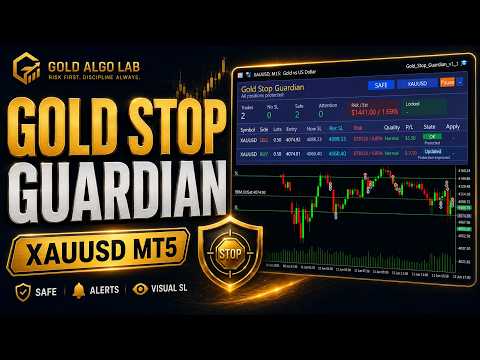
After you attach it to the chart, the panel starts scanning your open positions. For every trade, it answers four questions that matter when you already have skin in the game:
Does this position have a Stop Loss at all? If not, it tells you clearly. No SL is one of the most common causes of unexpected account damage on Gold, and it usually happens during fast sessions when you opened the trade quickly and planned to set the stop "in a moment."
Is the current stop still reasonable given where price is now? A stop set three hours ago may be completely different in context from what price structure looks like right now. The panel evaluates the recommended stop level based on recent pivot structure, ATR-adjusted distance and spread-aware buffering, then shows it alongside the current stop so you can compare both without doing the calculation yourself.
How much is actually at risk? The panel shows your exposure in account currency and as a percentage of balance - not just the stop price. There is a significant difference between knowing your stop is 47 points away and knowing that means $312 or 0.38% of your account. Both numbers are visible at a glance.
Is there a valid stop level you can act on? When a recommended stop meets all the safety checks - broker stop level, freeze level, spread conditions, and risk rules - the Apply option becomes available. You decide whether to use it. The tool never forces a stop update you didn't intend.
The Chart Side
One thing that the panel alone doesn't fully solve is spatial context. Knowing that your recommended stop is 4328.98 is useful. Seeing that level drawn on the actual price chart, relative to recent candles and the current SL line, is a different experience entirely.
Version 1.1 draws both your current stop and the recommended stop directly on the chart. You can see in seconds whether the suggestion makes structural sense, whether it's sitting just below a real support level or floating arbitrarily in open space. This matters more on Gold than on most instruments because M15 and M5 structure on XAUUSD shifts quickly and what looked reasonable an hour ago may not be anymore.
Protection States
The panel classifies each position into one of six states. These aren't arbitrary labels - each one tells you something specific about what the tool sees and what action, if any, is appropriate.
OK means the current stop is protected and no update is pending. The trade is being monitored but no intervention is needed.
No SL means there is no stop loss on the position. This state triggers alerts if you have notifications enabled.
Safe means the stop has been moved to break-even or profit-lock territory. The trade cannot lose money on its current stop even if it reverses.
Attention means there is a recommended stop available that would improve protection, but the tool is waiting for your review rather than acting automatically.
Alert means a condition requires immediate attention - either the stop is dangerously wide, a recommended level could not be computed, or a broker-side restriction is blocking an update.
Manual means the current stop is tighter than the recommendation. The tool respects it and monitors without interfering.
Modes and Control
Three operating modes let you choose how much automation you want.
AUTO mode scans positions on a timer and applies stop updates automatically when all protection conditions are met. This works best for traders who want passive stop management during active sessions without watching every position manually.
REVIEW mode surfaces recommendations and alerts but never applies any stop automatically. You see everything the tool sees and decide what to act on.
SAFE mode is a conservative middle ground. Break-even and profit-lock moves can happen automatically, but structural tightening moves require manual review. Useful if you want some automation without giving the tool full control.
Alert System
When a position has no Stop Loss, moves into Alert state, or gets its stop updated, the tool can notify you through MetaTrader's standard channels - popup, sound, push notification to your phone, or email. These are optional and controlled individually in the settings.
What This Tool Is Not
Gold Stop Guardian MT5 is a post-entry stop management utility. It does not open trades. It does not close trades. It does not give entry signals. It does not use hedging, grid logic, martingale, or any position-sizing technique. It watches stops and helps you manage them more deliberately.
It is optimized for XAUUSD but works on any symbol your broker supports. Execution behavior, stop and freeze level restrictions, and spread conditions vary between brokers. If you notice different behavior across accounts, that is almost always an execution environment difference rather than a settings issue. Test on a demo account first to understand how the tool behaves in your specific broker environment.
For a deeper look at how stop management affects Gold trading performance, this blog post explains the logic in more detail: https://www.mql5.com/en/blogs/post/769009
Product Guide
Want to understand this tool before adding it to your workflow?
Every Gold Algo Lab product includes a comprehensive MQL5 Product Guide covering real trading scenarios, workflow, limitations, FAQs, and practical usage.
👉 Read the full guide here: https://www.mql5.com/en/blogs/post/772067
Not sure where this tool fits in your trading process?
Each Gold Algo Lab tool is built to solve one specific part of the trading workflow. The Gold Algo Lab Tool Map shows how our MT5 tools connect across 6 practical stages for XAUUSD traders: market context, setup selection, risk planning, trade execution, position management and account protection.
→ Gold Algo Lab Tool Map: Where to Actually Start With MT5 Tools for XAUUSD
https://www.mql5.com/en/blogs/post/771930
You do not need every tool. Start with the stage where your process breaks down most often, then build your workflow one layer at a time.
Risk Disclaimer
Trading financial markets involves risk. Gold Stop Guardian MT5 is designed to help you review and manage Stop Loss placement more clearly, but it cannot remove market risk, slippage, execution delay or broker-side restrictions. No tool can guarantee trading results or protect against all market conditions. Please test on a demo account before using on a live account.
Gold Algo Lab builds practical, risk-first MT5 tools for serious XAUUSD traders, shaped by 8 years of developing and trading real systems to help traders identify clearer setups, manage risk with greater confidence and execute with more discipline.