
Chiroptera
- Experts
- 버전: 7.0
- 업데이트됨: 12 10월 2026
- 활성화: 5

Prop Firm Ready! Chiroptera is a non-martingale, non-grid, multi-currency Expert Advisor that operates in the quiet hours of the night. It uses single-placed trades (of all 28 pairs!) with tactically placed Take Profits and Stop Losses, that are continuously adjusted to maximize gains and minimize losses. It keeps track of past and upcoming news reports to ensure impacts are minimized and carefully measures real-time volatility to prevent impacts due to unpredictable geo-political disturbances caused by Tweets and other ad-hoc events, and exploits an advanced learning algorithm to ensure asset allocation is applied most optimally. Chiroptera only trades a few hours daily, during the quiet hours, and keeps client assets out of the market during the busiest (and unpredictable) times of day.
After you purchase the EA send me a direct message for recommendations on brokers.
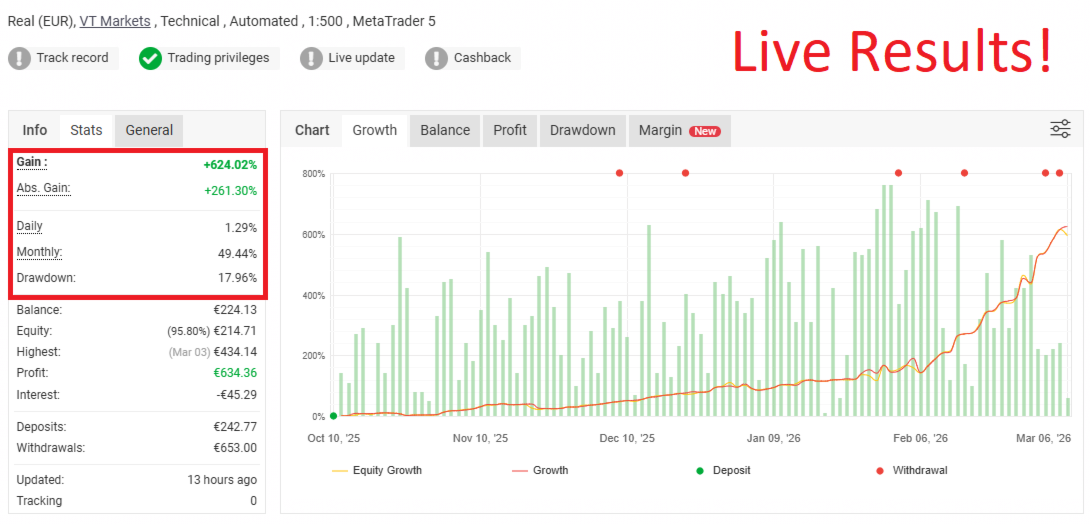
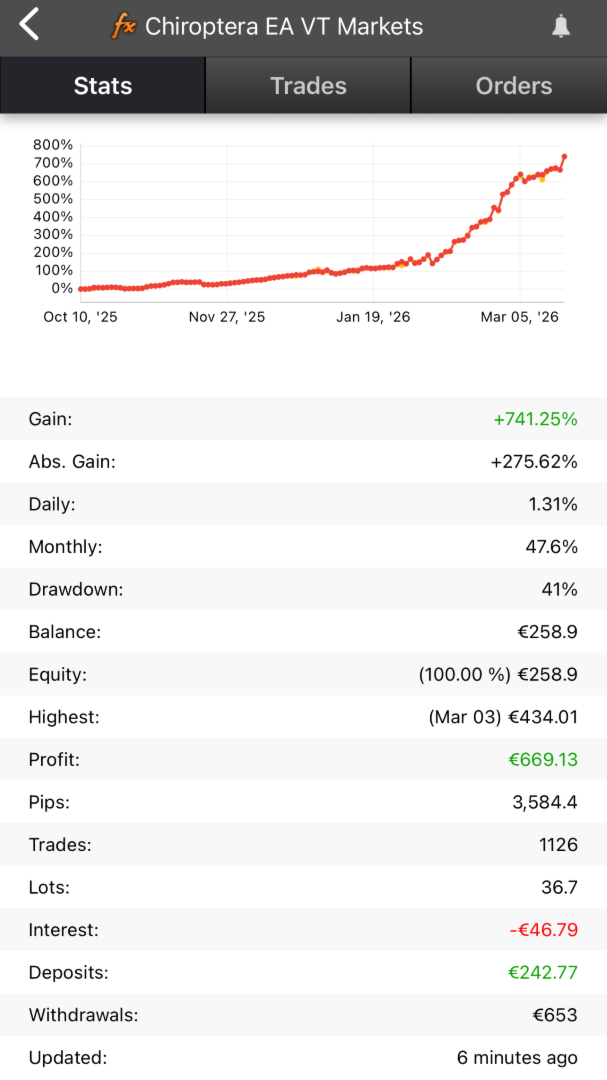
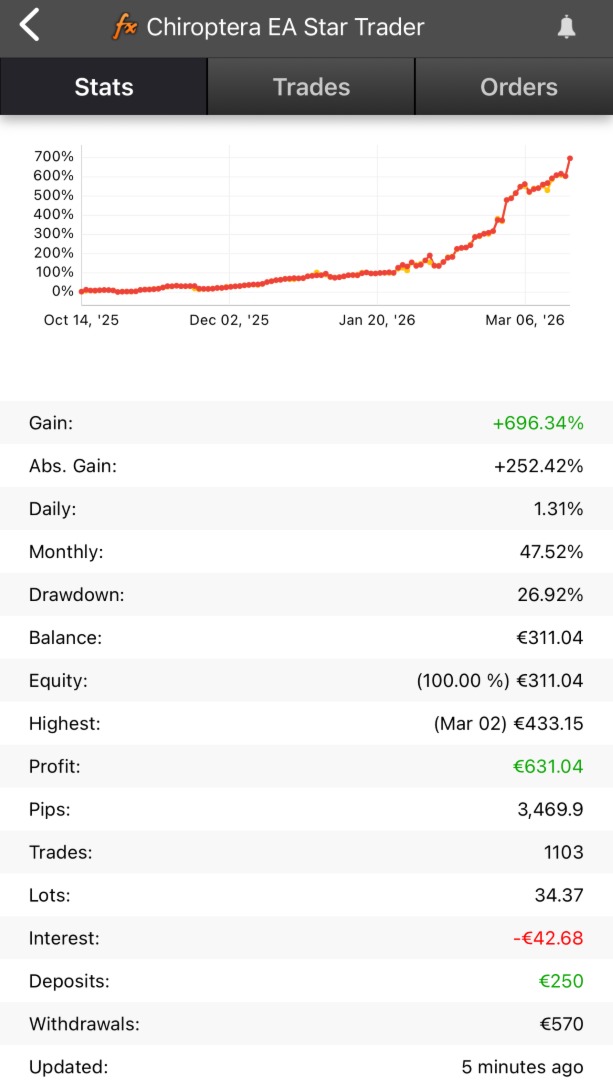
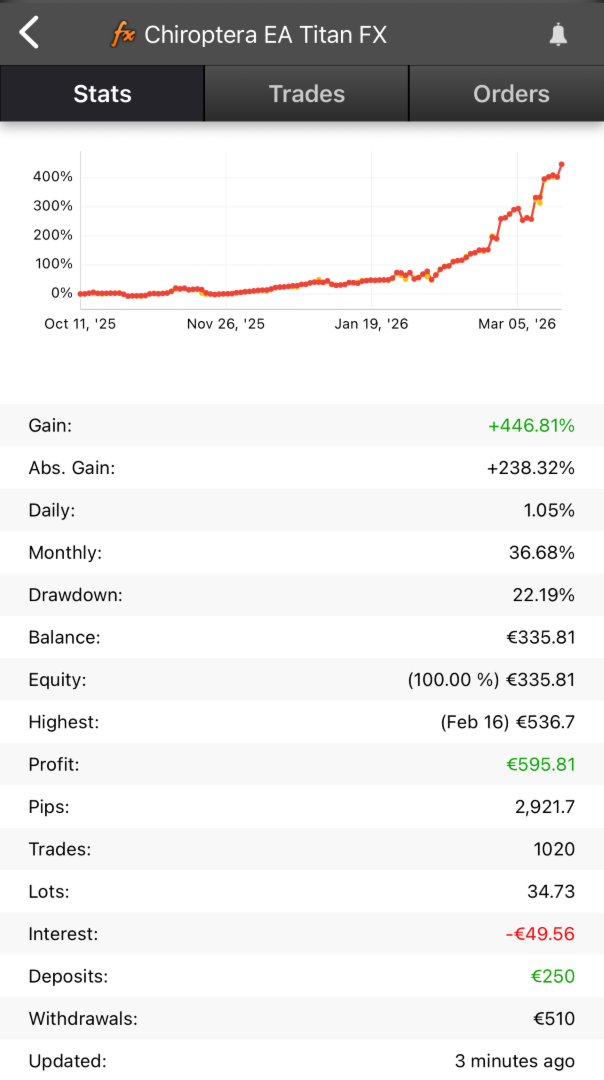
Live Performance
- Global Prime (default settings)
- FP Trading (default settings)
- [NEW] Fusion (Remove TP and Limits at rollover entry - Set to True to prevent slippage)
Unique Features that set Chiroptera apart from other Expert Advisors:
- it places single trades and does not employ martingale, grid or any other methods that are mathematically guaranteed to fail
- it is only actively trading for 2-3 hours every day: outside of that assets are out of the market and sitting safe with the broker
- it places limit orders in order to prevent slippage and execution delays, which negates the need for a low-latency VPS
- it modulates the incoming broker price feed in order to ensure a most optimal limit order placement, independent of broker spread
- it monitors multiple price feed aspects such as volume and price spikes in real time, to ensure ad-hoc and non-announced events (e.g. Tweets about tariffs) are monitored
- it connects to a live news server that allows it to monitor holidays, and impacts of past and future news events using advanced Pearson correlation calculations for future news pattern impacts
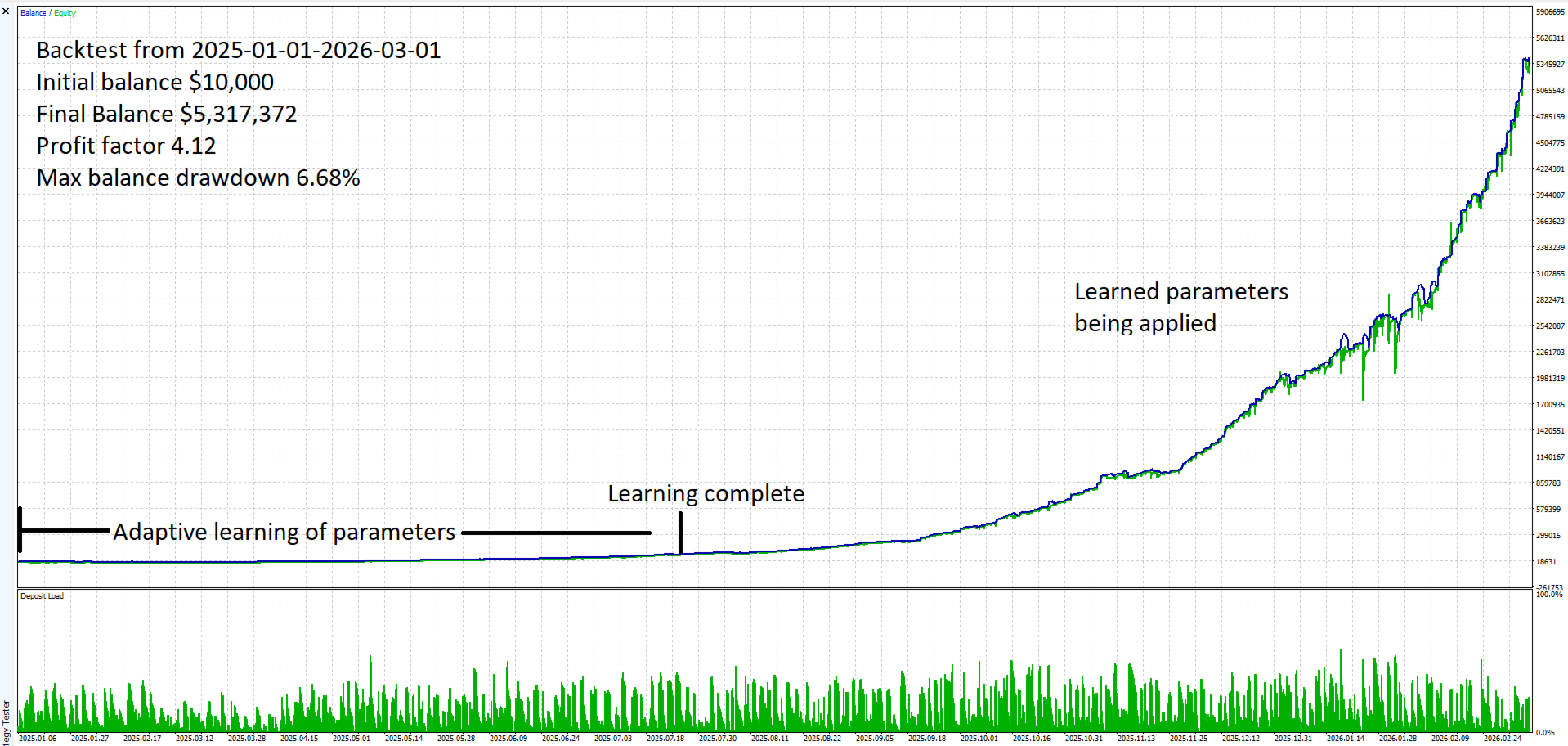
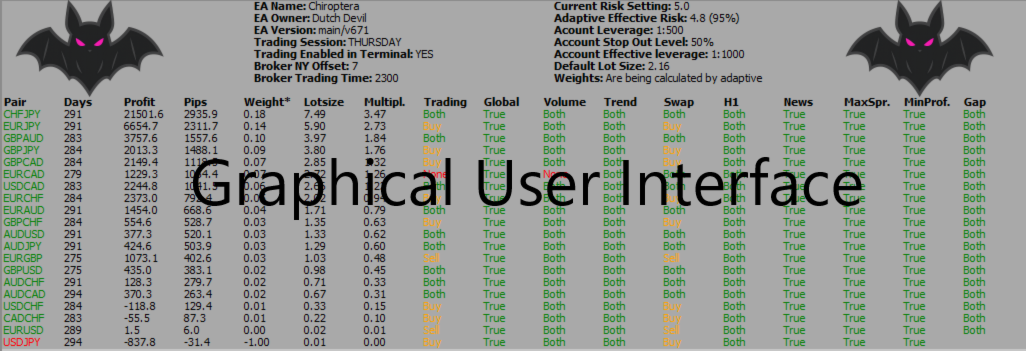
- it uses an advanced, time exponentially weighed, adaptive learning algorithm to calculate which symbols perform best for a specific broker based on historical performance. Allow the first 60 days to 'learn' the right conditions. This effect will show in backtest as a very 'flat growth curve' during the first 60 days of back-testing
- it sends real-time user notifications to user's MT5 Mobile App so users can monitor EA performance in real-time and monitor e.g. slippage and margin levels
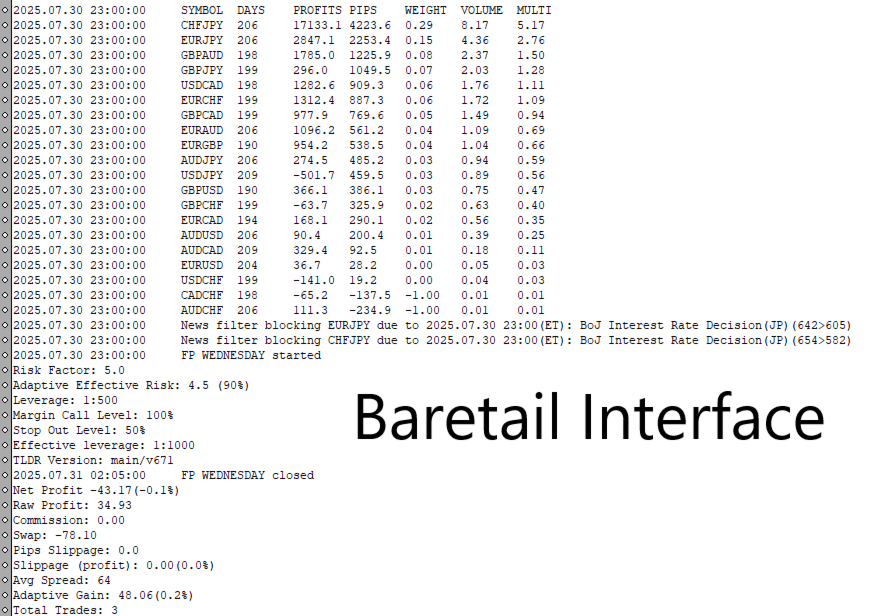
- It prints detailed performance metrics in Baretail for in-depth evaluations during backtest (download Baretail from Baremetalsoft and open 'PrintMonitor' file from 'Common' folder in backtest)
- BE AWARE THAT IN BACKTEST THE EA USES THE FIRST 60 DAYS FOR LEARNING AND WILL ONLY TRADE MINIMUM LOTSIZE (TYPICALLY 0.01). THESE 60 DAYS ARE NOT NEEDED ON A LIVE ACCOUNT (AS IT USES A PRE-LEARNED FILE)
Input parameters and default Values
- Magic = 12345; // Magic number allowing Chiroptera to run smoothly next to other EAs on the same account
- Run All Pairs= true; // allows to attach Chiroptera to one chart and run all currencies. 'False' will run Chiroptera only on the current symbol
- Pairs="EURUSD;GBPUSD;AUDCAD;AUDNZD;EURAUD;EURCAD;GBPAUD;GBPCAD;EURCHF;GBPCHF;USDJPY;EURJPY;USDCAD;EURGBP;USDCHF;CADCHF;CHFJPY;AUDJPY;AUDCHF;AUDUSD;GBPJPY"; // List of pairs that Chiroptera runs on effectively
- Trade Comment="Chiroptera"; // trade comment that can be adjusted by the user
- UseGoldForGMTOffset=true; // Uses Gold to automatically determine GMT offset. If errors occur select 'false' and report the issue to the developer
- RiskFactor=1.0; // Average lotSize = RiskFactor * balance (in USD) / contractsize (so a RiskFactor of 1.0 and account balance of 100,000 equates to an average of 1.0 lot per pair)
- StopLoss=1300; // In points (0=no Stoploss)
- [NEW] Remove TP and Limits Through Rollover (1655-1805 NYT); // Use this option if you experience slippage through the entire rollover window (MAKE SURE TO BACKTEST THIS)
- [NEW] Remove TP and Limits at rollover entry (1655-1710 NYT); // Use this option if you experience slippage at rollover entry (MAKE SURE TO BACKTEST THIS)
- [NEW] Remove TP and Limits at rollover exit (1755-1805 NYT); // Use this option if you experience slippage at rollover exit (MAKE SURE TO BACKTEST THIS)
- Trade Friday session 1st half; // Trade Friday before the weekend (will hold trades over the weekend)
- Trade Friday session 2nd half; // Trade Friday session past the weekend
- UseLearning=true; //Allows the EA to learn optimal lotsizes in backtest using machine learning
- ChiroStartDate=""; // Chiroptera automatically determines the correct start date when this EA started operating on the selected pairs; if this date is wrong you can use this parameter for a custom start date. Format is e.g. 2025.11.30-->this is NOT REQUIRED
- WriteWeightsFile=false; //Allows to create custom weightsfile in backtest-->this is NOT REQUIRED
- MinProfitToSwapRatio=5.0;// Ensures that the maximum profit of each trade is AT LEAST 5 times the swap. This filter disengages automatically after rollover (0=no check)
- MinProfitToCommissionRatio=0;// Ensures that the maximum profit of each trade is AT LEAST xx times the commission (0=no check)
- MaxSpreadPts=0;// Prevents symbols from trading when max spread is violated (0=no check)
- MinProfitPts=0;// Prevents symbols from trading when minimum allowable profit cannot be attained (0=no check)
- RewardsProgram=true; // Contact developer to be included in Chiroptera rewards program (0=no check for rewards program)
- SlippageNotifyThreshold=20; // Sends notification to user on MT5 Mobile App if Sendnotifications is enabled, if negative slippage on entry or exit is larger than threshold (-1 is no notifications)
- MarginLevelNotificationThreshold=100;// Notifies users on MT5 Mobile App if margin level drops below 100% (0=no check)
- PrintSessionReports=false; // Prints in terminal the session performance reports after each session
- PrintAdaptiveData=false; // Prints in terminal the pair performance list after each session
- PrintNews=true; // Prints in terminal all pertinent news
- PrintNewsBlocking=true; // Prints in terminal if news is blocking (and why)
- PrintHolidaysBlocking=true; // Prints in terminal if holidays are blocking
- SendNotifications=true; // Allows users to receive real-time performance notifications in MT5 App. Please see below for how to use this feature
Usage on live account
- PLEASE CONTACT US TO DISCUSS BROKERS
- Recommend to run on ECN Raw/Zero Spread account.
- Attach Chiroptera to a chart e.g. 'EURUSD' or 'EURUSD+' or 'EURUSD-ECN', make sure to choose the correct symbol if your broker uses prefix or suffix (this is typical for Raw / ECN accounts). Timeframe is irrelevant.
- Chiroptera will discover any pre- or suffixes automatically. No need to add the prefix or suffix for pairs in the EA parameters
- If desiring to receive performance reports in MT5 Mobile app: Place MetaQuotes ID in MT5 Terminal 'Tools'-->'Notifications' section, check 'Enable Push Notifications' and set 'SendNotifications' in the EA to true
- Chiroptera uses an advanced, time exponentially weighted filter to learn which are the best pairs (this is broker specific), for which it reads historical trade data. In backtest, this will take 60 days before it converges (it will trade the minimum lotsize up till then). On a live account, it will read pre-learning parameters from an embedded weightsfile. Custom weightsfiles can also be generated, please watch the below video (this is NOT required). Be aware that if creating the custom file on a different computer then where you are running the live account (e.g. on a VPS), the file has to be copied over (it is located in the 'Common' folder). Creation of custom weightsfiles will NOT work on MQL5 VPS as MQL5 VPS does not synchronize the 'Common' folder. Once again using this feature is NOT required.
Usage in Strategy Tester
- Run Chiroptera on one symbol only. Timeframe is irrelevant.
- Chiroptera EA has the News file embedded as a resource. Embedded News is up-to-date until the release date of the version you are using and updated each time a new version is released.
- For the use of 'Baretail' to see detailed performance metrics during backtest in a separate window, please download Baretail from BareMetalSoft and open the 'PrintMonitor' file that is created in your 'Common' folder at the start of your backtest.
- Optimal performance in backtest (or on a live account) will start when the adaptive lotsize algorithm has learned the optimal solution for lotsizes. This happens after 60 days. Before that expect generally worse performance in backtest. During these first 60 days of learning the EA will only trade the minimum lotsize (typically 0.01 lots)
Please send me a Direct Message if anything is unclear!




































I have used Chiroptera for circa 8 weeks; by far he best ea I’ve have used. Rob is also very helpful and responsive