Window Time Display for Korea Tokyo - Manual
Overview
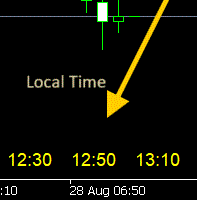
The Time Scale Korea Display is a custom MT5 indicator that displays local time (Korean time) on the chart's time scale. It shows the corresponding local time for each price bar, making it easier for traders to correlate market movements with their local timezone.
Features
- Dynamic Time Display: Shows local time corresponding to each chart candle
- Multiple Position Options: Display at top, center, or bottom of chart
- Windows Time Integration: Uses Windows system time for accurate local time display
- Timeframe Adaptive: Automatically adjusts display interval based on chart timeframe
- Customizable Appearance: Adjustable font size, color, and position
- Broker Time Independent: Works regardless of broker's timezone (UTC+2, UTC+3, etc.)
Input Parameters
Display Settings
| Parameter | Type | Default | Description |
| DISPLAY_POSITION | Enum | POSITION_BOTTOM | Chart display position (Top/Center/Bottom) |
| SCALE_TEXT_COLOR | Color | clrYellow | Text color for time display |
| SCALE_FONT_SIZE | Integer | 10 | Font size (8-20 recommended) |
| SCALE_FONT_NAME | String | "Arial" | Font family name |
| SCALE_Y_OFFSET | Integer | 30 | Vertical offset from chart edge |
Time Settings
| Parameter |
Type |
Default |
Description |
|
USE_WINDOWS_TIME |
Boolean |
true |
Use Windows system time (recommended) |
|
TIME_OFFSET_HOURS |
Integer |
9 |
Manual offset hours (only when USE_WINDOWS_TIME=false) |
Display Positions
POSITION_TOP
- Displays time labels at the top of the chart
- Useful when bottom area is cluttered with other indicators
POSITION_CENTER
- Shows time labels in the middle of the chart
- Good for temporary reference without obstructing price action
POSITION_BOTTOM
- Places time labels at the bottom of the chart (default)
- Most natural position, similar to built-in time scale
Time Format by Timeframe
| Timeframe | Display Format | Example |
| M1, M5, M10, M15, M30 | HH:MM | 14:30 |
| H1, H4 | HH:MM | 09:15 |
| D1, W1, MN1 | MM/DD | 08/28 |
Display Interval
The indicator automatically shows local time for every 4th candle across all timeframes. This provides optimal readability without cluttering the chart.
Time Synchronization Methods
Method 1: Windows System Time (Recommended)
- Setting: USE_WINDOWS_TIME = true
- Advantage: Automatically handles timezone changes, daylight saving time
- Use Case: Most traders using local Windows computer
Method 2: Manual Offset
- Setting: USE_WINDOWS_TIME = false
- Configuration: Set TIME_OFFSET_HOURS to your timezone offset from broker time
- Use Case: VPS environments or when precise manual control is needed
Installation Instructions
- Copy Time_Scale_Korea.mq5 to your MT5 Indicators folder
- Restart MT5 or refresh navigator
- Drag indicator onto desired chart
- Configure parameters in indicator settings dialog
- Click "OK" to apply
Usage Tips
For Korean Traders
- Keep USE_WINDOWS_TIME = true for automatic KST (Korea Standard Time)
- Use POSITION_BOTTOM for natural time scale appearance
- Choose SCALE_TEXT_COLOR = clrLime for good visibility
For Other Timezones
- Enable USE_WINDOWS_TIME = true to use your local system time
- Adjust SCALE_Y_OFFSET if time labels overlap with other elements
- Use different colors to distinguish from broker time
Performance Optimization
- Indicator updates automatically when new bars form
- Minimal CPU usage with smart update intervals
- Compatible with all MT5 chart types and symbols
Troubleshooting
Time Labels Not Visible
- Check DISPLAY_POSITION setting
- Adjust SCALE_Y_OFFSET value
- Try different SCALE_TEXT_COLOR
- Ensure chart has sufficient height
Incorrect Time Display
- Verify Windows system time is correct
- For manual mode, calculate correct TIME_OFFSET_HOURS
- Check broker's current timezone (may change with daylight saving)
Chart Performance Issues
- Indicator automatically limits to maximum 50 labels
- Updates only when necessary (new bar formation)
- Remove indicator from unused charts
Technical Specifications
- Platform: MetaTrader 5
- Language: MQL5
- Chart Window: Main chart window
- Resource Usage: Minimal (text objects only)
- Compatibility: All symbols and timeframes
- Update Frequency: Per new bar formation
Version History
Version 1.0
- Initial release
- Windows time integration
- Dynamic display positioning
- Timeframe-adaptive formatting
- 4-candle interval display
Support
For technical support or feature requests, please refer to your indicator provider or MQL5 community forums.