Chart Service

  • 유틸리티
  • Boris Sedov
    Boris Sedov
    👨‍💻 보리스 세도프(Boris Sedov) — 2008년부터 전문 트레이딩 툴을 개발해 온 개발자입니다.
    안녕하세요, 저는 보리스 세도프입니다. 저는 2008년부터 MetaTrader 4 및 5용 소프트웨어를 개발해 왔습니다. 제 접근 방식은 간단합니다. 유행을 쫓지 않습니다. 실제 트레이딩 문제를 해결하는 도구를 만들고, 제대로 완성될 때까지 계속해서 개선합니다.
  • 버전: 1.4
  • 업데이트됨: 5 3월 2025

Chart Service — improving the charts of the custom symbol.

The service shows trading levels on the chart of a custom symbol.

For example, it can be used when working on a seconds chart built using the Seconds Chart utility.

Unlike Expert Advisors, indicators and scripts, services are not linked to a specific chart. Such applications run in the background and are launched automatically when the terminal is started (if they were previously launched).

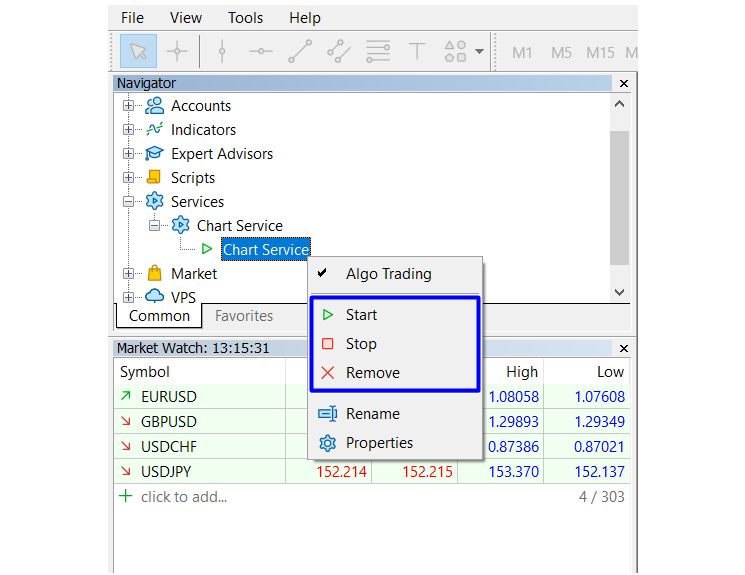
Use the Navigator to manage services.

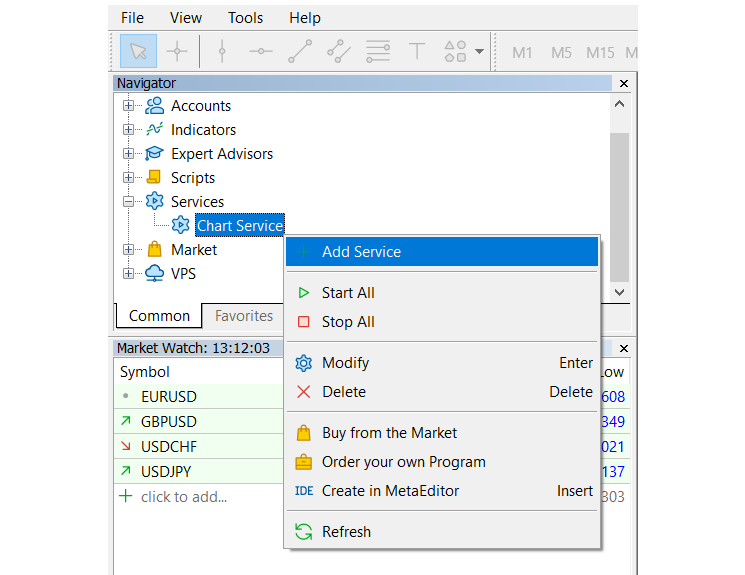
Services are not linked to charts, therefore a special mechanism has been implemented for the creation of service instances. Select a service from the Navigator and click "Add service" in its context menu. This will open a standard MQL5 program dialog, in which you can set various parameters.
추천 제품
LT Pointer Sync
Thiago Duarte
4.5 (6)
Pointer Sync is a pointer synchronizer between open charts. It makes the MT5 cross (activated by the middle mouse button) to be replicated on all open charts. In addition, it is possible to create horizontal lines (letter H) and vertical lines (letter V), very useful for studying. The appearance of the lines is customizable. Note: Synchronization is through the X and Y scale in pixels , not price and/or date. It is a simple and free utility. Enjoy! This is a free indicator, but it took hours to
FREE
Server Clock
Flavio Javier Jarabeck
5 (5)
Many friends asked me for a simple, non-obtrusive, resource-friendly clock to track the time during their trades. It seems pretty obvious, but it is a must-have for those trading the market manually, waiting for the Market News, or just to visually know what time it is... Trading is an absorbing endeavor! So, here it is... Totally configurable, including Font Type, Font Size and Chart Location: Upper Left/Center/Right OR Lower Left/Center/Right, with a little twist of adjusting the Offset, just
FREE
LT Clock MT5
Thiago Duarte
5 (10)
Simple indicator that draws the market hours on chart (broker, local and GMT). Functions: Horizontal distance - from border. Vertical distance - from border. Color - text color. Font - text font. Size - text size. Corner - which chart corner will be drawn. Show seconds - show or hide seconds. Draw as background - candles front or back. Label local - text before local time. Label broker - text before broker time. Label GMT - text before GMT time. Separator - separator between label and time Objec
FREE
FasterShark
Terence Gronowski
5 (1)
Idea I programmed this tool out of the necessity to be constantly informed about what is going on. Before I sometimes forgot to set a stopp loss, this is impossible with this tool. Further this tool allows you to make distributed entries, eg. with a first feeler with 0.1 contracts and when the direction is the right one you just put more contacts into the game. Money- and risk management is built in. If you use more then the predetermined number of contracts there is a warning. You are constantl
FREE
This tool allows you to export Ticks for any financial instrument available in MetaTrader 5. You can download multiple symbols into the same CSV file. You can also schedule the download frequency (every 5 minutes, 60 minutes, etc.). There is no need to open multiple charts to get the latest data—the tool downloads the data directly. The CSV file will be stored in the following folder: \MQL5\Files . How it works Select the symbols to download: Click an item to select or deselect it. Enter the CSV
FREE
Breakeven Bot
Gabriel Paul Ange Perrin
Optimize your trading management with Breakeven Bot, the essential tool for active traders managing multiple positions at once. No more wasting time manually adjusting your stops—one click is all it takes to secure your profits! Main Feature: ️ "BREAKEVEN" Button – Instantly set all profitable positions to breakeven and protect your gains quickly. ️ Customization Options: Set breakeven in pips or currency, depending on your preference. Choose whether breakeven should be at the entr
FREE
This Small tool allows you to define a time counter in minutes for the closing of your positions according to the number of minutes you have set. For example if you set it to 30 Min, the tool will close each open position after 30 minutes from its opening. The settings ACTIVE: It is to activate the tool and use it to close your positions after the number of minutes defined. MANAGE: you to choose with the symbols managed by the tool. Choose "ALL CURENCY" if you want the system to apply to
FREE
Boleta Pro V3
Jose Romulo Ferreira Leite
5 (2)
BOLETA PRO  A Boleta Pro  é um utilitário de interface gráfica profissional projetado para otimizar a execução e o gerenciamento manual de negociações diretamente no gráfico. Essa ferramenta centraliza operações de negociação complexas em um painel intuitivo, permitindo que os traders executem ordens de mercado ou pendentes com rapidez profissional. Principais características O painel oferece controle total sobre o seu fluxo operacional: Execução versátil: botões dedicados para compra e venda,
FREE
This is a decorative utility that replaces the standard marks of completed deals with "Kingdom Come: Deliverance" game style markers. In addition to the graphic display of the price and time of the transaction, the notes also contain a textual representation of the transaction volume. Running utility Drag the utility from the Navigator window to the desired graph. The utility does not use input parameters and does not require configuration. All trademarks available on the chart will be replaced
FREE
This indicator show the candle remaining time on the chart and/or in the corner of the window. It also display notificaton (popup and push) when a new candle is formed (optional). You configure the timer on candles and at chart corner. I don't need to explain the functions because are very simple. MT4 version:  https://www.mql5.com/en/market/product/38677 Any doubt or suggestion please contact us. Enjoy! This is a free indicator, but it took hours to develop. If you want to pay me a coffee, I a
FREE
Neon Shadow EA MT5
Evgeniy Ilin
4.5 (2)
Neon Shadow — 금융 시장에서 사용하기 위한 완성된 트레이딩 솔루션 이 제품은 "설치 후 잊어버리기" 모드로 사용하도록 개발되었습니다. 기본 STATIC 모드에는 내장된 전략이 포함되어 있어 차트에 설치한 후 추가 설정 없이 즉시 작동하기 시작합니다. 모든 입금 금액에 적합합니다. 트레이딩은 Swing 스타일로 진행됩니다. 이러한 트레이딩 스타일은 장기 트레이딩에서 드물지만 폭이 크고 훨씬 더 효과적인 트레이드를 제공합니다. 이 제품은 기본 설정으로 즉시 사용 가능합니다. 트레이딩을 시작하려면 어드바이저를 임의의 차트에 설치하기만 하면 됩니다. 대부분의 경우 시작은 자동으로 이루어지지만, 경우에 따라 설정의 해당 필드에 브로커의 종목 프리픽스 또는 접미사를 지정해야 할 수 있습니다. 어드바이저의 내부 로직을 자세히 연구하고 파라미터를 실험하고 싶다면 — 아래에 링크된 추가 기능을 확인하실 수 있습니다. 그러나 표준 사용에서는 이것이 필요하지 않습니다. 유용한 링크 만약 당
FREE
Value Chart Candlesticks
Flavio Javier Jarabeck
4.57 (14)
The idea of a Value Chart indicator was presented in the very good book I read back in 2020 , " Dynamic Trading Indicators: Winning with Value Charts and Price Action Profile ", from the authors Mark Helweg and David Stendahl. The idea is simple and the result is pure genius: Present candlestick Price analysis in a detrended way! HOW TO READ THIS INDICATOR Look for Overbought and Oversold levels. Of course, you will need to test the settings a lot to find the "correct" one for your approach. It
FREE
Candle Time MT5
Danrlei Hornke
5 (1)
Free indicator that displays the remaining time until the current candle closes directly on the chart. Designed for traders who demand precision and timing, this lightweight and fully customizable tool enhances your trading experience. It is easy to install, compatible with all assets, markets, and timeframes, and provides real-time updates to support smarter decision-making.
FREE
This robot sends Telegram notifications based on the coloring rules of PLATINUM Candle indicator. Example message for selling assets: [SPX][M15] PLATINUM TO SELL 11:45. Example message for buying assets : [EURUSD][M15] PLATINUM TO BUY 11:45 AM. Before enable Telegram notifications  you need to create a Telegram bot, get the bot API Key and also get your personal Telegram chatId. It's not possible to send messages to groups or channels. You can only send messages to your user chatId. You should
FREE
Symbol Watermark
Flavio Javier Jarabeck
4.6 (15)
Another request from my brotherhood was putting the name of the Symbol being seen - a little bigger - on the Chart, just to get sure that they are seeing the correct one... Mistakes pay a high price on the market... It is a very effective, and almost resource-null-consuming indicator that displays the current Symbol Name and Timeframe in almost any position of your Chart, with any color, and any Font Size... And also you can change the divisor character that is presented between the Symbol Name
FREE
Risk Calculator EA – Utility for Precise Trade Sizing If you find this tool useful consider to  Buy me a coffee!   The Ultimate Risk Calculator is a lightweight in-chart Expert Advisor (EA) designed to help you easily and quickly calculate position size and set stop-loss / take-profit levels with full control over risk management directly on the chart. What it does? It turns manual risk decisions into fast, visual, and accurate calculations. You draw or adjust the Entry, Stop-Loss and Take-P
FREE
SIMPLE AND QUICK CHART CLEANUP SCRIPT - FREE FOR ALL - EASY TO DRAG AND DROP ONTO THE CHART - A MUST HAVE IN MY EYES Everybody loves to draw on a chart! But cleaning is nobodies favor. Most of the time it will be faster to dump all and redraw the important part. Repetition makes you good! ALWAYS think about that! KEEP IT GROWING, ;-) I wish you a good day, Traders! If you need something, send me a message. Best wishes to you from Vienna!
FREE
Exact Time — detailed time on the seconds chart. The utility shows the opening time of the selected candle. This is necessary when working with seconds charts. For example, it can be used on a seconds chart built using the Seconds Chart utility. Inputs Base corner — the chart corner to which an object Is attached. X distance — the horizontal distance from the chart corner. Y distance — the vertical distance from the chart corner. Text font — font name Font size — font size Color — text color
FREE
Smart Copier Pro
Mirel Daniel Gheonu
5 (3)
Smart Copier Pro – MetaTrader 5를 위한 고급 트레이딩 동기화 Smart Copier Pro 는 MetaTrader 5 터미널 간의 거래 복사를 위한 고성능 솔루션으로, 여러 브로커에서 다수의 계정이나 복잡한 전략을 관리하는 트레이더를 위해 특별히 설계되었습니다. 일반 복사기와 달리 Smart Copier Pro는 고급 가격 상관관계 엔진을 포함하고 있어, 시세 차이가 있는 브로커 간(다른 스프레드, 유동성 변동 또는 다른 데이터 제공업체)에서도 정밀한 주문 실행이 가능합니다. 주요 기능: 고급 가격 상관관계: 당사의 독자적인 기술이 실시간으로 시세를 분석하여 슬레이브(Slave) 계정에서 최적의 실행 가격을 식별합니다. 이를 통해 브로커 간의 가격 불일치와 관계없이 마스터(Master) 계정과 동일한 시각적 맥락에서 거래가 체결되도록 보장합니다. 멀티 마스터 및 멀티 슬레이브 지원: 단일 인터페이스에서 여러 마스터로부터 동시에 거래를 수신하거나 여러 슬레이브
FREE
Account Info EA It is a tool that presents on the graph all the positions of the account, and specific information concerning the positions, but also the account. It enables the user to have an image of his account at a glance. Use like any expert advisor. You can't attach it in the same chart with other expert advisor. It does not have the ability to open or manage positions. You can attach it on any chart and any timeframe.
FREE
Volume Weighted Average Price or VWAP is an indicator wich shows different average prices on chart. This is very useful to find strong negotiation price areas and as trend following. Configurations: Day, Week and Month - Show different VWAPs according to the period. You can change each line style on "colors" tab. Any doubt or suggestion please contact us. Enjoy! This is a free indicator, but it took hours to develop. If you want to pay me a coffee, I appreciate a lot   <3 PayPal, Skrill, Nete
FREE
Shows various helpful informations lik: ATR (in Pips) Spread  (in Pips) Spread in percent of ATR (very helpful when your SL/TP is based on ATR Time left to next candle period Change in percent of last X candles (configurable) Spread warning, when its higher then 1/3 of the ATR Next-candle warning, when it appears shortly (2.5% of period) Please follow me on Twitter https://twitter.com/semager and stay up to date with the newest Indicators and EAs.
FREE
Phone Trade Manager
Krutik Piyushkumar Parekh
Smart Lot-Size Calculator And Trade Assistant for Mobile Trading Overview: This is the tool every trader in the market must have no matter if you are scalper, swing traders, day trader, or long term trader. This On-The-Go trading tool will help you stay disciplined and also stay free from daily trade management chores, Most traders face common problems like   1. Calculation of proper lot-size of a position to take controlled risk  2. Managing every trade and trailing stop-loss if trades goes in
FREE
ChartWall
Yury Kulikov
4.75 (12)
ChartWall is intended for displaying and automatic changing of wallpapers on a chart. It supports JPG and BMP formats.  A file and a display style are selected via the built-in panel, which can be opened by clicking on the application icon (hidden button) that appears in the bottom left corner of the chart (main window) as you move the cursor to that area. Using the built-in panel you can also set a period for the rotation of images in minutes. Image files are selected randomly from the folder t
FREE
Position Selective Close MT5
Francisco Manuel Vicente Berardo
The Position Selective Close is a multi-symbol multi-timeframe script used to close simultaneously various positions.  General Description   The Position Selective Close   possesses   three operation modes (Intersection,   Union   and All) that control the way   as   four position features (symbol, magic number,   type   and profit) are used. The modes, available through the Selection Mode input parameter, relate to the features, available through the “Select by Feature” and “Feature” input pa
FREE
Axilgo PipPiper CoPilot
Theory Y Technologies Pty Ltd
5 (2)
Axilgo Pip Piper CoPilot Elevate your trading game with the Axilgo Pip Piper CoPilot, the first in our revolutionary Pip Piper Series. This all-inclusive toolset is meticulously crafted for serious traders, focusing on key areas such as Risk Management, Trade Management, Prop Firm Rule Compliance, and Advanced Account Management . With CoPilot, you’re not just investing in a tool—you’re gaining a strategic partner in the intricate world of trading. Important Notice: To ensure you receive the fu
FREE
TradeInfo MT5
Manuraj Dhanda
4.33 (15)
TradeInfo is a utility indicator which displays the most important information of the current account and position. Displayed information: Information about the current account (Balance, Equity, Free Margin). Current spread, current drawdown (DD), planned profit, expected losses, etc. Number of open position(s), volume (LOT), profit. Today’s and yesterday’s range. Remaining time to the next candle. Last day profit information. MagicNumber filter. Comment filter. Indicator parameters: ShowPro
FREE
Introduction Welcome to the world of Forex trading, where every tick of the market can be influenced by news events. Introducing our expert advisor for MetaTrader, your ultimate tool for navigating the complexities of news trading. This innovative advisor is specifically designed to automate your trading strategy during key macroeconomic releases, ensuring you never miss an opportunity.  When important indicators are announced, volatility often spikes, creating potential for profit. Our expert
FREE
Never miss the next candle close without keeping your eyes glued to the chart. Candle Close Alerter helps traders make candle-close decisions without waiting at the screen nonstop. Many trading actions depend on the moment a candle closes, such as checking for an entry signal, managing a trade, confirming an exit, or deciding whether a setup is still valid. But watching every candle close manually can lead to unnecessary screen time, distraction, and emotional decisions like FOMO. Candle Close
FREE
Crimson FX
Michael Prescott Burney
Crimson EA emerges as a force to be reckoned with on the USDJPY M15 chart, embodying the perfect fusion of 50 meticulously crafted strategies that span across trend analysis, hedging, and scalping disciplines. This powerhouse operates beyond the confines of conventional stop-loss and take-profit mechanisms, relying instead on precise entry and exit signals generated from its strategic arsenal. Coupled with an advanced reversal function, Crimson EA offers a protective shield to safeguard invest
FREE
이 제품의 구매자들이 또한 구매함
Trade Assistant MT5
Evgeniy Kravchenko
4.43 (211)
거래당 위험 계산, 라인을 사용한 손쉬운 신규 주문, 부분 청산 기능을 통한 주문 관리, 7가지 유형의 트레일링 스탑 및 기타 유용한 기능을 제공합니다. 추가 자료 및 지침 설치 지침   -   애플리케이션 지침   -   데모 계정용 애플리케이션 평가판 라인 기능       - 차트에 개시선, 손절매, 차익실현을 표시합니다. 이 기능을 사용하면 새로운 주문을 쉽게 하고 개봉 전에 추가 특성을 볼 수 있습니다. 위기 관리       -       위험 계산 기능은 설정된 위험과 손절매 주문의 크기를 고려하여 새 주문의 볼륨을 계산합니다. 이를 통해 손절매 크기를 설정하고 동시에 설정된 위험을 존중할 수 있습니다. 로트 계산 버튼 - 위험 계산을 활성화/비활성화합니다. 필요한 위험 값은 위험 필드에 0에서 100 사이의 백분율 또는 예금 통화로 설정됩니다. 설정 탭에서 위험 계산 옵션을 선택합니다. $ 통화, % 잔액, % 지분, % 자유 마진, % 사용자 정의, % AB 이전
Trade Manager EA에 오신 것을 환영합니다. 이 도구는 거래를 보다 직관적이고 정확하며 효율적으로 만들기 위해 설계된 궁극적인 리스크 관리 도구 입니다. 단순한 주문 실행 도구가 아닌, 원활한 거래 계획, 포지션 관리 및 리스크 제어를 위한 종합 솔루션입니다. 초보자부터 고급 트레이더, 빠른 실행이 필요한 스캘퍼에 이르기까지 Trade Manager EA는 외환, 지수, 상품, 암호화폐 등 다양한 시장에서 유연성을 제공합니다. Trade Manager EA를 사용하면 복잡한 계산은 이제 과거의 일이 됩니다. 시장을 분석하고 진입, 손절 및 익절 수준을 차트의 수평선으로 표시한 후 리스크를 설정하면, Trade Manager가 이상적인 포지션 크기를 즉시 계산하고 SL 및 TP 값을 실시간으로 표시합니다. 모든 거래가 간편하게 관리됩니다. 주요 기능: 포지션 크기 계산기 : 정의된 리스크에 따라 거래 크기를 즉시 결정합니다. 간단한 거래 계획 : 진입, 손절, 익절을 위한
Local Trade Copier EA MT5
Juvenille Emperor Limited
4.96 (139)
Local Trade Copier EA MT5 를 사용하여 매우 빠른 거래 복사 경험을 해보세요. 1분 안에 간편하게 설정할 수 있으며, 이 거래 복사기를 사용하면 Windows 컴퓨터 또는 Windows VPS에서 여러 개의 MetaTrader 터미널 간에 거래를 0.5초 미만의 초고속 복사 속도로 복사할 수 있습니다. 초보자든 전문가든   Local Trade Copier EA MT5 는 다양한 옵션을 제공하여 사용자의 특정 요구에 맞게 맞춤 설정할 수 있습니다. 이는 수익 잠재력을 높이려는 모든 사람을 위한 최고의 솔루션입니다. 지금 사용해보시고 이것이 왜 시장에서 가장 빠르고 쉬운 무역용 복사기인지 알아보세요! 팁: 여기 에서 데모 계정에서 Local Trade Copier EA MT5 데모 버전을 다운로드하여 사용해 볼 수 있습니다. 다운로드한 무료 데모 파일을 MT5 >> File >> Open Data Folder >> MQL5 >> Experts 폴더에 붙여넣고 터
베타 출시 Telegram to MT5 Signal Trader 는 곧 공식 알파 버전을 출시할 예정입니다. 일부 기능은 아직 개발 중이며, 작은 버그가 발생할 수 있습니다. 문제가 있으면 꼭 보고해 주세요. 여러분의 피드백은 소프트웨어 개선에 도움이 됩니다. Telegram to MT5 Signal Trader 는 Telegram 채널 또는 그룹의 거래 신호를 자동으로 MetaTrader 5 계정으로 복사하는 강력한 도구입니다. 공개 및 비공개 채널을 모두 지원하며, 여러 신호 제공자를 여러 MT5 계정에 연결할 수 있습니다. 소프트웨어는 빠르고 안정적으로 동작하며, 복사된 거래를 완벽히 제어할 수 있습니다. 인터페이스는 깔끔하며 대시보드와 차트가 시각적으로 구성되어 있고, 직관적인 네비게이션이 가능합니다. 여러 Signal Account를 관리하고, 공급자별 설정을 세밀하게 조정하며, 모든 동작을 실시간으로 모니터링할 수 있습니다. 필수 조건 MQL의 제한으로 인해 EA는 Te
TradePanel MT5
Alfiya Fazylova
4.87 (156)
Trade Panel은 다기능 거래 도우미입니다. 이 애플리케이션에는 50개 이상의 수동 거래 기능이 포함되어 있으며 대부분의 거래 작업을 자동화할 수 있습니다. 구매하기 전에 데모 계정에서 데모 버전을 테스트할 수 있습니다. 데모 계정용 애플리케이션 체험판 다운로드: https://www.mql5.com/en/blogs/post/750865 . 전체 지침 여기 . 거래. 한 번의 클릭으로 거래를 수행할 수 있습니다: 리스크 자동 계산과 함께 예약 주문 및 포지션 열기. 한 번의 클릭으로 여러 주문 및 포지션 열기. 주문 그리드 열기. 예약 주문 및 포지션을 그룹별로 닫기. 포지션 방향 전환 (Buy 닫기 > Sell 열기, Sell 닫기 > Buy 열기). 포지션 잠금 (부족한 포지션을 열어 Buy와 Sell 포지션의 수량을 동일하게 만들기). 모든 포지션 한 번의 클릭으로 부분적으로 닫기. 모든 포지션의 테이크 프로핏과 스톱로스를 같은 가격 수준에 설정. 모든 포지션의 스톱로스를
Quant AI Agents
Ho Tuan Thang
5 (1)
Quant AI Agents are independent trading Expert Advisors. Instead of trading using a fixed strategy like other conventional EAs, Quant AI Agents   is a   multi-agent AI trading framework   that turns natural-language strategy prompts into live.  WANT THE SAME RESULTS AS MY LIVE SIGNAL?   Use the exact same brokers I do:   IC MARKETS , IC TRADING   .  Unlike the centralized stock market, Forex has no single, unified price feed.  Every broker sources liquidity from different providers, creating un
Trade Dashboard MT5
Fatemeh Ameri
4.95 (129)
Trade Dashboard simplifies how you open, manage, and control your trades, with built-in lot size calculation. It allows you to execute trades, manage risk, and control positions directly on the chart, with tools such as partial close, breakeven, and trailing stop. Designed to reduce manual work and help you stay focused on your trading decisions. A demo version is available for testing. Detailed explanations of features are provided within the MQL5 platform. Installation instructions are include
AI Agent Supervisor is NOT an Expert Advisor. AI Agent Supervisor   is a   multi-agent AI risk & portfolio supervisor   that watches every EA on your account and intervenes in real time.  WANT AN AI PORTFOLIO MANAGER WATCHING YOUR FLEET 24/7?   Run your fleet on the same brokers I do:   IC MARKETS , IC TRADING   .  Unlike the centralized stock market, Forex has no single, unified price feed.  Every broker sources liquidity from different providers, creating unique data streams. The Supervisor r
Exp COPYLOT CLIENT for MT5
Vladislav Andruschenko
3.91 (33)
MetaTrader 5용 전문 트레이드 복사기 MetaTrader 용 빠르고 전문적이며 신뢰할 수 있는 트레이드 복사기 입니다. COPYLOT 은 MT4와 MT5 터미널 간의 Forex 거래 복사를 지원하며, Hedge 및 Netting 계좌를 모두 지원합니다. COPYLOT MT5 버전 지원 구성: - MT5 Hedge → MT5 Hedge - MT5 Hedge → MT5 Netting - MT5 Netting → MT5 Hedge - MT5 Netting → MT5 Netting - MT4 → MT5 Hedge - MT4 → MT5 Netting MT4 버전 전체 설명 + DEMO + PDF 구매 방법 설치 방법 로그 파일 확인 방법 테스트 및 최적화 방법 Expforex의 모든 제품 MT4 터미널로도 거래를 복사할 수 있습니다(MT4 → MT4, MT5 → MT4): COPYLOT CLIENT for MT4 COPYLOT은 2개, 3개, 심지어 10개의 터미널과 동시에 작동할
파워 캔들 전략 스캐너 - 자체 최적화 다중 종목 설정 찾기 도구 파워 캔들 전략 스캐너는 마켓 워치에 등록된 모든 종목에 대해 파워 캔들 지표와 동일한 자체 최적화 엔진을 동시에 실행합니다. 하나의 패널에서 현재 통계적으로 거래 가능한 종목, 각 종목별 최적의 전략, 최적의 손절매/익절 조합을 알려주며, 새로운 신호가 발생하면 즉시 알림을 전송합니다. 이 도구는 Stein Investments 에코시스템의 일부입니다. 18개 이상의 도구와 함께 당신의 1대1 AI 트레이딩 멘토 Max.  항상 대기 중, 모든 인디케이터를 깊이 있게 이해, 무언가를 차근차근 생각해보고 싶은 순간에 도움을 줍니다.  https://stein.investments 에서 만나보세요 완벽한 시장 모니터링. 종목당 3,000건 이상의 자동 최적화. 2가지 알림 유형. 한 번의 클릭으로 차트를 전환하고 바로 거래하세요. 이 도구가 필요한 이유 대부분의 다중 종목 스캐너는 가격 변동만 보여줍니다. 티커별
Premium Trade Manager - MetaTrader 5를 위한 빠르고 규율 있는 거래 관리 도구 Premium Trade Manager 는 결정에만 집중하고 나머지 루틴은 패널이 처리하길 원하는 트레이더를 위한 도구입니다. 크기 계산, 주문 배치, 분할 청산, 트레일링, 뉴스 대응, 프롭 펌 한도 관리까지, 모든 거래에서 동일하게 규율 있는 방식으로 실행됩니다. MetaTrader 5용 빠른 온차트 패널로, 모든 거래에서 기계적인 작업을 완전히 없애줍니다. 방향, 종목, 타이밍은 당신이 결정합니다. 패널이 리스크에 맞춰 포지션 크기를 계산하고, 스톱과 타겟이 설정된 주문을 배치하고, 분할 청산으로 스케일아웃하고, 나머지를 트레일합니다. 펀디드 트레이더에게는 한 걸음 더 나아갑니다. 8개 주요 외환 프롭 펌의 실제 규칙을 내장하고, 각 한도까지 남은 거리를 실시간으로 표시하며, 하드 한도를 위반할 주문은 차단합니다. 구매 전에 직접 체험해 보세요. 인터랙티브 walkthro
The product will copy all telegram signal to MT5 ( which you are member) , also it can work as remote copier.  Easy to set up, copy order instant, can work with almost signal formats, image signal,  s upport to translate other language to English Work with all type of channel or group, even channel have "Restrict Saving Content", work with  multi channel, multi MT5 Work as remote copier: with signal have ticket number, it will copy exactly via ticket number. Support to backtest signal. How to s
Farmed Hedge Yield Farming | All Markets (Manual - Hybrid - Semi/Automated EA) MULTI-ASSET SUPPORT Trade any asset available on your broker - Forex: Major, Minor, Exotic pairs - Crypto: BTC, ETH, XRP, SOL, BNB - Stocks: Apple, Tesla, Amazon, Google, etc. - Commodities: Gold, Silver, Oil, Gas - Indices: US30, NAS100, SPX500, DAX40 - Any CFD your broker offers VERIFIED TRADING RESULTS - Farmed Hedge Yield Axi Copy:  https://www.mql5.com/en/signals/2356376 - Farmed Hedge Yield Exn Copy:   https:/
Timeless Charts
Samuel Manoel De Souza
5 (6)
Timeless Charts is an all-in-one trading utility for professional traders. It combines custom chart types such as Seconds Charts and Renko with advanced order flow analysis using Footprints , Clusters , Volume Profiles , VWAP studies, and anchored analysis tools for deeper market insight. Trading and position management are handled directly from the chart through an integrated trade management panel , while Market Replay and Virtual Accounts provide environments for practicing trading skills and
AntiOverfit PRO MT5
Enrique Enguix
5 (6)
EA를 구매하기 전에, 이 시스템이 정말 버티는지 아니면 백테스트에서 운 좋게 좋아 보였던 것뿐인지 먼저 확인하세요. 대부분의 로봇은 보기 좋은 백테스트와 함께 판매됩니다. 우상향 곡선. 좋은 Profit Factor. 의심할 이유가 거의 없어 보입니다. 그런데도 그런 EA들 중 많은 수가 시장이 그 과거 구간처럼 움직이지 않기 시작하는 순간 무너지기 시작합니다. 왜 그럴까요? 백테스트가 증명하는 것은 딱 한 가지뿐이기 때문입니다. 그 전략이 특정한 하나의 가격 경로에서는 작동했다는 것. 다른 경로에서도 버틴다는 뜻은 아닙니다. 견고하다는 뜻도 아닙니다. 당연히 당신의 돈을 쓸 가치가 있다는 뜻도 아닙니다. 당신이 EA를 사는 이유는 과거의 예쁜 곡선을 감상하기 위해서가 아닙니다. 계속 변하는 시장에서 실제로 쓰기 위해서입니다. AntiOverfit PRO가 하는 일 AntiOverfit PRO는 MetaTrader 5용 Expert Advisor가 정말 탄탄한지, 아니면 특정한
Footprint Chart Pro — Professional OrderFlow EA for MetaTrader 5 Version 6.34 | Professional tool for real traders | Institutional-Grade Visualization DEMO USERS - PLEASE SELECT EVERY TICK / REAL TICK WHEN TESTING AND YOU HAVE DOWNLOADED HISTORICAL DATA. IF YOU SEE A WAITING SCREEN AND IT IS NOT DOWNLOADING, IT MEANS YOU HAVE LOW HISTORICAL DATA. TRY 1 MIN AND 5 MIN FIRST ON 1 DAY DATA. ONE DAY DATA SHOULD BE THE NEWEST AND MOST CURRENT DATE. PLEASE WAIT UNTIL THE MARKET HAS ROLLED OVER PERIOD.
Trade copier MT5
Alfiya Fazylova
4.56 (45)
Trade Copier는 거래 계정 간의 거래를 복사하고 동기화하도록 설계된 전문 유틸리티입니다. 복사는 공급자의 계정/단말기에서 동일한 컴퓨터 또는 vps에 설치된 수신자의 계정/단말기로 발생합니다. 프로모션 - 이미 "Trade copier MT5"를 구매하셨다면, "Trade copier MT4"를 무료로 받으실 수 있습니다 (MT4 → MT5 및 MT4 ← MT5 복사용). 조건에 대한 자세한 정보를 원하시면, 개인 메시지를 통해 저희에게 문의해 주시기 바랍니다! 구매하기 전에 데모 계정에서 데모 버전을 테스트할 수 있습니다. 데모 버전 여기 . 전체 지침 여기 . 주요 기능 및 이점: 복사기는 "МТ5> МТ5", "МТ4> МТ5", "МТ5> МТ4" 복사를 지원합니다. 복사기는 데모 계정 > 실 계정, 실 계정 > 데모 계정, 데모 계정 > 데모 계정 및 실제 계정 > 실 계정 복사를 지원합니다. 복사기는 읽기 전용 암호가 적용된 투자자 계정에서 복사를 지원합니다. 하
================================================================================ POC BREAKOUT - V20.72. Full Professional Grade Toolkit ================================================================================ POC Breakout is a full MetaTrader 5 trading dashboard for discretionary traders who want breakout signals, Point of Control (POC) context, volume profiles, order flow, market structure, news, alerts, and advanced trade planning in one professional workspace. Attached directly to you
Seconds Chart MT5
Boris Sedov
4.59 (17)
Seconds Chart - MetaTrader 5에서 초 단위 차트를 생성하는 독특한 도구입니다. Seconds Chart 를 사용하면 초 단위로 설정된 타임프레임으로 차트를 작성할 수 있어, 표준 분 또는 시간 단위 차트에서는 불가능한 유연성과 정밀한 분석이 가능합니다. 예를 들어, S15 타임프레임은 15초 동안의 캔들로 구성된 차트를 의미합니다. 사용자 정의 심볼을 지원하는 모든 인디케이터와 전문가 어드바이저를 사용할 수 있습니다. 이를 사용하는 것은 표준 차트에서 거래하는 것만큼 편리합니다. 표준 도구와 달리, Seconds Chart 는 초고속 타임프레임에서도 높은 정확도와 지연 없이 작업할 수 있도록 지원합니다. 무료 데모: Seconds Chart v2.29 Demo.ex5 무료 데모를 다운로드하고 직접 확인하십시오: 완전한 기능 - 모든 기능을 제한 없이 사용 가능 24시간 테스트 - 정확성과 편리성을 평가하기에 충분한 시간 데모 계정만 - 대부분의 브로커에서 쉽게
Copy Cat More Trade Copier MT5 (복사 고양이 MT5) 는 오늘날의 거래 과제를 위해 설계된 로컬 거래 복사기이자 완전한 위험 관리 및 실행 프레임워크입니다. 프롭펌 챌린지부터 개인 포트폴리오 관리까지, 견고한 실행, 자본 보호, 유연한 구성 및 고급 거래 처리의 조합으로 모든 상황에 적응합니다. 복사기는 마스터(송신자)와 슬레이브(수신자) 모드 모두에서 작동하며, 시장 주문과 예약 주문, 거래 수정, 부분 청산 및 헷지 청산 작업의 실시간 동기화를 제공합니다. 데모 및 실계좌, 거래 또는 투자자 로그인과 호환되며, EA, 터미널 또는 VPS가 재시작되어도 지속적인 거래 메모리 시스템을 통해 복구를 보장합니다. 고유 ID로 여러 마스터와 슬레이브를 동시에 관리할 수 있으며, 브로커 간 차이는 접두사/접미사 조정 또는 사용자 정의 심볼 매핑을 통해 자동으로 처리됩니다. 매뉴얼/설정  | Copy Cat More MT4 | 채널  특별 기능: 설정이 간편함 —
Entry In The Zone with SMC Multi Timeframe is a real-time 2-in-1 market analysis tool that combines market structure analysis and a No Repaint BUY / SELL signal system into a single indicator, built on Smart Money Concepts (SMC) — a widely adopted framework used by professional traders to understand market structure. This indicator helps you see the market more clearly, make decisions based on structure rather than guesswork, and focus on high-probability zones where price is more likely to reac
The News Filter MT5
Leolouiski Gan
4.78 (23)
이 제품은 뉴스 시간 동안 모든 전문가 어드바이저 및 수동 차트를 필터링하여 수동 거래 설정이나 다른 전문가 어드바이저가 입력한 거래가 파괴될 수 있는 급격한 가격 상승으로부터 걱정하지 않아도 됩니다. 이 제품은 또한 뉴스 발표 전에 열린 포지션과 대기 주문을 처리할 수 있는 완전한 주문 관리 시스템이 함께 제공됩니다.   The News Filter  를 구매하면 더 이상 내장 뉴스 필터에 의존할 필요가 없으며 이제부터 모든 전문가 어드바이저를 여기서 필터링할 수 있습니다. 뉴스 선택 뉴스 소스는 Forex Factory의 경제 캘린더에서 얻어집니다. USD, EUR, GBP, JPY, AUD, CAD, CHF, NZD 및 CNY와 같은 어떤 통화 기준으로 선택할 수 있습니다. Non-Farm (NFP), FOMC, CPI 등과 같은 키워드 식별을 기준으로 선택할 수도 있습니다. 저, 중, 고 영향을 가지는 뉴스를 필터링할 수 있도록 선택할 수 있습니다. 차트와 관련된 뉴스만 선
MT5 to Telegram Signal Provider 는 사용하기 쉽고 완전히 커스터마이즈 가능한 유틸리티로, 특정 신호를 Telegram의 채팅, 채널 또는 그룹으로 전송하고, 귀하의 계정을 신호 제공자 로 만듭니다. 경쟁 제품과 달리 DLL 임포트를 사용하지 않습니다. [ 데모 ] [ 매뉴얼 ] [ MT4 버전 ] [ 디스코드 버전 ] [ 텔레그램 채널 ]  New: [ Telegram To MT5 ] 설정 단계별 사용자 가이드 가 제공됩니다. 텔레그램 API에 대한 지식은 필요하지 않습니다; 개발자가 제공하는 모든 것이 필요합니다. 주요 특징 구독자에게 보낸 주문 상세 정보를 커스터마이즈할 수 있습니다. 예를 들어, 브론즈, 실버, 골드와 같은 계층 구독 모델을 만들 수 있습니다. 골드 구독에서는 모든 신호를 받습니다. id, 심볼, 또는 코멘트로 주문을 필터링할 수 있습니다. 주문이 실행된 차트의 스크린샷이 포함됩니다 보낸 스크린샷에 닫힌 주문을 그려 추가 검증을 합니다
EA Portfolio Analyzer
Jimmy Peter Eriksson
4 (1)
설치 가이드:    여기를 클릭하세요! 여러 전문가 자문가의 의견을 종합적으로 분석합니다. 매직 넘버를 기준으로 EA 결과를 비교해 보세요. 수익성 및 손실 추이 추적 날짜 범위를 기준으로 결과 필터링 시각적 형평성 곡선 및 상세 지표 1분 안에 사용 준비 완료 EA 포트폴리오 분석기 EA 포트폴리오 분석기는   여러 전문가용 투자 자문 시스템(EA)의 실시간 성과를   명확하고 체계적인 방식으로   모니터링하도록 설계된   전문 분석 도구 입니다. 동일한 계정에서 여러 개의 EA를 실행할 때 각 EA가 전체 결과에 어떻게 기여하는지 파악하기 어려울 수 있습니다. EA 포트폴리오 분석기를 사용하면   매직 넘버를 기준으로 EA를 필터링하고 조합하여 특정   EA 하나, 선택한 몇 개의 EA 또는 전체 포트폴리오   의 성과를 확인할 수 있습니다   . 이를 통해 다양한 EA 조합을   쉽게 테스트하고   자산 곡선이 어떻게 함께 움직이는지 확인할 수 있습니다. 이를 통해   보다
HINN MagicEntry Extra
ALGOFLOW OÜ
4.73 (15)
HINN MAGIC ENTRY – the ultimate tool for entry and position management! Place orders by selecting a level directly on the chart! full description   ::  demo-version  :: 60-sec-video-description Key features: - Market, limit, and pending orders - Automatic lot size calculation - Automatic spread and commission accounting - Unlimited partitial take-profits  - Breakeven and trailing stop-loss and take-profit  functions - Invalidation leves - Intuitive, adaptive, and customizable interface - Works
SMC Trade Pilot MT5 Smart Money Concepts 트레이더를 위한 반자동 트레이딩 어시스턴트. 차트 스크린샷이 포함된 신호를 Telegram에서 받고, 한 번의 탭으로 트레이드를 실행하세요. 컴퓨터에서 떨어져 있어도 휴대폰에서 포지션을 관리할 수 있습니다. 해결하는 문제 Smart Money 셋업은 당신을 기다리지 않습니다. Order Blocks와 Liquidity Sweeps는 런던 개장, 뉴욕 개장 또는 아시아 세션 중에 형성되며, 이때 당신은 업무 중이거나 회의 중이거나 화면에서 떨어져 있을 때가 많습니다. 차트를 확인할 즈음이면 셋업은 이미 지나갔습니다. SMC Trade Pilot은 당신의 휴대폰을 실시간 트레이딩 콕핏으로 바꿔줍니다. 어시스턴트는 SMC 신호를 찾기 위해 차트를 24시간 스캔합니다. 셋업이 형성되면 완전한 트레이드 티켓을 Telegram 채팅에 전송합니다: 차트 스크린샷, 방향, 진입 가격, 권장 손절, 권장 익절, 품질 점수. 결
YuClusters
Yury Kulikov
4.93 (42)
Attention: You can view the program operation in the free version  YuClusters DEMO .  YuClusters is a professional market analysis system. The trader has unique opportunities to analyze the flow of orders, trade volumes, price movements using various charts, profiles, indicators, and graphical objects. YuClusters operates on data based on Time&Sales or ticks information, depending on what is available in the quotes of a financial instrument. YuClusters allows you to build graphs by combining da
MetaTrader 5용 트레이딩 패널 — 차트와 키보드에서 실행하는 프로페셔널 원클릭 트레이딩 활동적인 트레이더를 위해 설계된 고급 Trading Panel로, MetaTrader 기본 인터페이스보다 훨씬 빠르고 직관적으로 포지션과 주문을 열고, 관리하고, 종료할 수 있습니다. 이 패널은 포지션 관리, 대기 주문 제어, 총수익 관리, 체결 속도를 하나의 전문적인 작업 공간에 통합하고 싶은 트레이더를 위한 솔루션입니다. 이것은 단순한 보조 유틸리티가 아닙니다. MetaTrader 5를 위한 진정한 trading cockpit입니다. 차트에서 직접 거래하고, 키보드로 빠르게 명령을 실행하며, 자동 계산과 시각적 가이드를 통해 수동 트레이딩을 더 빠르고, 더 명확하고, 더 편리하게 만들어 줍니다.  이 패널을 사용하면 차트에서 단 한 번의 클릭으로 거래를 실행할 수 있으며, 표준 MetaTrader 컨트롤보다 최대 30배 빠르게 거래 작업을 수행할 수 있습니다. 새로운 프리미엄 버전
Equity Protect Pro: 안심 거래를 위한 종합 계좌 보호 전문가 계좌 보호, 자산 보호, 포트폴리오 보호, 다중 전략 보호, 수익 보호, 수익 확보, 거래 보안, 위험 관리 프로그램, 자동 위험 관리, 자동 청산, 조건부 청산, 예약 청산, 동적 청산, 추적 손절매, 원클릭 종료, 원클릭 청산, 원클릭 복원 등의 기능을 찾고 있다면 Equity Protect Pro가 바로 필요한 프로그램입니다. 설정이 간편하고 사전 설정된 조건이 충족되면 모든 차트를 닫을 수 있으며 신호 구독 취소도 지원합니다(이는 모든 거래 프로그램도 중지됨을 의미합니다). 이 시점에서 새로운 주문이 생성되지 않으며 최종적으로 모든 주문이 종료되어 예상치 못한 손실을 효과적으로 방지하고 안심하고 거래할 수 있습니다. Equity Protect Pro (Technical Manual) Equity Protect Pro Demo Version for yo u to test   Equity Protect
Trade Manager DaneTrades
Levi Dane Benjamin
4.28 (29)
거래 관리자는 위험을 자동으로 계산하는 동시에 거래를 빠르게 시작하고 종료하는 데 도움을 줍니다. 과잉 거래, 복수 거래 및 감정 거래를 방지하는 데 도움이 되는 기능이 포함되어 있습니다. 거래를 자동으로 관리할 수 있으며 계정 성과 지표를 그래프로 시각화할 수 있습니다. 이러한 기능은 이 패널을 모든 수동 거래자에게 이상적으로 만들고 MetaTrader 5 플랫폼을 향상시키는 데 도움이 됩니다. 다중 언어 지원. MT4 버전  |  사용자 가이드 + 데모 트레이드 매니저는 전략 테스터에서 작동하지 않습니다. 데모를 보려면 사용자 가이드로 이동하세요. 위기 관리 % 또는 $를 기준으로 위험 자동 조정 고정 로트 크기 또는 거래량과 핍을 기반으로 한 자동 로트 크기 계산을 사용하는 옵션 RR, Pips 또는 Price를 사용한 손익분기점 손실 설정 추적 중지 손실 설정 목표 달성 시 모든 거래를 자동으로 마감하는 최대 일일 손실률(%)입니다. 과도한 손실로부터 계정을 보호하고 과도한
제작자의 제품 더 보기
Seconds Chart MT5
Boris Sedov
4.59 (17)
Seconds Chart - MetaTrader 5에서 초 단위 차트를 생성하는 독특한 도구입니다. Seconds Chart 를 사용하면 초 단위로 설정된 타임프레임으로 차트를 작성할 수 있어, 표준 분 또는 시간 단위 차트에서는 불가능한 유연성과 정밀한 분석이 가능합니다. 예를 들어, S15 타임프레임은 15초 동안의 캔들로 구성된 차트를 의미합니다. 사용자 정의 심볼을 지원하는 모든 인디케이터와 전문가 어드바이저를 사용할 수 있습니다. 이를 사용하는 것은 표준 차트에서 거래하는 것만큼 편리합니다. 표준 도구와 달리, Seconds Chart 는 초고속 타임프레임에서도 높은 정확도와 지연 없이 작업할 수 있도록 지원합니다. 무료 데모: Seconds Chart v2.29 Demo.ex5 무료 데모를 다운로드하고 직접 확인하십시오: 완전한 기능 - 모든 기능을 제한 없이 사용 가능 24시간 테스트 - 정확성과 편리성을 평가하기에 충분한 시간 데모 계정만 - 대부분의 브로커에서 쉽게
RS Trade Copier - 진짜 그래픽 인터페이스를 갖춘 초고속 로컬 트레이드 카피어입니다. 계좌번호를 일일이 입력하지 마세요. 200개가 넘는 복잡한 입력 파라미터 목록은 이제 끝입니다. 여러 MT5와 MT4 터미널 간 거래 작업을 복사하기 위한 안정적이고 유연한 도구입니다. 이 도구는 경험 많은 트레이더, 신호 서비스, 개인 투자자 모두에게 적합합니다. 하나 또는 여러 시그널 소스(Provider)에서 하나 또는 여러 리시버(Client)로 트레이딩을 동기화 하여 높은 정밀도와 최소 지연 시간을 제공합니다. 간단한 자동 설정부터 고급 수동 구성까지 지원합니다. 수동 또는 다른 EA로 열린 주문에 간섭하지 않습니다. 모든 작업이 MT5 내부에서 로컬로 처리 되며 외부 서버 의존성 없이 실행됩니다. RS Trade Copier와 다른 솔루션 비교 RS Trade Copier 다른 솔루션 설정 시각적 단계별 마법사. 설정에 약 1분 소요. 200개 이상의 불분명한 입력 매개변수.
RS Trade Copier - 진짜 그래픽 인터페이스를 갖춘 초고속 로컬 트레이드 카피어입니다. 계좌번호를 일일이 입력하지 마세요. 200개가 넘는 복잡한 입력 파라미터 목록은 이제 끝입니다. 여러 MT4와 MT5 터미널 간 거래 작업을 복사하기 위한 안정적이고 유연한 도구입니다. 이 도구는 경험 많은 트레이더, 신호 서비스, 개인 투자자 모두에게 적합합니다. 하나 또는 여러 시그널 소스(Provider)에서 하나 또는 여러 리시버(Client)로 트레이딩을 동기화 하여 높은 정밀도와 최소 지연 시간을 제공합니다. 간단한 자동 설정부터 고급 수동 구성까지 지원합니다. 수동 또는 다른 EA로 열린 주문에 간섭하지 않습니다. 모든 작업이 MT4 내부에서 로컬로 처리 되며 외부 서버 의존성 없이 실행됩니다. RS Trade Copier와 다른 솔루션 비교 RS Trade Copier 다른 솔루션 설정 시각적 단계별 마법사. 설정에 약 1분 소요. 200개 이상의 불분명한 입력 매개변수.
Seconds Chart - MetaTrader 4에서 초 단위 차트를 생성하는 독특한 도구입니다. Seconds Chart 를 사용하면 초 단위로 설정된 타임프레임으로 차트를 작성할 수 있어, 표준 분 또는 시간 단위 차트에서는 불가능한 유연성과 정밀한 분석이 가능합니다. 예를 들어, S15 타임프레임은 15초 동안의 캔들로 구성된 차트를 의미합니다. 모든 인디케이터, 전문가 자문(EA), 스크립트를 사용할 수 있으며, 표준 차트와 동일한 편리함으로 작업할 수 있습니다. 표준 도구와 달리, Seconds Chart 는 초고속 타임프레임에서도 높은 정확도와 지연 없이 작업할 수 있도록 지원합니다. 이것도 유용할 수 있습니다 RS Trade Copier - 완전한 그래픽 인터페이스를 갖춘 초고속 로컬 거래 복사기입니다. 설정은 약 1분, 계좌 번호를 수동으로 입력할 필요가 없습니다. MT4와 MT5 간의 모든 조합으로 복사를 지원합니다. Seconds Chart의 장점 1초부터 900
Quick Trade Manager (QTM) 는 MT5 차트에서 빠르고 직관적인 거래를 지원하는 강력한 도구로, 사용자 지정(합성) 심볼도 완벽히 지원합니다. QTM은 원클릭 트레이딩을 더욱 편리하게 만들어주며, 차트에서 직접 빠르게 거래할 수 있는 기능을 확장합니다. 설정된 위험 비율에 따라 포지션 크기를 자동으로 계산할 수 있습니다. 또한 모든 사용자 정의(합성) 심볼을 완벽하게 지원합니다. 예를 들어, QTM을 초(秒) 차트는 물론, 렌코 차트 또는 기타 사용자 정의 차트 유형에서도 트레이딩에 활용할 수 있습니다. QTM 주요 기능 빠른 거래 패널 QTM을 실행하면 Buy/Sell 시장가 주문을 빠르게 열 수 있는 편리한 거래 패널이 차트에 나타납니다. MT5의 표준 패널과 유사하지만 모든 사용자 지정 심볼에서도 이용 가능합니다. 포지션 및 주문 관리 CTRL 키를 누르고 SL/TP 수준을 쉽게 드래그할 수 있습니다. SHIFT 키를 누르고 보류 주문의 오픈 가격 수준을 이동
FREE
This Expert Advisor is based on the "Ilan 1.6 Dynamic" Advisor with full preservation of the idea and input parameters. The "Ilan 1.6 Dynamic" advisor is the predecessor of all Ilans and the most recognizable Martingale method Forex advisor. The number of titles given to this development can hardly be counted. In fact, the Advisor uses a simple trading strategy based on two standard technical indicators - RSI (Relative Strength Index) and CCI (Commodity Channel Index) . The first one is used to

Tick History Loader is an essential auxiliary tool that downloads the full available tick history for any symbol in your MT5 terminal. The script performs a deep synchronization with the trading server, sequentially requesting and saving the entire tick history from the earliest available date. This is necessary for the correct operation of advanced analytical tools that require complete market data. The obtained tick history serves as the basis for building custom charts with a timeframe in sec
FREE
Exact Time — detailed time on the seconds chart. The utility shows the opening time of the selected candle. This is necessary when working with seconds charts. For example, it can be used on a seconds chart built using the Seconds Chart utility. Inputs Base corner — the chart corner to which an object Is attached. X distance — the horizontal distance from the chart corner. Y distance — the vertical distance from the chart corner. Text font — font name Font size — font size Color — text color
FREE
The programmable signal panel analyzes the charts of all available symbols and timeframes and sends a notification about the appearance of a trading signal. You can program all the necessary signals using the free binding indicator "Signal Collection". The binding   indicator is provided with open source code. Thus, it is possible to program all the necessary signals for subsequent use in conjunction with the signal panel. The signal panel can not only analyze charts, but also manage these chart
FREE
Tick Database — export of tick database from MT5 terminal to MT4. The utility provides access to the tick database in real time. This is necessary to generate synthetic charts in the MT4 terminal, which initially does not provide for loading a tick database. For example, you can organize permanent access to the tick database for the Seconds Chart utility. If the opening time of the current candle in the terminals is different, then you need to specify the time offset in hours. Example We open M1
FREE
Exact Countdown Timer — shows the remaining time before the current bar closes and a new bar forms. A fast and exact countdown timer will help you find the best moment to open a position. For example, it can be used on a seconds chart built using the Seconds Chart utility. Inputs Base corner — the chart corner to which an timer Is attached. X distance — the horizontal distance from the chart corner. Y distance — the vertical distance from the chart corner. Text font — font name Font size — font
FREE
DigitalFilterA
Boris Sedov
5 (4)
The algorithm of this indicator is based on a high-performance digital filter. The unique digital filtering algorithm allows receiving timely trading signals and estimating the current situation objectively while conducting technical analysis. The indicator is effective on small and big timeframes. Unlike common classic indicators, digital filtering method can significantly reduce the phase lag, which in turn allows obtaining a clear signal earlier than when using other indicators.
TickChart
Boris Sedov
5 (1)
Tick Chart — full-featured chart for MetaTrader 4. A utility for creating and working with a tick chart in the MetaTrader 4 terminal. You can create a tick chart that works exactly the same as a regular chart. You can apply indicators, Expert Advisors and scripts to the tick chart. You get a fully functional tick chart on which you can work just as well as on a regular chart. You can enable the output of the Ask price data. The data are generated in the form of the upper shadow of a tick bar. Fr
Tick Volume Chart — fixed volume bars for MetaTrader 4. The tool creates charts on which each candle has a fixed tick volume. Data sampling is carried out not by time but by the tick volume. Each bar contains a given (fixed) tick volume. Tick volume can be adjusted by changing the value of the Volume parameter. You can apply indicators, Expert Advisors and scripts to the tick chart. You get a fully functional chart, on which you can work just as well as on a regular chart. In the process of work
EXP DFA
Boris Sedov
This Expert Advisor can work in three different modes, which can be configured by changing the input parameters. The Expert Advisor performs trading operations based on the signals of the built-in indicator "Digital Filter A". The algorithm of this indicator is based on a highly efficient digital filter. The indicator resembles a moving average, but has one significant difference — the digital filtering algorithm. This algorithm is based on a mathematical model of a digital filter with adaptive

Ilan Dynamic Pro
Boris Sedov
4 (6)
Ilan Dynamic Pro: A New Level of Algorithmic Trading Ilan Dynamic Pro is a unique modification of the popular Ilan 1.6 Dynamic Expert Advisor, which has earned the trust of traders worldwide. At the core of the advisor lies a proven position averaging algorithm, allowing a series of unidirectional orders to be closed at a common TakeProfit level. However, in this version, everything has been taken to a new level. The entire code has been written from scratch, and the analytical block has been co
RenkoChart
Boris Sedov
5 (1)
Renko Chart — opens renko charts for MetaTrader 4. Renko charts can be created using this utility with all bars being in the form of Renko "bricks". All bars on the renko chart are the same size, which can be changed to get the desired chart. You can add indicators, EAs and scripts to the resulting chart. You get the completely operational chart which can be processed just like a regular one. The Renko Chart utility is not only history based, but also builds online. At the same time, the data is
Range Bar Chart — opens range bar charts for MetaTrader 4. The utility allows you to create charts of range bars on which all candlesticks are the same size and may have shadows. Data on the range bar chart are distributed by the bar size, rather than by the time. Each bar represents the price movement instead of time period. It works simple – the bar is not drawn as long as the price does not move. You can add indicators, EAs and scripts to the resulting chart. You get the completely operationa
Tick Volume Chart - MetaTrader 5 에서 틱 거래량 기반 차트를 생성하는 독보적인 도구입니다. Tick Volume Chart 를 사용하면 시간이 아닌 지정된 틱 수에 따라 각 캔들이 형성되는 차트를 구축할 수 있습니다. 이를 통해 표준 시간 차트에서는 얻을 수 없는 완벽한 시장 활동 분석 정밀도를 확보할 수 있습니다. 사용자 지정 심볼을 지원하는 모든 지표와 Expert Advisor를 사용할 수 있습니다. 생성된 차트는 표준 차트와 마찬가지로 편리하게 작업할 수 있습니다. 기존 도구와 달리 Tick Volume Chart 는 시간 간격이 아닌 실제 거래 강도에 기반하여 시장을 분석할 수 있게 해줍니다. Tick Volume Chart의 장점 각 바에 고정된 틱 거래량 을 가진 차트를 지원합니다. 내장된 틱 데이터베이스 덕분에 과거 데이터를 즉시 로드 합니다. 데이터가 실시간으로 업데이트되며, 일반 차트와 지연 없이 동기화 됩니다. 한 번에 여러 개의 틱 거
필터:
리뷰 없음
리뷰 답변