Trade Assistant EA

More about ATR: www.atr-trading.com


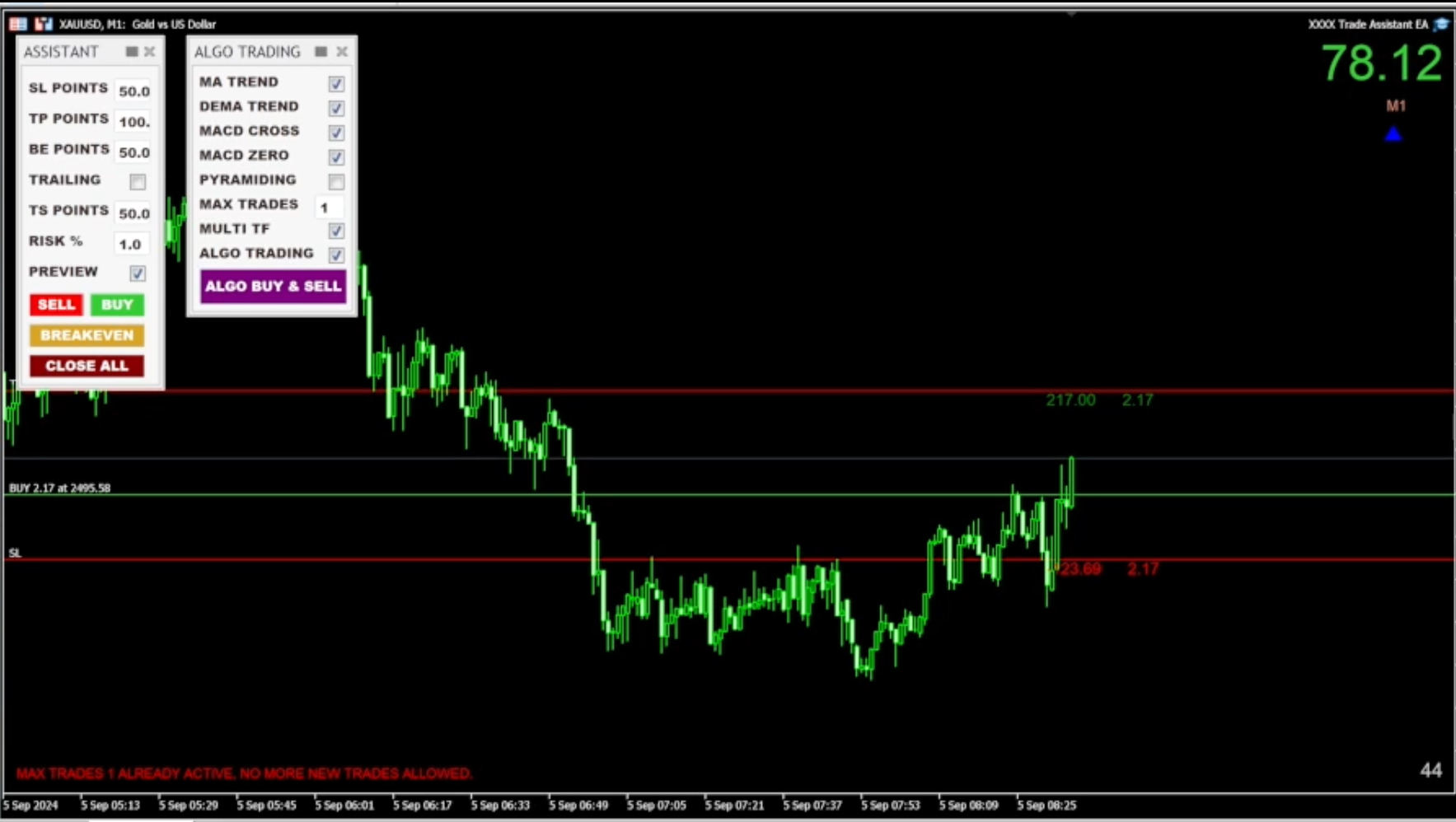
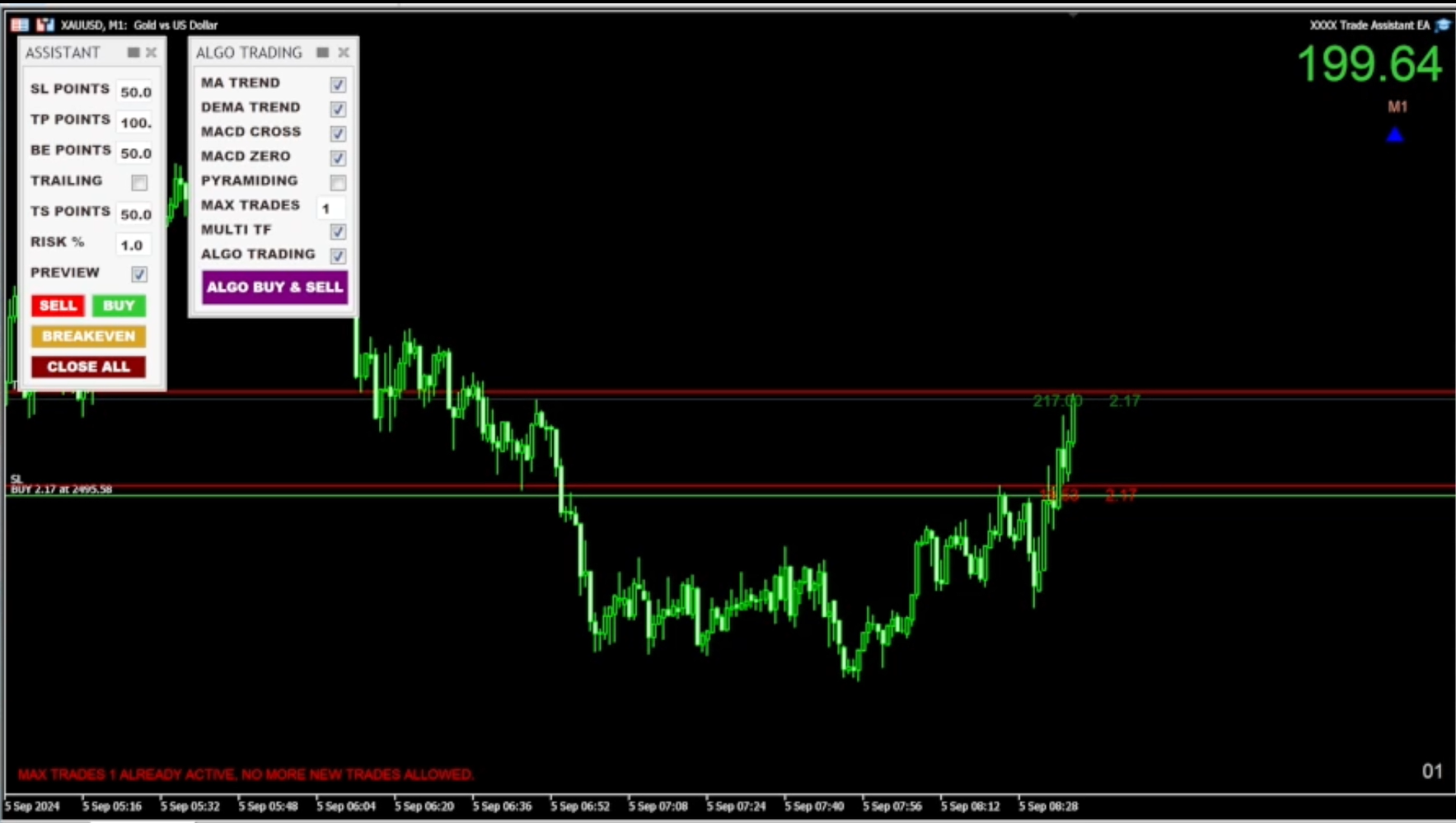
Introducing the Trade Assistant EA, a comprehensive tool designed for traders seeking advanced control. With this manager, you can effortlessly set stop loss and take profit at preferred distances in Points or ATR (Average True Range), and conveniently determine Breakeven and Trailing sizes. Enjoy the flexibility of trailing on candle close or in real-time, utilizing trailing distances based on points or ATR. Adjust Preview SL and TP lines based on % or lot size before position entry, and secure positions with the automated breakeven or manual breakeven button. The Trade Assistant EA also functions as a Position Manager, seamlessly integrating with various indicators and timeframes, catering to both manual and automated trading, while allowing personalized trading hours and no-trade zones for a tailored approach.


The EA is recommended for experienced traders who use it in combination with technical analysis.


HOW THE EA WORKS
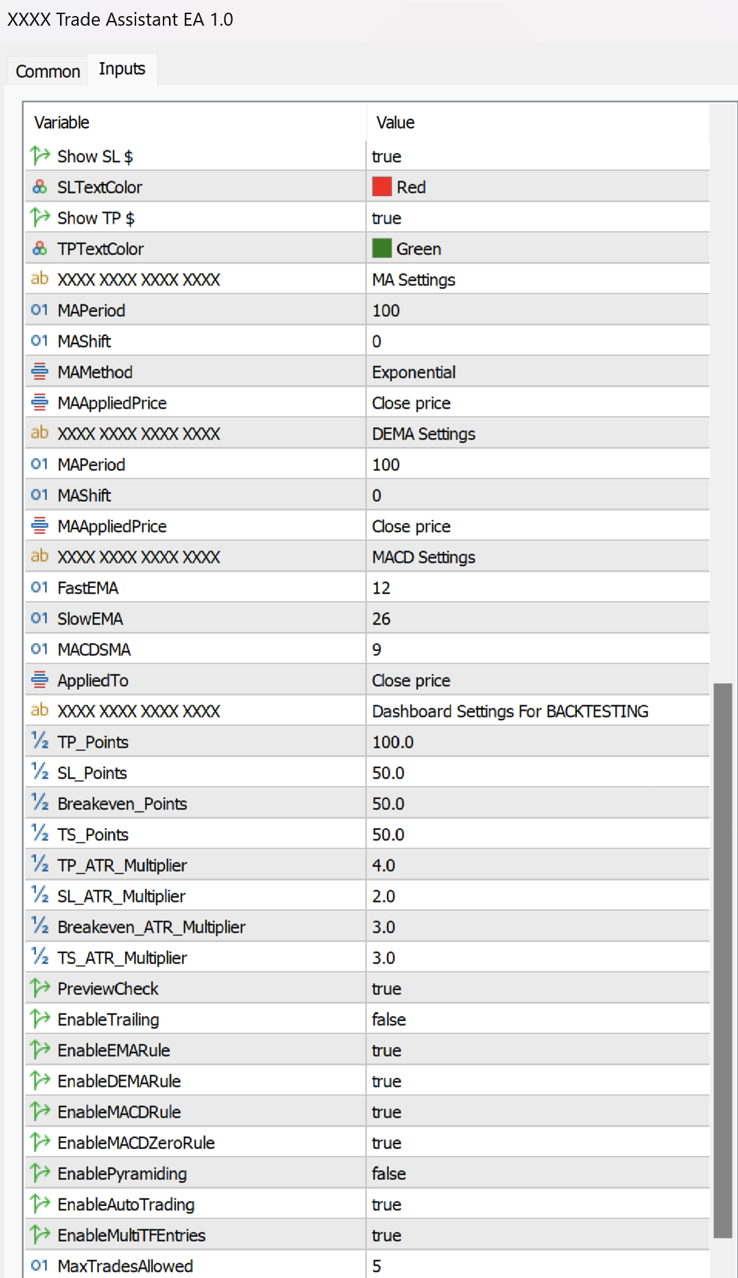
  • The EA uses a combination of technical indicators, such as ATR (Average True Range), Moving Averages (MA), DEMA (Double Exponential Moving Average), and MACD (Moving Average Convergence Divergence), to identify potential trading opportunities. The user can set specific input values for each of these indicators to suit their trading style and preferences.
  • Stop Loss, Take Profit, Breakeven, and Trailing can be used based on point distances, as well as ATR measurement, which can be set up in the inputs menu.

  • All trade entries are meticulously calculated based on Points or the ATR (Average True Range) indicator, which helps manage the risk and reward of each trade.

  • Once the user sets their preferred input values, the EA waits for specific market conditions to be met before opening a trade. These conditions include the price being above or below the Moving Average (MA), a DEMA crossover, a MACD crossover, and the MACD being above or below the zero line. If all of the conditions are met, the EA will wait for the next candle to trigger the entry in the desired direction.

  • The EA can also be used fully manually, allowing traders to enter trades with buy and sell buttons.

HOW TO USE THE EA
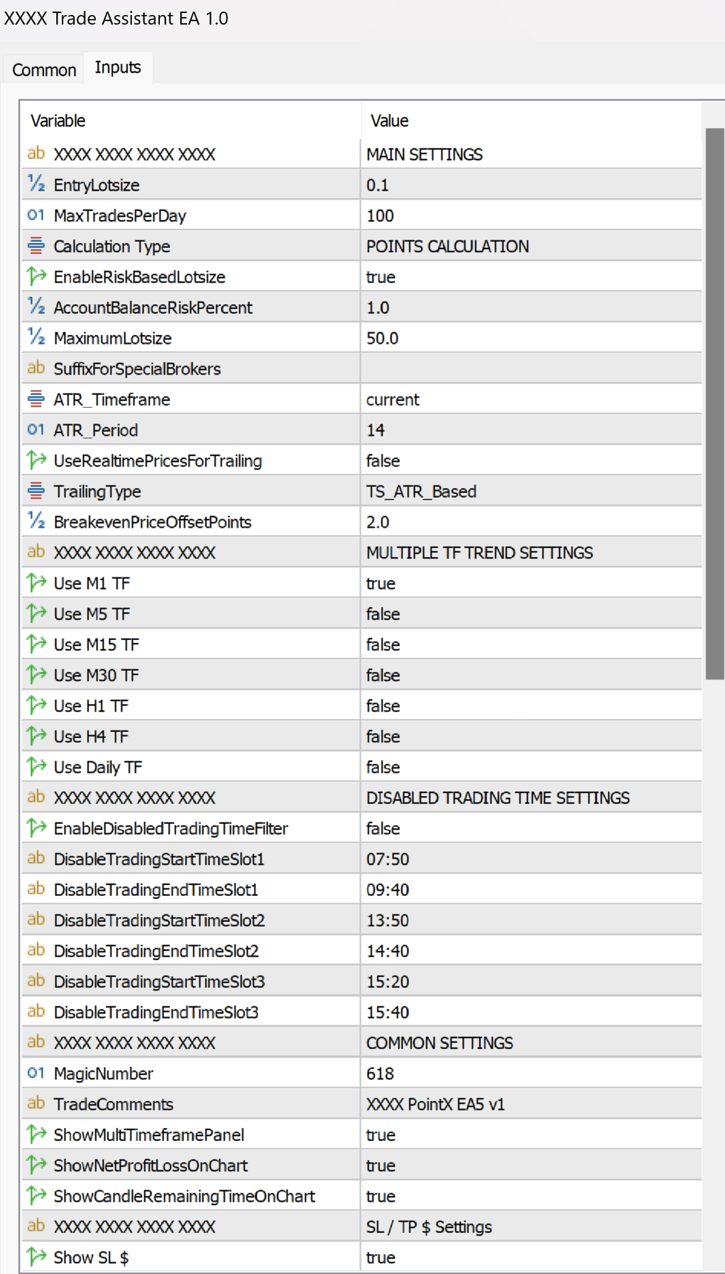
  • First, select Points or ATR Calculation in the inputs menu under Calculation Type. By default, it's Points Calculation, but it can be switched to ATR Calculation.

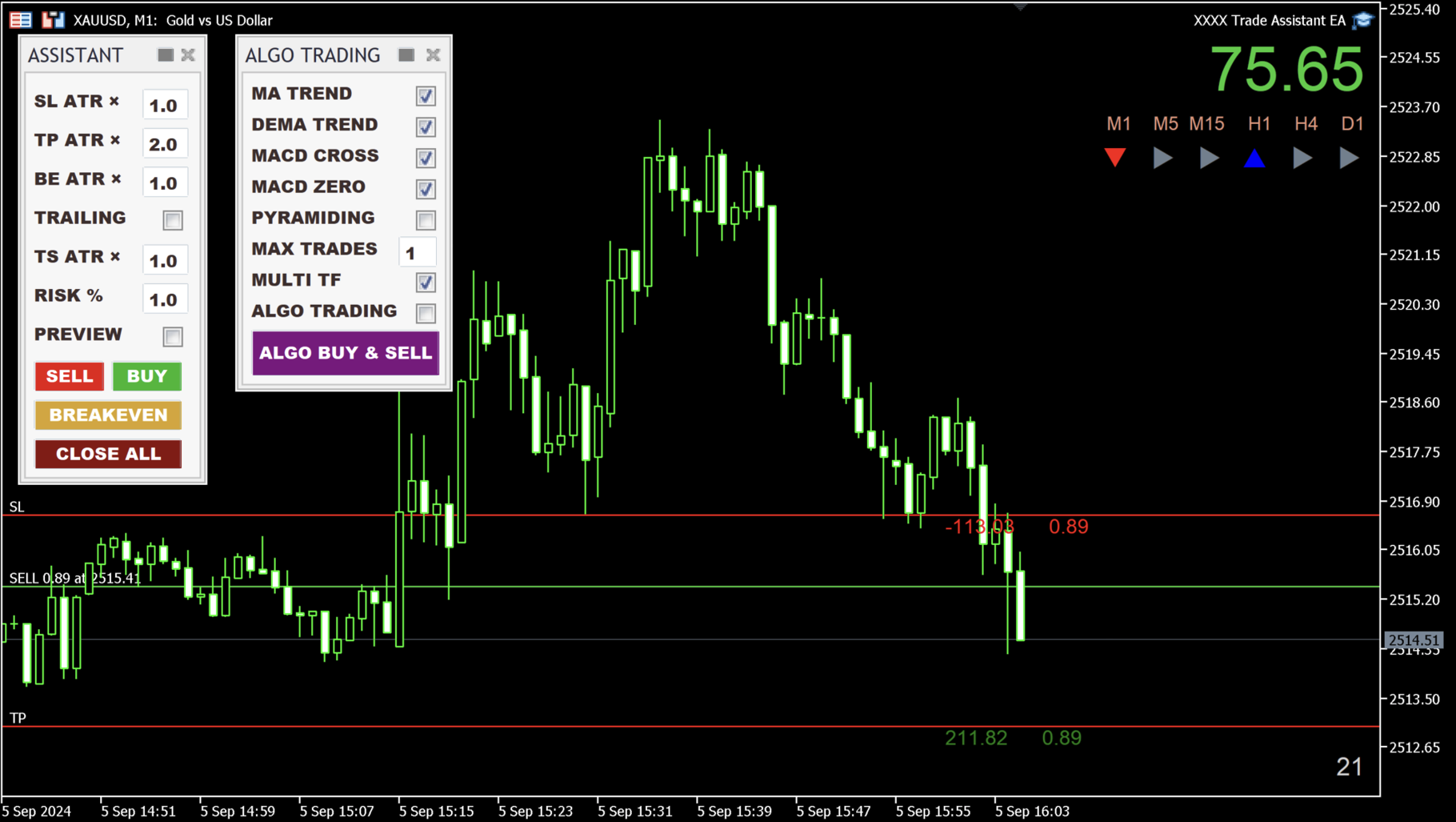
  • SL and TP: Set the size in Points or ATR for the stop loss and take profit.

  • BE: The breakeven size can be determined. You can set the BreakevenPriceOffsetPoints in settings. If you don't want to use Breakeven, set the BE value higher than TP.

  • ATR (RMA) period's default value is 14, but it can be modified in settings under ATR_Period.

  • TRAILING (Checkbox): Trailing only works if it's checked.

  • Trailing: You can choose between trailing on candle close or in real-time, which can be set up in settings by changing UseRealtimePricesForTrailing from "false" to "true."

  • The start of the trailing can be determined in the "inputs" settings under TrailingType, which can begin immediately or be based on Points or ATR.

  • TS: The trailing stop size can be determined by how far it should follow the price based on Points or ATR.
  • Modify any of the ASSISTANT panel's values even after entering a trade. You can delete TP in MetaTrader, and the EA will re-add the modified TP. This is also true for SL, BE, and TRAILING.

  • RISK %: The risk % of the balance can be determined in the text box (also all the panel's values in the inputs menu, preferred way).

  • Position sizes can be determined as a percentage of the account equity or in lot size. By default, the EA is set to use %. If you wish to change it to a regular lot size, go to settings and change EnableRiskBasedLotSize to "false."

  • Preview function: Preview SL and TP lines by clicking the checkbox and hitting the Sell or Buy buttons.

  • Advanced preview lines with drag-and-drop position adjustment, based on percentage or lot size (for manual trading): When the Preview checkbox is selected and the Sell or Buy buttons are clicked, an estimated position is displayed on the chart using the previously specified Points or ATR sizes. The preview lines can now be dragged anywhere on the chart while maintaining the same percentage or lot sizes that were initially given. Once the position is adjusted accordingly, clicking the Sell or Buy buttons again will open the position.

  • Breakeven button: Sets profitable positions to breakeven on the current chart.

  • Close All button: Closes all positions on the current chart.

  • Total profit display in the top right corner.

  • Algo Trading Panel: EMA, DEMA, MACD, PYRAMIDING, and AUTO TRADING rules can be switched on or off. These rules can also be set up in the inputs settings (preferred way).

  • ALGO BUY & SELL button: Places trades in both directions. If you click it, it turns to the ALGO BUY button, which only takes long positions. If you click once more, it turns to the ALGO SELL button, which only opens short positions (using a selected direction takes away the stress of manual position entries, as the EA enters trades for you).

  • Multi Timeframe Entries: In Algo Trading, positions can be opened based on the selected timeframes specified in the inputs settings. You can choose timeframes ranging from M1 to D1, and you also have the option to deselect any timeframes that you don't want to be considered. On the Trade Panel, the selected indicators will be applied to all shown timeframes.

  • Multiple instances of Trade Assistant EA can be added to up to 3 pairs at once (recommended maximum).

  • Compatible with all symbols, pairs, brokers (suffix added), and timeframes.

  • Suitable for both manual and automated trading. The EA can automatically manage positions opened by other EAs.

  • Time countdown on the current timeframe is displayed in the bottom right corner.

  • Tool panels can be hidden with a single click at the top.

  • Panels are movable and can be repositioned anywhere on the chart.

  • The EA can be removed from the chart by clicking the X on the panels.

  • Set up to 3 no-trade zones per day.

  • Max trades per MACD crossover (determined by the user).

  • Set a maximum number of trades per day in the inputs menu to avoid overtrading.

  • Additionally, the user can customize the EA's trading hours to avoid market opening and closing times or news events based on their preferences.

  • (Issue with panel resolution? Check Terminal64 Properties' Compatibility menu setup.)


STRATEGY TESTER

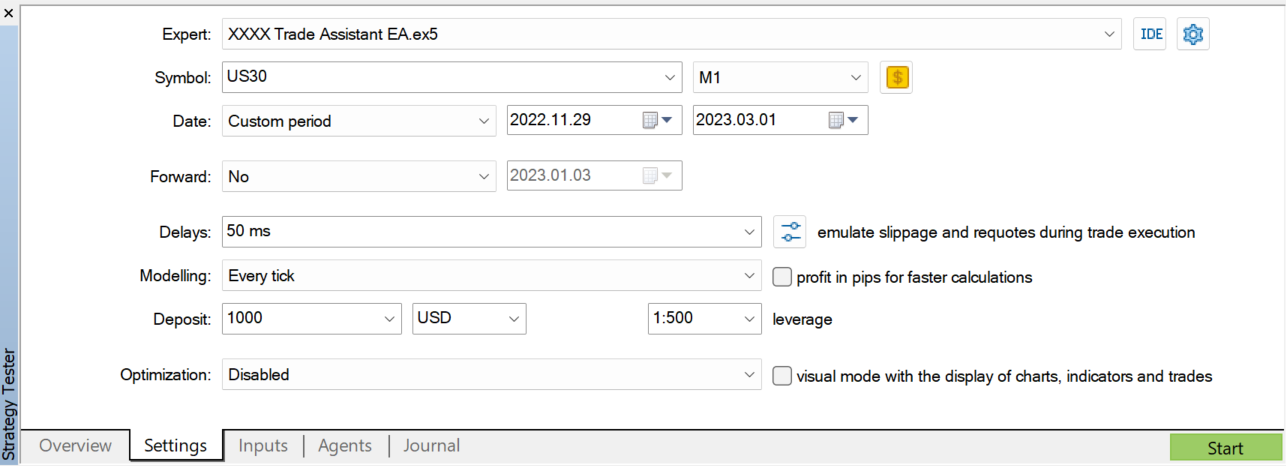
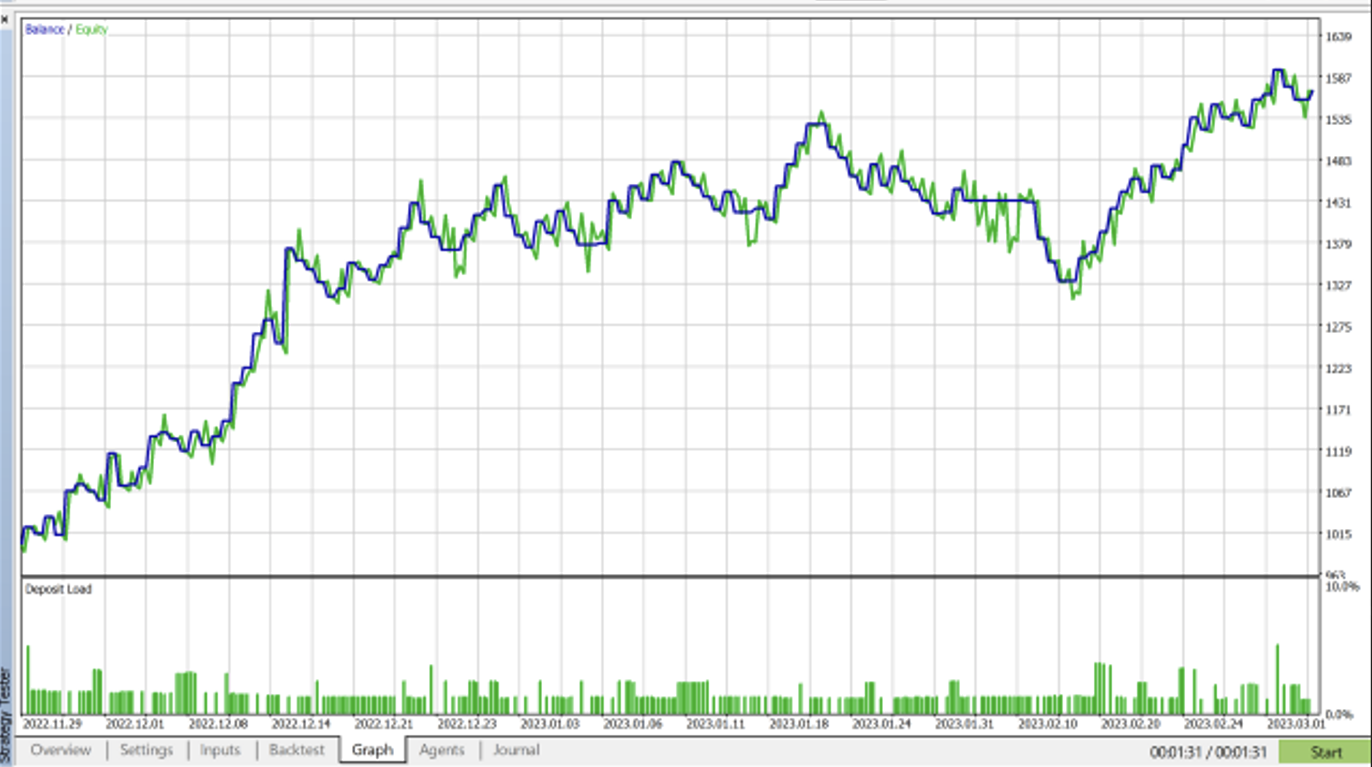
Please feel free to download the demo version and use it in the strategy tester, but keep in mind that this EA is not intended to generate consistent profits through excessive use. However, there are specific combinations of instruments, timeframes, no-trade zones, and Points or ATR values that, when precisely set up, can result in gains instead of losses. It's important to note that the default setup alone won't be enough to generate profits—you'll need to customize the settings to fit your trading strategy.
The EA is recommended for semi-automated use, combining a trader’s technical analysis with the EA, and only letting “Auto Trading” run when the trend direction matches a specific trade setup.


If you happen to experience any glitch with the EA, please let me know and will fix it asap. 

Please drop me a message if you have any questions. 

If you purchase the EA, please contact me for advice on the settings.
Thank you, 
András Bessenyei
추천 제품
ZF Equity Protector Premium v2.0 The Ultimate Daily Loss Breaker for Smart Traders & Prop Firm Hunters Have you ever blown a Prop Firm account just because of "one bad day"? Or has emotional revenge trading destroyed weeks of hard-earned profits in a matter of hours? Put an end to account destruction right now. ZF Equity Protector Premium v2.0 is an advanced automated safety system (EA) specifically engineered to be your capital's ultimate line of defense. This EA acts as a cold, calculated circ
Auto SL & TP for Manual Trades – MT5 Application Overview Auto SL & TP for Manual Trades is a simple and practical Expert Advisor for the MetaTrader 5 platform that automatically applies Stop Loss and Take Profit levels to manually opened trades as well as pending orders. The EA is designed primarily for traders who execute trades manually but want the assurance that every position is immediately protected with predefined Stop Loss and Take Profit levels. The Expert Advisor works in points and

Somewhere over the rainbow It is a system that tries to operate the market from the exhaustion of the trend with a correction algorithm that tries to cut losses at the cost of increasing the margin This system makes all the adjustments automatically, analyzing the pair and the market to decide which is the most efficient step to reach your destination. Somewhere over the rainbow is a multiple trade and multi lot system(The maximum batch can be up to 5 times the initial batch distributed in mult
Account Risk Hedge Bot                                                                                  ...hedge your trades with confidence. Safeguard Your Investments with Account Risk Hedge Bot, stay ahead of market volatility with our cutting-edge risk management solution. Account Risk Hedge Bot is designed to safeguard your investments with automated precision, helping you navigate market uncertainty, ensuring you minimize losses and maximize returns. Note: Account Risk Hedge Bot does
Ultra Charts
Tinashe Ndarimani
Ultra Charts - Advanced Custom Chart Types for MT5 Get Manual Here! Get The Free Ultra Charts Trader Here! Ultra Charts is a comprehensive charting solution that brings professional-grade alternative chart types to MetaTrader 5. This Expert Advisor provides traders with multiple custom chart formats beyond standard time-based candlesticks, enabling enhanced technical analysis and pattern recognition. Chart Types Included The product includes six distinct chart types, each designed to filter mark
FREE
RRtoolBox
David Ruiz Moreno
RRtoolbox - Professional Tools: Risk:Reward Trading Tool (SL/TP Horizontals + Pending orders + Diagonals), Alerts set on trend lines (for alerts on diagonal levels), SelfManagement (BE, partials...), close/cancelling by time, Statistics, Info and trading on chart. One-Click Trading with Visual Risk:Reward Management RRtoolbox is a comprehensive trading panel that combines one-click order execution,  statistics and  powerful visual Risk:Reward tools, alerts set with trendlines, on chart butt
Volume Trade Levels
Mahmoud Sabry Mohamed Youssef
The idea behind this indicator is very simple , First it contains 2 mechanisms to place your trades: 1- Enter the Pips you want to duplicate to price levels. 2- Automatically let the indicator specify the largest Buy / Sell Volume Candle and place duplicated levels based on the candle itself. How it works: 1- Enter the Pips you want to duplicate to price levels:    1- once the indicator is loaded you will need first to Specify the number of pips in the indicator Configuration window ,you can g
FXSN EasyAlert
Davindra Adrian Pyankaroo
An Essential Tool for the Professional Trader Problem:  As a professional trader, you have worked out entry points across several charts and now your anticipating price action. At this stage, you are having to constantly check your mobile phone or PC across several charts hoping for those prices to be achieved Solution:  Enter all the prices for all charts into a single display and get instant notifications to your mobile phone or PC. Save yourself time and frustration Note:  This product wil
FREE
Description: Smart Recovery Manager is a technical utility developed for the MetaTrader 5 platform. Its primary function is to provide trade management solutions for existing positions through a combination of averaging techniques and an automated hedging mechanism. Operational Features: This utility is designed to manage trades that are already active in the terminal. It does not provide trade signals or execute initial market entries. Averaging Logic: The tool can be configured to open additi
제목: Auto Multi Support & Resistance Pro - 스마트 다중 지지저항 [설명] 더 이상 지지선과 저항선을 수동으로 그리지 마세요! 'Auto Multi Support & Resistance Pro'는 스캘핑과 데이트레이딩을 위한 가장 정확한 주요 타점을 알고리즘이 자동으로 찾아줍니다. 골드(XAUUSD), 나스닥 등 변동성이 크고 휩소가 잦은 종목의 분봉(M1, M5, M15)에 완벽하게 최적화되어 있습니다. [주요 기능] 1. 다중 라인 자동 생성: 설정한 개수만큼 유의미한 지지와 저항 라인을 여러 개 그려줍니다. 2. 스마트 간격 필터(Smart Distance Filter): 좁은 구간에 선이 지저분하게 뭉치는 현상을 방지하여 깔끔한 차트를 유지합니다. 3. 민감도 조절 기능: 탐색 캔들 수를 직접 조절하여 내 매매 스타일에 맞는 고점/저점을 판별합니다. 4. 초경량 로직: 컴퓨터 리소스를 거의 차지하지 않아 차트 지연(Lag) 현상이 전혀 없습
FX Auto Risk Management TP SL and Out Stop v3.10 Strengths of the Script 1. Comprehensive Risk Management Automated Take Profit and Stop Loss   with customizable percentage-based settings Trailing Stop   with two adjustable modes (Normal and Aggressive) Stop Out   based on floating loss/profit percentage 2. Advanced Features Multi-mode trailing stop   with different parameters for each mode Slippage control   for more realistic order execution API request limit   to prevent server overload 3.
Introduction Our system is more than just a tool—it’s your personal guide in the dynamic trading landscape. Expertly developed and optimized using advanced strategies, this groundbreaking predictor gives traders a powerful edge. It’s not just about the features; it’s about a trading journey that stands out from the crowd. Get ready for an enhanced trading experience like never before! What It Does Next Candle Prediction: Imagine gaining insights into the market’s next move before it happens. Our
Auto SLTP Risk Assistant – Smart Risk Management & Auto Lot Size EA for MT5 Looking for a fast and professional way to calculate lot size, Stop Loss, and Take Profit automatically on MT5? Auto SLTP Risk Assistant is a powerful MetaTrader 5 trading assistant and risk management EA designed to help traders execute trades with precise risk control and accurate position sizing. Simply drag the Stop Loss line on your chart, and the EA will automatically: Calculate lot size Set Stop Loss (SL) Set Tak
Candle EA MT5
Mansour Babasafary
4.14 (22)
This expert is based on patterns The main patterns of this specialist are candlestick patterns Detects trends with candlestick patterns It has a profit limit and a loss limit, so it has a low risk The best time frame to use this expert is M30 time frame The best currency pairs to use with this expert is the EURUSD, GBPUSD, AUDUSD, USDCAD currency pairs Attributes: Can be used in the EURUSD, GBPUSD, AUDUSD, USDCAD  currency pairs Can be used in M30, H1, H4 time frames Has profit limit and loss
Levels Map
AL MOOSAWI ABDULLAH JAFFER BAQER
Levels Map See the market through its most important price levels. Levels Map is a professional MetaTrader utility that automatically identifies and displays significant market price levels directly on your chart. Designed to help traders visualize key areas of support, resistance, and market structure, Levels Map provides a clearer understanding of where price is likely to react before making trading decisions. Instead of manually drawing horizontal lines and constantly updating your charts, Le
Professional risk management utility. Auto lot-size calculator + live risk panel. Works alongside any other EA — does not open trades independently. - **Auto lot size**: calculated from % risk per trade + SL distance in pips + balance - **Live dashboard**: Balance | Equity | Drawdown % | Suggested Lot | R:R ratio - **Daily drawdown alert**: notification when daily DD exceeds threshold - **Auto-close option**: closes all positions on daily DD breach (configurable) - Zero trade opening — purely a
PredatorEA
Dragan Drenjanin
5 (1)
Predator EA 소개 Predator는 MetaTrader 5(MT5) 플랫폼을 위한 최첨단 전문가 자문(EA)으로, 외환 거래를 간소화하고 향상시키도록 설계되었습니다. 이 EA는 다양한 통화쌍과 시간대에 맞춰 사전 최적화되어 있어 신뢰할 수 있는 자동화 솔루션을 찾는 트레이더에게 적합합니다. 명세서 플랫폼   : MT5 계좌 유형   : 최적의 성과를 위해서는 헤지 계좌를 권장합니다. Predator의 잠재력을 끌어내려면 테스트가 필수적입니다. MT5의 전략 테스터를 사용하여 사용 가능한 모든 통화 쌍의 성과를 평가하고 XAUUSD-H1과 같은 가장 성과가 좋은 통화 쌍을 파악하세요. 성과는 계좌와 시장 환경에 따라 다르므로 브로커의 상황에 맞게 설정을 조정하세요. 왜 Predator를 선택해야 할까요? Predator는 단순성과 고급 자동화의 조화, 효율성 최적화, 그리고 다양한 전략에 대한 적응성을 자랑합니다. 향후 업그레이드와 전담 지원은 일관된 결과를 추구하는 트레
Title suggestion: LG Prop Firm Risk Manager Pro Product category: Utilities Short description: MetaTrader 5 prop firm risk utility with daily loss control, maximum loss protection, trailing drawdown, profit target lock, automatic position closing, pending order deletion, Magic Number filtering and on-chart status panel. LG Prop Firm Risk Manager Pro Overview LG Prop Firm Risk Manager Pro is a MetaTrader 5 risk management utility designed for traders who trade prop firm style accounts, eval
Harmonic Trader V4 Premium Professional Harmonic Pattern Trading System for MetaTrader 5 Overview Harmonic Trader V4 Premium is a fully automated trading system designed to identify and trade high-quality harmonic reversal structures. The robot continuously scans the market and evaluates pattern quality before opening any position. Unlike many pattern-based systems, Harmonic Trader does not trade every detected structure. Additional confirmation and filtering layers are applied before any order
Boleta RTrader
Rubens Pergentino Da Silva
Boleta RTrader - A Boleta Mais Completa para MetaTrader 5 A ferramenta definitiva para traders que buscam precisão, agilidade e controle total sobre suas operações no MetaTrader 5. **IMPORTANTE**: É aconselhável desabilitar no gráfico do MT5 o histórico de negociações somente quando for usar saídas parcias e precisar movimentar a ordem parcial para evitar delay. --- PRINCIPAIS FUNCIONALIDADES: EXECUÇÃO DE ORDENS **Compra e Venda Instantâneas**: Execute ordens a mercado com um único clique **
SMC Pro Indicator v16
Moch Wahyu Febriyanto
SMC Pro Ultimate is a comprehensive professional indicator designed for traders using Smart Money Concepts (SMC) and Inner Circle Trader (ICT) methodologies. This tool eliminates the need for manual chart mapping by automatically detecting high-probability market structures and liquidity zones. Unlike basic indicators, SMC Pro v16 includes a Smart Filter Engine that only alerts you when higher timeframe trends align, ensuring you trade with the flow of the smart money. Key Features 1. Advance
News Telegram MT5 is a smart MetaTrader 5 utility that sends economic calendar news alerts directly to your Telegram in a clear, fast, and organized format. This product is designed for traders who want to stay informed about important market events without watching the terminal all day. It helps you monitor upcoming releases, receive pre-news alerts before scheduled events, and get automatic updates when actual values become available in the MetaTrader 5 Economic Calendar. To improve readabilit
UTrailingMinMT5
Viktor Shpakovskiy
The EA for manual trading to manage open positions.The built-in trailing stop has five modes and seven instruments. There is a virtual stop loss and a virtual take profit, which can be freely moved around the chart. With the help of the built-in trading simulator, you can check how the EA works in the strategy tester. Guide to UTrailingMinMT5 can be found in the "Comments" section. In the MT5 strategy tester, manual movement of virtual SL and TP lines according to the schedule does not work! Ben
Chart Patterns Builder Premium
Florea E. Sorin-Mihai Persoana Fizica Autorizata
The Chart Patterns Builder Premium expert advisor is an extension of the freely available Chart Patterns Builder Basic :         it provides 1 new chart pattern: the rectangle breakout (besides the double top & bottom pattern already provided in the basic edition);         in most configurations, backtesting usually shows more than double (2x) average yearly return rate;         the account growth curve is also smoother, due to approximately double number of trades,  compared to the free version
DCA Buddy
Karim Abdelwahab
DCA Buddy: Advanced Price Visualiser Take control of your multi-position trading with DCA Buddy , an advanced indicator for MetaTrader 5. It provides a clear and accurate visualisation of the average break-even price for all your open trades on the current chart symbol. This powerful tool goes beyond simple averages, correctly handling both one-sided and complex hedged scenarios, and features a sophisticated alert system to notify you precisely when your net position achieves its goals. Core Fun
Protect your capital and turn winning trades into risk-free positions instantly. Auto Break-Even is an automated trade management utility that shifts your Stop Loss to your entry price (plus a customizable offset) the moment your trade reaches a defined profit target. Take the emotion out of trade management. By automating your break-even process, you prevent winning trades from turning into losers, allowing you to confidently hold positions for larger targets. [   Get the MT4 Version Here  ]
FREE
Voenix Chart Pattern Scanner MT5
Lorentzos Roussos
4.83 (6)
고조파 패턴 EA 설명을 읽는 대신 라이브 차트에서 이것을 보고 싶다면 여기에서 무료 데모를 즉시 다운로드할 수 있습니다. 포함된 패턴: 패턴 패턴 가틀리 패턴 박쥐무늬 사이퍼 패턴 3드라이브 패턴 블랙 스완 패턴 화이트 스완 패턴 콰지모도 패턴 또는 오버 언더 패턴 Alt 박쥐 패턴 나비 패턴 깊은 게 패턴 게 패턴 상어 패턴 파이브오 패턴 헤드앤숄더 패턴 오름차순 삼각형 패턴 하나 둘 셋 패턴 그리고 8개의 커스텀 패턴 Voenix는 25개의 차트 및 피보나치 패턴을 지원하는 다중 시간 프레임 및 다중 쌍 고조파 패턴 스캐너입니다. 사용자 정의 블록 광학 알고리즘을 사용하여 재도장하지 않고 확인 단계에 의존하지 않고 가능한 패턴을 신속하게 발견할 수 있습니다(지그재그 계산과 달리 ). 선택한 패턴을 자동으로 거래하거나 알림을 보내거나 쉽게 액세스하고 평가할 수 있도록 테이블에 수집할 수 있습니다. 거래는 최대 3개의 이익 목표를 가질 수 있으며, 각 목표에서 마감된 주문 비율
Zirk Trading Management Zirk Trading Management is a powerful trade management utility for MetaTrader that helps traders execute trades with consistent risk management. It is designed to simplify position sizing by automatically calculating the correct lot size based on your chosen risk percentage and stop-loss distance. Instead of manually calculating lot sizes, simply set your desired account risk (e.g., 1%), place your stop loss, and the utility instantly determines the appropriate trade volu
This is a common, simple and easy to use but effective tool to manage trading risks for all traders. It also help trader places stop loss and take profit levels at the same time the order is filled. How to set the expert advisor's parameters to support your trading style? Lots size. Fixed lots size - For traders who prefered to trade with fixed lots size, they can input the lots size in 'User lots' menu in the expert advisor's properties. The input value should be from the 'Minimum Volume' to th
Discord Notify
Aleh Piatrenka
5 (2)
MT5 거래의 오픈, 종료, 부분 종료 및 수정에 대한 실시간 알림을 discord로 자동 전송합니다. 이 유틸리티는 다음 16개 언어를 지원합니다: English, French, German, Indian (Hindi), Indonesian, Italian, Kazakh, Korean, Dutch, Polish, Portuguese, Russian, Spanish, Turkish, Ukrainian 및 Vietnamese. 이 제품은 터미널을 지속적으로 확인하지 않고 Discord 알림을 받고자 하는 트레이더를 위해 설계되었습니다. Expert Advisor 사용자가 자신의 활동을 추적하거나, 여러 종목을 거래하는 트레이더 및 VPS 사용자에게 적합합니다. 포지션의 전체 및 부분 종료가 정확하게 감지되며 (예: 0.10 / 0.30 랏), 중복 메시지 방지 기능이 구현되어 있습니다. 알림은 거래 계정의 모든 종목에 대해 전송할 수 있으며, 또는 유틸리티가 적용된 차트의 종목에 대
FREE
이 제품의 구매자들이 또한 구매함
Trade Assistant MT5
Evgeniy Kravchenko
4.43 (214)
거래당 위험 계산, 라인을 사용한 손쉬운 신규 주문, 부분 청산 기능을 통한 주문 관리, 7가지 유형의 트레일링 스탑 및 기타 유용한 기능을 제공합니다. 추가 자료 및 지침 설치 지침   -   애플리케이션 지침   -   데모 계정용 애플리케이션 평가판 라인 기능       - 차트에 개시선, 손절매, 차익실현을 표시합니다. 이 기능을 사용하면 새로운 주문을 쉽게 하고 개봉 전에 추가 특성을 볼 수 있습니다. 위기 관리       -       위험 계산 기능은 설정된 위험과 손절매 주문의 크기를 고려하여 새 주문의 볼륨을 계산합니다. 이를 통해 손절매 크기를 설정하고 동시에 설정된 위험을 존중할 수 있습니다. 로트 계산 버튼 - 위험 계산을 활성화/비활성화합니다. 필요한 위험 값은 위험 필드에 0에서 100 사이의 백분율 또는 예금 통화로 설정됩니다. 설정 탭에서 위험 계산 옵션을 선택합니다. $ 통화, % 잔액, % 지분, % 자유 마진, % 사용자 정의, % AB 이전
Trade Manager EA에 오신 것을 환영합니다. 이 도구는 거래를 보다 직관적이고 정확하며 효율적으로 만들기 위해 설계된 궁극적인 리스크 관리 도구 입니다. 단순한 주문 실행 도구가 아닌, 원활한 거래 계획, 포지션 관리 및 리스크 제어를 위한 종합 솔루션입니다. 초보자부터 고급 트레이더, 빠른 실행이 필요한 스캘퍼에 이르기까지 Trade Manager EA는 외환, 지수, 상품, 암호화폐 등 다양한 시장에서 유연성을 제공합니다. Trade Manager EA를 사용하면 복잡한 계산은 이제 과거의 일이 됩니다. 시장을 분석하고 진입, 손절 및 익절 수준을 차트의 수평선으로 표시한 후 리스크를 설정하면, Trade Manager가 이상적인 포지션 크기를 즉시 계산하고 SL 및 TP 값을 실시간으로 표시합니다. 모든 거래가 간편하게 관리됩니다. 주요 기능: 포지션 크기 계산기 : 정의된 리스크에 따라 거래 크기를 즉시 결정합니다. 간단한 거래 계획 : 진입, 손절, 익절을 위한
TradePanel MT5
Alfiya Fazylova
4.88 (162)
Trade Panel은 다기능 거래 도우미입니다. 이 애플리케이션에는 50개 이상의 수동 거래 기능이 포함되어 있으며 대부분의 거래 작업을 자동화할 수 있습니다. 구매하기 전에 데모 계정에서 데모 버전을 테스트할 수 있습니다. 데모 계정용 애플리케이션 체험판 다운로드: https://www.mql5.com/en/blogs/post/750865 . 전체 지침 여기 . 거래. 한 번의 클릭으로 거래를 수행할 수 있습니다: 리스크 자동 계산과 함께 예약 주문 및 포지션 열기. 한 번의 클릭으로 여러 주문 및 포지션 열기. 주문 그리드 열기. 예약 주문 및 포지션을 그룹별로 닫기. 포지션 방향 전환 (Buy 닫기 > Sell 열기, Sell 닫기 > Buy 열기). 포지션 잠금 (부족한 포지션을 열어 Buy와 Sell 포지션의 수량을 동일하게 만들기). 모든 포지션 한 번의 클릭으로 부분적으로 닫기. 모든 포지션의 테이크 프로핏과 스톱로스를 같은 가격 수준에 설정. 모든 포지션의 스톱로스를
베타 출시 Telegram to MT5 Signal Trader 는 곧 공식 알파 버전을 출시할 예정입니다. 일부 기능은 아직 개발 중이며, 작은 버그가 발생할 수 있습니다. 문제가 있으면 꼭 보고해 주세요. 여러분의 피드백은 소프트웨어 개선에 도움이 됩니다. Telegram to MT5 Signal Trader 는 Telegram 채널 또는 그룹의 거래 신호를 자동으로 MetaTrader 5 계정으로 복사하는 강력한 도구입니다. 공개 및 비공개 채널을 모두 지원하며, 여러 신호 제공자를 여러 MT5 계정에 연결할 수 있습니다. 소프트웨어는 빠르고 안정적으로 동작하며, 복사된 거래를 완벽히 제어할 수 있습니다. 인터페이스는 깔끔하며 대시보드와 차트가 시각적으로 구성되어 있고, 직관적인 네비게이션이 가능합니다. 여러 Signal Account를 관리하고, 공급자별 설정을 세밀하게 조정하며, 모든 동작을 실시간으로 모니터링할 수 있습니다. 필수 조건 MQL의 제한으로 인해 EA는 Te
Farmed Hedge Yield Farming | All Markets (Manual - Hybrid - Semi/Automated EA) MULTI-ASSET SUPPORT Trade any asset available on your broker - Forex: Major, Minor, Exotic pairs - Crypto: BTC, ETH, XRP, SOL, BNB - Stocks: Apple, Tesla, Amazon, Google, etc. - Commodities: Gold, Silver, Oil, Gas - Indices: US30, NAS100, SPX500, DAX40 - Any CFD your broker offers VERIFIED TRADING RESULTS - Farmed Hedge Yield Axi Copy:  https://www.mql5.com/en/signals/2356376 - Farmed Hedge Yield Exn Copy:   https:/
================================================================================ POC BREAKOUT - V20.72. Full Professional Grade Toolkit ================================================================================ POC Breakout is a full MetaTrader 5 trading dashboard for discretionary traders who want breakout signals, Point of Control (POC) context, volume profiles, order flow, market structure, news, alerts, and advanced trade planning in one professional workspace. Attached directly to you
Telegram to MT5 Multi-Channel Copier 는 Telegram 채널의 트레이딩 신호를 자동으로 MetaTrader 5로 직접 복사합니다. 봇도, 브라우저 확장 프로그램도, 수동 복사도 필요 없습니다. Telegram에서 신호를 받으면 EA가 몇 초 안에 터미널에서 거래를 엽니다. 본 제품은 두 가지 구성 요소로 구성되어 있습니다: Telegram 채널을 감시하는 Windows 애플리케이션과 MT5 터미널에서 신호를 실행하는 이 Expert Advisor입니다. MT4 버전도 제공됩니다. 설정 가이드 및 애플리케이션 다운로드: https://www.mql5.com/en/blogs/post/768988 작동 방식 Windows 애플리케이션은 봇이 아닌 사용자 자신의 API 자격 증명을 사용하여 Telegram에 연결됩니다. 이는 프라이빗 및 VIP 채널을 포함하여 구독 중인 모든 채널, 그룹 또는 주제를 읽을 수 있음을 의미합니다. 신호를 감지하면 이를 파싱하여
파워 캔들 전략 스캐너 - 자체 최적화 다중 종목 설정 찾기 도구 파워 캔들 전략 스캐너는 마켓 워치에 등록된 모든 종목에 대해 파워 캔들 지표와 동일한 자체 최적화 엔진을 동시에 실행합니다. 하나의 패널에서 현재 통계적으로 거래 가능한 종목, 각 종목별 최적의 전략, 최적의 손절매/익절 조합을 알려주며, 새로운 신호가 발생하면 즉시 알림을 전송합니다. 이 도구는 Stein Investments 에코시스템의 일부입니다. 18개 이상의 도구와 함께 당신의 1대1 AI 트레이딩 멘토 Max.  항상 대기 중, 모든 인디케이터를 깊이 있게 이해, 무언가를 차근차근 생각해보고 싶은 순간에 도움을 줍니다.  https://stein.investments 에서 만나보세요 완벽한 시장 모니터링. 종목당 3,000건 이상의 자동 최적화. 2가지 알림 유형. 한 번의 클릭으로 차트를 전환하고 바로 거래하세요. 이 도구가 필요한 이유 대부분의 다중 종목 스캐너는 가격 변동만 보여줍니다. 티커별
Anchor Trade Manager
Kalinskie Gilliam
5 (5)
Anchor: The EA Manager Run your full EA portfolio without conflicts, without stacked risk, and without watching every chart yourself. Anchor coordinates up to 64 Expert Advisors on a single account, including daily loss protection built for prop firm rules. Attach Anchor to any chart. Type your EA names and magic numbers in one line. Click OK. Anchor begins coordinating immediately. Built for portfolios. Built for prop firms. Built for discipline. The Problem Running multiple EAs on the same acc
YuClusters
Yury Kulikov
4.93 (43)
Attention: You can view the program operation in the free version  YuClusters DEMO .  YuClusters is a professional market analysis system. The trader has unique opportunities to analyze the flow of orders, trade volumes, price movements using various charts, profiles, indicators, and graphical objects. YuClusters operates on data based on Time&Sales or ticks information, depending on what is available in the quotes of a financial instrument. YuClusters allows you to build graphs by combining da
Footprint Chart Pro — Professional OrderFlow EA for MetaTrader 5 Version 6.34 | Professional tool for real traders | Institutional-Grade Visualization DEMO USERS - PLEASE SELECT EVERY TICK / REAL TICK WHEN TESTING AND YOU HAVE DOWNLOADED HISTORICAL DATA. IF YOU SEE A WAITING SCREEN AND IT IS NOT DOWNLOADING, IT MEANS YOU HAVE LOW HISTORICAL DATA. TRY 1 MIN AND 5 MIN FIRST ON 1 DAY DATA. ONE DAY DATA SHOULD BE THE NEWEST AND MOST CURRENT DATE. PLEASE WAIT UNTIL THE MARKET HAS ROLLED OVER PERIOD.
The product will copy all telegram signal to MT5 ( which you are member) , also it can work as remote copier.  Easy to set up, copy order instant, can work with almost signal formats, image signal,  s upport to translate other language to English Work with all type of channel or group, even channel have "Restrict Saving Content", work with  multi channel, multi MT5 Work as remote copier: with signal have ticket number, it will copy exactly via ticket number. Support to backtest signal. How to s
Trade Manager DaneTrades
Levi Dane Benjamin
4.28 (29)
거래 관리자는 위험을 자동으로 계산하는 동시에 거래를 빠르게 시작하고 종료하는 데 도움을 줍니다. 과잉 거래, 복수 거래 및 감정 거래를 방지하는 데 도움이 되는 기능이 포함되어 있습니다. 거래를 자동으로 관리할 수 있으며 계정 성과 지표를 그래프로 시각화할 수 있습니다. 이러한 기능은 이 패널을 모든 수동 거래자에게 이상적으로 만들고 MetaTrader 5 플랫폼을 향상시키는 데 도움이 됩니다. 다중 언어 지원. MT4 버전  |  사용자 가이드 + 데모 트레이드 매니저는 전략 테스터에서 작동하지 않습니다. 데모를 보려면 사용자 가이드로 이동하세요. 위기 관리 % 또는 $를 기준으로 위험 자동 조정 고정 로트 크기 또는 거래량과 핍을 기반으로 한 자동 로트 크기 계산을 사용하는 옵션 RR, Pips 또는 Price를 사용한 손익분기점 손실 설정 추적 중지 손실 설정 목표 달성 시 모든 거래를 자동으로 마감하는 최대 일일 손실률(%)입니다. 과도한 손실로부터 계정을 보호하고 과도한
EA Auditor
Stephen J Martret
5 (4)
EA Auditor is an independent analysis tool for traders evaluating Expert Advisors and trading signals on MetaTrader 5. It audits backtest reports, reviews posted developer signals, and cross-verifies the two against each other to help traders assess strategies before committing capital. The MQL5 market offers a wide range of Expert Advisors from many developers, with varying approaches, quality, and transparency. EA Auditor provides a consistent, data-driven framework for reviewing them, answer
HINN Lazy Trader
ALGOFLOW OÜ
5 (1)
LIMITED SUMMER SALE -40% ! ONLY $470 insead of $790!  Maximum real discount! ONLY UNTIL 08/22 The core idea: using the user interface, you configure the parameters the chart must meet before entering a position (or positions), choose which entry models to use, and set the rules for when trading and planning should end. Lazy Trader  handles the rest: it  takes over all the routine chart watching and execution! full description  :: 3 key videos [1] ->  [2]   ->  [3] What can it do? - Understand
Quant AI Agents
Ho Tuan Thang
5 (1)
Quant AI Agents are independent trading Expert Advisors. Instead of trading using a fixed strategy like other conventional EAs, Quant AI Agents   is a   multi-agent AI trading framework   that turns natural-language strategy prompts into live.  WANT THE SAME RESULTS AS MY LIVE SIGNAL?   Use the exact same brokers I do:   IC MARKETS , IC TRADING   .  Unlike the centralized stock market, Forex has no single, unified price feed.  Every broker sources liquidity from different providers, creating un
EasyInsight AIO MT5
Alain Verleyen
4.92 (12)
EASY Insight AIO – 스마트하고 손쉬운 트레이딩을 위한 올인원 솔루션 개요 외환, 금, 암호화폐, 지수, 심지어 주식까지 — 전 시장을 몇 초 만에, 수동 차트 확인이나 복잡한 설치, 인디케이터 설정 없이 스캔할 수 있다고 상상해 보세요. EASY Insight AIO 는 AI 기반 트레이딩을 위한 궁극의 플러그 앤 플레이(Plug & Play) 데이터 내보내기 도구입니다. 단 하나의 깔끔한 CSV 파일로 전체 시장 스냅샷을 제공하며, ChatGPT, Claude, Gemini, Perplexity 등 다양한 AI 플랫폼에서 즉시 분석할 수 있습니다. 창 전환, 복잡함, 차트 오버레이는 더 이상 필요 없습니다. 자동으로 내보내지는 순수하고 구조화된 데이터 인사이트만으로, 반복적인 차트 감시 대신 데이터 기반의 스마트한 의사결정에 집중할 수 있습니다. 왜 EASY Insight AIO인가요? 진정한 올인원 • 별도의 설정, 인디케이터 설치, 차트 오버레이가 필요 없습
The News Filter MT5
Leolouiski Gan
4.78 (23)
이 제품은 뉴스 시간 동안 모든 전문가 어드바이저 및 수동 차트를 필터링하여 수동 거래 설정이나 다른 전문가 어드바이저가 입력한 거래가 파괴될 수 있는 급격한 가격 상승으로부터 걱정하지 않아도 됩니다. 이 제품은 또한 뉴스 발표 전에 열린 포지션과 대기 주문을 처리할 수 있는 완전한 주문 관리 시스템이 함께 제공됩니다.   The News Filter  를 구매하면 더 이상 내장 뉴스 필터에 의존할 필요가 없으며 이제부터 모든 전문가 어드바이저를 여기서 필터링할 수 있습니다. 뉴스 선택 뉴스 소스는 Forex Factory의 경제 캘린더에서 얻어집니다. USD, EUR, GBP, JPY, AUD, CAD, CHF, NZD 및 CNY와 같은 어떤 통화 기준으로 선택할 수 있습니다. Non-Farm (NFP), FOMC, CPI 등과 같은 키워드 식별을 기준으로 선택할 수도 있습니다. 저, 중, 고 영향을 가지는 뉴스를 필터링할 수 있도록 선택할 수 있습니다. 차트와 관련된 뉴스만 선
Welcome to ENTRY IN THE ZONE WITH SMC MULTI TIMEFRAME Entry In The Zone with  SMC Multi Timeframe  is a professional trading indicator built on Smart Money Concepts (SMC), combining market structure analysis with a No Repaint BUY / SELL signal system in a single indicator. It helps traders understand market structure more clearly, identify key price zones, and focus on higher-quality trading opportunities. By combining Multi-Timeframe Analysis, Points of Interest (POIs), and real-time signals, t
Trader Evolution
Siarhei Vashchylka
5 (7)
" Trader Evolution " - A utility designed for traders who use wave and technical analysis in their work. One tab of the utility is capable of money management and opening orders, and the other can help in making Elliott wave and technical analysis. Manual (Be sure to read before purchasing) | Version for MT4 Advantages 1. Trading in a few clicks. Immediate and pending orders are available in the panel 2. Money management. The program automatically selects the appropriate lot size 3. Simplifies
EA Performance Tracker
Russell Leeon Tan
5 (3)
EA Performance Tracker (AESTracker) A clean, modern dashboard that shows exactly how your trades and EAs are performing — right on your chart. It reads your full account history automatically and breaks down the numbers by magic number / strategy. Display only — it does not place any trades. What it shows - Account header: live Balance, Equity, and Open (floating) P/L - Profit summary: gross profit, net profit, and the exact commission & swap deducted - Key stats: win rate, profit factor, exp
Premium Trade Manager - 코치가 내장된 트레이딩 패널 Premium Trade Manager 는 차트 안에 트레이딩 코치를 심어놓은 도구입니다. 주문을 확정하기 전에, AI 트레이딩 코치 Max가 설정된 거래를 직접 읽고 명확한 판단을 내려줍니다. 스톱이 규율 있는 접근 방식에 맞는지, 리스크 크기가 합리적인지, 고영향 뉴스 이벤트가 몇 분 후에 있는지, 프롭 펌 한도에 근접했는지. 그 아래에는 완전한 실행 엔진이 있습니다. 원클릭 리스크 기반 진입, 차트에서 드래그로 세우고 거래가 진행되는 동안에도 계속 움직일 수 있는 플랜, 최대 4단계 분할 익절, 7가지 트레일링 방식, 실시간 프롭 펌 컴플라이언스, 뉴스 가드, 그리고 자체 비용을 평가하는 스프레드까지. 결정은 당신이 내립니다. Max가 두 번째 시선으로 확인합니다. 패널이 그 이후의 모든 것을 처리합니다. 구매 전에 직접 체험해 보세요. 브라우저에서 라이브 패널을 직접 클릭해볼 수 있습니다. 구매 전에 실제
Timeless Charts
Samuel Manoel De Souza
5 (7)
Timeless Charts is an all-in-one trading utility for professional traders. It combines custom chart types such as Seconds Charts and Renko with advanced order flow analysis using Footprints , Clusters , Volume Profiles , VWAP studies, and anchored analysis tools for deeper market insight. Trading and position management are handled directly from the chart through an integrated trade management panel , while Market Replay and Virtual Accounts provide environments for practicing trading skills and
FUTURES ORDERFLOW FOOTPRINT CHART Professional OrderFlow EA for MetaTrader 5 Version 1.01| Professional tool for real traders | Institutional-Grade Visualization STRATEGY TESTER USERS - PLEASE SELECT EVERY REAL TICK WHEN TESTING AND YOU HAVE DOWNLOADED HISTORICAL DATA. IF YOU SEE A WAITING SCREEN AND IT IS NOT DOWNLOADING, IT MEANS YOU HAVE LOW HISTORICAL DATA. TRY 1 MIN AND 5 MIN FIRST ON 1 DAY DATA. ONE DAY DATA SHOULD BE THE NEWEST AND MOST CURRENT DATE. PLEASE WAIT UNTIL THE MARKET HAS ROL
Telegram To MT5 Receiver
Levi Dane Benjamin
4.53 (15)
가입한 모든 채널에서 (개인 및 제한된 채널 포함) 시그널을 바로 MT5로 복사합니다.   이 도구는 사용자를 고려하여 설계되었으며 거래를 관리하고 모니터하는 데 필요한 많은 기능을 제공합니다. 이 제품은 사용하기 쉽고 시각적으로 매력적인 그래픽 인터페이스로 제공됩니다. 설정을 사용자 정의하고 제품을 몇 분 안에 사용할 수 있습니다! 사용자 가이드 + 데모  | MT4 버전 | 디스코드 버전 데모를 시도하려면 사용자 가이드로 이동하십시오. Telegram To MT5 수신기는 전략 테스터에서 작동하지 않습니다! Telegram To MT5 특징 여러 채널에서 동시에 신호를 복사합니다. 개인 및 제한된 채널에서 신호를 복사합니다. Bot 토큰이나 채팅 ID가 필요하지 않습니다.   (원하는 경우에는 사용할 수 있습니다) 위험 % 또는 고정된 로트로 거래합니다. 특정 심볼을 제외합니다. 모든 신호를 복사할지 또는 복사할 신호를 사용자 정의할지 선택할 수 있습니다. 모든 신호를 인
Auto Trade Copier is designed to copy trades to multiple MT4, MT5 and cTrader accounts/terminals with 100% accuracy. The provider and receiver accounts must be on the same PC/VPS. With this tool, you can copy trades to receiver accounts on the same PC/VPS. All trading actions will be copied from provider to receiver perfectly. This version can be used on MT5 accounts only. For MT4 accounts, you must use Auto Trade Copier (for MT4). Reference: - For MT4 receiver, please download Trade Receiver Fr
AI Agent Supervisor is NOT an Expert Advisor. AI Agent Supervisor   is a   multi-agent AI risk & portfolio supervisor   that watches every EA on your account and intervenes in real time.  WANT AN AI PORTFOLIO MANAGER WATCHING YOUR FLEET 24/7?   Run your fleet on the same brokers I do:   IC MARKETS , IC TRADING   .  Unlike the centralized stock market, Forex has no single, unified price feed.  Every broker sources liquidity from different providers, creating unique data streams. The Supervisor r
Telegram to mt5 pro
Janet Abu Khalil
4 (4)
Telegram to MT5 Pro — Advanced Telegram Signal Copier with Auto-Fix, Multi-TP, Risk Control and Full Trade Management Telegram to MT5 Pro — 전문 텔레그램 신호 복사기 Telegram to MT5 Pro는 텔레그램 신호를 MetaTrader 5 계정으로 자동으로 직접 실행하는 고성능 트레이드 복사기로, 리스크, 실행, 트레이드 관리에 대한 완전한 제어를 제공합니다. 이 시스템은 두 가지 구성 요소로 이루어져 있습니다: • MetaTrader 5 내부에서 실행되는 Expert Advisor (EA) • 텔레그램에 연결되어 신호를 로컬로 EA에 전송하는 데스크톱 브리지 애플리케이션 두 구성 요소는 동일한 컴퓨터에서 실행되어야 합니다. MQL5 플랫폼 제한으로 인해 EA는 텔레그램에 직접 연결할 수 없습니다. 브리지는 텔레그램을 처리하고 EA는 거래를 실행합니다. 지원 및 설치
Trade Manager DashPlus
Henry Lyubomir Wallace
4.85 (13)
DashPlus 는 MetaTrader 5 플랫폼에서 거래 효율성과 효과를 향상시키기 위해 설계된 고급 거래 관리 도구입니다. 리스크 계산, 주문 관리, 고급 그리드 시스템, 차트 기반 도구 및 성과 분석 등 포괄적인 기능을 제공합니다. 주요 기능 1. 리커버리 그리드 불리한 시장 상황에서 거래를 관리하기 위한 평균화 및 유연한 그리드 시스템을 구현합니다. 거래 회복을 최적화할 수 있도록 전략적인 진입 및 종료 포인트를 제공합니다. 2. 스택 그리드 강한 시장 움직임 동안 포지션을 추가하여 유리한 거래에서 잠재적 수익을 극대화하도록 설계되었습니다. 유리한 시장 트렌드에서 승률을 높이며 거래를 확장할 수 있도록 합니다. 3. 손익(P&L) 라인 차트에서 잠재적인 수익 및 손실 시나리오를 시각적으로 표현합니다. 설정을 조정하고 P&L 라인을 드래그하여 실행 전에 다양한 거래 결과를 평가할 수 있습니다. 4. 바스켓 모드 동일한 심볼에 여러 포지션을 단일 집계 포지션으로 결합하여 관리합니
This is a multi-currency converter script that can convert the currency of the account history to another currency and output it. Since it supports multiple currencies, it is possible to exchange USD, EUR mutual conversion, JPY, GBP, AUD, or other minor currencies. Currency Exchanger can be converted to other currencies immediately by executing it once, so anyone can easily exchange currency. Let Currency Exchanger do the tedious work! The exchange result from the account history can be output a
제작자의 제품 더 보기
XXXX ATR (Average True Range) Position Manager: ATR StopLoss, ATR Target, ATR Breakeven, ATR Trailing StopLoss, with Risk % Calculation / Position. More about ATR:   www.atr-trading.com Key takeaways   One click does it all: SELL and BUY button automatically places ATR stoploss, ATR target, ATR breakeven, ATR trailing stop and Risk % calculation of equity Entire position is calculated based on ATR No more manual position calculations = No more wasted time =  No more late entries Position siz
XXXX ATR (Average True Range) Position Manager: ATR StopLoss, ATR Target, ATR Breakeven, ATR Trailing StopLoss, with Risk % Calculation / Position. More about ATR: www.atr-trading.com Key takeaways   One click does it all: SELL and BUY button automatically places ATR stoploss, ATR target, ATR breakeven, ATR trailing stop and Risk % calculation of equity Entire position is calculated based on ATR No more manual position calculations = No more wasted time =  No more late entries Position sizes c
필터:
리뷰 없음
리뷰 답변